<?xml version="1.0" encoding="utf-8"?>
<feed xmlns="http://www.w3.org/2005/Atom">
    <id>https://renovate-major-eslint-monore.logto-docs-tutorials.pages.dev/how-to</id>
    <title>Logto docs Blog</title>
    <updated>2026-04-17T22:35:40.905Z</updated>
    <generator>https://github.com/jpmonette/feed</generator>
    <link rel="alternate" href="https://renovate-major-eslint-monore.logto-docs-tutorials.pages.dev/how-to"/>
    <subtitle>Logto docs Blog</subtitle>
    <icon>https://renovate-major-eslint-monore.logto-docs-tutorials.pages.dev/img/favicon.ico</icon>
    <entry>
        <title type="html"><![CDATA[How to build Microsoft Entra ID OIDC enterprise SSO with Expo (React Native)]]></title>
        <id>https://renovate-major-eslint-monore.logto-docs-tutorials.pages.dev/how-to/build-microsoft-entra-id-oidc-enterprise-sso-sign-in-with-expo-react-native-and-logto</id>
        <link href="https://renovate-major-eslint-monore.logto-docs-tutorials.pages.dev/how-to/build-microsoft-entra-id-oidc-enterprise-sso-sign-in-with-expo-react-native-and-logto"/>
        <updated>2026-04-17T22:35:40.905Z</updated>
        <summary type="html"><![CDATA[{/*]]></summary>
        <content type="html"><![CDATA[
<!-- -->
<!-- -->
<!-- -->
<!-- -->
<!-- -->
<!-- -->
<div class="theme-admonition theme-admonition-info admonition_Gfwi alert alert--info"><div class="admonitionContent_UjKb"><div class="content_hlIx"><span class="title_towL" data-type="title">For our new friends<!-- -->:</span><br><br><p><span class="linkWrapper_B4Bt"><a href="https://logto.io/" target="_blank" rel="noopener noreferrer" class="link_hf7f">Logto<svg width="17" height="17" viewBox="0 0 17 17" fill="none" xmlns="http://www.w3.org/2000/svg" class="iconExternalLink_2l9O externalLink_ia3C"><path d="M12.422 7.54748C12.2452 7.54748 12.0757 7.61772 11.9506 7.74274C11.8256 7.86777 11.7554 8.03734 11.7554 8.21415V13.0008C11.7554 13.1776 11.6851 13.3472 11.5601 13.4722C11.4351 13.5972 11.2655 13.6675 11.0887 13.6675H3.75537C3.57856 13.6675 3.40899 13.5972 3.28397 13.4722C3.15894 13.3472 3.0887 13.1776 3.0887 13.0008V5.66748C3.0887 5.49067 3.15894 5.3211 3.28397 5.19608C3.40899 5.07105 3.57856 5.00081 3.75537 5.00081H8.54204C8.71885 5.00081 8.88842 4.93058 9.01344 4.80555C9.13847 4.68053 9.2087 4.51096 9.2087 4.33415C9.2087 4.15734 9.13847 3.98777 9.01344 3.86274C8.88842 3.73772 8.71885 3.66748 8.54204 3.66748H3.75537C3.22494 3.66748 2.71623 3.87819 2.34116 4.25327C1.96608 4.62834 1.75537 5.13705 1.75537 5.66748V13.0008C1.75537 13.5312 1.96608 14.04 2.34116 14.415C2.71623 14.7901 3.22494 15.0008 3.75537 15.0008H11.0887C11.6191 15.0008 12.1278 14.7901 12.5029 14.415C12.878 14.04 13.0887 13.5312 13.0887 13.0008V8.21415C13.0887 8.03734 13.0185 7.86777 12.8934 7.74274C12.7684 7.61772 12.5988 7.54748 12.422 7.54748ZM15.0354 2.08081C14.9677 1.91791 14.8383 1.78846 14.6754 1.72081C14.5952 1.68665 14.5092 1.66853 14.422 1.66748H10.422C10.2452 1.66748 10.0757 1.73772 9.95063 1.86274C9.82561 1.98777 9.75537 2.15734 9.75537 2.33415C9.75537 2.51096 9.82561 2.68053 9.95063 2.80555C10.0757 2.93058 10.2452 3.00081 10.422 3.00081H12.8154L5.9487 9.86081C5.88622 9.92279 5.83662 9.99652 5.80278 10.0778C5.76893 10.159 5.75151 10.2461 5.75151 10.3341C5.75151 10.4222 5.76893 10.5093 5.80278 10.5905C5.83662 10.6718 5.88622 10.7455 5.9487 10.8075C6.01068 10.87 6.08441 10.9196 6.16565 10.9534C6.24689 10.9873 6.33403 11.0047 6.42204 11.0047C6.51005 11.0047 6.59718 10.9873 6.67842 10.9534C6.75966 10.9196 6.8334 10.87 6.89537 10.8075L13.7554 3.94081V6.33415C13.7554 6.51096 13.8256 6.68053 13.9506 6.80555C14.0757 6.93058 14.2452 7.00081 14.422 7.00081C14.5988 7.00081 14.7684 6.93058 14.8934 6.80555C15.0185 6.68053 15.0887 6.51096 15.0887 6.33415V2.33415C15.0877 2.24703 15.0695 2.16096 15.0354 2.08081Z" fill="currentColor"></path></svg></a></span> is an Auth0 alternative designed for modern apps and SaaS products. It
offers both <span class="linkWrapper_B4Bt"><a href="https://cloud.logto.io/" target="_blank" rel="noopener noreferrer" class="link_hf7f">Cloud<svg width="17" height="17" viewBox="0 0 17 17" fill="none" xmlns="http://www.w3.org/2000/svg" class="iconExternalLink_2l9O externalLink_ia3C"><path d="M12.422 7.54748C12.2452 7.54748 12.0757 7.61772 11.9506 7.74274C11.8256 7.86777 11.7554 8.03734 11.7554 8.21415V13.0008C11.7554 13.1776 11.6851 13.3472 11.5601 13.4722C11.4351 13.5972 11.2655 13.6675 11.0887 13.6675H3.75537C3.57856 13.6675 3.40899 13.5972 3.28397 13.4722C3.15894 13.3472 3.0887 13.1776 3.0887 13.0008V5.66748C3.0887 5.49067 3.15894 5.3211 3.28397 5.19608C3.40899 5.07105 3.57856 5.00081 3.75537 5.00081H8.54204C8.71885 5.00081 8.88842 4.93058 9.01344 4.80555C9.13847 4.68053 9.2087 4.51096 9.2087 4.33415C9.2087 4.15734 9.13847 3.98777 9.01344 3.86274C8.88842 3.73772 8.71885 3.66748 8.54204 3.66748H3.75537C3.22494 3.66748 2.71623 3.87819 2.34116 4.25327C1.96608 4.62834 1.75537 5.13705 1.75537 5.66748V13.0008C1.75537 13.5312 1.96608 14.04 2.34116 14.415C2.71623 14.7901 3.22494 15.0008 3.75537 15.0008H11.0887C11.6191 15.0008 12.1278 14.7901 12.5029 14.415C12.878 14.04 13.0887 13.5312 13.0887 13.0008V8.21415C13.0887 8.03734 13.0185 7.86777 12.8934 7.74274C12.7684 7.61772 12.5988 7.54748 12.422 7.54748ZM15.0354 2.08081C14.9677 1.91791 14.8383 1.78846 14.6754 1.72081C14.5952 1.68665 14.5092 1.66853 14.422 1.66748H10.422C10.2452 1.66748 10.0757 1.73772 9.95063 1.86274C9.82561 1.98777 9.75537 2.15734 9.75537 2.33415C9.75537 2.51096 9.82561 2.68053 9.95063 2.80555C10.0757 2.93058 10.2452 3.00081 10.422 3.00081H12.8154L5.9487 9.86081C5.88622 9.92279 5.83662 9.99652 5.80278 10.0778C5.76893 10.159 5.75151 10.2461 5.75151 10.3341C5.75151 10.4222 5.76893 10.5093 5.80278 10.5905C5.83662 10.6718 5.88622 10.7455 5.9487 10.8075C6.01068 10.87 6.08441 10.9196 6.16565 10.9534C6.24689 10.9873 6.33403 11.0047 6.42204 11.0047C6.51005 11.0047 6.59718 10.9873 6.67842 10.9534C6.75966 10.9196 6.8334 10.87 6.89537 10.8075L13.7554 3.94081V6.33415C13.7554 6.51096 13.8256 6.68053 13.9506 6.80555C14.0757 6.93058 14.2452 7.00081 14.422 7.00081C14.5988 7.00081 14.7684 6.93058 14.8934 6.80555C15.0185 6.68053 15.0887 6.51096 15.0887 6.33415V2.33415C15.0877 2.24703 15.0695 2.16096 15.0354 2.08081Z" fill="currentColor"></path></svg></a></span> and <span class="linkWrapper_B4Bt"><a href="https://github.com/logto-io/logto" target="_blank" rel="noopener noreferrer" class="link_hf7f">Open-source<svg width="17" height="17" viewBox="0 0 17 17" fill="none" xmlns="http://www.w3.org/2000/svg" class="iconExternalLink_2l9O externalLink_ia3C"><path d="M12.422 7.54748C12.2452 7.54748 12.0757 7.61772 11.9506 7.74274C11.8256 7.86777 11.7554 8.03734 11.7554 8.21415V13.0008C11.7554 13.1776 11.6851 13.3472 11.5601 13.4722C11.4351 13.5972 11.2655 13.6675 11.0887 13.6675H3.75537C3.57856 13.6675 3.40899 13.5972 3.28397 13.4722C3.15894 13.3472 3.0887 13.1776 3.0887 13.0008V5.66748C3.0887 5.49067 3.15894 5.3211 3.28397 5.19608C3.40899 5.07105 3.57856 5.00081 3.75537 5.00081H8.54204C8.71885 5.00081 8.88842 4.93058 9.01344 4.80555C9.13847 4.68053 9.2087 4.51096 9.2087 4.33415C9.2087 4.15734 9.13847 3.98777 9.01344 3.86274C8.88842 3.73772 8.71885 3.66748 8.54204 3.66748H3.75537C3.22494 3.66748 2.71623 3.87819 2.34116 4.25327C1.96608 4.62834 1.75537 5.13705 1.75537 5.66748V13.0008C1.75537 13.5312 1.96608 14.04 2.34116 14.415C2.71623 14.7901 3.22494 15.0008 3.75537 15.0008H11.0887C11.6191 15.0008 12.1278 14.7901 12.5029 14.415C12.878 14.04 13.0887 13.5312 13.0887 13.0008V8.21415C13.0887 8.03734 13.0185 7.86777 12.8934 7.74274C12.7684 7.61772 12.5988 7.54748 12.422 7.54748ZM15.0354 2.08081C14.9677 1.91791 14.8383 1.78846 14.6754 1.72081C14.5952 1.68665 14.5092 1.66853 14.422 1.66748H10.422C10.2452 1.66748 10.0757 1.73772 9.95063 1.86274C9.82561 1.98777 9.75537 2.15734 9.75537 2.33415C9.75537 2.51096 9.82561 2.68053 9.95063 2.80555C10.0757 2.93058 10.2452 3.00081 10.422 3.00081H12.8154L5.9487 9.86081C5.88622 9.92279 5.83662 9.99652 5.80278 10.0778C5.76893 10.159 5.75151 10.2461 5.75151 10.3341C5.75151 10.4222 5.76893 10.5093 5.80278 10.5905C5.83662 10.6718 5.88622 10.7455 5.9487 10.8075C6.01068 10.87 6.08441 10.9196 6.16565 10.9534C6.24689 10.9873 6.33403 11.0047 6.42204 11.0047C6.51005 11.0047 6.59718 10.9873 6.67842 10.9534C6.75966 10.9196 6.8334 10.87 6.89537 10.8075L13.7554 3.94081V6.33415C13.7554 6.51096 13.8256 6.68053 13.9506 6.80555C14.0757 6.93058 14.2452 7.00081 14.422 7.00081C14.5988 7.00081 14.7684 6.93058 14.8934 6.80555C15.0185 6.68053 15.0887 6.51096 15.0887 6.33415V2.33415C15.0877 2.24703 15.0695 2.16096 15.0354 2.08081Z" fill="currentColor"></path></svg></a></span>
services to help you quickly launch your identity and management (IAM) system. Enjoy authentication,
authorization, and multi-tenant management <span class="linkWrapper_B4Bt"><a href="https://docs.logto.io/introduction" target="_blank" rel="noopener noreferrer" class="link_hf7f">all in one<svg width="17" height="17" viewBox="0 0 17 17" fill="none" xmlns="http://www.w3.org/2000/svg" class="iconExternalLink_2l9O externalLink_ia3C"><path d="M12.422 7.54748C12.2452 7.54748 12.0757 7.61772 11.9506 7.74274C11.8256 7.86777 11.7554 8.03734 11.7554 8.21415V13.0008C11.7554 13.1776 11.6851 13.3472 11.5601 13.4722C11.4351 13.5972 11.2655 13.6675 11.0887 13.6675H3.75537C3.57856 13.6675 3.40899 13.5972 3.28397 13.4722C3.15894 13.3472 3.0887 13.1776 3.0887 13.0008V5.66748C3.0887 5.49067 3.15894 5.3211 3.28397 5.19608C3.40899 5.07105 3.57856 5.00081 3.75537 5.00081H8.54204C8.71885 5.00081 8.88842 4.93058 9.01344 4.80555C9.13847 4.68053 9.2087 4.51096 9.2087 4.33415C9.2087 4.15734 9.13847 3.98777 9.01344 3.86274C8.88842 3.73772 8.71885 3.66748 8.54204 3.66748H3.75537C3.22494 3.66748 2.71623 3.87819 2.34116 4.25327C1.96608 4.62834 1.75537 5.13705 1.75537 5.66748V13.0008C1.75537 13.5312 1.96608 14.04 2.34116 14.415C2.71623 14.7901 3.22494 15.0008 3.75537 15.0008H11.0887C11.6191 15.0008 12.1278 14.7901 12.5029 14.415C12.878 14.04 13.0887 13.5312 13.0887 13.0008V8.21415C13.0887 8.03734 13.0185 7.86777 12.8934 7.74274C12.7684 7.61772 12.5988 7.54748 12.422 7.54748ZM15.0354 2.08081C14.9677 1.91791 14.8383 1.78846 14.6754 1.72081C14.5952 1.68665 14.5092 1.66853 14.422 1.66748H10.422C10.2452 1.66748 10.0757 1.73772 9.95063 1.86274C9.82561 1.98777 9.75537 2.15734 9.75537 2.33415C9.75537 2.51096 9.82561 2.68053 9.95063 2.80555C10.0757 2.93058 10.2452 3.00081 10.422 3.00081H12.8154L5.9487 9.86081C5.88622 9.92279 5.83662 9.99652 5.80278 10.0778C5.76893 10.159 5.75151 10.2461 5.75151 10.3341C5.75151 10.4222 5.76893 10.5093 5.80278 10.5905C5.83662 10.6718 5.88622 10.7455 5.9487 10.8075C6.01068 10.87 6.08441 10.9196 6.16565 10.9534C6.24689 10.9873 6.33403 11.0047 6.42204 11.0047C6.51005 11.0047 6.59718 10.9873 6.67842 10.9534C6.75966 10.9196 6.8334 10.87 6.89537 10.8075L13.7554 3.94081V6.33415C13.7554 6.51096 13.8256 6.68053 13.9506 6.80555C14.0757 6.93058 14.2452 7.00081 14.422 7.00081C14.5988 7.00081 14.7684 6.93058 14.8934 6.80555C15.0185 6.68053 15.0887 6.51096 15.0887 6.33415V2.33415C15.0877 2.24703 15.0695 2.16096 15.0354 2.08081Z" fill="currentColor"></path></svg></a></span>.<!-- --> </p><p>We recommend starting with a free development tenant on <span class="linkWrapper_B4Bt"><a href="https://cloud.logto.io/" target="_blank" rel="noopener noreferrer" class="link_hf7f">Logto Cloud<svg width="17" height="17" viewBox="0 0 17 17" fill="none" xmlns="http://www.w3.org/2000/svg" class="iconExternalLink_2l9O externalLink_ia3C"><path d="M12.422 7.54748C12.2452 7.54748 12.0757 7.61772 11.9506 7.74274C11.8256 7.86777 11.7554 8.03734 11.7554 8.21415V13.0008C11.7554 13.1776 11.6851 13.3472 11.5601 13.4722C11.4351 13.5972 11.2655 13.6675 11.0887 13.6675H3.75537C3.57856 13.6675 3.40899 13.5972 3.28397 13.4722C3.15894 13.3472 3.0887 13.1776 3.0887 13.0008V5.66748C3.0887 5.49067 3.15894 5.3211 3.28397 5.19608C3.40899 5.07105 3.57856 5.00081 3.75537 5.00081H8.54204C8.71885 5.00081 8.88842 4.93058 9.01344 4.80555C9.13847 4.68053 9.2087 4.51096 9.2087 4.33415C9.2087 4.15734 9.13847 3.98777 9.01344 3.86274C8.88842 3.73772 8.71885 3.66748 8.54204 3.66748H3.75537C3.22494 3.66748 2.71623 3.87819 2.34116 4.25327C1.96608 4.62834 1.75537 5.13705 1.75537 5.66748V13.0008C1.75537 13.5312 1.96608 14.04 2.34116 14.415C2.71623 14.7901 3.22494 15.0008 3.75537 15.0008H11.0887C11.6191 15.0008 12.1278 14.7901 12.5029 14.415C12.878 14.04 13.0887 13.5312 13.0887 13.0008V8.21415C13.0887 8.03734 13.0185 7.86777 12.8934 7.74274C12.7684 7.61772 12.5988 7.54748 12.422 7.54748ZM15.0354 2.08081C14.9677 1.91791 14.8383 1.78846 14.6754 1.72081C14.5952 1.68665 14.5092 1.66853 14.422 1.66748H10.422C10.2452 1.66748 10.0757 1.73772 9.95063 1.86274C9.82561 1.98777 9.75537 2.15734 9.75537 2.33415C9.75537 2.51096 9.82561 2.68053 9.95063 2.80555C10.0757 2.93058 10.2452 3.00081 10.422 3.00081H12.8154L5.9487 9.86081C5.88622 9.92279 5.83662 9.99652 5.80278 10.0778C5.76893 10.159 5.75151 10.2461 5.75151 10.3341C5.75151 10.4222 5.76893 10.5093 5.80278 10.5905C5.83662 10.6718 5.88622 10.7455 5.9487 10.8075C6.01068 10.87 6.08441 10.9196 6.16565 10.9534C6.24689 10.9873 6.33403 11.0047 6.42204 11.0047C6.51005 11.0047 6.59718 10.9873 6.67842 10.9534C6.75966 10.9196 6.8334 10.87 6.89537 10.8075L13.7554 3.94081V6.33415C13.7554 6.51096 13.8256 6.68053 13.9506 6.80555C14.0757 6.93058 14.2452 7.00081 14.422 7.00081C14.5988 7.00081 14.7684 6.93058 14.8934 6.80555C15.0185 6.68053 15.0887 6.51096 15.0887 6.33415V2.33415C15.0877 2.24703 15.0695 2.16096 15.0354 2.08081Z" fill="currentColor"></path></svg></a></span>. This allows you to explore all the features easily.</p></div></div></div>
<p>In this article, we will go through the steps to quickly build the <!-- -->Microsoft Entra ID OIDC enterprise SSO<!-- --> sign-in
experience (user authentication) with <a href="https://expo.dev/" target="_blank" rel="noopener">Expo (React Native)</a> and <span class="linkWrapper_B4Bt"><a href="https://logto.io/" target="_blank" rel="noopener noreferrer" class="link_hf7f">Logto<svg width="17" height="17" viewBox="0 0 17 17" fill="none" xmlns="http://www.w3.org/2000/svg" class="iconExternalLink_2l9O externalLink_ia3C"><path d="M12.422 7.54748C12.2452 7.54748 12.0757 7.61772 11.9506 7.74274C11.8256 7.86777 11.7554 8.03734 11.7554 8.21415V13.0008C11.7554 13.1776 11.6851 13.3472 11.5601 13.4722C11.4351 13.5972 11.2655 13.6675 11.0887 13.6675H3.75537C3.57856 13.6675 3.40899 13.5972 3.28397 13.4722C3.15894 13.3472 3.0887 13.1776 3.0887 13.0008V5.66748C3.0887 5.49067 3.15894 5.3211 3.28397 5.19608C3.40899 5.07105 3.57856 5.00081 3.75537 5.00081H8.54204C8.71885 5.00081 8.88842 4.93058 9.01344 4.80555C9.13847 4.68053 9.2087 4.51096 9.2087 4.33415C9.2087 4.15734 9.13847 3.98777 9.01344 3.86274C8.88842 3.73772 8.71885 3.66748 8.54204 3.66748H3.75537C3.22494 3.66748 2.71623 3.87819 2.34116 4.25327C1.96608 4.62834 1.75537 5.13705 1.75537 5.66748V13.0008C1.75537 13.5312 1.96608 14.04 2.34116 14.415C2.71623 14.7901 3.22494 15.0008 3.75537 15.0008H11.0887C11.6191 15.0008 12.1278 14.7901 12.5029 14.415C12.878 14.04 13.0887 13.5312 13.0887 13.0008V8.21415C13.0887 8.03734 13.0185 7.86777 12.8934 7.74274C12.7684 7.61772 12.5988 7.54748 12.422 7.54748ZM15.0354 2.08081C14.9677 1.91791 14.8383 1.78846 14.6754 1.72081C14.5952 1.68665 14.5092 1.66853 14.422 1.66748H10.422C10.2452 1.66748 10.0757 1.73772 9.95063 1.86274C9.82561 1.98777 9.75537 2.15734 9.75537 2.33415C9.75537 2.51096 9.82561 2.68053 9.95063 2.80555C10.0757 2.93058 10.2452 3.00081 10.422 3.00081H12.8154L5.9487 9.86081C5.88622 9.92279 5.83662 9.99652 5.80278 10.0778C5.76893 10.159 5.75151 10.2461 5.75151 10.3341C5.75151 10.4222 5.76893 10.5093 5.80278 10.5905C5.83662 10.6718 5.88622 10.7455 5.9487 10.8075C6.01068 10.87 6.08441 10.9196 6.16565 10.9534C6.24689 10.9873 6.33403 11.0047 6.42204 11.0047C6.51005 11.0047 6.59718 10.9873 6.67842 10.9534C6.75966 10.9196 6.8334 10.87 6.89537 10.8075L13.7554 3.94081V6.33415C13.7554 6.51096 13.8256 6.68053 13.9506 6.80555C14.0757 6.93058 14.2452 7.00081 14.422 7.00081C14.5988 7.00081 14.7684 6.93058 14.8934 6.80555C15.0185 6.68053 15.0887 6.51096 15.0887 6.33415V2.33415C15.0877 2.24703 15.0695 2.16096 15.0354 2.08081Z" fill="currentColor"></path></svg></a></span>.</p>
<p><strong>Prerequisites</strong></p>
<ul>
<li class="">A running Logto instance. Check out the <span class="linkWrapper_B4Bt"><a href="https://docs.logto.io/introduction" target="_blank" rel="noopener noreferrer" class="link_hf7f">introduction page<svg width="17" height="17" viewBox="0 0 17 17" fill="none" xmlns="http://www.w3.org/2000/svg" class="iconExternalLink_2l9O externalLink_ia3C"><path d="M12.422 7.54748C12.2452 7.54748 12.0757 7.61772 11.9506 7.74274C11.8256 7.86777 11.7554 8.03734 11.7554 8.21415V13.0008C11.7554 13.1776 11.6851 13.3472 11.5601 13.4722C11.4351 13.5972 11.2655 13.6675 11.0887 13.6675H3.75537C3.57856 13.6675 3.40899 13.5972 3.28397 13.4722C3.15894 13.3472 3.0887 13.1776 3.0887 13.0008V5.66748C3.0887 5.49067 3.15894 5.3211 3.28397 5.19608C3.40899 5.07105 3.57856 5.00081 3.75537 5.00081H8.54204C8.71885 5.00081 8.88842 4.93058 9.01344 4.80555C9.13847 4.68053 9.2087 4.51096 9.2087 4.33415C9.2087 4.15734 9.13847 3.98777 9.01344 3.86274C8.88842 3.73772 8.71885 3.66748 8.54204 3.66748H3.75537C3.22494 3.66748 2.71623 3.87819 2.34116 4.25327C1.96608 4.62834 1.75537 5.13705 1.75537 5.66748V13.0008C1.75537 13.5312 1.96608 14.04 2.34116 14.415C2.71623 14.7901 3.22494 15.0008 3.75537 15.0008H11.0887C11.6191 15.0008 12.1278 14.7901 12.5029 14.415C12.878 14.04 13.0887 13.5312 13.0887 13.0008V8.21415C13.0887 8.03734 13.0185 7.86777 12.8934 7.74274C12.7684 7.61772 12.5988 7.54748 12.422 7.54748ZM15.0354 2.08081C14.9677 1.91791 14.8383 1.78846 14.6754 1.72081C14.5952 1.68665 14.5092 1.66853 14.422 1.66748H10.422C10.2452 1.66748 10.0757 1.73772 9.95063 1.86274C9.82561 1.98777 9.75537 2.15734 9.75537 2.33415C9.75537 2.51096 9.82561 2.68053 9.95063 2.80555C10.0757 2.93058 10.2452 3.00081 10.422 3.00081H12.8154L5.9487 9.86081C5.88622 9.92279 5.83662 9.99652 5.80278 10.0778C5.76893 10.159 5.75151 10.2461 5.75151 10.3341C5.75151 10.4222 5.76893 10.5093 5.80278 10.5905C5.83662 10.6718 5.88622 10.7455 5.9487 10.8075C6.01068 10.87 6.08441 10.9196 6.16565 10.9534C6.24689 10.9873 6.33403 11.0047 6.42204 11.0047C6.51005 11.0047 6.59718 10.9873 6.67842 10.9534C6.75966 10.9196 6.8334 10.87 6.89537 10.8075L13.7554 3.94081V6.33415C13.7554 6.51096 13.8256 6.68053 13.9506 6.80555C14.0757 6.93058 14.2452 7.00081 14.422 7.00081C14.5988 7.00081 14.7684 6.93058 14.8934 6.80555C15.0185 6.68053 15.0887 6.51096 15.0887 6.33415V2.33415C15.0877 2.24703 15.0695 2.16096 15.0354 2.08081Z" fill="currentColor"></path></svg></a></span> to get started.</li>
<li class="">Basic knowledge of <a href="https://expo.dev/" target="_blank" rel="noopener">Expo (React Native)</a>.</li>
<li class="">A usable <!-- -->Microsoft Entra ID OIDC enterprise SSO<!-- --> account.</li>
</ul>
<!-- -->
<h2 class="anchor anchorTargetStickyNavbar_HQdW" id="create-an-application-in-logto">Create an application in Logto<a href="https://renovate-major-eslint-monore.logto-docs-tutorials.pages.dev/how-to/build-microsoft-entra-id-oidc-enterprise-sso-sign-in-with-expo-react-native-and-logto#create-an-application-in-logto" class="hash-link" aria-label="Direct link to Create an application in Logto" title="Direct link to Create an application in Logto" translate="no">​</a></h2>
<p>Logto is based on OpenID Connect (OIDC) authentication and OAuth 2.0 authorization. It supports federated identity management across multiple applications, commonly called Single Sign-On (SSO).</p>
<p>To create your <!-- -->Native app<!-- --> application, simply follow these steps:</p>
<ol>
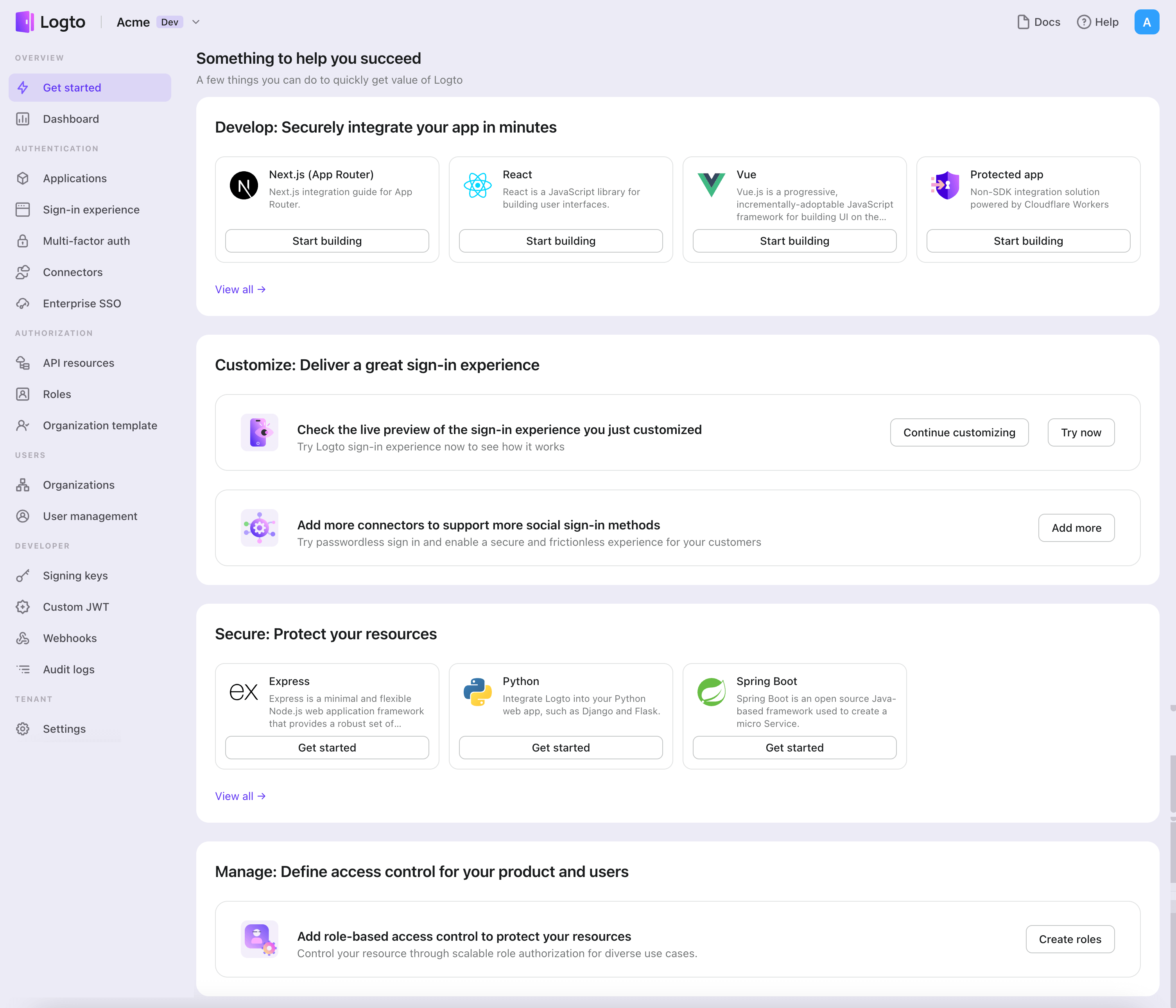
<li class="">Open the <span class="linkWrapper_B4Bt"><a href="https://cloud.logto.io/" target="_blank" rel="noopener noreferrer" class="link_hf7f">Logto Console<svg width="17" height="17" viewBox="0 0 17 17" fill="none" xmlns="http://www.w3.org/2000/svg" class="iconExternalLink_2l9O externalLink_ia3C"><path d="M12.422 7.54748C12.2452 7.54748 12.0757 7.61772 11.9506 7.74274C11.8256 7.86777 11.7554 8.03734 11.7554 8.21415V13.0008C11.7554 13.1776 11.6851 13.3472 11.5601 13.4722C11.4351 13.5972 11.2655 13.6675 11.0887 13.6675H3.75537C3.57856 13.6675 3.40899 13.5972 3.28397 13.4722C3.15894 13.3472 3.0887 13.1776 3.0887 13.0008V5.66748C3.0887 5.49067 3.15894 5.3211 3.28397 5.19608C3.40899 5.07105 3.57856 5.00081 3.75537 5.00081H8.54204C8.71885 5.00081 8.88842 4.93058 9.01344 4.80555C9.13847 4.68053 9.2087 4.51096 9.2087 4.33415C9.2087 4.15734 9.13847 3.98777 9.01344 3.86274C8.88842 3.73772 8.71885 3.66748 8.54204 3.66748H3.75537C3.22494 3.66748 2.71623 3.87819 2.34116 4.25327C1.96608 4.62834 1.75537 5.13705 1.75537 5.66748V13.0008C1.75537 13.5312 1.96608 14.04 2.34116 14.415C2.71623 14.7901 3.22494 15.0008 3.75537 15.0008H11.0887C11.6191 15.0008 12.1278 14.7901 12.5029 14.415C12.878 14.04 13.0887 13.5312 13.0887 13.0008V8.21415C13.0887 8.03734 13.0185 7.86777 12.8934 7.74274C12.7684 7.61772 12.5988 7.54748 12.422 7.54748ZM15.0354 2.08081C14.9677 1.91791 14.8383 1.78846 14.6754 1.72081C14.5952 1.68665 14.5092 1.66853 14.422 1.66748H10.422C10.2452 1.66748 10.0757 1.73772 9.95063 1.86274C9.82561 1.98777 9.75537 2.15734 9.75537 2.33415C9.75537 2.51096 9.82561 2.68053 9.95063 2.80555C10.0757 2.93058 10.2452 3.00081 10.422 3.00081H12.8154L5.9487 9.86081C5.88622 9.92279 5.83662 9.99652 5.80278 10.0778C5.76893 10.159 5.75151 10.2461 5.75151 10.3341C5.75151 10.4222 5.76893 10.5093 5.80278 10.5905C5.83662 10.6718 5.88622 10.7455 5.9487 10.8075C6.01068 10.87 6.08441 10.9196 6.16565 10.9534C6.24689 10.9873 6.33403 11.0047 6.42204 11.0047C6.51005 11.0047 6.59718 10.9873 6.67842 10.9534C6.75966 10.9196 6.8334 10.87 6.89537 10.8075L13.7554 3.94081V6.33415C13.7554 6.51096 13.8256 6.68053 13.9506 6.80555C14.0757 6.93058 14.2452 7.00081 14.422 7.00081C14.5988 7.00081 14.7684 6.93058 14.8934 6.80555C15.0185 6.68053 15.0887 6.51096 15.0887 6.33415V2.33415C15.0877 2.24703 15.0695 2.16096 15.0354 2.08081Z" fill="currentColor"></path></svg></a></span>. In the "Get started" section, click the "View all" link to open the application frameworks list. Alternatively, you can navigate to <span class="linkWrapper_B4Bt"><a href="https://cloud.logto.io/to/applications" target="_blank" rel="noopener noreferrer" class="link_hf7f">Logto Console &gt; Applications<svg width="17" height="17" viewBox="0 0 17 17" fill="none" xmlns="http://www.w3.org/2000/svg" class="iconExternalLink_2l9O externalLink_ia3C"><path d="M12.422 7.54748C12.2452 7.54748 12.0757 7.61772 11.9506 7.74274C11.8256 7.86777 11.7554 8.03734 11.7554 8.21415V13.0008C11.7554 13.1776 11.6851 13.3472 11.5601 13.4722C11.4351 13.5972 11.2655 13.6675 11.0887 13.6675H3.75537C3.57856 13.6675 3.40899 13.5972 3.28397 13.4722C3.15894 13.3472 3.0887 13.1776 3.0887 13.0008V5.66748C3.0887 5.49067 3.15894 5.3211 3.28397 5.19608C3.40899 5.07105 3.57856 5.00081 3.75537 5.00081H8.54204C8.71885 5.00081 8.88842 4.93058 9.01344 4.80555C9.13847 4.68053 9.2087 4.51096 9.2087 4.33415C9.2087 4.15734 9.13847 3.98777 9.01344 3.86274C8.88842 3.73772 8.71885 3.66748 8.54204 3.66748H3.75537C3.22494 3.66748 2.71623 3.87819 2.34116 4.25327C1.96608 4.62834 1.75537 5.13705 1.75537 5.66748V13.0008C1.75537 13.5312 1.96608 14.04 2.34116 14.415C2.71623 14.7901 3.22494 15.0008 3.75537 15.0008H11.0887C11.6191 15.0008 12.1278 14.7901 12.5029 14.415C12.878 14.04 13.0887 13.5312 13.0887 13.0008V8.21415C13.0887 8.03734 13.0185 7.86777 12.8934 7.74274C12.7684 7.61772 12.5988 7.54748 12.422 7.54748ZM15.0354 2.08081C14.9677 1.91791 14.8383 1.78846 14.6754 1.72081C14.5952 1.68665 14.5092 1.66853 14.422 1.66748H10.422C10.2452 1.66748 10.0757 1.73772 9.95063 1.86274C9.82561 1.98777 9.75537 2.15734 9.75537 2.33415C9.75537 2.51096 9.82561 2.68053 9.95063 2.80555C10.0757 2.93058 10.2452 3.00081 10.422 3.00081H12.8154L5.9487 9.86081C5.88622 9.92279 5.83662 9.99652 5.80278 10.0778C5.76893 10.159 5.75151 10.2461 5.75151 10.3341C5.75151 10.4222 5.76893 10.5093 5.80278 10.5905C5.83662 10.6718 5.88622 10.7455 5.9487 10.8075C6.01068 10.87 6.08441 10.9196 6.16565 10.9534C6.24689 10.9873 6.33403 11.0047 6.42204 11.0047C6.51005 11.0047 6.59718 10.9873 6.67842 10.9534C6.75966 10.9196 6.8334 10.87 6.89537 10.8075L13.7554 3.94081V6.33415C13.7554 6.51096 13.8256 6.68053 13.9506 6.80555C14.0757 6.93058 14.2452 7.00081 14.422 7.00081C14.5988 7.00081 14.7684 6.93058 14.8934 6.80555C15.0185 6.68053 15.0887 6.51096 15.0887 6.33415V2.33415C15.0877 2.24703 15.0695 2.16096 15.0354 2.08081Z" fill="currentColor"></path></svg></a></span>, and click the "Create application" button.<!-- -->
<img src="https://renovate-major-eslint-monore.logto-docs-tutorials.pages.dev/img/tutorial/get-started.png" alt="Get started">
</li>
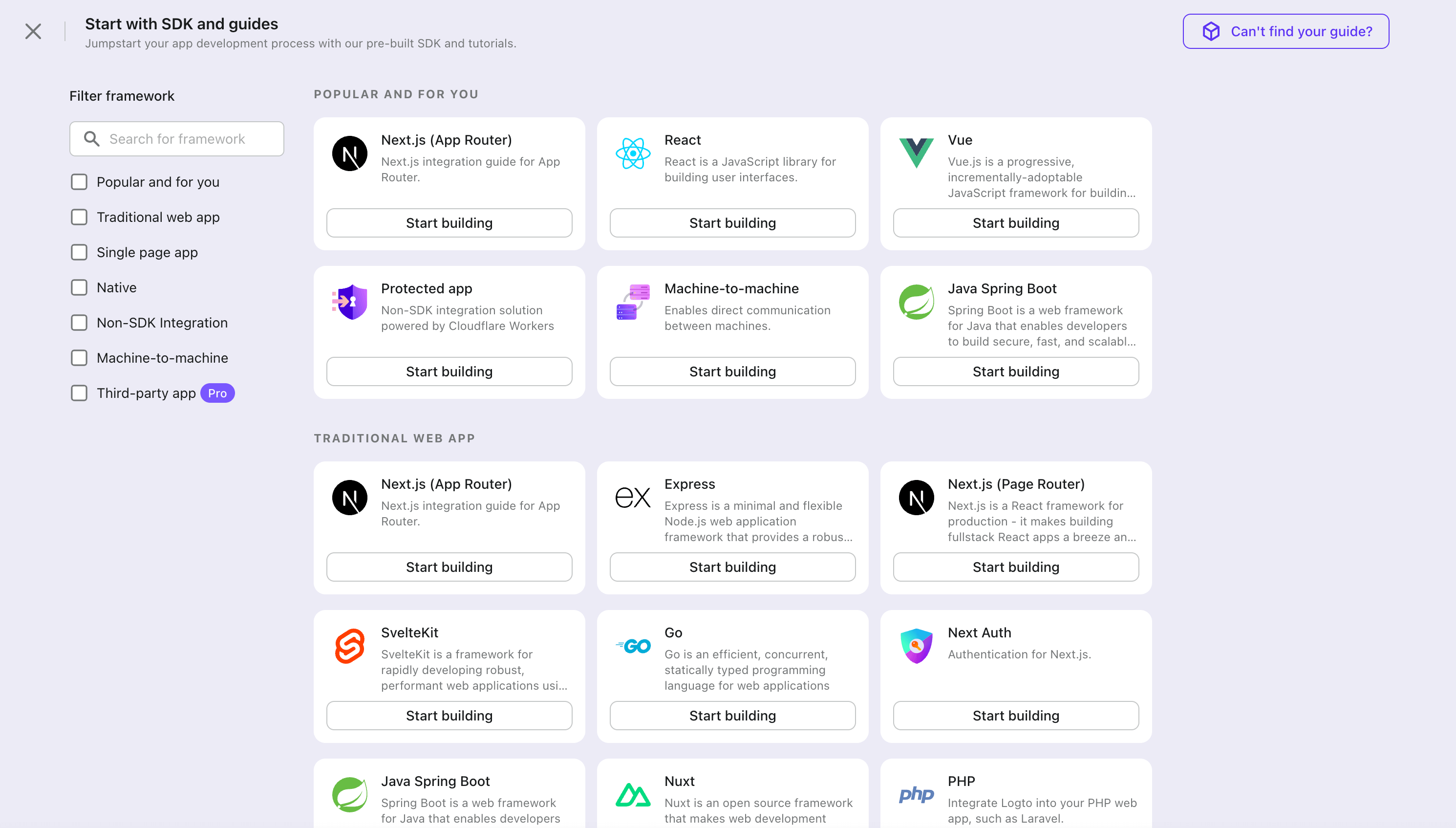
<li class="">In the opening modal, click the "<!-- -->Native app<!-- -->" section or filter all the available "<!-- -->Native app<!-- -->" frameworks using the quick filter checkboxes on the left. Click the "<!-- -->Expo<!-- -->" framework card to start creating your application.<!-- -->
<img src="https://renovate-major-eslint-monore.logto-docs-tutorials.pages.dev/img/tutorial/framework-list.png" alt="Frameworks">
</li>
<li class="">Enter the application name, e.g., "Bookstore," and click "Create application".</li>
</ol>
<p>🎉 Ta-da! You just created your first application in Logto. You'll see a congrats page which includes a detailed integration guide. Follow the guide to see what the experience will be in your application.</p>
<h2 class="anchor anchorTargetStickyNavbar_HQdW" id="integrate-with-logto">Integrate Expo with Logto<a href="https://renovate-major-eslint-monore.logto-docs-tutorials.pages.dev/how-to/build-microsoft-entra-id-oidc-enterprise-sso-sign-in-with-expo-react-native-and-logto#integrate-with-logto" class="hash-link" aria-label="Direct link to Integrate Expo with Logto" title="Direct link to Integrate Expo with Logto" translate="no">​</a></h2>
<div class="theme-admonition theme-admonition-tip admonition_Gfwi alert alert--success"><div class="admonitionContent_UjKb"><div class="content_hlIx"><span class="title_towL" data-type="title">tip<!-- -->:</span><ul>
<li class="">The following demonstration is built on Expo ~50.0.6.</li>
<li class="">The sample project is available on our <span class="linkWrapper_B4Bt"><a href="https://github.com/logto-io/react-native/tree/master/packages/rn-sample" target="_blank" rel="noopener noreferrer" class="link_hf7f">SDK repository<svg width="17" height="17" viewBox="0 0 17 17" fill="none" xmlns="http://www.w3.org/2000/svg" class="iconExternalLink_2l9O externalLink_ia3C"><path d="M12.422 7.54748C12.2452 7.54748 12.0757 7.61772 11.9506 7.74274C11.8256 7.86777 11.7554 8.03734 11.7554 8.21415V13.0008C11.7554 13.1776 11.6851 13.3472 11.5601 13.4722C11.4351 13.5972 11.2655 13.6675 11.0887 13.6675H3.75537C3.57856 13.6675 3.40899 13.5972 3.28397 13.4722C3.15894 13.3472 3.0887 13.1776 3.0887 13.0008V5.66748C3.0887 5.49067 3.15894 5.3211 3.28397 5.19608C3.40899 5.07105 3.57856 5.00081 3.75537 5.00081H8.54204C8.71885 5.00081 8.88842 4.93058 9.01344 4.80555C9.13847 4.68053 9.2087 4.51096 9.2087 4.33415C9.2087 4.15734 9.13847 3.98777 9.01344 3.86274C8.88842 3.73772 8.71885 3.66748 8.54204 3.66748H3.75537C3.22494 3.66748 2.71623 3.87819 2.34116 4.25327C1.96608 4.62834 1.75537 5.13705 1.75537 5.66748V13.0008C1.75537 13.5312 1.96608 14.04 2.34116 14.415C2.71623 14.7901 3.22494 15.0008 3.75537 15.0008H11.0887C11.6191 15.0008 12.1278 14.7901 12.5029 14.415C12.878 14.04 13.0887 13.5312 13.0887 13.0008V8.21415C13.0887 8.03734 13.0185 7.86777 12.8934 7.74274C12.7684 7.61772 12.5988 7.54748 12.422 7.54748ZM15.0354 2.08081C14.9677 1.91791 14.8383 1.78846 14.6754 1.72081C14.5952 1.68665 14.5092 1.66853 14.422 1.66748H10.422C10.2452 1.66748 10.0757 1.73772 9.95063 1.86274C9.82561 1.98777 9.75537 2.15734 9.75537 2.33415C9.75537 2.51096 9.82561 2.68053 9.95063 2.80555C10.0757 2.93058 10.2452 3.00081 10.422 3.00081H12.8154L5.9487 9.86081C5.88622 9.92279 5.83662 9.99652 5.80278 10.0778C5.76893 10.159 5.75151 10.2461 5.75151 10.3341C5.75151 10.4222 5.76893 10.5093 5.80278 10.5905C5.83662 10.6718 5.88622 10.7455 5.9487 10.8075C6.01068 10.87 6.08441 10.9196 6.16565 10.9534C6.24689 10.9873 6.33403 11.0047 6.42204 11.0047C6.51005 11.0047 6.59718 10.9873 6.67842 10.9534C6.75966 10.9196 6.8334 10.87 6.89537 10.8075L13.7554 3.94081V6.33415C13.7554 6.51096 13.8256 6.68053 13.9506 6.80555C14.0757 6.93058 14.2452 7.00081 14.422 7.00081C14.5988 7.00081 14.7684 6.93058 14.8934 6.80555C15.0185 6.68053 15.0887 6.51096 15.0887 6.33415V2.33415C15.0877 2.24703 15.0695 2.16096 15.0354 2.08081Z" fill="currentColor"></path></svg></a></span>.</li>
</ul></div></div></div>
<h3 class="anchor anchorTargetStickyNavbar_HQdW" id="installation">Installation<a href="https://renovate-major-eslint-monore.logto-docs-tutorials.pages.dev/how-to/build-microsoft-entra-id-oidc-enterprise-sso-sign-in-with-expo-react-native-and-logto#installation" class="hash-link" aria-label="Direct link to Installation" title="Direct link to Installation" translate="no">​</a></h3>
<p>Install Logto SDK and peer dependencies via your favorite package manager:</p>
<div class="theme-tabs-container tabs-container tabList_f266"><ul role="tablist" aria-orientation="horizontal" class="tabs"><li role="tab" tabindex="0" aria-selected="true" class="tabs__item tabItem_y1XS tabs__item--active">npm</li><li role="tab" tabindex="-1" aria-selected="false" class="tabs__item tabItem_y1XS">Yarn</li><li role="tab" tabindex="-1" aria-selected="false" class="tabs__item tabItem_y1XS">pnpm</li></ul><div class="margin-top--md"><div role="tabpanel" class="tabItem_oCxr"><div class="language-bash codeBlockContainer_VV7r theme-code-block" style="--prism-color:#F8F8F2;--prism-background-color:#282A36"><div class="codeBlockContent_oZeE"><pre tabindex="0" class="prism-code language-bash codeBlock_bGVz thin-scrollbar" style="color:#F8F8F2;background-color:#282A36"><code class="codeBlockLines_igco"><span class="token-line" style="color:#F8F8F2"><span class="token function" style="color:rgb(80, 250, 123)">npm</span><span class="token plain"> i @logto/rn</span><br></span><span class="token-line" style="color:#F8F8F2"><span class="token plain"></span><span class="token function" style="color:rgb(80, 250, 123)">npm</span><span class="token plain"> i expo-crypto expo-secure-store expo-web-browser @react-native-async-storage/async-storage</span><br></span></code></pre></div></div></div><div role="tabpanel" class="tabItem_oCxr" hidden=""><div class="language-bash codeBlockContainer_VV7r theme-code-block" style="--prism-color:#F8F8F2;--prism-background-color:#282A36"><div class="codeBlockContent_oZeE"><pre tabindex="0" class="prism-code language-bash codeBlock_bGVz thin-scrollbar" style="color:#F8F8F2;background-color:#282A36"><code class="codeBlockLines_igco"><span class="token-line" style="color:#F8F8F2"><span class="token function" style="color:rgb(80, 250, 123)">yarn</span><span class="token plain"> </span><span class="token function" style="color:rgb(80, 250, 123)">add</span><span class="token plain"> @logto/rn</span><br></span><span class="token-line" style="color:#F8F8F2"><span class="token plain"></span><span class="token function" style="color:rgb(80, 250, 123)">yarn</span><span class="token plain"> </span><span class="token function" style="color:rgb(80, 250, 123)">add</span><span class="token plain"> expo-crypto expo-secure-store expo-web-browser @react-native-async-storage/async-storage</span><br></span></code></pre></div></div></div><div role="tabpanel" class="tabItem_oCxr" hidden=""><div class="language-bash codeBlockContainer_VV7r theme-code-block" style="--prism-color:#F8F8F2;--prism-background-color:#282A36"><div class="codeBlockContent_oZeE"><pre tabindex="0" class="prism-code language-bash codeBlock_bGVz thin-scrollbar" style="color:#F8F8F2;background-color:#282A36"><code class="codeBlockLines_igco"><span class="token-line" style="color:#F8F8F2"><span class="token function" style="color:rgb(80, 250, 123)">pnpm</span><span class="token plain"> </span><span class="token function" style="color:rgb(80, 250, 123)">add</span><span class="token plain"> @logto/rn</span><br></span><span class="token-line" style="color:#F8F8F2"><span class="token plain"></span><span class="token function" style="color:rgb(80, 250, 123)">pnpm</span><span class="token plain"> </span><span class="token function" style="color:rgb(80, 250, 123)">add</span><span class="token plain"> expo-crypto expo-secure-store expo-web-browser @react-native-async-storage/async-storage</span><br></span></code></pre></div></div></div></div></div>
<p>The <code>@logto/rn</code> package is the SDK for Logto. The remaining packages are its peer dependencies. They couldn't be listed as direct dependencies because the Expo CLI requires that all dependencies for native modules be installed directly within the root project's <code>package.json</code>.</p>
<div class="theme-admonition theme-admonition-note admonition_Gfwi alert alert--secondary"><div class="admonitionContent_UjKb"><div class="content_hlIx"><span class="title_towL" data-type="title">note<!-- -->:</span><p>If you're installing this in a <span class="linkWrapper_B4Bt"><a href="https://docs.expo.dev/bare/overview" target="_blank" rel="noopener noreferrer" class="link_hf7f">bare React Native app<svg width="17" height="17" viewBox="0 0 17 17" fill="none" xmlns="http://www.w3.org/2000/svg" class="iconExternalLink_2l9O externalLink_ia3C"><path d="M12.422 7.54748C12.2452 7.54748 12.0757 7.61772 11.9506 7.74274C11.8256 7.86777 11.7554 8.03734 11.7554 8.21415V13.0008C11.7554 13.1776 11.6851 13.3472 11.5601 13.4722C11.4351 13.5972 11.2655 13.6675 11.0887 13.6675H3.75537C3.57856 13.6675 3.40899 13.5972 3.28397 13.4722C3.15894 13.3472 3.0887 13.1776 3.0887 13.0008V5.66748C3.0887 5.49067 3.15894 5.3211 3.28397 5.19608C3.40899 5.07105 3.57856 5.00081 3.75537 5.00081H8.54204C8.71885 5.00081 8.88842 4.93058 9.01344 4.80555C9.13847 4.68053 9.2087 4.51096 9.2087 4.33415C9.2087 4.15734 9.13847 3.98777 9.01344 3.86274C8.88842 3.73772 8.71885 3.66748 8.54204 3.66748H3.75537C3.22494 3.66748 2.71623 3.87819 2.34116 4.25327C1.96608 4.62834 1.75537 5.13705 1.75537 5.66748V13.0008C1.75537 13.5312 1.96608 14.04 2.34116 14.415C2.71623 14.7901 3.22494 15.0008 3.75537 15.0008H11.0887C11.6191 15.0008 12.1278 14.7901 12.5029 14.415C12.878 14.04 13.0887 13.5312 13.0887 13.0008V8.21415C13.0887 8.03734 13.0185 7.86777 12.8934 7.74274C12.7684 7.61772 12.5988 7.54748 12.422 7.54748ZM15.0354 2.08081C14.9677 1.91791 14.8383 1.78846 14.6754 1.72081C14.5952 1.68665 14.5092 1.66853 14.422 1.66748H10.422C10.2452 1.66748 10.0757 1.73772 9.95063 1.86274C9.82561 1.98777 9.75537 2.15734 9.75537 2.33415C9.75537 2.51096 9.82561 2.68053 9.95063 2.80555C10.0757 2.93058 10.2452 3.00081 10.422 3.00081H12.8154L5.9487 9.86081C5.88622 9.92279 5.83662 9.99652 5.80278 10.0778C5.76893 10.159 5.75151 10.2461 5.75151 10.3341C5.75151 10.4222 5.76893 10.5093 5.80278 10.5905C5.83662 10.6718 5.88622 10.7455 5.9487 10.8075C6.01068 10.87 6.08441 10.9196 6.16565 10.9534C6.24689 10.9873 6.33403 11.0047 6.42204 11.0047C6.51005 11.0047 6.59718 10.9873 6.67842 10.9534C6.75966 10.9196 6.8334 10.87 6.89537 10.8075L13.7554 3.94081V6.33415C13.7554 6.51096 13.8256 6.68053 13.9506 6.80555C14.0757 6.93058 14.2452 7.00081 14.422 7.00081C14.5988 7.00081 14.7684 6.93058 14.8934 6.80555C15.0185 6.68053 15.0887 6.51096 15.0887 6.33415V2.33415C15.0877 2.24703 15.0695 2.16096 15.0354 2.08081Z" fill="currentColor"></path></svg></a></span>, you should also follow these <span class="linkWrapper_B4Bt"><a href="https://docs.expo.dev/bare/installing-expo-modules/" target="_blank" rel="noopener noreferrer" class="link_hf7f">additional installation instructions<svg width="17" height="17" viewBox="0 0 17 17" fill="none" xmlns="http://www.w3.org/2000/svg" class="iconExternalLink_2l9O externalLink_ia3C"><path d="M12.422 7.54748C12.2452 7.54748 12.0757 7.61772 11.9506 7.74274C11.8256 7.86777 11.7554 8.03734 11.7554 8.21415V13.0008C11.7554 13.1776 11.6851 13.3472 11.5601 13.4722C11.4351 13.5972 11.2655 13.6675 11.0887 13.6675H3.75537C3.57856 13.6675 3.40899 13.5972 3.28397 13.4722C3.15894 13.3472 3.0887 13.1776 3.0887 13.0008V5.66748C3.0887 5.49067 3.15894 5.3211 3.28397 5.19608C3.40899 5.07105 3.57856 5.00081 3.75537 5.00081H8.54204C8.71885 5.00081 8.88842 4.93058 9.01344 4.80555C9.13847 4.68053 9.2087 4.51096 9.2087 4.33415C9.2087 4.15734 9.13847 3.98777 9.01344 3.86274C8.88842 3.73772 8.71885 3.66748 8.54204 3.66748H3.75537C3.22494 3.66748 2.71623 3.87819 2.34116 4.25327C1.96608 4.62834 1.75537 5.13705 1.75537 5.66748V13.0008C1.75537 13.5312 1.96608 14.04 2.34116 14.415C2.71623 14.7901 3.22494 15.0008 3.75537 15.0008H11.0887C11.6191 15.0008 12.1278 14.7901 12.5029 14.415C12.878 14.04 13.0887 13.5312 13.0887 13.0008V8.21415C13.0887 8.03734 13.0185 7.86777 12.8934 7.74274C12.7684 7.61772 12.5988 7.54748 12.422 7.54748ZM15.0354 2.08081C14.9677 1.91791 14.8383 1.78846 14.6754 1.72081C14.5952 1.68665 14.5092 1.66853 14.422 1.66748H10.422C10.2452 1.66748 10.0757 1.73772 9.95063 1.86274C9.82561 1.98777 9.75537 2.15734 9.75537 2.33415C9.75537 2.51096 9.82561 2.68053 9.95063 2.80555C10.0757 2.93058 10.2452 3.00081 10.422 3.00081H12.8154L5.9487 9.86081C5.88622 9.92279 5.83662 9.99652 5.80278 10.0778C5.76893 10.159 5.75151 10.2461 5.75151 10.3341C5.75151 10.4222 5.76893 10.5093 5.80278 10.5905C5.83662 10.6718 5.88622 10.7455 5.9487 10.8075C6.01068 10.87 6.08441 10.9196 6.16565 10.9534C6.24689 10.9873 6.33403 11.0047 6.42204 11.0047C6.51005 11.0047 6.59718 10.9873 6.67842 10.9534C6.75966 10.9196 6.8334 10.87 6.89537 10.8075L13.7554 3.94081V6.33415C13.7554 6.51096 13.8256 6.68053 13.9506 6.80555C14.0757 6.93058 14.2452 7.00081 14.422 7.00081C14.5988 7.00081 14.7684 6.93058 14.8934 6.80555C15.0185 6.68053 15.0887 6.51096 15.0887 6.33415V2.33415C15.0877 2.24703 15.0695 2.16096 15.0354 2.08081Z" fill="currentColor"></path></svg></a></span>.</p></div></div></div>
<h3 class="anchor anchorTargetStickyNavbar_HQdW" id="init-logto-provider">Init Logto provider<a href="https://renovate-major-eslint-monore.logto-docs-tutorials.pages.dev/how-to/build-microsoft-entra-id-oidc-enterprise-sso-sign-in-with-expo-react-native-and-logto#init-logto-provider" class="hash-link" aria-label="Direct link to Init Logto provider" title="Direct link to Init Logto provider" translate="no">​</a></h3>
<p>Import and use <code>LogtoProvider</code> to provide a Logto context:</p>
<div class="language-tsx codeBlockContainer_VV7r theme-code-block" style="--prism-color:#F8F8F2;--prism-background-color:#282A36"><div class="codeBlockTitle_aAWs">App.tsx</div><div class="codeBlockContent_oZeE"><pre tabindex="0" class="prism-code language-tsx codeBlock_bGVz thin-scrollbar" style="color:#F8F8F2;background-color:#282A36"><code class="codeBlockLines_igco"><span class="token-line" style="color:#F8F8F2"><span class="token keyword" style="color:rgb(189, 147, 249);font-style:italic">import</span><span class="token plain"> </span><span class="token imports punctuation" style="color:rgb(248, 248, 242)">{</span><span class="token imports"> </span><span class="token imports maybe-class-name">LogtoProvider</span><span class="token imports punctuation" style="color:rgb(248, 248, 242)">,</span><span class="token imports"> </span><span class="token imports maybe-class-name">LogtoConfig</span><span class="token imports"> </span><span class="token imports punctuation" style="color:rgb(248, 248, 242)">}</span><span class="token plain"> </span><span class="token keyword" style="color:rgb(189, 147, 249);font-style:italic">from</span><span class="token plain"> </span><span class="token string" style="color:rgb(255, 121, 198)">'@logto/rn'</span><span class="token punctuation" style="color:rgb(248, 248, 242)">;</span><span class="token plain"></span><br></span><span class="token-line" style="color:#F8F8F2"><span class="token plain" style="display:inline-block"></span><br></span><span class="token-line" style="color:#F8F8F2"><span class="token plain"></span><span class="token keyword" style="color:rgb(189, 147, 249);font-style:italic">const</span><span class="token plain"> config</span><span class="token operator">:</span><span class="token plain"> </span><span class="token maybe-class-name">LogtoConfig</span><span class="token plain"> </span><span class="token operator">=</span><span class="token plain"> </span><span class="token punctuation" style="color:rgb(248, 248, 242)">{</span><span class="token plain"></span><br></span><span class="token-line" style="color:#F8F8F2"><span class="token plain">  endpoint</span><span class="token operator">:</span><span class="token plain"> </span><span class="token string" style="color:rgb(255, 121, 198)">'&lt;your-logto-endpoint&gt;'</span><span class="token punctuation" style="color:rgb(248, 248, 242)">,</span><span class="token plain"></span><br></span><span class="token-line" style="color:#F8F8F2"><span class="token plain">  appId</span><span class="token operator">:</span><span class="token plain"> </span><span class="token string" style="color:rgb(255, 121, 198)">'&lt;your-application-id&gt;'</span><span class="token punctuation" style="color:rgb(248, 248, 242)">,</span><span class="token plain"></span><br></span><span class="token-line" style="color:#F8F8F2"><span class="token plain"></span><span class="token punctuation" style="color:rgb(248, 248, 242)">}</span><span class="token punctuation" style="color:rgb(248, 248, 242)">;</span><span class="token plain"></span><br></span><span class="token-line" style="color:#F8F8F2"><span class="token plain" style="display:inline-block"></span><br></span><span class="token-line" style="color:#F8F8F2"><span class="token plain"></span><span class="token keyword" style="color:rgb(189, 147, 249);font-style:italic">const</span><span class="token plain"> </span><span class="token function-variable function" style="color:rgb(80, 250, 123)">App</span><span class="token plain"> </span><span class="token operator">=</span><span class="token plain"> </span><span class="token punctuation" style="color:rgb(248, 248, 242)">(</span><span class="token punctuation" style="color:rgb(248, 248, 242)">)</span><span class="token plain"> </span><span class="token arrow operator">=&gt;</span><span class="token plain"> </span><span class="token punctuation" style="color:rgb(248, 248, 242)">(</span><span class="token plain"></span><br></span><span class="token-line" style="color:#F8F8F2"><span class="token plain">  </span><span class="token tag punctuation" style="color:rgb(248, 248, 242)">&lt;</span><span class="token tag class-name" style="color:rgb(255, 121, 198)">LogtoProvider</span><span class="token tag" style="color:rgb(255, 121, 198)"> </span><span class="token tag attr-name" style="color:rgb(241, 250, 140)">config</span><span class="token tag script language-javascript script-punctuation punctuation" style="color:rgb(248, 248, 242)">=</span><span class="token tag script language-javascript punctuation" style="color:rgb(248, 248, 242)">{</span><span class="token tag script language-javascript" style="color:rgb(255, 121, 198)">config</span><span class="token tag script language-javascript punctuation" style="color:rgb(248, 248, 242)">}</span><span class="token tag punctuation" style="color:rgb(248, 248, 242)">&gt;</span><span class="token plain-text"></span><br></span><span class="token-line" style="color:#F8F8F2"><span class="token plain-text">    </span><span class="token tag punctuation" style="color:rgb(248, 248, 242)">&lt;</span><span class="token tag class-name" style="color:rgb(255, 121, 198)">YourAppContent</span><span class="token tag" style="color:rgb(255, 121, 198)"> </span><span class="token tag punctuation" style="color:rgb(248, 248, 242)">/&gt;</span><span class="token plain-text"></span><br></span><span class="token-line" style="color:#F8F8F2"><span class="token plain-text">  </span><span class="token tag punctuation" style="color:rgb(248, 248, 242)">&lt;/</span><span class="token tag class-name" style="color:rgb(255, 121, 198)">LogtoProvider</span><span class="token tag punctuation" style="color:rgb(248, 248, 242)">&gt;</span><span class="token plain"></span><br></span><span class="token-line" style="color:#F8F8F2"><span class="token plain"></span><span class="token punctuation" style="color:rgb(248, 248, 242)">)</span><span class="token punctuation" style="color:rgb(248, 248, 242)">;</span><br></span></code></pre></div></div>
<h3 class="anchor anchorTargetStickyNavbar_HQdW" id="implement-sign-in-and-sign-out">Implement sign-in and sign-out<a href="https://renovate-major-eslint-monore.logto-docs-tutorials.pages.dev/how-to/build-microsoft-entra-id-oidc-enterprise-sso-sign-in-with-expo-react-native-and-logto#implement-sign-in-and-sign-out" class="hash-link" aria-label="Direct link to Implement sign-in and sign-out" title="Direct link to Implement sign-in and sign-out" translate="no">​</a></h3>
<p>Before we dive into the details, here's a quick overview of the end-user experience. The sign-in process can be simplified as follows:</p>
<!-- -->
<ol>
<li class="">Your app invokes the sign-in method.</li>
<li class="">The user is redirected to the Logto sign-in page. For native apps, the system browser is opened.</li>
<li class="">The user signs in and is redirected back to your app (configured as the redirect URI).</li>
</ol>
<details class="details_IL2z details_Jw1Q" data-collapsed="true"><summary><h3 class="anchor anchorTargetStickyNavbar_HQdW" id="regarding-redirect-based-sign-in">Regarding redirect-based sign-in<a href="https://renovate-major-eslint-monore.logto-docs-tutorials.pages.dev/how-to/build-microsoft-entra-id-oidc-enterprise-sso-sign-in-with-expo-react-native-and-logto#regarding-redirect-based-sign-in" class="hash-link" aria-label="Direct link to Regarding redirect-based sign-in" title="Direct link to Regarding redirect-based sign-in" translate="no">​</a></h3></summary><div><div class="collapsibleContent_eQNH"><ol>
<li class="">This authentication process follows the <span class="linkWrapper_B4Bt"><a href="https://openid.net/specs/openid-connect-core-1_0.html" target="_blank" rel="noopener noreferrer" class="link_hf7f">OpenID Connect (OIDC)<svg width="17" height="17" viewBox="0 0 17 17" fill="none" xmlns="http://www.w3.org/2000/svg" class="iconExternalLink_2l9O externalLink_ia3C"><path d="M12.422 7.54748C12.2452 7.54748 12.0757 7.61772 11.9506 7.74274C11.8256 7.86777 11.7554 8.03734 11.7554 8.21415V13.0008C11.7554 13.1776 11.6851 13.3472 11.5601 13.4722C11.4351 13.5972 11.2655 13.6675 11.0887 13.6675H3.75537C3.57856 13.6675 3.40899 13.5972 3.28397 13.4722C3.15894 13.3472 3.0887 13.1776 3.0887 13.0008V5.66748C3.0887 5.49067 3.15894 5.3211 3.28397 5.19608C3.40899 5.07105 3.57856 5.00081 3.75537 5.00081H8.54204C8.71885 5.00081 8.88842 4.93058 9.01344 4.80555C9.13847 4.68053 9.2087 4.51096 9.2087 4.33415C9.2087 4.15734 9.13847 3.98777 9.01344 3.86274C8.88842 3.73772 8.71885 3.66748 8.54204 3.66748H3.75537C3.22494 3.66748 2.71623 3.87819 2.34116 4.25327C1.96608 4.62834 1.75537 5.13705 1.75537 5.66748V13.0008C1.75537 13.5312 1.96608 14.04 2.34116 14.415C2.71623 14.7901 3.22494 15.0008 3.75537 15.0008H11.0887C11.6191 15.0008 12.1278 14.7901 12.5029 14.415C12.878 14.04 13.0887 13.5312 13.0887 13.0008V8.21415C13.0887 8.03734 13.0185 7.86777 12.8934 7.74274C12.7684 7.61772 12.5988 7.54748 12.422 7.54748ZM15.0354 2.08081C14.9677 1.91791 14.8383 1.78846 14.6754 1.72081C14.5952 1.68665 14.5092 1.66853 14.422 1.66748H10.422C10.2452 1.66748 10.0757 1.73772 9.95063 1.86274C9.82561 1.98777 9.75537 2.15734 9.75537 2.33415C9.75537 2.51096 9.82561 2.68053 9.95063 2.80555C10.0757 2.93058 10.2452 3.00081 10.422 3.00081H12.8154L5.9487 9.86081C5.88622 9.92279 5.83662 9.99652 5.80278 10.0778C5.76893 10.159 5.75151 10.2461 5.75151 10.3341C5.75151 10.4222 5.76893 10.5093 5.80278 10.5905C5.83662 10.6718 5.88622 10.7455 5.9487 10.8075C6.01068 10.87 6.08441 10.9196 6.16565 10.9534C6.24689 10.9873 6.33403 11.0047 6.42204 11.0047C6.51005 11.0047 6.59718 10.9873 6.67842 10.9534C6.75966 10.9196 6.8334 10.87 6.89537 10.8075L13.7554 3.94081V6.33415C13.7554 6.51096 13.8256 6.68053 13.9506 6.80555C14.0757 6.93058 14.2452 7.00081 14.422 7.00081C14.5988 7.00081 14.7684 6.93058 14.8934 6.80555C15.0185 6.68053 15.0887 6.51096 15.0887 6.33415V2.33415C15.0877 2.24703 15.0695 2.16096 15.0354 2.08081Z" fill="currentColor"></path></svg></a></span> protocol, and Logto enforces strict security measures to protect user sign-in.</li>
<li class="">If you have multiple apps, you can use the same identity provider (Logto). Once the user signs in to one app, Logto will automatically complete the sign-in process when the user accesses another app.</li>
</ol><p>To learn more about the rationale and benefits of redirect-based sign-in, see <span class="linkWrapper_B4Bt"><a href="https://docs.logto.io/concepts/sign-in-experience" target="_blank" rel="noopener noreferrer" class="link_hf7f"><svg xmlns="http://www.w3.org/2000/svg" width="20" height="20" fill="none" viewBox="0 0 20 20"><path fill="currentColor" d="m8.49 14.129-1.302 1.265a1.82 1.82 0 0 1-2.574-2.575l3.34-3.347a1.81 1.81 0 0 1 2.493-.066l.089.073a.736.736 0 1 0 1.03-1.052 2 2 0 0 0-.133-.154 3.28 3.28 0 0 0-4.48.162l-3.384 3.347a3.296 3.296 0 0 0 4.657 4.657l1.272-1.244A.736.736 0 0 0 8.49 14.13m7.865-10.476a3.303 3.303 0 0 0-4.657 0l-1.273 1.243a.736.736 0 0 0 1.008 1.067l1.273-1.265a1.82 1.82 0 1 1 2.575 2.574l-3.34 3.348a1.81 1.81 0 0 1-2.494.066l-.088-.074a.736.736 0 1 0-1.03 1.052q.08.083.169.155a3.29 3.29 0 0 0 4.48-.162l3.347-3.347a3.303 3.303 0 0 0 .03-4.657"></path></svg>Logto sign-in experience explained<svg width="17" height="17" viewBox="0 0 17 17" fill="none" xmlns="http://www.w3.org/2000/svg" class="iconExternalLink_2l9O externalLink_ia3C"><path d="M12.422 7.54748C12.2452 7.54748 12.0757 7.61772 11.9506 7.74274C11.8256 7.86777 11.7554 8.03734 11.7554 8.21415V13.0008C11.7554 13.1776 11.6851 13.3472 11.5601 13.4722C11.4351 13.5972 11.2655 13.6675 11.0887 13.6675H3.75537C3.57856 13.6675 3.40899 13.5972 3.28397 13.4722C3.15894 13.3472 3.0887 13.1776 3.0887 13.0008V5.66748C3.0887 5.49067 3.15894 5.3211 3.28397 5.19608C3.40899 5.07105 3.57856 5.00081 3.75537 5.00081H8.54204C8.71885 5.00081 8.88842 4.93058 9.01344 4.80555C9.13847 4.68053 9.2087 4.51096 9.2087 4.33415C9.2087 4.15734 9.13847 3.98777 9.01344 3.86274C8.88842 3.73772 8.71885 3.66748 8.54204 3.66748H3.75537C3.22494 3.66748 2.71623 3.87819 2.34116 4.25327C1.96608 4.62834 1.75537 5.13705 1.75537 5.66748V13.0008C1.75537 13.5312 1.96608 14.04 2.34116 14.415C2.71623 14.7901 3.22494 15.0008 3.75537 15.0008H11.0887C11.6191 15.0008 12.1278 14.7901 12.5029 14.415C12.878 14.04 13.0887 13.5312 13.0887 13.0008V8.21415C13.0887 8.03734 13.0185 7.86777 12.8934 7.74274C12.7684 7.61772 12.5988 7.54748 12.422 7.54748ZM15.0354 2.08081C14.9677 1.91791 14.8383 1.78846 14.6754 1.72081C14.5952 1.68665 14.5092 1.66853 14.422 1.66748H10.422C10.2452 1.66748 10.0757 1.73772 9.95063 1.86274C9.82561 1.98777 9.75537 2.15734 9.75537 2.33415C9.75537 2.51096 9.82561 2.68053 9.95063 2.80555C10.0757 2.93058 10.2452 3.00081 10.422 3.00081H12.8154L5.9487 9.86081C5.88622 9.92279 5.83662 9.99652 5.80278 10.0778C5.76893 10.159 5.75151 10.2461 5.75151 10.3341C5.75151 10.4222 5.76893 10.5093 5.80278 10.5905C5.83662 10.6718 5.88622 10.7455 5.9487 10.8075C6.01068 10.87 6.08441 10.9196 6.16565 10.9534C6.24689 10.9873 6.33403 11.0047 6.42204 11.0047C6.51005 11.0047 6.59718 10.9873 6.67842 10.9534C6.75966 10.9196 6.8334 10.87 6.89537 10.8075L13.7554 3.94081V6.33415C13.7554 6.51096 13.8256 6.68053 13.9506 6.80555C14.0757 6.93058 14.2452 7.00081 14.422 7.00081C14.5988 7.00081 14.7684 6.93058 14.8934 6.80555C15.0185 6.68053 15.0887 6.51096 15.0887 6.33415V2.33415C15.0877 2.24703 15.0695 2.16096 15.0354 2.08081Z" fill="currentColor"></path></svg></a></span>.</p></div></div></details>
<hr>
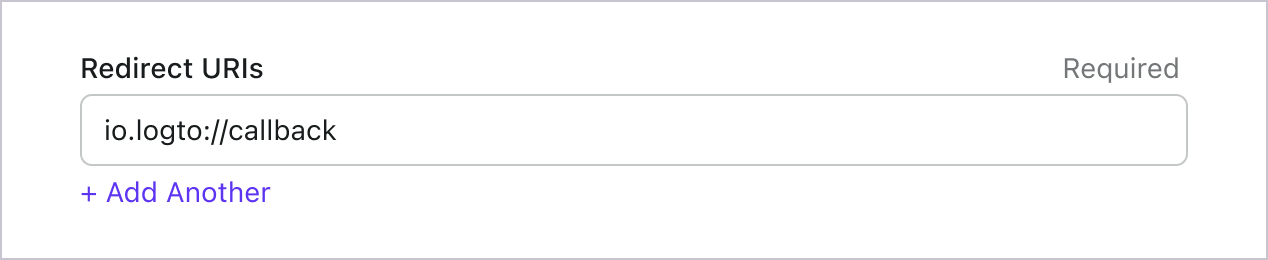
<p>Switch to the application details page of Logto Console. Add a native redirect URI (for example, <code>io.logto://callback</code>), then click "Save".</p>
<ul>
<li class="">
<p>For iOS, the redirect URI scheme does not really matter since the <code>ASWebAuthenticationSession</code> class will listen to the redirect URI regardless of if it's registered.</p>
</li>
<li class="">
<p>For Android, the redirect URI scheme must be filled in Expo's <code>app.json</code> file, for example:</p>
<div class="language-json codeBlockContainer_VV7r theme-code-block" style="--prism-color:#F8F8F2;--prism-background-color:#282A36"><div class="codeBlockTitle_aAWs">app.json</div><div class="codeBlockContent_oZeE"><pre tabindex="0" class="prism-code language-json codeBlock_bGVz thin-scrollbar" style="color:#F8F8F2;background-color:#282A36"><code class="codeBlockLines_igco"><span class="token-line" style="color:#F8F8F2"><span class="token punctuation" style="color:rgb(248, 248, 242)">{</span><span class="token plain"></span><br></span><span class="token-line" style="color:#F8F8F2"><span class="token plain">  </span><span class="token property">"expo"</span><span class="token operator">:</span><span class="token plain"> </span><span class="token punctuation" style="color:rgb(248, 248, 242)">{</span><span class="token plain"></span><br></span><span class="token-line" style="color:#F8F8F2"><span class="token plain">    </span><span class="token property">"scheme"</span><span class="token operator">:</span><span class="token plain"> </span><span class="token string" style="color:rgb(255, 121, 198)">"io.logto"</span><span class="token plain"></span><br></span><span class="token-line" style="color:#F8F8F2"><span class="token plain">  </span><span class="token punctuation" style="color:rgb(248, 248, 242)">}</span><span class="token plain"></span><br></span><span class="token-line" style="color:#F8F8F2"><span class="token plain"></span><span class="token punctuation" style="color:rgb(248, 248, 242)">}</span><br></span></code></pre></div></div>
</li>
</ul>
<p>Now back to your app, you can use <code>useLogto</code> hook to sign in and sign out:</p>
<div class="language-tsx codeBlockContainer_VV7r theme-code-block" style="--prism-color:#F8F8F2;--prism-background-color:#282A36"><div class="codeBlockTitle_aAWs">App.tsx</div><div class="codeBlockContent_oZeE"><pre tabindex="0" class="prism-code language-tsx codeBlock_bGVz thin-scrollbar" style="color:#F8F8F2;background-color:#282A36"><code class="codeBlockLines_igco"><span class="token-line" style="color:#F8F8F2"><span class="token keyword" style="color:rgb(189, 147, 249);font-style:italic">import</span><span class="token plain"> </span><span class="token imports punctuation" style="color:rgb(248, 248, 242)">{</span><span class="token imports"> useLogto </span><span class="token imports punctuation" style="color:rgb(248, 248, 242)">}</span><span class="token plain"> </span><span class="token keyword" style="color:rgb(189, 147, 249);font-style:italic">from</span><span class="token plain"> </span><span class="token string" style="color:rgb(255, 121, 198)">'@logto/rn'</span><span class="token punctuation" style="color:rgb(248, 248, 242)">;</span><span class="token plain"></span><br></span><span class="token-line" style="color:#F8F8F2"><span class="token plain"></span><span class="token keyword" style="color:rgb(189, 147, 249);font-style:italic">import</span><span class="token plain"> </span><span class="token imports punctuation" style="color:rgb(248, 248, 242)">{</span><span class="token imports"> </span><span class="token imports maybe-class-name">Button</span><span class="token imports"> </span><span class="token imports punctuation" style="color:rgb(248, 248, 242)">}</span><span class="token plain"> </span><span class="token keyword" style="color:rgb(189, 147, 249);font-style:italic">from</span><span class="token plain"> </span><span class="token string" style="color:rgb(255, 121, 198)">'react-native'</span><span class="token punctuation" style="color:rgb(248, 248, 242)">;</span><span class="token plain"></span><br></span><span class="token-line" style="color:#F8F8F2"><span class="token plain" style="display:inline-block"></span><br></span><span class="token-line" style="color:#F8F8F2"><span class="token plain"></span><span class="token keyword" style="color:rgb(189, 147, 249);font-style:italic">const</span><span class="token plain"> </span><span class="token function-variable function" style="color:rgb(80, 250, 123)">Content</span><span class="token plain"> </span><span class="token operator">=</span><span class="token plain"> </span><span class="token punctuation" style="color:rgb(248, 248, 242)">(</span><span class="token punctuation" style="color:rgb(248, 248, 242)">)</span><span class="token plain"> </span><span class="token arrow operator">=&gt;</span><span class="token plain"> </span><span class="token punctuation" style="color:rgb(248, 248, 242)">{</span><span class="token plain"></span><br></span><span class="token-line" style="color:#F8F8F2"><span class="token plain">  </span><span class="token keyword" style="color:rgb(189, 147, 249);font-style:italic">const</span><span class="token plain"> </span><span class="token punctuation" style="color:rgb(248, 248, 242)">{</span><span class="token plain"> signIn</span><span class="token punctuation" style="color:rgb(248, 248, 242)">,</span><span class="token plain"> signOut</span><span class="token punctuation" style="color:rgb(248, 248, 242)">,</span><span class="token plain"> isAuthenticated </span><span class="token punctuation" style="color:rgb(248, 248, 242)">}</span><span class="token plain"> </span><span class="token operator">=</span><span class="token plain"> </span><span class="token function" style="color:rgb(80, 250, 123)">useLogto</span><span class="token punctuation" style="color:rgb(248, 248, 242)">(</span><span class="token punctuation" style="color:rgb(248, 248, 242)">)</span><span class="token punctuation" style="color:rgb(248, 248, 242)">;</span><span class="token plain"></span><br></span><span class="token-line" style="color:#F8F8F2"><span class="token plain" style="display:inline-block"></span><br></span><span class="token-line" style="color:#F8F8F2"><span class="token plain">  </span><span class="token keyword" style="color:rgb(189, 147, 249);font-style:italic">return</span><span class="token plain"> </span><span class="token punctuation" style="color:rgb(248, 248, 242)">(</span><span class="token plain"></span><br></span><span class="token-line" style="color:#F8F8F2"><span class="token plain">    </span><span class="token tag punctuation" style="color:rgb(248, 248, 242)">&lt;</span><span class="token tag" style="color:rgb(255, 121, 198)">div</span><span class="token tag punctuation" style="color:rgb(248, 248, 242)">&gt;</span><span class="token plain-text"></span><br></span><span class="token-line" style="color:#F8F8F2"><span class="token plain-text">      </span><span class="token punctuation" style="color:rgb(248, 248, 242)">{</span><span class="token plain">isAuthenticated </span><span class="token operator">?</span><span class="token plain"> </span><span class="token punctuation" style="color:rgb(248, 248, 242)">(</span><span class="token plain"></span><br></span><span class="token-line" style="color:#F8F8F2"><span class="token plain">        </span><span class="token tag punctuation" style="color:rgb(248, 248, 242)">&lt;</span><span class="token tag class-name" style="color:rgb(255, 121, 198)">Button</span><span class="token tag" style="color:rgb(255, 121, 198)"> </span><span class="token tag attr-name" style="color:rgb(241, 250, 140)">title</span><span class="token tag attr-value punctuation attr-equals" style="color:rgb(248, 248, 242)">=</span><span class="token tag attr-value punctuation" style="color:rgb(248, 248, 242)">"</span><span class="token tag attr-value" style="color:rgb(255, 121, 198)">Sign out</span><span class="token tag attr-value punctuation" style="color:rgb(248, 248, 242)">"</span><span class="token tag" style="color:rgb(255, 121, 198)"> </span><span class="token tag attr-name" style="color:rgb(241, 250, 140)">onPress</span><span class="token tag script language-javascript script-punctuation punctuation" style="color:rgb(248, 248, 242)">=</span><span class="token tag script language-javascript punctuation" style="color:rgb(248, 248, 242)">{</span><span class="token tag script language-javascript keyword" style="color:rgb(189, 147, 249);font-style:italic">async</span><span class="token tag script language-javascript" style="color:rgb(255, 121, 198)"> </span><span class="token tag script language-javascript punctuation" style="color:rgb(248, 248, 242)">(</span><span class="token tag script language-javascript punctuation" style="color:rgb(248, 248, 242)">)</span><span class="token tag script language-javascript" style="color:rgb(255, 121, 198)"> </span><span class="token tag script language-javascript arrow operator" style="color:rgb(255, 121, 198)">=&gt;</span><span class="token tag script language-javascript" style="color:rgb(255, 121, 198)"> </span><span class="token tag script language-javascript function" style="color:rgb(80, 250, 123)">signOut</span><span class="token tag script language-javascript punctuation" style="color:rgb(248, 248, 242)">(</span><span class="token tag script language-javascript punctuation" style="color:rgb(248, 248, 242)">)</span><span class="token tag script language-javascript punctuation" style="color:rgb(248, 248, 242)">}</span><span class="token tag" style="color:rgb(255, 121, 198)"> </span><span class="token tag punctuation" style="color:rgb(248, 248, 242)">/&gt;</span><span class="token plain"></span><br></span><span class="token-line" style="color:#F8F8F2"><span class="token plain">      </span><span class="token punctuation" style="color:rgb(248, 248, 242)">)</span><span class="token plain"> </span><span class="token operator">:</span><span class="token plain"> </span><span class="token punctuation" style="color:rgb(248, 248, 242)">(</span><span class="token plain"></span><br></span><span class="token-line" style="color:#F8F8F2"><span class="token plain">        </span><span class="token comment" style="color:rgb(98, 114, 164)">// Replace the redirect URI with your own</span><span class="token plain"></span><br></span><span class="token-line" style="color:#F8F8F2"><span class="token plain">        </span><span class="token tag punctuation" style="color:rgb(248, 248, 242)">&lt;</span><span class="token tag class-name" style="color:rgb(255, 121, 198)">Button</span><span class="token tag" style="color:rgb(255, 121, 198)"> </span><span class="token tag attr-name" style="color:rgb(241, 250, 140)">title</span><span class="token tag attr-value punctuation attr-equals" style="color:rgb(248, 248, 242)">=</span><span class="token tag attr-value punctuation" style="color:rgb(248, 248, 242)">"</span><span class="token tag attr-value" style="color:rgb(255, 121, 198)">Sign in</span><span class="token tag attr-value punctuation" style="color:rgb(248, 248, 242)">"</span><span class="token tag" style="color:rgb(255, 121, 198)"> </span><span class="token tag attr-name" style="color:rgb(241, 250, 140)">onPress</span><span class="token tag script language-javascript script-punctuation punctuation" style="color:rgb(248, 248, 242)">=</span><span class="token tag script language-javascript punctuation" style="color:rgb(248, 248, 242)">{</span><span class="token tag script language-javascript keyword" style="color:rgb(189, 147, 249);font-style:italic">async</span><span class="token tag script language-javascript" style="color:rgb(255, 121, 198)"> </span><span class="token tag script language-javascript punctuation" style="color:rgb(248, 248, 242)">(</span><span class="token tag script language-javascript punctuation" style="color:rgb(248, 248, 242)">)</span><span class="token tag script language-javascript" style="color:rgb(255, 121, 198)"> </span><span class="token tag script language-javascript arrow operator" style="color:rgb(255, 121, 198)">=&gt;</span><span class="token tag script language-javascript" style="color:rgb(255, 121, 198)"> </span><span class="token tag script language-javascript function" style="color:rgb(80, 250, 123)">signIn</span><span class="token tag script language-javascript punctuation" style="color:rgb(248, 248, 242)">(</span><span class="token tag script language-javascript string" style="color:rgb(255, 121, 198)">'io.logto://callback'</span><span class="token tag script language-javascript punctuation" style="color:rgb(248, 248, 242)">)</span><span class="token tag script language-javascript punctuation" style="color:rgb(248, 248, 242)">}</span><span class="token tag" style="color:rgb(255, 121, 198)"> </span><span class="token tag punctuation" style="color:rgb(248, 248, 242)">/&gt;</span><span class="token plain"></span><br></span><span class="token-line" style="color:#F8F8F2"><span class="token plain">      </span><span class="token punctuation" style="color:rgb(248, 248, 242)">)</span><span class="token punctuation" style="color:rgb(248, 248, 242)">}</span><span class="token plain-text"></span><br></span><span class="token-line" style="color:#F8F8F2"><span class="token plain-text">    </span><span class="token tag punctuation" style="color:rgb(248, 248, 242)">&lt;/</span><span class="token tag" style="color:rgb(255, 121, 198)">div</span><span class="token tag punctuation" style="color:rgb(248, 248, 242)">&gt;</span><span class="token plain"></span><br></span><span class="token-line" style="color:#F8F8F2"><span class="token plain">  </span><span class="token punctuation" style="color:rgb(248, 248, 242)">)</span><span class="token punctuation" style="color:rgb(248, 248, 242)">;</span><span class="token plain"></span><br></span><span class="token-line" style="color:#F8F8F2"><span class="token plain"></span><span class="token punctuation" style="color:rgb(248, 248, 242)">}</span><span class="token punctuation" style="color:rgb(248, 248, 242)">;</span><br></span></code></pre></div></div>
<h3 class="anchor anchorTargetStickyNavbar_HQdW" id="checkpoint-test-your-application">Checkpoint: Test your application<a href="https://renovate-major-eslint-monore.logto-docs-tutorials.pages.dev/how-to/build-microsoft-entra-id-oidc-enterprise-sso-sign-in-with-expo-react-native-and-logto#checkpoint-test-your-application" class="hash-link" aria-label="Direct link to Checkpoint: Test your application" title="Direct link to Checkpoint: Test your application" translate="no">​</a></h3>
<p>Now, you can test your application:</p>
<ol>
<li class="">Run your application, you will see the sign-in button.</li>
<li class="">Click the sign-in button, the SDK will init the sign-in process and redirect you to the Logto sign-in page.</li>
<li class="">After you signed in, you will be redirected back to your application and see the sign-out button.</li>
<li class="">Click the sign-out button to clear token storage and sign out.</li>
</ol>
<h2 class="anchor anchorTargetStickyNavbar_HQdW" id="add-connector-connector">Add Microsoft Entra ID OIDC enterprise SSO connector<a href="https://renovate-major-eslint-monore.logto-docs-tutorials.pages.dev/how-to/build-microsoft-entra-id-oidc-enterprise-sso-sign-in-with-expo-react-native-and-logto#add-connector-connector" class="hash-link" aria-label="Direct link to Add Microsoft Entra ID OIDC enterprise SSO connector" title="Direct link to Add Microsoft Entra ID OIDC enterprise SSO connector" translate="no">​</a></h2>
<p>To simplify access management and gain enterprise-level safeguards for your big clients, connect with <!-- -->Expo<!-- --> as a federated identity provider. The Logto enterprise SSO connector helps you establish this connection in minutes by allowing several parameter inputs.</p>
<p>To add an enterprise SSO connector, simply follow these steps:</p>
<ol>
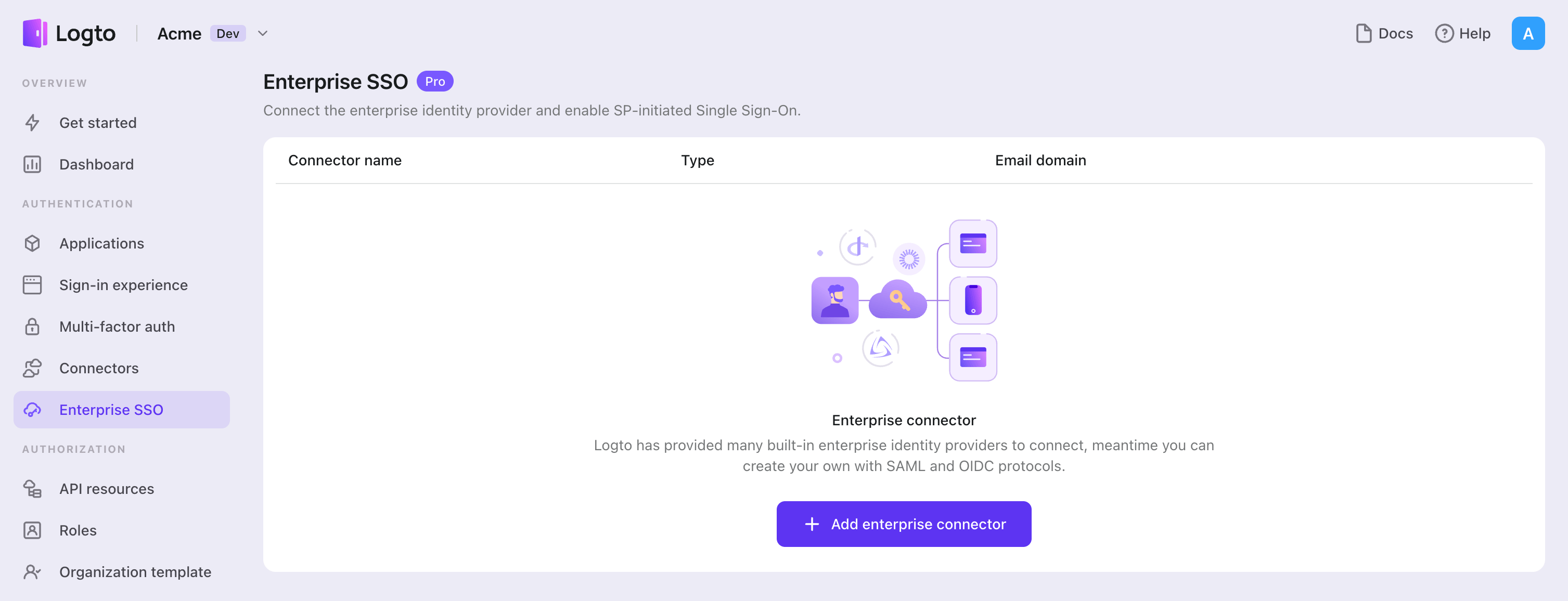
<li class="">Navigate to <span class="linkWrapper_B4Bt"><a href="https://cloud.logto.io/to/enterprise-sso" target="_blank" rel="noopener noreferrer" class="link_hf7f">Logto console &gt; Enterprise SSO<svg width="17" height="17" viewBox="0 0 17 17" fill="none" xmlns="http://www.w3.org/2000/svg" class="iconExternalLink_2l9O externalLink_ia3C"><path d="M12.422 7.54748C12.2452 7.54748 12.0757 7.61772 11.9506 7.74274C11.8256 7.86777 11.7554 8.03734 11.7554 8.21415V13.0008C11.7554 13.1776 11.6851 13.3472 11.5601 13.4722C11.4351 13.5972 11.2655 13.6675 11.0887 13.6675H3.75537C3.57856 13.6675 3.40899 13.5972 3.28397 13.4722C3.15894 13.3472 3.0887 13.1776 3.0887 13.0008V5.66748C3.0887 5.49067 3.15894 5.3211 3.28397 5.19608C3.40899 5.07105 3.57856 5.00081 3.75537 5.00081H8.54204C8.71885 5.00081 8.88842 4.93058 9.01344 4.80555C9.13847 4.68053 9.2087 4.51096 9.2087 4.33415C9.2087 4.15734 9.13847 3.98777 9.01344 3.86274C8.88842 3.73772 8.71885 3.66748 8.54204 3.66748H3.75537C3.22494 3.66748 2.71623 3.87819 2.34116 4.25327C1.96608 4.62834 1.75537 5.13705 1.75537 5.66748V13.0008C1.75537 13.5312 1.96608 14.04 2.34116 14.415C2.71623 14.7901 3.22494 15.0008 3.75537 15.0008H11.0887C11.6191 15.0008 12.1278 14.7901 12.5029 14.415C12.878 14.04 13.0887 13.5312 13.0887 13.0008V8.21415C13.0887 8.03734 13.0185 7.86777 12.8934 7.74274C12.7684 7.61772 12.5988 7.54748 12.422 7.54748ZM15.0354 2.08081C14.9677 1.91791 14.8383 1.78846 14.6754 1.72081C14.5952 1.68665 14.5092 1.66853 14.422 1.66748H10.422C10.2452 1.66748 10.0757 1.73772 9.95063 1.86274C9.82561 1.98777 9.75537 2.15734 9.75537 2.33415C9.75537 2.51096 9.82561 2.68053 9.95063 2.80555C10.0757 2.93058 10.2452 3.00081 10.422 3.00081H12.8154L5.9487 9.86081C5.88622 9.92279 5.83662 9.99652 5.80278 10.0778C5.76893 10.159 5.75151 10.2461 5.75151 10.3341C5.75151 10.4222 5.76893 10.5093 5.80278 10.5905C5.83662 10.6718 5.88622 10.7455 5.9487 10.8075C6.01068 10.87 6.08441 10.9196 6.16565 10.9534C6.24689 10.9873 6.33403 11.0047 6.42204 11.0047C6.51005 11.0047 6.59718 10.9873 6.67842 10.9534C6.75966 10.9196 6.8334 10.87 6.89537 10.8075L13.7554 3.94081V6.33415C13.7554 6.51096 13.8256 6.68053 13.9506 6.80555C14.0757 6.93058 14.2452 7.00081 14.422 7.00081C14.5988 7.00081 14.7684 6.93058 14.8934 6.80555C15.0185 6.68053 15.0887 6.51096 15.0887 6.33415V2.33415C15.0877 2.24703 15.0695 2.16096 15.0354 2.08081Z" fill="currentColor"></path></svg></a></span>.</li>
</ol>
<img src="https://renovate-major-eslint-monore.logto-docs-tutorials.pages.dev/img/tutorial/sso-page.png" alt="SSO page">
<ol start="2">
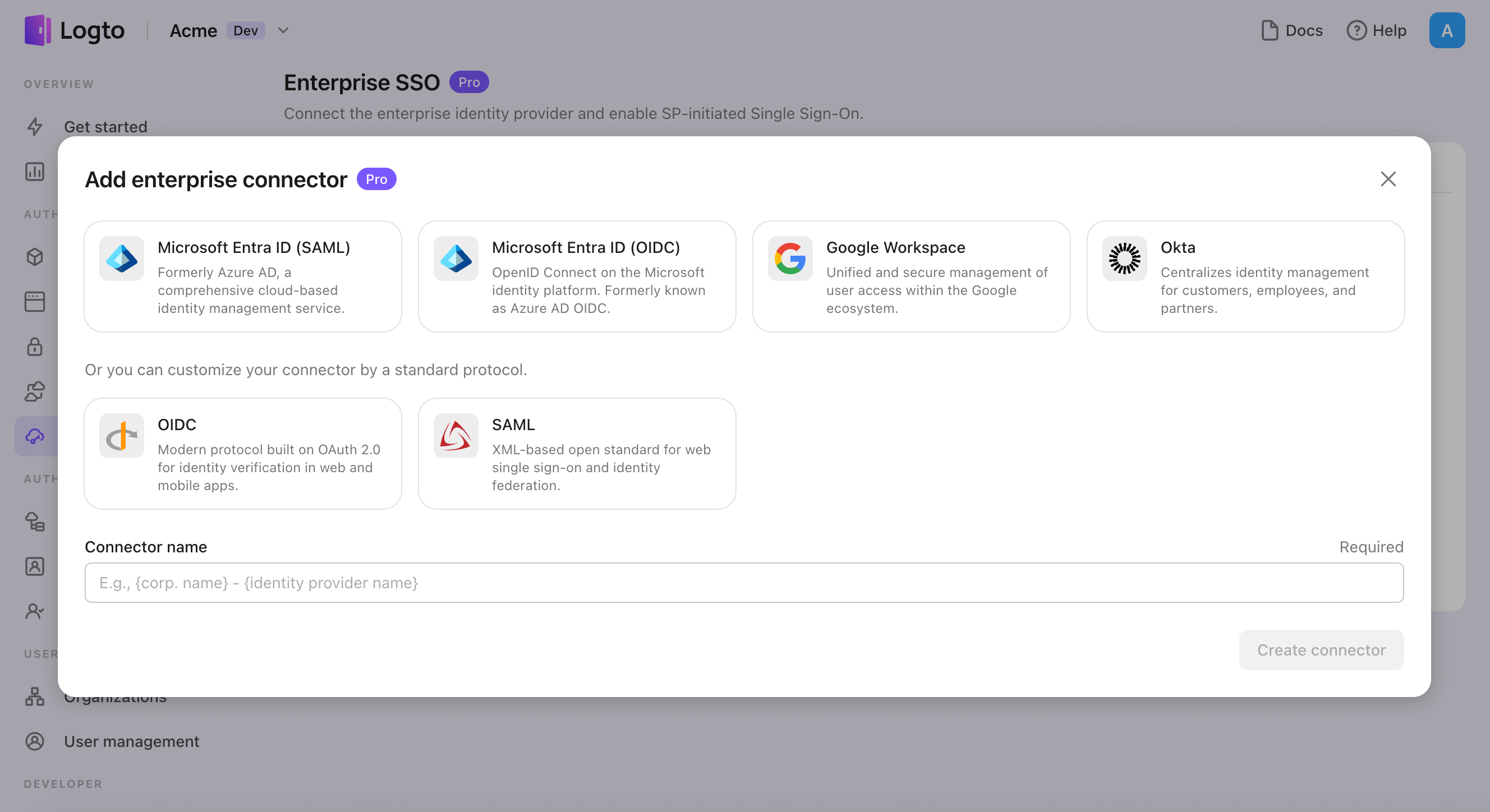
<li class="">Click "Add enterprise connector" button and choose your SSO provider type. Choose from prebuilt connectors for Microsoft Entra ID (Azure AD), Google Workspace, and Okta, or create a custom SSO connection using the standard OpenID Connect (OIDC) or SAML protocol.</li>
<li class="">Provide a unique name (e.g., SSO sign-in for Acme Company).</li>
</ol>
<img src="https://renovate-major-eslint-monore.logto-docs-tutorials.pages.dev/img/tutorial/select-your-sso-provider.png" alt="Select your SSO provider">
<ol start="4">
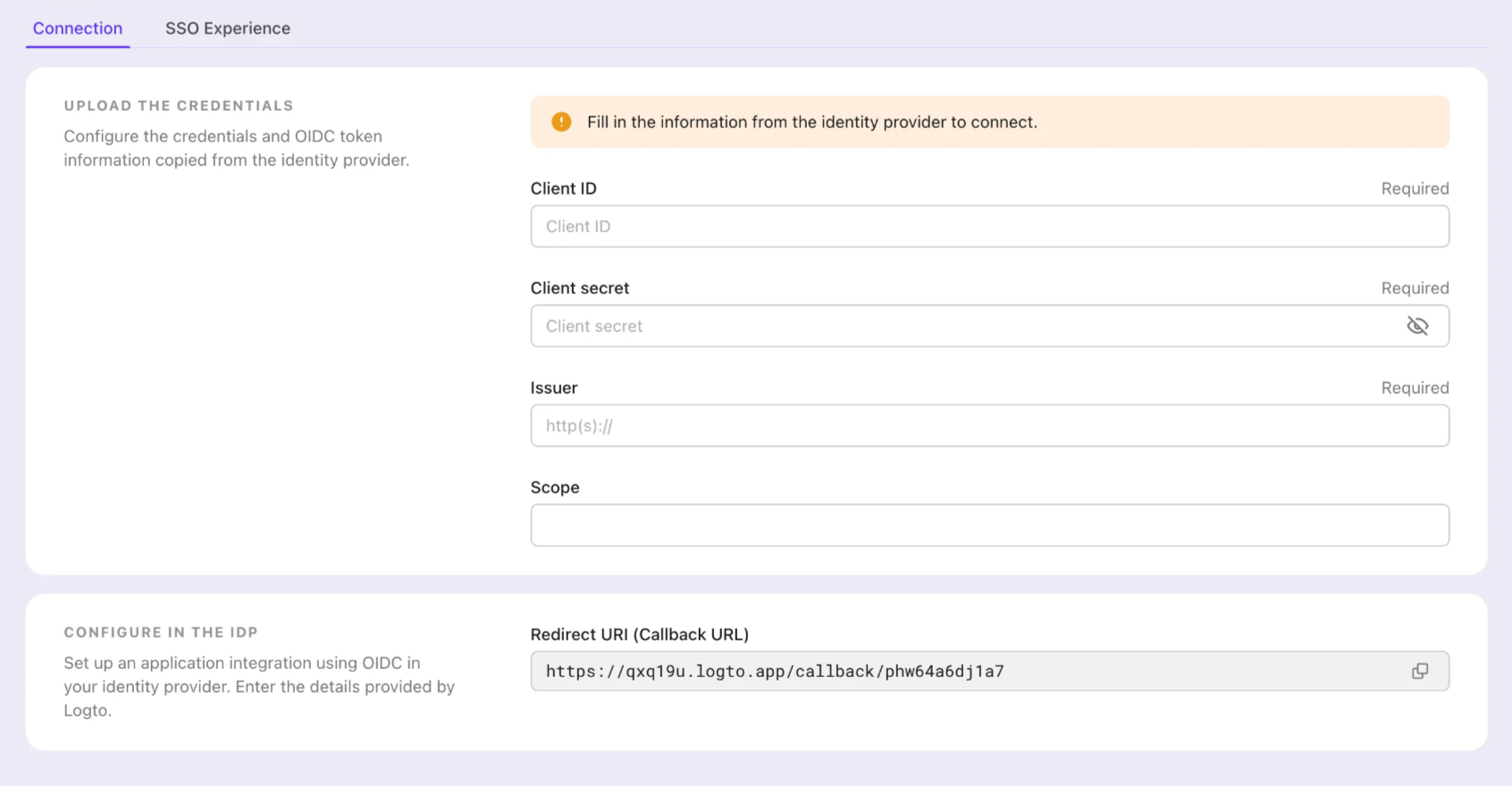
<li class="">Configure the connection with your IdP in the "Connection" tab. Check the guides above for each connector types.</li>
</ol>
<img src="https://renovate-major-eslint-monore.logto-docs-tutorials.pages.dev/img/tutorial/sso-connection-settings.png" alt="SSO connection">
<ol start="5">
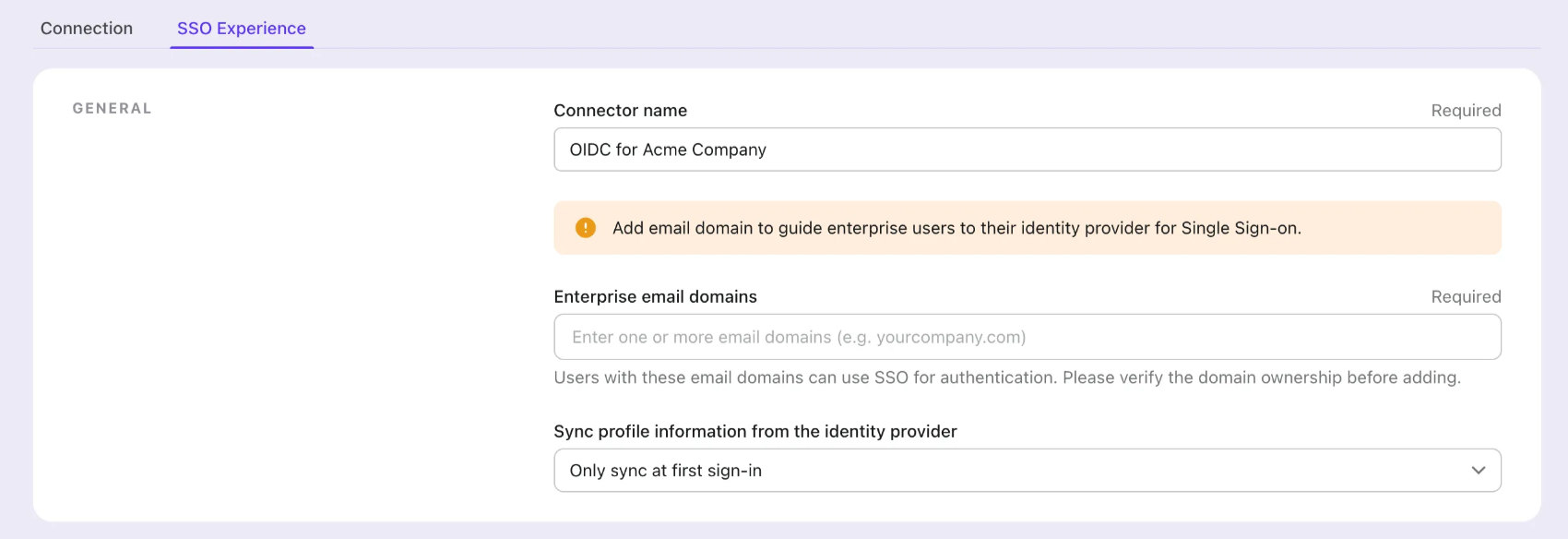
<li class="">Customize the SSO experience and enterprise’s <strong>email domain</strong> in the "Experience" tab. Users sign in with the SSO-enabled email domain will be redirected to SSO authentication.</li>
</ol>
<img src="https://renovate-major-eslint-monore.logto-docs-tutorials.pages.dev/img/tutorial/sso-experience-settings.png" alt="SSO experience">
<ol start="6">
<li class="">Save changes.</li>
</ol>
<h2 class="anchor anchorTargetStickyNavbar_HQdW" id="set-up-connectorconfigname">Set up Azure AD SSO application<a href="https://renovate-major-eslint-monore.logto-docs-tutorials.pages.dev/how-to/build-microsoft-entra-id-oidc-enterprise-sso-sign-in-with-expo-react-native-and-logto#set-up-connectorconfigname" class="hash-link" aria-label="Direct link to Set up Azure AD SSO application" title="Direct link to Set up Azure AD SSO application" translate="no">​</a></h2>
<h3 class="anchor anchorTargetStickyNavbar_HQdW" id="step-1-create-an-microsoft-entraid-oidc-application">Step 1: Create an Microsoft EntraID OIDC application<a href="https://renovate-major-eslint-monore.logto-docs-tutorials.pages.dev/how-to/build-microsoft-entra-id-oidc-enterprise-sso-sign-in-with-expo-react-native-and-logto#step-1-create-an-microsoft-entraid-oidc-application" class="hash-link" aria-label="Direct link to Step 1: Create an Microsoft EntraID OIDC application" title="Direct link to Step 1: Create an Microsoft EntraID OIDC application" translate="no">​</a></h3>
<ol>
<li class="">
<p>Go to the <span class="linkWrapper_B4Bt"><a href="https://entra.microsoft.com/" target="_blank" rel="noopener noreferrer" class="link_hf7f">Microsoft Entra admin center<svg width="17" height="17" viewBox="0 0 17 17" fill="none" xmlns="http://www.w3.org/2000/svg" class="iconExternalLink_2l9O externalLink_ia3C"><path d="M12.422 7.54748C12.2452 7.54748 12.0757 7.61772 11.9506 7.74274C11.8256 7.86777 11.7554 8.03734 11.7554 8.21415V13.0008C11.7554 13.1776 11.6851 13.3472 11.5601 13.4722C11.4351 13.5972 11.2655 13.6675 11.0887 13.6675H3.75537C3.57856 13.6675 3.40899 13.5972 3.28397 13.4722C3.15894 13.3472 3.0887 13.1776 3.0887 13.0008V5.66748C3.0887 5.49067 3.15894 5.3211 3.28397 5.19608C3.40899 5.07105 3.57856 5.00081 3.75537 5.00081H8.54204C8.71885 5.00081 8.88842 4.93058 9.01344 4.80555C9.13847 4.68053 9.2087 4.51096 9.2087 4.33415C9.2087 4.15734 9.13847 3.98777 9.01344 3.86274C8.88842 3.73772 8.71885 3.66748 8.54204 3.66748H3.75537C3.22494 3.66748 2.71623 3.87819 2.34116 4.25327C1.96608 4.62834 1.75537 5.13705 1.75537 5.66748V13.0008C1.75537 13.5312 1.96608 14.04 2.34116 14.415C2.71623 14.7901 3.22494 15.0008 3.75537 15.0008H11.0887C11.6191 15.0008 12.1278 14.7901 12.5029 14.415C12.878 14.04 13.0887 13.5312 13.0887 13.0008V8.21415C13.0887 8.03734 13.0185 7.86777 12.8934 7.74274C12.7684 7.61772 12.5988 7.54748 12.422 7.54748ZM15.0354 2.08081C14.9677 1.91791 14.8383 1.78846 14.6754 1.72081C14.5952 1.68665 14.5092 1.66853 14.422 1.66748H10.422C10.2452 1.66748 10.0757 1.73772 9.95063 1.86274C9.82561 1.98777 9.75537 2.15734 9.75537 2.33415C9.75537 2.51096 9.82561 2.68053 9.95063 2.80555C10.0757 2.93058 10.2452 3.00081 10.422 3.00081H12.8154L5.9487 9.86081C5.88622 9.92279 5.83662 9.99652 5.80278 10.0778C5.76893 10.159 5.75151 10.2461 5.75151 10.3341C5.75151 10.4222 5.76893 10.5093 5.80278 10.5905C5.83662 10.6718 5.88622 10.7455 5.9487 10.8075C6.01068 10.87 6.08441 10.9196 6.16565 10.9534C6.24689 10.9873 6.33403 11.0047 6.42204 11.0047C6.51005 11.0047 6.59718 10.9873 6.67842 10.9534C6.75966 10.9196 6.8334 10.87 6.89537 10.8075L13.7554 3.94081V6.33415C13.7554 6.51096 13.8256 6.68053 13.9506 6.80555C14.0757 6.93058 14.2452 7.00081 14.422 7.00081C14.5988 7.00081 14.7684 6.93058 14.8934 6.80555C15.0185 6.68053 15.0887 6.51096 15.0887 6.33415V2.33415C15.0877 2.24703 15.0695 2.16096 15.0354 2.08081Z" fill="currentColor"></path></svg></a></span> and sign in as an administrator.</p>
</li>
<li class="">
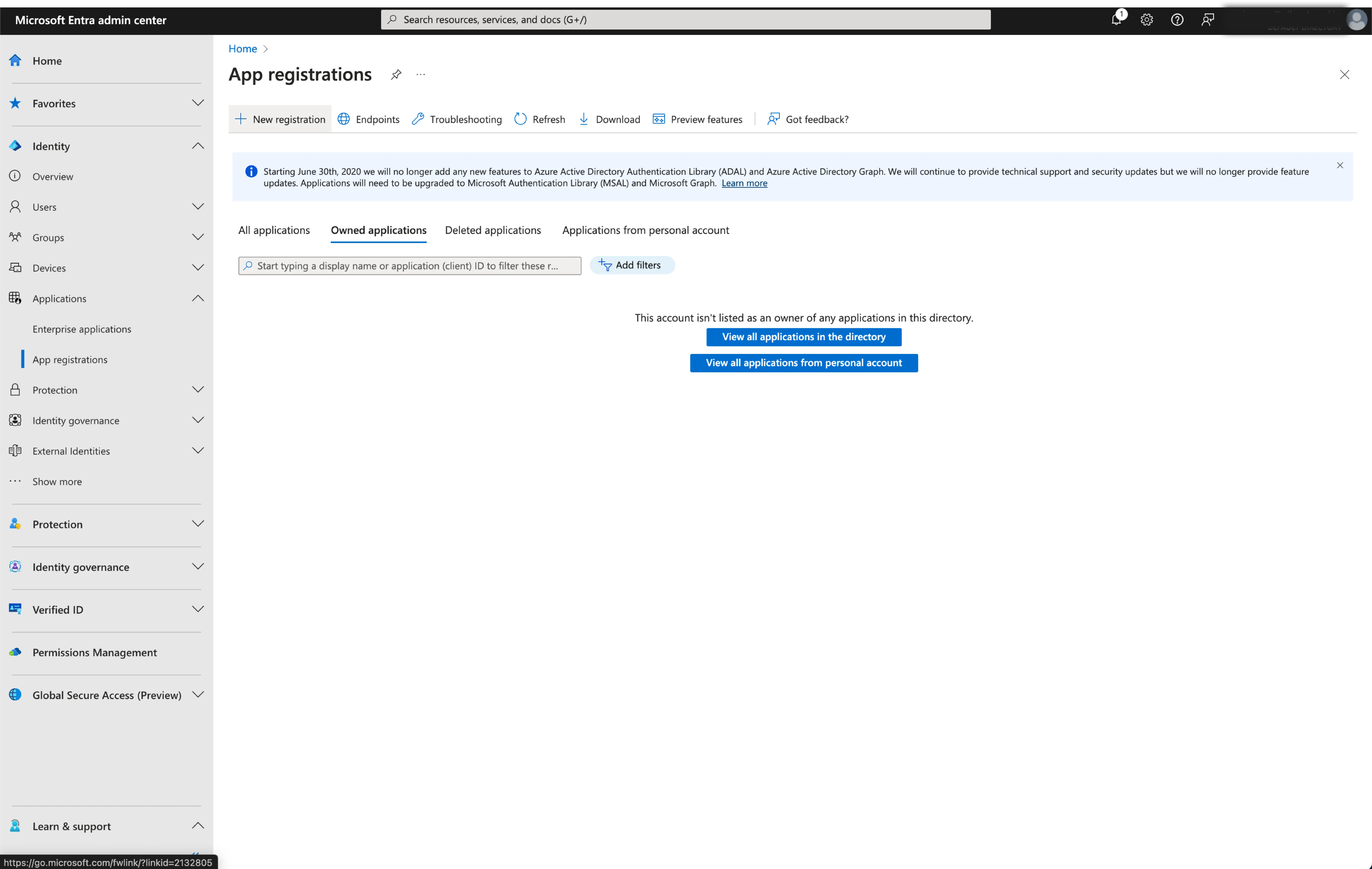
<p>Browse to Identity &gt; Applications &gt; App registrations.</p>
</li>
</ol>
<center><img src="https://renovate-major-eslint-monore.logto-docs-tutorials.pages.dev/img/assets/entra_id_oidc_create_application.webp" alt="Create Application"></center>
<ol start="3">
<li class="">
<p>Select <code>New registration</code>.</p>
</li>
<li class="">
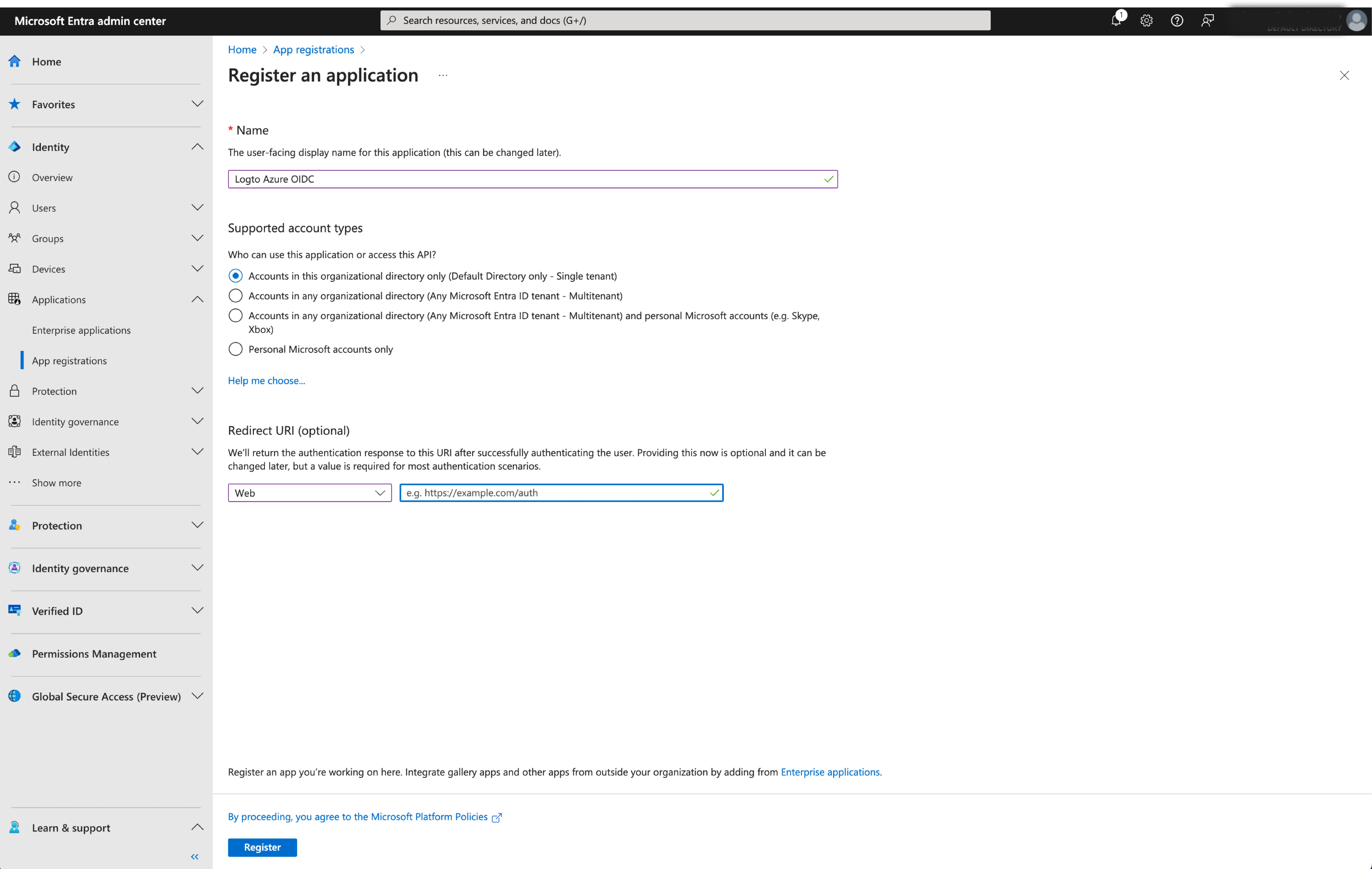
<p>Enter the application name and select the appropriate account type for your application.</p>
</li>
<li class="">
<p>Select <code>Web</code> as the application platform.</p>
</li>
<li class="">
<p>Copy and paste the <code>redirect URI</code> from Logto's SSO settings page. The <code>redirect URI</code> is the URL where the user is redirected after they have authenticated with Microsoft Entra ID.</p>
</li>
</ol>
<center><img src="https://renovate-major-eslint-monore.logto-docs-tutorials.pages.dev/img/assets/entra_id_oidc_config_application.webp" alt="Configure Application"></center>
<ol start="6">
<li class="">Click <code>Register</code> to create the application.</li>
</ol>
<h3 class="anchor anchorTargetStickyNavbar_HQdW" id="step-2-configure-microsoft-entra-id-oidc-sso-at-logto">Step 2: Configure Microsoft Entra ID OIDC SSO at Logto<a href="https://renovate-major-eslint-monore.logto-docs-tutorials.pages.dev/how-to/build-microsoft-entra-id-oidc-enterprise-sso-sign-in-with-expo-react-native-and-logto#step-2-configure-microsoft-entra-id-oidc-sso-at-logto" class="hash-link" aria-label="Direct link to Step 2: Configure Microsoft Entra ID OIDC SSO at Logto" title="Direct link to Step 2: Configure Microsoft Entra ID OIDC SSO at Logto" translate="no">​</a></h3>
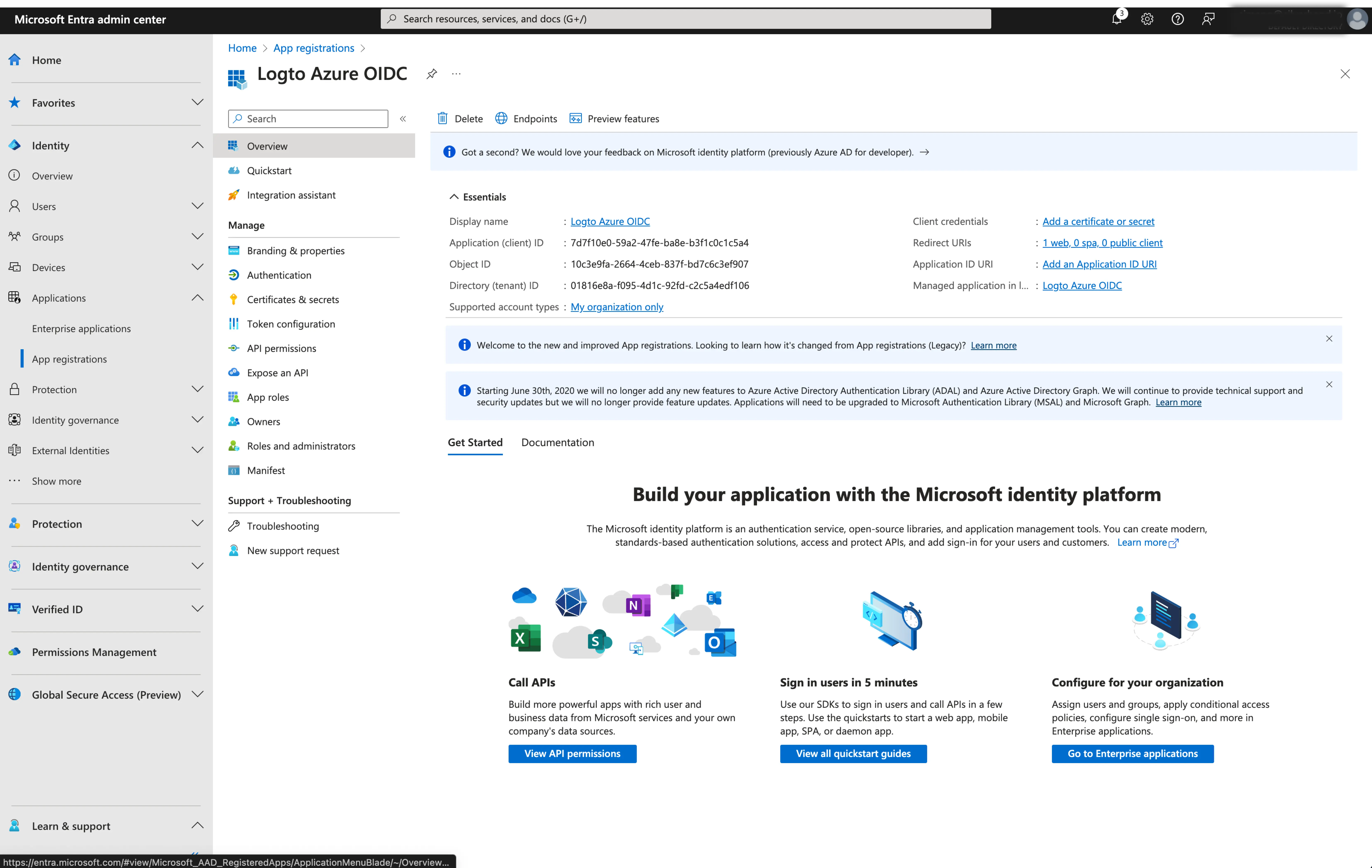
<p>After successfully creating an Microsoft Entra OIDC application, you will need to provide the IdP configurations back to Logto. Navigate to the <code>Connection</code> tab at Logto Console, and fill in the following configurations:</p>
<ol>
<li class=""><strong>Client ID</strong>: A unique identifier assigned to your OIDC application by the Microsoft Entra. This identifier is used by Logto to identify and authenticate the application during the OIDC flow. You can find it in the application overview page as <code>Application (client) ID</code>.</li>
</ol>
<center><img src="https://renovate-major-eslint-monore.logto-docs-tutorials.pages.dev/img/assets/entra_id_oidc_application_details.webp" alt="Application Details"></center>
<ol start="2">
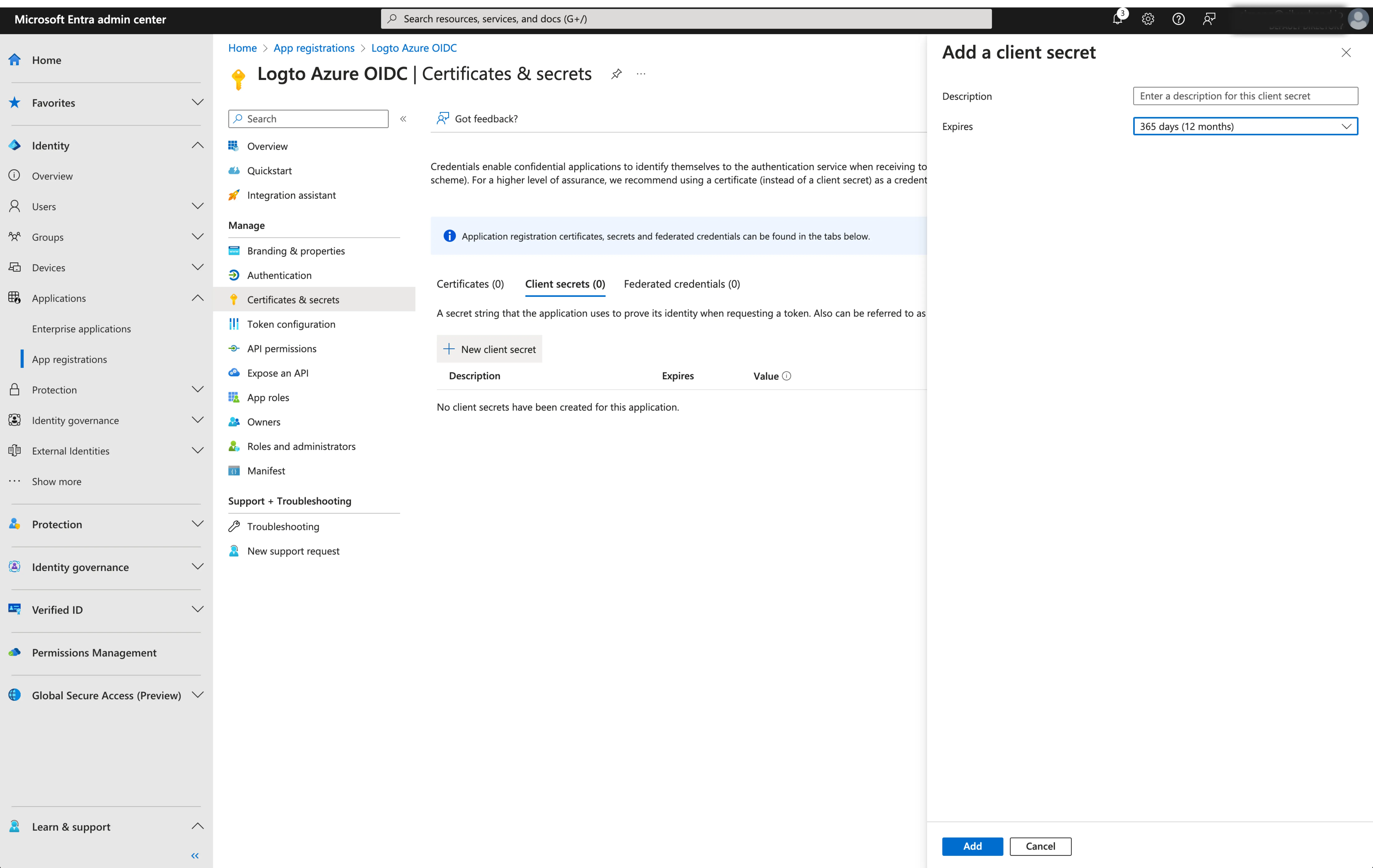
<li class=""><strong>Client Secret</strong>: Create a new client secret and copy the value to Logto. This secret is used to authenticate the OIDC application and secure the communication between Logto and the IdP.</li>
</ol>
<center><img src="https://renovate-major-eslint-monore.logto-docs-tutorials.pages.dev/img/assets/entra_id_oidc_create_secret.webp" alt="Create Secret"></center>
<ol start="3">
<li class="">
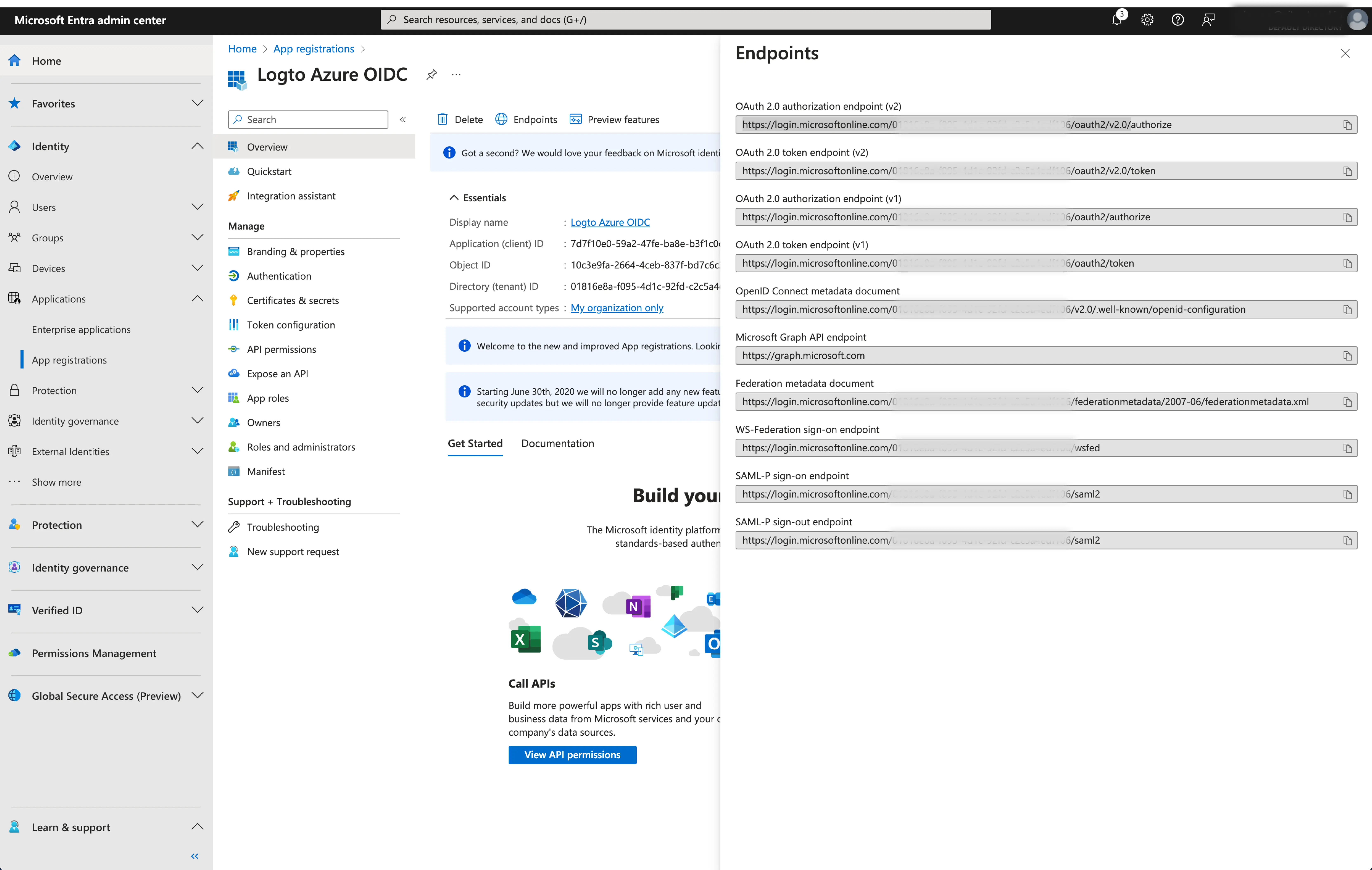
<p><strong>Issuer</strong>: The issuer URL, a unique identifier for the IdP, specifying the location where the OIDC identity provider can be found. It is a crucial part of the OIDC configuration as it helps Logto discover the necessary endpoints.</p>
<p>Instead of manually provide all these OIDC endpoints, Logto fetch all the required configurations and IdP endpoints automatically. This is done by utilizing the issuer url you provided and making a call to the IdP's discover endpoint.</p>
<p>To get the issuer URL, you can find it in the <code>Endpoints</code> section of the application overview page.</p>
<p>Locate the <code>OpenID Connect metadata document</code> endpoint and copy the URL <strong>WITHOUT</strong> the trailing path <code>.well-known/openid-configuration</code>. This is because Logto will automatically append the <code>.well-known/openid-configuration</code> to the issuer URL when fetching the OIDC configurations.</p>
</li>
</ol>
<center><img src="https://renovate-major-eslint-monore.logto-docs-tutorials.pages.dev/img/assets/entra_id_oidc_endpoints.webp" alt="Endpoints"></center>
<ol start="4">
<li class=""><strong>Scope</strong> (Optional): Logto automatically includes the required scopes (<code>openid</code>, <code>profile</code>, and <code>email</code>) in all requests. You can specify additional scopes as a space-separated list if your application requires extra permissions or access levels from the IdP.</li>
</ol>
<p>Click <code>Save</code> to finish the configuration process</p>
<h3 class="anchor anchorTargetStickyNavbar_HQdW" id="step-3-additional-scopes-optional">Step 3: Additional scopes (Optional)<a href="https://renovate-major-eslint-monore.logto-docs-tutorials.pages.dev/how-to/build-microsoft-entra-id-oidc-enterprise-sso-sign-in-with-expo-react-native-and-logto#step-3-additional-scopes-optional" class="hash-link" aria-label="Direct link to Step 3: Additional scopes (Optional)" title="Direct link to Step 3: Additional scopes (Optional)" translate="no">​</a></h3>
<p>Scopes define the permissions your app requests from users and control which data your app can access from their Microsoft Entra ID accounts. Requesting Microsoft Graph permissions requires configuration on both sides:</p>
<p><strong>In Microsoft Entra admin center:</strong></p>
<ol>
<li class="">Navigate to <strong>Microsoft Entra ID &gt; App registrations</strong> and select your application.</li>
<li class="">Go to <strong>API permissions &gt; Add a permission &gt; Microsoft Graph &gt; Delegated permissions</strong>.</li>
<li class="">Select only the permissions your app requires:<!-- -->
<ul>
<li class="">OpenID permissions:<!-- -->
<ul>
<li class=""><code>openid</code> (Required) - Sign users in</li>
<li class=""><code>profile</code> (Required) - View users' basic profile</li>
<li class=""><code>email</code> (Required) - View users' email address</li>
<li class=""><code>offline_access</code> (Optional) - Required only if you enable <span class="linkWrapper_B4Bt"><a href="https://renovate-major-eslint-monore.logto-docs-tutorials.pages.dev/how-to/build-microsoft-entra-id-oidc-enterprise-sso-sign-in-with-expo-react-native-and-logto#step-4-store-tokens-to-access-microsoft-apis-optional" class="link_hf7f">Store tokens for persistent API access</a></span> in the Logto connector and need to obtain refresh tokens for long-lived access to Microsoft Graph APIs.</li>
</ul>
</li>
<li class="">API access (Optional): Add any additional permissions needed for your app. Common Microsoft Graph permissions include <code>Mail.Read</code>, <code>Calendars.Read</code>, <code>Files.Read</code>, etc. Browse the <span class="linkWrapper_B4Bt"><a href="https://docs.microsoft.com/en-us/graph/permissions-reference" target="_blank" rel="noopener noreferrer" class="link_hf7f">Microsoft Graph permissions reference<svg width="17" height="17" viewBox="0 0 17 17" fill="none" xmlns="http://www.w3.org/2000/svg" class="iconExternalLink_2l9O externalLink_ia3C"><path d="M12.422 7.54748C12.2452 7.54748 12.0757 7.61772 11.9506 7.74274C11.8256 7.86777 11.7554 8.03734 11.7554 8.21415V13.0008C11.7554 13.1776 11.6851 13.3472 11.5601 13.4722C11.4351 13.5972 11.2655 13.6675 11.0887 13.6675H3.75537C3.57856 13.6675 3.40899 13.5972 3.28397 13.4722C3.15894 13.3472 3.0887 13.1776 3.0887 13.0008V5.66748C3.0887 5.49067 3.15894 5.3211 3.28397 5.19608C3.40899 5.07105 3.57856 5.00081 3.75537 5.00081H8.54204C8.71885 5.00081 8.88842 4.93058 9.01344 4.80555C9.13847 4.68053 9.2087 4.51096 9.2087 4.33415C9.2087 4.15734 9.13847 3.98777 9.01344 3.86274C8.88842 3.73772 8.71885 3.66748 8.54204 3.66748H3.75537C3.22494 3.66748 2.71623 3.87819 2.34116 4.25327C1.96608 4.62834 1.75537 5.13705 1.75537 5.66748V13.0008C1.75537 13.5312 1.96608 14.04 2.34116 14.415C2.71623 14.7901 3.22494 15.0008 3.75537 15.0008H11.0887C11.6191 15.0008 12.1278 14.7901 12.5029 14.415C12.878 14.04 13.0887 13.5312 13.0887 13.0008V8.21415C13.0887 8.03734 13.0185 7.86777 12.8934 7.74274C12.7684 7.61772 12.5988 7.54748 12.422 7.54748ZM15.0354 2.08081C14.9677 1.91791 14.8383 1.78846 14.6754 1.72081C14.5952 1.68665 14.5092 1.66853 14.422 1.66748H10.422C10.2452 1.66748 10.0757 1.73772 9.95063 1.86274C9.82561 1.98777 9.75537 2.15734 9.75537 2.33415C9.75537 2.51096 9.82561 2.68053 9.95063 2.80555C10.0757 2.93058 10.2452 3.00081 10.422 3.00081H12.8154L5.9487 9.86081C5.88622 9.92279 5.83662 9.99652 5.80278 10.0778C5.76893 10.159 5.75151 10.2461 5.75151 10.3341C5.75151 10.4222 5.76893 10.5093 5.80278 10.5905C5.83662 10.6718 5.88622 10.7455 5.9487 10.8075C6.01068 10.87 6.08441 10.9196 6.16565 10.9534C6.24689 10.9873 6.33403 11.0047 6.42204 11.0047C6.51005 11.0047 6.59718 10.9873 6.67842 10.9534C6.75966 10.9196 6.8334 10.87 6.89537 10.8075L13.7554 3.94081V6.33415C13.7554 6.51096 13.8256 6.68053 13.9506 6.80555C14.0757 6.93058 14.2452 7.00081 14.422 7.00081C14.5988 7.00081 14.7684 6.93058 14.8934 6.80555C15.0185 6.68053 15.0887 6.51096 15.0887 6.33415V2.33415C15.0877 2.24703 15.0695 2.16096 15.0354 2.08081Z" fill="currentColor"></path></svg></a></span> to find available permissions.</li>
</ul>
</li>
<li class="">Click <strong>Add permissions</strong> to confirm the selection.</li>
<li class="">If your app requires admin consent for certain permissions, click <strong>Grant admin consent for [Your Organization]</strong>.</li>
</ol>
<center><img src="https://renovate-major-eslint-monore.logto-docs-tutorials.pages.dev/img/assets/entra_id_oidc_add_api_permissions.webp" alt="Add Microsoft API permissions"></center>
<p><strong>In Logto Microsoft Entra ID connector:</strong></p>
<ol>
<li class="">Logto automatically includes <code>openid</code>, <code>profile</code>, and <code>email</code> scopes to retrieve basic user identity information. You can leave the <code>Scopes</code> field blank if you only need basic user information.</li>
<li class="">Add <code>offline_access</code> to the <code>Scopes</code> field if you plan to store tokens for persistent API access. This scope enables refresh tokens for long-lived API access.</li>
<li class="">Add additional scopes (separated by spaces) in the <code>Scopes</code> field to request more data from Microsoft Graph. Use standard scope names, for example: <code>User.Read Mail.Read Calendars.Read</code></li>
</ol>
<div class="theme-admonition theme-admonition-tip admonition_Gfwi alert alert--success"><div class="admonitionContent_UjKb"><div class="content_hlIx"><span class="title_towL" data-type="title">tip<!-- -->:</span><p>If your app requests these scopes to access the Microsoft Graph API and perform actions, make sure to enable <strong>Store tokens for persistent API access</strong> in Logto Microsoft Entra ID connector. See the next section for details.</p></div></div></div>
<h3 class="anchor anchorTargetStickyNavbar_HQdW" id="step-4-store-tokens-to-access-microsoft-apis-optional">Step 4: Store tokens to access Microsoft APIs (Optional)<a href="https://renovate-major-eslint-monore.logto-docs-tutorials.pages.dev/how-to/build-microsoft-entra-id-oidc-enterprise-sso-sign-in-with-expo-react-native-and-logto#step-4-store-tokens-to-access-microsoft-apis-optional" class="hash-link" aria-label="Direct link to Step 4: Store tokens to access Microsoft APIs (Optional)" title="Direct link to Step 4: Store tokens to access Microsoft APIs (Optional)" translate="no">​</a></h3>
<p>If you want to access <span class="linkWrapper_B4Bt"><a href="https://docs.microsoft.com/en-us/graph/api/overview" target="_blank" rel="noopener noreferrer" class="link_hf7f">Microsoft Graph APIs<svg width="17" height="17" viewBox="0 0 17 17" fill="none" xmlns="http://www.w3.org/2000/svg" class="iconExternalLink_2l9O externalLink_ia3C"><path d="M12.422 7.54748C12.2452 7.54748 12.0757 7.61772 11.9506 7.74274C11.8256 7.86777 11.7554 8.03734 11.7554 8.21415V13.0008C11.7554 13.1776 11.6851 13.3472 11.5601 13.4722C11.4351 13.5972 11.2655 13.6675 11.0887 13.6675H3.75537C3.57856 13.6675 3.40899 13.5972 3.28397 13.4722C3.15894 13.3472 3.0887 13.1776 3.0887 13.0008V5.66748C3.0887 5.49067 3.15894 5.3211 3.28397 5.19608C3.40899 5.07105 3.57856 5.00081 3.75537 5.00081H8.54204C8.71885 5.00081 8.88842 4.93058 9.01344 4.80555C9.13847 4.68053 9.2087 4.51096 9.2087 4.33415C9.2087 4.15734 9.13847 3.98777 9.01344 3.86274C8.88842 3.73772 8.71885 3.66748 8.54204 3.66748H3.75537C3.22494 3.66748 2.71623 3.87819 2.34116 4.25327C1.96608 4.62834 1.75537 5.13705 1.75537 5.66748V13.0008C1.75537 13.5312 1.96608 14.04 2.34116 14.415C2.71623 14.7901 3.22494 15.0008 3.75537 15.0008H11.0887C11.6191 15.0008 12.1278 14.7901 12.5029 14.415C12.878 14.04 13.0887 13.5312 13.0887 13.0008V8.21415C13.0887 8.03734 13.0185 7.86777 12.8934 7.74274C12.7684 7.61772 12.5988 7.54748 12.422 7.54748ZM15.0354 2.08081C14.9677 1.91791 14.8383 1.78846 14.6754 1.72081C14.5952 1.68665 14.5092 1.66853 14.422 1.66748H10.422C10.2452 1.66748 10.0757 1.73772 9.95063 1.86274C9.82561 1.98777 9.75537 2.15734 9.75537 2.33415C9.75537 2.51096 9.82561 2.68053 9.95063 2.80555C10.0757 2.93058 10.2452 3.00081 10.422 3.00081H12.8154L5.9487 9.86081C5.88622 9.92279 5.83662 9.99652 5.80278 10.0778C5.76893 10.159 5.75151 10.2461 5.75151 10.3341C5.75151 10.4222 5.76893 10.5093 5.80278 10.5905C5.83662 10.6718 5.88622 10.7455 5.9487 10.8075C6.01068 10.87 6.08441 10.9196 6.16565 10.9534C6.24689 10.9873 6.33403 11.0047 6.42204 11.0047C6.51005 11.0047 6.59718 10.9873 6.67842 10.9534C6.75966 10.9196 6.8334 10.87 6.89537 10.8075L13.7554 3.94081V6.33415C13.7554 6.51096 13.8256 6.68053 13.9506 6.80555C14.0757 6.93058 14.2452 7.00081 14.422 7.00081C14.5988 7.00081 14.7684 6.93058 14.8934 6.80555C15.0185 6.68053 15.0887 6.51096 15.0887 6.33415V2.33415C15.0877 2.24703 15.0695 2.16096 15.0354 2.08081Z" fill="currentColor"></path></svg></a></span> and perform actions with user authorization, Logto needs to get specific API scopes and store tokens.</p>
<ol>
<li class="">Add the required scopes in your Microsoft Entra admin center API permissions configuration and Logto Microsoft Entra ID connector.</li>
<li class="">Enable <strong>Store tokens for persistent API access</strong> in Logto Microsoft Entra ID connector. Logto will securely store Microsoft access and refresh tokens in the Secret Vault.</li>
<li class="">To ensure refresh tokens are returned, add the <code>offline_access</code> scope to your Microsoft Entra ID application permissions and include it in your Logto Microsoft Entra ID connector scopes. This scope allows your application to maintain access to resources for extended periods.</li>
</ol>
<h3 class="anchor anchorTargetStickyNavbar_HQdW" id="step-5-set-email-domains-and-enable-the-sso-connector">Step 5: Set email domains and enable the SSO connector<a href="https://renovate-major-eslint-monore.logto-docs-tutorials.pages.dev/how-to/build-microsoft-entra-id-oidc-enterprise-sso-sign-in-with-expo-react-native-and-logto#step-5-set-email-domains-and-enable-the-sso-connector" class="hash-link" aria-label="Direct link to Step 5: Set email domains and enable the SSO connector" title="Direct link to Step 5: Set email domains and enable the SSO connector" translate="no">​</a></h3>
<p>Provide the email <code>domains</code> of your organization on the connector <code>experience</code> tab. This will enable the SSO connector as an authentication method for those users.</p>
<p>Users with email addresses in the specified domains will be exclusively limited to use your SSO connector as their only authentication method.</p>
<h3 class="anchor anchorTargetStickyNavbar_HQdW" id="save-your-configuration">Save your configuration<a href="https://renovate-major-eslint-monore.logto-docs-tutorials.pages.dev/how-to/build-microsoft-entra-id-oidc-enterprise-sso-sign-in-with-expo-react-native-and-logto#save-your-configuration" class="hash-link" aria-label="Direct link to Save your configuration" title="Direct link to Save your configuration" translate="no">​</a></h3>
<p>Double check you have filled out necessary values in the Logto connector configuration area. Click
"Save and Done" (or "Save changes") and the <!-- -->Microsoft Entra ID OIDC enterprise SSO<!-- --> connector should be available now.</p>
<h2 class="anchor anchorTargetStickyNavbar_HQdW" id="enable-connector-connector-in-sign-in-experience">Enable Microsoft Entra ID OIDC enterprise SSO connector in Sign-in Experience<a href="https://renovate-major-eslint-monore.logto-docs-tutorials.pages.dev/how-to/build-microsoft-entra-id-oidc-enterprise-sso-sign-in-with-expo-react-native-and-logto#enable-connector-connector-in-sign-in-experience" class="hash-link" aria-label="Direct link to Enable Microsoft Entra ID OIDC enterprise SSO connector in Sign-in Experience" title="Direct link to Enable Microsoft Entra ID OIDC enterprise SSO connector in Sign-in Experience" translate="no">​</a></h2>
<p>You don’t need to configure enterprise connectors individually, Logto simplifies SSO integration into your applications with just one click.</p>
<ol>
<li class="">Navigate to: <span class="linkWrapper_B4Bt"><a href="https://cloud.logto.io/to/sign-in-experience/sign-up-and-sign-in" target="_blank" rel="noopener noreferrer" class="link_hf7f">Console &gt; Sign-in &amp; account &gt; Sign-up and sign-in<svg width="17" height="17" viewBox="0 0 17 17" fill="none" xmlns="http://www.w3.org/2000/svg" class="iconExternalLink_2l9O externalLink_ia3C"><path d="M12.422 7.54748C12.2452 7.54748 12.0757 7.61772 11.9506 7.74274C11.8256 7.86777 11.7554 8.03734 11.7554 8.21415V13.0008C11.7554 13.1776 11.6851 13.3472 11.5601 13.4722C11.4351 13.5972 11.2655 13.6675 11.0887 13.6675H3.75537C3.57856 13.6675 3.40899 13.5972 3.28397 13.4722C3.15894 13.3472 3.0887 13.1776 3.0887 13.0008V5.66748C3.0887 5.49067 3.15894 5.3211 3.28397 5.19608C3.40899 5.07105 3.57856 5.00081 3.75537 5.00081H8.54204C8.71885 5.00081 8.88842 4.93058 9.01344 4.80555C9.13847 4.68053 9.2087 4.51096 9.2087 4.33415C9.2087 4.15734 9.13847 3.98777 9.01344 3.86274C8.88842 3.73772 8.71885 3.66748 8.54204 3.66748H3.75537C3.22494 3.66748 2.71623 3.87819 2.34116 4.25327C1.96608 4.62834 1.75537 5.13705 1.75537 5.66748V13.0008C1.75537 13.5312 1.96608 14.04 2.34116 14.415C2.71623 14.7901 3.22494 15.0008 3.75537 15.0008H11.0887C11.6191 15.0008 12.1278 14.7901 12.5029 14.415C12.878 14.04 13.0887 13.5312 13.0887 13.0008V8.21415C13.0887 8.03734 13.0185 7.86777 12.8934 7.74274C12.7684 7.61772 12.5988 7.54748 12.422 7.54748ZM15.0354 2.08081C14.9677 1.91791 14.8383 1.78846 14.6754 1.72081C14.5952 1.68665 14.5092 1.66853 14.422 1.66748H10.422C10.2452 1.66748 10.0757 1.73772 9.95063 1.86274C9.82561 1.98777 9.75537 2.15734 9.75537 2.33415C9.75537 2.51096 9.82561 2.68053 9.95063 2.80555C10.0757 2.93058 10.2452 3.00081 10.422 3.00081H12.8154L5.9487 9.86081C5.88622 9.92279 5.83662 9.99652 5.80278 10.0778C5.76893 10.159 5.75151 10.2461 5.75151 10.3341C5.75151 10.4222 5.76893 10.5093 5.80278 10.5905C5.83662 10.6718 5.88622 10.7455 5.9487 10.8075C6.01068 10.87 6.08441 10.9196 6.16565 10.9534C6.24689 10.9873 6.33403 11.0047 6.42204 11.0047C6.51005 11.0047 6.59718 10.9873 6.67842 10.9534C6.75966 10.9196 6.8334 10.87 6.89537 10.8075L13.7554 3.94081V6.33415C13.7554 6.51096 13.8256 6.68053 13.9506 6.80555C14.0757 6.93058 14.2452 7.00081 14.422 7.00081C14.5988 7.00081 14.7684 6.93058 14.8934 6.80555C15.0185 6.68053 15.0887 6.51096 15.0887 6.33415V2.33415C15.0877 2.24703 15.0695 2.16096 15.0354 2.08081Z" fill="currentColor"></path></svg></a></span>.</li>
<li class="">Enable the "Enterprise SSO" toggle.</li>
<li class="">Save changes.</li>
</ol>
<p>Once enabled, a "Single Sign-On" button will appear on your sign-in page. Enterprise users with SSO-enabled email domains can access your services using their enterprise identity providers (IdPs).</p>
<img src="https://renovate-major-eslint-monore.logto-docs-tutorials.pages.dev/img/tutorial/sso-email-auto-navigation.png" alt="Auto detect SSO sign-in via email domain">
<img src="https://renovate-major-eslint-monore.logto-docs-tutorials.pages.dev/img/tutorial/sso-link-button-navigation.png" alt="Navigate to SSO sign-in via manually click link button">
<p>To learn more about the SSO user experience, including SP-initiated SSO and IdP-initiated SSO, refer to User flows: <span class="linkWrapper_B4Bt"><a href="https://docs.logto.io/end-user-flows/enterprise-sso" target="_blank" rel="noopener noreferrer" class="link_hf7f"><svg xmlns="http://www.w3.org/2000/svg" width="20" height="20" fill="none" viewBox="0 0 20 20"><path fill="currentColor" d="m8.49 14.129-1.302 1.265a1.82 1.82 0 0 1-2.574-2.575l3.34-3.347a1.81 1.81 0 0 1 2.493-.066l.089.073a.736.736 0 1 0 1.03-1.052 2 2 0 0 0-.133-.154 3.28 3.28 0 0 0-4.48.162l-3.384 3.347a3.296 3.296 0 0 0 4.657 4.657l1.272-1.244A.736.736 0 0 0 8.49 14.13m7.865-10.476a3.303 3.303 0 0 0-4.657 0l-1.273 1.243a.736.736 0 0 0 1.008 1.067l1.273-1.265a1.82 1.82 0 1 1 2.575 2.574l-3.34 3.348a1.81 1.81 0 0 1-2.494.066l-.088-.074a.736.736 0 1 0-1.03 1.052q.08.083.169.155a3.29 3.29 0 0 0 4.48-.162l3.347-3.347a3.303 3.303 0 0 0 .03-4.657"></path></svg>Enterprise SSO<svg width="17" height="17" viewBox="0 0 17 17" fill="none" xmlns="http://www.w3.org/2000/svg" class="iconExternalLink_2l9O externalLink_ia3C"><path d="M12.422 7.54748C12.2452 7.54748 12.0757 7.61772 11.9506 7.74274C11.8256 7.86777 11.7554 8.03734 11.7554 8.21415V13.0008C11.7554 13.1776 11.6851 13.3472 11.5601 13.4722C11.4351 13.5972 11.2655 13.6675 11.0887 13.6675H3.75537C3.57856 13.6675 3.40899 13.5972 3.28397 13.4722C3.15894 13.3472 3.0887 13.1776 3.0887 13.0008V5.66748C3.0887 5.49067 3.15894 5.3211 3.28397 5.19608C3.40899 5.07105 3.57856 5.00081 3.75537 5.00081H8.54204C8.71885 5.00081 8.88842 4.93058 9.01344 4.80555C9.13847 4.68053 9.2087 4.51096 9.2087 4.33415C9.2087 4.15734 9.13847 3.98777 9.01344 3.86274C8.88842 3.73772 8.71885 3.66748 8.54204 3.66748H3.75537C3.22494 3.66748 2.71623 3.87819 2.34116 4.25327C1.96608 4.62834 1.75537 5.13705 1.75537 5.66748V13.0008C1.75537 13.5312 1.96608 14.04 2.34116 14.415C2.71623 14.7901 3.22494 15.0008 3.75537 15.0008H11.0887C11.6191 15.0008 12.1278 14.7901 12.5029 14.415C12.878 14.04 13.0887 13.5312 13.0887 13.0008V8.21415C13.0887 8.03734 13.0185 7.86777 12.8934 7.74274C12.7684 7.61772 12.5988 7.54748 12.422 7.54748ZM15.0354 2.08081C14.9677 1.91791 14.8383 1.78846 14.6754 1.72081C14.5952 1.68665 14.5092 1.66853 14.422 1.66748H10.422C10.2452 1.66748 10.0757 1.73772 9.95063 1.86274C9.82561 1.98777 9.75537 2.15734 9.75537 2.33415C9.75537 2.51096 9.82561 2.68053 9.95063 2.80555C10.0757 2.93058 10.2452 3.00081 10.422 3.00081H12.8154L5.9487 9.86081C5.88622 9.92279 5.83662 9.99652 5.80278 10.0778C5.76893 10.159 5.75151 10.2461 5.75151 10.3341C5.75151 10.4222 5.76893 10.5093 5.80278 10.5905C5.83662 10.6718 5.88622 10.7455 5.9487 10.8075C6.01068 10.87 6.08441 10.9196 6.16565 10.9534C6.24689 10.9873 6.33403 11.0047 6.42204 11.0047C6.51005 11.0047 6.59718 10.9873 6.67842 10.9534C6.75966 10.9196 6.8334 10.87 6.89537 10.8075L13.7554 3.94081V6.33415C13.7554 6.51096 13.8256 6.68053 13.9506 6.80555C14.0757 6.93058 14.2452 7.00081 14.422 7.00081C14.5988 7.00081 14.7684 6.93058 14.8934 6.80555C15.0185 6.68053 15.0887 6.51096 15.0887 6.33415V2.33415C15.0877 2.24703 15.0695 2.16096 15.0354 2.08081Z" fill="currentColor"></path></svg></a></span>.</p>
<h2 class="anchor anchorTargetStickyNavbar_HQdW" id="testing-and-validation">Testing and Validation<a href="https://renovate-major-eslint-monore.logto-docs-tutorials.pages.dev/how-to/build-microsoft-entra-id-oidc-enterprise-sso-sign-in-with-expo-react-native-and-logto#testing-and-validation" class="hash-link" aria-label="Direct link to Testing and Validation" title="Direct link to Testing and Validation" translate="no">​</a></h2>
<p>Return to your <!-- -->Expo (React Native)<!-- --> app. You should now be able to sign in with <!-- -->Microsoft Entra ID OIDC enterprise SSO<!-- -->. Enjoy!</p>
<h2 class="anchor anchorTargetStickyNavbar_HQdW" id="further-readings">Further readings<a href="https://renovate-major-eslint-monore.logto-docs-tutorials.pages.dev/how-to/build-microsoft-entra-id-oidc-enterprise-sso-sign-in-with-expo-react-native-and-logto#further-readings" class="hash-link" aria-label="Direct link to Further readings" title="Direct link to Further readings" translate="no">​</a></h2>
<p><span class="linkWrapper_B4Bt"><a href="https://docs.logto.io/end-user-flows" target="_blank" rel="noopener noreferrer" class="link_hf7f">End-user flows<svg width="17" height="17" viewBox="0 0 17 17" fill="none" xmlns="http://www.w3.org/2000/svg" class="iconExternalLink_2l9O externalLink_ia3C"><path d="M12.422 7.54748C12.2452 7.54748 12.0757 7.61772 11.9506 7.74274C11.8256 7.86777 11.7554 8.03734 11.7554 8.21415V13.0008C11.7554 13.1776 11.6851 13.3472 11.5601 13.4722C11.4351 13.5972 11.2655 13.6675 11.0887 13.6675H3.75537C3.57856 13.6675 3.40899 13.5972 3.28397 13.4722C3.15894 13.3472 3.0887 13.1776 3.0887 13.0008V5.66748C3.0887 5.49067 3.15894 5.3211 3.28397 5.19608C3.40899 5.07105 3.57856 5.00081 3.75537 5.00081H8.54204C8.71885 5.00081 8.88842 4.93058 9.01344 4.80555C9.13847 4.68053 9.2087 4.51096 9.2087 4.33415C9.2087 4.15734 9.13847 3.98777 9.01344 3.86274C8.88842 3.73772 8.71885 3.66748 8.54204 3.66748H3.75537C3.22494 3.66748 2.71623 3.87819 2.34116 4.25327C1.96608 4.62834 1.75537 5.13705 1.75537 5.66748V13.0008C1.75537 13.5312 1.96608 14.04 2.34116 14.415C2.71623 14.7901 3.22494 15.0008 3.75537 15.0008H11.0887C11.6191 15.0008 12.1278 14.7901 12.5029 14.415C12.878 14.04 13.0887 13.5312 13.0887 13.0008V8.21415C13.0887 8.03734 13.0185 7.86777 12.8934 7.74274C12.7684 7.61772 12.5988 7.54748 12.422 7.54748ZM15.0354 2.08081C14.9677 1.91791 14.8383 1.78846 14.6754 1.72081C14.5952 1.68665 14.5092 1.66853 14.422 1.66748H10.422C10.2452 1.66748 10.0757 1.73772 9.95063 1.86274C9.82561 1.98777 9.75537 2.15734 9.75537 2.33415C9.75537 2.51096 9.82561 2.68053 9.95063 2.80555C10.0757 2.93058 10.2452 3.00081 10.422 3.00081H12.8154L5.9487 9.86081C5.88622 9.92279 5.83662 9.99652 5.80278 10.0778C5.76893 10.159 5.75151 10.2461 5.75151 10.3341C5.75151 10.4222 5.76893 10.5093 5.80278 10.5905C5.83662 10.6718 5.88622 10.7455 5.9487 10.8075C6.01068 10.87 6.08441 10.9196 6.16565 10.9534C6.24689 10.9873 6.33403 11.0047 6.42204 11.0047C6.51005 11.0047 6.59718 10.9873 6.67842 10.9534C6.75966 10.9196 6.8334 10.87 6.89537 10.8075L13.7554 3.94081V6.33415C13.7554 6.51096 13.8256 6.68053 13.9506 6.80555C14.0757 6.93058 14.2452 7.00081 14.422 7.00081C14.5988 7.00081 14.7684 6.93058 14.8934 6.80555C15.0185 6.68053 15.0887 6.51096 15.0887 6.33415V2.33415C15.0877 2.24703 15.0695 2.16096 15.0354 2.08081Z" fill="currentColor"></path></svg></a></span>: Logto provides a out-of-the-box authentication flows including MFA and enterprise SSO, along with powerful APIs for flexible implementation of account settings, security verification, and multi-tenant experience.</p>
<p><span class="linkWrapper_B4Bt"><a href="https://docs.logto.io/authorization" target="_blank" rel="noopener noreferrer" class="link_hf7f">Authorization<svg width="17" height="17" viewBox="0 0 17 17" fill="none" xmlns="http://www.w3.org/2000/svg" class="iconExternalLink_2l9O externalLink_ia3C"><path d="M12.422 7.54748C12.2452 7.54748 12.0757 7.61772 11.9506 7.74274C11.8256 7.86777 11.7554 8.03734 11.7554 8.21415V13.0008C11.7554 13.1776 11.6851 13.3472 11.5601 13.4722C11.4351 13.5972 11.2655 13.6675 11.0887 13.6675H3.75537C3.57856 13.6675 3.40899 13.5972 3.28397 13.4722C3.15894 13.3472 3.0887 13.1776 3.0887 13.0008V5.66748C3.0887 5.49067 3.15894 5.3211 3.28397 5.19608C3.40899 5.07105 3.57856 5.00081 3.75537 5.00081H8.54204C8.71885 5.00081 8.88842 4.93058 9.01344 4.80555C9.13847 4.68053 9.2087 4.51096 9.2087 4.33415C9.2087 4.15734 9.13847 3.98777 9.01344 3.86274C8.88842 3.73772 8.71885 3.66748 8.54204 3.66748H3.75537C3.22494 3.66748 2.71623 3.87819 2.34116 4.25327C1.96608 4.62834 1.75537 5.13705 1.75537 5.66748V13.0008C1.75537 13.5312 1.96608 14.04 2.34116 14.415C2.71623 14.7901 3.22494 15.0008 3.75537 15.0008H11.0887C11.6191 15.0008 12.1278 14.7901 12.5029 14.415C12.878 14.04 13.0887 13.5312 13.0887 13.0008V8.21415C13.0887 8.03734 13.0185 7.86777 12.8934 7.74274C12.7684 7.61772 12.5988 7.54748 12.422 7.54748ZM15.0354 2.08081C14.9677 1.91791 14.8383 1.78846 14.6754 1.72081C14.5952 1.68665 14.5092 1.66853 14.422 1.66748H10.422C10.2452 1.66748 10.0757 1.73772 9.95063 1.86274C9.82561 1.98777 9.75537 2.15734 9.75537 2.33415C9.75537 2.51096 9.82561 2.68053 9.95063 2.80555C10.0757 2.93058 10.2452 3.00081 10.422 3.00081H12.8154L5.9487 9.86081C5.88622 9.92279 5.83662 9.99652 5.80278 10.0778C5.76893 10.159 5.75151 10.2461 5.75151 10.3341C5.75151 10.4222 5.76893 10.5093 5.80278 10.5905C5.83662 10.6718 5.88622 10.7455 5.9487 10.8075C6.01068 10.87 6.08441 10.9196 6.16565 10.9534C6.24689 10.9873 6.33403 11.0047 6.42204 11.0047C6.51005 11.0047 6.59718 10.9873 6.67842 10.9534C6.75966 10.9196 6.8334 10.87 6.89537 10.8075L13.7554 3.94081V6.33415C13.7554 6.51096 13.8256 6.68053 13.9506 6.80555C14.0757 6.93058 14.2452 7.00081 14.422 7.00081C14.5988 7.00081 14.7684 6.93058 14.8934 6.80555C15.0185 6.68053 15.0887 6.51096 15.0887 6.33415V2.33415C15.0877 2.24703 15.0695 2.16096 15.0354 2.08081Z" fill="currentColor"></path></svg></a></span>: Authorization defines the actions a user can do or resources they can access after being authenticated. Explore how to protect your API for native and single-page applications and implement Role-based Access Control (RBAC).</p>
<p><span class="linkWrapper_B4Bt"><a href="https://docs.logto.io/organizations" target="_blank" rel="noopener noreferrer" class="link_hf7f">Organizations<svg width="17" height="17" viewBox="0 0 17 17" fill="none" xmlns="http://www.w3.org/2000/svg" class="iconExternalLink_2l9O externalLink_ia3C"><path d="M12.422 7.54748C12.2452 7.54748 12.0757 7.61772 11.9506 7.74274C11.8256 7.86777 11.7554 8.03734 11.7554 8.21415V13.0008C11.7554 13.1776 11.6851 13.3472 11.5601 13.4722C11.4351 13.5972 11.2655 13.6675 11.0887 13.6675H3.75537C3.57856 13.6675 3.40899 13.5972 3.28397 13.4722C3.15894 13.3472 3.0887 13.1776 3.0887 13.0008V5.66748C3.0887 5.49067 3.15894 5.3211 3.28397 5.19608C3.40899 5.07105 3.57856 5.00081 3.75537 5.00081H8.54204C8.71885 5.00081 8.88842 4.93058 9.01344 4.80555C9.13847 4.68053 9.2087 4.51096 9.2087 4.33415C9.2087 4.15734 9.13847 3.98777 9.01344 3.86274C8.88842 3.73772 8.71885 3.66748 8.54204 3.66748H3.75537C3.22494 3.66748 2.71623 3.87819 2.34116 4.25327C1.96608 4.62834 1.75537 5.13705 1.75537 5.66748V13.0008C1.75537 13.5312 1.96608 14.04 2.34116 14.415C2.71623 14.7901 3.22494 15.0008 3.75537 15.0008H11.0887C11.6191 15.0008 12.1278 14.7901 12.5029 14.415C12.878 14.04 13.0887 13.5312 13.0887 13.0008V8.21415C13.0887 8.03734 13.0185 7.86777 12.8934 7.74274C12.7684 7.61772 12.5988 7.54748 12.422 7.54748ZM15.0354 2.08081C14.9677 1.91791 14.8383 1.78846 14.6754 1.72081C14.5952 1.68665 14.5092 1.66853 14.422 1.66748H10.422C10.2452 1.66748 10.0757 1.73772 9.95063 1.86274C9.82561 1.98777 9.75537 2.15734 9.75537 2.33415C9.75537 2.51096 9.82561 2.68053 9.95063 2.80555C10.0757 2.93058 10.2452 3.00081 10.422 3.00081H12.8154L5.9487 9.86081C5.88622 9.92279 5.83662 9.99652 5.80278 10.0778C5.76893 10.159 5.75151 10.2461 5.75151 10.3341C5.75151 10.4222 5.76893 10.5093 5.80278 10.5905C5.83662 10.6718 5.88622 10.7455 5.9487 10.8075C6.01068 10.87 6.08441 10.9196 6.16565 10.9534C6.24689 10.9873 6.33403 11.0047 6.42204 11.0047C6.51005 11.0047 6.59718 10.9873 6.67842 10.9534C6.75966 10.9196 6.8334 10.87 6.89537 10.8075L13.7554 3.94081V6.33415C13.7554 6.51096 13.8256 6.68053 13.9506 6.80555C14.0757 6.93058 14.2452 7.00081 14.422 7.00081C14.5988 7.00081 14.7684 6.93058 14.8934 6.80555C15.0185 6.68053 15.0887 6.51096 15.0887 6.33415V2.33415C15.0877 2.24703 15.0695 2.16096 15.0354 2.08081Z" fill="currentColor"></path></svg></a></span>: Particularly effective in multi-tenant SaaS and B2B apps, the organization feature enable tenant creation, member management, organization-level RBAC, and just-in-time-provisioning.</p>
<p><span class="linkWrapper_B4Bt"><a href="https://blog.logto.io/ciam-101-intro-authn-sso" target="_blank" rel="noopener noreferrer" class="link_hf7f">Customer IAM series<svg width="17" height="17" viewBox="0 0 17 17" fill="none" xmlns="http://www.w3.org/2000/svg" class="iconExternalLink_2l9O externalLink_ia3C"><path d="M12.422 7.54748C12.2452 7.54748 12.0757 7.61772 11.9506 7.74274C11.8256 7.86777 11.7554 8.03734 11.7554 8.21415V13.0008C11.7554 13.1776 11.6851 13.3472 11.5601 13.4722C11.4351 13.5972 11.2655 13.6675 11.0887 13.6675H3.75537C3.57856 13.6675 3.40899 13.5972 3.28397 13.4722C3.15894 13.3472 3.0887 13.1776 3.0887 13.0008V5.66748C3.0887 5.49067 3.15894 5.3211 3.28397 5.19608C3.40899 5.07105 3.57856 5.00081 3.75537 5.00081H8.54204C8.71885 5.00081 8.88842 4.93058 9.01344 4.80555C9.13847 4.68053 9.2087 4.51096 9.2087 4.33415C9.2087 4.15734 9.13847 3.98777 9.01344 3.86274C8.88842 3.73772 8.71885 3.66748 8.54204 3.66748H3.75537C3.22494 3.66748 2.71623 3.87819 2.34116 4.25327C1.96608 4.62834 1.75537 5.13705 1.75537 5.66748V13.0008C1.75537 13.5312 1.96608 14.04 2.34116 14.415C2.71623 14.7901 3.22494 15.0008 3.75537 15.0008H11.0887C11.6191 15.0008 12.1278 14.7901 12.5029 14.415C12.878 14.04 13.0887 13.5312 13.0887 13.0008V8.21415C13.0887 8.03734 13.0185 7.86777 12.8934 7.74274C12.7684 7.61772 12.5988 7.54748 12.422 7.54748ZM15.0354 2.08081C14.9677 1.91791 14.8383 1.78846 14.6754 1.72081C14.5952 1.68665 14.5092 1.66853 14.422 1.66748H10.422C10.2452 1.66748 10.0757 1.73772 9.95063 1.86274C9.82561 1.98777 9.75537 2.15734 9.75537 2.33415C9.75537 2.51096 9.82561 2.68053 9.95063 2.80555C10.0757 2.93058 10.2452 3.00081 10.422 3.00081H12.8154L5.9487 9.86081C5.88622 9.92279 5.83662 9.99652 5.80278 10.0778C5.76893 10.159 5.75151 10.2461 5.75151 10.3341C5.75151 10.4222 5.76893 10.5093 5.80278 10.5905C5.83662 10.6718 5.88622 10.7455 5.9487 10.8075C6.01068 10.87 6.08441 10.9196 6.16565 10.9534C6.24689 10.9873 6.33403 11.0047 6.42204 11.0047C6.51005 11.0047 6.59718 10.9873 6.67842 10.9534C6.75966 10.9196 6.8334 10.87 6.89537 10.8075L13.7554 3.94081V6.33415C13.7554 6.51096 13.8256 6.68053 13.9506 6.80555C14.0757 6.93058 14.2452 7.00081 14.422 7.00081C14.5988 7.00081 14.7684 6.93058 14.8934 6.80555C15.0185 6.68053 15.0887 6.51096 15.0887 6.33415V2.33415C15.0877 2.24703 15.0695 2.16096 15.0354 2.08081Z" fill="currentColor"></path></svg></a></span> Our serial blog posts about Customer (or Consumer) Identity and Access Management, from 101 to advanced topics and beyond.</p>]]></content>
        <category label="SSO providers" term="SSO providers"/>
        <category label="microsoft-entra-id-oidc-enterprise-sso" term="microsoft-entra-id-oidc-enterprise-sso"/>
        <category label="expo-react-native" term="expo-react-native"/>
        <category label="js" term="js"/>
        <category label="SAML authentication" term="SAML authentication"/>
        <category label="enterprise login" term="enterprise login"/>
        <category label="SSO login" term="SSO login"/>
    </entry>
    <entry>
        <title type="html"><![CDATA[How to build Google Workspace enterprise SSO with iOS (Swift)]]></title>
        <id>https://renovate-major-eslint-monore.logto-docs-tutorials.pages.dev/how-to/build-google-workspace-enterprise-sso-sign-in-with-ios-swift-and-logto</id>
        <link href="https://renovate-major-eslint-monore.logto-docs-tutorials.pages.dev/how-to/build-google-workspace-enterprise-sso-sign-in-with-ios-swift-and-logto"/>
        <updated>2026-04-17T22:35:40.901Z</updated>
        <summary type="html"><![CDATA[{/*]]></summary>
        <content type="html"><![CDATA[
<!-- -->
<!-- -->
<!-- -->
<!-- -->
<!-- -->
<!-- -->
<div class="theme-admonition theme-admonition-info admonition_Gfwi alert alert--info"><div class="admonitionContent_UjKb"><div class="content_hlIx"><span class="title_towL" data-type="title">For our new friends<!-- -->:</span><br><br><p><span class="linkWrapper_B4Bt"><a href="https://logto.io/" target="_blank" rel="noopener noreferrer" class="link_hf7f">Logto<svg width="17" height="17" viewBox="0 0 17 17" fill="none" xmlns="http://www.w3.org/2000/svg" class="iconExternalLink_2l9O externalLink_ia3C"><path d="M12.422 7.54748C12.2452 7.54748 12.0757 7.61772 11.9506 7.74274C11.8256 7.86777 11.7554 8.03734 11.7554 8.21415V13.0008C11.7554 13.1776 11.6851 13.3472 11.5601 13.4722C11.4351 13.5972 11.2655 13.6675 11.0887 13.6675H3.75537C3.57856 13.6675 3.40899 13.5972 3.28397 13.4722C3.15894 13.3472 3.0887 13.1776 3.0887 13.0008V5.66748C3.0887 5.49067 3.15894 5.3211 3.28397 5.19608C3.40899 5.07105 3.57856 5.00081 3.75537 5.00081H8.54204C8.71885 5.00081 8.88842 4.93058 9.01344 4.80555C9.13847 4.68053 9.2087 4.51096 9.2087 4.33415C9.2087 4.15734 9.13847 3.98777 9.01344 3.86274C8.88842 3.73772 8.71885 3.66748 8.54204 3.66748H3.75537C3.22494 3.66748 2.71623 3.87819 2.34116 4.25327C1.96608 4.62834 1.75537 5.13705 1.75537 5.66748V13.0008C1.75537 13.5312 1.96608 14.04 2.34116 14.415C2.71623 14.7901 3.22494 15.0008 3.75537 15.0008H11.0887C11.6191 15.0008 12.1278 14.7901 12.5029 14.415C12.878 14.04 13.0887 13.5312 13.0887 13.0008V8.21415C13.0887 8.03734 13.0185 7.86777 12.8934 7.74274C12.7684 7.61772 12.5988 7.54748 12.422 7.54748ZM15.0354 2.08081C14.9677 1.91791 14.8383 1.78846 14.6754 1.72081C14.5952 1.68665 14.5092 1.66853 14.422 1.66748H10.422C10.2452 1.66748 10.0757 1.73772 9.95063 1.86274C9.82561 1.98777 9.75537 2.15734 9.75537 2.33415C9.75537 2.51096 9.82561 2.68053 9.95063 2.80555C10.0757 2.93058 10.2452 3.00081 10.422 3.00081H12.8154L5.9487 9.86081C5.88622 9.92279 5.83662 9.99652 5.80278 10.0778C5.76893 10.159 5.75151 10.2461 5.75151 10.3341C5.75151 10.4222 5.76893 10.5093 5.80278 10.5905C5.83662 10.6718 5.88622 10.7455 5.9487 10.8075C6.01068 10.87 6.08441 10.9196 6.16565 10.9534C6.24689 10.9873 6.33403 11.0047 6.42204 11.0047C6.51005 11.0047 6.59718 10.9873 6.67842 10.9534C6.75966 10.9196 6.8334 10.87 6.89537 10.8075L13.7554 3.94081V6.33415C13.7554 6.51096 13.8256 6.68053 13.9506 6.80555C14.0757 6.93058 14.2452 7.00081 14.422 7.00081C14.5988 7.00081 14.7684 6.93058 14.8934 6.80555C15.0185 6.68053 15.0887 6.51096 15.0887 6.33415V2.33415C15.0877 2.24703 15.0695 2.16096 15.0354 2.08081Z" fill="currentColor"></path></svg></a></span> is an Auth0 alternative designed for modern apps and SaaS products. It
offers both <span class="linkWrapper_B4Bt"><a href="https://cloud.logto.io/" target="_blank" rel="noopener noreferrer" class="link_hf7f">Cloud<svg width="17" height="17" viewBox="0 0 17 17" fill="none" xmlns="http://www.w3.org/2000/svg" class="iconExternalLink_2l9O externalLink_ia3C"><path d="M12.422 7.54748C12.2452 7.54748 12.0757 7.61772 11.9506 7.74274C11.8256 7.86777 11.7554 8.03734 11.7554 8.21415V13.0008C11.7554 13.1776 11.6851 13.3472 11.5601 13.4722C11.4351 13.5972 11.2655 13.6675 11.0887 13.6675H3.75537C3.57856 13.6675 3.40899 13.5972 3.28397 13.4722C3.15894 13.3472 3.0887 13.1776 3.0887 13.0008V5.66748C3.0887 5.49067 3.15894 5.3211 3.28397 5.19608C3.40899 5.07105 3.57856 5.00081 3.75537 5.00081H8.54204C8.71885 5.00081 8.88842 4.93058 9.01344 4.80555C9.13847 4.68053 9.2087 4.51096 9.2087 4.33415C9.2087 4.15734 9.13847 3.98777 9.01344 3.86274C8.88842 3.73772 8.71885 3.66748 8.54204 3.66748H3.75537C3.22494 3.66748 2.71623 3.87819 2.34116 4.25327C1.96608 4.62834 1.75537 5.13705 1.75537 5.66748V13.0008C1.75537 13.5312 1.96608 14.04 2.34116 14.415C2.71623 14.7901 3.22494 15.0008 3.75537 15.0008H11.0887C11.6191 15.0008 12.1278 14.7901 12.5029 14.415C12.878 14.04 13.0887 13.5312 13.0887 13.0008V8.21415C13.0887 8.03734 13.0185 7.86777 12.8934 7.74274C12.7684 7.61772 12.5988 7.54748 12.422 7.54748ZM15.0354 2.08081C14.9677 1.91791 14.8383 1.78846 14.6754 1.72081C14.5952 1.68665 14.5092 1.66853 14.422 1.66748H10.422C10.2452 1.66748 10.0757 1.73772 9.95063 1.86274C9.82561 1.98777 9.75537 2.15734 9.75537 2.33415C9.75537 2.51096 9.82561 2.68053 9.95063 2.80555C10.0757 2.93058 10.2452 3.00081 10.422 3.00081H12.8154L5.9487 9.86081C5.88622 9.92279 5.83662 9.99652 5.80278 10.0778C5.76893 10.159 5.75151 10.2461 5.75151 10.3341C5.75151 10.4222 5.76893 10.5093 5.80278 10.5905C5.83662 10.6718 5.88622 10.7455 5.9487 10.8075C6.01068 10.87 6.08441 10.9196 6.16565 10.9534C6.24689 10.9873 6.33403 11.0047 6.42204 11.0047C6.51005 11.0047 6.59718 10.9873 6.67842 10.9534C6.75966 10.9196 6.8334 10.87 6.89537 10.8075L13.7554 3.94081V6.33415C13.7554 6.51096 13.8256 6.68053 13.9506 6.80555C14.0757 6.93058 14.2452 7.00081 14.422 7.00081C14.5988 7.00081 14.7684 6.93058 14.8934 6.80555C15.0185 6.68053 15.0887 6.51096 15.0887 6.33415V2.33415C15.0877 2.24703 15.0695 2.16096 15.0354 2.08081Z" fill="currentColor"></path></svg></a></span> and <span class="linkWrapper_B4Bt"><a href="https://github.com/logto-io/logto" target="_blank" rel="noopener noreferrer" class="link_hf7f">Open-source<svg width="17" height="17" viewBox="0 0 17 17" fill="none" xmlns="http://www.w3.org/2000/svg" class="iconExternalLink_2l9O externalLink_ia3C"><path d="M12.422 7.54748C12.2452 7.54748 12.0757 7.61772 11.9506 7.74274C11.8256 7.86777 11.7554 8.03734 11.7554 8.21415V13.0008C11.7554 13.1776 11.6851 13.3472 11.5601 13.4722C11.4351 13.5972 11.2655 13.6675 11.0887 13.6675H3.75537C3.57856 13.6675 3.40899 13.5972 3.28397 13.4722C3.15894 13.3472 3.0887 13.1776 3.0887 13.0008V5.66748C3.0887 5.49067 3.15894 5.3211 3.28397 5.19608C3.40899 5.07105 3.57856 5.00081 3.75537 5.00081H8.54204C8.71885 5.00081 8.88842 4.93058 9.01344 4.80555C9.13847 4.68053 9.2087 4.51096 9.2087 4.33415C9.2087 4.15734 9.13847 3.98777 9.01344 3.86274C8.88842 3.73772 8.71885 3.66748 8.54204 3.66748H3.75537C3.22494 3.66748 2.71623 3.87819 2.34116 4.25327C1.96608 4.62834 1.75537 5.13705 1.75537 5.66748V13.0008C1.75537 13.5312 1.96608 14.04 2.34116 14.415C2.71623 14.7901 3.22494 15.0008 3.75537 15.0008H11.0887C11.6191 15.0008 12.1278 14.7901 12.5029 14.415C12.878 14.04 13.0887 13.5312 13.0887 13.0008V8.21415C13.0887 8.03734 13.0185 7.86777 12.8934 7.74274C12.7684 7.61772 12.5988 7.54748 12.422 7.54748ZM15.0354 2.08081C14.9677 1.91791 14.8383 1.78846 14.6754 1.72081C14.5952 1.68665 14.5092 1.66853 14.422 1.66748H10.422C10.2452 1.66748 10.0757 1.73772 9.95063 1.86274C9.82561 1.98777 9.75537 2.15734 9.75537 2.33415C9.75537 2.51096 9.82561 2.68053 9.95063 2.80555C10.0757 2.93058 10.2452 3.00081 10.422 3.00081H12.8154L5.9487 9.86081C5.88622 9.92279 5.83662 9.99652 5.80278 10.0778C5.76893 10.159 5.75151 10.2461 5.75151 10.3341C5.75151 10.4222 5.76893 10.5093 5.80278 10.5905C5.83662 10.6718 5.88622 10.7455 5.9487 10.8075C6.01068 10.87 6.08441 10.9196 6.16565 10.9534C6.24689 10.9873 6.33403 11.0047 6.42204 11.0047C6.51005 11.0047 6.59718 10.9873 6.67842 10.9534C6.75966 10.9196 6.8334 10.87 6.89537 10.8075L13.7554 3.94081V6.33415C13.7554 6.51096 13.8256 6.68053 13.9506 6.80555C14.0757 6.93058 14.2452 7.00081 14.422 7.00081C14.5988 7.00081 14.7684 6.93058 14.8934 6.80555C15.0185 6.68053 15.0887 6.51096 15.0887 6.33415V2.33415C15.0877 2.24703 15.0695 2.16096 15.0354 2.08081Z" fill="currentColor"></path></svg></a></span>
services to help you quickly launch your identity and management (IAM) system. Enjoy authentication,
authorization, and multi-tenant management <span class="linkWrapper_B4Bt"><a href="https://docs.logto.io/introduction" target="_blank" rel="noopener noreferrer" class="link_hf7f">all in one<svg width="17" height="17" viewBox="0 0 17 17" fill="none" xmlns="http://www.w3.org/2000/svg" class="iconExternalLink_2l9O externalLink_ia3C"><path d="M12.422 7.54748C12.2452 7.54748 12.0757 7.61772 11.9506 7.74274C11.8256 7.86777 11.7554 8.03734 11.7554 8.21415V13.0008C11.7554 13.1776 11.6851 13.3472 11.5601 13.4722C11.4351 13.5972 11.2655 13.6675 11.0887 13.6675H3.75537C3.57856 13.6675 3.40899 13.5972 3.28397 13.4722C3.15894 13.3472 3.0887 13.1776 3.0887 13.0008V5.66748C3.0887 5.49067 3.15894 5.3211 3.28397 5.19608C3.40899 5.07105 3.57856 5.00081 3.75537 5.00081H8.54204C8.71885 5.00081 8.88842 4.93058 9.01344 4.80555C9.13847 4.68053 9.2087 4.51096 9.2087 4.33415C9.2087 4.15734 9.13847 3.98777 9.01344 3.86274C8.88842 3.73772 8.71885 3.66748 8.54204 3.66748H3.75537C3.22494 3.66748 2.71623 3.87819 2.34116 4.25327C1.96608 4.62834 1.75537 5.13705 1.75537 5.66748V13.0008C1.75537 13.5312 1.96608 14.04 2.34116 14.415C2.71623 14.7901 3.22494 15.0008 3.75537 15.0008H11.0887C11.6191 15.0008 12.1278 14.7901 12.5029 14.415C12.878 14.04 13.0887 13.5312 13.0887 13.0008V8.21415C13.0887 8.03734 13.0185 7.86777 12.8934 7.74274C12.7684 7.61772 12.5988 7.54748 12.422 7.54748ZM15.0354 2.08081C14.9677 1.91791 14.8383 1.78846 14.6754 1.72081C14.5952 1.68665 14.5092 1.66853 14.422 1.66748H10.422C10.2452 1.66748 10.0757 1.73772 9.95063 1.86274C9.82561 1.98777 9.75537 2.15734 9.75537 2.33415C9.75537 2.51096 9.82561 2.68053 9.95063 2.80555C10.0757 2.93058 10.2452 3.00081 10.422 3.00081H12.8154L5.9487 9.86081C5.88622 9.92279 5.83662 9.99652 5.80278 10.0778C5.76893 10.159 5.75151 10.2461 5.75151 10.3341C5.75151 10.4222 5.76893 10.5093 5.80278 10.5905C5.83662 10.6718 5.88622 10.7455 5.9487 10.8075C6.01068 10.87 6.08441 10.9196 6.16565 10.9534C6.24689 10.9873 6.33403 11.0047 6.42204 11.0047C6.51005 11.0047 6.59718 10.9873 6.67842 10.9534C6.75966 10.9196 6.8334 10.87 6.89537 10.8075L13.7554 3.94081V6.33415C13.7554 6.51096 13.8256 6.68053 13.9506 6.80555C14.0757 6.93058 14.2452 7.00081 14.422 7.00081C14.5988 7.00081 14.7684 6.93058 14.8934 6.80555C15.0185 6.68053 15.0887 6.51096 15.0887 6.33415V2.33415C15.0877 2.24703 15.0695 2.16096 15.0354 2.08081Z" fill="currentColor"></path></svg></a></span>.<!-- --> </p><p>We recommend starting with a free development tenant on <span class="linkWrapper_B4Bt"><a href="https://cloud.logto.io/" target="_blank" rel="noopener noreferrer" class="link_hf7f">Logto Cloud<svg width="17" height="17" viewBox="0 0 17 17" fill="none" xmlns="http://www.w3.org/2000/svg" class="iconExternalLink_2l9O externalLink_ia3C"><path d="M12.422 7.54748C12.2452 7.54748 12.0757 7.61772 11.9506 7.74274C11.8256 7.86777 11.7554 8.03734 11.7554 8.21415V13.0008C11.7554 13.1776 11.6851 13.3472 11.5601 13.4722C11.4351 13.5972 11.2655 13.6675 11.0887 13.6675H3.75537C3.57856 13.6675 3.40899 13.5972 3.28397 13.4722C3.15894 13.3472 3.0887 13.1776 3.0887 13.0008V5.66748C3.0887 5.49067 3.15894 5.3211 3.28397 5.19608C3.40899 5.07105 3.57856 5.00081 3.75537 5.00081H8.54204C8.71885 5.00081 8.88842 4.93058 9.01344 4.80555C9.13847 4.68053 9.2087 4.51096 9.2087 4.33415C9.2087 4.15734 9.13847 3.98777 9.01344 3.86274C8.88842 3.73772 8.71885 3.66748 8.54204 3.66748H3.75537C3.22494 3.66748 2.71623 3.87819 2.34116 4.25327C1.96608 4.62834 1.75537 5.13705 1.75537 5.66748V13.0008C1.75537 13.5312 1.96608 14.04 2.34116 14.415C2.71623 14.7901 3.22494 15.0008 3.75537 15.0008H11.0887C11.6191 15.0008 12.1278 14.7901 12.5029 14.415C12.878 14.04 13.0887 13.5312 13.0887 13.0008V8.21415C13.0887 8.03734 13.0185 7.86777 12.8934 7.74274C12.7684 7.61772 12.5988 7.54748 12.422 7.54748ZM15.0354 2.08081C14.9677 1.91791 14.8383 1.78846 14.6754 1.72081C14.5952 1.68665 14.5092 1.66853 14.422 1.66748H10.422C10.2452 1.66748 10.0757 1.73772 9.95063 1.86274C9.82561 1.98777 9.75537 2.15734 9.75537 2.33415C9.75537 2.51096 9.82561 2.68053 9.95063 2.80555C10.0757 2.93058 10.2452 3.00081 10.422 3.00081H12.8154L5.9487 9.86081C5.88622 9.92279 5.83662 9.99652 5.80278 10.0778C5.76893 10.159 5.75151 10.2461 5.75151 10.3341C5.75151 10.4222 5.76893 10.5093 5.80278 10.5905C5.83662 10.6718 5.88622 10.7455 5.9487 10.8075C6.01068 10.87 6.08441 10.9196 6.16565 10.9534C6.24689 10.9873 6.33403 11.0047 6.42204 11.0047C6.51005 11.0047 6.59718 10.9873 6.67842 10.9534C6.75966 10.9196 6.8334 10.87 6.89537 10.8075L13.7554 3.94081V6.33415C13.7554 6.51096 13.8256 6.68053 13.9506 6.80555C14.0757 6.93058 14.2452 7.00081 14.422 7.00081C14.5988 7.00081 14.7684 6.93058 14.8934 6.80555C15.0185 6.68053 15.0887 6.51096 15.0887 6.33415V2.33415C15.0877 2.24703 15.0695 2.16096 15.0354 2.08081Z" fill="currentColor"></path></svg></a></span>. This allows you to explore all the features easily.</p></div></div></div>
<p>In this article, we will go through the steps to quickly build the <!-- -->Google Workspace enterprise SSO<!-- --> sign-in
experience (user authentication) with <a href="https://developer.apple.com/ios" target="_blank" rel="noopener">iOS (Swift)</a> and <span class="linkWrapper_B4Bt"><a href="https://logto.io/" target="_blank" rel="noopener noreferrer" class="link_hf7f">Logto<svg width="17" height="17" viewBox="0 0 17 17" fill="none" xmlns="http://www.w3.org/2000/svg" class="iconExternalLink_2l9O externalLink_ia3C"><path d="M12.422 7.54748C12.2452 7.54748 12.0757 7.61772 11.9506 7.74274C11.8256 7.86777 11.7554 8.03734 11.7554 8.21415V13.0008C11.7554 13.1776 11.6851 13.3472 11.5601 13.4722C11.4351 13.5972 11.2655 13.6675 11.0887 13.6675H3.75537C3.57856 13.6675 3.40899 13.5972 3.28397 13.4722C3.15894 13.3472 3.0887 13.1776 3.0887 13.0008V5.66748C3.0887 5.49067 3.15894 5.3211 3.28397 5.19608C3.40899 5.07105 3.57856 5.00081 3.75537 5.00081H8.54204C8.71885 5.00081 8.88842 4.93058 9.01344 4.80555C9.13847 4.68053 9.2087 4.51096 9.2087 4.33415C9.2087 4.15734 9.13847 3.98777 9.01344 3.86274C8.88842 3.73772 8.71885 3.66748 8.54204 3.66748H3.75537C3.22494 3.66748 2.71623 3.87819 2.34116 4.25327C1.96608 4.62834 1.75537 5.13705 1.75537 5.66748V13.0008C1.75537 13.5312 1.96608 14.04 2.34116 14.415C2.71623 14.7901 3.22494 15.0008 3.75537 15.0008H11.0887C11.6191 15.0008 12.1278 14.7901 12.5029 14.415C12.878 14.04 13.0887 13.5312 13.0887 13.0008V8.21415C13.0887 8.03734 13.0185 7.86777 12.8934 7.74274C12.7684 7.61772 12.5988 7.54748 12.422 7.54748ZM15.0354 2.08081C14.9677 1.91791 14.8383 1.78846 14.6754 1.72081C14.5952 1.68665 14.5092 1.66853 14.422 1.66748H10.422C10.2452 1.66748 10.0757 1.73772 9.95063 1.86274C9.82561 1.98777 9.75537 2.15734 9.75537 2.33415C9.75537 2.51096 9.82561 2.68053 9.95063 2.80555C10.0757 2.93058 10.2452 3.00081 10.422 3.00081H12.8154L5.9487 9.86081C5.88622 9.92279 5.83662 9.99652 5.80278 10.0778C5.76893 10.159 5.75151 10.2461 5.75151 10.3341C5.75151 10.4222 5.76893 10.5093 5.80278 10.5905C5.83662 10.6718 5.88622 10.7455 5.9487 10.8075C6.01068 10.87 6.08441 10.9196 6.16565 10.9534C6.24689 10.9873 6.33403 11.0047 6.42204 11.0047C6.51005 11.0047 6.59718 10.9873 6.67842 10.9534C6.75966 10.9196 6.8334 10.87 6.89537 10.8075L13.7554 3.94081V6.33415C13.7554 6.51096 13.8256 6.68053 13.9506 6.80555C14.0757 6.93058 14.2452 7.00081 14.422 7.00081C14.5988 7.00081 14.7684 6.93058 14.8934 6.80555C15.0185 6.68053 15.0887 6.51096 15.0887 6.33415V2.33415C15.0877 2.24703 15.0695 2.16096 15.0354 2.08081Z" fill="currentColor"></path></svg></a></span>.</p>
<p><strong>Prerequisites</strong></p>
<ul>
<li class="">A running Logto instance. Check out the <span class="linkWrapper_B4Bt"><a href="https://docs.logto.io/introduction" target="_blank" rel="noopener noreferrer" class="link_hf7f">introduction page<svg width="17" height="17" viewBox="0 0 17 17" fill="none" xmlns="http://www.w3.org/2000/svg" class="iconExternalLink_2l9O externalLink_ia3C"><path d="M12.422 7.54748C12.2452 7.54748 12.0757 7.61772 11.9506 7.74274C11.8256 7.86777 11.7554 8.03734 11.7554 8.21415V13.0008C11.7554 13.1776 11.6851 13.3472 11.5601 13.4722C11.4351 13.5972 11.2655 13.6675 11.0887 13.6675H3.75537C3.57856 13.6675 3.40899 13.5972 3.28397 13.4722C3.15894 13.3472 3.0887 13.1776 3.0887 13.0008V5.66748C3.0887 5.49067 3.15894 5.3211 3.28397 5.19608C3.40899 5.07105 3.57856 5.00081 3.75537 5.00081H8.54204C8.71885 5.00081 8.88842 4.93058 9.01344 4.80555C9.13847 4.68053 9.2087 4.51096 9.2087 4.33415C9.2087 4.15734 9.13847 3.98777 9.01344 3.86274C8.88842 3.73772 8.71885 3.66748 8.54204 3.66748H3.75537C3.22494 3.66748 2.71623 3.87819 2.34116 4.25327C1.96608 4.62834 1.75537 5.13705 1.75537 5.66748V13.0008C1.75537 13.5312 1.96608 14.04 2.34116 14.415C2.71623 14.7901 3.22494 15.0008 3.75537 15.0008H11.0887C11.6191 15.0008 12.1278 14.7901 12.5029 14.415C12.878 14.04 13.0887 13.5312 13.0887 13.0008V8.21415C13.0887 8.03734 13.0185 7.86777 12.8934 7.74274C12.7684 7.61772 12.5988 7.54748 12.422 7.54748ZM15.0354 2.08081C14.9677 1.91791 14.8383 1.78846 14.6754 1.72081C14.5952 1.68665 14.5092 1.66853 14.422 1.66748H10.422C10.2452 1.66748 10.0757 1.73772 9.95063 1.86274C9.82561 1.98777 9.75537 2.15734 9.75537 2.33415C9.75537 2.51096 9.82561 2.68053 9.95063 2.80555C10.0757 2.93058 10.2452 3.00081 10.422 3.00081H12.8154L5.9487 9.86081C5.88622 9.92279 5.83662 9.99652 5.80278 10.0778C5.76893 10.159 5.75151 10.2461 5.75151 10.3341C5.75151 10.4222 5.76893 10.5093 5.80278 10.5905C5.83662 10.6718 5.88622 10.7455 5.9487 10.8075C6.01068 10.87 6.08441 10.9196 6.16565 10.9534C6.24689 10.9873 6.33403 11.0047 6.42204 11.0047C6.51005 11.0047 6.59718 10.9873 6.67842 10.9534C6.75966 10.9196 6.8334 10.87 6.89537 10.8075L13.7554 3.94081V6.33415C13.7554 6.51096 13.8256 6.68053 13.9506 6.80555C14.0757 6.93058 14.2452 7.00081 14.422 7.00081C14.5988 7.00081 14.7684 6.93058 14.8934 6.80555C15.0185 6.68053 15.0887 6.51096 15.0887 6.33415V2.33415C15.0877 2.24703 15.0695 2.16096 15.0354 2.08081Z" fill="currentColor"></path></svg></a></span> to get started.</li>
<li class="">Basic knowledge of <a href="https://developer.apple.com/ios" target="_blank" rel="noopener">iOS (Swift)</a>.</li>
<li class="">A usable <!-- -->Google Workspace enterprise SSO<!-- --> account.</li>
</ul>
<!-- -->
<h2 class="anchor anchorTargetStickyNavbar_HQdW" id="create-an-application-in-logto">Create an application in Logto<a href="https://renovate-major-eslint-monore.logto-docs-tutorials.pages.dev/how-to/build-google-workspace-enterprise-sso-sign-in-with-ios-swift-and-logto#create-an-application-in-logto" class="hash-link" aria-label="Direct link to Create an application in Logto" title="Direct link to Create an application in Logto" translate="no">​</a></h2>
<p>Logto is based on OpenID Connect (OIDC) authentication and OAuth 2.0 authorization. It supports federated identity management across multiple applications, commonly called Single Sign-On (SSO).</p>
<p>To create your <!-- -->Native app<!-- --> application, simply follow these steps:</p>
<ol>
<li class="">Open the <span class="linkWrapper_B4Bt"><a href="https://cloud.logto.io/" target="_blank" rel="noopener noreferrer" class="link_hf7f">Logto Console<svg width="17" height="17" viewBox="0 0 17 17" fill="none" xmlns="http://www.w3.org/2000/svg" class="iconExternalLink_2l9O externalLink_ia3C"><path d="M12.422 7.54748C12.2452 7.54748 12.0757 7.61772 11.9506 7.74274C11.8256 7.86777 11.7554 8.03734 11.7554 8.21415V13.0008C11.7554 13.1776 11.6851 13.3472 11.5601 13.4722C11.4351 13.5972 11.2655 13.6675 11.0887 13.6675H3.75537C3.57856 13.6675 3.40899 13.5972 3.28397 13.4722C3.15894 13.3472 3.0887 13.1776 3.0887 13.0008V5.66748C3.0887 5.49067 3.15894 5.3211 3.28397 5.19608C3.40899 5.07105 3.57856 5.00081 3.75537 5.00081H8.54204C8.71885 5.00081 8.88842 4.93058 9.01344 4.80555C9.13847 4.68053 9.2087 4.51096 9.2087 4.33415C9.2087 4.15734 9.13847 3.98777 9.01344 3.86274C8.88842 3.73772 8.71885 3.66748 8.54204 3.66748H3.75537C3.22494 3.66748 2.71623 3.87819 2.34116 4.25327C1.96608 4.62834 1.75537 5.13705 1.75537 5.66748V13.0008C1.75537 13.5312 1.96608 14.04 2.34116 14.415C2.71623 14.7901 3.22494 15.0008 3.75537 15.0008H11.0887C11.6191 15.0008 12.1278 14.7901 12.5029 14.415C12.878 14.04 13.0887 13.5312 13.0887 13.0008V8.21415C13.0887 8.03734 13.0185 7.86777 12.8934 7.74274C12.7684 7.61772 12.5988 7.54748 12.422 7.54748ZM15.0354 2.08081C14.9677 1.91791 14.8383 1.78846 14.6754 1.72081C14.5952 1.68665 14.5092 1.66853 14.422 1.66748H10.422C10.2452 1.66748 10.0757 1.73772 9.95063 1.86274C9.82561 1.98777 9.75537 2.15734 9.75537 2.33415C9.75537 2.51096 9.82561 2.68053 9.95063 2.80555C10.0757 2.93058 10.2452 3.00081 10.422 3.00081H12.8154L5.9487 9.86081C5.88622 9.92279 5.83662 9.99652 5.80278 10.0778C5.76893 10.159 5.75151 10.2461 5.75151 10.3341C5.75151 10.4222 5.76893 10.5093 5.80278 10.5905C5.83662 10.6718 5.88622 10.7455 5.9487 10.8075C6.01068 10.87 6.08441 10.9196 6.16565 10.9534C6.24689 10.9873 6.33403 11.0047 6.42204 11.0047C6.51005 11.0047 6.59718 10.9873 6.67842 10.9534C6.75966 10.9196 6.8334 10.87 6.89537 10.8075L13.7554 3.94081V6.33415C13.7554 6.51096 13.8256 6.68053 13.9506 6.80555C14.0757 6.93058 14.2452 7.00081 14.422 7.00081C14.5988 7.00081 14.7684 6.93058 14.8934 6.80555C15.0185 6.68053 15.0887 6.51096 15.0887 6.33415V2.33415C15.0877 2.24703 15.0695 2.16096 15.0354 2.08081Z" fill="currentColor"></path></svg></a></span>. In the "Get started" section, click the "View all" link to open the application frameworks list. Alternatively, you can navigate to <span class="linkWrapper_B4Bt"><a href="https://cloud.logto.io/to/applications" target="_blank" rel="noopener noreferrer" class="link_hf7f">Logto Console &gt; Applications<svg width="17" height="17" viewBox="0 0 17 17" fill="none" xmlns="http://www.w3.org/2000/svg" class="iconExternalLink_2l9O externalLink_ia3C"><path d="M12.422 7.54748C12.2452 7.54748 12.0757 7.61772 11.9506 7.74274C11.8256 7.86777 11.7554 8.03734 11.7554 8.21415V13.0008C11.7554 13.1776 11.6851 13.3472 11.5601 13.4722C11.4351 13.5972 11.2655 13.6675 11.0887 13.6675H3.75537C3.57856 13.6675 3.40899 13.5972 3.28397 13.4722C3.15894 13.3472 3.0887 13.1776 3.0887 13.0008V5.66748C3.0887 5.49067 3.15894 5.3211 3.28397 5.19608C3.40899 5.07105 3.57856 5.00081 3.75537 5.00081H8.54204C8.71885 5.00081 8.88842 4.93058 9.01344 4.80555C9.13847 4.68053 9.2087 4.51096 9.2087 4.33415C9.2087 4.15734 9.13847 3.98777 9.01344 3.86274C8.88842 3.73772 8.71885 3.66748 8.54204 3.66748H3.75537C3.22494 3.66748 2.71623 3.87819 2.34116 4.25327C1.96608 4.62834 1.75537 5.13705 1.75537 5.66748V13.0008C1.75537 13.5312 1.96608 14.04 2.34116 14.415C2.71623 14.7901 3.22494 15.0008 3.75537 15.0008H11.0887C11.6191 15.0008 12.1278 14.7901 12.5029 14.415C12.878 14.04 13.0887 13.5312 13.0887 13.0008V8.21415C13.0887 8.03734 13.0185 7.86777 12.8934 7.74274C12.7684 7.61772 12.5988 7.54748 12.422 7.54748ZM15.0354 2.08081C14.9677 1.91791 14.8383 1.78846 14.6754 1.72081C14.5952 1.68665 14.5092 1.66853 14.422 1.66748H10.422C10.2452 1.66748 10.0757 1.73772 9.95063 1.86274C9.82561 1.98777 9.75537 2.15734 9.75537 2.33415C9.75537 2.51096 9.82561 2.68053 9.95063 2.80555C10.0757 2.93058 10.2452 3.00081 10.422 3.00081H12.8154L5.9487 9.86081C5.88622 9.92279 5.83662 9.99652 5.80278 10.0778C5.76893 10.159 5.75151 10.2461 5.75151 10.3341C5.75151 10.4222 5.76893 10.5093 5.80278 10.5905C5.83662 10.6718 5.88622 10.7455 5.9487 10.8075C6.01068 10.87 6.08441 10.9196 6.16565 10.9534C6.24689 10.9873 6.33403 11.0047 6.42204 11.0047C6.51005 11.0047 6.59718 10.9873 6.67842 10.9534C6.75966 10.9196 6.8334 10.87 6.89537 10.8075L13.7554 3.94081V6.33415C13.7554 6.51096 13.8256 6.68053 13.9506 6.80555C14.0757 6.93058 14.2452 7.00081 14.422 7.00081C14.5988 7.00081 14.7684 6.93058 14.8934 6.80555C15.0185 6.68053 15.0887 6.51096 15.0887 6.33415V2.33415C15.0877 2.24703 15.0695 2.16096 15.0354 2.08081Z" fill="currentColor"></path></svg></a></span>, and click the "Create application" button.<!-- -->
<img src="https://renovate-major-eslint-monore.logto-docs-tutorials.pages.dev/img/tutorial/get-started.png" alt="Get started">
</li>
<li class="">In the opening modal, click the "<!-- -->Native app<!-- -->" section or filter all the available "<!-- -->Native app<!-- -->" frameworks using the quick filter checkboxes on the left. Click the "<!-- -->iOS (Swift)<!-- -->" framework card to start creating your application.<!-- -->
<img src="https://renovate-major-eslint-monore.logto-docs-tutorials.pages.dev/img/tutorial/framework-list.png" alt="Frameworks">
</li>
<li class="">Enter the application name, e.g., "Bookstore," and click "Create application".</li>
</ol>
<p>🎉 Ta-da! You just created your first application in Logto. You'll see a congrats page which includes a detailed integration guide. Follow the guide to see what the experience will be in your application.</p>
<h2 class="anchor anchorTargetStickyNavbar_HQdW" id="integrate-with-logto">Integrate iOS (Swift) with Logto<a href="https://renovate-major-eslint-monore.logto-docs-tutorials.pages.dev/how-to/build-google-workspace-enterprise-sso-sign-in-with-ios-swift-and-logto#integrate-with-logto" class="hash-link" aria-label="Direct link to Integrate iOS (Swift) with Logto" title="Direct link to Integrate iOS (Swift) with Logto" translate="no">​</a></h2>
<h3 class="anchor anchorTargetStickyNavbar_HQdW" id="add-logto-sdk-as-a-dependency">Add Logto SDK as a dependency<a href="https://renovate-major-eslint-monore.logto-docs-tutorials.pages.dev/how-to/build-google-workspace-enterprise-sso-sign-in-with-ios-swift-and-logto#add-logto-sdk-as-a-dependency" class="hash-link" aria-label="Direct link to Add Logto SDK as a dependency" title="Direct link to Add Logto SDK as a dependency" translate="no">​</a></h3>
<p>Use the following URL to add Logto SDK as a dependency in Swift Package Manager.</p>
<div class="language-bash codeBlockContainer_VV7r theme-code-block" style="--prism-color:#F8F8F2;--prism-background-color:#282A36"><div class="codeBlockContent_oZeE"><pre tabindex="0" class="prism-code language-bash codeBlock_bGVz thin-scrollbar" style="color:#F8F8F2;background-color:#282A36"><code class="codeBlockLines_igco"><span class="token-line" style="color:#F8F8F2"><span class="token plain">https://github.com/logto-io/swift.git</span><br></span></code></pre></div></div>
<p>Since Xcode 11, you can <span class="linkWrapper_B4Bt"><a href="https://developer.apple.com/documentation/swift_packages/adding_package_dependencies_to_your_app" target="_blank" rel="noopener noreferrer" class="link_hf7f">directly import a Swift package<svg width="17" height="17" viewBox="0 0 17 17" fill="none" xmlns="http://www.w3.org/2000/svg" class="iconExternalLink_2l9O externalLink_ia3C"><path d="M12.422 7.54748C12.2452 7.54748 12.0757 7.61772 11.9506 7.74274C11.8256 7.86777 11.7554 8.03734 11.7554 8.21415V13.0008C11.7554 13.1776 11.6851 13.3472 11.5601 13.4722C11.4351 13.5972 11.2655 13.6675 11.0887 13.6675H3.75537C3.57856 13.6675 3.40899 13.5972 3.28397 13.4722C3.15894 13.3472 3.0887 13.1776 3.0887 13.0008V5.66748C3.0887 5.49067 3.15894 5.3211 3.28397 5.19608C3.40899 5.07105 3.57856 5.00081 3.75537 5.00081H8.54204C8.71885 5.00081 8.88842 4.93058 9.01344 4.80555C9.13847 4.68053 9.2087 4.51096 9.2087 4.33415C9.2087 4.15734 9.13847 3.98777 9.01344 3.86274C8.88842 3.73772 8.71885 3.66748 8.54204 3.66748H3.75537C3.22494 3.66748 2.71623 3.87819 2.34116 4.25327C1.96608 4.62834 1.75537 5.13705 1.75537 5.66748V13.0008C1.75537 13.5312 1.96608 14.04 2.34116 14.415C2.71623 14.7901 3.22494 15.0008 3.75537 15.0008H11.0887C11.6191 15.0008 12.1278 14.7901 12.5029 14.415C12.878 14.04 13.0887 13.5312 13.0887 13.0008V8.21415C13.0887 8.03734 13.0185 7.86777 12.8934 7.74274C12.7684 7.61772 12.5988 7.54748 12.422 7.54748ZM15.0354 2.08081C14.9677 1.91791 14.8383 1.78846 14.6754 1.72081C14.5952 1.68665 14.5092 1.66853 14.422 1.66748H10.422C10.2452 1.66748 10.0757 1.73772 9.95063 1.86274C9.82561 1.98777 9.75537 2.15734 9.75537 2.33415C9.75537 2.51096 9.82561 2.68053 9.95063 2.80555C10.0757 2.93058 10.2452 3.00081 10.422 3.00081H12.8154L5.9487 9.86081C5.88622 9.92279 5.83662 9.99652 5.80278 10.0778C5.76893 10.159 5.75151 10.2461 5.75151 10.3341C5.75151 10.4222 5.76893 10.5093 5.80278 10.5905C5.83662 10.6718 5.88622 10.7455 5.9487 10.8075C6.01068 10.87 6.08441 10.9196 6.16565 10.9534C6.24689 10.9873 6.33403 11.0047 6.42204 11.0047C6.51005 11.0047 6.59718 10.9873 6.67842 10.9534C6.75966 10.9196 6.8334 10.87 6.89537 10.8075L13.7554 3.94081V6.33415C13.7554 6.51096 13.8256 6.68053 13.9506 6.80555C14.0757 6.93058 14.2452 7.00081 14.422 7.00081C14.5988 7.00081 14.7684 6.93058 14.8934 6.80555C15.0185 6.68053 15.0887 6.51096 15.0887 6.33415V2.33415C15.0877 2.24703 15.0695 2.16096 15.0354 2.08081Z" fill="currentColor"></path></svg></a></span> w/o any additional tool.</p>
<p>We do not support <strong>Carthage</strong> and <strong>CocoaPods</strong> at the time due to some technical issues.</p>
<details class="details_IL2z details_Jw1Q" data-collapsed="true"><summary><h3 class="anchor anchorTargetStickyNavbar_HQdW" id="carthage">Carthage<a href="https://renovate-major-eslint-monore.logto-docs-tutorials.pages.dev/how-to/build-google-workspace-enterprise-sso-sign-in-with-ios-swift-and-logto#carthage" class="hash-link" aria-label="Direct link to Carthage" title="Direct link to Carthage" translate="no">​</a></h3></summary><div><div class="collapsibleContent_eQNH"><p>Carthage <span class="linkWrapper_B4Bt"><a href="https://github.com/Carthage/Carthage/issues/1226#issuecomment-290931385" target="_blank" rel="noopener noreferrer" class="link_hf7f">needs a <code>xcodeproj</code> file to build<svg width="17" height="17" viewBox="0 0 17 17" fill="none" xmlns="http://www.w3.org/2000/svg" class="iconExternalLink_2l9O externalLink_ia3C"><path d="M12.422 7.54748C12.2452 7.54748 12.0757 7.61772 11.9506 7.74274C11.8256 7.86777 11.7554 8.03734 11.7554 8.21415V13.0008C11.7554 13.1776 11.6851 13.3472 11.5601 13.4722C11.4351 13.5972 11.2655 13.6675 11.0887 13.6675H3.75537C3.57856 13.6675 3.40899 13.5972 3.28397 13.4722C3.15894 13.3472 3.0887 13.1776 3.0887 13.0008V5.66748C3.0887 5.49067 3.15894 5.3211 3.28397 5.19608C3.40899 5.07105 3.57856 5.00081 3.75537 5.00081H8.54204C8.71885 5.00081 8.88842 4.93058 9.01344 4.80555C9.13847 4.68053 9.2087 4.51096 9.2087 4.33415C9.2087 4.15734 9.13847 3.98777 9.01344 3.86274C8.88842 3.73772 8.71885 3.66748 8.54204 3.66748H3.75537C3.22494 3.66748 2.71623 3.87819 2.34116 4.25327C1.96608 4.62834 1.75537 5.13705 1.75537 5.66748V13.0008C1.75537 13.5312 1.96608 14.04 2.34116 14.415C2.71623 14.7901 3.22494 15.0008 3.75537 15.0008H11.0887C11.6191 15.0008 12.1278 14.7901 12.5029 14.415C12.878 14.04 13.0887 13.5312 13.0887 13.0008V8.21415C13.0887 8.03734 13.0185 7.86777 12.8934 7.74274C12.7684 7.61772 12.5988 7.54748 12.422 7.54748ZM15.0354 2.08081C14.9677 1.91791 14.8383 1.78846 14.6754 1.72081C14.5952 1.68665 14.5092 1.66853 14.422 1.66748H10.422C10.2452 1.66748 10.0757 1.73772 9.95063 1.86274C9.82561 1.98777 9.75537 2.15734 9.75537 2.33415C9.75537 2.51096 9.82561 2.68053 9.95063 2.80555C10.0757 2.93058 10.2452 3.00081 10.422 3.00081H12.8154L5.9487 9.86081C5.88622 9.92279 5.83662 9.99652 5.80278 10.0778C5.76893 10.159 5.75151 10.2461 5.75151 10.3341C5.75151 10.4222 5.76893 10.5093 5.80278 10.5905C5.83662 10.6718 5.88622 10.7455 5.9487 10.8075C6.01068 10.87 6.08441 10.9196 6.16565 10.9534C6.24689 10.9873 6.33403 11.0047 6.42204 11.0047C6.51005 11.0047 6.59718 10.9873 6.67842 10.9534C6.75966 10.9196 6.8334 10.87 6.89537 10.8075L13.7554 3.94081V6.33415C13.7554 6.51096 13.8256 6.68053 13.9506 6.80555C14.0757 6.93058 14.2452 7.00081 14.422 7.00081C14.5988 7.00081 14.7684 6.93058 14.8934 6.80555C15.0185 6.68053 15.0887 6.51096 15.0887 6.33415V2.33415C15.0877 2.24703 15.0695 2.16096 15.0354 2.08081Z" fill="currentColor"></path></svg></a></span>, but <code>swift package generate-xcodeproj</code> will report a failure since we are using binary targets
for native social plugins. We will try to find a workaround later.</p></div></div></details>
<details class="details_IL2z details_Jw1Q" data-collapsed="true"><summary><h3 class="anchor anchorTargetStickyNavbar_HQdW" id="cocoapods">CocoaPods<a href="https://renovate-major-eslint-monore.logto-docs-tutorials.pages.dev/how-to/build-google-workspace-enterprise-sso-sign-in-with-ios-swift-and-logto#cocoapods" class="hash-link" aria-label="Direct link to CocoaPods" title="Direct link to CocoaPods" translate="no">​</a></h3></summary><div><div class="collapsibleContent_eQNH"><p>CocoaPods <span class="linkWrapper_B4Bt"><a href="https://github.com/CocoaPods/CocoaPods/issues/3276" target="_blank" rel="noopener noreferrer" class="link_hf7f">does not support local dependency<svg width="17" height="17" viewBox="0 0 17 17" fill="none" xmlns="http://www.w3.org/2000/svg" class="iconExternalLink_2l9O externalLink_ia3C"><path d="M12.422 7.54748C12.2452 7.54748 12.0757 7.61772 11.9506 7.74274C11.8256 7.86777 11.7554 8.03734 11.7554 8.21415V13.0008C11.7554 13.1776 11.6851 13.3472 11.5601 13.4722C11.4351 13.5972 11.2655 13.6675 11.0887 13.6675H3.75537C3.57856 13.6675 3.40899 13.5972 3.28397 13.4722C3.15894 13.3472 3.0887 13.1776 3.0887 13.0008V5.66748C3.0887 5.49067 3.15894 5.3211 3.28397 5.19608C3.40899 5.07105 3.57856 5.00081 3.75537 5.00081H8.54204C8.71885 5.00081 8.88842 4.93058 9.01344 4.80555C9.13847 4.68053 9.2087 4.51096 9.2087 4.33415C9.2087 4.15734 9.13847 3.98777 9.01344 3.86274C8.88842 3.73772 8.71885 3.66748 8.54204 3.66748H3.75537C3.22494 3.66748 2.71623 3.87819 2.34116 4.25327C1.96608 4.62834 1.75537 5.13705 1.75537 5.66748V13.0008C1.75537 13.5312 1.96608 14.04 2.34116 14.415C2.71623 14.7901 3.22494 15.0008 3.75537 15.0008H11.0887C11.6191 15.0008 12.1278 14.7901 12.5029 14.415C12.878 14.04 13.0887 13.5312 13.0887 13.0008V8.21415C13.0887 8.03734 13.0185 7.86777 12.8934 7.74274C12.7684 7.61772 12.5988 7.54748 12.422 7.54748ZM15.0354 2.08081C14.9677 1.91791 14.8383 1.78846 14.6754 1.72081C14.5952 1.68665 14.5092 1.66853 14.422 1.66748H10.422C10.2452 1.66748 10.0757 1.73772 9.95063 1.86274C9.82561 1.98777 9.75537 2.15734 9.75537 2.33415C9.75537 2.51096 9.82561 2.68053 9.95063 2.80555C10.0757 2.93058 10.2452 3.00081 10.422 3.00081H12.8154L5.9487 9.86081C5.88622 9.92279 5.83662 9.99652 5.80278 10.0778C5.76893 10.159 5.75151 10.2461 5.75151 10.3341C5.75151 10.4222 5.76893 10.5093 5.80278 10.5905C5.83662 10.6718 5.88622 10.7455 5.9487 10.8075C6.01068 10.87 6.08441 10.9196 6.16565 10.9534C6.24689 10.9873 6.33403 11.0047 6.42204 11.0047C6.51005 11.0047 6.59718 10.9873 6.67842 10.9534C6.75966 10.9196 6.8334 10.87 6.89537 10.8075L13.7554 3.94081V6.33415C13.7554 6.51096 13.8256 6.68053 13.9506 6.80555C14.0757 6.93058 14.2452 7.00081 14.422 7.00081C14.5988 7.00081 14.7684 6.93058 14.8934 6.80555C15.0185 6.68053 15.0887 6.51096 15.0887 6.33415V2.33415C15.0877 2.24703 15.0695 2.16096 15.0354 2.08081Z" fill="currentColor"></path></svg></a></span> and monorepo, thus it's hard to create a <code>.podspec</code> for this repo.</p></div></div></details>
<h3 class="anchor anchorTargetStickyNavbar_HQdW" id="init-logtoclient">Init LogtoClient<a href="https://renovate-major-eslint-monore.logto-docs-tutorials.pages.dev/how-to/build-google-workspace-enterprise-sso-sign-in-with-ios-swift-and-logto#init-logtoclient" class="hash-link" aria-label="Direct link to Init LogtoClient" title="Direct link to Init LogtoClient" translate="no">​</a></h3>
<p>Initialize the client by creating a <code>LogtoClient</code> instance with a <code>LogtoConfig</code> object.</p>
<div class="language-swift codeBlockContainer_VV7r theme-code-block" style="--prism-color:#F8F8F2;--prism-background-color:#282A36"><div class="codeBlockTitle_aAWs">ContentView.swift</div><div class="codeBlockContent_oZeE"><pre tabindex="0" class="prism-code language-swift codeBlock_bGVz thin-scrollbar" style="color:#F8F8F2;background-color:#282A36"><code class="codeBlockLines_igco"><span class="token-line" style="color:#F8F8F2"><span class="token keyword" style="color:rgb(189, 147, 249);font-style:italic">import</span><span class="token plain"> </span><span class="token class-name">Logto</span><span class="token plain"></span><br></span><span class="token-line" style="color:#F8F8F2"><span class="token plain"></span><span class="token keyword" style="color:rgb(189, 147, 249);font-style:italic">import</span><span class="token plain"> </span><span class="token class-name">LogtoClient</span><span class="token plain"></span><br></span><span class="token-line" style="color:#F8F8F2"><span class="token plain" style="display:inline-block"></span><br></span><span class="token-line" style="color:#F8F8F2"><span class="token plain"></span><span class="token keyword" style="color:rgb(189, 147, 249);font-style:italic">let</span><span class="token plain"> config </span><span class="token operator">=</span><span class="token plain"> </span><span class="token keyword" style="color:rgb(189, 147, 249);font-style:italic">try</span><span class="token operator">?</span><span class="token plain"> </span><span class="token class-name">LogtoConfig</span><span class="token punctuation" style="color:rgb(248, 248, 242)">(</span><span class="token plain"></span><br></span><span class="token-line" style="color:#F8F8F2"><span class="token plain">  endpoint</span><span class="token punctuation" style="color:rgb(248, 248, 242)">:</span><span class="token plain"> </span><span class="token string-literal string" style="color:rgb(255, 121, 198)">"&lt;your-logto-endpoint&gt;"</span><span class="token punctuation" style="color:rgb(248, 248, 242)">,</span><span class="token plain"> </span><span class="token comment" style="color:rgb(98, 114, 164)">// E.g. http://localhost:3001</span><span class="token plain"></span><br></span><span class="token-line" style="color:#F8F8F2"><span class="token plain">  appId</span><span class="token punctuation" style="color:rgb(248, 248, 242)">:</span><span class="token plain"> </span><span class="token string-literal string" style="color:rgb(255, 121, 198)">"&lt;your-app-id&gt;"</span><span class="token plain"></span><br></span><span class="token-line" style="color:#F8F8F2"><span class="token plain"></span><span class="token punctuation" style="color:rgb(248, 248, 242)">)</span><span class="token plain"></span><br></span><span class="token-line" style="color:#F8F8F2"><span class="token plain"></span><span class="token keyword" style="color:rgb(189, 147, 249);font-style:italic">let</span><span class="token plain"> client </span><span class="token operator">=</span><span class="token plain"> </span><span class="token class-name">LogtoClient</span><span class="token punctuation" style="color:rgb(248, 248, 242)">(</span><span class="token plain">useConfig</span><span class="token punctuation" style="color:rgb(248, 248, 242)">:</span><span class="token plain"> config</span><span class="token punctuation" style="color:rgb(248, 248, 242)">)</span><br></span></code></pre></div></div>
<div class="theme-admonition theme-admonition-info admonition_Gfwi alert alert--info"><div class="admonitionContent_UjKb"><div class="content_hlIx"><span class="title_towL" data-type="title">info<!-- -->:</span><p>By default, we store credentials like ID Token and Refresh Token in the Keychain. Thus the user doesn't need to sign in again when he returns.</p><p>To turn off this behavior, set <code>usingPersistStorage</code> to <code>false</code>:</p><div class="language-swift codeBlockContainer_VV7r theme-code-block" style="--prism-color:#F8F8F2;--prism-background-color:#282A36"><div class="codeBlockContent_oZeE"><pre tabindex="0" class="prism-code language-swift codeBlock_bGVz thin-scrollbar" style="color:#F8F8F2;background-color:#282A36"><code class="codeBlockLines_igco"><span class="token-line" style="color:#F8F8F2"><span class="token keyword" style="color:rgb(189, 147, 249);font-style:italic">let</span><span class="token plain"> config </span><span class="token operator">=</span><span class="token plain"> </span><span class="token keyword" style="color:rgb(189, 147, 249);font-style:italic">try</span><span class="token operator">?</span><span class="token plain"> </span><span class="token class-name">LogtoConfig</span><span class="token punctuation" style="color:rgb(248, 248, 242)">(</span><span class="token plain"></span><br></span><span class="token-line" style="color:#F8F8F2"><span class="token plain">  </span><span class="token comment" style="color:rgb(98, 114, 164)">// ...</span><span class="token plain"></span><br></span><span class="token-line" style="color:#F8F8F2"><span class="token plain">  usingPersistStorage</span><span class="token punctuation" style="color:rgb(248, 248, 242)">:</span><span class="token plain"> </span><span class="token boolean">false</span><span class="token plain"></span><br></span><span class="token-line" style="color:#F8F8F2"><span class="token plain"></span><span class="token punctuation" style="color:rgb(248, 248, 242)">)</span><br></span></code></pre></div></div></div></div></div>
<h3 class="anchor anchorTargetStickyNavbar_HQdW" id="sign-in">Sign in<a href="https://renovate-major-eslint-monore.logto-docs-tutorials.pages.dev/how-to/build-google-workspace-enterprise-sso-sign-in-with-ios-swift-and-logto#sign-in" class="hash-link" aria-label="Direct link to Sign in" title="Direct link to Sign in" translate="no">​</a></h3>
<p>Before we dive into the details, here's a quick overview of the end-user experience. The sign-in process can be simplified as follows:</p>
<!-- -->
<ol>
<li class="">Your app invokes the sign-in method.</li>
<li class="">The user is redirected to the Logto sign-in page. For native apps, the system browser is opened.</li>
<li class="">The user signs in and is redirected back to your app (configured as the redirect URI).</li>
</ol>
<details class="details_IL2z details_Jw1Q" data-collapsed="true"><summary><h3 class="anchor anchorTargetStickyNavbar_HQdW" id="regarding-redirect-based-sign-in">Regarding redirect-based sign-in<a href="https://renovate-major-eslint-monore.logto-docs-tutorials.pages.dev/how-to/build-google-workspace-enterprise-sso-sign-in-with-ios-swift-and-logto#regarding-redirect-based-sign-in" class="hash-link" aria-label="Direct link to Regarding redirect-based sign-in" title="Direct link to Regarding redirect-based sign-in" translate="no">​</a></h3></summary><div><div class="collapsibleContent_eQNH"><ol>
<li class="">This authentication process follows the <span class="linkWrapper_B4Bt"><a href="https://openid.net/specs/openid-connect-core-1_0.html" target="_blank" rel="noopener noreferrer" class="link_hf7f">OpenID Connect (OIDC)<svg width="17" height="17" viewBox="0 0 17 17" fill="none" xmlns="http://www.w3.org/2000/svg" class="iconExternalLink_2l9O externalLink_ia3C"><path d="M12.422 7.54748C12.2452 7.54748 12.0757 7.61772 11.9506 7.74274C11.8256 7.86777 11.7554 8.03734 11.7554 8.21415V13.0008C11.7554 13.1776 11.6851 13.3472 11.5601 13.4722C11.4351 13.5972 11.2655 13.6675 11.0887 13.6675H3.75537C3.57856 13.6675 3.40899 13.5972 3.28397 13.4722C3.15894 13.3472 3.0887 13.1776 3.0887 13.0008V5.66748C3.0887 5.49067 3.15894 5.3211 3.28397 5.19608C3.40899 5.07105 3.57856 5.00081 3.75537 5.00081H8.54204C8.71885 5.00081 8.88842 4.93058 9.01344 4.80555C9.13847 4.68053 9.2087 4.51096 9.2087 4.33415C9.2087 4.15734 9.13847 3.98777 9.01344 3.86274C8.88842 3.73772 8.71885 3.66748 8.54204 3.66748H3.75537C3.22494 3.66748 2.71623 3.87819 2.34116 4.25327C1.96608 4.62834 1.75537 5.13705 1.75537 5.66748V13.0008C1.75537 13.5312 1.96608 14.04 2.34116 14.415C2.71623 14.7901 3.22494 15.0008 3.75537 15.0008H11.0887C11.6191 15.0008 12.1278 14.7901 12.5029 14.415C12.878 14.04 13.0887 13.5312 13.0887 13.0008V8.21415C13.0887 8.03734 13.0185 7.86777 12.8934 7.74274C12.7684 7.61772 12.5988 7.54748 12.422 7.54748ZM15.0354 2.08081C14.9677 1.91791 14.8383 1.78846 14.6754 1.72081C14.5952 1.68665 14.5092 1.66853 14.422 1.66748H10.422C10.2452 1.66748 10.0757 1.73772 9.95063 1.86274C9.82561 1.98777 9.75537 2.15734 9.75537 2.33415C9.75537 2.51096 9.82561 2.68053 9.95063 2.80555C10.0757 2.93058 10.2452 3.00081 10.422 3.00081H12.8154L5.9487 9.86081C5.88622 9.92279 5.83662 9.99652 5.80278 10.0778C5.76893 10.159 5.75151 10.2461 5.75151 10.3341C5.75151 10.4222 5.76893 10.5093 5.80278 10.5905C5.83662 10.6718 5.88622 10.7455 5.9487 10.8075C6.01068 10.87 6.08441 10.9196 6.16565 10.9534C6.24689 10.9873 6.33403 11.0047 6.42204 11.0047C6.51005 11.0047 6.59718 10.9873 6.67842 10.9534C6.75966 10.9196 6.8334 10.87 6.89537 10.8075L13.7554 3.94081V6.33415C13.7554 6.51096 13.8256 6.68053 13.9506 6.80555C14.0757 6.93058 14.2452 7.00081 14.422 7.00081C14.5988 7.00081 14.7684 6.93058 14.8934 6.80555C15.0185 6.68053 15.0887 6.51096 15.0887 6.33415V2.33415C15.0877 2.24703 15.0695 2.16096 15.0354 2.08081Z" fill="currentColor"></path></svg></a></span> protocol, and Logto enforces strict security measures to protect user sign-in.</li>
<li class="">If you have multiple apps, you can use the same identity provider (Logto). Once the user signs in to one app, Logto will automatically complete the sign-in process when the user accesses another app.</li>
</ol><p>To learn more about the rationale and benefits of redirect-based sign-in, see <span class="linkWrapper_B4Bt"><a href="https://docs.logto.io/concepts/sign-in-experience" target="_blank" rel="noopener noreferrer" class="link_hf7f"><svg xmlns="http://www.w3.org/2000/svg" width="20" height="20" fill="none" viewBox="0 0 20 20"><path fill="currentColor" d="m8.49 14.129-1.302 1.265a1.82 1.82 0 0 1-2.574-2.575l3.34-3.347a1.81 1.81 0 0 1 2.493-.066l.089.073a.736.736 0 1 0 1.03-1.052 2 2 0 0 0-.133-.154 3.28 3.28 0 0 0-4.48.162l-3.384 3.347a3.296 3.296 0 0 0 4.657 4.657l1.272-1.244A.736.736 0 0 0 8.49 14.13m7.865-10.476a3.303 3.303 0 0 0-4.657 0l-1.273 1.243a.736.736 0 0 0 1.008 1.067l1.273-1.265a1.82 1.82 0 1 1 2.575 2.574l-3.34 3.348a1.81 1.81 0 0 1-2.494.066l-.088-.074a.736.736 0 1 0-1.03 1.052q.08.083.169.155a3.29 3.29 0 0 0 4.48-.162l3.347-3.347a3.303 3.303 0 0 0 .03-4.657"></path></svg>Logto sign-in experience explained<svg width="17" height="17" viewBox="0 0 17 17" fill="none" xmlns="http://www.w3.org/2000/svg" class="iconExternalLink_2l9O externalLink_ia3C"><path d="M12.422 7.54748C12.2452 7.54748 12.0757 7.61772 11.9506 7.74274C11.8256 7.86777 11.7554 8.03734 11.7554 8.21415V13.0008C11.7554 13.1776 11.6851 13.3472 11.5601 13.4722C11.4351 13.5972 11.2655 13.6675 11.0887 13.6675H3.75537C3.57856 13.6675 3.40899 13.5972 3.28397 13.4722C3.15894 13.3472 3.0887 13.1776 3.0887 13.0008V5.66748C3.0887 5.49067 3.15894 5.3211 3.28397 5.19608C3.40899 5.07105 3.57856 5.00081 3.75537 5.00081H8.54204C8.71885 5.00081 8.88842 4.93058 9.01344 4.80555C9.13847 4.68053 9.2087 4.51096 9.2087 4.33415C9.2087 4.15734 9.13847 3.98777 9.01344 3.86274C8.88842 3.73772 8.71885 3.66748 8.54204 3.66748H3.75537C3.22494 3.66748 2.71623 3.87819 2.34116 4.25327C1.96608 4.62834 1.75537 5.13705 1.75537 5.66748V13.0008C1.75537 13.5312 1.96608 14.04 2.34116 14.415C2.71623 14.7901 3.22494 15.0008 3.75537 15.0008H11.0887C11.6191 15.0008 12.1278 14.7901 12.5029 14.415C12.878 14.04 13.0887 13.5312 13.0887 13.0008V8.21415C13.0887 8.03734 13.0185 7.86777 12.8934 7.74274C12.7684 7.61772 12.5988 7.54748 12.422 7.54748ZM15.0354 2.08081C14.9677 1.91791 14.8383 1.78846 14.6754 1.72081C14.5952 1.68665 14.5092 1.66853 14.422 1.66748H10.422C10.2452 1.66748 10.0757 1.73772 9.95063 1.86274C9.82561 1.98777 9.75537 2.15734 9.75537 2.33415C9.75537 2.51096 9.82561 2.68053 9.95063 2.80555C10.0757 2.93058 10.2452 3.00081 10.422 3.00081H12.8154L5.9487 9.86081C5.88622 9.92279 5.83662 9.99652 5.80278 10.0778C5.76893 10.159 5.75151 10.2461 5.75151 10.3341C5.75151 10.4222 5.76893 10.5093 5.80278 10.5905C5.83662 10.6718 5.88622 10.7455 5.9487 10.8075C6.01068 10.87 6.08441 10.9196 6.16565 10.9534C6.24689 10.9873 6.33403 11.0047 6.42204 11.0047C6.51005 11.0047 6.59718 10.9873 6.67842 10.9534C6.75966 10.9196 6.8334 10.87 6.89537 10.8075L13.7554 3.94081V6.33415C13.7554 6.51096 13.8256 6.68053 13.9506 6.80555C14.0757 6.93058 14.2452 7.00081 14.422 7.00081C14.5988 7.00081 14.7684 6.93058 14.8934 6.80555C15.0185 6.68053 15.0887 6.51096 15.0887 6.33415V2.33415C15.0877 2.24703 15.0695 2.16096 15.0354 2.08081Z" fill="currentColor"></path></svg></a></span>.</p></div></div></details>
<hr>
<h4 class="anchor anchorTargetStickyNavbar_HQdW" id="configure-redirect-uri">Configure redirect URI<a href="https://renovate-major-eslint-monore.logto-docs-tutorials.pages.dev/how-to/build-google-workspace-enterprise-sso-sign-in-with-ios-swift-and-logto#configure-redirect-uri" class="hash-link" aria-label="Direct link to Configure redirect URI" title="Direct link to Configure redirect URI" translate="no">​</a></h4>
<p>Let's switch to the Application details page of Logto Console. Add a Redirect URI <code>io.logto://callback</code> and click "Save changes".</p>
<img alt="Redirect URI in Logto Console" src="https://renovate-major-eslint-monore.logto-docs-tutorials.pages.dev/img/assets/ios-redirect-uri.png" width="600px">
<div class="theme-admonition theme-admonition-info admonition_Gfwi alert alert--info"><div class="admonitionContent_UjKb"><div class="content_hlIx"><span class="title_towL" data-type="title">info<!-- -->:</span><p>The Redirect URI in iOS SDK is only for internal use. There's <em>NO NEED</em> to add a <span class="linkWrapper_B4Bt"><a href="https://developer.apple.com/documentation/xcode/defining-a-custom-url-scheme-for-your-app" target="_blank" rel="noopener noreferrer" class="link_hf7f">Custom URL Scheme<svg width="17" height="17" viewBox="0 0 17 17" fill="none" xmlns="http://www.w3.org/2000/svg" class="iconExternalLink_2l9O externalLink_ia3C"><path d="M12.422 7.54748C12.2452 7.54748 12.0757 7.61772 11.9506 7.74274C11.8256 7.86777 11.7554 8.03734 11.7554 8.21415V13.0008C11.7554 13.1776 11.6851 13.3472 11.5601 13.4722C11.4351 13.5972 11.2655 13.6675 11.0887 13.6675H3.75537C3.57856 13.6675 3.40899 13.5972 3.28397 13.4722C3.15894 13.3472 3.0887 13.1776 3.0887 13.0008V5.66748C3.0887 5.49067 3.15894 5.3211 3.28397 5.19608C3.40899 5.07105 3.57856 5.00081 3.75537 5.00081H8.54204C8.71885 5.00081 8.88842 4.93058 9.01344 4.80555C9.13847 4.68053 9.2087 4.51096 9.2087 4.33415C9.2087 4.15734 9.13847 3.98777 9.01344 3.86274C8.88842 3.73772 8.71885 3.66748 8.54204 3.66748H3.75537C3.22494 3.66748 2.71623 3.87819 2.34116 4.25327C1.96608 4.62834 1.75537 5.13705 1.75537 5.66748V13.0008C1.75537 13.5312 1.96608 14.04 2.34116 14.415C2.71623 14.7901 3.22494 15.0008 3.75537 15.0008H11.0887C11.6191 15.0008 12.1278 14.7901 12.5029 14.415C12.878 14.04 13.0887 13.5312 13.0887 13.0008V8.21415C13.0887 8.03734 13.0185 7.86777 12.8934 7.74274C12.7684 7.61772 12.5988 7.54748 12.422 7.54748ZM15.0354 2.08081C14.9677 1.91791 14.8383 1.78846 14.6754 1.72081C14.5952 1.68665 14.5092 1.66853 14.422 1.66748H10.422C10.2452 1.66748 10.0757 1.73772 9.95063 1.86274C9.82561 1.98777 9.75537 2.15734 9.75537 2.33415C9.75537 2.51096 9.82561 2.68053 9.95063 2.80555C10.0757 2.93058 10.2452 3.00081 10.422 3.00081H12.8154L5.9487 9.86081C5.88622 9.92279 5.83662 9.99652 5.80278 10.0778C5.76893 10.159 5.75151 10.2461 5.75151 10.3341C5.75151 10.4222 5.76893 10.5093 5.80278 10.5905C5.83662 10.6718 5.88622 10.7455 5.9487 10.8075C6.01068 10.87 6.08441 10.9196 6.16565 10.9534C6.24689 10.9873 6.33403 11.0047 6.42204 11.0047C6.51005 11.0047 6.59718 10.9873 6.67842 10.9534C6.75966 10.9196 6.8334 10.87 6.89537 10.8075L13.7554 3.94081V6.33415C13.7554 6.51096 13.8256 6.68053 13.9506 6.80555C14.0757 6.93058 14.2452 7.00081 14.422 7.00081C14.5988 7.00081 14.7684 6.93058 14.8934 6.80555C15.0185 6.68053 15.0887 6.51096 15.0887 6.33415V2.33415C15.0877 2.24703 15.0695 2.16096 15.0354 2.08081Z" fill="currentColor"></path></svg></a></span> until a connector asks.</p></div></div></div>
<h4 class="anchor anchorTargetStickyNavbar_HQdW" id="sign-in-and-sign-out">Sign-in and sign-out<a href="https://renovate-major-eslint-monore.logto-docs-tutorials.pages.dev/how-to/build-google-workspace-enterprise-sso-sign-in-with-ios-swift-and-logto#sign-in-and-sign-out" class="hash-link" aria-label="Direct link to Sign-in and sign-out" title="Direct link to Sign-in and sign-out" translate="no">​</a></h4>
<div class="theme-admonition theme-admonition-note admonition_Gfwi alert alert--secondary"><div class="admonitionContent_UjKb"><div class="content_hlIx"><span class="title_towL" data-type="title">note<!-- -->:</span><p>Before calling <code>.signInWithBrowser(redirectUri:)</code>, make sure you have correctly configured Redirect URI
in Admin Console.</p></div></div></div>
<p>You can use <code>client.signInWithBrowser(redirectUri:)</code> to sign in the user and <code>client.signOut()</code> to sign out the user.</p>
<p>For example, in a SwiftUI app:</p>
<div class="language-swift codeBlockContainer_VV7r theme-code-block" style="--prism-color:#F8F8F2;--prism-background-color:#282A36"><div class="codeBlockTitle_aAWs">ContentView.swift</div><div class="codeBlockContent_oZeE"><pre tabindex="0" class="prism-code language-swift codeBlock_bGVz thin-scrollbar" style="color:#F8F8F2;background-color:#282A36"><code class="codeBlockLines_igco"><span class="token-line" style="color:#F8F8F2"><span class="token keyword" style="color:rgb(189, 147, 249);font-style:italic">struct</span><span class="token plain"> </span><span class="token class-name">ContentView</span><span class="token punctuation" style="color:rgb(248, 248, 242)">:</span><span class="token plain"> </span><span class="token class-name">View</span><span class="token plain"> </span><span class="token punctuation" style="color:rgb(248, 248, 242)">{</span><span class="token plain"></span><br></span><span class="token-line" style="color:#F8F8F2"><span class="token plain">  </span><span class="token attribute atrule">@State</span><span class="token plain"> </span><span class="token keyword" style="color:rgb(189, 147, 249);font-style:italic">var</span><span class="token plain"> isAuthenticated</span><span class="token punctuation" style="color:rgb(248, 248, 242)">:</span><span class="token plain"> </span><span class="token class-name">Bool</span><span class="token plain"></span><br></span><span class="token-line" style="color:#F8F8F2"><span class="token plain" style="display:inline-block"></span><br></span><span class="token-line" style="color:#F8F8F2"><span class="token plain">  </span><span class="token keyword" style="color:rgb(189, 147, 249);font-style:italic">init</span><span class="token punctuation" style="color:rgb(248, 248, 242)">(</span><span class="token punctuation" style="color:rgb(248, 248, 242)">)</span><span class="token plain"> </span><span class="token punctuation" style="color:rgb(248, 248, 242)">{</span><span class="token plain"></span><br></span><span class="token-line" style="color:#F8F8F2"><span class="token plain">    isAuthenticated </span><span class="token operator">=</span><span class="token plain"> client</span><span class="token punctuation" style="color:rgb(248, 248, 242)">.</span><span class="token plain">isAuthenticated</span><br></span><span class="token-line" style="color:#F8F8F2"><span class="token plain">  </span><span class="token punctuation" style="color:rgb(248, 248, 242)">}</span><span class="token plain"></span><br></span><span class="token-line" style="color:#F8F8F2"><span class="token plain" style="display:inline-block"></span><br></span><span class="token-line" style="color:#F8F8F2"><span class="token plain">  </span><span class="token keyword" style="color:rgb(189, 147, 249);font-style:italic">var</span><span class="token plain"> body</span><span class="token punctuation" style="color:rgb(248, 248, 242)">:</span><span class="token plain"> </span><span class="token keyword" style="color:rgb(189, 147, 249);font-style:italic">some</span><span class="token plain"> </span><span class="token class-name">View</span><span class="token plain"> </span><span class="token punctuation" style="color:rgb(248, 248, 242)">{</span><span class="token plain"></span><br></span><span class="token-line" style="color:#F8F8F2"><span class="token plain">    </span><span class="token class-name">VStack</span><span class="token plain"> </span><span class="token punctuation" style="color:rgb(248, 248, 242)">{</span><span class="token plain"></span><br></span><span class="token-line" style="color:#F8F8F2"><span class="token plain">      </span><span class="token keyword" style="color:rgb(189, 147, 249);font-style:italic">if</span><span class="token plain"> isAuthenticated </span><span class="token punctuation" style="color:rgb(248, 248, 242)">{</span><span class="token plain"></span><br></span><span class="token-line" style="color:#F8F8F2"><span class="token plain">        </span><span class="token class-name">Button</span><span class="token punctuation" style="color:rgb(248, 248, 242)">(</span><span class="token string-literal string" style="color:rgb(255, 121, 198)">"Sign Out"</span><span class="token punctuation" style="color:rgb(248, 248, 242)">)</span><span class="token plain"> </span><span class="token punctuation" style="color:rgb(248, 248, 242)">{</span><span class="token plain"></span><br></span><span class="token-line" style="color:#F8F8F2"><span class="token plain">          </span><span class="token class-name">Task</span><span class="token plain"> </span><span class="token punctuation" style="color:rgb(248, 248, 242)">{</span><span class="token plain"> </span><span class="token punctuation" style="color:rgb(248, 248, 242)">[</span><span class="token keyword" style="color:rgb(189, 147, 249);font-style:italic">self</span><span class="token punctuation" style="color:rgb(248, 248, 242)">]</span><span class="token plain"> </span><span class="token keyword" style="color:rgb(189, 147, 249);font-style:italic">in</span><span class="token plain"></span><br></span><span class="token-line" style="color:#F8F8F2"><span class="token plain">            </span><span class="token keyword" style="color:rgb(189, 147, 249);font-style:italic">await</span><span class="token plain"> client</span><span class="token punctuation" style="color:rgb(248, 248, 242)">.</span><span class="token function" style="color:rgb(80, 250, 123)">signOut</span><span class="token punctuation" style="color:rgb(248, 248, 242)">(</span><span class="token punctuation" style="color:rgb(248, 248, 242)">)</span><span class="token plain"></span><br></span><span class="token-line" style="color:#F8F8F2"><span class="token plain">            isAuthenticated </span><span class="token operator">=</span><span class="token plain"> </span><span class="token boolean">false</span><span class="token plain"></span><br></span><span class="token-line" style="color:#F8F8F2"><span class="token plain">          </span><span class="token punctuation" style="color:rgb(248, 248, 242)">}</span><span class="token plain"></span><br></span><span class="token-line" style="color:#F8F8F2"><span class="token plain">        </span><span class="token punctuation" style="color:rgb(248, 248, 242)">}</span><span class="token plain"></span><br></span><span class="token-line" style="color:#F8F8F2"><span class="token plain">      </span><span class="token punctuation" style="color:rgb(248, 248, 242)">}</span><span class="token plain"> </span><span class="token keyword" style="color:rgb(189, 147, 249);font-style:italic">else</span><span class="token plain"> </span><span class="token punctuation" style="color:rgb(248, 248, 242)">{</span><span class="token plain"></span><br></span><span class="token-line" style="color:#F8F8F2"><span class="token plain">        </span><span class="token class-name">Button</span><span class="token punctuation" style="color:rgb(248, 248, 242)">(</span><span class="token string-literal string" style="color:rgb(255, 121, 198)">"Sign In"</span><span class="token punctuation" style="color:rgb(248, 248, 242)">)</span><span class="token plain"> </span><span class="token punctuation" style="color:rgb(248, 248, 242)">{</span><span class="token plain"></span><br></span><span class="token-line" style="color:#F8F8F2"><span class="token plain">          </span><span class="token class-name">Task</span><span class="token plain"> </span><span class="token punctuation" style="color:rgb(248, 248, 242)">{</span><span class="token plain"> </span><span class="token punctuation" style="color:rgb(248, 248, 242)">[</span><span class="token keyword" style="color:rgb(189, 147, 249);font-style:italic">self</span><span class="token punctuation" style="color:rgb(248, 248, 242)">]</span><span class="token plain"> </span><span class="token keyword" style="color:rgb(189, 147, 249);font-style:italic">in</span><span class="token plain"></span><br></span><span class="token-line" style="color:#F8F8F2"><span class="token plain">            </span><span class="token keyword" style="color:rgb(189, 147, 249);font-style:italic">do</span><span class="token plain"> </span><span class="token punctuation" style="color:rgb(248, 248, 242)">{</span><span class="token plain"></span><br></span><span class="token-line" style="color:#F8F8F2"><span class="token plain">              </span><span class="token keyword" style="color:rgb(189, 147, 249);font-style:italic">try</span><span class="token plain"> </span><span class="token keyword" style="color:rgb(189, 147, 249);font-style:italic">await</span><span class="token plain"> client</span><span class="token punctuation" style="color:rgb(248, 248, 242)">.</span><span class="token function" style="color:rgb(80, 250, 123)">signInWithBrowser</span><span class="token punctuation" style="color:rgb(248, 248, 242)">(</span><span class="token plain">redirectUri</span><span class="token punctuation" style="color:rgb(248, 248, 242)">:</span><span class="token plain"> "$</span><span class="token punctuation" style="color:rgb(248, 248, 242)">{</span><span class="token plain"></span><br></span><span class="token-line" style="color:#F8F8F2"><span class="token plain">                props</span><span class="token punctuation" style="color:rgb(248, 248, 242)">.</span><span class="token plain">redirectUris</span><span class="token punctuation" style="color:rgb(248, 248, 242)">[</span><span class="token number">0</span><span class="token punctuation" style="color:rgb(248, 248, 242)">]</span><span class="token plain"> </span><span class="token operator">??</span><span class="token plain"> 'io</span><span class="token punctuation" style="color:rgb(248, 248, 242)">.</span><span class="token plain">logto</span><span class="token punctuation" style="color:rgb(248, 248, 242)">:</span><span class="token operator">//</span><span class="token plain">callback'</span><br></span><span class="token-line" style="color:#F8F8F2"><span class="token plain">              </span><span class="token punctuation" style="color:rgb(248, 248, 242)">}</span><span class="token plain">"</span><span class="token punctuation" style="color:rgb(248, 248, 242)">)</span><span class="token plain"></span><br></span><span class="token-line" style="color:#F8F8F2"><span class="token plain">              isAuthenticated </span><span class="token operator">=</span><span class="token plain"> </span><span class="token boolean">true</span><span class="token plain"></span><br></span><span class="token-line" style="color:#F8F8F2"><span class="token plain">            </span><span class="token punctuation" style="color:rgb(248, 248, 242)">}</span><span class="token plain"> </span><span class="token keyword" style="color:rgb(189, 147, 249);font-style:italic">catch</span><span class="token plain"> </span><span class="token keyword" style="color:rgb(189, 147, 249);font-style:italic">let</span><span class="token plain"> error </span><span class="token keyword" style="color:rgb(189, 147, 249);font-style:italic">as</span><span class="token plain"> </span><span class="token class-name">LogtoClientErrors</span><span class="token punctuation" style="color:rgb(248, 248, 242)">.</span><span class="token class-name">SignIn</span><span class="token plain"> </span><span class="token punctuation" style="color:rgb(248, 248, 242)">{</span><span class="token plain"></span><br></span><span class="token-line" style="color:#F8F8F2"><span class="token plain">              </span><span class="token comment" style="color:rgb(98, 114, 164)">// error occured during sign in</span><span class="token plain"></span><br></span><span class="token-line" style="color:#F8F8F2"><span class="token plain">            </span><span class="token punctuation" style="color:rgb(248, 248, 242)">}</span><span class="token plain"> </span><span class="token keyword" style="color:rgb(189, 147, 249);font-style:italic">catch</span><span class="token plain"> </span><span class="token punctuation" style="color:rgb(248, 248, 242)">{</span><span class="token plain"></span><br></span><span class="token-line" style="color:#F8F8F2"><span class="token plain">              </span><span class="token comment" style="color:rgb(98, 114, 164)">// other errors</span><span class="token plain"></span><br></span><span class="token-line" style="color:#F8F8F2"><span class="token plain">            </span><span class="token punctuation" style="color:rgb(248, 248, 242)">}</span><span class="token plain"></span><br></span><span class="token-line" style="color:#F8F8F2"><span class="token plain">          </span><span class="token punctuation" style="color:rgb(248, 248, 242)">}</span><span class="token plain"></span><br></span><span class="token-line" style="color:#F8F8F2"><span class="token plain">        </span><span class="token punctuation" style="color:rgb(248, 248, 242)">}</span><span class="token plain"></span><br></span><span class="token-line" style="color:#F8F8F2"><span class="token plain">      </span><span class="token punctuation" style="color:rgb(248, 248, 242)">}</span><span class="token plain"></span><br></span><span class="token-line" style="color:#F8F8F2"><span class="token plain">    </span><span class="token punctuation" style="color:rgb(248, 248, 242)">}</span><span class="token plain"></span><br></span><span class="token-line" style="color:#F8F8F2"><span class="token plain">  </span><span class="token punctuation" style="color:rgb(248, 248, 242)">}</span><span class="token plain"></span><br></span><span class="token-line" style="color:#F8F8F2"><span class="token plain"></span><span class="token punctuation" style="color:rgb(248, 248, 242)">}</span><br></span></code></pre></div></div>
<h3 class="anchor anchorTargetStickyNavbar_HQdW" id="checkpoint-test-your-application">Checkpoint: Test your application<a href="https://renovate-major-eslint-monore.logto-docs-tutorials.pages.dev/how-to/build-google-workspace-enterprise-sso-sign-in-with-ios-swift-and-logto#checkpoint-test-your-application" class="hash-link" aria-label="Direct link to Checkpoint: Test your application" title="Direct link to Checkpoint: Test your application" translate="no">​</a></h3>
<p>Now, you can test your application:</p>
<ol>
<li class="">Run your application, you will see the sign-in button.</li>
<li class="">Click the sign-in button, the SDK will init the sign-in process and redirect you to the Logto sign-in page.</li>
<li class="">After you signed in, you will be redirected back to your application and see the sign-out button.</li>
<li class="">Click the sign-out button to clear token storage and sign out.</li>
</ol>
<h2 class="anchor anchorTargetStickyNavbar_HQdW" id="add-connector-connector">Add Google Workspace enterprise SSO connector<a href="https://renovate-major-eslint-monore.logto-docs-tutorials.pages.dev/how-to/build-google-workspace-enterprise-sso-sign-in-with-ios-swift-and-logto#add-connector-connector" class="hash-link" aria-label="Direct link to Add Google Workspace enterprise SSO connector" title="Direct link to Add Google Workspace enterprise SSO connector" translate="no">​</a></h2>
<p>To simplify access management and gain enterprise-level safeguards for your big clients, connect with <!-- -->iOS (Swift)<!-- --> as a federated identity provider. The Logto enterprise SSO connector helps you establish this connection in minutes by allowing several parameter inputs.</p>
<p>To add an enterprise SSO connector, simply follow these steps:</p>
<ol>
<li class="">Navigate to <span class="linkWrapper_B4Bt"><a href="https://cloud.logto.io/to/enterprise-sso" target="_blank" rel="noopener noreferrer" class="link_hf7f">Logto console &gt; Enterprise SSO<svg width="17" height="17" viewBox="0 0 17 17" fill="none" xmlns="http://www.w3.org/2000/svg" class="iconExternalLink_2l9O externalLink_ia3C"><path d="M12.422 7.54748C12.2452 7.54748 12.0757 7.61772 11.9506 7.74274C11.8256 7.86777 11.7554 8.03734 11.7554 8.21415V13.0008C11.7554 13.1776 11.6851 13.3472 11.5601 13.4722C11.4351 13.5972 11.2655 13.6675 11.0887 13.6675H3.75537C3.57856 13.6675 3.40899 13.5972 3.28397 13.4722C3.15894 13.3472 3.0887 13.1776 3.0887 13.0008V5.66748C3.0887 5.49067 3.15894 5.3211 3.28397 5.19608C3.40899 5.07105 3.57856 5.00081 3.75537 5.00081H8.54204C8.71885 5.00081 8.88842 4.93058 9.01344 4.80555C9.13847 4.68053 9.2087 4.51096 9.2087 4.33415C9.2087 4.15734 9.13847 3.98777 9.01344 3.86274C8.88842 3.73772 8.71885 3.66748 8.54204 3.66748H3.75537C3.22494 3.66748 2.71623 3.87819 2.34116 4.25327C1.96608 4.62834 1.75537 5.13705 1.75537 5.66748V13.0008C1.75537 13.5312 1.96608 14.04 2.34116 14.415C2.71623 14.7901 3.22494 15.0008 3.75537 15.0008H11.0887C11.6191 15.0008 12.1278 14.7901 12.5029 14.415C12.878 14.04 13.0887 13.5312 13.0887 13.0008V8.21415C13.0887 8.03734 13.0185 7.86777 12.8934 7.74274C12.7684 7.61772 12.5988 7.54748 12.422 7.54748ZM15.0354 2.08081C14.9677 1.91791 14.8383 1.78846 14.6754 1.72081C14.5952 1.68665 14.5092 1.66853 14.422 1.66748H10.422C10.2452 1.66748 10.0757 1.73772 9.95063 1.86274C9.82561 1.98777 9.75537 2.15734 9.75537 2.33415C9.75537 2.51096 9.82561 2.68053 9.95063 2.80555C10.0757 2.93058 10.2452 3.00081 10.422 3.00081H12.8154L5.9487 9.86081C5.88622 9.92279 5.83662 9.99652 5.80278 10.0778C5.76893 10.159 5.75151 10.2461 5.75151 10.3341C5.75151 10.4222 5.76893 10.5093 5.80278 10.5905C5.83662 10.6718 5.88622 10.7455 5.9487 10.8075C6.01068 10.87 6.08441 10.9196 6.16565 10.9534C6.24689 10.9873 6.33403 11.0047 6.42204 11.0047C6.51005 11.0047 6.59718 10.9873 6.67842 10.9534C6.75966 10.9196 6.8334 10.87 6.89537 10.8075L13.7554 3.94081V6.33415C13.7554 6.51096 13.8256 6.68053 13.9506 6.80555C14.0757 6.93058 14.2452 7.00081 14.422 7.00081C14.5988 7.00081 14.7684 6.93058 14.8934 6.80555C15.0185 6.68053 15.0887 6.51096 15.0887 6.33415V2.33415C15.0877 2.24703 15.0695 2.16096 15.0354 2.08081Z" fill="currentColor"></path></svg></a></span>.</li>
</ol>
<img src="https://renovate-major-eslint-monore.logto-docs-tutorials.pages.dev/img/tutorial/sso-page.png" alt="SSO page">
<ol start="2">
<li class="">Click "Add enterprise connector" button and choose your SSO provider type. Choose from prebuilt connectors for Microsoft Entra ID (Azure AD), Google Workspace, and Okta, or create a custom SSO connection using the standard OpenID Connect (OIDC) or SAML protocol.</li>
<li class="">Provide a unique name (e.g., SSO sign-in for Acme Company).</li>
</ol>
<img src="https://renovate-major-eslint-monore.logto-docs-tutorials.pages.dev/img/tutorial/select-your-sso-provider.png" alt="Select your SSO provider">
<ol start="4">
<li class="">Configure the connection with your IdP in the "Connection" tab. Check the guides above for each connector types.</li>
</ol>
<img src="https://renovate-major-eslint-monore.logto-docs-tutorials.pages.dev/img/tutorial/sso-connection-settings.png" alt="SSO connection">
<ol start="5">
<li class="">Customize the SSO experience and enterprise’s <strong>email domain</strong> in the "Experience" tab. Users sign in with the SSO-enabled email domain will be redirected to SSO authentication.</li>
</ol>
<img src="https://renovate-major-eslint-monore.logto-docs-tutorials.pages.dev/img/tutorial/sso-experience-settings.png" alt="SSO experience">
<ol start="6">
<li class="">Save changes.</li>
</ol>
<h2 class="anchor anchorTargetStickyNavbar_HQdW" id="set-up-connectorconfigname">Set up Google Cloud Platform<a href="https://renovate-major-eslint-monore.logto-docs-tutorials.pages.dev/how-to/build-google-workspace-enterprise-sso-sign-in-with-ios-swift-and-logto#set-up-connectorconfigname" class="hash-link" aria-label="Direct link to Set up Google Cloud Platform" title="Direct link to Set up Google Cloud Platform" translate="no">​</a></h2>
<h3 class="anchor anchorTargetStickyNavbar_HQdW" id="step-1-create-a-new-project-on-google-cloud-platform">Step 1: Create a new project on Google Cloud Platform<a href="https://renovate-major-eslint-monore.logto-docs-tutorials.pages.dev/how-to/build-google-workspace-enterprise-sso-sign-in-with-ios-swift-and-logto#step-1-create-a-new-project-on-google-cloud-platform" class="hash-link" aria-label="Direct link to Step 1: Create a new project on Google Cloud Platform" title="Direct link to Step 1: Create a new project on Google Cloud Platform" translate="no">​</a></h3>
<p>Before you can use Google Workspace as an authentication provider, you must set up a project in the <span class="linkWrapper_B4Bt"><a href="https://console.developers.google.com/" target="_blank" rel="noopener noreferrer" class="link_hf7f">Google API Console<svg width="17" height="17" viewBox="0 0 17 17" fill="none" xmlns="http://www.w3.org/2000/svg" class="iconExternalLink_2l9O externalLink_ia3C"><path d="M12.422 7.54748C12.2452 7.54748 12.0757 7.61772 11.9506 7.74274C11.8256 7.86777 11.7554 8.03734 11.7554 8.21415V13.0008C11.7554 13.1776 11.6851 13.3472 11.5601 13.4722C11.4351 13.5972 11.2655 13.6675 11.0887 13.6675H3.75537C3.57856 13.6675 3.40899 13.5972 3.28397 13.4722C3.15894 13.3472 3.0887 13.1776 3.0887 13.0008V5.66748C3.0887 5.49067 3.15894 5.3211 3.28397 5.19608C3.40899 5.07105 3.57856 5.00081 3.75537 5.00081H8.54204C8.71885 5.00081 8.88842 4.93058 9.01344 4.80555C9.13847 4.68053 9.2087 4.51096 9.2087 4.33415C9.2087 4.15734 9.13847 3.98777 9.01344 3.86274C8.88842 3.73772 8.71885 3.66748 8.54204 3.66748H3.75537C3.22494 3.66748 2.71623 3.87819 2.34116 4.25327C1.96608 4.62834 1.75537 5.13705 1.75537 5.66748V13.0008C1.75537 13.5312 1.96608 14.04 2.34116 14.415C2.71623 14.7901 3.22494 15.0008 3.75537 15.0008H11.0887C11.6191 15.0008 12.1278 14.7901 12.5029 14.415C12.878 14.04 13.0887 13.5312 13.0887 13.0008V8.21415C13.0887 8.03734 13.0185 7.86777 12.8934 7.74274C12.7684 7.61772 12.5988 7.54748 12.422 7.54748ZM15.0354 2.08081C14.9677 1.91791 14.8383 1.78846 14.6754 1.72081C14.5952 1.68665 14.5092 1.66853 14.422 1.66748H10.422C10.2452 1.66748 10.0757 1.73772 9.95063 1.86274C9.82561 1.98777 9.75537 2.15734 9.75537 2.33415C9.75537 2.51096 9.82561 2.68053 9.95063 2.80555C10.0757 2.93058 10.2452 3.00081 10.422 3.00081H12.8154L5.9487 9.86081C5.88622 9.92279 5.83662 9.99652 5.80278 10.0778C5.76893 10.159 5.75151 10.2461 5.75151 10.3341C5.75151 10.4222 5.76893 10.5093 5.80278 10.5905C5.83662 10.6718 5.88622 10.7455 5.9487 10.8075C6.01068 10.87 6.08441 10.9196 6.16565 10.9534C6.24689 10.9873 6.33403 11.0047 6.42204 11.0047C6.51005 11.0047 6.59718 10.9873 6.67842 10.9534C6.75966 10.9196 6.8334 10.87 6.89537 10.8075L13.7554 3.94081V6.33415C13.7554 6.51096 13.8256 6.68053 13.9506 6.80555C14.0757 6.93058 14.2452 7.00081 14.422 7.00081C14.5988 7.00081 14.7684 6.93058 14.8934 6.80555C15.0185 6.68053 15.0887 6.51096 15.0887 6.33415V2.33415C15.0877 2.24703 15.0695 2.16096 15.0354 2.08081Z" fill="currentColor"></path></svg></a></span> to obtain OAuth 2.0 credentials, If you already have a project, you can skip this step. Otherwise, create a new project under your Google organization.</p>
<h3 class="anchor anchorTargetStickyNavbar_HQdW" id="step-2-config-the-consent-screen-for-your-application">Step 2: Config the consent screen for your application<a href="https://renovate-major-eslint-monore.logto-docs-tutorials.pages.dev/how-to/build-google-workspace-enterprise-sso-sign-in-with-ios-swift-and-logto#step-2-config-the-consent-screen-for-your-application" class="hash-link" aria-label="Direct link to Step 2: Config the consent screen for your application" title="Direct link to Step 2: Config the consent screen for your application" translate="no">​</a></h3>
<p>In order to create a new OIDC credential, you need to configure the consent screen for your application.</p>
<ol>
<li class="">Navigate to the <span class="linkWrapper_B4Bt"><a href="https://console.cloud.google.com/apis/credentials/consent" target="_blank" rel="noopener noreferrer" class="link_hf7f">OAuth consent screen<svg width="17" height="17" viewBox="0 0 17 17" fill="none" xmlns="http://www.w3.org/2000/svg" class="iconExternalLink_2l9O externalLink_ia3C"><path d="M12.422 7.54748C12.2452 7.54748 12.0757 7.61772 11.9506 7.74274C11.8256 7.86777 11.7554 8.03734 11.7554 8.21415V13.0008C11.7554 13.1776 11.6851 13.3472 11.5601 13.4722C11.4351 13.5972 11.2655 13.6675 11.0887 13.6675H3.75537C3.57856 13.6675 3.40899 13.5972 3.28397 13.4722C3.15894 13.3472 3.0887 13.1776 3.0887 13.0008V5.66748C3.0887 5.49067 3.15894 5.3211 3.28397 5.19608C3.40899 5.07105 3.57856 5.00081 3.75537 5.00081H8.54204C8.71885 5.00081 8.88842 4.93058 9.01344 4.80555C9.13847 4.68053 9.2087 4.51096 9.2087 4.33415C9.2087 4.15734 9.13847 3.98777 9.01344 3.86274C8.88842 3.73772 8.71885 3.66748 8.54204 3.66748H3.75537C3.22494 3.66748 2.71623 3.87819 2.34116 4.25327C1.96608 4.62834 1.75537 5.13705 1.75537 5.66748V13.0008C1.75537 13.5312 1.96608 14.04 2.34116 14.415C2.71623 14.7901 3.22494 15.0008 3.75537 15.0008H11.0887C11.6191 15.0008 12.1278 14.7901 12.5029 14.415C12.878 14.04 13.0887 13.5312 13.0887 13.0008V8.21415C13.0887 8.03734 13.0185 7.86777 12.8934 7.74274C12.7684 7.61772 12.5988 7.54748 12.422 7.54748ZM15.0354 2.08081C14.9677 1.91791 14.8383 1.78846 14.6754 1.72081C14.5952 1.68665 14.5092 1.66853 14.422 1.66748H10.422C10.2452 1.66748 10.0757 1.73772 9.95063 1.86274C9.82561 1.98777 9.75537 2.15734 9.75537 2.33415C9.75537 2.51096 9.82561 2.68053 9.95063 2.80555C10.0757 2.93058 10.2452 3.00081 10.422 3.00081H12.8154L5.9487 9.86081C5.88622 9.92279 5.83662 9.99652 5.80278 10.0778C5.76893 10.159 5.75151 10.2461 5.75151 10.3341C5.75151 10.4222 5.76893 10.5093 5.80278 10.5905C5.83662 10.6718 5.88622 10.7455 5.9487 10.8075C6.01068 10.87 6.08441 10.9196 6.16565 10.9534C6.24689 10.9873 6.33403 11.0047 6.42204 11.0047C6.51005 11.0047 6.59718 10.9873 6.67842 10.9534C6.75966 10.9196 6.8334 10.87 6.89537 10.8075L13.7554 3.94081V6.33415C13.7554 6.51096 13.8256 6.68053 13.9506 6.80555C14.0757 6.93058 14.2452 7.00081 14.422 7.00081C14.5988 7.00081 14.7684 6.93058 14.8934 6.80555C15.0185 6.68053 15.0887 6.51096 15.0887 6.33415V2.33415C15.0877 2.24703 15.0695 2.16096 15.0354 2.08081Z" fill="currentColor"></path></svg></a></span> page and select the <code>Internal</code> user type. This will make the OAuth application only available to users within your organization.</li>
</ol>
<img src="https://renovate-major-eslint-monore.logto-docs-tutorials.pages.dev/img/assets/google_workspace_consent_screen_user_type.webp" alt="Google Workspace consent screen user type">
<ol start="2">
<li class="">Fill in the <code>Consent Screen</code> settings following the instructions on the page. You need to provide the following minimum information:</li>
</ol>
<ul>
<li class=""><strong>Application name</strong>: The name of your application. It will be displayed on the consent screen.</li>
<li class=""><strong>Support email</strong>: The support email of your application. It will be displayed on the consent screen.</li>
</ul>
<img src="https://renovate-major-eslint-monore.logto-docs-tutorials.pages.dev/img/assets/google_workspace_consent_screen_settings.webp" alt="Google Workspace consent screen settings">
<ol start="3">
<li class="">Set the <code>Scopes</code> for your application. In order to retrieve the user's identity information and email address properly from the IdP, Logto SSO connectors need to grant the following scopes from the IdP:</li>
</ol>
<img src="https://renovate-major-eslint-monore.logto-docs-tutorials.pages.dev/img/assets/google_workspace_consent_screen_scopes.webp" alt="Google Workspace consent screen scopes">
<ul>
<li class=""><strong>openid</strong>: This scope is required for OIDC authentication. It is used to retrieve the ID token and get access to the userInfo endpoint of the IdP.</li>
<li class=""><strong>profile</strong>: This scope is required for accessing the user's basic profile information.</li>
<li class=""><strong>email</strong>: This scope is required for accessing the user's email address.</li>
</ul>
<p>Click the <code>Save</code> button to save the consent screen settings.</p>
<h3 class="anchor anchorTargetStickyNavbar_HQdW" id="step-3-create-a-new-oauth-credential">Step 3: Create a new OAuth credential<a href="https://renovate-major-eslint-monore.logto-docs-tutorials.pages.dev/how-to/build-google-workspace-enterprise-sso-sign-in-with-ios-swift-and-logto#step-3-create-a-new-oauth-credential" class="hash-link" aria-label="Direct link to Step 3: Create a new OAuth credential" title="Direct link to Step 3: Create a new OAuth credential" translate="no">​</a></h3>
<p>Navigate to the <span class="linkWrapper_B4Bt"><a href="https://console.cloud.google.com/apis/credentials" target="_blank" rel="noopener noreferrer" class="link_hf7f">Credentials<svg width="17" height="17" viewBox="0 0 17 17" fill="none" xmlns="http://www.w3.org/2000/svg" class="iconExternalLink_2l9O externalLink_ia3C"><path d="M12.422 7.54748C12.2452 7.54748 12.0757 7.61772 11.9506 7.74274C11.8256 7.86777 11.7554 8.03734 11.7554 8.21415V13.0008C11.7554 13.1776 11.6851 13.3472 11.5601 13.4722C11.4351 13.5972 11.2655 13.6675 11.0887 13.6675H3.75537C3.57856 13.6675 3.40899 13.5972 3.28397 13.4722C3.15894 13.3472 3.0887 13.1776 3.0887 13.0008V5.66748C3.0887 5.49067 3.15894 5.3211 3.28397 5.19608C3.40899 5.07105 3.57856 5.00081 3.75537 5.00081H8.54204C8.71885 5.00081 8.88842 4.93058 9.01344 4.80555C9.13847 4.68053 9.2087 4.51096 9.2087 4.33415C9.2087 4.15734 9.13847 3.98777 9.01344 3.86274C8.88842 3.73772 8.71885 3.66748 8.54204 3.66748H3.75537C3.22494 3.66748 2.71623 3.87819 2.34116 4.25327C1.96608 4.62834 1.75537 5.13705 1.75537 5.66748V13.0008C1.75537 13.5312 1.96608 14.04 2.34116 14.415C2.71623 14.7901 3.22494 15.0008 3.75537 15.0008H11.0887C11.6191 15.0008 12.1278 14.7901 12.5029 14.415C12.878 14.04 13.0887 13.5312 13.0887 13.0008V8.21415C13.0887 8.03734 13.0185 7.86777 12.8934 7.74274C12.7684 7.61772 12.5988 7.54748 12.422 7.54748ZM15.0354 2.08081C14.9677 1.91791 14.8383 1.78846 14.6754 1.72081C14.5952 1.68665 14.5092 1.66853 14.422 1.66748H10.422C10.2452 1.66748 10.0757 1.73772 9.95063 1.86274C9.82561 1.98777 9.75537 2.15734 9.75537 2.33415C9.75537 2.51096 9.82561 2.68053 9.95063 2.80555C10.0757 2.93058 10.2452 3.00081 10.422 3.00081H12.8154L5.9487 9.86081C5.88622 9.92279 5.83662 9.99652 5.80278 10.0778C5.76893 10.159 5.75151 10.2461 5.75151 10.3341C5.75151 10.4222 5.76893 10.5093 5.80278 10.5905C5.83662 10.6718 5.88622 10.7455 5.9487 10.8075C6.01068 10.87 6.08441 10.9196 6.16565 10.9534C6.24689 10.9873 6.33403 11.0047 6.42204 11.0047C6.51005 11.0047 6.59718 10.9873 6.67842 10.9534C6.75966 10.9196 6.8334 10.87 6.89537 10.8075L13.7554 3.94081V6.33415C13.7554 6.51096 13.8256 6.68053 13.9506 6.80555C14.0757 6.93058 14.2452 7.00081 14.422 7.00081C14.5988 7.00081 14.7684 6.93058 14.8934 6.80555C15.0185 6.68053 15.0887 6.51096 15.0887 6.33415V2.33415C15.0877 2.24703 15.0695 2.16096 15.0354 2.08081Z" fill="currentColor"></path></svg></a></span> page and click the <code>Create Credentials</code> button. Select the <code>OAuth client ID</code> option from the dropdown menu to create a new OAuth credential for your application.</p>
<img src="https://renovate-major-eslint-monore.logto-docs-tutorials.pages.dev/img/assets/google_workspace_create_credentials.webp" alt="Google Workspace create credentials">
<p>Continue setting up the OAuth credential by filling up the following information:</p>
<img src="https://renovate-major-eslint-monore.logto-docs-tutorials.pages.dev/img/assets/google_workspace_credentials_config.webp" alt="Google Workspace credentials config">
<ol>
<li class="">Select the <code>Web application</code> as the application type.</li>
<li class="">Fill in the <code>Name</code> of your client application, <code>Logto SSO Connector</code> for example. This will help you to identify the credentials in the future.</li>
<li class="">Fill in the <code>Authorized redirect URIs</code> with the Logto callback URI. This is the URI that Google will redirect the user's browser after successful authentication. After a user successfully authenticates with the IdP, the IdP redirects the user's browser back to this designated URI along with an authorization code. Logto will complete the authentication process based on the authorization code received from this URI.</li>
<li class="">Fill in the <code>Authorized JavaScript origins</code> with the Logto callback URI's origin. This ensures only your Logto application can send requests to the Google OAuth server.</li>
<li class="">Click the <code>Create</code> button to create the OAuth credential.</li>
</ol>
<h3 class="anchor anchorTargetStickyNavbar_HQdW" id="step-4-set-up-logto-connector-with-the-client-credentials">Step 4: Set up Logto connector with the client credentials<a href="https://renovate-major-eslint-monore.logto-docs-tutorials.pages.dev/how-to/build-google-workspace-enterprise-sso-sign-in-with-ios-swift-and-logto#step-4-set-up-logto-connector-with-the-client-credentials" class="hash-link" aria-label="Direct link to Step 4: Set up Logto connector with the client credentials" title="Direct link to Step 4: Set up Logto connector with the client credentials" translate="no">​</a></h3>
<p>After successfully creating the OAuth credential, you will receive a prompt modal with the client ID and client secret.</p>
<img src="https://renovate-major-eslint-monore.logto-docs-tutorials.pages.dev/img/assets/google_workspace_create_credentials.webp" alt="Google Workspace create credentials">
<p>Copy the <code>Client ID</code> and <code>Client secret</code> and fill in the corresponding fields on Logto’s SSO connector <code>Connection</code> tab.</p>
<p>Now you have successfully configured a Google Workspace SSO connector on Logto.</p>
<h3 class="anchor anchorTargetStickyNavbar_HQdW" id="step-5-additional-scopes-optional">Step 5: Additional Scopes (Optional)<a href="https://renovate-major-eslint-monore.logto-docs-tutorials.pages.dev/how-to/build-google-workspace-enterprise-sso-sign-in-with-ios-swift-and-logto#step-5-additional-scopes-optional" class="hash-link" aria-label="Direct link to Step 5: Additional Scopes (Optional)" title="Direct link to Step 5: Additional Scopes (Optional)" translate="no">​</a></h3>
<p>Scopes define the permissions your app requests from users and control which data your app can access from their Google Workspace accounts. Requesting Google permissions requires configuration on both sides:</p>
<p><strong>In Google Cloud Console:</strong></p>
<ol>
<li class="">Navigate to <strong>APIs &amp; Services &gt; OAuth consent screen &gt; Scopes</strong>.</li>
<li class="">Click <strong>Add or Remove Scopes</strong> and select only the scopes your app requires:<!-- -->
<ul>
<li class="">Authentication (Required):<!-- -->
<ul>
<li class=""><code>https://www.googleapis.com/auth/userinfo.email</code></li>
<li class=""><code>https://www.googleapis.com/auth/userinfo.profile</code></li>
<li class=""><code>openid</code></li>
</ul>
</li>
<li class="">API access (Optional): Add any additional scopes needed for your app (e.g., Drive, Calendar, YouTube). Browse the <span class="linkWrapper_B4Bt"><a href="https://console.cloud.google.com/apis/library" target="_blank" rel="noopener noreferrer" class="link_hf7f">Google API Library<svg width="17" height="17" viewBox="0 0 17 17" fill="none" xmlns="http://www.w3.org/2000/svg" class="iconExternalLink_2l9O externalLink_ia3C"><path d="M12.422 7.54748C12.2452 7.54748 12.0757 7.61772 11.9506 7.74274C11.8256 7.86777 11.7554 8.03734 11.7554 8.21415V13.0008C11.7554 13.1776 11.6851 13.3472 11.5601 13.4722C11.4351 13.5972 11.2655 13.6675 11.0887 13.6675H3.75537C3.57856 13.6675 3.40899 13.5972 3.28397 13.4722C3.15894 13.3472 3.0887 13.1776 3.0887 13.0008V5.66748C3.0887 5.49067 3.15894 5.3211 3.28397 5.19608C3.40899 5.07105 3.57856 5.00081 3.75537 5.00081H8.54204C8.71885 5.00081 8.88842 4.93058 9.01344 4.80555C9.13847 4.68053 9.2087 4.51096 9.2087 4.33415C9.2087 4.15734 9.13847 3.98777 9.01344 3.86274C8.88842 3.73772 8.71885 3.66748 8.54204 3.66748H3.75537C3.22494 3.66748 2.71623 3.87819 2.34116 4.25327C1.96608 4.62834 1.75537 5.13705 1.75537 5.66748V13.0008C1.75537 13.5312 1.96608 14.04 2.34116 14.415C2.71623 14.7901 3.22494 15.0008 3.75537 15.0008H11.0887C11.6191 15.0008 12.1278 14.7901 12.5029 14.415C12.878 14.04 13.0887 13.5312 13.0887 13.0008V8.21415C13.0887 8.03734 13.0185 7.86777 12.8934 7.74274C12.7684 7.61772 12.5988 7.54748 12.422 7.54748ZM15.0354 2.08081C14.9677 1.91791 14.8383 1.78846 14.6754 1.72081C14.5952 1.68665 14.5092 1.66853 14.422 1.66748H10.422C10.2452 1.66748 10.0757 1.73772 9.95063 1.86274C9.82561 1.98777 9.75537 2.15734 9.75537 2.33415C9.75537 2.51096 9.82561 2.68053 9.95063 2.80555C10.0757 2.93058 10.2452 3.00081 10.422 3.00081H12.8154L5.9487 9.86081C5.88622 9.92279 5.83662 9.99652 5.80278 10.0778C5.76893 10.159 5.75151 10.2461 5.75151 10.3341C5.75151 10.4222 5.76893 10.5093 5.80278 10.5905C5.83662 10.6718 5.88622 10.7455 5.9487 10.8075C6.01068 10.87 6.08441 10.9196 6.16565 10.9534C6.24689 10.9873 6.33403 11.0047 6.42204 11.0047C6.51005 11.0047 6.59718 10.9873 6.67842 10.9534C6.75966 10.9196 6.8334 10.87 6.89537 10.8075L13.7554 3.94081V6.33415C13.7554 6.51096 13.8256 6.68053 13.9506 6.80555C14.0757 6.93058 14.2452 7.00081 14.422 7.00081C14.5988 7.00081 14.7684 6.93058 14.8934 6.80555C15.0185 6.68053 15.0887 6.51096 15.0887 6.33415V2.33415C15.0877 2.24703 15.0695 2.16096 15.0354 2.08081Z" fill="currentColor"></path></svg></a></span> to find available services. If your app needs access to Google APIs beyond basic permissions, first enable the specific APIs your app will use (e.g., Google Drive API, Gmail API, Calendar API) in the Google API Library.</li>
</ul>
</li>
<li class="">Click <strong>Update</strong> to confirm the selection.</li>
<li class="">Click <strong>Save and Continue</strong> to apply the changes.</li>
</ol>
<p><strong>In Logto Google Workspace connector:</strong></p>
<ol>
<li class="">Logto automatically includes <code>openid</code>, <code>profile</code>, and <code>email</code> scopes to retrieve basic user identity information. You can leave the <code>Scopes</code> field blank if you only need basic user information</li>
<li class="">Add additional scopes (separated by spaces) in the <code>Scopes</code> field to request more data from Google. Use full scope URLs, for example: <code>https://www.googleapis.com/auth/calendar.readonly</code></li>
</ol>
<div class="theme-admonition theme-admonition-tip admonition_Gfwi alert alert--success"><div class="admonitionContent_UjKb"><div class="content_hlIx"><span class="title_towL" data-type="title">tip<!-- -->:</span><p>If your app requests these scopes to access the Google API and perform actions, make sure to enable <strong>Store tokens for persistent API access</strong> in Logto Google connector. See the next section for details.</p></div></div></div>
<h3 class="anchor anchorTargetStickyNavbar_HQdW" id="step-6-store-tokens-to-access-google-apis-optional">Step 6: Store tokens to access Google APIs (Optional)<a href="https://renovate-major-eslint-monore.logto-docs-tutorials.pages.dev/how-to/build-google-workspace-enterprise-sso-sign-in-with-ios-swift-and-logto#step-6-store-tokens-to-access-google-apis-optional" class="hash-link" aria-label="Direct link to Step 6: Store tokens to access Google APIs (Optional)" title="Direct link to Step 6: Store tokens to access Google APIs (Optional)" translate="no">​</a></h3>
<p>If you want to access <span class="linkWrapper_B4Bt"><a href="https://console.cloud.google.com/apis/library" target="_blank" rel="noopener noreferrer" class="link_hf7f">Google APIs<svg width="17" height="17" viewBox="0 0 17 17" fill="none" xmlns="http://www.w3.org/2000/svg" class="iconExternalLink_2l9O externalLink_ia3C"><path d="M12.422 7.54748C12.2452 7.54748 12.0757 7.61772 11.9506 7.74274C11.8256 7.86777 11.7554 8.03734 11.7554 8.21415V13.0008C11.7554 13.1776 11.6851 13.3472 11.5601 13.4722C11.4351 13.5972 11.2655 13.6675 11.0887 13.6675H3.75537C3.57856 13.6675 3.40899 13.5972 3.28397 13.4722C3.15894 13.3472 3.0887 13.1776 3.0887 13.0008V5.66748C3.0887 5.49067 3.15894 5.3211 3.28397 5.19608C3.40899 5.07105 3.57856 5.00081 3.75537 5.00081H8.54204C8.71885 5.00081 8.88842 4.93058 9.01344 4.80555C9.13847 4.68053 9.2087 4.51096 9.2087 4.33415C9.2087 4.15734 9.13847 3.98777 9.01344 3.86274C8.88842 3.73772 8.71885 3.66748 8.54204 3.66748H3.75537C3.22494 3.66748 2.71623 3.87819 2.34116 4.25327C1.96608 4.62834 1.75537 5.13705 1.75537 5.66748V13.0008C1.75537 13.5312 1.96608 14.04 2.34116 14.415C2.71623 14.7901 3.22494 15.0008 3.75537 15.0008H11.0887C11.6191 15.0008 12.1278 14.7901 12.5029 14.415C12.878 14.04 13.0887 13.5312 13.0887 13.0008V8.21415C13.0887 8.03734 13.0185 7.86777 12.8934 7.74274C12.7684 7.61772 12.5988 7.54748 12.422 7.54748ZM15.0354 2.08081C14.9677 1.91791 14.8383 1.78846 14.6754 1.72081C14.5952 1.68665 14.5092 1.66853 14.422 1.66748H10.422C10.2452 1.66748 10.0757 1.73772 9.95063 1.86274C9.82561 1.98777 9.75537 2.15734 9.75537 2.33415C9.75537 2.51096 9.82561 2.68053 9.95063 2.80555C10.0757 2.93058 10.2452 3.00081 10.422 3.00081H12.8154L5.9487 9.86081C5.88622 9.92279 5.83662 9.99652 5.80278 10.0778C5.76893 10.159 5.75151 10.2461 5.75151 10.3341C5.75151 10.4222 5.76893 10.5093 5.80278 10.5905C5.83662 10.6718 5.88622 10.7455 5.9487 10.8075C6.01068 10.87 6.08441 10.9196 6.16565 10.9534C6.24689 10.9873 6.33403 11.0047 6.42204 11.0047C6.51005 11.0047 6.59718 10.9873 6.67842 10.9534C6.75966 10.9196 6.8334 10.87 6.89537 10.8075L13.7554 3.94081V6.33415C13.7554 6.51096 13.8256 6.68053 13.9506 6.80555C14.0757 6.93058 14.2452 7.00081 14.422 7.00081C14.5988 7.00081 14.7684 6.93058 14.8934 6.80555C15.0185 6.68053 15.0887 6.51096 15.0887 6.33415V2.33415C15.0877 2.24703 15.0695 2.16096 15.0354 2.08081Z" fill="currentColor"></path></svg></a></span> and perform actions with user authorization, Logto needs to get specific API scopes and store tokens.</p>
<ol>
<li class="">Add the required scopes in your Google Cloud Console OAuth consent screen configuration and Logto Google connector.</li>
<li class="">Enable <strong>Store tokens for persistent API access</strong> in Logto Google connector. Logto will securely store Google access and refresh tokens in the Secret Vault.</li>
<li class="">To ensure refresh tokens are returned, configure your Logto Google connector to enable <strong>Offline Access</strong>.</li>
</ol>
<div class="theme-admonition theme-admonition-warning admonition_Gfwi alert alert--warning"><div class="admonitionContent_UjKb"><div class="content_hlIx"><span class="title_towL" data-type="title">warning<!-- -->:</span><p>You do not need to add <code>offline_access</code> in the Logto <code>Scope</code> field — doing so may cause an error. Google uses <code>access_type=offline</code> automatically when offline access is enabled.</p></div></div></div>
<h3 class="anchor anchorTargetStickyNavbar_HQdW" id="step-7-set-email-domains-and-enable-the-sso-connector">Step 7: Set email domains and enable the SSO connector<a href="https://renovate-major-eslint-monore.logto-docs-tutorials.pages.dev/how-to/build-google-workspace-enterprise-sso-sign-in-with-ios-swift-and-logto#step-7-set-email-domains-and-enable-the-sso-connector" class="hash-link" aria-label="Direct link to Step 7: Set email domains and enable the SSO connector" title="Direct link to Step 7: Set email domains and enable the SSO connector" translate="no">​</a></h3>
<p>Provide the <code>email domains</code> of your organization on Logto’s connector <code>SSO experience</code> tab. This will enable the SSO connector as an authentication method for those users.</p>
<p>Users with email addresses in the specified domains will be redirected to use your SSO connector as their only authentication method.</p>
<p>For more information about the Google Workspace SSO connector, please check <span class="linkWrapper_B4Bt"><a href="https://developers.google.com/identity/openid-connect/openid-connect" target="_blank" rel="noopener noreferrer" class="link_hf7f">Google OpenID Connector<svg width="17" height="17" viewBox="0 0 17 17" fill="none" xmlns="http://www.w3.org/2000/svg" class="iconExternalLink_2l9O externalLink_ia3C"><path d="M12.422 7.54748C12.2452 7.54748 12.0757 7.61772 11.9506 7.74274C11.8256 7.86777 11.7554 8.03734 11.7554 8.21415V13.0008C11.7554 13.1776 11.6851 13.3472 11.5601 13.4722C11.4351 13.5972 11.2655 13.6675 11.0887 13.6675H3.75537C3.57856 13.6675 3.40899 13.5972 3.28397 13.4722C3.15894 13.3472 3.0887 13.1776 3.0887 13.0008V5.66748C3.0887 5.49067 3.15894 5.3211 3.28397 5.19608C3.40899 5.07105 3.57856 5.00081 3.75537 5.00081H8.54204C8.71885 5.00081 8.88842 4.93058 9.01344 4.80555C9.13847 4.68053 9.2087 4.51096 9.2087 4.33415C9.2087 4.15734 9.13847 3.98777 9.01344 3.86274C8.88842 3.73772 8.71885 3.66748 8.54204 3.66748H3.75537C3.22494 3.66748 2.71623 3.87819 2.34116 4.25327C1.96608 4.62834 1.75537 5.13705 1.75537 5.66748V13.0008C1.75537 13.5312 1.96608 14.04 2.34116 14.415C2.71623 14.7901 3.22494 15.0008 3.75537 15.0008H11.0887C11.6191 15.0008 12.1278 14.7901 12.5029 14.415C12.878 14.04 13.0887 13.5312 13.0887 13.0008V8.21415C13.0887 8.03734 13.0185 7.86777 12.8934 7.74274C12.7684 7.61772 12.5988 7.54748 12.422 7.54748ZM15.0354 2.08081C14.9677 1.91791 14.8383 1.78846 14.6754 1.72081C14.5952 1.68665 14.5092 1.66853 14.422 1.66748H10.422C10.2452 1.66748 10.0757 1.73772 9.95063 1.86274C9.82561 1.98777 9.75537 2.15734 9.75537 2.33415C9.75537 2.51096 9.82561 2.68053 9.95063 2.80555C10.0757 2.93058 10.2452 3.00081 10.422 3.00081H12.8154L5.9487 9.86081C5.88622 9.92279 5.83662 9.99652 5.80278 10.0778C5.76893 10.159 5.75151 10.2461 5.75151 10.3341C5.75151 10.4222 5.76893 10.5093 5.80278 10.5905C5.83662 10.6718 5.88622 10.7455 5.9487 10.8075C6.01068 10.87 6.08441 10.9196 6.16565 10.9534C6.24689 10.9873 6.33403 11.0047 6.42204 11.0047C6.51005 11.0047 6.59718 10.9873 6.67842 10.9534C6.75966 10.9196 6.8334 10.87 6.89537 10.8075L13.7554 3.94081V6.33415C13.7554 6.51096 13.8256 6.68053 13.9506 6.80555C14.0757 6.93058 14.2452 7.00081 14.422 7.00081C14.5988 7.00081 14.7684 6.93058 14.8934 6.80555C15.0185 6.68053 15.0887 6.51096 15.0887 6.33415V2.33415C15.0877 2.24703 15.0695 2.16096 15.0354 2.08081Z" fill="currentColor"></path></svg></a></span>.</p>
<h3 class="anchor anchorTargetStickyNavbar_HQdW" id="save-your-configuration">Save your configuration<a href="https://renovate-major-eslint-monore.logto-docs-tutorials.pages.dev/how-to/build-google-workspace-enterprise-sso-sign-in-with-ios-swift-and-logto#save-your-configuration" class="hash-link" aria-label="Direct link to Save your configuration" title="Direct link to Save your configuration" translate="no">​</a></h3>
<p>Double check you have filled out necessary values in the Logto connector configuration area. Click
"Save and Done" (or "Save changes") and the <!-- -->Google Workspace enterprise SSO<!-- --> connector should be available now.</p>
<h2 class="anchor anchorTargetStickyNavbar_HQdW" id="enable-connector-connector-in-sign-in-experience">Enable Google Workspace enterprise SSO connector in Sign-in Experience<a href="https://renovate-major-eslint-monore.logto-docs-tutorials.pages.dev/how-to/build-google-workspace-enterprise-sso-sign-in-with-ios-swift-and-logto#enable-connector-connector-in-sign-in-experience" class="hash-link" aria-label="Direct link to Enable Google Workspace enterprise SSO connector in Sign-in Experience" title="Direct link to Enable Google Workspace enterprise SSO connector in Sign-in Experience" translate="no">​</a></h2>
<p>You don’t need to configure enterprise connectors individually, Logto simplifies SSO integration into your applications with just one click.</p>
<ol>
<li class="">Navigate to: <span class="linkWrapper_B4Bt"><a href="https://cloud.logto.io/to/sign-in-experience/sign-up-and-sign-in" target="_blank" rel="noopener noreferrer" class="link_hf7f">Console &gt; Sign-in &amp; account &gt; Sign-up and sign-in<svg width="17" height="17" viewBox="0 0 17 17" fill="none" xmlns="http://www.w3.org/2000/svg" class="iconExternalLink_2l9O externalLink_ia3C"><path d="M12.422 7.54748C12.2452 7.54748 12.0757 7.61772 11.9506 7.74274C11.8256 7.86777 11.7554 8.03734 11.7554 8.21415V13.0008C11.7554 13.1776 11.6851 13.3472 11.5601 13.4722C11.4351 13.5972 11.2655 13.6675 11.0887 13.6675H3.75537C3.57856 13.6675 3.40899 13.5972 3.28397 13.4722C3.15894 13.3472 3.0887 13.1776 3.0887 13.0008V5.66748C3.0887 5.49067 3.15894 5.3211 3.28397 5.19608C3.40899 5.07105 3.57856 5.00081 3.75537 5.00081H8.54204C8.71885 5.00081 8.88842 4.93058 9.01344 4.80555C9.13847 4.68053 9.2087 4.51096 9.2087 4.33415C9.2087 4.15734 9.13847 3.98777 9.01344 3.86274C8.88842 3.73772 8.71885 3.66748 8.54204 3.66748H3.75537C3.22494 3.66748 2.71623 3.87819 2.34116 4.25327C1.96608 4.62834 1.75537 5.13705 1.75537 5.66748V13.0008C1.75537 13.5312 1.96608 14.04 2.34116 14.415C2.71623 14.7901 3.22494 15.0008 3.75537 15.0008H11.0887C11.6191 15.0008 12.1278 14.7901 12.5029 14.415C12.878 14.04 13.0887 13.5312 13.0887 13.0008V8.21415C13.0887 8.03734 13.0185 7.86777 12.8934 7.74274C12.7684 7.61772 12.5988 7.54748 12.422 7.54748ZM15.0354 2.08081C14.9677 1.91791 14.8383 1.78846 14.6754 1.72081C14.5952 1.68665 14.5092 1.66853 14.422 1.66748H10.422C10.2452 1.66748 10.0757 1.73772 9.95063 1.86274C9.82561 1.98777 9.75537 2.15734 9.75537 2.33415C9.75537 2.51096 9.82561 2.68053 9.95063 2.80555C10.0757 2.93058 10.2452 3.00081 10.422 3.00081H12.8154L5.9487 9.86081C5.88622 9.92279 5.83662 9.99652 5.80278 10.0778C5.76893 10.159 5.75151 10.2461 5.75151 10.3341C5.75151 10.4222 5.76893 10.5093 5.80278 10.5905C5.83662 10.6718 5.88622 10.7455 5.9487 10.8075C6.01068 10.87 6.08441 10.9196 6.16565 10.9534C6.24689 10.9873 6.33403 11.0047 6.42204 11.0047C6.51005 11.0047 6.59718 10.9873 6.67842 10.9534C6.75966 10.9196 6.8334 10.87 6.89537 10.8075L13.7554 3.94081V6.33415C13.7554 6.51096 13.8256 6.68053 13.9506 6.80555C14.0757 6.93058 14.2452 7.00081 14.422 7.00081C14.5988 7.00081 14.7684 6.93058 14.8934 6.80555C15.0185 6.68053 15.0887 6.51096 15.0887 6.33415V2.33415C15.0877 2.24703 15.0695 2.16096 15.0354 2.08081Z" fill="currentColor"></path></svg></a></span>.</li>
<li class="">Enable the "Enterprise SSO" toggle.</li>
<li class="">Save changes.</li>
</ol>
<p>Once enabled, a "Single Sign-On" button will appear on your sign-in page. Enterprise users with SSO-enabled email domains can access your services using their enterprise identity providers (IdPs).</p>
<img src="https://renovate-major-eslint-monore.logto-docs-tutorials.pages.dev/img/tutorial/sso-email-auto-navigation.png" alt="Auto detect SSO sign-in via email domain">
<img src="https://renovate-major-eslint-monore.logto-docs-tutorials.pages.dev/img/tutorial/sso-link-button-navigation.png" alt="Navigate to SSO sign-in via manually click link button">
<p>To learn more about the SSO user experience, including SP-initiated SSO and IdP-initiated SSO, refer to User flows: <span class="linkWrapper_B4Bt"><a href="https://docs.logto.io/end-user-flows/enterprise-sso" target="_blank" rel="noopener noreferrer" class="link_hf7f"><svg xmlns="http://www.w3.org/2000/svg" width="20" height="20" fill="none" viewBox="0 0 20 20"><path fill="currentColor" d="m8.49 14.129-1.302 1.265a1.82 1.82 0 0 1-2.574-2.575l3.34-3.347a1.81 1.81 0 0 1 2.493-.066l.089.073a.736.736 0 1 0 1.03-1.052 2 2 0 0 0-.133-.154 3.28 3.28 0 0 0-4.48.162l-3.384 3.347a3.296 3.296 0 0 0 4.657 4.657l1.272-1.244A.736.736 0 0 0 8.49 14.13m7.865-10.476a3.303 3.303 0 0 0-4.657 0l-1.273 1.243a.736.736 0 0 0 1.008 1.067l1.273-1.265a1.82 1.82 0 1 1 2.575 2.574l-3.34 3.348a1.81 1.81 0 0 1-2.494.066l-.088-.074a.736.736 0 1 0-1.03 1.052q.08.083.169.155a3.29 3.29 0 0 0 4.48-.162l3.347-3.347a3.303 3.303 0 0 0 .03-4.657"></path></svg>Enterprise SSO<svg width="17" height="17" viewBox="0 0 17 17" fill="none" xmlns="http://www.w3.org/2000/svg" class="iconExternalLink_2l9O externalLink_ia3C"><path d="M12.422 7.54748C12.2452 7.54748 12.0757 7.61772 11.9506 7.74274C11.8256 7.86777 11.7554 8.03734 11.7554 8.21415V13.0008C11.7554 13.1776 11.6851 13.3472 11.5601 13.4722C11.4351 13.5972 11.2655 13.6675 11.0887 13.6675H3.75537C3.57856 13.6675 3.40899 13.5972 3.28397 13.4722C3.15894 13.3472 3.0887 13.1776 3.0887 13.0008V5.66748C3.0887 5.49067 3.15894 5.3211 3.28397 5.19608C3.40899 5.07105 3.57856 5.00081 3.75537 5.00081H8.54204C8.71885 5.00081 8.88842 4.93058 9.01344 4.80555C9.13847 4.68053 9.2087 4.51096 9.2087 4.33415C9.2087 4.15734 9.13847 3.98777 9.01344 3.86274C8.88842 3.73772 8.71885 3.66748 8.54204 3.66748H3.75537C3.22494 3.66748 2.71623 3.87819 2.34116 4.25327C1.96608 4.62834 1.75537 5.13705 1.75537 5.66748V13.0008C1.75537 13.5312 1.96608 14.04 2.34116 14.415C2.71623 14.7901 3.22494 15.0008 3.75537 15.0008H11.0887C11.6191 15.0008 12.1278 14.7901 12.5029 14.415C12.878 14.04 13.0887 13.5312 13.0887 13.0008V8.21415C13.0887 8.03734 13.0185 7.86777 12.8934 7.74274C12.7684 7.61772 12.5988 7.54748 12.422 7.54748ZM15.0354 2.08081C14.9677 1.91791 14.8383 1.78846 14.6754 1.72081C14.5952 1.68665 14.5092 1.66853 14.422 1.66748H10.422C10.2452 1.66748 10.0757 1.73772 9.95063 1.86274C9.82561 1.98777 9.75537 2.15734 9.75537 2.33415C9.75537 2.51096 9.82561 2.68053 9.95063 2.80555C10.0757 2.93058 10.2452 3.00081 10.422 3.00081H12.8154L5.9487 9.86081C5.88622 9.92279 5.83662 9.99652 5.80278 10.0778C5.76893 10.159 5.75151 10.2461 5.75151 10.3341C5.75151 10.4222 5.76893 10.5093 5.80278 10.5905C5.83662 10.6718 5.88622 10.7455 5.9487 10.8075C6.01068 10.87 6.08441 10.9196 6.16565 10.9534C6.24689 10.9873 6.33403 11.0047 6.42204 11.0047C6.51005 11.0047 6.59718 10.9873 6.67842 10.9534C6.75966 10.9196 6.8334 10.87 6.89537 10.8075L13.7554 3.94081V6.33415C13.7554 6.51096 13.8256 6.68053 13.9506 6.80555C14.0757 6.93058 14.2452 7.00081 14.422 7.00081C14.5988 7.00081 14.7684 6.93058 14.8934 6.80555C15.0185 6.68053 15.0887 6.51096 15.0887 6.33415V2.33415C15.0877 2.24703 15.0695 2.16096 15.0354 2.08081Z" fill="currentColor"></path></svg></a></span>.</p>
<h2 class="anchor anchorTargetStickyNavbar_HQdW" id="testing-and-validation">Testing and Validation<a href="https://renovate-major-eslint-monore.logto-docs-tutorials.pages.dev/how-to/build-google-workspace-enterprise-sso-sign-in-with-ios-swift-and-logto#testing-and-validation" class="hash-link" aria-label="Direct link to Testing and Validation" title="Direct link to Testing and Validation" translate="no">​</a></h2>
<p>Return to your <!-- -->iOS (Swift)<!-- --> app. You should now be able to sign in with <!-- -->Google Workspace enterprise SSO<!-- -->. Enjoy!</p>
<h2 class="anchor anchorTargetStickyNavbar_HQdW" id="further-readings">Further readings<a href="https://renovate-major-eslint-monore.logto-docs-tutorials.pages.dev/how-to/build-google-workspace-enterprise-sso-sign-in-with-ios-swift-and-logto#further-readings" class="hash-link" aria-label="Direct link to Further readings" title="Direct link to Further readings" translate="no">​</a></h2>
<p><span class="linkWrapper_B4Bt"><a href="https://docs.logto.io/end-user-flows" target="_blank" rel="noopener noreferrer" class="link_hf7f">End-user flows<svg width="17" height="17" viewBox="0 0 17 17" fill="none" xmlns="http://www.w3.org/2000/svg" class="iconExternalLink_2l9O externalLink_ia3C"><path d="M12.422 7.54748C12.2452 7.54748 12.0757 7.61772 11.9506 7.74274C11.8256 7.86777 11.7554 8.03734 11.7554 8.21415V13.0008C11.7554 13.1776 11.6851 13.3472 11.5601 13.4722C11.4351 13.5972 11.2655 13.6675 11.0887 13.6675H3.75537C3.57856 13.6675 3.40899 13.5972 3.28397 13.4722C3.15894 13.3472 3.0887 13.1776 3.0887 13.0008V5.66748C3.0887 5.49067 3.15894 5.3211 3.28397 5.19608C3.40899 5.07105 3.57856 5.00081 3.75537 5.00081H8.54204C8.71885 5.00081 8.88842 4.93058 9.01344 4.80555C9.13847 4.68053 9.2087 4.51096 9.2087 4.33415C9.2087 4.15734 9.13847 3.98777 9.01344 3.86274C8.88842 3.73772 8.71885 3.66748 8.54204 3.66748H3.75537C3.22494 3.66748 2.71623 3.87819 2.34116 4.25327C1.96608 4.62834 1.75537 5.13705 1.75537 5.66748V13.0008C1.75537 13.5312 1.96608 14.04 2.34116 14.415C2.71623 14.7901 3.22494 15.0008 3.75537 15.0008H11.0887C11.6191 15.0008 12.1278 14.7901 12.5029 14.415C12.878 14.04 13.0887 13.5312 13.0887 13.0008V8.21415C13.0887 8.03734 13.0185 7.86777 12.8934 7.74274C12.7684 7.61772 12.5988 7.54748 12.422 7.54748ZM15.0354 2.08081C14.9677 1.91791 14.8383 1.78846 14.6754 1.72081C14.5952 1.68665 14.5092 1.66853 14.422 1.66748H10.422C10.2452 1.66748 10.0757 1.73772 9.95063 1.86274C9.82561 1.98777 9.75537 2.15734 9.75537 2.33415C9.75537 2.51096 9.82561 2.68053 9.95063 2.80555C10.0757 2.93058 10.2452 3.00081 10.422 3.00081H12.8154L5.9487 9.86081C5.88622 9.92279 5.83662 9.99652 5.80278 10.0778C5.76893 10.159 5.75151 10.2461 5.75151 10.3341C5.75151 10.4222 5.76893 10.5093 5.80278 10.5905C5.83662 10.6718 5.88622 10.7455 5.9487 10.8075C6.01068 10.87 6.08441 10.9196 6.16565 10.9534C6.24689 10.9873 6.33403 11.0047 6.42204 11.0047C6.51005 11.0047 6.59718 10.9873 6.67842 10.9534C6.75966 10.9196 6.8334 10.87 6.89537 10.8075L13.7554 3.94081V6.33415C13.7554 6.51096 13.8256 6.68053 13.9506 6.80555C14.0757 6.93058 14.2452 7.00081 14.422 7.00081C14.5988 7.00081 14.7684 6.93058 14.8934 6.80555C15.0185 6.68053 15.0887 6.51096 15.0887 6.33415V2.33415C15.0877 2.24703 15.0695 2.16096 15.0354 2.08081Z" fill="currentColor"></path></svg></a></span>: Logto provides a out-of-the-box authentication flows including MFA and enterprise SSO, along with powerful APIs for flexible implementation of account settings, security verification, and multi-tenant experience.</p>
<p><span class="linkWrapper_B4Bt"><a href="https://docs.logto.io/authorization" target="_blank" rel="noopener noreferrer" class="link_hf7f">Authorization<svg width="17" height="17" viewBox="0 0 17 17" fill="none" xmlns="http://www.w3.org/2000/svg" class="iconExternalLink_2l9O externalLink_ia3C"><path d="M12.422 7.54748C12.2452 7.54748 12.0757 7.61772 11.9506 7.74274C11.8256 7.86777 11.7554 8.03734 11.7554 8.21415V13.0008C11.7554 13.1776 11.6851 13.3472 11.5601 13.4722C11.4351 13.5972 11.2655 13.6675 11.0887 13.6675H3.75537C3.57856 13.6675 3.40899 13.5972 3.28397 13.4722C3.15894 13.3472 3.0887 13.1776 3.0887 13.0008V5.66748C3.0887 5.49067 3.15894 5.3211 3.28397 5.19608C3.40899 5.07105 3.57856 5.00081 3.75537 5.00081H8.54204C8.71885 5.00081 8.88842 4.93058 9.01344 4.80555C9.13847 4.68053 9.2087 4.51096 9.2087 4.33415C9.2087 4.15734 9.13847 3.98777 9.01344 3.86274C8.88842 3.73772 8.71885 3.66748 8.54204 3.66748H3.75537C3.22494 3.66748 2.71623 3.87819 2.34116 4.25327C1.96608 4.62834 1.75537 5.13705 1.75537 5.66748V13.0008C1.75537 13.5312 1.96608 14.04 2.34116 14.415C2.71623 14.7901 3.22494 15.0008 3.75537 15.0008H11.0887C11.6191 15.0008 12.1278 14.7901 12.5029 14.415C12.878 14.04 13.0887 13.5312 13.0887 13.0008V8.21415C13.0887 8.03734 13.0185 7.86777 12.8934 7.74274C12.7684 7.61772 12.5988 7.54748 12.422 7.54748ZM15.0354 2.08081C14.9677 1.91791 14.8383 1.78846 14.6754 1.72081C14.5952 1.68665 14.5092 1.66853 14.422 1.66748H10.422C10.2452 1.66748 10.0757 1.73772 9.95063 1.86274C9.82561 1.98777 9.75537 2.15734 9.75537 2.33415C9.75537 2.51096 9.82561 2.68053 9.95063 2.80555C10.0757 2.93058 10.2452 3.00081 10.422 3.00081H12.8154L5.9487 9.86081C5.88622 9.92279 5.83662 9.99652 5.80278 10.0778C5.76893 10.159 5.75151 10.2461 5.75151 10.3341C5.75151 10.4222 5.76893 10.5093 5.80278 10.5905C5.83662 10.6718 5.88622 10.7455 5.9487 10.8075C6.01068 10.87 6.08441 10.9196 6.16565 10.9534C6.24689 10.9873 6.33403 11.0047 6.42204 11.0047C6.51005 11.0047 6.59718 10.9873 6.67842 10.9534C6.75966 10.9196 6.8334 10.87 6.89537 10.8075L13.7554 3.94081V6.33415C13.7554 6.51096 13.8256 6.68053 13.9506 6.80555C14.0757 6.93058 14.2452 7.00081 14.422 7.00081C14.5988 7.00081 14.7684 6.93058 14.8934 6.80555C15.0185 6.68053 15.0887 6.51096 15.0887 6.33415V2.33415C15.0877 2.24703 15.0695 2.16096 15.0354 2.08081Z" fill="currentColor"></path></svg></a></span>: Authorization defines the actions a user can do or resources they can access after being authenticated. Explore how to protect your API for native and single-page applications and implement Role-based Access Control (RBAC).</p>
<p><span class="linkWrapper_B4Bt"><a href="https://docs.logto.io/organizations" target="_blank" rel="noopener noreferrer" class="link_hf7f">Organizations<svg width="17" height="17" viewBox="0 0 17 17" fill="none" xmlns="http://www.w3.org/2000/svg" class="iconExternalLink_2l9O externalLink_ia3C"><path d="M12.422 7.54748C12.2452 7.54748 12.0757 7.61772 11.9506 7.74274C11.8256 7.86777 11.7554 8.03734 11.7554 8.21415V13.0008C11.7554 13.1776 11.6851 13.3472 11.5601 13.4722C11.4351 13.5972 11.2655 13.6675 11.0887 13.6675H3.75537C3.57856 13.6675 3.40899 13.5972 3.28397 13.4722C3.15894 13.3472 3.0887 13.1776 3.0887 13.0008V5.66748C3.0887 5.49067 3.15894 5.3211 3.28397 5.19608C3.40899 5.07105 3.57856 5.00081 3.75537 5.00081H8.54204C8.71885 5.00081 8.88842 4.93058 9.01344 4.80555C9.13847 4.68053 9.2087 4.51096 9.2087 4.33415C9.2087 4.15734 9.13847 3.98777 9.01344 3.86274C8.88842 3.73772 8.71885 3.66748 8.54204 3.66748H3.75537C3.22494 3.66748 2.71623 3.87819 2.34116 4.25327C1.96608 4.62834 1.75537 5.13705 1.75537 5.66748V13.0008C1.75537 13.5312 1.96608 14.04 2.34116 14.415C2.71623 14.7901 3.22494 15.0008 3.75537 15.0008H11.0887C11.6191 15.0008 12.1278 14.7901 12.5029 14.415C12.878 14.04 13.0887 13.5312 13.0887 13.0008V8.21415C13.0887 8.03734 13.0185 7.86777 12.8934 7.74274C12.7684 7.61772 12.5988 7.54748 12.422 7.54748ZM15.0354 2.08081C14.9677 1.91791 14.8383 1.78846 14.6754 1.72081C14.5952 1.68665 14.5092 1.66853 14.422 1.66748H10.422C10.2452 1.66748 10.0757 1.73772 9.95063 1.86274C9.82561 1.98777 9.75537 2.15734 9.75537 2.33415C9.75537 2.51096 9.82561 2.68053 9.95063 2.80555C10.0757 2.93058 10.2452 3.00081 10.422 3.00081H12.8154L5.9487 9.86081C5.88622 9.92279 5.83662 9.99652 5.80278 10.0778C5.76893 10.159 5.75151 10.2461 5.75151 10.3341C5.75151 10.4222 5.76893 10.5093 5.80278 10.5905C5.83662 10.6718 5.88622 10.7455 5.9487 10.8075C6.01068 10.87 6.08441 10.9196 6.16565 10.9534C6.24689 10.9873 6.33403 11.0047 6.42204 11.0047C6.51005 11.0047 6.59718 10.9873 6.67842 10.9534C6.75966 10.9196 6.8334 10.87 6.89537 10.8075L13.7554 3.94081V6.33415C13.7554 6.51096 13.8256 6.68053 13.9506 6.80555C14.0757 6.93058 14.2452 7.00081 14.422 7.00081C14.5988 7.00081 14.7684 6.93058 14.8934 6.80555C15.0185 6.68053 15.0887 6.51096 15.0887 6.33415V2.33415C15.0877 2.24703 15.0695 2.16096 15.0354 2.08081Z" fill="currentColor"></path></svg></a></span>: Particularly effective in multi-tenant SaaS and B2B apps, the organization feature enable tenant creation, member management, organization-level RBAC, and just-in-time-provisioning.</p>
<p><span class="linkWrapper_B4Bt"><a href="https://blog.logto.io/ciam-101-intro-authn-sso" target="_blank" rel="noopener noreferrer" class="link_hf7f">Customer IAM series<svg width="17" height="17" viewBox="0 0 17 17" fill="none" xmlns="http://www.w3.org/2000/svg" class="iconExternalLink_2l9O externalLink_ia3C"><path d="M12.422 7.54748C12.2452 7.54748 12.0757 7.61772 11.9506 7.74274C11.8256 7.86777 11.7554 8.03734 11.7554 8.21415V13.0008C11.7554 13.1776 11.6851 13.3472 11.5601 13.4722C11.4351 13.5972 11.2655 13.6675 11.0887 13.6675H3.75537C3.57856 13.6675 3.40899 13.5972 3.28397 13.4722C3.15894 13.3472 3.0887 13.1776 3.0887 13.0008V5.66748C3.0887 5.49067 3.15894 5.3211 3.28397 5.19608C3.40899 5.07105 3.57856 5.00081 3.75537 5.00081H8.54204C8.71885 5.00081 8.88842 4.93058 9.01344 4.80555C9.13847 4.68053 9.2087 4.51096 9.2087 4.33415C9.2087 4.15734 9.13847 3.98777 9.01344 3.86274C8.88842 3.73772 8.71885 3.66748 8.54204 3.66748H3.75537C3.22494 3.66748 2.71623 3.87819 2.34116 4.25327C1.96608 4.62834 1.75537 5.13705 1.75537 5.66748V13.0008C1.75537 13.5312 1.96608 14.04 2.34116 14.415C2.71623 14.7901 3.22494 15.0008 3.75537 15.0008H11.0887C11.6191 15.0008 12.1278 14.7901 12.5029 14.415C12.878 14.04 13.0887 13.5312 13.0887 13.0008V8.21415C13.0887 8.03734 13.0185 7.86777 12.8934 7.74274C12.7684 7.61772 12.5988 7.54748 12.422 7.54748ZM15.0354 2.08081C14.9677 1.91791 14.8383 1.78846 14.6754 1.72081C14.5952 1.68665 14.5092 1.66853 14.422 1.66748H10.422C10.2452 1.66748 10.0757 1.73772 9.95063 1.86274C9.82561 1.98777 9.75537 2.15734 9.75537 2.33415C9.75537 2.51096 9.82561 2.68053 9.95063 2.80555C10.0757 2.93058 10.2452 3.00081 10.422 3.00081H12.8154L5.9487 9.86081C5.88622 9.92279 5.83662 9.99652 5.80278 10.0778C5.76893 10.159 5.75151 10.2461 5.75151 10.3341C5.75151 10.4222 5.76893 10.5093 5.80278 10.5905C5.83662 10.6718 5.88622 10.7455 5.9487 10.8075C6.01068 10.87 6.08441 10.9196 6.16565 10.9534C6.24689 10.9873 6.33403 11.0047 6.42204 11.0047C6.51005 11.0047 6.59718 10.9873 6.67842 10.9534C6.75966 10.9196 6.8334 10.87 6.89537 10.8075L13.7554 3.94081V6.33415C13.7554 6.51096 13.8256 6.68053 13.9506 6.80555C14.0757 6.93058 14.2452 7.00081 14.422 7.00081C14.5988 7.00081 14.7684 6.93058 14.8934 6.80555C15.0185 6.68053 15.0887 6.51096 15.0887 6.33415V2.33415C15.0877 2.24703 15.0695 2.16096 15.0354 2.08081Z" fill="currentColor"></path></svg></a></span> Our serial blog posts about Customer (or Consumer) Identity and Access Management, from 101 to advanced topics and beyond.</p>]]></content>
        <category label="SSO providers" term="SSO providers"/>
        <category label="google-workspace-enterprise-sso" term="google-workspace-enterprise-sso"/>
        <category label="ios-swift" term="ios-swift"/>
        <category label="swift" term="swift"/>
        <category label="SAML authentication" term="SAML authentication"/>
        <category label="enterprise login" term="enterprise login"/>
        <category label="SSO login" term="SSO login"/>
    </entry>
    <entry>
        <title type="html"><![CDATA[How to build Microsoft Entra ID SAML enterprise SSO with iOS (Swift)]]></title>
        <id>https://renovate-major-eslint-monore.logto-docs-tutorials.pages.dev/how-to/build-microsoft-entra-id-saml-enterprise-sso-sign-in-with-ios-swift-and-logto</id>
        <link href="https://renovate-major-eslint-monore.logto-docs-tutorials.pages.dev/how-to/build-microsoft-entra-id-saml-enterprise-sso-sign-in-with-ios-swift-and-logto"/>
        <updated>2026-04-17T22:35:40.901Z</updated>
        <summary type="html"><![CDATA[{/*]]></summary>
        <content type="html"><![CDATA[
<!-- -->
<!-- -->
<!-- -->
<!-- -->
<!-- -->
<!-- -->
<div class="theme-admonition theme-admonition-info admonition_Gfwi alert alert--info"><div class="admonitionContent_UjKb"><div class="content_hlIx"><span class="title_towL" data-type="title">For our new friends<!-- -->:</span><br><br><p><span class="linkWrapper_B4Bt"><a href="https://logto.io/" target="_blank" rel="noopener noreferrer" class="link_hf7f">Logto<svg width="17" height="17" viewBox="0 0 17 17" fill="none" xmlns="http://www.w3.org/2000/svg" class="iconExternalLink_2l9O externalLink_ia3C"><path d="M12.422 7.54748C12.2452 7.54748 12.0757 7.61772 11.9506 7.74274C11.8256 7.86777 11.7554 8.03734 11.7554 8.21415V13.0008C11.7554 13.1776 11.6851 13.3472 11.5601 13.4722C11.4351 13.5972 11.2655 13.6675 11.0887 13.6675H3.75537C3.57856 13.6675 3.40899 13.5972 3.28397 13.4722C3.15894 13.3472 3.0887 13.1776 3.0887 13.0008V5.66748C3.0887 5.49067 3.15894 5.3211 3.28397 5.19608C3.40899 5.07105 3.57856 5.00081 3.75537 5.00081H8.54204C8.71885 5.00081 8.88842 4.93058 9.01344 4.80555C9.13847 4.68053 9.2087 4.51096 9.2087 4.33415C9.2087 4.15734 9.13847 3.98777 9.01344 3.86274C8.88842 3.73772 8.71885 3.66748 8.54204 3.66748H3.75537C3.22494 3.66748 2.71623 3.87819 2.34116 4.25327C1.96608 4.62834 1.75537 5.13705 1.75537 5.66748V13.0008C1.75537 13.5312 1.96608 14.04 2.34116 14.415C2.71623 14.7901 3.22494 15.0008 3.75537 15.0008H11.0887C11.6191 15.0008 12.1278 14.7901 12.5029 14.415C12.878 14.04 13.0887 13.5312 13.0887 13.0008V8.21415C13.0887 8.03734 13.0185 7.86777 12.8934 7.74274C12.7684 7.61772 12.5988 7.54748 12.422 7.54748ZM15.0354 2.08081C14.9677 1.91791 14.8383 1.78846 14.6754 1.72081C14.5952 1.68665 14.5092 1.66853 14.422 1.66748H10.422C10.2452 1.66748 10.0757 1.73772 9.95063 1.86274C9.82561 1.98777 9.75537 2.15734 9.75537 2.33415C9.75537 2.51096 9.82561 2.68053 9.95063 2.80555C10.0757 2.93058 10.2452 3.00081 10.422 3.00081H12.8154L5.9487 9.86081C5.88622 9.92279 5.83662 9.99652 5.80278 10.0778C5.76893 10.159 5.75151 10.2461 5.75151 10.3341C5.75151 10.4222 5.76893 10.5093 5.80278 10.5905C5.83662 10.6718 5.88622 10.7455 5.9487 10.8075C6.01068 10.87 6.08441 10.9196 6.16565 10.9534C6.24689 10.9873 6.33403 11.0047 6.42204 11.0047C6.51005 11.0047 6.59718 10.9873 6.67842 10.9534C6.75966 10.9196 6.8334 10.87 6.89537 10.8075L13.7554 3.94081V6.33415C13.7554 6.51096 13.8256 6.68053 13.9506 6.80555C14.0757 6.93058 14.2452 7.00081 14.422 7.00081C14.5988 7.00081 14.7684 6.93058 14.8934 6.80555C15.0185 6.68053 15.0887 6.51096 15.0887 6.33415V2.33415C15.0877 2.24703 15.0695 2.16096 15.0354 2.08081Z" fill="currentColor"></path></svg></a></span> is an Auth0 alternative designed for modern apps and SaaS products. It
offers both <span class="linkWrapper_B4Bt"><a href="https://cloud.logto.io/" target="_blank" rel="noopener noreferrer" class="link_hf7f">Cloud<svg width="17" height="17" viewBox="0 0 17 17" fill="none" xmlns="http://www.w3.org/2000/svg" class="iconExternalLink_2l9O externalLink_ia3C"><path d="M12.422 7.54748C12.2452 7.54748 12.0757 7.61772 11.9506 7.74274C11.8256 7.86777 11.7554 8.03734 11.7554 8.21415V13.0008C11.7554 13.1776 11.6851 13.3472 11.5601 13.4722C11.4351 13.5972 11.2655 13.6675 11.0887 13.6675H3.75537C3.57856 13.6675 3.40899 13.5972 3.28397 13.4722C3.15894 13.3472 3.0887 13.1776 3.0887 13.0008V5.66748C3.0887 5.49067 3.15894 5.3211 3.28397 5.19608C3.40899 5.07105 3.57856 5.00081 3.75537 5.00081H8.54204C8.71885 5.00081 8.88842 4.93058 9.01344 4.80555C9.13847 4.68053 9.2087 4.51096 9.2087 4.33415C9.2087 4.15734 9.13847 3.98777 9.01344 3.86274C8.88842 3.73772 8.71885 3.66748 8.54204 3.66748H3.75537C3.22494 3.66748 2.71623 3.87819 2.34116 4.25327C1.96608 4.62834 1.75537 5.13705 1.75537 5.66748V13.0008C1.75537 13.5312 1.96608 14.04 2.34116 14.415C2.71623 14.7901 3.22494 15.0008 3.75537 15.0008H11.0887C11.6191 15.0008 12.1278 14.7901 12.5029 14.415C12.878 14.04 13.0887 13.5312 13.0887 13.0008V8.21415C13.0887 8.03734 13.0185 7.86777 12.8934 7.74274C12.7684 7.61772 12.5988 7.54748 12.422 7.54748ZM15.0354 2.08081C14.9677 1.91791 14.8383 1.78846 14.6754 1.72081C14.5952 1.68665 14.5092 1.66853 14.422 1.66748H10.422C10.2452 1.66748 10.0757 1.73772 9.95063 1.86274C9.82561 1.98777 9.75537 2.15734 9.75537 2.33415C9.75537 2.51096 9.82561 2.68053 9.95063 2.80555C10.0757 2.93058 10.2452 3.00081 10.422 3.00081H12.8154L5.9487 9.86081C5.88622 9.92279 5.83662 9.99652 5.80278 10.0778C5.76893 10.159 5.75151 10.2461 5.75151 10.3341C5.75151 10.4222 5.76893 10.5093 5.80278 10.5905C5.83662 10.6718 5.88622 10.7455 5.9487 10.8075C6.01068 10.87 6.08441 10.9196 6.16565 10.9534C6.24689 10.9873 6.33403 11.0047 6.42204 11.0047C6.51005 11.0047 6.59718 10.9873 6.67842 10.9534C6.75966 10.9196 6.8334 10.87 6.89537 10.8075L13.7554 3.94081V6.33415C13.7554 6.51096 13.8256 6.68053 13.9506 6.80555C14.0757 6.93058 14.2452 7.00081 14.422 7.00081C14.5988 7.00081 14.7684 6.93058 14.8934 6.80555C15.0185 6.68053 15.0887 6.51096 15.0887 6.33415V2.33415C15.0877 2.24703 15.0695 2.16096 15.0354 2.08081Z" fill="currentColor"></path></svg></a></span> and <span class="linkWrapper_B4Bt"><a href="https://github.com/logto-io/logto" target="_blank" rel="noopener noreferrer" class="link_hf7f">Open-source<svg width="17" height="17" viewBox="0 0 17 17" fill="none" xmlns="http://www.w3.org/2000/svg" class="iconExternalLink_2l9O externalLink_ia3C"><path d="M12.422 7.54748C12.2452 7.54748 12.0757 7.61772 11.9506 7.74274C11.8256 7.86777 11.7554 8.03734 11.7554 8.21415V13.0008C11.7554 13.1776 11.6851 13.3472 11.5601 13.4722C11.4351 13.5972 11.2655 13.6675 11.0887 13.6675H3.75537C3.57856 13.6675 3.40899 13.5972 3.28397 13.4722C3.15894 13.3472 3.0887 13.1776 3.0887 13.0008V5.66748C3.0887 5.49067 3.15894 5.3211 3.28397 5.19608C3.40899 5.07105 3.57856 5.00081 3.75537 5.00081H8.54204C8.71885 5.00081 8.88842 4.93058 9.01344 4.80555C9.13847 4.68053 9.2087 4.51096 9.2087 4.33415C9.2087 4.15734 9.13847 3.98777 9.01344 3.86274C8.88842 3.73772 8.71885 3.66748 8.54204 3.66748H3.75537C3.22494 3.66748 2.71623 3.87819 2.34116 4.25327C1.96608 4.62834 1.75537 5.13705 1.75537 5.66748V13.0008C1.75537 13.5312 1.96608 14.04 2.34116 14.415C2.71623 14.7901 3.22494 15.0008 3.75537 15.0008H11.0887C11.6191 15.0008 12.1278 14.7901 12.5029 14.415C12.878 14.04 13.0887 13.5312 13.0887 13.0008V8.21415C13.0887 8.03734 13.0185 7.86777 12.8934 7.74274C12.7684 7.61772 12.5988 7.54748 12.422 7.54748ZM15.0354 2.08081C14.9677 1.91791 14.8383 1.78846 14.6754 1.72081C14.5952 1.68665 14.5092 1.66853 14.422 1.66748H10.422C10.2452 1.66748 10.0757 1.73772 9.95063 1.86274C9.82561 1.98777 9.75537 2.15734 9.75537 2.33415C9.75537 2.51096 9.82561 2.68053 9.95063 2.80555C10.0757 2.93058 10.2452 3.00081 10.422 3.00081H12.8154L5.9487 9.86081C5.88622 9.92279 5.83662 9.99652 5.80278 10.0778C5.76893 10.159 5.75151 10.2461 5.75151 10.3341C5.75151 10.4222 5.76893 10.5093 5.80278 10.5905C5.83662 10.6718 5.88622 10.7455 5.9487 10.8075C6.01068 10.87 6.08441 10.9196 6.16565 10.9534C6.24689 10.9873 6.33403 11.0047 6.42204 11.0047C6.51005 11.0047 6.59718 10.9873 6.67842 10.9534C6.75966 10.9196 6.8334 10.87 6.89537 10.8075L13.7554 3.94081V6.33415C13.7554 6.51096 13.8256 6.68053 13.9506 6.80555C14.0757 6.93058 14.2452 7.00081 14.422 7.00081C14.5988 7.00081 14.7684 6.93058 14.8934 6.80555C15.0185 6.68053 15.0887 6.51096 15.0887 6.33415V2.33415C15.0877 2.24703 15.0695 2.16096 15.0354 2.08081Z" fill="currentColor"></path></svg></a></span>
services to help you quickly launch your identity and management (IAM) system. Enjoy authentication,
authorization, and multi-tenant management <span class="linkWrapper_B4Bt"><a href="https://docs.logto.io/introduction" target="_blank" rel="noopener noreferrer" class="link_hf7f">all in one<svg width="17" height="17" viewBox="0 0 17 17" fill="none" xmlns="http://www.w3.org/2000/svg" class="iconExternalLink_2l9O externalLink_ia3C"><path d="M12.422 7.54748C12.2452 7.54748 12.0757 7.61772 11.9506 7.74274C11.8256 7.86777 11.7554 8.03734 11.7554 8.21415V13.0008C11.7554 13.1776 11.6851 13.3472 11.5601 13.4722C11.4351 13.5972 11.2655 13.6675 11.0887 13.6675H3.75537C3.57856 13.6675 3.40899 13.5972 3.28397 13.4722C3.15894 13.3472 3.0887 13.1776 3.0887 13.0008V5.66748C3.0887 5.49067 3.15894 5.3211 3.28397 5.19608C3.40899 5.07105 3.57856 5.00081 3.75537 5.00081H8.54204C8.71885 5.00081 8.88842 4.93058 9.01344 4.80555C9.13847 4.68053 9.2087 4.51096 9.2087 4.33415C9.2087 4.15734 9.13847 3.98777 9.01344 3.86274C8.88842 3.73772 8.71885 3.66748 8.54204 3.66748H3.75537C3.22494 3.66748 2.71623 3.87819 2.34116 4.25327C1.96608 4.62834 1.75537 5.13705 1.75537 5.66748V13.0008C1.75537 13.5312 1.96608 14.04 2.34116 14.415C2.71623 14.7901 3.22494 15.0008 3.75537 15.0008H11.0887C11.6191 15.0008 12.1278 14.7901 12.5029 14.415C12.878 14.04 13.0887 13.5312 13.0887 13.0008V8.21415C13.0887 8.03734 13.0185 7.86777 12.8934 7.74274C12.7684 7.61772 12.5988 7.54748 12.422 7.54748ZM15.0354 2.08081C14.9677 1.91791 14.8383 1.78846 14.6754 1.72081C14.5952 1.68665 14.5092 1.66853 14.422 1.66748H10.422C10.2452 1.66748 10.0757 1.73772 9.95063 1.86274C9.82561 1.98777 9.75537 2.15734 9.75537 2.33415C9.75537 2.51096 9.82561 2.68053 9.95063 2.80555C10.0757 2.93058 10.2452 3.00081 10.422 3.00081H12.8154L5.9487 9.86081C5.88622 9.92279 5.83662 9.99652 5.80278 10.0778C5.76893 10.159 5.75151 10.2461 5.75151 10.3341C5.75151 10.4222 5.76893 10.5093 5.80278 10.5905C5.83662 10.6718 5.88622 10.7455 5.9487 10.8075C6.01068 10.87 6.08441 10.9196 6.16565 10.9534C6.24689 10.9873 6.33403 11.0047 6.42204 11.0047C6.51005 11.0047 6.59718 10.9873 6.67842 10.9534C6.75966 10.9196 6.8334 10.87 6.89537 10.8075L13.7554 3.94081V6.33415C13.7554 6.51096 13.8256 6.68053 13.9506 6.80555C14.0757 6.93058 14.2452 7.00081 14.422 7.00081C14.5988 7.00081 14.7684 6.93058 14.8934 6.80555C15.0185 6.68053 15.0887 6.51096 15.0887 6.33415V2.33415C15.0877 2.24703 15.0695 2.16096 15.0354 2.08081Z" fill="currentColor"></path></svg></a></span>.<!-- --> </p><p>We recommend starting with a free development tenant on <span class="linkWrapper_B4Bt"><a href="https://cloud.logto.io/" target="_blank" rel="noopener noreferrer" class="link_hf7f">Logto Cloud<svg width="17" height="17" viewBox="0 0 17 17" fill="none" xmlns="http://www.w3.org/2000/svg" class="iconExternalLink_2l9O externalLink_ia3C"><path d="M12.422 7.54748C12.2452 7.54748 12.0757 7.61772 11.9506 7.74274C11.8256 7.86777 11.7554 8.03734 11.7554 8.21415V13.0008C11.7554 13.1776 11.6851 13.3472 11.5601 13.4722C11.4351 13.5972 11.2655 13.6675 11.0887 13.6675H3.75537C3.57856 13.6675 3.40899 13.5972 3.28397 13.4722C3.15894 13.3472 3.0887 13.1776 3.0887 13.0008V5.66748C3.0887 5.49067 3.15894 5.3211 3.28397 5.19608C3.40899 5.07105 3.57856 5.00081 3.75537 5.00081H8.54204C8.71885 5.00081 8.88842 4.93058 9.01344 4.80555C9.13847 4.68053 9.2087 4.51096 9.2087 4.33415C9.2087 4.15734 9.13847 3.98777 9.01344 3.86274C8.88842 3.73772 8.71885 3.66748 8.54204 3.66748H3.75537C3.22494 3.66748 2.71623 3.87819 2.34116 4.25327C1.96608 4.62834 1.75537 5.13705 1.75537 5.66748V13.0008C1.75537 13.5312 1.96608 14.04 2.34116 14.415C2.71623 14.7901 3.22494 15.0008 3.75537 15.0008H11.0887C11.6191 15.0008 12.1278 14.7901 12.5029 14.415C12.878 14.04 13.0887 13.5312 13.0887 13.0008V8.21415C13.0887 8.03734 13.0185 7.86777 12.8934 7.74274C12.7684 7.61772 12.5988 7.54748 12.422 7.54748ZM15.0354 2.08081C14.9677 1.91791 14.8383 1.78846 14.6754 1.72081C14.5952 1.68665 14.5092 1.66853 14.422 1.66748H10.422C10.2452 1.66748 10.0757 1.73772 9.95063 1.86274C9.82561 1.98777 9.75537 2.15734 9.75537 2.33415C9.75537 2.51096 9.82561 2.68053 9.95063 2.80555C10.0757 2.93058 10.2452 3.00081 10.422 3.00081H12.8154L5.9487 9.86081C5.88622 9.92279 5.83662 9.99652 5.80278 10.0778C5.76893 10.159 5.75151 10.2461 5.75151 10.3341C5.75151 10.4222 5.76893 10.5093 5.80278 10.5905C5.83662 10.6718 5.88622 10.7455 5.9487 10.8075C6.01068 10.87 6.08441 10.9196 6.16565 10.9534C6.24689 10.9873 6.33403 11.0047 6.42204 11.0047C6.51005 11.0047 6.59718 10.9873 6.67842 10.9534C6.75966 10.9196 6.8334 10.87 6.89537 10.8075L13.7554 3.94081V6.33415C13.7554 6.51096 13.8256 6.68053 13.9506 6.80555C14.0757 6.93058 14.2452 7.00081 14.422 7.00081C14.5988 7.00081 14.7684 6.93058 14.8934 6.80555C15.0185 6.68053 15.0887 6.51096 15.0887 6.33415V2.33415C15.0877 2.24703 15.0695 2.16096 15.0354 2.08081Z" fill="currentColor"></path></svg></a></span>. This allows you to explore all the features easily.</p></div></div></div>
<p>In this article, we will go through the steps to quickly build the <!-- -->Microsoft Entra ID SAML enterprise SSO<!-- --> sign-in
experience (user authentication) with <a href="https://developer.apple.com/ios" target="_blank" rel="noopener">iOS (Swift)</a> and <span class="linkWrapper_B4Bt"><a href="https://logto.io/" target="_blank" rel="noopener noreferrer" class="link_hf7f">Logto<svg width="17" height="17" viewBox="0 0 17 17" fill="none" xmlns="http://www.w3.org/2000/svg" class="iconExternalLink_2l9O externalLink_ia3C"><path d="M12.422 7.54748C12.2452 7.54748 12.0757 7.61772 11.9506 7.74274C11.8256 7.86777 11.7554 8.03734 11.7554 8.21415V13.0008C11.7554 13.1776 11.6851 13.3472 11.5601 13.4722C11.4351 13.5972 11.2655 13.6675 11.0887 13.6675H3.75537C3.57856 13.6675 3.40899 13.5972 3.28397 13.4722C3.15894 13.3472 3.0887 13.1776 3.0887 13.0008V5.66748C3.0887 5.49067 3.15894 5.3211 3.28397 5.19608C3.40899 5.07105 3.57856 5.00081 3.75537 5.00081H8.54204C8.71885 5.00081 8.88842 4.93058 9.01344 4.80555C9.13847 4.68053 9.2087 4.51096 9.2087 4.33415C9.2087 4.15734 9.13847 3.98777 9.01344 3.86274C8.88842 3.73772 8.71885 3.66748 8.54204 3.66748H3.75537C3.22494 3.66748 2.71623 3.87819 2.34116 4.25327C1.96608 4.62834 1.75537 5.13705 1.75537 5.66748V13.0008C1.75537 13.5312 1.96608 14.04 2.34116 14.415C2.71623 14.7901 3.22494 15.0008 3.75537 15.0008H11.0887C11.6191 15.0008 12.1278 14.7901 12.5029 14.415C12.878 14.04 13.0887 13.5312 13.0887 13.0008V8.21415C13.0887 8.03734 13.0185 7.86777 12.8934 7.74274C12.7684 7.61772 12.5988 7.54748 12.422 7.54748ZM15.0354 2.08081C14.9677 1.91791 14.8383 1.78846 14.6754 1.72081C14.5952 1.68665 14.5092 1.66853 14.422 1.66748H10.422C10.2452 1.66748 10.0757 1.73772 9.95063 1.86274C9.82561 1.98777 9.75537 2.15734 9.75537 2.33415C9.75537 2.51096 9.82561 2.68053 9.95063 2.80555C10.0757 2.93058 10.2452 3.00081 10.422 3.00081H12.8154L5.9487 9.86081C5.88622 9.92279 5.83662 9.99652 5.80278 10.0778C5.76893 10.159 5.75151 10.2461 5.75151 10.3341C5.75151 10.4222 5.76893 10.5093 5.80278 10.5905C5.83662 10.6718 5.88622 10.7455 5.9487 10.8075C6.01068 10.87 6.08441 10.9196 6.16565 10.9534C6.24689 10.9873 6.33403 11.0047 6.42204 11.0047C6.51005 11.0047 6.59718 10.9873 6.67842 10.9534C6.75966 10.9196 6.8334 10.87 6.89537 10.8075L13.7554 3.94081V6.33415C13.7554 6.51096 13.8256 6.68053 13.9506 6.80555C14.0757 6.93058 14.2452 7.00081 14.422 7.00081C14.5988 7.00081 14.7684 6.93058 14.8934 6.80555C15.0185 6.68053 15.0887 6.51096 15.0887 6.33415V2.33415C15.0877 2.24703 15.0695 2.16096 15.0354 2.08081Z" fill="currentColor"></path></svg></a></span>.</p>
<p><strong>Prerequisites</strong></p>
<ul>
<li class="">A running Logto instance. Check out the <span class="linkWrapper_B4Bt"><a href="https://docs.logto.io/introduction" target="_blank" rel="noopener noreferrer" class="link_hf7f">introduction page<svg width="17" height="17" viewBox="0 0 17 17" fill="none" xmlns="http://www.w3.org/2000/svg" class="iconExternalLink_2l9O externalLink_ia3C"><path d="M12.422 7.54748C12.2452 7.54748 12.0757 7.61772 11.9506 7.74274C11.8256 7.86777 11.7554 8.03734 11.7554 8.21415V13.0008C11.7554 13.1776 11.6851 13.3472 11.5601 13.4722C11.4351 13.5972 11.2655 13.6675 11.0887 13.6675H3.75537C3.57856 13.6675 3.40899 13.5972 3.28397 13.4722C3.15894 13.3472 3.0887 13.1776 3.0887 13.0008V5.66748C3.0887 5.49067 3.15894 5.3211 3.28397 5.19608C3.40899 5.07105 3.57856 5.00081 3.75537 5.00081H8.54204C8.71885 5.00081 8.88842 4.93058 9.01344 4.80555C9.13847 4.68053 9.2087 4.51096 9.2087 4.33415C9.2087 4.15734 9.13847 3.98777 9.01344 3.86274C8.88842 3.73772 8.71885 3.66748 8.54204 3.66748H3.75537C3.22494 3.66748 2.71623 3.87819 2.34116 4.25327C1.96608 4.62834 1.75537 5.13705 1.75537 5.66748V13.0008C1.75537 13.5312 1.96608 14.04 2.34116 14.415C2.71623 14.7901 3.22494 15.0008 3.75537 15.0008H11.0887C11.6191 15.0008 12.1278 14.7901 12.5029 14.415C12.878 14.04 13.0887 13.5312 13.0887 13.0008V8.21415C13.0887 8.03734 13.0185 7.86777 12.8934 7.74274C12.7684 7.61772 12.5988 7.54748 12.422 7.54748ZM15.0354 2.08081C14.9677 1.91791 14.8383 1.78846 14.6754 1.72081C14.5952 1.68665 14.5092 1.66853 14.422 1.66748H10.422C10.2452 1.66748 10.0757 1.73772 9.95063 1.86274C9.82561 1.98777 9.75537 2.15734 9.75537 2.33415C9.75537 2.51096 9.82561 2.68053 9.95063 2.80555C10.0757 2.93058 10.2452 3.00081 10.422 3.00081H12.8154L5.9487 9.86081C5.88622 9.92279 5.83662 9.99652 5.80278 10.0778C5.76893 10.159 5.75151 10.2461 5.75151 10.3341C5.75151 10.4222 5.76893 10.5093 5.80278 10.5905C5.83662 10.6718 5.88622 10.7455 5.9487 10.8075C6.01068 10.87 6.08441 10.9196 6.16565 10.9534C6.24689 10.9873 6.33403 11.0047 6.42204 11.0047C6.51005 11.0047 6.59718 10.9873 6.67842 10.9534C6.75966 10.9196 6.8334 10.87 6.89537 10.8075L13.7554 3.94081V6.33415C13.7554 6.51096 13.8256 6.68053 13.9506 6.80555C14.0757 6.93058 14.2452 7.00081 14.422 7.00081C14.5988 7.00081 14.7684 6.93058 14.8934 6.80555C15.0185 6.68053 15.0887 6.51096 15.0887 6.33415V2.33415C15.0877 2.24703 15.0695 2.16096 15.0354 2.08081Z" fill="currentColor"></path></svg></a></span> to get started.</li>
<li class="">Basic knowledge of <a href="https://developer.apple.com/ios" target="_blank" rel="noopener">iOS (Swift)</a>.</li>
<li class="">A usable <!-- -->Microsoft Entra ID SAML enterprise SSO<!-- --> account.</li>
</ul>
<!-- -->
<h2 class="anchor anchorTargetStickyNavbar_HQdW" id="create-an-application-in-logto">Create an application in Logto<a href="https://renovate-major-eslint-monore.logto-docs-tutorials.pages.dev/how-to/build-microsoft-entra-id-saml-enterprise-sso-sign-in-with-ios-swift-and-logto#create-an-application-in-logto" class="hash-link" aria-label="Direct link to Create an application in Logto" title="Direct link to Create an application in Logto" translate="no">​</a></h2>
<p>Logto is based on OpenID Connect (OIDC) authentication and OAuth 2.0 authorization. It supports federated identity management across multiple applications, commonly called Single Sign-On (SSO).</p>
<p>To create your <!-- -->Native app<!-- --> application, simply follow these steps:</p>
<ol>
<li class="">Open the <span class="linkWrapper_B4Bt"><a href="https://cloud.logto.io/" target="_blank" rel="noopener noreferrer" class="link_hf7f">Logto Console<svg width="17" height="17" viewBox="0 0 17 17" fill="none" xmlns="http://www.w3.org/2000/svg" class="iconExternalLink_2l9O externalLink_ia3C"><path d="M12.422 7.54748C12.2452 7.54748 12.0757 7.61772 11.9506 7.74274C11.8256 7.86777 11.7554 8.03734 11.7554 8.21415V13.0008C11.7554 13.1776 11.6851 13.3472 11.5601 13.4722C11.4351 13.5972 11.2655 13.6675 11.0887 13.6675H3.75537C3.57856 13.6675 3.40899 13.5972 3.28397 13.4722C3.15894 13.3472 3.0887 13.1776 3.0887 13.0008V5.66748C3.0887 5.49067 3.15894 5.3211 3.28397 5.19608C3.40899 5.07105 3.57856 5.00081 3.75537 5.00081H8.54204C8.71885 5.00081 8.88842 4.93058 9.01344 4.80555C9.13847 4.68053 9.2087 4.51096 9.2087 4.33415C9.2087 4.15734 9.13847 3.98777 9.01344 3.86274C8.88842 3.73772 8.71885 3.66748 8.54204 3.66748H3.75537C3.22494 3.66748 2.71623 3.87819 2.34116 4.25327C1.96608 4.62834 1.75537 5.13705 1.75537 5.66748V13.0008C1.75537 13.5312 1.96608 14.04 2.34116 14.415C2.71623 14.7901 3.22494 15.0008 3.75537 15.0008H11.0887C11.6191 15.0008 12.1278 14.7901 12.5029 14.415C12.878 14.04 13.0887 13.5312 13.0887 13.0008V8.21415C13.0887 8.03734 13.0185 7.86777 12.8934 7.74274C12.7684 7.61772 12.5988 7.54748 12.422 7.54748ZM15.0354 2.08081C14.9677 1.91791 14.8383 1.78846 14.6754 1.72081C14.5952 1.68665 14.5092 1.66853 14.422 1.66748H10.422C10.2452 1.66748 10.0757 1.73772 9.95063 1.86274C9.82561 1.98777 9.75537 2.15734 9.75537 2.33415C9.75537 2.51096 9.82561 2.68053 9.95063 2.80555C10.0757 2.93058 10.2452 3.00081 10.422 3.00081H12.8154L5.9487 9.86081C5.88622 9.92279 5.83662 9.99652 5.80278 10.0778C5.76893 10.159 5.75151 10.2461 5.75151 10.3341C5.75151 10.4222 5.76893 10.5093 5.80278 10.5905C5.83662 10.6718 5.88622 10.7455 5.9487 10.8075C6.01068 10.87 6.08441 10.9196 6.16565 10.9534C6.24689 10.9873 6.33403 11.0047 6.42204 11.0047C6.51005 11.0047 6.59718 10.9873 6.67842 10.9534C6.75966 10.9196 6.8334 10.87 6.89537 10.8075L13.7554 3.94081V6.33415C13.7554 6.51096 13.8256 6.68053 13.9506 6.80555C14.0757 6.93058 14.2452 7.00081 14.422 7.00081C14.5988 7.00081 14.7684 6.93058 14.8934 6.80555C15.0185 6.68053 15.0887 6.51096 15.0887 6.33415V2.33415C15.0877 2.24703 15.0695 2.16096 15.0354 2.08081Z" fill="currentColor"></path></svg></a></span>. In the "Get started" section, click the "View all" link to open the application frameworks list. Alternatively, you can navigate to <span class="linkWrapper_B4Bt"><a href="https://cloud.logto.io/to/applications" target="_blank" rel="noopener noreferrer" class="link_hf7f">Logto Console &gt; Applications<svg width="17" height="17" viewBox="0 0 17 17" fill="none" xmlns="http://www.w3.org/2000/svg" class="iconExternalLink_2l9O externalLink_ia3C"><path d="M12.422 7.54748C12.2452 7.54748 12.0757 7.61772 11.9506 7.74274C11.8256 7.86777 11.7554 8.03734 11.7554 8.21415V13.0008C11.7554 13.1776 11.6851 13.3472 11.5601 13.4722C11.4351 13.5972 11.2655 13.6675 11.0887 13.6675H3.75537C3.57856 13.6675 3.40899 13.5972 3.28397 13.4722C3.15894 13.3472 3.0887 13.1776 3.0887 13.0008V5.66748C3.0887 5.49067 3.15894 5.3211 3.28397 5.19608C3.40899 5.07105 3.57856 5.00081 3.75537 5.00081H8.54204C8.71885 5.00081 8.88842 4.93058 9.01344 4.80555C9.13847 4.68053 9.2087 4.51096 9.2087 4.33415C9.2087 4.15734 9.13847 3.98777 9.01344 3.86274C8.88842 3.73772 8.71885 3.66748 8.54204 3.66748H3.75537C3.22494 3.66748 2.71623 3.87819 2.34116 4.25327C1.96608 4.62834 1.75537 5.13705 1.75537 5.66748V13.0008C1.75537 13.5312 1.96608 14.04 2.34116 14.415C2.71623 14.7901 3.22494 15.0008 3.75537 15.0008H11.0887C11.6191 15.0008 12.1278 14.7901 12.5029 14.415C12.878 14.04 13.0887 13.5312 13.0887 13.0008V8.21415C13.0887 8.03734 13.0185 7.86777 12.8934 7.74274C12.7684 7.61772 12.5988 7.54748 12.422 7.54748ZM15.0354 2.08081C14.9677 1.91791 14.8383 1.78846 14.6754 1.72081C14.5952 1.68665 14.5092 1.66853 14.422 1.66748H10.422C10.2452 1.66748 10.0757 1.73772 9.95063 1.86274C9.82561 1.98777 9.75537 2.15734 9.75537 2.33415C9.75537 2.51096 9.82561 2.68053 9.95063 2.80555C10.0757 2.93058 10.2452 3.00081 10.422 3.00081H12.8154L5.9487 9.86081C5.88622 9.92279 5.83662 9.99652 5.80278 10.0778C5.76893 10.159 5.75151 10.2461 5.75151 10.3341C5.75151 10.4222 5.76893 10.5093 5.80278 10.5905C5.83662 10.6718 5.88622 10.7455 5.9487 10.8075C6.01068 10.87 6.08441 10.9196 6.16565 10.9534C6.24689 10.9873 6.33403 11.0047 6.42204 11.0047C6.51005 11.0047 6.59718 10.9873 6.67842 10.9534C6.75966 10.9196 6.8334 10.87 6.89537 10.8075L13.7554 3.94081V6.33415C13.7554 6.51096 13.8256 6.68053 13.9506 6.80555C14.0757 6.93058 14.2452 7.00081 14.422 7.00081C14.5988 7.00081 14.7684 6.93058 14.8934 6.80555C15.0185 6.68053 15.0887 6.51096 15.0887 6.33415V2.33415C15.0877 2.24703 15.0695 2.16096 15.0354 2.08081Z" fill="currentColor"></path></svg></a></span>, and click the "Create application" button.<!-- -->
<img src="https://renovate-major-eslint-monore.logto-docs-tutorials.pages.dev/img/tutorial/get-started.png" alt="Get started">
</li>
<li class="">In the opening modal, click the "<!-- -->Native app<!-- -->" section or filter all the available "<!-- -->Native app<!-- -->" frameworks using the quick filter checkboxes on the left. Click the "<!-- -->iOS (Swift)<!-- -->" framework card to start creating your application.<!-- -->
<img src="https://renovate-major-eslint-monore.logto-docs-tutorials.pages.dev/img/tutorial/framework-list.png" alt="Frameworks">
</li>
<li class="">Enter the application name, e.g., "Bookstore," and click "Create application".</li>
</ol>
<p>🎉 Ta-da! You just created your first application in Logto. You'll see a congrats page which includes a detailed integration guide. Follow the guide to see what the experience will be in your application.</p>
<h2 class="anchor anchorTargetStickyNavbar_HQdW" id="integrate-with-logto">Integrate iOS (Swift) with Logto<a href="https://renovate-major-eslint-monore.logto-docs-tutorials.pages.dev/how-to/build-microsoft-entra-id-saml-enterprise-sso-sign-in-with-ios-swift-and-logto#integrate-with-logto" class="hash-link" aria-label="Direct link to Integrate iOS (Swift) with Logto" title="Direct link to Integrate iOS (Swift) with Logto" translate="no">​</a></h2>
<h3 class="anchor anchorTargetStickyNavbar_HQdW" id="add-logto-sdk-as-a-dependency">Add Logto SDK as a dependency<a href="https://renovate-major-eslint-monore.logto-docs-tutorials.pages.dev/how-to/build-microsoft-entra-id-saml-enterprise-sso-sign-in-with-ios-swift-and-logto#add-logto-sdk-as-a-dependency" class="hash-link" aria-label="Direct link to Add Logto SDK as a dependency" title="Direct link to Add Logto SDK as a dependency" translate="no">​</a></h3>
<p>Use the following URL to add Logto SDK as a dependency in Swift Package Manager.</p>
<div class="language-bash codeBlockContainer_VV7r theme-code-block" style="--prism-color:#F8F8F2;--prism-background-color:#282A36"><div class="codeBlockContent_oZeE"><pre tabindex="0" class="prism-code language-bash codeBlock_bGVz thin-scrollbar" style="color:#F8F8F2;background-color:#282A36"><code class="codeBlockLines_igco"><span class="token-line" style="color:#F8F8F2"><span class="token plain">https://github.com/logto-io/swift.git</span><br></span></code></pre></div></div>
<p>Since Xcode 11, you can <span class="linkWrapper_B4Bt"><a href="https://developer.apple.com/documentation/swift_packages/adding_package_dependencies_to_your_app" target="_blank" rel="noopener noreferrer" class="link_hf7f">directly import a Swift package<svg width="17" height="17" viewBox="0 0 17 17" fill="none" xmlns="http://www.w3.org/2000/svg" class="iconExternalLink_2l9O externalLink_ia3C"><path d="M12.422 7.54748C12.2452 7.54748 12.0757 7.61772 11.9506 7.74274C11.8256 7.86777 11.7554 8.03734 11.7554 8.21415V13.0008C11.7554 13.1776 11.6851 13.3472 11.5601 13.4722C11.4351 13.5972 11.2655 13.6675 11.0887 13.6675H3.75537C3.57856 13.6675 3.40899 13.5972 3.28397 13.4722C3.15894 13.3472 3.0887 13.1776 3.0887 13.0008V5.66748C3.0887 5.49067 3.15894 5.3211 3.28397 5.19608C3.40899 5.07105 3.57856 5.00081 3.75537 5.00081H8.54204C8.71885 5.00081 8.88842 4.93058 9.01344 4.80555C9.13847 4.68053 9.2087 4.51096 9.2087 4.33415C9.2087 4.15734 9.13847 3.98777 9.01344 3.86274C8.88842 3.73772 8.71885 3.66748 8.54204 3.66748H3.75537C3.22494 3.66748 2.71623 3.87819 2.34116 4.25327C1.96608 4.62834 1.75537 5.13705 1.75537 5.66748V13.0008C1.75537 13.5312 1.96608 14.04 2.34116 14.415C2.71623 14.7901 3.22494 15.0008 3.75537 15.0008H11.0887C11.6191 15.0008 12.1278 14.7901 12.5029 14.415C12.878 14.04 13.0887 13.5312 13.0887 13.0008V8.21415C13.0887 8.03734 13.0185 7.86777 12.8934 7.74274C12.7684 7.61772 12.5988 7.54748 12.422 7.54748ZM15.0354 2.08081C14.9677 1.91791 14.8383 1.78846 14.6754 1.72081C14.5952 1.68665 14.5092 1.66853 14.422 1.66748H10.422C10.2452 1.66748 10.0757 1.73772 9.95063 1.86274C9.82561 1.98777 9.75537 2.15734 9.75537 2.33415C9.75537 2.51096 9.82561 2.68053 9.95063 2.80555C10.0757 2.93058 10.2452 3.00081 10.422 3.00081H12.8154L5.9487 9.86081C5.88622 9.92279 5.83662 9.99652 5.80278 10.0778C5.76893 10.159 5.75151 10.2461 5.75151 10.3341C5.75151 10.4222 5.76893 10.5093 5.80278 10.5905C5.83662 10.6718 5.88622 10.7455 5.9487 10.8075C6.01068 10.87 6.08441 10.9196 6.16565 10.9534C6.24689 10.9873 6.33403 11.0047 6.42204 11.0047C6.51005 11.0047 6.59718 10.9873 6.67842 10.9534C6.75966 10.9196 6.8334 10.87 6.89537 10.8075L13.7554 3.94081V6.33415C13.7554 6.51096 13.8256 6.68053 13.9506 6.80555C14.0757 6.93058 14.2452 7.00081 14.422 7.00081C14.5988 7.00081 14.7684 6.93058 14.8934 6.80555C15.0185 6.68053 15.0887 6.51096 15.0887 6.33415V2.33415C15.0877 2.24703 15.0695 2.16096 15.0354 2.08081Z" fill="currentColor"></path></svg></a></span> w/o any additional tool.</p>
<p>We do not support <strong>Carthage</strong> and <strong>CocoaPods</strong> at the time due to some technical issues.</p>
<details class="details_IL2z details_Jw1Q" data-collapsed="true"><summary><h3 class="anchor anchorTargetStickyNavbar_HQdW" id="carthage">Carthage<a href="https://renovate-major-eslint-monore.logto-docs-tutorials.pages.dev/how-to/build-microsoft-entra-id-saml-enterprise-sso-sign-in-with-ios-swift-and-logto#carthage" class="hash-link" aria-label="Direct link to Carthage" title="Direct link to Carthage" translate="no">​</a></h3></summary><div><div class="collapsibleContent_eQNH"><p>Carthage <span class="linkWrapper_B4Bt"><a href="https://github.com/Carthage/Carthage/issues/1226#issuecomment-290931385" target="_blank" rel="noopener noreferrer" class="link_hf7f">needs a <code>xcodeproj</code> file to build<svg width="17" height="17" viewBox="0 0 17 17" fill="none" xmlns="http://www.w3.org/2000/svg" class="iconExternalLink_2l9O externalLink_ia3C"><path d="M12.422 7.54748C12.2452 7.54748 12.0757 7.61772 11.9506 7.74274C11.8256 7.86777 11.7554 8.03734 11.7554 8.21415V13.0008C11.7554 13.1776 11.6851 13.3472 11.5601 13.4722C11.4351 13.5972 11.2655 13.6675 11.0887 13.6675H3.75537C3.57856 13.6675 3.40899 13.5972 3.28397 13.4722C3.15894 13.3472 3.0887 13.1776 3.0887 13.0008V5.66748C3.0887 5.49067 3.15894 5.3211 3.28397 5.19608C3.40899 5.07105 3.57856 5.00081 3.75537 5.00081H8.54204C8.71885 5.00081 8.88842 4.93058 9.01344 4.80555C9.13847 4.68053 9.2087 4.51096 9.2087 4.33415C9.2087 4.15734 9.13847 3.98777 9.01344 3.86274C8.88842 3.73772 8.71885 3.66748 8.54204 3.66748H3.75537C3.22494 3.66748 2.71623 3.87819 2.34116 4.25327C1.96608 4.62834 1.75537 5.13705 1.75537 5.66748V13.0008C1.75537 13.5312 1.96608 14.04 2.34116 14.415C2.71623 14.7901 3.22494 15.0008 3.75537 15.0008H11.0887C11.6191 15.0008 12.1278 14.7901 12.5029 14.415C12.878 14.04 13.0887 13.5312 13.0887 13.0008V8.21415C13.0887 8.03734 13.0185 7.86777 12.8934 7.74274C12.7684 7.61772 12.5988 7.54748 12.422 7.54748ZM15.0354 2.08081C14.9677 1.91791 14.8383 1.78846 14.6754 1.72081C14.5952 1.68665 14.5092 1.66853 14.422 1.66748H10.422C10.2452 1.66748 10.0757 1.73772 9.95063 1.86274C9.82561 1.98777 9.75537 2.15734 9.75537 2.33415C9.75537 2.51096 9.82561 2.68053 9.95063 2.80555C10.0757 2.93058 10.2452 3.00081 10.422 3.00081H12.8154L5.9487 9.86081C5.88622 9.92279 5.83662 9.99652 5.80278 10.0778C5.76893 10.159 5.75151 10.2461 5.75151 10.3341C5.75151 10.4222 5.76893 10.5093 5.80278 10.5905C5.83662 10.6718 5.88622 10.7455 5.9487 10.8075C6.01068 10.87 6.08441 10.9196 6.16565 10.9534C6.24689 10.9873 6.33403 11.0047 6.42204 11.0047C6.51005 11.0047 6.59718 10.9873 6.67842 10.9534C6.75966 10.9196 6.8334 10.87 6.89537 10.8075L13.7554 3.94081V6.33415C13.7554 6.51096 13.8256 6.68053 13.9506 6.80555C14.0757 6.93058 14.2452 7.00081 14.422 7.00081C14.5988 7.00081 14.7684 6.93058 14.8934 6.80555C15.0185 6.68053 15.0887 6.51096 15.0887 6.33415V2.33415C15.0877 2.24703 15.0695 2.16096 15.0354 2.08081Z" fill="currentColor"></path></svg></a></span>, but <code>swift package generate-xcodeproj</code> will report a failure since we are using binary targets
for native social plugins. We will try to find a workaround later.</p></div></div></details>
<details class="details_IL2z details_Jw1Q" data-collapsed="true"><summary><h3 class="anchor anchorTargetStickyNavbar_HQdW" id="cocoapods">CocoaPods<a href="https://renovate-major-eslint-monore.logto-docs-tutorials.pages.dev/how-to/build-microsoft-entra-id-saml-enterprise-sso-sign-in-with-ios-swift-and-logto#cocoapods" class="hash-link" aria-label="Direct link to CocoaPods" title="Direct link to CocoaPods" translate="no">​</a></h3></summary><div><div class="collapsibleContent_eQNH"><p>CocoaPods <span class="linkWrapper_B4Bt"><a href="https://github.com/CocoaPods/CocoaPods/issues/3276" target="_blank" rel="noopener noreferrer" class="link_hf7f">does not support local dependency<svg width="17" height="17" viewBox="0 0 17 17" fill="none" xmlns="http://www.w3.org/2000/svg" class="iconExternalLink_2l9O externalLink_ia3C"><path d="M12.422 7.54748C12.2452 7.54748 12.0757 7.61772 11.9506 7.74274C11.8256 7.86777 11.7554 8.03734 11.7554 8.21415V13.0008C11.7554 13.1776 11.6851 13.3472 11.5601 13.4722C11.4351 13.5972 11.2655 13.6675 11.0887 13.6675H3.75537C3.57856 13.6675 3.40899 13.5972 3.28397 13.4722C3.15894 13.3472 3.0887 13.1776 3.0887 13.0008V5.66748C3.0887 5.49067 3.15894 5.3211 3.28397 5.19608C3.40899 5.07105 3.57856 5.00081 3.75537 5.00081H8.54204C8.71885 5.00081 8.88842 4.93058 9.01344 4.80555C9.13847 4.68053 9.2087 4.51096 9.2087 4.33415C9.2087 4.15734 9.13847 3.98777 9.01344 3.86274C8.88842 3.73772 8.71885 3.66748 8.54204 3.66748H3.75537C3.22494 3.66748 2.71623 3.87819 2.34116 4.25327C1.96608 4.62834 1.75537 5.13705 1.75537 5.66748V13.0008C1.75537 13.5312 1.96608 14.04 2.34116 14.415C2.71623 14.7901 3.22494 15.0008 3.75537 15.0008H11.0887C11.6191 15.0008 12.1278 14.7901 12.5029 14.415C12.878 14.04 13.0887 13.5312 13.0887 13.0008V8.21415C13.0887 8.03734 13.0185 7.86777 12.8934 7.74274C12.7684 7.61772 12.5988 7.54748 12.422 7.54748ZM15.0354 2.08081C14.9677 1.91791 14.8383 1.78846 14.6754 1.72081C14.5952 1.68665 14.5092 1.66853 14.422 1.66748H10.422C10.2452 1.66748 10.0757 1.73772 9.95063 1.86274C9.82561 1.98777 9.75537 2.15734 9.75537 2.33415C9.75537 2.51096 9.82561 2.68053 9.95063 2.80555C10.0757 2.93058 10.2452 3.00081 10.422 3.00081H12.8154L5.9487 9.86081C5.88622 9.92279 5.83662 9.99652 5.80278 10.0778C5.76893 10.159 5.75151 10.2461 5.75151 10.3341C5.75151 10.4222 5.76893 10.5093 5.80278 10.5905C5.83662 10.6718 5.88622 10.7455 5.9487 10.8075C6.01068 10.87 6.08441 10.9196 6.16565 10.9534C6.24689 10.9873 6.33403 11.0047 6.42204 11.0047C6.51005 11.0047 6.59718 10.9873 6.67842 10.9534C6.75966 10.9196 6.8334 10.87 6.89537 10.8075L13.7554 3.94081V6.33415C13.7554 6.51096 13.8256 6.68053 13.9506 6.80555C14.0757 6.93058 14.2452 7.00081 14.422 7.00081C14.5988 7.00081 14.7684 6.93058 14.8934 6.80555C15.0185 6.68053 15.0887 6.51096 15.0887 6.33415V2.33415C15.0877 2.24703 15.0695 2.16096 15.0354 2.08081Z" fill="currentColor"></path></svg></a></span> and monorepo, thus it's hard to create a <code>.podspec</code> for this repo.</p></div></div></details>
<h3 class="anchor anchorTargetStickyNavbar_HQdW" id="init-logtoclient">Init LogtoClient<a href="https://renovate-major-eslint-monore.logto-docs-tutorials.pages.dev/how-to/build-microsoft-entra-id-saml-enterprise-sso-sign-in-with-ios-swift-and-logto#init-logtoclient" class="hash-link" aria-label="Direct link to Init LogtoClient" title="Direct link to Init LogtoClient" translate="no">​</a></h3>
<p>Initialize the client by creating a <code>LogtoClient</code> instance with a <code>LogtoConfig</code> object.</p>
<div class="language-swift codeBlockContainer_VV7r theme-code-block" style="--prism-color:#F8F8F2;--prism-background-color:#282A36"><div class="codeBlockTitle_aAWs">ContentView.swift</div><div class="codeBlockContent_oZeE"><pre tabindex="0" class="prism-code language-swift codeBlock_bGVz thin-scrollbar" style="color:#F8F8F2;background-color:#282A36"><code class="codeBlockLines_igco"><span class="token-line" style="color:#F8F8F2"><span class="token keyword" style="color:rgb(189, 147, 249);font-style:italic">import</span><span class="token plain"> </span><span class="token class-name">Logto</span><span class="token plain"></span><br></span><span class="token-line" style="color:#F8F8F2"><span class="token plain"></span><span class="token keyword" style="color:rgb(189, 147, 249);font-style:italic">import</span><span class="token plain"> </span><span class="token class-name">LogtoClient</span><span class="token plain"></span><br></span><span class="token-line" style="color:#F8F8F2"><span class="token plain" style="display:inline-block"></span><br></span><span class="token-line" style="color:#F8F8F2"><span class="token plain"></span><span class="token keyword" style="color:rgb(189, 147, 249);font-style:italic">let</span><span class="token plain"> config </span><span class="token operator">=</span><span class="token plain"> </span><span class="token keyword" style="color:rgb(189, 147, 249);font-style:italic">try</span><span class="token operator">?</span><span class="token plain"> </span><span class="token class-name">LogtoConfig</span><span class="token punctuation" style="color:rgb(248, 248, 242)">(</span><span class="token plain"></span><br></span><span class="token-line" style="color:#F8F8F2"><span class="token plain">  endpoint</span><span class="token punctuation" style="color:rgb(248, 248, 242)">:</span><span class="token plain"> </span><span class="token string-literal string" style="color:rgb(255, 121, 198)">"&lt;your-logto-endpoint&gt;"</span><span class="token punctuation" style="color:rgb(248, 248, 242)">,</span><span class="token plain"> </span><span class="token comment" style="color:rgb(98, 114, 164)">// E.g. http://localhost:3001</span><span class="token plain"></span><br></span><span class="token-line" style="color:#F8F8F2"><span class="token plain">  appId</span><span class="token punctuation" style="color:rgb(248, 248, 242)">:</span><span class="token plain"> </span><span class="token string-literal string" style="color:rgb(255, 121, 198)">"&lt;your-app-id&gt;"</span><span class="token plain"></span><br></span><span class="token-line" style="color:#F8F8F2"><span class="token plain"></span><span class="token punctuation" style="color:rgb(248, 248, 242)">)</span><span class="token plain"></span><br></span><span class="token-line" style="color:#F8F8F2"><span class="token plain"></span><span class="token keyword" style="color:rgb(189, 147, 249);font-style:italic">let</span><span class="token plain"> client </span><span class="token operator">=</span><span class="token plain"> </span><span class="token class-name">LogtoClient</span><span class="token punctuation" style="color:rgb(248, 248, 242)">(</span><span class="token plain">useConfig</span><span class="token punctuation" style="color:rgb(248, 248, 242)">:</span><span class="token plain"> config</span><span class="token punctuation" style="color:rgb(248, 248, 242)">)</span><br></span></code></pre></div></div>
<div class="theme-admonition theme-admonition-info admonition_Gfwi alert alert--info"><div class="admonitionContent_UjKb"><div class="content_hlIx"><span class="title_towL" data-type="title">info<!-- -->:</span><p>By default, we store credentials like ID Token and Refresh Token in the Keychain. Thus the user doesn't need to sign in again when he returns.</p><p>To turn off this behavior, set <code>usingPersistStorage</code> to <code>false</code>:</p><div class="language-swift codeBlockContainer_VV7r theme-code-block" style="--prism-color:#F8F8F2;--prism-background-color:#282A36"><div class="codeBlockContent_oZeE"><pre tabindex="0" class="prism-code language-swift codeBlock_bGVz thin-scrollbar" style="color:#F8F8F2;background-color:#282A36"><code class="codeBlockLines_igco"><span class="token-line" style="color:#F8F8F2"><span class="token keyword" style="color:rgb(189, 147, 249);font-style:italic">let</span><span class="token plain"> config </span><span class="token operator">=</span><span class="token plain"> </span><span class="token keyword" style="color:rgb(189, 147, 249);font-style:italic">try</span><span class="token operator">?</span><span class="token plain"> </span><span class="token class-name">LogtoConfig</span><span class="token punctuation" style="color:rgb(248, 248, 242)">(</span><span class="token plain"></span><br></span><span class="token-line" style="color:#F8F8F2"><span class="token plain">  </span><span class="token comment" style="color:rgb(98, 114, 164)">// ...</span><span class="token plain"></span><br></span><span class="token-line" style="color:#F8F8F2"><span class="token plain">  usingPersistStorage</span><span class="token punctuation" style="color:rgb(248, 248, 242)">:</span><span class="token plain"> </span><span class="token boolean">false</span><span class="token plain"></span><br></span><span class="token-line" style="color:#F8F8F2"><span class="token plain"></span><span class="token punctuation" style="color:rgb(248, 248, 242)">)</span><br></span></code></pre></div></div></div></div></div>
<h3 class="anchor anchorTargetStickyNavbar_HQdW" id="sign-in">Sign in<a href="https://renovate-major-eslint-monore.logto-docs-tutorials.pages.dev/how-to/build-microsoft-entra-id-saml-enterprise-sso-sign-in-with-ios-swift-and-logto#sign-in" class="hash-link" aria-label="Direct link to Sign in" title="Direct link to Sign in" translate="no">​</a></h3>
<p>Before we dive into the details, here's a quick overview of the end-user experience. The sign-in process can be simplified as follows:</p>
<!-- -->
<ol>
<li class="">Your app invokes the sign-in method.</li>
<li class="">The user is redirected to the Logto sign-in page. For native apps, the system browser is opened.</li>
<li class="">The user signs in and is redirected back to your app (configured as the redirect URI).</li>
</ol>
<details class="details_IL2z details_Jw1Q" data-collapsed="true"><summary><h3 class="anchor anchorTargetStickyNavbar_HQdW" id="regarding-redirect-based-sign-in">Regarding redirect-based sign-in<a href="https://renovate-major-eslint-monore.logto-docs-tutorials.pages.dev/how-to/build-microsoft-entra-id-saml-enterprise-sso-sign-in-with-ios-swift-and-logto#regarding-redirect-based-sign-in" class="hash-link" aria-label="Direct link to Regarding redirect-based sign-in" title="Direct link to Regarding redirect-based sign-in" translate="no">​</a></h3></summary><div><div class="collapsibleContent_eQNH"><ol>
<li class="">This authentication process follows the <span class="linkWrapper_B4Bt"><a href="https://openid.net/specs/openid-connect-core-1_0.html" target="_blank" rel="noopener noreferrer" class="link_hf7f">OpenID Connect (OIDC)<svg width="17" height="17" viewBox="0 0 17 17" fill="none" xmlns="http://www.w3.org/2000/svg" class="iconExternalLink_2l9O externalLink_ia3C"><path d="M12.422 7.54748C12.2452 7.54748 12.0757 7.61772 11.9506 7.74274C11.8256 7.86777 11.7554 8.03734 11.7554 8.21415V13.0008C11.7554 13.1776 11.6851 13.3472 11.5601 13.4722C11.4351 13.5972 11.2655 13.6675 11.0887 13.6675H3.75537C3.57856 13.6675 3.40899 13.5972 3.28397 13.4722C3.15894 13.3472 3.0887 13.1776 3.0887 13.0008V5.66748C3.0887 5.49067 3.15894 5.3211 3.28397 5.19608C3.40899 5.07105 3.57856 5.00081 3.75537 5.00081H8.54204C8.71885 5.00081 8.88842 4.93058 9.01344 4.80555C9.13847 4.68053 9.2087 4.51096 9.2087 4.33415C9.2087 4.15734 9.13847 3.98777 9.01344 3.86274C8.88842 3.73772 8.71885 3.66748 8.54204 3.66748H3.75537C3.22494 3.66748 2.71623 3.87819 2.34116 4.25327C1.96608 4.62834 1.75537 5.13705 1.75537 5.66748V13.0008C1.75537 13.5312 1.96608 14.04 2.34116 14.415C2.71623 14.7901 3.22494 15.0008 3.75537 15.0008H11.0887C11.6191 15.0008 12.1278 14.7901 12.5029 14.415C12.878 14.04 13.0887 13.5312 13.0887 13.0008V8.21415C13.0887 8.03734 13.0185 7.86777 12.8934 7.74274C12.7684 7.61772 12.5988 7.54748 12.422 7.54748ZM15.0354 2.08081C14.9677 1.91791 14.8383 1.78846 14.6754 1.72081C14.5952 1.68665 14.5092 1.66853 14.422 1.66748H10.422C10.2452 1.66748 10.0757 1.73772 9.95063 1.86274C9.82561 1.98777 9.75537 2.15734 9.75537 2.33415C9.75537 2.51096 9.82561 2.68053 9.95063 2.80555C10.0757 2.93058 10.2452 3.00081 10.422 3.00081H12.8154L5.9487 9.86081C5.88622 9.92279 5.83662 9.99652 5.80278 10.0778C5.76893 10.159 5.75151 10.2461 5.75151 10.3341C5.75151 10.4222 5.76893 10.5093 5.80278 10.5905C5.83662 10.6718 5.88622 10.7455 5.9487 10.8075C6.01068 10.87 6.08441 10.9196 6.16565 10.9534C6.24689 10.9873 6.33403 11.0047 6.42204 11.0047C6.51005 11.0047 6.59718 10.9873 6.67842 10.9534C6.75966 10.9196 6.8334 10.87 6.89537 10.8075L13.7554 3.94081V6.33415C13.7554 6.51096 13.8256 6.68053 13.9506 6.80555C14.0757 6.93058 14.2452 7.00081 14.422 7.00081C14.5988 7.00081 14.7684 6.93058 14.8934 6.80555C15.0185 6.68053 15.0887 6.51096 15.0887 6.33415V2.33415C15.0877 2.24703 15.0695 2.16096 15.0354 2.08081Z" fill="currentColor"></path></svg></a></span> protocol, and Logto enforces strict security measures to protect user sign-in.</li>
<li class="">If you have multiple apps, you can use the same identity provider (Logto). Once the user signs in to one app, Logto will automatically complete the sign-in process when the user accesses another app.</li>
</ol><p>To learn more about the rationale and benefits of redirect-based sign-in, see <span class="linkWrapper_B4Bt"><a href="https://docs.logto.io/concepts/sign-in-experience" target="_blank" rel="noopener noreferrer" class="link_hf7f"><svg xmlns="http://www.w3.org/2000/svg" width="20" height="20" fill="none" viewBox="0 0 20 20"><path fill="currentColor" d="m8.49 14.129-1.302 1.265a1.82 1.82 0 0 1-2.574-2.575l3.34-3.347a1.81 1.81 0 0 1 2.493-.066l.089.073a.736.736 0 1 0 1.03-1.052 2 2 0 0 0-.133-.154 3.28 3.28 0 0 0-4.48.162l-3.384 3.347a3.296 3.296 0 0 0 4.657 4.657l1.272-1.244A.736.736 0 0 0 8.49 14.13m7.865-10.476a3.303 3.303 0 0 0-4.657 0l-1.273 1.243a.736.736 0 0 0 1.008 1.067l1.273-1.265a1.82 1.82 0 1 1 2.575 2.574l-3.34 3.348a1.81 1.81 0 0 1-2.494.066l-.088-.074a.736.736 0 1 0-1.03 1.052q.08.083.169.155a3.29 3.29 0 0 0 4.48-.162l3.347-3.347a3.303 3.303 0 0 0 .03-4.657"></path></svg>Logto sign-in experience explained<svg width="17" height="17" viewBox="0 0 17 17" fill="none" xmlns="http://www.w3.org/2000/svg" class="iconExternalLink_2l9O externalLink_ia3C"><path d="M12.422 7.54748C12.2452 7.54748 12.0757 7.61772 11.9506 7.74274C11.8256 7.86777 11.7554 8.03734 11.7554 8.21415V13.0008C11.7554 13.1776 11.6851 13.3472 11.5601 13.4722C11.4351 13.5972 11.2655 13.6675 11.0887 13.6675H3.75537C3.57856 13.6675 3.40899 13.5972 3.28397 13.4722C3.15894 13.3472 3.0887 13.1776 3.0887 13.0008V5.66748C3.0887 5.49067 3.15894 5.3211 3.28397 5.19608C3.40899 5.07105 3.57856 5.00081 3.75537 5.00081H8.54204C8.71885 5.00081 8.88842 4.93058 9.01344 4.80555C9.13847 4.68053 9.2087 4.51096 9.2087 4.33415C9.2087 4.15734 9.13847 3.98777 9.01344 3.86274C8.88842 3.73772 8.71885 3.66748 8.54204 3.66748H3.75537C3.22494 3.66748 2.71623 3.87819 2.34116 4.25327C1.96608 4.62834 1.75537 5.13705 1.75537 5.66748V13.0008C1.75537 13.5312 1.96608 14.04 2.34116 14.415C2.71623 14.7901 3.22494 15.0008 3.75537 15.0008H11.0887C11.6191 15.0008 12.1278 14.7901 12.5029 14.415C12.878 14.04 13.0887 13.5312 13.0887 13.0008V8.21415C13.0887 8.03734 13.0185 7.86777 12.8934 7.74274C12.7684 7.61772 12.5988 7.54748 12.422 7.54748ZM15.0354 2.08081C14.9677 1.91791 14.8383 1.78846 14.6754 1.72081C14.5952 1.68665 14.5092 1.66853 14.422 1.66748H10.422C10.2452 1.66748 10.0757 1.73772 9.95063 1.86274C9.82561 1.98777 9.75537 2.15734 9.75537 2.33415C9.75537 2.51096 9.82561 2.68053 9.95063 2.80555C10.0757 2.93058 10.2452 3.00081 10.422 3.00081H12.8154L5.9487 9.86081C5.88622 9.92279 5.83662 9.99652 5.80278 10.0778C5.76893 10.159 5.75151 10.2461 5.75151 10.3341C5.75151 10.4222 5.76893 10.5093 5.80278 10.5905C5.83662 10.6718 5.88622 10.7455 5.9487 10.8075C6.01068 10.87 6.08441 10.9196 6.16565 10.9534C6.24689 10.9873 6.33403 11.0047 6.42204 11.0047C6.51005 11.0047 6.59718 10.9873 6.67842 10.9534C6.75966 10.9196 6.8334 10.87 6.89537 10.8075L13.7554 3.94081V6.33415C13.7554 6.51096 13.8256 6.68053 13.9506 6.80555C14.0757 6.93058 14.2452 7.00081 14.422 7.00081C14.5988 7.00081 14.7684 6.93058 14.8934 6.80555C15.0185 6.68053 15.0887 6.51096 15.0887 6.33415V2.33415C15.0877 2.24703 15.0695 2.16096 15.0354 2.08081Z" fill="currentColor"></path></svg></a></span>.</p></div></div></details>
<hr>
<h4 class="anchor anchorTargetStickyNavbar_HQdW" id="configure-redirect-uri">Configure redirect URI<a href="https://renovate-major-eslint-monore.logto-docs-tutorials.pages.dev/how-to/build-microsoft-entra-id-saml-enterprise-sso-sign-in-with-ios-swift-and-logto#configure-redirect-uri" class="hash-link" aria-label="Direct link to Configure redirect URI" title="Direct link to Configure redirect URI" translate="no">​</a></h4>
<p>Let's switch to the Application details page of Logto Console. Add a Redirect URI <code>io.logto://callback</code> and click "Save changes".</p>
<img alt="Redirect URI in Logto Console" src="https://renovate-major-eslint-monore.logto-docs-tutorials.pages.dev/img/assets/ios-redirect-uri.png" width="600px">
<div class="theme-admonition theme-admonition-info admonition_Gfwi alert alert--info"><div class="admonitionContent_UjKb"><div class="content_hlIx"><span class="title_towL" data-type="title">info<!-- -->:</span><p>The Redirect URI in iOS SDK is only for internal use. There's <em>NO NEED</em> to add a <span class="linkWrapper_B4Bt"><a href="https://developer.apple.com/documentation/xcode/defining-a-custom-url-scheme-for-your-app" target="_blank" rel="noopener noreferrer" class="link_hf7f">Custom URL Scheme<svg width="17" height="17" viewBox="0 0 17 17" fill="none" xmlns="http://www.w3.org/2000/svg" class="iconExternalLink_2l9O externalLink_ia3C"><path d="M12.422 7.54748C12.2452 7.54748 12.0757 7.61772 11.9506 7.74274C11.8256 7.86777 11.7554 8.03734 11.7554 8.21415V13.0008C11.7554 13.1776 11.6851 13.3472 11.5601 13.4722C11.4351 13.5972 11.2655 13.6675 11.0887 13.6675H3.75537C3.57856 13.6675 3.40899 13.5972 3.28397 13.4722C3.15894 13.3472 3.0887 13.1776 3.0887 13.0008V5.66748C3.0887 5.49067 3.15894 5.3211 3.28397 5.19608C3.40899 5.07105 3.57856 5.00081 3.75537 5.00081H8.54204C8.71885 5.00081 8.88842 4.93058 9.01344 4.80555C9.13847 4.68053 9.2087 4.51096 9.2087 4.33415C9.2087 4.15734 9.13847 3.98777 9.01344 3.86274C8.88842 3.73772 8.71885 3.66748 8.54204 3.66748H3.75537C3.22494 3.66748 2.71623 3.87819 2.34116 4.25327C1.96608 4.62834 1.75537 5.13705 1.75537 5.66748V13.0008C1.75537 13.5312 1.96608 14.04 2.34116 14.415C2.71623 14.7901 3.22494 15.0008 3.75537 15.0008H11.0887C11.6191 15.0008 12.1278 14.7901 12.5029 14.415C12.878 14.04 13.0887 13.5312 13.0887 13.0008V8.21415C13.0887 8.03734 13.0185 7.86777 12.8934 7.74274C12.7684 7.61772 12.5988 7.54748 12.422 7.54748ZM15.0354 2.08081C14.9677 1.91791 14.8383 1.78846 14.6754 1.72081C14.5952 1.68665 14.5092 1.66853 14.422 1.66748H10.422C10.2452 1.66748 10.0757 1.73772 9.95063 1.86274C9.82561 1.98777 9.75537 2.15734 9.75537 2.33415C9.75537 2.51096 9.82561 2.68053 9.95063 2.80555C10.0757 2.93058 10.2452 3.00081 10.422 3.00081H12.8154L5.9487 9.86081C5.88622 9.92279 5.83662 9.99652 5.80278 10.0778C5.76893 10.159 5.75151 10.2461 5.75151 10.3341C5.75151 10.4222 5.76893 10.5093 5.80278 10.5905C5.83662 10.6718 5.88622 10.7455 5.9487 10.8075C6.01068 10.87 6.08441 10.9196 6.16565 10.9534C6.24689 10.9873 6.33403 11.0047 6.42204 11.0047C6.51005 11.0047 6.59718 10.9873 6.67842 10.9534C6.75966 10.9196 6.8334 10.87 6.89537 10.8075L13.7554 3.94081V6.33415C13.7554 6.51096 13.8256 6.68053 13.9506 6.80555C14.0757 6.93058 14.2452 7.00081 14.422 7.00081C14.5988 7.00081 14.7684 6.93058 14.8934 6.80555C15.0185 6.68053 15.0887 6.51096 15.0887 6.33415V2.33415C15.0877 2.24703 15.0695 2.16096 15.0354 2.08081Z" fill="currentColor"></path></svg></a></span> until a connector asks.</p></div></div></div>
<h4 class="anchor anchorTargetStickyNavbar_HQdW" id="sign-in-and-sign-out">Sign-in and sign-out<a href="https://renovate-major-eslint-monore.logto-docs-tutorials.pages.dev/how-to/build-microsoft-entra-id-saml-enterprise-sso-sign-in-with-ios-swift-and-logto#sign-in-and-sign-out" class="hash-link" aria-label="Direct link to Sign-in and sign-out" title="Direct link to Sign-in and sign-out" translate="no">​</a></h4>
<div class="theme-admonition theme-admonition-note admonition_Gfwi alert alert--secondary"><div class="admonitionContent_UjKb"><div class="content_hlIx"><span class="title_towL" data-type="title">note<!-- -->:</span><p>Before calling <code>.signInWithBrowser(redirectUri:)</code>, make sure you have correctly configured Redirect URI
in Admin Console.</p></div></div></div>
<p>You can use <code>client.signInWithBrowser(redirectUri:)</code> to sign in the user and <code>client.signOut()</code> to sign out the user.</p>
<p>For example, in a SwiftUI app:</p>
<div class="language-swift codeBlockContainer_VV7r theme-code-block" style="--prism-color:#F8F8F2;--prism-background-color:#282A36"><div class="codeBlockTitle_aAWs">ContentView.swift</div><div class="codeBlockContent_oZeE"><pre tabindex="0" class="prism-code language-swift codeBlock_bGVz thin-scrollbar" style="color:#F8F8F2;background-color:#282A36"><code class="codeBlockLines_igco"><span class="token-line" style="color:#F8F8F2"><span class="token keyword" style="color:rgb(189, 147, 249);font-style:italic">struct</span><span class="token plain"> </span><span class="token class-name">ContentView</span><span class="token punctuation" style="color:rgb(248, 248, 242)">:</span><span class="token plain"> </span><span class="token class-name">View</span><span class="token plain"> </span><span class="token punctuation" style="color:rgb(248, 248, 242)">{</span><span class="token plain"></span><br></span><span class="token-line" style="color:#F8F8F2"><span class="token plain">  </span><span class="token attribute atrule">@State</span><span class="token plain"> </span><span class="token keyword" style="color:rgb(189, 147, 249);font-style:italic">var</span><span class="token plain"> isAuthenticated</span><span class="token punctuation" style="color:rgb(248, 248, 242)">:</span><span class="token plain"> </span><span class="token class-name">Bool</span><span class="token plain"></span><br></span><span class="token-line" style="color:#F8F8F2"><span class="token plain" style="display:inline-block"></span><br></span><span class="token-line" style="color:#F8F8F2"><span class="token plain">  </span><span class="token keyword" style="color:rgb(189, 147, 249);font-style:italic">init</span><span class="token punctuation" style="color:rgb(248, 248, 242)">(</span><span class="token punctuation" style="color:rgb(248, 248, 242)">)</span><span class="token plain"> </span><span class="token punctuation" style="color:rgb(248, 248, 242)">{</span><span class="token plain"></span><br></span><span class="token-line" style="color:#F8F8F2"><span class="token plain">    isAuthenticated </span><span class="token operator">=</span><span class="token plain"> client</span><span class="token punctuation" style="color:rgb(248, 248, 242)">.</span><span class="token plain">isAuthenticated</span><br></span><span class="token-line" style="color:#F8F8F2"><span class="token plain">  </span><span class="token punctuation" style="color:rgb(248, 248, 242)">}</span><span class="token plain"></span><br></span><span class="token-line" style="color:#F8F8F2"><span class="token plain" style="display:inline-block"></span><br></span><span class="token-line" style="color:#F8F8F2"><span class="token plain">  </span><span class="token keyword" style="color:rgb(189, 147, 249);font-style:italic">var</span><span class="token plain"> body</span><span class="token punctuation" style="color:rgb(248, 248, 242)">:</span><span class="token plain"> </span><span class="token keyword" style="color:rgb(189, 147, 249);font-style:italic">some</span><span class="token plain"> </span><span class="token class-name">View</span><span class="token plain"> </span><span class="token punctuation" style="color:rgb(248, 248, 242)">{</span><span class="token plain"></span><br></span><span class="token-line" style="color:#F8F8F2"><span class="token plain">    </span><span class="token class-name">VStack</span><span class="token plain"> </span><span class="token punctuation" style="color:rgb(248, 248, 242)">{</span><span class="token plain"></span><br></span><span class="token-line" style="color:#F8F8F2"><span class="token plain">      </span><span class="token keyword" style="color:rgb(189, 147, 249);font-style:italic">if</span><span class="token plain"> isAuthenticated </span><span class="token punctuation" style="color:rgb(248, 248, 242)">{</span><span class="token plain"></span><br></span><span class="token-line" style="color:#F8F8F2"><span class="token plain">        </span><span class="token class-name">Button</span><span class="token punctuation" style="color:rgb(248, 248, 242)">(</span><span class="token string-literal string" style="color:rgb(255, 121, 198)">"Sign Out"</span><span class="token punctuation" style="color:rgb(248, 248, 242)">)</span><span class="token plain"> </span><span class="token punctuation" style="color:rgb(248, 248, 242)">{</span><span class="token plain"></span><br></span><span class="token-line" style="color:#F8F8F2"><span class="token plain">          </span><span class="token class-name">Task</span><span class="token plain"> </span><span class="token punctuation" style="color:rgb(248, 248, 242)">{</span><span class="token plain"> </span><span class="token punctuation" style="color:rgb(248, 248, 242)">[</span><span class="token keyword" style="color:rgb(189, 147, 249);font-style:italic">self</span><span class="token punctuation" style="color:rgb(248, 248, 242)">]</span><span class="token plain"> </span><span class="token keyword" style="color:rgb(189, 147, 249);font-style:italic">in</span><span class="token plain"></span><br></span><span class="token-line" style="color:#F8F8F2"><span class="token plain">            </span><span class="token keyword" style="color:rgb(189, 147, 249);font-style:italic">await</span><span class="token plain"> client</span><span class="token punctuation" style="color:rgb(248, 248, 242)">.</span><span class="token function" style="color:rgb(80, 250, 123)">signOut</span><span class="token punctuation" style="color:rgb(248, 248, 242)">(</span><span class="token punctuation" style="color:rgb(248, 248, 242)">)</span><span class="token plain"></span><br></span><span class="token-line" style="color:#F8F8F2"><span class="token plain">            isAuthenticated </span><span class="token operator">=</span><span class="token plain"> </span><span class="token boolean">false</span><span class="token plain"></span><br></span><span class="token-line" style="color:#F8F8F2"><span class="token plain">          </span><span class="token punctuation" style="color:rgb(248, 248, 242)">}</span><span class="token plain"></span><br></span><span class="token-line" style="color:#F8F8F2"><span class="token plain">        </span><span class="token punctuation" style="color:rgb(248, 248, 242)">}</span><span class="token plain"></span><br></span><span class="token-line" style="color:#F8F8F2"><span class="token plain">      </span><span class="token punctuation" style="color:rgb(248, 248, 242)">}</span><span class="token plain"> </span><span class="token keyword" style="color:rgb(189, 147, 249);font-style:italic">else</span><span class="token plain"> </span><span class="token punctuation" style="color:rgb(248, 248, 242)">{</span><span class="token plain"></span><br></span><span class="token-line" style="color:#F8F8F2"><span class="token plain">        </span><span class="token class-name">Button</span><span class="token punctuation" style="color:rgb(248, 248, 242)">(</span><span class="token string-literal string" style="color:rgb(255, 121, 198)">"Sign In"</span><span class="token punctuation" style="color:rgb(248, 248, 242)">)</span><span class="token plain"> </span><span class="token punctuation" style="color:rgb(248, 248, 242)">{</span><span class="token plain"></span><br></span><span class="token-line" style="color:#F8F8F2"><span class="token plain">          </span><span class="token class-name">Task</span><span class="token plain"> </span><span class="token punctuation" style="color:rgb(248, 248, 242)">{</span><span class="token plain"> </span><span class="token punctuation" style="color:rgb(248, 248, 242)">[</span><span class="token keyword" style="color:rgb(189, 147, 249);font-style:italic">self</span><span class="token punctuation" style="color:rgb(248, 248, 242)">]</span><span class="token plain"> </span><span class="token keyword" style="color:rgb(189, 147, 249);font-style:italic">in</span><span class="token plain"></span><br></span><span class="token-line" style="color:#F8F8F2"><span class="token plain">            </span><span class="token keyword" style="color:rgb(189, 147, 249);font-style:italic">do</span><span class="token plain"> </span><span class="token punctuation" style="color:rgb(248, 248, 242)">{</span><span class="token plain"></span><br></span><span class="token-line" style="color:#F8F8F2"><span class="token plain">              </span><span class="token keyword" style="color:rgb(189, 147, 249);font-style:italic">try</span><span class="token plain"> </span><span class="token keyword" style="color:rgb(189, 147, 249);font-style:italic">await</span><span class="token plain"> client</span><span class="token punctuation" style="color:rgb(248, 248, 242)">.</span><span class="token function" style="color:rgb(80, 250, 123)">signInWithBrowser</span><span class="token punctuation" style="color:rgb(248, 248, 242)">(</span><span class="token plain">redirectUri</span><span class="token punctuation" style="color:rgb(248, 248, 242)">:</span><span class="token plain"> "$</span><span class="token punctuation" style="color:rgb(248, 248, 242)">{</span><span class="token plain"></span><br></span><span class="token-line" style="color:#F8F8F2"><span class="token plain">                props</span><span class="token punctuation" style="color:rgb(248, 248, 242)">.</span><span class="token plain">redirectUris</span><span class="token punctuation" style="color:rgb(248, 248, 242)">[</span><span class="token number">0</span><span class="token punctuation" style="color:rgb(248, 248, 242)">]</span><span class="token plain"> </span><span class="token operator">??</span><span class="token plain"> 'io</span><span class="token punctuation" style="color:rgb(248, 248, 242)">.</span><span class="token plain">logto</span><span class="token punctuation" style="color:rgb(248, 248, 242)">:</span><span class="token operator">//</span><span class="token plain">callback'</span><br></span><span class="token-line" style="color:#F8F8F2"><span class="token plain">              </span><span class="token punctuation" style="color:rgb(248, 248, 242)">}</span><span class="token plain">"</span><span class="token punctuation" style="color:rgb(248, 248, 242)">)</span><span class="token plain"></span><br></span><span class="token-line" style="color:#F8F8F2"><span class="token plain">              isAuthenticated </span><span class="token operator">=</span><span class="token plain"> </span><span class="token boolean">true</span><span class="token plain"></span><br></span><span class="token-line" style="color:#F8F8F2"><span class="token plain">            </span><span class="token punctuation" style="color:rgb(248, 248, 242)">}</span><span class="token plain"> </span><span class="token keyword" style="color:rgb(189, 147, 249);font-style:italic">catch</span><span class="token plain"> </span><span class="token keyword" style="color:rgb(189, 147, 249);font-style:italic">let</span><span class="token plain"> error </span><span class="token keyword" style="color:rgb(189, 147, 249);font-style:italic">as</span><span class="token plain"> </span><span class="token class-name">LogtoClientErrors</span><span class="token punctuation" style="color:rgb(248, 248, 242)">.</span><span class="token class-name">SignIn</span><span class="token plain"> </span><span class="token punctuation" style="color:rgb(248, 248, 242)">{</span><span class="token plain"></span><br></span><span class="token-line" style="color:#F8F8F2"><span class="token plain">              </span><span class="token comment" style="color:rgb(98, 114, 164)">// error occured during sign in</span><span class="token plain"></span><br></span><span class="token-line" style="color:#F8F8F2"><span class="token plain">            </span><span class="token punctuation" style="color:rgb(248, 248, 242)">}</span><span class="token plain"> </span><span class="token keyword" style="color:rgb(189, 147, 249);font-style:italic">catch</span><span class="token plain"> </span><span class="token punctuation" style="color:rgb(248, 248, 242)">{</span><span class="token plain"></span><br></span><span class="token-line" style="color:#F8F8F2"><span class="token plain">              </span><span class="token comment" style="color:rgb(98, 114, 164)">// other errors</span><span class="token plain"></span><br></span><span class="token-line" style="color:#F8F8F2"><span class="token plain">            </span><span class="token punctuation" style="color:rgb(248, 248, 242)">}</span><span class="token plain"></span><br></span><span class="token-line" style="color:#F8F8F2"><span class="token plain">          </span><span class="token punctuation" style="color:rgb(248, 248, 242)">}</span><span class="token plain"></span><br></span><span class="token-line" style="color:#F8F8F2"><span class="token plain">        </span><span class="token punctuation" style="color:rgb(248, 248, 242)">}</span><span class="token plain"></span><br></span><span class="token-line" style="color:#F8F8F2"><span class="token plain">      </span><span class="token punctuation" style="color:rgb(248, 248, 242)">}</span><span class="token plain"></span><br></span><span class="token-line" style="color:#F8F8F2"><span class="token plain">    </span><span class="token punctuation" style="color:rgb(248, 248, 242)">}</span><span class="token plain"></span><br></span><span class="token-line" style="color:#F8F8F2"><span class="token plain">  </span><span class="token punctuation" style="color:rgb(248, 248, 242)">}</span><span class="token plain"></span><br></span><span class="token-line" style="color:#F8F8F2"><span class="token plain"></span><span class="token punctuation" style="color:rgb(248, 248, 242)">}</span><br></span></code></pre></div></div>
<h3 class="anchor anchorTargetStickyNavbar_HQdW" id="checkpoint-test-your-application">Checkpoint: Test your application<a href="https://renovate-major-eslint-monore.logto-docs-tutorials.pages.dev/how-to/build-microsoft-entra-id-saml-enterprise-sso-sign-in-with-ios-swift-and-logto#checkpoint-test-your-application" class="hash-link" aria-label="Direct link to Checkpoint: Test your application" title="Direct link to Checkpoint: Test your application" translate="no">​</a></h3>
<p>Now, you can test your application:</p>
<ol>
<li class="">Run your application, you will see the sign-in button.</li>
<li class="">Click the sign-in button, the SDK will init the sign-in process and redirect you to the Logto sign-in page.</li>
<li class="">After you signed in, you will be redirected back to your application and see the sign-out button.</li>
<li class="">Click the sign-out button to clear token storage and sign out.</li>
</ol>
<h2 class="anchor anchorTargetStickyNavbar_HQdW" id="add-connector-connector">Add Microsoft Entra ID SAML enterprise SSO connector<a href="https://renovate-major-eslint-monore.logto-docs-tutorials.pages.dev/how-to/build-microsoft-entra-id-saml-enterprise-sso-sign-in-with-ios-swift-and-logto#add-connector-connector" class="hash-link" aria-label="Direct link to Add Microsoft Entra ID SAML enterprise SSO connector" title="Direct link to Add Microsoft Entra ID SAML enterprise SSO connector" translate="no">​</a></h2>
<p>To simplify access management and gain enterprise-level safeguards for your big clients, connect with <!-- -->iOS (Swift)<!-- --> as a federated identity provider. The Logto enterprise SSO connector helps you establish this connection in minutes by allowing several parameter inputs.</p>
<p>To add an enterprise SSO connector, simply follow these steps:</p>
<ol>
<li class="">Navigate to <span class="linkWrapper_B4Bt"><a href="https://cloud.logto.io/to/enterprise-sso" target="_blank" rel="noopener noreferrer" class="link_hf7f">Logto console &gt; Enterprise SSO<svg width="17" height="17" viewBox="0 0 17 17" fill="none" xmlns="http://www.w3.org/2000/svg" class="iconExternalLink_2l9O externalLink_ia3C"><path d="M12.422 7.54748C12.2452 7.54748 12.0757 7.61772 11.9506 7.74274C11.8256 7.86777 11.7554 8.03734 11.7554 8.21415V13.0008C11.7554 13.1776 11.6851 13.3472 11.5601 13.4722C11.4351 13.5972 11.2655 13.6675 11.0887 13.6675H3.75537C3.57856 13.6675 3.40899 13.5972 3.28397 13.4722C3.15894 13.3472 3.0887 13.1776 3.0887 13.0008V5.66748C3.0887 5.49067 3.15894 5.3211 3.28397 5.19608C3.40899 5.07105 3.57856 5.00081 3.75537 5.00081H8.54204C8.71885 5.00081 8.88842 4.93058 9.01344 4.80555C9.13847 4.68053 9.2087 4.51096 9.2087 4.33415C9.2087 4.15734 9.13847 3.98777 9.01344 3.86274C8.88842 3.73772 8.71885 3.66748 8.54204 3.66748H3.75537C3.22494 3.66748 2.71623 3.87819 2.34116 4.25327C1.96608 4.62834 1.75537 5.13705 1.75537 5.66748V13.0008C1.75537 13.5312 1.96608 14.04 2.34116 14.415C2.71623 14.7901 3.22494 15.0008 3.75537 15.0008H11.0887C11.6191 15.0008 12.1278 14.7901 12.5029 14.415C12.878 14.04 13.0887 13.5312 13.0887 13.0008V8.21415C13.0887 8.03734 13.0185 7.86777 12.8934 7.74274C12.7684 7.61772 12.5988 7.54748 12.422 7.54748ZM15.0354 2.08081C14.9677 1.91791 14.8383 1.78846 14.6754 1.72081C14.5952 1.68665 14.5092 1.66853 14.422 1.66748H10.422C10.2452 1.66748 10.0757 1.73772 9.95063 1.86274C9.82561 1.98777 9.75537 2.15734 9.75537 2.33415C9.75537 2.51096 9.82561 2.68053 9.95063 2.80555C10.0757 2.93058 10.2452 3.00081 10.422 3.00081H12.8154L5.9487 9.86081C5.88622 9.92279 5.83662 9.99652 5.80278 10.0778C5.76893 10.159 5.75151 10.2461 5.75151 10.3341C5.75151 10.4222 5.76893 10.5093 5.80278 10.5905C5.83662 10.6718 5.88622 10.7455 5.9487 10.8075C6.01068 10.87 6.08441 10.9196 6.16565 10.9534C6.24689 10.9873 6.33403 11.0047 6.42204 11.0047C6.51005 11.0047 6.59718 10.9873 6.67842 10.9534C6.75966 10.9196 6.8334 10.87 6.89537 10.8075L13.7554 3.94081V6.33415C13.7554 6.51096 13.8256 6.68053 13.9506 6.80555C14.0757 6.93058 14.2452 7.00081 14.422 7.00081C14.5988 7.00081 14.7684 6.93058 14.8934 6.80555C15.0185 6.68053 15.0887 6.51096 15.0887 6.33415V2.33415C15.0877 2.24703 15.0695 2.16096 15.0354 2.08081Z" fill="currentColor"></path></svg></a></span>.</li>
</ol>
<img src="https://renovate-major-eslint-monore.logto-docs-tutorials.pages.dev/img/tutorial/sso-page.png" alt="SSO page">
<ol start="2">
<li class="">Click "Add enterprise connector" button and choose your SSO provider type. Choose from prebuilt connectors for Microsoft Entra ID (Azure AD), Google Workspace, and Okta, or create a custom SSO connection using the standard OpenID Connect (OIDC) or SAML protocol.</li>
<li class="">Provide a unique name (e.g., SSO sign-in for Acme Company).</li>
</ol>
<img src="https://renovate-major-eslint-monore.logto-docs-tutorials.pages.dev/img/tutorial/select-your-sso-provider.png" alt="Select your SSO provider">
<ol start="4">
<li class="">Configure the connection with your IdP in the "Connection" tab. Check the guides above for each connector types.</li>
</ol>
<img src="https://renovate-major-eslint-monore.logto-docs-tutorials.pages.dev/img/tutorial/sso-connection-settings.png" alt="SSO connection">
<ol start="5">
<li class="">Customize the SSO experience and enterprise’s <strong>email domain</strong> in the "Experience" tab. Users sign in with the SSO-enabled email domain will be redirected to SSO authentication.</li>
</ol>
<img src="https://renovate-major-eslint-monore.logto-docs-tutorials.pages.dev/img/tutorial/sso-experience-settings.png" alt="SSO experience">
<ol start="6">
<li class="">Save changes.</li>
</ol>
<h2 class="anchor anchorTargetStickyNavbar_HQdW" id="set-up-connectorconfigname">Set up Azure AD SSO application<a href="https://renovate-major-eslint-monore.logto-docs-tutorials.pages.dev/how-to/build-microsoft-entra-id-saml-enterprise-sso-sign-in-with-ios-swift-and-logto#set-up-connectorconfigname" class="hash-link" aria-label="Direct link to Set up Azure AD SSO application" title="Direct link to Set up Azure AD SSO application" translate="no">​</a></h2>
<h3 class="anchor anchorTargetStickyNavbar_HQdW" id="step-1-create-an-azure-ad-sso-application">Step 1: Create an Azure AD SSO application<a href="https://renovate-major-eslint-monore.logto-docs-tutorials.pages.dev/how-to/build-microsoft-entra-id-saml-enterprise-sso-sign-in-with-ios-swift-and-logto#step-1-create-an-azure-ad-sso-application" class="hash-link" aria-label="Direct link to Step 1: Create an Azure AD SSO application" title="Direct link to Step 1: Create an Azure AD SSO application" translate="no">​</a></h3>
<p>Initiate the Azure AD SSO integration by creating an SSO application on the Azure AD side.</p>
<ol>
<li class="">Go to the <span class="linkWrapper_B4Bt"><a href="https://portal.azure.com/" target="_blank" rel="noopener noreferrer" class="link_hf7f">Azure portal<svg width="17" height="17" viewBox="0 0 17 17" fill="none" xmlns="http://www.w3.org/2000/svg" class="iconExternalLink_2l9O externalLink_ia3C"><path d="M12.422 7.54748C12.2452 7.54748 12.0757 7.61772 11.9506 7.74274C11.8256 7.86777 11.7554 8.03734 11.7554 8.21415V13.0008C11.7554 13.1776 11.6851 13.3472 11.5601 13.4722C11.4351 13.5972 11.2655 13.6675 11.0887 13.6675H3.75537C3.57856 13.6675 3.40899 13.5972 3.28397 13.4722C3.15894 13.3472 3.0887 13.1776 3.0887 13.0008V5.66748C3.0887 5.49067 3.15894 5.3211 3.28397 5.19608C3.40899 5.07105 3.57856 5.00081 3.75537 5.00081H8.54204C8.71885 5.00081 8.88842 4.93058 9.01344 4.80555C9.13847 4.68053 9.2087 4.51096 9.2087 4.33415C9.2087 4.15734 9.13847 3.98777 9.01344 3.86274C8.88842 3.73772 8.71885 3.66748 8.54204 3.66748H3.75537C3.22494 3.66748 2.71623 3.87819 2.34116 4.25327C1.96608 4.62834 1.75537 5.13705 1.75537 5.66748V13.0008C1.75537 13.5312 1.96608 14.04 2.34116 14.415C2.71623 14.7901 3.22494 15.0008 3.75537 15.0008H11.0887C11.6191 15.0008 12.1278 14.7901 12.5029 14.415C12.878 14.04 13.0887 13.5312 13.0887 13.0008V8.21415C13.0887 8.03734 13.0185 7.86777 12.8934 7.74274C12.7684 7.61772 12.5988 7.54748 12.422 7.54748ZM15.0354 2.08081C14.9677 1.91791 14.8383 1.78846 14.6754 1.72081C14.5952 1.68665 14.5092 1.66853 14.422 1.66748H10.422C10.2452 1.66748 10.0757 1.73772 9.95063 1.86274C9.82561 1.98777 9.75537 2.15734 9.75537 2.33415C9.75537 2.51096 9.82561 2.68053 9.95063 2.80555C10.0757 2.93058 10.2452 3.00081 10.422 3.00081H12.8154L5.9487 9.86081C5.88622 9.92279 5.83662 9.99652 5.80278 10.0778C5.76893 10.159 5.75151 10.2461 5.75151 10.3341C5.75151 10.4222 5.76893 10.5093 5.80278 10.5905C5.83662 10.6718 5.88622 10.7455 5.9487 10.8075C6.01068 10.87 6.08441 10.9196 6.16565 10.9534C6.24689 10.9873 6.33403 11.0047 6.42204 11.0047C6.51005 11.0047 6.59718 10.9873 6.67842 10.9534C6.75966 10.9196 6.8334 10.87 6.89537 10.8075L13.7554 3.94081V6.33415C13.7554 6.51096 13.8256 6.68053 13.9506 6.80555C14.0757 6.93058 14.2452 7.00081 14.422 7.00081C14.5988 7.00081 14.7684 6.93058 14.8934 6.80555C15.0185 6.68053 15.0887 6.51096 15.0887 6.33415V2.33415C15.0877 2.24703 15.0695 2.16096 15.0354 2.08081Z" fill="currentColor"></path></svg></a></span> and sign in as an administrator.</li>
<li class="">Select <code>Microsoft Entra ID</code> service.</li>
<li class="">Navigate to the <code>Enterprise applications</code> using the side menu. Click <code>New application</code>, and select <code>Create your own application</code>.</li>
</ol>
<img src="https://renovate-major-eslint-monore.logto-docs-tutorials.pages.dev/img/assets/azure_ad_create_application.webp" alt="Azure AD create application">
<ol>
<li class="">Enter the application name and select <code>Integrate any other application you don't find in the gallery (Non-gallery)</code>.</li>
<li class="">Select <code>Setup single sign-on</code> &gt; <code>SAML</code>.</li>
</ol>
<img src="https://renovate-major-eslint-monore.logto-docs-tutorials.pages.dev/img/assets/azure_ad_set_up_single_sign_on.webp" alt="Azure AD set up SSO">
<ol>
<li class="">Follow the instructions, as the first step, you will need to fill in the basic SAML configuration using the following information provided by Logto.</li>
</ol>
<img src="https://renovate-major-eslint-monore.logto-docs-tutorials.pages.dev/img/assets/azure_ad_sp_config.webp" alt="Azure AD SP config">
<ul>
<li class=""><strong>Audience URI(SP Entity ID)</strong>: It represents as a globally unique identifier for your Logto service, functioning as the EntityId for SP during authentication requests to the IdP. This identifier is pivotal for the secure exchange of SAML assertions and other authentication-related data between the IdP and Logto.</li>
<li class=""><strong>ACS URL</strong>: The Assertion Consumer Service (ACS) URL is the location where the SAML assertion is sent with a POST request. This URL is used by the IdP to send the SAML assertion to Logto. It acts as a callback URL where Logto expects to receive and consume the SAML response containing the user's identity information.</li>
</ul>
<p>Click <code>Save</code> to continue.</p>
<h3 class="anchor anchorTargetStickyNavbar_HQdW" id="step-2-configure-saml-sso-at-logto">Step 2: Configure SAML SSO at Logto<a href="https://renovate-major-eslint-monore.logto-docs-tutorials.pages.dev/how-to/build-microsoft-entra-id-saml-enterprise-sso-sign-in-with-ios-swift-and-logto#step-2-configure-saml-sso-at-logto" class="hash-link" aria-label="Direct link to Step 2: Configure SAML SSO at Logto" title="Direct link to Step 2: Configure SAML SSO at Logto" translate="no">​</a></h3>
<p>To make the SAML SSO integration work, you will need to provide the IdP metadata back to Logto. Let's switch back to the Logto side, and navigate to the <code>Connection</code> tab of your Azure AD SSO connector.</p>
<p>Logto provides three different ways to configure the IdP metadata. The easiest way is by providing the <code>metadata URL</code> of the Azure AD SSO application.</p>
<p>Copy the <code>App Federation Metadata Url</code> from your Azure AD SSO application's <code>SAML Certificates section</code> and paste it into the <code>Metadata URL</code> field in Logto.</p>
<img src="https://renovate-major-eslint-monore.logto-docs-tutorials.pages.dev/img/assets/azure_ad_metadata_url.webp" alt="Azure AD Metadata URL">
<p>Logto will fetch the metadata from the URL and configure the SAML SSO integration automatically.</p>
<h3 class="anchor anchorTargetStickyNavbar_HQdW" id="step-3-configure-user-attributes-mapping">Step 3: Configure user attributes mapping<a href="https://renovate-major-eslint-monore.logto-docs-tutorials.pages.dev/how-to/build-microsoft-entra-id-saml-enterprise-sso-sign-in-with-ios-swift-and-logto#step-3-configure-user-attributes-mapping" class="hash-link" aria-label="Direct link to Step 3: Configure user attributes mapping" title="Direct link to Step 3: Configure user attributes mapping" translate="no">​</a></h3>
<p>Logto provides a flexible way to map the user attributes returned from IdP to the user attributes in Logto. Logto will sync the following user attributes from IdP by default:</p>
<ul>
<li class="">id: The unique identifier of the user. Logto will read the <code>nameID</code> claim from the SAML response as the user SSO identity id.</li>
<li class="">email: The email address of the user. Logto will read the <code>email</code> claim from the SAML response as the user primary email by default.</li>
<li class="">name: The name of the user.</li>
</ul>
<p>You may manage the user attributes mapping logic either on the Azure AD side or Logto side.</p>
<ol>
<li class="">
<p>Map the AzureAD user attributes to Logto user attributes on Logto side.</p>
<p>Visit the <code>Attributes &amp; Claims</code> section of your Azure AD SSO application.</p>
<p>Copy the following attribute names (with namespace prefix) and paste them into the corresponding fields in Logto.</p>
<ul>
<li class=""><code>http://schemas.xmlsoap.org/ws/2005/05/identity/claims/emailaddress</code></li>
<li class=""><code>http://schemas.xmlsoap.org/ws/2005/05/identity/claims/name</code> (Recommendation: update this attribute value map to <code>user.displayname</code> for better user experience)a</li>
</ul>
</li>
</ol>
<img src="https://renovate-major-eslint-monore.logto-docs-tutorials.pages.dev/img/assets/azure_ad_default_attribute_mapping.webp" alt="Azure AD default attribute mapping">
<ol>
<li class="">
<p>Map the AzureAD user attributes to Logto user attributes at the AzureAD side.</p>
<p>Visit the <code>Attributes &amp; Claims</code> section of your Azure AD SSO application.</p>
<p>Click on <code>Edit</code>, and update the <code>Additional claims</code> fields based on the Logto user attributes settings:</p>
<ul>
<li class="">update the claim name value based on the Logto user attributes settings.</li>
<li class="">remove the namespace prefix.</li>
<li class="">click <code>Save</code> to continue.</li>
</ul>
<p>Should end up with the following settings:</p>
</li>
</ol>
<img src="https://renovate-major-eslint-monore.logto-docs-tutorials.pages.dev/img/assets/azure_ad_logto_attribute_mapping.webp" alt="Azure AD_Logto attribute mapping">
<p>You may also specify additional user attributes on the Azure AD side. Logto will keep a record of the original user attributes returned from IdP under the user's <code>sso_identity</code> field.</p>
<h3 class="anchor anchorTargetStickyNavbar_HQdW" id="step-4-assign-users-to-the-azure-ad-sso-application">Step 4: Assign users to the Azure AD SSO application<a href="https://renovate-major-eslint-monore.logto-docs-tutorials.pages.dev/how-to/build-microsoft-entra-id-saml-enterprise-sso-sign-in-with-ios-swift-and-logto#step-4-assign-users-to-the-azure-ad-sso-application" class="hash-link" aria-label="Direct link to Step 4: Assign users to the Azure AD SSO application" title="Direct link to Step 4: Assign users to the Azure AD SSO application" translate="no">​</a></h3>
<p>Visit the <code>Users and groups</code> section of your Azure AD SSO application. Click on <code>Add user/group</code> to assign users to the Azure AD SSO application. Only users assigned to your Azure AD SSO application will be able to authenticate through the Azure AD SSO connector.</p>
<img src="https://renovate-major-eslint-monore.logto-docs-tutorials.pages.dev/img/assets/azure_ad_assign_users.webp" alt="Azure AD assign users">
<h3 class="anchor anchorTargetStickyNavbar_HQdW" id="step-5-set-email-domains-and-enable-the-sso-connector">Step 5: Set email domains and enable the SSO connector<a href="https://renovate-major-eslint-monore.logto-docs-tutorials.pages.dev/how-to/build-microsoft-entra-id-saml-enterprise-sso-sign-in-with-ios-swift-and-logto#step-5-set-email-domains-and-enable-the-sso-connector" class="hash-link" aria-label="Direct link to Step 5: Set email domains and enable the SSO connector" title="Direct link to Step 5: Set email domains and enable the SSO connector" translate="no">​</a></h3>
<p>Provide the <code>email domains</code> of your organization at Logto's connector <code>SSO experience</code> tab. This will enable the SSO connector as an authentication method for those users.</p>
<p>Users with email addresses in the specified domains will be redirected to use the SAML SSO connector as their only authentication method.</p>
<p>Please check Azure AD's official <span class="linkWrapper_B4Bt"><a href="https://learn.microsoft.com/en-us/entra/identity/enterprise-apps/add-application-portal-setup-sso" target="_blank" rel="noopener noreferrer" class="link_hf7f">documentation<svg width="17" height="17" viewBox="0 0 17 17" fill="none" xmlns="http://www.w3.org/2000/svg" class="iconExternalLink_2l9O externalLink_ia3C"><path d="M12.422 7.54748C12.2452 7.54748 12.0757 7.61772 11.9506 7.74274C11.8256 7.86777 11.7554 8.03734 11.7554 8.21415V13.0008C11.7554 13.1776 11.6851 13.3472 11.5601 13.4722C11.4351 13.5972 11.2655 13.6675 11.0887 13.6675H3.75537C3.57856 13.6675 3.40899 13.5972 3.28397 13.4722C3.15894 13.3472 3.0887 13.1776 3.0887 13.0008V5.66748C3.0887 5.49067 3.15894 5.3211 3.28397 5.19608C3.40899 5.07105 3.57856 5.00081 3.75537 5.00081H8.54204C8.71885 5.00081 8.88842 4.93058 9.01344 4.80555C9.13847 4.68053 9.2087 4.51096 9.2087 4.33415C9.2087 4.15734 9.13847 3.98777 9.01344 3.86274C8.88842 3.73772 8.71885 3.66748 8.54204 3.66748H3.75537C3.22494 3.66748 2.71623 3.87819 2.34116 4.25327C1.96608 4.62834 1.75537 5.13705 1.75537 5.66748V13.0008C1.75537 13.5312 1.96608 14.04 2.34116 14.415C2.71623 14.7901 3.22494 15.0008 3.75537 15.0008H11.0887C11.6191 15.0008 12.1278 14.7901 12.5029 14.415C12.878 14.04 13.0887 13.5312 13.0887 13.0008V8.21415C13.0887 8.03734 13.0185 7.86777 12.8934 7.74274C12.7684 7.61772 12.5988 7.54748 12.422 7.54748ZM15.0354 2.08081C14.9677 1.91791 14.8383 1.78846 14.6754 1.72081C14.5952 1.68665 14.5092 1.66853 14.422 1.66748H10.422C10.2452 1.66748 10.0757 1.73772 9.95063 1.86274C9.82561 1.98777 9.75537 2.15734 9.75537 2.33415C9.75537 2.51096 9.82561 2.68053 9.95063 2.80555C10.0757 2.93058 10.2452 3.00081 10.422 3.00081H12.8154L5.9487 9.86081C5.88622 9.92279 5.83662 9.99652 5.80278 10.0778C5.76893 10.159 5.75151 10.2461 5.75151 10.3341C5.75151 10.4222 5.76893 10.5093 5.80278 10.5905C5.83662 10.6718 5.88622 10.7455 5.9487 10.8075C6.01068 10.87 6.08441 10.9196 6.16565 10.9534C6.24689 10.9873 6.33403 11.0047 6.42204 11.0047C6.51005 11.0047 6.59718 10.9873 6.67842 10.9534C6.75966 10.9196 6.8334 10.87 6.89537 10.8075L13.7554 3.94081V6.33415C13.7554 6.51096 13.8256 6.68053 13.9506 6.80555C14.0757 6.93058 14.2452 7.00081 14.422 7.00081C14.5988 7.00081 14.7684 6.93058 14.8934 6.80555C15.0185 6.68053 15.0887 6.51096 15.0887 6.33415V2.33415C15.0877 2.24703 15.0695 2.16096 15.0354 2.08081Z" fill="currentColor"></path></svg></a></span> for more details about the Azure AD SSO integration.</p>
<h3 class="anchor anchorTargetStickyNavbar_HQdW" id="save-your-configuration">Save your configuration<a href="https://renovate-major-eslint-monore.logto-docs-tutorials.pages.dev/how-to/build-microsoft-entra-id-saml-enterprise-sso-sign-in-with-ios-swift-and-logto#save-your-configuration" class="hash-link" aria-label="Direct link to Save your configuration" title="Direct link to Save your configuration" translate="no">​</a></h3>
<p>Double check you have filled out necessary values in the Logto connector configuration area. Click
"Save and Done" (or "Save changes") and the <!-- -->Microsoft Entra ID SAML enterprise SSO<!-- --> connector should be available now.</p>
<h2 class="anchor anchorTargetStickyNavbar_HQdW" id="enable-connector-connector-in-sign-in-experience">Enable Microsoft Entra ID SAML enterprise SSO connector in Sign-in Experience<a href="https://renovate-major-eslint-monore.logto-docs-tutorials.pages.dev/how-to/build-microsoft-entra-id-saml-enterprise-sso-sign-in-with-ios-swift-and-logto#enable-connector-connector-in-sign-in-experience" class="hash-link" aria-label="Direct link to Enable Microsoft Entra ID SAML enterprise SSO connector in Sign-in Experience" title="Direct link to Enable Microsoft Entra ID SAML enterprise SSO connector in Sign-in Experience" translate="no">​</a></h2>
<p>You don’t need to configure enterprise connectors individually, Logto simplifies SSO integration into your applications with just one click.</p>
<ol>
<li class="">Navigate to: <span class="linkWrapper_B4Bt"><a href="https://cloud.logto.io/to/sign-in-experience/sign-up-and-sign-in" target="_blank" rel="noopener noreferrer" class="link_hf7f">Console &gt; Sign-in &amp; account &gt; Sign-up and sign-in<svg width="17" height="17" viewBox="0 0 17 17" fill="none" xmlns="http://www.w3.org/2000/svg" class="iconExternalLink_2l9O externalLink_ia3C"><path d="M12.422 7.54748C12.2452 7.54748 12.0757 7.61772 11.9506 7.74274C11.8256 7.86777 11.7554 8.03734 11.7554 8.21415V13.0008C11.7554 13.1776 11.6851 13.3472 11.5601 13.4722C11.4351 13.5972 11.2655 13.6675 11.0887 13.6675H3.75537C3.57856 13.6675 3.40899 13.5972 3.28397 13.4722C3.15894 13.3472 3.0887 13.1776 3.0887 13.0008V5.66748C3.0887 5.49067 3.15894 5.3211 3.28397 5.19608C3.40899 5.07105 3.57856 5.00081 3.75537 5.00081H8.54204C8.71885 5.00081 8.88842 4.93058 9.01344 4.80555C9.13847 4.68053 9.2087 4.51096 9.2087 4.33415C9.2087 4.15734 9.13847 3.98777 9.01344 3.86274C8.88842 3.73772 8.71885 3.66748 8.54204 3.66748H3.75537C3.22494 3.66748 2.71623 3.87819 2.34116 4.25327C1.96608 4.62834 1.75537 5.13705 1.75537 5.66748V13.0008C1.75537 13.5312 1.96608 14.04 2.34116 14.415C2.71623 14.7901 3.22494 15.0008 3.75537 15.0008H11.0887C11.6191 15.0008 12.1278 14.7901 12.5029 14.415C12.878 14.04 13.0887 13.5312 13.0887 13.0008V8.21415C13.0887 8.03734 13.0185 7.86777 12.8934 7.74274C12.7684 7.61772 12.5988 7.54748 12.422 7.54748ZM15.0354 2.08081C14.9677 1.91791 14.8383 1.78846 14.6754 1.72081C14.5952 1.68665 14.5092 1.66853 14.422 1.66748H10.422C10.2452 1.66748 10.0757 1.73772 9.95063 1.86274C9.82561 1.98777 9.75537 2.15734 9.75537 2.33415C9.75537 2.51096 9.82561 2.68053 9.95063 2.80555C10.0757 2.93058 10.2452 3.00081 10.422 3.00081H12.8154L5.9487 9.86081C5.88622 9.92279 5.83662 9.99652 5.80278 10.0778C5.76893 10.159 5.75151 10.2461 5.75151 10.3341C5.75151 10.4222 5.76893 10.5093 5.80278 10.5905C5.83662 10.6718 5.88622 10.7455 5.9487 10.8075C6.01068 10.87 6.08441 10.9196 6.16565 10.9534C6.24689 10.9873 6.33403 11.0047 6.42204 11.0047C6.51005 11.0047 6.59718 10.9873 6.67842 10.9534C6.75966 10.9196 6.8334 10.87 6.89537 10.8075L13.7554 3.94081V6.33415C13.7554 6.51096 13.8256 6.68053 13.9506 6.80555C14.0757 6.93058 14.2452 7.00081 14.422 7.00081C14.5988 7.00081 14.7684 6.93058 14.8934 6.80555C15.0185 6.68053 15.0887 6.51096 15.0887 6.33415V2.33415C15.0877 2.24703 15.0695 2.16096 15.0354 2.08081Z" fill="currentColor"></path></svg></a></span>.</li>
<li class="">Enable the "Enterprise SSO" toggle.</li>
<li class="">Save changes.</li>
</ol>
<p>Once enabled, a "Single Sign-On" button will appear on your sign-in page. Enterprise users with SSO-enabled email domains can access your services using their enterprise identity providers (IdPs).</p>
<img src="https://renovate-major-eslint-monore.logto-docs-tutorials.pages.dev/img/tutorial/sso-email-auto-navigation.png" alt="Auto detect SSO sign-in via email domain">
<img src="https://renovate-major-eslint-monore.logto-docs-tutorials.pages.dev/img/tutorial/sso-link-button-navigation.png" alt="Navigate to SSO sign-in via manually click link button">
<p>To learn more about the SSO user experience, including SP-initiated SSO and IdP-initiated SSO, refer to User flows: <span class="linkWrapper_B4Bt"><a href="https://docs.logto.io/end-user-flows/enterprise-sso" target="_blank" rel="noopener noreferrer" class="link_hf7f"><svg xmlns="http://www.w3.org/2000/svg" width="20" height="20" fill="none" viewBox="0 0 20 20"><path fill="currentColor" d="m8.49 14.129-1.302 1.265a1.82 1.82 0 0 1-2.574-2.575l3.34-3.347a1.81 1.81 0 0 1 2.493-.066l.089.073a.736.736 0 1 0 1.03-1.052 2 2 0 0 0-.133-.154 3.28 3.28 0 0 0-4.48.162l-3.384 3.347a3.296 3.296 0 0 0 4.657 4.657l1.272-1.244A.736.736 0 0 0 8.49 14.13m7.865-10.476a3.303 3.303 0 0 0-4.657 0l-1.273 1.243a.736.736 0 0 0 1.008 1.067l1.273-1.265a1.82 1.82 0 1 1 2.575 2.574l-3.34 3.348a1.81 1.81 0 0 1-2.494.066l-.088-.074a.736.736 0 1 0-1.03 1.052q.08.083.169.155a3.29 3.29 0 0 0 4.48-.162l3.347-3.347a3.303 3.303 0 0 0 .03-4.657"></path></svg>Enterprise SSO<svg width="17" height="17" viewBox="0 0 17 17" fill="none" xmlns="http://www.w3.org/2000/svg" class="iconExternalLink_2l9O externalLink_ia3C"><path d="M12.422 7.54748C12.2452 7.54748 12.0757 7.61772 11.9506 7.74274C11.8256 7.86777 11.7554 8.03734 11.7554 8.21415V13.0008C11.7554 13.1776 11.6851 13.3472 11.5601 13.4722C11.4351 13.5972 11.2655 13.6675 11.0887 13.6675H3.75537C3.57856 13.6675 3.40899 13.5972 3.28397 13.4722C3.15894 13.3472 3.0887 13.1776 3.0887 13.0008V5.66748C3.0887 5.49067 3.15894 5.3211 3.28397 5.19608C3.40899 5.07105 3.57856 5.00081 3.75537 5.00081H8.54204C8.71885 5.00081 8.88842 4.93058 9.01344 4.80555C9.13847 4.68053 9.2087 4.51096 9.2087 4.33415C9.2087 4.15734 9.13847 3.98777 9.01344 3.86274C8.88842 3.73772 8.71885 3.66748 8.54204 3.66748H3.75537C3.22494 3.66748 2.71623 3.87819 2.34116 4.25327C1.96608 4.62834 1.75537 5.13705 1.75537 5.66748V13.0008C1.75537 13.5312 1.96608 14.04 2.34116 14.415C2.71623 14.7901 3.22494 15.0008 3.75537 15.0008H11.0887C11.6191 15.0008 12.1278 14.7901 12.5029 14.415C12.878 14.04 13.0887 13.5312 13.0887 13.0008V8.21415C13.0887 8.03734 13.0185 7.86777 12.8934 7.74274C12.7684 7.61772 12.5988 7.54748 12.422 7.54748ZM15.0354 2.08081C14.9677 1.91791 14.8383 1.78846 14.6754 1.72081C14.5952 1.68665 14.5092 1.66853 14.422 1.66748H10.422C10.2452 1.66748 10.0757 1.73772 9.95063 1.86274C9.82561 1.98777 9.75537 2.15734 9.75537 2.33415C9.75537 2.51096 9.82561 2.68053 9.95063 2.80555C10.0757 2.93058 10.2452 3.00081 10.422 3.00081H12.8154L5.9487 9.86081C5.88622 9.92279 5.83662 9.99652 5.80278 10.0778C5.76893 10.159 5.75151 10.2461 5.75151 10.3341C5.75151 10.4222 5.76893 10.5093 5.80278 10.5905C5.83662 10.6718 5.88622 10.7455 5.9487 10.8075C6.01068 10.87 6.08441 10.9196 6.16565 10.9534C6.24689 10.9873 6.33403 11.0047 6.42204 11.0047C6.51005 11.0047 6.59718 10.9873 6.67842 10.9534C6.75966 10.9196 6.8334 10.87 6.89537 10.8075L13.7554 3.94081V6.33415C13.7554 6.51096 13.8256 6.68053 13.9506 6.80555C14.0757 6.93058 14.2452 7.00081 14.422 7.00081C14.5988 7.00081 14.7684 6.93058 14.8934 6.80555C15.0185 6.68053 15.0887 6.51096 15.0887 6.33415V2.33415C15.0877 2.24703 15.0695 2.16096 15.0354 2.08081Z" fill="currentColor"></path></svg></a></span>.</p>
<h2 class="anchor anchorTargetStickyNavbar_HQdW" id="testing-and-validation">Testing and Validation<a href="https://renovate-major-eslint-monore.logto-docs-tutorials.pages.dev/how-to/build-microsoft-entra-id-saml-enterprise-sso-sign-in-with-ios-swift-and-logto#testing-and-validation" class="hash-link" aria-label="Direct link to Testing and Validation" title="Direct link to Testing and Validation" translate="no">​</a></h2>
<p>Return to your <!-- -->iOS (Swift)<!-- --> app. You should now be able to sign in with <!-- -->Microsoft Entra ID SAML enterprise SSO<!-- -->. Enjoy!</p>
<h2 class="anchor anchorTargetStickyNavbar_HQdW" id="further-readings">Further readings<a href="https://renovate-major-eslint-monore.logto-docs-tutorials.pages.dev/how-to/build-microsoft-entra-id-saml-enterprise-sso-sign-in-with-ios-swift-and-logto#further-readings" class="hash-link" aria-label="Direct link to Further readings" title="Direct link to Further readings" translate="no">​</a></h2>
<p><span class="linkWrapper_B4Bt"><a href="https://docs.logto.io/end-user-flows" target="_blank" rel="noopener noreferrer" class="link_hf7f">End-user flows<svg width="17" height="17" viewBox="0 0 17 17" fill="none" xmlns="http://www.w3.org/2000/svg" class="iconExternalLink_2l9O externalLink_ia3C"><path d="M12.422 7.54748C12.2452 7.54748 12.0757 7.61772 11.9506 7.74274C11.8256 7.86777 11.7554 8.03734 11.7554 8.21415V13.0008C11.7554 13.1776 11.6851 13.3472 11.5601 13.4722C11.4351 13.5972 11.2655 13.6675 11.0887 13.6675H3.75537C3.57856 13.6675 3.40899 13.5972 3.28397 13.4722C3.15894 13.3472 3.0887 13.1776 3.0887 13.0008V5.66748C3.0887 5.49067 3.15894 5.3211 3.28397 5.19608C3.40899 5.07105 3.57856 5.00081 3.75537 5.00081H8.54204C8.71885 5.00081 8.88842 4.93058 9.01344 4.80555C9.13847 4.68053 9.2087 4.51096 9.2087 4.33415C9.2087 4.15734 9.13847 3.98777 9.01344 3.86274C8.88842 3.73772 8.71885 3.66748 8.54204 3.66748H3.75537C3.22494 3.66748 2.71623 3.87819 2.34116 4.25327C1.96608 4.62834 1.75537 5.13705 1.75537 5.66748V13.0008C1.75537 13.5312 1.96608 14.04 2.34116 14.415C2.71623 14.7901 3.22494 15.0008 3.75537 15.0008H11.0887C11.6191 15.0008 12.1278 14.7901 12.5029 14.415C12.878 14.04 13.0887 13.5312 13.0887 13.0008V8.21415C13.0887 8.03734 13.0185 7.86777 12.8934 7.74274C12.7684 7.61772 12.5988 7.54748 12.422 7.54748ZM15.0354 2.08081C14.9677 1.91791 14.8383 1.78846 14.6754 1.72081C14.5952 1.68665 14.5092 1.66853 14.422 1.66748H10.422C10.2452 1.66748 10.0757 1.73772 9.95063 1.86274C9.82561 1.98777 9.75537 2.15734 9.75537 2.33415C9.75537 2.51096 9.82561 2.68053 9.95063 2.80555C10.0757 2.93058 10.2452 3.00081 10.422 3.00081H12.8154L5.9487 9.86081C5.88622 9.92279 5.83662 9.99652 5.80278 10.0778C5.76893 10.159 5.75151 10.2461 5.75151 10.3341C5.75151 10.4222 5.76893 10.5093 5.80278 10.5905C5.83662 10.6718 5.88622 10.7455 5.9487 10.8075C6.01068 10.87 6.08441 10.9196 6.16565 10.9534C6.24689 10.9873 6.33403 11.0047 6.42204 11.0047C6.51005 11.0047 6.59718 10.9873 6.67842 10.9534C6.75966 10.9196 6.8334 10.87 6.89537 10.8075L13.7554 3.94081V6.33415C13.7554 6.51096 13.8256 6.68053 13.9506 6.80555C14.0757 6.93058 14.2452 7.00081 14.422 7.00081C14.5988 7.00081 14.7684 6.93058 14.8934 6.80555C15.0185 6.68053 15.0887 6.51096 15.0887 6.33415V2.33415C15.0877 2.24703 15.0695 2.16096 15.0354 2.08081Z" fill="currentColor"></path></svg></a></span>: Logto provides a out-of-the-box authentication flows including MFA and enterprise SSO, along with powerful APIs for flexible implementation of account settings, security verification, and multi-tenant experience.</p>
<p><span class="linkWrapper_B4Bt"><a href="https://docs.logto.io/authorization" target="_blank" rel="noopener noreferrer" class="link_hf7f">Authorization<svg width="17" height="17" viewBox="0 0 17 17" fill="none" xmlns="http://www.w3.org/2000/svg" class="iconExternalLink_2l9O externalLink_ia3C"><path d="M12.422 7.54748C12.2452 7.54748 12.0757 7.61772 11.9506 7.74274C11.8256 7.86777 11.7554 8.03734 11.7554 8.21415V13.0008C11.7554 13.1776 11.6851 13.3472 11.5601 13.4722C11.4351 13.5972 11.2655 13.6675 11.0887 13.6675H3.75537C3.57856 13.6675 3.40899 13.5972 3.28397 13.4722C3.15894 13.3472 3.0887 13.1776 3.0887 13.0008V5.66748C3.0887 5.49067 3.15894 5.3211 3.28397 5.19608C3.40899 5.07105 3.57856 5.00081 3.75537 5.00081H8.54204C8.71885 5.00081 8.88842 4.93058 9.01344 4.80555C9.13847 4.68053 9.2087 4.51096 9.2087 4.33415C9.2087 4.15734 9.13847 3.98777 9.01344 3.86274C8.88842 3.73772 8.71885 3.66748 8.54204 3.66748H3.75537C3.22494 3.66748 2.71623 3.87819 2.34116 4.25327C1.96608 4.62834 1.75537 5.13705 1.75537 5.66748V13.0008C1.75537 13.5312 1.96608 14.04 2.34116 14.415C2.71623 14.7901 3.22494 15.0008 3.75537 15.0008H11.0887C11.6191 15.0008 12.1278 14.7901 12.5029 14.415C12.878 14.04 13.0887 13.5312 13.0887 13.0008V8.21415C13.0887 8.03734 13.0185 7.86777 12.8934 7.74274C12.7684 7.61772 12.5988 7.54748 12.422 7.54748ZM15.0354 2.08081C14.9677 1.91791 14.8383 1.78846 14.6754 1.72081C14.5952 1.68665 14.5092 1.66853 14.422 1.66748H10.422C10.2452 1.66748 10.0757 1.73772 9.95063 1.86274C9.82561 1.98777 9.75537 2.15734 9.75537 2.33415C9.75537 2.51096 9.82561 2.68053 9.95063 2.80555C10.0757 2.93058 10.2452 3.00081 10.422 3.00081H12.8154L5.9487 9.86081C5.88622 9.92279 5.83662 9.99652 5.80278 10.0778C5.76893 10.159 5.75151 10.2461 5.75151 10.3341C5.75151 10.4222 5.76893 10.5093 5.80278 10.5905C5.83662 10.6718 5.88622 10.7455 5.9487 10.8075C6.01068 10.87 6.08441 10.9196 6.16565 10.9534C6.24689 10.9873 6.33403 11.0047 6.42204 11.0047C6.51005 11.0047 6.59718 10.9873 6.67842 10.9534C6.75966 10.9196 6.8334 10.87 6.89537 10.8075L13.7554 3.94081V6.33415C13.7554 6.51096 13.8256 6.68053 13.9506 6.80555C14.0757 6.93058 14.2452 7.00081 14.422 7.00081C14.5988 7.00081 14.7684 6.93058 14.8934 6.80555C15.0185 6.68053 15.0887 6.51096 15.0887 6.33415V2.33415C15.0877 2.24703 15.0695 2.16096 15.0354 2.08081Z" fill="currentColor"></path></svg></a></span>: Authorization defines the actions a user can do or resources they can access after being authenticated. Explore how to protect your API for native and single-page applications and implement Role-based Access Control (RBAC).</p>
<p><span class="linkWrapper_B4Bt"><a href="https://docs.logto.io/organizations" target="_blank" rel="noopener noreferrer" class="link_hf7f">Organizations<svg width="17" height="17" viewBox="0 0 17 17" fill="none" xmlns="http://www.w3.org/2000/svg" class="iconExternalLink_2l9O externalLink_ia3C"><path d="M12.422 7.54748C12.2452 7.54748 12.0757 7.61772 11.9506 7.74274C11.8256 7.86777 11.7554 8.03734 11.7554 8.21415V13.0008C11.7554 13.1776 11.6851 13.3472 11.5601 13.4722C11.4351 13.5972 11.2655 13.6675 11.0887 13.6675H3.75537C3.57856 13.6675 3.40899 13.5972 3.28397 13.4722C3.15894 13.3472 3.0887 13.1776 3.0887 13.0008V5.66748C3.0887 5.49067 3.15894 5.3211 3.28397 5.19608C3.40899 5.07105 3.57856 5.00081 3.75537 5.00081H8.54204C8.71885 5.00081 8.88842 4.93058 9.01344 4.80555C9.13847 4.68053 9.2087 4.51096 9.2087 4.33415C9.2087 4.15734 9.13847 3.98777 9.01344 3.86274C8.88842 3.73772 8.71885 3.66748 8.54204 3.66748H3.75537C3.22494 3.66748 2.71623 3.87819 2.34116 4.25327C1.96608 4.62834 1.75537 5.13705 1.75537 5.66748V13.0008C1.75537 13.5312 1.96608 14.04 2.34116 14.415C2.71623 14.7901 3.22494 15.0008 3.75537 15.0008H11.0887C11.6191 15.0008 12.1278 14.7901 12.5029 14.415C12.878 14.04 13.0887 13.5312 13.0887 13.0008V8.21415C13.0887 8.03734 13.0185 7.86777 12.8934 7.74274C12.7684 7.61772 12.5988 7.54748 12.422 7.54748ZM15.0354 2.08081C14.9677 1.91791 14.8383 1.78846 14.6754 1.72081C14.5952 1.68665 14.5092 1.66853 14.422 1.66748H10.422C10.2452 1.66748 10.0757 1.73772 9.95063 1.86274C9.82561 1.98777 9.75537 2.15734 9.75537 2.33415C9.75537 2.51096 9.82561 2.68053 9.95063 2.80555C10.0757 2.93058 10.2452 3.00081 10.422 3.00081H12.8154L5.9487 9.86081C5.88622 9.92279 5.83662 9.99652 5.80278 10.0778C5.76893 10.159 5.75151 10.2461 5.75151 10.3341C5.75151 10.4222 5.76893 10.5093 5.80278 10.5905C5.83662 10.6718 5.88622 10.7455 5.9487 10.8075C6.01068 10.87 6.08441 10.9196 6.16565 10.9534C6.24689 10.9873 6.33403 11.0047 6.42204 11.0047C6.51005 11.0047 6.59718 10.9873 6.67842 10.9534C6.75966 10.9196 6.8334 10.87 6.89537 10.8075L13.7554 3.94081V6.33415C13.7554 6.51096 13.8256 6.68053 13.9506 6.80555C14.0757 6.93058 14.2452 7.00081 14.422 7.00081C14.5988 7.00081 14.7684 6.93058 14.8934 6.80555C15.0185 6.68053 15.0887 6.51096 15.0887 6.33415V2.33415C15.0877 2.24703 15.0695 2.16096 15.0354 2.08081Z" fill="currentColor"></path></svg></a></span>: Particularly effective in multi-tenant SaaS and B2B apps, the organization feature enable tenant creation, member management, organization-level RBAC, and just-in-time-provisioning.</p>
<p><span class="linkWrapper_B4Bt"><a href="https://blog.logto.io/ciam-101-intro-authn-sso" target="_blank" rel="noopener noreferrer" class="link_hf7f">Customer IAM series<svg width="17" height="17" viewBox="0 0 17 17" fill="none" xmlns="http://www.w3.org/2000/svg" class="iconExternalLink_2l9O externalLink_ia3C"><path d="M12.422 7.54748C12.2452 7.54748 12.0757 7.61772 11.9506 7.74274C11.8256 7.86777 11.7554 8.03734 11.7554 8.21415V13.0008C11.7554 13.1776 11.6851 13.3472 11.5601 13.4722C11.4351 13.5972 11.2655 13.6675 11.0887 13.6675H3.75537C3.57856 13.6675 3.40899 13.5972 3.28397 13.4722C3.15894 13.3472 3.0887 13.1776 3.0887 13.0008V5.66748C3.0887 5.49067 3.15894 5.3211 3.28397 5.19608C3.40899 5.07105 3.57856 5.00081 3.75537 5.00081H8.54204C8.71885 5.00081 8.88842 4.93058 9.01344 4.80555C9.13847 4.68053 9.2087 4.51096 9.2087 4.33415C9.2087 4.15734 9.13847 3.98777 9.01344 3.86274C8.88842 3.73772 8.71885 3.66748 8.54204 3.66748H3.75537C3.22494 3.66748 2.71623 3.87819 2.34116 4.25327C1.96608 4.62834 1.75537 5.13705 1.75537 5.66748V13.0008C1.75537 13.5312 1.96608 14.04 2.34116 14.415C2.71623 14.7901 3.22494 15.0008 3.75537 15.0008H11.0887C11.6191 15.0008 12.1278 14.7901 12.5029 14.415C12.878 14.04 13.0887 13.5312 13.0887 13.0008V8.21415C13.0887 8.03734 13.0185 7.86777 12.8934 7.74274C12.7684 7.61772 12.5988 7.54748 12.422 7.54748ZM15.0354 2.08081C14.9677 1.91791 14.8383 1.78846 14.6754 1.72081C14.5952 1.68665 14.5092 1.66853 14.422 1.66748H10.422C10.2452 1.66748 10.0757 1.73772 9.95063 1.86274C9.82561 1.98777 9.75537 2.15734 9.75537 2.33415C9.75537 2.51096 9.82561 2.68053 9.95063 2.80555C10.0757 2.93058 10.2452 3.00081 10.422 3.00081H12.8154L5.9487 9.86081C5.88622 9.92279 5.83662 9.99652 5.80278 10.0778C5.76893 10.159 5.75151 10.2461 5.75151 10.3341C5.75151 10.4222 5.76893 10.5093 5.80278 10.5905C5.83662 10.6718 5.88622 10.7455 5.9487 10.8075C6.01068 10.87 6.08441 10.9196 6.16565 10.9534C6.24689 10.9873 6.33403 11.0047 6.42204 11.0047C6.51005 11.0047 6.59718 10.9873 6.67842 10.9534C6.75966 10.9196 6.8334 10.87 6.89537 10.8075L13.7554 3.94081V6.33415C13.7554 6.51096 13.8256 6.68053 13.9506 6.80555C14.0757 6.93058 14.2452 7.00081 14.422 7.00081C14.5988 7.00081 14.7684 6.93058 14.8934 6.80555C15.0185 6.68053 15.0887 6.51096 15.0887 6.33415V2.33415C15.0877 2.24703 15.0695 2.16096 15.0354 2.08081Z" fill="currentColor"></path></svg></a></span> Our serial blog posts about Customer (or Consumer) Identity and Access Management, from 101 to advanced topics and beyond.</p>]]></content>
        <category label="SSO providers" term="SSO providers"/>
        <category label="microsoft-entra-id-saml-enterprise-sso" term="microsoft-entra-id-saml-enterprise-sso"/>
        <category label="ios-swift" term="ios-swift"/>
        <category label="swift" term="swift"/>
        <category label="SAML authentication" term="SAML authentication"/>
        <category label="enterprise login" term="enterprise login"/>
        <category label="SSO login" term="SSO login"/>
    </entry>
    <entry>
        <title type="html"><![CDATA[How to build OIDC enterprise SSO with iOS (Swift)]]></title>
        <id>https://renovate-major-eslint-monore.logto-docs-tutorials.pages.dev/how-to/build-oidc-enterprise-sso-sign-in-with-ios-swift-and-logto</id>
        <link href="https://renovate-major-eslint-monore.logto-docs-tutorials.pages.dev/how-to/build-oidc-enterprise-sso-sign-in-with-ios-swift-and-logto"/>
        <updated>2026-04-17T22:35:40.901Z</updated>
        <summary type="html"><![CDATA[{/*]]></summary>
        <content type="html"><![CDATA[
<!-- -->
<!-- -->
<!-- -->
<!-- -->
<!-- -->
<!-- -->
<div class="theme-admonition theme-admonition-info admonition_Gfwi alert alert--info"><div class="admonitionContent_UjKb"><div class="content_hlIx"><span class="title_towL" data-type="title">For our new friends<!-- -->:</span><br><br><p><span class="linkWrapper_B4Bt"><a href="https://logto.io/" target="_blank" rel="noopener noreferrer" class="link_hf7f">Logto<svg width="17" height="17" viewBox="0 0 17 17" fill="none" xmlns="http://www.w3.org/2000/svg" class="iconExternalLink_2l9O externalLink_ia3C"><path d="M12.422 7.54748C12.2452 7.54748 12.0757 7.61772 11.9506 7.74274C11.8256 7.86777 11.7554 8.03734 11.7554 8.21415V13.0008C11.7554 13.1776 11.6851 13.3472 11.5601 13.4722C11.4351 13.5972 11.2655 13.6675 11.0887 13.6675H3.75537C3.57856 13.6675 3.40899 13.5972 3.28397 13.4722C3.15894 13.3472 3.0887 13.1776 3.0887 13.0008V5.66748C3.0887 5.49067 3.15894 5.3211 3.28397 5.19608C3.40899 5.07105 3.57856 5.00081 3.75537 5.00081H8.54204C8.71885 5.00081 8.88842 4.93058 9.01344 4.80555C9.13847 4.68053 9.2087 4.51096 9.2087 4.33415C9.2087 4.15734 9.13847 3.98777 9.01344 3.86274C8.88842 3.73772 8.71885 3.66748 8.54204 3.66748H3.75537C3.22494 3.66748 2.71623 3.87819 2.34116 4.25327C1.96608 4.62834 1.75537 5.13705 1.75537 5.66748V13.0008C1.75537 13.5312 1.96608 14.04 2.34116 14.415C2.71623 14.7901 3.22494 15.0008 3.75537 15.0008H11.0887C11.6191 15.0008 12.1278 14.7901 12.5029 14.415C12.878 14.04 13.0887 13.5312 13.0887 13.0008V8.21415C13.0887 8.03734 13.0185 7.86777 12.8934 7.74274C12.7684 7.61772 12.5988 7.54748 12.422 7.54748ZM15.0354 2.08081C14.9677 1.91791 14.8383 1.78846 14.6754 1.72081C14.5952 1.68665 14.5092 1.66853 14.422 1.66748H10.422C10.2452 1.66748 10.0757 1.73772 9.95063 1.86274C9.82561 1.98777 9.75537 2.15734 9.75537 2.33415C9.75537 2.51096 9.82561 2.68053 9.95063 2.80555C10.0757 2.93058 10.2452 3.00081 10.422 3.00081H12.8154L5.9487 9.86081C5.88622 9.92279 5.83662 9.99652 5.80278 10.0778C5.76893 10.159 5.75151 10.2461 5.75151 10.3341C5.75151 10.4222 5.76893 10.5093 5.80278 10.5905C5.83662 10.6718 5.88622 10.7455 5.9487 10.8075C6.01068 10.87 6.08441 10.9196 6.16565 10.9534C6.24689 10.9873 6.33403 11.0047 6.42204 11.0047C6.51005 11.0047 6.59718 10.9873 6.67842 10.9534C6.75966 10.9196 6.8334 10.87 6.89537 10.8075L13.7554 3.94081V6.33415C13.7554 6.51096 13.8256 6.68053 13.9506 6.80555C14.0757 6.93058 14.2452 7.00081 14.422 7.00081C14.5988 7.00081 14.7684 6.93058 14.8934 6.80555C15.0185 6.68053 15.0887 6.51096 15.0887 6.33415V2.33415C15.0877 2.24703 15.0695 2.16096 15.0354 2.08081Z" fill="currentColor"></path></svg></a></span> is an Auth0 alternative designed for modern apps and SaaS products. It
offers both <span class="linkWrapper_B4Bt"><a href="https://cloud.logto.io/" target="_blank" rel="noopener noreferrer" class="link_hf7f">Cloud<svg width="17" height="17" viewBox="0 0 17 17" fill="none" xmlns="http://www.w3.org/2000/svg" class="iconExternalLink_2l9O externalLink_ia3C"><path d="M12.422 7.54748C12.2452 7.54748 12.0757 7.61772 11.9506 7.74274C11.8256 7.86777 11.7554 8.03734 11.7554 8.21415V13.0008C11.7554 13.1776 11.6851 13.3472 11.5601 13.4722C11.4351 13.5972 11.2655 13.6675 11.0887 13.6675H3.75537C3.57856 13.6675 3.40899 13.5972 3.28397 13.4722C3.15894 13.3472 3.0887 13.1776 3.0887 13.0008V5.66748C3.0887 5.49067 3.15894 5.3211 3.28397 5.19608C3.40899 5.07105 3.57856 5.00081 3.75537 5.00081H8.54204C8.71885 5.00081 8.88842 4.93058 9.01344 4.80555C9.13847 4.68053 9.2087 4.51096 9.2087 4.33415C9.2087 4.15734 9.13847 3.98777 9.01344 3.86274C8.88842 3.73772 8.71885 3.66748 8.54204 3.66748H3.75537C3.22494 3.66748 2.71623 3.87819 2.34116 4.25327C1.96608 4.62834 1.75537 5.13705 1.75537 5.66748V13.0008C1.75537 13.5312 1.96608 14.04 2.34116 14.415C2.71623 14.7901 3.22494 15.0008 3.75537 15.0008H11.0887C11.6191 15.0008 12.1278 14.7901 12.5029 14.415C12.878 14.04 13.0887 13.5312 13.0887 13.0008V8.21415C13.0887 8.03734 13.0185 7.86777 12.8934 7.74274C12.7684 7.61772 12.5988 7.54748 12.422 7.54748ZM15.0354 2.08081C14.9677 1.91791 14.8383 1.78846 14.6754 1.72081C14.5952 1.68665 14.5092 1.66853 14.422 1.66748H10.422C10.2452 1.66748 10.0757 1.73772 9.95063 1.86274C9.82561 1.98777 9.75537 2.15734 9.75537 2.33415C9.75537 2.51096 9.82561 2.68053 9.95063 2.80555C10.0757 2.93058 10.2452 3.00081 10.422 3.00081H12.8154L5.9487 9.86081C5.88622 9.92279 5.83662 9.99652 5.80278 10.0778C5.76893 10.159 5.75151 10.2461 5.75151 10.3341C5.75151 10.4222 5.76893 10.5093 5.80278 10.5905C5.83662 10.6718 5.88622 10.7455 5.9487 10.8075C6.01068 10.87 6.08441 10.9196 6.16565 10.9534C6.24689 10.9873 6.33403 11.0047 6.42204 11.0047C6.51005 11.0047 6.59718 10.9873 6.67842 10.9534C6.75966 10.9196 6.8334 10.87 6.89537 10.8075L13.7554 3.94081V6.33415C13.7554 6.51096 13.8256 6.68053 13.9506 6.80555C14.0757 6.93058 14.2452 7.00081 14.422 7.00081C14.5988 7.00081 14.7684 6.93058 14.8934 6.80555C15.0185 6.68053 15.0887 6.51096 15.0887 6.33415V2.33415C15.0877 2.24703 15.0695 2.16096 15.0354 2.08081Z" fill="currentColor"></path></svg></a></span> and <span class="linkWrapper_B4Bt"><a href="https://github.com/logto-io/logto" target="_blank" rel="noopener noreferrer" class="link_hf7f">Open-source<svg width="17" height="17" viewBox="0 0 17 17" fill="none" xmlns="http://www.w3.org/2000/svg" class="iconExternalLink_2l9O externalLink_ia3C"><path d="M12.422 7.54748C12.2452 7.54748 12.0757 7.61772 11.9506 7.74274C11.8256 7.86777 11.7554 8.03734 11.7554 8.21415V13.0008C11.7554 13.1776 11.6851 13.3472 11.5601 13.4722C11.4351 13.5972 11.2655 13.6675 11.0887 13.6675H3.75537C3.57856 13.6675 3.40899 13.5972 3.28397 13.4722C3.15894 13.3472 3.0887 13.1776 3.0887 13.0008V5.66748C3.0887 5.49067 3.15894 5.3211 3.28397 5.19608C3.40899 5.07105 3.57856 5.00081 3.75537 5.00081H8.54204C8.71885 5.00081 8.88842 4.93058 9.01344 4.80555C9.13847 4.68053 9.2087 4.51096 9.2087 4.33415C9.2087 4.15734 9.13847 3.98777 9.01344 3.86274C8.88842 3.73772 8.71885 3.66748 8.54204 3.66748H3.75537C3.22494 3.66748 2.71623 3.87819 2.34116 4.25327C1.96608 4.62834 1.75537 5.13705 1.75537 5.66748V13.0008C1.75537 13.5312 1.96608 14.04 2.34116 14.415C2.71623 14.7901 3.22494 15.0008 3.75537 15.0008H11.0887C11.6191 15.0008 12.1278 14.7901 12.5029 14.415C12.878 14.04 13.0887 13.5312 13.0887 13.0008V8.21415C13.0887 8.03734 13.0185 7.86777 12.8934 7.74274C12.7684 7.61772 12.5988 7.54748 12.422 7.54748ZM15.0354 2.08081C14.9677 1.91791 14.8383 1.78846 14.6754 1.72081C14.5952 1.68665 14.5092 1.66853 14.422 1.66748H10.422C10.2452 1.66748 10.0757 1.73772 9.95063 1.86274C9.82561 1.98777 9.75537 2.15734 9.75537 2.33415C9.75537 2.51096 9.82561 2.68053 9.95063 2.80555C10.0757 2.93058 10.2452 3.00081 10.422 3.00081H12.8154L5.9487 9.86081C5.88622 9.92279 5.83662 9.99652 5.80278 10.0778C5.76893 10.159 5.75151 10.2461 5.75151 10.3341C5.75151 10.4222 5.76893 10.5093 5.80278 10.5905C5.83662 10.6718 5.88622 10.7455 5.9487 10.8075C6.01068 10.87 6.08441 10.9196 6.16565 10.9534C6.24689 10.9873 6.33403 11.0047 6.42204 11.0047C6.51005 11.0047 6.59718 10.9873 6.67842 10.9534C6.75966 10.9196 6.8334 10.87 6.89537 10.8075L13.7554 3.94081V6.33415C13.7554 6.51096 13.8256 6.68053 13.9506 6.80555C14.0757 6.93058 14.2452 7.00081 14.422 7.00081C14.5988 7.00081 14.7684 6.93058 14.8934 6.80555C15.0185 6.68053 15.0887 6.51096 15.0887 6.33415V2.33415C15.0877 2.24703 15.0695 2.16096 15.0354 2.08081Z" fill="currentColor"></path></svg></a></span>
services to help you quickly launch your identity and management (IAM) system. Enjoy authentication,
authorization, and multi-tenant management <span class="linkWrapper_B4Bt"><a href="https://docs.logto.io/introduction" target="_blank" rel="noopener noreferrer" class="link_hf7f">all in one<svg width="17" height="17" viewBox="0 0 17 17" fill="none" xmlns="http://www.w3.org/2000/svg" class="iconExternalLink_2l9O externalLink_ia3C"><path d="M12.422 7.54748C12.2452 7.54748 12.0757 7.61772 11.9506 7.74274C11.8256 7.86777 11.7554 8.03734 11.7554 8.21415V13.0008C11.7554 13.1776 11.6851 13.3472 11.5601 13.4722C11.4351 13.5972 11.2655 13.6675 11.0887 13.6675H3.75537C3.57856 13.6675 3.40899 13.5972 3.28397 13.4722C3.15894 13.3472 3.0887 13.1776 3.0887 13.0008V5.66748C3.0887 5.49067 3.15894 5.3211 3.28397 5.19608C3.40899 5.07105 3.57856 5.00081 3.75537 5.00081H8.54204C8.71885 5.00081 8.88842 4.93058 9.01344 4.80555C9.13847 4.68053 9.2087 4.51096 9.2087 4.33415C9.2087 4.15734 9.13847 3.98777 9.01344 3.86274C8.88842 3.73772 8.71885 3.66748 8.54204 3.66748H3.75537C3.22494 3.66748 2.71623 3.87819 2.34116 4.25327C1.96608 4.62834 1.75537 5.13705 1.75537 5.66748V13.0008C1.75537 13.5312 1.96608 14.04 2.34116 14.415C2.71623 14.7901 3.22494 15.0008 3.75537 15.0008H11.0887C11.6191 15.0008 12.1278 14.7901 12.5029 14.415C12.878 14.04 13.0887 13.5312 13.0887 13.0008V8.21415C13.0887 8.03734 13.0185 7.86777 12.8934 7.74274C12.7684 7.61772 12.5988 7.54748 12.422 7.54748ZM15.0354 2.08081C14.9677 1.91791 14.8383 1.78846 14.6754 1.72081C14.5952 1.68665 14.5092 1.66853 14.422 1.66748H10.422C10.2452 1.66748 10.0757 1.73772 9.95063 1.86274C9.82561 1.98777 9.75537 2.15734 9.75537 2.33415C9.75537 2.51096 9.82561 2.68053 9.95063 2.80555C10.0757 2.93058 10.2452 3.00081 10.422 3.00081H12.8154L5.9487 9.86081C5.88622 9.92279 5.83662 9.99652 5.80278 10.0778C5.76893 10.159 5.75151 10.2461 5.75151 10.3341C5.75151 10.4222 5.76893 10.5093 5.80278 10.5905C5.83662 10.6718 5.88622 10.7455 5.9487 10.8075C6.01068 10.87 6.08441 10.9196 6.16565 10.9534C6.24689 10.9873 6.33403 11.0047 6.42204 11.0047C6.51005 11.0047 6.59718 10.9873 6.67842 10.9534C6.75966 10.9196 6.8334 10.87 6.89537 10.8075L13.7554 3.94081V6.33415C13.7554 6.51096 13.8256 6.68053 13.9506 6.80555C14.0757 6.93058 14.2452 7.00081 14.422 7.00081C14.5988 7.00081 14.7684 6.93058 14.8934 6.80555C15.0185 6.68053 15.0887 6.51096 15.0887 6.33415V2.33415C15.0877 2.24703 15.0695 2.16096 15.0354 2.08081Z" fill="currentColor"></path></svg></a></span>.<!-- --> </p><p>We recommend starting with a free development tenant on <span class="linkWrapper_B4Bt"><a href="https://cloud.logto.io/" target="_blank" rel="noopener noreferrer" class="link_hf7f">Logto Cloud<svg width="17" height="17" viewBox="0 0 17 17" fill="none" xmlns="http://www.w3.org/2000/svg" class="iconExternalLink_2l9O externalLink_ia3C"><path d="M12.422 7.54748C12.2452 7.54748 12.0757 7.61772 11.9506 7.74274C11.8256 7.86777 11.7554 8.03734 11.7554 8.21415V13.0008C11.7554 13.1776 11.6851 13.3472 11.5601 13.4722C11.4351 13.5972 11.2655 13.6675 11.0887 13.6675H3.75537C3.57856 13.6675 3.40899 13.5972 3.28397 13.4722C3.15894 13.3472 3.0887 13.1776 3.0887 13.0008V5.66748C3.0887 5.49067 3.15894 5.3211 3.28397 5.19608C3.40899 5.07105 3.57856 5.00081 3.75537 5.00081H8.54204C8.71885 5.00081 8.88842 4.93058 9.01344 4.80555C9.13847 4.68053 9.2087 4.51096 9.2087 4.33415C9.2087 4.15734 9.13847 3.98777 9.01344 3.86274C8.88842 3.73772 8.71885 3.66748 8.54204 3.66748H3.75537C3.22494 3.66748 2.71623 3.87819 2.34116 4.25327C1.96608 4.62834 1.75537 5.13705 1.75537 5.66748V13.0008C1.75537 13.5312 1.96608 14.04 2.34116 14.415C2.71623 14.7901 3.22494 15.0008 3.75537 15.0008H11.0887C11.6191 15.0008 12.1278 14.7901 12.5029 14.415C12.878 14.04 13.0887 13.5312 13.0887 13.0008V8.21415C13.0887 8.03734 13.0185 7.86777 12.8934 7.74274C12.7684 7.61772 12.5988 7.54748 12.422 7.54748ZM15.0354 2.08081C14.9677 1.91791 14.8383 1.78846 14.6754 1.72081C14.5952 1.68665 14.5092 1.66853 14.422 1.66748H10.422C10.2452 1.66748 10.0757 1.73772 9.95063 1.86274C9.82561 1.98777 9.75537 2.15734 9.75537 2.33415C9.75537 2.51096 9.82561 2.68053 9.95063 2.80555C10.0757 2.93058 10.2452 3.00081 10.422 3.00081H12.8154L5.9487 9.86081C5.88622 9.92279 5.83662 9.99652 5.80278 10.0778C5.76893 10.159 5.75151 10.2461 5.75151 10.3341C5.75151 10.4222 5.76893 10.5093 5.80278 10.5905C5.83662 10.6718 5.88622 10.7455 5.9487 10.8075C6.01068 10.87 6.08441 10.9196 6.16565 10.9534C6.24689 10.9873 6.33403 11.0047 6.42204 11.0047C6.51005 11.0047 6.59718 10.9873 6.67842 10.9534C6.75966 10.9196 6.8334 10.87 6.89537 10.8075L13.7554 3.94081V6.33415C13.7554 6.51096 13.8256 6.68053 13.9506 6.80555C14.0757 6.93058 14.2452 7.00081 14.422 7.00081C14.5988 7.00081 14.7684 6.93058 14.8934 6.80555C15.0185 6.68053 15.0887 6.51096 15.0887 6.33415V2.33415C15.0877 2.24703 15.0695 2.16096 15.0354 2.08081Z" fill="currentColor"></path></svg></a></span>. This allows you to explore all the features easily.</p></div></div></div>
<p>In this article, we will go through the steps to quickly build the <!-- -->OIDC enterprise SSO<!-- --> sign-in
experience (user authentication) with <a href="https://developer.apple.com/ios" target="_blank" rel="noopener">iOS (Swift)</a> and <span class="linkWrapper_B4Bt"><a href="https://logto.io/" target="_blank" rel="noopener noreferrer" class="link_hf7f">Logto<svg width="17" height="17" viewBox="0 0 17 17" fill="none" xmlns="http://www.w3.org/2000/svg" class="iconExternalLink_2l9O externalLink_ia3C"><path d="M12.422 7.54748C12.2452 7.54748 12.0757 7.61772 11.9506 7.74274C11.8256 7.86777 11.7554 8.03734 11.7554 8.21415V13.0008C11.7554 13.1776 11.6851 13.3472 11.5601 13.4722C11.4351 13.5972 11.2655 13.6675 11.0887 13.6675H3.75537C3.57856 13.6675 3.40899 13.5972 3.28397 13.4722C3.15894 13.3472 3.0887 13.1776 3.0887 13.0008V5.66748C3.0887 5.49067 3.15894 5.3211 3.28397 5.19608C3.40899 5.07105 3.57856 5.00081 3.75537 5.00081H8.54204C8.71885 5.00081 8.88842 4.93058 9.01344 4.80555C9.13847 4.68053 9.2087 4.51096 9.2087 4.33415C9.2087 4.15734 9.13847 3.98777 9.01344 3.86274C8.88842 3.73772 8.71885 3.66748 8.54204 3.66748H3.75537C3.22494 3.66748 2.71623 3.87819 2.34116 4.25327C1.96608 4.62834 1.75537 5.13705 1.75537 5.66748V13.0008C1.75537 13.5312 1.96608 14.04 2.34116 14.415C2.71623 14.7901 3.22494 15.0008 3.75537 15.0008H11.0887C11.6191 15.0008 12.1278 14.7901 12.5029 14.415C12.878 14.04 13.0887 13.5312 13.0887 13.0008V8.21415C13.0887 8.03734 13.0185 7.86777 12.8934 7.74274C12.7684 7.61772 12.5988 7.54748 12.422 7.54748ZM15.0354 2.08081C14.9677 1.91791 14.8383 1.78846 14.6754 1.72081C14.5952 1.68665 14.5092 1.66853 14.422 1.66748H10.422C10.2452 1.66748 10.0757 1.73772 9.95063 1.86274C9.82561 1.98777 9.75537 2.15734 9.75537 2.33415C9.75537 2.51096 9.82561 2.68053 9.95063 2.80555C10.0757 2.93058 10.2452 3.00081 10.422 3.00081H12.8154L5.9487 9.86081C5.88622 9.92279 5.83662 9.99652 5.80278 10.0778C5.76893 10.159 5.75151 10.2461 5.75151 10.3341C5.75151 10.4222 5.76893 10.5093 5.80278 10.5905C5.83662 10.6718 5.88622 10.7455 5.9487 10.8075C6.01068 10.87 6.08441 10.9196 6.16565 10.9534C6.24689 10.9873 6.33403 11.0047 6.42204 11.0047C6.51005 11.0047 6.59718 10.9873 6.67842 10.9534C6.75966 10.9196 6.8334 10.87 6.89537 10.8075L13.7554 3.94081V6.33415C13.7554 6.51096 13.8256 6.68053 13.9506 6.80555C14.0757 6.93058 14.2452 7.00081 14.422 7.00081C14.5988 7.00081 14.7684 6.93058 14.8934 6.80555C15.0185 6.68053 15.0887 6.51096 15.0887 6.33415V2.33415C15.0877 2.24703 15.0695 2.16096 15.0354 2.08081Z" fill="currentColor"></path></svg></a></span>.</p>
<p><strong>Prerequisites</strong></p>
<ul>
<li class="">A running Logto instance. Check out the <span class="linkWrapper_B4Bt"><a href="https://docs.logto.io/introduction" target="_blank" rel="noopener noreferrer" class="link_hf7f">introduction page<svg width="17" height="17" viewBox="0 0 17 17" fill="none" xmlns="http://www.w3.org/2000/svg" class="iconExternalLink_2l9O externalLink_ia3C"><path d="M12.422 7.54748C12.2452 7.54748 12.0757 7.61772 11.9506 7.74274C11.8256 7.86777 11.7554 8.03734 11.7554 8.21415V13.0008C11.7554 13.1776 11.6851 13.3472 11.5601 13.4722C11.4351 13.5972 11.2655 13.6675 11.0887 13.6675H3.75537C3.57856 13.6675 3.40899 13.5972 3.28397 13.4722C3.15894 13.3472 3.0887 13.1776 3.0887 13.0008V5.66748C3.0887 5.49067 3.15894 5.3211 3.28397 5.19608C3.40899 5.07105 3.57856 5.00081 3.75537 5.00081H8.54204C8.71885 5.00081 8.88842 4.93058 9.01344 4.80555C9.13847 4.68053 9.2087 4.51096 9.2087 4.33415C9.2087 4.15734 9.13847 3.98777 9.01344 3.86274C8.88842 3.73772 8.71885 3.66748 8.54204 3.66748H3.75537C3.22494 3.66748 2.71623 3.87819 2.34116 4.25327C1.96608 4.62834 1.75537 5.13705 1.75537 5.66748V13.0008C1.75537 13.5312 1.96608 14.04 2.34116 14.415C2.71623 14.7901 3.22494 15.0008 3.75537 15.0008H11.0887C11.6191 15.0008 12.1278 14.7901 12.5029 14.415C12.878 14.04 13.0887 13.5312 13.0887 13.0008V8.21415C13.0887 8.03734 13.0185 7.86777 12.8934 7.74274C12.7684 7.61772 12.5988 7.54748 12.422 7.54748ZM15.0354 2.08081C14.9677 1.91791 14.8383 1.78846 14.6754 1.72081C14.5952 1.68665 14.5092 1.66853 14.422 1.66748H10.422C10.2452 1.66748 10.0757 1.73772 9.95063 1.86274C9.82561 1.98777 9.75537 2.15734 9.75537 2.33415C9.75537 2.51096 9.82561 2.68053 9.95063 2.80555C10.0757 2.93058 10.2452 3.00081 10.422 3.00081H12.8154L5.9487 9.86081C5.88622 9.92279 5.83662 9.99652 5.80278 10.0778C5.76893 10.159 5.75151 10.2461 5.75151 10.3341C5.75151 10.4222 5.76893 10.5093 5.80278 10.5905C5.83662 10.6718 5.88622 10.7455 5.9487 10.8075C6.01068 10.87 6.08441 10.9196 6.16565 10.9534C6.24689 10.9873 6.33403 11.0047 6.42204 11.0047C6.51005 11.0047 6.59718 10.9873 6.67842 10.9534C6.75966 10.9196 6.8334 10.87 6.89537 10.8075L13.7554 3.94081V6.33415C13.7554 6.51096 13.8256 6.68053 13.9506 6.80555C14.0757 6.93058 14.2452 7.00081 14.422 7.00081C14.5988 7.00081 14.7684 6.93058 14.8934 6.80555C15.0185 6.68053 15.0887 6.51096 15.0887 6.33415V2.33415C15.0877 2.24703 15.0695 2.16096 15.0354 2.08081Z" fill="currentColor"></path></svg></a></span> to get started.</li>
<li class="">Basic knowledge of <a href="https://developer.apple.com/ios" target="_blank" rel="noopener">iOS (Swift)</a>.</li>
<li class="">A usable <!-- -->OIDC enterprise SSO<!-- --> account.</li>
</ul>
<!-- -->
<h2 class="anchor anchorTargetStickyNavbar_HQdW" id="create-an-application-in-logto">Create an application in Logto<a href="https://renovate-major-eslint-monore.logto-docs-tutorials.pages.dev/how-to/build-oidc-enterprise-sso-sign-in-with-ios-swift-and-logto#create-an-application-in-logto" class="hash-link" aria-label="Direct link to Create an application in Logto" title="Direct link to Create an application in Logto" translate="no">​</a></h2>
<p>Logto is based on OpenID Connect (OIDC) authentication and OAuth 2.0 authorization. It supports federated identity management across multiple applications, commonly called Single Sign-On (SSO).</p>
<p>To create your <!-- -->Native app<!-- --> application, simply follow these steps:</p>
<ol>
<li class="">Open the <span class="linkWrapper_B4Bt"><a href="https://cloud.logto.io/" target="_blank" rel="noopener noreferrer" class="link_hf7f">Logto Console<svg width="17" height="17" viewBox="0 0 17 17" fill="none" xmlns="http://www.w3.org/2000/svg" class="iconExternalLink_2l9O externalLink_ia3C"><path d="M12.422 7.54748C12.2452 7.54748 12.0757 7.61772 11.9506 7.74274C11.8256 7.86777 11.7554 8.03734 11.7554 8.21415V13.0008C11.7554 13.1776 11.6851 13.3472 11.5601 13.4722C11.4351 13.5972 11.2655 13.6675 11.0887 13.6675H3.75537C3.57856 13.6675 3.40899 13.5972 3.28397 13.4722C3.15894 13.3472 3.0887 13.1776 3.0887 13.0008V5.66748C3.0887 5.49067 3.15894 5.3211 3.28397 5.19608C3.40899 5.07105 3.57856 5.00081 3.75537 5.00081H8.54204C8.71885 5.00081 8.88842 4.93058 9.01344 4.80555C9.13847 4.68053 9.2087 4.51096 9.2087 4.33415C9.2087 4.15734 9.13847 3.98777 9.01344 3.86274C8.88842 3.73772 8.71885 3.66748 8.54204 3.66748H3.75537C3.22494 3.66748 2.71623 3.87819 2.34116 4.25327C1.96608 4.62834 1.75537 5.13705 1.75537 5.66748V13.0008C1.75537 13.5312 1.96608 14.04 2.34116 14.415C2.71623 14.7901 3.22494 15.0008 3.75537 15.0008H11.0887C11.6191 15.0008 12.1278 14.7901 12.5029 14.415C12.878 14.04 13.0887 13.5312 13.0887 13.0008V8.21415C13.0887 8.03734 13.0185 7.86777 12.8934 7.74274C12.7684 7.61772 12.5988 7.54748 12.422 7.54748ZM15.0354 2.08081C14.9677 1.91791 14.8383 1.78846 14.6754 1.72081C14.5952 1.68665 14.5092 1.66853 14.422 1.66748H10.422C10.2452 1.66748 10.0757 1.73772 9.95063 1.86274C9.82561 1.98777 9.75537 2.15734 9.75537 2.33415C9.75537 2.51096 9.82561 2.68053 9.95063 2.80555C10.0757 2.93058 10.2452 3.00081 10.422 3.00081H12.8154L5.9487 9.86081C5.88622 9.92279 5.83662 9.99652 5.80278 10.0778C5.76893 10.159 5.75151 10.2461 5.75151 10.3341C5.75151 10.4222 5.76893 10.5093 5.80278 10.5905C5.83662 10.6718 5.88622 10.7455 5.9487 10.8075C6.01068 10.87 6.08441 10.9196 6.16565 10.9534C6.24689 10.9873 6.33403 11.0047 6.42204 11.0047C6.51005 11.0047 6.59718 10.9873 6.67842 10.9534C6.75966 10.9196 6.8334 10.87 6.89537 10.8075L13.7554 3.94081V6.33415C13.7554 6.51096 13.8256 6.68053 13.9506 6.80555C14.0757 6.93058 14.2452 7.00081 14.422 7.00081C14.5988 7.00081 14.7684 6.93058 14.8934 6.80555C15.0185 6.68053 15.0887 6.51096 15.0887 6.33415V2.33415C15.0877 2.24703 15.0695 2.16096 15.0354 2.08081Z" fill="currentColor"></path></svg></a></span>. In the "Get started" section, click the "View all" link to open the application frameworks list. Alternatively, you can navigate to <span class="linkWrapper_B4Bt"><a href="https://cloud.logto.io/to/applications" target="_blank" rel="noopener noreferrer" class="link_hf7f">Logto Console &gt; Applications<svg width="17" height="17" viewBox="0 0 17 17" fill="none" xmlns="http://www.w3.org/2000/svg" class="iconExternalLink_2l9O externalLink_ia3C"><path d="M12.422 7.54748C12.2452 7.54748 12.0757 7.61772 11.9506 7.74274C11.8256 7.86777 11.7554 8.03734 11.7554 8.21415V13.0008C11.7554 13.1776 11.6851 13.3472 11.5601 13.4722C11.4351 13.5972 11.2655 13.6675 11.0887 13.6675H3.75537C3.57856 13.6675 3.40899 13.5972 3.28397 13.4722C3.15894 13.3472 3.0887 13.1776 3.0887 13.0008V5.66748C3.0887 5.49067 3.15894 5.3211 3.28397 5.19608C3.40899 5.07105 3.57856 5.00081 3.75537 5.00081H8.54204C8.71885 5.00081 8.88842 4.93058 9.01344 4.80555C9.13847 4.68053 9.2087 4.51096 9.2087 4.33415C9.2087 4.15734 9.13847 3.98777 9.01344 3.86274C8.88842 3.73772 8.71885 3.66748 8.54204 3.66748H3.75537C3.22494 3.66748 2.71623 3.87819 2.34116 4.25327C1.96608 4.62834 1.75537 5.13705 1.75537 5.66748V13.0008C1.75537 13.5312 1.96608 14.04 2.34116 14.415C2.71623 14.7901 3.22494 15.0008 3.75537 15.0008H11.0887C11.6191 15.0008 12.1278 14.7901 12.5029 14.415C12.878 14.04 13.0887 13.5312 13.0887 13.0008V8.21415C13.0887 8.03734 13.0185 7.86777 12.8934 7.74274C12.7684 7.61772 12.5988 7.54748 12.422 7.54748ZM15.0354 2.08081C14.9677 1.91791 14.8383 1.78846 14.6754 1.72081C14.5952 1.68665 14.5092 1.66853 14.422 1.66748H10.422C10.2452 1.66748 10.0757 1.73772 9.95063 1.86274C9.82561 1.98777 9.75537 2.15734 9.75537 2.33415C9.75537 2.51096 9.82561 2.68053 9.95063 2.80555C10.0757 2.93058 10.2452 3.00081 10.422 3.00081H12.8154L5.9487 9.86081C5.88622 9.92279 5.83662 9.99652 5.80278 10.0778C5.76893 10.159 5.75151 10.2461 5.75151 10.3341C5.75151 10.4222 5.76893 10.5093 5.80278 10.5905C5.83662 10.6718 5.88622 10.7455 5.9487 10.8075C6.01068 10.87 6.08441 10.9196 6.16565 10.9534C6.24689 10.9873 6.33403 11.0047 6.42204 11.0047C6.51005 11.0047 6.59718 10.9873 6.67842 10.9534C6.75966 10.9196 6.8334 10.87 6.89537 10.8075L13.7554 3.94081V6.33415C13.7554 6.51096 13.8256 6.68053 13.9506 6.80555C14.0757 6.93058 14.2452 7.00081 14.422 7.00081C14.5988 7.00081 14.7684 6.93058 14.8934 6.80555C15.0185 6.68053 15.0887 6.51096 15.0887 6.33415V2.33415C15.0877 2.24703 15.0695 2.16096 15.0354 2.08081Z" fill="currentColor"></path></svg></a></span>, and click the "Create application" button.<!-- -->
<img src="https://renovate-major-eslint-monore.logto-docs-tutorials.pages.dev/img/tutorial/get-started.png" alt="Get started">
</li>
<li class="">In the opening modal, click the "<!-- -->Native app<!-- -->" section or filter all the available "<!-- -->Native app<!-- -->" frameworks using the quick filter checkboxes on the left. Click the "<!-- -->iOS (Swift)<!-- -->" framework card to start creating your application.<!-- -->
<img src="https://renovate-major-eslint-monore.logto-docs-tutorials.pages.dev/img/tutorial/framework-list.png" alt="Frameworks">
</li>
<li class="">Enter the application name, e.g., "Bookstore," and click "Create application".</li>
</ol>
<p>🎉 Ta-da! You just created your first application in Logto. You'll see a congrats page which includes a detailed integration guide. Follow the guide to see what the experience will be in your application.</p>
<h2 class="anchor anchorTargetStickyNavbar_HQdW" id="integrate-with-logto">Integrate iOS (Swift) with Logto<a href="https://renovate-major-eslint-monore.logto-docs-tutorials.pages.dev/how-to/build-oidc-enterprise-sso-sign-in-with-ios-swift-and-logto#integrate-with-logto" class="hash-link" aria-label="Direct link to Integrate iOS (Swift) with Logto" title="Direct link to Integrate iOS (Swift) with Logto" translate="no">​</a></h2>
<h3 class="anchor anchorTargetStickyNavbar_HQdW" id="add-logto-sdk-as-a-dependency">Add Logto SDK as a dependency<a href="https://renovate-major-eslint-monore.logto-docs-tutorials.pages.dev/how-to/build-oidc-enterprise-sso-sign-in-with-ios-swift-and-logto#add-logto-sdk-as-a-dependency" class="hash-link" aria-label="Direct link to Add Logto SDK as a dependency" title="Direct link to Add Logto SDK as a dependency" translate="no">​</a></h3>
<p>Use the following URL to add Logto SDK as a dependency in Swift Package Manager.</p>
<div class="language-bash codeBlockContainer_VV7r theme-code-block" style="--prism-color:#F8F8F2;--prism-background-color:#282A36"><div class="codeBlockContent_oZeE"><pre tabindex="0" class="prism-code language-bash codeBlock_bGVz thin-scrollbar" style="color:#F8F8F2;background-color:#282A36"><code class="codeBlockLines_igco"><span class="token-line" style="color:#F8F8F2"><span class="token plain">https://github.com/logto-io/swift.git</span><br></span></code></pre></div></div>
<p>Since Xcode 11, you can <span class="linkWrapper_B4Bt"><a href="https://developer.apple.com/documentation/swift_packages/adding_package_dependencies_to_your_app" target="_blank" rel="noopener noreferrer" class="link_hf7f">directly import a Swift package<svg width="17" height="17" viewBox="0 0 17 17" fill="none" xmlns="http://www.w3.org/2000/svg" class="iconExternalLink_2l9O externalLink_ia3C"><path d="M12.422 7.54748C12.2452 7.54748 12.0757 7.61772 11.9506 7.74274C11.8256 7.86777 11.7554 8.03734 11.7554 8.21415V13.0008C11.7554 13.1776 11.6851 13.3472 11.5601 13.4722C11.4351 13.5972 11.2655 13.6675 11.0887 13.6675H3.75537C3.57856 13.6675 3.40899 13.5972 3.28397 13.4722C3.15894 13.3472 3.0887 13.1776 3.0887 13.0008V5.66748C3.0887 5.49067 3.15894 5.3211 3.28397 5.19608C3.40899 5.07105 3.57856 5.00081 3.75537 5.00081H8.54204C8.71885 5.00081 8.88842 4.93058 9.01344 4.80555C9.13847 4.68053 9.2087 4.51096 9.2087 4.33415C9.2087 4.15734 9.13847 3.98777 9.01344 3.86274C8.88842 3.73772 8.71885 3.66748 8.54204 3.66748H3.75537C3.22494 3.66748 2.71623 3.87819 2.34116 4.25327C1.96608 4.62834 1.75537 5.13705 1.75537 5.66748V13.0008C1.75537 13.5312 1.96608 14.04 2.34116 14.415C2.71623 14.7901 3.22494 15.0008 3.75537 15.0008H11.0887C11.6191 15.0008 12.1278 14.7901 12.5029 14.415C12.878 14.04 13.0887 13.5312 13.0887 13.0008V8.21415C13.0887 8.03734 13.0185 7.86777 12.8934 7.74274C12.7684 7.61772 12.5988 7.54748 12.422 7.54748ZM15.0354 2.08081C14.9677 1.91791 14.8383 1.78846 14.6754 1.72081C14.5952 1.68665 14.5092 1.66853 14.422 1.66748H10.422C10.2452 1.66748 10.0757 1.73772 9.95063 1.86274C9.82561 1.98777 9.75537 2.15734 9.75537 2.33415C9.75537 2.51096 9.82561 2.68053 9.95063 2.80555C10.0757 2.93058 10.2452 3.00081 10.422 3.00081H12.8154L5.9487 9.86081C5.88622 9.92279 5.83662 9.99652 5.80278 10.0778C5.76893 10.159 5.75151 10.2461 5.75151 10.3341C5.75151 10.4222 5.76893 10.5093 5.80278 10.5905C5.83662 10.6718 5.88622 10.7455 5.9487 10.8075C6.01068 10.87 6.08441 10.9196 6.16565 10.9534C6.24689 10.9873 6.33403 11.0047 6.42204 11.0047C6.51005 11.0047 6.59718 10.9873 6.67842 10.9534C6.75966 10.9196 6.8334 10.87 6.89537 10.8075L13.7554 3.94081V6.33415C13.7554 6.51096 13.8256 6.68053 13.9506 6.80555C14.0757 6.93058 14.2452 7.00081 14.422 7.00081C14.5988 7.00081 14.7684 6.93058 14.8934 6.80555C15.0185 6.68053 15.0887 6.51096 15.0887 6.33415V2.33415C15.0877 2.24703 15.0695 2.16096 15.0354 2.08081Z" fill="currentColor"></path></svg></a></span> w/o any additional tool.</p>
<p>We do not support <strong>Carthage</strong> and <strong>CocoaPods</strong> at the time due to some technical issues.</p>
<details class="details_IL2z details_Jw1Q" data-collapsed="true"><summary><h3 class="anchor anchorTargetStickyNavbar_HQdW" id="carthage">Carthage<a href="https://renovate-major-eslint-monore.logto-docs-tutorials.pages.dev/how-to/build-oidc-enterprise-sso-sign-in-with-ios-swift-and-logto#carthage" class="hash-link" aria-label="Direct link to Carthage" title="Direct link to Carthage" translate="no">​</a></h3></summary><div><div class="collapsibleContent_eQNH"><p>Carthage <span class="linkWrapper_B4Bt"><a href="https://github.com/Carthage/Carthage/issues/1226#issuecomment-290931385" target="_blank" rel="noopener noreferrer" class="link_hf7f">needs a <code>xcodeproj</code> file to build<svg width="17" height="17" viewBox="0 0 17 17" fill="none" xmlns="http://www.w3.org/2000/svg" class="iconExternalLink_2l9O externalLink_ia3C"><path d="M12.422 7.54748C12.2452 7.54748 12.0757 7.61772 11.9506 7.74274C11.8256 7.86777 11.7554 8.03734 11.7554 8.21415V13.0008C11.7554 13.1776 11.6851 13.3472 11.5601 13.4722C11.4351 13.5972 11.2655 13.6675 11.0887 13.6675H3.75537C3.57856 13.6675 3.40899 13.5972 3.28397 13.4722C3.15894 13.3472 3.0887 13.1776 3.0887 13.0008V5.66748C3.0887 5.49067 3.15894 5.3211 3.28397 5.19608C3.40899 5.07105 3.57856 5.00081 3.75537 5.00081H8.54204C8.71885 5.00081 8.88842 4.93058 9.01344 4.80555C9.13847 4.68053 9.2087 4.51096 9.2087 4.33415C9.2087 4.15734 9.13847 3.98777 9.01344 3.86274C8.88842 3.73772 8.71885 3.66748 8.54204 3.66748H3.75537C3.22494 3.66748 2.71623 3.87819 2.34116 4.25327C1.96608 4.62834 1.75537 5.13705 1.75537 5.66748V13.0008C1.75537 13.5312 1.96608 14.04 2.34116 14.415C2.71623 14.7901 3.22494 15.0008 3.75537 15.0008H11.0887C11.6191 15.0008 12.1278 14.7901 12.5029 14.415C12.878 14.04 13.0887 13.5312 13.0887 13.0008V8.21415C13.0887 8.03734 13.0185 7.86777 12.8934 7.74274C12.7684 7.61772 12.5988 7.54748 12.422 7.54748ZM15.0354 2.08081C14.9677 1.91791 14.8383 1.78846 14.6754 1.72081C14.5952 1.68665 14.5092 1.66853 14.422 1.66748H10.422C10.2452 1.66748 10.0757 1.73772 9.95063 1.86274C9.82561 1.98777 9.75537 2.15734 9.75537 2.33415C9.75537 2.51096 9.82561 2.68053 9.95063 2.80555C10.0757 2.93058 10.2452 3.00081 10.422 3.00081H12.8154L5.9487 9.86081C5.88622 9.92279 5.83662 9.99652 5.80278 10.0778C5.76893 10.159 5.75151 10.2461 5.75151 10.3341C5.75151 10.4222 5.76893 10.5093 5.80278 10.5905C5.83662 10.6718 5.88622 10.7455 5.9487 10.8075C6.01068 10.87 6.08441 10.9196 6.16565 10.9534C6.24689 10.9873 6.33403 11.0047 6.42204 11.0047C6.51005 11.0047 6.59718 10.9873 6.67842 10.9534C6.75966 10.9196 6.8334 10.87 6.89537 10.8075L13.7554 3.94081V6.33415C13.7554 6.51096 13.8256 6.68053 13.9506 6.80555C14.0757 6.93058 14.2452 7.00081 14.422 7.00081C14.5988 7.00081 14.7684 6.93058 14.8934 6.80555C15.0185 6.68053 15.0887 6.51096 15.0887 6.33415V2.33415C15.0877 2.24703 15.0695 2.16096 15.0354 2.08081Z" fill="currentColor"></path></svg></a></span>, but <code>swift package generate-xcodeproj</code> will report a failure since we are using binary targets
for native social plugins. We will try to find a workaround later.</p></div></div></details>
<details class="details_IL2z details_Jw1Q" data-collapsed="true"><summary><h3 class="anchor anchorTargetStickyNavbar_HQdW" id="cocoapods">CocoaPods<a href="https://renovate-major-eslint-monore.logto-docs-tutorials.pages.dev/how-to/build-oidc-enterprise-sso-sign-in-with-ios-swift-and-logto#cocoapods" class="hash-link" aria-label="Direct link to CocoaPods" title="Direct link to CocoaPods" translate="no">​</a></h3></summary><div><div class="collapsibleContent_eQNH"><p>CocoaPods <span class="linkWrapper_B4Bt"><a href="https://github.com/CocoaPods/CocoaPods/issues/3276" target="_blank" rel="noopener noreferrer" class="link_hf7f">does not support local dependency<svg width="17" height="17" viewBox="0 0 17 17" fill="none" xmlns="http://www.w3.org/2000/svg" class="iconExternalLink_2l9O externalLink_ia3C"><path d="M12.422 7.54748C12.2452 7.54748 12.0757 7.61772 11.9506 7.74274C11.8256 7.86777 11.7554 8.03734 11.7554 8.21415V13.0008C11.7554 13.1776 11.6851 13.3472 11.5601 13.4722C11.4351 13.5972 11.2655 13.6675 11.0887 13.6675H3.75537C3.57856 13.6675 3.40899 13.5972 3.28397 13.4722C3.15894 13.3472 3.0887 13.1776 3.0887 13.0008V5.66748C3.0887 5.49067 3.15894 5.3211 3.28397 5.19608C3.40899 5.07105 3.57856 5.00081 3.75537 5.00081H8.54204C8.71885 5.00081 8.88842 4.93058 9.01344 4.80555C9.13847 4.68053 9.2087 4.51096 9.2087 4.33415C9.2087 4.15734 9.13847 3.98777 9.01344 3.86274C8.88842 3.73772 8.71885 3.66748 8.54204 3.66748H3.75537C3.22494 3.66748 2.71623 3.87819 2.34116 4.25327C1.96608 4.62834 1.75537 5.13705 1.75537 5.66748V13.0008C1.75537 13.5312 1.96608 14.04 2.34116 14.415C2.71623 14.7901 3.22494 15.0008 3.75537 15.0008H11.0887C11.6191 15.0008 12.1278 14.7901 12.5029 14.415C12.878 14.04 13.0887 13.5312 13.0887 13.0008V8.21415C13.0887 8.03734 13.0185 7.86777 12.8934 7.74274C12.7684 7.61772 12.5988 7.54748 12.422 7.54748ZM15.0354 2.08081C14.9677 1.91791 14.8383 1.78846 14.6754 1.72081C14.5952 1.68665 14.5092 1.66853 14.422 1.66748H10.422C10.2452 1.66748 10.0757 1.73772 9.95063 1.86274C9.82561 1.98777 9.75537 2.15734 9.75537 2.33415C9.75537 2.51096 9.82561 2.68053 9.95063 2.80555C10.0757 2.93058 10.2452 3.00081 10.422 3.00081H12.8154L5.9487 9.86081C5.88622 9.92279 5.83662 9.99652 5.80278 10.0778C5.76893 10.159 5.75151 10.2461 5.75151 10.3341C5.75151 10.4222 5.76893 10.5093 5.80278 10.5905C5.83662 10.6718 5.88622 10.7455 5.9487 10.8075C6.01068 10.87 6.08441 10.9196 6.16565 10.9534C6.24689 10.9873 6.33403 11.0047 6.42204 11.0047C6.51005 11.0047 6.59718 10.9873 6.67842 10.9534C6.75966 10.9196 6.8334 10.87 6.89537 10.8075L13.7554 3.94081V6.33415C13.7554 6.51096 13.8256 6.68053 13.9506 6.80555C14.0757 6.93058 14.2452 7.00081 14.422 7.00081C14.5988 7.00081 14.7684 6.93058 14.8934 6.80555C15.0185 6.68053 15.0887 6.51096 15.0887 6.33415V2.33415C15.0877 2.24703 15.0695 2.16096 15.0354 2.08081Z" fill="currentColor"></path></svg></a></span> and monorepo, thus it's hard to create a <code>.podspec</code> for this repo.</p></div></div></details>
<h3 class="anchor anchorTargetStickyNavbar_HQdW" id="init-logtoclient">Init LogtoClient<a href="https://renovate-major-eslint-monore.logto-docs-tutorials.pages.dev/how-to/build-oidc-enterprise-sso-sign-in-with-ios-swift-and-logto#init-logtoclient" class="hash-link" aria-label="Direct link to Init LogtoClient" title="Direct link to Init LogtoClient" translate="no">​</a></h3>
<p>Initialize the client by creating a <code>LogtoClient</code> instance with a <code>LogtoConfig</code> object.</p>
<div class="language-swift codeBlockContainer_VV7r theme-code-block" style="--prism-color:#F8F8F2;--prism-background-color:#282A36"><div class="codeBlockTitle_aAWs">ContentView.swift</div><div class="codeBlockContent_oZeE"><pre tabindex="0" class="prism-code language-swift codeBlock_bGVz thin-scrollbar" style="color:#F8F8F2;background-color:#282A36"><code class="codeBlockLines_igco"><span class="token-line" style="color:#F8F8F2"><span class="token keyword" style="color:rgb(189, 147, 249);font-style:italic">import</span><span class="token plain"> </span><span class="token class-name">Logto</span><span class="token plain"></span><br></span><span class="token-line" style="color:#F8F8F2"><span class="token plain"></span><span class="token keyword" style="color:rgb(189, 147, 249);font-style:italic">import</span><span class="token plain"> </span><span class="token class-name">LogtoClient</span><span class="token plain"></span><br></span><span class="token-line" style="color:#F8F8F2"><span class="token plain" style="display:inline-block"></span><br></span><span class="token-line" style="color:#F8F8F2"><span class="token plain"></span><span class="token keyword" style="color:rgb(189, 147, 249);font-style:italic">let</span><span class="token plain"> config </span><span class="token operator">=</span><span class="token plain"> </span><span class="token keyword" style="color:rgb(189, 147, 249);font-style:italic">try</span><span class="token operator">?</span><span class="token plain"> </span><span class="token class-name">LogtoConfig</span><span class="token punctuation" style="color:rgb(248, 248, 242)">(</span><span class="token plain"></span><br></span><span class="token-line" style="color:#F8F8F2"><span class="token plain">  endpoint</span><span class="token punctuation" style="color:rgb(248, 248, 242)">:</span><span class="token plain"> </span><span class="token string-literal string" style="color:rgb(255, 121, 198)">"&lt;your-logto-endpoint&gt;"</span><span class="token punctuation" style="color:rgb(248, 248, 242)">,</span><span class="token plain"> </span><span class="token comment" style="color:rgb(98, 114, 164)">// E.g. http://localhost:3001</span><span class="token plain"></span><br></span><span class="token-line" style="color:#F8F8F2"><span class="token plain">  appId</span><span class="token punctuation" style="color:rgb(248, 248, 242)">:</span><span class="token plain"> </span><span class="token string-literal string" style="color:rgb(255, 121, 198)">"&lt;your-app-id&gt;"</span><span class="token plain"></span><br></span><span class="token-line" style="color:#F8F8F2"><span class="token plain"></span><span class="token punctuation" style="color:rgb(248, 248, 242)">)</span><span class="token plain"></span><br></span><span class="token-line" style="color:#F8F8F2"><span class="token plain"></span><span class="token keyword" style="color:rgb(189, 147, 249);font-style:italic">let</span><span class="token plain"> client </span><span class="token operator">=</span><span class="token plain"> </span><span class="token class-name">LogtoClient</span><span class="token punctuation" style="color:rgb(248, 248, 242)">(</span><span class="token plain">useConfig</span><span class="token punctuation" style="color:rgb(248, 248, 242)">:</span><span class="token plain"> config</span><span class="token punctuation" style="color:rgb(248, 248, 242)">)</span><br></span></code></pre></div></div>
<div class="theme-admonition theme-admonition-info admonition_Gfwi alert alert--info"><div class="admonitionContent_UjKb"><div class="content_hlIx"><span class="title_towL" data-type="title">info<!-- -->:</span><p>By default, we store credentials like ID Token and Refresh Token in the Keychain. Thus the user doesn't need to sign in again when he returns.</p><p>To turn off this behavior, set <code>usingPersistStorage</code> to <code>false</code>:</p><div class="language-swift codeBlockContainer_VV7r theme-code-block" style="--prism-color:#F8F8F2;--prism-background-color:#282A36"><div class="codeBlockContent_oZeE"><pre tabindex="0" class="prism-code language-swift codeBlock_bGVz thin-scrollbar" style="color:#F8F8F2;background-color:#282A36"><code class="codeBlockLines_igco"><span class="token-line" style="color:#F8F8F2"><span class="token keyword" style="color:rgb(189, 147, 249);font-style:italic">let</span><span class="token plain"> config </span><span class="token operator">=</span><span class="token plain"> </span><span class="token keyword" style="color:rgb(189, 147, 249);font-style:italic">try</span><span class="token operator">?</span><span class="token plain"> </span><span class="token class-name">LogtoConfig</span><span class="token punctuation" style="color:rgb(248, 248, 242)">(</span><span class="token plain"></span><br></span><span class="token-line" style="color:#F8F8F2"><span class="token plain">  </span><span class="token comment" style="color:rgb(98, 114, 164)">// ...</span><span class="token plain"></span><br></span><span class="token-line" style="color:#F8F8F2"><span class="token plain">  usingPersistStorage</span><span class="token punctuation" style="color:rgb(248, 248, 242)">:</span><span class="token plain"> </span><span class="token boolean">false</span><span class="token plain"></span><br></span><span class="token-line" style="color:#F8F8F2"><span class="token plain"></span><span class="token punctuation" style="color:rgb(248, 248, 242)">)</span><br></span></code></pre></div></div></div></div></div>
<h3 class="anchor anchorTargetStickyNavbar_HQdW" id="sign-in">Sign in<a href="https://renovate-major-eslint-monore.logto-docs-tutorials.pages.dev/how-to/build-oidc-enterprise-sso-sign-in-with-ios-swift-and-logto#sign-in" class="hash-link" aria-label="Direct link to Sign in" title="Direct link to Sign in" translate="no">​</a></h3>
<p>Before we dive into the details, here's a quick overview of the end-user experience. The sign-in process can be simplified as follows:</p>
<!-- -->
<ol>
<li class="">Your app invokes the sign-in method.</li>
<li class="">The user is redirected to the Logto sign-in page. For native apps, the system browser is opened.</li>
<li class="">The user signs in and is redirected back to your app (configured as the redirect URI).</li>
</ol>
<details class="details_IL2z details_Jw1Q" data-collapsed="true"><summary><h3 class="anchor anchorTargetStickyNavbar_HQdW" id="regarding-redirect-based-sign-in">Regarding redirect-based sign-in<a href="https://renovate-major-eslint-monore.logto-docs-tutorials.pages.dev/how-to/build-oidc-enterprise-sso-sign-in-with-ios-swift-and-logto#regarding-redirect-based-sign-in" class="hash-link" aria-label="Direct link to Regarding redirect-based sign-in" title="Direct link to Regarding redirect-based sign-in" translate="no">​</a></h3></summary><div><div class="collapsibleContent_eQNH"><ol>
<li class="">This authentication process follows the <span class="linkWrapper_B4Bt"><a href="https://openid.net/specs/openid-connect-core-1_0.html" target="_blank" rel="noopener noreferrer" class="link_hf7f">OpenID Connect (OIDC)<svg width="17" height="17" viewBox="0 0 17 17" fill="none" xmlns="http://www.w3.org/2000/svg" class="iconExternalLink_2l9O externalLink_ia3C"><path d="M12.422 7.54748C12.2452 7.54748 12.0757 7.61772 11.9506 7.74274C11.8256 7.86777 11.7554 8.03734 11.7554 8.21415V13.0008C11.7554 13.1776 11.6851 13.3472 11.5601 13.4722C11.4351 13.5972 11.2655 13.6675 11.0887 13.6675H3.75537C3.57856 13.6675 3.40899 13.5972 3.28397 13.4722C3.15894 13.3472 3.0887 13.1776 3.0887 13.0008V5.66748C3.0887 5.49067 3.15894 5.3211 3.28397 5.19608C3.40899 5.07105 3.57856 5.00081 3.75537 5.00081H8.54204C8.71885 5.00081 8.88842 4.93058 9.01344 4.80555C9.13847 4.68053 9.2087 4.51096 9.2087 4.33415C9.2087 4.15734 9.13847 3.98777 9.01344 3.86274C8.88842 3.73772 8.71885 3.66748 8.54204 3.66748H3.75537C3.22494 3.66748 2.71623 3.87819 2.34116 4.25327C1.96608 4.62834 1.75537 5.13705 1.75537 5.66748V13.0008C1.75537 13.5312 1.96608 14.04 2.34116 14.415C2.71623 14.7901 3.22494 15.0008 3.75537 15.0008H11.0887C11.6191 15.0008 12.1278 14.7901 12.5029 14.415C12.878 14.04 13.0887 13.5312 13.0887 13.0008V8.21415C13.0887 8.03734 13.0185 7.86777 12.8934 7.74274C12.7684 7.61772 12.5988 7.54748 12.422 7.54748ZM15.0354 2.08081C14.9677 1.91791 14.8383 1.78846 14.6754 1.72081C14.5952 1.68665 14.5092 1.66853 14.422 1.66748H10.422C10.2452 1.66748 10.0757 1.73772 9.95063 1.86274C9.82561 1.98777 9.75537 2.15734 9.75537 2.33415C9.75537 2.51096 9.82561 2.68053 9.95063 2.80555C10.0757 2.93058 10.2452 3.00081 10.422 3.00081H12.8154L5.9487 9.86081C5.88622 9.92279 5.83662 9.99652 5.80278 10.0778C5.76893 10.159 5.75151 10.2461 5.75151 10.3341C5.75151 10.4222 5.76893 10.5093 5.80278 10.5905C5.83662 10.6718 5.88622 10.7455 5.9487 10.8075C6.01068 10.87 6.08441 10.9196 6.16565 10.9534C6.24689 10.9873 6.33403 11.0047 6.42204 11.0047C6.51005 11.0047 6.59718 10.9873 6.67842 10.9534C6.75966 10.9196 6.8334 10.87 6.89537 10.8075L13.7554 3.94081V6.33415C13.7554 6.51096 13.8256 6.68053 13.9506 6.80555C14.0757 6.93058 14.2452 7.00081 14.422 7.00081C14.5988 7.00081 14.7684 6.93058 14.8934 6.80555C15.0185 6.68053 15.0887 6.51096 15.0887 6.33415V2.33415C15.0877 2.24703 15.0695 2.16096 15.0354 2.08081Z" fill="currentColor"></path></svg></a></span> protocol, and Logto enforces strict security measures to protect user sign-in.</li>
<li class="">If you have multiple apps, you can use the same identity provider (Logto). Once the user signs in to one app, Logto will automatically complete the sign-in process when the user accesses another app.</li>
</ol><p>To learn more about the rationale and benefits of redirect-based sign-in, see <span class="linkWrapper_B4Bt"><a href="https://docs.logto.io/concepts/sign-in-experience" target="_blank" rel="noopener noreferrer" class="link_hf7f"><svg xmlns="http://www.w3.org/2000/svg" width="20" height="20" fill="none" viewBox="0 0 20 20"><path fill="currentColor" d="m8.49 14.129-1.302 1.265a1.82 1.82 0 0 1-2.574-2.575l3.34-3.347a1.81 1.81 0 0 1 2.493-.066l.089.073a.736.736 0 1 0 1.03-1.052 2 2 0 0 0-.133-.154 3.28 3.28 0 0 0-4.48.162l-3.384 3.347a3.296 3.296 0 0 0 4.657 4.657l1.272-1.244A.736.736 0 0 0 8.49 14.13m7.865-10.476a3.303 3.303 0 0 0-4.657 0l-1.273 1.243a.736.736 0 0 0 1.008 1.067l1.273-1.265a1.82 1.82 0 1 1 2.575 2.574l-3.34 3.348a1.81 1.81 0 0 1-2.494.066l-.088-.074a.736.736 0 1 0-1.03 1.052q.08.083.169.155a3.29 3.29 0 0 0 4.48-.162l3.347-3.347a3.303 3.303 0 0 0 .03-4.657"></path></svg>Logto sign-in experience explained<svg width="17" height="17" viewBox="0 0 17 17" fill="none" xmlns="http://www.w3.org/2000/svg" class="iconExternalLink_2l9O externalLink_ia3C"><path d="M12.422 7.54748C12.2452 7.54748 12.0757 7.61772 11.9506 7.74274C11.8256 7.86777 11.7554 8.03734 11.7554 8.21415V13.0008C11.7554 13.1776 11.6851 13.3472 11.5601 13.4722C11.4351 13.5972 11.2655 13.6675 11.0887 13.6675H3.75537C3.57856 13.6675 3.40899 13.5972 3.28397 13.4722C3.15894 13.3472 3.0887 13.1776 3.0887 13.0008V5.66748C3.0887 5.49067 3.15894 5.3211 3.28397 5.19608C3.40899 5.07105 3.57856 5.00081 3.75537 5.00081H8.54204C8.71885 5.00081 8.88842 4.93058 9.01344 4.80555C9.13847 4.68053 9.2087 4.51096 9.2087 4.33415C9.2087 4.15734 9.13847 3.98777 9.01344 3.86274C8.88842 3.73772 8.71885 3.66748 8.54204 3.66748H3.75537C3.22494 3.66748 2.71623 3.87819 2.34116 4.25327C1.96608 4.62834 1.75537 5.13705 1.75537 5.66748V13.0008C1.75537 13.5312 1.96608 14.04 2.34116 14.415C2.71623 14.7901 3.22494 15.0008 3.75537 15.0008H11.0887C11.6191 15.0008 12.1278 14.7901 12.5029 14.415C12.878 14.04 13.0887 13.5312 13.0887 13.0008V8.21415C13.0887 8.03734 13.0185 7.86777 12.8934 7.74274C12.7684 7.61772 12.5988 7.54748 12.422 7.54748ZM15.0354 2.08081C14.9677 1.91791 14.8383 1.78846 14.6754 1.72081C14.5952 1.68665 14.5092 1.66853 14.422 1.66748H10.422C10.2452 1.66748 10.0757 1.73772 9.95063 1.86274C9.82561 1.98777 9.75537 2.15734 9.75537 2.33415C9.75537 2.51096 9.82561 2.68053 9.95063 2.80555C10.0757 2.93058 10.2452 3.00081 10.422 3.00081H12.8154L5.9487 9.86081C5.88622 9.92279 5.83662 9.99652 5.80278 10.0778C5.76893 10.159 5.75151 10.2461 5.75151 10.3341C5.75151 10.4222 5.76893 10.5093 5.80278 10.5905C5.83662 10.6718 5.88622 10.7455 5.9487 10.8075C6.01068 10.87 6.08441 10.9196 6.16565 10.9534C6.24689 10.9873 6.33403 11.0047 6.42204 11.0047C6.51005 11.0047 6.59718 10.9873 6.67842 10.9534C6.75966 10.9196 6.8334 10.87 6.89537 10.8075L13.7554 3.94081V6.33415C13.7554 6.51096 13.8256 6.68053 13.9506 6.80555C14.0757 6.93058 14.2452 7.00081 14.422 7.00081C14.5988 7.00081 14.7684 6.93058 14.8934 6.80555C15.0185 6.68053 15.0887 6.51096 15.0887 6.33415V2.33415C15.0877 2.24703 15.0695 2.16096 15.0354 2.08081Z" fill="currentColor"></path></svg></a></span>.</p></div></div></details>
<hr>
<h4 class="anchor anchorTargetStickyNavbar_HQdW" id="configure-redirect-uri">Configure redirect URI<a href="https://renovate-major-eslint-monore.logto-docs-tutorials.pages.dev/how-to/build-oidc-enterprise-sso-sign-in-with-ios-swift-and-logto#configure-redirect-uri" class="hash-link" aria-label="Direct link to Configure redirect URI" title="Direct link to Configure redirect URI" translate="no">​</a></h4>
<p>Let's switch to the Application details page of Logto Console. Add a Redirect URI <code>io.logto://callback</code> and click "Save changes".</p>
<img alt="Redirect URI in Logto Console" src="https://renovate-major-eslint-monore.logto-docs-tutorials.pages.dev/img/assets/ios-redirect-uri.png" width="600px">
<div class="theme-admonition theme-admonition-info admonition_Gfwi alert alert--info"><div class="admonitionContent_UjKb"><div class="content_hlIx"><span class="title_towL" data-type="title">info<!-- -->:</span><p>The Redirect URI in iOS SDK is only for internal use. There's <em>NO NEED</em> to add a <span class="linkWrapper_B4Bt"><a href="https://developer.apple.com/documentation/xcode/defining-a-custom-url-scheme-for-your-app" target="_blank" rel="noopener noreferrer" class="link_hf7f">Custom URL Scheme<svg width="17" height="17" viewBox="0 0 17 17" fill="none" xmlns="http://www.w3.org/2000/svg" class="iconExternalLink_2l9O externalLink_ia3C"><path d="M12.422 7.54748C12.2452 7.54748 12.0757 7.61772 11.9506 7.74274C11.8256 7.86777 11.7554 8.03734 11.7554 8.21415V13.0008C11.7554 13.1776 11.6851 13.3472 11.5601 13.4722C11.4351 13.5972 11.2655 13.6675 11.0887 13.6675H3.75537C3.57856 13.6675 3.40899 13.5972 3.28397 13.4722C3.15894 13.3472 3.0887 13.1776 3.0887 13.0008V5.66748C3.0887 5.49067 3.15894 5.3211 3.28397 5.19608C3.40899 5.07105 3.57856 5.00081 3.75537 5.00081H8.54204C8.71885 5.00081 8.88842 4.93058 9.01344 4.80555C9.13847 4.68053 9.2087 4.51096 9.2087 4.33415C9.2087 4.15734 9.13847 3.98777 9.01344 3.86274C8.88842 3.73772 8.71885 3.66748 8.54204 3.66748H3.75537C3.22494 3.66748 2.71623 3.87819 2.34116 4.25327C1.96608 4.62834 1.75537 5.13705 1.75537 5.66748V13.0008C1.75537 13.5312 1.96608 14.04 2.34116 14.415C2.71623 14.7901 3.22494 15.0008 3.75537 15.0008H11.0887C11.6191 15.0008 12.1278 14.7901 12.5029 14.415C12.878 14.04 13.0887 13.5312 13.0887 13.0008V8.21415C13.0887 8.03734 13.0185 7.86777 12.8934 7.74274C12.7684 7.61772 12.5988 7.54748 12.422 7.54748ZM15.0354 2.08081C14.9677 1.91791 14.8383 1.78846 14.6754 1.72081C14.5952 1.68665 14.5092 1.66853 14.422 1.66748H10.422C10.2452 1.66748 10.0757 1.73772 9.95063 1.86274C9.82561 1.98777 9.75537 2.15734 9.75537 2.33415C9.75537 2.51096 9.82561 2.68053 9.95063 2.80555C10.0757 2.93058 10.2452 3.00081 10.422 3.00081H12.8154L5.9487 9.86081C5.88622 9.92279 5.83662 9.99652 5.80278 10.0778C5.76893 10.159 5.75151 10.2461 5.75151 10.3341C5.75151 10.4222 5.76893 10.5093 5.80278 10.5905C5.83662 10.6718 5.88622 10.7455 5.9487 10.8075C6.01068 10.87 6.08441 10.9196 6.16565 10.9534C6.24689 10.9873 6.33403 11.0047 6.42204 11.0047C6.51005 11.0047 6.59718 10.9873 6.67842 10.9534C6.75966 10.9196 6.8334 10.87 6.89537 10.8075L13.7554 3.94081V6.33415C13.7554 6.51096 13.8256 6.68053 13.9506 6.80555C14.0757 6.93058 14.2452 7.00081 14.422 7.00081C14.5988 7.00081 14.7684 6.93058 14.8934 6.80555C15.0185 6.68053 15.0887 6.51096 15.0887 6.33415V2.33415C15.0877 2.24703 15.0695 2.16096 15.0354 2.08081Z" fill="currentColor"></path></svg></a></span> until a connector asks.</p></div></div></div>
<h4 class="anchor anchorTargetStickyNavbar_HQdW" id="sign-in-and-sign-out">Sign-in and sign-out<a href="https://renovate-major-eslint-monore.logto-docs-tutorials.pages.dev/how-to/build-oidc-enterprise-sso-sign-in-with-ios-swift-and-logto#sign-in-and-sign-out" class="hash-link" aria-label="Direct link to Sign-in and sign-out" title="Direct link to Sign-in and sign-out" translate="no">​</a></h4>
<div class="theme-admonition theme-admonition-note admonition_Gfwi alert alert--secondary"><div class="admonitionContent_UjKb"><div class="content_hlIx"><span class="title_towL" data-type="title">note<!-- -->:</span><p>Before calling <code>.signInWithBrowser(redirectUri:)</code>, make sure you have correctly configured Redirect URI
in Admin Console.</p></div></div></div>
<p>You can use <code>client.signInWithBrowser(redirectUri:)</code> to sign in the user and <code>client.signOut()</code> to sign out the user.</p>
<p>For example, in a SwiftUI app:</p>
<div class="language-swift codeBlockContainer_VV7r theme-code-block" style="--prism-color:#F8F8F2;--prism-background-color:#282A36"><div class="codeBlockTitle_aAWs">ContentView.swift</div><div class="codeBlockContent_oZeE"><pre tabindex="0" class="prism-code language-swift codeBlock_bGVz thin-scrollbar" style="color:#F8F8F2;background-color:#282A36"><code class="codeBlockLines_igco"><span class="token-line" style="color:#F8F8F2"><span class="token keyword" style="color:rgb(189, 147, 249);font-style:italic">struct</span><span class="token plain"> </span><span class="token class-name">ContentView</span><span class="token punctuation" style="color:rgb(248, 248, 242)">:</span><span class="token plain"> </span><span class="token class-name">View</span><span class="token plain"> </span><span class="token punctuation" style="color:rgb(248, 248, 242)">{</span><span class="token plain"></span><br></span><span class="token-line" style="color:#F8F8F2"><span class="token plain">  </span><span class="token attribute atrule">@State</span><span class="token plain"> </span><span class="token keyword" style="color:rgb(189, 147, 249);font-style:italic">var</span><span class="token plain"> isAuthenticated</span><span class="token punctuation" style="color:rgb(248, 248, 242)">:</span><span class="token plain"> </span><span class="token class-name">Bool</span><span class="token plain"></span><br></span><span class="token-line" style="color:#F8F8F2"><span class="token plain" style="display:inline-block"></span><br></span><span class="token-line" style="color:#F8F8F2"><span class="token plain">  </span><span class="token keyword" style="color:rgb(189, 147, 249);font-style:italic">init</span><span class="token punctuation" style="color:rgb(248, 248, 242)">(</span><span class="token punctuation" style="color:rgb(248, 248, 242)">)</span><span class="token plain"> </span><span class="token punctuation" style="color:rgb(248, 248, 242)">{</span><span class="token plain"></span><br></span><span class="token-line" style="color:#F8F8F2"><span class="token plain">    isAuthenticated </span><span class="token operator">=</span><span class="token plain"> client</span><span class="token punctuation" style="color:rgb(248, 248, 242)">.</span><span class="token plain">isAuthenticated</span><br></span><span class="token-line" style="color:#F8F8F2"><span class="token plain">  </span><span class="token punctuation" style="color:rgb(248, 248, 242)">}</span><span class="token plain"></span><br></span><span class="token-line" style="color:#F8F8F2"><span class="token plain" style="display:inline-block"></span><br></span><span class="token-line" style="color:#F8F8F2"><span class="token plain">  </span><span class="token keyword" style="color:rgb(189, 147, 249);font-style:italic">var</span><span class="token plain"> body</span><span class="token punctuation" style="color:rgb(248, 248, 242)">:</span><span class="token plain"> </span><span class="token keyword" style="color:rgb(189, 147, 249);font-style:italic">some</span><span class="token plain"> </span><span class="token class-name">View</span><span class="token plain"> </span><span class="token punctuation" style="color:rgb(248, 248, 242)">{</span><span class="token plain"></span><br></span><span class="token-line" style="color:#F8F8F2"><span class="token plain">    </span><span class="token class-name">VStack</span><span class="token plain"> </span><span class="token punctuation" style="color:rgb(248, 248, 242)">{</span><span class="token plain"></span><br></span><span class="token-line" style="color:#F8F8F2"><span class="token plain">      </span><span class="token keyword" style="color:rgb(189, 147, 249);font-style:italic">if</span><span class="token plain"> isAuthenticated </span><span class="token punctuation" style="color:rgb(248, 248, 242)">{</span><span class="token plain"></span><br></span><span class="token-line" style="color:#F8F8F2"><span class="token plain">        </span><span class="token class-name">Button</span><span class="token punctuation" style="color:rgb(248, 248, 242)">(</span><span class="token string-literal string" style="color:rgb(255, 121, 198)">"Sign Out"</span><span class="token punctuation" style="color:rgb(248, 248, 242)">)</span><span class="token plain"> </span><span class="token punctuation" style="color:rgb(248, 248, 242)">{</span><span class="token plain"></span><br></span><span class="token-line" style="color:#F8F8F2"><span class="token plain">          </span><span class="token class-name">Task</span><span class="token plain"> </span><span class="token punctuation" style="color:rgb(248, 248, 242)">{</span><span class="token plain"> </span><span class="token punctuation" style="color:rgb(248, 248, 242)">[</span><span class="token keyword" style="color:rgb(189, 147, 249);font-style:italic">self</span><span class="token punctuation" style="color:rgb(248, 248, 242)">]</span><span class="token plain"> </span><span class="token keyword" style="color:rgb(189, 147, 249);font-style:italic">in</span><span class="token plain"></span><br></span><span class="token-line" style="color:#F8F8F2"><span class="token plain">            </span><span class="token keyword" style="color:rgb(189, 147, 249);font-style:italic">await</span><span class="token plain"> client</span><span class="token punctuation" style="color:rgb(248, 248, 242)">.</span><span class="token function" style="color:rgb(80, 250, 123)">signOut</span><span class="token punctuation" style="color:rgb(248, 248, 242)">(</span><span class="token punctuation" style="color:rgb(248, 248, 242)">)</span><span class="token plain"></span><br></span><span class="token-line" style="color:#F8F8F2"><span class="token plain">            isAuthenticated </span><span class="token operator">=</span><span class="token plain"> </span><span class="token boolean">false</span><span class="token plain"></span><br></span><span class="token-line" style="color:#F8F8F2"><span class="token plain">          </span><span class="token punctuation" style="color:rgb(248, 248, 242)">}</span><span class="token plain"></span><br></span><span class="token-line" style="color:#F8F8F2"><span class="token plain">        </span><span class="token punctuation" style="color:rgb(248, 248, 242)">}</span><span class="token plain"></span><br></span><span class="token-line" style="color:#F8F8F2"><span class="token plain">      </span><span class="token punctuation" style="color:rgb(248, 248, 242)">}</span><span class="token plain"> </span><span class="token keyword" style="color:rgb(189, 147, 249);font-style:italic">else</span><span class="token plain"> </span><span class="token punctuation" style="color:rgb(248, 248, 242)">{</span><span class="token plain"></span><br></span><span class="token-line" style="color:#F8F8F2"><span class="token plain">        </span><span class="token class-name">Button</span><span class="token punctuation" style="color:rgb(248, 248, 242)">(</span><span class="token string-literal string" style="color:rgb(255, 121, 198)">"Sign In"</span><span class="token punctuation" style="color:rgb(248, 248, 242)">)</span><span class="token plain"> </span><span class="token punctuation" style="color:rgb(248, 248, 242)">{</span><span class="token plain"></span><br></span><span class="token-line" style="color:#F8F8F2"><span class="token plain">          </span><span class="token class-name">Task</span><span class="token plain"> </span><span class="token punctuation" style="color:rgb(248, 248, 242)">{</span><span class="token plain"> </span><span class="token punctuation" style="color:rgb(248, 248, 242)">[</span><span class="token keyword" style="color:rgb(189, 147, 249);font-style:italic">self</span><span class="token punctuation" style="color:rgb(248, 248, 242)">]</span><span class="token plain"> </span><span class="token keyword" style="color:rgb(189, 147, 249);font-style:italic">in</span><span class="token plain"></span><br></span><span class="token-line" style="color:#F8F8F2"><span class="token plain">            </span><span class="token keyword" style="color:rgb(189, 147, 249);font-style:italic">do</span><span class="token plain"> </span><span class="token punctuation" style="color:rgb(248, 248, 242)">{</span><span class="token plain"></span><br></span><span class="token-line" style="color:#F8F8F2"><span class="token plain">              </span><span class="token keyword" style="color:rgb(189, 147, 249);font-style:italic">try</span><span class="token plain"> </span><span class="token keyword" style="color:rgb(189, 147, 249);font-style:italic">await</span><span class="token plain"> client</span><span class="token punctuation" style="color:rgb(248, 248, 242)">.</span><span class="token function" style="color:rgb(80, 250, 123)">signInWithBrowser</span><span class="token punctuation" style="color:rgb(248, 248, 242)">(</span><span class="token plain">redirectUri</span><span class="token punctuation" style="color:rgb(248, 248, 242)">:</span><span class="token plain"> "$</span><span class="token punctuation" style="color:rgb(248, 248, 242)">{</span><span class="token plain"></span><br></span><span class="token-line" style="color:#F8F8F2"><span class="token plain">                props</span><span class="token punctuation" style="color:rgb(248, 248, 242)">.</span><span class="token plain">redirectUris</span><span class="token punctuation" style="color:rgb(248, 248, 242)">[</span><span class="token number">0</span><span class="token punctuation" style="color:rgb(248, 248, 242)">]</span><span class="token plain"> </span><span class="token operator">??</span><span class="token plain"> 'io</span><span class="token punctuation" style="color:rgb(248, 248, 242)">.</span><span class="token plain">logto</span><span class="token punctuation" style="color:rgb(248, 248, 242)">:</span><span class="token operator">//</span><span class="token plain">callback'</span><br></span><span class="token-line" style="color:#F8F8F2"><span class="token plain">              </span><span class="token punctuation" style="color:rgb(248, 248, 242)">}</span><span class="token plain">"</span><span class="token punctuation" style="color:rgb(248, 248, 242)">)</span><span class="token plain"></span><br></span><span class="token-line" style="color:#F8F8F2"><span class="token plain">              isAuthenticated </span><span class="token operator">=</span><span class="token plain"> </span><span class="token boolean">true</span><span class="token plain"></span><br></span><span class="token-line" style="color:#F8F8F2"><span class="token plain">            </span><span class="token punctuation" style="color:rgb(248, 248, 242)">}</span><span class="token plain"> </span><span class="token keyword" style="color:rgb(189, 147, 249);font-style:italic">catch</span><span class="token plain"> </span><span class="token keyword" style="color:rgb(189, 147, 249);font-style:italic">let</span><span class="token plain"> error </span><span class="token keyword" style="color:rgb(189, 147, 249);font-style:italic">as</span><span class="token plain"> </span><span class="token class-name">LogtoClientErrors</span><span class="token punctuation" style="color:rgb(248, 248, 242)">.</span><span class="token class-name">SignIn</span><span class="token plain"> </span><span class="token punctuation" style="color:rgb(248, 248, 242)">{</span><span class="token plain"></span><br></span><span class="token-line" style="color:#F8F8F2"><span class="token plain">              </span><span class="token comment" style="color:rgb(98, 114, 164)">// error occured during sign in</span><span class="token plain"></span><br></span><span class="token-line" style="color:#F8F8F2"><span class="token plain">            </span><span class="token punctuation" style="color:rgb(248, 248, 242)">}</span><span class="token plain"> </span><span class="token keyword" style="color:rgb(189, 147, 249);font-style:italic">catch</span><span class="token plain"> </span><span class="token punctuation" style="color:rgb(248, 248, 242)">{</span><span class="token plain"></span><br></span><span class="token-line" style="color:#F8F8F2"><span class="token plain">              </span><span class="token comment" style="color:rgb(98, 114, 164)">// other errors</span><span class="token plain"></span><br></span><span class="token-line" style="color:#F8F8F2"><span class="token plain">            </span><span class="token punctuation" style="color:rgb(248, 248, 242)">}</span><span class="token plain"></span><br></span><span class="token-line" style="color:#F8F8F2"><span class="token plain">          </span><span class="token punctuation" style="color:rgb(248, 248, 242)">}</span><span class="token plain"></span><br></span><span class="token-line" style="color:#F8F8F2"><span class="token plain">        </span><span class="token punctuation" style="color:rgb(248, 248, 242)">}</span><span class="token plain"></span><br></span><span class="token-line" style="color:#F8F8F2"><span class="token plain">      </span><span class="token punctuation" style="color:rgb(248, 248, 242)">}</span><span class="token plain"></span><br></span><span class="token-line" style="color:#F8F8F2"><span class="token plain">    </span><span class="token punctuation" style="color:rgb(248, 248, 242)">}</span><span class="token plain"></span><br></span><span class="token-line" style="color:#F8F8F2"><span class="token plain">  </span><span class="token punctuation" style="color:rgb(248, 248, 242)">}</span><span class="token plain"></span><br></span><span class="token-line" style="color:#F8F8F2"><span class="token plain"></span><span class="token punctuation" style="color:rgb(248, 248, 242)">}</span><br></span></code></pre></div></div>
<h3 class="anchor anchorTargetStickyNavbar_HQdW" id="checkpoint-test-your-application">Checkpoint: Test your application<a href="https://renovate-major-eslint-monore.logto-docs-tutorials.pages.dev/how-to/build-oidc-enterprise-sso-sign-in-with-ios-swift-and-logto#checkpoint-test-your-application" class="hash-link" aria-label="Direct link to Checkpoint: Test your application" title="Direct link to Checkpoint: Test your application" translate="no">​</a></h3>
<p>Now, you can test your application:</p>
<ol>
<li class="">Run your application, you will see the sign-in button.</li>
<li class="">Click the sign-in button, the SDK will init the sign-in process and redirect you to the Logto sign-in page.</li>
<li class="">After you signed in, you will be redirected back to your application and see the sign-out button.</li>
<li class="">Click the sign-out button to clear token storage and sign out.</li>
</ol>
<h2 class="anchor anchorTargetStickyNavbar_HQdW" id="add-connector-connector">Add OIDC enterprise SSO connector<a href="https://renovate-major-eslint-monore.logto-docs-tutorials.pages.dev/how-to/build-oidc-enterprise-sso-sign-in-with-ios-swift-and-logto#add-connector-connector" class="hash-link" aria-label="Direct link to Add OIDC enterprise SSO connector" title="Direct link to Add OIDC enterprise SSO connector" translate="no">​</a></h2>
<p>To simplify access management and gain enterprise-level safeguards for your big clients, connect with <!-- -->iOS (Swift)<!-- --> as a federated identity provider. The Logto enterprise SSO connector helps you establish this connection in minutes by allowing several parameter inputs.</p>
<p>To add an enterprise SSO connector, simply follow these steps:</p>
<ol>
<li class="">Navigate to <span class="linkWrapper_B4Bt"><a href="https://cloud.logto.io/to/enterprise-sso" target="_blank" rel="noopener noreferrer" class="link_hf7f">Logto console &gt; Enterprise SSO<svg width="17" height="17" viewBox="0 0 17 17" fill="none" xmlns="http://www.w3.org/2000/svg" class="iconExternalLink_2l9O externalLink_ia3C"><path d="M12.422 7.54748C12.2452 7.54748 12.0757 7.61772 11.9506 7.74274C11.8256 7.86777 11.7554 8.03734 11.7554 8.21415V13.0008C11.7554 13.1776 11.6851 13.3472 11.5601 13.4722C11.4351 13.5972 11.2655 13.6675 11.0887 13.6675H3.75537C3.57856 13.6675 3.40899 13.5972 3.28397 13.4722C3.15894 13.3472 3.0887 13.1776 3.0887 13.0008V5.66748C3.0887 5.49067 3.15894 5.3211 3.28397 5.19608C3.40899 5.07105 3.57856 5.00081 3.75537 5.00081H8.54204C8.71885 5.00081 8.88842 4.93058 9.01344 4.80555C9.13847 4.68053 9.2087 4.51096 9.2087 4.33415C9.2087 4.15734 9.13847 3.98777 9.01344 3.86274C8.88842 3.73772 8.71885 3.66748 8.54204 3.66748H3.75537C3.22494 3.66748 2.71623 3.87819 2.34116 4.25327C1.96608 4.62834 1.75537 5.13705 1.75537 5.66748V13.0008C1.75537 13.5312 1.96608 14.04 2.34116 14.415C2.71623 14.7901 3.22494 15.0008 3.75537 15.0008H11.0887C11.6191 15.0008 12.1278 14.7901 12.5029 14.415C12.878 14.04 13.0887 13.5312 13.0887 13.0008V8.21415C13.0887 8.03734 13.0185 7.86777 12.8934 7.74274C12.7684 7.61772 12.5988 7.54748 12.422 7.54748ZM15.0354 2.08081C14.9677 1.91791 14.8383 1.78846 14.6754 1.72081C14.5952 1.68665 14.5092 1.66853 14.422 1.66748H10.422C10.2452 1.66748 10.0757 1.73772 9.95063 1.86274C9.82561 1.98777 9.75537 2.15734 9.75537 2.33415C9.75537 2.51096 9.82561 2.68053 9.95063 2.80555C10.0757 2.93058 10.2452 3.00081 10.422 3.00081H12.8154L5.9487 9.86081C5.88622 9.92279 5.83662 9.99652 5.80278 10.0778C5.76893 10.159 5.75151 10.2461 5.75151 10.3341C5.75151 10.4222 5.76893 10.5093 5.80278 10.5905C5.83662 10.6718 5.88622 10.7455 5.9487 10.8075C6.01068 10.87 6.08441 10.9196 6.16565 10.9534C6.24689 10.9873 6.33403 11.0047 6.42204 11.0047C6.51005 11.0047 6.59718 10.9873 6.67842 10.9534C6.75966 10.9196 6.8334 10.87 6.89537 10.8075L13.7554 3.94081V6.33415C13.7554 6.51096 13.8256 6.68053 13.9506 6.80555C14.0757 6.93058 14.2452 7.00081 14.422 7.00081C14.5988 7.00081 14.7684 6.93058 14.8934 6.80555C15.0185 6.68053 15.0887 6.51096 15.0887 6.33415V2.33415C15.0877 2.24703 15.0695 2.16096 15.0354 2.08081Z" fill="currentColor"></path></svg></a></span>.</li>
</ol>
<img src="https://renovate-major-eslint-monore.logto-docs-tutorials.pages.dev/img/tutorial/sso-page.png" alt="SSO page">
<ol start="2">
<li class="">Click "Add enterprise connector" button and choose your SSO provider type. Choose from prebuilt connectors for Microsoft Entra ID (Azure AD), Google Workspace, and Okta, or create a custom SSO connection using the standard OpenID Connect (OIDC) or SAML protocol.</li>
<li class="">Provide a unique name (e.g., SSO sign-in for Acme Company).</li>
</ol>
<img src="https://renovate-major-eslint-monore.logto-docs-tutorials.pages.dev/img/tutorial/select-your-sso-provider.png" alt="Select your SSO provider">
<ol start="4">
<li class="">Configure the connection with your IdP in the "Connection" tab. Check the guides above for each connector types.</li>
</ol>
<img src="https://renovate-major-eslint-monore.logto-docs-tutorials.pages.dev/img/tutorial/sso-connection-settings.png" alt="SSO connection">
<ol start="5">
<li class="">Customize the SSO experience and enterprise’s <strong>email domain</strong> in the "Experience" tab. Users sign in with the SSO-enabled email domain will be redirected to SSO authentication.</li>
</ol>
<img src="https://renovate-major-eslint-monore.logto-docs-tutorials.pages.dev/img/tutorial/sso-experience-settings.png" alt="SSO experience">
<ol start="6">
<li class="">Save changes.</li>
</ol>
<h2 class="anchor anchorTargetStickyNavbar_HQdW" id="set-up-connectorconfigname">Set up OIDC application on your IdP<a href="https://renovate-major-eslint-monore.logto-docs-tutorials.pages.dev/how-to/build-oidc-enterprise-sso-sign-in-with-ios-swift-and-logto#set-up-connectorconfigname" class="hash-link" aria-label="Direct link to Set up OIDC application on your IdP" title="Direct link to Set up OIDC application on your IdP" translate="no">​</a></h2>
<h3 class="anchor anchorTargetStickyNavbar_HQdW" id="step-1-create-an-oidc-application-on-your-idp">Step 1: Create an OIDC application on your IdP<a href="https://renovate-major-eslint-monore.logto-docs-tutorials.pages.dev/how-to/build-oidc-enterprise-sso-sign-in-with-ios-swift-and-logto#step-1-create-an-oidc-application-on-your-idp" class="hash-link" aria-label="Direct link to Step 1: Create an OIDC application on your IdP" title="Direct link to Step 1: Create an OIDC application on your IdP" translate="no">​</a></h3>
<p>Initiate the OIDC SSO integration by creating an application on the IdP side. You will need to provide the following configurations from the Logto server.</p>
<ul>
<li class=""><strong>Callback URI</strong>: The Logto Callback URI, also known as the Redirect URI or Reply URL, is a specific endpoint or URL that the IdP uses to redirect the user's browser after successful authentication. After a user successfully authenticates with the IdP, the IdP redirects the user's browser back to this designated URI along with an authorization code. Logto will complete the authentication process based on authorization code received from this URI.</li>
</ul>
<p>Fill in the Logto Callback URI in your IdP OIDC application settings form and continue to create the application. (Most of the OIDC IdPs provide a wide range of application types to choose from. To create a web-based SSO connector on Logto, please choose the <code>Web Application</code> type.)</p>
<h3 class="anchor anchorTargetStickyNavbar_HQdW" id="step-2-configure-oidc-sso-on-logto">Step 2: Configure OIDC SSO on Logto<a href="https://renovate-major-eslint-monore.logto-docs-tutorials.pages.dev/how-to/build-oidc-enterprise-sso-sign-in-with-ios-swift-and-logto#step-2-configure-oidc-sso-on-logto" class="hash-link" aria-label="Direct link to Step 2: Configure OIDC SSO on Logto" title="Direct link to Step 2: Configure OIDC SSO on Logto" translate="no">​</a></h3>
<p>After successfully creating an OIDC application on the IdP side, you will need to provide the IdP configurations back to Logto. Navigate to the <code>Connection</code> tab, and fill in the following configurations:</p>
<ul>
<li class=""><strong>Client ID</strong>: A unique identifier assigned to your OIDC application by the IdP. This identifier is used by Logto to identify and authenticate the application during the OIDC flow.</li>
<li class=""><strong>Client Secret</strong>: A confidential secret shared between Logto and the IdP. This secret is used to authenticate the OIDC application and secure the communication between Logto and the IdP.</li>
<li class=""><strong>Issuer</strong>: The issuer URL, a unique identifier for the IdP, specifying the location where the OIDC identity provider can be found. It is a crucial part of the OIDC configuration as it helps Logto discover the necessary endpoints.
To make the configuration process easier. Logto will automatically fetch the required OIDC endpoints and configurations. This is done by utilizing the issuer you provided and making a call to the IdP's OIDC discover endpoints. It is imperative to ensure that the issuer endpoint is valid and accurately configured to enable Logto to retrieve the required information correctly.
After a successful fetch request, you should be able to see the parsed IdP configurations under the issuers section.</li>
</ul>
<h2 class="anchor anchorTargetStickyNavbar_HQdW" id="step-3-configure-scopes-optional">Step 3: Configure scopes (Optional)<a href="https://renovate-major-eslint-monore.logto-docs-tutorials.pages.dev/how-to/build-oidc-enterprise-sso-sign-in-with-ios-swift-and-logto#step-3-configure-scopes-optional" class="hash-link" aria-label="Direct link to Step 3: Configure scopes (Optional)" title="Direct link to Step 3: Configure scopes (Optional)" translate="no">​</a></h2>
<p>Scopes define the permissions your app requests from users and control which data your app can access from their enterprise accounts.</p>
<p>Setting up scopes requires configuration on both sides:</p>
<ol>
<li class=""><strong>Your Identity Provider (IdP)</strong>: Configure which permissions are allowed for authorization in your IdP console<!-- -->
<ul>
<li class="">Some IdPs enable all public scopes by default (no action needed)</li>
<li class="">Others require you to explicitly grant permissions</li>
</ul>
</li>
<li class=""><strong>Logto enterprise connector</strong>: Specify which scopes to request during authentication in the Logto OIDC enterprise connector settings &gt; <code>Scopes</code> field.<!-- -->
<ul>
<li class="">Logto always includes the <code>openid</code>, <code>profile</code>, and <code>email</code> scopes to retrieve basic user identity information, regardless of your custom scope settings.</li>
<li class="">You can add additional scopes (separated by spaces) to request more information from the IdP.</li>
</ul>
</li>
</ol>
<div class="theme-admonition theme-admonition-tip admonition_Gfwi alert alert--success"><div class="admonitionContent_UjKb"><div class="content_hlIx"><span class="title_towL" data-type="title">tip<!-- -->:</span><p>If your app needs to access APIs using these scopes, make sure to enable <strong>Store tokens for persistent API access</strong> in your Logto enterprise connector. See the next section for details.</p></div></div></div>
<h2 class="anchor anchorTargetStickyNavbar_HQdW" id="step-4-store-tokens-to-access-third-party-apis-optional">Step 4: Store tokens to access third-party APIs (Optional)<a href="https://renovate-major-eslint-monore.logto-docs-tutorials.pages.dev/how-to/build-oidc-enterprise-sso-sign-in-with-ios-swift-and-logto#step-4-store-tokens-to-access-third-party-apis-optional" class="hash-link" aria-label="Direct link to Step 4: Store tokens to access third-party APIs (Optional)" title="Direct link to Step 4: Store tokens to access third-party APIs (Optional)" translate="no">​</a></h2>
<p>If you want to access the Identity Provider's APIs and perform actions with user authorization, Logto needs to get specific API scopes and store tokens.</p>
<ol>
<li class="">Add the required scopes in the <strong>scope</strong> field following the instructions above</li>
<li class="">Enable <strong>Store tokens for persistent API access</strong> in the Logto OIDC enterprise connector. Logto will securely store access tokens in the Secret Vault.</li>
<li class="">For <strong>standard</strong> OIDC identity providers, the <code>offline_access</code> scope must be included to obtain a refresh token, preventing repeated user consent prompts.</li>
</ol>
<h2 class="anchor anchorTargetStickyNavbar_HQdW" id="step-5-set-email-domains-and-enable-the-sso-connector">Step 5: Set email domains and enable the SSO connector<a href="https://renovate-major-eslint-monore.logto-docs-tutorials.pages.dev/how-to/build-oidc-enterprise-sso-sign-in-with-ios-swift-and-logto#step-5-set-email-domains-and-enable-the-sso-connector" class="hash-link" aria-label="Direct link to Step 5: Set email domains and enable the SSO connector" title="Direct link to Step 5: Set email domains and enable the SSO connector" translate="no">​</a></h2>
<p>Provide the <code>email domains</code> of your organization on Logto’s connector <code>SSO experience</code> tab. This will enable the SSO connector as an authentication method for those users.</p>
<p>Users with email addresses in the specified domains will be redirected to use your SSO connector as their only authentication method.</p>
<h3 class="anchor anchorTargetStickyNavbar_HQdW" id="save-your-configuration">Save your configuration<a href="https://renovate-major-eslint-monore.logto-docs-tutorials.pages.dev/how-to/build-oidc-enterprise-sso-sign-in-with-ios-swift-and-logto#save-your-configuration" class="hash-link" aria-label="Direct link to Save your configuration" title="Direct link to Save your configuration" translate="no">​</a></h3>
<p>Double check you have filled out necessary values in the Logto connector configuration area. Click
"Save and Done" (or "Save changes") and the <!-- -->OIDC enterprise SSO<!-- --> connector should be available now.</p>
<h2 class="anchor anchorTargetStickyNavbar_HQdW" id="enable-connector-connector-in-sign-in-experience">Enable OIDC enterprise SSO connector in Sign-in Experience<a href="https://renovate-major-eslint-monore.logto-docs-tutorials.pages.dev/how-to/build-oidc-enterprise-sso-sign-in-with-ios-swift-and-logto#enable-connector-connector-in-sign-in-experience" class="hash-link" aria-label="Direct link to Enable OIDC enterprise SSO connector in Sign-in Experience" title="Direct link to Enable OIDC enterprise SSO connector in Sign-in Experience" translate="no">​</a></h2>
<p>You don’t need to configure enterprise connectors individually, Logto simplifies SSO integration into your applications with just one click.</p>
<ol>
<li class="">Navigate to: <span class="linkWrapper_B4Bt"><a href="https://cloud.logto.io/to/sign-in-experience/sign-up-and-sign-in" target="_blank" rel="noopener noreferrer" class="link_hf7f">Console &gt; Sign-in &amp; account &gt; Sign-up and sign-in<svg width="17" height="17" viewBox="0 0 17 17" fill="none" xmlns="http://www.w3.org/2000/svg" class="iconExternalLink_2l9O externalLink_ia3C"><path d="M12.422 7.54748C12.2452 7.54748 12.0757 7.61772 11.9506 7.74274C11.8256 7.86777 11.7554 8.03734 11.7554 8.21415V13.0008C11.7554 13.1776 11.6851 13.3472 11.5601 13.4722C11.4351 13.5972 11.2655 13.6675 11.0887 13.6675H3.75537C3.57856 13.6675 3.40899 13.5972 3.28397 13.4722C3.15894 13.3472 3.0887 13.1776 3.0887 13.0008V5.66748C3.0887 5.49067 3.15894 5.3211 3.28397 5.19608C3.40899 5.07105 3.57856 5.00081 3.75537 5.00081H8.54204C8.71885 5.00081 8.88842 4.93058 9.01344 4.80555C9.13847 4.68053 9.2087 4.51096 9.2087 4.33415C9.2087 4.15734 9.13847 3.98777 9.01344 3.86274C8.88842 3.73772 8.71885 3.66748 8.54204 3.66748H3.75537C3.22494 3.66748 2.71623 3.87819 2.34116 4.25327C1.96608 4.62834 1.75537 5.13705 1.75537 5.66748V13.0008C1.75537 13.5312 1.96608 14.04 2.34116 14.415C2.71623 14.7901 3.22494 15.0008 3.75537 15.0008H11.0887C11.6191 15.0008 12.1278 14.7901 12.5029 14.415C12.878 14.04 13.0887 13.5312 13.0887 13.0008V8.21415C13.0887 8.03734 13.0185 7.86777 12.8934 7.74274C12.7684 7.61772 12.5988 7.54748 12.422 7.54748ZM15.0354 2.08081C14.9677 1.91791 14.8383 1.78846 14.6754 1.72081C14.5952 1.68665 14.5092 1.66853 14.422 1.66748H10.422C10.2452 1.66748 10.0757 1.73772 9.95063 1.86274C9.82561 1.98777 9.75537 2.15734 9.75537 2.33415C9.75537 2.51096 9.82561 2.68053 9.95063 2.80555C10.0757 2.93058 10.2452 3.00081 10.422 3.00081H12.8154L5.9487 9.86081C5.88622 9.92279 5.83662 9.99652 5.80278 10.0778C5.76893 10.159 5.75151 10.2461 5.75151 10.3341C5.75151 10.4222 5.76893 10.5093 5.80278 10.5905C5.83662 10.6718 5.88622 10.7455 5.9487 10.8075C6.01068 10.87 6.08441 10.9196 6.16565 10.9534C6.24689 10.9873 6.33403 11.0047 6.42204 11.0047C6.51005 11.0047 6.59718 10.9873 6.67842 10.9534C6.75966 10.9196 6.8334 10.87 6.89537 10.8075L13.7554 3.94081V6.33415C13.7554 6.51096 13.8256 6.68053 13.9506 6.80555C14.0757 6.93058 14.2452 7.00081 14.422 7.00081C14.5988 7.00081 14.7684 6.93058 14.8934 6.80555C15.0185 6.68053 15.0887 6.51096 15.0887 6.33415V2.33415C15.0877 2.24703 15.0695 2.16096 15.0354 2.08081Z" fill="currentColor"></path></svg></a></span>.</li>
<li class="">Enable the "Enterprise SSO" toggle.</li>
<li class="">Save changes.</li>
</ol>
<p>Once enabled, a "Single Sign-On" button will appear on your sign-in page. Enterprise users with SSO-enabled email domains can access your services using their enterprise identity providers (IdPs).</p>
<img src="https://renovate-major-eslint-monore.logto-docs-tutorials.pages.dev/img/tutorial/sso-email-auto-navigation.png" alt="Auto detect SSO sign-in via email domain">
<img src="https://renovate-major-eslint-monore.logto-docs-tutorials.pages.dev/img/tutorial/sso-link-button-navigation.png" alt="Navigate to SSO sign-in via manually click link button">
<p>To learn more about the SSO user experience, including SP-initiated SSO and IdP-initiated SSO, refer to User flows: <span class="linkWrapper_B4Bt"><a href="https://docs.logto.io/end-user-flows/enterprise-sso" target="_blank" rel="noopener noreferrer" class="link_hf7f"><svg xmlns="http://www.w3.org/2000/svg" width="20" height="20" fill="none" viewBox="0 0 20 20"><path fill="currentColor" d="m8.49 14.129-1.302 1.265a1.82 1.82 0 0 1-2.574-2.575l3.34-3.347a1.81 1.81 0 0 1 2.493-.066l.089.073a.736.736 0 1 0 1.03-1.052 2 2 0 0 0-.133-.154 3.28 3.28 0 0 0-4.48.162l-3.384 3.347a3.296 3.296 0 0 0 4.657 4.657l1.272-1.244A.736.736 0 0 0 8.49 14.13m7.865-10.476a3.303 3.303 0 0 0-4.657 0l-1.273 1.243a.736.736 0 0 0 1.008 1.067l1.273-1.265a1.82 1.82 0 1 1 2.575 2.574l-3.34 3.348a1.81 1.81 0 0 1-2.494.066l-.088-.074a.736.736 0 1 0-1.03 1.052q.08.083.169.155a3.29 3.29 0 0 0 4.48-.162l3.347-3.347a3.303 3.303 0 0 0 .03-4.657"></path></svg>Enterprise SSO<svg width="17" height="17" viewBox="0 0 17 17" fill="none" xmlns="http://www.w3.org/2000/svg" class="iconExternalLink_2l9O externalLink_ia3C"><path d="M12.422 7.54748C12.2452 7.54748 12.0757 7.61772 11.9506 7.74274C11.8256 7.86777 11.7554 8.03734 11.7554 8.21415V13.0008C11.7554 13.1776 11.6851 13.3472 11.5601 13.4722C11.4351 13.5972 11.2655 13.6675 11.0887 13.6675H3.75537C3.57856 13.6675 3.40899 13.5972 3.28397 13.4722C3.15894 13.3472 3.0887 13.1776 3.0887 13.0008V5.66748C3.0887 5.49067 3.15894 5.3211 3.28397 5.19608C3.40899 5.07105 3.57856 5.00081 3.75537 5.00081H8.54204C8.71885 5.00081 8.88842 4.93058 9.01344 4.80555C9.13847 4.68053 9.2087 4.51096 9.2087 4.33415C9.2087 4.15734 9.13847 3.98777 9.01344 3.86274C8.88842 3.73772 8.71885 3.66748 8.54204 3.66748H3.75537C3.22494 3.66748 2.71623 3.87819 2.34116 4.25327C1.96608 4.62834 1.75537 5.13705 1.75537 5.66748V13.0008C1.75537 13.5312 1.96608 14.04 2.34116 14.415C2.71623 14.7901 3.22494 15.0008 3.75537 15.0008H11.0887C11.6191 15.0008 12.1278 14.7901 12.5029 14.415C12.878 14.04 13.0887 13.5312 13.0887 13.0008V8.21415C13.0887 8.03734 13.0185 7.86777 12.8934 7.74274C12.7684 7.61772 12.5988 7.54748 12.422 7.54748ZM15.0354 2.08081C14.9677 1.91791 14.8383 1.78846 14.6754 1.72081C14.5952 1.68665 14.5092 1.66853 14.422 1.66748H10.422C10.2452 1.66748 10.0757 1.73772 9.95063 1.86274C9.82561 1.98777 9.75537 2.15734 9.75537 2.33415C9.75537 2.51096 9.82561 2.68053 9.95063 2.80555C10.0757 2.93058 10.2452 3.00081 10.422 3.00081H12.8154L5.9487 9.86081C5.88622 9.92279 5.83662 9.99652 5.80278 10.0778C5.76893 10.159 5.75151 10.2461 5.75151 10.3341C5.75151 10.4222 5.76893 10.5093 5.80278 10.5905C5.83662 10.6718 5.88622 10.7455 5.9487 10.8075C6.01068 10.87 6.08441 10.9196 6.16565 10.9534C6.24689 10.9873 6.33403 11.0047 6.42204 11.0047C6.51005 11.0047 6.59718 10.9873 6.67842 10.9534C6.75966 10.9196 6.8334 10.87 6.89537 10.8075L13.7554 3.94081V6.33415C13.7554 6.51096 13.8256 6.68053 13.9506 6.80555C14.0757 6.93058 14.2452 7.00081 14.422 7.00081C14.5988 7.00081 14.7684 6.93058 14.8934 6.80555C15.0185 6.68053 15.0887 6.51096 15.0887 6.33415V2.33415C15.0877 2.24703 15.0695 2.16096 15.0354 2.08081Z" fill="currentColor"></path></svg></a></span>.</p>
<h2 class="anchor anchorTargetStickyNavbar_HQdW" id="testing-and-validation">Testing and Validation<a href="https://renovate-major-eslint-monore.logto-docs-tutorials.pages.dev/how-to/build-oidc-enterprise-sso-sign-in-with-ios-swift-and-logto#testing-and-validation" class="hash-link" aria-label="Direct link to Testing and Validation" title="Direct link to Testing and Validation" translate="no">​</a></h2>
<p>Return to your <!-- -->iOS (Swift)<!-- --> app. You should now be able to sign in with <!-- -->OIDC enterprise SSO<!-- -->. Enjoy!</p>
<h2 class="anchor anchorTargetStickyNavbar_HQdW" id="further-readings">Further readings<a href="https://renovate-major-eslint-monore.logto-docs-tutorials.pages.dev/how-to/build-oidc-enterprise-sso-sign-in-with-ios-swift-and-logto#further-readings" class="hash-link" aria-label="Direct link to Further readings" title="Direct link to Further readings" translate="no">​</a></h2>
<p><span class="linkWrapper_B4Bt"><a href="https://docs.logto.io/end-user-flows" target="_blank" rel="noopener noreferrer" class="link_hf7f">End-user flows<svg width="17" height="17" viewBox="0 0 17 17" fill="none" xmlns="http://www.w3.org/2000/svg" class="iconExternalLink_2l9O externalLink_ia3C"><path d="M12.422 7.54748C12.2452 7.54748 12.0757 7.61772 11.9506 7.74274C11.8256 7.86777 11.7554 8.03734 11.7554 8.21415V13.0008C11.7554 13.1776 11.6851 13.3472 11.5601 13.4722C11.4351 13.5972 11.2655 13.6675 11.0887 13.6675H3.75537C3.57856 13.6675 3.40899 13.5972 3.28397 13.4722C3.15894 13.3472 3.0887 13.1776 3.0887 13.0008V5.66748C3.0887 5.49067 3.15894 5.3211 3.28397 5.19608C3.40899 5.07105 3.57856 5.00081 3.75537 5.00081H8.54204C8.71885 5.00081 8.88842 4.93058 9.01344 4.80555C9.13847 4.68053 9.2087 4.51096 9.2087 4.33415C9.2087 4.15734 9.13847 3.98777 9.01344 3.86274C8.88842 3.73772 8.71885 3.66748 8.54204 3.66748H3.75537C3.22494 3.66748 2.71623 3.87819 2.34116 4.25327C1.96608 4.62834 1.75537 5.13705 1.75537 5.66748V13.0008C1.75537 13.5312 1.96608 14.04 2.34116 14.415C2.71623 14.7901 3.22494 15.0008 3.75537 15.0008H11.0887C11.6191 15.0008 12.1278 14.7901 12.5029 14.415C12.878 14.04 13.0887 13.5312 13.0887 13.0008V8.21415C13.0887 8.03734 13.0185 7.86777 12.8934 7.74274C12.7684 7.61772 12.5988 7.54748 12.422 7.54748ZM15.0354 2.08081C14.9677 1.91791 14.8383 1.78846 14.6754 1.72081C14.5952 1.68665 14.5092 1.66853 14.422 1.66748H10.422C10.2452 1.66748 10.0757 1.73772 9.95063 1.86274C9.82561 1.98777 9.75537 2.15734 9.75537 2.33415C9.75537 2.51096 9.82561 2.68053 9.95063 2.80555C10.0757 2.93058 10.2452 3.00081 10.422 3.00081H12.8154L5.9487 9.86081C5.88622 9.92279 5.83662 9.99652 5.80278 10.0778C5.76893 10.159 5.75151 10.2461 5.75151 10.3341C5.75151 10.4222 5.76893 10.5093 5.80278 10.5905C5.83662 10.6718 5.88622 10.7455 5.9487 10.8075C6.01068 10.87 6.08441 10.9196 6.16565 10.9534C6.24689 10.9873 6.33403 11.0047 6.42204 11.0047C6.51005 11.0047 6.59718 10.9873 6.67842 10.9534C6.75966 10.9196 6.8334 10.87 6.89537 10.8075L13.7554 3.94081V6.33415C13.7554 6.51096 13.8256 6.68053 13.9506 6.80555C14.0757 6.93058 14.2452 7.00081 14.422 7.00081C14.5988 7.00081 14.7684 6.93058 14.8934 6.80555C15.0185 6.68053 15.0887 6.51096 15.0887 6.33415V2.33415C15.0877 2.24703 15.0695 2.16096 15.0354 2.08081Z" fill="currentColor"></path></svg></a></span>: Logto provides a out-of-the-box authentication flows including MFA and enterprise SSO, along with powerful APIs for flexible implementation of account settings, security verification, and multi-tenant experience.</p>
<p><span class="linkWrapper_B4Bt"><a href="https://docs.logto.io/authorization" target="_blank" rel="noopener noreferrer" class="link_hf7f">Authorization<svg width="17" height="17" viewBox="0 0 17 17" fill="none" xmlns="http://www.w3.org/2000/svg" class="iconExternalLink_2l9O externalLink_ia3C"><path d="M12.422 7.54748C12.2452 7.54748 12.0757 7.61772 11.9506 7.74274C11.8256 7.86777 11.7554 8.03734 11.7554 8.21415V13.0008C11.7554 13.1776 11.6851 13.3472 11.5601 13.4722C11.4351 13.5972 11.2655 13.6675 11.0887 13.6675H3.75537C3.57856 13.6675 3.40899 13.5972 3.28397 13.4722C3.15894 13.3472 3.0887 13.1776 3.0887 13.0008V5.66748C3.0887 5.49067 3.15894 5.3211 3.28397 5.19608C3.40899 5.07105 3.57856 5.00081 3.75537 5.00081H8.54204C8.71885 5.00081 8.88842 4.93058 9.01344 4.80555C9.13847 4.68053 9.2087 4.51096 9.2087 4.33415C9.2087 4.15734 9.13847 3.98777 9.01344 3.86274C8.88842 3.73772 8.71885 3.66748 8.54204 3.66748H3.75537C3.22494 3.66748 2.71623 3.87819 2.34116 4.25327C1.96608 4.62834 1.75537 5.13705 1.75537 5.66748V13.0008C1.75537 13.5312 1.96608 14.04 2.34116 14.415C2.71623 14.7901 3.22494 15.0008 3.75537 15.0008H11.0887C11.6191 15.0008 12.1278 14.7901 12.5029 14.415C12.878 14.04 13.0887 13.5312 13.0887 13.0008V8.21415C13.0887 8.03734 13.0185 7.86777 12.8934 7.74274C12.7684 7.61772 12.5988 7.54748 12.422 7.54748ZM15.0354 2.08081C14.9677 1.91791 14.8383 1.78846 14.6754 1.72081C14.5952 1.68665 14.5092 1.66853 14.422 1.66748H10.422C10.2452 1.66748 10.0757 1.73772 9.95063 1.86274C9.82561 1.98777 9.75537 2.15734 9.75537 2.33415C9.75537 2.51096 9.82561 2.68053 9.95063 2.80555C10.0757 2.93058 10.2452 3.00081 10.422 3.00081H12.8154L5.9487 9.86081C5.88622 9.92279 5.83662 9.99652 5.80278 10.0778C5.76893 10.159 5.75151 10.2461 5.75151 10.3341C5.75151 10.4222 5.76893 10.5093 5.80278 10.5905C5.83662 10.6718 5.88622 10.7455 5.9487 10.8075C6.01068 10.87 6.08441 10.9196 6.16565 10.9534C6.24689 10.9873 6.33403 11.0047 6.42204 11.0047C6.51005 11.0047 6.59718 10.9873 6.67842 10.9534C6.75966 10.9196 6.8334 10.87 6.89537 10.8075L13.7554 3.94081V6.33415C13.7554 6.51096 13.8256 6.68053 13.9506 6.80555C14.0757 6.93058 14.2452 7.00081 14.422 7.00081C14.5988 7.00081 14.7684 6.93058 14.8934 6.80555C15.0185 6.68053 15.0887 6.51096 15.0887 6.33415V2.33415C15.0877 2.24703 15.0695 2.16096 15.0354 2.08081Z" fill="currentColor"></path></svg></a></span>: Authorization defines the actions a user can do or resources they can access after being authenticated. Explore how to protect your API for native and single-page applications and implement Role-based Access Control (RBAC).</p>
<p><span class="linkWrapper_B4Bt"><a href="https://docs.logto.io/organizations" target="_blank" rel="noopener noreferrer" class="link_hf7f">Organizations<svg width="17" height="17" viewBox="0 0 17 17" fill="none" xmlns="http://www.w3.org/2000/svg" class="iconExternalLink_2l9O externalLink_ia3C"><path d="M12.422 7.54748C12.2452 7.54748 12.0757 7.61772 11.9506 7.74274C11.8256 7.86777 11.7554 8.03734 11.7554 8.21415V13.0008C11.7554 13.1776 11.6851 13.3472 11.5601 13.4722C11.4351 13.5972 11.2655 13.6675 11.0887 13.6675H3.75537C3.57856 13.6675 3.40899 13.5972 3.28397 13.4722C3.15894 13.3472 3.0887 13.1776 3.0887 13.0008V5.66748C3.0887 5.49067 3.15894 5.3211 3.28397 5.19608C3.40899 5.07105 3.57856 5.00081 3.75537 5.00081H8.54204C8.71885 5.00081 8.88842 4.93058 9.01344 4.80555C9.13847 4.68053 9.2087 4.51096 9.2087 4.33415C9.2087 4.15734 9.13847 3.98777 9.01344 3.86274C8.88842 3.73772 8.71885 3.66748 8.54204 3.66748H3.75537C3.22494 3.66748 2.71623 3.87819 2.34116 4.25327C1.96608 4.62834 1.75537 5.13705 1.75537 5.66748V13.0008C1.75537 13.5312 1.96608 14.04 2.34116 14.415C2.71623 14.7901 3.22494 15.0008 3.75537 15.0008H11.0887C11.6191 15.0008 12.1278 14.7901 12.5029 14.415C12.878 14.04 13.0887 13.5312 13.0887 13.0008V8.21415C13.0887 8.03734 13.0185 7.86777 12.8934 7.74274C12.7684 7.61772 12.5988 7.54748 12.422 7.54748ZM15.0354 2.08081C14.9677 1.91791 14.8383 1.78846 14.6754 1.72081C14.5952 1.68665 14.5092 1.66853 14.422 1.66748H10.422C10.2452 1.66748 10.0757 1.73772 9.95063 1.86274C9.82561 1.98777 9.75537 2.15734 9.75537 2.33415C9.75537 2.51096 9.82561 2.68053 9.95063 2.80555C10.0757 2.93058 10.2452 3.00081 10.422 3.00081H12.8154L5.9487 9.86081C5.88622 9.92279 5.83662 9.99652 5.80278 10.0778C5.76893 10.159 5.75151 10.2461 5.75151 10.3341C5.75151 10.4222 5.76893 10.5093 5.80278 10.5905C5.83662 10.6718 5.88622 10.7455 5.9487 10.8075C6.01068 10.87 6.08441 10.9196 6.16565 10.9534C6.24689 10.9873 6.33403 11.0047 6.42204 11.0047C6.51005 11.0047 6.59718 10.9873 6.67842 10.9534C6.75966 10.9196 6.8334 10.87 6.89537 10.8075L13.7554 3.94081V6.33415C13.7554 6.51096 13.8256 6.68053 13.9506 6.80555C14.0757 6.93058 14.2452 7.00081 14.422 7.00081C14.5988 7.00081 14.7684 6.93058 14.8934 6.80555C15.0185 6.68053 15.0887 6.51096 15.0887 6.33415V2.33415C15.0877 2.24703 15.0695 2.16096 15.0354 2.08081Z" fill="currentColor"></path></svg></a></span>: Particularly effective in multi-tenant SaaS and B2B apps, the organization feature enable tenant creation, member management, organization-level RBAC, and just-in-time-provisioning.</p>
<p><span class="linkWrapper_B4Bt"><a href="https://blog.logto.io/ciam-101-intro-authn-sso" target="_blank" rel="noopener noreferrer" class="link_hf7f">Customer IAM series<svg width="17" height="17" viewBox="0 0 17 17" fill="none" xmlns="http://www.w3.org/2000/svg" class="iconExternalLink_2l9O externalLink_ia3C"><path d="M12.422 7.54748C12.2452 7.54748 12.0757 7.61772 11.9506 7.74274C11.8256 7.86777 11.7554 8.03734 11.7554 8.21415V13.0008C11.7554 13.1776 11.6851 13.3472 11.5601 13.4722C11.4351 13.5972 11.2655 13.6675 11.0887 13.6675H3.75537C3.57856 13.6675 3.40899 13.5972 3.28397 13.4722C3.15894 13.3472 3.0887 13.1776 3.0887 13.0008V5.66748C3.0887 5.49067 3.15894 5.3211 3.28397 5.19608C3.40899 5.07105 3.57856 5.00081 3.75537 5.00081H8.54204C8.71885 5.00081 8.88842 4.93058 9.01344 4.80555C9.13847 4.68053 9.2087 4.51096 9.2087 4.33415C9.2087 4.15734 9.13847 3.98777 9.01344 3.86274C8.88842 3.73772 8.71885 3.66748 8.54204 3.66748H3.75537C3.22494 3.66748 2.71623 3.87819 2.34116 4.25327C1.96608 4.62834 1.75537 5.13705 1.75537 5.66748V13.0008C1.75537 13.5312 1.96608 14.04 2.34116 14.415C2.71623 14.7901 3.22494 15.0008 3.75537 15.0008H11.0887C11.6191 15.0008 12.1278 14.7901 12.5029 14.415C12.878 14.04 13.0887 13.5312 13.0887 13.0008V8.21415C13.0887 8.03734 13.0185 7.86777 12.8934 7.74274C12.7684 7.61772 12.5988 7.54748 12.422 7.54748ZM15.0354 2.08081C14.9677 1.91791 14.8383 1.78846 14.6754 1.72081C14.5952 1.68665 14.5092 1.66853 14.422 1.66748H10.422C10.2452 1.66748 10.0757 1.73772 9.95063 1.86274C9.82561 1.98777 9.75537 2.15734 9.75537 2.33415C9.75537 2.51096 9.82561 2.68053 9.95063 2.80555C10.0757 2.93058 10.2452 3.00081 10.422 3.00081H12.8154L5.9487 9.86081C5.88622 9.92279 5.83662 9.99652 5.80278 10.0778C5.76893 10.159 5.75151 10.2461 5.75151 10.3341C5.75151 10.4222 5.76893 10.5093 5.80278 10.5905C5.83662 10.6718 5.88622 10.7455 5.9487 10.8075C6.01068 10.87 6.08441 10.9196 6.16565 10.9534C6.24689 10.9873 6.33403 11.0047 6.42204 11.0047C6.51005 11.0047 6.59718 10.9873 6.67842 10.9534C6.75966 10.9196 6.8334 10.87 6.89537 10.8075L13.7554 3.94081V6.33415C13.7554 6.51096 13.8256 6.68053 13.9506 6.80555C14.0757 6.93058 14.2452 7.00081 14.422 7.00081C14.5988 7.00081 14.7684 6.93058 14.8934 6.80555C15.0185 6.68053 15.0887 6.51096 15.0887 6.33415V2.33415C15.0877 2.24703 15.0695 2.16096 15.0354 2.08081Z" fill="currentColor"></path></svg></a></span> Our serial blog posts about Customer (or Consumer) Identity and Access Management, from 101 to advanced topics and beyond.</p>]]></content>
        <category label="SSO providers" term="SSO providers"/>
        <category label="oidc-enterprise-sso" term="oidc-enterprise-sso"/>
        <category label="ios-swift" term="ios-swift"/>
        <category label="swift" term="swift"/>
        <category label="SAML authentication" term="SAML authentication"/>
        <category label="enterprise login" term="enterprise login"/>
        <category label="SSO login" term="SSO login"/>
    </entry>
    <entry>
        <title type="html"><![CDATA[How to build Okta enterprise SSO with iOS (Swift)]]></title>
        <id>https://renovate-major-eslint-monore.logto-docs-tutorials.pages.dev/how-to/build-okta-enterprise-sso-sign-in-with-ios-swift-and-logto</id>
        <link href="https://renovate-major-eslint-monore.logto-docs-tutorials.pages.dev/how-to/build-okta-enterprise-sso-sign-in-with-ios-swift-and-logto"/>
        <updated>2026-04-17T22:35:40.901Z</updated>
        <summary type="html"><![CDATA[{/*]]></summary>
        <content type="html"><![CDATA[
<!-- -->
<!-- -->
<!-- -->
<!-- -->
<!-- -->
<!-- -->
<div class="theme-admonition theme-admonition-info admonition_Gfwi alert alert--info"><div class="admonitionContent_UjKb"><div class="content_hlIx"><span class="title_towL" data-type="title">For our new friends<!-- -->:</span><br><br><p><span class="linkWrapper_B4Bt"><a href="https://logto.io/" target="_blank" rel="noopener noreferrer" class="link_hf7f">Logto<svg width="17" height="17" viewBox="0 0 17 17" fill="none" xmlns="http://www.w3.org/2000/svg" class="iconExternalLink_2l9O externalLink_ia3C"><path d="M12.422 7.54748C12.2452 7.54748 12.0757 7.61772 11.9506 7.74274C11.8256 7.86777 11.7554 8.03734 11.7554 8.21415V13.0008C11.7554 13.1776 11.6851 13.3472 11.5601 13.4722C11.4351 13.5972 11.2655 13.6675 11.0887 13.6675H3.75537C3.57856 13.6675 3.40899 13.5972 3.28397 13.4722C3.15894 13.3472 3.0887 13.1776 3.0887 13.0008V5.66748C3.0887 5.49067 3.15894 5.3211 3.28397 5.19608C3.40899 5.07105 3.57856 5.00081 3.75537 5.00081H8.54204C8.71885 5.00081 8.88842 4.93058 9.01344 4.80555C9.13847 4.68053 9.2087 4.51096 9.2087 4.33415C9.2087 4.15734 9.13847 3.98777 9.01344 3.86274C8.88842 3.73772 8.71885 3.66748 8.54204 3.66748H3.75537C3.22494 3.66748 2.71623 3.87819 2.34116 4.25327C1.96608 4.62834 1.75537 5.13705 1.75537 5.66748V13.0008C1.75537 13.5312 1.96608 14.04 2.34116 14.415C2.71623 14.7901 3.22494 15.0008 3.75537 15.0008H11.0887C11.6191 15.0008 12.1278 14.7901 12.5029 14.415C12.878 14.04 13.0887 13.5312 13.0887 13.0008V8.21415C13.0887 8.03734 13.0185 7.86777 12.8934 7.74274C12.7684 7.61772 12.5988 7.54748 12.422 7.54748ZM15.0354 2.08081C14.9677 1.91791 14.8383 1.78846 14.6754 1.72081C14.5952 1.68665 14.5092 1.66853 14.422 1.66748H10.422C10.2452 1.66748 10.0757 1.73772 9.95063 1.86274C9.82561 1.98777 9.75537 2.15734 9.75537 2.33415C9.75537 2.51096 9.82561 2.68053 9.95063 2.80555C10.0757 2.93058 10.2452 3.00081 10.422 3.00081H12.8154L5.9487 9.86081C5.88622 9.92279 5.83662 9.99652 5.80278 10.0778C5.76893 10.159 5.75151 10.2461 5.75151 10.3341C5.75151 10.4222 5.76893 10.5093 5.80278 10.5905C5.83662 10.6718 5.88622 10.7455 5.9487 10.8075C6.01068 10.87 6.08441 10.9196 6.16565 10.9534C6.24689 10.9873 6.33403 11.0047 6.42204 11.0047C6.51005 11.0047 6.59718 10.9873 6.67842 10.9534C6.75966 10.9196 6.8334 10.87 6.89537 10.8075L13.7554 3.94081V6.33415C13.7554 6.51096 13.8256 6.68053 13.9506 6.80555C14.0757 6.93058 14.2452 7.00081 14.422 7.00081C14.5988 7.00081 14.7684 6.93058 14.8934 6.80555C15.0185 6.68053 15.0887 6.51096 15.0887 6.33415V2.33415C15.0877 2.24703 15.0695 2.16096 15.0354 2.08081Z" fill="currentColor"></path></svg></a></span> is an Auth0 alternative designed for modern apps and SaaS products. It
offers both <span class="linkWrapper_B4Bt"><a href="https://cloud.logto.io/" target="_blank" rel="noopener noreferrer" class="link_hf7f">Cloud<svg width="17" height="17" viewBox="0 0 17 17" fill="none" xmlns="http://www.w3.org/2000/svg" class="iconExternalLink_2l9O externalLink_ia3C"><path d="M12.422 7.54748C12.2452 7.54748 12.0757 7.61772 11.9506 7.74274C11.8256 7.86777 11.7554 8.03734 11.7554 8.21415V13.0008C11.7554 13.1776 11.6851 13.3472 11.5601 13.4722C11.4351 13.5972 11.2655 13.6675 11.0887 13.6675H3.75537C3.57856 13.6675 3.40899 13.5972 3.28397 13.4722C3.15894 13.3472 3.0887 13.1776 3.0887 13.0008V5.66748C3.0887 5.49067 3.15894 5.3211 3.28397 5.19608C3.40899 5.07105 3.57856 5.00081 3.75537 5.00081H8.54204C8.71885 5.00081 8.88842 4.93058 9.01344 4.80555C9.13847 4.68053 9.2087 4.51096 9.2087 4.33415C9.2087 4.15734 9.13847 3.98777 9.01344 3.86274C8.88842 3.73772 8.71885 3.66748 8.54204 3.66748H3.75537C3.22494 3.66748 2.71623 3.87819 2.34116 4.25327C1.96608 4.62834 1.75537 5.13705 1.75537 5.66748V13.0008C1.75537 13.5312 1.96608 14.04 2.34116 14.415C2.71623 14.7901 3.22494 15.0008 3.75537 15.0008H11.0887C11.6191 15.0008 12.1278 14.7901 12.5029 14.415C12.878 14.04 13.0887 13.5312 13.0887 13.0008V8.21415C13.0887 8.03734 13.0185 7.86777 12.8934 7.74274C12.7684 7.61772 12.5988 7.54748 12.422 7.54748ZM15.0354 2.08081C14.9677 1.91791 14.8383 1.78846 14.6754 1.72081C14.5952 1.68665 14.5092 1.66853 14.422 1.66748H10.422C10.2452 1.66748 10.0757 1.73772 9.95063 1.86274C9.82561 1.98777 9.75537 2.15734 9.75537 2.33415C9.75537 2.51096 9.82561 2.68053 9.95063 2.80555C10.0757 2.93058 10.2452 3.00081 10.422 3.00081H12.8154L5.9487 9.86081C5.88622 9.92279 5.83662 9.99652 5.80278 10.0778C5.76893 10.159 5.75151 10.2461 5.75151 10.3341C5.75151 10.4222 5.76893 10.5093 5.80278 10.5905C5.83662 10.6718 5.88622 10.7455 5.9487 10.8075C6.01068 10.87 6.08441 10.9196 6.16565 10.9534C6.24689 10.9873 6.33403 11.0047 6.42204 11.0047C6.51005 11.0047 6.59718 10.9873 6.67842 10.9534C6.75966 10.9196 6.8334 10.87 6.89537 10.8075L13.7554 3.94081V6.33415C13.7554 6.51096 13.8256 6.68053 13.9506 6.80555C14.0757 6.93058 14.2452 7.00081 14.422 7.00081C14.5988 7.00081 14.7684 6.93058 14.8934 6.80555C15.0185 6.68053 15.0887 6.51096 15.0887 6.33415V2.33415C15.0877 2.24703 15.0695 2.16096 15.0354 2.08081Z" fill="currentColor"></path></svg></a></span> and <span class="linkWrapper_B4Bt"><a href="https://github.com/logto-io/logto" target="_blank" rel="noopener noreferrer" class="link_hf7f">Open-source<svg width="17" height="17" viewBox="0 0 17 17" fill="none" xmlns="http://www.w3.org/2000/svg" class="iconExternalLink_2l9O externalLink_ia3C"><path d="M12.422 7.54748C12.2452 7.54748 12.0757 7.61772 11.9506 7.74274C11.8256 7.86777 11.7554 8.03734 11.7554 8.21415V13.0008C11.7554 13.1776 11.6851 13.3472 11.5601 13.4722C11.4351 13.5972 11.2655 13.6675 11.0887 13.6675H3.75537C3.57856 13.6675 3.40899 13.5972 3.28397 13.4722C3.15894 13.3472 3.0887 13.1776 3.0887 13.0008V5.66748C3.0887 5.49067 3.15894 5.3211 3.28397 5.19608C3.40899 5.07105 3.57856 5.00081 3.75537 5.00081H8.54204C8.71885 5.00081 8.88842 4.93058 9.01344 4.80555C9.13847 4.68053 9.2087 4.51096 9.2087 4.33415C9.2087 4.15734 9.13847 3.98777 9.01344 3.86274C8.88842 3.73772 8.71885 3.66748 8.54204 3.66748H3.75537C3.22494 3.66748 2.71623 3.87819 2.34116 4.25327C1.96608 4.62834 1.75537 5.13705 1.75537 5.66748V13.0008C1.75537 13.5312 1.96608 14.04 2.34116 14.415C2.71623 14.7901 3.22494 15.0008 3.75537 15.0008H11.0887C11.6191 15.0008 12.1278 14.7901 12.5029 14.415C12.878 14.04 13.0887 13.5312 13.0887 13.0008V8.21415C13.0887 8.03734 13.0185 7.86777 12.8934 7.74274C12.7684 7.61772 12.5988 7.54748 12.422 7.54748ZM15.0354 2.08081C14.9677 1.91791 14.8383 1.78846 14.6754 1.72081C14.5952 1.68665 14.5092 1.66853 14.422 1.66748H10.422C10.2452 1.66748 10.0757 1.73772 9.95063 1.86274C9.82561 1.98777 9.75537 2.15734 9.75537 2.33415C9.75537 2.51096 9.82561 2.68053 9.95063 2.80555C10.0757 2.93058 10.2452 3.00081 10.422 3.00081H12.8154L5.9487 9.86081C5.88622 9.92279 5.83662 9.99652 5.80278 10.0778C5.76893 10.159 5.75151 10.2461 5.75151 10.3341C5.75151 10.4222 5.76893 10.5093 5.80278 10.5905C5.83662 10.6718 5.88622 10.7455 5.9487 10.8075C6.01068 10.87 6.08441 10.9196 6.16565 10.9534C6.24689 10.9873 6.33403 11.0047 6.42204 11.0047C6.51005 11.0047 6.59718 10.9873 6.67842 10.9534C6.75966 10.9196 6.8334 10.87 6.89537 10.8075L13.7554 3.94081V6.33415C13.7554 6.51096 13.8256 6.68053 13.9506 6.80555C14.0757 6.93058 14.2452 7.00081 14.422 7.00081C14.5988 7.00081 14.7684 6.93058 14.8934 6.80555C15.0185 6.68053 15.0887 6.51096 15.0887 6.33415V2.33415C15.0877 2.24703 15.0695 2.16096 15.0354 2.08081Z" fill="currentColor"></path></svg></a></span>
services to help you quickly launch your identity and management (IAM) system. Enjoy authentication,
authorization, and multi-tenant management <span class="linkWrapper_B4Bt"><a href="https://docs.logto.io/introduction" target="_blank" rel="noopener noreferrer" class="link_hf7f">all in one<svg width="17" height="17" viewBox="0 0 17 17" fill="none" xmlns="http://www.w3.org/2000/svg" class="iconExternalLink_2l9O externalLink_ia3C"><path d="M12.422 7.54748C12.2452 7.54748 12.0757 7.61772 11.9506 7.74274C11.8256 7.86777 11.7554 8.03734 11.7554 8.21415V13.0008C11.7554 13.1776 11.6851 13.3472 11.5601 13.4722C11.4351 13.5972 11.2655 13.6675 11.0887 13.6675H3.75537C3.57856 13.6675 3.40899 13.5972 3.28397 13.4722C3.15894 13.3472 3.0887 13.1776 3.0887 13.0008V5.66748C3.0887 5.49067 3.15894 5.3211 3.28397 5.19608C3.40899 5.07105 3.57856 5.00081 3.75537 5.00081H8.54204C8.71885 5.00081 8.88842 4.93058 9.01344 4.80555C9.13847 4.68053 9.2087 4.51096 9.2087 4.33415C9.2087 4.15734 9.13847 3.98777 9.01344 3.86274C8.88842 3.73772 8.71885 3.66748 8.54204 3.66748H3.75537C3.22494 3.66748 2.71623 3.87819 2.34116 4.25327C1.96608 4.62834 1.75537 5.13705 1.75537 5.66748V13.0008C1.75537 13.5312 1.96608 14.04 2.34116 14.415C2.71623 14.7901 3.22494 15.0008 3.75537 15.0008H11.0887C11.6191 15.0008 12.1278 14.7901 12.5029 14.415C12.878 14.04 13.0887 13.5312 13.0887 13.0008V8.21415C13.0887 8.03734 13.0185 7.86777 12.8934 7.74274C12.7684 7.61772 12.5988 7.54748 12.422 7.54748ZM15.0354 2.08081C14.9677 1.91791 14.8383 1.78846 14.6754 1.72081C14.5952 1.68665 14.5092 1.66853 14.422 1.66748H10.422C10.2452 1.66748 10.0757 1.73772 9.95063 1.86274C9.82561 1.98777 9.75537 2.15734 9.75537 2.33415C9.75537 2.51096 9.82561 2.68053 9.95063 2.80555C10.0757 2.93058 10.2452 3.00081 10.422 3.00081H12.8154L5.9487 9.86081C5.88622 9.92279 5.83662 9.99652 5.80278 10.0778C5.76893 10.159 5.75151 10.2461 5.75151 10.3341C5.75151 10.4222 5.76893 10.5093 5.80278 10.5905C5.83662 10.6718 5.88622 10.7455 5.9487 10.8075C6.01068 10.87 6.08441 10.9196 6.16565 10.9534C6.24689 10.9873 6.33403 11.0047 6.42204 11.0047C6.51005 11.0047 6.59718 10.9873 6.67842 10.9534C6.75966 10.9196 6.8334 10.87 6.89537 10.8075L13.7554 3.94081V6.33415C13.7554 6.51096 13.8256 6.68053 13.9506 6.80555C14.0757 6.93058 14.2452 7.00081 14.422 7.00081C14.5988 7.00081 14.7684 6.93058 14.8934 6.80555C15.0185 6.68053 15.0887 6.51096 15.0887 6.33415V2.33415C15.0877 2.24703 15.0695 2.16096 15.0354 2.08081Z" fill="currentColor"></path></svg></a></span>.<!-- --> </p><p>We recommend starting with a free development tenant on <span class="linkWrapper_B4Bt"><a href="https://cloud.logto.io/" target="_blank" rel="noopener noreferrer" class="link_hf7f">Logto Cloud<svg width="17" height="17" viewBox="0 0 17 17" fill="none" xmlns="http://www.w3.org/2000/svg" class="iconExternalLink_2l9O externalLink_ia3C"><path d="M12.422 7.54748C12.2452 7.54748 12.0757 7.61772 11.9506 7.74274C11.8256 7.86777 11.7554 8.03734 11.7554 8.21415V13.0008C11.7554 13.1776 11.6851 13.3472 11.5601 13.4722C11.4351 13.5972 11.2655 13.6675 11.0887 13.6675H3.75537C3.57856 13.6675 3.40899 13.5972 3.28397 13.4722C3.15894 13.3472 3.0887 13.1776 3.0887 13.0008V5.66748C3.0887 5.49067 3.15894 5.3211 3.28397 5.19608C3.40899 5.07105 3.57856 5.00081 3.75537 5.00081H8.54204C8.71885 5.00081 8.88842 4.93058 9.01344 4.80555C9.13847 4.68053 9.2087 4.51096 9.2087 4.33415C9.2087 4.15734 9.13847 3.98777 9.01344 3.86274C8.88842 3.73772 8.71885 3.66748 8.54204 3.66748H3.75537C3.22494 3.66748 2.71623 3.87819 2.34116 4.25327C1.96608 4.62834 1.75537 5.13705 1.75537 5.66748V13.0008C1.75537 13.5312 1.96608 14.04 2.34116 14.415C2.71623 14.7901 3.22494 15.0008 3.75537 15.0008H11.0887C11.6191 15.0008 12.1278 14.7901 12.5029 14.415C12.878 14.04 13.0887 13.5312 13.0887 13.0008V8.21415C13.0887 8.03734 13.0185 7.86777 12.8934 7.74274C12.7684 7.61772 12.5988 7.54748 12.422 7.54748ZM15.0354 2.08081C14.9677 1.91791 14.8383 1.78846 14.6754 1.72081C14.5952 1.68665 14.5092 1.66853 14.422 1.66748H10.422C10.2452 1.66748 10.0757 1.73772 9.95063 1.86274C9.82561 1.98777 9.75537 2.15734 9.75537 2.33415C9.75537 2.51096 9.82561 2.68053 9.95063 2.80555C10.0757 2.93058 10.2452 3.00081 10.422 3.00081H12.8154L5.9487 9.86081C5.88622 9.92279 5.83662 9.99652 5.80278 10.0778C5.76893 10.159 5.75151 10.2461 5.75151 10.3341C5.75151 10.4222 5.76893 10.5093 5.80278 10.5905C5.83662 10.6718 5.88622 10.7455 5.9487 10.8075C6.01068 10.87 6.08441 10.9196 6.16565 10.9534C6.24689 10.9873 6.33403 11.0047 6.42204 11.0047C6.51005 11.0047 6.59718 10.9873 6.67842 10.9534C6.75966 10.9196 6.8334 10.87 6.89537 10.8075L13.7554 3.94081V6.33415C13.7554 6.51096 13.8256 6.68053 13.9506 6.80555C14.0757 6.93058 14.2452 7.00081 14.422 7.00081C14.5988 7.00081 14.7684 6.93058 14.8934 6.80555C15.0185 6.68053 15.0887 6.51096 15.0887 6.33415V2.33415C15.0877 2.24703 15.0695 2.16096 15.0354 2.08081Z" fill="currentColor"></path></svg></a></span>. This allows you to explore all the features easily.</p></div></div></div>
<p>In this article, we will go through the steps to quickly build the <!-- -->Okta enterprise SSO<!-- --> sign-in
experience (user authentication) with <a href="https://developer.apple.com/ios" target="_blank" rel="noopener">iOS (Swift)</a> and <span class="linkWrapper_B4Bt"><a href="https://logto.io/" target="_blank" rel="noopener noreferrer" class="link_hf7f">Logto<svg width="17" height="17" viewBox="0 0 17 17" fill="none" xmlns="http://www.w3.org/2000/svg" class="iconExternalLink_2l9O externalLink_ia3C"><path d="M12.422 7.54748C12.2452 7.54748 12.0757 7.61772 11.9506 7.74274C11.8256 7.86777 11.7554 8.03734 11.7554 8.21415V13.0008C11.7554 13.1776 11.6851 13.3472 11.5601 13.4722C11.4351 13.5972 11.2655 13.6675 11.0887 13.6675H3.75537C3.57856 13.6675 3.40899 13.5972 3.28397 13.4722C3.15894 13.3472 3.0887 13.1776 3.0887 13.0008V5.66748C3.0887 5.49067 3.15894 5.3211 3.28397 5.19608C3.40899 5.07105 3.57856 5.00081 3.75537 5.00081H8.54204C8.71885 5.00081 8.88842 4.93058 9.01344 4.80555C9.13847 4.68053 9.2087 4.51096 9.2087 4.33415C9.2087 4.15734 9.13847 3.98777 9.01344 3.86274C8.88842 3.73772 8.71885 3.66748 8.54204 3.66748H3.75537C3.22494 3.66748 2.71623 3.87819 2.34116 4.25327C1.96608 4.62834 1.75537 5.13705 1.75537 5.66748V13.0008C1.75537 13.5312 1.96608 14.04 2.34116 14.415C2.71623 14.7901 3.22494 15.0008 3.75537 15.0008H11.0887C11.6191 15.0008 12.1278 14.7901 12.5029 14.415C12.878 14.04 13.0887 13.5312 13.0887 13.0008V8.21415C13.0887 8.03734 13.0185 7.86777 12.8934 7.74274C12.7684 7.61772 12.5988 7.54748 12.422 7.54748ZM15.0354 2.08081C14.9677 1.91791 14.8383 1.78846 14.6754 1.72081C14.5952 1.68665 14.5092 1.66853 14.422 1.66748H10.422C10.2452 1.66748 10.0757 1.73772 9.95063 1.86274C9.82561 1.98777 9.75537 2.15734 9.75537 2.33415C9.75537 2.51096 9.82561 2.68053 9.95063 2.80555C10.0757 2.93058 10.2452 3.00081 10.422 3.00081H12.8154L5.9487 9.86081C5.88622 9.92279 5.83662 9.99652 5.80278 10.0778C5.76893 10.159 5.75151 10.2461 5.75151 10.3341C5.75151 10.4222 5.76893 10.5093 5.80278 10.5905C5.83662 10.6718 5.88622 10.7455 5.9487 10.8075C6.01068 10.87 6.08441 10.9196 6.16565 10.9534C6.24689 10.9873 6.33403 11.0047 6.42204 11.0047C6.51005 11.0047 6.59718 10.9873 6.67842 10.9534C6.75966 10.9196 6.8334 10.87 6.89537 10.8075L13.7554 3.94081V6.33415C13.7554 6.51096 13.8256 6.68053 13.9506 6.80555C14.0757 6.93058 14.2452 7.00081 14.422 7.00081C14.5988 7.00081 14.7684 6.93058 14.8934 6.80555C15.0185 6.68053 15.0887 6.51096 15.0887 6.33415V2.33415C15.0877 2.24703 15.0695 2.16096 15.0354 2.08081Z" fill="currentColor"></path></svg></a></span>.</p>
<p><strong>Prerequisites</strong></p>
<ul>
<li class="">A running Logto instance. Check out the <span class="linkWrapper_B4Bt"><a href="https://docs.logto.io/introduction" target="_blank" rel="noopener noreferrer" class="link_hf7f">introduction page<svg width="17" height="17" viewBox="0 0 17 17" fill="none" xmlns="http://www.w3.org/2000/svg" class="iconExternalLink_2l9O externalLink_ia3C"><path d="M12.422 7.54748C12.2452 7.54748 12.0757 7.61772 11.9506 7.74274C11.8256 7.86777 11.7554 8.03734 11.7554 8.21415V13.0008C11.7554 13.1776 11.6851 13.3472 11.5601 13.4722C11.4351 13.5972 11.2655 13.6675 11.0887 13.6675H3.75537C3.57856 13.6675 3.40899 13.5972 3.28397 13.4722C3.15894 13.3472 3.0887 13.1776 3.0887 13.0008V5.66748C3.0887 5.49067 3.15894 5.3211 3.28397 5.19608C3.40899 5.07105 3.57856 5.00081 3.75537 5.00081H8.54204C8.71885 5.00081 8.88842 4.93058 9.01344 4.80555C9.13847 4.68053 9.2087 4.51096 9.2087 4.33415C9.2087 4.15734 9.13847 3.98777 9.01344 3.86274C8.88842 3.73772 8.71885 3.66748 8.54204 3.66748H3.75537C3.22494 3.66748 2.71623 3.87819 2.34116 4.25327C1.96608 4.62834 1.75537 5.13705 1.75537 5.66748V13.0008C1.75537 13.5312 1.96608 14.04 2.34116 14.415C2.71623 14.7901 3.22494 15.0008 3.75537 15.0008H11.0887C11.6191 15.0008 12.1278 14.7901 12.5029 14.415C12.878 14.04 13.0887 13.5312 13.0887 13.0008V8.21415C13.0887 8.03734 13.0185 7.86777 12.8934 7.74274C12.7684 7.61772 12.5988 7.54748 12.422 7.54748ZM15.0354 2.08081C14.9677 1.91791 14.8383 1.78846 14.6754 1.72081C14.5952 1.68665 14.5092 1.66853 14.422 1.66748H10.422C10.2452 1.66748 10.0757 1.73772 9.95063 1.86274C9.82561 1.98777 9.75537 2.15734 9.75537 2.33415C9.75537 2.51096 9.82561 2.68053 9.95063 2.80555C10.0757 2.93058 10.2452 3.00081 10.422 3.00081H12.8154L5.9487 9.86081C5.88622 9.92279 5.83662 9.99652 5.80278 10.0778C5.76893 10.159 5.75151 10.2461 5.75151 10.3341C5.75151 10.4222 5.76893 10.5093 5.80278 10.5905C5.83662 10.6718 5.88622 10.7455 5.9487 10.8075C6.01068 10.87 6.08441 10.9196 6.16565 10.9534C6.24689 10.9873 6.33403 11.0047 6.42204 11.0047C6.51005 11.0047 6.59718 10.9873 6.67842 10.9534C6.75966 10.9196 6.8334 10.87 6.89537 10.8075L13.7554 3.94081V6.33415C13.7554 6.51096 13.8256 6.68053 13.9506 6.80555C14.0757 6.93058 14.2452 7.00081 14.422 7.00081C14.5988 7.00081 14.7684 6.93058 14.8934 6.80555C15.0185 6.68053 15.0887 6.51096 15.0887 6.33415V2.33415C15.0877 2.24703 15.0695 2.16096 15.0354 2.08081Z" fill="currentColor"></path></svg></a></span> to get started.</li>
<li class="">Basic knowledge of <a href="https://developer.apple.com/ios" target="_blank" rel="noopener">iOS (Swift)</a>.</li>
<li class="">A usable <!-- -->Okta enterprise SSO<!-- --> account.</li>
</ul>
<!-- -->
<h2 class="anchor anchorTargetStickyNavbar_HQdW" id="create-an-application-in-logto">Create an application in Logto<a href="https://renovate-major-eslint-monore.logto-docs-tutorials.pages.dev/how-to/build-okta-enterprise-sso-sign-in-with-ios-swift-and-logto#create-an-application-in-logto" class="hash-link" aria-label="Direct link to Create an application in Logto" title="Direct link to Create an application in Logto" translate="no">​</a></h2>
<p>Logto is based on OpenID Connect (OIDC) authentication and OAuth 2.0 authorization. It supports federated identity management across multiple applications, commonly called Single Sign-On (SSO).</p>
<p>To create your <!-- -->Native app<!-- --> application, simply follow these steps:</p>
<ol>
<li class="">Open the <span class="linkWrapper_B4Bt"><a href="https://cloud.logto.io/" target="_blank" rel="noopener noreferrer" class="link_hf7f">Logto Console<svg width="17" height="17" viewBox="0 0 17 17" fill="none" xmlns="http://www.w3.org/2000/svg" class="iconExternalLink_2l9O externalLink_ia3C"><path d="M12.422 7.54748C12.2452 7.54748 12.0757 7.61772 11.9506 7.74274C11.8256 7.86777 11.7554 8.03734 11.7554 8.21415V13.0008C11.7554 13.1776 11.6851 13.3472 11.5601 13.4722C11.4351 13.5972 11.2655 13.6675 11.0887 13.6675H3.75537C3.57856 13.6675 3.40899 13.5972 3.28397 13.4722C3.15894 13.3472 3.0887 13.1776 3.0887 13.0008V5.66748C3.0887 5.49067 3.15894 5.3211 3.28397 5.19608C3.40899 5.07105 3.57856 5.00081 3.75537 5.00081H8.54204C8.71885 5.00081 8.88842 4.93058 9.01344 4.80555C9.13847 4.68053 9.2087 4.51096 9.2087 4.33415C9.2087 4.15734 9.13847 3.98777 9.01344 3.86274C8.88842 3.73772 8.71885 3.66748 8.54204 3.66748H3.75537C3.22494 3.66748 2.71623 3.87819 2.34116 4.25327C1.96608 4.62834 1.75537 5.13705 1.75537 5.66748V13.0008C1.75537 13.5312 1.96608 14.04 2.34116 14.415C2.71623 14.7901 3.22494 15.0008 3.75537 15.0008H11.0887C11.6191 15.0008 12.1278 14.7901 12.5029 14.415C12.878 14.04 13.0887 13.5312 13.0887 13.0008V8.21415C13.0887 8.03734 13.0185 7.86777 12.8934 7.74274C12.7684 7.61772 12.5988 7.54748 12.422 7.54748ZM15.0354 2.08081C14.9677 1.91791 14.8383 1.78846 14.6754 1.72081C14.5952 1.68665 14.5092 1.66853 14.422 1.66748H10.422C10.2452 1.66748 10.0757 1.73772 9.95063 1.86274C9.82561 1.98777 9.75537 2.15734 9.75537 2.33415C9.75537 2.51096 9.82561 2.68053 9.95063 2.80555C10.0757 2.93058 10.2452 3.00081 10.422 3.00081H12.8154L5.9487 9.86081C5.88622 9.92279 5.83662 9.99652 5.80278 10.0778C5.76893 10.159 5.75151 10.2461 5.75151 10.3341C5.75151 10.4222 5.76893 10.5093 5.80278 10.5905C5.83662 10.6718 5.88622 10.7455 5.9487 10.8075C6.01068 10.87 6.08441 10.9196 6.16565 10.9534C6.24689 10.9873 6.33403 11.0047 6.42204 11.0047C6.51005 11.0047 6.59718 10.9873 6.67842 10.9534C6.75966 10.9196 6.8334 10.87 6.89537 10.8075L13.7554 3.94081V6.33415C13.7554 6.51096 13.8256 6.68053 13.9506 6.80555C14.0757 6.93058 14.2452 7.00081 14.422 7.00081C14.5988 7.00081 14.7684 6.93058 14.8934 6.80555C15.0185 6.68053 15.0887 6.51096 15.0887 6.33415V2.33415C15.0877 2.24703 15.0695 2.16096 15.0354 2.08081Z" fill="currentColor"></path></svg></a></span>. In the "Get started" section, click the "View all" link to open the application frameworks list. Alternatively, you can navigate to <span class="linkWrapper_B4Bt"><a href="https://cloud.logto.io/to/applications" target="_blank" rel="noopener noreferrer" class="link_hf7f">Logto Console &gt; Applications<svg width="17" height="17" viewBox="0 0 17 17" fill="none" xmlns="http://www.w3.org/2000/svg" class="iconExternalLink_2l9O externalLink_ia3C"><path d="M12.422 7.54748C12.2452 7.54748 12.0757 7.61772 11.9506 7.74274C11.8256 7.86777 11.7554 8.03734 11.7554 8.21415V13.0008C11.7554 13.1776 11.6851 13.3472 11.5601 13.4722C11.4351 13.5972 11.2655 13.6675 11.0887 13.6675H3.75537C3.57856 13.6675 3.40899 13.5972 3.28397 13.4722C3.15894 13.3472 3.0887 13.1776 3.0887 13.0008V5.66748C3.0887 5.49067 3.15894 5.3211 3.28397 5.19608C3.40899 5.07105 3.57856 5.00081 3.75537 5.00081H8.54204C8.71885 5.00081 8.88842 4.93058 9.01344 4.80555C9.13847 4.68053 9.2087 4.51096 9.2087 4.33415C9.2087 4.15734 9.13847 3.98777 9.01344 3.86274C8.88842 3.73772 8.71885 3.66748 8.54204 3.66748H3.75537C3.22494 3.66748 2.71623 3.87819 2.34116 4.25327C1.96608 4.62834 1.75537 5.13705 1.75537 5.66748V13.0008C1.75537 13.5312 1.96608 14.04 2.34116 14.415C2.71623 14.7901 3.22494 15.0008 3.75537 15.0008H11.0887C11.6191 15.0008 12.1278 14.7901 12.5029 14.415C12.878 14.04 13.0887 13.5312 13.0887 13.0008V8.21415C13.0887 8.03734 13.0185 7.86777 12.8934 7.74274C12.7684 7.61772 12.5988 7.54748 12.422 7.54748ZM15.0354 2.08081C14.9677 1.91791 14.8383 1.78846 14.6754 1.72081C14.5952 1.68665 14.5092 1.66853 14.422 1.66748H10.422C10.2452 1.66748 10.0757 1.73772 9.95063 1.86274C9.82561 1.98777 9.75537 2.15734 9.75537 2.33415C9.75537 2.51096 9.82561 2.68053 9.95063 2.80555C10.0757 2.93058 10.2452 3.00081 10.422 3.00081H12.8154L5.9487 9.86081C5.88622 9.92279 5.83662 9.99652 5.80278 10.0778C5.76893 10.159 5.75151 10.2461 5.75151 10.3341C5.75151 10.4222 5.76893 10.5093 5.80278 10.5905C5.83662 10.6718 5.88622 10.7455 5.9487 10.8075C6.01068 10.87 6.08441 10.9196 6.16565 10.9534C6.24689 10.9873 6.33403 11.0047 6.42204 11.0047C6.51005 11.0047 6.59718 10.9873 6.67842 10.9534C6.75966 10.9196 6.8334 10.87 6.89537 10.8075L13.7554 3.94081V6.33415C13.7554 6.51096 13.8256 6.68053 13.9506 6.80555C14.0757 6.93058 14.2452 7.00081 14.422 7.00081C14.5988 7.00081 14.7684 6.93058 14.8934 6.80555C15.0185 6.68053 15.0887 6.51096 15.0887 6.33415V2.33415C15.0877 2.24703 15.0695 2.16096 15.0354 2.08081Z" fill="currentColor"></path></svg></a></span>, and click the "Create application" button.<!-- -->
<img src="https://renovate-major-eslint-monore.logto-docs-tutorials.pages.dev/img/tutorial/get-started.png" alt="Get started">
</li>
<li class="">In the opening modal, click the "<!-- -->Native app<!-- -->" section or filter all the available "<!-- -->Native app<!-- -->" frameworks using the quick filter checkboxes on the left. Click the "<!-- -->iOS (Swift)<!-- -->" framework card to start creating your application.<!-- -->
<img src="https://renovate-major-eslint-monore.logto-docs-tutorials.pages.dev/img/tutorial/framework-list.png" alt="Frameworks">
</li>
<li class="">Enter the application name, e.g., "Bookstore," and click "Create application".</li>
</ol>
<p>🎉 Ta-da! You just created your first application in Logto. You'll see a congrats page which includes a detailed integration guide. Follow the guide to see what the experience will be in your application.</p>
<h2 class="anchor anchorTargetStickyNavbar_HQdW" id="integrate-with-logto">Integrate iOS (Swift) with Logto<a href="https://renovate-major-eslint-monore.logto-docs-tutorials.pages.dev/how-to/build-okta-enterprise-sso-sign-in-with-ios-swift-and-logto#integrate-with-logto" class="hash-link" aria-label="Direct link to Integrate iOS (Swift) with Logto" title="Direct link to Integrate iOS (Swift) with Logto" translate="no">​</a></h2>
<h3 class="anchor anchorTargetStickyNavbar_HQdW" id="add-logto-sdk-as-a-dependency">Add Logto SDK as a dependency<a href="https://renovate-major-eslint-monore.logto-docs-tutorials.pages.dev/how-to/build-okta-enterprise-sso-sign-in-with-ios-swift-and-logto#add-logto-sdk-as-a-dependency" class="hash-link" aria-label="Direct link to Add Logto SDK as a dependency" title="Direct link to Add Logto SDK as a dependency" translate="no">​</a></h3>
<p>Use the following URL to add Logto SDK as a dependency in Swift Package Manager.</p>
<div class="language-bash codeBlockContainer_VV7r theme-code-block" style="--prism-color:#F8F8F2;--prism-background-color:#282A36"><div class="codeBlockContent_oZeE"><pre tabindex="0" class="prism-code language-bash codeBlock_bGVz thin-scrollbar" style="color:#F8F8F2;background-color:#282A36"><code class="codeBlockLines_igco"><span class="token-line" style="color:#F8F8F2"><span class="token plain">https://github.com/logto-io/swift.git</span><br></span></code></pre></div></div>
<p>Since Xcode 11, you can <span class="linkWrapper_B4Bt"><a href="https://developer.apple.com/documentation/swift_packages/adding_package_dependencies_to_your_app" target="_blank" rel="noopener noreferrer" class="link_hf7f">directly import a Swift package<svg width="17" height="17" viewBox="0 0 17 17" fill="none" xmlns="http://www.w3.org/2000/svg" class="iconExternalLink_2l9O externalLink_ia3C"><path d="M12.422 7.54748C12.2452 7.54748 12.0757 7.61772 11.9506 7.74274C11.8256 7.86777 11.7554 8.03734 11.7554 8.21415V13.0008C11.7554 13.1776 11.6851 13.3472 11.5601 13.4722C11.4351 13.5972 11.2655 13.6675 11.0887 13.6675H3.75537C3.57856 13.6675 3.40899 13.5972 3.28397 13.4722C3.15894 13.3472 3.0887 13.1776 3.0887 13.0008V5.66748C3.0887 5.49067 3.15894 5.3211 3.28397 5.19608C3.40899 5.07105 3.57856 5.00081 3.75537 5.00081H8.54204C8.71885 5.00081 8.88842 4.93058 9.01344 4.80555C9.13847 4.68053 9.2087 4.51096 9.2087 4.33415C9.2087 4.15734 9.13847 3.98777 9.01344 3.86274C8.88842 3.73772 8.71885 3.66748 8.54204 3.66748H3.75537C3.22494 3.66748 2.71623 3.87819 2.34116 4.25327C1.96608 4.62834 1.75537 5.13705 1.75537 5.66748V13.0008C1.75537 13.5312 1.96608 14.04 2.34116 14.415C2.71623 14.7901 3.22494 15.0008 3.75537 15.0008H11.0887C11.6191 15.0008 12.1278 14.7901 12.5029 14.415C12.878 14.04 13.0887 13.5312 13.0887 13.0008V8.21415C13.0887 8.03734 13.0185 7.86777 12.8934 7.74274C12.7684 7.61772 12.5988 7.54748 12.422 7.54748ZM15.0354 2.08081C14.9677 1.91791 14.8383 1.78846 14.6754 1.72081C14.5952 1.68665 14.5092 1.66853 14.422 1.66748H10.422C10.2452 1.66748 10.0757 1.73772 9.95063 1.86274C9.82561 1.98777 9.75537 2.15734 9.75537 2.33415C9.75537 2.51096 9.82561 2.68053 9.95063 2.80555C10.0757 2.93058 10.2452 3.00081 10.422 3.00081H12.8154L5.9487 9.86081C5.88622 9.92279 5.83662 9.99652 5.80278 10.0778C5.76893 10.159 5.75151 10.2461 5.75151 10.3341C5.75151 10.4222 5.76893 10.5093 5.80278 10.5905C5.83662 10.6718 5.88622 10.7455 5.9487 10.8075C6.01068 10.87 6.08441 10.9196 6.16565 10.9534C6.24689 10.9873 6.33403 11.0047 6.42204 11.0047C6.51005 11.0047 6.59718 10.9873 6.67842 10.9534C6.75966 10.9196 6.8334 10.87 6.89537 10.8075L13.7554 3.94081V6.33415C13.7554 6.51096 13.8256 6.68053 13.9506 6.80555C14.0757 6.93058 14.2452 7.00081 14.422 7.00081C14.5988 7.00081 14.7684 6.93058 14.8934 6.80555C15.0185 6.68053 15.0887 6.51096 15.0887 6.33415V2.33415C15.0877 2.24703 15.0695 2.16096 15.0354 2.08081Z" fill="currentColor"></path></svg></a></span> w/o any additional tool.</p>
<p>We do not support <strong>Carthage</strong> and <strong>CocoaPods</strong> at the time due to some technical issues.</p>
<details class="details_IL2z details_Jw1Q" data-collapsed="true"><summary><h3 class="anchor anchorTargetStickyNavbar_HQdW" id="carthage">Carthage<a href="https://renovate-major-eslint-monore.logto-docs-tutorials.pages.dev/how-to/build-okta-enterprise-sso-sign-in-with-ios-swift-and-logto#carthage" class="hash-link" aria-label="Direct link to Carthage" title="Direct link to Carthage" translate="no">​</a></h3></summary><div><div class="collapsibleContent_eQNH"><p>Carthage <span class="linkWrapper_B4Bt"><a href="https://github.com/Carthage/Carthage/issues/1226#issuecomment-290931385" target="_blank" rel="noopener noreferrer" class="link_hf7f">needs a <code>xcodeproj</code> file to build<svg width="17" height="17" viewBox="0 0 17 17" fill="none" xmlns="http://www.w3.org/2000/svg" class="iconExternalLink_2l9O externalLink_ia3C"><path d="M12.422 7.54748C12.2452 7.54748 12.0757 7.61772 11.9506 7.74274C11.8256 7.86777 11.7554 8.03734 11.7554 8.21415V13.0008C11.7554 13.1776 11.6851 13.3472 11.5601 13.4722C11.4351 13.5972 11.2655 13.6675 11.0887 13.6675H3.75537C3.57856 13.6675 3.40899 13.5972 3.28397 13.4722C3.15894 13.3472 3.0887 13.1776 3.0887 13.0008V5.66748C3.0887 5.49067 3.15894 5.3211 3.28397 5.19608C3.40899 5.07105 3.57856 5.00081 3.75537 5.00081H8.54204C8.71885 5.00081 8.88842 4.93058 9.01344 4.80555C9.13847 4.68053 9.2087 4.51096 9.2087 4.33415C9.2087 4.15734 9.13847 3.98777 9.01344 3.86274C8.88842 3.73772 8.71885 3.66748 8.54204 3.66748H3.75537C3.22494 3.66748 2.71623 3.87819 2.34116 4.25327C1.96608 4.62834 1.75537 5.13705 1.75537 5.66748V13.0008C1.75537 13.5312 1.96608 14.04 2.34116 14.415C2.71623 14.7901 3.22494 15.0008 3.75537 15.0008H11.0887C11.6191 15.0008 12.1278 14.7901 12.5029 14.415C12.878 14.04 13.0887 13.5312 13.0887 13.0008V8.21415C13.0887 8.03734 13.0185 7.86777 12.8934 7.74274C12.7684 7.61772 12.5988 7.54748 12.422 7.54748ZM15.0354 2.08081C14.9677 1.91791 14.8383 1.78846 14.6754 1.72081C14.5952 1.68665 14.5092 1.66853 14.422 1.66748H10.422C10.2452 1.66748 10.0757 1.73772 9.95063 1.86274C9.82561 1.98777 9.75537 2.15734 9.75537 2.33415C9.75537 2.51096 9.82561 2.68053 9.95063 2.80555C10.0757 2.93058 10.2452 3.00081 10.422 3.00081H12.8154L5.9487 9.86081C5.88622 9.92279 5.83662 9.99652 5.80278 10.0778C5.76893 10.159 5.75151 10.2461 5.75151 10.3341C5.75151 10.4222 5.76893 10.5093 5.80278 10.5905C5.83662 10.6718 5.88622 10.7455 5.9487 10.8075C6.01068 10.87 6.08441 10.9196 6.16565 10.9534C6.24689 10.9873 6.33403 11.0047 6.42204 11.0047C6.51005 11.0047 6.59718 10.9873 6.67842 10.9534C6.75966 10.9196 6.8334 10.87 6.89537 10.8075L13.7554 3.94081V6.33415C13.7554 6.51096 13.8256 6.68053 13.9506 6.80555C14.0757 6.93058 14.2452 7.00081 14.422 7.00081C14.5988 7.00081 14.7684 6.93058 14.8934 6.80555C15.0185 6.68053 15.0887 6.51096 15.0887 6.33415V2.33415C15.0877 2.24703 15.0695 2.16096 15.0354 2.08081Z" fill="currentColor"></path></svg></a></span>, but <code>swift package generate-xcodeproj</code> will report a failure since we are using binary targets
for native social plugins. We will try to find a workaround later.</p></div></div></details>
<details class="details_IL2z details_Jw1Q" data-collapsed="true"><summary><h3 class="anchor anchorTargetStickyNavbar_HQdW" id="cocoapods">CocoaPods<a href="https://renovate-major-eslint-monore.logto-docs-tutorials.pages.dev/how-to/build-okta-enterprise-sso-sign-in-with-ios-swift-and-logto#cocoapods" class="hash-link" aria-label="Direct link to CocoaPods" title="Direct link to CocoaPods" translate="no">​</a></h3></summary><div><div class="collapsibleContent_eQNH"><p>CocoaPods <span class="linkWrapper_B4Bt"><a href="https://github.com/CocoaPods/CocoaPods/issues/3276" target="_blank" rel="noopener noreferrer" class="link_hf7f">does not support local dependency<svg width="17" height="17" viewBox="0 0 17 17" fill="none" xmlns="http://www.w3.org/2000/svg" class="iconExternalLink_2l9O externalLink_ia3C"><path d="M12.422 7.54748C12.2452 7.54748 12.0757 7.61772 11.9506 7.74274C11.8256 7.86777 11.7554 8.03734 11.7554 8.21415V13.0008C11.7554 13.1776 11.6851 13.3472 11.5601 13.4722C11.4351 13.5972 11.2655 13.6675 11.0887 13.6675H3.75537C3.57856 13.6675 3.40899 13.5972 3.28397 13.4722C3.15894 13.3472 3.0887 13.1776 3.0887 13.0008V5.66748C3.0887 5.49067 3.15894 5.3211 3.28397 5.19608C3.40899 5.07105 3.57856 5.00081 3.75537 5.00081H8.54204C8.71885 5.00081 8.88842 4.93058 9.01344 4.80555C9.13847 4.68053 9.2087 4.51096 9.2087 4.33415C9.2087 4.15734 9.13847 3.98777 9.01344 3.86274C8.88842 3.73772 8.71885 3.66748 8.54204 3.66748H3.75537C3.22494 3.66748 2.71623 3.87819 2.34116 4.25327C1.96608 4.62834 1.75537 5.13705 1.75537 5.66748V13.0008C1.75537 13.5312 1.96608 14.04 2.34116 14.415C2.71623 14.7901 3.22494 15.0008 3.75537 15.0008H11.0887C11.6191 15.0008 12.1278 14.7901 12.5029 14.415C12.878 14.04 13.0887 13.5312 13.0887 13.0008V8.21415C13.0887 8.03734 13.0185 7.86777 12.8934 7.74274C12.7684 7.61772 12.5988 7.54748 12.422 7.54748ZM15.0354 2.08081C14.9677 1.91791 14.8383 1.78846 14.6754 1.72081C14.5952 1.68665 14.5092 1.66853 14.422 1.66748H10.422C10.2452 1.66748 10.0757 1.73772 9.95063 1.86274C9.82561 1.98777 9.75537 2.15734 9.75537 2.33415C9.75537 2.51096 9.82561 2.68053 9.95063 2.80555C10.0757 2.93058 10.2452 3.00081 10.422 3.00081H12.8154L5.9487 9.86081C5.88622 9.92279 5.83662 9.99652 5.80278 10.0778C5.76893 10.159 5.75151 10.2461 5.75151 10.3341C5.75151 10.4222 5.76893 10.5093 5.80278 10.5905C5.83662 10.6718 5.88622 10.7455 5.9487 10.8075C6.01068 10.87 6.08441 10.9196 6.16565 10.9534C6.24689 10.9873 6.33403 11.0047 6.42204 11.0047C6.51005 11.0047 6.59718 10.9873 6.67842 10.9534C6.75966 10.9196 6.8334 10.87 6.89537 10.8075L13.7554 3.94081V6.33415C13.7554 6.51096 13.8256 6.68053 13.9506 6.80555C14.0757 6.93058 14.2452 7.00081 14.422 7.00081C14.5988 7.00081 14.7684 6.93058 14.8934 6.80555C15.0185 6.68053 15.0887 6.51096 15.0887 6.33415V2.33415C15.0877 2.24703 15.0695 2.16096 15.0354 2.08081Z" fill="currentColor"></path></svg></a></span> and monorepo, thus it's hard to create a <code>.podspec</code> for this repo.</p></div></div></details>
<h3 class="anchor anchorTargetStickyNavbar_HQdW" id="init-logtoclient">Init LogtoClient<a href="https://renovate-major-eslint-monore.logto-docs-tutorials.pages.dev/how-to/build-okta-enterprise-sso-sign-in-with-ios-swift-and-logto#init-logtoclient" class="hash-link" aria-label="Direct link to Init LogtoClient" title="Direct link to Init LogtoClient" translate="no">​</a></h3>
<p>Initialize the client by creating a <code>LogtoClient</code> instance with a <code>LogtoConfig</code> object.</p>
<div class="language-swift codeBlockContainer_VV7r theme-code-block" style="--prism-color:#F8F8F2;--prism-background-color:#282A36"><div class="codeBlockTitle_aAWs">ContentView.swift</div><div class="codeBlockContent_oZeE"><pre tabindex="0" class="prism-code language-swift codeBlock_bGVz thin-scrollbar" style="color:#F8F8F2;background-color:#282A36"><code class="codeBlockLines_igco"><span class="token-line" style="color:#F8F8F2"><span class="token keyword" style="color:rgb(189, 147, 249);font-style:italic">import</span><span class="token plain"> </span><span class="token class-name">Logto</span><span class="token plain"></span><br></span><span class="token-line" style="color:#F8F8F2"><span class="token plain"></span><span class="token keyword" style="color:rgb(189, 147, 249);font-style:italic">import</span><span class="token plain"> </span><span class="token class-name">LogtoClient</span><span class="token plain"></span><br></span><span class="token-line" style="color:#F8F8F2"><span class="token plain" style="display:inline-block"></span><br></span><span class="token-line" style="color:#F8F8F2"><span class="token plain"></span><span class="token keyword" style="color:rgb(189, 147, 249);font-style:italic">let</span><span class="token plain"> config </span><span class="token operator">=</span><span class="token plain"> </span><span class="token keyword" style="color:rgb(189, 147, 249);font-style:italic">try</span><span class="token operator">?</span><span class="token plain"> </span><span class="token class-name">LogtoConfig</span><span class="token punctuation" style="color:rgb(248, 248, 242)">(</span><span class="token plain"></span><br></span><span class="token-line" style="color:#F8F8F2"><span class="token plain">  endpoint</span><span class="token punctuation" style="color:rgb(248, 248, 242)">:</span><span class="token plain"> </span><span class="token string-literal string" style="color:rgb(255, 121, 198)">"&lt;your-logto-endpoint&gt;"</span><span class="token punctuation" style="color:rgb(248, 248, 242)">,</span><span class="token plain"> </span><span class="token comment" style="color:rgb(98, 114, 164)">// E.g. http://localhost:3001</span><span class="token plain"></span><br></span><span class="token-line" style="color:#F8F8F2"><span class="token plain">  appId</span><span class="token punctuation" style="color:rgb(248, 248, 242)">:</span><span class="token plain"> </span><span class="token string-literal string" style="color:rgb(255, 121, 198)">"&lt;your-app-id&gt;"</span><span class="token plain"></span><br></span><span class="token-line" style="color:#F8F8F2"><span class="token plain"></span><span class="token punctuation" style="color:rgb(248, 248, 242)">)</span><span class="token plain"></span><br></span><span class="token-line" style="color:#F8F8F2"><span class="token plain"></span><span class="token keyword" style="color:rgb(189, 147, 249);font-style:italic">let</span><span class="token plain"> client </span><span class="token operator">=</span><span class="token plain"> </span><span class="token class-name">LogtoClient</span><span class="token punctuation" style="color:rgb(248, 248, 242)">(</span><span class="token plain">useConfig</span><span class="token punctuation" style="color:rgb(248, 248, 242)">:</span><span class="token plain"> config</span><span class="token punctuation" style="color:rgb(248, 248, 242)">)</span><br></span></code></pre></div></div>
<div class="theme-admonition theme-admonition-info admonition_Gfwi alert alert--info"><div class="admonitionContent_UjKb"><div class="content_hlIx"><span class="title_towL" data-type="title">info<!-- -->:</span><p>By default, we store credentials like ID Token and Refresh Token in the Keychain. Thus the user doesn't need to sign in again when he returns.</p><p>To turn off this behavior, set <code>usingPersistStorage</code> to <code>false</code>:</p><div class="language-swift codeBlockContainer_VV7r theme-code-block" style="--prism-color:#F8F8F2;--prism-background-color:#282A36"><div class="codeBlockContent_oZeE"><pre tabindex="0" class="prism-code language-swift codeBlock_bGVz thin-scrollbar" style="color:#F8F8F2;background-color:#282A36"><code class="codeBlockLines_igco"><span class="token-line" style="color:#F8F8F2"><span class="token keyword" style="color:rgb(189, 147, 249);font-style:italic">let</span><span class="token plain"> config </span><span class="token operator">=</span><span class="token plain"> </span><span class="token keyword" style="color:rgb(189, 147, 249);font-style:italic">try</span><span class="token operator">?</span><span class="token plain"> </span><span class="token class-name">LogtoConfig</span><span class="token punctuation" style="color:rgb(248, 248, 242)">(</span><span class="token plain"></span><br></span><span class="token-line" style="color:#F8F8F2"><span class="token plain">  </span><span class="token comment" style="color:rgb(98, 114, 164)">// ...</span><span class="token plain"></span><br></span><span class="token-line" style="color:#F8F8F2"><span class="token plain">  usingPersistStorage</span><span class="token punctuation" style="color:rgb(248, 248, 242)">:</span><span class="token plain"> </span><span class="token boolean">false</span><span class="token plain"></span><br></span><span class="token-line" style="color:#F8F8F2"><span class="token plain"></span><span class="token punctuation" style="color:rgb(248, 248, 242)">)</span><br></span></code></pre></div></div></div></div></div>
<h3 class="anchor anchorTargetStickyNavbar_HQdW" id="sign-in">Sign in<a href="https://renovate-major-eslint-monore.logto-docs-tutorials.pages.dev/how-to/build-okta-enterprise-sso-sign-in-with-ios-swift-and-logto#sign-in" class="hash-link" aria-label="Direct link to Sign in" title="Direct link to Sign in" translate="no">​</a></h3>
<p>Before we dive into the details, here's a quick overview of the end-user experience. The sign-in process can be simplified as follows:</p>
<!-- -->
<ol>
<li class="">Your app invokes the sign-in method.</li>
<li class="">The user is redirected to the Logto sign-in page. For native apps, the system browser is opened.</li>
<li class="">The user signs in and is redirected back to your app (configured as the redirect URI).</li>
</ol>
<details class="details_IL2z details_Jw1Q" data-collapsed="true"><summary><h3 class="anchor anchorTargetStickyNavbar_HQdW" id="regarding-redirect-based-sign-in">Regarding redirect-based sign-in<a href="https://renovate-major-eslint-monore.logto-docs-tutorials.pages.dev/how-to/build-okta-enterprise-sso-sign-in-with-ios-swift-and-logto#regarding-redirect-based-sign-in" class="hash-link" aria-label="Direct link to Regarding redirect-based sign-in" title="Direct link to Regarding redirect-based sign-in" translate="no">​</a></h3></summary><div><div class="collapsibleContent_eQNH"><ol>
<li class="">This authentication process follows the <span class="linkWrapper_B4Bt"><a href="https://openid.net/specs/openid-connect-core-1_0.html" target="_blank" rel="noopener noreferrer" class="link_hf7f">OpenID Connect (OIDC)<svg width="17" height="17" viewBox="0 0 17 17" fill="none" xmlns="http://www.w3.org/2000/svg" class="iconExternalLink_2l9O externalLink_ia3C"><path d="M12.422 7.54748C12.2452 7.54748 12.0757 7.61772 11.9506 7.74274C11.8256 7.86777 11.7554 8.03734 11.7554 8.21415V13.0008C11.7554 13.1776 11.6851 13.3472 11.5601 13.4722C11.4351 13.5972 11.2655 13.6675 11.0887 13.6675H3.75537C3.57856 13.6675 3.40899 13.5972 3.28397 13.4722C3.15894 13.3472 3.0887 13.1776 3.0887 13.0008V5.66748C3.0887 5.49067 3.15894 5.3211 3.28397 5.19608C3.40899 5.07105 3.57856 5.00081 3.75537 5.00081H8.54204C8.71885 5.00081 8.88842 4.93058 9.01344 4.80555C9.13847 4.68053 9.2087 4.51096 9.2087 4.33415C9.2087 4.15734 9.13847 3.98777 9.01344 3.86274C8.88842 3.73772 8.71885 3.66748 8.54204 3.66748H3.75537C3.22494 3.66748 2.71623 3.87819 2.34116 4.25327C1.96608 4.62834 1.75537 5.13705 1.75537 5.66748V13.0008C1.75537 13.5312 1.96608 14.04 2.34116 14.415C2.71623 14.7901 3.22494 15.0008 3.75537 15.0008H11.0887C11.6191 15.0008 12.1278 14.7901 12.5029 14.415C12.878 14.04 13.0887 13.5312 13.0887 13.0008V8.21415C13.0887 8.03734 13.0185 7.86777 12.8934 7.74274C12.7684 7.61772 12.5988 7.54748 12.422 7.54748ZM15.0354 2.08081C14.9677 1.91791 14.8383 1.78846 14.6754 1.72081C14.5952 1.68665 14.5092 1.66853 14.422 1.66748H10.422C10.2452 1.66748 10.0757 1.73772 9.95063 1.86274C9.82561 1.98777 9.75537 2.15734 9.75537 2.33415C9.75537 2.51096 9.82561 2.68053 9.95063 2.80555C10.0757 2.93058 10.2452 3.00081 10.422 3.00081H12.8154L5.9487 9.86081C5.88622 9.92279 5.83662 9.99652 5.80278 10.0778C5.76893 10.159 5.75151 10.2461 5.75151 10.3341C5.75151 10.4222 5.76893 10.5093 5.80278 10.5905C5.83662 10.6718 5.88622 10.7455 5.9487 10.8075C6.01068 10.87 6.08441 10.9196 6.16565 10.9534C6.24689 10.9873 6.33403 11.0047 6.42204 11.0047C6.51005 11.0047 6.59718 10.9873 6.67842 10.9534C6.75966 10.9196 6.8334 10.87 6.89537 10.8075L13.7554 3.94081V6.33415C13.7554 6.51096 13.8256 6.68053 13.9506 6.80555C14.0757 6.93058 14.2452 7.00081 14.422 7.00081C14.5988 7.00081 14.7684 6.93058 14.8934 6.80555C15.0185 6.68053 15.0887 6.51096 15.0887 6.33415V2.33415C15.0877 2.24703 15.0695 2.16096 15.0354 2.08081Z" fill="currentColor"></path></svg></a></span> protocol, and Logto enforces strict security measures to protect user sign-in.</li>
<li class="">If you have multiple apps, you can use the same identity provider (Logto). Once the user signs in to one app, Logto will automatically complete the sign-in process when the user accesses another app.</li>
</ol><p>To learn more about the rationale and benefits of redirect-based sign-in, see <span class="linkWrapper_B4Bt"><a href="https://docs.logto.io/concepts/sign-in-experience" target="_blank" rel="noopener noreferrer" class="link_hf7f"><svg xmlns="http://www.w3.org/2000/svg" width="20" height="20" fill="none" viewBox="0 0 20 20"><path fill="currentColor" d="m8.49 14.129-1.302 1.265a1.82 1.82 0 0 1-2.574-2.575l3.34-3.347a1.81 1.81 0 0 1 2.493-.066l.089.073a.736.736 0 1 0 1.03-1.052 2 2 0 0 0-.133-.154 3.28 3.28 0 0 0-4.48.162l-3.384 3.347a3.296 3.296 0 0 0 4.657 4.657l1.272-1.244A.736.736 0 0 0 8.49 14.13m7.865-10.476a3.303 3.303 0 0 0-4.657 0l-1.273 1.243a.736.736 0 0 0 1.008 1.067l1.273-1.265a1.82 1.82 0 1 1 2.575 2.574l-3.34 3.348a1.81 1.81 0 0 1-2.494.066l-.088-.074a.736.736 0 1 0-1.03 1.052q.08.083.169.155a3.29 3.29 0 0 0 4.48-.162l3.347-3.347a3.303 3.303 0 0 0 .03-4.657"></path></svg>Logto sign-in experience explained<svg width="17" height="17" viewBox="0 0 17 17" fill="none" xmlns="http://www.w3.org/2000/svg" class="iconExternalLink_2l9O externalLink_ia3C"><path d="M12.422 7.54748C12.2452 7.54748 12.0757 7.61772 11.9506 7.74274C11.8256 7.86777 11.7554 8.03734 11.7554 8.21415V13.0008C11.7554 13.1776 11.6851 13.3472 11.5601 13.4722C11.4351 13.5972 11.2655 13.6675 11.0887 13.6675H3.75537C3.57856 13.6675 3.40899 13.5972 3.28397 13.4722C3.15894 13.3472 3.0887 13.1776 3.0887 13.0008V5.66748C3.0887 5.49067 3.15894 5.3211 3.28397 5.19608C3.40899 5.07105 3.57856 5.00081 3.75537 5.00081H8.54204C8.71885 5.00081 8.88842 4.93058 9.01344 4.80555C9.13847 4.68053 9.2087 4.51096 9.2087 4.33415C9.2087 4.15734 9.13847 3.98777 9.01344 3.86274C8.88842 3.73772 8.71885 3.66748 8.54204 3.66748H3.75537C3.22494 3.66748 2.71623 3.87819 2.34116 4.25327C1.96608 4.62834 1.75537 5.13705 1.75537 5.66748V13.0008C1.75537 13.5312 1.96608 14.04 2.34116 14.415C2.71623 14.7901 3.22494 15.0008 3.75537 15.0008H11.0887C11.6191 15.0008 12.1278 14.7901 12.5029 14.415C12.878 14.04 13.0887 13.5312 13.0887 13.0008V8.21415C13.0887 8.03734 13.0185 7.86777 12.8934 7.74274C12.7684 7.61772 12.5988 7.54748 12.422 7.54748ZM15.0354 2.08081C14.9677 1.91791 14.8383 1.78846 14.6754 1.72081C14.5952 1.68665 14.5092 1.66853 14.422 1.66748H10.422C10.2452 1.66748 10.0757 1.73772 9.95063 1.86274C9.82561 1.98777 9.75537 2.15734 9.75537 2.33415C9.75537 2.51096 9.82561 2.68053 9.95063 2.80555C10.0757 2.93058 10.2452 3.00081 10.422 3.00081H12.8154L5.9487 9.86081C5.88622 9.92279 5.83662 9.99652 5.80278 10.0778C5.76893 10.159 5.75151 10.2461 5.75151 10.3341C5.75151 10.4222 5.76893 10.5093 5.80278 10.5905C5.83662 10.6718 5.88622 10.7455 5.9487 10.8075C6.01068 10.87 6.08441 10.9196 6.16565 10.9534C6.24689 10.9873 6.33403 11.0047 6.42204 11.0047C6.51005 11.0047 6.59718 10.9873 6.67842 10.9534C6.75966 10.9196 6.8334 10.87 6.89537 10.8075L13.7554 3.94081V6.33415C13.7554 6.51096 13.8256 6.68053 13.9506 6.80555C14.0757 6.93058 14.2452 7.00081 14.422 7.00081C14.5988 7.00081 14.7684 6.93058 14.8934 6.80555C15.0185 6.68053 15.0887 6.51096 15.0887 6.33415V2.33415C15.0877 2.24703 15.0695 2.16096 15.0354 2.08081Z" fill="currentColor"></path></svg></a></span>.</p></div></div></details>
<hr>
<h4 class="anchor anchorTargetStickyNavbar_HQdW" id="configure-redirect-uri">Configure redirect URI<a href="https://renovate-major-eslint-monore.logto-docs-tutorials.pages.dev/how-to/build-okta-enterprise-sso-sign-in-with-ios-swift-and-logto#configure-redirect-uri" class="hash-link" aria-label="Direct link to Configure redirect URI" title="Direct link to Configure redirect URI" translate="no">​</a></h4>
<p>Let's switch to the Application details page of Logto Console. Add a Redirect URI <code>io.logto://callback</code> and click "Save changes".</p>
<img alt="Redirect URI in Logto Console" src="https://renovate-major-eslint-monore.logto-docs-tutorials.pages.dev/img/assets/ios-redirect-uri.png" width="600px">
<div class="theme-admonition theme-admonition-info admonition_Gfwi alert alert--info"><div class="admonitionContent_UjKb"><div class="content_hlIx"><span class="title_towL" data-type="title">info<!-- -->:</span><p>The Redirect URI in iOS SDK is only for internal use. There's <em>NO NEED</em> to add a <span class="linkWrapper_B4Bt"><a href="https://developer.apple.com/documentation/xcode/defining-a-custom-url-scheme-for-your-app" target="_blank" rel="noopener noreferrer" class="link_hf7f">Custom URL Scheme<svg width="17" height="17" viewBox="0 0 17 17" fill="none" xmlns="http://www.w3.org/2000/svg" class="iconExternalLink_2l9O externalLink_ia3C"><path d="M12.422 7.54748C12.2452 7.54748 12.0757 7.61772 11.9506 7.74274C11.8256 7.86777 11.7554 8.03734 11.7554 8.21415V13.0008C11.7554 13.1776 11.6851 13.3472 11.5601 13.4722C11.4351 13.5972 11.2655 13.6675 11.0887 13.6675H3.75537C3.57856 13.6675 3.40899 13.5972 3.28397 13.4722C3.15894 13.3472 3.0887 13.1776 3.0887 13.0008V5.66748C3.0887 5.49067 3.15894 5.3211 3.28397 5.19608C3.40899 5.07105 3.57856 5.00081 3.75537 5.00081H8.54204C8.71885 5.00081 8.88842 4.93058 9.01344 4.80555C9.13847 4.68053 9.2087 4.51096 9.2087 4.33415C9.2087 4.15734 9.13847 3.98777 9.01344 3.86274C8.88842 3.73772 8.71885 3.66748 8.54204 3.66748H3.75537C3.22494 3.66748 2.71623 3.87819 2.34116 4.25327C1.96608 4.62834 1.75537 5.13705 1.75537 5.66748V13.0008C1.75537 13.5312 1.96608 14.04 2.34116 14.415C2.71623 14.7901 3.22494 15.0008 3.75537 15.0008H11.0887C11.6191 15.0008 12.1278 14.7901 12.5029 14.415C12.878 14.04 13.0887 13.5312 13.0887 13.0008V8.21415C13.0887 8.03734 13.0185 7.86777 12.8934 7.74274C12.7684 7.61772 12.5988 7.54748 12.422 7.54748ZM15.0354 2.08081C14.9677 1.91791 14.8383 1.78846 14.6754 1.72081C14.5952 1.68665 14.5092 1.66853 14.422 1.66748H10.422C10.2452 1.66748 10.0757 1.73772 9.95063 1.86274C9.82561 1.98777 9.75537 2.15734 9.75537 2.33415C9.75537 2.51096 9.82561 2.68053 9.95063 2.80555C10.0757 2.93058 10.2452 3.00081 10.422 3.00081H12.8154L5.9487 9.86081C5.88622 9.92279 5.83662 9.99652 5.80278 10.0778C5.76893 10.159 5.75151 10.2461 5.75151 10.3341C5.75151 10.4222 5.76893 10.5093 5.80278 10.5905C5.83662 10.6718 5.88622 10.7455 5.9487 10.8075C6.01068 10.87 6.08441 10.9196 6.16565 10.9534C6.24689 10.9873 6.33403 11.0047 6.42204 11.0047C6.51005 11.0047 6.59718 10.9873 6.67842 10.9534C6.75966 10.9196 6.8334 10.87 6.89537 10.8075L13.7554 3.94081V6.33415C13.7554 6.51096 13.8256 6.68053 13.9506 6.80555C14.0757 6.93058 14.2452 7.00081 14.422 7.00081C14.5988 7.00081 14.7684 6.93058 14.8934 6.80555C15.0185 6.68053 15.0887 6.51096 15.0887 6.33415V2.33415C15.0877 2.24703 15.0695 2.16096 15.0354 2.08081Z" fill="currentColor"></path></svg></a></span> until a connector asks.</p></div></div></div>
<h4 class="anchor anchorTargetStickyNavbar_HQdW" id="sign-in-and-sign-out">Sign-in and sign-out<a href="https://renovate-major-eslint-monore.logto-docs-tutorials.pages.dev/how-to/build-okta-enterprise-sso-sign-in-with-ios-swift-and-logto#sign-in-and-sign-out" class="hash-link" aria-label="Direct link to Sign-in and sign-out" title="Direct link to Sign-in and sign-out" translate="no">​</a></h4>
<div class="theme-admonition theme-admonition-note admonition_Gfwi alert alert--secondary"><div class="admonitionContent_UjKb"><div class="content_hlIx"><span class="title_towL" data-type="title">note<!-- -->:</span><p>Before calling <code>.signInWithBrowser(redirectUri:)</code>, make sure you have correctly configured Redirect URI
in Admin Console.</p></div></div></div>
<p>You can use <code>client.signInWithBrowser(redirectUri:)</code> to sign in the user and <code>client.signOut()</code> to sign out the user.</p>
<p>For example, in a SwiftUI app:</p>
<div class="language-swift codeBlockContainer_VV7r theme-code-block" style="--prism-color:#F8F8F2;--prism-background-color:#282A36"><div class="codeBlockTitle_aAWs">ContentView.swift</div><div class="codeBlockContent_oZeE"><pre tabindex="0" class="prism-code language-swift codeBlock_bGVz thin-scrollbar" style="color:#F8F8F2;background-color:#282A36"><code class="codeBlockLines_igco"><span class="token-line" style="color:#F8F8F2"><span class="token keyword" style="color:rgb(189, 147, 249);font-style:italic">struct</span><span class="token plain"> </span><span class="token class-name">ContentView</span><span class="token punctuation" style="color:rgb(248, 248, 242)">:</span><span class="token plain"> </span><span class="token class-name">View</span><span class="token plain"> </span><span class="token punctuation" style="color:rgb(248, 248, 242)">{</span><span class="token plain"></span><br></span><span class="token-line" style="color:#F8F8F2"><span class="token plain">  </span><span class="token attribute atrule">@State</span><span class="token plain"> </span><span class="token keyword" style="color:rgb(189, 147, 249);font-style:italic">var</span><span class="token plain"> isAuthenticated</span><span class="token punctuation" style="color:rgb(248, 248, 242)">:</span><span class="token plain"> </span><span class="token class-name">Bool</span><span class="token plain"></span><br></span><span class="token-line" style="color:#F8F8F2"><span class="token plain" style="display:inline-block"></span><br></span><span class="token-line" style="color:#F8F8F2"><span class="token plain">  </span><span class="token keyword" style="color:rgb(189, 147, 249);font-style:italic">init</span><span class="token punctuation" style="color:rgb(248, 248, 242)">(</span><span class="token punctuation" style="color:rgb(248, 248, 242)">)</span><span class="token plain"> </span><span class="token punctuation" style="color:rgb(248, 248, 242)">{</span><span class="token plain"></span><br></span><span class="token-line" style="color:#F8F8F2"><span class="token plain">    isAuthenticated </span><span class="token operator">=</span><span class="token plain"> client</span><span class="token punctuation" style="color:rgb(248, 248, 242)">.</span><span class="token plain">isAuthenticated</span><br></span><span class="token-line" style="color:#F8F8F2"><span class="token plain">  </span><span class="token punctuation" style="color:rgb(248, 248, 242)">}</span><span class="token plain"></span><br></span><span class="token-line" style="color:#F8F8F2"><span class="token plain" style="display:inline-block"></span><br></span><span class="token-line" style="color:#F8F8F2"><span class="token plain">  </span><span class="token keyword" style="color:rgb(189, 147, 249);font-style:italic">var</span><span class="token plain"> body</span><span class="token punctuation" style="color:rgb(248, 248, 242)">:</span><span class="token plain"> </span><span class="token keyword" style="color:rgb(189, 147, 249);font-style:italic">some</span><span class="token plain"> </span><span class="token class-name">View</span><span class="token plain"> </span><span class="token punctuation" style="color:rgb(248, 248, 242)">{</span><span class="token plain"></span><br></span><span class="token-line" style="color:#F8F8F2"><span class="token plain">    </span><span class="token class-name">VStack</span><span class="token plain"> </span><span class="token punctuation" style="color:rgb(248, 248, 242)">{</span><span class="token plain"></span><br></span><span class="token-line" style="color:#F8F8F2"><span class="token plain">      </span><span class="token keyword" style="color:rgb(189, 147, 249);font-style:italic">if</span><span class="token plain"> isAuthenticated </span><span class="token punctuation" style="color:rgb(248, 248, 242)">{</span><span class="token plain"></span><br></span><span class="token-line" style="color:#F8F8F2"><span class="token plain">        </span><span class="token class-name">Button</span><span class="token punctuation" style="color:rgb(248, 248, 242)">(</span><span class="token string-literal string" style="color:rgb(255, 121, 198)">"Sign Out"</span><span class="token punctuation" style="color:rgb(248, 248, 242)">)</span><span class="token plain"> </span><span class="token punctuation" style="color:rgb(248, 248, 242)">{</span><span class="token plain"></span><br></span><span class="token-line" style="color:#F8F8F2"><span class="token plain">          </span><span class="token class-name">Task</span><span class="token plain"> </span><span class="token punctuation" style="color:rgb(248, 248, 242)">{</span><span class="token plain"> </span><span class="token punctuation" style="color:rgb(248, 248, 242)">[</span><span class="token keyword" style="color:rgb(189, 147, 249);font-style:italic">self</span><span class="token punctuation" style="color:rgb(248, 248, 242)">]</span><span class="token plain"> </span><span class="token keyword" style="color:rgb(189, 147, 249);font-style:italic">in</span><span class="token plain"></span><br></span><span class="token-line" style="color:#F8F8F2"><span class="token plain">            </span><span class="token keyword" style="color:rgb(189, 147, 249);font-style:italic">await</span><span class="token plain"> client</span><span class="token punctuation" style="color:rgb(248, 248, 242)">.</span><span class="token function" style="color:rgb(80, 250, 123)">signOut</span><span class="token punctuation" style="color:rgb(248, 248, 242)">(</span><span class="token punctuation" style="color:rgb(248, 248, 242)">)</span><span class="token plain"></span><br></span><span class="token-line" style="color:#F8F8F2"><span class="token plain">            isAuthenticated </span><span class="token operator">=</span><span class="token plain"> </span><span class="token boolean">false</span><span class="token plain"></span><br></span><span class="token-line" style="color:#F8F8F2"><span class="token plain">          </span><span class="token punctuation" style="color:rgb(248, 248, 242)">}</span><span class="token plain"></span><br></span><span class="token-line" style="color:#F8F8F2"><span class="token plain">        </span><span class="token punctuation" style="color:rgb(248, 248, 242)">}</span><span class="token plain"></span><br></span><span class="token-line" style="color:#F8F8F2"><span class="token plain">      </span><span class="token punctuation" style="color:rgb(248, 248, 242)">}</span><span class="token plain"> </span><span class="token keyword" style="color:rgb(189, 147, 249);font-style:italic">else</span><span class="token plain"> </span><span class="token punctuation" style="color:rgb(248, 248, 242)">{</span><span class="token plain"></span><br></span><span class="token-line" style="color:#F8F8F2"><span class="token plain">        </span><span class="token class-name">Button</span><span class="token punctuation" style="color:rgb(248, 248, 242)">(</span><span class="token string-literal string" style="color:rgb(255, 121, 198)">"Sign In"</span><span class="token punctuation" style="color:rgb(248, 248, 242)">)</span><span class="token plain"> </span><span class="token punctuation" style="color:rgb(248, 248, 242)">{</span><span class="token plain"></span><br></span><span class="token-line" style="color:#F8F8F2"><span class="token plain">          </span><span class="token class-name">Task</span><span class="token plain"> </span><span class="token punctuation" style="color:rgb(248, 248, 242)">{</span><span class="token plain"> </span><span class="token punctuation" style="color:rgb(248, 248, 242)">[</span><span class="token keyword" style="color:rgb(189, 147, 249);font-style:italic">self</span><span class="token punctuation" style="color:rgb(248, 248, 242)">]</span><span class="token plain"> </span><span class="token keyword" style="color:rgb(189, 147, 249);font-style:italic">in</span><span class="token plain"></span><br></span><span class="token-line" style="color:#F8F8F2"><span class="token plain">            </span><span class="token keyword" style="color:rgb(189, 147, 249);font-style:italic">do</span><span class="token plain"> </span><span class="token punctuation" style="color:rgb(248, 248, 242)">{</span><span class="token plain"></span><br></span><span class="token-line" style="color:#F8F8F2"><span class="token plain">              </span><span class="token keyword" style="color:rgb(189, 147, 249);font-style:italic">try</span><span class="token plain"> </span><span class="token keyword" style="color:rgb(189, 147, 249);font-style:italic">await</span><span class="token plain"> client</span><span class="token punctuation" style="color:rgb(248, 248, 242)">.</span><span class="token function" style="color:rgb(80, 250, 123)">signInWithBrowser</span><span class="token punctuation" style="color:rgb(248, 248, 242)">(</span><span class="token plain">redirectUri</span><span class="token punctuation" style="color:rgb(248, 248, 242)">:</span><span class="token plain"> "$</span><span class="token punctuation" style="color:rgb(248, 248, 242)">{</span><span class="token plain"></span><br></span><span class="token-line" style="color:#F8F8F2"><span class="token plain">                props</span><span class="token punctuation" style="color:rgb(248, 248, 242)">.</span><span class="token plain">redirectUris</span><span class="token punctuation" style="color:rgb(248, 248, 242)">[</span><span class="token number">0</span><span class="token punctuation" style="color:rgb(248, 248, 242)">]</span><span class="token plain"> </span><span class="token operator">??</span><span class="token plain"> 'io</span><span class="token punctuation" style="color:rgb(248, 248, 242)">.</span><span class="token plain">logto</span><span class="token punctuation" style="color:rgb(248, 248, 242)">:</span><span class="token operator">//</span><span class="token plain">callback'</span><br></span><span class="token-line" style="color:#F8F8F2"><span class="token plain">              </span><span class="token punctuation" style="color:rgb(248, 248, 242)">}</span><span class="token plain">"</span><span class="token punctuation" style="color:rgb(248, 248, 242)">)</span><span class="token plain"></span><br></span><span class="token-line" style="color:#F8F8F2"><span class="token plain">              isAuthenticated </span><span class="token operator">=</span><span class="token plain"> </span><span class="token boolean">true</span><span class="token plain"></span><br></span><span class="token-line" style="color:#F8F8F2"><span class="token plain">            </span><span class="token punctuation" style="color:rgb(248, 248, 242)">}</span><span class="token plain"> </span><span class="token keyword" style="color:rgb(189, 147, 249);font-style:italic">catch</span><span class="token plain"> </span><span class="token keyword" style="color:rgb(189, 147, 249);font-style:italic">let</span><span class="token plain"> error </span><span class="token keyword" style="color:rgb(189, 147, 249);font-style:italic">as</span><span class="token plain"> </span><span class="token class-name">LogtoClientErrors</span><span class="token punctuation" style="color:rgb(248, 248, 242)">.</span><span class="token class-name">SignIn</span><span class="token plain"> </span><span class="token punctuation" style="color:rgb(248, 248, 242)">{</span><span class="token plain"></span><br></span><span class="token-line" style="color:#F8F8F2"><span class="token plain">              </span><span class="token comment" style="color:rgb(98, 114, 164)">// error occured during sign in</span><span class="token plain"></span><br></span><span class="token-line" style="color:#F8F8F2"><span class="token plain">            </span><span class="token punctuation" style="color:rgb(248, 248, 242)">}</span><span class="token plain"> </span><span class="token keyword" style="color:rgb(189, 147, 249);font-style:italic">catch</span><span class="token plain"> </span><span class="token punctuation" style="color:rgb(248, 248, 242)">{</span><span class="token plain"></span><br></span><span class="token-line" style="color:#F8F8F2"><span class="token plain">              </span><span class="token comment" style="color:rgb(98, 114, 164)">// other errors</span><span class="token plain"></span><br></span><span class="token-line" style="color:#F8F8F2"><span class="token plain">            </span><span class="token punctuation" style="color:rgb(248, 248, 242)">}</span><span class="token plain"></span><br></span><span class="token-line" style="color:#F8F8F2"><span class="token plain">          </span><span class="token punctuation" style="color:rgb(248, 248, 242)">}</span><span class="token plain"></span><br></span><span class="token-line" style="color:#F8F8F2"><span class="token plain">        </span><span class="token punctuation" style="color:rgb(248, 248, 242)">}</span><span class="token plain"></span><br></span><span class="token-line" style="color:#F8F8F2"><span class="token plain">      </span><span class="token punctuation" style="color:rgb(248, 248, 242)">}</span><span class="token plain"></span><br></span><span class="token-line" style="color:#F8F8F2"><span class="token plain">    </span><span class="token punctuation" style="color:rgb(248, 248, 242)">}</span><span class="token plain"></span><br></span><span class="token-line" style="color:#F8F8F2"><span class="token plain">  </span><span class="token punctuation" style="color:rgb(248, 248, 242)">}</span><span class="token plain"></span><br></span><span class="token-line" style="color:#F8F8F2"><span class="token plain"></span><span class="token punctuation" style="color:rgb(248, 248, 242)">}</span><br></span></code></pre></div></div>
<h3 class="anchor anchorTargetStickyNavbar_HQdW" id="checkpoint-test-your-application">Checkpoint: Test your application<a href="https://renovate-major-eslint-monore.logto-docs-tutorials.pages.dev/how-to/build-okta-enterprise-sso-sign-in-with-ios-swift-and-logto#checkpoint-test-your-application" class="hash-link" aria-label="Direct link to Checkpoint: Test your application" title="Direct link to Checkpoint: Test your application" translate="no">​</a></h3>
<p>Now, you can test your application:</p>
<ol>
<li class="">Run your application, you will see the sign-in button.</li>
<li class="">Click the sign-in button, the SDK will init the sign-in process and redirect you to the Logto sign-in page.</li>
<li class="">After you signed in, you will be redirected back to your application and see the sign-out button.</li>
<li class="">Click the sign-out button to clear token storage and sign out.</li>
</ol>
<h2 class="anchor anchorTargetStickyNavbar_HQdW" id="add-connector-connector">Add Okta enterprise SSO connector<a href="https://renovate-major-eslint-monore.logto-docs-tutorials.pages.dev/how-to/build-okta-enterprise-sso-sign-in-with-ios-swift-and-logto#add-connector-connector" class="hash-link" aria-label="Direct link to Add Okta enterprise SSO connector" title="Direct link to Add Okta enterprise SSO connector" translate="no">​</a></h2>
<p>To simplify access management and gain enterprise-level safeguards for your big clients, connect with <!-- -->iOS (Swift)<!-- --> as a federated identity provider. The Logto enterprise SSO connector helps you establish this connection in minutes by allowing several parameter inputs.</p>
<p>To add an enterprise SSO connector, simply follow these steps:</p>
<ol>
<li class="">Navigate to <span class="linkWrapper_B4Bt"><a href="https://cloud.logto.io/to/enterprise-sso" target="_blank" rel="noopener noreferrer" class="link_hf7f">Logto console &gt; Enterprise SSO<svg width="17" height="17" viewBox="0 0 17 17" fill="none" xmlns="http://www.w3.org/2000/svg" class="iconExternalLink_2l9O externalLink_ia3C"><path d="M12.422 7.54748C12.2452 7.54748 12.0757 7.61772 11.9506 7.74274C11.8256 7.86777 11.7554 8.03734 11.7554 8.21415V13.0008C11.7554 13.1776 11.6851 13.3472 11.5601 13.4722C11.4351 13.5972 11.2655 13.6675 11.0887 13.6675H3.75537C3.57856 13.6675 3.40899 13.5972 3.28397 13.4722C3.15894 13.3472 3.0887 13.1776 3.0887 13.0008V5.66748C3.0887 5.49067 3.15894 5.3211 3.28397 5.19608C3.40899 5.07105 3.57856 5.00081 3.75537 5.00081H8.54204C8.71885 5.00081 8.88842 4.93058 9.01344 4.80555C9.13847 4.68053 9.2087 4.51096 9.2087 4.33415C9.2087 4.15734 9.13847 3.98777 9.01344 3.86274C8.88842 3.73772 8.71885 3.66748 8.54204 3.66748H3.75537C3.22494 3.66748 2.71623 3.87819 2.34116 4.25327C1.96608 4.62834 1.75537 5.13705 1.75537 5.66748V13.0008C1.75537 13.5312 1.96608 14.04 2.34116 14.415C2.71623 14.7901 3.22494 15.0008 3.75537 15.0008H11.0887C11.6191 15.0008 12.1278 14.7901 12.5029 14.415C12.878 14.04 13.0887 13.5312 13.0887 13.0008V8.21415C13.0887 8.03734 13.0185 7.86777 12.8934 7.74274C12.7684 7.61772 12.5988 7.54748 12.422 7.54748ZM15.0354 2.08081C14.9677 1.91791 14.8383 1.78846 14.6754 1.72081C14.5952 1.68665 14.5092 1.66853 14.422 1.66748H10.422C10.2452 1.66748 10.0757 1.73772 9.95063 1.86274C9.82561 1.98777 9.75537 2.15734 9.75537 2.33415C9.75537 2.51096 9.82561 2.68053 9.95063 2.80555C10.0757 2.93058 10.2452 3.00081 10.422 3.00081H12.8154L5.9487 9.86081C5.88622 9.92279 5.83662 9.99652 5.80278 10.0778C5.76893 10.159 5.75151 10.2461 5.75151 10.3341C5.75151 10.4222 5.76893 10.5093 5.80278 10.5905C5.83662 10.6718 5.88622 10.7455 5.9487 10.8075C6.01068 10.87 6.08441 10.9196 6.16565 10.9534C6.24689 10.9873 6.33403 11.0047 6.42204 11.0047C6.51005 11.0047 6.59718 10.9873 6.67842 10.9534C6.75966 10.9196 6.8334 10.87 6.89537 10.8075L13.7554 3.94081V6.33415C13.7554 6.51096 13.8256 6.68053 13.9506 6.80555C14.0757 6.93058 14.2452 7.00081 14.422 7.00081C14.5988 7.00081 14.7684 6.93058 14.8934 6.80555C15.0185 6.68053 15.0887 6.51096 15.0887 6.33415V2.33415C15.0877 2.24703 15.0695 2.16096 15.0354 2.08081Z" fill="currentColor"></path></svg></a></span>.</li>
</ol>
<img src="https://renovate-major-eslint-monore.logto-docs-tutorials.pages.dev/img/tutorial/sso-page.png" alt="SSO page">
<ol start="2">
<li class="">Click "Add enterprise connector" button and choose your SSO provider type. Choose from prebuilt connectors for Microsoft Entra ID (Azure AD), Google Workspace, and Okta, or create a custom SSO connection using the standard OpenID Connect (OIDC) or SAML protocol.</li>
<li class="">Provide a unique name (e.g., SSO sign-in for Acme Company).</li>
</ol>
<img src="https://renovate-major-eslint-monore.logto-docs-tutorials.pages.dev/img/tutorial/select-your-sso-provider.png" alt="Select your SSO provider">
<ol start="4">
<li class="">Configure the connection with your IdP in the "Connection" tab. Check the guides above for each connector types.</li>
</ol>
<img src="https://renovate-major-eslint-monore.logto-docs-tutorials.pages.dev/img/tutorial/sso-connection-settings.png" alt="SSO connection">
<ol start="5">
<li class="">Customize the SSO experience and enterprise’s <strong>email domain</strong> in the "Experience" tab. Users sign in with the SSO-enabled email domain will be redirected to SSO authentication.</li>
</ol>
<img src="https://renovate-major-eslint-monore.logto-docs-tutorials.pages.dev/img/tutorial/sso-experience-settings.png" alt="SSO experience">
<ol start="6">
<li class="">Save changes.</li>
</ol>
<h2 class="anchor anchorTargetStickyNavbar_HQdW" id="set-up-connectorconfigname">Set up OIDC application on Okta admin portal<a href="https://renovate-major-eslint-monore.logto-docs-tutorials.pages.dev/how-to/build-okta-enterprise-sso-sign-in-with-ios-swift-and-logto#set-up-connectorconfigname" class="hash-link" aria-label="Direct link to Set up OIDC application on Okta admin portal" title="Direct link to Set up OIDC application on Okta admin portal" translate="no">​</a></h2>
<h3 class="anchor anchorTargetStickyNavbar_HQdW" id="step-1-create-an-oidc-application-on-okta-admin-portal">Step 1: Create an OIDC application on Okta admin portal<a href="https://renovate-major-eslint-monore.logto-docs-tutorials.pages.dev/how-to/build-okta-enterprise-sso-sign-in-with-ios-swift-and-logto#step-1-create-an-oidc-application-on-okta-admin-portal" class="hash-link" aria-label="Direct link to Step 1: Create an OIDC application on Okta admin portal" title="Direct link to Step 1: Create an OIDC application on Okta admin portal" translate="no">​</a></h3>
<ul>
<li class="">Visit the Okta admin portal and sign in as an administrator.</li>
<li class="">Navigate to the <code>Applications</code>/<code>Applications</code> page using the side menu.</li>
<li class="">Click the <code>Create App Integration</code> button to create a new OIDC application.</li>
<li class="">Select the <code>OIDC - OpenID Connect</code> option as the <code>Sign-in method</code>.</li>
<li class="">Select the <code>Web Application</code> option as the <code>Application type</code>.</li>
</ul>
<img src="https://renovate-major-eslint-monore.logto-docs-tutorials.pages.dev/img/assets/okta_create_application.webp" alt="Okta create application">
<p>Click the <code>Next</code> button to continue.</p>
<h3 class="anchor anchorTargetStickyNavbar_HQdW" id="step-2-configure-the-application-settings">Step 2: Configure the application settings<a href="https://renovate-major-eslint-monore.logto-docs-tutorials.pages.dev/how-to/build-okta-enterprise-sso-sign-in-with-ios-swift-and-logto#step-2-configure-the-application-settings" class="hash-link" aria-label="Direct link to Step 2: Configure the application settings" title="Direct link to Step 2: Configure the application settings" translate="no">​</a></h3>
<ol>
<li class="">Provide an <code>App integration name</code>. It will be used as the identifier of your OIDC application.</li>
<li class="">Add a new <code>Sign-in redirect URIs</code> using the Logto SSO connector's callback URL.</li>
</ol>
<p>This is the URI that the Okta will redirect the user's browser after successful authentication. After a user successfully authenticates with the IdP, the IdP redirects the user's browser back to this designated URI along with an authorization code. Logto will complete the authentication process based on the authorization code received from this URI.</p>
<img src="https://renovate-major-eslint-monore.logto-docs-tutorials.pages.dev/img/assets/okta_application_settings.webp" alt="Okta application settings">
<ol start="3">
<li class="">Assign users to the application.</li>
</ol>
<p>Based on the <code>Assignments</code> settings, you can choose to assign the application to all users or specific users/groups.</p>
<img src="https://renovate-major-eslint-monore.logto-docs-tutorials.pages.dev/img/assets/okta_assign_users.webp" alt="Okta assign users">
<p>Click the <code>Save</code> button to save the application settings.</p>
<h3 class="anchor anchorTargetStickyNavbar_HQdW" id="step-3-set-up-logto-connector-with-the-client-credentials">Step 3: Set up Logto connector with the client credentials<a href="https://renovate-major-eslint-monore.logto-docs-tutorials.pages.dev/how-to/build-okta-enterprise-sso-sign-in-with-ios-swift-and-logto#step-3-set-up-logto-connector-with-the-client-credentials" class="hash-link" aria-label="Direct link to Step 3: Set up Logto connector with the client credentials" title="Direct link to Step 3: Set up Logto connector with the client credentials" translate="no">​</a></h3>
<p>After successfully creating the OIDC application, you will be redirected to the application details page.</p>
<img src="https://renovate-major-eslint-monore.logto-docs-tutorials.pages.dev/img/assets/okta_client_credentials.webp" alt="Okta client credentials">
<p>Copy the <code>client ID</code> and <code>client secret</code> and fill in the corresponding fields on the Logto SSO connector <code>Connection</code> tab.</p>
<p>Use your Okta domain as the <code>issuer</code>. Example: <code>https://dev-12345678.okta.com</code>. Once you have filled in all the fields, click the <code>Save</code> button to save the connector settings.</p>
<p>If the <code>issuer</code> link you provided is valid, you will see a parsed full list of Okta IdP configurations shown below the <code>issuer</code> field.</p>
<h3 class="anchor anchorTargetStickyNavbar_HQdW" id="step-4-additional-scopes-optional">Step 4: Additional scopes (Optional)<a href="https://renovate-major-eslint-monore.logto-docs-tutorials.pages.dev/how-to/build-okta-enterprise-sso-sign-in-with-ios-swift-and-logto#step-4-additional-scopes-optional" class="hash-link" aria-label="Direct link to Step 4: Additional scopes (Optional)" title="Direct link to Step 4: Additional scopes (Optional)" translate="no">​</a></h3>
<p>Scopes define the permissions your app requests from users and control which data your app can access from their Okta accounts. Requesting additional Okta permissions requires configuration on both sides:</p>
<p><strong>In Okta admin console:</strong></p>
<ol>
<li class="">Navigate to <strong>Applications &gt; Applications</strong> and select your OIDC application.</li>
<li class="">Go to the <strong>Assignments</strong> tab to ensure your app has access to the required users and groups.</li>
<li class="">For custom scopes, navigate to <strong>Security &gt; API &gt; Authorization Servers</strong> and select your authorization server.</li>
<li class="">Add custom scopes if needed:<!-- -->
<ul>
<li class="">Click <strong>Scopes</strong> and then <strong>Add Scope</strong></li>
<li class="">Define scope names like <code>okta.users.read</code> or <code>okta.groups.read</code> for accessing Okta APIs</li>
<li class="">Configure consent requirements for each scope</li>
</ul>
</li>
</ol>
<p>For a complete list of available scopes and their descriptions, please refer to the <span class="linkWrapper_B4Bt"><a href="https://developer.okta.com/docs/api/openapi/okta-oauth/guides/overview/#scopes" target="_blank" rel="noopener noreferrer" class="link_hf7f">Okta OIDC documentation<svg width="17" height="17" viewBox="0 0 17 17" fill="none" xmlns="http://www.w3.org/2000/svg" class="iconExternalLink_2l9O externalLink_ia3C"><path d="M12.422 7.54748C12.2452 7.54748 12.0757 7.61772 11.9506 7.74274C11.8256 7.86777 11.7554 8.03734 11.7554 8.21415V13.0008C11.7554 13.1776 11.6851 13.3472 11.5601 13.4722C11.4351 13.5972 11.2655 13.6675 11.0887 13.6675H3.75537C3.57856 13.6675 3.40899 13.5972 3.28397 13.4722C3.15894 13.3472 3.0887 13.1776 3.0887 13.0008V5.66748C3.0887 5.49067 3.15894 5.3211 3.28397 5.19608C3.40899 5.07105 3.57856 5.00081 3.75537 5.00081H8.54204C8.71885 5.00081 8.88842 4.93058 9.01344 4.80555C9.13847 4.68053 9.2087 4.51096 9.2087 4.33415C9.2087 4.15734 9.13847 3.98777 9.01344 3.86274C8.88842 3.73772 8.71885 3.66748 8.54204 3.66748H3.75537C3.22494 3.66748 2.71623 3.87819 2.34116 4.25327C1.96608 4.62834 1.75537 5.13705 1.75537 5.66748V13.0008C1.75537 13.5312 1.96608 14.04 2.34116 14.415C2.71623 14.7901 3.22494 15.0008 3.75537 15.0008H11.0887C11.6191 15.0008 12.1278 14.7901 12.5029 14.415C12.878 14.04 13.0887 13.5312 13.0887 13.0008V8.21415C13.0887 8.03734 13.0185 7.86777 12.8934 7.74274C12.7684 7.61772 12.5988 7.54748 12.422 7.54748ZM15.0354 2.08081C14.9677 1.91791 14.8383 1.78846 14.6754 1.72081C14.5952 1.68665 14.5092 1.66853 14.422 1.66748H10.422C10.2452 1.66748 10.0757 1.73772 9.95063 1.86274C9.82561 1.98777 9.75537 2.15734 9.75537 2.33415C9.75537 2.51096 9.82561 2.68053 9.95063 2.80555C10.0757 2.93058 10.2452 3.00081 10.422 3.00081H12.8154L5.9487 9.86081C5.88622 9.92279 5.83662 9.99652 5.80278 10.0778C5.76893 10.159 5.75151 10.2461 5.75151 10.3341C5.75151 10.4222 5.76893 10.5093 5.80278 10.5905C5.83662 10.6718 5.88622 10.7455 5.9487 10.8075C6.01068 10.87 6.08441 10.9196 6.16565 10.9534C6.24689 10.9873 6.33403 11.0047 6.42204 11.0047C6.51005 11.0047 6.59718 10.9873 6.67842 10.9534C6.75966 10.9196 6.8334 10.87 6.89537 10.8075L13.7554 3.94081V6.33415C13.7554 6.51096 13.8256 6.68053 13.9506 6.80555C14.0757 6.93058 14.2452 7.00081 14.422 7.00081C14.5988 7.00081 14.7684 6.93058 14.8934 6.80555C15.0185 6.68053 15.0887 6.51096 15.0887 6.33415V2.33415C15.0877 2.24703 15.0695 2.16096 15.0354 2.08081Z" fill="currentColor"></path></svg></a></span>.</p>
<p><strong>In Logto Okta connector:</strong></p>
<ol>
<li class="">Logto automatically includes <code>openid</code>, <code>profile</code>, and <code>email</code> scopes to retrieve basic user identity information. You can leave the <code>Scopes</code> field blank if you only need basic user information.</li>
<li class="">Add <code>offline_access</code> to the <code>Scopes</code> field if you plan to store tokens for persistent API access. This scope enables refresh tokens for long-lived API access.</li>
<li class="">Add additional scopes (separated by spaces) in the <code>Scopes</code> field to request more data from Okta. For example: <code>okta.users.read okta.groups.read</code></li>
</ol>
<div class="theme-admonition theme-admonition-tip admonition_Gfwi alert alert--success"><div class="admonitionContent_UjKb"><div class="content_hlIx"><span class="title_towL" data-type="title">tip<!-- -->:</span><p>If your app requests these scopes to access Okta APIs and perform actions, make sure to enable <strong>Store tokens for persistent API access</strong> in Logto Okta connector. See the next section for details.</p></div></div></div>
<h3 class="anchor anchorTargetStickyNavbar_HQdW" id="step-5-store-tokens-to-access-okta-apis-optional">Step 5: Store tokens to access Okta APIs (Optional)<a href="https://renovate-major-eslint-monore.logto-docs-tutorials.pages.dev/how-to/build-okta-enterprise-sso-sign-in-with-ios-swift-and-logto#step-5-store-tokens-to-access-okta-apis-optional" class="hash-link" aria-label="Direct link to Step 5: Store tokens to access Okta APIs (Optional)" title="Direct link to Step 5: Store tokens to access Okta APIs (Optional)" translate="no">​</a></h3>
<p>If you want to access <span class="linkWrapper_B4Bt"><a href="https://developer.okta.com/docs/guides/request-user-consent/main/#enable-consent-for-scopes" target="_blank" rel="noopener noreferrer" class="link_hf7f">Okta scopes<svg width="17" height="17" viewBox="0 0 17 17" fill="none" xmlns="http://www.w3.org/2000/svg" class="iconExternalLink_2l9O externalLink_ia3C"><path d="M12.422 7.54748C12.2452 7.54748 12.0757 7.61772 11.9506 7.74274C11.8256 7.86777 11.7554 8.03734 11.7554 8.21415V13.0008C11.7554 13.1776 11.6851 13.3472 11.5601 13.4722C11.4351 13.5972 11.2655 13.6675 11.0887 13.6675H3.75537C3.57856 13.6675 3.40899 13.5972 3.28397 13.4722C3.15894 13.3472 3.0887 13.1776 3.0887 13.0008V5.66748C3.0887 5.49067 3.15894 5.3211 3.28397 5.19608C3.40899 5.07105 3.57856 5.00081 3.75537 5.00081H8.54204C8.71885 5.00081 8.88842 4.93058 9.01344 4.80555C9.13847 4.68053 9.2087 4.51096 9.2087 4.33415C9.2087 4.15734 9.13847 3.98777 9.01344 3.86274C8.88842 3.73772 8.71885 3.66748 8.54204 3.66748H3.75537C3.22494 3.66748 2.71623 3.87819 2.34116 4.25327C1.96608 4.62834 1.75537 5.13705 1.75537 5.66748V13.0008C1.75537 13.5312 1.96608 14.04 2.34116 14.415C2.71623 14.7901 3.22494 15.0008 3.75537 15.0008H11.0887C11.6191 15.0008 12.1278 14.7901 12.5029 14.415C12.878 14.04 13.0887 13.5312 13.0887 13.0008V8.21415C13.0887 8.03734 13.0185 7.86777 12.8934 7.74274C12.7684 7.61772 12.5988 7.54748 12.422 7.54748ZM15.0354 2.08081C14.9677 1.91791 14.8383 1.78846 14.6754 1.72081C14.5952 1.68665 14.5092 1.66853 14.422 1.66748H10.422C10.2452 1.66748 10.0757 1.73772 9.95063 1.86274C9.82561 1.98777 9.75537 2.15734 9.75537 2.33415C9.75537 2.51096 9.82561 2.68053 9.95063 2.80555C10.0757 2.93058 10.2452 3.00081 10.422 3.00081H12.8154L5.9487 9.86081C5.88622 9.92279 5.83662 9.99652 5.80278 10.0778C5.76893 10.159 5.75151 10.2461 5.75151 10.3341C5.75151 10.4222 5.76893 10.5093 5.80278 10.5905C5.83662 10.6718 5.88622 10.7455 5.9487 10.8075C6.01068 10.87 6.08441 10.9196 6.16565 10.9534C6.24689 10.9873 6.33403 11.0047 6.42204 11.0047C6.51005 11.0047 6.59718 10.9873 6.67842 10.9534C6.75966 10.9196 6.8334 10.87 6.89537 10.8075L13.7554 3.94081V6.33415C13.7554 6.51096 13.8256 6.68053 13.9506 6.80555C14.0757 6.93058 14.2452 7.00081 14.422 7.00081C14.5988 7.00081 14.7684 6.93058 14.8934 6.80555C15.0185 6.68053 15.0887 6.51096 15.0887 6.33415V2.33415C15.0877 2.24703 15.0695 2.16096 15.0354 2.08081Z" fill="currentColor"></path></svg></a></span> and perform actions with user authorization, Logto needs to get specific scopes and store tokens.</p>
<ol>
<li class="">Add the required scopes in your Okta developer console API permissions configuration and Logto Okta connector.</li>
<li class="">Enable <strong>Store tokens for persistent API access</strong> in Logto Okta connector. Logto will securely store Okta access and refresh tokens in the Secret Vault.</li>
<li class="">To ensure refresh tokens are returned, add the <code>offline_access</code> scope to your Okta application permissions and include it in your Logto Okta connector scopes. This scope allows your application to maintain access to resources for extended periods.</li>
</ol>
<h3 class="anchor anchorTargetStickyNavbar_HQdW" id="step-6-set-email-domains-and-enable-the-sso-connector">Step 6: Set email domains and enable the SSO connector<a href="https://renovate-major-eslint-monore.logto-docs-tutorials.pages.dev/how-to/build-okta-enterprise-sso-sign-in-with-ios-swift-and-logto#step-6-set-email-domains-and-enable-the-sso-connector" class="hash-link" aria-label="Direct link to Step 6: Set email domains and enable the SSO connector" title="Direct link to Step 6: Set email domains and enable the SSO connector" translate="no">​</a></h3>
<p>Provide the <code>email domains</code> of your organization on Logto's connector <code>SSO experience</code> tab. This will enable the SSO connector as an authentication method for those users.</p>
<p>Users with email addresses in the specified domains will be redirected to use your SSO connector as their only authentication method.</p>
<p>For more details about creating OIDC integration with Okta, please check <span class="linkWrapper_B4Bt"><a href="https://help.okta.com/oie/en-us/content/topics/apps/apps_app_integration_wizard_oidc.htm" target="_blank" rel="noopener noreferrer" class="link_hf7f">Create OIDC App Integrations<svg width="17" height="17" viewBox="0 0 17 17" fill="none" xmlns="http://www.w3.org/2000/svg" class="iconExternalLink_2l9O externalLink_ia3C"><path d="M12.422 7.54748C12.2452 7.54748 12.0757 7.61772 11.9506 7.74274C11.8256 7.86777 11.7554 8.03734 11.7554 8.21415V13.0008C11.7554 13.1776 11.6851 13.3472 11.5601 13.4722C11.4351 13.5972 11.2655 13.6675 11.0887 13.6675H3.75537C3.57856 13.6675 3.40899 13.5972 3.28397 13.4722C3.15894 13.3472 3.0887 13.1776 3.0887 13.0008V5.66748C3.0887 5.49067 3.15894 5.3211 3.28397 5.19608C3.40899 5.07105 3.57856 5.00081 3.75537 5.00081H8.54204C8.71885 5.00081 8.88842 4.93058 9.01344 4.80555C9.13847 4.68053 9.2087 4.51096 9.2087 4.33415C9.2087 4.15734 9.13847 3.98777 9.01344 3.86274C8.88842 3.73772 8.71885 3.66748 8.54204 3.66748H3.75537C3.22494 3.66748 2.71623 3.87819 2.34116 4.25327C1.96608 4.62834 1.75537 5.13705 1.75537 5.66748V13.0008C1.75537 13.5312 1.96608 14.04 2.34116 14.415C2.71623 14.7901 3.22494 15.0008 3.75537 15.0008H11.0887C11.6191 15.0008 12.1278 14.7901 12.5029 14.415C12.878 14.04 13.0887 13.5312 13.0887 13.0008V8.21415C13.0887 8.03734 13.0185 7.86777 12.8934 7.74274C12.7684 7.61772 12.5988 7.54748 12.422 7.54748ZM15.0354 2.08081C14.9677 1.91791 14.8383 1.78846 14.6754 1.72081C14.5952 1.68665 14.5092 1.66853 14.422 1.66748H10.422C10.2452 1.66748 10.0757 1.73772 9.95063 1.86274C9.82561 1.98777 9.75537 2.15734 9.75537 2.33415C9.75537 2.51096 9.82561 2.68053 9.95063 2.80555C10.0757 2.93058 10.2452 3.00081 10.422 3.00081H12.8154L5.9487 9.86081C5.88622 9.92279 5.83662 9.99652 5.80278 10.0778C5.76893 10.159 5.75151 10.2461 5.75151 10.3341C5.75151 10.4222 5.76893 10.5093 5.80278 10.5905C5.83662 10.6718 5.88622 10.7455 5.9487 10.8075C6.01068 10.87 6.08441 10.9196 6.16565 10.9534C6.24689 10.9873 6.33403 11.0047 6.42204 11.0047C6.51005 11.0047 6.59718 10.9873 6.67842 10.9534C6.75966 10.9196 6.8334 10.87 6.89537 10.8075L13.7554 3.94081V6.33415C13.7554 6.51096 13.8256 6.68053 13.9506 6.80555C14.0757 6.93058 14.2452 7.00081 14.422 7.00081C14.5988 7.00081 14.7684 6.93058 14.8934 6.80555C15.0185 6.68053 15.0887 6.51096 15.0887 6.33415V2.33415C15.0877 2.24703 15.0695 2.16096 15.0354 2.08081Z" fill="currentColor"></path></svg></a></span>.</p>
<h3 class="anchor anchorTargetStickyNavbar_HQdW" id="save-your-configuration">Save your configuration<a href="https://renovate-major-eslint-monore.logto-docs-tutorials.pages.dev/how-to/build-okta-enterprise-sso-sign-in-with-ios-swift-and-logto#save-your-configuration" class="hash-link" aria-label="Direct link to Save your configuration" title="Direct link to Save your configuration" translate="no">​</a></h3>
<p>Double check you have filled out necessary values in the Logto connector configuration area. Click
"Save and Done" (or "Save changes") and the <!-- -->Okta enterprise SSO<!-- --> connector should be available now.</p>
<h2 class="anchor anchorTargetStickyNavbar_HQdW" id="enable-connector-connector-in-sign-in-experience">Enable Okta enterprise SSO connector in Sign-in Experience<a href="https://renovate-major-eslint-monore.logto-docs-tutorials.pages.dev/how-to/build-okta-enterprise-sso-sign-in-with-ios-swift-and-logto#enable-connector-connector-in-sign-in-experience" class="hash-link" aria-label="Direct link to Enable Okta enterprise SSO connector in Sign-in Experience" title="Direct link to Enable Okta enterprise SSO connector in Sign-in Experience" translate="no">​</a></h2>
<p>You don’t need to configure enterprise connectors individually, Logto simplifies SSO integration into your applications with just one click.</p>
<ol>
<li class="">Navigate to: <span class="linkWrapper_B4Bt"><a href="https://cloud.logto.io/to/sign-in-experience/sign-up-and-sign-in" target="_blank" rel="noopener noreferrer" class="link_hf7f">Console &gt; Sign-in &amp; account &gt; Sign-up and sign-in<svg width="17" height="17" viewBox="0 0 17 17" fill="none" xmlns="http://www.w3.org/2000/svg" class="iconExternalLink_2l9O externalLink_ia3C"><path d="M12.422 7.54748C12.2452 7.54748 12.0757 7.61772 11.9506 7.74274C11.8256 7.86777 11.7554 8.03734 11.7554 8.21415V13.0008C11.7554 13.1776 11.6851 13.3472 11.5601 13.4722C11.4351 13.5972 11.2655 13.6675 11.0887 13.6675H3.75537C3.57856 13.6675 3.40899 13.5972 3.28397 13.4722C3.15894 13.3472 3.0887 13.1776 3.0887 13.0008V5.66748C3.0887 5.49067 3.15894 5.3211 3.28397 5.19608C3.40899 5.07105 3.57856 5.00081 3.75537 5.00081H8.54204C8.71885 5.00081 8.88842 4.93058 9.01344 4.80555C9.13847 4.68053 9.2087 4.51096 9.2087 4.33415C9.2087 4.15734 9.13847 3.98777 9.01344 3.86274C8.88842 3.73772 8.71885 3.66748 8.54204 3.66748H3.75537C3.22494 3.66748 2.71623 3.87819 2.34116 4.25327C1.96608 4.62834 1.75537 5.13705 1.75537 5.66748V13.0008C1.75537 13.5312 1.96608 14.04 2.34116 14.415C2.71623 14.7901 3.22494 15.0008 3.75537 15.0008H11.0887C11.6191 15.0008 12.1278 14.7901 12.5029 14.415C12.878 14.04 13.0887 13.5312 13.0887 13.0008V8.21415C13.0887 8.03734 13.0185 7.86777 12.8934 7.74274C12.7684 7.61772 12.5988 7.54748 12.422 7.54748ZM15.0354 2.08081C14.9677 1.91791 14.8383 1.78846 14.6754 1.72081C14.5952 1.68665 14.5092 1.66853 14.422 1.66748H10.422C10.2452 1.66748 10.0757 1.73772 9.95063 1.86274C9.82561 1.98777 9.75537 2.15734 9.75537 2.33415C9.75537 2.51096 9.82561 2.68053 9.95063 2.80555C10.0757 2.93058 10.2452 3.00081 10.422 3.00081H12.8154L5.9487 9.86081C5.88622 9.92279 5.83662 9.99652 5.80278 10.0778C5.76893 10.159 5.75151 10.2461 5.75151 10.3341C5.75151 10.4222 5.76893 10.5093 5.80278 10.5905C5.83662 10.6718 5.88622 10.7455 5.9487 10.8075C6.01068 10.87 6.08441 10.9196 6.16565 10.9534C6.24689 10.9873 6.33403 11.0047 6.42204 11.0047C6.51005 11.0047 6.59718 10.9873 6.67842 10.9534C6.75966 10.9196 6.8334 10.87 6.89537 10.8075L13.7554 3.94081V6.33415C13.7554 6.51096 13.8256 6.68053 13.9506 6.80555C14.0757 6.93058 14.2452 7.00081 14.422 7.00081C14.5988 7.00081 14.7684 6.93058 14.8934 6.80555C15.0185 6.68053 15.0887 6.51096 15.0887 6.33415V2.33415C15.0877 2.24703 15.0695 2.16096 15.0354 2.08081Z" fill="currentColor"></path></svg></a></span>.</li>
<li class="">Enable the "Enterprise SSO" toggle.</li>
<li class="">Save changes.</li>
</ol>
<p>Once enabled, a "Single Sign-On" button will appear on your sign-in page. Enterprise users with SSO-enabled email domains can access your services using their enterprise identity providers (IdPs).</p>
<img src="https://renovate-major-eslint-monore.logto-docs-tutorials.pages.dev/img/tutorial/sso-email-auto-navigation.png" alt="Auto detect SSO sign-in via email domain">
<img src="https://renovate-major-eslint-monore.logto-docs-tutorials.pages.dev/img/tutorial/sso-link-button-navigation.png" alt="Navigate to SSO sign-in via manually click link button">
<p>To learn more about the SSO user experience, including SP-initiated SSO and IdP-initiated SSO, refer to User flows: <span class="linkWrapper_B4Bt"><a href="https://docs.logto.io/end-user-flows/enterprise-sso" target="_blank" rel="noopener noreferrer" class="link_hf7f"><svg xmlns="http://www.w3.org/2000/svg" width="20" height="20" fill="none" viewBox="0 0 20 20"><path fill="currentColor" d="m8.49 14.129-1.302 1.265a1.82 1.82 0 0 1-2.574-2.575l3.34-3.347a1.81 1.81 0 0 1 2.493-.066l.089.073a.736.736 0 1 0 1.03-1.052 2 2 0 0 0-.133-.154 3.28 3.28 0 0 0-4.48.162l-3.384 3.347a3.296 3.296 0 0 0 4.657 4.657l1.272-1.244A.736.736 0 0 0 8.49 14.13m7.865-10.476a3.303 3.303 0 0 0-4.657 0l-1.273 1.243a.736.736 0 0 0 1.008 1.067l1.273-1.265a1.82 1.82 0 1 1 2.575 2.574l-3.34 3.348a1.81 1.81 0 0 1-2.494.066l-.088-.074a.736.736 0 1 0-1.03 1.052q.08.083.169.155a3.29 3.29 0 0 0 4.48-.162l3.347-3.347a3.303 3.303 0 0 0 .03-4.657"></path></svg>Enterprise SSO<svg width="17" height="17" viewBox="0 0 17 17" fill="none" xmlns="http://www.w3.org/2000/svg" class="iconExternalLink_2l9O externalLink_ia3C"><path d="M12.422 7.54748C12.2452 7.54748 12.0757 7.61772 11.9506 7.74274C11.8256 7.86777 11.7554 8.03734 11.7554 8.21415V13.0008C11.7554 13.1776 11.6851 13.3472 11.5601 13.4722C11.4351 13.5972 11.2655 13.6675 11.0887 13.6675H3.75537C3.57856 13.6675 3.40899 13.5972 3.28397 13.4722C3.15894 13.3472 3.0887 13.1776 3.0887 13.0008V5.66748C3.0887 5.49067 3.15894 5.3211 3.28397 5.19608C3.40899 5.07105 3.57856 5.00081 3.75537 5.00081H8.54204C8.71885 5.00081 8.88842 4.93058 9.01344 4.80555C9.13847 4.68053 9.2087 4.51096 9.2087 4.33415C9.2087 4.15734 9.13847 3.98777 9.01344 3.86274C8.88842 3.73772 8.71885 3.66748 8.54204 3.66748H3.75537C3.22494 3.66748 2.71623 3.87819 2.34116 4.25327C1.96608 4.62834 1.75537 5.13705 1.75537 5.66748V13.0008C1.75537 13.5312 1.96608 14.04 2.34116 14.415C2.71623 14.7901 3.22494 15.0008 3.75537 15.0008H11.0887C11.6191 15.0008 12.1278 14.7901 12.5029 14.415C12.878 14.04 13.0887 13.5312 13.0887 13.0008V8.21415C13.0887 8.03734 13.0185 7.86777 12.8934 7.74274C12.7684 7.61772 12.5988 7.54748 12.422 7.54748ZM15.0354 2.08081C14.9677 1.91791 14.8383 1.78846 14.6754 1.72081C14.5952 1.68665 14.5092 1.66853 14.422 1.66748H10.422C10.2452 1.66748 10.0757 1.73772 9.95063 1.86274C9.82561 1.98777 9.75537 2.15734 9.75537 2.33415C9.75537 2.51096 9.82561 2.68053 9.95063 2.80555C10.0757 2.93058 10.2452 3.00081 10.422 3.00081H12.8154L5.9487 9.86081C5.88622 9.92279 5.83662 9.99652 5.80278 10.0778C5.76893 10.159 5.75151 10.2461 5.75151 10.3341C5.75151 10.4222 5.76893 10.5093 5.80278 10.5905C5.83662 10.6718 5.88622 10.7455 5.9487 10.8075C6.01068 10.87 6.08441 10.9196 6.16565 10.9534C6.24689 10.9873 6.33403 11.0047 6.42204 11.0047C6.51005 11.0047 6.59718 10.9873 6.67842 10.9534C6.75966 10.9196 6.8334 10.87 6.89537 10.8075L13.7554 3.94081V6.33415C13.7554 6.51096 13.8256 6.68053 13.9506 6.80555C14.0757 6.93058 14.2452 7.00081 14.422 7.00081C14.5988 7.00081 14.7684 6.93058 14.8934 6.80555C15.0185 6.68053 15.0887 6.51096 15.0887 6.33415V2.33415C15.0877 2.24703 15.0695 2.16096 15.0354 2.08081Z" fill="currentColor"></path></svg></a></span>.</p>
<h2 class="anchor anchorTargetStickyNavbar_HQdW" id="testing-and-validation">Testing and Validation<a href="https://renovate-major-eslint-monore.logto-docs-tutorials.pages.dev/how-to/build-okta-enterprise-sso-sign-in-with-ios-swift-and-logto#testing-and-validation" class="hash-link" aria-label="Direct link to Testing and Validation" title="Direct link to Testing and Validation" translate="no">​</a></h2>
<p>Return to your <!-- -->iOS (Swift)<!-- --> app. You should now be able to sign in with <!-- -->Okta enterprise SSO<!-- -->. Enjoy!</p>
<h2 class="anchor anchorTargetStickyNavbar_HQdW" id="further-readings">Further readings<a href="https://renovate-major-eslint-monore.logto-docs-tutorials.pages.dev/how-to/build-okta-enterprise-sso-sign-in-with-ios-swift-and-logto#further-readings" class="hash-link" aria-label="Direct link to Further readings" title="Direct link to Further readings" translate="no">​</a></h2>
<p><span class="linkWrapper_B4Bt"><a href="https://docs.logto.io/end-user-flows" target="_blank" rel="noopener noreferrer" class="link_hf7f">End-user flows<svg width="17" height="17" viewBox="0 0 17 17" fill="none" xmlns="http://www.w3.org/2000/svg" class="iconExternalLink_2l9O externalLink_ia3C"><path d="M12.422 7.54748C12.2452 7.54748 12.0757 7.61772 11.9506 7.74274C11.8256 7.86777 11.7554 8.03734 11.7554 8.21415V13.0008C11.7554 13.1776 11.6851 13.3472 11.5601 13.4722C11.4351 13.5972 11.2655 13.6675 11.0887 13.6675H3.75537C3.57856 13.6675 3.40899 13.5972 3.28397 13.4722C3.15894 13.3472 3.0887 13.1776 3.0887 13.0008V5.66748C3.0887 5.49067 3.15894 5.3211 3.28397 5.19608C3.40899 5.07105 3.57856 5.00081 3.75537 5.00081H8.54204C8.71885 5.00081 8.88842 4.93058 9.01344 4.80555C9.13847 4.68053 9.2087 4.51096 9.2087 4.33415C9.2087 4.15734 9.13847 3.98777 9.01344 3.86274C8.88842 3.73772 8.71885 3.66748 8.54204 3.66748H3.75537C3.22494 3.66748 2.71623 3.87819 2.34116 4.25327C1.96608 4.62834 1.75537 5.13705 1.75537 5.66748V13.0008C1.75537 13.5312 1.96608 14.04 2.34116 14.415C2.71623 14.7901 3.22494 15.0008 3.75537 15.0008H11.0887C11.6191 15.0008 12.1278 14.7901 12.5029 14.415C12.878 14.04 13.0887 13.5312 13.0887 13.0008V8.21415C13.0887 8.03734 13.0185 7.86777 12.8934 7.74274C12.7684 7.61772 12.5988 7.54748 12.422 7.54748ZM15.0354 2.08081C14.9677 1.91791 14.8383 1.78846 14.6754 1.72081C14.5952 1.68665 14.5092 1.66853 14.422 1.66748H10.422C10.2452 1.66748 10.0757 1.73772 9.95063 1.86274C9.82561 1.98777 9.75537 2.15734 9.75537 2.33415C9.75537 2.51096 9.82561 2.68053 9.95063 2.80555C10.0757 2.93058 10.2452 3.00081 10.422 3.00081H12.8154L5.9487 9.86081C5.88622 9.92279 5.83662 9.99652 5.80278 10.0778C5.76893 10.159 5.75151 10.2461 5.75151 10.3341C5.75151 10.4222 5.76893 10.5093 5.80278 10.5905C5.83662 10.6718 5.88622 10.7455 5.9487 10.8075C6.01068 10.87 6.08441 10.9196 6.16565 10.9534C6.24689 10.9873 6.33403 11.0047 6.42204 11.0047C6.51005 11.0047 6.59718 10.9873 6.67842 10.9534C6.75966 10.9196 6.8334 10.87 6.89537 10.8075L13.7554 3.94081V6.33415C13.7554 6.51096 13.8256 6.68053 13.9506 6.80555C14.0757 6.93058 14.2452 7.00081 14.422 7.00081C14.5988 7.00081 14.7684 6.93058 14.8934 6.80555C15.0185 6.68053 15.0887 6.51096 15.0887 6.33415V2.33415C15.0877 2.24703 15.0695 2.16096 15.0354 2.08081Z" fill="currentColor"></path></svg></a></span>: Logto provides a out-of-the-box authentication flows including MFA and enterprise SSO, along with powerful APIs for flexible implementation of account settings, security verification, and multi-tenant experience.</p>
<p><span class="linkWrapper_B4Bt"><a href="https://docs.logto.io/authorization" target="_blank" rel="noopener noreferrer" class="link_hf7f">Authorization<svg width="17" height="17" viewBox="0 0 17 17" fill="none" xmlns="http://www.w3.org/2000/svg" class="iconExternalLink_2l9O externalLink_ia3C"><path d="M12.422 7.54748C12.2452 7.54748 12.0757 7.61772 11.9506 7.74274C11.8256 7.86777 11.7554 8.03734 11.7554 8.21415V13.0008C11.7554 13.1776 11.6851 13.3472 11.5601 13.4722C11.4351 13.5972 11.2655 13.6675 11.0887 13.6675H3.75537C3.57856 13.6675 3.40899 13.5972 3.28397 13.4722C3.15894 13.3472 3.0887 13.1776 3.0887 13.0008V5.66748C3.0887 5.49067 3.15894 5.3211 3.28397 5.19608C3.40899 5.07105 3.57856 5.00081 3.75537 5.00081H8.54204C8.71885 5.00081 8.88842 4.93058 9.01344 4.80555C9.13847 4.68053 9.2087 4.51096 9.2087 4.33415C9.2087 4.15734 9.13847 3.98777 9.01344 3.86274C8.88842 3.73772 8.71885 3.66748 8.54204 3.66748H3.75537C3.22494 3.66748 2.71623 3.87819 2.34116 4.25327C1.96608 4.62834 1.75537 5.13705 1.75537 5.66748V13.0008C1.75537 13.5312 1.96608 14.04 2.34116 14.415C2.71623 14.7901 3.22494 15.0008 3.75537 15.0008H11.0887C11.6191 15.0008 12.1278 14.7901 12.5029 14.415C12.878 14.04 13.0887 13.5312 13.0887 13.0008V8.21415C13.0887 8.03734 13.0185 7.86777 12.8934 7.74274C12.7684 7.61772 12.5988 7.54748 12.422 7.54748ZM15.0354 2.08081C14.9677 1.91791 14.8383 1.78846 14.6754 1.72081C14.5952 1.68665 14.5092 1.66853 14.422 1.66748H10.422C10.2452 1.66748 10.0757 1.73772 9.95063 1.86274C9.82561 1.98777 9.75537 2.15734 9.75537 2.33415C9.75537 2.51096 9.82561 2.68053 9.95063 2.80555C10.0757 2.93058 10.2452 3.00081 10.422 3.00081H12.8154L5.9487 9.86081C5.88622 9.92279 5.83662 9.99652 5.80278 10.0778C5.76893 10.159 5.75151 10.2461 5.75151 10.3341C5.75151 10.4222 5.76893 10.5093 5.80278 10.5905C5.83662 10.6718 5.88622 10.7455 5.9487 10.8075C6.01068 10.87 6.08441 10.9196 6.16565 10.9534C6.24689 10.9873 6.33403 11.0047 6.42204 11.0047C6.51005 11.0047 6.59718 10.9873 6.67842 10.9534C6.75966 10.9196 6.8334 10.87 6.89537 10.8075L13.7554 3.94081V6.33415C13.7554 6.51096 13.8256 6.68053 13.9506 6.80555C14.0757 6.93058 14.2452 7.00081 14.422 7.00081C14.5988 7.00081 14.7684 6.93058 14.8934 6.80555C15.0185 6.68053 15.0887 6.51096 15.0887 6.33415V2.33415C15.0877 2.24703 15.0695 2.16096 15.0354 2.08081Z" fill="currentColor"></path></svg></a></span>: Authorization defines the actions a user can do or resources they can access after being authenticated. Explore how to protect your API for native and single-page applications and implement Role-based Access Control (RBAC).</p>
<p><span class="linkWrapper_B4Bt"><a href="https://docs.logto.io/organizations" target="_blank" rel="noopener noreferrer" class="link_hf7f">Organizations<svg width="17" height="17" viewBox="0 0 17 17" fill="none" xmlns="http://www.w3.org/2000/svg" class="iconExternalLink_2l9O externalLink_ia3C"><path d="M12.422 7.54748C12.2452 7.54748 12.0757 7.61772 11.9506 7.74274C11.8256 7.86777 11.7554 8.03734 11.7554 8.21415V13.0008C11.7554 13.1776 11.6851 13.3472 11.5601 13.4722C11.4351 13.5972 11.2655 13.6675 11.0887 13.6675H3.75537C3.57856 13.6675 3.40899 13.5972 3.28397 13.4722C3.15894 13.3472 3.0887 13.1776 3.0887 13.0008V5.66748C3.0887 5.49067 3.15894 5.3211 3.28397 5.19608C3.40899 5.07105 3.57856 5.00081 3.75537 5.00081H8.54204C8.71885 5.00081 8.88842 4.93058 9.01344 4.80555C9.13847 4.68053 9.2087 4.51096 9.2087 4.33415C9.2087 4.15734 9.13847 3.98777 9.01344 3.86274C8.88842 3.73772 8.71885 3.66748 8.54204 3.66748H3.75537C3.22494 3.66748 2.71623 3.87819 2.34116 4.25327C1.96608 4.62834 1.75537 5.13705 1.75537 5.66748V13.0008C1.75537 13.5312 1.96608 14.04 2.34116 14.415C2.71623 14.7901 3.22494 15.0008 3.75537 15.0008H11.0887C11.6191 15.0008 12.1278 14.7901 12.5029 14.415C12.878 14.04 13.0887 13.5312 13.0887 13.0008V8.21415C13.0887 8.03734 13.0185 7.86777 12.8934 7.74274C12.7684 7.61772 12.5988 7.54748 12.422 7.54748ZM15.0354 2.08081C14.9677 1.91791 14.8383 1.78846 14.6754 1.72081C14.5952 1.68665 14.5092 1.66853 14.422 1.66748H10.422C10.2452 1.66748 10.0757 1.73772 9.95063 1.86274C9.82561 1.98777 9.75537 2.15734 9.75537 2.33415C9.75537 2.51096 9.82561 2.68053 9.95063 2.80555C10.0757 2.93058 10.2452 3.00081 10.422 3.00081H12.8154L5.9487 9.86081C5.88622 9.92279 5.83662 9.99652 5.80278 10.0778C5.76893 10.159 5.75151 10.2461 5.75151 10.3341C5.75151 10.4222 5.76893 10.5093 5.80278 10.5905C5.83662 10.6718 5.88622 10.7455 5.9487 10.8075C6.01068 10.87 6.08441 10.9196 6.16565 10.9534C6.24689 10.9873 6.33403 11.0047 6.42204 11.0047C6.51005 11.0047 6.59718 10.9873 6.67842 10.9534C6.75966 10.9196 6.8334 10.87 6.89537 10.8075L13.7554 3.94081V6.33415C13.7554 6.51096 13.8256 6.68053 13.9506 6.80555C14.0757 6.93058 14.2452 7.00081 14.422 7.00081C14.5988 7.00081 14.7684 6.93058 14.8934 6.80555C15.0185 6.68053 15.0887 6.51096 15.0887 6.33415V2.33415C15.0877 2.24703 15.0695 2.16096 15.0354 2.08081Z" fill="currentColor"></path></svg></a></span>: Particularly effective in multi-tenant SaaS and B2B apps, the organization feature enable tenant creation, member management, organization-level RBAC, and just-in-time-provisioning.</p>
<p><span class="linkWrapper_B4Bt"><a href="https://blog.logto.io/ciam-101-intro-authn-sso" target="_blank" rel="noopener noreferrer" class="link_hf7f">Customer IAM series<svg width="17" height="17" viewBox="0 0 17 17" fill="none" xmlns="http://www.w3.org/2000/svg" class="iconExternalLink_2l9O externalLink_ia3C"><path d="M12.422 7.54748C12.2452 7.54748 12.0757 7.61772 11.9506 7.74274C11.8256 7.86777 11.7554 8.03734 11.7554 8.21415V13.0008C11.7554 13.1776 11.6851 13.3472 11.5601 13.4722C11.4351 13.5972 11.2655 13.6675 11.0887 13.6675H3.75537C3.57856 13.6675 3.40899 13.5972 3.28397 13.4722C3.15894 13.3472 3.0887 13.1776 3.0887 13.0008V5.66748C3.0887 5.49067 3.15894 5.3211 3.28397 5.19608C3.40899 5.07105 3.57856 5.00081 3.75537 5.00081H8.54204C8.71885 5.00081 8.88842 4.93058 9.01344 4.80555C9.13847 4.68053 9.2087 4.51096 9.2087 4.33415C9.2087 4.15734 9.13847 3.98777 9.01344 3.86274C8.88842 3.73772 8.71885 3.66748 8.54204 3.66748H3.75537C3.22494 3.66748 2.71623 3.87819 2.34116 4.25327C1.96608 4.62834 1.75537 5.13705 1.75537 5.66748V13.0008C1.75537 13.5312 1.96608 14.04 2.34116 14.415C2.71623 14.7901 3.22494 15.0008 3.75537 15.0008H11.0887C11.6191 15.0008 12.1278 14.7901 12.5029 14.415C12.878 14.04 13.0887 13.5312 13.0887 13.0008V8.21415C13.0887 8.03734 13.0185 7.86777 12.8934 7.74274C12.7684 7.61772 12.5988 7.54748 12.422 7.54748ZM15.0354 2.08081C14.9677 1.91791 14.8383 1.78846 14.6754 1.72081C14.5952 1.68665 14.5092 1.66853 14.422 1.66748H10.422C10.2452 1.66748 10.0757 1.73772 9.95063 1.86274C9.82561 1.98777 9.75537 2.15734 9.75537 2.33415C9.75537 2.51096 9.82561 2.68053 9.95063 2.80555C10.0757 2.93058 10.2452 3.00081 10.422 3.00081H12.8154L5.9487 9.86081C5.88622 9.92279 5.83662 9.99652 5.80278 10.0778C5.76893 10.159 5.75151 10.2461 5.75151 10.3341C5.75151 10.4222 5.76893 10.5093 5.80278 10.5905C5.83662 10.6718 5.88622 10.7455 5.9487 10.8075C6.01068 10.87 6.08441 10.9196 6.16565 10.9534C6.24689 10.9873 6.33403 11.0047 6.42204 11.0047C6.51005 11.0047 6.59718 10.9873 6.67842 10.9534C6.75966 10.9196 6.8334 10.87 6.89537 10.8075L13.7554 3.94081V6.33415C13.7554 6.51096 13.8256 6.68053 13.9506 6.80555C14.0757 6.93058 14.2452 7.00081 14.422 7.00081C14.5988 7.00081 14.7684 6.93058 14.8934 6.80555C15.0185 6.68053 15.0887 6.51096 15.0887 6.33415V2.33415C15.0877 2.24703 15.0695 2.16096 15.0354 2.08081Z" fill="currentColor"></path></svg></a></span> Our serial blog posts about Customer (or Consumer) Identity and Access Management, from 101 to advanced topics and beyond.</p>]]></content>
        <category label="SSO providers" term="SSO providers"/>
        <category label="okta-enterprise-sso" term="okta-enterprise-sso"/>
        <category label="ios-swift" term="ios-swift"/>
        <category label="swift" term="swift"/>
        <category label="SAML authentication" term="SAML authentication"/>
        <category label="enterprise login" term="enterprise login"/>
        <category label="SSO login" term="SSO login"/>
    </entry>
    <entry>
        <title type="html"><![CDATA[How to build SAML enterprise SSO with iOS (Swift)]]></title>
        <id>https://renovate-major-eslint-monore.logto-docs-tutorials.pages.dev/how-to/build-saml-enterprise-sso-sign-in-with-ios-swift-and-logto</id>
        <link href="https://renovate-major-eslint-monore.logto-docs-tutorials.pages.dev/how-to/build-saml-enterprise-sso-sign-in-with-ios-swift-and-logto"/>
        <updated>2026-04-17T22:35:40.901Z</updated>
        <summary type="html"><![CDATA[{/*]]></summary>
        <content type="html"><![CDATA[
<!-- -->
<!-- -->
<!-- -->
<!-- -->
<!-- -->
<!-- -->
<div class="theme-admonition theme-admonition-info admonition_Gfwi alert alert--info"><div class="admonitionContent_UjKb"><div class="content_hlIx"><span class="title_towL" data-type="title">For our new friends<!-- -->:</span><br><br><p><span class="linkWrapper_B4Bt"><a href="https://logto.io/" target="_blank" rel="noopener noreferrer" class="link_hf7f">Logto<svg width="17" height="17" viewBox="0 0 17 17" fill="none" xmlns="http://www.w3.org/2000/svg" class="iconExternalLink_2l9O externalLink_ia3C"><path d="M12.422 7.54748C12.2452 7.54748 12.0757 7.61772 11.9506 7.74274C11.8256 7.86777 11.7554 8.03734 11.7554 8.21415V13.0008C11.7554 13.1776 11.6851 13.3472 11.5601 13.4722C11.4351 13.5972 11.2655 13.6675 11.0887 13.6675H3.75537C3.57856 13.6675 3.40899 13.5972 3.28397 13.4722C3.15894 13.3472 3.0887 13.1776 3.0887 13.0008V5.66748C3.0887 5.49067 3.15894 5.3211 3.28397 5.19608C3.40899 5.07105 3.57856 5.00081 3.75537 5.00081H8.54204C8.71885 5.00081 8.88842 4.93058 9.01344 4.80555C9.13847 4.68053 9.2087 4.51096 9.2087 4.33415C9.2087 4.15734 9.13847 3.98777 9.01344 3.86274C8.88842 3.73772 8.71885 3.66748 8.54204 3.66748H3.75537C3.22494 3.66748 2.71623 3.87819 2.34116 4.25327C1.96608 4.62834 1.75537 5.13705 1.75537 5.66748V13.0008C1.75537 13.5312 1.96608 14.04 2.34116 14.415C2.71623 14.7901 3.22494 15.0008 3.75537 15.0008H11.0887C11.6191 15.0008 12.1278 14.7901 12.5029 14.415C12.878 14.04 13.0887 13.5312 13.0887 13.0008V8.21415C13.0887 8.03734 13.0185 7.86777 12.8934 7.74274C12.7684 7.61772 12.5988 7.54748 12.422 7.54748ZM15.0354 2.08081C14.9677 1.91791 14.8383 1.78846 14.6754 1.72081C14.5952 1.68665 14.5092 1.66853 14.422 1.66748H10.422C10.2452 1.66748 10.0757 1.73772 9.95063 1.86274C9.82561 1.98777 9.75537 2.15734 9.75537 2.33415C9.75537 2.51096 9.82561 2.68053 9.95063 2.80555C10.0757 2.93058 10.2452 3.00081 10.422 3.00081H12.8154L5.9487 9.86081C5.88622 9.92279 5.83662 9.99652 5.80278 10.0778C5.76893 10.159 5.75151 10.2461 5.75151 10.3341C5.75151 10.4222 5.76893 10.5093 5.80278 10.5905C5.83662 10.6718 5.88622 10.7455 5.9487 10.8075C6.01068 10.87 6.08441 10.9196 6.16565 10.9534C6.24689 10.9873 6.33403 11.0047 6.42204 11.0047C6.51005 11.0047 6.59718 10.9873 6.67842 10.9534C6.75966 10.9196 6.8334 10.87 6.89537 10.8075L13.7554 3.94081V6.33415C13.7554 6.51096 13.8256 6.68053 13.9506 6.80555C14.0757 6.93058 14.2452 7.00081 14.422 7.00081C14.5988 7.00081 14.7684 6.93058 14.8934 6.80555C15.0185 6.68053 15.0887 6.51096 15.0887 6.33415V2.33415C15.0877 2.24703 15.0695 2.16096 15.0354 2.08081Z" fill="currentColor"></path></svg></a></span> is an Auth0 alternative designed for modern apps and SaaS products. It
offers both <span class="linkWrapper_B4Bt"><a href="https://cloud.logto.io/" target="_blank" rel="noopener noreferrer" class="link_hf7f">Cloud<svg width="17" height="17" viewBox="0 0 17 17" fill="none" xmlns="http://www.w3.org/2000/svg" class="iconExternalLink_2l9O externalLink_ia3C"><path d="M12.422 7.54748C12.2452 7.54748 12.0757 7.61772 11.9506 7.74274C11.8256 7.86777 11.7554 8.03734 11.7554 8.21415V13.0008C11.7554 13.1776 11.6851 13.3472 11.5601 13.4722C11.4351 13.5972 11.2655 13.6675 11.0887 13.6675H3.75537C3.57856 13.6675 3.40899 13.5972 3.28397 13.4722C3.15894 13.3472 3.0887 13.1776 3.0887 13.0008V5.66748C3.0887 5.49067 3.15894 5.3211 3.28397 5.19608C3.40899 5.07105 3.57856 5.00081 3.75537 5.00081H8.54204C8.71885 5.00081 8.88842 4.93058 9.01344 4.80555C9.13847 4.68053 9.2087 4.51096 9.2087 4.33415C9.2087 4.15734 9.13847 3.98777 9.01344 3.86274C8.88842 3.73772 8.71885 3.66748 8.54204 3.66748H3.75537C3.22494 3.66748 2.71623 3.87819 2.34116 4.25327C1.96608 4.62834 1.75537 5.13705 1.75537 5.66748V13.0008C1.75537 13.5312 1.96608 14.04 2.34116 14.415C2.71623 14.7901 3.22494 15.0008 3.75537 15.0008H11.0887C11.6191 15.0008 12.1278 14.7901 12.5029 14.415C12.878 14.04 13.0887 13.5312 13.0887 13.0008V8.21415C13.0887 8.03734 13.0185 7.86777 12.8934 7.74274C12.7684 7.61772 12.5988 7.54748 12.422 7.54748ZM15.0354 2.08081C14.9677 1.91791 14.8383 1.78846 14.6754 1.72081C14.5952 1.68665 14.5092 1.66853 14.422 1.66748H10.422C10.2452 1.66748 10.0757 1.73772 9.95063 1.86274C9.82561 1.98777 9.75537 2.15734 9.75537 2.33415C9.75537 2.51096 9.82561 2.68053 9.95063 2.80555C10.0757 2.93058 10.2452 3.00081 10.422 3.00081H12.8154L5.9487 9.86081C5.88622 9.92279 5.83662 9.99652 5.80278 10.0778C5.76893 10.159 5.75151 10.2461 5.75151 10.3341C5.75151 10.4222 5.76893 10.5093 5.80278 10.5905C5.83662 10.6718 5.88622 10.7455 5.9487 10.8075C6.01068 10.87 6.08441 10.9196 6.16565 10.9534C6.24689 10.9873 6.33403 11.0047 6.42204 11.0047C6.51005 11.0047 6.59718 10.9873 6.67842 10.9534C6.75966 10.9196 6.8334 10.87 6.89537 10.8075L13.7554 3.94081V6.33415C13.7554 6.51096 13.8256 6.68053 13.9506 6.80555C14.0757 6.93058 14.2452 7.00081 14.422 7.00081C14.5988 7.00081 14.7684 6.93058 14.8934 6.80555C15.0185 6.68053 15.0887 6.51096 15.0887 6.33415V2.33415C15.0877 2.24703 15.0695 2.16096 15.0354 2.08081Z" fill="currentColor"></path></svg></a></span> and <span class="linkWrapper_B4Bt"><a href="https://github.com/logto-io/logto" target="_blank" rel="noopener noreferrer" class="link_hf7f">Open-source<svg width="17" height="17" viewBox="0 0 17 17" fill="none" xmlns="http://www.w3.org/2000/svg" class="iconExternalLink_2l9O externalLink_ia3C"><path d="M12.422 7.54748C12.2452 7.54748 12.0757 7.61772 11.9506 7.74274C11.8256 7.86777 11.7554 8.03734 11.7554 8.21415V13.0008C11.7554 13.1776 11.6851 13.3472 11.5601 13.4722C11.4351 13.5972 11.2655 13.6675 11.0887 13.6675H3.75537C3.57856 13.6675 3.40899 13.5972 3.28397 13.4722C3.15894 13.3472 3.0887 13.1776 3.0887 13.0008V5.66748C3.0887 5.49067 3.15894 5.3211 3.28397 5.19608C3.40899 5.07105 3.57856 5.00081 3.75537 5.00081H8.54204C8.71885 5.00081 8.88842 4.93058 9.01344 4.80555C9.13847 4.68053 9.2087 4.51096 9.2087 4.33415C9.2087 4.15734 9.13847 3.98777 9.01344 3.86274C8.88842 3.73772 8.71885 3.66748 8.54204 3.66748H3.75537C3.22494 3.66748 2.71623 3.87819 2.34116 4.25327C1.96608 4.62834 1.75537 5.13705 1.75537 5.66748V13.0008C1.75537 13.5312 1.96608 14.04 2.34116 14.415C2.71623 14.7901 3.22494 15.0008 3.75537 15.0008H11.0887C11.6191 15.0008 12.1278 14.7901 12.5029 14.415C12.878 14.04 13.0887 13.5312 13.0887 13.0008V8.21415C13.0887 8.03734 13.0185 7.86777 12.8934 7.74274C12.7684 7.61772 12.5988 7.54748 12.422 7.54748ZM15.0354 2.08081C14.9677 1.91791 14.8383 1.78846 14.6754 1.72081C14.5952 1.68665 14.5092 1.66853 14.422 1.66748H10.422C10.2452 1.66748 10.0757 1.73772 9.95063 1.86274C9.82561 1.98777 9.75537 2.15734 9.75537 2.33415C9.75537 2.51096 9.82561 2.68053 9.95063 2.80555C10.0757 2.93058 10.2452 3.00081 10.422 3.00081H12.8154L5.9487 9.86081C5.88622 9.92279 5.83662 9.99652 5.80278 10.0778C5.76893 10.159 5.75151 10.2461 5.75151 10.3341C5.75151 10.4222 5.76893 10.5093 5.80278 10.5905C5.83662 10.6718 5.88622 10.7455 5.9487 10.8075C6.01068 10.87 6.08441 10.9196 6.16565 10.9534C6.24689 10.9873 6.33403 11.0047 6.42204 11.0047C6.51005 11.0047 6.59718 10.9873 6.67842 10.9534C6.75966 10.9196 6.8334 10.87 6.89537 10.8075L13.7554 3.94081V6.33415C13.7554 6.51096 13.8256 6.68053 13.9506 6.80555C14.0757 6.93058 14.2452 7.00081 14.422 7.00081C14.5988 7.00081 14.7684 6.93058 14.8934 6.80555C15.0185 6.68053 15.0887 6.51096 15.0887 6.33415V2.33415C15.0877 2.24703 15.0695 2.16096 15.0354 2.08081Z" fill="currentColor"></path></svg></a></span>
services to help you quickly launch your identity and management (IAM) system. Enjoy authentication,
authorization, and multi-tenant management <span class="linkWrapper_B4Bt"><a href="https://docs.logto.io/introduction" target="_blank" rel="noopener noreferrer" class="link_hf7f">all in one<svg width="17" height="17" viewBox="0 0 17 17" fill="none" xmlns="http://www.w3.org/2000/svg" class="iconExternalLink_2l9O externalLink_ia3C"><path d="M12.422 7.54748C12.2452 7.54748 12.0757 7.61772 11.9506 7.74274C11.8256 7.86777 11.7554 8.03734 11.7554 8.21415V13.0008C11.7554 13.1776 11.6851 13.3472 11.5601 13.4722C11.4351 13.5972 11.2655 13.6675 11.0887 13.6675H3.75537C3.57856 13.6675 3.40899 13.5972 3.28397 13.4722C3.15894 13.3472 3.0887 13.1776 3.0887 13.0008V5.66748C3.0887 5.49067 3.15894 5.3211 3.28397 5.19608C3.40899 5.07105 3.57856 5.00081 3.75537 5.00081H8.54204C8.71885 5.00081 8.88842 4.93058 9.01344 4.80555C9.13847 4.68053 9.2087 4.51096 9.2087 4.33415C9.2087 4.15734 9.13847 3.98777 9.01344 3.86274C8.88842 3.73772 8.71885 3.66748 8.54204 3.66748H3.75537C3.22494 3.66748 2.71623 3.87819 2.34116 4.25327C1.96608 4.62834 1.75537 5.13705 1.75537 5.66748V13.0008C1.75537 13.5312 1.96608 14.04 2.34116 14.415C2.71623 14.7901 3.22494 15.0008 3.75537 15.0008H11.0887C11.6191 15.0008 12.1278 14.7901 12.5029 14.415C12.878 14.04 13.0887 13.5312 13.0887 13.0008V8.21415C13.0887 8.03734 13.0185 7.86777 12.8934 7.74274C12.7684 7.61772 12.5988 7.54748 12.422 7.54748ZM15.0354 2.08081C14.9677 1.91791 14.8383 1.78846 14.6754 1.72081C14.5952 1.68665 14.5092 1.66853 14.422 1.66748H10.422C10.2452 1.66748 10.0757 1.73772 9.95063 1.86274C9.82561 1.98777 9.75537 2.15734 9.75537 2.33415C9.75537 2.51096 9.82561 2.68053 9.95063 2.80555C10.0757 2.93058 10.2452 3.00081 10.422 3.00081H12.8154L5.9487 9.86081C5.88622 9.92279 5.83662 9.99652 5.80278 10.0778C5.76893 10.159 5.75151 10.2461 5.75151 10.3341C5.75151 10.4222 5.76893 10.5093 5.80278 10.5905C5.83662 10.6718 5.88622 10.7455 5.9487 10.8075C6.01068 10.87 6.08441 10.9196 6.16565 10.9534C6.24689 10.9873 6.33403 11.0047 6.42204 11.0047C6.51005 11.0047 6.59718 10.9873 6.67842 10.9534C6.75966 10.9196 6.8334 10.87 6.89537 10.8075L13.7554 3.94081V6.33415C13.7554 6.51096 13.8256 6.68053 13.9506 6.80555C14.0757 6.93058 14.2452 7.00081 14.422 7.00081C14.5988 7.00081 14.7684 6.93058 14.8934 6.80555C15.0185 6.68053 15.0887 6.51096 15.0887 6.33415V2.33415C15.0877 2.24703 15.0695 2.16096 15.0354 2.08081Z" fill="currentColor"></path></svg></a></span>.<!-- --> </p><p>We recommend starting with a free development tenant on <span class="linkWrapper_B4Bt"><a href="https://cloud.logto.io/" target="_blank" rel="noopener noreferrer" class="link_hf7f">Logto Cloud<svg width="17" height="17" viewBox="0 0 17 17" fill="none" xmlns="http://www.w3.org/2000/svg" class="iconExternalLink_2l9O externalLink_ia3C"><path d="M12.422 7.54748C12.2452 7.54748 12.0757 7.61772 11.9506 7.74274C11.8256 7.86777 11.7554 8.03734 11.7554 8.21415V13.0008C11.7554 13.1776 11.6851 13.3472 11.5601 13.4722C11.4351 13.5972 11.2655 13.6675 11.0887 13.6675H3.75537C3.57856 13.6675 3.40899 13.5972 3.28397 13.4722C3.15894 13.3472 3.0887 13.1776 3.0887 13.0008V5.66748C3.0887 5.49067 3.15894 5.3211 3.28397 5.19608C3.40899 5.07105 3.57856 5.00081 3.75537 5.00081H8.54204C8.71885 5.00081 8.88842 4.93058 9.01344 4.80555C9.13847 4.68053 9.2087 4.51096 9.2087 4.33415C9.2087 4.15734 9.13847 3.98777 9.01344 3.86274C8.88842 3.73772 8.71885 3.66748 8.54204 3.66748H3.75537C3.22494 3.66748 2.71623 3.87819 2.34116 4.25327C1.96608 4.62834 1.75537 5.13705 1.75537 5.66748V13.0008C1.75537 13.5312 1.96608 14.04 2.34116 14.415C2.71623 14.7901 3.22494 15.0008 3.75537 15.0008H11.0887C11.6191 15.0008 12.1278 14.7901 12.5029 14.415C12.878 14.04 13.0887 13.5312 13.0887 13.0008V8.21415C13.0887 8.03734 13.0185 7.86777 12.8934 7.74274C12.7684 7.61772 12.5988 7.54748 12.422 7.54748ZM15.0354 2.08081C14.9677 1.91791 14.8383 1.78846 14.6754 1.72081C14.5952 1.68665 14.5092 1.66853 14.422 1.66748H10.422C10.2452 1.66748 10.0757 1.73772 9.95063 1.86274C9.82561 1.98777 9.75537 2.15734 9.75537 2.33415C9.75537 2.51096 9.82561 2.68053 9.95063 2.80555C10.0757 2.93058 10.2452 3.00081 10.422 3.00081H12.8154L5.9487 9.86081C5.88622 9.92279 5.83662 9.99652 5.80278 10.0778C5.76893 10.159 5.75151 10.2461 5.75151 10.3341C5.75151 10.4222 5.76893 10.5093 5.80278 10.5905C5.83662 10.6718 5.88622 10.7455 5.9487 10.8075C6.01068 10.87 6.08441 10.9196 6.16565 10.9534C6.24689 10.9873 6.33403 11.0047 6.42204 11.0047C6.51005 11.0047 6.59718 10.9873 6.67842 10.9534C6.75966 10.9196 6.8334 10.87 6.89537 10.8075L13.7554 3.94081V6.33415C13.7554 6.51096 13.8256 6.68053 13.9506 6.80555C14.0757 6.93058 14.2452 7.00081 14.422 7.00081C14.5988 7.00081 14.7684 6.93058 14.8934 6.80555C15.0185 6.68053 15.0887 6.51096 15.0887 6.33415V2.33415C15.0877 2.24703 15.0695 2.16096 15.0354 2.08081Z" fill="currentColor"></path></svg></a></span>. This allows you to explore all the features easily.</p></div></div></div>
<p>In this article, we will go through the steps to quickly build the <!-- -->SAML enterprise SSO<!-- --> sign-in
experience (user authentication) with <a href="https://developer.apple.com/ios" target="_blank" rel="noopener">iOS (Swift)</a> and <span class="linkWrapper_B4Bt"><a href="https://logto.io/" target="_blank" rel="noopener noreferrer" class="link_hf7f">Logto<svg width="17" height="17" viewBox="0 0 17 17" fill="none" xmlns="http://www.w3.org/2000/svg" class="iconExternalLink_2l9O externalLink_ia3C"><path d="M12.422 7.54748C12.2452 7.54748 12.0757 7.61772 11.9506 7.74274C11.8256 7.86777 11.7554 8.03734 11.7554 8.21415V13.0008C11.7554 13.1776 11.6851 13.3472 11.5601 13.4722C11.4351 13.5972 11.2655 13.6675 11.0887 13.6675H3.75537C3.57856 13.6675 3.40899 13.5972 3.28397 13.4722C3.15894 13.3472 3.0887 13.1776 3.0887 13.0008V5.66748C3.0887 5.49067 3.15894 5.3211 3.28397 5.19608C3.40899 5.07105 3.57856 5.00081 3.75537 5.00081H8.54204C8.71885 5.00081 8.88842 4.93058 9.01344 4.80555C9.13847 4.68053 9.2087 4.51096 9.2087 4.33415C9.2087 4.15734 9.13847 3.98777 9.01344 3.86274C8.88842 3.73772 8.71885 3.66748 8.54204 3.66748H3.75537C3.22494 3.66748 2.71623 3.87819 2.34116 4.25327C1.96608 4.62834 1.75537 5.13705 1.75537 5.66748V13.0008C1.75537 13.5312 1.96608 14.04 2.34116 14.415C2.71623 14.7901 3.22494 15.0008 3.75537 15.0008H11.0887C11.6191 15.0008 12.1278 14.7901 12.5029 14.415C12.878 14.04 13.0887 13.5312 13.0887 13.0008V8.21415C13.0887 8.03734 13.0185 7.86777 12.8934 7.74274C12.7684 7.61772 12.5988 7.54748 12.422 7.54748ZM15.0354 2.08081C14.9677 1.91791 14.8383 1.78846 14.6754 1.72081C14.5952 1.68665 14.5092 1.66853 14.422 1.66748H10.422C10.2452 1.66748 10.0757 1.73772 9.95063 1.86274C9.82561 1.98777 9.75537 2.15734 9.75537 2.33415C9.75537 2.51096 9.82561 2.68053 9.95063 2.80555C10.0757 2.93058 10.2452 3.00081 10.422 3.00081H12.8154L5.9487 9.86081C5.88622 9.92279 5.83662 9.99652 5.80278 10.0778C5.76893 10.159 5.75151 10.2461 5.75151 10.3341C5.75151 10.4222 5.76893 10.5093 5.80278 10.5905C5.83662 10.6718 5.88622 10.7455 5.9487 10.8075C6.01068 10.87 6.08441 10.9196 6.16565 10.9534C6.24689 10.9873 6.33403 11.0047 6.42204 11.0047C6.51005 11.0047 6.59718 10.9873 6.67842 10.9534C6.75966 10.9196 6.8334 10.87 6.89537 10.8075L13.7554 3.94081V6.33415C13.7554 6.51096 13.8256 6.68053 13.9506 6.80555C14.0757 6.93058 14.2452 7.00081 14.422 7.00081C14.5988 7.00081 14.7684 6.93058 14.8934 6.80555C15.0185 6.68053 15.0887 6.51096 15.0887 6.33415V2.33415C15.0877 2.24703 15.0695 2.16096 15.0354 2.08081Z" fill="currentColor"></path></svg></a></span>.</p>
<p><strong>Prerequisites</strong></p>
<ul>
<li class="">A running Logto instance. Check out the <span class="linkWrapper_B4Bt"><a href="https://docs.logto.io/introduction" target="_blank" rel="noopener noreferrer" class="link_hf7f">introduction page<svg width="17" height="17" viewBox="0 0 17 17" fill="none" xmlns="http://www.w3.org/2000/svg" class="iconExternalLink_2l9O externalLink_ia3C"><path d="M12.422 7.54748C12.2452 7.54748 12.0757 7.61772 11.9506 7.74274C11.8256 7.86777 11.7554 8.03734 11.7554 8.21415V13.0008C11.7554 13.1776 11.6851 13.3472 11.5601 13.4722C11.4351 13.5972 11.2655 13.6675 11.0887 13.6675H3.75537C3.57856 13.6675 3.40899 13.5972 3.28397 13.4722C3.15894 13.3472 3.0887 13.1776 3.0887 13.0008V5.66748C3.0887 5.49067 3.15894 5.3211 3.28397 5.19608C3.40899 5.07105 3.57856 5.00081 3.75537 5.00081H8.54204C8.71885 5.00081 8.88842 4.93058 9.01344 4.80555C9.13847 4.68053 9.2087 4.51096 9.2087 4.33415C9.2087 4.15734 9.13847 3.98777 9.01344 3.86274C8.88842 3.73772 8.71885 3.66748 8.54204 3.66748H3.75537C3.22494 3.66748 2.71623 3.87819 2.34116 4.25327C1.96608 4.62834 1.75537 5.13705 1.75537 5.66748V13.0008C1.75537 13.5312 1.96608 14.04 2.34116 14.415C2.71623 14.7901 3.22494 15.0008 3.75537 15.0008H11.0887C11.6191 15.0008 12.1278 14.7901 12.5029 14.415C12.878 14.04 13.0887 13.5312 13.0887 13.0008V8.21415C13.0887 8.03734 13.0185 7.86777 12.8934 7.74274C12.7684 7.61772 12.5988 7.54748 12.422 7.54748ZM15.0354 2.08081C14.9677 1.91791 14.8383 1.78846 14.6754 1.72081C14.5952 1.68665 14.5092 1.66853 14.422 1.66748H10.422C10.2452 1.66748 10.0757 1.73772 9.95063 1.86274C9.82561 1.98777 9.75537 2.15734 9.75537 2.33415C9.75537 2.51096 9.82561 2.68053 9.95063 2.80555C10.0757 2.93058 10.2452 3.00081 10.422 3.00081H12.8154L5.9487 9.86081C5.88622 9.92279 5.83662 9.99652 5.80278 10.0778C5.76893 10.159 5.75151 10.2461 5.75151 10.3341C5.75151 10.4222 5.76893 10.5093 5.80278 10.5905C5.83662 10.6718 5.88622 10.7455 5.9487 10.8075C6.01068 10.87 6.08441 10.9196 6.16565 10.9534C6.24689 10.9873 6.33403 11.0047 6.42204 11.0047C6.51005 11.0047 6.59718 10.9873 6.67842 10.9534C6.75966 10.9196 6.8334 10.87 6.89537 10.8075L13.7554 3.94081V6.33415C13.7554 6.51096 13.8256 6.68053 13.9506 6.80555C14.0757 6.93058 14.2452 7.00081 14.422 7.00081C14.5988 7.00081 14.7684 6.93058 14.8934 6.80555C15.0185 6.68053 15.0887 6.51096 15.0887 6.33415V2.33415C15.0877 2.24703 15.0695 2.16096 15.0354 2.08081Z" fill="currentColor"></path></svg></a></span> to get started.</li>
<li class="">Basic knowledge of <a href="https://developer.apple.com/ios" target="_blank" rel="noopener">iOS (Swift)</a>.</li>
<li class="">A usable <!-- -->SAML enterprise SSO<!-- --> account.</li>
</ul>
<!-- -->
<h2 class="anchor anchorTargetStickyNavbar_HQdW" id="create-an-application-in-logto">Create an application in Logto<a href="https://renovate-major-eslint-monore.logto-docs-tutorials.pages.dev/how-to/build-saml-enterprise-sso-sign-in-with-ios-swift-and-logto#create-an-application-in-logto" class="hash-link" aria-label="Direct link to Create an application in Logto" title="Direct link to Create an application in Logto" translate="no">​</a></h2>
<p>Logto is based on OpenID Connect (OIDC) authentication and OAuth 2.0 authorization. It supports federated identity management across multiple applications, commonly called Single Sign-On (SSO).</p>
<p>To create your <!-- -->Native app<!-- --> application, simply follow these steps:</p>
<ol>
<li class="">Open the <span class="linkWrapper_B4Bt"><a href="https://cloud.logto.io/" target="_blank" rel="noopener noreferrer" class="link_hf7f">Logto Console<svg width="17" height="17" viewBox="0 0 17 17" fill="none" xmlns="http://www.w3.org/2000/svg" class="iconExternalLink_2l9O externalLink_ia3C"><path d="M12.422 7.54748C12.2452 7.54748 12.0757 7.61772 11.9506 7.74274C11.8256 7.86777 11.7554 8.03734 11.7554 8.21415V13.0008C11.7554 13.1776 11.6851 13.3472 11.5601 13.4722C11.4351 13.5972 11.2655 13.6675 11.0887 13.6675H3.75537C3.57856 13.6675 3.40899 13.5972 3.28397 13.4722C3.15894 13.3472 3.0887 13.1776 3.0887 13.0008V5.66748C3.0887 5.49067 3.15894 5.3211 3.28397 5.19608C3.40899 5.07105 3.57856 5.00081 3.75537 5.00081H8.54204C8.71885 5.00081 8.88842 4.93058 9.01344 4.80555C9.13847 4.68053 9.2087 4.51096 9.2087 4.33415C9.2087 4.15734 9.13847 3.98777 9.01344 3.86274C8.88842 3.73772 8.71885 3.66748 8.54204 3.66748H3.75537C3.22494 3.66748 2.71623 3.87819 2.34116 4.25327C1.96608 4.62834 1.75537 5.13705 1.75537 5.66748V13.0008C1.75537 13.5312 1.96608 14.04 2.34116 14.415C2.71623 14.7901 3.22494 15.0008 3.75537 15.0008H11.0887C11.6191 15.0008 12.1278 14.7901 12.5029 14.415C12.878 14.04 13.0887 13.5312 13.0887 13.0008V8.21415C13.0887 8.03734 13.0185 7.86777 12.8934 7.74274C12.7684 7.61772 12.5988 7.54748 12.422 7.54748ZM15.0354 2.08081C14.9677 1.91791 14.8383 1.78846 14.6754 1.72081C14.5952 1.68665 14.5092 1.66853 14.422 1.66748H10.422C10.2452 1.66748 10.0757 1.73772 9.95063 1.86274C9.82561 1.98777 9.75537 2.15734 9.75537 2.33415C9.75537 2.51096 9.82561 2.68053 9.95063 2.80555C10.0757 2.93058 10.2452 3.00081 10.422 3.00081H12.8154L5.9487 9.86081C5.88622 9.92279 5.83662 9.99652 5.80278 10.0778C5.76893 10.159 5.75151 10.2461 5.75151 10.3341C5.75151 10.4222 5.76893 10.5093 5.80278 10.5905C5.83662 10.6718 5.88622 10.7455 5.9487 10.8075C6.01068 10.87 6.08441 10.9196 6.16565 10.9534C6.24689 10.9873 6.33403 11.0047 6.42204 11.0047C6.51005 11.0047 6.59718 10.9873 6.67842 10.9534C6.75966 10.9196 6.8334 10.87 6.89537 10.8075L13.7554 3.94081V6.33415C13.7554 6.51096 13.8256 6.68053 13.9506 6.80555C14.0757 6.93058 14.2452 7.00081 14.422 7.00081C14.5988 7.00081 14.7684 6.93058 14.8934 6.80555C15.0185 6.68053 15.0887 6.51096 15.0887 6.33415V2.33415C15.0877 2.24703 15.0695 2.16096 15.0354 2.08081Z" fill="currentColor"></path></svg></a></span>. In the "Get started" section, click the "View all" link to open the application frameworks list. Alternatively, you can navigate to <span class="linkWrapper_B4Bt"><a href="https://cloud.logto.io/to/applications" target="_blank" rel="noopener noreferrer" class="link_hf7f">Logto Console &gt; Applications<svg width="17" height="17" viewBox="0 0 17 17" fill="none" xmlns="http://www.w3.org/2000/svg" class="iconExternalLink_2l9O externalLink_ia3C"><path d="M12.422 7.54748C12.2452 7.54748 12.0757 7.61772 11.9506 7.74274C11.8256 7.86777 11.7554 8.03734 11.7554 8.21415V13.0008C11.7554 13.1776 11.6851 13.3472 11.5601 13.4722C11.4351 13.5972 11.2655 13.6675 11.0887 13.6675H3.75537C3.57856 13.6675 3.40899 13.5972 3.28397 13.4722C3.15894 13.3472 3.0887 13.1776 3.0887 13.0008V5.66748C3.0887 5.49067 3.15894 5.3211 3.28397 5.19608C3.40899 5.07105 3.57856 5.00081 3.75537 5.00081H8.54204C8.71885 5.00081 8.88842 4.93058 9.01344 4.80555C9.13847 4.68053 9.2087 4.51096 9.2087 4.33415C9.2087 4.15734 9.13847 3.98777 9.01344 3.86274C8.88842 3.73772 8.71885 3.66748 8.54204 3.66748H3.75537C3.22494 3.66748 2.71623 3.87819 2.34116 4.25327C1.96608 4.62834 1.75537 5.13705 1.75537 5.66748V13.0008C1.75537 13.5312 1.96608 14.04 2.34116 14.415C2.71623 14.7901 3.22494 15.0008 3.75537 15.0008H11.0887C11.6191 15.0008 12.1278 14.7901 12.5029 14.415C12.878 14.04 13.0887 13.5312 13.0887 13.0008V8.21415C13.0887 8.03734 13.0185 7.86777 12.8934 7.74274C12.7684 7.61772 12.5988 7.54748 12.422 7.54748ZM15.0354 2.08081C14.9677 1.91791 14.8383 1.78846 14.6754 1.72081C14.5952 1.68665 14.5092 1.66853 14.422 1.66748H10.422C10.2452 1.66748 10.0757 1.73772 9.95063 1.86274C9.82561 1.98777 9.75537 2.15734 9.75537 2.33415C9.75537 2.51096 9.82561 2.68053 9.95063 2.80555C10.0757 2.93058 10.2452 3.00081 10.422 3.00081H12.8154L5.9487 9.86081C5.88622 9.92279 5.83662 9.99652 5.80278 10.0778C5.76893 10.159 5.75151 10.2461 5.75151 10.3341C5.75151 10.4222 5.76893 10.5093 5.80278 10.5905C5.83662 10.6718 5.88622 10.7455 5.9487 10.8075C6.01068 10.87 6.08441 10.9196 6.16565 10.9534C6.24689 10.9873 6.33403 11.0047 6.42204 11.0047C6.51005 11.0047 6.59718 10.9873 6.67842 10.9534C6.75966 10.9196 6.8334 10.87 6.89537 10.8075L13.7554 3.94081V6.33415C13.7554 6.51096 13.8256 6.68053 13.9506 6.80555C14.0757 6.93058 14.2452 7.00081 14.422 7.00081C14.5988 7.00081 14.7684 6.93058 14.8934 6.80555C15.0185 6.68053 15.0887 6.51096 15.0887 6.33415V2.33415C15.0877 2.24703 15.0695 2.16096 15.0354 2.08081Z" fill="currentColor"></path></svg></a></span>, and click the "Create application" button.<!-- -->
<img src="https://renovate-major-eslint-monore.logto-docs-tutorials.pages.dev/img/tutorial/get-started.png" alt="Get started">
</li>
<li class="">In the opening modal, click the "<!-- -->Native app<!-- -->" section or filter all the available "<!-- -->Native app<!-- -->" frameworks using the quick filter checkboxes on the left. Click the "<!-- -->iOS (Swift)<!-- -->" framework card to start creating your application.<!-- -->
<img src="https://renovate-major-eslint-monore.logto-docs-tutorials.pages.dev/img/tutorial/framework-list.png" alt="Frameworks">
</li>
<li class="">Enter the application name, e.g., "Bookstore," and click "Create application".</li>
</ol>
<p>🎉 Ta-da! You just created your first application in Logto. You'll see a congrats page which includes a detailed integration guide. Follow the guide to see what the experience will be in your application.</p>
<h2 class="anchor anchorTargetStickyNavbar_HQdW" id="integrate-with-logto">Integrate iOS (Swift) with Logto<a href="https://renovate-major-eslint-monore.logto-docs-tutorials.pages.dev/how-to/build-saml-enterprise-sso-sign-in-with-ios-swift-and-logto#integrate-with-logto" class="hash-link" aria-label="Direct link to Integrate iOS (Swift) with Logto" title="Direct link to Integrate iOS (Swift) with Logto" translate="no">​</a></h2>
<h3 class="anchor anchorTargetStickyNavbar_HQdW" id="add-logto-sdk-as-a-dependency">Add Logto SDK as a dependency<a href="https://renovate-major-eslint-monore.logto-docs-tutorials.pages.dev/how-to/build-saml-enterprise-sso-sign-in-with-ios-swift-and-logto#add-logto-sdk-as-a-dependency" class="hash-link" aria-label="Direct link to Add Logto SDK as a dependency" title="Direct link to Add Logto SDK as a dependency" translate="no">​</a></h3>
<p>Use the following URL to add Logto SDK as a dependency in Swift Package Manager.</p>
<div class="language-bash codeBlockContainer_VV7r theme-code-block" style="--prism-color:#F8F8F2;--prism-background-color:#282A36"><div class="codeBlockContent_oZeE"><pre tabindex="0" class="prism-code language-bash codeBlock_bGVz thin-scrollbar" style="color:#F8F8F2;background-color:#282A36"><code class="codeBlockLines_igco"><span class="token-line" style="color:#F8F8F2"><span class="token plain">https://github.com/logto-io/swift.git</span><br></span></code></pre></div></div>
<p>Since Xcode 11, you can <span class="linkWrapper_B4Bt"><a href="https://developer.apple.com/documentation/swift_packages/adding_package_dependencies_to_your_app" target="_blank" rel="noopener noreferrer" class="link_hf7f">directly import a Swift package<svg width="17" height="17" viewBox="0 0 17 17" fill="none" xmlns="http://www.w3.org/2000/svg" class="iconExternalLink_2l9O externalLink_ia3C"><path d="M12.422 7.54748C12.2452 7.54748 12.0757 7.61772 11.9506 7.74274C11.8256 7.86777 11.7554 8.03734 11.7554 8.21415V13.0008C11.7554 13.1776 11.6851 13.3472 11.5601 13.4722C11.4351 13.5972 11.2655 13.6675 11.0887 13.6675H3.75537C3.57856 13.6675 3.40899 13.5972 3.28397 13.4722C3.15894 13.3472 3.0887 13.1776 3.0887 13.0008V5.66748C3.0887 5.49067 3.15894 5.3211 3.28397 5.19608C3.40899 5.07105 3.57856 5.00081 3.75537 5.00081H8.54204C8.71885 5.00081 8.88842 4.93058 9.01344 4.80555C9.13847 4.68053 9.2087 4.51096 9.2087 4.33415C9.2087 4.15734 9.13847 3.98777 9.01344 3.86274C8.88842 3.73772 8.71885 3.66748 8.54204 3.66748H3.75537C3.22494 3.66748 2.71623 3.87819 2.34116 4.25327C1.96608 4.62834 1.75537 5.13705 1.75537 5.66748V13.0008C1.75537 13.5312 1.96608 14.04 2.34116 14.415C2.71623 14.7901 3.22494 15.0008 3.75537 15.0008H11.0887C11.6191 15.0008 12.1278 14.7901 12.5029 14.415C12.878 14.04 13.0887 13.5312 13.0887 13.0008V8.21415C13.0887 8.03734 13.0185 7.86777 12.8934 7.74274C12.7684 7.61772 12.5988 7.54748 12.422 7.54748ZM15.0354 2.08081C14.9677 1.91791 14.8383 1.78846 14.6754 1.72081C14.5952 1.68665 14.5092 1.66853 14.422 1.66748H10.422C10.2452 1.66748 10.0757 1.73772 9.95063 1.86274C9.82561 1.98777 9.75537 2.15734 9.75537 2.33415C9.75537 2.51096 9.82561 2.68053 9.95063 2.80555C10.0757 2.93058 10.2452 3.00081 10.422 3.00081H12.8154L5.9487 9.86081C5.88622 9.92279 5.83662 9.99652 5.80278 10.0778C5.76893 10.159 5.75151 10.2461 5.75151 10.3341C5.75151 10.4222 5.76893 10.5093 5.80278 10.5905C5.83662 10.6718 5.88622 10.7455 5.9487 10.8075C6.01068 10.87 6.08441 10.9196 6.16565 10.9534C6.24689 10.9873 6.33403 11.0047 6.42204 11.0047C6.51005 11.0047 6.59718 10.9873 6.67842 10.9534C6.75966 10.9196 6.8334 10.87 6.89537 10.8075L13.7554 3.94081V6.33415C13.7554 6.51096 13.8256 6.68053 13.9506 6.80555C14.0757 6.93058 14.2452 7.00081 14.422 7.00081C14.5988 7.00081 14.7684 6.93058 14.8934 6.80555C15.0185 6.68053 15.0887 6.51096 15.0887 6.33415V2.33415C15.0877 2.24703 15.0695 2.16096 15.0354 2.08081Z" fill="currentColor"></path></svg></a></span> w/o any additional tool.</p>
<p>We do not support <strong>Carthage</strong> and <strong>CocoaPods</strong> at the time due to some technical issues.</p>
<details class="details_IL2z details_Jw1Q" data-collapsed="true"><summary><h3 class="anchor anchorTargetStickyNavbar_HQdW" id="carthage">Carthage<a href="https://renovate-major-eslint-monore.logto-docs-tutorials.pages.dev/how-to/build-saml-enterprise-sso-sign-in-with-ios-swift-and-logto#carthage" class="hash-link" aria-label="Direct link to Carthage" title="Direct link to Carthage" translate="no">​</a></h3></summary><div><div class="collapsibleContent_eQNH"><p>Carthage <span class="linkWrapper_B4Bt"><a href="https://github.com/Carthage/Carthage/issues/1226#issuecomment-290931385" target="_blank" rel="noopener noreferrer" class="link_hf7f">needs a <code>xcodeproj</code> file to build<svg width="17" height="17" viewBox="0 0 17 17" fill="none" xmlns="http://www.w3.org/2000/svg" class="iconExternalLink_2l9O externalLink_ia3C"><path d="M12.422 7.54748C12.2452 7.54748 12.0757 7.61772 11.9506 7.74274C11.8256 7.86777 11.7554 8.03734 11.7554 8.21415V13.0008C11.7554 13.1776 11.6851 13.3472 11.5601 13.4722C11.4351 13.5972 11.2655 13.6675 11.0887 13.6675H3.75537C3.57856 13.6675 3.40899 13.5972 3.28397 13.4722C3.15894 13.3472 3.0887 13.1776 3.0887 13.0008V5.66748C3.0887 5.49067 3.15894 5.3211 3.28397 5.19608C3.40899 5.07105 3.57856 5.00081 3.75537 5.00081H8.54204C8.71885 5.00081 8.88842 4.93058 9.01344 4.80555C9.13847 4.68053 9.2087 4.51096 9.2087 4.33415C9.2087 4.15734 9.13847 3.98777 9.01344 3.86274C8.88842 3.73772 8.71885 3.66748 8.54204 3.66748H3.75537C3.22494 3.66748 2.71623 3.87819 2.34116 4.25327C1.96608 4.62834 1.75537 5.13705 1.75537 5.66748V13.0008C1.75537 13.5312 1.96608 14.04 2.34116 14.415C2.71623 14.7901 3.22494 15.0008 3.75537 15.0008H11.0887C11.6191 15.0008 12.1278 14.7901 12.5029 14.415C12.878 14.04 13.0887 13.5312 13.0887 13.0008V8.21415C13.0887 8.03734 13.0185 7.86777 12.8934 7.74274C12.7684 7.61772 12.5988 7.54748 12.422 7.54748ZM15.0354 2.08081C14.9677 1.91791 14.8383 1.78846 14.6754 1.72081C14.5952 1.68665 14.5092 1.66853 14.422 1.66748H10.422C10.2452 1.66748 10.0757 1.73772 9.95063 1.86274C9.82561 1.98777 9.75537 2.15734 9.75537 2.33415C9.75537 2.51096 9.82561 2.68053 9.95063 2.80555C10.0757 2.93058 10.2452 3.00081 10.422 3.00081H12.8154L5.9487 9.86081C5.88622 9.92279 5.83662 9.99652 5.80278 10.0778C5.76893 10.159 5.75151 10.2461 5.75151 10.3341C5.75151 10.4222 5.76893 10.5093 5.80278 10.5905C5.83662 10.6718 5.88622 10.7455 5.9487 10.8075C6.01068 10.87 6.08441 10.9196 6.16565 10.9534C6.24689 10.9873 6.33403 11.0047 6.42204 11.0047C6.51005 11.0047 6.59718 10.9873 6.67842 10.9534C6.75966 10.9196 6.8334 10.87 6.89537 10.8075L13.7554 3.94081V6.33415C13.7554 6.51096 13.8256 6.68053 13.9506 6.80555C14.0757 6.93058 14.2452 7.00081 14.422 7.00081C14.5988 7.00081 14.7684 6.93058 14.8934 6.80555C15.0185 6.68053 15.0887 6.51096 15.0887 6.33415V2.33415C15.0877 2.24703 15.0695 2.16096 15.0354 2.08081Z" fill="currentColor"></path></svg></a></span>, but <code>swift package generate-xcodeproj</code> will report a failure since we are using binary targets
for native social plugins. We will try to find a workaround later.</p></div></div></details>
<details class="details_IL2z details_Jw1Q" data-collapsed="true"><summary><h3 class="anchor anchorTargetStickyNavbar_HQdW" id="cocoapods">CocoaPods<a href="https://renovate-major-eslint-monore.logto-docs-tutorials.pages.dev/how-to/build-saml-enterprise-sso-sign-in-with-ios-swift-and-logto#cocoapods" class="hash-link" aria-label="Direct link to CocoaPods" title="Direct link to CocoaPods" translate="no">​</a></h3></summary><div><div class="collapsibleContent_eQNH"><p>CocoaPods <span class="linkWrapper_B4Bt"><a href="https://github.com/CocoaPods/CocoaPods/issues/3276" target="_blank" rel="noopener noreferrer" class="link_hf7f">does not support local dependency<svg width="17" height="17" viewBox="0 0 17 17" fill="none" xmlns="http://www.w3.org/2000/svg" class="iconExternalLink_2l9O externalLink_ia3C"><path d="M12.422 7.54748C12.2452 7.54748 12.0757 7.61772 11.9506 7.74274C11.8256 7.86777 11.7554 8.03734 11.7554 8.21415V13.0008C11.7554 13.1776 11.6851 13.3472 11.5601 13.4722C11.4351 13.5972 11.2655 13.6675 11.0887 13.6675H3.75537C3.57856 13.6675 3.40899 13.5972 3.28397 13.4722C3.15894 13.3472 3.0887 13.1776 3.0887 13.0008V5.66748C3.0887 5.49067 3.15894 5.3211 3.28397 5.19608C3.40899 5.07105 3.57856 5.00081 3.75537 5.00081H8.54204C8.71885 5.00081 8.88842 4.93058 9.01344 4.80555C9.13847 4.68053 9.2087 4.51096 9.2087 4.33415C9.2087 4.15734 9.13847 3.98777 9.01344 3.86274C8.88842 3.73772 8.71885 3.66748 8.54204 3.66748H3.75537C3.22494 3.66748 2.71623 3.87819 2.34116 4.25327C1.96608 4.62834 1.75537 5.13705 1.75537 5.66748V13.0008C1.75537 13.5312 1.96608 14.04 2.34116 14.415C2.71623 14.7901 3.22494 15.0008 3.75537 15.0008H11.0887C11.6191 15.0008 12.1278 14.7901 12.5029 14.415C12.878 14.04 13.0887 13.5312 13.0887 13.0008V8.21415C13.0887 8.03734 13.0185 7.86777 12.8934 7.74274C12.7684 7.61772 12.5988 7.54748 12.422 7.54748ZM15.0354 2.08081C14.9677 1.91791 14.8383 1.78846 14.6754 1.72081C14.5952 1.68665 14.5092 1.66853 14.422 1.66748H10.422C10.2452 1.66748 10.0757 1.73772 9.95063 1.86274C9.82561 1.98777 9.75537 2.15734 9.75537 2.33415C9.75537 2.51096 9.82561 2.68053 9.95063 2.80555C10.0757 2.93058 10.2452 3.00081 10.422 3.00081H12.8154L5.9487 9.86081C5.88622 9.92279 5.83662 9.99652 5.80278 10.0778C5.76893 10.159 5.75151 10.2461 5.75151 10.3341C5.75151 10.4222 5.76893 10.5093 5.80278 10.5905C5.83662 10.6718 5.88622 10.7455 5.9487 10.8075C6.01068 10.87 6.08441 10.9196 6.16565 10.9534C6.24689 10.9873 6.33403 11.0047 6.42204 11.0047C6.51005 11.0047 6.59718 10.9873 6.67842 10.9534C6.75966 10.9196 6.8334 10.87 6.89537 10.8075L13.7554 3.94081V6.33415C13.7554 6.51096 13.8256 6.68053 13.9506 6.80555C14.0757 6.93058 14.2452 7.00081 14.422 7.00081C14.5988 7.00081 14.7684 6.93058 14.8934 6.80555C15.0185 6.68053 15.0887 6.51096 15.0887 6.33415V2.33415C15.0877 2.24703 15.0695 2.16096 15.0354 2.08081Z" fill="currentColor"></path></svg></a></span> and monorepo, thus it's hard to create a <code>.podspec</code> for this repo.</p></div></div></details>
<h3 class="anchor anchorTargetStickyNavbar_HQdW" id="init-logtoclient">Init LogtoClient<a href="https://renovate-major-eslint-monore.logto-docs-tutorials.pages.dev/how-to/build-saml-enterprise-sso-sign-in-with-ios-swift-and-logto#init-logtoclient" class="hash-link" aria-label="Direct link to Init LogtoClient" title="Direct link to Init LogtoClient" translate="no">​</a></h3>
<p>Initialize the client by creating a <code>LogtoClient</code> instance with a <code>LogtoConfig</code> object.</p>
<div class="language-swift codeBlockContainer_VV7r theme-code-block" style="--prism-color:#F8F8F2;--prism-background-color:#282A36"><div class="codeBlockTitle_aAWs">ContentView.swift</div><div class="codeBlockContent_oZeE"><pre tabindex="0" class="prism-code language-swift codeBlock_bGVz thin-scrollbar" style="color:#F8F8F2;background-color:#282A36"><code class="codeBlockLines_igco"><span class="token-line" style="color:#F8F8F2"><span class="token keyword" style="color:rgb(189, 147, 249);font-style:italic">import</span><span class="token plain"> </span><span class="token class-name">Logto</span><span class="token plain"></span><br></span><span class="token-line" style="color:#F8F8F2"><span class="token plain"></span><span class="token keyword" style="color:rgb(189, 147, 249);font-style:italic">import</span><span class="token plain"> </span><span class="token class-name">LogtoClient</span><span class="token plain"></span><br></span><span class="token-line" style="color:#F8F8F2"><span class="token plain" style="display:inline-block"></span><br></span><span class="token-line" style="color:#F8F8F2"><span class="token plain"></span><span class="token keyword" style="color:rgb(189, 147, 249);font-style:italic">let</span><span class="token plain"> config </span><span class="token operator">=</span><span class="token plain"> </span><span class="token keyword" style="color:rgb(189, 147, 249);font-style:italic">try</span><span class="token operator">?</span><span class="token plain"> </span><span class="token class-name">LogtoConfig</span><span class="token punctuation" style="color:rgb(248, 248, 242)">(</span><span class="token plain"></span><br></span><span class="token-line" style="color:#F8F8F2"><span class="token plain">  endpoint</span><span class="token punctuation" style="color:rgb(248, 248, 242)">:</span><span class="token plain"> </span><span class="token string-literal string" style="color:rgb(255, 121, 198)">"&lt;your-logto-endpoint&gt;"</span><span class="token punctuation" style="color:rgb(248, 248, 242)">,</span><span class="token plain"> </span><span class="token comment" style="color:rgb(98, 114, 164)">// E.g. http://localhost:3001</span><span class="token plain"></span><br></span><span class="token-line" style="color:#F8F8F2"><span class="token plain">  appId</span><span class="token punctuation" style="color:rgb(248, 248, 242)">:</span><span class="token plain"> </span><span class="token string-literal string" style="color:rgb(255, 121, 198)">"&lt;your-app-id&gt;"</span><span class="token plain"></span><br></span><span class="token-line" style="color:#F8F8F2"><span class="token plain"></span><span class="token punctuation" style="color:rgb(248, 248, 242)">)</span><span class="token plain"></span><br></span><span class="token-line" style="color:#F8F8F2"><span class="token plain"></span><span class="token keyword" style="color:rgb(189, 147, 249);font-style:italic">let</span><span class="token plain"> client </span><span class="token operator">=</span><span class="token plain"> </span><span class="token class-name">LogtoClient</span><span class="token punctuation" style="color:rgb(248, 248, 242)">(</span><span class="token plain">useConfig</span><span class="token punctuation" style="color:rgb(248, 248, 242)">:</span><span class="token plain"> config</span><span class="token punctuation" style="color:rgb(248, 248, 242)">)</span><br></span></code></pre></div></div>
<div class="theme-admonition theme-admonition-info admonition_Gfwi alert alert--info"><div class="admonitionContent_UjKb"><div class="content_hlIx"><span class="title_towL" data-type="title">info<!-- -->:</span><p>By default, we store credentials like ID Token and Refresh Token in the Keychain. Thus the user doesn't need to sign in again when he returns.</p><p>To turn off this behavior, set <code>usingPersistStorage</code> to <code>false</code>:</p><div class="language-swift codeBlockContainer_VV7r theme-code-block" style="--prism-color:#F8F8F2;--prism-background-color:#282A36"><div class="codeBlockContent_oZeE"><pre tabindex="0" class="prism-code language-swift codeBlock_bGVz thin-scrollbar" style="color:#F8F8F2;background-color:#282A36"><code class="codeBlockLines_igco"><span class="token-line" style="color:#F8F8F2"><span class="token keyword" style="color:rgb(189, 147, 249);font-style:italic">let</span><span class="token plain"> config </span><span class="token operator">=</span><span class="token plain"> </span><span class="token keyword" style="color:rgb(189, 147, 249);font-style:italic">try</span><span class="token operator">?</span><span class="token plain"> </span><span class="token class-name">LogtoConfig</span><span class="token punctuation" style="color:rgb(248, 248, 242)">(</span><span class="token plain"></span><br></span><span class="token-line" style="color:#F8F8F2"><span class="token plain">  </span><span class="token comment" style="color:rgb(98, 114, 164)">// ...</span><span class="token plain"></span><br></span><span class="token-line" style="color:#F8F8F2"><span class="token plain">  usingPersistStorage</span><span class="token punctuation" style="color:rgb(248, 248, 242)">:</span><span class="token plain"> </span><span class="token boolean">false</span><span class="token plain"></span><br></span><span class="token-line" style="color:#F8F8F2"><span class="token plain"></span><span class="token punctuation" style="color:rgb(248, 248, 242)">)</span><br></span></code></pre></div></div></div></div></div>
<h3 class="anchor anchorTargetStickyNavbar_HQdW" id="sign-in">Sign in<a href="https://renovate-major-eslint-monore.logto-docs-tutorials.pages.dev/how-to/build-saml-enterprise-sso-sign-in-with-ios-swift-and-logto#sign-in" class="hash-link" aria-label="Direct link to Sign in" title="Direct link to Sign in" translate="no">​</a></h3>
<p>Before we dive into the details, here's a quick overview of the end-user experience. The sign-in process can be simplified as follows:</p>
<!-- -->
<ol>
<li class="">Your app invokes the sign-in method.</li>
<li class="">The user is redirected to the Logto sign-in page. For native apps, the system browser is opened.</li>
<li class="">The user signs in and is redirected back to your app (configured as the redirect URI).</li>
</ol>
<details class="details_IL2z details_Jw1Q" data-collapsed="true"><summary><h3 class="anchor anchorTargetStickyNavbar_HQdW" id="regarding-redirect-based-sign-in">Regarding redirect-based sign-in<a href="https://renovate-major-eslint-monore.logto-docs-tutorials.pages.dev/how-to/build-saml-enterprise-sso-sign-in-with-ios-swift-and-logto#regarding-redirect-based-sign-in" class="hash-link" aria-label="Direct link to Regarding redirect-based sign-in" title="Direct link to Regarding redirect-based sign-in" translate="no">​</a></h3></summary><div><div class="collapsibleContent_eQNH"><ol>
<li class="">This authentication process follows the <span class="linkWrapper_B4Bt"><a href="https://openid.net/specs/openid-connect-core-1_0.html" target="_blank" rel="noopener noreferrer" class="link_hf7f">OpenID Connect (OIDC)<svg width="17" height="17" viewBox="0 0 17 17" fill="none" xmlns="http://www.w3.org/2000/svg" class="iconExternalLink_2l9O externalLink_ia3C"><path d="M12.422 7.54748C12.2452 7.54748 12.0757 7.61772 11.9506 7.74274C11.8256 7.86777 11.7554 8.03734 11.7554 8.21415V13.0008C11.7554 13.1776 11.6851 13.3472 11.5601 13.4722C11.4351 13.5972 11.2655 13.6675 11.0887 13.6675H3.75537C3.57856 13.6675 3.40899 13.5972 3.28397 13.4722C3.15894 13.3472 3.0887 13.1776 3.0887 13.0008V5.66748C3.0887 5.49067 3.15894 5.3211 3.28397 5.19608C3.40899 5.07105 3.57856 5.00081 3.75537 5.00081H8.54204C8.71885 5.00081 8.88842 4.93058 9.01344 4.80555C9.13847 4.68053 9.2087 4.51096 9.2087 4.33415C9.2087 4.15734 9.13847 3.98777 9.01344 3.86274C8.88842 3.73772 8.71885 3.66748 8.54204 3.66748H3.75537C3.22494 3.66748 2.71623 3.87819 2.34116 4.25327C1.96608 4.62834 1.75537 5.13705 1.75537 5.66748V13.0008C1.75537 13.5312 1.96608 14.04 2.34116 14.415C2.71623 14.7901 3.22494 15.0008 3.75537 15.0008H11.0887C11.6191 15.0008 12.1278 14.7901 12.5029 14.415C12.878 14.04 13.0887 13.5312 13.0887 13.0008V8.21415C13.0887 8.03734 13.0185 7.86777 12.8934 7.74274C12.7684 7.61772 12.5988 7.54748 12.422 7.54748ZM15.0354 2.08081C14.9677 1.91791 14.8383 1.78846 14.6754 1.72081C14.5952 1.68665 14.5092 1.66853 14.422 1.66748H10.422C10.2452 1.66748 10.0757 1.73772 9.95063 1.86274C9.82561 1.98777 9.75537 2.15734 9.75537 2.33415C9.75537 2.51096 9.82561 2.68053 9.95063 2.80555C10.0757 2.93058 10.2452 3.00081 10.422 3.00081H12.8154L5.9487 9.86081C5.88622 9.92279 5.83662 9.99652 5.80278 10.0778C5.76893 10.159 5.75151 10.2461 5.75151 10.3341C5.75151 10.4222 5.76893 10.5093 5.80278 10.5905C5.83662 10.6718 5.88622 10.7455 5.9487 10.8075C6.01068 10.87 6.08441 10.9196 6.16565 10.9534C6.24689 10.9873 6.33403 11.0047 6.42204 11.0047C6.51005 11.0047 6.59718 10.9873 6.67842 10.9534C6.75966 10.9196 6.8334 10.87 6.89537 10.8075L13.7554 3.94081V6.33415C13.7554 6.51096 13.8256 6.68053 13.9506 6.80555C14.0757 6.93058 14.2452 7.00081 14.422 7.00081C14.5988 7.00081 14.7684 6.93058 14.8934 6.80555C15.0185 6.68053 15.0887 6.51096 15.0887 6.33415V2.33415C15.0877 2.24703 15.0695 2.16096 15.0354 2.08081Z" fill="currentColor"></path></svg></a></span> protocol, and Logto enforces strict security measures to protect user sign-in.</li>
<li class="">If you have multiple apps, you can use the same identity provider (Logto). Once the user signs in to one app, Logto will automatically complete the sign-in process when the user accesses another app.</li>
</ol><p>To learn more about the rationale and benefits of redirect-based sign-in, see <span class="linkWrapper_B4Bt"><a href="https://docs.logto.io/concepts/sign-in-experience" target="_blank" rel="noopener noreferrer" class="link_hf7f"><svg xmlns="http://www.w3.org/2000/svg" width="20" height="20" fill="none" viewBox="0 0 20 20"><path fill="currentColor" d="m8.49 14.129-1.302 1.265a1.82 1.82 0 0 1-2.574-2.575l3.34-3.347a1.81 1.81 0 0 1 2.493-.066l.089.073a.736.736 0 1 0 1.03-1.052 2 2 0 0 0-.133-.154 3.28 3.28 0 0 0-4.48.162l-3.384 3.347a3.296 3.296 0 0 0 4.657 4.657l1.272-1.244A.736.736 0 0 0 8.49 14.13m7.865-10.476a3.303 3.303 0 0 0-4.657 0l-1.273 1.243a.736.736 0 0 0 1.008 1.067l1.273-1.265a1.82 1.82 0 1 1 2.575 2.574l-3.34 3.348a1.81 1.81 0 0 1-2.494.066l-.088-.074a.736.736 0 1 0-1.03 1.052q.08.083.169.155a3.29 3.29 0 0 0 4.48-.162l3.347-3.347a3.303 3.303 0 0 0 .03-4.657"></path></svg>Logto sign-in experience explained<svg width="17" height="17" viewBox="0 0 17 17" fill="none" xmlns="http://www.w3.org/2000/svg" class="iconExternalLink_2l9O externalLink_ia3C"><path d="M12.422 7.54748C12.2452 7.54748 12.0757 7.61772 11.9506 7.74274C11.8256 7.86777 11.7554 8.03734 11.7554 8.21415V13.0008C11.7554 13.1776 11.6851 13.3472 11.5601 13.4722C11.4351 13.5972 11.2655 13.6675 11.0887 13.6675H3.75537C3.57856 13.6675 3.40899 13.5972 3.28397 13.4722C3.15894 13.3472 3.0887 13.1776 3.0887 13.0008V5.66748C3.0887 5.49067 3.15894 5.3211 3.28397 5.19608C3.40899 5.07105 3.57856 5.00081 3.75537 5.00081H8.54204C8.71885 5.00081 8.88842 4.93058 9.01344 4.80555C9.13847 4.68053 9.2087 4.51096 9.2087 4.33415C9.2087 4.15734 9.13847 3.98777 9.01344 3.86274C8.88842 3.73772 8.71885 3.66748 8.54204 3.66748H3.75537C3.22494 3.66748 2.71623 3.87819 2.34116 4.25327C1.96608 4.62834 1.75537 5.13705 1.75537 5.66748V13.0008C1.75537 13.5312 1.96608 14.04 2.34116 14.415C2.71623 14.7901 3.22494 15.0008 3.75537 15.0008H11.0887C11.6191 15.0008 12.1278 14.7901 12.5029 14.415C12.878 14.04 13.0887 13.5312 13.0887 13.0008V8.21415C13.0887 8.03734 13.0185 7.86777 12.8934 7.74274C12.7684 7.61772 12.5988 7.54748 12.422 7.54748ZM15.0354 2.08081C14.9677 1.91791 14.8383 1.78846 14.6754 1.72081C14.5952 1.68665 14.5092 1.66853 14.422 1.66748H10.422C10.2452 1.66748 10.0757 1.73772 9.95063 1.86274C9.82561 1.98777 9.75537 2.15734 9.75537 2.33415C9.75537 2.51096 9.82561 2.68053 9.95063 2.80555C10.0757 2.93058 10.2452 3.00081 10.422 3.00081H12.8154L5.9487 9.86081C5.88622 9.92279 5.83662 9.99652 5.80278 10.0778C5.76893 10.159 5.75151 10.2461 5.75151 10.3341C5.75151 10.4222 5.76893 10.5093 5.80278 10.5905C5.83662 10.6718 5.88622 10.7455 5.9487 10.8075C6.01068 10.87 6.08441 10.9196 6.16565 10.9534C6.24689 10.9873 6.33403 11.0047 6.42204 11.0047C6.51005 11.0047 6.59718 10.9873 6.67842 10.9534C6.75966 10.9196 6.8334 10.87 6.89537 10.8075L13.7554 3.94081V6.33415C13.7554 6.51096 13.8256 6.68053 13.9506 6.80555C14.0757 6.93058 14.2452 7.00081 14.422 7.00081C14.5988 7.00081 14.7684 6.93058 14.8934 6.80555C15.0185 6.68053 15.0887 6.51096 15.0887 6.33415V2.33415C15.0877 2.24703 15.0695 2.16096 15.0354 2.08081Z" fill="currentColor"></path></svg></a></span>.</p></div></div></details>
<hr>
<h4 class="anchor anchorTargetStickyNavbar_HQdW" id="configure-redirect-uri">Configure redirect URI<a href="https://renovate-major-eslint-monore.logto-docs-tutorials.pages.dev/how-to/build-saml-enterprise-sso-sign-in-with-ios-swift-and-logto#configure-redirect-uri" class="hash-link" aria-label="Direct link to Configure redirect URI" title="Direct link to Configure redirect URI" translate="no">​</a></h4>
<p>Let's switch to the Application details page of Logto Console. Add a Redirect URI <code>io.logto://callback</code> and click "Save changes".</p>
<img alt="Redirect URI in Logto Console" src="https://renovate-major-eslint-monore.logto-docs-tutorials.pages.dev/img/assets/ios-redirect-uri.png" width="600px">
<div class="theme-admonition theme-admonition-info admonition_Gfwi alert alert--info"><div class="admonitionContent_UjKb"><div class="content_hlIx"><span class="title_towL" data-type="title">info<!-- -->:</span><p>The Redirect URI in iOS SDK is only for internal use. There's <em>NO NEED</em> to add a <span class="linkWrapper_B4Bt"><a href="https://developer.apple.com/documentation/xcode/defining-a-custom-url-scheme-for-your-app" target="_blank" rel="noopener noreferrer" class="link_hf7f">Custom URL Scheme<svg width="17" height="17" viewBox="0 0 17 17" fill="none" xmlns="http://www.w3.org/2000/svg" class="iconExternalLink_2l9O externalLink_ia3C"><path d="M12.422 7.54748C12.2452 7.54748 12.0757 7.61772 11.9506 7.74274C11.8256 7.86777 11.7554 8.03734 11.7554 8.21415V13.0008C11.7554 13.1776 11.6851 13.3472 11.5601 13.4722C11.4351 13.5972 11.2655 13.6675 11.0887 13.6675H3.75537C3.57856 13.6675 3.40899 13.5972 3.28397 13.4722C3.15894 13.3472 3.0887 13.1776 3.0887 13.0008V5.66748C3.0887 5.49067 3.15894 5.3211 3.28397 5.19608C3.40899 5.07105 3.57856 5.00081 3.75537 5.00081H8.54204C8.71885 5.00081 8.88842 4.93058 9.01344 4.80555C9.13847 4.68053 9.2087 4.51096 9.2087 4.33415C9.2087 4.15734 9.13847 3.98777 9.01344 3.86274C8.88842 3.73772 8.71885 3.66748 8.54204 3.66748H3.75537C3.22494 3.66748 2.71623 3.87819 2.34116 4.25327C1.96608 4.62834 1.75537 5.13705 1.75537 5.66748V13.0008C1.75537 13.5312 1.96608 14.04 2.34116 14.415C2.71623 14.7901 3.22494 15.0008 3.75537 15.0008H11.0887C11.6191 15.0008 12.1278 14.7901 12.5029 14.415C12.878 14.04 13.0887 13.5312 13.0887 13.0008V8.21415C13.0887 8.03734 13.0185 7.86777 12.8934 7.74274C12.7684 7.61772 12.5988 7.54748 12.422 7.54748ZM15.0354 2.08081C14.9677 1.91791 14.8383 1.78846 14.6754 1.72081C14.5952 1.68665 14.5092 1.66853 14.422 1.66748H10.422C10.2452 1.66748 10.0757 1.73772 9.95063 1.86274C9.82561 1.98777 9.75537 2.15734 9.75537 2.33415C9.75537 2.51096 9.82561 2.68053 9.95063 2.80555C10.0757 2.93058 10.2452 3.00081 10.422 3.00081H12.8154L5.9487 9.86081C5.88622 9.92279 5.83662 9.99652 5.80278 10.0778C5.76893 10.159 5.75151 10.2461 5.75151 10.3341C5.75151 10.4222 5.76893 10.5093 5.80278 10.5905C5.83662 10.6718 5.88622 10.7455 5.9487 10.8075C6.01068 10.87 6.08441 10.9196 6.16565 10.9534C6.24689 10.9873 6.33403 11.0047 6.42204 11.0047C6.51005 11.0047 6.59718 10.9873 6.67842 10.9534C6.75966 10.9196 6.8334 10.87 6.89537 10.8075L13.7554 3.94081V6.33415C13.7554 6.51096 13.8256 6.68053 13.9506 6.80555C14.0757 6.93058 14.2452 7.00081 14.422 7.00081C14.5988 7.00081 14.7684 6.93058 14.8934 6.80555C15.0185 6.68053 15.0887 6.51096 15.0887 6.33415V2.33415C15.0877 2.24703 15.0695 2.16096 15.0354 2.08081Z" fill="currentColor"></path></svg></a></span> until a connector asks.</p></div></div></div>
<h4 class="anchor anchorTargetStickyNavbar_HQdW" id="sign-in-and-sign-out">Sign-in and sign-out<a href="https://renovate-major-eslint-monore.logto-docs-tutorials.pages.dev/how-to/build-saml-enterprise-sso-sign-in-with-ios-swift-and-logto#sign-in-and-sign-out" class="hash-link" aria-label="Direct link to Sign-in and sign-out" title="Direct link to Sign-in and sign-out" translate="no">​</a></h4>
<div class="theme-admonition theme-admonition-note admonition_Gfwi alert alert--secondary"><div class="admonitionContent_UjKb"><div class="content_hlIx"><span class="title_towL" data-type="title">note<!-- -->:</span><p>Before calling <code>.signInWithBrowser(redirectUri:)</code>, make sure you have correctly configured Redirect URI
in Admin Console.</p></div></div></div>
<p>You can use <code>client.signInWithBrowser(redirectUri:)</code> to sign in the user and <code>client.signOut()</code> to sign out the user.</p>
<p>For example, in a SwiftUI app:</p>
<div class="language-swift codeBlockContainer_VV7r theme-code-block" style="--prism-color:#F8F8F2;--prism-background-color:#282A36"><div class="codeBlockTitle_aAWs">ContentView.swift</div><div class="codeBlockContent_oZeE"><pre tabindex="0" class="prism-code language-swift codeBlock_bGVz thin-scrollbar" style="color:#F8F8F2;background-color:#282A36"><code class="codeBlockLines_igco"><span class="token-line" style="color:#F8F8F2"><span class="token keyword" style="color:rgb(189, 147, 249);font-style:italic">struct</span><span class="token plain"> </span><span class="token class-name">ContentView</span><span class="token punctuation" style="color:rgb(248, 248, 242)">:</span><span class="token plain"> </span><span class="token class-name">View</span><span class="token plain"> </span><span class="token punctuation" style="color:rgb(248, 248, 242)">{</span><span class="token plain"></span><br></span><span class="token-line" style="color:#F8F8F2"><span class="token plain">  </span><span class="token attribute atrule">@State</span><span class="token plain"> </span><span class="token keyword" style="color:rgb(189, 147, 249);font-style:italic">var</span><span class="token plain"> isAuthenticated</span><span class="token punctuation" style="color:rgb(248, 248, 242)">:</span><span class="token plain"> </span><span class="token class-name">Bool</span><span class="token plain"></span><br></span><span class="token-line" style="color:#F8F8F2"><span class="token plain" style="display:inline-block"></span><br></span><span class="token-line" style="color:#F8F8F2"><span class="token plain">  </span><span class="token keyword" style="color:rgb(189, 147, 249);font-style:italic">init</span><span class="token punctuation" style="color:rgb(248, 248, 242)">(</span><span class="token punctuation" style="color:rgb(248, 248, 242)">)</span><span class="token plain"> </span><span class="token punctuation" style="color:rgb(248, 248, 242)">{</span><span class="token plain"></span><br></span><span class="token-line" style="color:#F8F8F2"><span class="token plain">    isAuthenticated </span><span class="token operator">=</span><span class="token plain"> client</span><span class="token punctuation" style="color:rgb(248, 248, 242)">.</span><span class="token plain">isAuthenticated</span><br></span><span class="token-line" style="color:#F8F8F2"><span class="token plain">  </span><span class="token punctuation" style="color:rgb(248, 248, 242)">}</span><span class="token plain"></span><br></span><span class="token-line" style="color:#F8F8F2"><span class="token plain" style="display:inline-block"></span><br></span><span class="token-line" style="color:#F8F8F2"><span class="token plain">  </span><span class="token keyword" style="color:rgb(189, 147, 249);font-style:italic">var</span><span class="token plain"> body</span><span class="token punctuation" style="color:rgb(248, 248, 242)">:</span><span class="token plain"> </span><span class="token keyword" style="color:rgb(189, 147, 249);font-style:italic">some</span><span class="token plain"> </span><span class="token class-name">View</span><span class="token plain"> </span><span class="token punctuation" style="color:rgb(248, 248, 242)">{</span><span class="token plain"></span><br></span><span class="token-line" style="color:#F8F8F2"><span class="token plain">    </span><span class="token class-name">VStack</span><span class="token plain"> </span><span class="token punctuation" style="color:rgb(248, 248, 242)">{</span><span class="token plain"></span><br></span><span class="token-line" style="color:#F8F8F2"><span class="token plain">      </span><span class="token keyword" style="color:rgb(189, 147, 249);font-style:italic">if</span><span class="token plain"> isAuthenticated </span><span class="token punctuation" style="color:rgb(248, 248, 242)">{</span><span class="token plain"></span><br></span><span class="token-line" style="color:#F8F8F2"><span class="token plain">        </span><span class="token class-name">Button</span><span class="token punctuation" style="color:rgb(248, 248, 242)">(</span><span class="token string-literal string" style="color:rgb(255, 121, 198)">"Sign Out"</span><span class="token punctuation" style="color:rgb(248, 248, 242)">)</span><span class="token plain"> </span><span class="token punctuation" style="color:rgb(248, 248, 242)">{</span><span class="token plain"></span><br></span><span class="token-line" style="color:#F8F8F2"><span class="token plain">          </span><span class="token class-name">Task</span><span class="token plain"> </span><span class="token punctuation" style="color:rgb(248, 248, 242)">{</span><span class="token plain"> </span><span class="token punctuation" style="color:rgb(248, 248, 242)">[</span><span class="token keyword" style="color:rgb(189, 147, 249);font-style:italic">self</span><span class="token punctuation" style="color:rgb(248, 248, 242)">]</span><span class="token plain"> </span><span class="token keyword" style="color:rgb(189, 147, 249);font-style:italic">in</span><span class="token plain"></span><br></span><span class="token-line" style="color:#F8F8F2"><span class="token plain">            </span><span class="token keyword" style="color:rgb(189, 147, 249);font-style:italic">await</span><span class="token plain"> client</span><span class="token punctuation" style="color:rgb(248, 248, 242)">.</span><span class="token function" style="color:rgb(80, 250, 123)">signOut</span><span class="token punctuation" style="color:rgb(248, 248, 242)">(</span><span class="token punctuation" style="color:rgb(248, 248, 242)">)</span><span class="token plain"></span><br></span><span class="token-line" style="color:#F8F8F2"><span class="token plain">            isAuthenticated </span><span class="token operator">=</span><span class="token plain"> </span><span class="token boolean">false</span><span class="token plain"></span><br></span><span class="token-line" style="color:#F8F8F2"><span class="token plain">          </span><span class="token punctuation" style="color:rgb(248, 248, 242)">}</span><span class="token plain"></span><br></span><span class="token-line" style="color:#F8F8F2"><span class="token plain">        </span><span class="token punctuation" style="color:rgb(248, 248, 242)">}</span><span class="token plain"></span><br></span><span class="token-line" style="color:#F8F8F2"><span class="token plain">      </span><span class="token punctuation" style="color:rgb(248, 248, 242)">}</span><span class="token plain"> </span><span class="token keyword" style="color:rgb(189, 147, 249);font-style:italic">else</span><span class="token plain"> </span><span class="token punctuation" style="color:rgb(248, 248, 242)">{</span><span class="token plain"></span><br></span><span class="token-line" style="color:#F8F8F2"><span class="token plain">        </span><span class="token class-name">Button</span><span class="token punctuation" style="color:rgb(248, 248, 242)">(</span><span class="token string-literal string" style="color:rgb(255, 121, 198)">"Sign In"</span><span class="token punctuation" style="color:rgb(248, 248, 242)">)</span><span class="token plain"> </span><span class="token punctuation" style="color:rgb(248, 248, 242)">{</span><span class="token plain"></span><br></span><span class="token-line" style="color:#F8F8F2"><span class="token plain">          </span><span class="token class-name">Task</span><span class="token plain"> </span><span class="token punctuation" style="color:rgb(248, 248, 242)">{</span><span class="token plain"> </span><span class="token punctuation" style="color:rgb(248, 248, 242)">[</span><span class="token keyword" style="color:rgb(189, 147, 249);font-style:italic">self</span><span class="token punctuation" style="color:rgb(248, 248, 242)">]</span><span class="token plain"> </span><span class="token keyword" style="color:rgb(189, 147, 249);font-style:italic">in</span><span class="token plain"></span><br></span><span class="token-line" style="color:#F8F8F2"><span class="token plain">            </span><span class="token keyword" style="color:rgb(189, 147, 249);font-style:italic">do</span><span class="token plain"> </span><span class="token punctuation" style="color:rgb(248, 248, 242)">{</span><span class="token plain"></span><br></span><span class="token-line" style="color:#F8F8F2"><span class="token plain">              </span><span class="token keyword" style="color:rgb(189, 147, 249);font-style:italic">try</span><span class="token plain"> </span><span class="token keyword" style="color:rgb(189, 147, 249);font-style:italic">await</span><span class="token plain"> client</span><span class="token punctuation" style="color:rgb(248, 248, 242)">.</span><span class="token function" style="color:rgb(80, 250, 123)">signInWithBrowser</span><span class="token punctuation" style="color:rgb(248, 248, 242)">(</span><span class="token plain">redirectUri</span><span class="token punctuation" style="color:rgb(248, 248, 242)">:</span><span class="token plain"> "$</span><span class="token punctuation" style="color:rgb(248, 248, 242)">{</span><span class="token plain"></span><br></span><span class="token-line" style="color:#F8F8F2"><span class="token plain">                props</span><span class="token punctuation" style="color:rgb(248, 248, 242)">.</span><span class="token plain">redirectUris</span><span class="token punctuation" style="color:rgb(248, 248, 242)">[</span><span class="token number">0</span><span class="token punctuation" style="color:rgb(248, 248, 242)">]</span><span class="token plain"> </span><span class="token operator">??</span><span class="token plain"> 'io</span><span class="token punctuation" style="color:rgb(248, 248, 242)">.</span><span class="token plain">logto</span><span class="token punctuation" style="color:rgb(248, 248, 242)">:</span><span class="token operator">//</span><span class="token plain">callback'</span><br></span><span class="token-line" style="color:#F8F8F2"><span class="token plain">              </span><span class="token punctuation" style="color:rgb(248, 248, 242)">}</span><span class="token plain">"</span><span class="token punctuation" style="color:rgb(248, 248, 242)">)</span><span class="token plain"></span><br></span><span class="token-line" style="color:#F8F8F2"><span class="token plain">              isAuthenticated </span><span class="token operator">=</span><span class="token plain"> </span><span class="token boolean">true</span><span class="token plain"></span><br></span><span class="token-line" style="color:#F8F8F2"><span class="token plain">            </span><span class="token punctuation" style="color:rgb(248, 248, 242)">}</span><span class="token plain"> </span><span class="token keyword" style="color:rgb(189, 147, 249);font-style:italic">catch</span><span class="token plain"> </span><span class="token keyword" style="color:rgb(189, 147, 249);font-style:italic">let</span><span class="token plain"> error </span><span class="token keyword" style="color:rgb(189, 147, 249);font-style:italic">as</span><span class="token plain"> </span><span class="token class-name">LogtoClientErrors</span><span class="token punctuation" style="color:rgb(248, 248, 242)">.</span><span class="token class-name">SignIn</span><span class="token plain"> </span><span class="token punctuation" style="color:rgb(248, 248, 242)">{</span><span class="token plain"></span><br></span><span class="token-line" style="color:#F8F8F2"><span class="token plain">              </span><span class="token comment" style="color:rgb(98, 114, 164)">// error occured during sign in</span><span class="token plain"></span><br></span><span class="token-line" style="color:#F8F8F2"><span class="token plain">            </span><span class="token punctuation" style="color:rgb(248, 248, 242)">}</span><span class="token plain"> </span><span class="token keyword" style="color:rgb(189, 147, 249);font-style:italic">catch</span><span class="token plain"> </span><span class="token punctuation" style="color:rgb(248, 248, 242)">{</span><span class="token plain"></span><br></span><span class="token-line" style="color:#F8F8F2"><span class="token plain">              </span><span class="token comment" style="color:rgb(98, 114, 164)">// other errors</span><span class="token plain"></span><br></span><span class="token-line" style="color:#F8F8F2"><span class="token plain">            </span><span class="token punctuation" style="color:rgb(248, 248, 242)">}</span><span class="token plain"></span><br></span><span class="token-line" style="color:#F8F8F2"><span class="token plain">          </span><span class="token punctuation" style="color:rgb(248, 248, 242)">}</span><span class="token plain"></span><br></span><span class="token-line" style="color:#F8F8F2"><span class="token plain">        </span><span class="token punctuation" style="color:rgb(248, 248, 242)">}</span><span class="token plain"></span><br></span><span class="token-line" style="color:#F8F8F2"><span class="token plain">      </span><span class="token punctuation" style="color:rgb(248, 248, 242)">}</span><span class="token plain"></span><br></span><span class="token-line" style="color:#F8F8F2"><span class="token plain">    </span><span class="token punctuation" style="color:rgb(248, 248, 242)">}</span><span class="token plain"></span><br></span><span class="token-line" style="color:#F8F8F2"><span class="token plain">  </span><span class="token punctuation" style="color:rgb(248, 248, 242)">}</span><span class="token plain"></span><br></span><span class="token-line" style="color:#F8F8F2"><span class="token plain"></span><span class="token punctuation" style="color:rgb(248, 248, 242)">}</span><br></span></code></pre></div></div>
<h3 class="anchor anchorTargetStickyNavbar_HQdW" id="checkpoint-test-your-application">Checkpoint: Test your application<a href="https://renovate-major-eslint-monore.logto-docs-tutorials.pages.dev/how-to/build-saml-enterprise-sso-sign-in-with-ios-swift-and-logto#checkpoint-test-your-application" class="hash-link" aria-label="Direct link to Checkpoint: Test your application" title="Direct link to Checkpoint: Test your application" translate="no">​</a></h3>
<p>Now, you can test your application:</p>
<ol>
<li class="">Run your application, you will see the sign-in button.</li>
<li class="">Click the sign-in button, the SDK will init the sign-in process and redirect you to the Logto sign-in page.</li>
<li class="">After you signed in, you will be redirected back to your application and see the sign-out button.</li>
<li class="">Click the sign-out button to clear token storage and sign out.</li>
</ol>
<h2 class="anchor anchorTargetStickyNavbar_HQdW" id="add-connector-connector">Add SAML enterprise SSO connector<a href="https://renovate-major-eslint-monore.logto-docs-tutorials.pages.dev/how-to/build-saml-enterprise-sso-sign-in-with-ios-swift-and-logto#add-connector-connector" class="hash-link" aria-label="Direct link to Add SAML enterprise SSO connector" title="Direct link to Add SAML enterprise SSO connector" translate="no">​</a></h2>
<p>To simplify access management and gain enterprise-level safeguards for your big clients, connect with <!-- -->iOS (Swift)<!-- --> as a federated identity provider. The Logto enterprise SSO connector helps you establish this connection in minutes by allowing several parameter inputs.</p>
<p>To add an enterprise SSO connector, simply follow these steps:</p>
<ol>
<li class="">Navigate to <span class="linkWrapper_B4Bt"><a href="https://cloud.logto.io/to/enterprise-sso" target="_blank" rel="noopener noreferrer" class="link_hf7f">Logto console &gt; Enterprise SSO<svg width="17" height="17" viewBox="0 0 17 17" fill="none" xmlns="http://www.w3.org/2000/svg" class="iconExternalLink_2l9O externalLink_ia3C"><path d="M12.422 7.54748C12.2452 7.54748 12.0757 7.61772 11.9506 7.74274C11.8256 7.86777 11.7554 8.03734 11.7554 8.21415V13.0008C11.7554 13.1776 11.6851 13.3472 11.5601 13.4722C11.4351 13.5972 11.2655 13.6675 11.0887 13.6675H3.75537C3.57856 13.6675 3.40899 13.5972 3.28397 13.4722C3.15894 13.3472 3.0887 13.1776 3.0887 13.0008V5.66748C3.0887 5.49067 3.15894 5.3211 3.28397 5.19608C3.40899 5.07105 3.57856 5.00081 3.75537 5.00081H8.54204C8.71885 5.00081 8.88842 4.93058 9.01344 4.80555C9.13847 4.68053 9.2087 4.51096 9.2087 4.33415C9.2087 4.15734 9.13847 3.98777 9.01344 3.86274C8.88842 3.73772 8.71885 3.66748 8.54204 3.66748H3.75537C3.22494 3.66748 2.71623 3.87819 2.34116 4.25327C1.96608 4.62834 1.75537 5.13705 1.75537 5.66748V13.0008C1.75537 13.5312 1.96608 14.04 2.34116 14.415C2.71623 14.7901 3.22494 15.0008 3.75537 15.0008H11.0887C11.6191 15.0008 12.1278 14.7901 12.5029 14.415C12.878 14.04 13.0887 13.5312 13.0887 13.0008V8.21415C13.0887 8.03734 13.0185 7.86777 12.8934 7.74274C12.7684 7.61772 12.5988 7.54748 12.422 7.54748ZM15.0354 2.08081C14.9677 1.91791 14.8383 1.78846 14.6754 1.72081C14.5952 1.68665 14.5092 1.66853 14.422 1.66748H10.422C10.2452 1.66748 10.0757 1.73772 9.95063 1.86274C9.82561 1.98777 9.75537 2.15734 9.75537 2.33415C9.75537 2.51096 9.82561 2.68053 9.95063 2.80555C10.0757 2.93058 10.2452 3.00081 10.422 3.00081H12.8154L5.9487 9.86081C5.88622 9.92279 5.83662 9.99652 5.80278 10.0778C5.76893 10.159 5.75151 10.2461 5.75151 10.3341C5.75151 10.4222 5.76893 10.5093 5.80278 10.5905C5.83662 10.6718 5.88622 10.7455 5.9487 10.8075C6.01068 10.87 6.08441 10.9196 6.16565 10.9534C6.24689 10.9873 6.33403 11.0047 6.42204 11.0047C6.51005 11.0047 6.59718 10.9873 6.67842 10.9534C6.75966 10.9196 6.8334 10.87 6.89537 10.8075L13.7554 3.94081V6.33415C13.7554 6.51096 13.8256 6.68053 13.9506 6.80555C14.0757 6.93058 14.2452 7.00081 14.422 7.00081C14.5988 7.00081 14.7684 6.93058 14.8934 6.80555C15.0185 6.68053 15.0887 6.51096 15.0887 6.33415V2.33415C15.0877 2.24703 15.0695 2.16096 15.0354 2.08081Z" fill="currentColor"></path></svg></a></span>.</li>
</ol>
<img src="https://renovate-major-eslint-monore.logto-docs-tutorials.pages.dev/img/tutorial/sso-page.png" alt="SSO page">
<ol start="2">
<li class="">Click "Add enterprise connector" button and choose your SSO provider type. Choose from prebuilt connectors for Microsoft Entra ID (Azure AD), Google Workspace, and Okta, or create a custom SSO connection using the standard OpenID Connect (OIDC) or SAML protocol.</li>
<li class="">Provide a unique name (e.g., SSO sign-in for Acme Company).</li>
</ol>
<img src="https://renovate-major-eslint-monore.logto-docs-tutorials.pages.dev/img/tutorial/select-your-sso-provider.png" alt="Select your SSO provider">
<ol start="4">
<li class="">Configure the connection with your IdP in the "Connection" tab. Check the guides above for each connector types.</li>
</ol>
<img src="https://renovate-major-eslint-monore.logto-docs-tutorials.pages.dev/img/tutorial/sso-connection-settings.png" alt="SSO connection">
<ol start="5">
<li class="">Customize the SSO experience and enterprise’s <strong>email domain</strong> in the "Experience" tab. Users sign in with the SSO-enabled email domain will be redirected to SSO authentication.</li>
</ol>
<img src="https://renovate-major-eslint-monore.logto-docs-tutorials.pages.dev/img/tutorial/sso-experience-settings.png" alt="SSO experience">
<ol start="6">
<li class="">Save changes.</li>
</ol>
<h2 class="anchor anchorTargetStickyNavbar_HQdW" id="set-up-connectorconfigname">Set up SAML SSO application on your IdP<a href="https://renovate-major-eslint-monore.logto-docs-tutorials.pages.dev/how-to/build-saml-enterprise-sso-sign-in-with-ios-swift-and-logto#set-up-connectorconfigname" class="hash-link" aria-label="Direct link to Set up SAML SSO application on your IdP" title="Direct link to Set up SAML SSO application on your IdP" translate="no">​</a></h2>
<p>Step 1: Create a SAML SSO application on your IdP {#step-1-create-a-saml-sso-application-on-your-idp}</p>
<p>Initiate the SAML SSO integration by creating an application on the IdP side. Obtain the following configurations from Logto, representing your Service Provider (SP):</p>
<ul>
<li class=""><strong>Audience URI(SP Entity ID)</strong>: It represents as a globally unique identifier for your Logto service, functioning as the EntityId for SP during authentication requests to the IdP. This identifier is pivotal for the secure exchange of SAML assertions and other authentication-related data between the IdP and Logto.</li>
<li class=""><strong>ACS URL</strong>: The Assertion Consumer Service (ACS) URL is the location where the SAML assertion is sent with a POST request. This URL is used by the IdP to send the SAML assertion to Logto. It acts as a callback URL where Logto expects to receive and consume the SAML response containing the user's identity information.</li>
</ul>
<p>Fill in the Audience URI and ACS URL configurations in your IdP SAML application and continue to retrieve the following configurations from your IdP.</p>
<h3 class="anchor anchorTargetStickyNavbar_HQdW" id="step-2-configure-saml-sso-on-logto">Step 2: Configure SAML SSO on Logto<a href="https://renovate-major-eslint-monore.logto-docs-tutorials.pages.dev/how-to/build-saml-enterprise-sso-sign-in-with-ios-swift-and-logto#step-2-configure-saml-sso-on-logto" class="hash-link" aria-label="Direct link to Step 2: Configure SAML SSO on Logto" title="Direct link to Step 2: Configure SAML SSO on Logto" translate="no">​</a></h3>
<p>To make the SAML SSO integration work, you will need to provide the IdP metadata to Logto. The IdP metadata is an <span class="linkWrapper_B4Bt"><a href="https://blog.logto.io/what-is-xml" target="_blank" rel="noopener noreferrer" class="link_hf7f">XML<svg width="17" height="17" viewBox="0 0 17 17" fill="none" xmlns="http://www.w3.org/2000/svg" class="iconExternalLink_2l9O externalLink_ia3C"><path d="M12.422 7.54748C12.2452 7.54748 12.0757 7.61772 11.9506 7.74274C11.8256 7.86777 11.7554 8.03734 11.7554 8.21415V13.0008C11.7554 13.1776 11.6851 13.3472 11.5601 13.4722C11.4351 13.5972 11.2655 13.6675 11.0887 13.6675H3.75537C3.57856 13.6675 3.40899 13.5972 3.28397 13.4722C3.15894 13.3472 3.0887 13.1776 3.0887 13.0008V5.66748C3.0887 5.49067 3.15894 5.3211 3.28397 5.19608C3.40899 5.07105 3.57856 5.00081 3.75537 5.00081H8.54204C8.71885 5.00081 8.88842 4.93058 9.01344 4.80555C9.13847 4.68053 9.2087 4.51096 9.2087 4.33415C9.2087 4.15734 9.13847 3.98777 9.01344 3.86274C8.88842 3.73772 8.71885 3.66748 8.54204 3.66748H3.75537C3.22494 3.66748 2.71623 3.87819 2.34116 4.25327C1.96608 4.62834 1.75537 5.13705 1.75537 5.66748V13.0008C1.75537 13.5312 1.96608 14.04 2.34116 14.415C2.71623 14.7901 3.22494 15.0008 3.75537 15.0008H11.0887C11.6191 15.0008 12.1278 14.7901 12.5029 14.415C12.878 14.04 13.0887 13.5312 13.0887 13.0008V8.21415C13.0887 8.03734 13.0185 7.86777 12.8934 7.74274C12.7684 7.61772 12.5988 7.54748 12.422 7.54748ZM15.0354 2.08081C14.9677 1.91791 14.8383 1.78846 14.6754 1.72081C14.5952 1.68665 14.5092 1.66853 14.422 1.66748H10.422C10.2452 1.66748 10.0757 1.73772 9.95063 1.86274C9.82561 1.98777 9.75537 2.15734 9.75537 2.33415C9.75537 2.51096 9.82561 2.68053 9.95063 2.80555C10.0757 2.93058 10.2452 3.00081 10.422 3.00081H12.8154L5.9487 9.86081C5.88622 9.92279 5.83662 9.99652 5.80278 10.0778C5.76893 10.159 5.75151 10.2461 5.75151 10.3341C5.75151 10.4222 5.76893 10.5093 5.80278 10.5905C5.83662 10.6718 5.88622 10.7455 5.9487 10.8075C6.01068 10.87 6.08441 10.9196 6.16565 10.9534C6.24689 10.9873 6.33403 11.0047 6.42204 11.0047C6.51005 11.0047 6.59718 10.9873 6.67842 10.9534C6.75966 10.9196 6.8334 10.87 6.89537 10.8075L13.7554 3.94081V6.33415C13.7554 6.51096 13.8256 6.68053 13.9506 6.80555C14.0757 6.93058 14.2452 7.00081 14.422 7.00081C14.5988 7.00081 14.7684 6.93058 14.8934 6.80555C15.0185 6.68053 15.0887 6.51096 15.0887 6.33415V2.33415C15.0877 2.24703 15.0695 2.16096 15.0354 2.08081Z" fill="currentColor"></path></svg></a></span> document that contains all the information required for Logto to establish the trust with the IdP.</p>
<p>Navigate to the <code>Connection</code> tab. Logto provides three different ways to configure the IdP metadata:</p>
<ol>
<li class=""><strong>Metadata URL</strong>: Provide the URL of the IdP metadata XML document. Logto will fetch the metadata from the URL and configure the SAML SSO integration automatically.</li>
<li class=""><strong>Upload Metadata</strong>: Upload the IdP metadata XML document. Logto will parse the XML document and configure the SAML SSO integration automatically.</li>
<li class=""><strong>Manual Configuration</strong>: Manually configure the IdP metadata.</li>
</ol>
<ul>
<li class="">IdP entity ID: The Entity ID of the IdP.</li>
<li class="">Single sign-on URL: The URL of the IdP Single Sign-On Service.</li>
<li class="">Signing certificate: The x509 certificate is used to verify the signature of the SAML response from the IdP.</li>
</ul>
<p>With either of the above configurations, Logto will parse the IdP metadata and configure the SAML SSO integration accordingly.</p>
<h3 class="anchor anchorTargetStickyNavbar_HQdW" id="step-3-configure-user-attributes-mapping">Step 3: Configure user attributes mapping<a href="https://renovate-major-eslint-monore.logto-docs-tutorials.pages.dev/how-to/build-saml-enterprise-sso-sign-in-with-ios-swift-and-logto#step-3-configure-user-attributes-mapping" class="hash-link" aria-label="Direct link to Step 3: Configure user attributes mapping" title="Direct link to Step 3: Configure user attributes mapping" translate="no">​</a></h3>
<p>The user attributes returned from IdP may vary depending on the IdP configuration. Logto provides a flexible way to map the user attributes returned from IdP to the user attributes in Logto. You can configure the user attributes mapping in the SAML SSO integration experience tab.</p>
<ul>
<li class="">id: The unique identifier of the user. Logto will read the <code>nameId</code> claim from the SAML response as the user SSO identity id.</li>
<li class="">email: The email address of the user.</li>
<li class="">name: The name of the user.</li>
</ul>
<h3 class="anchor anchorTargetStickyNavbar_HQdW" id="step4-set-email-domains-and-enable-the-sso-connector">Step4: Set email domains and enable the SSO connector<a href="https://renovate-major-eslint-monore.logto-docs-tutorials.pages.dev/how-to/build-saml-enterprise-sso-sign-in-with-ios-swift-and-logto#step4-set-email-domains-and-enable-the-sso-connector" class="hash-link" aria-label="Direct link to Step4: Set email domains and enable the SSO connector" title="Direct link to Step4: Set email domains and enable the SSO connector" translate="no">​</a></h3>
<p>Provide the <code>email domains</code> of your organization in Logto’s connector <code>SSO experience</code> tab. This will enable the SSO connector as an authentication method for those users.</p>
<p>Users with email addresses in the specified domains will be redirected to use the SAML SSO connector as their only authentication method.</p>
<h3 class="anchor anchorTargetStickyNavbar_HQdW" id="save-your-configuration">Save your configuration<a href="https://renovate-major-eslint-monore.logto-docs-tutorials.pages.dev/how-to/build-saml-enterprise-sso-sign-in-with-ios-swift-and-logto#save-your-configuration" class="hash-link" aria-label="Direct link to Save your configuration" title="Direct link to Save your configuration" translate="no">​</a></h3>
<p>Double check you have filled out necessary values in the Logto connector configuration area. Click
"Save and Done" (or "Save changes") and the <!-- -->SAML enterprise SSO<!-- --> connector should be available now.</p>
<h2 class="anchor anchorTargetStickyNavbar_HQdW" id="enable-connector-connector-in-sign-in-experience">Enable SAML enterprise SSO connector in Sign-in Experience<a href="https://renovate-major-eslint-monore.logto-docs-tutorials.pages.dev/how-to/build-saml-enterprise-sso-sign-in-with-ios-swift-and-logto#enable-connector-connector-in-sign-in-experience" class="hash-link" aria-label="Direct link to Enable SAML enterprise SSO connector in Sign-in Experience" title="Direct link to Enable SAML enterprise SSO connector in Sign-in Experience" translate="no">​</a></h2>
<p>You don’t need to configure enterprise connectors individually, Logto simplifies SSO integration into your applications with just one click.</p>
<ol>
<li class="">Navigate to: <span class="linkWrapper_B4Bt"><a href="https://cloud.logto.io/to/sign-in-experience/sign-up-and-sign-in" target="_blank" rel="noopener noreferrer" class="link_hf7f">Console &gt; Sign-in &amp; account &gt; Sign-up and sign-in<svg width="17" height="17" viewBox="0 0 17 17" fill="none" xmlns="http://www.w3.org/2000/svg" class="iconExternalLink_2l9O externalLink_ia3C"><path d="M12.422 7.54748C12.2452 7.54748 12.0757 7.61772 11.9506 7.74274C11.8256 7.86777 11.7554 8.03734 11.7554 8.21415V13.0008C11.7554 13.1776 11.6851 13.3472 11.5601 13.4722C11.4351 13.5972 11.2655 13.6675 11.0887 13.6675H3.75537C3.57856 13.6675 3.40899 13.5972 3.28397 13.4722C3.15894 13.3472 3.0887 13.1776 3.0887 13.0008V5.66748C3.0887 5.49067 3.15894 5.3211 3.28397 5.19608C3.40899 5.07105 3.57856 5.00081 3.75537 5.00081H8.54204C8.71885 5.00081 8.88842 4.93058 9.01344 4.80555C9.13847 4.68053 9.2087 4.51096 9.2087 4.33415C9.2087 4.15734 9.13847 3.98777 9.01344 3.86274C8.88842 3.73772 8.71885 3.66748 8.54204 3.66748H3.75537C3.22494 3.66748 2.71623 3.87819 2.34116 4.25327C1.96608 4.62834 1.75537 5.13705 1.75537 5.66748V13.0008C1.75537 13.5312 1.96608 14.04 2.34116 14.415C2.71623 14.7901 3.22494 15.0008 3.75537 15.0008H11.0887C11.6191 15.0008 12.1278 14.7901 12.5029 14.415C12.878 14.04 13.0887 13.5312 13.0887 13.0008V8.21415C13.0887 8.03734 13.0185 7.86777 12.8934 7.74274C12.7684 7.61772 12.5988 7.54748 12.422 7.54748ZM15.0354 2.08081C14.9677 1.91791 14.8383 1.78846 14.6754 1.72081C14.5952 1.68665 14.5092 1.66853 14.422 1.66748H10.422C10.2452 1.66748 10.0757 1.73772 9.95063 1.86274C9.82561 1.98777 9.75537 2.15734 9.75537 2.33415C9.75537 2.51096 9.82561 2.68053 9.95063 2.80555C10.0757 2.93058 10.2452 3.00081 10.422 3.00081H12.8154L5.9487 9.86081C5.88622 9.92279 5.83662 9.99652 5.80278 10.0778C5.76893 10.159 5.75151 10.2461 5.75151 10.3341C5.75151 10.4222 5.76893 10.5093 5.80278 10.5905C5.83662 10.6718 5.88622 10.7455 5.9487 10.8075C6.01068 10.87 6.08441 10.9196 6.16565 10.9534C6.24689 10.9873 6.33403 11.0047 6.42204 11.0047C6.51005 11.0047 6.59718 10.9873 6.67842 10.9534C6.75966 10.9196 6.8334 10.87 6.89537 10.8075L13.7554 3.94081V6.33415C13.7554 6.51096 13.8256 6.68053 13.9506 6.80555C14.0757 6.93058 14.2452 7.00081 14.422 7.00081C14.5988 7.00081 14.7684 6.93058 14.8934 6.80555C15.0185 6.68053 15.0887 6.51096 15.0887 6.33415V2.33415C15.0877 2.24703 15.0695 2.16096 15.0354 2.08081Z" fill="currentColor"></path></svg></a></span>.</li>
<li class="">Enable the "Enterprise SSO" toggle.</li>
<li class="">Save changes.</li>
</ol>
<p>Once enabled, a "Single Sign-On" button will appear on your sign-in page. Enterprise users with SSO-enabled email domains can access your services using their enterprise identity providers (IdPs).</p>
<img src="https://renovate-major-eslint-monore.logto-docs-tutorials.pages.dev/img/tutorial/sso-email-auto-navigation.png" alt="Auto detect SSO sign-in via email domain">
<img src="https://renovate-major-eslint-monore.logto-docs-tutorials.pages.dev/img/tutorial/sso-link-button-navigation.png" alt="Navigate to SSO sign-in via manually click link button">
<p>To learn more about the SSO user experience, including SP-initiated SSO and IdP-initiated SSO, refer to User flows: <span class="linkWrapper_B4Bt"><a href="https://docs.logto.io/end-user-flows/enterprise-sso" target="_blank" rel="noopener noreferrer" class="link_hf7f"><svg xmlns="http://www.w3.org/2000/svg" width="20" height="20" fill="none" viewBox="0 0 20 20"><path fill="currentColor" d="m8.49 14.129-1.302 1.265a1.82 1.82 0 0 1-2.574-2.575l3.34-3.347a1.81 1.81 0 0 1 2.493-.066l.089.073a.736.736 0 1 0 1.03-1.052 2 2 0 0 0-.133-.154 3.28 3.28 0 0 0-4.48.162l-3.384 3.347a3.296 3.296 0 0 0 4.657 4.657l1.272-1.244A.736.736 0 0 0 8.49 14.13m7.865-10.476a3.303 3.303 0 0 0-4.657 0l-1.273 1.243a.736.736 0 0 0 1.008 1.067l1.273-1.265a1.82 1.82 0 1 1 2.575 2.574l-3.34 3.348a1.81 1.81 0 0 1-2.494.066l-.088-.074a.736.736 0 1 0-1.03 1.052q.08.083.169.155a3.29 3.29 0 0 0 4.48-.162l3.347-3.347a3.303 3.303 0 0 0 .03-4.657"></path></svg>Enterprise SSO<svg width="17" height="17" viewBox="0 0 17 17" fill="none" xmlns="http://www.w3.org/2000/svg" class="iconExternalLink_2l9O externalLink_ia3C"><path d="M12.422 7.54748C12.2452 7.54748 12.0757 7.61772 11.9506 7.74274C11.8256 7.86777 11.7554 8.03734 11.7554 8.21415V13.0008C11.7554 13.1776 11.6851 13.3472 11.5601 13.4722C11.4351 13.5972 11.2655 13.6675 11.0887 13.6675H3.75537C3.57856 13.6675 3.40899 13.5972 3.28397 13.4722C3.15894 13.3472 3.0887 13.1776 3.0887 13.0008V5.66748C3.0887 5.49067 3.15894 5.3211 3.28397 5.19608C3.40899 5.07105 3.57856 5.00081 3.75537 5.00081H8.54204C8.71885 5.00081 8.88842 4.93058 9.01344 4.80555C9.13847 4.68053 9.2087 4.51096 9.2087 4.33415C9.2087 4.15734 9.13847 3.98777 9.01344 3.86274C8.88842 3.73772 8.71885 3.66748 8.54204 3.66748H3.75537C3.22494 3.66748 2.71623 3.87819 2.34116 4.25327C1.96608 4.62834 1.75537 5.13705 1.75537 5.66748V13.0008C1.75537 13.5312 1.96608 14.04 2.34116 14.415C2.71623 14.7901 3.22494 15.0008 3.75537 15.0008H11.0887C11.6191 15.0008 12.1278 14.7901 12.5029 14.415C12.878 14.04 13.0887 13.5312 13.0887 13.0008V8.21415C13.0887 8.03734 13.0185 7.86777 12.8934 7.74274C12.7684 7.61772 12.5988 7.54748 12.422 7.54748ZM15.0354 2.08081C14.9677 1.91791 14.8383 1.78846 14.6754 1.72081C14.5952 1.68665 14.5092 1.66853 14.422 1.66748H10.422C10.2452 1.66748 10.0757 1.73772 9.95063 1.86274C9.82561 1.98777 9.75537 2.15734 9.75537 2.33415C9.75537 2.51096 9.82561 2.68053 9.95063 2.80555C10.0757 2.93058 10.2452 3.00081 10.422 3.00081H12.8154L5.9487 9.86081C5.88622 9.92279 5.83662 9.99652 5.80278 10.0778C5.76893 10.159 5.75151 10.2461 5.75151 10.3341C5.75151 10.4222 5.76893 10.5093 5.80278 10.5905C5.83662 10.6718 5.88622 10.7455 5.9487 10.8075C6.01068 10.87 6.08441 10.9196 6.16565 10.9534C6.24689 10.9873 6.33403 11.0047 6.42204 11.0047C6.51005 11.0047 6.59718 10.9873 6.67842 10.9534C6.75966 10.9196 6.8334 10.87 6.89537 10.8075L13.7554 3.94081V6.33415C13.7554 6.51096 13.8256 6.68053 13.9506 6.80555C14.0757 6.93058 14.2452 7.00081 14.422 7.00081C14.5988 7.00081 14.7684 6.93058 14.8934 6.80555C15.0185 6.68053 15.0887 6.51096 15.0887 6.33415V2.33415C15.0877 2.24703 15.0695 2.16096 15.0354 2.08081Z" fill="currentColor"></path></svg></a></span>.</p>
<h2 class="anchor anchorTargetStickyNavbar_HQdW" id="testing-and-validation">Testing and Validation<a href="https://renovate-major-eslint-monore.logto-docs-tutorials.pages.dev/how-to/build-saml-enterprise-sso-sign-in-with-ios-swift-and-logto#testing-and-validation" class="hash-link" aria-label="Direct link to Testing and Validation" title="Direct link to Testing and Validation" translate="no">​</a></h2>
<p>Return to your <!-- -->iOS (Swift)<!-- --> app. You should now be able to sign in with <!-- -->SAML enterprise SSO<!-- -->. Enjoy!</p>
<h2 class="anchor anchorTargetStickyNavbar_HQdW" id="further-readings">Further readings<a href="https://renovate-major-eslint-monore.logto-docs-tutorials.pages.dev/how-to/build-saml-enterprise-sso-sign-in-with-ios-swift-and-logto#further-readings" class="hash-link" aria-label="Direct link to Further readings" title="Direct link to Further readings" translate="no">​</a></h2>
<p><span class="linkWrapper_B4Bt"><a href="https://docs.logto.io/end-user-flows" target="_blank" rel="noopener noreferrer" class="link_hf7f">End-user flows<svg width="17" height="17" viewBox="0 0 17 17" fill="none" xmlns="http://www.w3.org/2000/svg" class="iconExternalLink_2l9O externalLink_ia3C"><path d="M12.422 7.54748C12.2452 7.54748 12.0757 7.61772 11.9506 7.74274C11.8256 7.86777 11.7554 8.03734 11.7554 8.21415V13.0008C11.7554 13.1776 11.6851 13.3472 11.5601 13.4722C11.4351 13.5972 11.2655 13.6675 11.0887 13.6675H3.75537C3.57856 13.6675 3.40899 13.5972 3.28397 13.4722C3.15894 13.3472 3.0887 13.1776 3.0887 13.0008V5.66748C3.0887 5.49067 3.15894 5.3211 3.28397 5.19608C3.40899 5.07105 3.57856 5.00081 3.75537 5.00081H8.54204C8.71885 5.00081 8.88842 4.93058 9.01344 4.80555C9.13847 4.68053 9.2087 4.51096 9.2087 4.33415C9.2087 4.15734 9.13847 3.98777 9.01344 3.86274C8.88842 3.73772 8.71885 3.66748 8.54204 3.66748H3.75537C3.22494 3.66748 2.71623 3.87819 2.34116 4.25327C1.96608 4.62834 1.75537 5.13705 1.75537 5.66748V13.0008C1.75537 13.5312 1.96608 14.04 2.34116 14.415C2.71623 14.7901 3.22494 15.0008 3.75537 15.0008H11.0887C11.6191 15.0008 12.1278 14.7901 12.5029 14.415C12.878 14.04 13.0887 13.5312 13.0887 13.0008V8.21415C13.0887 8.03734 13.0185 7.86777 12.8934 7.74274C12.7684 7.61772 12.5988 7.54748 12.422 7.54748ZM15.0354 2.08081C14.9677 1.91791 14.8383 1.78846 14.6754 1.72081C14.5952 1.68665 14.5092 1.66853 14.422 1.66748H10.422C10.2452 1.66748 10.0757 1.73772 9.95063 1.86274C9.82561 1.98777 9.75537 2.15734 9.75537 2.33415C9.75537 2.51096 9.82561 2.68053 9.95063 2.80555C10.0757 2.93058 10.2452 3.00081 10.422 3.00081H12.8154L5.9487 9.86081C5.88622 9.92279 5.83662 9.99652 5.80278 10.0778C5.76893 10.159 5.75151 10.2461 5.75151 10.3341C5.75151 10.4222 5.76893 10.5093 5.80278 10.5905C5.83662 10.6718 5.88622 10.7455 5.9487 10.8075C6.01068 10.87 6.08441 10.9196 6.16565 10.9534C6.24689 10.9873 6.33403 11.0047 6.42204 11.0047C6.51005 11.0047 6.59718 10.9873 6.67842 10.9534C6.75966 10.9196 6.8334 10.87 6.89537 10.8075L13.7554 3.94081V6.33415C13.7554 6.51096 13.8256 6.68053 13.9506 6.80555C14.0757 6.93058 14.2452 7.00081 14.422 7.00081C14.5988 7.00081 14.7684 6.93058 14.8934 6.80555C15.0185 6.68053 15.0887 6.51096 15.0887 6.33415V2.33415C15.0877 2.24703 15.0695 2.16096 15.0354 2.08081Z" fill="currentColor"></path></svg></a></span>: Logto provides a out-of-the-box authentication flows including MFA and enterprise SSO, along with powerful APIs for flexible implementation of account settings, security verification, and multi-tenant experience.</p>
<p><span class="linkWrapper_B4Bt"><a href="https://docs.logto.io/authorization" target="_blank" rel="noopener noreferrer" class="link_hf7f">Authorization<svg width="17" height="17" viewBox="0 0 17 17" fill="none" xmlns="http://www.w3.org/2000/svg" class="iconExternalLink_2l9O externalLink_ia3C"><path d="M12.422 7.54748C12.2452 7.54748 12.0757 7.61772 11.9506 7.74274C11.8256 7.86777 11.7554 8.03734 11.7554 8.21415V13.0008C11.7554 13.1776 11.6851 13.3472 11.5601 13.4722C11.4351 13.5972 11.2655 13.6675 11.0887 13.6675H3.75537C3.57856 13.6675 3.40899 13.5972 3.28397 13.4722C3.15894 13.3472 3.0887 13.1776 3.0887 13.0008V5.66748C3.0887 5.49067 3.15894 5.3211 3.28397 5.19608C3.40899 5.07105 3.57856 5.00081 3.75537 5.00081H8.54204C8.71885 5.00081 8.88842 4.93058 9.01344 4.80555C9.13847 4.68053 9.2087 4.51096 9.2087 4.33415C9.2087 4.15734 9.13847 3.98777 9.01344 3.86274C8.88842 3.73772 8.71885 3.66748 8.54204 3.66748H3.75537C3.22494 3.66748 2.71623 3.87819 2.34116 4.25327C1.96608 4.62834 1.75537 5.13705 1.75537 5.66748V13.0008C1.75537 13.5312 1.96608 14.04 2.34116 14.415C2.71623 14.7901 3.22494 15.0008 3.75537 15.0008H11.0887C11.6191 15.0008 12.1278 14.7901 12.5029 14.415C12.878 14.04 13.0887 13.5312 13.0887 13.0008V8.21415C13.0887 8.03734 13.0185 7.86777 12.8934 7.74274C12.7684 7.61772 12.5988 7.54748 12.422 7.54748ZM15.0354 2.08081C14.9677 1.91791 14.8383 1.78846 14.6754 1.72081C14.5952 1.68665 14.5092 1.66853 14.422 1.66748H10.422C10.2452 1.66748 10.0757 1.73772 9.95063 1.86274C9.82561 1.98777 9.75537 2.15734 9.75537 2.33415C9.75537 2.51096 9.82561 2.68053 9.95063 2.80555C10.0757 2.93058 10.2452 3.00081 10.422 3.00081H12.8154L5.9487 9.86081C5.88622 9.92279 5.83662 9.99652 5.80278 10.0778C5.76893 10.159 5.75151 10.2461 5.75151 10.3341C5.75151 10.4222 5.76893 10.5093 5.80278 10.5905C5.83662 10.6718 5.88622 10.7455 5.9487 10.8075C6.01068 10.87 6.08441 10.9196 6.16565 10.9534C6.24689 10.9873 6.33403 11.0047 6.42204 11.0047C6.51005 11.0047 6.59718 10.9873 6.67842 10.9534C6.75966 10.9196 6.8334 10.87 6.89537 10.8075L13.7554 3.94081V6.33415C13.7554 6.51096 13.8256 6.68053 13.9506 6.80555C14.0757 6.93058 14.2452 7.00081 14.422 7.00081C14.5988 7.00081 14.7684 6.93058 14.8934 6.80555C15.0185 6.68053 15.0887 6.51096 15.0887 6.33415V2.33415C15.0877 2.24703 15.0695 2.16096 15.0354 2.08081Z" fill="currentColor"></path></svg></a></span>: Authorization defines the actions a user can do or resources they can access after being authenticated. Explore how to protect your API for native and single-page applications and implement Role-based Access Control (RBAC).</p>
<p><span class="linkWrapper_B4Bt"><a href="https://docs.logto.io/organizations" target="_blank" rel="noopener noreferrer" class="link_hf7f">Organizations<svg width="17" height="17" viewBox="0 0 17 17" fill="none" xmlns="http://www.w3.org/2000/svg" class="iconExternalLink_2l9O externalLink_ia3C"><path d="M12.422 7.54748C12.2452 7.54748 12.0757 7.61772 11.9506 7.74274C11.8256 7.86777 11.7554 8.03734 11.7554 8.21415V13.0008C11.7554 13.1776 11.6851 13.3472 11.5601 13.4722C11.4351 13.5972 11.2655 13.6675 11.0887 13.6675H3.75537C3.57856 13.6675 3.40899 13.5972 3.28397 13.4722C3.15894 13.3472 3.0887 13.1776 3.0887 13.0008V5.66748C3.0887 5.49067 3.15894 5.3211 3.28397 5.19608C3.40899 5.07105 3.57856 5.00081 3.75537 5.00081H8.54204C8.71885 5.00081 8.88842 4.93058 9.01344 4.80555C9.13847 4.68053 9.2087 4.51096 9.2087 4.33415C9.2087 4.15734 9.13847 3.98777 9.01344 3.86274C8.88842 3.73772 8.71885 3.66748 8.54204 3.66748H3.75537C3.22494 3.66748 2.71623 3.87819 2.34116 4.25327C1.96608 4.62834 1.75537 5.13705 1.75537 5.66748V13.0008C1.75537 13.5312 1.96608 14.04 2.34116 14.415C2.71623 14.7901 3.22494 15.0008 3.75537 15.0008H11.0887C11.6191 15.0008 12.1278 14.7901 12.5029 14.415C12.878 14.04 13.0887 13.5312 13.0887 13.0008V8.21415C13.0887 8.03734 13.0185 7.86777 12.8934 7.74274C12.7684 7.61772 12.5988 7.54748 12.422 7.54748ZM15.0354 2.08081C14.9677 1.91791 14.8383 1.78846 14.6754 1.72081C14.5952 1.68665 14.5092 1.66853 14.422 1.66748H10.422C10.2452 1.66748 10.0757 1.73772 9.95063 1.86274C9.82561 1.98777 9.75537 2.15734 9.75537 2.33415C9.75537 2.51096 9.82561 2.68053 9.95063 2.80555C10.0757 2.93058 10.2452 3.00081 10.422 3.00081H12.8154L5.9487 9.86081C5.88622 9.92279 5.83662 9.99652 5.80278 10.0778C5.76893 10.159 5.75151 10.2461 5.75151 10.3341C5.75151 10.4222 5.76893 10.5093 5.80278 10.5905C5.83662 10.6718 5.88622 10.7455 5.9487 10.8075C6.01068 10.87 6.08441 10.9196 6.16565 10.9534C6.24689 10.9873 6.33403 11.0047 6.42204 11.0047C6.51005 11.0047 6.59718 10.9873 6.67842 10.9534C6.75966 10.9196 6.8334 10.87 6.89537 10.8075L13.7554 3.94081V6.33415C13.7554 6.51096 13.8256 6.68053 13.9506 6.80555C14.0757 6.93058 14.2452 7.00081 14.422 7.00081C14.5988 7.00081 14.7684 6.93058 14.8934 6.80555C15.0185 6.68053 15.0887 6.51096 15.0887 6.33415V2.33415C15.0877 2.24703 15.0695 2.16096 15.0354 2.08081Z" fill="currentColor"></path></svg></a></span>: Particularly effective in multi-tenant SaaS and B2B apps, the organization feature enable tenant creation, member management, organization-level RBAC, and just-in-time-provisioning.</p>
<p><span class="linkWrapper_B4Bt"><a href="https://blog.logto.io/ciam-101-intro-authn-sso" target="_blank" rel="noopener noreferrer" class="link_hf7f">Customer IAM series<svg width="17" height="17" viewBox="0 0 17 17" fill="none" xmlns="http://www.w3.org/2000/svg" class="iconExternalLink_2l9O externalLink_ia3C"><path d="M12.422 7.54748C12.2452 7.54748 12.0757 7.61772 11.9506 7.74274C11.8256 7.86777 11.7554 8.03734 11.7554 8.21415V13.0008C11.7554 13.1776 11.6851 13.3472 11.5601 13.4722C11.4351 13.5972 11.2655 13.6675 11.0887 13.6675H3.75537C3.57856 13.6675 3.40899 13.5972 3.28397 13.4722C3.15894 13.3472 3.0887 13.1776 3.0887 13.0008V5.66748C3.0887 5.49067 3.15894 5.3211 3.28397 5.19608C3.40899 5.07105 3.57856 5.00081 3.75537 5.00081H8.54204C8.71885 5.00081 8.88842 4.93058 9.01344 4.80555C9.13847 4.68053 9.2087 4.51096 9.2087 4.33415C9.2087 4.15734 9.13847 3.98777 9.01344 3.86274C8.88842 3.73772 8.71885 3.66748 8.54204 3.66748H3.75537C3.22494 3.66748 2.71623 3.87819 2.34116 4.25327C1.96608 4.62834 1.75537 5.13705 1.75537 5.66748V13.0008C1.75537 13.5312 1.96608 14.04 2.34116 14.415C2.71623 14.7901 3.22494 15.0008 3.75537 15.0008H11.0887C11.6191 15.0008 12.1278 14.7901 12.5029 14.415C12.878 14.04 13.0887 13.5312 13.0887 13.0008V8.21415C13.0887 8.03734 13.0185 7.86777 12.8934 7.74274C12.7684 7.61772 12.5988 7.54748 12.422 7.54748ZM15.0354 2.08081C14.9677 1.91791 14.8383 1.78846 14.6754 1.72081C14.5952 1.68665 14.5092 1.66853 14.422 1.66748H10.422C10.2452 1.66748 10.0757 1.73772 9.95063 1.86274C9.82561 1.98777 9.75537 2.15734 9.75537 2.33415C9.75537 2.51096 9.82561 2.68053 9.95063 2.80555C10.0757 2.93058 10.2452 3.00081 10.422 3.00081H12.8154L5.9487 9.86081C5.88622 9.92279 5.83662 9.99652 5.80278 10.0778C5.76893 10.159 5.75151 10.2461 5.75151 10.3341C5.75151 10.4222 5.76893 10.5093 5.80278 10.5905C5.83662 10.6718 5.88622 10.7455 5.9487 10.8075C6.01068 10.87 6.08441 10.9196 6.16565 10.9534C6.24689 10.9873 6.33403 11.0047 6.42204 11.0047C6.51005 11.0047 6.59718 10.9873 6.67842 10.9534C6.75966 10.9196 6.8334 10.87 6.89537 10.8075L13.7554 3.94081V6.33415C13.7554 6.51096 13.8256 6.68053 13.9506 6.80555C14.0757 6.93058 14.2452 7.00081 14.422 7.00081C14.5988 7.00081 14.7684 6.93058 14.8934 6.80555C15.0185 6.68053 15.0887 6.51096 15.0887 6.33415V2.33415C15.0877 2.24703 15.0695 2.16096 15.0354 2.08081Z" fill="currentColor"></path></svg></a></span> Our serial blog posts about Customer (or Consumer) Identity and Access Management, from 101 to advanced topics and beyond.</p>]]></content>
        <category label="SSO providers" term="SSO providers"/>
        <category label="saml-enterprise-sso" term="saml-enterprise-sso"/>
        <category label="ios-swift" term="ios-swift"/>
        <category label="swift" term="swift"/>
        <category label="SAML authentication" term="SAML authentication"/>
        <category label="enterprise login" term="enterprise login"/>
        <category label="SSO login" term="SSO login"/>
    </entry>
    <entry>
        <title type="html"><![CDATA[How to build Google Workspace enterprise SSO with Vanilla JS]]></title>
        <id>https://renovate-major-eslint-monore.logto-docs-tutorials.pages.dev/how-to/build-google-workspace-enterprise-sso-sign-in-with-vanilla-js-and-logto</id>
        <link href="https://renovate-major-eslint-monore.logto-docs-tutorials.pages.dev/how-to/build-google-workspace-enterprise-sso-sign-in-with-vanilla-js-and-logto"/>
        <updated>2026-04-17T22:35:40.901Z</updated>
        <summary type="html"><![CDATA[{/*]]></summary>
        <content type="html"><![CDATA[
<!-- -->
<!-- -->
<!-- -->
<!-- -->
<!-- -->
<!-- -->
<div class="theme-admonition theme-admonition-info admonition_Gfwi alert alert--info"><div class="admonitionContent_UjKb"><div class="content_hlIx"><span class="title_towL" data-type="title">For our new friends<!-- -->:</span><br><br><p><span class="linkWrapper_B4Bt"><a href="https://logto.io/" target="_blank" rel="noopener noreferrer" class="link_hf7f">Logto<svg width="17" height="17" viewBox="0 0 17 17" fill="none" xmlns="http://www.w3.org/2000/svg" class="iconExternalLink_2l9O externalLink_ia3C"><path d="M12.422 7.54748C12.2452 7.54748 12.0757 7.61772 11.9506 7.74274C11.8256 7.86777 11.7554 8.03734 11.7554 8.21415V13.0008C11.7554 13.1776 11.6851 13.3472 11.5601 13.4722C11.4351 13.5972 11.2655 13.6675 11.0887 13.6675H3.75537C3.57856 13.6675 3.40899 13.5972 3.28397 13.4722C3.15894 13.3472 3.0887 13.1776 3.0887 13.0008V5.66748C3.0887 5.49067 3.15894 5.3211 3.28397 5.19608C3.40899 5.07105 3.57856 5.00081 3.75537 5.00081H8.54204C8.71885 5.00081 8.88842 4.93058 9.01344 4.80555C9.13847 4.68053 9.2087 4.51096 9.2087 4.33415C9.2087 4.15734 9.13847 3.98777 9.01344 3.86274C8.88842 3.73772 8.71885 3.66748 8.54204 3.66748H3.75537C3.22494 3.66748 2.71623 3.87819 2.34116 4.25327C1.96608 4.62834 1.75537 5.13705 1.75537 5.66748V13.0008C1.75537 13.5312 1.96608 14.04 2.34116 14.415C2.71623 14.7901 3.22494 15.0008 3.75537 15.0008H11.0887C11.6191 15.0008 12.1278 14.7901 12.5029 14.415C12.878 14.04 13.0887 13.5312 13.0887 13.0008V8.21415C13.0887 8.03734 13.0185 7.86777 12.8934 7.74274C12.7684 7.61772 12.5988 7.54748 12.422 7.54748ZM15.0354 2.08081C14.9677 1.91791 14.8383 1.78846 14.6754 1.72081C14.5952 1.68665 14.5092 1.66853 14.422 1.66748H10.422C10.2452 1.66748 10.0757 1.73772 9.95063 1.86274C9.82561 1.98777 9.75537 2.15734 9.75537 2.33415C9.75537 2.51096 9.82561 2.68053 9.95063 2.80555C10.0757 2.93058 10.2452 3.00081 10.422 3.00081H12.8154L5.9487 9.86081C5.88622 9.92279 5.83662 9.99652 5.80278 10.0778C5.76893 10.159 5.75151 10.2461 5.75151 10.3341C5.75151 10.4222 5.76893 10.5093 5.80278 10.5905C5.83662 10.6718 5.88622 10.7455 5.9487 10.8075C6.01068 10.87 6.08441 10.9196 6.16565 10.9534C6.24689 10.9873 6.33403 11.0047 6.42204 11.0047C6.51005 11.0047 6.59718 10.9873 6.67842 10.9534C6.75966 10.9196 6.8334 10.87 6.89537 10.8075L13.7554 3.94081V6.33415C13.7554 6.51096 13.8256 6.68053 13.9506 6.80555C14.0757 6.93058 14.2452 7.00081 14.422 7.00081C14.5988 7.00081 14.7684 6.93058 14.8934 6.80555C15.0185 6.68053 15.0887 6.51096 15.0887 6.33415V2.33415C15.0877 2.24703 15.0695 2.16096 15.0354 2.08081Z" fill="currentColor"></path></svg></a></span> is an Auth0 alternative designed for modern apps and SaaS products. It
offers both <span class="linkWrapper_B4Bt"><a href="https://cloud.logto.io/" target="_blank" rel="noopener noreferrer" class="link_hf7f">Cloud<svg width="17" height="17" viewBox="0 0 17 17" fill="none" xmlns="http://www.w3.org/2000/svg" class="iconExternalLink_2l9O externalLink_ia3C"><path d="M12.422 7.54748C12.2452 7.54748 12.0757 7.61772 11.9506 7.74274C11.8256 7.86777 11.7554 8.03734 11.7554 8.21415V13.0008C11.7554 13.1776 11.6851 13.3472 11.5601 13.4722C11.4351 13.5972 11.2655 13.6675 11.0887 13.6675H3.75537C3.57856 13.6675 3.40899 13.5972 3.28397 13.4722C3.15894 13.3472 3.0887 13.1776 3.0887 13.0008V5.66748C3.0887 5.49067 3.15894 5.3211 3.28397 5.19608C3.40899 5.07105 3.57856 5.00081 3.75537 5.00081H8.54204C8.71885 5.00081 8.88842 4.93058 9.01344 4.80555C9.13847 4.68053 9.2087 4.51096 9.2087 4.33415C9.2087 4.15734 9.13847 3.98777 9.01344 3.86274C8.88842 3.73772 8.71885 3.66748 8.54204 3.66748H3.75537C3.22494 3.66748 2.71623 3.87819 2.34116 4.25327C1.96608 4.62834 1.75537 5.13705 1.75537 5.66748V13.0008C1.75537 13.5312 1.96608 14.04 2.34116 14.415C2.71623 14.7901 3.22494 15.0008 3.75537 15.0008H11.0887C11.6191 15.0008 12.1278 14.7901 12.5029 14.415C12.878 14.04 13.0887 13.5312 13.0887 13.0008V8.21415C13.0887 8.03734 13.0185 7.86777 12.8934 7.74274C12.7684 7.61772 12.5988 7.54748 12.422 7.54748ZM15.0354 2.08081C14.9677 1.91791 14.8383 1.78846 14.6754 1.72081C14.5952 1.68665 14.5092 1.66853 14.422 1.66748H10.422C10.2452 1.66748 10.0757 1.73772 9.95063 1.86274C9.82561 1.98777 9.75537 2.15734 9.75537 2.33415C9.75537 2.51096 9.82561 2.68053 9.95063 2.80555C10.0757 2.93058 10.2452 3.00081 10.422 3.00081H12.8154L5.9487 9.86081C5.88622 9.92279 5.83662 9.99652 5.80278 10.0778C5.76893 10.159 5.75151 10.2461 5.75151 10.3341C5.75151 10.4222 5.76893 10.5093 5.80278 10.5905C5.83662 10.6718 5.88622 10.7455 5.9487 10.8075C6.01068 10.87 6.08441 10.9196 6.16565 10.9534C6.24689 10.9873 6.33403 11.0047 6.42204 11.0047C6.51005 11.0047 6.59718 10.9873 6.67842 10.9534C6.75966 10.9196 6.8334 10.87 6.89537 10.8075L13.7554 3.94081V6.33415C13.7554 6.51096 13.8256 6.68053 13.9506 6.80555C14.0757 6.93058 14.2452 7.00081 14.422 7.00081C14.5988 7.00081 14.7684 6.93058 14.8934 6.80555C15.0185 6.68053 15.0887 6.51096 15.0887 6.33415V2.33415C15.0877 2.24703 15.0695 2.16096 15.0354 2.08081Z" fill="currentColor"></path></svg></a></span> and <span class="linkWrapper_B4Bt"><a href="https://github.com/logto-io/logto" target="_blank" rel="noopener noreferrer" class="link_hf7f">Open-source<svg width="17" height="17" viewBox="0 0 17 17" fill="none" xmlns="http://www.w3.org/2000/svg" class="iconExternalLink_2l9O externalLink_ia3C"><path d="M12.422 7.54748C12.2452 7.54748 12.0757 7.61772 11.9506 7.74274C11.8256 7.86777 11.7554 8.03734 11.7554 8.21415V13.0008C11.7554 13.1776 11.6851 13.3472 11.5601 13.4722C11.4351 13.5972 11.2655 13.6675 11.0887 13.6675H3.75537C3.57856 13.6675 3.40899 13.5972 3.28397 13.4722C3.15894 13.3472 3.0887 13.1776 3.0887 13.0008V5.66748C3.0887 5.49067 3.15894 5.3211 3.28397 5.19608C3.40899 5.07105 3.57856 5.00081 3.75537 5.00081H8.54204C8.71885 5.00081 8.88842 4.93058 9.01344 4.80555C9.13847 4.68053 9.2087 4.51096 9.2087 4.33415C9.2087 4.15734 9.13847 3.98777 9.01344 3.86274C8.88842 3.73772 8.71885 3.66748 8.54204 3.66748H3.75537C3.22494 3.66748 2.71623 3.87819 2.34116 4.25327C1.96608 4.62834 1.75537 5.13705 1.75537 5.66748V13.0008C1.75537 13.5312 1.96608 14.04 2.34116 14.415C2.71623 14.7901 3.22494 15.0008 3.75537 15.0008H11.0887C11.6191 15.0008 12.1278 14.7901 12.5029 14.415C12.878 14.04 13.0887 13.5312 13.0887 13.0008V8.21415C13.0887 8.03734 13.0185 7.86777 12.8934 7.74274C12.7684 7.61772 12.5988 7.54748 12.422 7.54748ZM15.0354 2.08081C14.9677 1.91791 14.8383 1.78846 14.6754 1.72081C14.5952 1.68665 14.5092 1.66853 14.422 1.66748H10.422C10.2452 1.66748 10.0757 1.73772 9.95063 1.86274C9.82561 1.98777 9.75537 2.15734 9.75537 2.33415C9.75537 2.51096 9.82561 2.68053 9.95063 2.80555C10.0757 2.93058 10.2452 3.00081 10.422 3.00081H12.8154L5.9487 9.86081C5.88622 9.92279 5.83662 9.99652 5.80278 10.0778C5.76893 10.159 5.75151 10.2461 5.75151 10.3341C5.75151 10.4222 5.76893 10.5093 5.80278 10.5905C5.83662 10.6718 5.88622 10.7455 5.9487 10.8075C6.01068 10.87 6.08441 10.9196 6.16565 10.9534C6.24689 10.9873 6.33403 11.0047 6.42204 11.0047C6.51005 11.0047 6.59718 10.9873 6.67842 10.9534C6.75966 10.9196 6.8334 10.87 6.89537 10.8075L13.7554 3.94081V6.33415C13.7554 6.51096 13.8256 6.68053 13.9506 6.80555C14.0757 6.93058 14.2452 7.00081 14.422 7.00081C14.5988 7.00081 14.7684 6.93058 14.8934 6.80555C15.0185 6.68053 15.0887 6.51096 15.0887 6.33415V2.33415C15.0877 2.24703 15.0695 2.16096 15.0354 2.08081Z" fill="currentColor"></path></svg></a></span>
services to help you quickly launch your identity and management (IAM) system. Enjoy authentication,
authorization, and multi-tenant management <span class="linkWrapper_B4Bt"><a href="https://docs.logto.io/introduction" target="_blank" rel="noopener noreferrer" class="link_hf7f">all in one<svg width="17" height="17" viewBox="0 0 17 17" fill="none" xmlns="http://www.w3.org/2000/svg" class="iconExternalLink_2l9O externalLink_ia3C"><path d="M12.422 7.54748C12.2452 7.54748 12.0757 7.61772 11.9506 7.74274C11.8256 7.86777 11.7554 8.03734 11.7554 8.21415V13.0008C11.7554 13.1776 11.6851 13.3472 11.5601 13.4722C11.4351 13.5972 11.2655 13.6675 11.0887 13.6675H3.75537C3.57856 13.6675 3.40899 13.5972 3.28397 13.4722C3.15894 13.3472 3.0887 13.1776 3.0887 13.0008V5.66748C3.0887 5.49067 3.15894 5.3211 3.28397 5.19608C3.40899 5.07105 3.57856 5.00081 3.75537 5.00081H8.54204C8.71885 5.00081 8.88842 4.93058 9.01344 4.80555C9.13847 4.68053 9.2087 4.51096 9.2087 4.33415C9.2087 4.15734 9.13847 3.98777 9.01344 3.86274C8.88842 3.73772 8.71885 3.66748 8.54204 3.66748H3.75537C3.22494 3.66748 2.71623 3.87819 2.34116 4.25327C1.96608 4.62834 1.75537 5.13705 1.75537 5.66748V13.0008C1.75537 13.5312 1.96608 14.04 2.34116 14.415C2.71623 14.7901 3.22494 15.0008 3.75537 15.0008H11.0887C11.6191 15.0008 12.1278 14.7901 12.5029 14.415C12.878 14.04 13.0887 13.5312 13.0887 13.0008V8.21415C13.0887 8.03734 13.0185 7.86777 12.8934 7.74274C12.7684 7.61772 12.5988 7.54748 12.422 7.54748ZM15.0354 2.08081C14.9677 1.91791 14.8383 1.78846 14.6754 1.72081C14.5952 1.68665 14.5092 1.66853 14.422 1.66748H10.422C10.2452 1.66748 10.0757 1.73772 9.95063 1.86274C9.82561 1.98777 9.75537 2.15734 9.75537 2.33415C9.75537 2.51096 9.82561 2.68053 9.95063 2.80555C10.0757 2.93058 10.2452 3.00081 10.422 3.00081H12.8154L5.9487 9.86081C5.88622 9.92279 5.83662 9.99652 5.80278 10.0778C5.76893 10.159 5.75151 10.2461 5.75151 10.3341C5.75151 10.4222 5.76893 10.5093 5.80278 10.5905C5.83662 10.6718 5.88622 10.7455 5.9487 10.8075C6.01068 10.87 6.08441 10.9196 6.16565 10.9534C6.24689 10.9873 6.33403 11.0047 6.42204 11.0047C6.51005 11.0047 6.59718 10.9873 6.67842 10.9534C6.75966 10.9196 6.8334 10.87 6.89537 10.8075L13.7554 3.94081V6.33415C13.7554 6.51096 13.8256 6.68053 13.9506 6.80555C14.0757 6.93058 14.2452 7.00081 14.422 7.00081C14.5988 7.00081 14.7684 6.93058 14.8934 6.80555C15.0185 6.68053 15.0887 6.51096 15.0887 6.33415V2.33415C15.0877 2.24703 15.0695 2.16096 15.0354 2.08081Z" fill="currentColor"></path></svg></a></span>.<!-- --> </p><p>We recommend starting with a free development tenant on <span class="linkWrapper_B4Bt"><a href="https://cloud.logto.io/" target="_blank" rel="noopener noreferrer" class="link_hf7f">Logto Cloud<svg width="17" height="17" viewBox="0 0 17 17" fill="none" xmlns="http://www.w3.org/2000/svg" class="iconExternalLink_2l9O externalLink_ia3C"><path d="M12.422 7.54748C12.2452 7.54748 12.0757 7.61772 11.9506 7.74274C11.8256 7.86777 11.7554 8.03734 11.7554 8.21415V13.0008C11.7554 13.1776 11.6851 13.3472 11.5601 13.4722C11.4351 13.5972 11.2655 13.6675 11.0887 13.6675H3.75537C3.57856 13.6675 3.40899 13.5972 3.28397 13.4722C3.15894 13.3472 3.0887 13.1776 3.0887 13.0008V5.66748C3.0887 5.49067 3.15894 5.3211 3.28397 5.19608C3.40899 5.07105 3.57856 5.00081 3.75537 5.00081H8.54204C8.71885 5.00081 8.88842 4.93058 9.01344 4.80555C9.13847 4.68053 9.2087 4.51096 9.2087 4.33415C9.2087 4.15734 9.13847 3.98777 9.01344 3.86274C8.88842 3.73772 8.71885 3.66748 8.54204 3.66748H3.75537C3.22494 3.66748 2.71623 3.87819 2.34116 4.25327C1.96608 4.62834 1.75537 5.13705 1.75537 5.66748V13.0008C1.75537 13.5312 1.96608 14.04 2.34116 14.415C2.71623 14.7901 3.22494 15.0008 3.75537 15.0008H11.0887C11.6191 15.0008 12.1278 14.7901 12.5029 14.415C12.878 14.04 13.0887 13.5312 13.0887 13.0008V8.21415C13.0887 8.03734 13.0185 7.86777 12.8934 7.74274C12.7684 7.61772 12.5988 7.54748 12.422 7.54748ZM15.0354 2.08081C14.9677 1.91791 14.8383 1.78846 14.6754 1.72081C14.5952 1.68665 14.5092 1.66853 14.422 1.66748H10.422C10.2452 1.66748 10.0757 1.73772 9.95063 1.86274C9.82561 1.98777 9.75537 2.15734 9.75537 2.33415C9.75537 2.51096 9.82561 2.68053 9.95063 2.80555C10.0757 2.93058 10.2452 3.00081 10.422 3.00081H12.8154L5.9487 9.86081C5.88622 9.92279 5.83662 9.99652 5.80278 10.0778C5.76893 10.159 5.75151 10.2461 5.75151 10.3341C5.75151 10.4222 5.76893 10.5093 5.80278 10.5905C5.83662 10.6718 5.88622 10.7455 5.9487 10.8075C6.01068 10.87 6.08441 10.9196 6.16565 10.9534C6.24689 10.9873 6.33403 11.0047 6.42204 11.0047C6.51005 11.0047 6.59718 10.9873 6.67842 10.9534C6.75966 10.9196 6.8334 10.87 6.89537 10.8075L13.7554 3.94081V6.33415C13.7554 6.51096 13.8256 6.68053 13.9506 6.80555C14.0757 6.93058 14.2452 7.00081 14.422 7.00081C14.5988 7.00081 14.7684 6.93058 14.8934 6.80555C15.0185 6.68053 15.0887 6.51096 15.0887 6.33415V2.33415C15.0877 2.24703 15.0695 2.16096 15.0354 2.08081Z" fill="currentColor"></path></svg></a></span>. This allows you to explore all the features easily.</p></div></div></div>
<p>In this article, we will go through the steps to quickly build the <!-- -->Google Workspace enterprise SSO<!-- --> sign-in
experience (user authentication) with <a href="https://en.wikipedia.org/wiki/ECMAScript" target="_blank" rel="noopener">Vanilla JS</a> and <span class="linkWrapper_B4Bt"><a href="https://logto.io/" target="_blank" rel="noopener noreferrer" class="link_hf7f">Logto<svg width="17" height="17" viewBox="0 0 17 17" fill="none" xmlns="http://www.w3.org/2000/svg" class="iconExternalLink_2l9O externalLink_ia3C"><path d="M12.422 7.54748C12.2452 7.54748 12.0757 7.61772 11.9506 7.74274C11.8256 7.86777 11.7554 8.03734 11.7554 8.21415V13.0008C11.7554 13.1776 11.6851 13.3472 11.5601 13.4722C11.4351 13.5972 11.2655 13.6675 11.0887 13.6675H3.75537C3.57856 13.6675 3.40899 13.5972 3.28397 13.4722C3.15894 13.3472 3.0887 13.1776 3.0887 13.0008V5.66748C3.0887 5.49067 3.15894 5.3211 3.28397 5.19608C3.40899 5.07105 3.57856 5.00081 3.75537 5.00081H8.54204C8.71885 5.00081 8.88842 4.93058 9.01344 4.80555C9.13847 4.68053 9.2087 4.51096 9.2087 4.33415C9.2087 4.15734 9.13847 3.98777 9.01344 3.86274C8.88842 3.73772 8.71885 3.66748 8.54204 3.66748H3.75537C3.22494 3.66748 2.71623 3.87819 2.34116 4.25327C1.96608 4.62834 1.75537 5.13705 1.75537 5.66748V13.0008C1.75537 13.5312 1.96608 14.04 2.34116 14.415C2.71623 14.7901 3.22494 15.0008 3.75537 15.0008H11.0887C11.6191 15.0008 12.1278 14.7901 12.5029 14.415C12.878 14.04 13.0887 13.5312 13.0887 13.0008V8.21415C13.0887 8.03734 13.0185 7.86777 12.8934 7.74274C12.7684 7.61772 12.5988 7.54748 12.422 7.54748ZM15.0354 2.08081C14.9677 1.91791 14.8383 1.78846 14.6754 1.72081C14.5952 1.68665 14.5092 1.66853 14.422 1.66748H10.422C10.2452 1.66748 10.0757 1.73772 9.95063 1.86274C9.82561 1.98777 9.75537 2.15734 9.75537 2.33415C9.75537 2.51096 9.82561 2.68053 9.95063 2.80555C10.0757 2.93058 10.2452 3.00081 10.422 3.00081H12.8154L5.9487 9.86081C5.88622 9.92279 5.83662 9.99652 5.80278 10.0778C5.76893 10.159 5.75151 10.2461 5.75151 10.3341C5.75151 10.4222 5.76893 10.5093 5.80278 10.5905C5.83662 10.6718 5.88622 10.7455 5.9487 10.8075C6.01068 10.87 6.08441 10.9196 6.16565 10.9534C6.24689 10.9873 6.33403 11.0047 6.42204 11.0047C6.51005 11.0047 6.59718 10.9873 6.67842 10.9534C6.75966 10.9196 6.8334 10.87 6.89537 10.8075L13.7554 3.94081V6.33415C13.7554 6.51096 13.8256 6.68053 13.9506 6.80555C14.0757 6.93058 14.2452 7.00081 14.422 7.00081C14.5988 7.00081 14.7684 6.93058 14.8934 6.80555C15.0185 6.68053 15.0887 6.51096 15.0887 6.33415V2.33415C15.0877 2.24703 15.0695 2.16096 15.0354 2.08081Z" fill="currentColor"></path></svg></a></span>.</p>
<p><strong>Prerequisites</strong></p>
<ul>
<li class="">A running Logto instance. Check out the <span class="linkWrapper_B4Bt"><a href="https://docs.logto.io/introduction" target="_blank" rel="noopener noreferrer" class="link_hf7f">introduction page<svg width="17" height="17" viewBox="0 0 17 17" fill="none" xmlns="http://www.w3.org/2000/svg" class="iconExternalLink_2l9O externalLink_ia3C"><path d="M12.422 7.54748C12.2452 7.54748 12.0757 7.61772 11.9506 7.74274C11.8256 7.86777 11.7554 8.03734 11.7554 8.21415V13.0008C11.7554 13.1776 11.6851 13.3472 11.5601 13.4722C11.4351 13.5972 11.2655 13.6675 11.0887 13.6675H3.75537C3.57856 13.6675 3.40899 13.5972 3.28397 13.4722C3.15894 13.3472 3.0887 13.1776 3.0887 13.0008V5.66748C3.0887 5.49067 3.15894 5.3211 3.28397 5.19608C3.40899 5.07105 3.57856 5.00081 3.75537 5.00081H8.54204C8.71885 5.00081 8.88842 4.93058 9.01344 4.80555C9.13847 4.68053 9.2087 4.51096 9.2087 4.33415C9.2087 4.15734 9.13847 3.98777 9.01344 3.86274C8.88842 3.73772 8.71885 3.66748 8.54204 3.66748H3.75537C3.22494 3.66748 2.71623 3.87819 2.34116 4.25327C1.96608 4.62834 1.75537 5.13705 1.75537 5.66748V13.0008C1.75537 13.5312 1.96608 14.04 2.34116 14.415C2.71623 14.7901 3.22494 15.0008 3.75537 15.0008H11.0887C11.6191 15.0008 12.1278 14.7901 12.5029 14.415C12.878 14.04 13.0887 13.5312 13.0887 13.0008V8.21415C13.0887 8.03734 13.0185 7.86777 12.8934 7.74274C12.7684 7.61772 12.5988 7.54748 12.422 7.54748ZM15.0354 2.08081C14.9677 1.91791 14.8383 1.78846 14.6754 1.72081C14.5952 1.68665 14.5092 1.66853 14.422 1.66748H10.422C10.2452 1.66748 10.0757 1.73772 9.95063 1.86274C9.82561 1.98777 9.75537 2.15734 9.75537 2.33415C9.75537 2.51096 9.82561 2.68053 9.95063 2.80555C10.0757 2.93058 10.2452 3.00081 10.422 3.00081H12.8154L5.9487 9.86081C5.88622 9.92279 5.83662 9.99652 5.80278 10.0778C5.76893 10.159 5.75151 10.2461 5.75151 10.3341C5.75151 10.4222 5.76893 10.5093 5.80278 10.5905C5.83662 10.6718 5.88622 10.7455 5.9487 10.8075C6.01068 10.87 6.08441 10.9196 6.16565 10.9534C6.24689 10.9873 6.33403 11.0047 6.42204 11.0047C6.51005 11.0047 6.59718 10.9873 6.67842 10.9534C6.75966 10.9196 6.8334 10.87 6.89537 10.8075L13.7554 3.94081V6.33415C13.7554 6.51096 13.8256 6.68053 13.9506 6.80555C14.0757 6.93058 14.2452 7.00081 14.422 7.00081C14.5988 7.00081 14.7684 6.93058 14.8934 6.80555C15.0185 6.68053 15.0887 6.51096 15.0887 6.33415V2.33415C15.0877 2.24703 15.0695 2.16096 15.0354 2.08081Z" fill="currentColor"></path></svg></a></span> to get started.</li>
<li class="">Basic knowledge of <a href="https://en.wikipedia.org/wiki/ECMAScript" target="_blank" rel="noopener">Vanilla JS</a>.</li>
<li class="">A usable <!-- -->Google Workspace enterprise SSO<!-- --> account.</li>
</ul>
<!-- -->
<h2 class="anchor anchorTargetStickyNavbar_HQdW" id="create-an-application-in-logto">Create an application in Logto<a href="https://renovate-major-eslint-monore.logto-docs-tutorials.pages.dev/how-to/build-google-workspace-enterprise-sso-sign-in-with-vanilla-js-and-logto#create-an-application-in-logto" class="hash-link" aria-label="Direct link to Create an application in Logto" title="Direct link to Create an application in Logto" translate="no">​</a></h2>
<p>Logto is based on OpenID Connect (OIDC) authentication and OAuth 2.0 authorization. It supports federated identity management across multiple applications, commonly called Single Sign-On (SSO).</p>
<p>To create your <!-- -->Single page app<!-- --> application, simply follow these steps:</p>
<ol>
<li class="">Open the <span class="linkWrapper_B4Bt"><a href="https://cloud.logto.io/" target="_blank" rel="noopener noreferrer" class="link_hf7f">Logto Console<svg width="17" height="17" viewBox="0 0 17 17" fill="none" xmlns="http://www.w3.org/2000/svg" class="iconExternalLink_2l9O externalLink_ia3C"><path d="M12.422 7.54748C12.2452 7.54748 12.0757 7.61772 11.9506 7.74274C11.8256 7.86777 11.7554 8.03734 11.7554 8.21415V13.0008C11.7554 13.1776 11.6851 13.3472 11.5601 13.4722C11.4351 13.5972 11.2655 13.6675 11.0887 13.6675H3.75537C3.57856 13.6675 3.40899 13.5972 3.28397 13.4722C3.15894 13.3472 3.0887 13.1776 3.0887 13.0008V5.66748C3.0887 5.49067 3.15894 5.3211 3.28397 5.19608C3.40899 5.07105 3.57856 5.00081 3.75537 5.00081H8.54204C8.71885 5.00081 8.88842 4.93058 9.01344 4.80555C9.13847 4.68053 9.2087 4.51096 9.2087 4.33415C9.2087 4.15734 9.13847 3.98777 9.01344 3.86274C8.88842 3.73772 8.71885 3.66748 8.54204 3.66748H3.75537C3.22494 3.66748 2.71623 3.87819 2.34116 4.25327C1.96608 4.62834 1.75537 5.13705 1.75537 5.66748V13.0008C1.75537 13.5312 1.96608 14.04 2.34116 14.415C2.71623 14.7901 3.22494 15.0008 3.75537 15.0008H11.0887C11.6191 15.0008 12.1278 14.7901 12.5029 14.415C12.878 14.04 13.0887 13.5312 13.0887 13.0008V8.21415C13.0887 8.03734 13.0185 7.86777 12.8934 7.74274C12.7684 7.61772 12.5988 7.54748 12.422 7.54748ZM15.0354 2.08081C14.9677 1.91791 14.8383 1.78846 14.6754 1.72081C14.5952 1.68665 14.5092 1.66853 14.422 1.66748H10.422C10.2452 1.66748 10.0757 1.73772 9.95063 1.86274C9.82561 1.98777 9.75537 2.15734 9.75537 2.33415C9.75537 2.51096 9.82561 2.68053 9.95063 2.80555C10.0757 2.93058 10.2452 3.00081 10.422 3.00081H12.8154L5.9487 9.86081C5.88622 9.92279 5.83662 9.99652 5.80278 10.0778C5.76893 10.159 5.75151 10.2461 5.75151 10.3341C5.75151 10.4222 5.76893 10.5093 5.80278 10.5905C5.83662 10.6718 5.88622 10.7455 5.9487 10.8075C6.01068 10.87 6.08441 10.9196 6.16565 10.9534C6.24689 10.9873 6.33403 11.0047 6.42204 11.0047C6.51005 11.0047 6.59718 10.9873 6.67842 10.9534C6.75966 10.9196 6.8334 10.87 6.89537 10.8075L13.7554 3.94081V6.33415C13.7554 6.51096 13.8256 6.68053 13.9506 6.80555C14.0757 6.93058 14.2452 7.00081 14.422 7.00081C14.5988 7.00081 14.7684 6.93058 14.8934 6.80555C15.0185 6.68053 15.0887 6.51096 15.0887 6.33415V2.33415C15.0877 2.24703 15.0695 2.16096 15.0354 2.08081Z" fill="currentColor"></path></svg></a></span>. In the "Get started" section, click the "View all" link to open the application frameworks list. Alternatively, you can navigate to <span class="linkWrapper_B4Bt"><a href="https://cloud.logto.io/to/applications" target="_blank" rel="noopener noreferrer" class="link_hf7f">Logto Console &gt; Applications<svg width="17" height="17" viewBox="0 0 17 17" fill="none" xmlns="http://www.w3.org/2000/svg" class="iconExternalLink_2l9O externalLink_ia3C"><path d="M12.422 7.54748C12.2452 7.54748 12.0757 7.61772 11.9506 7.74274C11.8256 7.86777 11.7554 8.03734 11.7554 8.21415V13.0008C11.7554 13.1776 11.6851 13.3472 11.5601 13.4722C11.4351 13.5972 11.2655 13.6675 11.0887 13.6675H3.75537C3.57856 13.6675 3.40899 13.5972 3.28397 13.4722C3.15894 13.3472 3.0887 13.1776 3.0887 13.0008V5.66748C3.0887 5.49067 3.15894 5.3211 3.28397 5.19608C3.40899 5.07105 3.57856 5.00081 3.75537 5.00081H8.54204C8.71885 5.00081 8.88842 4.93058 9.01344 4.80555C9.13847 4.68053 9.2087 4.51096 9.2087 4.33415C9.2087 4.15734 9.13847 3.98777 9.01344 3.86274C8.88842 3.73772 8.71885 3.66748 8.54204 3.66748H3.75537C3.22494 3.66748 2.71623 3.87819 2.34116 4.25327C1.96608 4.62834 1.75537 5.13705 1.75537 5.66748V13.0008C1.75537 13.5312 1.96608 14.04 2.34116 14.415C2.71623 14.7901 3.22494 15.0008 3.75537 15.0008H11.0887C11.6191 15.0008 12.1278 14.7901 12.5029 14.415C12.878 14.04 13.0887 13.5312 13.0887 13.0008V8.21415C13.0887 8.03734 13.0185 7.86777 12.8934 7.74274C12.7684 7.61772 12.5988 7.54748 12.422 7.54748ZM15.0354 2.08081C14.9677 1.91791 14.8383 1.78846 14.6754 1.72081C14.5952 1.68665 14.5092 1.66853 14.422 1.66748H10.422C10.2452 1.66748 10.0757 1.73772 9.95063 1.86274C9.82561 1.98777 9.75537 2.15734 9.75537 2.33415C9.75537 2.51096 9.82561 2.68053 9.95063 2.80555C10.0757 2.93058 10.2452 3.00081 10.422 3.00081H12.8154L5.9487 9.86081C5.88622 9.92279 5.83662 9.99652 5.80278 10.0778C5.76893 10.159 5.75151 10.2461 5.75151 10.3341C5.75151 10.4222 5.76893 10.5093 5.80278 10.5905C5.83662 10.6718 5.88622 10.7455 5.9487 10.8075C6.01068 10.87 6.08441 10.9196 6.16565 10.9534C6.24689 10.9873 6.33403 11.0047 6.42204 11.0047C6.51005 11.0047 6.59718 10.9873 6.67842 10.9534C6.75966 10.9196 6.8334 10.87 6.89537 10.8075L13.7554 3.94081V6.33415C13.7554 6.51096 13.8256 6.68053 13.9506 6.80555C14.0757 6.93058 14.2452 7.00081 14.422 7.00081C14.5988 7.00081 14.7684 6.93058 14.8934 6.80555C15.0185 6.68053 15.0887 6.51096 15.0887 6.33415V2.33415C15.0877 2.24703 15.0695 2.16096 15.0354 2.08081Z" fill="currentColor"></path></svg></a></span>, and click the "Create application" button.<!-- -->
<img src="https://renovate-major-eslint-monore.logto-docs-tutorials.pages.dev/img/tutorial/get-started.png" alt="Get started">
</li>
<li class="">In the opening modal, click the "<!-- -->Single page app<!-- -->" section or filter all the available "<!-- -->Single page app<!-- -->" frameworks using the quick filter checkboxes on the left. Click the "<!-- -->Vanilla JS<!-- -->" framework card to start creating your application.<!-- -->
<img src="https://renovate-major-eslint-monore.logto-docs-tutorials.pages.dev/img/tutorial/framework-list.png" alt="Frameworks">
</li>
<li class="">Enter the application name, e.g., "Bookstore," and click "Create application".</li>
</ol>
<p>🎉 Ta-da! You just created your first application in Logto. You'll see a congrats page which includes a detailed integration guide. Follow the guide to see what the experience will be in your application.</p>
<h2 class="anchor anchorTargetStickyNavbar_HQdW" id="integrate-with-logto">Integrate Vanilla JS with Logto<a href="https://renovate-major-eslint-monore.logto-docs-tutorials.pages.dev/how-to/build-google-workspace-enterprise-sso-sign-in-with-vanilla-js-and-logto#integrate-with-logto" class="hash-link" aria-label="Direct link to Integrate Vanilla JS with Logto" title="Direct link to Integrate Vanilla JS with Logto" translate="no">​</a></h2>
<div class="theme-admonition theme-admonition-tip admonition_Gfwi alert alert--success"><div class="admonitionContent_UjKb"><div class="content_hlIx"><span class="title_towL" data-type="title">tip<!-- -->:</span><ul>
<li class="">The vanilla-js SDK is <span class="linkWrapper_B4Bt"><a href="https://stackoverflow.com/questions/64725017/what-does-it-mean-by-framework-agnostic" target="_blank" rel="noopener noreferrer" class="link_hf7f">framework-agnostic<svg width="17" height="17" viewBox="0 0 17 17" fill="none" xmlns="http://www.w3.org/2000/svg" class="iconExternalLink_2l9O externalLink_ia3C"><path d="M12.422 7.54748C12.2452 7.54748 12.0757 7.61772 11.9506 7.74274C11.8256 7.86777 11.7554 8.03734 11.7554 8.21415V13.0008C11.7554 13.1776 11.6851 13.3472 11.5601 13.4722C11.4351 13.5972 11.2655 13.6675 11.0887 13.6675H3.75537C3.57856 13.6675 3.40899 13.5972 3.28397 13.4722C3.15894 13.3472 3.0887 13.1776 3.0887 13.0008V5.66748C3.0887 5.49067 3.15894 5.3211 3.28397 5.19608C3.40899 5.07105 3.57856 5.00081 3.75537 5.00081H8.54204C8.71885 5.00081 8.88842 4.93058 9.01344 4.80555C9.13847 4.68053 9.2087 4.51096 9.2087 4.33415C9.2087 4.15734 9.13847 3.98777 9.01344 3.86274C8.88842 3.73772 8.71885 3.66748 8.54204 3.66748H3.75537C3.22494 3.66748 2.71623 3.87819 2.34116 4.25327C1.96608 4.62834 1.75537 5.13705 1.75537 5.66748V13.0008C1.75537 13.5312 1.96608 14.04 2.34116 14.415C2.71623 14.7901 3.22494 15.0008 3.75537 15.0008H11.0887C11.6191 15.0008 12.1278 14.7901 12.5029 14.415C12.878 14.04 13.0887 13.5312 13.0887 13.0008V8.21415C13.0887 8.03734 13.0185 7.86777 12.8934 7.74274C12.7684 7.61772 12.5988 7.54748 12.422 7.54748ZM15.0354 2.08081C14.9677 1.91791 14.8383 1.78846 14.6754 1.72081C14.5952 1.68665 14.5092 1.66853 14.422 1.66748H10.422C10.2452 1.66748 10.0757 1.73772 9.95063 1.86274C9.82561 1.98777 9.75537 2.15734 9.75537 2.33415C9.75537 2.51096 9.82561 2.68053 9.95063 2.80555C10.0757 2.93058 10.2452 3.00081 10.422 3.00081H12.8154L5.9487 9.86081C5.88622 9.92279 5.83662 9.99652 5.80278 10.0778C5.76893 10.159 5.75151 10.2461 5.75151 10.3341C5.75151 10.4222 5.76893 10.5093 5.80278 10.5905C5.83662 10.6718 5.88622 10.7455 5.9487 10.8075C6.01068 10.87 6.08441 10.9196 6.16565 10.9534C6.24689 10.9873 6.33403 11.0047 6.42204 11.0047C6.51005 11.0047 6.59718 10.9873 6.67842 10.9534C6.75966 10.9196 6.8334 10.87 6.89537 10.8075L13.7554 3.94081V6.33415C13.7554 6.51096 13.8256 6.68053 13.9506 6.80555C14.0757 6.93058 14.2452 7.00081 14.422 7.00081C14.5988 7.00081 14.7684 6.93058 14.8934 6.80555C15.0185 6.68053 15.0887 6.51096 15.0887 6.33415V2.33415C15.0877 2.24703 15.0695 2.16096 15.0354 2.08081Z" fill="currentColor"></path></svg></a></span>, you can use it in any frontend framework by writing a wrapper to fit it.</li>
<li class="">The sample project is available on our <span class="linkWrapper_B4Bt"><a href="https://github.com/logto-io/js/tree/master/packages/browser-sample" target="_blank" rel="noopener noreferrer" class="link_hf7f">SDK repository<svg width="17" height="17" viewBox="0 0 17 17" fill="none" xmlns="http://www.w3.org/2000/svg" class="iconExternalLink_2l9O externalLink_ia3C"><path d="M12.422 7.54748C12.2452 7.54748 12.0757 7.61772 11.9506 7.74274C11.8256 7.86777 11.7554 8.03734 11.7554 8.21415V13.0008C11.7554 13.1776 11.6851 13.3472 11.5601 13.4722C11.4351 13.5972 11.2655 13.6675 11.0887 13.6675H3.75537C3.57856 13.6675 3.40899 13.5972 3.28397 13.4722C3.15894 13.3472 3.0887 13.1776 3.0887 13.0008V5.66748C3.0887 5.49067 3.15894 5.3211 3.28397 5.19608C3.40899 5.07105 3.57856 5.00081 3.75537 5.00081H8.54204C8.71885 5.00081 8.88842 4.93058 9.01344 4.80555C9.13847 4.68053 9.2087 4.51096 9.2087 4.33415C9.2087 4.15734 9.13847 3.98777 9.01344 3.86274C8.88842 3.73772 8.71885 3.66748 8.54204 3.66748H3.75537C3.22494 3.66748 2.71623 3.87819 2.34116 4.25327C1.96608 4.62834 1.75537 5.13705 1.75537 5.66748V13.0008C1.75537 13.5312 1.96608 14.04 2.34116 14.415C2.71623 14.7901 3.22494 15.0008 3.75537 15.0008H11.0887C11.6191 15.0008 12.1278 14.7901 12.5029 14.415C12.878 14.04 13.0887 13.5312 13.0887 13.0008V8.21415C13.0887 8.03734 13.0185 7.86777 12.8934 7.74274C12.7684 7.61772 12.5988 7.54748 12.422 7.54748ZM15.0354 2.08081C14.9677 1.91791 14.8383 1.78846 14.6754 1.72081C14.5952 1.68665 14.5092 1.66853 14.422 1.66748H10.422C10.2452 1.66748 10.0757 1.73772 9.95063 1.86274C9.82561 1.98777 9.75537 2.15734 9.75537 2.33415C9.75537 2.51096 9.82561 2.68053 9.95063 2.80555C10.0757 2.93058 10.2452 3.00081 10.422 3.00081H12.8154L5.9487 9.86081C5.88622 9.92279 5.83662 9.99652 5.80278 10.0778C5.76893 10.159 5.75151 10.2461 5.75151 10.3341C5.75151 10.4222 5.76893 10.5093 5.80278 10.5905C5.83662 10.6718 5.88622 10.7455 5.9487 10.8075C6.01068 10.87 6.08441 10.9196 6.16565 10.9534C6.24689 10.9873 6.33403 11.0047 6.42204 11.0047C6.51005 11.0047 6.59718 10.9873 6.67842 10.9534C6.75966 10.9196 6.8334 10.87 6.89537 10.8075L13.7554 3.94081V6.33415C13.7554 6.51096 13.8256 6.68053 13.9506 6.80555C14.0757 6.93058 14.2452 7.00081 14.422 7.00081C14.5988 7.00081 14.7684 6.93058 14.8934 6.80555C15.0185 6.68053 15.0887 6.51096 15.0887 6.33415V2.33415C15.0877 2.24703 15.0695 2.16096 15.0354 2.08081Z" fill="currentColor"></path></svg></a></span>.</li>
</ul></div></div></div>
<h3 class="anchor anchorTargetStickyNavbar_HQdW" id="installation">Installation<a href="https://renovate-major-eslint-monore.logto-docs-tutorials.pages.dev/how-to/build-google-workspace-enterprise-sso-sign-in-with-vanilla-js-and-logto#installation" class="hash-link" aria-label="Direct link to Installation" title="Direct link to Installation" translate="no">​</a></h3>
<p>Choose your favorite package manager or use the CDN to install the Logto Browser SDK.</p>
<div class="theme-tabs-container tabs-container tabList_f266"><ul role="tablist" aria-orientation="horizontal" class="tabs"><li role="tab" tabindex="0" aria-selected="true" class="tabs__item tabItem_y1XS tabs__item--active">npm</li><li role="tab" tabindex="-1" aria-selected="false" class="tabs__item tabItem_y1XS">pnpm</li><li role="tab" tabindex="-1" aria-selected="false" class="tabs__item tabItem_y1XS">yarn</li><li role="tab" tabindex="-1" aria-selected="false" class="tabs__item tabItem_y1XS">CDN</li></ul><div class="margin-top--md"><div role="tabpanel" class="tabItem_oCxr"><div class="language-bash codeBlockContainer_VV7r theme-code-block" style="--prism-color:#F8F8F2;--prism-background-color:#282A36"><div class="codeBlockContent_oZeE"><pre tabindex="0" class="prism-code language-bash codeBlock_bGVz thin-scrollbar" style="color:#F8F8F2;background-color:#282A36"><code class="codeBlockLines_igco"><span class="token-line" style="color:#F8F8F2"><span class="token function" style="color:rgb(80, 250, 123)">npm</span><span class="token plain"> i @logto/browser</span><br></span></code></pre></div></div></div><div role="tabpanel" class="tabItem_oCxr" hidden=""><div class="language-bash codeBlockContainer_VV7r theme-code-block" style="--prism-color:#F8F8F2;--prism-background-color:#282A36"><div class="codeBlockContent_oZeE"><pre tabindex="0" class="prism-code language-bash codeBlock_bGVz thin-scrollbar" style="color:#F8F8F2;background-color:#282A36"><code class="codeBlockLines_igco"><span class="token-line" style="color:#F8F8F2"><span class="token function" style="color:rgb(80, 250, 123)">pnpm</span><span class="token plain"> </span><span class="token function" style="color:rgb(80, 250, 123)">add</span><span class="token plain"> @logto/browser</span><br></span></code></pre></div></div></div><div role="tabpanel" class="tabItem_oCxr" hidden=""><div class="language-bash codeBlockContainer_VV7r theme-code-block" style="--prism-color:#F8F8F2;--prism-background-color:#282A36"><div class="codeBlockContent_oZeE"><pre tabindex="0" class="prism-code language-bash codeBlock_bGVz thin-scrollbar" style="color:#F8F8F2;background-color:#282A36"><code class="codeBlockLines_igco"><span class="token-line" style="color:#F8F8F2"><span class="token function" style="color:rgb(80, 250, 123)">yarn</span><span class="token plain"> </span><span class="token function" style="color:rgb(80, 250, 123)">add</span><span class="token plain"> @logto/browser</span><br></span></code></pre></div></div></div><div role="tabpanel" class="tabItem_oCxr" hidden=""><div class="language-html codeBlockContainer_VV7r theme-code-block" style="--prism-color:#F8F8F2;--prism-background-color:#282A36"><div class="codeBlockContent_oZeE"><pre tabindex="0" class="prism-code language-html codeBlock_bGVz thin-scrollbar" style="color:#F8F8F2;background-color:#282A36"><code class="codeBlockLines_igco"><span class="token-line" style="color:#F8F8F2"><span class="token comment" style="color:rgb(98, 114, 164)">&lt;!-- Special thanks to jsdelivr --&gt;</span><span class="token plain"></span><br></span><span class="token-line" style="color:#F8F8F2"><span class="token plain"></span><span class="token tag punctuation" style="color:rgb(248, 248, 242)">&lt;</span><span class="token tag" style="color:rgb(255, 121, 198)">script</span><span class="token tag" style="color:rgb(255, 121, 198)"> </span><span class="token tag attr-name" style="color:rgb(241, 250, 140)">type</span><span class="token tag attr-value punctuation attr-equals" style="color:rgb(248, 248, 242)">=</span><span class="token tag attr-value punctuation" style="color:rgb(248, 248, 242)">"</span><span class="token tag attr-value" style="color:rgb(255, 121, 198)">module</span><span class="token tag attr-value punctuation" style="color:rgb(248, 248, 242)">"</span><span class="token tag punctuation" style="color:rgb(248, 248, 242)">&gt;</span><span class="token script language-javascript"></span><br></span><span class="token-line" style="color:#F8F8F2"><span class="token script language-javascript">  </span><span class="token script language-javascript keyword module" style="color:rgb(189, 147, 249);font-style:italic">import</span><span class="token script language-javascript"> </span><span class="token script language-javascript imports maybe-class-name">LogtoClient</span><span class="token script language-javascript"> </span><span class="token script language-javascript keyword module" style="color:rgb(189, 147, 249);font-style:italic">from</span><span class="token script language-javascript"> </span><span class="token script language-javascript string" style="color:rgb(255, 121, 198)">'https://cdn.jsdelivr.net/npm/@logto/browser@2.2.13/+esm'</span><span class="token script language-javascript punctuation" style="color:rgb(248, 248, 242)">;</span><span class="token script language-javascript"></span><br></span><span class="token-line" style="color:#F8F8F2"><span class="token script language-javascript"></span><span class="token tag punctuation" style="color:rgb(248, 248, 242)">&lt;/</span><span class="token tag" style="color:rgb(255, 121, 198)">script</span><span class="token tag punctuation" style="color:rgb(248, 248, 242)">&gt;</span><br></span></code></pre></div></div></div></div></div>
<h3 class="anchor anchorTargetStickyNavbar_HQdW" id="init-logtoclient">Init LogtoClient<a href="https://renovate-major-eslint-monore.logto-docs-tutorials.pages.dev/how-to/build-google-workspace-enterprise-sso-sign-in-with-vanilla-js-and-logto#init-logtoclient" class="hash-link" aria-label="Direct link to Init LogtoClient" title="Direct link to Init LogtoClient" translate="no">​</a></h3>
<p>Import and init a <code>LogtoClient</code> instance by passing config:</p>
<div class="language-ts codeBlockContainer_VV7r theme-code-block" style="--prism-color:#F8F8F2;--prism-background-color:#282A36"><div class="codeBlockTitle_aAWs">index.js</div><div class="codeBlockContent_oZeE"><pre tabindex="0" class="prism-code language-ts codeBlock_bGVz thin-scrollbar" style="color:#F8F8F2;background-color:#282A36"><code class="codeBlockLines_igco"><span class="token-line" style="color:#F8F8F2"><span class="token keyword" style="color:rgb(189, 147, 249);font-style:italic">import</span><span class="token plain"> LogtoClient </span><span class="token keyword" style="color:rgb(189, 147, 249);font-style:italic">from</span><span class="token plain"> </span><span class="token string" style="color:rgb(255, 121, 198)">'@logto/browser'</span><span class="token punctuation" style="color:rgb(248, 248, 242)">;</span><span class="token plain"></span><br></span><span class="token-line" style="color:#F8F8F2"><span class="token plain" style="display:inline-block"></span><br></span><span class="token-line" style="color:#F8F8F2"><span class="token plain"></span><span class="token keyword" style="color:rgb(189, 147, 249);font-style:italic">const</span><span class="token plain"> logtoClient </span><span class="token operator">=</span><span class="token plain"> </span><span class="token keyword" style="color:rgb(189, 147, 249);font-style:italic">new</span><span class="token plain"> </span><span class="token class-name">LogtoClient</span><span class="token punctuation" style="color:rgb(248, 248, 242)">(</span><span class="token punctuation" style="color:rgb(248, 248, 242)">{</span><span class="token plain"></span><br></span><span class="token-line" style="color:#F8F8F2"><span class="token plain">  endpoint</span><span class="token operator">:</span><span class="token plain"> </span><span class="token string" style="color:rgb(255, 121, 198)">'&lt;your-logto-endpoint&gt;'</span><span class="token punctuation" style="color:rgb(248, 248, 242)">,</span><span class="token plain"></span><br></span><span class="token-line" style="color:#F8F8F2"><span class="token plain">  appId</span><span class="token operator">:</span><span class="token plain"> </span><span class="token string" style="color:rgb(255, 121, 198)">'&lt;your-application-id&gt;'</span><span class="token punctuation" style="color:rgb(248, 248, 242)">,</span><span class="token plain"></span><br></span><span class="token-line" style="color:#F8F8F2"><span class="token plain"></span><span class="token punctuation" style="color:rgb(248, 248, 242)">}</span><span class="token punctuation" style="color:rgb(248, 248, 242)">)</span><span class="token punctuation" style="color:rgb(248, 248, 242)">;</span><br></span></code></pre></div></div>
<p>The <code>endpoint</code> and <code>appId</code> can be found in the application details page in Logto Console.</p>
<h3 class="anchor anchorTargetStickyNavbar_HQdW" id="implement-a-sign-in-and-sign-out">Implement a sign-in and sign-out<a href="https://renovate-major-eslint-monore.logto-docs-tutorials.pages.dev/how-to/build-google-workspace-enterprise-sso-sign-in-with-vanilla-js-and-logto#implement-a-sign-in-and-sign-out" class="hash-link" aria-label="Direct link to Implement a sign-in and sign-out" title="Direct link to Implement a sign-in and sign-out" translate="no">​</a></h3>
<h3 class="anchor anchorTargetStickyNavbar_HQdW" id="configure-redirect-uris">Configure redirect URIs<a href="https://renovate-major-eslint-monore.logto-docs-tutorials.pages.dev/how-to/build-google-workspace-enterprise-sso-sign-in-with-vanilla-js-and-logto#configure-redirect-uris" class="hash-link" aria-label="Direct link to Configure redirect URIs" title="Direct link to Configure redirect URIs" translate="no">​</a></h3>
<p>Before we dive into the details, here's a quick overview of the end-user experience. The sign-in process can be simplified as follows:</p>
<!-- -->
<ol>
<li class="">Your app invokes the sign-in method.</li>
<li class="">The user is redirected to the Logto sign-in page. For native apps, the system browser is opened.</li>
<li class="">The user signs in and is redirected back to your app (configured as the redirect URI).</li>
</ol>
<details class="details_IL2z details_Jw1Q" data-collapsed="true"><summary><h3 class="anchor anchorTargetStickyNavbar_HQdW" id="regarding-redirect-based-sign-in">Regarding redirect-based sign-in<a href="https://renovate-major-eslint-monore.logto-docs-tutorials.pages.dev/how-to/build-google-workspace-enterprise-sso-sign-in-with-vanilla-js-and-logto#regarding-redirect-based-sign-in" class="hash-link" aria-label="Direct link to Regarding redirect-based sign-in" title="Direct link to Regarding redirect-based sign-in" translate="no">​</a></h3></summary><div><div class="collapsibleContent_eQNH"><ol>
<li class="">This authentication process follows the <span class="linkWrapper_B4Bt"><a href="https://openid.net/specs/openid-connect-core-1_0.html" target="_blank" rel="noopener noreferrer" class="link_hf7f">OpenID Connect (OIDC)<svg width="17" height="17" viewBox="0 0 17 17" fill="none" xmlns="http://www.w3.org/2000/svg" class="iconExternalLink_2l9O externalLink_ia3C"><path d="M12.422 7.54748C12.2452 7.54748 12.0757 7.61772 11.9506 7.74274C11.8256 7.86777 11.7554 8.03734 11.7554 8.21415V13.0008C11.7554 13.1776 11.6851 13.3472 11.5601 13.4722C11.4351 13.5972 11.2655 13.6675 11.0887 13.6675H3.75537C3.57856 13.6675 3.40899 13.5972 3.28397 13.4722C3.15894 13.3472 3.0887 13.1776 3.0887 13.0008V5.66748C3.0887 5.49067 3.15894 5.3211 3.28397 5.19608C3.40899 5.07105 3.57856 5.00081 3.75537 5.00081H8.54204C8.71885 5.00081 8.88842 4.93058 9.01344 4.80555C9.13847 4.68053 9.2087 4.51096 9.2087 4.33415C9.2087 4.15734 9.13847 3.98777 9.01344 3.86274C8.88842 3.73772 8.71885 3.66748 8.54204 3.66748H3.75537C3.22494 3.66748 2.71623 3.87819 2.34116 4.25327C1.96608 4.62834 1.75537 5.13705 1.75537 5.66748V13.0008C1.75537 13.5312 1.96608 14.04 2.34116 14.415C2.71623 14.7901 3.22494 15.0008 3.75537 15.0008H11.0887C11.6191 15.0008 12.1278 14.7901 12.5029 14.415C12.878 14.04 13.0887 13.5312 13.0887 13.0008V8.21415C13.0887 8.03734 13.0185 7.86777 12.8934 7.74274C12.7684 7.61772 12.5988 7.54748 12.422 7.54748ZM15.0354 2.08081C14.9677 1.91791 14.8383 1.78846 14.6754 1.72081C14.5952 1.68665 14.5092 1.66853 14.422 1.66748H10.422C10.2452 1.66748 10.0757 1.73772 9.95063 1.86274C9.82561 1.98777 9.75537 2.15734 9.75537 2.33415C9.75537 2.51096 9.82561 2.68053 9.95063 2.80555C10.0757 2.93058 10.2452 3.00081 10.422 3.00081H12.8154L5.9487 9.86081C5.88622 9.92279 5.83662 9.99652 5.80278 10.0778C5.76893 10.159 5.75151 10.2461 5.75151 10.3341C5.75151 10.4222 5.76893 10.5093 5.80278 10.5905C5.83662 10.6718 5.88622 10.7455 5.9487 10.8075C6.01068 10.87 6.08441 10.9196 6.16565 10.9534C6.24689 10.9873 6.33403 11.0047 6.42204 11.0047C6.51005 11.0047 6.59718 10.9873 6.67842 10.9534C6.75966 10.9196 6.8334 10.87 6.89537 10.8075L13.7554 3.94081V6.33415C13.7554 6.51096 13.8256 6.68053 13.9506 6.80555C14.0757 6.93058 14.2452 7.00081 14.422 7.00081C14.5988 7.00081 14.7684 6.93058 14.8934 6.80555C15.0185 6.68053 15.0887 6.51096 15.0887 6.33415V2.33415C15.0877 2.24703 15.0695 2.16096 15.0354 2.08081Z" fill="currentColor"></path></svg></a></span> protocol, and Logto enforces strict security measures to protect user sign-in.</li>
<li class="">If you have multiple apps, you can use the same identity provider (Logto). Once the user signs in to one app, Logto will automatically complete the sign-in process when the user accesses another app.</li>
</ol><p>To learn more about the rationale and benefits of redirect-based sign-in, see <span class="linkWrapper_B4Bt"><a href="https://docs.logto.io/concepts/sign-in-experience" target="_blank" rel="noopener noreferrer" class="link_hf7f"><svg xmlns="http://www.w3.org/2000/svg" width="20" height="20" fill="none" viewBox="0 0 20 20"><path fill="currentColor" d="m8.49 14.129-1.302 1.265a1.82 1.82 0 0 1-2.574-2.575l3.34-3.347a1.81 1.81 0 0 1 2.493-.066l.089.073a.736.736 0 1 0 1.03-1.052 2 2 0 0 0-.133-.154 3.28 3.28 0 0 0-4.48.162l-3.384 3.347a3.296 3.296 0 0 0 4.657 4.657l1.272-1.244A.736.736 0 0 0 8.49 14.13m7.865-10.476a3.303 3.303 0 0 0-4.657 0l-1.273 1.243a.736.736 0 0 0 1.008 1.067l1.273-1.265a1.82 1.82 0 1 1 2.575 2.574l-3.34 3.348a1.81 1.81 0 0 1-2.494.066l-.088-.074a.736.736 0 1 0-1.03 1.052q.08.083.169.155a3.29 3.29 0 0 0 4.48-.162l3.347-3.347a3.303 3.303 0 0 0 .03-4.657"></path></svg>Logto sign-in experience explained<svg width="17" height="17" viewBox="0 0 17 17" fill="none" xmlns="http://www.w3.org/2000/svg" class="iconExternalLink_2l9O externalLink_ia3C"><path d="M12.422 7.54748C12.2452 7.54748 12.0757 7.61772 11.9506 7.74274C11.8256 7.86777 11.7554 8.03734 11.7554 8.21415V13.0008C11.7554 13.1776 11.6851 13.3472 11.5601 13.4722C11.4351 13.5972 11.2655 13.6675 11.0887 13.6675H3.75537C3.57856 13.6675 3.40899 13.5972 3.28397 13.4722C3.15894 13.3472 3.0887 13.1776 3.0887 13.0008V5.66748C3.0887 5.49067 3.15894 5.3211 3.28397 5.19608C3.40899 5.07105 3.57856 5.00081 3.75537 5.00081H8.54204C8.71885 5.00081 8.88842 4.93058 9.01344 4.80555C9.13847 4.68053 9.2087 4.51096 9.2087 4.33415C9.2087 4.15734 9.13847 3.98777 9.01344 3.86274C8.88842 3.73772 8.71885 3.66748 8.54204 3.66748H3.75537C3.22494 3.66748 2.71623 3.87819 2.34116 4.25327C1.96608 4.62834 1.75537 5.13705 1.75537 5.66748V13.0008C1.75537 13.5312 1.96608 14.04 2.34116 14.415C2.71623 14.7901 3.22494 15.0008 3.75537 15.0008H11.0887C11.6191 15.0008 12.1278 14.7901 12.5029 14.415C12.878 14.04 13.0887 13.5312 13.0887 13.0008V8.21415C13.0887 8.03734 13.0185 7.86777 12.8934 7.74274C12.7684 7.61772 12.5988 7.54748 12.422 7.54748ZM15.0354 2.08081C14.9677 1.91791 14.8383 1.78846 14.6754 1.72081C14.5952 1.68665 14.5092 1.66853 14.422 1.66748H10.422C10.2452 1.66748 10.0757 1.73772 9.95063 1.86274C9.82561 1.98777 9.75537 2.15734 9.75537 2.33415C9.75537 2.51096 9.82561 2.68053 9.95063 2.80555C10.0757 2.93058 10.2452 3.00081 10.422 3.00081H12.8154L5.9487 9.86081C5.88622 9.92279 5.83662 9.99652 5.80278 10.0778C5.76893 10.159 5.75151 10.2461 5.75151 10.3341C5.75151 10.4222 5.76893 10.5093 5.80278 10.5905C5.83662 10.6718 5.88622 10.7455 5.9487 10.8075C6.01068 10.87 6.08441 10.9196 6.16565 10.9534C6.24689 10.9873 6.33403 11.0047 6.42204 11.0047C6.51005 11.0047 6.59718 10.9873 6.67842 10.9534C6.75966 10.9196 6.8334 10.87 6.89537 10.8075L13.7554 3.94081V6.33415C13.7554 6.51096 13.8256 6.68053 13.9506 6.80555C14.0757 6.93058 14.2452 7.00081 14.422 7.00081C14.5988 7.00081 14.7684 6.93058 14.8934 6.80555C15.0185 6.68053 15.0887 6.51096 15.0887 6.33415V2.33415C15.0877 2.24703 15.0695 2.16096 15.0354 2.08081Z" fill="currentColor"></path></svg></a></span>.</p></div></div></details>
<hr>
<div class="theme-admonition theme-admonition-note admonition_Gfwi alert alert--secondary"><div class="admonitionContent_UjKb"><div class="content_hlIx"><span class="title_towL" data-type="title">note<!-- -->:</span><p>In the following code snippets, we assume your app is running on <code>http://localhost:3000/</code>.</p></div></div></div>
<!-- -->
<!-- -->
<h4 class="anchor anchorTargetStickyNavbar_HQdW" id="configure-redirect-uris">Configure redirect URIs<a href="https://renovate-major-eslint-monore.logto-docs-tutorials.pages.dev/how-to/build-google-workspace-enterprise-sso-sign-in-with-vanilla-js-and-logto#configure-redirect-uris" class="hash-link" aria-label="Direct link to Configure redirect URIs" title="Direct link to Configure redirect URIs" translate="no">​</a></h4>
<p>Switch to the application details page of Logto Console. Add a redirect URI <code>http://localhost:3000/callback</code>.</p>
<img alt="Redirect URI in Logto Console" src="https://renovate-major-eslint-monore.logto-docs-tutorials.pages.dev/img/assets/web-redirect-uri.png" width="600px">
<p>Just like signing in, users should be redirected to Logto for signing out of the shared session. Once finished, it would be great to redirect the user back to your website. For example, add <code>http://localhost:3000/</code> as the post sign-out redirect URI section.</p>
<p>Then click "Save" to save the changes.</p>
<h3 class="anchor anchorTargetStickyNavbar_HQdW" id="handle-redirect">Handle redirect<a href="https://renovate-major-eslint-monore.logto-docs-tutorials.pages.dev/how-to/build-google-workspace-enterprise-sso-sign-in-with-vanilla-js-and-logto#handle-redirect" class="hash-link" aria-label="Direct link to Handle redirect" title="Direct link to Handle redirect" translate="no">​</a></h3>
<p>There are still things to do after the user is redirected back to your application from Logto. Let's handle it properly.</p>
<div class="language-js codeBlockContainer_VV7r theme-code-block" style="--prism-color:#F8F8F2;--prism-background-color:#282A36"><div class="codeBlockTitle_aAWs">pages/Callback.js</div><div class="codeBlockContent_oZeE"><pre tabindex="0" class="prism-code language-js codeBlock_bGVz thin-scrollbar" style="color:#F8F8F2;background-color:#282A36"><code class="codeBlockLines_igco"><span class="token-line" style="color:#F8F8F2"><span class="token keyword" style="color:rgb(189, 147, 249);font-style:italic">const</span><span class="token plain"> </span><span class="token function-variable function" style="color:rgb(80, 250, 123)">callbackHandler</span><span class="token plain"> </span><span class="token operator">=</span><span class="token plain"> </span><span class="token keyword" style="color:rgb(189, 147, 249);font-style:italic">async</span><span class="token plain"> </span><span class="token punctuation" style="color:rgb(248, 248, 242)">(</span><span class="token parameter">logtoClient</span><span class="token punctuation" style="color:rgb(248, 248, 242)">)</span><span class="token plain"> </span><span class="token arrow operator">=&gt;</span><span class="token plain"> </span><span class="token punctuation" style="color:rgb(248, 248, 242)">{</span><span class="token plain"></span><br></span><span class="token-line" style="color:#F8F8F2"><span class="token plain">  </span><span class="token keyword control-flow" style="color:rgb(189, 147, 249);font-style:italic">await</span><span class="token plain"> logtoClient</span><span class="token punctuation" style="color:rgb(248, 248, 242)">.</span><span class="token method function property-access" style="color:rgb(80, 250, 123)">handleSignInCallback</span><span class="token punctuation" style="color:rgb(248, 248, 242)">(</span><span class="token dom variable" style="color:rgb(189, 147, 249);font-style:italic">window</span><span class="token punctuation" style="color:rgb(248, 248, 242)">.</span><span class="token property-access">location</span><span class="token punctuation" style="color:rgb(248, 248, 242)">.</span><span class="token property-access">href</span><span class="token punctuation" style="color:rgb(248, 248, 242)">)</span><span class="token punctuation" style="color:rgb(248, 248, 242)">;</span><span class="token plain"></span><br></span><span class="token-line" style="color:#F8F8F2"><span class="token plain" style="display:inline-block"></span><br></span><span class="token-line" style="color:#F8F8F2"><span class="token plain">  </span><span class="token keyword control-flow" style="color:rgb(189, 147, 249);font-style:italic">if</span><span class="token plain"> </span><span class="token punctuation" style="color:rgb(248, 248, 242)">(</span><span class="token operator">!</span><span class="token plain">logtoClient</span><span class="token punctuation" style="color:rgb(248, 248, 242)">.</span><span class="token property-access">isAuthenticated</span><span class="token punctuation" style="color:rgb(248, 248, 242)">)</span><span class="token plain"> </span><span class="token punctuation" style="color:rgb(248, 248, 242)">{</span><span class="token plain"></span><br></span><span class="token-line" style="color:#F8F8F2"><span class="token plain">    </span><span class="token comment" style="color:rgb(98, 114, 164)">// Handle failed sign-in</span><span class="token plain"></span><br></span><span class="token-line" style="color:#F8F8F2"><span class="token plain">    </span><span class="token function" style="color:rgb(80, 250, 123)">alert</span><span class="token punctuation" style="color:rgb(248, 248, 242)">(</span><span class="token string" style="color:rgb(255, 121, 198)">'Failed to sign in'</span><span class="token punctuation" style="color:rgb(248, 248, 242)">)</span><span class="token punctuation" style="color:rgb(248, 248, 242)">;</span><span class="token plain"></span><br></span><span class="token-line" style="color:#F8F8F2"><span class="token plain">    </span><span class="token keyword control-flow" style="color:rgb(189, 147, 249);font-style:italic">return</span><span class="token punctuation" style="color:rgb(248, 248, 242)">;</span><span class="token plain"></span><br></span><span class="token-line" style="color:#F8F8F2"><span class="token plain">  </span><span class="token punctuation" style="color:rgb(248, 248, 242)">}</span><span class="token plain"></span><br></span><span class="token-line" style="color:#F8F8F2"><span class="token plain" style="display:inline-block"></span><br></span><span class="token-line" style="color:#F8F8F2"><span class="token plain">  </span><span class="token comment" style="color:rgb(98, 114, 164)">// Handle successful sign-in</span><span class="token plain"></span><br></span><span class="token-line" style="color:#F8F8F2"><span class="token plain">  </span><span class="token dom variable" style="color:rgb(189, 147, 249);font-style:italic">window</span><span class="token punctuation" style="color:rgb(248, 248, 242)">.</span><span class="token property-access">location</span><span class="token punctuation" style="color:rgb(248, 248, 242)">.</span><span class="token method function property-access" style="color:rgb(80, 250, 123)">assign</span><span class="token punctuation" style="color:rgb(248, 248, 242)">(</span><span class="token string" style="color:rgb(255, 121, 198)">'/'</span><span class="token punctuation" style="color:rgb(248, 248, 242)">)</span><span class="token punctuation" style="color:rgb(248, 248, 242)">;</span><span class="token plain"></span><br></span><span class="token-line" style="color:#F8F8F2"><span class="token plain"></span><span class="token punctuation" style="color:rgb(248, 248, 242)">}</span><span class="token punctuation" style="color:rgb(248, 248, 242)">;</span><br></span></code></pre></div></div>
<h3 class="anchor anchorTargetStickyNavbar_HQdW" id="implement-sign-in-and-sign-out">Implement sign-in and sign-out<a href="https://renovate-major-eslint-monore.logto-docs-tutorials.pages.dev/how-to/build-google-workspace-enterprise-sso-sign-in-with-vanilla-js-and-logto#implement-sign-in-and-sign-out" class="hash-link" aria-label="Direct link to Implement sign-in and sign-out" title="Direct link to Implement sign-in and sign-out" translate="no">​</a></h3>
<p><code>logtoClient</code> provides <code>signIn</code> and <code>signOut</code> methods to help you easily manage the authentication flow.</p>
<div class="theme-admonition theme-admonition-note admonition_Gfwi alert alert--secondary"><div class="admonitionContent_UjKb"><div class="content_hlIx"><span class="title_towL" data-type="title">note<!-- -->:</span><p>Before calling <code>.signIn()</code>, make sure you have correctly configured Redirect URI
in Admin Console.</p></div></div></div>
<div class="language-js codeBlockContainer_VV7r theme-code-block" style="--prism-color:#F8F8F2;--prism-background-color:#282A36"><div class="codeBlockTitle_aAWs">pages/Home.js</div><div class="codeBlockContent_oZeE"><pre tabindex="0" class="prism-code language-js codeBlock_bGVz thin-scrollbar" style="color:#F8F8F2;background-color:#282A36"><code class="codeBlockLines_igco"><span class="token-line" style="color:#F8F8F2"><span class="token keyword" style="color:rgb(189, 147, 249);font-style:italic">const</span><span class="token plain"> isAuthenticated </span><span class="token operator">=</span><span class="token plain"> </span><span class="token keyword control-flow" style="color:rgb(189, 147, 249);font-style:italic">await</span><span class="token plain"> logtoClient</span><span class="token punctuation" style="color:rgb(248, 248, 242)">.</span><span class="token method function property-access" style="color:rgb(80, 250, 123)">isAuthenticated</span><span class="token punctuation" style="color:rgb(248, 248, 242)">(</span><span class="token punctuation" style="color:rgb(248, 248, 242)">)</span><span class="token punctuation" style="color:rgb(248, 248, 242)">;</span><span class="token plain"></span><br></span><span class="token-line" style="color:#F8F8F2"><span class="token plain" style="display:inline-block"></span><br></span><span class="token-line" style="color:#F8F8F2"><span class="token plain"></span><span class="token keyword" style="color:rgb(189, 147, 249);font-style:italic">const</span><span class="token plain"> </span><span class="token function-variable function" style="color:rgb(80, 250, 123)">onClickSignIn</span><span class="token plain"> </span><span class="token operator">=</span><span class="token plain"> </span><span class="token punctuation" style="color:rgb(248, 248, 242)">(</span><span class="token punctuation" style="color:rgb(248, 248, 242)">)</span><span class="token plain"> </span><span class="token arrow operator">=&gt;</span><span class="token plain"> </span><span class="token punctuation" style="color:rgb(248, 248, 242)">{</span><span class="token plain"></span><br></span><span class="token-line" style="color:#F8F8F2"><span class="token plain">  logtoClient</span><span class="token punctuation" style="color:rgb(248, 248, 242)">.</span><span class="token method function property-access" style="color:rgb(80, 250, 123)">signIn</span><span class="token punctuation" style="color:rgb(248, 248, 242)">(</span><span class="token string" style="color:rgb(255, 121, 198)">'http://localhost:3000/callback'</span><span class="token punctuation" style="color:rgb(248, 248, 242)">)</span><span class="token punctuation" style="color:rgb(248, 248, 242)">;</span><span class="token plain"></span><br></span><span class="token-line" style="color:#F8F8F2"><span class="token plain"></span><span class="token punctuation" style="color:rgb(248, 248, 242)">}</span><span class="token punctuation" style="color:rgb(248, 248, 242)">;</span><span class="token plain"></span><br></span><span class="token-line" style="color:#F8F8F2"><span class="token plain"></span><span class="token keyword" style="color:rgb(189, 147, 249);font-style:italic">const</span><span class="token plain"> </span><span class="token function-variable function" style="color:rgb(80, 250, 123)">onClickSignOut</span><span class="token plain"> </span><span class="token operator">=</span><span class="token plain"> </span><span class="token punctuation" style="color:rgb(248, 248, 242)">(</span><span class="token punctuation" style="color:rgb(248, 248, 242)">)</span><span class="token plain"> </span><span class="token arrow operator">=&gt;</span><span class="token plain"> </span><span class="token punctuation" style="color:rgb(248, 248, 242)">{</span><span class="token plain"></span><br></span><span class="token-line" style="color:#F8F8F2"><span class="token plain">  logtoClient</span><span class="token punctuation" style="color:rgb(248, 248, 242)">.</span><span class="token method function property-access" style="color:rgb(80, 250, 123)">signOut</span><span class="token punctuation" style="color:rgb(248, 248, 242)">(</span><span class="token string" style="color:rgb(255, 121, 198)">'http://localhost:3000'</span><span class="token punctuation" style="color:rgb(248, 248, 242)">)</span><span class="token punctuation" style="color:rgb(248, 248, 242)">;</span><span class="token plain"></span><br></span><span class="token-line" style="color:#F8F8F2"><span class="token plain"></span><span class="token punctuation" style="color:rgb(248, 248, 242)">}</span><span class="token punctuation" style="color:rgb(248, 248, 242)">;</span><span class="token plain"></span><br></span><span class="token-line" style="color:#F8F8F2"><span class="token plain" style="display:inline-block"></span><br></span><span class="token-line" style="color:#F8F8F2"><span class="token plain"></span><span class="token keyword" style="color:rgb(189, 147, 249);font-style:italic">const</span><span class="token plain"> button </span><span class="token operator">=</span><span class="token plain"> </span><span class="token dom variable" style="color:rgb(189, 147, 249);font-style:italic">document</span><span class="token punctuation" style="color:rgb(248, 248, 242)">.</span><span class="token method function property-access" style="color:rgb(80, 250, 123)">createElement</span><span class="token punctuation" style="color:rgb(248, 248, 242)">(</span><span class="token string" style="color:rgb(255, 121, 198)">'button'</span><span class="token punctuation" style="color:rgb(248, 248, 242)">)</span><span class="token punctuation" style="color:rgb(248, 248, 242)">;</span><span class="token plain"></span><br></span><span class="token-line" style="color:#F8F8F2"><span class="token plain">button</span><span class="token punctuation" style="color:rgb(248, 248, 242)">.</span><span class="token property-access">innerHTML</span><span class="token plain"> </span><span class="token operator">=</span><span class="token plain"> isAuthenticated </span><span class="token operator">?</span><span class="token plain"> </span><span class="token string" style="color:rgb(255, 121, 198)">'Sign Out'</span><span class="token plain"> </span><span class="token operator">:</span><span class="token plain"> </span><span class="token string" style="color:rgb(255, 121, 198)">'Sign In'</span><span class="token punctuation" style="color:rgb(248, 248, 242)">;</span><span class="token plain"></span><br></span><span class="token-line" style="color:#F8F8F2"><span class="token plain">button</span><span class="token punctuation" style="color:rgb(248, 248, 242)">.</span><span class="token method function property-access" style="color:rgb(80, 250, 123)">addEventListener</span><span class="token punctuation" style="color:rgb(248, 248, 242)">(</span><span class="token string" style="color:rgb(255, 121, 198)">'click'</span><span class="token punctuation" style="color:rgb(248, 248, 242)">,</span><span class="token plain"> isAuthenticated </span><span class="token operator">?</span><span class="token plain"> onClickSignOut </span><span class="token operator">:</span><span class="token plain"> onClickSignIn</span><span class="token punctuation" style="color:rgb(248, 248, 242)">)</span><span class="token punctuation" style="color:rgb(248, 248, 242)">;</span><span class="token plain"></span><br></span><span class="token-line" style="color:#F8F8F2"><span class="token plain" style="display:inline-block"></span><br></span><span class="token-line" style="color:#F8F8F2"><span class="token plain"></span><span class="token dom variable" style="color:rgb(189, 147, 249);font-style:italic">document</span><span class="token punctuation" style="color:rgb(248, 248, 242)">.</span><span class="token property-access">body</span><span class="token punctuation" style="color:rgb(248, 248, 242)">.</span><span class="token method function property-access" style="color:rgb(80, 250, 123)">appendChild</span><span class="token punctuation" style="color:rgb(248, 248, 242)">(</span><span class="token plain">button</span><span class="token punctuation" style="color:rgb(248, 248, 242)">)</span><span class="token punctuation" style="color:rgb(248, 248, 242)">;</span><br></span></code></pre></div></div>
<p>Calling <code>.signOut()</code> will clear all the Logto data in memory and localStorage if they exist.</p>
<h3 class="anchor anchorTargetStickyNavbar_HQdW" id="handle-authentication-status">Handle authentication status<a href="https://renovate-major-eslint-monore.logto-docs-tutorials.pages.dev/how-to/build-google-workspace-enterprise-sso-sign-in-with-vanilla-js-and-logto#handle-authentication-status" class="hash-link" aria-label="Direct link to Handle authentication status" title="Direct link to Handle authentication status" translate="no">​</a></h3>
<p>In Logto SDK, generally we can use <code>logtoClient.isAuthenticated</code> to check the authentication status, if the user is signed in, the value will be <code>true</code>, otherwise, the value will be <code>false</code>.</p>
<p>In your vanilla JS app, you can use the <code>isAuthenticated</code> status to programmatically show and hide the sign-in and sign-out buttons. Let's see how to do it.</p>
<div class="language-js codeBlockContainer_VV7r theme-code-block" style="--prism-color:#F8F8F2;--prism-background-color:#282A36"><div class="codeBlockContent_oZeE"><pre tabindex="0" class="prism-code language-js codeBlock_bGVz thin-scrollbar" style="color:#F8F8F2;background-color:#282A36"><code class="codeBlockLines_igco"><span class="token-line" style="color:#F8F8F2"><span class="token keyword" style="color:rgb(189, 147, 249);font-style:italic">const</span><span class="token plain"> redirectUrl </span><span class="token operator">=</span><span class="token plain"> </span><span class="token string" style="color:rgb(255, 121, 198)">'http://localhost:3000/callback'</span><span class="token punctuation" style="color:rgb(248, 248, 242)">;</span><span class="token plain"></span><br></span><span class="token-line" style="color:#F8F8F2"><span class="token plain"></span><span class="token keyword" style="color:rgb(189, 147, 249);font-style:italic">const</span><span class="token plain"> baseUrl </span><span class="token operator">=</span><span class="token plain"> </span><span class="token string" style="color:rgb(255, 121, 198)">'http://localhost:3000'</span><span class="token punctuation" style="color:rgb(248, 248, 242)">;</span><span class="token plain"></span><br></span><span class="token-line" style="color:#F8F8F2"><span class="token plain" style="display:inline-block"></span><br></span><span class="token-line" style="color:#F8F8F2"><span class="token plain"></span><span class="token comment" style="color:rgb(98, 114, 164)">// Conditional rendering of sign-in and sign-out buttons</span><span class="token plain"></span><br></span><span class="token-line" style="color:#F8F8F2"><span class="token plain"></span><span class="token keyword" style="color:rgb(189, 147, 249);font-style:italic">const</span><span class="token plain"> </span><span class="token function-variable function" style="color:rgb(80, 250, 123)">render</span><span class="token plain"> </span><span class="token operator">=</span><span class="token plain"> </span><span class="token keyword" style="color:rgb(189, 147, 249);font-style:italic">async</span><span class="token plain"> </span><span class="token punctuation" style="color:rgb(248, 248, 242)">(</span><span class="token parameter">logtoClient</span><span class="token punctuation" style="color:rgb(248, 248, 242)">)</span><span class="token plain"> </span><span class="token arrow operator">=&gt;</span><span class="token plain"> </span><span class="token punctuation" style="color:rgb(248, 248, 242)">{</span><span class="token plain"></span><br></span><span class="token-line" style="color:#F8F8F2"><span class="token plain">  </span><span class="token keyword" style="color:rgb(189, 147, 249);font-style:italic">const</span><span class="token plain"> isAuthenticated </span><span class="token operator">=</span><span class="token plain"> </span><span class="token keyword control-flow" style="color:rgb(189, 147, 249);font-style:italic">await</span><span class="token plain"> logtoClient</span><span class="token punctuation" style="color:rgb(248, 248, 242)">.</span><span class="token method function property-access" style="color:rgb(80, 250, 123)">isAuthenticated</span><span class="token punctuation" style="color:rgb(248, 248, 242)">(</span><span class="token punctuation" style="color:rgb(248, 248, 242)">)</span><span class="token punctuation" style="color:rgb(248, 248, 242)">;</span><span class="token plain"></span><br></span><span class="token-line" style="color:#F8F8F2"><span class="token plain">  </span><span class="token keyword" style="color:rgb(189, 147, 249);font-style:italic">const</span><span class="token plain"> container </span><span class="token operator">=</span><span class="token plain"> </span><span class="token dom variable" style="color:rgb(189, 147, 249);font-style:italic">document</span><span class="token punctuation" style="color:rgb(248, 248, 242)">.</span><span class="token method function property-access" style="color:rgb(80, 250, 123)">querySelector</span><span class="token punctuation" style="color:rgb(248, 248, 242)">(</span><span class="token string" style="color:rgb(255, 121, 198)">'#container'</span><span class="token punctuation" style="color:rgb(248, 248, 242)">)</span><span class="token punctuation" style="color:rgb(248, 248, 242)">;</span><span class="token plain"></span><br></span><span class="token-line" style="color:#F8F8F2"><span class="token plain" style="display:inline-block"></span><br></span><span class="token-line" style="color:#F8F8F2"><span class="token plain">  </span><span class="token keyword" style="color:rgb(189, 147, 249);font-style:italic">const</span><span class="token plain"> </span><span class="token function-variable function" style="color:rgb(80, 250, 123)">onClickSignIn</span><span class="token plain"> </span><span class="token operator">=</span><span class="token plain"> </span><span class="token punctuation" style="color:rgb(248, 248, 242)">(</span><span class="token punctuation" style="color:rgb(248, 248, 242)">)</span><span class="token plain"> </span><span class="token arrow operator">=&gt;</span><span class="token plain"> logtoClient</span><span class="token punctuation" style="color:rgb(248, 248, 242)">.</span><span class="token method function property-access" style="color:rgb(80, 250, 123)">signIn</span><span class="token punctuation" style="color:rgb(248, 248, 242)">(</span><span class="token plain">redirectUrl</span><span class="token punctuation" style="color:rgb(248, 248, 242)">)</span><span class="token punctuation" style="color:rgb(248, 248, 242)">;</span><span class="token plain"></span><br></span><span class="token-line" style="color:#F8F8F2"><span class="token plain">  </span><span class="token keyword" style="color:rgb(189, 147, 249);font-style:italic">const</span><span class="token plain"> </span><span class="token function-variable function" style="color:rgb(80, 250, 123)">onClickSignOut</span><span class="token plain"> </span><span class="token operator">=</span><span class="token plain"> </span><span class="token punctuation" style="color:rgb(248, 248, 242)">(</span><span class="token punctuation" style="color:rgb(248, 248, 242)">)</span><span class="token plain"> </span><span class="token arrow operator">=&gt;</span><span class="token plain"> logtoClient</span><span class="token punctuation" style="color:rgb(248, 248, 242)">.</span><span class="token method function property-access" style="color:rgb(80, 250, 123)">signOut</span><span class="token punctuation" style="color:rgb(248, 248, 242)">(</span><span class="token plain">baseUrl</span><span class="token punctuation" style="color:rgb(248, 248, 242)">)</span><span class="token punctuation" style="color:rgb(248, 248, 242)">;</span><span class="token plain"></span><br></span><span class="token-line" style="color:#F8F8F2"><span class="token plain" style="display:inline-block"></span><br></span><span class="token-line" style="color:#F8F8F2"><span class="token plain">  </span><span class="token keyword" style="color:rgb(189, 147, 249);font-style:italic">const</span><span class="token plain"> button </span><span class="token operator">=</span><span class="token plain"> </span><span class="token dom variable" style="color:rgb(189, 147, 249);font-style:italic">document</span><span class="token punctuation" style="color:rgb(248, 248, 242)">.</span><span class="token method function property-access" style="color:rgb(80, 250, 123)">createElement</span><span class="token punctuation" style="color:rgb(248, 248, 242)">(</span><span class="token string" style="color:rgb(255, 121, 198)">'button'</span><span class="token punctuation" style="color:rgb(248, 248, 242)">)</span><span class="token punctuation" style="color:rgb(248, 248, 242)">;</span><span class="token plain"></span><br></span><span class="token-line" style="color:#F8F8F2"><span class="token plain">  button</span><span class="token punctuation" style="color:rgb(248, 248, 242)">.</span><span class="token property-access">innerHTML</span><span class="token plain"> </span><span class="token operator">=</span><span class="token plain"> isAuthenticated </span><span class="token operator">?</span><span class="token plain"> </span><span class="token string" style="color:rgb(255, 121, 198)">'Sign Out'</span><span class="token plain"> </span><span class="token operator">:</span><span class="token plain"> </span><span class="token string" style="color:rgb(255, 121, 198)">'Sign In'</span><span class="token punctuation" style="color:rgb(248, 248, 242)">;</span><span class="token plain"></span><br></span><span class="token-line" style="color:#F8F8F2"><span class="token plain">  button</span><span class="token punctuation" style="color:rgb(248, 248, 242)">.</span><span class="token method function property-access" style="color:rgb(80, 250, 123)">addEventListener</span><span class="token punctuation" style="color:rgb(248, 248, 242)">(</span><span class="token string" style="color:rgb(255, 121, 198)">'click'</span><span class="token punctuation" style="color:rgb(248, 248, 242)">,</span><span class="token plain"> isAuthenticated </span><span class="token operator">?</span><span class="token plain"> onClickSignOut </span><span class="token operator">:</span><span class="token plain"> onClickSignIn</span><span class="token punctuation" style="color:rgb(248, 248, 242)">)</span><span class="token punctuation" style="color:rgb(248, 248, 242)">;</span><span class="token plain"></span><br></span><span class="token-line" style="color:#F8F8F2"><span class="token plain" style="display:inline-block"></span><br></span><span class="token-line" style="color:#F8F8F2"><span class="token plain">  container</span><span class="token punctuation" style="color:rgb(248, 248, 242)">.</span><span class="token method function property-access" style="color:rgb(80, 250, 123)">append</span><span class="token punctuation" style="color:rgb(248, 248, 242)">(</span><span class="token plain">button</span><span class="token punctuation" style="color:rgb(248, 248, 242)">)</span><span class="token punctuation" style="color:rgb(248, 248, 242)">;</span><span class="token plain"></span><br></span><span class="token-line" style="color:#F8F8F2"><span class="token plain"></span><span class="token punctuation" style="color:rgb(248, 248, 242)">}</span><span class="token punctuation" style="color:rgb(248, 248, 242)">;</span><br></span></code></pre></div></div>
<h3 class="anchor anchorTargetStickyNavbar_HQdW" id="checkpoint-test-your-application">Checkpoint: Test your application<a href="https://renovate-major-eslint-monore.logto-docs-tutorials.pages.dev/how-to/build-google-workspace-enterprise-sso-sign-in-with-vanilla-js-and-logto#checkpoint-test-your-application" class="hash-link" aria-label="Direct link to Checkpoint: Test your application" title="Direct link to Checkpoint: Test your application" translate="no">​</a></h3>
<p>Now, you can test your application:</p>
<ol>
<li class="">Run your application, you will see the sign-in button.</li>
<li class="">Click the sign-in button, the SDK will init the sign-in process and redirect you to the Logto sign-in page.</li>
<li class="">After you signed in, you will be redirected back to your application and see the sign-out button.</li>
<li class="">Click the sign-out button to clear token storage and sign out.</li>
</ol>
<h2 class="anchor anchorTargetStickyNavbar_HQdW" id="add-connector-connector">Add Google Workspace enterprise SSO connector<a href="https://renovate-major-eslint-monore.logto-docs-tutorials.pages.dev/how-to/build-google-workspace-enterprise-sso-sign-in-with-vanilla-js-and-logto#add-connector-connector" class="hash-link" aria-label="Direct link to Add Google Workspace enterprise SSO connector" title="Direct link to Add Google Workspace enterprise SSO connector" translate="no">​</a></h2>
<p>To simplify access management and gain enterprise-level safeguards for your big clients, connect with <!-- -->Vanilla JS<!-- --> as a federated identity provider. The Logto enterprise SSO connector helps you establish this connection in minutes by allowing several parameter inputs.</p>
<p>To add an enterprise SSO connector, simply follow these steps:</p>
<ol>
<li class="">Navigate to <span class="linkWrapper_B4Bt"><a href="https://cloud.logto.io/to/enterprise-sso" target="_blank" rel="noopener noreferrer" class="link_hf7f">Logto console &gt; Enterprise SSO<svg width="17" height="17" viewBox="0 0 17 17" fill="none" xmlns="http://www.w3.org/2000/svg" class="iconExternalLink_2l9O externalLink_ia3C"><path d="M12.422 7.54748C12.2452 7.54748 12.0757 7.61772 11.9506 7.74274C11.8256 7.86777 11.7554 8.03734 11.7554 8.21415V13.0008C11.7554 13.1776 11.6851 13.3472 11.5601 13.4722C11.4351 13.5972 11.2655 13.6675 11.0887 13.6675H3.75537C3.57856 13.6675 3.40899 13.5972 3.28397 13.4722C3.15894 13.3472 3.0887 13.1776 3.0887 13.0008V5.66748C3.0887 5.49067 3.15894 5.3211 3.28397 5.19608C3.40899 5.07105 3.57856 5.00081 3.75537 5.00081H8.54204C8.71885 5.00081 8.88842 4.93058 9.01344 4.80555C9.13847 4.68053 9.2087 4.51096 9.2087 4.33415C9.2087 4.15734 9.13847 3.98777 9.01344 3.86274C8.88842 3.73772 8.71885 3.66748 8.54204 3.66748H3.75537C3.22494 3.66748 2.71623 3.87819 2.34116 4.25327C1.96608 4.62834 1.75537 5.13705 1.75537 5.66748V13.0008C1.75537 13.5312 1.96608 14.04 2.34116 14.415C2.71623 14.7901 3.22494 15.0008 3.75537 15.0008H11.0887C11.6191 15.0008 12.1278 14.7901 12.5029 14.415C12.878 14.04 13.0887 13.5312 13.0887 13.0008V8.21415C13.0887 8.03734 13.0185 7.86777 12.8934 7.74274C12.7684 7.61772 12.5988 7.54748 12.422 7.54748ZM15.0354 2.08081C14.9677 1.91791 14.8383 1.78846 14.6754 1.72081C14.5952 1.68665 14.5092 1.66853 14.422 1.66748H10.422C10.2452 1.66748 10.0757 1.73772 9.95063 1.86274C9.82561 1.98777 9.75537 2.15734 9.75537 2.33415C9.75537 2.51096 9.82561 2.68053 9.95063 2.80555C10.0757 2.93058 10.2452 3.00081 10.422 3.00081H12.8154L5.9487 9.86081C5.88622 9.92279 5.83662 9.99652 5.80278 10.0778C5.76893 10.159 5.75151 10.2461 5.75151 10.3341C5.75151 10.4222 5.76893 10.5093 5.80278 10.5905C5.83662 10.6718 5.88622 10.7455 5.9487 10.8075C6.01068 10.87 6.08441 10.9196 6.16565 10.9534C6.24689 10.9873 6.33403 11.0047 6.42204 11.0047C6.51005 11.0047 6.59718 10.9873 6.67842 10.9534C6.75966 10.9196 6.8334 10.87 6.89537 10.8075L13.7554 3.94081V6.33415C13.7554 6.51096 13.8256 6.68053 13.9506 6.80555C14.0757 6.93058 14.2452 7.00081 14.422 7.00081C14.5988 7.00081 14.7684 6.93058 14.8934 6.80555C15.0185 6.68053 15.0887 6.51096 15.0887 6.33415V2.33415C15.0877 2.24703 15.0695 2.16096 15.0354 2.08081Z" fill="currentColor"></path></svg></a></span>.</li>
</ol>
<img src="https://renovate-major-eslint-monore.logto-docs-tutorials.pages.dev/img/tutorial/sso-page.png" alt="SSO page">
<ol start="2">
<li class="">Click "Add enterprise connector" button and choose your SSO provider type. Choose from prebuilt connectors for Microsoft Entra ID (Azure AD), Google Workspace, and Okta, or create a custom SSO connection using the standard OpenID Connect (OIDC) or SAML protocol.</li>
<li class="">Provide a unique name (e.g., SSO sign-in for Acme Company).</li>
</ol>
<img src="https://renovate-major-eslint-monore.logto-docs-tutorials.pages.dev/img/tutorial/select-your-sso-provider.png" alt="Select your SSO provider">
<ol start="4">
<li class="">Configure the connection with your IdP in the "Connection" tab. Check the guides above for each connector types.</li>
</ol>
<img src="https://renovate-major-eslint-monore.logto-docs-tutorials.pages.dev/img/tutorial/sso-connection-settings.png" alt="SSO connection">
<ol start="5">
<li class="">Customize the SSO experience and enterprise’s <strong>email domain</strong> in the "Experience" tab. Users sign in with the SSO-enabled email domain will be redirected to SSO authentication.</li>
</ol>
<img src="https://renovate-major-eslint-monore.logto-docs-tutorials.pages.dev/img/tutorial/sso-experience-settings.png" alt="SSO experience">
<ol start="6">
<li class="">Save changes.</li>
</ol>
<h2 class="anchor anchorTargetStickyNavbar_HQdW" id="set-up-connectorconfigname">Set up Google Cloud Platform<a href="https://renovate-major-eslint-monore.logto-docs-tutorials.pages.dev/how-to/build-google-workspace-enterprise-sso-sign-in-with-vanilla-js-and-logto#set-up-connectorconfigname" class="hash-link" aria-label="Direct link to Set up Google Cloud Platform" title="Direct link to Set up Google Cloud Platform" translate="no">​</a></h2>
<h3 class="anchor anchorTargetStickyNavbar_HQdW" id="step-1-create-a-new-project-on-google-cloud-platform">Step 1: Create a new project on Google Cloud Platform<a href="https://renovate-major-eslint-monore.logto-docs-tutorials.pages.dev/how-to/build-google-workspace-enterprise-sso-sign-in-with-vanilla-js-and-logto#step-1-create-a-new-project-on-google-cloud-platform" class="hash-link" aria-label="Direct link to Step 1: Create a new project on Google Cloud Platform" title="Direct link to Step 1: Create a new project on Google Cloud Platform" translate="no">​</a></h3>
<p>Before you can use Google Workspace as an authentication provider, you must set up a project in the <span class="linkWrapper_B4Bt"><a href="https://console.developers.google.com/" target="_blank" rel="noopener noreferrer" class="link_hf7f">Google API Console<svg width="17" height="17" viewBox="0 0 17 17" fill="none" xmlns="http://www.w3.org/2000/svg" class="iconExternalLink_2l9O externalLink_ia3C"><path d="M12.422 7.54748C12.2452 7.54748 12.0757 7.61772 11.9506 7.74274C11.8256 7.86777 11.7554 8.03734 11.7554 8.21415V13.0008C11.7554 13.1776 11.6851 13.3472 11.5601 13.4722C11.4351 13.5972 11.2655 13.6675 11.0887 13.6675H3.75537C3.57856 13.6675 3.40899 13.5972 3.28397 13.4722C3.15894 13.3472 3.0887 13.1776 3.0887 13.0008V5.66748C3.0887 5.49067 3.15894 5.3211 3.28397 5.19608C3.40899 5.07105 3.57856 5.00081 3.75537 5.00081H8.54204C8.71885 5.00081 8.88842 4.93058 9.01344 4.80555C9.13847 4.68053 9.2087 4.51096 9.2087 4.33415C9.2087 4.15734 9.13847 3.98777 9.01344 3.86274C8.88842 3.73772 8.71885 3.66748 8.54204 3.66748H3.75537C3.22494 3.66748 2.71623 3.87819 2.34116 4.25327C1.96608 4.62834 1.75537 5.13705 1.75537 5.66748V13.0008C1.75537 13.5312 1.96608 14.04 2.34116 14.415C2.71623 14.7901 3.22494 15.0008 3.75537 15.0008H11.0887C11.6191 15.0008 12.1278 14.7901 12.5029 14.415C12.878 14.04 13.0887 13.5312 13.0887 13.0008V8.21415C13.0887 8.03734 13.0185 7.86777 12.8934 7.74274C12.7684 7.61772 12.5988 7.54748 12.422 7.54748ZM15.0354 2.08081C14.9677 1.91791 14.8383 1.78846 14.6754 1.72081C14.5952 1.68665 14.5092 1.66853 14.422 1.66748H10.422C10.2452 1.66748 10.0757 1.73772 9.95063 1.86274C9.82561 1.98777 9.75537 2.15734 9.75537 2.33415C9.75537 2.51096 9.82561 2.68053 9.95063 2.80555C10.0757 2.93058 10.2452 3.00081 10.422 3.00081H12.8154L5.9487 9.86081C5.88622 9.92279 5.83662 9.99652 5.80278 10.0778C5.76893 10.159 5.75151 10.2461 5.75151 10.3341C5.75151 10.4222 5.76893 10.5093 5.80278 10.5905C5.83662 10.6718 5.88622 10.7455 5.9487 10.8075C6.01068 10.87 6.08441 10.9196 6.16565 10.9534C6.24689 10.9873 6.33403 11.0047 6.42204 11.0047C6.51005 11.0047 6.59718 10.9873 6.67842 10.9534C6.75966 10.9196 6.8334 10.87 6.89537 10.8075L13.7554 3.94081V6.33415C13.7554 6.51096 13.8256 6.68053 13.9506 6.80555C14.0757 6.93058 14.2452 7.00081 14.422 7.00081C14.5988 7.00081 14.7684 6.93058 14.8934 6.80555C15.0185 6.68053 15.0887 6.51096 15.0887 6.33415V2.33415C15.0877 2.24703 15.0695 2.16096 15.0354 2.08081Z" fill="currentColor"></path></svg></a></span> to obtain OAuth 2.0 credentials, If you already have a project, you can skip this step. Otherwise, create a new project under your Google organization.</p>
<h3 class="anchor anchorTargetStickyNavbar_HQdW" id="step-2-config-the-consent-screen-for-your-application">Step 2: Config the consent screen for your application<a href="https://renovate-major-eslint-monore.logto-docs-tutorials.pages.dev/how-to/build-google-workspace-enterprise-sso-sign-in-with-vanilla-js-and-logto#step-2-config-the-consent-screen-for-your-application" class="hash-link" aria-label="Direct link to Step 2: Config the consent screen for your application" title="Direct link to Step 2: Config the consent screen for your application" translate="no">​</a></h3>
<p>In order to create a new OIDC credential, you need to configure the consent screen for your application.</p>
<ol>
<li class="">Navigate to the <span class="linkWrapper_B4Bt"><a href="https://console.cloud.google.com/apis/credentials/consent" target="_blank" rel="noopener noreferrer" class="link_hf7f">OAuth consent screen<svg width="17" height="17" viewBox="0 0 17 17" fill="none" xmlns="http://www.w3.org/2000/svg" class="iconExternalLink_2l9O externalLink_ia3C"><path d="M12.422 7.54748C12.2452 7.54748 12.0757 7.61772 11.9506 7.74274C11.8256 7.86777 11.7554 8.03734 11.7554 8.21415V13.0008C11.7554 13.1776 11.6851 13.3472 11.5601 13.4722C11.4351 13.5972 11.2655 13.6675 11.0887 13.6675H3.75537C3.57856 13.6675 3.40899 13.5972 3.28397 13.4722C3.15894 13.3472 3.0887 13.1776 3.0887 13.0008V5.66748C3.0887 5.49067 3.15894 5.3211 3.28397 5.19608C3.40899 5.07105 3.57856 5.00081 3.75537 5.00081H8.54204C8.71885 5.00081 8.88842 4.93058 9.01344 4.80555C9.13847 4.68053 9.2087 4.51096 9.2087 4.33415C9.2087 4.15734 9.13847 3.98777 9.01344 3.86274C8.88842 3.73772 8.71885 3.66748 8.54204 3.66748H3.75537C3.22494 3.66748 2.71623 3.87819 2.34116 4.25327C1.96608 4.62834 1.75537 5.13705 1.75537 5.66748V13.0008C1.75537 13.5312 1.96608 14.04 2.34116 14.415C2.71623 14.7901 3.22494 15.0008 3.75537 15.0008H11.0887C11.6191 15.0008 12.1278 14.7901 12.5029 14.415C12.878 14.04 13.0887 13.5312 13.0887 13.0008V8.21415C13.0887 8.03734 13.0185 7.86777 12.8934 7.74274C12.7684 7.61772 12.5988 7.54748 12.422 7.54748ZM15.0354 2.08081C14.9677 1.91791 14.8383 1.78846 14.6754 1.72081C14.5952 1.68665 14.5092 1.66853 14.422 1.66748H10.422C10.2452 1.66748 10.0757 1.73772 9.95063 1.86274C9.82561 1.98777 9.75537 2.15734 9.75537 2.33415C9.75537 2.51096 9.82561 2.68053 9.95063 2.80555C10.0757 2.93058 10.2452 3.00081 10.422 3.00081H12.8154L5.9487 9.86081C5.88622 9.92279 5.83662 9.99652 5.80278 10.0778C5.76893 10.159 5.75151 10.2461 5.75151 10.3341C5.75151 10.4222 5.76893 10.5093 5.80278 10.5905C5.83662 10.6718 5.88622 10.7455 5.9487 10.8075C6.01068 10.87 6.08441 10.9196 6.16565 10.9534C6.24689 10.9873 6.33403 11.0047 6.42204 11.0047C6.51005 11.0047 6.59718 10.9873 6.67842 10.9534C6.75966 10.9196 6.8334 10.87 6.89537 10.8075L13.7554 3.94081V6.33415C13.7554 6.51096 13.8256 6.68053 13.9506 6.80555C14.0757 6.93058 14.2452 7.00081 14.422 7.00081C14.5988 7.00081 14.7684 6.93058 14.8934 6.80555C15.0185 6.68053 15.0887 6.51096 15.0887 6.33415V2.33415C15.0877 2.24703 15.0695 2.16096 15.0354 2.08081Z" fill="currentColor"></path></svg></a></span> page and select the <code>Internal</code> user type. This will make the OAuth application only available to users within your organization.</li>
</ol>
<img src="https://renovate-major-eslint-monore.logto-docs-tutorials.pages.dev/img/assets/google_workspace_consent_screen_user_type.webp" alt="Google Workspace consent screen user type">
<ol start="2">
<li class="">Fill in the <code>Consent Screen</code> settings following the instructions on the page. You need to provide the following minimum information:</li>
</ol>
<ul>
<li class=""><strong>Application name</strong>: The name of your application. It will be displayed on the consent screen.</li>
<li class=""><strong>Support email</strong>: The support email of your application. It will be displayed on the consent screen.</li>
</ul>
<img src="https://renovate-major-eslint-monore.logto-docs-tutorials.pages.dev/img/assets/google_workspace_consent_screen_settings.webp" alt="Google Workspace consent screen settings">
<ol start="3">
<li class="">Set the <code>Scopes</code> for your application. In order to retrieve the user's identity information and email address properly from the IdP, Logto SSO connectors need to grant the following scopes from the IdP:</li>
</ol>
<img src="https://renovate-major-eslint-monore.logto-docs-tutorials.pages.dev/img/assets/google_workspace_consent_screen_scopes.webp" alt="Google Workspace consent screen scopes">
<ul>
<li class=""><strong>openid</strong>: This scope is required for OIDC authentication. It is used to retrieve the ID token and get access to the userInfo endpoint of the IdP.</li>
<li class=""><strong>profile</strong>: This scope is required for accessing the user's basic profile information.</li>
<li class=""><strong>email</strong>: This scope is required for accessing the user's email address.</li>
</ul>
<p>Click the <code>Save</code> button to save the consent screen settings.</p>
<h3 class="anchor anchorTargetStickyNavbar_HQdW" id="step-3-create-a-new-oauth-credential">Step 3: Create a new OAuth credential<a href="https://renovate-major-eslint-monore.logto-docs-tutorials.pages.dev/how-to/build-google-workspace-enterprise-sso-sign-in-with-vanilla-js-and-logto#step-3-create-a-new-oauth-credential" class="hash-link" aria-label="Direct link to Step 3: Create a new OAuth credential" title="Direct link to Step 3: Create a new OAuth credential" translate="no">​</a></h3>
<p>Navigate to the <span class="linkWrapper_B4Bt"><a href="https://console.cloud.google.com/apis/credentials" target="_blank" rel="noopener noreferrer" class="link_hf7f">Credentials<svg width="17" height="17" viewBox="0 0 17 17" fill="none" xmlns="http://www.w3.org/2000/svg" class="iconExternalLink_2l9O externalLink_ia3C"><path d="M12.422 7.54748C12.2452 7.54748 12.0757 7.61772 11.9506 7.74274C11.8256 7.86777 11.7554 8.03734 11.7554 8.21415V13.0008C11.7554 13.1776 11.6851 13.3472 11.5601 13.4722C11.4351 13.5972 11.2655 13.6675 11.0887 13.6675H3.75537C3.57856 13.6675 3.40899 13.5972 3.28397 13.4722C3.15894 13.3472 3.0887 13.1776 3.0887 13.0008V5.66748C3.0887 5.49067 3.15894 5.3211 3.28397 5.19608C3.40899 5.07105 3.57856 5.00081 3.75537 5.00081H8.54204C8.71885 5.00081 8.88842 4.93058 9.01344 4.80555C9.13847 4.68053 9.2087 4.51096 9.2087 4.33415C9.2087 4.15734 9.13847 3.98777 9.01344 3.86274C8.88842 3.73772 8.71885 3.66748 8.54204 3.66748H3.75537C3.22494 3.66748 2.71623 3.87819 2.34116 4.25327C1.96608 4.62834 1.75537 5.13705 1.75537 5.66748V13.0008C1.75537 13.5312 1.96608 14.04 2.34116 14.415C2.71623 14.7901 3.22494 15.0008 3.75537 15.0008H11.0887C11.6191 15.0008 12.1278 14.7901 12.5029 14.415C12.878 14.04 13.0887 13.5312 13.0887 13.0008V8.21415C13.0887 8.03734 13.0185 7.86777 12.8934 7.74274C12.7684 7.61772 12.5988 7.54748 12.422 7.54748ZM15.0354 2.08081C14.9677 1.91791 14.8383 1.78846 14.6754 1.72081C14.5952 1.68665 14.5092 1.66853 14.422 1.66748H10.422C10.2452 1.66748 10.0757 1.73772 9.95063 1.86274C9.82561 1.98777 9.75537 2.15734 9.75537 2.33415C9.75537 2.51096 9.82561 2.68053 9.95063 2.80555C10.0757 2.93058 10.2452 3.00081 10.422 3.00081H12.8154L5.9487 9.86081C5.88622 9.92279 5.83662 9.99652 5.80278 10.0778C5.76893 10.159 5.75151 10.2461 5.75151 10.3341C5.75151 10.4222 5.76893 10.5093 5.80278 10.5905C5.83662 10.6718 5.88622 10.7455 5.9487 10.8075C6.01068 10.87 6.08441 10.9196 6.16565 10.9534C6.24689 10.9873 6.33403 11.0047 6.42204 11.0047C6.51005 11.0047 6.59718 10.9873 6.67842 10.9534C6.75966 10.9196 6.8334 10.87 6.89537 10.8075L13.7554 3.94081V6.33415C13.7554 6.51096 13.8256 6.68053 13.9506 6.80555C14.0757 6.93058 14.2452 7.00081 14.422 7.00081C14.5988 7.00081 14.7684 6.93058 14.8934 6.80555C15.0185 6.68053 15.0887 6.51096 15.0887 6.33415V2.33415C15.0877 2.24703 15.0695 2.16096 15.0354 2.08081Z" fill="currentColor"></path></svg></a></span> page and click the <code>Create Credentials</code> button. Select the <code>OAuth client ID</code> option from the dropdown menu to create a new OAuth credential for your application.</p>
<img src="https://renovate-major-eslint-monore.logto-docs-tutorials.pages.dev/img/assets/google_workspace_create_credentials.webp" alt="Google Workspace create credentials">
<p>Continue setting up the OAuth credential by filling up the following information:</p>
<img src="https://renovate-major-eslint-monore.logto-docs-tutorials.pages.dev/img/assets/google_workspace_credentials_config.webp" alt="Google Workspace credentials config">
<ol>
<li class="">Select the <code>Web application</code> as the application type.</li>
<li class="">Fill in the <code>Name</code> of your client application, <code>Logto SSO Connector</code> for example. This will help you to identify the credentials in the future.</li>
<li class="">Fill in the <code>Authorized redirect URIs</code> with the Logto callback URI. This is the URI that Google will redirect the user's browser after successful authentication. After a user successfully authenticates with the IdP, the IdP redirects the user's browser back to this designated URI along with an authorization code. Logto will complete the authentication process based on the authorization code received from this URI.</li>
<li class="">Fill in the <code>Authorized JavaScript origins</code> with the Logto callback URI's origin. This ensures only your Logto application can send requests to the Google OAuth server.</li>
<li class="">Click the <code>Create</code> button to create the OAuth credential.</li>
</ol>
<h3 class="anchor anchorTargetStickyNavbar_HQdW" id="step-4-set-up-logto-connector-with-the-client-credentials">Step 4: Set up Logto connector with the client credentials<a href="https://renovate-major-eslint-monore.logto-docs-tutorials.pages.dev/how-to/build-google-workspace-enterprise-sso-sign-in-with-vanilla-js-and-logto#step-4-set-up-logto-connector-with-the-client-credentials" class="hash-link" aria-label="Direct link to Step 4: Set up Logto connector with the client credentials" title="Direct link to Step 4: Set up Logto connector with the client credentials" translate="no">​</a></h3>
<p>After successfully creating the OAuth credential, you will receive a prompt modal with the client ID and client secret.</p>
<img src="https://renovate-major-eslint-monore.logto-docs-tutorials.pages.dev/img/assets/google_workspace_create_credentials.webp" alt="Google Workspace create credentials">
<p>Copy the <code>Client ID</code> and <code>Client secret</code> and fill in the corresponding fields on Logto’s SSO connector <code>Connection</code> tab.</p>
<p>Now you have successfully configured a Google Workspace SSO connector on Logto.</p>
<h3 class="anchor anchorTargetStickyNavbar_HQdW" id="step-5-additional-scopes-optional">Step 5: Additional Scopes (Optional)<a href="https://renovate-major-eslint-monore.logto-docs-tutorials.pages.dev/how-to/build-google-workspace-enterprise-sso-sign-in-with-vanilla-js-and-logto#step-5-additional-scopes-optional" class="hash-link" aria-label="Direct link to Step 5: Additional Scopes (Optional)" title="Direct link to Step 5: Additional Scopes (Optional)" translate="no">​</a></h3>
<p>Scopes define the permissions your app requests from users and control which data your app can access from their Google Workspace accounts. Requesting Google permissions requires configuration on both sides:</p>
<p><strong>In Google Cloud Console:</strong></p>
<ol>
<li class="">Navigate to <strong>APIs &amp; Services &gt; OAuth consent screen &gt; Scopes</strong>.</li>
<li class="">Click <strong>Add or Remove Scopes</strong> and select only the scopes your app requires:<!-- -->
<ul>
<li class="">Authentication (Required):<!-- -->
<ul>
<li class=""><code>https://www.googleapis.com/auth/userinfo.email</code></li>
<li class=""><code>https://www.googleapis.com/auth/userinfo.profile</code></li>
<li class=""><code>openid</code></li>
</ul>
</li>
<li class="">API access (Optional): Add any additional scopes needed for your app (e.g., Drive, Calendar, YouTube). Browse the <span class="linkWrapper_B4Bt"><a href="https://console.cloud.google.com/apis/library" target="_blank" rel="noopener noreferrer" class="link_hf7f">Google API Library<svg width="17" height="17" viewBox="0 0 17 17" fill="none" xmlns="http://www.w3.org/2000/svg" class="iconExternalLink_2l9O externalLink_ia3C"><path d="M12.422 7.54748C12.2452 7.54748 12.0757 7.61772 11.9506 7.74274C11.8256 7.86777 11.7554 8.03734 11.7554 8.21415V13.0008C11.7554 13.1776 11.6851 13.3472 11.5601 13.4722C11.4351 13.5972 11.2655 13.6675 11.0887 13.6675H3.75537C3.57856 13.6675 3.40899 13.5972 3.28397 13.4722C3.15894 13.3472 3.0887 13.1776 3.0887 13.0008V5.66748C3.0887 5.49067 3.15894 5.3211 3.28397 5.19608C3.40899 5.07105 3.57856 5.00081 3.75537 5.00081H8.54204C8.71885 5.00081 8.88842 4.93058 9.01344 4.80555C9.13847 4.68053 9.2087 4.51096 9.2087 4.33415C9.2087 4.15734 9.13847 3.98777 9.01344 3.86274C8.88842 3.73772 8.71885 3.66748 8.54204 3.66748H3.75537C3.22494 3.66748 2.71623 3.87819 2.34116 4.25327C1.96608 4.62834 1.75537 5.13705 1.75537 5.66748V13.0008C1.75537 13.5312 1.96608 14.04 2.34116 14.415C2.71623 14.7901 3.22494 15.0008 3.75537 15.0008H11.0887C11.6191 15.0008 12.1278 14.7901 12.5029 14.415C12.878 14.04 13.0887 13.5312 13.0887 13.0008V8.21415C13.0887 8.03734 13.0185 7.86777 12.8934 7.74274C12.7684 7.61772 12.5988 7.54748 12.422 7.54748ZM15.0354 2.08081C14.9677 1.91791 14.8383 1.78846 14.6754 1.72081C14.5952 1.68665 14.5092 1.66853 14.422 1.66748H10.422C10.2452 1.66748 10.0757 1.73772 9.95063 1.86274C9.82561 1.98777 9.75537 2.15734 9.75537 2.33415C9.75537 2.51096 9.82561 2.68053 9.95063 2.80555C10.0757 2.93058 10.2452 3.00081 10.422 3.00081H12.8154L5.9487 9.86081C5.88622 9.92279 5.83662 9.99652 5.80278 10.0778C5.76893 10.159 5.75151 10.2461 5.75151 10.3341C5.75151 10.4222 5.76893 10.5093 5.80278 10.5905C5.83662 10.6718 5.88622 10.7455 5.9487 10.8075C6.01068 10.87 6.08441 10.9196 6.16565 10.9534C6.24689 10.9873 6.33403 11.0047 6.42204 11.0047C6.51005 11.0047 6.59718 10.9873 6.67842 10.9534C6.75966 10.9196 6.8334 10.87 6.89537 10.8075L13.7554 3.94081V6.33415C13.7554 6.51096 13.8256 6.68053 13.9506 6.80555C14.0757 6.93058 14.2452 7.00081 14.422 7.00081C14.5988 7.00081 14.7684 6.93058 14.8934 6.80555C15.0185 6.68053 15.0887 6.51096 15.0887 6.33415V2.33415C15.0877 2.24703 15.0695 2.16096 15.0354 2.08081Z" fill="currentColor"></path></svg></a></span> to find available services. If your app needs access to Google APIs beyond basic permissions, first enable the specific APIs your app will use (e.g., Google Drive API, Gmail API, Calendar API) in the Google API Library.</li>
</ul>
</li>
<li class="">Click <strong>Update</strong> to confirm the selection.</li>
<li class="">Click <strong>Save and Continue</strong> to apply the changes.</li>
</ol>
<p><strong>In Logto Google Workspace connector:</strong></p>
<ol>
<li class="">Logto automatically includes <code>openid</code>, <code>profile</code>, and <code>email</code> scopes to retrieve basic user identity information. You can leave the <code>Scopes</code> field blank if you only need basic user information</li>
<li class="">Add additional scopes (separated by spaces) in the <code>Scopes</code> field to request more data from Google. Use full scope URLs, for example: <code>https://www.googleapis.com/auth/calendar.readonly</code></li>
</ol>
<div class="theme-admonition theme-admonition-tip admonition_Gfwi alert alert--success"><div class="admonitionContent_UjKb"><div class="content_hlIx"><span class="title_towL" data-type="title">tip<!-- -->:</span><p>If your app requests these scopes to access the Google API and perform actions, make sure to enable <strong>Store tokens for persistent API access</strong> in Logto Google connector. See the next section for details.</p></div></div></div>
<h3 class="anchor anchorTargetStickyNavbar_HQdW" id="step-6-store-tokens-to-access-google-apis-optional">Step 6: Store tokens to access Google APIs (Optional)<a href="https://renovate-major-eslint-monore.logto-docs-tutorials.pages.dev/how-to/build-google-workspace-enterprise-sso-sign-in-with-vanilla-js-and-logto#step-6-store-tokens-to-access-google-apis-optional" class="hash-link" aria-label="Direct link to Step 6: Store tokens to access Google APIs (Optional)" title="Direct link to Step 6: Store tokens to access Google APIs (Optional)" translate="no">​</a></h3>
<p>If you want to access <span class="linkWrapper_B4Bt"><a href="https://console.cloud.google.com/apis/library" target="_blank" rel="noopener noreferrer" class="link_hf7f">Google APIs<svg width="17" height="17" viewBox="0 0 17 17" fill="none" xmlns="http://www.w3.org/2000/svg" class="iconExternalLink_2l9O externalLink_ia3C"><path d="M12.422 7.54748C12.2452 7.54748 12.0757 7.61772 11.9506 7.74274C11.8256 7.86777 11.7554 8.03734 11.7554 8.21415V13.0008C11.7554 13.1776 11.6851 13.3472 11.5601 13.4722C11.4351 13.5972 11.2655 13.6675 11.0887 13.6675H3.75537C3.57856 13.6675 3.40899 13.5972 3.28397 13.4722C3.15894 13.3472 3.0887 13.1776 3.0887 13.0008V5.66748C3.0887 5.49067 3.15894 5.3211 3.28397 5.19608C3.40899 5.07105 3.57856 5.00081 3.75537 5.00081H8.54204C8.71885 5.00081 8.88842 4.93058 9.01344 4.80555C9.13847 4.68053 9.2087 4.51096 9.2087 4.33415C9.2087 4.15734 9.13847 3.98777 9.01344 3.86274C8.88842 3.73772 8.71885 3.66748 8.54204 3.66748H3.75537C3.22494 3.66748 2.71623 3.87819 2.34116 4.25327C1.96608 4.62834 1.75537 5.13705 1.75537 5.66748V13.0008C1.75537 13.5312 1.96608 14.04 2.34116 14.415C2.71623 14.7901 3.22494 15.0008 3.75537 15.0008H11.0887C11.6191 15.0008 12.1278 14.7901 12.5029 14.415C12.878 14.04 13.0887 13.5312 13.0887 13.0008V8.21415C13.0887 8.03734 13.0185 7.86777 12.8934 7.74274C12.7684 7.61772 12.5988 7.54748 12.422 7.54748ZM15.0354 2.08081C14.9677 1.91791 14.8383 1.78846 14.6754 1.72081C14.5952 1.68665 14.5092 1.66853 14.422 1.66748H10.422C10.2452 1.66748 10.0757 1.73772 9.95063 1.86274C9.82561 1.98777 9.75537 2.15734 9.75537 2.33415C9.75537 2.51096 9.82561 2.68053 9.95063 2.80555C10.0757 2.93058 10.2452 3.00081 10.422 3.00081H12.8154L5.9487 9.86081C5.88622 9.92279 5.83662 9.99652 5.80278 10.0778C5.76893 10.159 5.75151 10.2461 5.75151 10.3341C5.75151 10.4222 5.76893 10.5093 5.80278 10.5905C5.83662 10.6718 5.88622 10.7455 5.9487 10.8075C6.01068 10.87 6.08441 10.9196 6.16565 10.9534C6.24689 10.9873 6.33403 11.0047 6.42204 11.0047C6.51005 11.0047 6.59718 10.9873 6.67842 10.9534C6.75966 10.9196 6.8334 10.87 6.89537 10.8075L13.7554 3.94081V6.33415C13.7554 6.51096 13.8256 6.68053 13.9506 6.80555C14.0757 6.93058 14.2452 7.00081 14.422 7.00081C14.5988 7.00081 14.7684 6.93058 14.8934 6.80555C15.0185 6.68053 15.0887 6.51096 15.0887 6.33415V2.33415C15.0877 2.24703 15.0695 2.16096 15.0354 2.08081Z" fill="currentColor"></path></svg></a></span> and perform actions with user authorization, Logto needs to get specific API scopes and store tokens.</p>
<ol>
<li class="">Add the required scopes in your Google Cloud Console OAuth consent screen configuration and Logto Google connector.</li>
<li class="">Enable <strong>Store tokens for persistent API access</strong> in Logto Google connector. Logto will securely store Google access and refresh tokens in the Secret Vault.</li>
<li class="">To ensure refresh tokens are returned, configure your Logto Google connector to enable <strong>Offline Access</strong>.</li>
</ol>
<div class="theme-admonition theme-admonition-warning admonition_Gfwi alert alert--warning"><div class="admonitionContent_UjKb"><div class="content_hlIx"><span class="title_towL" data-type="title">warning<!-- -->:</span><p>You do not need to add <code>offline_access</code> in the Logto <code>Scope</code> field — doing so may cause an error. Google uses <code>access_type=offline</code> automatically when offline access is enabled.</p></div></div></div>
<h3 class="anchor anchorTargetStickyNavbar_HQdW" id="step-7-set-email-domains-and-enable-the-sso-connector">Step 7: Set email domains and enable the SSO connector<a href="https://renovate-major-eslint-monore.logto-docs-tutorials.pages.dev/how-to/build-google-workspace-enterprise-sso-sign-in-with-vanilla-js-and-logto#step-7-set-email-domains-and-enable-the-sso-connector" class="hash-link" aria-label="Direct link to Step 7: Set email domains and enable the SSO connector" title="Direct link to Step 7: Set email domains and enable the SSO connector" translate="no">​</a></h3>
<p>Provide the <code>email domains</code> of your organization on Logto’s connector <code>SSO experience</code> tab. This will enable the SSO connector as an authentication method for those users.</p>
<p>Users with email addresses in the specified domains will be redirected to use your SSO connector as their only authentication method.</p>
<p>For more information about the Google Workspace SSO connector, please check <span class="linkWrapper_B4Bt"><a href="https://developers.google.com/identity/openid-connect/openid-connect" target="_blank" rel="noopener noreferrer" class="link_hf7f">Google OpenID Connector<svg width="17" height="17" viewBox="0 0 17 17" fill="none" xmlns="http://www.w3.org/2000/svg" class="iconExternalLink_2l9O externalLink_ia3C"><path d="M12.422 7.54748C12.2452 7.54748 12.0757 7.61772 11.9506 7.74274C11.8256 7.86777 11.7554 8.03734 11.7554 8.21415V13.0008C11.7554 13.1776 11.6851 13.3472 11.5601 13.4722C11.4351 13.5972 11.2655 13.6675 11.0887 13.6675H3.75537C3.57856 13.6675 3.40899 13.5972 3.28397 13.4722C3.15894 13.3472 3.0887 13.1776 3.0887 13.0008V5.66748C3.0887 5.49067 3.15894 5.3211 3.28397 5.19608C3.40899 5.07105 3.57856 5.00081 3.75537 5.00081H8.54204C8.71885 5.00081 8.88842 4.93058 9.01344 4.80555C9.13847 4.68053 9.2087 4.51096 9.2087 4.33415C9.2087 4.15734 9.13847 3.98777 9.01344 3.86274C8.88842 3.73772 8.71885 3.66748 8.54204 3.66748H3.75537C3.22494 3.66748 2.71623 3.87819 2.34116 4.25327C1.96608 4.62834 1.75537 5.13705 1.75537 5.66748V13.0008C1.75537 13.5312 1.96608 14.04 2.34116 14.415C2.71623 14.7901 3.22494 15.0008 3.75537 15.0008H11.0887C11.6191 15.0008 12.1278 14.7901 12.5029 14.415C12.878 14.04 13.0887 13.5312 13.0887 13.0008V8.21415C13.0887 8.03734 13.0185 7.86777 12.8934 7.74274C12.7684 7.61772 12.5988 7.54748 12.422 7.54748ZM15.0354 2.08081C14.9677 1.91791 14.8383 1.78846 14.6754 1.72081C14.5952 1.68665 14.5092 1.66853 14.422 1.66748H10.422C10.2452 1.66748 10.0757 1.73772 9.95063 1.86274C9.82561 1.98777 9.75537 2.15734 9.75537 2.33415C9.75537 2.51096 9.82561 2.68053 9.95063 2.80555C10.0757 2.93058 10.2452 3.00081 10.422 3.00081H12.8154L5.9487 9.86081C5.88622 9.92279 5.83662 9.99652 5.80278 10.0778C5.76893 10.159 5.75151 10.2461 5.75151 10.3341C5.75151 10.4222 5.76893 10.5093 5.80278 10.5905C5.83662 10.6718 5.88622 10.7455 5.9487 10.8075C6.01068 10.87 6.08441 10.9196 6.16565 10.9534C6.24689 10.9873 6.33403 11.0047 6.42204 11.0047C6.51005 11.0047 6.59718 10.9873 6.67842 10.9534C6.75966 10.9196 6.8334 10.87 6.89537 10.8075L13.7554 3.94081V6.33415C13.7554 6.51096 13.8256 6.68053 13.9506 6.80555C14.0757 6.93058 14.2452 7.00081 14.422 7.00081C14.5988 7.00081 14.7684 6.93058 14.8934 6.80555C15.0185 6.68053 15.0887 6.51096 15.0887 6.33415V2.33415C15.0877 2.24703 15.0695 2.16096 15.0354 2.08081Z" fill="currentColor"></path></svg></a></span>.</p>
<h3 class="anchor anchorTargetStickyNavbar_HQdW" id="save-your-configuration">Save your configuration<a href="https://renovate-major-eslint-monore.logto-docs-tutorials.pages.dev/how-to/build-google-workspace-enterprise-sso-sign-in-with-vanilla-js-and-logto#save-your-configuration" class="hash-link" aria-label="Direct link to Save your configuration" title="Direct link to Save your configuration" translate="no">​</a></h3>
<p>Double check you have filled out necessary values in the Logto connector configuration area. Click
"Save and Done" (or "Save changes") and the <!-- -->Google Workspace enterprise SSO<!-- --> connector should be available now.</p>
<h2 class="anchor anchorTargetStickyNavbar_HQdW" id="enable-connector-connector-in-sign-in-experience">Enable Google Workspace enterprise SSO connector in Sign-in Experience<a href="https://renovate-major-eslint-monore.logto-docs-tutorials.pages.dev/how-to/build-google-workspace-enterprise-sso-sign-in-with-vanilla-js-and-logto#enable-connector-connector-in-sign-in-experience" class="hash-link" aria-label="Direct link to Enable Google Workspace enterprise SSO connector in Sign-in Experience" title="Direct link to Enable Google Workspace enterprise SSO connector in Sign-in Experience" translate="no">​</a></h2>
<p>You don’t need to configure enterprise connectors individually, Logto simplifies SSO integration into your applications with just one click.</p>
<ol>
<li class="">Navigate to: <span class="linkWrapper_B4Bt"><a href="https://cloud.logto.io/to/sign-in-experience/sign-up-and-sign-in" target="_blank" rel="noopener noreferrer" class="link_hf7f">Console &gt; Sign-in &amp; account &gt; Sign-up and sign-in<svg width="17" height="17" viewBox="0 0 17 17" fill="none" xmlns="http://www.w3.org/2000/svg" class="iconExternalLink_2l9O externalLink_ia3C"><path d="M12.422 7.54748C12.2452 7.54748 12.0757 7.61772 11.9506 7.74274C11.8256 7.86777 11.7554 8.03734 11.7554 8.21415V13.0008C11.7554 13.1776 11.6851 13.3472 11.5601 13.4722C11.4351 13.5972 11.2655 13.6675 11.0887 13.6675H3.75537C3.57856 13.6675 3.40899 13.5972 3.28397 13.4722C3.15894 13.3472 3.0887 13.1776 3.0887 13.0008V5.66748C3.0887 5.49067 3.15894 5.3211 3.28397 5.19608C3.40899 5.07105 3.57856 5.00081 3.75537 5.00081H8.54204C8.71885 5.00081 8.88842 4.93058 9.01344 4.80555C9.13847 4.68053 9.2087 4.51096 9.2087 4.33415C9.2087 4.15734 9.13847 3.98777 9.01344 3.86274C8.88842 3.73772 8.71885 3.66748 8.54204 3.66748H3.75537C3.22494 3.66748 2.71623 3.87819 2.34116 4.25327C1.96608 4.62834 1.75537 5.13705 1.75537 5.66748V13.0008C1.75537 13.5312 1.96608 14.04 2.34116 14.415C2.71623 14.7901 3.22494 15.0008 3.75537 15.0008H11.0887C11.6191 15.0008 12.1278 14.7901 12.5029 14.415C12.878 14.04 13.0887 13.5312 13.0887 13.0008V8.21415C13.0887 8.03734 13.0185 7.86777 12.8934 7.74274C12.7684 7.61772 12.5988 7.54748 12.422 7.54748ZM15.0354 2.08081C14.9677 1.91791 14.8383 1.78846 14.6754 1.72081C14.5952 1.68665 14.5092 1.66853 14.422 1.66748H10.422C10.2452 1.66748 10.0757 1.73772 9.95063 1.86274C9.82561 1.98777 9.75537 2.15734 9.75537 2.33415C9.75537 2.51096 9.82561 2.68053 9.95063 2.80555C10.0757 2.93058 10.2452 3.00081 10.422 3.00081H12.8154L5.9487 9.86081C5.88622 9.92279 5.83662 9.99652 5.80278 10.0778C5.76893 10.159 5.75151 10.2461 5.75151 10.3341C5.75151 10.4222 5.76893 10.5093 5.80278 10.5905C5.83662 10.6718 5.88622 10.7455 5.9487 10.8075C6.01068 10.87 6.08441 10.9196 6.16565 10.9534C6.24689 10.9873 6.33403 11.0047 6.42204 11.0047C6.51005 11.0047 6.59718 10.9873 6.67842 10.9534C6.75966 10.9196 6.8334 10.87 6.89537 10.8075L13.7554 3.94081V6.33415C13.7554 6.51096 13.8256 6.68053 13.9506 6.80555C14.0757 6.93058 14.2452 7.00081 14.422 7.00081C14.5988 7.00081 14.7684 6.93058 14.8934 6.80555C15.0185 6.68053 15.0887 6.51096 15.0887 6.33415V2.33415C15.0877 2.24703 15.0695 2.16096 15.0354 2.08081Z" fill="currentColor"></path></svg></a></span>.</li>
<li class="">Enable the "Enterprise SSO" toggle.</li>
<li class="">Save changes.</li>
</ol>
<p>Once enabled, a "Single Sign-On" button will appear on your sign-in page. Enterprise users with SSO-enabled email domains can access your services using their enterprise identity providers (IdPs).</p>
<img src="https://renovate-major-eslint-monore.logto-docs-tutorials.pages.dev/img/tutorial/sso-email-auto-navigation.png" alt="Auto detect SSO sign-in via email domain">
<img src="https://renovate-major-eslint-monore.logto-docs-tutorials.pages.dev/img/tutorial/sso-link-button-navigation.png" alt="Navigate to SSO sign-in via manually click link button">
<p>To learn more about the SSO user experience, including SP-initiated SSO and IdP-initiated SSO, refer to User flows: <span class="linkWrapper_B4Bt"><a href="https://docs.logto.io/end-user-flows/enterprise-sso" target="_blank" rel="noopener noreferrer" class="link_hf7f"><svg xmlns="http://www.w3.org/2000/svg" width="20" height="20" fill="none" viewBox="0 0 20 20"><path fill="currentColor" d="m8.49 14.129-1.302 1.265a1.82 1.82 0 0 1-2.574-2.575l3.34-3.347a1.81 1.81 0 0 1 2.493-.066l.089.073a.736.736 0 1 0 1.03-1.052 2 2 0 0 0-.133-.154 3.28 3.28 0 0 0-4.48.162l-3.384 3.347a3.296 3.296 0 0 0 4.657 4.657l1.272-1.244A.736.736 0 0 0 8.49 14.13m7.865-10.476a3.303 3.303 0 0 0-4.657 0l-1.273 1.243a.736.736 0 0 0 1.008 1.067l1.273-1.265a1.82 1.82 0 1 1 2.575 2.574l-3.34 3.348a1.81 1.81 0 0 1-2.494.066l-.088-.074a.736.736 0 1 0-1.03 1.052q.08.083.169.155a3.29 3.29 0 0 0 4.48-.162l3.347-3.347a3.303 3.303 0 0 0 .03-4.657"></path></svg>Enterprise SSO<svg width="17" height="17" viewBox="0 0 17 17" fill="none" xmlns="http://www.w3.org/2000/svg" class="iconExternalLink_2l9O externalLink_ia3C"><path d="M12.422 7.54748C12.2452 7.54748 12.0757 7.61772 11.9506 7.74274C11.8256 7.86777 11.7554 8.03734 11.7554 8.21415V13.0008C11.7554 13.1776 11.6851 13.3472 11.5601 13.4722C11.4351 13.5972 11.2655 13.6675 11.0887 13.6675H3.75537C3.57856 13.6675 3.40899 13.5972 3.28397 13.4722C3.15894 13.3472 3.0887 13.1776 3.0887 13.0008V5.66748C3.0887 5.49067 3.15894 5.3211 3.28397 5.19608C3.40899 5.07105 3.57856 5.00081 3.75537 5.00081H8.54204C8.71885 5.00081 8.88842 4.93058 9.01344 4.80555C9.13847 4.68053 9.2087 4.51096 9.2087 4.33415C9.2087 4.15734 9.13847 3.98777 9.01344 3.86274C8.88842 3.73772 8.71885 3.66748 8.54204 3.66748H3.75537C3.22494 3.66748 2.71623 3.87819 2.34116 4.25327C1.96608 4.62834 1.75537 5.13705 1.75537 5.66748V13.0008C1.75537 13.5312 1.96608 14.04 2.34116 14.415C2.71623 14.7901 3.22494 15.0008 3.75537 15.0008H11.0887C11.6191 15.0008 12.1278 14.7901 12.5029 14.415C12.878 14.04 13.0887 13.5312 13.0887 13.0008V8.21415C13.0887 8.03734 13.0185 7.86777 12.8934 7.74274C12.7684 7.61772 12.5988 7.54748 12.422 7.54748ZM15.0354 2.08081C14.9677 1.91791 14.8383 1.78846 14.6754 1.72081C14.5952 1.68665 14.5092 1.66853 14.422 1.66748H10.422C10.2452 1.66748 10.0757 1.73772 9.95063 1.86274C9.82561 1.98777 9.75537 2.15734 9.75537 2.33415C9.75537 2.51096 9.82561 2.68053 9.95063 2.80555C10.0757 2.93058 10.2452 3.00081 10.422 3.00081H12.8154L5.9487 9.86081C5.88622 9.92279 5.83662 9.99652 5.80278 10.0778C5.76893 10.159 5.75151 10.2461 5.75151 10.3341C5.75151 10.4222 5.76893 10.5093 5.80278 10.5905C5.83662 10.6718 5.88622 10.7455 5.9487 10.8075C6.01068 10.87 6.08441 10.9196 6.16565 10.9534C6.24689 10.9873 6.33403 11.0047 6.42204 11.0047C6.51005 11.0047 6.59718 10.9873 6.67842 10.9534C6.75966 10.9196 6.8334 10.87 6.89537 10.8075L13.7554 3.94081V6.33415C13.7554 6.51096 13.8256 6.68053 13.9506 6.80555C14.0757 6.93058 14.2452 7.00081 14.422 7.00081C14.5988 7.00081 14.7684 6.93058 14.8934 6.80555C15.0185 6.68053 15.0887 6.51096 15.0887 6.33415V2.33415C15.0877 2.24703 15.0695 2.16096 15.0354 2.08081Z" fill="currentColor"></path></svg></a></span>.</p>
<h2 class="anchor anchorTargetStickyNavbar_HQdW" id="testing-and-validation">Testing and Validation<a href="https://renovate-major-eslint-monore.logto-docs-tutorials.pages.dev/how-to/build-google-workspace-enterprise-sso-sign-in-with-vanilla-js-and-logto#testing-and-validation" class="hash-link" aria-label="Direct link to Testing and Validation" title="Direct link to Testing and Validation" translate="no">​</a></h2>
<p>Return to your <!-- -->Vanilla JS<!-- --> app. You should now be able to sign in with <!-- -->Google Workspace enterprise SSO<!-- -->. Enjoy!</p>
<h2 class="anchor anchorTargetStickyNavbar_HQdW" id="further-readings">Further readings<a href="https://renovate-major-eslint-monore.logto-docs-tutorials.pages.dev/how-to/build-google-workspace-enterprise-sso-sign-in-with-vanilla-js-and-logto#further-readings" class="hash-link" aria-label="Direct link to Further readings" title="Direct link to Further readings" translate="no">​</a></h2>
<p><span class="linkWrapper_B4Bt"><a href="https://docs.logto.io/end-user-flows" target="_blank" rel="noopener noreferrer" class="link_hf7f">End-user flows<svg width="17" height="17" viewBox="0 0 17 17" fill="none" xmlns="http://www.w3.org/2000/svg" class="iconExternalLink_2l9O externalLink_ia3C"><path d="M12.422 7.54748C12.2452 7.54748 12.0757 7.61772 11.9506 7.74274C11.8256 7.86777 11.7554 8.03734 11.7554 8.21415V13.0008C11.7554 13.1776 11.6851 13.3472 11.5601 13.4722C11.4351 13.5972 11.2655 13.6675 11.0887 13.6675H3.75537C3.57856 13.6675 3.40899 13.5972 3.28397 13.4722C3.15894 13.3472 3.0887 13.1776 3.0887 13.0008V5.66748C3.0887 5.49067 3.15894 5.3211 3.28397 5.19608C3.40899 5.07105 3.57856 5.00081 3.75537 5.00081H8.54204C8.71885 5.00081 8.88842 4.93058 9.01344 4.80555C9.13847 4.68053 9.2087 4.51096 9.2087 4.33415C9.2087 4.15734 9.13847 3.98777 9.01344 3.86274C8.88842 3.73772 8.71885 3.66748 8.54204 3.66748H3.75537C3.22494 3.66748 2.71623 3.87819 2.34116 4.25327C1.96608 4.62834 1.75537 5.13705 1.75537 5.66748V13.0008C1.75537 13.5312 1.96608 14.04 2.34116 14.415C2.71623 14.7901 3.22494 15.0008 3.75537 15.0008H11.0887C11.6191 15.0008 12.1278 14.7901 12.5029 14.415C12.878 14.04 13.0887 13.5312 13.0887 13.0008V8.21415C13.0887 8.03734 13.0185 7.86777 12.8934 7.74274C12.7684 7.61772 12.5988 7.54748 12.422 7.54748ZM15.0354 2.08081C14.9677 1.91791 14.8383 1.78846 14.6754 1.72081C14.5952 1.68665 14.5092 1.66853 14.422 1.66748H10.422C10.2452 1.66748 10.0757 1.73772 9.95063 1.86274C9.82561 1.98777 9.75537 2.15734 9.75537 2.33415C9.75537 2.51096 9.82561 2.68053 9.95063 2.80555C10.0757 2.93058 10.2452 3.00081 10.422 3.00081H12.8154L5.9487 9.86081C5.88622 9.92279 5.83662 9.99652 5.80278 10.0778C5.76893 10.159 5.75151 10.2461 5.75151 10.3341C5.75151 10.4222 5.76893 10.5093 5.80278 10.5905C5.83662 10.6718 5.88622 10.7455 5.9487 10.8075C6.01068 10.87 6.08441 10.9196 6.16565 10.9534C6.24689 10.9873 6.33403 11.0047 6.42204 11.0047C6.51005 11.0047 6.59718 10.9873 6.67842 10.9534C6.75966 10.9196 6.8334 10.87 6.89537 10.8075L13.7554 3.94081V6.33415C13.7554 6.51096 13.8256 6.68053 13.9506 6.80555C14.0757 6.93058 14.2452 7.00081 14.422 7.00081C14.5988 7.00081 14.7684 6.93058 14.8934 6.80555C15.0185 6.68053 15.0887 6.51096 15.0887 6.33415V2.33415C15.0877 2.24703 15.0695 2.16096 15.0354 2.08081Z" fill="currentColor"></path></svg></a></span>: Logto provides a out-of-the-box authentication flows including MFA and enterprise SSO, along with powerful APIs for flexible implementation of account settings, security verification, and multi-tenant experience.</p>
<p><span class="linkWrapper_B4Bt"><a href="https://docs.logto.io/authorization" target="_blank" rel="noopener noreferrer" class="link_hf7f">Authorization<svg width="17" height="17" viewBox="0 0 17 17" fill="none" xmlns="http://www.w3.org/2000/svg" class="iconExternalLink_2l9O externalLink_ia3C"><path d="M12.422 7.54748C12.2452 7.54748 12.0757 7.61772 11.9506 7.74274C11.8256 7.86777 11.7554 8.03734 11.7554 8.21415V13.0008C11.7554 13.1776 11.6851 13.3472 11.5601 13.4722C11.4351 13.5972 11.2655 13.6675 11.0887 13.6675H3.75537C3.57856 13.6675 3.40899 13.5972 3.28397 13.4722C3.15894 13.3472 3.0887 13.1776 3.0887 13.0008V5.66748C3.0887 5.49067 3.15894 5.3211 3.28397 5.19608C3.40899 5.07105 3.57856 5.00081 3.75537 5.00081H8.54204C8.71885 5.00081 8.88842 4.93058 9.01344 4.80555C9.13847 4.68053 9.2087 4.51096 9.2087 4.33415C9.2087 4.15734 9.13847 3.98777 9.01344 3.86274C8.88842 3.73772 8.71885 3.66748 8.54204 3.66748H3.75537C3.22494 3.66748 2.71623 3.87819 2.34116 4.25327C1.96608 4.62834 1.75537 5.13705 1.75537 5.66748V13.0008C1.75537 13.5312 1.96608 14.04 2.34116 14.415C2.71623 14.7901 3.22494 15.0008 3.75537 15.0008H11.0887C11.6191 15.0008 12.1278 14.7901 12.5029 14.415C12.878 14.04 13.0887 13.5312 13.0887 13.0008V8.21415C13.0887 8.03734 13.0185 7.86777 12.8934 7.74274C12.7684 7.61772 12.5988 7.54748 12.422 7.54748ZM15.0354 2.08081C14.9677 1.91791 14.8383 1.78846 14.6754 1.72081C14.5952 1.68665 14.5092 1.66853 14.422 1.66748H10.422C10.2452 1.66748 10.0757 1.73772 9.95063 1.86274C9.82561 1.98777 9.75537 2.15734 9.75537 2.33415C9.75537 2.51096 9.82561 2.68053 9.95063 2.80555C10.0757 2.93058 10.2452 3.00081 10.422 3.00081H12.8154L5.9487 9.86081C5.88622 9.92279 5.83662 9.99652 5.80278 10.0778C5.76893 10.159 5.75151 10.2461 5.75151 10.3341C5.75151 10.4222 5.76893 10.5093 5.80278 10.5905C5.83662 10.6718 5.88622 10.7455 5.9487 10.8075C6.01068 10.87 6.08441 10.9196 6.16565 10.9534C6.24689 10.9873 6.33403 11.0047 6.42204 11.0047C6.51005 11.0047 6.59718 10.9873 6.67842 10.9534C6.75966 10.9196 6.8334 10.87 6.89537 10.8075L13.7554 3.94081V6.33415C13.7554 6.51096 13.8256 6.68053 13.9506 6.80555C14.0757 6.93058 14.2452 7.00081 14.422 7.00081C14.5988 7.00081 14.7684 6.93058 14.8934 6.80555C15.0185 6.68053 15.0887 6.51096 15.0887 6.33415V2.33415C15.0877 2.24703 15.0695 2.16096 15.0354 2.08081Z" fill="currentColor"></path></svg></a></span>: Authorization defines the actions a user can do or resources they can access after being authenticated. Explore how to protect your API for native and single-page applications and implement Role-based Access Control (RBAC).</p>
<p><span class="linkWrapper_B4Bt"><a href="https://docs.logto.io/organizations" target="_blank" rel="noopener noreferrer" class="link_hf7f">Organizations<svg width="17" height="17" viewBox="0 0 17 17" fill="none" xmlns="http://www.w3.org/2000/svg" class="iconExternalLink_2l9O externalLink_ia3C"><path d="M12.422 7.54748C12.2452 7.54748 12.0757 7.61772 11.9506 7.74274C11.8256 7.86777 11.7554 8.03734 11.7554 8.21415V13.0008C11.7554 13.1776 11.6851 13.3472 11.5601 13.4722C11.4351 13.5972 11.2655 13.6675 11.0887 13.6675H3.75537C3.57856 13.6675 3.40899 13.5972 3.28397 13.4722C3.15894 13.3472 3.0887 13.1776 3.0887 13.0008V5.66748C3.0887 5.49067 3.15894 5.3211 3.28397 5.19608C3.40899 5.07105 3.57856 5.00081 3.75537 5.00081H8.54204C8.71885 5.00081 8.88842 4.93058 9.01344 4.80555C9.13847 4.68053 9.2087 4.51096 9.2087 4.33415C9.2087 4.15734 9.13847 3.98777 9.01344 3.86274C8.88842 3.73772 8.71885 3.66748 8.54204 3.66748H3.75537C3.22494 3.66748 2.71623 3.87819 2.34116 4.25327C1.96608 4.62834 1.75537 5.13705 1.75537 5.66748V13.0008C1.75537 13.5312 1.96608 14.04 2.34116 14.415C2.71623 14.7901 3.22494 15.0008 3.75537 15.0008H11.0887C11.6191 15.0008 12.1278 14.7901 12.5029 14.415C12.878 14.04 13.0887 13.5312 13.0887 13.0008V8.21415C13.0887 8.03734 13.0185 7.86777 12.8934 7.74274C12.7684 7.61772 12.5988 7.54748 12.422 7.54748ZM15.0354 2.08081C14.9677 1.91791 14.8383 1.78846 14.6754 1.72081C14.5952 1.68665 14.5092 1.66853 14.422 1.66748H10.422C10.2452 1.66748 10.0757 1.73772 9.95063 1.86274C9.82561 1.98777 9.75537 2.15734 9.75537 2.33415C9.75537 2.51096 9.82561 2.68053 9.95063 2.80555C10.0757 2.93058 10.2452 3.00081 10.422 3.00081H12.8154L5.9487 9.86081C5.88622 9.92279 5.83662 9.99652 5.80278 10.0778C5.76893 10.159 5.75151 10.2461 5.75151 10.3341C5.75151 10.4222 5.76893 10.5093 5.80278 10.5905C5.83662 10.6718 5.88622 10.7455 5.9487 10.8075C6.01068 10.87 6.08441 10.9196 6.16565 10.9534C6.24689 10.9873 6.33403 11.0047 6.42204 11.0047C6.51005 11.0047 6.59718 10.9873 6.67842 10.9534C6.75966 10.9196 6.8334 10.87 6.89537 10.8075L13.7554 3.94081V6.33415C13.7554 6.51096 13.8256 6.68053 13.9506 6.80555C14.0757 6.93058 14.2452 7.00081 14.422 7.00081C14.5988 7.00081 14.7684 6.93058 14.8934 6.80555C15.0185 6.68053 15.0887 6.51096 15.0887 6.33415V2.33415C15.0877 2.24703 15.0695 2.16096 15.0354 2.08081Z" fill="currentColor"></path></svg></a></span>: Particularly effective in multi-tenant SaaS and B2B apps, the organization feature enable tenant creation, member management, organization-level RBAC, and just-in-time-provisioning.</p>
<p><span class="linkWrapper_B4Bt"><a href="https://blog.logto.io/ciam-101-intro-authn-sso" target="_blank" rel="noopener noreferrer" class="link_hf7f">Customer IAM series<svg width="17" height="17" viewBox="0 0 17 17" fill="none" xmlns="http://www.w3.org/2000/svg" class="iconExternalLink_2l9O externalLink_ia3C"><path d="M12.422 7.54748C12.2452 7.54748 12.0757 7.61772 11.9506 7.74274C11.8256 7.86777 11.7554 8.03734 11.7554 8.21415V13.0008C11.7554 13.1776 11.6851 13.3472 11.5601 13.4722C11.4351 13.5972 11.2655 13.6675 11.0887 13.6675H3.75537C3.57856 13.6675 3.40899 13.5972 3.28397 13.4722C3.15894 13.3472 3.0887 13.1776 3.0887 13.0008V5.66748C3.0887 5.49067 3.15894 5.3211 3.28397 5.19608C3.40899 5.07105 3.57856 5.00081 3.75537 5.00081H8.54204C8.71885 5.00081 8.88842 4.93058 9.01344 4.80555C9.13847 4.68053 9.2087 4.51096 9.2087 4.33415C9.2087 4.15734 9.13847 3.98777 9.01344 3.86274C8.88842 3.73772 8.71885 3.66748 8.54204 3.66748H3.75537C3.22494 3.66748 2.71623 3.87819 2.34116 4.25327C1.96608 4.62834 1.75537 5.13705 1.75537 5.66748V13.0008C1.75537 13.5312 1.96608 14.04 2.34116 14.415C2.71623 14.7901 3.22494 15.0008 3.75537 15.0008H11.0887C11.6191 15.0008 12.1278 14.7901 12.5029 14.415C12.878 14.04 13.0887 13.5312 13.0887 13.0008V8.21415C13.0887 8.03734 13.0185 7.86777 12.8934 7.74274C12.7684 7.61772 12.5988 7.54748 12.422 7.54748ZM15.0354 2.08081C14.9677 1.91791 14.8383 1.78846 14.6754 1.72081C14.5952 1.68665 14.5092 1.66853 14.422 1.66748H10.422C10.2452 1.66748 10.0757 1.73772 9.95063 1.86274C9.82561 1.98777 9.75537 2.15734 9.75537 2.33415C9.75537 2.51096 9.82561 2.68053 9.95063 2.80555C10.0757 2.93058 10.2452 3.00081 10.422 3.00081H12.8154L5.9487 9.86081C5.88622 9.92279 5.83662 9.99652 5.80278 10.0778C5.76893 10.159 5.75151 10.2461 5.75151 10.3341C5.75151 10.4222 5.76893 10.5093 5.80278 10.5905C5.83662 10.6718 5.88622 10.7455 5.9487 10.8075C6.01068 10.87 6.08441 10.9196 6.16565 10.9534C6.24689 10.9873 6.33403 11.0047 6.42204 11.0047C6.51005 11.0047 6.59718 10.9873 6.67842 10.9534C6.75966 10.9196 6.8334 10.87 6.89537 10.8075L13.7554 3.94081V6.33415C13.7554 6.51096 13.8256 6.68053 13.9506 6.80555C14.0757 6.93058 14.2452 7.00081 14.422 7.00081C14.5988 7.00081 14.7684 6.93058 14.8934 6.80555C15.0185 6.68053 15.0887 6.51096 15.0887 6.33415V2.33415C15.0877 2.24703 15.0695 2.16096 15.0354 2.08081Z" fill="currentColor"></path></svg></a></span> Our serial blog posts about Customer (or Consumer) Identity and Access Management, from 101 to advanced topics and beyond.</p>]]></content>
        <category label="SSO providers" term="SSO providers"/>
        <category label="google-workspace-enterprise-sso" term="google-workspace-enterprise-sso"/>
        <category label="vanilla-js" term="vanilla-js"/>
        <category label="js" term="js"/>
        <category label="SAML authentication" term="SAML authentication"/>
        <category label="enterprise login" term="enterprise login"/>
        <category label="SSO login" term="SSO login"/>
    </entry>
    <entry>
        <title type="html"><![CDATA[How to build Microsoft Entra ID OIDC enterprise SSO with Vanilla JS]]></title>
        <id>https://renovate-major-eslint-monore.logto-docs-tutorials.pages.dev/how-to/build-microsoft-entra-id-oidc-enterprise-sso-sign-in-with-vanilla-js-and-logto</id>
        <link href="https://renovate-major-eslint-monore.logto-docs-tutorials.pages.dev/how-to/build-microsoft-entra-id-oidc-enterprise-sso-sign-in-with-vanilla-js-and-logto"/>
        <updated>2026-04-17T22:35:40.901Z</updated>
        <summary type="html"><![CDATA[{/*]]></summary>
        <content type="html"><![CDATA[
<!-- -->
<!-- -->
<!-- -->
<!-- -->
<!-- -->
<!-- -->
<div class="theme-admonition theme-admonition-info admonition_Gfwi alert alert--info"><div class="admonitionContent_UjKb"><div class="content_hlIx"><span class="title_towL" data-type="title">For our new friends<!-- -->:</span><br><br><p><span class="linkWrapper_B4Bt"><a href="https://logto.io/" target="_blank" rel="noopener noreferrer" class="link_hf7f">Logto<svg width="17" height="17" viewBox="0 0 17 17" fill="none" xmlns="http://www.w3.org/2000/svg" class="iconExternalLink_2l9O externalLink_ia3C"><path d="M12.422 7.54748C12.2452 7.54748 12.0757 7.61772 11.9506 7.74274C11.8256 7.86777 11.7554 8.03734 11.7554 8.21415V13.0008C11.7554 13.1776 11.6851 13.3472 11.5601 13.4722C11.4351 13.5972 11.2655 13.6675 11.0887 13.6675H3.75537C3.57856 13.6675 3.40899 13.5972 3.28397 13.4722C3.15894 13.3472 3.0887 13.1776 3.0887 13.0008V5.66748C3.0887 5.49067 3.15894 5.3211 3.28397 5.19608C3.40899 5.07105 3.57856 5.00081 3.75537 5.00081H8.54204C8.71885 5.00081 8.88842 4.93058 9.01344 4.80555C9.13847 4.68053 9.2087 4.51096 9.2087 4.33415C9.2087 4.15734 9.13847 3.98777 9.01344 3.86274C8.88842 3.73772 8.71885 3.66748 8.54204 3.66748H3.75537C3.22494 3.66748 2.71623 3.87819 2.34116 4.25327C1.96608 4.62834 1.75537 5.13705 1.75537 5.66748V13.0008C1.75537 13.5312 1.96608 14.04 2.34116 14.415C2.71623 14.7901 3.22494 15.0008 3.75537 15.0008H11.0887C11.6191 15.0008 12.1278 14.7901 12.5029 14.415C12.878 14.04 13.0887 13.5312 13.0887 13.0008V8.21415C13.0887 8.03734 13.0185 7.86777 12.8934 7.74274C12.7684 7.61772 12.5988 7.54748 12.422 7.54748ZM15.0354 2.08081C14.9677 1.91791 14.8383 1.78846 14.6754 1.72081C14.5952 1.68665 14.5092 1.66853 14.422 1.66748H10.422C10.2452 1.66748 10.0757 1.73772 9.95063 1.86274C9.82561 1.98777 9.75537 2.15734 9.75537 2.33415C9.75537 2.51096 9.82561 2.68053 9.95063 2.80555C10.0757 2.93058 10.2452 3.00081 10.422 3.00081H12.8154L5.9487 9.86081C5.88622 9.92279 5.83662 9.99652 5.80278 10.0778C5.76893 10.159 5.75151 10.2461 5.75151 10.3341C5.75151 10.4222 5.76893 10.5093 5.80278 10.5905C5.83662 10.6718 5.88622 10.7455 5.9487 10.8075C6.01068 10.87 6.08441 10.9196 6.16565 10.9534C6.24689 10.9873 6.33403 11.0047 6.42204 11.0047C6.51005 11.0047 6.59718 10.9873 6.67842 10.9534C6.75966 10.9196 6.8334 10.87 6.89537 10.8075L13.7554 3.94081V6.33415C13.7554 6.51096 13.8256 6.68053 13.9506 6.80555C14.0757 6.93058 14.2452 7.00081 14.422 7.00081C14.5988 7.00081 14.7684 6.93058 14.8934 6.80555C15.0185 6.68053 15.0887 6.51096 15.0887 6.33415V2.33415C15.0877 2.24703 15.0695 2.16096 15.0354 2.08081Z" fill="currentColor"></path></svg></a></span> is an Auth0 alternative designed for modern apps and SaaS products. It
offers both <span class="linkWrapper_B4Bt"><a href="https://cloud.logto.io/" target="_blank" rel="noopener noreferrer" class="link_hf7f">Cloud<svg width="17" height="17" viewBox="0 0 17 17" fill="none" xmlns="http://www.w3.org/2000/svg" class="iconExternalLink_2l9O externalLink_ia3C"><path d="M12.422 7.54748C12.2452 7.54748 12.0757 7.61772 11.9506 7.74274C11.8256 7.86777 11.7554 8.03734 11.7554 8.21415V13.0008C11.7554 13.1776 11.6851 13.3472 11.5601 13.4722C11.4351 13.5972 11.2655 13.6675 11.0887 13.6675H3.75537C3.57856 13.6675 3.40899 13.5972 3.28397 13.4722C3.15894 13.3472 3.0887 13.1776 3.0887 13.0008V5.66748C3.0887 5.49067 3.15894 5.3211 3.28397 5.19608C3.40899 5.07105 3.57856 5.00081 3.75537 5.00081H8.54204C8.71885 5.00081 8.88842 4.93058 9.01344 4.80555C9.13847 4.68053 9.2087 4.51096 9.2087 4.33415C9.2087 4.15734 9.13847 3.98777 9.01344 3.86274C8.88842 3.73772 8.71885 3.66748 8.54204 3.66748H3.75537C3.22494 3.66748 2.71623 3.87819 2.34116 4.25327C1.96608 4.62834 1.75537 5.13705 1.75537 5.66748V13.0008C1.75537 13.5312 1.96608 14.04 2.34116 14.415C2.71623 14.7901 3.22494 15.0008 3.75537 15.0008H11.0887C11.6191 15.0008 12.1278 14.7901 12.5029 14.415C12.878 14.04 13.0887 13.5312 13.0887 13.0008V8.21415C13.0887 8.03734 13.0185 7.86777 12.8934 7.74274C12.7684 7.61772 12.5988 7.54748 12.422 7.54748ZM15.0354 2.08081C14.9677 1.91791 14.8383 1.78846 14.6754 1.72081C14.5952 1.68665 14.5092 1.66853 14.422 1.66748H10.422C10.2452 1.66748 10.0757 1.73772 9.95063 1.86274C9.82561 1.98777 9.75537 2.15734 9.75537 2.33415C9.75537 2.51096 9.82561 2.68053 9.95063 2.80555C10.0757 2.93058 10.2452 3.00081 10.422 3.00081H12.8154L5.9487 9.86081C5.88622 9.92279 5.83662 9.99652 5.80278 10.0778C5.76893 10.159 5.75151 10.2461 5.75151 10.3341C5.75151 10.4222 5.76893 10.5093 5.80278 10.5905C5.83662 10.6718 5.88622 10.7455 5.9487 10.8075C6.01068 10.87 6.08441 10.9196 6.16565 10.9534C6.24689 10.9873 6.33403 11.0047 6.42204 11.0047C6.51005 11.0047 6.59718 10.9873 6.67842 10.9534C6.75966 10.9196 6.8334 10.87 6.89537 10.8075L13.7554 3.94081V6.33415C13.7554 6.51096 13.8256 6.68053 13.9506 6.80555C14.0757 6.93058 14.2452 7.00081 14.422 7.00081C14.5988 7.00081 14.7684 6.93058 14.8934 6.80555C15.0185 6.68053 15.0887 6.51096 15.0887 6.33415V2.33415C15.0877 2.24703 15.0695 2.16096 15.0354 2.08081Z" fill="currentColor"></path></svg></a></span> and <span class="linkWrapper_B4Bt"><a href="https://github.com/logto-io/logto" target="_blank" rel="noopener noreferrer" class="link_hf7f">Open-source<svg width="17" height="17" viewBox="0 0 17 17" fill="none" xmlns="http://www.w3.org/2000/svg" class="iconExternalLink_2l9O externalLink_ia3C"><path d="M12.422 7.54748C12.2452 7.54748 12.0757 7.61772 11.9506 7.74274C11.8256 7.86777 11.7554 8.03734 11.7554 8.21415V13.0008C11.7554 13.1776 11.6851 13.3472 11.5601 13.4722C11.4351 13.5972 11.2655 13.6675 11.0887 13.6675H3.75537C3.57856 13.6675 3.40899 13.5972 3.28397 13.4722C3.15894 13.3472 3.0887 13.1776 3.0887 13.0008V5.66748C3.0887 5.49067 3.15894 5.3211 3.28397 5.19608C3.40899 5.07105 3.57856 5.00081 3.75537 5.00081H8.54204C8.71885 5.00081 8.88842 4.93058 9.01344 4.80555C9.13847 4.68053 9.2087 4.51096 9.2087 4.33415C9.2087 4.15734 9.13847 3.98777 9.01344 3.86274C8.88842 3.73772 8.71885 3.66748 8.54204 3.66748H3.75537C3.22494 3.66748 2.71623 3.87819 2.34116 4.25327C1.96608 4.62834 1.75537 5.13705 1.75537 5.66748V13.0008C1.75537 13.5312 1.96608 14.04 2.34116 14.415C2.71623 14.7901 3.22494 15.0008 3.75537 15.0008H11.0887C11.6191 15.0008 12.1278 14.7901 12.5029 14.415C12.878 14.04 13.0887 13.5312 13.0887 13.0008V8.21415C13.0887 8.03734 13.0185 7.86777 12.8934 7.74274C12.7684 7.61772 12.5988 7.54748 12.422 7.54748ZM15.0354 2.08081C14.9677 1.91791 14.8383 1.78846 14.6754 1.72081C14.5952 1.68665 14.5092 1.66853 14.422 1.66748H10.422C10.2452 1.66748 10.0757 1.73772 9.95063 1.86274C9.82561 1.98777 9.75537 2.15734 9.75537 2.33415C9.75537 2.51096 9.82561 2.68053 9.95063 2.80555C10.0757 2.93058 10.2452 3.00081 10.422 3.00081H12.8154L5.9487 9.86081C5.88622 9.92279 5.83662 9.99652 5.80278 10.0778C5.76893 10.159 5.75151 10.2461 5.75151 10.3341C5.75151 10.4222 5.76893 10.5093 5.80278 10.5905C5.83662 10.6718 5.88622 10.7455 5.9487 10.8075C6.01068 10.87 6.08441 10.9196 6.16565 10.9534C6.24689 10.9873 6.33403 11.0047 6.42204 11.0047C6.51005 11.0047 6.59718 10.9873 6.67842 10.9534C6.75966 10.9196 6.8334 10.87 6.89537 10.8075L13.7554 3.94081V6.33415C13.7554 6.51096 13.8256 6.68053 13.9506 6.80555C14.0757 6.93058 14.2452 7.00081 14.422 7.00081C14.5988 7.00081 14.7684 6.93058 14.8934 6.80555C15.0185 6.68053 15.0887 6.51096 15.0887 6.33415V2.33415C15.0877 2.24703 15.0695 2.16096 15.0354 2.08081Z" fill="currentColor"></path></svg></a></span>
services to help you quickly launch your identity and management (IAM) system. Enjoy authentication,
authorization, and multi-tenant management <span class="linkWrapper_B4Bt"><a href="https://docs.logto.io/introduction" target="_blank" rel="noopener noreferrer" class="link_hf7f">all in one<svg width="17" height="17" viewBox="0 0 17 17" fill="none" xmlns="http://www.w3.org/2000/svg" class="iconExternalLink_2l9O externalLink_ia3C"><path d="M12.422 7.54748C12.2452 7.54748 12.0757 7.61772 11.9506 7.74274C11.8256 7.86777 11.7554 8.03734 11.7554 8.21415V13.0008C11.7554 13.1776 11.6851 13.3472 11.5601 13.4722C11.4351 13.5972 11.2655 13.6675 11.0887 13.6675H3.75537C3.57856 13.6675 3.40899 13.5972 3.28397 13.4722C3.15894 13.3472 3.0887 13.1776 3.0887 13.0008V5.66748C3.0887 5.49067 3.15894 5.3211 3.28397 5.19608C3.40899 5.07105 3.57856 5.00081 3.75537 5.00081H8.54204C8.71885 5.00081 8.88842 4.93058 9.01344 4.80555C9.13847 4.68053 9.2087 4.51096 9.2087 4.33415C9.2087 4.15734 9.13847 3.98777 9.01344 3.86274C8.88842 3.73772 8.71885 3.66748 8.54204 3.66748H3.75537C3.22494 3.66748 2.71623 3.87819 2.34116 4.25327C1.96608 4.62834 1.75537 5.13705 1.75537 5.66748V13.0008C1.75537 13.5312 1.96608 14.04 2.34116 14.415C2.71623 14.7901 3.22494 15.0008 3.75537 15.0008H11.0887C11.6191 15.0008 12.1278 14.7901 12.5029 14.415C12.878 14.04 13.0887 13.5312 13.0887 13.0008V8.21415C13.0887 8.03734 13.0185 7.86777 12.8934 7.74274C12.7684 7.61772 12.5988 7.54748 12.422 7.54748ZM15.0354 2.08081C14.9677 1.91791 14.8383 1.78846 14.6754 1.72081C14.5952 1.68665 14.5092 1.66853 14.422 1.66748H10.422C10.2452 1.66748 10.0757 1.73772 9.95063 1.86274C9.82561 1.98777 9.75537 2.15734 9.75537 2.33415C9.75537 2.51096 9.82561 2.68053 9.95063 2.80555C10.0757 2.93058 10.2452 3.00081 10.422 3.00081H12.8154L5.9487 9.86081C5.88622 9.92279 5.83662 9.99652 5.80278 10.0778C5.76893 10.159 5.75151 10.2461 5.75151 10.3341C5.75151 10.4222 5.76893 10.5093 5.80278 10.5905C5.83662 10.6718 5.88622 10.7455 5.9487 10.8075C6.01068 10.87 6.08441 10.9196 6.16565 10.9534C6.24689 10.9873 6.33403 11.0047 6.42204 11.0047C6.51005 11.0047 6.59718 10.9873 6.67842 10.9534C6.75966 10.9196 6.8334 10.87 6.89537 10.8075L13.7554 3.94081V6.33415C13.7554 6.51096 13.8256 6.68053 13.9506 6.80555C14.0757 6.93058 14.2452 7.00081 14.422 7.00081C14.5988 7.00081 14.7684 6.93058 14.8934 6.80555C15.0185 6.68053 15.0887 6.51096 15.0887 6.33415V2.33415C15.0877 2.24703 15.0695 2.16096 15.0354 2.08081Z" fill="currentColor"></path></svg></a></span>.<!-- --> </p><p>We recommend starting with a free development tenant on <span class="linkWrapper_B4Bt"><a href="https://cloud.logto.io/" target="_blank" rel="noopener noreferrer" class="link_hf7f">Logto Cloud<svg width="17" height="17" viewBox="0 0 17 17" fill="none" xmlns="http://www.w3.org/2000/svg" class="iconExternalLink_2l9O externalLink_ia3C"><path d="M12.422 7.54748C12.2452 7.54748 12.0757 7.61772 11.9506 7.74274C11.8256 7.86777 11.7554 8.03734 11.7554 8.21415V13.0008C11.7554 13.1776 11.6851 13.3472 11.5601 13.4722C11.4351 13.5972 11.2655 13.6675 11.0887 13.6675H3.75537C3.57856 13.6675 3.40899 13.5972 3.28397 13.4722C3.15894 13.3472 3.0887 13.1776 3.0887 13.0008V5.66748C3.0887 5.49067 3.15894 5.3211 3.28397 5.19608C3.40899 5.07105 3.57856 5.00081 3.75537 5.00081H8.54204C8.71885 5.00081 8.88842 4.93058 9.01344 4.80555C9.13847 4.68053 9.2087 4.51096 9.2087 4.33415C9.2087 4.15734 9.13847 3.98777 9.01344 3.86274C8.88842 3.73772 8.71885 3.66748 8.54204 3.66748H3.75537C3.22494 3.66748 2.71623 3.87819 2.34116 4.25327C1.96608 4.62834 1.75537 5.13705 1.75537 5.66748V13.0008C1.75537 13.5312 1.96608 14.04 2.34116 14.415C2.71623 14.7901 3.22494 15.0008 3.75537 15.0008H11.0887C11.6191 15.0008 12.1278 14.7901 12.5029 14.415C12.878 14.04 13.0887 13.5312 13.0887 13.0008V8.21415C13.0887 8.03734 13.0185 7.86777 12.8934 7.74274C12.7684 7.61772 12.5988 7.54748 12.422 7.54748ZM15.0354 2.08081C14.9677 1.91791 14.8383 1.78846 14.6754 1.72081C14.5952 1.68665 14.5092 1.66853 14.422 1.66748H10.422C10.2452 1.66748 10.0757 1.73772 9.95063 1.86274C9.82561 1.98777 9.75537 2.15734 9.75537 2.33415C9.75537 2.51096 9.82561 2.68053 9.95063 2.80555C10.0757 2.93058 10.2452 3.00081 10.422 3.00081H12.8154L5.9487 9.86081C5.88622 9.92279 5.83662 9.99652 5.80278 10.0778C5.76893 10.159 5.75151 10.2461 5.75151 10.3341C5.75151 10.4222 5.76893 10.5093 5.80278 10.5905C5.83662 10.6718 5.88622 10.7455 5.9487 10.8075C6.01068 10.87 6.08441 10.9196 6.16565 10.9534C6.24689 10.9873 6.33403 11.0047 6.42204 11.0047C6.51005 11.0047 6.59718 10.9873 6.67842 10.9534C6.75966 10.9196 6.8334 10.87 6.89537 10.8075L13.7554 3.94081V6.33415C13.7554 6.51096 13.8256 6.68053 13.9506 6.80555C14.0757 6.93058 14.2452 7.00081 14.422 7.00081C14.5988 7.00081 14.7684 6.93058 14.8934 6.80555C15.0185 6.68053 15.0887 6.51096 15.0887 6.33415V2.33415C15.0877 2.24703 15.0695 2.16096 15.0354 2.08081Z" fill="currentColor"></path></svg></a></span>. This allows you to explore all the features easily.</p></div></div></div>
<p>In this article, we will go through the steps to quickly build the <!-- -->Microsoft Entra ID OIDC enterprise SSO<!-- --> sign-in
experience (user authentication) with <a href="https://en.wikipedia.org/wiki/ECMAScript" target="_blank" rel="noopener">Vanilla JS</a> and <span class="linkWrapper_B4Bt"><a href="https://logto.io/" target="_blank" rel="noopener noreferrer" class="link_hf7f">Logto<svg width="17" height="17" viewBox="0 0 17 17" fill="none" xmlns="http://www.w3.org/2000/svg" class="iconExternalLink_2l9O externalLink_ia3C"><path d="M12.422 7.54748C12.2452 7.54748 12.0757 7.61772 11.9506 7.74274C11.8256 7.86777 11.7554 8.03734 11.7554 8.21415V13.0008C11.7554 13.1776 11.6851 13.3472 11.5601 13.4722C11.4351 13.5972 11.2655 13.6675 11.0887 13.6675H3.75537C3.57856 13.6675 3.40899 13.5972 3.28397 13.4722C3.15894 13.3472 3.0887 13.1776 3.0887 13.0008V5.66748C3.0887 5.49067 3.15894 5.3211 3.28397 5.19608C3.40899 5.07105 3.57856 5.00081 3.75537 5.00081H8.54204C8.71885 5.00081 8.88842 4.93058 9.01344 4.80555C9.13847 4.68053 9.2087 4.51096 9.2087 4.33415C9.2087 4.15734 9.13847 3.98777 9.01344 3.86274C8.88842 3.73772 8.71885 3.66748 8.54204 3.66748H3.75537C3.22494 3.66748 2.71623 3.87819 2.34116 4.25327C1.96608 4.62834 1.75537 5.13705 1.75537 5.66748V13.0008C1.75537 13.5312 1.96608 14.04 2.34116 14.415C2.71623 14.7901 3.22494 15.0008 3.75537 15.0008H11.0887C11.6191 15.0008 12.1278 14.7901 12.5029 14.415C12.878 14.04 13.0887 13.5312 13.0887 13.0008V8.21415C13.0887 8.03734 13.0185 7.86777 12.8934 7.74274C12.7684 7.61772 12.5988 7.54748 12.422 7.54748ZM15.0354 2.08081C14.9677 1.91791 14.8383 1.78846 14.6754 1.72081C14.5952 1.68665 14.5092 1.66853 14.422 1.66748H10.422C10.2452 1.66748 10.0757 1.73772 9.95063 1.86274C9.82561 1.98777 9.75537 2.15734 9.75537 2.33415C9.75537 2.51096 9.82561 2.68053 9.95063 2.80555C10.0757 2.93058 10.2452 3.00081 10.422 3.00081H12.8154L5.9487 9.86081C5.88622 9.92279 5.83662 9.99652 5.80278 10.0778C5.76893 10.159 5.75151 10.2461 5.75151 10.3341C5.75151 10.4222 5.76893 10.5093 5.80278 10.5905C5.83662 10.6718 5.88622 10.7455 5.9487 10.8075C6.01068 10.87 6.08441 10.9196 6.16565 10.9534C6.24689 10.9873 6.33403 11.0047 6.42204 11.0047C6.51005 11.0047 6.59718 10.9873 6.67842 10.9534C6.75966 10.9196 6.8334 10.87 6.89537 10.8075L13.7554 3.94081V6.33415C13.7554 6.51096 13.8256 6.68053 13.9506 6.80555C14.0757 6.93058 14.2452 7.00081 14.422 7.00081C14.5988 7.00081 14.7684 6.93058 14.8934 6.80555C15.0185 6.68053 15.0887 6.51096 15.0887 6.33415V2.33415C15.0877 2.24703 15.0695 2.16096 15.0354 2.08081Z" fill="currentColor"></path></svg></a></span>.</p>
<p><strong>Prerequisites</strong></p>
<ul>
<li class="">A running Logto instance. Check out the <span class="linkWrapper_B4Bt"><a href="https://docs.logto.io/introduction" target="_blank" rel="noopener noreferrer" class="link_hf7f">introduction page<svg width="17" height="17" viewBox="0 0 17 17" fill="none" xmlns="http://www.w3.org/2000/svg" class="iconExternalLink_2l9O externalLink_ia3C"><path d="M12.422 7.54748C12.2452 7.54748 12.0757 7.61772 11.9506 7.74274C11.8256 7.86777 11.7554 8.03734 11.7554 8.21415V13.0008C11.7554 13.1776 11.6851 13.3472 11.5601 13.4722C11.4351 13.5972 11.2655 13.6675 11.0887 13.6675H3.75537C3.57856 13.6675 3.40899 13.5972 3.28397 13.4722C3.15894 13.3472 3.0887 13.1776 3.0887 13.0008V5.66748C3.0887 5.49067 3.15894 5.3211 3.28397 5.19608C3.40899 5.07105 3.57856 5.00081 3.75537 5.00081H8.54204C8.71885 5.00081 8.88842 4.93058 9.01344 4.80555C9.13847 4.68053 9.2087 4.51096 9.2087 4.33415C9.2087 4.15734 9.13847 3.98777 9.01344 3.86274C8.88842 3.73772 8.71885 3.66748 8.54204 3.66748H3.75537C3.22494 3.66748 2.71623 3.87819 2.34116 4.25327C1.96608 4.62834 1.75537 5.13705 1.75537 5.66748V13.0008C1.75537 13.5312 1.96608 14.04 2.34116 14.415C2.71623 14.7901 3.22494 15.0008 3.75537 15.0008H11.0887C11.6191 15.0008 12.1278 14.7901 12.5029 14.415C12.878 14.04 13.0887 13.5312 13.0887 13.0008V8.21415C13.0887 8.03734 13.0185 7.86777 12.8934 7.74274C12.7684 7.61772 12.5988 7.54748 12.422 7.54748ZM15.0354 2.08081C14.9677 1.91791 14.8383 1.78846 14.6754 1.72081C14.5952 1.68665 14.5092 1.66853 14.422 1.66748H10.422C10.2452 1.66748 10.0757 1.73772 9.95063 1.86274C9.82561 1.98777 9.75537 2.15734 9.75537 2.33415C9.75537 2.51096 9.82561 2.68053 9.95063 2.80555C10.0757 2.93058 10.2452 3.00081 10.422 3.00081H12.8154L5.9487 9.86081C5.88622 9.92279 5.83662 9.99652 5.80278 10.0778C5.76893 10.159 5.75151 10.2461 5.75151 10.3341C5.75151 10.4222 5.76893 10.5093 5.80278 10.5905C5.83662 10.6718 5.88622 10.7455 5.9487 10.8075C6.01068 10.87 6.08441 10.9196 6.16565 10.9534C6.24689 10.9873 6.33403 11.0047 6.42204 11.0047C6.51005 11.0047 6.59718 10.9873 6.67842 10.9534C6.75966 10.9196 6.8334 10.87 6.89537 10.8075L13.7554 3.94081V6.33415C13.7554 6.51096 13.8256 6.68053 13.9506 6.80555C14.0757 6.93058 14.2452 7.00081 14.422 7.00081C14.5988 7.00081 14.7684 6.93058 14.8934 6.80555C15.0185 6.68053 15.0887 6.51096 15.0887 6.33415V2.33415C15.0877 2.24703 15.0695 2.16096 15.0354 2.08081Z" fill="currentColor"></path></svg></a></span> to get started.</li>
<li class="">Basic knowledge of <a href="https://en.wikipedia.org/wiki/ECMAScript" target="_blank" rel="noopener">Vanilla JS</a>.</li>
<li class="">A usable <!-- -->Microsoft Entra ID OIDC enterprise SSO<!-- --> account.</li>
</ul>
<!-- -->
<h2 class="anchor anchorTargetStickyNavbar_HQdW" id="create-an-application-in-logto">Create an application in Logto<a href="https://renovate-major-eslint-monore.logto-docs-tutorials.pages.dev/how-to/build-microsoft-entra-id-oidc-enterprise-sso-sign-in-with-vanilla-js-and-logto#create-an-application-in-logto" class="hash-link" aria-label="Direct link to Create an application in Logto" title="Direct link to Create an application in Logto" translate="no">​</a></h2>
<p>Logto is based on OpenID Connect (OIDC) authentication and OAuth 2.0 authorization. It supports federated identity management across multiple applications, commonly called Single Sign-On (SSO).</p>
<p>To create your <!-- -->Single page app<!-- --> application, simply follow these steps:</p>
<ol>
<li class="">Open the <span class="linkWrapper_B4Bt"><a href="https://cloud.logto.io/" target="_blank" rel="noopener noreferrer" class="link_hf7f">Logto Console<svg width="17" height="17" viewBox="0 0 17 17" fill="none" xmlns="http://www.w3.org/2000/svg" class="iconExternalLink_2l9O externalLink_ia3C"><path d="M12.422 7.54748C12.2452 7.54748 12.0757 7.61772 11.9506 7.74274C11.8256 7.86777 11.7554 8.03734 11.7554 8.21415V13.0008C11.7554 13.1776 11.6851 13.3472 11.5601 13.4722C11.4351 13.5972 11.2655 13.6675 11.0887 13.6675H3.75537C3.57856 13.6675 3.40899 13.5972 3.28397 13.4722C3.15894 13.3472 3.0887 13.1776 3.0887 13.0008V5.66748C3.0887 5.49067 3.15894 5.3211 3.28397 5.19608C3.40899 5.07105 3.57856 5.00081 3.75537 5.00081H8.54204C8.71885 5.00081 8.88842 4.93058 9.01344 4.80555C9.13847 4.68053 9.2087 4.51096 9.2087 4.33415C9.2087 4.15734 9.13847 3.98777 9.01344 3.86274C8.88842 3.73772 8.71885 3.66748 8.54204 3.66748H3.75537C3.22494 3.66748 2.71623 3.87819 2.34116 4.25327C1.96608 4.62834 1.75537 5.13705 1.75537 5.66748V13.0008C1.75537 13.5312 1.96608 14.04 2.34116 14.415C2.71623 14.7901 3.22494 15.0008 3.75537 15.0008H11.0887C11.6191 15.0008 12.1278 14.7901 12.5029 14.415C12.878 14.04 13.0887 13.5312 13.0887 13.0008V8.21415C13.0887 8.03734 13.0185 7.86777 12.8934 7.74274C12.7684 7.61772 12.5988 7.54748 12.422 7.54748ZM15.0354 2.08081C14.9677 1.91791 14.8383 1.78846 14.6754 1.72081C14.5952 1.68665 14.5092 1.66853 14.422 1.66748H10.422C10.2452 1.66748 10.0757 1.73772 9.95063 1.86274C9.82561 1.98777 9.75537 2.15734 9.75537 2.33415C9.75537 2.51096 9.82561 2.68053 9.95063 2.80555C10.0757 2.93058 10.2452 3.00081 10.422 3.00081H12.8154L5.9487 9.86081C5.88622 9.92279 5.83662 9.99652 5.80278 10.0778C5.76893 10.159 5.75151 10.2461 5.75151 10.3341C5.75151 10.4222 5.76893 10.5093 5.80278 10.5905C5.83662 10.6718 5.88622 10.7455 5.9487 10.8075C6.01068 10.87 6.08441 10.9196 6.16565 10.9534C6.24689 10.9873 6.33403 11.0047 6.42204 11.0047C6.51005 11.0047 6.59718 10.9873 6.67842 10.9534C6.75966 10.9196 6.8334 10.87 6.89537 10.8075L13.7554 3.94081V6.33415C13.7554 6.51096 13.8256 6.68053 13.9506 6.80555C14.0757 6.93058 14.2452 7.00081 14.422 7.00081C14.5988 7.00081 14.7684 6.93058 14.8934 6.80555C15.0185 6.68053 15.0887 6.51096 15.0887 6.33415V2.33415C15.0877 2.24703 15.0695 2.16096 15.0354 2.08081Z" fill="currentColor"></path></svg></a></span>. In the "Get started" section, click the "View all" link to open the application frameworks list. Alternatively, you can navigate to <span class="linkWrapper_B4Bt"><a href="https://cloud.logto.io/to/applications" target="_blank" rel="noopener noreferrer" class="link_hf7f">Logto Console &gt; Applications<svg width="17" height="17" viewBox="0 0 17 17" fill="none" xmlns="http://www.w3.org/2000/svg" class="iconExternalLink_2l9O externalLink_ia3C"><path d="M12.422 7.54748C12.2452 7.54748 12.0757 7.61772 11.9506 7.74274C11.8256 7.86777 11.7554 8.03734 11.7554 8.21415V13.0008C11.7554 13.1776 11.6851 13.3472 11.5601 13.4722C11.4351 13.5972 11.2655 13.6675 11.0887 13.6675H3.75537C3.57856 13.6675 3.40899 13.5972 3.28397 13.4722C3.15894 13.3472 3.0887 13.1776 3.0887 13.0008V5.66748C3.0887 5.49067 3.15894 5.3211 3.28397 5.19608C3.40899 5.07105 3.57856 5.00081 3.75537 5.00081H8.54204C8.71885 5.00081 8.88842 4.93058 9.01344 4.80555C9.13847 4.68053 9.2087 4.51096 9.2087 4.33415C9.2087 4.15734 9.13847 3.98777 9.01344 3.86274C8.88842 3.73772 8.71885 3.66748 8.54204 3.66748H3.75537C3.22494 3.66748 2.71623 3.87819 2.34116 4.25327C1.96608 4.62834 1.75537 5.13705 1.75537 5.66748V13.0008C1.75537 13.5312 1.96608 14.04 2.34116 14.415C2.71623 14.7901 3.22494 15.0008 3.75537 15.0008H11.0887C11.6191 15.0008 12.1278 14.7901 12.5029 14.415C12.878 14.04 13.0887 13.5312 13.0887 13.0008V8.21415C13.0887 8.03734 13.0185 7.86777 12.8934 7.74274C12.7684 7.61772 12.5988 7.54748 12.422 7.54748ZM15.0354 2.08081C14.9677 1.91791 14.8383 1.78846 14.6754 1.72081C14.5952 1.68665 14.5092 1.66853 14.422 1.66748H10.422C10.2452 1.66748 10.0757 1.73772 9.95063 1.86274C9.82561 1.98777 9.75537 2.15734 9.75537 2.33415C9.75537 2.51096 9.82561 2.68053 9.95063 2.80555C10.0757 2.93058 10.2452 3.00081 10.422 3.00081H12.8154L5.9487 9.86081C5.88622 9.92279 5.83662 9.99652 5.80278 10.0778C5.76893 10.159 5.75151 10.2461 5.75151 10.3341C5.75151 10.4222 5.76893 10.5093 5.80278 10.5905C5.83662 10.6718 5.88622 10.7455 5.9487 10.8075C6.01068 10.87 6.08441 10.9196 6.16565 10.9534C6.24689 10.9873 6.33403 11.0047 6.42204 11.0047C6.51005 11.0047 6.59718 10.9873 6.67842 10.9534C6.75966 10.9196 6.8334 10.87 6.89537 10.8075L13.7554 3.94081V6.33415C13.7554 6.51096 13.8256 6.68053 13.9506 6.80555C14.0757 6.93058 14.2452 7.00081 14.422 7.00081C14.5988 7.00081 14.7684 6.93058 14.8934 6.80555C15.0185 6.68053 15.0887 6.51096 15.0887 6.33415V2.33415C15.0877 2.24703 15.0695 2.16096 15.0354 2.08081Z" fill="currentColor"></path></svg></a></span>, and click the "Create application" button.<!-- -->
<img src="https://renovate-major-eslint-monore.logto-docs-tutorials.pages.dev/img/tutorial/get-started.png" alt="Get started">
</li>
<li class="">In the opening modal, click the "<!-- -->Single page app<!-- -->" section or filter all the available "<!-- -->Single page app<!-- -->" frameworks using the quick filter checkboxes on the left. Click the "<!-- -->Vanilla JS<!-- -->" framework card to start creating your application.<!-- -->
<img src="https://renovate-major-eslint-monore.logto-docs-tutorials.pages.dev/img/tutorial/framework-list.png" alt="Frameworks">
</li>
<li class="">Enter the application name, e.g., "Bookstore," and click "Create application".</li>
</ol>
<p>🎉 Ta-da! You just created your first application in Logto. You'll see a congrats page which includes a detailed integration guide. Follow the guide to see what the experience will be in your application.</p>
<h2 class="anchor anchorTargetStickyNavbar_HQdW" id="integrate-with-logto">Integrate Vanilla JS with Logto<a href="https://renovate-major-eslint-monore.logto-docs-tutorials.pages.dev/how-to/build-microsoft-entra-id-oidc-enterprise-sso-sign-in-with-vanilla-js-and-logto#integrate-with-logto" class="hash-link" aria-label="Direct link to Integrate Vanilla JS with Logto" title="Direct link to Integrate Vanilla JS with Logto" translate="no">​</a></h2>
<div class="theme-admonition theme-admonition-tip admonition_Gfwi alert alert--success"><div class="admonitionContent_UjKb"><div class="content_hlIx"><span class="title_towL" data-type="title">tip<!-- -->:</span><ul>
<li class="">The vanilla-js SDK is <span class="linkWrapper_B4Bt"><a href="https://stackoverflow.com/questions/64725017/what-does-it-mean-by-framework-agnostic" target="_blank" rel="noopener noreferrer" class="link_hf7f">framework-agnostic<svg width="17" height="17" viewBox="0 0 17 17" fill="none" xmlns="http://www.w3.org/2000/svg" class="iconExternalLink_2l9O externalLink_ia3C"><path d="M12.422 7.54748C12.2452 7.54748 12.0757 7.61772 11.9506 7.74274C11.8256 7.86777 11.7554 8.03734 11.7554 8.21415V13.0008C11.7554 13.1776 11.6851 13.3472 11.5601 13.4722C11.4351 13.5972 11.2655 13.6675 11.0887 13.6675H3.75537C3.57856 13.6675 3.40899 13.5972 3.28397 13.4722C3.15894 13.3472 3.0887 13.1776 3.0887 13.0008V5.66748C3.0887 5.49067 3.15894 5.3211 3.28397 5.19608C3.40899 5.07105 3.57856 5.00081 3.75537 5.00081H8.54204C8.71885 5.00081 8.88842 4.93058 9.01344 4.80555C9.13847 4.68053 9.2087 4.51096 9.2087 4.33415C9.2087 4.15734 9.13847 3.98777 9.01344 3.86274C8.88842 3.73772 8.71885 3.66748 8.54204 3.66748H3.75537C3.22494 3.66748 2.71623 3.87819 2.34116 4.25327C1.96608 4.62834 1.75537 5.13705 1.75537 5.66748V13.0008C1.75537 13.5312 1.96608 14.04 2.34116 14.415C2.71623 14.7901 3.22494 15.0008 3.75537 15.0008H11.0887C11.6191 15.0008 12.1278 14.7901 12.5029 14.415C12.878 14.04 13.0887 13.5312 13.0887 13.0008V8.21415C13.0887 8.03734 13.0185 7.86777 12.8934 7.74274C12.7684 7.61772 12.5988 7.54748 12.422 7.54748ZM15.0354 2.08081C14.9677 1.91791 14.8383 1.78846 14.6754 1.72081C14.5952 1.68665 14.5092 1.66853 14.422 1.66748H10.422C10.2452 1.66748 10.0757 1.73772 9.95063 1.86274C9.82561 1.98777 9.75537 2.15734 9.75537 2.33415C9.75537 2.51096 9.82561 2.68053 9.95063 2.80555C10.0757 2.93058 10.2452 3.00081 10.422 3.00081H12.8154L5.9487 9.86081C5.88622 9.92279 5.83662 9.99652 5.80278 10.0778C5.76893 10.159 5.75151 10.2461 5.75151 10.3341C5.75151 10.4222 5.76893 10.5093 5.80278 10.5905C5.83662 10.6718 5.88622 10.7455 5.9487 10.8075C6.01068 10.87 6.08441 10.9196 6.16565 10.9534C6.24689 10.9873 6.33403 11.0047 6.42204 11.0047C6.51005 11.0047 6.59718 10.9873 6.67842 10.9534C6.75966 10.9196 6.8334 10.87 6.89537 10.8075L13.7554 3.94081V6.33415C13.7554 6.51096 13.8256 6.68053 13.9506 6.80555C14.0757 6.93058 14.2452 7.00081 14.422 7.00081C14.5988 7.00081 14.7684 6.93058 14.8934 6.80555C15.0185 6.68053 15.0887 6.51096 15.0887 6.33415V2.33415C15.0877 2.24703 15.0695 2.16096 15.0354 2.08081Z" fill="currentColor"></path></svg></a></span>, you can use it in any frontend framework by writing a wrapper to fit it.</li>
<li class="">The sample project is available on our <span class="linkWrapper_B4Bt"><a href="https://github.com/logto-io/js/tree/master/packages/browser-sample" target="_blank" rel="noopener noreferrer" class="link_hf7f">SDK repository<svg width="17" height="17" viewBox="0 0 17 17" fill="none" xmlns="http://www.w3.org/2000/svg" class="iconExternalLink_2l9O externalLink_ia3C"><path d="M12.422 7.54748C12.2452 7.54748 12.0757 7.61772 11.9506 7.74274C11.8256 7.86777 11.7554 8.03734 11.7554 8.21415V13.0008C11.7554 13.1776 11.6851 13.3472 11.5601 13.4722C11.4351 13.5972 11.2655 13.6675 11.0887 13.6675H3.75537C3.57856 13.6675 3.40899 13.5972 3.28397 13.4722C3.15894 13.3472 3.0887 13.1776 3.0887 13.0008V5.66748C3.0887 5.49067 3.15894 5.3211 3.28397 5.19608C3.40899 5.07105 3.57856 5.00081 3.75537 5.00081H8.54204C8.71885 5.00081 8.88842 4.93058 9.01344 4.80555C9.13847 4.68053 9.2087 4.51096 9.2087 4.33415C9.2087 4.15734 9.13847 3.98777 9.01344 3.86274C8.88842 3.73772 8.71885 3.66748 8.54204 3.66748H3.75537C3.22494 3.66748 2.71623 3.87819 2.34116 4.25327C1.96608 4.62834 1.75537 5.13705 1.75537 5.66748V13.0008C1.75537 13.5312 1.96608 14.04 2.34116 14.415C2.71623 14.7901 3.22494 15.0008 3.75537 15.0008H11.0887C11.6191 15.0008 12.1278 14.7901 12.5029 14.415C12.878 14.04 13.0887 13.5312 13.0887 13.0008V8.21415C13.0887 8.03734 13.0185 7.86777 12.8934 7.74274C12.7684 7.61772 12.5988 7.54748 12.422 7.54748ZM15.0354 2.08081C14.9677 1.91791 14.8383 1.78846 14.6754 1.72081C14.5952 1.68665 14.5092 1.66853 14.422 1.66748H10.422C10.2452 1.66748 10.0757 1.73772 9.95063 1.86274C9.82561 1.98777 9.75537 2.15734 9.75537 2.33415C9.75537 2.51096 9.82561 2.68053 9.95063 2.80555C10.0757 2.93058 10.2452 3.00081 10.422 3.00081H12.8154L5.9487 9.86081C5.88622 9.92279 5.83662 9.99652 5.80278 10.0778C5.76893 10.159 5.75151 10.2461 5.75151 10.3341C5.75151 10.4222 5.76893 10.5093 5.80278 10.5905C5.83662 10.6718 5.88622 10.7455 5.9487 10.8075C6.01068 10.87 6.08441 10.9196 6.16565 10.9534C6.24689 10.9873 6.33403 11.0047 6.42204 11.0047C6.51005 11.0047 6.59718 10.9873 6.67842 10.9534C6.75966 10.9196 6.8334 10.87 6.89537 10.8075L13.7554 3.94081V6.33415C13.7554 6.51096 13.8256 6.68053 13.9506 6.80555C14.0757 6.93058 14.2452 7.00081 14.422 7.00081C14.5988 7.00081 14.7684 6.93058 14.8934 6.80555C15.0185 6.68053 15.0887 6.51096 15.0887 6.33415V2.33415C15.0877 2.24703 15.0695 2.16096 15.0354 2.08081Z" fill="currentColor"></path></svg></a></span>.</li>
</ul></div></div></div>
<h3 class="anchor anchorTargetStickyNavbar_HQdW" id="installation">Installation<a href="https://renovate-major-eslint-monore.logto-docs-tutorials.pages.dev/how-to/build-microsoft-entra-id-oidc-enterprise-sso-sign-in-with-vanilla-js-and-logto#installation" class="hash-link" aria-label="Direct link to Installation" title="Direct link to Installation" translate="no">​</a></h3>
<p>Choose your favorite package manager or use the CDN to install the Logto Browser SDK.</p>
<div class="theme-tabs-container tabs-container tabList_f266"><ul role="tablist" aria-orientation="horizontal" class="tabs"><li role="tab" tabindex="0" aria-selected="true" class="tabs__item tabItem_y1XS tabs__item--active">npm</li><li role="tab" tabindex="-1" aria-selected="false" class="tabs__item tabItem_y1XS">pnpm</li><li role="tab" tabindex="-1" aria-selected="false" class="tabs__item tabItem_y1XS">yarn</li><li role="tab" tabindex="-1" aria-selected="false" class="tabs__item tabItem_y1XS">CDN</li></ul><div class="margin-top--md"><div role="tabpanel" class="tabItem_oCxr"><div class="language-bash codeBlockContainer_VV7r theme-code-block" style="--prism-color:#F8F8F2;--prism-background-color:#282A36"><div class="codeBlockContent_oZeE"><pre tabindex="0" class="prism-code language-bash codeBlock_bGVz thin-scrollbar" style="color:#F8F8F2;background-color:#282A36"><code class="codeBlockLines_igco"><span class="token-line" style="color:#F8F8F2"><span class="token function" style="color:rgb(80, 250, 123)">npm</span><span class="token plain"> i @logto/browser</span><br></span></code></pre></div></div></div><div role="tabpanel" class="tabItem_oCxr" hidden=""><div class="language-bash codeBlockContainer_VV7r theme-code-block" style="--prism-color:#F8F8F2;--prism-background-color:#282A36"><div class="codeBlockContent_oZeE"><pre tabindex="0" class="prism-code language-bash codeBlock_bGVz thin-scrollbar" style="color:#F8F8F2;background-color:#282A36"><code class="codeBlockLines_igco"><span class="token-line" style="color:#F8F8F2"><span class="token function" style="color:rgb(80, 250, 123)">pnpm</span><span class="token plain"> </span><span class="token function" style="color:rgb(80, 250, 123)">add</span><span class="token plain"> @logto/browser</span><br></span></code></pre></div></div></div><div role="tabpanel" class="tabItem_oCxr" hidden=""><div class="language-bash codeBlockContainer_VV7r theme-code-block" style="--prism-color:#F8F8F2;--prism-background-color:#282A36"><div class="codeBlockContent_oZeE"><pre tabindex="0" class="prism-code language-bash codeBlock_bGVz thin-scrollbar" style="color:#F8F8F2;background-color:#282A36"><code class="codeBlockLines_igco"><span class="token-line" style="color:#F8F8F2"><span class="token function" style="color:rgb(80, 250, 123)">yarn</span><span class="token plain"> </span><span class="token function" style="color:rgb(80, 250, 123)">add</span><span class="token plain"> @logto/browser</span><br></span></code></pre></div></div></div><div role="tabpanel" class="tabItem_oCxr" hidden=""><div class="language-html codeBlockContainer_VV7r theme-code-block" style="--prism-color:#F8F8F2;--prism-background-color:#282A36"><div class="codeBlockContent_oZeE"><pre tabindex="0" class="prism-code language-html codeBlock_bGVz thin-scrollbar" style="color:#F8F8F2;background-color:#282A36"><code class="codeBlockLines_igco"><span class="token-line" style="color:#F8F8F2"><span class="token comment" style="color:rgb(98, 114, 164)">&lt;!-- Special thanks to jsdelivr --&gt;</span><span class="token plain"></span><br></span><span class="token-line" style="color:#F8F8F2"><span class="token plain"></span><span class="token tag punctuation" style="color:rgb(248, 248, 242)">&lt;</span><span class="token tag" style="color:rgb(255, 121, 198)">script</span><span class="token tag" style="color:rgb(255, 121, 198)"> </span><span class="token tag attr-name" style="color:rgb(241, 250, 140)">type</span><span class="token tag attr-value punctuation attr-equals" style="color:rgb(248, 248, 242)">=</span><span class="token tag attr-value punctuation" style="color:rgb(248, 248, 242)">"</span><span class="token tag attr-value" style="color:rgb(255, 121, 198)">module</span><span class="token tag attr-value punctuation" style="color:rgb(248, 248, 242)">"</span><span class="token tag punctuation" style="color:rgb(248, 248, 242)">&gt;</span><span class="token script language-javascript"></span><br></span><span class="token-line" style="color:#F8F8F2"><span class="token script language-javascript">  </span><span class="token script language-javascript keyword module" style="color:rgb(189, 147, 249);font-style:italic">import</span><span class="token script language-javascript"> </span><span class="token script language-javascript imports maybe-class-name">LogtoClient</span><span class="token script language-javascript"> </span><span class="token script language-javascript keyword module" style="color:rgb(189, 147, 249);font-style:italic">from</span><span class="token script language-javascript"> </span><span class="token script language-javascript string" style="color:rgb(255, 121, 198)">'https://cdn.jsdelivr.net/npm/@logto/browser@2.2.13/+esm'</span><span class="token script language-javascript punctuation" style="color:rgb(248, 248, 242)">;</span><span class="token script language-javascript"></span><br></span><span class="token-line" style="color:#F8F8F2"><span class="token script language-javascript"></span><span class="token tag punctuation" style="color:rgb(248, 248, 242)">&lt;/</span><span class="token tag" style="color:rgb(255, 121, 198)">script</span><span class="token tag punctuation" style="color:rgb(248, 248, 242)">&gt;</span><br></span></code></pre></div></div></div></div></div>
<h3 class="anchor anchorTargetStickyNavbar_HQdW" id="init-logtoclient">Init LogtoClient<a href="https://renovate-major-eslint-monore.logto-docs-tutorials.pages.dev/how-to/build-microsoft-entra-id-oidc-enterprise-sso-sign-in-with-vanilla-js-and-logto#init-logtoclient" class="hash-link" aria-label="Direct link to Init LogtoClient" title="Direct link to Init LogtoClient" translate="no">​</a></h3>
<p>Import and init a <code>LogtoClient</code> instance by passing config:</p>
<div class="language-ts codeBlockContainer_VV7r theme-code-block" style="--prism-color:#F8F8F2;--prism-background-color:#282A36"><div class="codeBlockTitle_aAWs">index.js</div><div class="codeBlockContent_oZeE"><pre tabindex="0" class="prism-code language-ts codeBlock_bGVz thin-scrollbar" style="color:#F8F8F2;background-color:#282A36"><code class="codeBlockLines_igco"><span class="token-line" style="color:#F8F8F2"><span class="token keyword" style="color:rgb(189, 147, 249);font-style:italic">import</span><span class="token plain"> LogtoClient </span><span class="token keyword" style="color:rgb(189, 147, 249);font-style:italic">from</span><span class="token plain"> </span><span class="token string" style="color:rgb(255, 121, 198)">'@logto/browser'</span><span class="token punctuation" style="color:rgb(248, 248, 242)">;</span><span class="token plain"></span><br></span><span class="token-line" style="color:#F8F8F2"><span class="token plain" style="display:inline-block"></span><br></span><span class="token-line" style="color:#F8F8F2"><span class="token plain"></span><span class="token keyword" style="color:rgb(189, 147, 249);font-style:italic">const</span><span class="token plain"> logtoClient </span><span class="token operator">=</span><span class="token plain"> </span><span class="token keyword" style="color:rgb(189, 147, 249);font-style:italic">new</span><span class="token plain"> </span><span class="token class-name">LogtoClient</span><span class="token punctuation" style="color:rgb(248, 248, 242)">(</span><span class="token punctuation" style="color:rgb(248, 248, 242)">{</span><span class="token plain"></span><br></span><span class="token-line" style="color:#F8F8F2"><span class="token plain">  endpoint</span><span class="token operator">:</span><span class="token plain"> </span><span class="token string" style="color:rgb(255, 121, 198)">'&lt;your-logto-endpoint&gt;'</span><span class="token punctuation" style="color:rgb(248, 248, 242)">,</span><span class="token plain"></span><br></span><span class="token-line" style="color:#F8F8F2"><span class="token plain">  appId</span><span class="token operator">:</span><span class="token plain"> </span><span class="token string" style="color:rgb(255, 121, 198)">'&lt;your-application-id&gt;'</span><span class="token punctuation" style="color:rgb(248, 248, 242)">,</span><span class="token plain"></span><br></span><span class="token-line" style="color:#F8F8F2"><span class="token plain"></span><span class="token punctuation" style="color:rgb(248, 248, 242)">}</span><span class="token punctuation" style="color:rgb(248, 248, 242)">)</span><span class="token punctuation" style="color:rgb(248, 248, 242)">;</span><br></span></code></pre></div></div>
<p>The <code>endpoint</code> and <code>appId</code> can be found in the application details page in Logto Console.</p>
<h3 class="anchor anchorTargetStickyNavbar_HQdW" id="implement-a-sign-in-and-sign-out">Implement a sign-in and sign-out<a href="https://renovate-major-eslint-monore.logto-docs-tutorials.pages.dev/how-to/build-microsoft-entra-id-oidc-enterprise-sso-sign-in-with-vanilla-js-and-logto#implement-a-sign-in-and-sign-out" class="hash-link" aria-label="Direct link to Implement a sign-in and sign-out" title="Direct link to Implement a sign-in and sign-out" translate="no">​</a></h3>
<h3 class="anchor anchorTargetStickyNavbar_HQdW" id="configure-redirect-uris">Configure redirect URIs<a href="https://renovate-major-eslint-monore.logto-docs-tutorials.pages.dev/how-to/build-microsoft-entra-id-oidc-enterprise-sso-sign-in-with-vanilla-js-and-logto#configure-redirect-uris" class="hash-link" aria-label="Direct link to Configure redirect URIs" title="Direct link to Configure redirect URIs" translate="no">​</a></h3>
<p>Before we dive into the details, here's a quick overview of the end-user experience. The sign-in process can be simplified as follows:</p>
<!-- -->
<ol>
<li class="">Your app invokes the sign-in method.</li>
<li class="">The user is redirected to the Logto sign-in page. For native apps, the system browser is opened.</li>
<li class="">The user signs in and is redirected back to your app (configured as the redirect URI).</li>
</ol>
<details class="details_IL2z details_Jw1Q" data-collapsed="true"><summary><h3 class="anchor anchorTargetStickyNavbar_HQdW" id="regarding-redirect-based-sign-in">Regarding redirect-based sign-in<a href="https://renovate-major-eslint-monore.logto-docs-tutorials.pages.dev/how-to/build-microsoft-entra-id-oidc-enterprise-sso-sign-in-with-vanilla-js-and-logto#regarding-redirect-based-sign-in" class="hash-link" aria-label="Direct link to Regarding redirect-based sign-in" title="Direct link to Regarding redirect-based sign-in" translate="no">​</a></h3></summary><div><div class="collapsibleContent_eQNH"><ol>
<li class="">This authentication process follows the <span class="linkWrapper_B4Bt"><a href="https://openid.net/specs/openid-connect-core-1_0.html" target="_blank" rel="noopener noreferrer" class="link_hf7f">OpenID Connect (OIDC)<svg width="17" height="17" viewBox="0 0 17 17" fill="none" xmlns="http://www.w3.org/2000/svg" class="iconExternalLink_2l9O externalLink_ia3C"><path d="M12.422 7.54748C12.2452 7.54748 12.0757 7.61772 11.9506 7.74274C11.8256 7.86777 11.7554 8.03734 11.7554 8.21415V13.0008C11.7554 13.1776 11.6851 13.3472 11.5601 13.4722C11.4351 13.5972 11.2655 13.6675 11.0887 13.6675H3.75537C3.57856 13.6675 3.40899 13.5972 3.28397 13.4722C3.15894 13.3472 3.0887 13.1776 3.0887 13.0008V5.66748C3.0887 5.49067 3.15894 5.3211 3.28397 5.19608C3.40899 5.07105 3.57856 5.00081 3.75537 5.00081H8.54204C8.71885 5.00081 8.88842 4.93058 9.01344 4.80555C9.13847 4.68053 9.2087 4.51096 9.2087 4.33415C9.2087 4.15734 9.13847 3.98777 9.01344 3.86274C8.88842 3.73772 8.71885 3.66748 8.54204 3.66748H3.75537C3.22494 3.66748 2.71623 3.87819 2.34116 4.25327C1.96608 4.62834 1.75537 5.13705 1.75537 5.66748V13.0008C1.75537 13.5312 1.96608 14.04 2.34116 14.415C2.71623 14.7901 3.22494 15.0008 3.75537 15.0008H11.0887C11.6191 15.0008 12.1278 14.7901 12.5029 14.415C12.878 14.04 13.0887 13.5312 13.0887 13.0008V8.21415C13.0887 8.03734 13.0185 7.86777 12.8934 7.74274C12.7684 7.61772 12.5988 7.54748 12.422 7.54748ZM15.0354 2.08081C14.9677 1.91791 14.8383 1.78846 14.6754 1.72081C14.5952 1.68665 14.5092 1.66853 14.422 1.66748H10.422C10.2452 1.66748 10.0757 1.73772 9.95063 1.86274C9.82561 1.98777 9.75537 2.15734 9.75537 2.33415C9.75537 2.51096 9.82561 2.68053 9.95063 2.80555C10.0757 2.93058 10.2452 3.00081 10.422 3.00081H12.8154L5.9487 9.86081C5.88622 9.92279 5.83662 9.99652 5.80278 10.0778C5.76893 10.159 5.75151 10.2461 5.75151 10.3341C5.75151 10.4222 5.76893 10.5093 5.80278 10.5905C5.83662 10.6718 5.88622 10.7455 5.9487 10.8075C6.01068 10.87 6.08441 10.9196 6.16565 10.9534C6.24689 10.9873 6.33403 11.0047 6.42204 11.0047C6.51005 11.0047 6.59718 10.9873 6.67842 10.9534C6.75966 10.9196 6.8334 10.87 6.89537 10.8075L13.7554 3.94081V6.33415C13.7554 6.51096 13.8256 6.68053 13.9506 6.80555C14.0757 6.93058 14.2452 7.00081 14.422 7.00081C14.5988 7.00081 14.7684 6.93058 14.8934 6.80555C15.0185 6.68053 15.0887 6.51096 15.0887 6.33415V2.33415C15.0877 2.24703 15.0695 2.16096 15.0354 2.08081Z" fill="currentColor"></path></svg></a></span> protocol, and Logto enforces strict security measures to protect user sign-in.</li>
<li class="">If you have multiple apps, you can use the same identity provider (Logto). Once the user signs in to one app, Logto will automatically complete the sign-in process when the user accesses another app.</li>
</ol><p>To learn more about the rationale and benefits of redirect-based sign-in, see <span class="linkWrapper_B4Bt"><a href="https://docs.logto.io/concepts/sign-in-experience" target="_blank" rel="noopener noreferrer" class="link_hf7f"><svg xmlns="http://www.w3.org/2000/svg" width="20" height="20" fill="none" viewBox="0 0 20 20"><path fill="currentColor" d="m8.49 14.129-1.302 1.265a1.82 1.82 0 0 1-2.574-2.575l3.34-3.347a1.81 1.81 0 0 1 2.493-.066l.089.073a.736.736 0 1 0 1.03-1.052 2 2 0 0 0-.133-.154 3.28 3.28 0 0 0-4.48.162l-3.384 3.347a3.296 3.296 0 0 0 4.657 4.657l1.272-1.244A.736.736 0 0 0 8.49 14.13m7.865-10.476a3.303 3.303 0 0 0-4.657 0l-1.273 1.243a.736.736 0 0 0 1.008 1.067l1.273-1.265a1.82 1.82 0 1 1 2.575 2.574l-3.34 3.348a1.81 1.81 0 0 1-2.494.066l-.088-.074a.736.736 0 1 0-1.03 1.052q.08.083.169.155a3.29 3.29 0 0 0 4.48-.162l3.347-3.347a3.303 3.303 0 0 0 .03-4.657"></path></svg>Logto sign-in experience explained<svg width="17" height="17" viewBox="0 0 17 17" fill="none" xmlns="http://www.w3.org/2000/svg" class="iconExternalLink_2l9O externalLink_ia3C"><path d="M12.422 7.54748C12.2452 7.54748 12.0757 7.61772 11.9506 7.74274C11.8256 7.86777 11.7554 8.03734 11.7554 8.21415V13.0008C11.7554 13.1776 11.6851 13.3472 11.5601 13.4722C11.4351 13.5972 11.2655 13.6675 11.0887 13.6675H3.75537C3.57856 13.6675 3.40899 13.5972 3.28397 13.4722C3.15894 13.3472 3.0887 13.1776 3.0887 13.0008V5.66748C3.0887 5.49067 3.15894 5.3211 3.28397 5.19608C3.40899 5.07105 3.57856 5.00081 3.75537 5.00081H8.54204C8.71885 5.00081 8.88842 4.93058 9.01344 4.80555C9.13847 4.68053 9.2087 4.51096 9.2087 4.33415C9.2087 4.15734 9.13847 3.98777 9.01344 3.86274C8.88842 3.73772 8.71885 3.66748 8.54204 3.66748H3.75537C3.22494 3.66748 2.71623 3.87819 2.34116 4.25327C1.96608 4.62834 1.75537 5.13705 1.75537 5.66748V13.0008C1.75537 13.5312 1.96608 14.04 2.34116 14.415C2.71623 14.7901 3.22494 15.0008 3.75537 15.0008H11.0887C11.6191 15.0008 12.1278 14.7901 12.5029 14.415C12.878 14.04 13.0887 13.5312 13.0887 13.0008V8.21415C13.0887 8.03734 13.0185 7.86777 12.8934 7.74274C12.7684 7.61772 12.5988 7.54748 12.422 7.54748ZM15.0354 2.08081C14.9677 1.91791 14.8383 1.78846 14.6754 1.72081C14.5952 1.68665 14.5092 1.66853 14.422 1.66748H10.422C10.2452 1.66748 10.0757 1.73772 9.95063 1.86274C9.82561 1.98777 9.75537 2.15734 9.75537 2.33415C9.75537 2.51096 9.82561 2.68053 9.95063 2.80555C10.0757 2.93058 10.2452 3.00081 10.422 3.00081H12.8154L5.9487 9.86081C5.88622 9.92279 5.83662 9.99652 5.80278 10.0778C5.76893 10.159 5.75151 10.2461 5.75151 10.3341C5.75151 10.4222 5.76893 10.5093 5.80278 10.5905C5.83662 10.6718 5.88622 10.7455 5.9487 10.8075C6.01068 10.87 6.08441 10.9196 6.16565 10.9534C6.24689 10.9873 6.33403 11.0047 6.42204 11.0047C6.51005 11.0047 6.59718 10.9873 6.67842 10.9534C6.75966 10.9196 6.8334 10.87 6.89537 10.8075L13.7554 3.94081V6.33415C13.7554 6.51096 13.8256 6.68053 13.9506 6.80555C14.0757 6.93058 14.2452 7.00081 14.422 7.00081C14.5988 7.00081 14.7684 6.93058 14.8934 6.80555C15.0185 6.68053 15.0887 6.51096 15.0887 6.33415V2.33415C15.0877 2.24703 15.0695 2.16096 15.0354 2.08081Z" fill="currentColor"></path></svg></a></span>.</p></div></div></details>
<hr>
<div class="theme-admonition theme-admonition-note admonition_Gfwi alert alert--secondary"><div class="admonitionContent_UjKb"><div class="content_hlIx"><span class="title_towL" data-type="title">note<!-- -->:</span><p>In the following code snippets, we assume your app is running on <code>http://localhost:3000/</code>.</p></div></div></div>
<!-- -->
<!-- -->
<h4 class="anchor anchorTargetStickyNavbar_HQdW" id="configure-redirect-uris">Configure redirect URIs<a href="https://renovate-major-eslint-monore.logto-docs-tutorials.pages.dev/how-to/build-microsoft-entra-id-oidc-enterprise-sso-sign-in-with-vanilla-js-and-logto#configure-redirect-uris" class="hash-link" aria-label="Direct link to Configure redirect URIs" title="Direct link to Configure redirect URIs" translate="no">​</a></h4>
<p>Switch to the application details page of Logto Console. Add a redirect URI <code>http://localhost:3000/callback</code>.</p>
<img alt="Redirect URI in Logto Console" src="https://renovate-major-eslint-monore.logto-docs-tutorials.pages.dev/img/assets/web-redirect-uri.png" width="600px">
<p>Just like signing in, users should be redirected to Logto for signing out of the shared session. Once finished, it would be great to redirect the user back to your website. For example, add <code>http://localhost:3000/</code> as the post sign-out redirect URI section.</p>
<p>Then click "Save" to save the changes.</p>
<h3 class="anchor anchorTargetStickyNavbar_HQdW" id="handle-redirect">Handle redirect<a href="https://renovate-major-eslint-monore.logto-docs-tutorials.pages.dev/how-to/build-microsoft-entra-id-oidc-enterprise-sso-sign-in-with-vanilla-js-and-logto#handle-redirect" class="hash-link" aria-label="Direct link to Handle redirect" title="Direct link to Handle redirect" translate="no">​</a></h3>
<p>There are still things to do after the user is redirected back to your application from Logto. Let's handle it properly.</p>
<div class="language-js codeBlockContainer_VV7r theme-code-block" style="--prism-color:#F8F8F2;--prism-background-color:#282A36"><div class="codeBlockTitle_aAWs">pages/Callback.js</div><div class="codeBlockContent_oZeE"><pre tabindex="0" class="prism-code language-js codeBlock_bGVz thin-scrollbar" style="color:#F8F8F2;background-color:#282A36"><code class="codeBlockLines_igco"><span class="token-line" style="color:#F8F8F2"><span class="token keyword" style="color:rgb(189, 147, 249);font-style:italic">const</span><span class="token plain"> </span><span class="token function-variable function" style="color:rgb(80, 250, 123)">callbackHandler</span><span class="token plain"> </span><span class="token operator">=</span><span class="token plain"> </span><span class="token keyword" style="color:rgb(189, 147, 249);font-style:italic">async</span><span class="token plain"> </span><span class="token punctuation" style="color:rgb(248, 248, 242)">(</span><span class="token parameter">logtoClient</span><span class="token punctuation" style="color:rgb(248, 248, 242)">)</span><span class="token plain"> </span><span class="token arrow operator">=&gt;</span><span class="token plain"> </span><span class="token punctuation" style="color:rgb(248, 248, 242)">{</span><span class="token plain"></span><br></span><span class="token-line" style="color:#F8F8F2"><span class="token plain">  </span><span class="token keyword control-flow" style="color:rgb(189, 147, 249);font-style:italic">await</span><span class="token plain"> logtoClient</span><span class="token punctuation" style="color:rgb(248, 248, 242)">.</span><span class="token method function property-access" style="color:rgb(80, 250, 123)">handleSignInCallback</span><span class="token punctuation" style="color:rgb(248, 248, 242)">(</span><span class="token dom variable" style="color:rgb(189, 147, 249);font-style:italic">window</span><span class="token punctuation" style="color:rgb(248, 248, 242)">.</span><span class="token property-access">location</span><span class="token punctuation" style="color:rgb(248, 248, 242)">.</span><span class="token property-access">href</span><span class="token punctuation" style="color:rgb(248, 248, 242)">)</span><span class="token punctuation" style="color:rgb(248, 248, 242)">;</span><span class="token plain"></span><br></span><span class="token-line" style="color:#F8F8F2"><span class="token plain" style="display:inline-block"></span><br></span><span class="token-line" style="color:#F8F8F2"><span class="token plain">  </span><span class="token keyword control-flow" style="color:rgb(189, 147, 249);font-style:italic">if</span><span class="token plain"> </span><span class="token punctuation" style="color:rgb(248, 248, 242)">(</span><span class="token operator">!</span><span class="token plain">logtoClient</span><span class="token punctuation" style="color:rgb(248, 248, 242)">.</span><span class="token property-access">isAuthenticated</span><span class="token punctuation" style="color:rgb(248, 248, 242)">)</span><span class="token plain"> </span><span class="token punctuation" style="color:rgb(248, 248, 242)">{</span><span class="token plain"></span><br></span><span class="token-line" style="color:#F8F8F2"><span class="token plain">    </span><span class="token comment" style="color:rgb(98, 114, 164)">// Handle failed sign-in</span><span class="token plain"></span><br></span><span class="token-line" style="color:#F8F8F2"><span class="token plain">    </span><span class="token function" style="color:rgb(80, 250, 123)">alert</span><span class="token punctuation" style="color:rgb(248, 248, 242)">(</span><span class="token string" style="color:rgb(255, 121, 198)">'Failed to sign in'</span><span class="token punctuation" style="color:rgb(248, 248, 242)">)</span><span class="token punctuation" style="color:rgb(248, 248, 242)">;</span><span class="token plain"></span><br></span><span class="token-line" style="color:#F8F8F2"><span class="token plain">    </span><span class="token keyword control-flow" style="color:rgb(189, 147, 249);font-style:italic">return</span><span class="token punctuation" style="color:rgb(248, 248, 242)">;</span><span class="token plain"></span><br></span><span class="token-line" style="color:#F8F8F2"><span class="token plain">  </span><span class="token punctuation" style="color:rgb(248, 248, 242)">}</span><span class="token plain"></span><br></span><span class="token-line" style="color:#F8F8F2"><span class="token plain" style="display:inline-block"></span><br></span><span class="token-line" style="color:#F8F8F2"><span class="token plain">  </span><span class="token comment" style="color:rgb(98, 114, 164)">// Handle successful sign-in</span><span class="token plain"></span><br></span><span class="token-line" style="color:#F8F8F2"><span class="token plain">  </span><span class="token dom variable" style="color:rgb(189, 147, 249);font-style:italic">window</span><span class="token punctuation" style="color:rgb(248, 248, 242)">.</span><span class="token property-access">location</span><span class="token punctuation" style="color:rgb(248, 248, 242)">.</span><span class="token method function property-access" style="color:rgb(80, 250, 123)">assign</span><span class="token punctuation" style="color:rgb(248, 248, 242)">(</span><span class="token string" style="color:rgb(255, 121, 198)">'/'</span><span class="token punctuation" style="color:rgb(248, 248, 242)">)</span><span class="token punctuation" style="color:rgb(248, 248, 242)">;</span><span class="token plain"></span><br></span><span class="token-line" style="color:#F8F8F2"><span class="token plain"></span><span class="token punctuation" style="color:rgb(248, 248, 242)">}</span><span class="token punctuation" style="color:rgb(248, 248, 242)">;</span><br></span></code></pre></div></div>
<h3 class="anchor anchorTargetStickyNavbar_HQdW" id="implement-sign-in-and-sign-out">Implement sign-in and sign-out<a href="https://renovate-major-eslint-monore.logto-docs-tutorials.pages.dev/how-to/build-microsoft-entra-id-oidc-enterprise-sso-sign-in-with-vanilla-js-and-logto#implement-sign-in-and-sign-out" class="hash-link" aria-label="Direct link to Implement sign-in and sign-out" title="Direct link to Implement sign-in and sign-out" translate="no">​</a></h3>
<p><code>logtoClient</code> provides <code>signIn</code> and <code>signOut</code> methods to help you easily manage the authentication flow.</p>
<div class="theme-admonition theme-admonition-note admonition_Gfwi alert alert--secondary"><div class="admonitionContent_UjKb"><div class="content_hlIx"><span class="title_towL" data-type="title">note<!-- -->:</span><p>Before calling <code>.signIn()</code>, make sure you have correctly configured Redirect URI
in Admin Console.</p></div></div></div>
<div class="language-js codeBlockContainer_VV7r theme-code-block" style="--prism-color:#F8F8F2;--prism-background-color:#282A36"><div class="codeBlockTitle_aAWs">pages/Home.js</div><div class="codeBlockContent_oZeE"><pre tabindex="0" class="prism-code language-js codeBlock_bGVz thin-scrollbar" style="color:#F8F8F2;background-color:#282A36"><code class="codeBlockLines_igco"><span class="token-line" style="color:#F8F8F2"><span class="token keyword" style="color:rgb(189, 147, 249);font-style:italic">const</span><span class="token plain"> isAuthenticated </span><span class="token operator">=</span><span class="token plain"> </span><span class="token keyword control-flow" style="color:rgb(189, 147, 249);font-style:italic">await</span><span class="token plain"> logtoClient</span><span class="token punctuation" style="color:rgb(248, 248, 242)">.</span><span class="token method function property-access" style="color:rgb(80, 250, 123)">isAuthenticated</span><span class="token punctuation" style="color:rgb(248, 248, 242)">(</span><span class="token punctuation" style="color:rgb(248, 248, 242)">)</span><span class="token punctuation" style="color:rgb(248, 248, 242)">;</span><span class="token plain"></span><br></span><span class="token-line" style="color:#F8F8F2"><span class="token plain" style="display:inline-block"></span><br></span><span class="token-line" style="color:#F8F8F2"><span class="token plain"></span><span class="token keyword" style="color:rgb(189, 147, 249);font-style:italic">const</span><span class="token plain"> </span><span class="token function-variable function" style="color:rgb(80, 250, 123)">onClickSignIn</span><span class="token plain"> </span><span class="token operator">=</span><span class="token plain"> </span><span class="token punctuation" style="color:rgb(248, 248, 242)">(</span><span class="token punctuation" style="color:rgb(248, 248, 242)">)</span><span class="token plain"> </span><span class="token arrow operator">=&gt;</span><span class="token plain"> </span><span class="token punctuation" style="color:rgb(248, 248, 242)">{</span><span class="token plain"></span><br></span><span class="token-line" style="color:#F8F8F2"><span class="token plain">  logtoClient</span><span class="token punctuation" style="color:rgb(248, 248, 242)">.</span><span class="token method function property-access" style="color:rgb(80, 250, 123)">signIn</span><span class="token punctuation" style="color:rgb(248, 248, 242)">(</span><span class="token string" style="color:rgb(255, 121, 198)">'http://localhost:3000/callback'</span><span class="token punctuation" style="color:rgb(248, 248, 242)">)</span><span class="token punctuation" style="color:rgb(248, 248, 242)">;</span><span class="token plain"></span><br></span><span class="token-line" style="color:#F8F8F2"><span class="token plain"></span><span class="token punctuation" style="color:rgb(248, 248, 242)">}</span><span class="token punctuation" style="color:rgb(248, 248, 242)">;</span><span class="token plain"></span><br></span><span class="token-line" style="color:#F8F8F2"><span class="token plain"></span><span class="token keyword" style="color:rgb(189, 147, 249);font-style:italic">const</span><span class="token plain"> </span><span class="token function-variable function" style="color:rgb(80, 250, 123)">onClickSignOut</span><span class="token plain"> </span><span class="token operator">=</span><span class="token plain"> </span><span class="token punctuation" style="color:rgb(248, 248, 242)">(</span><span class="token punctuation" style="color:rgb(248, 248, 242)">)</span><span class="token plain"> </span><span class="token arrow operator">=&gt;</span><span class="token plain"> </span><span class="token punctuation" style="color:rgb(248, 248, 242)">{</span><span class="token plain"></span><br></span><span class="token-line" style="color:#F8F8F2"><span class="token plain">  logtoClient</span><span class="token punctuation" style="color:rgb(248, 248, 242)">.</span><span class="token method function property-access" style="color:rgb(80, 250, 123)">signOut</span><span class="token punctuation" style="color:rgb(248, 248, 242)">(</span><span class="token string" style="color:rgb(255, 121, 198)">'http://localhost:3000'</span><span class="token punctuation" style="color:rgb(248, 248, 242)">)</span><span class="token punctuation" style="color:rgb(248, 248, 242)">;</span><span class="token plain"></span><br></span><span class="token-line" style="color:#F8F8F2"><span class="token plain"></span><span class="token punctuation" style="color:rgb(248, 248, 242)">}</span><span class="token punctuation" style="color:rgb(248, 248, 242)">;</span><span class="token plain"></span><br></span><span class="token-line" style="color:#F8F8F2"><span class="token plain" style="display:inline-block"></span><br></span><span class="token-line" style="color:#F8F8F2"><span class="token plain"></span><span class="token keyword" style="color:rgb(189, 147, 249);font-style:italic">const</span><span class="token plain"> button </span><span class="token operator">=</span><span class="token plain"> </span><span class="token dom variable" style="color:rgb(189, 147, 249);font-style:italic">document</span><span class="token punctuation" style="color:rgb(248, 248, 242)">.</span><span class="token method function property-access" style="color:rgb(80, 250, 123)">createElement</span><span class="token punctuation" style="color:rgb(248, 248, 242)">(</span><span class="token string" style="color:rgb(255, 121, 198)">'button'</span><span class="token punctuation" style="color:rgb(248, 248, 242)">)</span><span class="token punctuation" style="color:rgb(248, 248, 242)">;</span><span class="token plain"></span><br></span><span class="token-line" style="color:#F8F8F2"><span class="token plain">button</span><span class="token punctuation" style="color:rgb(248, 248, 242)">.</span><span class="token property-access">innerHTML</span><span class="token plain"> </span><span class="token operator">=</span><span class="token plain"> isAuthenticated </span><span class="token operator">?</span><span class="token plain"> </span><span class="token string" style="color:rgb(255, 121, 198)">'Sign Out'</span><span class="token plain"> </span><span class="token operator">:</span><span class="token plain"> </span><span class="token string" style="color:rgb(255, 121, 198)">'Sign In'</span><span class="token punctuation" style="color:rgb(248, 248, 242)">;</span><span class="token plain"></span><br></span><span class="token-line" style="color:#F8F8F2"><span class="token plain">button</span><span class="token punctuation" style="color:rgb(248, 248, 242)">.</span><span class="token method function property-access" style="color:rgb(80, 250, 123)">addEventListener</span><span class="token punctuation" style="color:rgb(248, 248, 242)">(</span><span class="token string" style="color:rgb(255, 121, 198)">'click'</span><span class="token punctuation" style="color:rgb(248, 248, 242)">,</span><span class="token plain"> isAuthenticated </span><span class="token operator">?</span><span class="token plain"> onClickSignOut </span><span class="token operator">:</span><span class="token plain"> onClickSignIn</span><span class="token punctuation" style="color:rgb(248, 248, 242)">)</span><span class="token punctuation" style="color:rgb(248, 248, 242)">;</span><span class="token plain"></span><br></span><span class="token-line" style="color:#F8F8F2"><span class="token plain" style="display:inline-block"></span><br></span><span class="token-line" style="color:#F8F8F2"><span class="token plain"></span><span class="token dom variable" style="color:rgb(189, 147, 249);font-style:italic">document</span><span class="token punctuation" style="color:rgb(248, 248, 242)">.</span><span class="token property-access">body</span><span class="token punctuation" style="color:rgb(248, 248, 242)">.</span><span class="token method function property-access" style="color:rgb(80, 250, 123)">appendChild</span><span class="token punctuation" style="color:rgb(248, 248, 242)">(</span><span class="token plain">button</span><span class="token punctuation" style="color:rgb(248, 248, 242)">)</span><span class="token punctuation" style="color:rgb(248, 248, 242)">;</span><br></span></code></pre></div></div>
<p>Calling <code>.signOut()</code> will clear all the Logto data in memory and localStorage if they exist.</p>
<h3 class="anchor anchorTargetStickyNavbar_HQdW" id="handle-authentication-status">Handle authentication status<a href="https://renovate-major-eslint-monore.logto-docs-tutorials.pages.dev/how-to/build-microsoft-entra-id-oidc-enterprise-sso-sign-in-with-vanilla-js-and-logto#handle-authentication-status" class="hash-link" aria-label="Direct link to Handle authentication status" title="Direct link to Handle authentication status" translate="no">​</a></h3>
<p>In Logto SDK, generally we can use <code>logtoClient.isAuthenticated</code> to check the authentication status, if the user is signed in, the value will be <code>true</code>, otherwise, the value will be <code>false</code>.</p>
<p>In your vanilla JS app, you can use the <code>isAuthenticated</code> status to programmatically show and hide the sign-in and sign-out buttons. Let's see how to do it.</p>
<div class="language-js codeBlockContainer_VV7r theme-code-block" style="--prism-color:#F8F8F2;--prism-background-color:#282A36"><div class="codeBlockContent_oZeE"><pre tabindex="0" class="prism-code language-js codeBlock_bGVz thin-scrollbar" style="color:#F8F8F2;background-color:#282A36"><code class="codeBlockLines_igco"><span class="token-line" style="color:#F8F8F2"><span class="token keyword" style="color:rgb(189, 147, 249);font-style:italic">const</span><span class="token plain"> redirectUrl </span><span class="token operator">=</span><span class="token plain"> </span><span class="token string" style="color:rgb(255, 121, 198)">'http://localhost:3000/callback'</span><span class="token punctuation" style="color:rgb(248, 248, 242)">;</span><span class="token plain"></span><br></span><span class="token-line" style="color:#F8F8F2"><span class="token plain"></span><span class="token keyword" style="color:rgb(189, 147, 249);font-style:italic">const</span><span class="token plain"> baseUrl </span><span class="token operator">=</span><span class="token plain"> </span><span class="token string" style="color:rgb(255, 121, 198)">'http://localhost:3000'</span><span class="token punctuation" style="color:rgb(248, 248, 242)">;</span><span class="token plain"></span><br></span><span class="token-line" style="color:#F8F8F2"><span class="token plain" style="display:inline-block"></span><br></span><span class="token-line" style="color:#F8F8F2"><span class="token plain"></span><span class="token comment" style="color:rgb(98, 114, 164)">// Conditional rendering of sign-in and sign-out buttons</span><span class="token plain"></span><br></span><span class="token-line" style="color:#F8F8F2"><span class="token plain"></span><span class="token keyword" style="color:rgb(189, 147, 249);font-style:italic">const</span><span class="token plain"> </span><span class="token function-variable function" style="color:rgb(80, 250, 123)">render</span><span class="token plain"> </span><span class="token operator">=</span><span class="token plain"> </span><span class="token keyword" style="color:rgb(189, 147, 249);font-style:italic">async</span><span class="token plain"> </span><span class="token punctuation" style="color:rgb(248, 248, 242)">(</span><span class="token parameter">logtoClient</span><span class="token punctuation" style="color:rgb(248, 248, 242)">)</span><span class="token plain"> </span><span class="token arrow operator">=&gt;</span><span class="token plain"> </span><span class="token punctuation" style="color:rgb(248, 248, 242)">{</span><span class="token plain"></span><br></span><span class="token-line" style="color:#F8F8F2"><span class="token plain">  </span><span class="token keyword" style="color:rgb(189, 147, 249);font-style:italic">const</span><span class="token plain"> isAuthenticated </span><span class="token operator">=</span><span class="token plain"> </span><span class="token keyword control-flow" style="color:rgb(189, 147, 249);font-style:italic">await</span><span class="token plain"> logtoClient</span><span class="token punctuation" style="color:rgb(248, 248, 242)">.</span><span class="token method function property-access" style="color:rgb(80, 250, 123)">isAuthenticated</span><span class="token punctuation" style="color:rgb(248, 248, 242)">(</span><span class="token punctuation" style="color:rgb(248, 248, 242)">)</span><span class="token punctuation" style="color:rgb(248, 248, 242)">;</span><span class="token plain"></span><br></span><span class="token-line" style="color:#F8F8F2"><span class="token plain">  </span><span class="token keyword" style="color:rgb(189, 147, 249);font-style:italic">const</span><span class="token plain"> container </span><span class="token operator">=</span><span class="token plain"> </span><span class="token dom variable" style="color:rgb(189, 147, 249);font-style:italic">document</span><span class="token punctuation" style="color:rgb(248, 248, 242)">.</span><span class="token method function property-access" style="color:rgb(80, 250, 123)">querySelector</span><span class="token punctuation" style="color:rgb(248, 248, 242)">(</span><span class="token string" style="color:rgb(255, 121, 198)">'#container'</span><span class="token punctuation" style="color:rgb(248, 248, 242)">)</span><span class="token punctuation" style="color:rgb(248, 248, 242)">;</span><span class="token plain"></span><br></span><span class="token-line" style="color:#F8F8F2"><span class="token plain" style="display:inline-block"></span><br></span><span class="token-line" style="color:#F8F8F2"><span class="token plain">  </span><span class="token keyword" style="color:rgb(189, 147, 249);font-style:italic">const</span><span class="token plain"> </span><span class="token function-variable function" style="color:rgb(80, 250, 123)">onClickSignIn</span><span class="token plain"> </span><span class="token operator">=</span><span class="token plain"> </span><span class="token punctuation" style="color:rgb(248, 248, 242)">(</span><span class="token punctuation" style="color:rgb(248, 248, 242)">)</span><span class="token plain"> </span><span class="token arrow operator">=&gt;</span><span class="token plain"> logtoClient</span><span class="token punctuation" style="color:rgb(248, 248, 242)">.</span><span class="token method function property-access" style="color:rgb(80, 250, 123)">signIn</span><span class="token punctuation" style="color:rgb(248, 248, 242)">(</span><span class="token plain">redirectUrl</span><span class="token punctuation" style="color:rgb(248, 248, 242)">)</span><span class="token punctuation" style="color:rgb(248, 248, 242)">;</span><span class="token plain"></span><br></span><span class="token-line" style="color:#F8F8F2"><span class="token plain">  </span><span class="token keyword" style="color:rgb(189, 147, 249);font-style:italic">const</span><span class="token plain"> </span><span class="token function-variable function" style="color:rgb(80, 250, 123)">onClickSignOut</span><span class="token plain"> </span><span class="token operator">=</span><span class="token plain"> </span><span class="token punctuation" style="color:rgb(248, 248, 242)">(</span><span class="token punctuation" style="color:rgb(248, 248, 242)">)</span><span class="token plain"> </span><span class="token arrow operator">=&gt;</span><span class="token plain"> logtoClient</span><span class="token punctuation" style="color:rgb(248, 248, 242)">.</span><span class="token method function property-access" style="color:rgb(80, 250, 123)">signOut</span><span class="token punctuation" style="color:rgb(248, 248, 242)">(</span><span class="token plain">baseUrl</span><span class="token punctuation" style="color:rgb(248, 248, 242)">)</span><span class="token punctuation" style="color:rgb(248, 248, 242)">;</span><span class="token plain"></span><br></span><span class="token-line" style="color:#F8F8F2"><span class="token plain" style="display:inline-block"></span><br></span><span class="token-line" style="color:#F8F8F2"><span class="token plain">  </span><span class="token keyword" style="color:rgb(189, 147, 249);font-style:italic">const</span><span class="token plain"> button </span><span class="token operator">=</span><span class="token plain"> </span><span class="token dom variable" style="color:rgb(189, 147, 249);font-style:italic">document</span><span class="token punctuation" style="color:rgb(248, 248, 242)">.</span><span class="token method function property-access" style="color:rgb(80, 250, 123)">createElement</span><span class="token punctuation" style="color:rgb(248, 248, 242)">(</span><span class="token string" style="color:rgb(255, 121, 198)">'button'</span><span class="token punctuation" style="color:rgb(248, 248, 242)">)</span><span class="token punctuation" style="color:rgb(248, 248, 242)">;</span><span class="token plain"></span><br></span><span class="token-line" style="color:#F8F8F2"><span class="token plain">  button</span><span class="token punctuation" style="color:rgb(248, 248, 242)">.</span><span class="token property-access">innerHTML</span><span class="token plain"> </span><span class="token operator">=</span><span class="token plain"> isAuthenticated </span><span class="token operator">?</span><span class="token plain"> </span><span class="token string" style="color:rgb(255, 121, 198)">'Sign Out'</span><span class="token plain"> </span><span class="token operator">:</span><span class="token plain"> </span><span class="token string" style="color:rgb(255, 121, 198)">'Sign In'</span><span class="token punctuation" style="color:rgb(248, 248, 242)">;</span><span class="token plain"></span><br></span><span class="token-line" style="color:#F8F8F2"><span class="token plain">  button</span><span class="token punctuation" style="color:rgb(248, 248, 242)">.</span><span class="token method function property-access" style="color:rgb(80, 250, 123)">addEventListener</span><span class="token punctuation" style="color:rgb(248, 248, 242)">(</span><span class="token string" style="color:rgb(255, 121, 198)">'click'</span><span class="token punctuation" style="color:rgb(248, 248, 242)">,</span><span class="token plain"> isAuthenticated </span><span class="token operator">?</span><span class="token plain"> onClickSignOut </span><span class="token operator">:</span><span class="token plain"> onClickSignIn</span><span class="token punctuation" style="color:rgb(248, 248, 242)">)</span><span class="token punctuation" style="color:rgb(248, 248, 242)">;</span><span class="token plain"></span><br></span><span class="token-line" style="color:#F8F8F2"><span class="token plain" style="display:inline-block"></span><br></span><span class="token-line" style="color:#F8F8F2"><span class="token plain">  container</span><span class="token punctuation" style="color:rgb(248, 248, 242)">.</span><span class="token method function property-access" style="color:rgb(80, 250, 123)">append</span><span class="token punctuation" style="color:rgb(248, 248, 242)">(</span><span class="token plain">button</span><span class="token punctuation" style="color:rgb(248, 248, 242)">)</span><span class="token punctuation" style="color:rgb(248, 248, 242)">;</span><span class="token plain"></span><br></span><span class="token-line" style="color:#F8F8F2"><span class="token plain"></span><span class="token punctuation" style="color:rgb(248, 248, 242)">}</span><span class="token punctuation" style="color:rgb(248, 248, 242)">;</span><br></span></code></pre></div></div>
<h3 class="anchor anchorTargetStickyNavbar_HQdW" id="checkpoint-test-your-application">Checkpoint: Test your application<a href="https://renovate-major-eslint-monore.logto-docs-tutorials.pages.dev/how-to/build-microsoft-entra-id-oidc-enterprise-sso-sign-in-with-vanilla-js-and-logto#checkpoint-test-your-application" class="hash-link" aria-label="Direct link to Checkpoint: Test your application" title="Direct link to Checkpoint: Test your application" translate="no">​</a></h3>
<p>Now, you can test your application:</p>
<ol>
<li class="">Run your application, you will see the sign-in button.</li>
<li class="">Click the sign-in button, the SDK will init the sign-in process and redirect you to the Logto sign-in page.</li>
<li class="">After you signed in, you will be redirected back to your application and see the sign-out button.</li>
<li class="">Click the sign-out button to clear token storage and sign out.</li>
</ol>
<h2 class="anchor anchorTargetStickyNavbar_HQdW" id="add-connector-connector">Add Microsoft Entra ID OIDC enterprise SSO connector<a href="https://renovate-major-eslint-monore.logto-docs-tutorials.pages.dev/how-to/build-microsoft-entra-id-oidc-enterprise-sso-sign-in-with-vanilla-js-and-logto#add-connector-connector" class="hash-link" aria-label="Direct link to Add Microsoft Entra ID OIDC enterprise SSO connector" title="Direct link to Add Microsoft Entra ID OIDC enterprise SSO connector" translate="no">​</a></h2>
<p>To simplify access management and gain enterprise-level safeguards for your big clients, connect with <!-- -->Vanilla JS<!-- --> as a federated identity provider. The Logto enterprise SSO connector helps you establish this connection in minutes by allowing several parameter inputs.</p>
<p>To add an enterprise SSO connector, simply follow these steps:</p>
<ol>
<li class="">Navigate to <span class="linkWrapper_B4Bt"><a href="https://cloud.logto.io/to/enterprise-sso" target="_blank" rel="noopener noreferrer" class="link_hf7f">Logto console &gt; Enterprise SSO<svg width="17" height="17" viewBox="0 0 17 17" fill="none" xmlns="http://www.w3.org/2000/svg" class="iconExternalLink_2l9O externalLink_ia3C"><path d="M12.422 7.54748C12.2452 7.54748 12.0757 7.61772 11.9506 7.74274C11.8256 7.86777 11.7554 8.03734 11.7554 8.21415V13.0008C11.7554 13.1776 11.6851 13.3472 11.5601 13.4722C11.4351 13.5972 11.2655 13.6675 11.0887 13.6675H3.75537C3.57856 13.6675 3.40899 13.5972 3.28397 13.4722C3.15894 13.3472 3.0887 13.1776 3.0887 13.0008V5.66748C3.0887 5.49067 3.15894 5.3211 3.28397 5.19608C3.40899 5.07105 3.57856 5.00081 3.75537 5.00081H8.54204C8.71885 5.00081 8.88842 4.93058 9.01344 4.80555C9.13847 4.68053 9.2087 4.51096 9.2087 4.33415C9.2087 4.15734 9.13847 3.98777 9.01344 3.86274C8.88842 3.73772 8.71885 3.66748 8.54204 3.66748H3.75537C3.22494 3.66748 2.71623 3.87819 2.34116 4.25327C1.96608 4.62834 1.75537 5.13705 1.75537 5.66748V13.0008C1.75537 13.5312 1.96608 14.04 2.34116 14.415C2.71623 14.7901 3.22494 15.0008 3.75537 15.0008H11.0887C11.6191 15.0008 12.1278 14.7901 12.5029 14.415C12.878 14.04 13.0887 13.5312 13.0887 13.0008V8.21415C13.0887 8.03734 13.0185 7.86777 12.8934 7.74274C12.7684 7.61772 12.5988 7.54748 12.422 7.54748ZM15.0354 2.08081C14.9677 1.91791 14.8383 1.78846 14.6754 1.72081C14.5952 1.68665 14.5092 1.66853 14.422 1.66748H10.422C10.2452 1.66748 10.0757 1.73772 9.95063 1.86274C9.82561 1.98777 9.75537 2.15734 9.75537 2.33415C9.75537 2.51096 9.82561 2.68053 9.95063 2.80555C10.0757 2.93058 10.2452 3.00081 10.422 3.00081H12.8154L5.9487 9.86081C5.88622 9.92279 5.83662 9.99652 5.80278 10.0778C5.76893 10.159 5.75151 10.2461 5.75151 10.3341C5.75151 10.4222 5.76893 10.5093 5.80278 10.5905C5.83662 10.6718 5.88622 10.7455 5.9487 10.8075C6.01068 10.87 6.08441 10.9196 6.16565 10.9534C6.24689 10.9873 6.33403 11.0047 6.42204 11.0047C6.51005 11.0047 6.59718 10.9873 6.67842 10.9534C6.75966 10.9196 6.8334 10.87 6.89537 10.8075L13.7554 3.94081V6.33415C13.7554 6.51096 13.8256 6.68053 13.9506 6.80555C14.0757 6.93058 14.2452 7.00081 14.422 7.00081C14.5988 7.00081 14.7684 6.93058 14.8934 6.80555C15.0185 6.68053 15.0887 6.51096 15.0887 6.33415V2.33415C15.0877 2.24703 15.0695 2.16096 15.0354 2.08081Z" fill="currentColor"></path></svg></a></span>.</li>
</ol>
<img src="https://renovate-major-eslint-monore.logto-docs-tutorials.pages.dev/img/tutorial/sso-page.png" alt="SSO page">
<ol start="2">
<li class="">Click "Add enterprise connector" button and choose your SSO provider type. Choose from prebuilt connectors for Microsoft Entra ID (Azure AD), Google Workspace, and Okta, or create a custom SSO connection using the standard OpenID Connect (OIDC) or SAML protocol.</li>
<li class="">Provide a unique name (e.g., SSO sign-in for Acme Company).</li>
</ol>
<img src="https://renovate-major-eslint-monore.logto-docs-tutorials.pages.dev/img/tutorial/select-your-sso-provider.png" alt="Select your SSO provider">
<ol start="4">
<li class="">Configure the connection with your IdP in the "Connection" tab. Check the guides above for each connector types.</li>
</ol>
<img src="https://renovate-major-eslint-monore.logto-docs-tutorials.pages.dev/img/tutorial/sso-connection-settings.png" alt="SSO connection">
<ol start="5">
<li class="">Customize the SSO experience and enterprise’s <strong>email domain</strong> in the "Experience" tab. Users sign in with the SSO-enabled email domain will be redirected to SSO authentication.</li>
</ol>
<img src="https://renovate-major-eslint-monore.logto-docs-tutorials.pages.dev/img/tutorial/sso-experience-settings.png" alt="SSO experience">
<ol start="6">
<li class="">Save changes.</li>
</ol>
<h2 class="anchor anchorTargetStickyNavbar_HQdW" id="set-up-connectorconfigname">Set up Azure AD SSO application<a href="https://renovate-major-eslint-monore.logto-docs-tutorials.pages.dev/how-to/build-microsoft-entra-id-oidc-enterprise-sso-sign-in-with-vanilla-js-and-logto#set-up-connectorconfigname" class="hash-link" aria-label="Direct link to Set up Azure AD SSO application" title="Direct link to Set up Azure AD SSO application" translate="no">​</a></h2>
<h3 class="anchor anchorTargetStickyNavbar_HQdW" id="step-1-create-an-microsoft-entraid-oidc-application">Step 1: Create an Microsoft EntraID OIDC application<a href="https://renovate-major-eslint-monore.logto-docs-tutorials.pages.dev/how-to/build-microsoft-entra-id-oidc-enterprise-sso-sign-in-with-vanilla-js-and-logto#step-1-create-an-microsoft-entraid-oidc-application" class="hash-link" aria-label="Direct link to Step 1: Create an Microsoft EntraID OIDC application" title="Direct link to Step 1: Create an Microsoft EntraID OIDC application" translate="no">​</a></h3>
<ol>
<li class="">
<p>Go to the <span class="linkWrapper_B4Bt"><a href="https://entra.microsoft.com/" target="_blank" rel="noopener noreferrer" class="link_hf7f">Microsoft Entra admin center<svg width="17" height="17" viewBox="0 0 17 17" fill="none" xmlns="http://www.w3.org/2000/svg" class="iconExternalLink_2l9O externalLink_ia3C"><path d="M12.422 7.54748C12.2452 7.54748 12.0757 7.61772 11.9506 7.74274C11.8256 7.86777 11.7554 8.03734 11.7554 8.21415V13.0008C11.7554 13.1776 11.6851 13.3472 11.5601 13.4722C11.4351 13.5972 11.2655 13.6675 11.0887 13.6675H3.75537C3.57856 13.6675 3.40899 13.5972 3.28397 13.4722C3.15894 13.3472 3.0887 13.1776 3.0887 13.0008V5.66748C3.0887 5.49067 3.15894 5.3211 3.28397 5.19608C3.40899 5.07105 3.57856 5.00081 3.75537 5.00081H8.54204C8.71885 5.00081 8.88842 4.93058 9.01344 4.80555C9.13847 4.68053 9.2087 4.51096 9.2087 4.33415C9.2087 4.15734 9.13847 3.98777 9.01344 3.86274C8.88842 3.73772 8.71885 3.66748 8.54204 3.66748H3.75537C3.22494 3.66748 2.71623 3.87819 2.34116 4.25327C1.96608 4.62834 1.75537 5.13705 1.75537 5.66748V13.0008C1.75537 13.5312 1.96608 14.04 2.34116 14.415C2.71623 14.7901 3.22494 15.0008 3.75537 15.0008H11.0887C11.6191 15.0008 12.1278 14.7901 12.5029 14.415C12.878 14.04 13.0887 13.5312 13.0887 13.0008V8.21415C13.0887 8.03734 13.0185 7.86777 12.8934 7.74274C12.7684 7.61772 12.5988 7.54748 12.422 7.54748ZM15.0354 2.08081C14.9677 1.91791 14.8383 1.78846 14.6754 1.72081C14.5952 1.68665 14.5092 1.66853 14.422 1.66748H10.422C10.2452 1.66748 10.0757 1.73772 9.95063 1.86274C9.82561 1.98777 9.75537 2.15734 9.75537 2.33415C9.75537 2.51096 9.82561 2.68053 9.95063 2.80555C10.0757 2.93058 10.2452 3.00081 10.422 3.00081H12.8154L5.9487 9.86081C5.88622 9.92279 5.83662 9.99652 5.80278 10.0778C5.76893 10.159 5.75151 10.2461 5.75151 10.3341C5.75151 10.4222 5.76893 10.5093 5.80278 10.5905C5.83662 10.6718 5.88622 10.7455 5.9487 10.8075C6.01068 10.87 6.08441 10.9196 6.16565 10.9534C6.24689 10.9873 6.33403 11.0047 6.42204 11.0047C6.51005 11.0047 6.59718 10.9873 6.67842 10.9534C6.75966 10.9196 6.8334 10.87 6.89537 10.8075L13.7554 3.94081V6.33415C13.7554 6.51096 13.8256 6.68053 13.9506 6.80555C14.0757 6.93058 14.2452 7.00081 14.422 7.00081C14.5988 7.00081 14.7684 6.93058 14.8934 6.80555C15.0185 6.68053 15.0887 6.51096 15.0887 6.33415V2.33415C15.0877 2.24703 15.0695 2.16096 15.0354 2.08081Z" fill="currentColor"></path></svg></a></span> and sign in as an administrator.</p>
</li>
<li class="">
<p>Browse to Identity &gt; Applications &gt; App registrations.</p>
</li>
</ol>
<center><img src="https://renovate-major-eslint-monore.logto-docs-tutorials.pages.dev/img/assets/entra_id_oidc_create_application.webp" alt="Create Application"></center>
<ol start="3">
<li class="">
<p>Select <code>New registration</code>.</p>
</li>
<li class="">
<p>Enter the application name and select the appropriate account type for your application.</p>
</li>
<li class="">
<p>Select <code>Web</code> as the application platform.</p>
</li>
<li class="">
<p>Copy and paste the <code>redirect URI</code> from Logto's SSO settings page. The <code>redirect URI</code> is the URL where the user is redirected after they have authenticated with Microsoft Entra ID.</p>
</li>
</ol>
<center><img src="https://renovate-major-eslint-monore.logto-docs-tutorials.pages.dev/img/assets/entra_id_oidc_config_application.webp" alt="Configure Application"></center>
<ol start="6">
<li class="">Click <code>Register</code> to create the application.</li>
</ol>
<h3 class="anchor anchorTargetStickyNavbar_HQdW" id="step-2-configure-microsoft-entra-id-oidc-sso-at-logto">Step 2: Configure Microsoft Entra ID OIDC SSO at Logto<a href="https://renovate-major-eslint-monore.logto-docs-tutorials.pages.dev/how-to/build-microsoft-entra-id-oidc-enterprise-sso-sign-in-with-vanilla-js-and-logto#step-2-configure-microsoft-entra-id-oidc-sso-at-logto" class="hash-link" aria-label="Direct link to Step 2: Configure Microsoft Entra ID OIDC SSO at Logto" title="Direct link to Step 2: Configure Microsoft Entra ID OIDC SSO at Logto" translate="no">​</a></h3>
<p>After successfully creating an Microsoft Entra OIDC application, you will need to provide the IdP configurations back to Logto. Navigate to the <code>Connection</code> tab at Logto Console, and fill in the following configurations:</p>
<ol>
<li class=""><strong>Client ID</strong>: A unique identifier assigned to your OIDC application by the Microsoft Entra. This identifier is used by Logto to identify and authenticate the application during the OIDC flow. You can find it in the application overview page as <code>Application (client) ID</code>.</li>
</ol>
<center><img src="https://renovate-major-eslint-monore.logto-docs-tutorials.pages.dev/img/assets/entra_id_oidc_application_details.webp" alt="Application Details"></center>
<ol start="2">
<li class=""><strong>Client Secret</strong>: Create a new client secret and copy the value to Logto. This secret is used to authenticate the OIDC application and secure the communication between Logto and the IdP.</li>
</ol>
<center><img src="https://renovate-major-eslint-monore.logto-docs-tutorials.pages.dev/img/assets/entra_id_oidc_create_secret.webp" alt="Create Secret"></center>
<ol start="3">
<li class="">
<p><strong>Issuer</strong>: The issuer URL, a unique identifier for the IdP, specifying the location where the OIDC identity provider can be found. It is a crucial part of the OIDC configuration as it helps Logto discover the necessary endpoints.</p>
<p>Instead of manually provide all these OIDC endpoints, Logto fetch all the required configurations and IdP endpoints automatically. This is done by utilizing the issuer url you provided and making a call to the IdP's discover endpoint.</p>
<p>To get the issuer URL, you can find it in the <code>Endpoints</code> section of the application overview page.</p>
<p>Locate the <code>OpenID Connect metadata document</code> endpoint and copy the URL <strong>WITHOUT</strong> the trailing path <code>.well-known/openid-configuration</code>. This is because Logto will automatically append the <code>.well-known/openid-configuration</code> to the issuer URL when fetching the OIDC configurations.</p>
</li>
</ol>
<center><img src="https://renovate-major-eslint-monore.logto-docs-tutorials.pages.dev/img/assets/entra_id_oidc_endpoints.webp" alt="Endpoints"></center>
<ol start="4">
<li class=""><strong>Scope</strong> (Optional): Logto automatically includes the required scopes (<code>openid</code>, <code>profile</code>, and <code>email</code>) in all requests. You can specify additional scopes as a space-separated list if your application requires extra permissions or access levels from the IdP.</li>
</ol>
<p>Click <code>Save</code> to finish the configuration process</p>
<h3 class="anchor anchorTargetStickyNavbar_HQdW" id="step-3-additional-scopes-optional">Step 3: Additional scopes (Optional)<a href="https://renovate-major-eslint-monore.logto-docs-tutorials.pages.dev/how-to/build-microsoft-entra-id-oidc-enterprise-sso-sign-in-with-vanilla-js-and-logto#step-3-additional-scopes-optional" class="hash-link" aria-label="Direct link to Step 3: Additional scopes (Optional)" title="Direct link to Step 3: Additional scopes (Optional)" translate="no">​</a></h3>
<p>Scopes define the permissions your app requests from users and control which data your app can access from their Microsoft Entra ID accounts. Requesting Microsoft Graph permissions requires configuration on both sides:</p>
<p><strong>In Microsoft Entra admin center:</strong></p>
<ol>
<li class="">Navigate to <strong>Microsoft Entra ID &gt; App registrations</strong> and select your application.</li>
<li class="">Go to <strong>API permissions &gt; Add a permission &gt; Microsoft Graph &gt; Delegated permissions</strong>.</li>
<li class="">Select only the permissions your app requires:<!-- -->
<ul>
<li class="">OpenID permissions:<!-- -->
<ul>
<li class=""><code>openid</code> (Required) - Sign users in</li>
<li class=""><code>profile</code> (Required) - View users' basic profile</li>
<li class=""><code>email</code> (Required) - View users' email address</li>
<li class=""><code>offline_access</code> (Optional) - Required only if you enable <span class="linkWrapper_B4Bt"><a href="https://renovate-major-eslint-monore.logto-docs-tutorials.pages.dev/how-to/build-microsoft-entra-id-oidc-enterprise-sso-sign-in-with-vanilla-js-and-logto#step-4-store-tokens-to-access-microsoft-apis-optional" class="link_hf7f">Store tokens for persistent API access</a></span> in the Logto connector and need to obtain refresh tokens for long-lived access to Microsoft Graph APIs.</li>
</ul>
</li>
<li class="">API access (Optional): Add any additional permissions needed for your app. Common Microsoft Graph permissions include <code>Mail.Read</code>, <code>Calendars.Read</code>, <code>Files.Read</code>, etc. Browse the <span class="linkWrapper_B4Bt"><a href="https://docs.microsoft.com/en-us/graph/permissions-reference" target="_blank" rel="noopener noreferrer" class="link_hf7f">Microsoft Graph permissions reference<svg width="17" height="17" viewBox="0 0 17 17" fill="none" xmlns="http://www.w3.org/2000/svg" class="iconExternalLink_2l9O externalLink_ia3C"><path d="M12.422 7.54748C12.2452 7.54748 12.0757 7.61772 11.9506 7.74274C11.8256 7.86777 11.7554 8.03734 11.7554 8.21415V13.0008C11.7554 13.1776 11.6851 13.3472 11.5601 13.4722C11.4351 13.5972 11.2655 13.6675 11.0887 13.6675H3.75537C3.57856 13.6675 3.40899 13.5972 3.28397 13.4722C3.15894 13.3472 3.0887 13.1776 3.0887 13.0008V5.66748C3.0887 5.49067 3.15894 5.3211 3.28397 5.19608C3.40899 5.07105 3.57856 5.00081 3.75537 5.00081H8.54204C8.71885 5.00081 8.88842 4.93058 9.01344 4.80555C9.13847 4.68053 9.2087 4.51096 9.2087 4.33415C9.2087 4.15734 9.13847 3.98777 9.01344 3.86274C8.88842 3.73772 8.71885 3.66748 8.54204 3.66748H3.75537C3.22494 3.66748 2.71623 3.87819 2.34116 4.25327C1.96608 4.62834 1.75537 5.13705 1.75537 5.66748V13.0008C1.75537 13.5312 1.96608 14.04 2.34116 14.415C2.71623 14.7901 3.22494 15.0008 3.75537 15.0008H11.0887C11.6191 15.0008 12.1278 14.7901 12.5029 14.415C12.878 14.04 13.0887 13.5312 13.0887 13.0008V8.21415C13.0887 8.03734 13.0185 7.86777 12.8934 7.74274C12.7684 7.61772 12.5988 7.54748 12.422 7.54748ZM15.0354 2.08081C14.9677 1.91791 14.8383 1.78846 14.6754 1.72081C14.5952 1.68665 14.5092 1.66853 14.422 1.66748H10.422C10.2452 1.66748 10.0757 1.73772 9.95063 1.86274C9.82561 1.98777 9.75537 2.15734 9.75537 2.33415C9.75537 2.51096 9.82561 2.68053 9.95063 2.80555C10.0757 2.93058 10.2452 3.00081 10.422 3.00081H12.8154L5.9487 9.86081C5.88622 9.92279 5.83662 9.99652 5.80278 10.0778C5.76893 10.159 5.75151 10.2461 5.75151 10.3341C5.75151 10.4222 5.76893 10.5093 5.80278 10.5905C5.83662 10.6718 5.88622 10.7455 5.9487 10.8075C6.01068 10.87 6.08441 10.9196 6.16565 10.9534C6.24689 10.9873 6.33403 11.0047 6.42204 11.0047C6.51005 11.0047 6.59718 10.9873 6.67842 10.9534C6.75966 10.9196 6.8334 10.87 6.89537 10.8075L13.7554 3.94081V6.33415C13.7554 6.51096 13.8256 6.68053 13.9506 6.80555C14.0757 6.93058 14.2452 7.00081 14.422 7.00081C14.5988 7.00081 14.7684 6.93058 14.8934 6.80555C15.0185 6.68053 15.0887 6.51096 15.0887 6.33415V2.33415C15.0877 2.24703 15.0695 2.16096 15.0354 2.08081Z" fill="currentColor"></path></svg></a></span> to find available permissions.</li>
</ul>
</li>
<li class="">Click <strong>Add permissions</strong> to confirm the selection.</li>
<li class="">If your app requires admin consent for certain permissions, click <strong>Grant admin consent for [Your Organization]</strong>.</li>
</ol>
<center><img src="https://renovate-major-eslint-monore.logto-docs-tutorials.pages.dev/img/assets/entra_id_oidc_add_api_permissions.webp" alt="Add Microsoft API permissions"></center>
<p><strong>In Logto Microsoft Entra ID connector:</strong></p>
<ol>
<li class="">Logto automatically includes <code>openid</code>, <code>profile</code>, and <code>email</code> scopes to retrieve basic user identity information. You can leave the <code>Scopes</code> field blank if you only need basic user information.</li>
<li class="">Add <code>offline_access</code> to the <code>Scopes</code> field if you plan to store tokens for persistent API access. This scope enables refresh tokens for long-lived API access.</li>
<li class="">Add additional scopes (separated by spaces) in the <code>Scopes</code> field to request more data from Microsoft Graph. Use standard scope names, for example: <code>User.Read Mail.Read Calendars.Read</code></li>
</ol>
<div class="theme-admonition theme-admonition-tip admonition_Gfwi alert alert--success"><div class="admonitionContent_UjKb"><div class="content_hlIx"><span class="title_towL" data-type="title">tip<!-- -->:</span><p>If your app requests these scopes to access the Microsoft Graph API and perform actions, make sure to enable <strong>Store tokens for persistent API access</strong> in Logto Microsoft Entra ID connector. See the next section for details.</p></div></div></div>
<h3 class="anchor anchorTargetStickyNavbar_HQdW" id="step-4-store-tokens-to-access-microsoft-apis-optional">Step 4: Store tokens to access Microsoft APIs (Optional)<a href="https://renovate-major-eslint-monore.logto-docs-tutorials.pages.dev/how-to/build-microsoft-entra-id-oidc-enterprise-sso-sign-in-with-vanilla-js-and-logto#step-4-store-tokens-to-access-microsoft-apis-optional" class="hash-link" aria-label="Direct link to Step 4: Store tokens to access Microsoft APIs (Optional)" title="Direct link to Step 4: Store tokens to access Microsoft APIs (Optional)" translate="no">​</a></h3>
<p>If you want to access <span class="linkWrapper_B4Bt"><a href="https://docs.microsoft.com/en-us/graph/api/overview" target="_blank" rel="noopener noreferrer" class="link_hf7f">Microsoft Graph APIs<svg width="17" height="17" viewBox="0 0 17 17" fill="none" xmlns="http://www.w3.org/2000/svg" class="iconExternalLink_2l9O externalLink_ia3C"><path d="M12.422 7.54748C12.2452 7.54748 12.0757 7.61772 11.9506 7.74274C11.8256 7.86777 11.7554 8.03734 11.7554 8.21415V13.0008C11.7554 13.1776 11.6851 13.3472 11.5601 13.4722C11.4351 13.5972 11.2655 13.6675 11.0887 13.6675H3.75537C3.57856 13.6675 3.40899 13.5972 3.28397 13.4722C3.15894 13.3472 3.0887 13.1776 3.0887 13.0008V5.66748C3.0887 5.49067 3.15894 5.3211 3.28397 5.19608C3.40899 5.07105 3.57856 5.00081 3.75537 5.00081H8.54204C8.71885 5.00081 8.88842 4.93058 9.01344 4.80555C9.13847 4.68053 9.2087 4.51096 9.2087 4.33415C9.2087 4.15734 9.13847 3.98777 9.01344 3.86274C8.88842 3.73772 8.71885 3.66748 8.54204 3.66748H3.75537C3.22494 3.66748 2.71623 3.87819 2.34116 4.25327C1.96608 4.62834 1.75537 5.13705 1.75537 5.66748V13.0008C1.75537 13.5312 1.96608 14.04 2.34116 14.415C2.71623 14.7901 3.22494 15.0008 3.75537 15.0008H11.0887C11.6191 15.0008 12.1278 14.7901 12.5029 14.415C12.878 14.04 13.0887 13.5312 13.0887 13.0008V8.21415C13.0887 8.03734 13.0185 7.86777 12.8934 7.74274C12.7684 7.61772 12.5988 7.54748 12.422 7.54748ZM15.0354 2.08081C14.9677 1.91791 14.8383 1.78846 14.6754 1.72081C14.5952 1.68665 14.5092 1.66853 14.422 1.66748H10.422C10.2452 1.66748 10.0757 1.73772 9.95063 1.86274C9.82561 1.98777 9.75537 2.15734 9.75537 2.33415C9.75537 2.51096 9.82561 2.68053 9.95063 2.80555C10.0757 2.93058 10.2452 3.00081 10.422 3.00081H12.8154L5.9487 9.86081C5.88622 9.92279 5.83662 9.99652 5.80278 10.0778C5.76893 10.159 5.75151 10.2461 5.75151 10.3341C5.75151 10.4222 5.76893 10.5093 5.80278 10.5905C5.83662 10.6718 5.88622 10.7455 5.9487 10.8075C6.01068 10.87 6.08441 10.9196 6.16565 10.9534C6.24689 10.9873 6.33403 11.0047 6.42204 11.0047C6.51005 11.0047 6.59718 10.9873 6.67842 10.9534C6.75966 10.9196 6.8334 10.87 6.89537 10.8075L13.7554 3.94081V6.33415C13.7554 6.51096 13.8256 6.68053 13.9506 6.80555C14.0757 6.93058 14.2452 7.00081 14.422 7.00081C14.5988 7.00081 14.7684 6.93058 14.8934 6.80555C15.0185 6.68053 15.0887 6.51096 15.0887 6.33415V2.33415C15.0877 2.24703 15.0695 2.16096 15.0354 2.08081Z" fill="currentColor"></path></svg></a></span> and perform actions with user authorization, Logto needs to get specific API scopes and store tokens.</p>
<ol>
<li class="">Add the required scopes in your Microsoft Entra admin center API permissions configuration and Logto Microsoft Entra ID connector.</li>
<li class="">Enable <strong>Store tokens for persistent API access</strong> in Logto Microsoft Entra ID connector. Logto will securely store Microsoft access and refresh tokens in the Secret Vault.</li>
<li class="">To ensure refresh tokens are returned, add the <code>offline_access</code> scope to your Microsoft Entra ID application permissions and include it in your Logto Microsoft Entra ID connector scopes. This scope allows your application to maintain access to resources for extended periods.</li>
</ol>
<h3 class="anchor anchorTargetStickyNavbar_HQdW" id="step-5-set-email-domains-and-enable-the-sso-connector">Step 5: Set email domains and enable the SSO connector<a href="https://renovate-major-eslint-monore.logto-docs-tutorials.pages.dev/how-to/build-microsoft-entra-id-oidc-enterprise-sso-sign-in-with-vanilla-js-and-logto#step-5-set-email-domains-and-enable-the-sso-connector" class="hash-link" aria-label="Direct link to Step 5: Set email domains and enable the SSO connector" title="Direct link to Step 5: Set email domains and enable the SSO connector" translate="no">​</a></h3>
<p>Provide the email <code>domains</code> of your organization on the connector <code>experience</code> tab. This will enable the SSO connector as an authentication method for those users.</p>
<p>Users with email addresses in the specified domains will be exclusively limited to use your SSO connector as their only authentication method.</p>
<h3 class="anchor anchorTargetStickyNavbar_HQdW" id="save-your-configuration">Save your configuration<a href="https://renovate-major-eslint-monore.logto-docs-tutorials.pages.dev/how-to/build-microsoft-entra-id-oidc-enterprise-sso-sign-in-with-vanilla-js-and-logto#save-your-configuration" class="hash-link" aria-label="Direct link to Save your configuration" title="Direct link to Save your configuration" translate="no">​</a></h3>
<p>Double check you have filled out necessary values in the Logto connector configuration area. Click
"Save and Done" (or "Save changes") and the <!-- -->Microsoft Entra ID OIDC enterprise SSO<!-- --> connector should be available now.</p>
<h2 class="anchor anchorTargetStickyNavbar_HQdW" id="enable-connector-connector-in-sign-in-experience">Enable Microsoft Entra ID OIDC enterprise SSO connector in Sign-in Experience<a href="https://renovate-major-eslint-monore.logto-docs-tutorials.pages.dev/how-to/build-microsoft-entra-id-oidc-enterprise-sso-sign-in-with-vanilla-js-and-logto#enable-connector-connector-in-sign-in-experience" class="hash-link" aria-label="Direct link to Enable Microsoft Entra ID OIDC enterprise SSO connector in Sign-in Experience" title="Direct link to Enable Microsoft Entra ID OIDC enterprise SSO connector in Sign-in Experience" translate="no">​</a></h2>
<p>You don’t need to configure enterprise connectors individually, Logto simplifies SSO integration into your applications with just one click.</p>
<ol>
<li class="">Navigate to: <span class="linkWrapper_B4Bt"><a href="https://cloud.logto.io/to/sign-in-experience/sign-up-and-sign-in" target="_blank" rel="noopener noreferrer" class="link_hf7f">Console &gt; Sign-in &amp; account &gt; Sign-up and sign-in<svg width="17" height="17" viewBox="0 0 17 17" fill="none" xmlns="http://www.w3.org/2000/svg" class="iconExternalLink_2l9O externalLink_ia3C"><path d="M12.422 7.54748C12.2452 7.54748 12.0757 7.61772 11.9506 7.74274C11.8256 7.86777 11.7554 8.03734 11.7554 8.21415V13.0008C11.7554 13.1776 11.6851 13.3472 11.5601 13.4722C11.4351 13.5972 11.2655 13.6675 11.0887 13.6675H3.75537C3.57856 13.6675 3.40899 13.5972 3.28397 13.4722C3.15894 13.3472 3.0887 13.1776 3.0887 13.0008V5.66748C3.0887 5.49067 3.15894 5.3211 3.28397 5.19608C3.40899 5.07105 3.57856 5.00081 3.75537 5.00081H8.54204C8.71885 5.00081 8.88842 4.93058 9.01344 4.80555C9.13847 4.68053 9.2087 4.51096 9.2087 4.33415C9.2087 4.15734 9.13847 3.98777 9.01344 3.86274C8.88842 3.73772 8.71885 3.66748 8.54204 3.66748H3.75537C3.22494 3.66748 2.71623 3.87819 2.34116 4.25327C1.96608 4.62834 1.75537 5.13705 1.75537 5.66748V13.0008C1.75537 13.5312 1.96608 14.04 2.34116 14.415C2.71623 14.7901 3.22494 15.0008 3.75537 15.0008H11.0887C11.6191 15.0008 12.1278 14.7901 12.5029 14.415C12.878 14.04 13.0887 13.5312 13.0887 13.0008V8.21415C13.0887 8.03734 13.0185 7.86777 12.8934 7.74274C12.7684 7.61772 12.5988 7.54748 12.422 7.54748ZM15.0354 2.08081C14.9677 1.91791 14.8383 1.78846 14.6754 1.72081C14.5952 1.68665 14.5092 1.66853 14.422 1.66748H10.422C10.2452 1.66748 10.0757 1.73772 9.95063 1.86274C9.82561 1.98777 9.75537 2.15734 9.75537 2.33415C9.75537 2.51096 9.82561 2.68053 9.95063 2.80555C10.0757 2.93058 10.2452 3.00081 10.422 3.00081H12.8154L5.9487 9.86081C5.88622 9.92279 5.83662 9.99652 5.80278 10.0778C5.76893 10.159 5.75151 10.2461 5.75151 10.3341C5.75151 10.4222 5.76893 10.5093 5.80278 10.5905C5.83662 10.6718 5.88622 10.7455 5.9487 10.8075C6.01068 10.87 6.08441 10.9196 6.16565 10.9534C6.24689 10.9873 6.33403 11.0047 6.42204 11.0047C6.51005 11.0047 6.59718 10.9873 6.67842 10.9534C6.75966 10.9196 6.8334 10.87 6.89537 10.8075L13.7554 3.94081V6.33415C13.7554 6.51096 13.8256 6.68053 13.9506 6.80555C14.0757 6.93058 14.2452 7.00081 14.422 7.00081C14.5988 7.00081 14.7684 6.93058 14.8934 6.80555C15.0185 6.68053 15.0887 6.51096 15.0887 6.33415V2.33415C15.0877 2.24703 15.0695 2.16096 15.0354 2.08081Z" fill="currentColor"></path></svg></a></span>.</li>
<li class="">Enable the "Enterprise SSO" toggle.</li>
<li class="">Save changes.</li>
</ol>
<p>Once enabled, a "Single Sign-On" button will appear on your sign-in page. Enterprise users with SSO-enabled email domains can access your services using their enterprise identity providers (IdPs).</p>
<img src="https://renovate-major-eslint-monore.logto-docs-tutorials.pages.dev/img/tutorial/sso-email-auto-navigation.png" alt="Auto detect SSO sign-in via email domain">
<img src="https://renovate-major-eslint-monore.logto-docs-tutorials.pages.dev/img/tutorial/sso-link-button-navigation.png" alt="Navigate to SSO sign-in via manually click link button">
<p>To learn more about the SSO user experience, including SP-initiated SSO and IdP-initiated SSO, refer to User flows: <span class="linkWrapper_B4Bt"><a href="https://docs.logto.io/end-user-flows/enterprise-sso" target="_blank" rel="noopener noreferrer" class="link_hf7f"><svg xmlns="http://www.w3.org/2000/svg" width="20" height="20" fill="none" viewBox="0 0 20 20"><path fill="currentColor" d="m8.49 14.129-1.302 1.265a1.82 1.82 0 0 1-2.574-2.575l3.34-3.347a1.81 1.81 0 0 1 2.493-.066l.089.073a.736.736 0 1 0 1.03-1.052 2 2 0 0 0-.133-.154 3.28 3.28 0 0 0-4.48.162l-3.384 3.347a3.296 3.296 0 0 0 4.657 4.657l1.272-1.244A.736.736 0 0 0 8.49 14.13m7.865-10.476a3.303 3.303 0 0 0-4.657 0l-1.273 1.243a.736.736 0 0 0 1.008 1.067l1.273-1.265a1.82 1.82 0 1 1 2.575 2.574l-3.34 3.348a1.81 1.81 0 0 1-2.494.066l-.088-.074a.736.736 0 1 0-1.03 1.052q.08.083.169.155a3.29 3.29 0 0 0 4.48-.162l3.347-3.347a3.303 3.303 0 0 0 .03-4.657"></path></svg>Enterprise SSO<svg width="17" height="17" viewBox="0 0 17 17" fill="none" xmlns="http://www.w3.org/2000/svg" class="iconExternalLink_2l9O externalLink_ia3C"><path d="M12.422 7.54748C12.2452 7.54748 12.0757 7.61772 11.9506 7.74274C11.8256 7.86777 11.7554 8.03734 11.7554 8.21415V13.0008C11.7554 13.1776 11.6851 13.3472 11.5601 13.4722C11.4351 13.5972 11.2655 13.6675 11.0887 13.6675H3.75537C3.57856 13.6675 3.40899 13.5972 3.28397 13.4722C3.15894 13.3472 3.0887 13.1776 3.0887 13.0008V5.66748C3.0887 5.49067 3.15894 5.3211 3.28397 5.19608C3.40899 5.07105 3.57856 5.00081 3.75537 5.00081H8.54204C8.71885 5.00081 8.88842 4.93058 9.01344 4.80555C9.13847 4.68053 9.2087 4.51096 9.2087 4.33415C9.2087 4.15734 9.13847 3.98777 9.01344 3.86274C8.88842 3.73772 8.71885 3.66748 8.54204 3.66748H3.75537C3.22494 3.66748 2.71623 3.87819 2.34116 4.25327C1.96608 4.62834 1.75537 5.13705 1.75537 5.66748V13.0008C1.75537 13.5312 1.96608 14.04 2.34116 14.415C2.71623 14.7901 3.22494 15.0008 3.75537 15.0008H11.0887C11.6191 15.0008 12.1278 14.7901 12.5029 14.415C12.878 14.04 13.0887 13.5312 13.0887 13.0008V8.21415C13.0887 8.03734 13.0185 7.86777 12.8934 7.74274C12.7684 7.61772 12.5988 7.54748 12.422 7.54748ZM15.0354 2.08081C14.9677 1.91791 14.8383 1.78846 14.6754 1.72081C14.5952 1.68665 14.5092 1.66853 14.422 1.66748H10.422C10.2452 1.66748 10.0757 1.73772 9.95063 1.86274C9.82561 1.98777 9.75537 2.15734 9.75537 2.33415C9.75537 2.51096 9.82561 2.68053 9.95063 2.80555C10.0757 2.93058 10.2452 3.00081 10.422 3.00081H12.8154L5.9487 9.86081C5.88622 9.92279 5.83662 9.99652 5.80278 10.0778C5.76893 10.159 5.75151 10.2461 5.75151 10.3341C5.75151 10.4222 5.76893 10.5093 5.80278 10.5905C5.83662 10.6718 5.88622 10.7455 5.9487 10.8075C6.01068 10.87 6.08441 10.9196 6.16565 10.9534C6.24689 10.9873 6.33403 11.0047 6.42204 11.0047C6.51005 11.0047 6.59718 10.9873 6.67842 10.9534C6.75966 10.9196 6.8334 10.87 6.89537 10.8075L13.7554 3.94081V6.33415C13.7554 6.51096 13.8256 6.68053 13.9506 6.80555C14.0757 6.93058 14.2452 7.00081 14.422 7.00081C14.5988 7.00081 14.7684 6.93058 14.8934 6.80555C15.0185 6.68053 15.0887 6.51096 15.0887 6.33415V2.33415C15.0877 2.24703 15.0695 2.16096 15.0354 2.08081Z" fill="currentColor"></path></svg></a></span>.</p>
<h2 class="anchor anchorTargetStickyNavbar_HQdW" id="testing-and-validation">Testing and Validation<a href="https://renovate-major-eslint-monore.logto-docs-tutorials.pages.dev/how-to/build-microsoft-entra-id-oidc-enterprise-sso-sign-in-with-vanilla-js-and-logto#testing-and-validation" class="hash-link" aria-label="Direct link to Testing and Validation" title="Direct link to Testing and Validation" translate="no">​</a></h2>
<p>Return to your <!-- -->Vanilla JS<!-- --> app. You should now be able to sign in with <!-- -->Microsoft Entra ID OIDC enterprise SSO<!-- -->. Enjoy!</p>
<h2 class="anchor anchorTargetStickyNavbar_HQdW" id="further-readings">Further readings<a href="https://renovate-major-eslint-monore.logto-docs-tutorials.pages.dev/how-to/build-microsoft-entra-id-oidc-enterprise-sso-sign-in-with-vanilla-js-and-logto#further-readings" class="hash-link" aria-label="Direct link to Further readings" title="Direct link to Further readings" translate="no">​</a></h2>
<p><span class="linkWrapper_B4Bt"><a href="https://docs.logto.io/end-user-flows" target="_blank" rel="noopener noreferrer" class="link_hf7f">End-user flows<svg width="17" height="17" viewBox="0 0 17 17" fill="none" xmlns="http://www.w3.org/2000/svg" class="iconExternalLink_2l9O externalLink_ia3C"><path d="M12.422 7.54748C12.2452 7.54748 12.0757 7.61772 11.9506 7.74274C11.8256 7.86777 11.7554 8.03734 11.7554 8.21415V13.0008C11.7554 13.1776 11.6851 13.3472 11.5601 13.4722C11.4351 13.5972 11.2655 13.6675 11.0887 13.6675H3.75537C3.57856 13.6675 3.40899 13.5972 3.28397 13.4722C3.15894 13.3472 3.0887 13.1776 3.0887 13.0008V5.66748C3.0887 5.49067 3.15894 5.3211 3.28397 5.19608C3.40899 5.07105 3.57856 5.00081 3.75537 5.00081H8.54204C8.71885 5.00081 8.88842 4.93058 9.01344 4.80555C9.13847 4.68053 9.2087 4.51096 9.2087 4.33415C9.2087 4.15734 9.13847 3.98777 9.01344 3.86274C8.88842 3.73772 8.71885 3.66748 8.54204 3.66748H3.75537C3.22494 3.66748 2.71623 3.87819 2.34116 4.25327C1.96608 4.62834 1.75537 5.13705 1.75537 5.66748V13.0008C1.75537 13.5312 1.96608 14.04 2.34116 14.415C2.71623 14.7901 3.22494 15.0008 3.75537 15.0008H11.0887C11.6191 15.0008 12.1278 14.7901 12.5029 14.415C12.878 14.04 13.0887 13.5312 13.0887 13.0008V8.21415C13.0887 8.03734 13.0185 7.86777 12.8934 7.74274C12.7684 7.61772 12.5988 7.54748 12.422 7.54748ZM15.0354 2.08081C14.9677 1.91791 14.8383 1.78846 14.6754 1.72081C14.5952 1.68665 14.5092 1.66853 14.422 1.66748H10.422C10.2452 1.66748 10.0757 1.73772 9.95063 1.86274C9.82561 1.98777 9.75537 2.15734 9.75537 2.33415C9.75537 2.51096 9.82561 2.68053 9.95063 2.80555C10.0757 2.93058 10.2452 3.00081 10.422 3.00081H12.8154L5.9487 9.86081C5.88622 9.92279 5.83662 9.99652 5.80278 10.0778C5.76893 10.159 5.75151 10.2461 5.75151 10.3341C5.75151 10.4222 5.76893 10.5093 5.80278 10.5905C5.83662 10.6718 5.88622 10.7455 5.9487 10.8075C6.01068 10.87 6.08441 10.9196 6.16565 10.9534C6.24689 10.9873 6.33403 11.0047 6.42204 11.0047C6.51005 11.0047 6.59718 10.9873 6.67842 10.9534C6.75966 10.9196 6.8334 10.87 6.89537 10.8075L13.7554 3.94081V6.33415C13.7554 6.51096 13.8256 6.68053 13.9506 6.80555C14.0757 6.93058 14.2452 7.00081 14.422 7.00081C14.5988 7.00081 14.7684 6.93058 14.8934 6.80555C15.0185 6.68053 15.0887 6.51096 15.0887 6.33415V2.33415C15.0877 2.24703 15.0695 2.16096 15.0354 2.08081Z" fill="currentColor"></path></svg></a></span>: Logto provides a out-of-the-box authentication flows including MFA and enterprise SSO, along with powerful APIs for flexible implementation of account settings, security verification, and multi-tenant experience.</p>
<p><span class="linkWrapper_B4Bt"><a href="https://docs.logto.io/authorization" target="_blank" rel="noopener noreferrer" class="link_hf7f">Authorization<svg width="17" height="17" viewBox="0 0 17 17" fill="none" xmlns="http://www.w3.org/2000/svg" class="iconExternalLink_2l9O externalLink_ia3C"><path d="M12.422 7.54748C12.2452 7.54748 12.0757 7.61772 11.9506 7.74274C11.8256 7.86777 11.7554 8.03734 11.7554 8.21415V13.0008C11.7554 13.1776 11.6851 13.3472 11.5601 13.4722C11.4351 13.5972 11.2655 13.6675 11.0887 13.6675H3.75537C3.57856 13.6675 3.40899 13.5972 3.28397 13.4722C3.15894 13.3472 3.0887 13.1776 3.0887 13.0008V5.66748C3.0887 5.49067 3.15894 5.3211 3.28397 5.19608C3.40899 5.07105 3.57856 5.00081 3.75537 5.00081H8.54204C8.71885 5.00081 8.88842 4.93058 9.01344 4.80555C9.13847 4.68053 9.2087 4.51096 9.2087 4.33415C9.2087 4.15734 9.13847 3.98777 9.01344 3.86274C8.88842 3.73772 8.71885 3.66748 8.54204 3.66748H3.75537C3.22494 3.66748 2.71623 3.87819 2.34116 4.25327C1.96608 4.62834 1.75537 5.13705 1.75537 5.66748V13.0008C1.75537 13.5312 1.96608 14.04 2.34116 14.415C2.71623 14.7901 3.22494 15.0008 3.75537 15.0008H11.0887C11.6191 15.0008 12.1278 14.7901 12.5029 14.415C12.878 14.04 13.0887 13.5312 13.0887 13.0008V8.21415C13.0887 8.03734 13.0185 7.86777 12.8934 7.74274C12.7684 7.61772 12.5988 7.54748 12.422 7.54748ZM15.0354 2.08081C14.9677 1.91791 14.8383 1.78846 14.6754 1.72081C14.5952 1.68665 14.5092 1.66853 14.422 1.66748H10.422C10.2452 1.66748 10.0757 1.73772 9.95063 1.86274C9.82561 1.98777 9.75537 2.15734 9.75537 2.33415C9.75537 2.51096 9.82561 2.68053 9.95063 2.80555C10.0757 2.93058 10.2452 3.00081 10.422 3.00081H12.8154L5.9487 9.86081C5.88622 9.92279 5.83662 9.99652 5.80278 10.0778C5.76893 10.159 5.75151 10.2461 5.75151 10.3341C5.75151 10.4222 5.76893 10.5093 5.80278 10.5905C5.83662 10.6718 5.88622 10.7455 5.9487 10.8075C6.01068 10.87 6.08441 10.9196 6.16565 10.9534C6.24689 10.9873 6.33403 11.0047 6.42204 11.0047C6.51005 11.0047 6.59718 10.9873 6.67842 10.9534C6.75966 10.9196 6.8334 10.87 6.89537 10.8075L13.7554 3.94081V6.33415C13.7554 6.51096 13.8256 6.68053 13.9506 6.80555C14.0757 6.93058 14.2452 7.00081 14.422 7.00081C14.5988 7.00081 14.7684 6.93058 14.8934 6.80555C15.0185 6.68053 15.0887 6.51096 15.0887 6.33415V2.33415C15.0877 2.24703 15.0695 2.16096 15.0354 2.08081Z" fill="currentColor"></path></svg></a></span>: Authorization defines the actions a user can do or resources they can access after being authenticated. Explore how to protect your API for native and single-page applications and implement Role-based Access Control (RBAC).</p>
<p><span class="linkWrapper_B4Bt"><a href="https://docs.logto.io/organizations" target="_blank" rel="noopener noreferrer" class="link_hf7f">Organizations<svg width="17" height="17" viewBox="0 0 17 17" fill="none" xmlns="http://www.w3.org/2000/svg" class="iconExternalLink_2l9O externalLink_ia3C"><path d="M12.422 7.54748C12.2452 7.54748 12.0757 7.61772 11.9506 7.74274C11.8256 7.86777 11.7554 8.03734 11.7554 8.21415V13.0008C11.7554 13.1776 11.6851 13.3472 11.5601 13.4722C11.4351 13.5972 11.2655 13.6675 11.0887 13.6675H3.75537C3.57856 13.6675 3.40899 13.5972 3.28397 13.4722C3.15894 13.3472 3.0887 13.1776 3.0887 13.0008V5.66748C3.0887 5.49067 3.15894 5.3211 3.28397 5.19608C3.40899 5.07105 3.57856 5.00081 3.75537 5.00081H8.54204C8.71885 5.00081 8.88842 4.93058 9.01344 4.80555C9.13847 4.68053 9.2087 4.51096 9.2087 4.33415C9.2087 4.15734 9.13847 3.98777 9.01344 3.86274C8.88842 3.73772 8.71885 3.66748 8.54204 3.66748H3.75537C3.22494 3.66748 2.71623 3.87819 2.34116 4.25327C1.96608 4.62834 1.75537 5.13705 1.75537 5.66748V13.0008C1.75537 13.5312 1.96608 14.04 2.34116 14.415C2.71623 14.7901 3.22494 15.0008 3.75537 15.0008H11.0887C11.6191 15.0008 12.1278 14.7901 12.5029 14.415C12.878 14.04 13.0887 13.5312 13.0887 13.0008V8.21415C13.0887 8.03734 13.0185 7.86777 12.8934 7.74274C12.7684 7.61772 12.5988 7.54748 12.422 7.54748ZM15.0354 2.08081C14.9677 1.91791 14.8383 1.78846 14.6754 1.72081C14.5952 1.68665 14.5092 1.66853 14.422 1.66748H10.422C10.2452 1.66748 10.0757 1.73772 9.95063 1.86274C9.82561 1.98777 9.75537 2.15734 9.75537 2.33415C9.75537 2.51096 9.82561 2.68053 9.95063 2.80555C10.0757 2.93058 10.2452 3.00081 10.422 3.00081H12.8154L5.9487 9.86081C5.88622 9.92279 5.83662 9.99652 5.80278 10.0778C5.76893 10.159 5.75151 10.2461 5.75151 10.3341C5.75151 10.4222 5.76893 10.5093 5.80278 10.5905C5.83662 10.6718 5.88622 10.7455 5.9487 10.8075C6.01068 10.87 6.08441 10.9196 6.16565 10.9534C6.24689 10.9873 6.33403 11.0047 6.42204 11.0047C6.51005 11.0047 6.59718 10.9873 6.67842 10.9534C6.75966 10.9196 6.8334 10.87 6.89537 10.8075L13.7554 3.94081V6.33415C13.7554 6.51096 13.8256 6.68053 13.9506 6.80555C14.0757 6.93058 14.2452 7.00081 14.422 7.00081C14.5988 7.00081 14.7684 6.93058 14.8934 6.80555C15.0185 6.68053 15.0887 6.51096 15.0887 6.33415V2.33415C15.0877 2.24703 15.0695 2.16096 15.0354 2.08081Z" fill="currentColor"></path></svg></a></span>: Particularly effective in multi-tenant SaaS and B2B apps, the organization feature enable tenant creation, member management, organization-level RBAC, and just-in-time-provisioning.</p>
<p><span class="linkWrapper_B4Bt"><a href="https://blog.logto.io/ciam-101-intro-authn-sso" target="_blank" rel="noopener noreferrer" class="link_hf7f">Customer IAM series<svg width="17" height="17" viewBox="0 0 17 17" fill="none" xmlns="http://www.w3.org/2000/svg" class="iconExternalLink_2l9O externalLink_ia3C"><path d="M12.422 7.54748C12.2452 7.54748 12.0757 7.61772 11.9506 7.74274C11.8256 7.86777 11.7554 8.03734 11.7554 8.21415V13.0008C11.7554 13.1776 11.6851 13.3472 11.5601 13.4722C11.4351 13.5972 11.2655 13.6675 11.0887 13.6675H3.75537C3.57856 13.6675 3.40899 13.5972 3.28397 13.4722C3.15894 13.3472 3.0887 13.1776 3.0887 13.0008V5.66748C3.0887 5.49067 3.15894 5.3211 3.28397 5.19608C3.40899 5.07105 3.57856 5.00081 3.75537 5.00081H8.54204C8.71885 5.00081 8.88842 4.93058 9.01344 4.80555C9.13847 4.68053 9.2087 4.51096 9.2087 4.33415C9.2087 4.15734 9.13847 3.98777 9.01344 3.86274C8.88842 3.73772 8.71885 3.66748 8.54204 3.66748H3.75537C3.22494 3.66748 2.71623 3.87819 2.34116 4.25327C1.96608 4.62834 1.75537 5.13705 1.75537 5.66748V13.0008C1.75537 13.5312 1.96608 14.04 2.34116 14.415C2.71623 14.7901 3.22494 15.0008 3.75537 15.0008H11.0887C11.6191 15.0008 12.1278 14.7901 12.5029 14.415C12.878 14.04 13.0887 13.5312 13.0887 13.0008V8.21415C13.0887 8.03734 13.0185 7.86777 12.8934 7.74274C12.7684 7.61772 12.5988 7.54748 12.422 7.54748ZM15.0354 2.08081C14.9677 1.91791 14.8383 1.78846 14.6754 1.72081C14.5952 1.68665 14.5092 1.66853 14.422 1.66748H10.422C10.2452 1.66748 10.0757 1.73772 9.95063 1.86274C9.82561 1.98777 9.75537 2.15734 9.75537 2.33415C9.75537 2.51096 9.82561 2.68053 9.95063 2.80555C10.0757 2.93058 10.2452 3.00081 10.422 3.00081H12.8154L5.9487 9.86081C5.88622 9.92279 5.83662 9.99652 5.80278 10.0778C5.76893 10.159 5.75151 10.2461 5.75151 10.3341C5.75151 10.4222 5.76893 10.5093 5.80278 10.5905C5.83662 10.6718 5.88622 10.7455 5.9487 10.8075C6.01068 10.87 6.08441 10.9196 6.16565 10.9534C6.24689 10.9873 6.33403 11.0047 6.42204 11.0047C6.51005 11.0047 6.59718 10.9873 6.67842 10.9534C6.75966 10.9196 6.8334 10.87 6.89537 10.8075L13.7554 3.94081V6.33415C13.7554 6.51096 13.8256 6.68053 13.9506 6.80555C14.0757 6.93058 14.2452 7.00081 14.422 7.00081C14.5988 7.00081 14.7684 6.93058 14.8934 6.80555C15.0185 6.68053 15.0887 6.51096 15.0887 6.33415V2.33415C15.0877 2.24703 15.0695 2.16096 15.0354 2.08081Z" fill="currentColor"></path></svg></a></span> Our serial blog posts about Customer (or Consumer) Identity and Access Management, from 101 to advanced topics and beyond.</p>]]></content>
        <category label="SSO providers" term="SSO providers"/>
        <category label="microsoft-entra-id-oidc-enterprise-sso" term="microsoft-entra-id-oidc-enterprise-sso"/>
        <category label="vanilla-js" term="vanilla-js"/>
        <category label="js" term="js"/>
        <category label="SAML authentication" term="SAML authentication"/>
        <category label="enterprise login" term="enterprise login"/>
        <category label="SSO login" term="SSO login"/>
    </entry>
    <entry>
        <title type="html"><![CDATA[How to build Microsoft Entra ID SAML enterprise SSO with Vanilla JS]]></title>
        <id>https://renovate-major-eslint-monore.logto-docs-tutorials.pages.dev/how-to/build-microsoft-entra-id-saml-enterprise-sso-sign-in-with-vanilla-js-and-logto</id>
        <link href="https://renovate-major-eslint-monore.logto-docs-tutorials.pages.dev/how-to/build-microsoft-entra-id-saml-enterprise-sso-sign-in-with-vanilla-js-and-logto"/>
        <updated>2026-04-17T22:35:40.901Z</updated>
        <summary type="html"><![CDATA[{/*]]></summary>
        <content type="html"><![CDATA[
<!-- -->
<!-- -->
<!-- -->
<!-- -->
<!-- -->
<!-- -->
<div class="theme-admonition theme-admonition-info admonition_Gfwi alert alert--info"><div class="admonitionContent_UjKb"><div class="content_hlIx"><span class="title_towL" data-type="title">For our new friends<!-- -->:</span><br><br><p><span class="linkWrapper_B4Bt"><a href="https://logto.io/" target="_blank" rel="noopener noreferrer" class="link_hf7f">Logto<svg width="17" height="17" viewBox="0 0 17 17" fill="none" xmlns="http://www.w3.org/2000/svg" class="iconExternalLink_2l9O externalLink_ia3C"><path d="M12.422 7.54748C12.2452 7.54748 12.0757 7.61772 11.9506 7.74274C11.8256 7.86777 11.7554 8.03734 11.7554 8.21415V13.0008C11.7554 13.1776 11.6851 13.3472 11.5601 13.4722C11.4351 13.5972 11.2655 13.6675 11.0887 13.6675H3.75537C3.57856 13.6675 3.40899 13.5972 3.28397 13.4722C3.15894 13.3472 3.0887 13.1776 3.0887 13.0008V5.66748C3.0887 5.49067 3.15894 5.3211 3.28397 5.19608C3.40899 5.07105 3.57856 5.00081 3.75537 5.00081H8.54204C8.71885 5.00081 8.88842 4.93058 9.01344 4.80555C9.13847 4.68053 9.2087 4.51096 9.2087 4.33415C9.2087 4.15734 9.13847 3.98777 9.01344 3.86274C8.88842 3.73772 8.71885 3.66748 8.54204 3.66748H3.75537C3.22494 3.66748 2.71623 3.87819 2.34116 4.25327C1.96608 4.62834 1.75537 5.13705 1.75537 5.66748V13.0008C1.75537 13.5312 1.96608 14.04 2.34116 14.415C2.71623 14.7901 3.22494 15.0008 3.75537 15.0008H11.0887C11.6191 15.0008 12.1278 14.7901 12.5029 14.415C12.878 14.04 13.0887 13.5312 13.0887 13.0008V8.21415C13.0887 8.03734 13.0185 7.86777 12.8934 7.74274C12.7684 7.61772 12.5988 7.54748 12.422 7.54748ZM15.0354 2.08081C14.9677 1.91791 14.8383 1.78846 14.6754 1.72081C14.5952 1.68665 14.5092 1.66853 14.422 1.66748H10.422C10.2452 1.66748 10.0757 1.73772 9.95063 1.86274C9.82561 1.98777 9.75537 2.15734 9.75537 2.33415C9.75537 2.51096 9.82561 2.68053 9.95063 2.80555C10.0757 2.93058 10.2452 3.00081 10.422 3.00081H12.8154L5.9487 9.86081C5.88622 9.92279 5.83662 9.99652 5.80278 10.0778C5.76893 10.159 5.75151 10.2461 5.75151 10.3341C5.75151 10.4222 5.76893 10.5093 5.80278 10.5905C5.83662 10.6718 5.88622 10.7455 5.9487 10.8075C6.01068 10.87 6.08441 10.9196 6.16565 10.9534C6.24689 10.9873 6.33403 11.0047 6.42204 11.0047C6.51005 11.0047 6.59718 10.9873 6.67842 10.9534C6.75966 10.9196 6.8334 10.87 6.89537 10.8075L13.7554 3.94081V6.33415C13.7554 6.51096 13.8256 6.68053 13.9506 6.80555C14.0757 6.93058 14.2452 7.00081 14.422 7.00081C14.5988 7.00081 14.7684 6.93058 14.8934 6.80555C15.0185 6.68053 15.0887 6.51096 15.0887 6.33415V2.33415C15.0877 2.24703 15.0695 2.16096 15.0354 2.08081Z" fill="currentColor"></path></svg></a></span> is an Auth0 alternative designed for modern apps and SaaS products. It
offers both <span class="linkWrapper_B4Bt"><a href="https://cloud.logto.io/" target="_blank" rel="noopener noreferrer" class="link_hf7f">Cloud<svg width="17" height="17" viewBox="0 0 17 17" fill="none" xmlns="http://www.w3.org/2000/svg" class="iconExternalLink_2l9O externalLink_ia3C"><path d="M12.422 7.54748C12.2452 7.54748 12.0757 7.61772 11.9506 7.74274C11.8256 7.86777 11.7554 8.03734 11.7554 8.21415V13.0008C11.7554 13.1776 11.6851 13.3472 11.5601 13.4722C11.4351 13.5972 11.2655 13.6675 11.0887 13.6675H3.75537C3.57856 13.6675 3.40899 13.5972 3.28397 13.4722C3.15894 13.3472 3.0887 13.1776 3.0887 13.0008V5.66748C3.0887 5.49067 3.15894 5.3211 3.28397 5.19608C3.40899 5.07105 3.57856 5.00081 3.75537 5.00081H8.54204C8.71885 5.00081 8.88842 4.93058 9.01344 4.80555C9.13847 4.68053 9.2087 4.51096 9.2087 4.33415C9.2087 4.15734 9.13847 3.98777 9.01344 3.86274C8.88842 3.73772 8.71885 3.66748 8.54204 3.66748H3.75537C3.22494 3.66748 2.71623 3.87819 2.34116 4.25327C1.96608 4.62834 1.75537 5.13705 1.75537 5.66748V13.0008C1.75537 13.5312 1.96608 14.04 2.34116 14.415C2.71623 14.7901 3.22494 15.0008 3.75537 15.0008H11.0887C11.6191 15.0008 12.1278 14.7901 12.5029 14.415C12.878 14.04 13.0887 13.5312 13.0887 13.0008V8.21415C13.0887 8.03734 13.0185 7.86777 12.8934 7.74274C12.7684 7.61772 12.5988 7.54748 12.422 7.54748ZM15.0354 2.08081C14.9677 1.91791 14.8383 1.78846 14.6754 1.72081C14.5952 1.68665 14.5092 1.66853 14.422 1.66748H10.422C10.2452 1.66748 10.0757 1.73772 9.95063 1.86274C9.82561 1.98777 9.75537 2.15734 9.75537 2.33415C9.75537 2.51096 9.82561 2.68053 9.95063 2.80555C10.0757 2.93058 10.2452 3.00081 10.422 3.00081H12.8154L5.9487 9.86081C5.88622 9.92279 5.83662 9.99652 5.80278 10.0778C5.76893 10.159 5.75151 10.2461 5.75151 10.3341C5.75151 10.4222 5.76893 10.5093 5.80278 10.5905C5.83662 10.6718 5.88622 10.7455 5.9487 10.8075C6.01068 10.87 6.08441 10.9196 6.16565 10.9534C6.24689 10.9873 6.33403 11.0047 6.42204 11.0047C6.51005 11.0047 6.59718 10.9873 6.67842 10.9534C6.75966 10.9196 6.8334 10.87 6.89537 10.8075L13.7554 3.94081V6.33415C13.7554 6.51096 13.8256 6.68053 13.9506 6.80555C14.0757 6.93058 14.2452 7.00081 14.422 7.00081C14.5988 7.00081 14.7684 6.93058 14.8934 6.80555C15.0185 6.68053 15.0887 6.51096 15.0887 6.33415V2.33415C15.0877 2.24703 15.0695 2.16096 15.0354 2.08081Z" fill="currentColor"></path></svg></a></span> and <span class="linkWrapper_B4Bt"><a href="https://github.com/logto-io/logto" target="_blank" rel="noopener noreferrer" class="link_hf7f">Open-source<svg width="17" height="17" viewBox="0 0 17 17" fill="none" xmlns="http://www.w3.org/2000/svg" class="iconExternalLink_2l9O externalLink_ia3C"><path d="M12.422 7.54748C12.2452 7.54748 12.0757 7.61772 11.9506 7.74274C11.8256 7.86777 11.7554 8.03734 11.7554 8.21415V13.0008C11.7554 13.1776 11.6851 13.3472 11.5601 13.4722C11.4351 13.5972 11.2655 13.6675 11.0887 13.6675H3.75537C3.57856 13.6675 3.40899 13.5972 3.28397 13.4722C3.15894 13.3472 3.0887 13.1776 3.0887 13.0008V5.66748C3.0887 5.49067 3.15894 5.3211 3.28397 5.19608C3.40899 5.07105 3.57856 5.00081 3.75537 5.00081H8.54204C8.71885 5.00081 8.88842 4.93058 9.01344 4.80555C9.13847 4.68053 9.2087 4.51096 9.2087 4.33415C9.2087 4.15734 9.13847 3.98777 9.01344 3.86274C8.88842 3.73772 8.71885 3.66748 8.54204 3.66748H3.75537C3.22494 3.66748 2.71623 3.87819 2.34116 4.25327C1.96608 4.62834 1.75537 5.13705 1.75537 5.66748V13.0008C1.75537 13.5312 1.96608 14.04 2.34116 14.415C2.71623 14.7901 3.22494 15.0008 3.75537 15.0008H11.0887C11.6191 15.0008 12.1278 14.7901 12.5029 14.415C12.878 14.04 13.0887 13.5312 13.0887 13.0008V8.21415C13.0887 8.03734 13.0185 7.86777 12.8934 7.74274C12.7684 7.61772 12.5988 7.54748 12.422 7.54748ZM15.0354 2.08081C14.9677 1.91791 14.8383 1.78846 14.6754 1.72081C14.5952 1.68665 14.5092 1.66853 14.422 1.66748H10.422C10.2452 1.66748 10.0757 1.73772 9.95063 1.86274C9.82561 1.98777 9.75537 2.15734 9.75537 2.33415C9.75537 2.51096 9.82561 2.68053 9.95063 2.80555C10.0757 2.93058 10.2452 3.00081 10.422 3.00081H12.8154L5.9487 9.86081C5.88622 9.92279 5.83662 9.99652 5.80278 10.0778C5.76893 10.159 5.75151 10.2461 5.75151 10.3341C5.75151 10.4222 5.76893 10.5093 5.80278 10.5905C5.83662 10.6718 5.88622 10.7455 5.9487 10.8075C6.01068 10.87 6.08441 10.9196 6.16565 10.9534C6.24689 10.9873 6.33403 11.0047 6.42204 11.0047C6.51005 11.0047 6.59718 10.9873 6.67842 10.9534C6.75966 10.9196 6.8334 10.87 6.89537 10.8075L13.7554 3.94081V6.33415C13.7554 6.51096 13.8256 6.68053 13.9506 6.80555C14.0757 6.93058 14.2452 7.00081 14.422 7.00081C14.5988 7.00081 14.7684 6.93058 14.8934 6.80555C15.0185 6.68053 15.0887 6.51096 15.0887 6.33415V2.33415C15.0877 2.24703 15.0695 2.16096 15.0354 2.08081Z" fill="currentColor"></path></svg></a></span>
services to help you quickly launch your identity and management (IAM) system. Enjoy authentication,
authorization, and multi-tenant management <span class="linkWrapper_B4Bt"><a href="https://docs.logto.io/introduction" target="_blank" rel="noopener noreferrer" class="link_hf7f">all in one<svg width="17" height="17" viewBox="0 0 17 17" fill="none" xmlns="http://www.w3.org/2000/svg" class="iconExternalLink_2l9O externalLink_ia3C"><path d="M12.422 7.54748C12.2452 7.54748 12.0757 7.61772 11.9506 7.74274C11.8256 7.86777 11.7554 8.03734 11.7554 8.21415V13.0008C11.7554 13.1776 11.6851 13.3472 11.5601 13.4722C11.4351 13.5972 11.2655 13.6675 11.0887 13.6675H3.75537C3.57856 13.6675 3.40899 13.5972 3.28397 13.4722C3.15894 13.3472 3.0887 13.1776 3.0887 13.0008V5.66748C3.0887 5.49067 3.15894 5.3211 3.28397 5.19608C3.40899 5.07105 3.57856 5.00081 3.75537 5.00081H8.54204C8.71885 5.00081 8.88842 4.93058 9.01344 4.80555C9.13847 4.68053 9.2087 4.51096 9.2087 4.33415C9.2087 4.15734 9.13847 3.98777 9.01344 3.86274C8.88842 3.73772 8.71885 3.66748 8.54204 3.66748H3.75537C3.22494 3.66748 2.71623 3.87819 2.34116 4.25327C1.96608 4.62834 1.75537 5.13705 1.75537 5.66748V13.0008C1.75537 13.5312 1.96608 14.04 2.34116 14.415C2.71623 14.7901 3.22494 15.0008 3.75537 15.0008H11.0887C11.6191 15.0008 12.1278 14.7901 12.5029 14.415C12.878 14.04 13.0887 13.5312 13.0887 13.0008V8.21415C13.0887 8.03734 13.0185 7.86777 12.8934 7.74274C12.7684 7.61772 12.5988 7.54748 12.422 7.54748ZM15.0354 2.08081C14.9677 1.91791 14.8383 1.78846 14.6754 1.72081C14.5952 1.68665 14.5092 1.66853 14.422 1.66748H10.422C10.2452 1.66748 10.0757 1.73772 9.95063 1.86274C9.82561 1.98777 9.75537 2.15734 9.75537 2.33415C9.75537 2.51096 9.82561 2.68053 9.95063 2.80555C10.0757 2.93058 10.2452 3.00081 10.422 3.00081H12.8154L5.9487 9.86081C5.88622 9.92279 5.83662 9.99652 5.80278 10.0778C5.76893 10.159 5.75151 10.2461 5.75151 10.3341C5.75151 10.4222 5.76893 10.5093 5.80278 10.5905C5.83662 10.6718 5.88622 10.7455 5.9487 10.8075C6.01068 10.87 6.08441 10.9196 6.16565 10.9534C6.24689 10.9873 6.33403 11.0047 6.42204 11.0047C6.51005 11.0047 6.59718 10.9873 6.67842 10.9534C6.75966 10.9196 6.8334 10.87 6.89537 10.8075L13.7554 3.94081V6.33415C13.7554 6.51096 13.8256 6.68053 13.9506 6.80555C14.0757 6.93058 14.2452 7.00081 14.422 7.00081C14.5988 7.00081 14.7684 6.93058 14.8934 6.80555C15.0185 6.68053 15.0887 6.51096 15.0887 6.33415V2.33415C15.0877 2.24703 15.0695 2.16096 15.0354 2.08081Z" fill="currentColor"></path></svg></a></span>.<!-- --> </p><p>We recommend starting with a free development tenant on <span class="linkWrapper_B4Bt"><a href="https://cloud.logto.io/" target="_blank" rel="noopener noreferrer" class="link_hf7f">Logto Cloud<svg width="17" height="17" viewBox="0 0 17 17" fill="none" xmlns="http://www.w3.org/2000/svg" class="iconExternalLink_2l9O externalLink_ia3C"><path d="M12.422 7.54748C12.2452 7.54748 12.0757 7.61772 11.9506 7.74274C11.8256 7.86777 11.7554 8.03734 11.7554 8.21415V13.0008C11.7554 13.1776 11.6851 13.3472 11.5601 13.4722C11.4351 13.5972 11.2655 13.6675 11.0887 13.6675H3.75537C3.57856 13.6675 3.40899 13.5972 3.28397 13.4722C3.15894 13.3472 3.0887 13.1776 3.0887 13.0008V5.66748C3.0887 5.49067 3.15894 5.3211 3.28397 5.19608C3.40899 5.07105 3.57856 5.00081 3.75537 5.00081H8.54204C8.71885 5.00081 8.88842 4.93058 9.01344 4.80555C9.13847 4.68053 9.2087 4.51096 9.2087 4.33415C9.2087 4.15734 9.13847 3.98777 9.01344 3.86274C8.88842 3.73772 8.71885 3.66748 8.54204 3.66748H3.75537C3.22494 3.66748 2.71623 3.87819 2.34116 4.25327C1.96608 4.62834 1.75537 5.13705 1.75537 5.66748V13.0008C1.75537 13.5312 1.96608 14.04 2.34116 14.415C2.71623 14.7901 3.22494 15.0008 3.75537 15.0008H11.0887C11.6191 15.0008 12.1278 14.7901 12.5029 14.415C12.878 14.04 13.0887 13.5312 13.0887 13.0008V8.21415C13.0887 8.03734 13.0185 7.86777 12.8934 7.74274C12.7684 7.61772 12.5988 7.54748 12.422 7.54748ZM15.0354 2.08081C14.9677 1.91791 14.8383 1.78846 14.6754 1.72081C14.5952 1.68665 14.5092 1.66853 14.422 1.66748H10.422C10.2452 1.66748 10.0757 1.73772 9.95063 1.86274C9.82561 1.98777 9.75537 2.15734 9.75537 2.33415C9.75537 2.51096 9.82561 2.68053 9.95063 2.80555C10.0757 2.93058 10.2452 3.00081 10.422 3.00081H12.8154L5.9487 9.86081C5.88622 9.92279 5.83662 9.99652 5.80278 10.0778C5.76893 10.159 5.75151 10.2461 5.75151 10.3341C5.75151 10.4222 5.76893 10.5093 5.80278 10.5905C5.83662 10.6718 5.88622 10.7455 5.9487 10.8075C6.01068 10.87 6.08441 10.9196 6.16565 10.9534C6.24689 10.9873 6.33403 11.0047 6.42204 11.0047C6.51005 11.0047 6.59718 10.9873 6.67842 10.9534C6.75966 10.9196 6.8334 10.87 6.89537 10.8075L13.7554 3.94081V6.33415C13.7554 6.51096 13.8256 6.68053 13.9506 6.80555C14.0757 6.93058 14.2452 7.00081 14.422 7.00081C14.5988 7.00081 14.7684 6.93058 14.8934 6.80555C15.0185 6.68053 15.0887 6.51096 15.0887 6.33415V2.33415C15.0877 2.24703 15.0695 2.16096 15.0354 2.08081Z" fill="currentColor"></path></svg></a></span>. This allows you to explore all the features easily.</p></div></div></div>
<p>In this article, we will go through the steps to quickly build the <!-- -->Microsoft Entra ID SAML enterprise SSO<!-- --> sign-in
experience (user authentication) with <a href="https://en.wikipedia.org/wiki/ECMAScript" target="_blank" rel="noopener">Vanilla JS</a> and <span class="linkWrapper_B4Bt"><a href="https://logto.io/" target="_blank" rel="noopener noreferrer" class="link_hf7f">Logto<svg width="17" height="17" viewBox="0 0 17 17" fill="none" xmlns="http://www.w3.org/2000/svg" class="iconExternalLink_2l9O externalLink_ia3C"><path d="M12.422 7.54748C12.2452 7.54748 12.0757 7.61772 11.9506 7.74274C11.8256 7.86777 11.7554 8.03734 11.7554 8.21415V13.0008C11.7554 13.1776 11.6851 13.3472 11.5601 13.4722C11.4351 13.5972 11.2655 13.6675 11.0887 13.6675H3.75537C3.57856 13.6675 3.40899 13.5972 3.28397 13.4722C3.15894 13.3472 3.0887 13.1776 3.0887 13.0008V5.66748C3.0887 5.49067 3.15894 5.3211 3.28397 5.19608C3.40899 5.07105 3.57856 5.00081 3.75537 5.00081H8.54204C8.71885 5.00081 8.88842 4.93058 9.01344 4.80555C9.13847 4.68053 9.2087 4.51096 9.2087 4.33415C9.2087 4.15734 9.13847 3.98777 9.01344 3.86274C8.88842 3.73772 8.71885 3.66748 8.54204 3.66748H3.75537C3.22494 3.66748 2.71623 3.87819 2.34116 4.25327C1.96608 4.62834 1.75537 5.13705 1.75537 5.66748V13.0008C1.75537 13.5312 1.96608 14.04 2.34116 14.415C2.71623 14.7901 3.22494 15.0008 3.75537 15.0008H11.0887C11.6191 15.0008 12.1278 14.7901 12.5029 14.415C12.878 14.04 13.0887 13.5312 13.0887 13.0008V8.21415C13.0887 8.03734 13.0185 7.86777 12.8934 7.74274C12.7684 7.61772 12.5988 7.54748 12.422 7.54748ZM15.0354 2.08081C14.9677 1.91791 14.8383 1.78846 14.6754 1.72081C14.5952 1.68665 14.5092 1.66853 14.422 1.66748H10.422C10.2452 1.66748 10.0757 1.73772 9.95063 1.86274C9.82561 1.98777 9.75537 2.15734 9.75537 2.33415C9.75537 2.51096 9.82561 2.68053 9.95063 2.80555C10.0757 2.93058 10.2452 3.00081 10.422 3.00081H12.8154L5.9487 9.86081C5.88622 9.92279 5.83662 9.99652 5.80278 10.0778C5.76893 10.159 5.75151 10.2461 5.75151 10.3341C5.75151 10.4222 5.76893 10.5093 5.80278 10.5905C5.83662 10.6718 5.88622 10.7455 5.9487 10.8075C6.01068 10.87 6.08441 10.9196 6.16565 10.9534C6.24689 10.9873 6.33403 11.0047 6.42204 11.0047C6.51005 11.0047 6.59718 10.9873 6.67842 10.9534C6.75966 10.9196 6.8334 10.87 6.89537 10.8075L13.7554 3.94081V6.33415C13.7554 6.51096 13.8256 6.68053 13.9506 6.80555C14.0757 6.93058 14.2452 7.00081 14.422 7.00081C14.5988 7.00081 14.7684 6.93058 14.8934 6.80555C15.0185 6.68053 15.0887 6.51096 15.0887 6.33415V2.33415C15.0877 2.24703 15.0695 2.16096 15.0354 2.08081Z" fill="currentColor"></path></svg></a></span>.</p>
<p><strong>Prerequisites</strong></p>
<ul>
<li class="">A running Logto instance. Check out the <span class="linkWrapper_B4Bt"><a href="https://docs.logto.io/introduction" target="_blank" rel="noopener noreferrer" class="link_hf7f">introduction page<svg width="17" height="17" viewBox="0 0 17 17" fill="none" xmlns="http://www.w3.org/2000/svg" class="iconExternalLink_2l9O externalLink_ia3C"><path d="M12.422 7.54748C12.2452 7.54748 12.0757 7.61772 11.9506 7.74274C11.8256 7.86777 11.7554 8.03734 11.7554 8.21415V13.0008C11.7554 13.1776 11.6851 13.3472 11.5601 13.4722C11.4351 13.5972 11.2655 13.6675 11.0887 13.6675H3.75537C3.57856 13.6675 3.40899 13.5972 3.28397 13.4722C3.15894 13.3472 3.0887 13.1776 3.0887 13.0008V5.66748C3.0887 5.49067 3.15894 5.3211 3.28397 5.19608C3.40899 5.07105 3.57856 5.00081 3.75537 5.00081H8.54204C8.71885 5.00081 8.88842 4.93058 9.01344 4.80555C9.13847 4.68053 9.2087 4.51096 9.2087 4.33415C9.2087 4.15734 9.13847 3.98777 9.01344 3.86274C8.88842 3.73772 8.71885 3.66748 8.54204 3.66748H3.75537C3.22494 3.66748 2.71623 3.87819 2.34116 4.25327C1.96608 4.62834 1.75537 5.13705 1.75537 5.66748V13.0008C1.75537 13.5312 1.96608 14.04 2.34116 14.415C2.71623 14.7901 3.22494 15.0008 3.75537 15.0008H11.0887C11.6191 15.0008 12.1278 14.7901 12.5029 14.415C12.878 14.04 13.0887 13.5312 13.0887 13.0008V8.21415C13.0887 8.03734 13.0185 7.86777 12.8934 7.74274C12.7684 7.61772 12.5988 7.54748 12.422 7.54748ZM15.0354 2.08081C14.9677 1.91791 14.8383 1.78846 14.6754 1.72081C14.5952 1.68665 14.5092 1.66853 14.422 1.66748H10.422C10.2452 1.66748 10.0757 1.73772 9.95063 1.86274C9.82561 1.98777 9.75537 2.15734 9.75537 2.33415C9.75537 2.51096 9.82561 2.68053 9.95063 2.80555C10.0757 2.93058 10.2452 3.00081 10.422 3.00081H12.8154L5.9487 9.86081C5.88622 9.92279 5.83662 9.99652 5.80278 10.0778C5.76893 10.159 5.75151 10.2461 5.75151 10.3341C5.75151 10.4222 5.76893 10.5093 5.80278 10.5905C5.83662 10.6718 5.88622 10.7455 5.9487 10.8075C6.01068 10.87 6.08441 10.9196 6.16565 10.9534C6.24689 10.9873 6.33403 11.0047 6.42204 11.0047C6.51005 11.0047 6.59718 10.9873 6.67842 10.9534C6.75966 10.9196 6.8334 10.87 6.89537 10.8075L13.7554 3.94081V6.33415C13.7554 6.51096 13.8256 6.68053 13.9506 6.80555C14.0757 6.93058 14.2452 7.00081 14.422 7.00081C14.5988 7.00081 14.7684 6.93058 14.8934 6.80555C15.0185 6.68053 15.0887 6.51096 15.0887 6.33415V2.33415C15.0877 2.24703 15.0695 2.16096 15.0354 2.08081Z" fill="currentColor"></path></svg></a></span> to get started.</li>
<li class="">Basic knowledge of <a href="https://en.wikipedia.org/wiki/ECMAScript" target="_blank" rel="noopener">Vanilla JS</a>.</li>
<li class="">A usable <!-- -->Microsoft Entra ID SAML enterprise SSO<!-- --> account.</li>
</ul>
<!-- -->
<h2 class="anchor anchorTargetStickyNavbar_HQdW" id="create-an-application-in-logto">Create an application in Logto<a href="https://renovate-major-eslint-monore.logto-docs-tutorials.pages.dev/how-to/build-microsoft-entra-id-saml-enterprise-sso-sign-in-with-vanilla-js-and-logto#create-an-application-in-logto" class="hash-link" aria-label="Direct link to Create an application in Logto" title="Direct link to Create an application in Logto" translate="no">​</a></h2>
<p>Logto is based on OpenID Connect (OIDC) authentication and OAuth 2.0 authorization. It supports federated identity management across multiple applications, commonly called Single Sign-On (SSO).</p>
<p>To create your <!-- -->Single page app<!-- --> application, simply follow these steps:</p>
<ol>
<li class="">Open the <span class="linkWrapper_B4Bt"><a href="https://cloud.logto.io/" target="_blank" rel="noopener noreferrer" class="link_hf7f">Logto Console<svg width="17" height="17" viewBox="0 0 17 17" fill="none" xmlns="http://www.w3.org/2000/svg" class="iconExternalLink_2l9O externalLink_ia3C"><path d="M12.422 7.54748C12.2452 7.54748 12.0757 7.61772 11.9506 7.74274C11.8256 7.86777 11.7554 8.03734 11.7554 8.21415V13.0008C11.7554 13.1776 11.6851 13.3472 11.5601 13.4722C11.4351 13.5972 11.2655 13.6675 11.0887 13.6675H3.75537C3.57856 13.6675 3.40899 13.5972 3.28397 13.4722C3.15894 13.3472 3.0887 13.1776 3.0887 13.0008V5.66748C3.0887 5.49067 3.15894 5.3211 3.28397 5.19608C3.40899 5.07105 3.57856 5.00081 3.75537 5.00081H8.54204C8.71885 5.00081 8.88842 4.93058 9.01344 4.80555C9.13847 4.68053 9.2087 4.51096 9.2087 4.33415C9.2087 4.15734 9.13847 3.98777 9.01344 3.86274C8.88842 3.73772 8.71885 3.66748 8.54204 3.66748H3.75537C3.22494 3.66748 2.71623 3.87819 2.34116 4.25327C1.96608 4.62834 1.75537 5.13705 1.75537 5.66748V13.0008C1.75537 13.5312 1.96608 14.04 2.34116 14.415C2.71623 14.7901 3.22494 15.0008 3.75537 15.0008H11.0887C11.6191 15.0008 12.1278 14.7901 12.5029 14.415C12.878 14.04 13.0887 13.5312 13.0887 13.0008V8.21415C13.0887 8.03734 13.0185 7.86777 12.8934 7.74274C12.7684 7.61772 12.5988 7.54748 12.422 7.54748ZM15.0354 2.08081C14.9677 1.91791 14.8383 1.78846 14.6754 1.72081C14.5952 1.68665 14.5092 1.66853 14.422 1.66748H10.422C10.2452 1.66748 10.0757 1.73772 9.95063 1.86274C9.82561 1.98777 9.75537 2.15734 9.75537 2.33415C9.75537 2.51096 9.82561 2.68053 9.95063 2.80555C10.0757 2.93058 10.2452 3.00081 10.422 3.00081H12.8154L5.9487 9.86081C5.88622 9.92279 5.83662 9.99652 5.80278 10.0778C5.76893 10.159 5.75151 10.2461 5.75151 10.3341C5.75151 10.4222 5.76893 10.5093 5.80278 10.5905C5.83662 10.6718 5.88622 10.7455 5.9487 10.8075C6.01068 10.87 6.08441 10.9196 6.16565 10.9534C6.24689 10.9873 6.33403 11.0047 6.42204 11.0047C6.51005 11.0047 6.59718 10.9873 6.67842 10.9534C6.75966 10.9196 6.8334 10.87 6.89537 10.8075L13.7554 3.94081V6.33415C13.7554 6.51096 13.8256 6.68053 13.9506 6.80555C14.0757 6.93058 14.2452 7.00081 14.422 7.00081C14.5988 7.00081 14.7684 6.93058 14.8934 6.80555C15.0185 6.68053 15.0887 6.51096 15.0887 6.33415V2.33415C15.0877 2.24703 15.0695 2.16096 15.0354 2.08081Z" fill="currentColor"></path></svg></a></span>. In the "Get started" section, click the "View all" link to open the application frameworks list. Alternatively, you can navigate to <span class="linkWrapper_B4Bt"><a href="https://cloud.logto.io/to/applications" target="_blank" rel="noopener noreferrer" class="link_hf7f">Logto Console &gt; Applications<svg width="17" height="17" viewBox="0 0 17 17" fill="none" xmlns="http://www.w3.org/2000/svg" class="iconExternalLink_2l9O externalLink_ia3C"><path d="M12.422 7.54748C12.2452 7.54748 12.0757 7.61772 11.9506 7.74274C11.8256 7.86777 11.7554 8.03734 11.7554 8.21415V13.0008C11.7554 13.1776 11.6851 13.3472 11.5601 13.4722C11.4351 13.5972 11.2655 13.6675 11.0887 13.6675H3.75537C3.57856 13.6675 3.40899 13.5972 3.28397 13.4722C3.15894 13.3472 3.0887 13.1776 3.0887 13.0008V5.66748C3.0887 5.49067 3.15894 5.3211 3.28397 5.19608C3.40899 5.07105 3.57856 5.00081 3.75537 5.00081H8.54204C8.71885 5.00081 8.88842 4.93058 9.01344 4.80555C9.13847 4.68053 9.2087 4.51096 9.2087 4.33415C9.2087 4.15734 9.13847 3.98777 9.01344 3.86274C8.88842 3.73772 8.71885 3.66748 8.54204 3.66748H3.75537C3.22494 3.66748 2.71623 3.87819 2.34116 4.25327C1.96608 4.62834 1.75537 5.13705 1.75537 5.66748V13.0008C1.75537 13.5312 1.96608 14.04 2.34116 14.415C2.71623 14.7901 3.22494 15.0008 3.75537 15.0008H11.0887C11.6191 15.0008 12.1278 14.7901 12.5029 14.415C12.878 14.04 13.0887 13.5312 13.0887 13.0008V8.21415C13.0887 8.03734 13.0185 7.86777 12.8934 7.74274C12.7684 7.61772 12.5988 7.54748 12.422 7.54748ZM15.0354 2.08081C14.9677 1.91791 14.8383 1.78846 14.6754 1.72081C14.5952 1.68665 14.5092 1.66853 14.422 1.66748H10.422C10.2452 1.66748 10.0757 1.73772 9.95063 1.86274C9.82561 1.98777 9.75537 2.15734 9.75537 2.33415C9.75537 2.51096 9.82561 2.68053 9.95063 2.80555C10.0757 2.93058 10.2452 3.00081 10.422 3.00081H12.8154L5.9487 9.86081C5.88622 9.92279 5.83662 9.99652 5.80278 10.0778C5.76893 10.159 5.75151 10.2461 5.75151 10.3341C5.75151 10.4222 5.76893 10.5093 5.80278 10.5905C5.83662 10.6718 5.88622 10.7455 5.9487 10.8075C6.01068 10.87 6.08441 10.9196 6.16565 10.9534C6.24689 10.9873 6.33403 11.0047 6.42204 11.0047C6.51005 11.0047 6.59718 10.9873 6.67842 10.9534C6.75966 10.9196 6.8334 10.87 6.89537 10.8075L13.7554 3.94081V6.33415C13.7554 6.51096 13.8256 6.68053 13.9506 6.80555C14.0757 6.93058 14.2452 7.00081 14.422 7.00081C14.5988 7.00081 14.7684 6.93058 14.8934 6.80555C15.0185 6.68053 15.0887 6.51096 15.0887 6.33415V2.33415C15.0877 2.24703 15.0695 2.16096 15.0354 2.08081Z" fill="currentColor"></path></svg></a></span>, and click the "Create application" button.<!-- -->
<img src="https://renovate-major-eslint-monore.logto-docs-tutorials.pages.dev/img/tutorial/get-started.png" alt="Get started">
</li>
<li class="">In the opening modal, click the "<!-- -->Single page app<!-- -->" section or filter all the available "<!-- -->Single page app<!-- -->" frameworks using the quick filter checkboxes on the left. Click the "<!-- -->Vanilla JS<!-- -->" framework card to start creating your application.<!-- -->
<img src="https://renovate-major-eslint-monore.logto-docs-tutorials.pages.dev/img/tutorial/framework-list.png" alt="Frameworks">
</li>
<li class="">Enter the application name, e.g., "Bookstore," and click "Create application".</li>
</ol>
<p>🎉 Ta-da! You just created your first application in Logto. You'll see a congrats page which includes a detailed integration guide. Follow the guide to see what the experience will be in your application.</p>
<h2 class="anchor anchorTargetStickyNavbar_HQdW" id="integrate-with-logto">Integrate Vanilla JS with Logto<a href="https://renovate-major-eslint-monore.logto-docs-tutorials.pages.dev/how-to/build-microsoft-entra-id-saml-enterprise-sso-sign-in-with-vanilla-js-and-logto#integrate-with-logto" class="hash-link" aria-label="Direct link to Integrate Vanilla JS with Logto" title="Direct link to Integrate Vanilla JS with Logto" translate="no">​</a></h2>
<div class="theme-admonition theme-admonition-tip admonition_Gfwi alert alert--success"><div class="admonitionContent_UjKb"><div class="content_hlIx"><span class="title_towL" data-type="title">tip<!-- -->:</span><ul>
<li class="">The vanilla-js SDK is <span class="linkWrapper_B4Bt"><a href="https://stackoverflow.com/questions/64725017/what-does-it-mean-by-framework-agnostic" target="_blank" rel="noopener noreferrer" class="link_hf7f">framework-agnostic<svg width="17" height="17" viewBox="0 0 17 17" fill="none" xmlns="http://www.w3.org/2000/svg" class="iconExternalLink_2l9O externalLink_ia3C"><path d="M12.422 7.54748C12.2452 7.54748 12.0757 7.61772 11.9506 7.74274C11.8256 7.86777 11.7554 8.03734 11.7554 8.21415V13.0008C11.7554 13.1776 11.6851 13.3472 11.5601 13.4722C11.4351 13.5972 11.2655 13.6675 11.0887 13.6675H3.75537C3.57856 13.6675 3.40899 13.5972 3.28397 13.4722C3.15894 13.3472 3.0887 13.1776 3.0887 13.0008V5.66748C3.0887 5.49067 3.15894 5.3211 3.28397 5.19608C3.40899 5.07105 3.57856 5.00081 3.75537 5.00081H8.54204C8.71885 5.00081 8.88842 4.93058 9.01344 4.80555C9.13847 4.68053 9.2087 4.51096 9.2087 4.33415C9.2087 4.15734 9.13847 3.98777 9.01344 3.86274C8.88842 3.73772 8.71885 3.66748 8.54204 3.66748H3.75537C3.22494 3.66748 2.71623 3.87819 2.34116 4.25327C1.96608 4.62834 1.75537 5.13705 1.75537 5.66748V13.0008C1.75537 13.5312 1.96608 14.04 2.34116 14.415C2.71623 14.7901 3.22494 15.0008 3.75537 15.0008H11.0887C11.6191 15.0008 12.1278 14.7901 12.5029 14.415C12.878 14.04 13.0887 13.5312 13.0887 13.0008V8.21415C13.0887 8.03734 13.0185 7.86777 12.8934 7.74274C12.7684 7.61772 12.5988 7.54748 12.422 7.54748ZM15.0354 2.08081C14.9677 1.91791 14.8383 1.78846 14.6754 1.72081C14.5952 1.68665 14.5092 1.66853 14.422 1.66748H10.422C10.2452 1.66748 10.0757 1.73772 9.95063 1.86274C9.82561 1.98777 9.75537 2.15734 9.75537 2.33415C9.75537 2.51096 9.82561 2.68053 9.95063 2.80555C10.0757 2.93058 10.2452 3.00081 10.422 3.00081H12.8154L5.9487 9.86081C5.88622 9.92279 5.83662 9.99652 5.80278 10.0778C5.76893 10.159 5.75151 10.2461 5.75151 10.3341C5.75151 10.4222 5.76893 10.5093 5.80278 10.5905C5.83662 10.6718 5.88622 10.7455 5.9487 10.8075C6.01068 10.87 6.08441 10.9196 6.16565 10.9534C6.24689 10.9873 6.33403 11.0047 6.42204 11.0047C6.51005 11.0047 6.59718 10.9873 6.67842 10.9534C6.75966 10.9196 6.8334 10.87 6.89537 10.8075L13.7554 3.94081V6.33415C13.7554 6.51096 13.8256 6.68053 13.9506 6.80555C14.0757 6.93058 14.2452 7.00081 14.422 7.00081C14.5988 7.00081 14.7684 6.93058 14.8934 6.80555C15.0185 6.68053 15.0887 6.51096 15.0887 6.33415V2.33415C15.0877 2.24703 15.0695 2.16096 15.0354 2.08081Z" fill="currentColor"></path></svg></a></span>, you can use it in any frontend framework by writing a wrapper to fit it.</li>
<li class="">The sample project is available on our <span class="linkWrapper_B4Bt"><a href="https://github.com/logto-io/js/tree/master/packages/browser-sample" target="_blank" rel="noopener noreferrer" class="link_hf7f">SDK repository<svg width="17" height="17" viewBox="0 0 17 17" fill="none" xmlns="http://www.w3.org/2000/svg" class="iconExternalLink_2l9O externalLink_ia3C"><path d="M12.422 7.54748C12.2452 7.54748 12.0757 7.61772 11.9506 7.74274C11.8256 7.86777 11.7554 8.03734 11.7554 8.21415V13.0008C11.7554 13.1776 11.6851 13.3472 11.5601 13.4722C11.4351 13.5972 11.2655 13.6675 11.0887 13.6675H3.75537C3.57856 13.6675 3.40899 13.5972 3.28397 13.4722C3.15894 13.3472 3.0887 13.1776 3.0887 13.0008V5.66748C3.0887 5.49067 3.15894 5.3211 3.28397 5.19608C3.40899 5.07105 3.57856 5.00081 3.75537 5.00081H8.54204C8.71885 5.00081 8.88842 4.93058 9.01344 4.80555C9.13847 4.68053 9.2087 4.51096 9.2087 4.33415C9.2087 4.15734 9.13847 3.98777 9.01344 3.86274C8.88842 3.73772 8.71885 3.66748 8.54204 3.66748H3.75537C3.22494 3.66748 2.71623 3.87819 2.34116 4.25327C1.96608 4.62834 1.75537 5.13705 1.75537 5.66748V13.0008C1.75537 13.5312 1.96608 14.04 2.34116 14.415C2.71623 14.7901 3.22494 15.0008 3.75537 15.0008H11.0887C11.6191 15.0008 12.1278 14.7901 12.5029 14.415C12.878 14.04 13.0887 13.5312 13.0887 13.0008V8.21415C13.0887 8.03734 13.0185 7.86777 12.8934 7.74274C12.7684 7.61772 12.5988 7.54748 12.422 7.54748ZM15.0354 2.08081C14.9677 1.91791 14.8383 1.78846 14.6754 1.72081C14.5952 1.68665 14.5092 1.66853 14.422 1.66748H10.422C10.2452 1.66748 10.0757 1.73772 9.95063 1.86274C9.82561 1.98777 9.75537 2.15734 9.75537 2.33415C9.75537 2.51096 9.82561 2.68053 9.95063 2.80555C10.0757 2.93058 10.2452 3.00081 10.422 3.00081H12.8154L5.9487 9.86081C5.88622 9.92279 5.83662 9.99652 5.80278 10.0778C5.76893 10.159 5.75151 10.2461 5.75151 10.3341C5.75151 10.4222 5.76893 10.5093 5.80278 10.5905C5.83662 10.6718 5.88622 10.7455 5.9487 10.8075C6.01068 10.87 6.08441 10.9196 6.16565 10.9534C6.24689 10.9873 6.33403 11.0047 6.42204 11.0047C6.51005 11.0047 6.59718 10.9873 6.67842 10.9534C6.75966 10.9196 6.8334 10.87 6.89537 10.8075L13.7554 3.94081V6.33415C13.7554 6.51096 13.8256 6.68053 13.9506 6.80555C14.0757 6.93058 14.2452 7.00081 14.422 7.00081C14.5988 7.00081 14.7684 6.93058 14.8934 6.80555C15.0185 6.68053 15.0887 6.51096 15.0887 6.33415V2.33415C15.0877 2.24703 15.0695 2.16096 15.0354 2.08081Z" fill="currentColor"></path></svg></a></span>.</li>
</ul></div></div></div>
<h3 class="anchor anchorTargetStickyNavbar_HQdW" id="installation">Installation<a href="https://renovate-major-eslint-monore.logto-docs-tutorials.pages.dev/how-to/build-microsoft-entra-id-saml-enterprise-sso-sign-in-with-vanilla-js-and-logto#installation" class="hash-link" aria-label="Direct link to Installation" title="Direct link to Installation" translate="no">​</a></h3>
<p>Choose your favorite package manager or use the CDN to install the Logto Browser SDK.</p>
<div class="theme-tabs-container tabs-container tabList_f266"><ul role="tablist" aria-orientation="horizontal" class="tabs"><li role="tab" tabindex="0" aria-selected="true" class="tabs__item tabItem_y1XS tabs__item--active">npm</li><li role="tab" tabindex="-1" aria-selected="false" class="tabs__item tabItem_y1XS">pnpm</li><li role="tab" tabindex="-1" aria-selected="false" class="tabs__item tabItem_y1XS">yarn</li><li role="tab" tabindex="-1" aria-selected="false" class="tabs__item tabItem_y1XS">CDN</li></ul><div class="margin-top--md"><div role="tabpanel" class="tabItem_oCxr"><div class="language-bash codeBlockContainer_VV7r theme-code-block" style="--prism-color:#F8F8F2;--prism-background-color:#282A36"><div class="codeBlockContent_oZeE"><pre tabindex="0" class="prism-code language-bash codeBlock_bGVz thin-scrollbar" style="color:#F8F8F2;background-color:#282A36"><code class="codeBlockLines_igco"><span class="token-line" style="color:#F8F8F2"><span class="token function" style="color:rgb(80, 250, 123)">npm</span><span class="token plain"> i @logto/browser</span><br></span></code></pre></div></div></div><div role="tabpanel" class="tabItem_oCxr" hidden=""><div class="language-bash codeBlockContainer_VV7r theme-code-block" style="--prism-color:#F8F8F2;--prism-background-color:#282A36"><div class="codeBlockContent_oZeE"><pre tabindex="0" class="prism-code language-bash codeBlock_bGVz thin-scrollbar" style="color:#F8F8F2;background-color:#282A36"><code class="codeBlockLines_igco"><span class="token-line" style="color:#F8F8F2"><span class="token function" style="color:rgb(80, 250, 123)">pnpm</span><span class="token plain"> </span><span class="token function" style="color:rgb(80, 250, 123)">add</span><span class="token plain"> @logto/browser</span><br></span></code></pre></div></div></div><div role="tabpanel" class="tabItem_oCxr" hidden=""><div class="language-bash codeBlockContainer_VV7r theme-code-block" style="--prism-color:#F8F8F2;--prism-background-color:#282A36"><div class="codeBlockContent_oZeE"><pre tabindex="0" class="prism-code language-bash codeBlock_bGVz thin-scrollbar" style="color:#F8F8F2;background-color:#282A36"><code class="codeBlockLines_igco"><span class="token-line" style="color:#F8F8F2"><span class="token function" style="color:rgb(80, 250, 123)">yarn</span><span class="token plain"> </span><span class="token function" style="color:rgb(80, 250, 123)">add</span><span class="token plain"> @logto/browser</span><br></span></code></pre></div></div></div><div role="tabpanel" class="tabItem_oCxr" hidden=""><div class="language-html codeBlockContainer_VV7r theme-code-block" style="--prism-color:#F8F8F2;--prism-background-color:#282A36"><div class="codeBlockContent_oZeE"><pre tabindex="0" class="prism-code language-html codeBlock_bGVz thin-scrollbar" style="color:#F8F8F2;background-color:#282A36"><code class="codeBlockLines_igco"><span class="token-line" style="color:#F8F8F2"><span class="token comment" style="color:rgb(98, 114, 164)">&lt;!-- Special thanks to jsdelivr --&gt;</span><span class="token plain"></span><br></span><span class="token-line" style="color:#F8F8F2"><span class="token plain"></span><span class="token tag punctuation" style="color:rgb(248, 248, 242)">&lt;</span><span class="token tag" style="color:rgb(255, 121, 198)">script</span><span class="token tag" style="color:rgb(255, 121, 198)"> </span><span class="token tag attr-name" style="color:rgb(241, 250, 140)">type</span><span class="token tag attr-value punctuation attr-equals" style="color:rgb(248, 248, 242)">=</span><span class="token tag attr-value punctuation" style="color:rgb(248, 248, 242)">"</span><span class="token tag attr-value" style="color:rgb(255, 121, 198)">module</span><span class="token tag attr-value punctuation" style="color:rgb(248, 248, 242)">"</span><span class="token tag punctuation" style="color:rgb(248, 248, 242)">&gt;</span><span class="token script language-javascript"></span><br></span><span class="token-line" style="color:#F8F8F2"><span class="token script language-javascript">  </span><span class="token script language-javascript keyword module" style="color:rgb(189, 147, 249);font-style:italic">import</span><span class="token script language-javascript"> </span><span class="token script language-javascript imports maybe-class-name">LogtoClient</span><span class="token script language-javascript"> </span><span class="token script language-javascript keyword module" style="color:rgb(189, 147, 249);font-style:italic">from</span><span class="token script language-javascript"> </span><span class="token script language-javascript string" style="color:rgb(255, 121, 198)">'https://cdn.jsdelivr.net/npm/@logto/browser@2.2.13/+esm'</span><span class="token script language-javascript punctuation" style="color:rgb(248, 248, 242)">;</span><span class="token script language-javascript"></span><br></span><span class="token-line" style="color:#F8F8F2"><span class="token script language-javascript"></span><span class="token tag punctuation" style="color:rgb(248, 248, 242)">&lt;/</span><span class="token tag" style="color:rgb(255, 121, 198)">script</span><span class="token tag punctuation" style="color:rgb(248, 248, 242)">&gt;</span><br></span></code></pre></div></div></div></div></div>
<h3 class="anchor anchorTargetStickyNavbar_HQdW" id="init-logtoclient">Init LogtoClient<a href="https://renovate-major-eslint-monore.logto-docs-tutorials.pages.dev/how-to/build-microsoft-entra-id-saml-enterprise-sso-sign-in-with-vanilla-js-and-logto#init-logtoclient" class="hash-link" aria-label="Direct link to Init LogtoClient" title="Direct link to Init LogtoClient" translate="no">​</a></h3>
<p>Import and init a <code>LogtoClient</code> instance by passing config:</p>
<div class="language-ts codeBlockContainer_VV7r theme-code-block" style="--prism-color:#F8F8F2;--prism-background-color:#282A36"><div class="codeBlockTitle_aAWs">index.js</div><div class="codeBlockContent_oZeE"><pre tabindex="0" class="prism-code language-ts codeBlock_bGVz thin-scrollbar" style="color:#F8F8F2;background-color:#282A36"><code class="codeBlockLines_igco"><span class="token-line" style="color:#F8F8F2"><span class="token keyword" style="color:rgb(189, 147, 249);font-style:italic">import</span><span class="token plain"> LogtoClient </span><span class="token keyword" style="color:rgb(189, 147, 249);font-style:italic">from</span><span class="token plain"> </span><span class="token string" style="color:rgb(255, 121, 198)">'@logto/browser'</span><span class="token punctuation" style="color:rgb(248, 248, 242)">;</span><span class="token plain"></span><br></span><span class="token-line" style="color:#F8F8F2"><span class="token plain" style="display:inline-block"></span><br></span><span class="token-line" style="color:#F8F8F2"><span class="token plain"></span><span class="token keyword" style="color:rgb(189, 147, 249);font-style:italic">const</span><span class="token plain"> logtoClient </span><span class="token operator">=</span><span class="token plain"> </span><span class="token keyword" style="color:rgb(189, 147, 249);font-style:italic">new</span><span class="token plain"> </span><span class="token class-name">LogtoClient</span><span class="token punctuation" style="color:rgb(248, 248, 242)">(</span><span class="token punctuation" style="color:rgb(248, 248, 242)">{</span><span class="token plain"></span><br></span><span class="token-line" style="color:#F8F8F2"><span class="token plain">  endpoint</span><span class="token operator">:</span><span class="token plain"> </span><span class="token string" style="color:rgb(255, 121, 198)">'&lt;your-logto-endpoint&gt;'</span><span class="token punctuation" style="color:rgb(248, 248, 242)">,</span><span class="token plain"></span><br></span><span class="token-line" style="color:#F8F8F2"><span class="token plain">  appId</span><span class="token operator">:</span><span class="token plain"> </span><span class="token string" style="color:rgb(255, 121, 198)">'&lt;your-application-id&gt;'</span><span class="token punctuation" style="color:rgb(248, 248, 242)">,</span><span class="token plain"></span><br></span><span class="token-line" style="color:#F8F8F2"><span class="token plain"></span><span class="token punctuation" style="color:rgb(248, 248, 242)">}</span><span class="token punctuation" style="color:rgb(248, 248, 242)">)</span><span class="token punctuation" style="color:rgb(248, 248, 242)">;</span><br></span></code></pre></div></div>
<p>The <code>endpoint</code> and <code>appId</code> can be found in the application details page in Logto Console.</p>
<h3 class="anchor anchorTargetStickyNavbar_HQdW" id="implement-a-sign-in-and-sign-out">Implement a sign-in and sign-out<a href="https://renovate-major-eslint-monore.logto-docs-tutorials.pages.dev/how-to/build-microsoft-entra-id-saml-enterprise-sso-sign-in-with-vanilla-js-and-logto#implement-a-sign-in-and-sign-out" class="hash-link" aria-label="Direct link to Implement a sign-in and sign-out" title="Direct link to Implement a sign-in and sign-out" translate="no">​</a></h3>
<h3 class="anchor anchorTargetStickyNavbar_HQdW" id="configure-redirect-uris">Configure redirect URIs<a href="https://renovate-major-eslint-monore.logto-docs-tutorials.pages.dev/how-to/build-microsoft-entra-id-saml-enterprise-sso-sign-in-with-vanilla-js-and-logto#configure-redirect-uris" class="hash-link" aria-label="Direct link to Configure redirect URIs" title="Direct link to Configure redirect URIs" translate="no">​</a></h3>
<p>Before we dive into the details, here's a quick overview of the end-user experience. The sign-in process can be simplified as follows:</p>
<!-- -->
<ol>
<li class="">Your app invokes the sign-in method.</li>
<li class="">The user is redirected to the Logto sign-in page. For native apps, the system browser is opened.</li>
<li class="">The user signs in and is redirected back to your app (configured as the redirect URI).</li>
</ol>
<details class="details_IL2z details_Jw1Q" data-collapsed="true"><summary><h3 class="anchor anchorTargetStickyNavbar_HQdW" id="regarding-redirect-based-sign-in">Regarding redirect-based sign-in<a href="https://renovate-major-eslint-monore.logto-docs-tutorials.pages.dev/how-to/build-microsoft-entra-id-saml-enterprise-sso-sign-in-with-vanilla-js-and-logto#regarding-redirect-based-sign-in" class="hash-link" aria-label="Direct link to Regarding redirect-based sign-in" title="Direct link to Regarding redirect-based sign-in" translate="no">​</a></h3></summary><div><div class="collapsibleContent_eQNH"><ol>
<li class="">This authentication process follows the <span class="linkWrapper_B4Bt"><a href="https://openid.net/specs/openid-connect-core-1_0.html" target="_blank" rel="noopener noreferrer" class="link_hf7f">OpenID Connect (OIDC)<svg width="17" height="17" viewBox="0 0 17 17" fill="none" xmlns="http://www.w3.org/2000/svg" class="iconExternalLink_2l9O externalLink_ia3C"><path d="M12.422 7.54748C12.2452 7.54748 12.0757 7.61772 11.9506 7.74274C11.8256 7.86777 11.7554 8.03734 11.7554 8.21415V13.0008C11.7554 13.1776 11.6851 13.3472 11.5601 13.4722C11.4351 13.5972 11.2655 13.6675 11.0887 13.6675H3.75537C3.57856 13.6675 3.40899 13.5972 3.28397 13.4722C3.15894 13.3472 3.0887 13.1776 3.0887 13.0008V5.66748C3.0887 5.49067 3.15894 5.3211 3.28397 5.19608C3.40899 5.07105 3.57856 5.00081 3.75537 5.00081H8.54204C8.71885 5.00081 8.88842 4.93058 9.01344 4.80555C9.13847 4.68053 9.2087 4.51096 9.2087 4.33415C9.2087 4.15734 9.13847 3.98777 9.01344 3.86274C8.88842 3.73772 8.71885 3.66748 8.54204 3.66748H3.75537C3.22494 3.66748 2.71623 3.87819 2.34116 4.25327C1.96608 4.62834 1.75537 5.13705 1.75537 5.66748V13.0008C1.75537 13.5312 1.96608 14.04 2.34116 14.415C2.71623 14.7901 3.22494 15.0008 3.75537 15.0008H11.0887C11.6191 15.0008 12.1278 14.7901 12.5029 14.415C12.878 14.04 13.0887 13.5312 13.0887 13.0008V8.21415C13.0887 8.03734 13.0185 7.86777 12.8934 7.74274C12.7684 7.61772 12.5988 7.54748 12.422 7.54748ZM15.0354 2.08081C14.9677 1.91791 14.8383 1.78846 14.6754 1.72081C14.5952 1.68665 14.5092 1.66853 14.422 1.66748H10.422C10.2452 1.66748 10.0757 1.73772 9.95063 1.86274C9.82561 1.98777 9.75537 2.15734 9.75537 2.33415C9.75537 2.51096 9.82561 2.68053 9.95063 2.80555C10.0757 2.93058 10.2452 3.00081 10.422 3.00081H12.8154L5.9487 9.86081C5.88622 9.92279 5.83662 9.99652 5.80278 10.0778C5.76893 10.159 5.75151 10.2461 5.75151 10.3341C5.75151 10.4222 5.76893 10.5093 5.80278 10.5905C5.83662 10.6718 5.88622 10.7455 5.9487 10.8075C6.01068 10.87 6.08441 10.9196 6.16565 10.9534C6.24689 10.9873 6.33403 11.0047 6.42204 11.0047C6.51005 11.0047 6.59718 10.9873 6.67842 10.9534C6.75966 10.9196 6.8334 10.87 6.89537 10.8075L13.7554 3.94081V6.33415C13.7554 6.51096 13.8256 6.68053 13.9506 6.80555C14.0757 6.93058 14.2452 7.00081 14.422 7.00081C14.5988 7.00081 14.7684 6.93058 14.8934 6.80555C15.0185 6.68053 15.0887 6.51096 15.0887 6.33415V2.33415C15.0877 2.24703 15.0695 2.16096 15.0354 2.08081Z" fill="currentColor"></path></svg></a></span> protocol, and Logto enforces strict security measures to protect user sign-in.</li>
<li class="">If you have multiple apps, you can use the same identity provider (Logto). Once the user signs in to one app, Logto will automatically complete the sign-in process when the user accesses another app.</li>
</ol><p>To learn more about the rationale and benefits of redirect-based sign-in, see <span class="linkWrapper_B4Bt"><a href="https://docs.logto.io/concepts/sign-in-experience" target="_blank" rel="noopener noreferrer" class="link_hf7f"><svg xmlns="http://www.w3.org/2000/svg" width="20" height="20" fill="none" viewBox="0 0 20 20"><path fill="currentColor" d="m8.49 14.129-1.302 1.265a1.82 1.82 0 0 1-2.574-2.575l3.34-3.347a1.81 1.81 0 0 1 2.493-.066l.089.073a.736.736 0 1 0 1.03-1.052 2 2 0 0 0-.133-.154 3.28 3.28 0 0 0-4.48.162l-3.384 3.347a3.296 3.296 0 0 0 4.657 4.657l1.272-1.244A.736.736 0 0 0 8.49 14.13m7.865-10.476a3.303 3.303 0 0 0-4.657 0l-1.273 1.243a.736.736 0 0 0 1.008 1.067l1.273-1.265a1.82 1.82 0 1 1 2.575 2.574l-3.34 3.348a1.81 1.81 0 0 1-2.494.066l-.088-.074a.736.736 0 1 0-1.03 1.052q.08.083.169.155a3.29 3.29 0 0 0 4.48-.162l3.347-3.347a3.303 3.303 0 0 0 .03-4.657"></path></svg>Logto sign-in experience explained<svg width="17" height="17" viewBox="0 0 17 17" fill="none" xmlns="http://www.w3.org/2000/svg" class="iconExternalLink_2l9O externalLink_ia3C"><path d="M12.422 7.54748C12.2452 7.54748 12.0757 7.61772 11.9506 7.74274C11.8256 7.86777 11.7554 8.03734 11.7554 8.21415V13.0008C11.7554 13.1776 11.6851 13.3472 11.5601 13.4722C11.4351 13.5972 11.2655 13.6675 11.0887 13.6675H3.75537C3.57856 13.6675 3.40899 13.5972 3.28397 13.4722C3.15894 13.3472 3.0887 13.1776 3.0887 13.0008V5.66748C3.0887 5.49067 3.15894 5.3211 3.28397 5.19608C3.40899 5.07105 3.57856 5.00081 3.75537 5.00081H8.54204C8.71885 5.00081 8.88842 4.93058 9.01344 4.80555C9.13847 4.68053 9.2087 4.51096 9.2087 4.33415C9.2087 4.15734 9.13847 3.98777 9.01344 3.86274C8.88842 3.73772 8.71885 3.66748 8.54204 3.66748H3.75537C3.22494 3.66748 2.71623 3.87819 2.34116 4.25327C1.96608 4.62834 1.75537 5.13705 1.75537 5.66748V13.0008C1.75537 13.5312 1.96608 14.04 2.34116 14.415C2.71623 14.7901 3.22494 15.0008 3.75537 15.0008H11.0887C11.6191 15.0008 12.1278 14.7901 12.5029 14.415C12.878 14.04 13.0887 13.5312 13.0887 13.0008V8.21415C13.0887 8.03734 13.0185 7.86777 12.8934 7.74274C12.7684 7.61772 12.5988 7.54748 12.422 7.54748ZM15.0354 2.08081C14.9677 1.91791 14.8383 1.78846 14.6754 1.72081C14.5952 1.68665 14.5092 1.66853 14.422 1.66748H10.422C10.2452 1.66748 10.0757 1.73772 9.95063 1.86274C9.82561 1.98777 9.75537 2.15734 9.75537 2.33415C9.75537 2.51096 9.82561 2.68053 9.95063 2.80555C10.0757 2.93058 10.2452 3.00081 10.422 3.00081H12.8154L5.9487 9.86081C5.88622 9.92279 5.83662 9.99652 5.80278 10.0778C5.76893 10.159 5.75151 10.2461 5.75151 10.3341C5.75151 10.4222 5.76893 10.5093 5.80278 10.5905C5.83662 10.6718 5.88622 10.7455 5.9487 10.8075C6.01068 10.87 6.08441 10.9196 6.16565 10.9534C6.24689 10.9873 6.33403 11.0047 6.42204 11.0047C6.51005 11.0047 6.59718 10.9873 6.67842 10.9534C6.75966 10.9196 6.8334 10.87 6.89537 10.8075L13.7554 3.94081V6.33415C13.7554 6.51096 13.8256 6.68053 13.9506 6.80555C14.0757 6.93058 14.2452 7.00081 14.422 7.00081C14.5988 7.00081 14.7684 6.93058 14.8934 6.80555C15.0185 6.68053 15.0887 6.51096 15.0887 6.33415V2.33415C15.0877 2.24703 15.0695 2.16096 15.0354 2.08081Z" fill="currentColor"></path></svg></a></span>.</p></div></div></details>
<hr>
<div class="theme-admonition theme-admonition-note admonition_Gfwi alert alert--secondary"><div class="admonitionContent_UjKb"><div class="content_hlIx"><span class="title_towL" data-type="title">note<!-- -->:</span><p>In the following code snippets, we assume your app is running on <code>http://localhost:3000/</code>.</p></div></div></div>
<!-- -->
<!-- -->
<h4 class="anchor anchorTargetStickyNavbar_HQdW" id="configure-redirect-uris">Configure redirect URIs<a href="https://renovate-major-eslint-monore.logto-docs-tutorials.pages.dev/how-to/build-microsoft-entra-id-saml-enterprise-sso-sign-in-with-vanilla-js-and-logto#configure-redirect-uris" class="hash-link" aria-label="Direct link to Configure redirect URIs" title="Direct link to Configure redirect URIs" translate="no">​</a></h4>
<p>Switch to the application details page of Logto Console. Add a redirect URI <code>http://localhost:3000/callback</code>.</p>
<img alt="Redirect URI in Logto Console" src="https://renovate-major-eslint-monore.logto-docs-tutorials.pages.dev/img/assets/web-redirect-uri.png" width="600px">
<p>Just like signing in, users should be redirected to Logto for signing out of the shared session. Once finished, it would be great to redirect the user back to your website. For example, add <code>http://localhost:3000/</code> as the post sign-out redirect URI section.</p>
<p>Then click "Save" to save the changes.</p>
<h3 class="anchor anchorTargetStickyNavbar_HQdW" id="handle-redirect">Handle redirect<a href="https://renovate-major-eslint-monore.logto-docs-tutorials.pages.dev/how-to/build-microsoft-entra-id-saml-enterprise-sso-sign-in-with-vanilla-js-and-logto#handle-redirect" class="hash-link" aria-label="Direct link to Handle redirect" title="Direct link to Handle redirect" translate="no">​</a></h3>
<p>There are still things to do after the user is redirected back to your application from Logto. Let's handle it properly.</p>
<div class="language-js codeBlockContainer_VV7r theme-code-block" style="--prism-color:#F8F8F2;--prism-background-color:#282A36"><div class="codeBlockTitle_aAWs">pages/Callback.js</div><div class="codeBlockContent_oZeE"><pre tabindex="0" class="prism-code language-js codeBlock_bGVz thin-scrollbar" style="color:#F8F8F2;background-color:#282A36"><code class="codeBlockLines_igco"><span class="token-line" style="color:#F8F8F2"><span class="token keyword" style="color:rgb(189, 147, 249);font-style:italic">const</span><span class="token plain"> </span><span class="token function-variable function" style="color:rgb(80, 250, 123)">callbackHandler</span><span class="token plain"> </span><span class="token operator">=</span><span class="token plain"> </span><span class="token keyword" style="color:rgb(189, 147, 249);font-style:italic">async</span><span class="token plain"> </span><span class="token punctuation" style="color:rgb(248, 248, 242)">(</span><span class="token parameter">logtoClient</span><span class="token punctuation" style="color:rgb(248, 248, 242)">)</span><span class="token plain"> </span><span class="token arrow operator">=&gt;</span><span class="token plain"> </span><span class="token punctuation" style="color:rgb(248, 248, 242)">{</span><span class="token plain"></span><br></span><span class="token-line" style="color:#F8F8F2"><span class="token plain">  </span><span class="token keyword control-flow" style="color:rgb(189, 147, 249);font-style:italic">await</span><span class="token plain"> logtoClient</span><span class="token punctuation" style="color:rgb(248, 248, 242)">.</span><span class="token method function property-access" style="color:rgb(80, 250, 123)">handleSignInCallback</span><span class="token punctuation" style="color:rgb(248, 248, 242)">(</span><span class="token dom variable" style="color:rgb(189, 147, 249);font-style:italic">window</span><span class="token punctuation" style="color:rgb(248, 248, 242)">.</span><span class="token property-access">location</span><span class="token punctuation" style="color:rgb(248, 248, 242)">.</span><span class="token property-access">href</span><span class="token punctuation" style="color:rgb(248, 248, 242)">)</span><span class="token punctuation" style="color:rgb(248, 248, 242)">;</span><span class="token plain"></span><br></span><span class="token-line" style="color:#F8F8F2"><span class="token plain" style="display:inline-block"></span><br></span><span class="token-line" style="color:#F8F8F2"><span class="token plain">  </span><span class="token keyword control-flow" style="color:rgb(189, 147, 249);font-style:italic">if</span><span class="token plain"> </span><span class="token punctuation" style="color:rgb(248, 248, 242)">(</span><span class="token operator">!</span><span class="token plain">logtoClient</span><span class="token punctuation" style="color:rgb(248, 248, 242)">.</span><span class="token property-access">isAuthenticated</span><span class="token punctuation" style="color:rgb(248, 248, 242)">)</span><span class="token plain"> </span><span class="token punctuation" style="color:rgb(248, 248, 242)">{</span><span class="token plain"></span><br></span><span class="token-line" style="color:#F8F8F2"><span class="token plain">    </span><span class="token comment" style="color:rgb(98, 114, 164)">// Handle failed sign-in</span><span class="token plain"></span><br></span><span class="token-line" style="color:#F8F8F2"><span class="token plain">    </span><span class="token function" style="color:rgb(80, 250, 123)">alert</span><span class="token punctuation" style="color:rgb(248, 248, 242)">(</span><span class="token string" style="color:rgb(255, 121, 198)">'Failed to sign in'</span><span class="token punctuation" style="color:rgb(248, 248, 242)">)</span><span class="token punctuation" style="color:rgb(248, 248, 242)">;</span><span class="token plain"></span><br></span><span class="token-line" style="color:#F8F8F2"><span class="token plain">    </span><span class="token keyword control-flow" style="color:rgb(189, 147, 249);font-style:italic">return</span><span class="token punctuation" style="color:rgb(248, 248, 242)">;</span><span class="token plain"></span><br></span><span class="token-line" style="color:#F8F8F2"><span class="token plain">  </span><span class="token punctuation" style="color:rgb(248, 248, 242)">}</span><span class="token plain"></span><br></span><span class="token-line" style="color:#F8F8F2"><span class="token plain" style="display:inline-block"></span><br></span><span class="token-line" style="color:#F8F8F2"><span class="token plain">  </span><span class="token comment" style="color:rgb(98, 114, 164)">// Handle successful sign-in</span><span class="token plain"></span><br></span><span class="token-line" style="color:#F8F8F2"><span class="token plain">  </span><span class="token dom variable" style="color:rgb(189, 147, 249);font-style:italic">window</span><span class="token punctuation" style="color:rgb(248, 248, 242)">.</span><span class="token property-access">location</span><span class="token punctuation" style="color:rgb(248, 248, 242)">.</span><span class="token method function property-access" style="color:rgb(80, 250, 123)">assign</span><span class="token punctuation" style="color:rgb(248, 248, 242)">(</span><span class="token string" style="color:rgb(255, 121, 198)">'/'</span><span class="token punctuation" style="color:rgb(248, 248, 242)">)</span><span class="token punctuation" style="color:rgb(248, 248, 242)">;</span><span class="token plain"></span><br></span><span class="token-line" style="color:#F8F8F2"><span class="token plain"></span><span class="token punctuation" style="color:rgb(248, 248, 242)">}</span><span class="token punctuation" style="color:rgb(248, 248, 242)">;</span><br></span></code></pre></div></div>
<h3 class="anchor anchorTargetStickyNavbar_HQdW" id="implement-sign-in-and-sign-out">Implement sign-in and sign-out<a href="https://renovate-major-eslint-monore.logto-docs-tutorials.pages.dev/how-to/build-microsoft-entra-id-saml-enterprise-sso-sign-in-with-vanilla-js-and-logto#implement-sign-in-and-sign-out" class="hash-link" aria-label="Direct link to Implement sign-in and sign-out" title="Direct link to Implement sign-in and sign-out" translate="no">​</a></h3>
<p><code>logtoClient</code> provides <code>signIn</code> and <code>signOut</code> methods to help you easily manage the authentication flow.</p>
<div class="theme-admonition theme-admonition-note admonition_Gfwi alert alert--secondary"><div class="admonitionContent_UjKb"><div class="content_hlIx"><span class="title_towL" data-type="title">note<!-- -->:</span><p>Before calling <code>.signIn()</code>, make sure you have correctly configured Redirect URI
in Admin Console.</p></div></div></div>
<div class="language-js codeBlockContainer_VV7r theme-code-block" style="--prism-color:#F8F8F2;--prism-background-color:#282A36"><div class="codeBlockTitle_aAWs">pages/Home.js</div><div class="codeBlockContent_oZeE"><pre tabindex="0" class="prism-code language-js codeBlock_bGVz thin-scrollbar" style="color:#F8F8F2;background-color:#282A36"><code class="codeBlockLines_igco"><span class="token-line" style="color:#F8F8F2"><span class="token keyword" style="color:rgb(189, 147, 249);font-style:italic">const</span><span class="token plain"> isAuthenticated </span><span class="token operator">=</span><span class="token plain"> </span><span class="token keyword control-flow" style="color:rgb(189, 147, 249);font-style:italic">await</span><span class="token plain"> logtoClient</span><span class="token punctuation" style="color:rgb(248, 248, 242)">.</span><span class="token method function property-access" style="color:rgb(80, 250, 123)">isAuthenticated</span><span class="token punctuation" style="color:rgb(248, 248, 242)">(</span><span class="token punctuation" style="color:rgb(248, 248, 242)">)</span><span class="token punctuation" style="color:rgb(248, 248, 242)">;</span><span class="token plain"></span><br></span><span class="token-line" style="color:#F8F8F2"><span class="token plain" style="display:inline-block"></span><br></span><span class="token-line" style="color:#F8F8F2"><span class="token plain"></span><span class="token keyword" style="color:rgb(189, 147, 249);font-style:italic">const</span><span class="token plain"> </span><span class="token function-variable function" style="color:rgb(80, 250, 123)">onClickSignIn</span><span class="token plain"> </span><span class="token operator">=</span><span class="token plain"> </span><span class="token punctuation" style="color:rgb(248, 248, 242)">(</span><span class="token punctuation" style="color:rgb(248, 248, 242)">)</span><span class="token plain"> </span><span class="token arrow operator">=&gt;</span><span class="token plain"> </span><span class="token punctuation" style="color:rgb(248, 248, 242)">{</span><span class="token plain"></span><br></span><span class="token-line" style="color:#F8F8F2"><span class="token plain">  logtoClient</span><span class="token punctuation" style="color:rgb(248, 248, 242)">.</span><span class="token method function property-access" style="color:rgb(80, 250, 123)">signIn</span><span class="token punctuation" style="color:rgb(248, 248, 242)">(</span><span class="token string" style="color:rgb(255, 121, 198)">'http://localhost:3000/callback'</span><span class="token punctuation" style="color:rgb(248, 248, 242)">)</span><span class="token punctuation" style="color:rgb(248, 248, 242)">;</span><span class="token plain"></span><br></span><span class="token-line" style="color:#F8F8F2"><span class="token plain"></span><span class="token punctuation" style="color:rgb(248, 248, 242)">}</span><span class="token punctuation" style="color:rgb(248, 248, 242)">;</span><span class="token plain"></span><br></span><span class="token-line" style="color:#F8F8F2"><span class="token plain"></span><span class="token keyword" style="color:rgb(189, 147, 249);font-style:italic">const</span><span class="token plain"> </span><span class="token function-variable function" style="color:rgb(80, 250, 123)">onClickSignOut</span><span class="token plain"> </span><span class="token operator">=</span><span class="token plain"> </span><span class="token punctuation" style="color:rgb(248, 248, 242)">(</span><span class="token punctuation" style="color:rgb(248, 248, 242)">)</span><span class="token plain"> </span><span class="token arrow operator">=&gt;</span><span class="token plain"> </span><span class="token punctuation" style="color:rgb(248, 248, 242)">{</span><span class="token plain"></span><br></span><span class="token-line" style="color:#F8F8F2"><span class="token plain">  logtoClient</span><span class="token punctuation" style="color:rgb(248, 248, 242)">.</span><span class="token method function property-access" style="color:rgb(80, 250, 123)">signOut</span><span class="token punctuation" style="color:rgb(248, 248, 242)">(</span><span class="token string" style="color:rgb(255, 121, 198)">'http://localhost:3000'</span><span class="token punctuation" style="color:rgb(248, 248, 242)">)</span><span class="token punctuation" style="color:rgb(248, 248, 242)">;</span><span class="token plain"></span><br></span><span class="token-line" style="color:#F8F8F2"><span class="token plain"></span><span class="token punctuation" style="color:rgb(248, 248, 242)">}</span><span class="token punctuation" style="color:rgb(248, 248, 242)">;</span><span class="token plain"></span><br></span><span class="token-line" style="color:#F8F8F2"><span class="token plain" style="display:inline-block"></span><br></span><span class="token-line" style="color:#F8F8F2"><span class="token plain"></span><span class="token keyword" style="color:rgb(189, 147, 249);font-style:italic">const</span><span class="token plain"> button </span><span class="token operator">=</span><span class="token plain"> </span><span class="token dom variable" style="color:rgb(189, 147, 249);font-style:italic">document</span><span class="token punctuation" style="color:rgb(248, 248, 242)">.</span><span class="token method function property-access" style="color:rgb(80, 250, 123)">createElement</span><span class="token punctuation" style="color:rgb(248, 248, 242)">(</span><span class="token string" style="color:rgb(255, 121, 198)">'button'</span><span class="token punctuation" style="color:rgb(248, 248, 242)">)</span><span class="token punctuation" style="color:rgb(248, 248, 242)">;</span><span class="token plain"></span><br></span><span class="token-line" style="color:#F8F8F2"><span class="token plain">button</span><span class="token punctuation" style="color:rgb(248, 248, 242)">.</span><span class="token property-access">innerHTML</span><span class="token plain"> </span><span class="token operator">=</span><span class="token plain"> isAuthenticated </span><span class="token operator">?</span><span class="token plain"> </span><span class="token string" style="color:rgb(255, 121, 198)">'Sign Out'</span><span class="token plain"> </span><span class="token operator">:</span><span class="token plain"> </span><span class="token string" style="color:rgb(255, 121, 198)">'Sign In'</span><span class="token punctuation" style="color:rgb(248, 248, 242)">;</span><span class="token plain"></span><br></span><span class="token-line" style="color:#F8F8F2"><span class="token plain">button</span><span class="token punctuation" style="color:rgb(248, 248, 242)">.</span><span class="token method function property-access" style="color:rgb(80, 250, 123)">addEventListener</span><span class="token punctuation" style="color:rgb(248, 248, 242)">(</span><span class="token string" style="color:rgb(255, 121, 198)">'click'</span><span class="token punctuation" style="color:rgb(248, 248, 242)">,</span><span class="token plain"> isAuthenticated </span><span class="token operator">?</span><span class="token plain"> onClickSignOut </span><span class="token operator">:</span><span class="token plain"> onClickSignIn</span><span class="token punctuation" style="color:rgb(248, 248, 242)">)</span><span class="token punctuation" style="color:rgb(248, 248, 242)">;</span><span class="token plain"></span><br></span><span class="token-line" style="color:#F8F8F2"><span class="token plain" style="display:inline-block"></span><br></span><span class="token-line" style="color:#F8F8F2"><span class="token plain"></span><span class="token dom variable" style="color:rgb(189, 147, 249);font-style:italic">document</span><span class="token punctuation" style="color:rgb(248, 248, 242)">.</span><span class="token property-access">body</span><span class="token punctuation" style="color:rgb(248, 248, 242)">.</span><span class="token method function property-access" style="color:rgb(80, 250, 123)">appendChild</span><span class="token punctuation" style="color:rgb(248, 248, 242)">(</span><span class="token plain">button</span><span class="token punctuation" style="color:rgb(248, 248, 242)">)</span><span class="token punctuation" style="color:rgb(248, 248, 242)">;</span><br></span></code></pre></div></div>
<p>Calling <code>.signOut()</code> will clear all the Logto data in memory and localStorage if they exist.</p>
<h3 class="anchor anchorTargetStickyNavbar_HQdW" id="handle-authentication-status">Handle authentication status<a href="https://renovate-major-eslint-monore.logto-docs-tutorials.pages.dev/how-to/build-microsoft-entra-id-saml-enterprise-sso-sign-in-with-vanilla-js-and-logto#handle-authentication-status" class="hash-link" aria-label="Direct link to Handle authentication status" title="Direct link to Handle authentication status" translate="no">​</a></h3>
<p>In Logto SDK, generally we can use <code>logtoClient.isAuthenticated</code> to check the authentication status, if the user is signed in, the value will be <code>true</code>, otherwise, the value will be <code>false</code>.</p>
<p>In your vanilla JS app, you can use the <code>isAuthenticated</code> status to programmatically show and hide the sign-in and sign-out buttons. Let's see how to do it.</p>
<div class="language-js codeBlockContainer_VV7r theme-code-block" style="--prism-color:#F8F8F2;--prism-background-color:#282A36"><div class="codeBlockContent_oZeE"><pre tabindex="0" class="prism-code language-js codeBlock_bGVz thin-scrollbar" style="color:#F8F8F2;background-color:#282A36"><code class="codeBlockLines_igco"><span class="token-line" style="color:#F8F8F2"><span class="token keyword" style="color:rgb(189, 147, 249);font-style:italic">const</span><span class="token plain"> redirectUrl </span><span class="token operator">=</span><span class="token plain"> </span><span class="token string" style="color:rgb(255, 121, 198)">'http://localhost:3000/callback'</span><span class="token punctuation" style="color:rgb(248, 248, 242)">;</span><span class="token plain"></span><br></span><span class="token-line" style="color:#F8F8F2"><span class="token plain"></span><span class="token keyword" style="color:rgb(189, 147, 249);font-style:italic">const</span><span class="token plain"> baseUrl </span><span class="token operator">=</span><span class="token plain"> </span><span class="token string" style="color:rgb(255, 121, 198)">'http://localhost:3000'</span><span class="token punctuation" style="color:rgb(248, 248, 242)">;</span><span class="token plain"></span><br></span><span class="token-line" style="color:#F8F8F2"><span class="token plain" style="display:inline-block"></span><br></span><span class="token-line" style="color:#F8F8F2"><span class="token plain"></span><span class="token comment" style="color:rgb(98, 114, 164)">// Conditional rendering of sign-in and sign-out buttons</span><span class="token plain"></span><br></span><span class="token-line" style="color:#F8F8F2"><span class="token plain"></span><span class="token keyword" style="color:rgb(189, 147, 249);font-style:italic">const</span><span class="token plain"> </span><span class="token function-variable function" style="color:rgb(80, 250, 123)">render</span><span class="token plain"> </span><span class="token operator">=</span><span class="token plain"> </span><span class="token keyword" style="color:rgb(189, 147, 249);font-style:italic">async</span><span class="token plain"> </span><span class="token punctuation" style="color:rgb(248, 248, 242)">(</span><span class="token parameter">logtoClient</span><span class="token punctuation" style="color:rgb(248, 248, 242)">)</span><span class="token plain"> </span><span class="token arrow operator">=&gt;</span><span class="token plain"> </span><span class="token punctuation" style="color:rgb(248, 248, 242)">{</span><span class="token plain"></span><br></span><span class="token-line" style="color:#F8F8F2"><span class="token plain">  </span><span class="token keyword" style="color:rgb(189, 147, 249);font-style:italic">const</span><span class="token plain"> isAuthenticated </span><span class="token operator">=</span><span class="token plain"> </span><span class="token keyword control-flow" style="color:rgb(189, 147, 249);font-style:italic">await</span><span class="token plain"> logtoClient</span><span class="token punctuation" style="color:rgb(248, 248, 242)">.</span><span class="token method function property-access" style="color:rgb(80, 250, 123)">isAuthenticated</span><span class="token punctuation" style="color:rgb(248, 248, 242)">(</span><span class="token punctuation" style="color:rgb(248, 248, 242)">)</span><span class="token punctuation" style="color:rgb(248, 248, 242)">;</span><span class="token plain"></span><br></span><span class="token-line" style="color:#F8F8F2"><span class="token plain">  </span><span class="token keyword" style="color:rgb(189, 147, 249);font-style:italic">const</span><span class="token plain"> container </span><span class="token operator">=</span><span class="token plain"> </span><span class="token dom variable" style="color:rgb(189, 147, 249);font-style:italic">document</span><span class="token punctuation" style="color:rgb(248, 248, 242)">.</span><span class="token method function property-access" style="color:rgb(80, 250, 123)">querySelector</span><span class="token punctuation" style="color:rgb(248, 248, 242)">(</span><span class="token string" style="color:rgb(255, 121, 198)">'#container'</span><span class="token punctuation" style="color:rgb(248, 248, 242)">)</span><span class="token punctuation" style="color:rgb(248, 248, 242)">;</span><span class="token plain"></span><br></span><span class="token-line" style="color:#F8F8F2"><span class="token plain" style="display:inline-block"></span><br></span><span class="token-line" style="color:#F8F8F2"><span class="token plain">  </span><span class="token keyword" style="color:rgb(189, 147, 249);font-style:italic">const</span><span class="token plain"> </span><span class="token function-variable function" style="color:rgb(80, 250, 123)">onClickSignIn</span><span class="token plain"> </span><span class="token operator">=</span><span class="token plain"> </span><span class="token punctuation" style="color:rgb(248, 248, 242)">(</span><span class="token punctuation" style="color:rgb(248, 248, 242)">)</span><span class="token plain"> </span><span class="token arrow operator">=&gt;</span><span class="token plain"> logtoClient</span><span class="token punctuation" style="color:rgb(248, 248, 242)">.</span><span class="token method function property-access" style="color:rgb(80, 250, 123)">signIn</span><span class="token punctuation" style="color:rgb(248, 248, 242)">(</span><span class="token plain">redirectUrl</span><span class="token punctuation" style="color:rgb(248, 248, 242)">)</span><span class="token punctuation" style="color:rgb(248, 248, 242)">;</span><span class="token plain"></span><br></span><span class="token-line" style="color:#F8F8F2"><span class="token plain">  </span><span class="token keyword" style="color:rgb(189, 147, 249);font-style:italic">const</span><span class="token plain"> </span><span class="token function-variable function" style="color:rgb(80, 250, 123)">onClickSignOut</span><span class="token plain"> </span><span class="token operator">=</span><span class="token plain"> </span><span class="token punctuation" style="color:rgb(248, 248, 242)">(</span><span class="token punctuation" style="color:rgb(248, 248, 242)">)</span><span class="token plain"> </span><span class="token arrow operator">=&gt;</span><span class="token plain"> logtoClient</span><span class="token punctuation" style="color:rgb(248, 248, 242)">.</span><span class="token method function property-access" style="color:rgb(80, 250, 123)">signOut</span><span class="token punctuation" style="color:rgb(248, 248, 242)">(</span><span class="token plain">baseUrl</span><span class="token punctuation" style="color:rgb(248, 248, 242)">)</span><span class="token punctuation" style="color:rgb(248, 248, 242)">;</span><span class="token plain"></span><br></span><span class="token-line" style="color:#F8F8F2"><span class="token plain" style="display:inline-block"></span><br></span><span class="token-line" style="color:#F8F8F2"><span class="token plain">  </span><span class="token keyword" style="color:rgb(189, 147, 249);font-style:italic">const</span><span class="token plain"> button </span><span class="token operator">=</span><span class="token plain"> </span><span class="token dom variable" style="color:rgb(189, 147, 249);font-style:italic">document</span><span class="token punctuation" style="color:rgb(248, 248, 242)">.</span><span class="token method function property-access" style="color:rgb(80, 250, 123)">createElement</span><span class="token punctuation" style="color:rgb(248, 248, 242)">(</span><span class="token string" style="color:rgb(255, 121, 198)">'button'</span><span class="token punctuation" style="color:rgb(248, 248, 242)">)</span><span class="token punctuation" style="color:rgb(248, 248, 242)">;</span><span class="token plain"></span><br></span><span class="token-line" style="color:#F8F8F2"><span class="token plain">  button</span><span class="token punctuation" style="color:rgb(248, 248, 242)">.</span><span class="token property-access">innerHTML</span><span class="token plain"> </span><span class="token operator">=</span><span class="token plain"> isAuthenticated </span><span class="token operator">?</span><span class="token plain"> </span><span class="token string" style="color:rgb(255, 121, 198)">'Sign Out'</span><span class="token plain"> </span><span class="token operator">:</span><span class="token plain"> </span><span class="token string" style="color:rgb(255, 121, 198)">'Sign In'</span><span class="token punctuation" style="color:rgb(248, 248, 242)">;</span><span class="token plain"></span><br></span><span class="token-line" style="color:#F8F8F2"><span class="token plain">  button</span><span class="token punctuation" style="color:rgb(248, 248, 242)">.</span><span class="token method function property-access" style="color:rgb(80, 250, 123)">addEventListener</span><span class="token punctuation" style="color:rgb(248, 248, 242)">(</span><span class="token string" style="color:rgb(255, 121, 198)">'click'</span><span class="token punctuation" style="color:rgb(248, 248, 242)">,</span><span class="token plain"> isAuthenticated </span><span class="token operator">?</span><span class="token plain"> onClickSignOut </span><span class="token operator">:</span><span class="token plain"> onClickSignIn</span><span class="token punctuation" style="color:rgb(248, 248, 242)">)</span><span class="token punctuation" style="color:rgb(248, 248, 242)">;</span><span class="token plain"></span><br></span><span class="token-line" style="color:#F8F8F2"><span class="token plain" style="display:inline-block"></span><br></span><span class="token-line" style="color:#F8F8F2"><span class="token plain">  container</span><span class="token punctuation" style="color:rgb(248, 248, 242)">.</span><span class="token method function property-access" style="color:rgb(80, 250, 123)">append</span><span class="token punctuation" style="color:rgb(248, 248, 242)">(</span><span class="token plain">button</span><span class="token punctuation" style="color:rgb(248, 248, 242)">)</span><span class="token punctuation" style="color:rgb(248, 248, 242)">;</span><span class="token plain"></span><br></span><span class="token-line" style="color:#F8F8F2"><span class="token plain"></span><span class="token punctuation" style="color:rgb(248, 248, 242)">}</span><span class="token punctuation" style="color:rgb(248, 248, 242)">;</span><br></span></code></pre></div></div>
<h3 class="anchor anchorTargetStickyNavbar_HQdW" id="checkpoint-test-your-application">Checkpoint: Test your application<a href="https://renovate-major-eslint-monore.logto-docs-tutorials.pages.dev/how-to/build-microsoft-entra-id-saml-enterprise-sso-sign-in-with-vanilla-js-and-logto#checkpoint-test-your-application" class="hash-link" aria-label="Direct link to Checkpoint: Test your application" title="Direct link to Checkpoint: Test your application" translate="no">​</a></h3>
<p>Now, you can test your application:</p>
<ol>
<li class="">Run your application, you will see the sign-in button.</li>
<li class="">Click the sign-in button, the SDK will init the sign-in process and redirect you to the Logto sign-in page.</li>
<li class="">After you signed in, you will be redirected back to your application and see the sign-out button.</li>
<li class="">Click the sign-out button to clear token storage and sign out.</li>
</ol>
<h2 class="anchor anchorTargetStickyNavbar_HQdW" id="add-connector-connector">Add Microsoft Entra ID SAML enterprise SSO connector<a href="https://renovate-major-eslint-monore.logto-docs-tutorials.pages.dev/how-to/build-microsoft-entra-id-saml-enterprise-sso-sign-in-with-vanilla-js-and-logto#add-connector-connector" class="hash-link" aria-label="Direct link to Add Microsoft Entra ID SAML enterprise SSO connector" title="Direct link to Add Microsoft Entra ID SAML enterprise SSO connector" translate="no">​</a></h2>
<p>To simplify access management and gain enterprise-level safeguards for your big clients, connect with <!-- -->Vanilla JS<!-- --> as a federated identity provider. The Logto enterprise SSO connector helps you establish this connection in minutes by allowing several parameter inputs.</p>
<p>To add an enterprise SSO connector, simply follow these steps:</p>
<ol>
<li class="">Navigate to <span class="linkWrapper_B4Bt"><a href="https://cloud.logto.io/to/enterprise-sso" target="_blank" rel="noopener noreferrer" class="link_hf7f">Logto console &gt; Enterprise SSO<svg width="17" height="17" viewBox="0 0 17 17" fill="none" xmlns="http://www.w3.org/2000/svg" class="iconExternalLink_2l9O externalLink_ia3C"><path d="M12.422 7.54748C12.2452 7.54748 12.0757 7.61772 11.9506 7.74274C11.8256 7.86777 11.7554 8.03734 11.7554 8.21415V13.0008C11.7554 13.1776 11.6851 13.3472 11.5601 13.4722C11.4351 13.5972 11.2655 13.6675 11.0887 13.6675H3.75537C3.57856 13.6675 3.40899 13.5972 3.28397 13.4722C3.15894 13.3472 3.0887 13.1776 3.0887 13.0008V5.66748C3.0887 5.49067 3.15894 5.3211 3.28397 5.19608C3.40899 5.07105 3.57856 5.00081 3.75537 5.00081H8.54204C8.71885 5.00081 8.88842 4.93058 9.01344 4.80555C9.13847 4.68053 9.2087 4.51096 9.2087 4.33415C9.2087 4.15734 9.13847 3.98777 9.01344 3.86274C8.88842 3.73772 8.71885 3.66748 8.54204 3.66748H3.75537C3.22494 3.66748 2.71623 3.87819 2.34116 4.25327C1.96608 4.62834 1.75537 5.13705 1.75537 5.66748V13.0008C1.75537 13.5312 1.96608 14.04 2.34116 14.415C2.71623 14.7901 3.22494 15.0008 3.75537 15.0008H11.0887C11.6191 15.0008 12.1278 14.7901 12.5029 14.415C12.878 14.04 13.0887 13.5312 13.0887 13.0008V8.21415C13.0887 8.03734 13.0185 7.86777 12.8934 7.74274C12.7684 7.61772 12.5988 7.54748 12.422 7.54748ZM15.0354 2.08081C14.9677 1.91791 14.8383 1.78846 14.6754 1.72081C14.5952 1.68665 14.5092 1.66853 14.422 1.66748H10.422C10.2452 1.66748 10.0757 1.73772 9.95063 1.86274C9.82561 1.98777 9.75537 2.15734 9.75537 2.33415C9.75537 2.51096 9.82561 2.68053 9.95063 2.80555C10.0757 2.93058 10.2452 3.00081 10.422 3.00081H12.8154L5.9487 9.86081C5.88622 9.92279 5.83662 9.99652 5.80278 10.0778C5.76893 10.159 5.75151 10.2461 5.75151 10.3341C5.75151 10.4222 5.76893 10.5093 5.80278 10.5905C5.83662 10.6718 5.88622 10.7455 5.9487 10.8075C6.01068 10.87 6.08441 10.9196 6.16565 10.9534C6.24689 10.9873 6.33403 11.0047 6.42204 11.0047C6.51005 11.0047 6.59718 10.9873 6.67842 10.9534C6.75966 10.9196 6.8334 10.87 6.89537 10.8075L13.7554 3.94081V6.33415C13.7554 6.51096 13.8256 6.68053 13.9506 6.80555C14.0757 6.93058 14.2452 7.00081 14.422 7.00081C14.5988 7.00081 14.7684 6.93058 14.8934 6.80555C15.0185 6.68053 15.0887 6.51096 15.0887 6.33415V2.33415C15.0877 2.24703 15.0695 2.16096 15.0354 2.08081Z" fill="currentColor"></path></svg></a></span>.</li>
</ol>
<img src="https://renovate-major-eslint-monore.logto-docs-tutorials.pages.dev/img/tutorial/sso-page.png" alt="SSO page">
<ol start="2">
<li class="">Click "Add enterprise connector" button and choose your SSO provider type. Choose from prebuilt connectors for Microsoft Entra ID (Azure AD), Google Workspace, and Okta, or create a custom SSO connection using the standard OpenID Connect (OIDC) or SAML protocol.</li>
<li class="">Provide a unique name (e.g., SSO sign-in for Acme Company).</li>
</ol>
<img src="https://renovate-major-eslint-monore.logto-docs-tutorials.pages.dev/img/tutorial/select-your-sso-provider.png" alt="Select your SSO provider">
<ol start="4">
<li class="">Configure the connection with your IdP in the "Connection" tab. Check the guides above for each connector types.</li>
</ol>
<img src="https://renovate-major-eslint-monore.logto-docs-tutorials.pages.dev/img/tutorial/sso-connection-settings.png" alt="SSO connection">
<ol start="5">
<li class="">Customize the SSO experience and enterprise’s <strong>email domain</strong> in the "Experience" tab. Users sign in with the SSO-enabled email domain will be redirected to SSO authentication.</li>
</ol>
<img src="https://renovate-major-eslint-monore.logto-docs-tutorials.pages.dev/img/tutorial/sso-experience-settings.png" alt="SSO experience">
<ol start="6">
<li class="">Save changes.</li>
</ol>
<h2 class="anchor anchorTargetStickyNavbar_HQdW" id="set-up-connectorconfigname">Set up Azure AD SSO application<a href="https://renovate-major-eslint-monore.logto-docs-tutorials.pages.dev/how-to/build-microsoft-entra-id-saml-enterprise-sso-sign-in-with-vanilla-js-and-logto#set-up-connectorconfigname" class="hash-link" aria-label="Direct link to Set up Azure AD SSO application" title="Direct link to Set up Azure AD SSO application" translate="no">​</a></h2>
<h3 class="anchor anchorTargetStickyNavbar_HQdW" id="step-1-create-an-azure-ad-sso-application">Step 1: Create an Azure AD SSO application<a href="https://renovate-major-eslint-monore.logto-docs-tutorials.pages.dev/how-to/build-microsoft-entra-id-saml-enterprise-sso-sign-in-with-vanilla-js-and-logto#step-1-create-an-azure-ad-sso-application" class="hash-link" aria-label="Direct link to Step 1: Create an Azure AD SSO application" title="Direct link to Step 1: Create an Azure AD SSO application" translate="no">​</a></h3>
<p>Initiate the Azure AD SSO integration by creating an SSO application on the Azure AD side.</p>
<ol>
<li class="">Go to the <span class="linkWrapper_B4Bt"><a href="https://portal.azure.com/" target="_blank" rel="noopener noreferrer" class="link_hf7f">Azure portal<svg width="17" height="17" viewBox="0 0 17 17" fill="none" xmlns="http://www.w3.org/2000/svg" class="iconExternalLink_2l9O externalLink_ia3C"><path d="M12.422 7.54748C12.2452 7.54748 12.0757 7.61772 11.9506 7.74274C11.8256 7.86777 11.7554 8.03734 11.7554 8.21415V13.0008C11.7554 13.1776 11.6851 13.3472 11.5601 13.4722C11.4351 13.5972 11.2655 13.6675 11.0887 13.6675H3.75537C3.57856 13.6675 3.40899 13.5972 3.28397 13.4722C3.15894 13.3472 3.0887 13.1776 3.0887 13.0008V5.66748C3.0887 5.49067 3.15894 5.3211 3.28397 5.19608C3.40899 5.07105 3.57856 5.00081 3.75537 5.00081H8.54204C8.71885 5.00081 8.88842 4.93058 9.01344 4.80555C9.13847 4.68053 9.2087 4.51096 9.2087 4.33415C9.2087 4.15734 9.13847 3.98777 9.01344 3.86274C8.88842 3.73772 8.71885 3.66748 8.54204 3.66748H3.75537C3.22494 3.66748 2.71623 3.87819 2.34116 4.25327C1.96608 4.62834 1.75537 5.13705 1.75537 5.66748V13.0008C1.75537 13.5312 1.96608 14.04 2.34116 14.415C2.71623 14.7901 3.22494 15.0008 3.75537 15.0008H11.0887C11.6191 15.0008 12.1278 14.7901 12.5029 14.415C12.878 14.04 13.0887 13.5312 13.0887 13.0008V8.21415C13.0887 8.03734 13.0185 7.86777 12.8934 7.74274C12.7684 7.61772 12.5988 7.54748 12.422 7.54748ZM15.0354 2.08081C14.9677 1.91791 14.8383 1.78846 14.6754 1.72081C14.5952 1.68665 14.5092 1.66853 14.422 1.66748H10.422C10.2452 1.66748 10.0757 1.73772 9.95063 1.86274C9.82561 1.98777 9.75537 2.15734 9.75537 2.33415C9.75537 2.51096 9.82561 2.68053 9.95063 2.80555C10.0757 2.93058 10.2452 3.00081 10.422 3.00081H12.8154L5.9487 9.86081C5.88622 9.92279 5.83662 9.99652 5.80278 10.0778C5.76893 10.159 5.75151 10.2461 5.75151 10.3341C5.75151 10.4222 5.76893 10.5093 5.80278 10.5905C5.83662 10.6718 5.88622 10.7455 5.9487 10.8075C6.01068 10.87 6.08441 10.9196 6.16565 10.9534C6.24689 10.9873 6.33403 11.0047 6.42204 11.0047C6.51005 11.0047 6.59718 10.9873 6.67842 10.9534C6.75966 10.9196 6.8334 10.87 6.89537 10.8075L13.7554 3.94081V6.33415C13.7554 6.51096 13.8256 6.68053 13.9506 6.80555C14.0757 6.93058 14.2452 7.00081 14.422 7.00081C14.5988 7.00081 14.7684 6.93058 14.8934 6.80555C15.0185 6.68053 15.0887 6.51096 15.0887 6.33415V2.33415C15.0877 2.24703 15.0695 2.16096 15.0354 2.08081Z" fill="currentColor"></path></svg></a></span> and sign in as an administrator.</li>
<li class="">Select <code>Microsoft Entra ID</code> service.</li>
<li class="">Navigate to the <code>Enterprise applications</code> using the side menu. Click <code>New application</code>, and select <code>Create your own application</code>.</li>
</ol>
<img src="https://renovate-major-eslint-monore.logto-docs-tutorials.pages.dev/img/assets/azure_ad_create_application.webp" alt="Azure AD create application">
<ol>
<li class="">Enter the application name and select <code>Integrate any other application you don't find in the gallery (Non-gallery)</code>.</li>
<li class="">Select <code>Setup single sign-on</code> &gt; <code>SAML</code>.</li>
</ol>
<img src="https://renovate-major-eslint-monore.logto-docs-tutorials.pages.dev/img/assets/azure_ad_set_up_single_sign_on.webp" alt="Azure AD set up SSO">
<ol>
<li class="">Follow the instructions, as the first step, you will need to fill in the basic SAML configuration using the following information provided by Logto.</li>
</ol>
<img src="https://renovate-major-eslint-monore.logto-docs-tutorials.pages.dev/img/assets/azure_ad_sp_config.webp" alt="Azure AD SP config">
<ul>
<li class=""><strong>Audience URI(SP Entity ID)</strong>: It represents as a globally unique identifier for your Logto service, functioning as the EntityId for SP during authentication requests to the IdP. This identifier is pivotal for the secure exchange of SAML assertions and other authentication-related data between the IdP and Logto.</li>
<li class=""><strong>ACS URL</strong>: The Assertion Consumer Service (ACS) URL is the location where the SAML assertion is sent with a POST request. This URL is used by the IdP to send the SAML assertion to Logto. It acts as a callback URL where Logto expects to receive and consume the SAML response containing the user's identity information.</li>
</ul>
<p>Click <code>Save</code> to continue.</p>
<h3 class="anchor anchorTargetStickyNavbar_HQdW" id="step-2-configure-saml-sso-at-logto">Step 2: Configure SAML SSO at Logto<a href="https://renovate-major-eslint-monore.logto-docs-tutorials.pages.dev/how-to/build-microsoft-entra-id-saml-enterprise-sso-sign-in-with-vanilla-js-and-logto#step-2-configure-saml-sso-at-logto" class="hash-link" aria-label="Direct link to Step 2: Configure SAML SSO at Logto" title="Direct link to Step 2: Configure SAML SSO at Logto" translate="no">​</a></h3>
<p>To make the SAML SSO integration work, you will need to provide the IdP metadata back to Logto. Let's switch back to the Logto side, and navigate to the <code>Connection</code> tab of your Azure AD SSO connector.</p>
<p>Logto provides three different ways to configure the IdP metadata. The easiest way is by providing the <code>metadata URL</code> of the Azure AD SSO application.</p>
<p>Copy the <code>App Federation Metadata Url</code> from your Azure AD SSO application's <code>SAML Certificates section</code> and paste it into the <code>Metadata URL</code> field in Logto.</p>
<img src="https://renovate-major-eslint-monore.logto-docs-tutorials.pages.dev/img/assets/azure_ad_metadata_url.webp" alt="Azure AD Metadata URL">
<p>Logto will fetch the metadata from the URL and configure the SAML SSO integration automatically.</p>
<h3 class="anchor anchorTargetStickyNavbar_HQdW" id="step-3-configure-user-attributes-mapping">Step 3: Configure user attributes mapping<a href="https://renovate-major-eslint-monore.logto-docs-tutorials.pages.dev/how-to/build-microsoft-entra-id-saml-enterprise-sso-sign-in-with-vanilla-js-and-logto#step-3-configure-user-attributes-mapping" class="hash-link" aria-label="Direct link to Step 3: Configure user attributes mapping" title="Direct link to Step 3: Configure user attributes mapping" translate="no">​</a></h3>
<p>Logto provides a flexible way to map the user attributes returned from IdP to the user attributes in Logto. Logto will sync the following user attributes from IdP by default:</p>
<ul>
<li class="">id: The unique identifier of the user. Logto will read the <code>nameID</code> claim from the SAML response as the user SSO identity id.</li>
<li class="">email: The email address of the user. Logto will read the <code>email</code> claim from the SAML response as the user primary email by default.</li>
<li class="">name: The name of the user.</li>
</ul>
<p>You may manage the user attributes mapping logic either on the Azure AD side or Logto side.</p>
<ol>
<li class="">
<p>Map the AzureAD user attributes to Logto user attributes on Logto side.</p>
<p>Visit the <code>Attributes &amp; Claims</code> section of your Azure AD SSO application.</p>
<p>Copy the following attribute names (with namespace prefix) and paste them into the corresponding fields in Logto.</p>
<ul>
<li class=""><code>http://schemas.xmlsoap.org/ws/2005/05/identity/claims/emailaddress</code></li>
<li class=""><code>http://schemas.xmlsoap.org/ws/2005/05/identity/claims/name</code> (Recommendation: update this attribute value map to <code>user.displayname</code> for better user experience)a</li>
</ul>
</li>
</ol>
<img src="https://renovate-major-eslint-monore.logto-docs-tutorials.pages.dev/img/assets/azure_ad_default_attribute_mapping.webp" alt="Azure AD default attribute mapping">
<ol>
<li class="">
<p>Map the AzureAD user attributes to Logto user attributes at the AzureAD side.</p>
<p>Visit the <code>Attributes &amp; Claims</code> section of your Azure AD SSO application.</p>
<p>Click on <code>Edit</code>, and update the <code>Additional claims</code> fields based on the Logto user attributes settings:</p>
<ul>
<li class="">update the claim name value based on the Logto user attributes settings.</li>
<li class="">remove the namespace prefix.</li>
<li class="">click <code>Save</code> to continue.</li>
</ul>
<p>Should end up with the following settings:</p>
</li>
</ol>
<img src="https://renovate-major-eslint-monore.logto-docs-tutorials.pages.dev/img/assets/azure_ad_logto_attribute_mapping.webp" alt="Azure AD_Logto attribute mapping">
<p>You may also specify additional user attributes on the Azure AD side. Logto will keep a record of the original user attributes returned from IdP under the user's <code>sso_identity</code> field.</p>
<h3 class="anchor anchorTargetStickyNavbar_HQdW" id="step-4-assign-users-to-the-azure-ad-sso-application">Step 4: Assign users to the Azure AD SSO application<a href="https://renovate-major-eslint-monore.logto-docs-tutorials.pages.dev/how-to/build-microsoft-entra-id-saml-enterprise-sso-sign-in-with-vanilla-js-and-logto#step-4-assign-users-to-the-azure-ad-sso-application" class="hash-link" aria-label="Direct link to Step 4: Assign users to the Azure AD SSO application" title="Direct link to Step 4: Assign users to the Azure AD SSO application" translate="no">​</a></h3>
<p>Visit the <code>Users and groups</code> section of your Azure AD SSO application. Click on <code>Add user/group</code> to assign users to the Azure AD SSO application. Only users assigned to your Azure AD SSO application will be able to authenticate through the Azure AD SSO connector.</p>
<img src="https://renovate-major-eslint-monore.logto-docs-tutorials.pages.dev/img/assets/azure_ad_assign_users.webp" alt="Azure AD assign users">
<h3 class="anchor anchorTargetStickyNavbar_HQdW" id="step-5-set-email-domains-and-enable-the-sso-connector">Step 5: Set email domains and enable the SSO connector<a href="https://renovate-major-eslint-monore.logto-docs-tutorials.pages.dev/how-to/build-microsoft-entra-id-saml-enterprise-sso-sign-in-with-vanilla-js-and-logto#step-5-set-email-domains-and-enable-the-sso-connector" class="hash-link" aria-label="Direct link to Step 5: Set email domains and enable the SSO connector" title="Direct link to Step 5: Set email domains and enable the SSO connector" translate="no">​</a></h3>
<p>Provide the <code>email domains</code> of your organization at Logto's connector <code>SSO experience</code> tab. This will enable the SSO connector as an authentication method for those users.</p>
<p>Users with email addresses in the specified domains will be redirected to use the SAML SSO connector as their only authentication method.</p>
<p>Please check Azure AD's official <span class="linkWrapper_B4Bt"><a href="https://learn.microsoft.com/en-us/entra/identity/enterprise-apps/add-application-portal-setup-sso" target="_blank" rel="noopener noreferrer" class="link_hf7f">documentation<svg width="17" height="17" viewBox="0 0 17 17" fill="none" xmlns="http://www.w3.org/2000/svg" class="iconExternalLink_2l9O externalLink_ia3C"><path d="M12.422 7.54748C12.2452 7.54748 12.0757 7.61772 11.9506 7.74274C11.8256 7.86777 11.7554 8.03734 11.7554 8.21415V13.0008C11.7554 13.1776 11.6851 13.3472 11.5601 13.4722C11.4351 13.5972 11.2655 13.6675 11.0887 13.6675H3.75537C3.57856 13.6675 3.40899 13.5972 3.28397 13.4722C3.15894 13.3472 3.0887 13.1776 3.0887 13.0008V5.66748C3.0887 5.49067 3.15894 5.3211 3.28397 5.19608C3.40899 5.07105 3.57856 5.00081 3.75537 5.00081H8.54204C8.71885 5.00081 8.88842 4.93058 9.01344 4.80555C9.13847 4.68053 9.2087 4.51096 9.2087 4.33415C9.2087 4.15734 9.13847 3.98777 9.01344 3.86274C8.88842 3.73772 8.71885 3.66748 8.54204 3.66748H3.75537C3.22494 3.66748 2.71623 3.87819 2.34116 4.25327C1.96608 4.62834 1.75537 5.13705 1.75537 5.66748V13.0008C1.75537 13.5312 1.96608 14.04 2.34116 14.415C2.71623 14.7901 3.22494 15.0008 3.75537 15.0008H11.0887C11.6191 15.0008 12.1278 14.7901 12.5029 14.415C12.878 14.04 13.0887 13.5312 13.0887 13.0008V8.21415C13.0887 8.03734 13.0185 7.86777 12.8934 7.74274C12.7684 7.61772 12.5988 7.54748 12.422 7.54748ZM15.0354 2.08081C14.9677 1.91791 14.8383 1.78846 14.6754 1.72081C14.5952 1.68665 14.5092 1.66853 14.422 1.66748H10.422C10.2452 1.66748 10.0757 1.73772 9.95063 1.86274C9.82561 1.98777 9.75537 2.15734 9.75537 2.33415C9.75537 2.51096 9.82561 2.68053 9.95063 2.80555C10.0757 2.93058 10.2452 3.00081 10.422 3.00081H12.8154L5.9487 9.86081C5.88622 9.92279 5.83662 9.99652 5.80278 10.0778C5.76893 10.159 5.75151 10.2461 5.75151 10.3341C5.75151 10.4222 5.76893 10.5093 5.80278 10.5905C5.83662 10.6718 5.88622 10.7455 5.9487 10.8075C6.01068 10.87 6.08441 10.9196 6.16565 10.9534C6.24689 10.9873 6.33403 11.0047 6.42204 11.0047C6.51005 11.0047 6.59718 10.9873 6.67842 10.9534C6.75966 10.9196 6.8334 10.87 6.89537 10.8075L13.7554 3.94081V6.33415C13.7554 6.51096 13.8256 6.68053 13.9506 6.80555C14.0757 6.93058 14.2452 7.00081 14.422 7.00081C14.5988 7.00081 14.7684 6.93058 14.8934 6.80555C15.0185 6.68053 15.0887 6.51096 15.0887 6.33415V2.33415C15.0877 2.24703 15.0695 2.16096 15.0354 2.08081Z" fill="currentColor"></path></svg></a></span> for more details about the Azure AD SSO integration.</p>
<h3 class="anchor anchorTargetStickyNavbar_HQdW" id="save-your-configuration">Save your configuration<a href="https://renovate-major-eslint-monore.logto-docs-tutorials.pages.dev/how-to/build-microsoft-entra-id-saml-enterprise-sso-sign-in-with-vanilla-js-and-logto#save-your-configuration" class="hash-link" aria-label="Direct link to Save your configuration" title="Direct link to Save your configuration" translate="no">​</a></h3>
<p>Double check you have filled out necessary values in the Logto connector configuration area. Click
"Save and Done" (or "Save changes") and the <!-- -->Microsoft Entra ID SAML enterprise SSO<!-- --> connector should be available now.</p>
<h2 class="anchor anchorTargetStickyNavbar_HQdW" id="enable-connector-connector-in-sign-in-experience">Enable Microsoft Entra ID SAML enterprise SSO connector in Sign-in Experience<a href="https://renovate-major-eslint-monore.logto-docs-tutorials.pages.dev/how-to/build-microsoft-entra-id-saml-enterprise-sso-sign-in-with-vanilla-js-and-logto#enable-connector-connector-in-sign-in-experience" class="hash-link" aria-label="Direct link to Enable Microsoft Entra ID SAML enterprise SSO connector in Sign-in Experience" title="Direct link to Enable Microsoft Entra ID SAML enterprise SSO connector in Sign-in Experience" translate="no">​</a></h2>
<p>You don’t need to configure enterprise connectors individually, Logto simplifies SSO integration into your applications with just one click.</p>
<ol>
<li class="">Navigate to: <span class="linkWrapper_B4Bt"><a href="https://cloud.logto.io/to/sign-in-experience/sign-up-and-sign-in" target="_blank" rel="noopener noreferrer" class="link_hf7f">Console &gt; Sign-in &amp; account &gt; Sign-up and sign-in<svg width="17" height="17" viewBox="0 0 17 17" fill="none" xmlns="http://www.w3.org/2000/svg" class="iconExternalLink_2l9O externalLink_ia3C"><path d="M12.422 7.54748C12.2452 7.54748 12.0757 7.61772 11.9506 7.74274C11.8256 7.86777 11.7554 8.03734 11.7554 8.21415V13.0008C11.7554 13.1776 11.6851 13.3472 11.5601 13.4722C11.4351 13.5972 11.2655 13.6675 11.0887 13.6675H3.75537C3.57856 13.6675 3.40899 13.5972 3.28397 13.4722C3.15894 13.3472 3.0887 13.1776 3.0887 13.0008V5.66748C3.0887 5.49067 3.15894 5.3211 3.28397 5.19608C3.40899 5.07105 3.57856 5.00081 3.75537 5.00081H8.54204C8.71885 5.00081 8.88842 4.93058 9.01344 4.80555C9.13847 4.68053 9.2087 4.51096 9.2087 4.33415C9.2087 4.15734 9.13847 3.98777 9.01344 3.86274C8.88842 3.73772 8.71885 3.66748 8.54204 3.66748H3.75537C3.22494 3.66748 2.71623 3.87819 2.34116 4.25327C1.96608 4.62834 1.75537 5.13705 1.75537 5.66748V13.0008C1.75537 13.5312 1.96608 14.04 2.34116 14.415C2.71623 14.7901 3.22494 15.0008 3.75537 15.0008H11.0887C11.6191 15.0008 12.1278 14.7901 12.5029 14.415C12.878 14.04 13.0887 13.5312 13.0887 13.0008V8.21415C13.0887 8.03734 13.0185 7.86777 12.8934 7.74274C12.7684 7.61772 12.5988 7.54748 12.422 7.54748ZM15.0354 2.08081C14.9677 1.91791 14.8383 1.78846 14.6754 1.72081C14.5952 1.68665 14.5092 1.66853 14.422 1.66748H10.422C10.2452 1.66748 10.0757 1.73772 9.95063 1.86274C9.82561 1.98777 9.75537 2.15734 9.75537 2.33415C9.75537 2.51096 9.82561 2.68053 9.95063 2.80555C10.0757 2.93058 10.2452 3.00081 10.422 3.00081H12.8154L5.9487 9.86081C5.88622 9.92279 5.83662 9.99652 5.80278 10.0778C5.76893 10.159 5.75151 10.2461 5.75151 10.3341C5.75151 10.4222 5.76893 10.5093 5.80278 10.5905C5.83662 10.6718 5.88622 10.7455 5.9487 10.8075C6.01068 10.87 6.08441 10.9196 6.16565 10.9534C6.24689 10.9873 6.33403 11.0047 6.42204 11.0047C6.51005 11.0047 6.59718 10.9873 6.67842 10.9534C6.75966 10.9196 6.8334 10.87 6.89537 10.8075L13.7554 3.94081V6.33415C13.7554 6.51096 13.8256 6.68053 13.9506 6.80555C14.0757 6.93058 14.2452 7.00081 14.422 7.00081C14.5988 7.00081 14.7684 6.93058 14.8934 6.80555C15.0185 6.68053 15.0887 6.51096 15.0887 6.33415V2.33415C15.0877 2.24703 15.0695 2.16096 15.0354 2.08081Z" fill="currentColor"></path></svg></a></span>.</li>
<li class="">Enable the "Enterprise SSO" toggle.</li>
<li class="">Save changes.</li>
</ol>
<p>Once enabled, a "Single Sign-On" button will appear on your sign-in page. Enterprise users with SSO-enabled email domains can access your services using their enterprise identity providers (IdPs).</p>
<img src="https://renovate-major-eslint-monore.logto-docs-tutorials.pages.dev/img/tutorial/sso-email-auto-navigation.png" alt="Auto detect SSO sign-in via email domain">
<img src="https://renovate-major-eslint-monore.logto-docs-tutorials.pages.dev/img/tutorial/sso-link-button-navigation.png" alt="Navigate to SSO sign-in via manually click link button">
<p>To learn more about the SSO user experience, including SP-initiated SSO and IdP-initiated SSO, refer to User flows: <span class="linkWrapper_B4Bt"><a href="https://docs.logto.io/end-user-flows/enterprise-sso" target="_blank" rel="noopener noreferrer" class="link_hf7f"><svg xmlns="http://www.w3.org/2000/svg" width="20" height="20" fill="none" viewBox="0 0 20 20"><path fill="currentColor" d="m8.49 14.129-1.302 1.265a1.82 1.82 0 0 1-2.574-2.575l3.34-3.347a1.81 1.81 0 0 1 2.493-.066l.089.073a.736.736 0 1 0 1.03-1.052 2 2 0 0 0-.133-.154 3.28 3.28 0 0 0-4.48.162l-3.384 3.347a3.296 3.296 0 0 0 4.657 4.657l1.272-1.244A.736.736 0 0 0 8.49 14.13m7.865-10.476a3.303 3.303 0 0 0-4.657 0l-1.273 1.243a.736.736 0 0 0 1.008 1.067l1.273-1.265a1.82 1.82 0 1 1 2.575 2.574l-3.34 3.348a1.81 1.81 0 0 1-2.494.066l-.088-.074a.736.736 0 1 0-1.03 1.052q.08.083.169.155a3.29 3.29 0 0 0 4.48-.162l3.347-3.347a3.303 3.303 0 0 0 .03-4.657"></path></svg>Enterprise SSO<svg width="17" height="17" viewBox="0 0 17 17" fill="none" xmlns="http://www.w3.org/2000/svg" class="iconExternalLink_2l9O externalLink_ia3C"><path d="M12.422 7.54748C12.2452 7.54748 12.0757 7.61772 11.9506 7.74274C11.8256 7.86777 11.7554 8.03734 11.7554 8.21415V13.0008C11.7554 13.1776 11.6851 13.3472 11.5601 13.4722C11.4351 13.5972 11.2655 13.6675 11.0887 13.6675H3.75537C3.57856 13.6675 3.40899 13.5972 3.28397 13.4722C3.15894 13.3472 3.0887 13.1776 3.0887 13.0008V5.66748C3.0887 5.49067 3.15894 5.3211 3.28397 5.19608C3.40899 5.07105 3.57856 5.00081 3.75537 5.00081H8.54204C8.71885 5.00081 8.88842 4.93058 9.01344 4.80555C9.13847 4.68053 9.2087 4.51096 9.2087 4.33415C9.2087 4.15734 9.13847 3.98777 9.01344 3.86274C8.88842 3.73772 8.71885 3.66748 8.54204 3.66748H3.75537C3.22494 3.66748 2.71623 3.87819 2.34116 4.25327C1.96608 4.62834 1.75537 5.13705 1.75537 5.66748V13.0008C1.75537 13.5312 1.96608 14.04 2.34116 14.415C2.71623 14.7901 3.22494 15.0008 3.75537 15.0008H11.0887C11.6191 15.0008 12.1278 14.7901 12.5029 14.415C12.878 14.04 13.0887 13.5312 13.0887 13.0008V8.21415C13.0887 8.03734 13.0185 7.86777 12.8934 7.74274C12.7684 7.61772 12.5988 7.54748 12.422 7.54748ZM15.0354 2.08081C14.9677 1.91791 14.8383 1.78846 14.6754 1.72081C14.5952 1.68665 14.5092 1.66853 14.422 1.66748H10.422C10.2452 1.66748 10.0757 1.73772 9.95063 1.86274C9.82561 1.98777 9.75537 2.15734 9.75537 2.33415C9.75537 2.51096 9.82561 2.68053 9.95063 2.80555C10.0757 2.93058 10.2452 3.00081 10.422 3.00081H12.8154L5.9487 9.86081C5.88622 9.92279 5.83662 9.99652 5.80278 10.0778C5.76893 10.159 5.75151 10.2461 5.75151 10.3341C5.75151 10.4222 5.76893 10.5093 5.80278 10.5905C5.83662 10.6718 5.88622 10.7455 5.9487 10.8075C6.01068 10.87 6.08441 10.9196 6.16565 10.9534C6.24689 10.9873 6.33403 11.0047 6.42204 11.0047C6.51005 11.0047 6.59718 10.9873 6.67842 10.9534C6.75966 10.9196 6.8334 10.87 6.89537 10.8075L13.7554 3.94081V6.33415C13.7554 6.51096 13.8256 6.68053 13.9506 6.80555C14.0757 6.93058 14.2452 7.00081 14.422 7.00081C14.5988 7.00081 14.7684 6.93058 14.8934 6.80555C15.0185 6.68053 15.0887 6.51096 15.0887 6.33415V2.33415C15.0877 2.24703 15.0695 2.16096 15.0354 2.08081Z" fill="currentColor"></path></svg></a></span>.</p>
<h2 class="anchor anchorTargetStickyNavbar_HQdW" id="testing-and-validation">Testing and Validation<a href="https://renovate-major-eslint-monore.logto-docs-tutorials.pages.dev/how-to/build-microsoft-entra-id-saml-enterprise-sso-sign-in-with-vanilla-js-and-logto#testing-and-validation" class="hash-link" aria-label="Direct link to Testing and Validation" title="Direct link to Testing and Validation" translate="no">​</a></h2>
<p>Return to your <!-- -->Vanilla JS<!-- --> app. You should now be able to sign in with <!-- -->Microsoft Entra ID SAML enterprise SSO<!-- -->. Enjoy!</p>
<h2 class="anchor anchorTargetStickyNavbar_HQdW" id="further-readings">Further readings<a href="https://renovate-major-eslint-monore.logto-docs-tutorials.pages.dev/how-to/build-microsoft-entra-id-saml-enterprise-sso-sign-in-with-vanilla-js-and-logto#further-readings" class="hash-link" aria-label="Direct link to Further readings" title="Direct link to Further readings" translate="no">​</a></h2>
<p><span class="linkWrapper_B4Bt"><a href="https://docs.logto.io/end-user-flows" target="_blank" rel="noopener noreferrer" class="link_hf7f">End-user flows<svg width="17" height="17" viewBox="0 0 17 17" fill="none" xmlns="http://www.w3.org/2000/svg" class="iconExternalLink_2l9O externalLink_ia3C"><path d="M12.422 7.54748C12.2452 7.54748 12.0757 7.61772 11.9506 7.74274C11.8256 7.86777 11.7554 8.03734 11.7554 8.21415V13.0008C11.7554 13.1776 11.6851 13.3472 11.5601 13.4722C11.4351 13.5972 11.2655 13.6675 11.0887 13.6675H3.75537C3.57856 13.6675 3.40899 13.5972 3.28397 13.4722C3.15894 13.3472 3.0887 13.1776 3.0887 13.0008V5.66748C3.0887 5.49067 3.15894 5.3211 3.28397 5.19608C3.40899 5.07105 3.57856 5.00081 3.75537 5.00081H8.54204C8.71885 5.00081 8.88842 4.93058 9.01344 4.80555C9.13847 4.68053 9.2087 4.51096 9.2087 4.33415C9.2087 4.15734 9.13847 3.98777 9.01344 3.86274C8.88842 3.73772 8.71885 3.66748 8.54204 3.66748H3.75537C3.22494 3.66748 2.71623 3.87819 2.34116 4.25327C1.96608 4.62834 1.75537 5.13705 1.75537 5.66748V13.0008C1.75537 13.5312 1.96608 14.04 2.34116 14.415C2.71623 14.7901 3.22494 15.0008 3.75537 15.0008H11.0887C11.6191 15.0008 12.1278 14.7901 12.5029 14.415C12.878 14.04 13.0887 13.5312 13.0887 13.0008V8.21415C13.0887 8.03734 13.0185 7.86777 12.8934 7.74274C12.7684 7.61772 12.5988 7.54748 12.422 7.54748ZM15.0354 2.08081C14.9677 1.91791 14.8383 1.78846 14.6754 1.72081C14.5952 1.68665 14.5092 1.66853 14.422 1.66748H10.422C10.2452 1.66748 10.0757 1.73772 9.95063 1.86274C9.82561 1.98777 9.75537 2.15734 9.75537 2.33415C9.75537 2.51096 9.82561 2.68053 9.95063 2.80555C10.0757 2.93058 10.2452 3.00081 10.422 3.00081H12.8154L5.9487 9.86081C5.88622 9.92279 5.83662 9.99652 5.80278 10.0778C5.76893 10.159 5.75151 10.2461 5.75151 10.3341C5.75151 10.4222 5.76893 10.5093 5.80278 10.5905C5.83662 10.6718 5.88622 10.7455 5.9487 10.8075C6.01068 10.87 6.08441 10.9196 6.16565 10.9534C6.24689 10.9873 6.33403 11.0047 6.42204 11.0047C6.51005 11.0047 6.59718 10.9873 6.67842 10.9534C6.75966 10.9196 6.8334 10.87 6.89537 10.8075L13.7554 3.94081V6.33415C13.7554 6.51096 13.8256 6.68053 13.9506 6.80555C14.0757 6.93058 14.2452 7.00081 14.422 7.00081C14.5988 7.00081 14.7684 6.93058 14.8934 6.80555C15.0185 6.68053 15.0887 6.51096 15.0887 6.33415V2.33415C15.0877 2.24703 15.0695 2.16096 15.0354 2.08081Z" fill="currentColor"></path></svg></a></span>: Logto provides a out-of-the-box authentication flows including MFA and enterprise SSO, along with powerful APIs for flexible implementation of account settings, security verification, and multi-tenant experience.</p>
<p><span class="linkWrapper_B4Bt"><a href="https://docs.logto.io/authorization" target="_blank" rel="noopener noreferrer" class="link_hf7f">Authorization<svg width="17" height="17" viewBox="0 0 17 17" fill="none" xmlns="http://www.w3.org/2000/svg" class="iconExternalLink_2l9O externalLink_ia3C"><path d="M12.422 7.54748C12.2452 7.54748 12.0757 7.61772 11.9506 7.74274C11.8256 7.86777 11.7554 8.03734 11.7554 8.21415V13.0008C11.7554 13.1776 11.6851 13.3472 11.5601 13.4722C11.4351 13.5972 11.2655 13.6675 11.0887 13.6675H3.75537C3.57856 13.6675 3.40899 13.5972 3.28397 13.4722C3.15894 13.3472 3.0887 13.1776 3.0887 13.0008V5.66748C3.0887 5.49067 3.15894 5.3211 3.28397 5.19608C3.40899 5.07105 3.57856 5.00081 3.75537 5.00081H8.54204C8.71885 5.00081 8.88842 4.93058 9.01344 4.80555C9.13847 4.68053 9.2087 4.51096 9.2087 4.33415C9.2087 4.15734 9.13847 3.98777 9.01344 3.86274C8.88842 3.73772 8.71885 3.66748 8.54204 3.66748H3.75537C3.22494 3.66748 2.71623 3.87819 2.34116 4.25327C1.96608 4.62834 1.75537 5.13705 1.75537 5.66748V13.0008C1.75537 13.5312 1.96608 14.04 2.34116 14.415C2.71623 14.7901 3.22494 15.0008 3.75537 15.0008H11.0887C11.6191 15.0008 12.1278 14.7901 12.5029 14.415C12.878 14.04 13.0887 13.5312 13.0887 13.0008V8.21415C13.0887 8.03734 13.0185 7.86777 12.8934 7.74274C12.7684 7.61772 12.5988 7.54748 12.422 7.54748ZM15.0354 2.08081C14.9677 1.91791 14.8383 1.78846 14.6754 1.72081C14.5952 1.68665 14.5092 1.66853 14.422 1.66748H10.422C10.2452 1.66748 10.0757 1.73772 9.95063 1.86274C9.82561 1.98777 9.75537 2.15734 9.75537 2.33415C9.75537 2.51096 9.82561 2.68053 9.95063 2.80555C10.0757 2.93058 10.2452 3.00081 10.422 3.00081H12.8154L5.9487 9.86081C5.88622 9.92279 5.83662 9.99652 5.80278 10.0778C5.76893 10.159 5.75151 10.2461 5.75151 10.3341C5.75151 10.4222 5.76893 10.5093 5.80278 10.5905C5.83662 10.6718 5.88622 10.7455 5.9487 10.8075C6.01068 10.87 6.08441 10.9196 6.16565 10.9534C6.24689 10.9873 6.33403 11.0047 6.42204 11.0047C6.51005 11.0047 6.59718 10.9873 6.67842 10.9534C6.75966 10.9196 6.8334 10.87 6.89537 10.8075L13.7554 3.94081V6.33415C13.7554 6.51096 13.8256 6.68053 13.9506 6.80555C14.0757 6.93058 14.2452 7.00081 14.422 7.00081C14.5988 7.00081 14.7684 6.93058 14.8934 6.80555C15.0185 6.68053 15.0887 6.51096 15.0887 6.33415V2.33415C15.0877 2.24703 15.0695 2.16096 15.0354 2.08081Z" fill="currentColor"></path></svg></a></span>: Authorization defines the actions a user can do or resources they can access after being authenticated. Explore how to protect your API for native and single-page applications and implement Role-based Access Control (RBAC).</p>
<p><span class="linkWrapper_B4Bt"><a href="https://docs.logto.io/organizations" target="_blank" rel="noopener noreferrer" class="link_hf7f">Organizations<svg width="17" height="17" viewBox="0 0 17 17" fill="none" xmlns="http://www.w3.org/2000/svg" class="iconExternalLink_2l9O externalLink_ia3C"><path d="M12.422 7.54748C12.2452 7.54748 12.0757 7.61772 11.9506 7.74274C11.8256 7.86777 11.7554 8.03734 11.7554 8.21415V13.0008C11.7554 13.1776 11.6851 13.3472 11.5601 13.4722C11.4351 13.5972 11.2655 13.6675 11.0887 13.6675H3.75537C3.57856 13.6675 3.40899 13.5972 3.28397 13.4722C3.15894 13.3472 3.0887 13.1776 3.0887 13.0008V5.66748C3.0887 5.49067 3.15894 5.3211 3.28397 5.19608C3.40899 5.07105 3.57856 5.00081 3.75537 5.00081H8.54204C8.71885 5.00081 8.88842 4.93058 9.01344 4.80555C9.13847 4.68053 9.2087 4.51096 9.2087 4.33415C9.2087 4.15734 9.13847 3.98777 9.01344 3.86274C8.88842 3.73772 8.71885 3.66748 8.54204 3.66748H3.75537C3.22494 3.66748 2.71623 3.87819 2.34116 4.25327C1.96608 4.62834 1.75537 5.13705 1.75537 5.66748V13.0008C1.75537 13.5312 1.96608 14.04 2.34116 14.415C2.71623 14.7901 3.22494 15.0008 3.75537 15.0008H11.0887C11.6191 15.0008 12.1278 14.7901 12.5029 14.415C12.878 14.04 13.0887 13.5312 13.0887 13.0008V8.21415C13.0887 8.03734 13.0185 7.86777 12.8934 7.74274C12.7684 7.61772 12.5988 7.54748 12.422 7.54748ZM15.0354 2.08081C14.9677 1.91791 14.8383 1.78846 14.6754 1.72081C14.5952 1.68665 14.5092 1.66853 14.422 1.66748H10.422C10.2452 1.66748 10.0757 1.73772 9.95063 1.86274C9.82561 1.98777 9.75537 2.15734 9.75537 2.33415C9.75537 2.51096 9.82561 2.68053 9.95063 2.80555C10.0757 2.93058 10.2452 3.00081 10.422 3.00081H12.8154L5.9487 9.86081C5.88622 9.92279 5.83662 9.99652 5.80278 10.0778C5.76893 10.159 5.75151 10.2461 5.75151 10.3341C5.75151 10.4222 5.76893 10.5093 5.80278 10.5905C5.83662 10.6718 5.88622 10.7455 5.9487 10.8075C6.01068 10.87 6.08441 10.9196 6.16565 10.9534C6.24689 10.9873 6.33403 11.0047 6.42204 11.0047C6.51005 11.0047 6.59718 10.9873 6.67842 10.9534C6.75966 10.9196 6.8334 10.87 6.89537 10.8075L13.7554 3.94081V6.33415C13.7554 6.51096 13.8256 6.68053 13.9506 6.80555C14.0757 6.93058 14.2452 7.00081 14.422 7.00081C14.5988 7.00081 14.7684 6.93058 14.8934 6.80555C15.0185 6.68053 15.0887 6.51096 15.0887 6.33415V2.33415C15.0877 2.24703 15.0695 2.16096 15.0354 2.08081Z" fill="currentColor"></path></svg></a></span>: Particularly effective in multi-tenant SaaS and B2B apps, the organization feature enable tenant creation, member management, organization-level RBAC, and just-in-time-provisioning.</p>
<p><span class="linkWrapper_B4Bt"><a href="https://blog.logto.io/ciam-101-intro-authn-sso" target="_blank" rel="noopener noreferrer" class="link_hf7f">Customer IAM series<svg width="17" height="17" viewBox="0 0 17 17" fill="none" xmlns="http://www.w3.org/2000/svg" class="iconExternalLink_2l9O externalLink_ia3C"><path d="M12.422 7.54748C12.2452 7.54748 12.0757 7.61772 11.9506 7.74274C11.8256 7.86777 11.7554 8.03734 11.7554 8.21415V13.0008C11.7554 13.1776 11.6851 13.3472 11.5601 13.4722C11.4351 13.5972 11.2655 13.6675 11.0887 13.6675H3.75537C3.57856 13.6675 3.40899 13.5972 3.28397 13.4722C3.15894 13.3472 3.0887 13.1776 3.0887 13.0008V5.66748C3.0887 5.49067 3.15894 5.3211 3.28397 5.19608C3.40899 5.07105 3.57856 5.00081 3.75537 5.00081H8.54204C8.71885 5.00081 8.88842 4.93058 9.01344 4.80555C9.13847 4.68053 9.2087 4.51096 9.2087 4.33415C9.2087 4.15734 9.13847 3.98777 9.01344 3.86274C8.88842 3.73772 8.71885 3.66748 8.54204 3.66748H3.75537C3.22494 3.66748 2.71623 3.87819 2.34116 4.25327C1.96608 4.62834 1.75537 5.13705 1.75537 5.66748V13.0008C1.75537 13.5312 1.96608 14.04 2.34116 14.415C2.71623 14.7901 3.22494 15.0008 3.75537 15.0008H11.0887C11.6191 15.0008 12.1278 14.7901 12.5029 14.415C12.878 14.04 13.0887 13.5312 13.0887 13.0008V8.21415C13.0887 8.03734 13.0185 7.86777 12.8934 7.74274C12.7684 7.61772 12.5988 7.54748 12.422 7.54748ZM15.0354 2.08081C14.9677 1.91791 14.8383 1.78846 14.6754 1.72081C14.5952 1.68665 14.5092 1.66853 14.422 1.66748H10.422C10.2452 1.66748 10.0757 1.73772 9.95063 1.86274C9.82561 1.98777 9.75537 2.15734 9.75537 2.33415C9.75537 2.51096 9.82561 2.68053 9.95063 2.80555C10.0757 2.93058 10.2452 3.00081 10.422 3.00081H12.8154L5.9487 9.86081C5.88622 9.92279 5.83662 9.99652 5.80278 10.0778C5.76893 10.159 5.75151 10.2461 5.75151 10.3341C5.75151 10.4222 5.76893 10.5093 5.80278 10.5905C5.83662 10.6718 5.88622 10.7455 5.9487 10.8075C6.01068 10.87 6.08441 10.9196 6.16565 10.9534C6.24689 10.9873 6.33403 11.0047 6.42204 11.0047C6.51005 11.0047 6.59718 10.9873 6.67842 10.9534C6.75966 10.9196 6.8334 10.87 6.89537 10.8075L13.7554 3.94081V6.33415C13.7554 6.51096 13.8256 6.68053 13.9506 6.80555C14.0757 6.93058 14.2452 7.00081 14.422 7.00081C14.5988 7.00081 14.7684 6.93058 14.8934 6.80555C15.0185 6.68053 15.0887 6.51096 15.0887 6.33415V2.33415C15.0877 2.24703 15.0695 2.16096 15.0354 2.08081Z" fill="currentColor"></path></svg></a></span> Our serial blog posts about Customer (or Consumer) Identity and Access Management, from 101 to advanced topics and beyond.</p>]]></content>
        <category label="SSO providers" term="SSO providers"/>
        <category label="microsoft-entra-id-saml-enterprise-sso" term="microsoft-entra-id-saml-enterprise-sso"/>
        <category label="vanilla-js" term="vanilla-js"/>
        <category label="js" term="js"/>
        <category label="SAML authentication" term="SAML authentication"/>
        <category label="enterprise login" term="enterprise login"/>
        <category label="SSO login" term="SSO login"/>
    </entry>
    <entry>
        <title type="html"><![CDATA[How to build OIDC enterprise SSO with Vanilla JS]]></title>
        <id>https://renovate-major-eslint-monore.logto-docs-tutorials.pages.dev/how-to/build-oidc-enterprise-sso-sign-in-with-vanilla-js-and-logto</id>
        <link href="https://renovate-major-eslint-monore.logto-docs-tutorials.pages.dev/how-to/build-oidc-enterprise-sso-sign-in-with-vanilla-js-and-logto"/>
        <updated>2026-04-17T22:35:40.901Z</updated>
        <summary type="html"><![CDATA[{/*]]></summary>
        <content type="html"><![CDATA[
<!-- -->
<!-- -->
<!-- -->
<!-- -->
<!-- -->
<!-- -->
<div class="theme-admonition theme-admonition-info admonition_Gfwi alert alert--info"><div class="admonitionContent_UjKb"><div class="content_hlIx"><span class="title_towL" data-type="title">For our new friends<!-- -->:</span><br><br><p><span class="linkWrapper_B4Bt"><a href="https://logto.io/" target="_blank" rel="noopener noreferrer" class="link_hf7f">Logto<svg width="17" height="17" viewBox="0 0 17 17" fill="none" xmlns="http://www.w3.org/2000/svg" class="iconExternalLink_2l9O externalLink_ia3C"><path d="M12.422 7.54748C12.2452 7.54748 12.0757 7.61772 11.9506 7.74274C11.8256 7.86777 11.7554 8.03734 11.7554 8.21415V13.0008C11.7554 13.1776 11.6851 13.3472 11.5601 13.4722C11.4351 13.5972 11.2655 13.6675 11.0887 13.6675H3.75537C3.57856 13.6675 3.40899 13.5972 3.28397 13.4722C3.15894 13.3472 3.0887 13.1776 3.0887 13.0008V5.66748C3.0887 5.49067 3.15894 5.3211 3.28397 5.19608C3.40899 5.07105 3.57856 5.00081 3.75537 5.00081H8.54204C8.71885 5.00081 8.88842 4.93058 9.01344 4.80555C9.13847 4.68053 9.2087 4.51096 9.2087 4.33415C9.2087 4.15734 9.13847 3.98777 9.01344 3.86274C8.88842 3.73772 8.71885 3.66748 8.54204 3.66748H3.75537C3.22494 3.66748 2.71623 3.87819 2.34116 4.25327C1.96608 4.62834 1.75537 5.13705 1.75537 5.66748V13.0008C1.75537 13.5312 1.96608 14.04 2.34116 14.415C2.71623 14.7901 3.22494 15.0008 3.75537 15.0008H11.0887C11.6191 15.0008 12.1278 14.7901 12.5029 14.415C12.878 14.04 13.0887 13.5312 13.0887 13.0008V8.21415C13.0887 8.03734 13.0185 7.86777 12.8934 7.74274C12.7684 7.61772 12.5988 7.54748 12.422 7.54748ZM15.0354 2.08081C14.9677 1.91791 14.8383 1.78846 14.6754 1.72081C14.5952 1.68665 14.5092 1.66853 14.422 1.66748H10.422C10.2452 1.66748 10.0757 1.73772 9.95063 1.86274C9.82561 1.98777 9.75537 2.15734 9.75537 2.33415C9.75537 2.51096 9.82561 2.68053 9.95063 2.80555C10.0757 2.93058 10.2452 3.00081 10.422 3.00081H12.8154L5.9487 9.86081C5.88622 9.92279 5.83662 9.99652 5.80278 10.0778C5.76893 10.159 5.75151 10.2461 5.75151 10.3341C5.75151 10.4222 5.76893 10.5093 5.80278 10.5905C5.83662 10.6718 5.88622 10.7455 5.9487 10.8075C6.01068 10.87 6.08441 10.9196 6.16565 10.9534C6.24689 10.9873 6.33403 11.0047 6.42204 11.0047C6.51005 11.0047 6.59718 10.9873 6.67842 10.9534C6.75966 10.9196 6.8334 10.87 6.89537 10.8075L13.7554 3.94081V6.33415C13.7554 6.51096 13.8256 6.68053 13.9506 6.80555C14.0757 6.93058 14.2452 7.00081 14.422 7.00081C14.5988 7.00081 14.7684 6.93058 14.8934 6.80555C15.0185 6.68053 15.0887 6.51096 15.0887 6.33415V2.33415C15.0877 2.24703 15.0695 2.16096 15.0354 2.08081Z" fill="currentColor"></path></svg></a></span> is an Auth0 alternative designed for modern apps and SaaS products. It
offers both <span class="linkWrapper_B4Bt"><a href="https://cloud.logto.io/" target="_blank" rel="noopener noreferrer" class="link_hf7f">Cloud<svg width="17" height="17" viewBox="0 0 17 17" fill="none" xmlns="http://www.w3.org/2000/svg" class="iconExternalLink_2l9O externalLink_ia3C"><path d="M12.422 7.54748C12.2452 7.54748 12.0757 7.61772 11.9506 7.74274C11.8256 7.86777 11.7554 8.03734 11.7554 8.21415V13.0008C11.7554 13.1776 11.6851 13.3472 11.5601 13.4722C11.4351 13.5972 11.2655 13.6675 11.0887 13.6675H3.75537C3.57856 13.6675 3.40899 13.5972 3.28397 13.4722C3.15894 13.3472 3.0887 13.1776 3.0887 13.0008V5.66748C3.0887 5.49067 3.15894 5.3211 3.28397 5.19608C3.40899 5.07105 3.57856 5.00081 3.75537 5.00081H8.54204C8.71885 5.00081 8.88842 4.93058 9.01344 4.80555C9.13847 4.68053 9.2087 4.51096 9.2087 4.33415C9.2087 4.15734 9.13847 3.98777 9.01344 3.86274C8.88842 3.73772 8.71885 3.66748 8.54204 3.66748H3.75537C3.22494 3.66748 2.71623 3.87819 2.34116 4.25327C1.96608 4.62834 1.75537 5.13705 1.75537 5.66748V13.0008C1.75537 13.5312 1.96608 14.04 2.34116 14.415C2.71623 14.7901 3.22494 15.0008 3.75537 15.0008H11.0887C11.6191 15.0008 12.1278 14.7901 12.5029 14.415C12.878 14.04 13.0887 13.5312 13.0887 13.0008V8.21415C13.0887 8.03734 13.0185 7.86777 12.8934 7.74274C12.7684 7.61772 12.5988 7.54748 12.422 7.54748ZM15.0354 2.08081C14.9677 1.91791 14.8383 1.78846 14.6754 1.72081C14.5952 1.68665 14.5092 1.66853 14.422 1.66748H10.422C10.2452 1.66748 10.0757 1.73772 9.95063 1.86274C9.82561 1.98777 9.75537 2.15734 9.75537 2.33415C9.75537 2.51096 9.82561 2.68053 9.95063 2.80555C10.0757 2.93058 10.2452 3.00081 10.422 3.00081H12.8154L5.9487 9.86081C5.88622 9.92279 5.83662 9.99652 5.80278 10.0778C5.76893 10.159 5.75151 10.2461 5.75151 10.3341C5.75151 10.4222 5.76893 10.5093 5.80278 10.5905C5.83662 10.6718 5.88622 10.7455 5.9487 10.8075C6.01068 10.87 6.08441 10.9196 6.16565 10.9534C6.24689 10.9873 6.33403 11.0047 6.42204 11.0047C6.51005 11.0047 6.59718 10.9873 6.67842 10.9534C6.75966 10.9196 6.8334 10.87 6.89537 10.8075L13.7554 3.94081V6.33415C13.7554 6.51096 13.8256 6.68053 13.9506 6.80555C14.0757 6.93058 14.2452 7.00081 14.422 7.00081C14.5988 7.00081 14.7684 6.93058 14.8934 6.80555C15.0185 6.68053 15.0887 6.51096 15.0887 6.33415V2.33415C15.0877 2.24703 15.0695 2.16096 15.0354 2.08081Z" fill="currentColor"></path></svg></a></span> and <span class="linkWrapper_B4Bt"><a href="https://github.com/logto-io/logto" target="_blank" rel="noopener noreferrer" class="link_hf7f">Open-source<svg width="17" height="17" viewBox="0 0 17 17" fill="none" xmlns="http://www.w3.org/2000/svg" class="iconExternalLink_2l9O externalLink_ia3C"><path d="M12.422 7.54748C12.2452 7.54748 12.0757 7.61772 11.9506 7.74274C11.8256 7.86777 11.7554 8.03734 11.7554 8.21415V13.0008C11.7554 13.1776 11.6851 13.3472 11.5601 13.4722C11.4351 13.5972 11.2655 13.6675 11.0887 13.6675H3.75537C3.57856 13.6675 3.40899 13.5972 3.28397 13.4722C3.15894 13.3472 3.0887 13.1776 3.0887 13.0008V5.66748C3.0887 5.49067 3.15894 5.3211 3.28397 5.19608C3.40899 5.07105 3.57856 5.00081 3.75537 5.00081H8.54204C8.71885 5.00081 8.88842 4.93058 9.01344 4.80555C9.13847 4.68053 9.2087 4.51096 9.2087 4.33415C9.2087 4.15734 9.13847 3.98777 9.01344 3.86274C8.88842 3.73772 8.71885 3.66748 8.54204 3.66748H3.75537C3.22494 3.66748 2.71623 3.87819 2.34116 4.25327C1.96608 4.62834 1.75537 5.13705 1.75537 5.66748V13.0008C1.75537 13.5312 1.96608 14.04 2.34116 14.415C2.71623 14.7901 3.22494 15.0008 3.75537 15.0008H11.0887C11.6191 15.0008 12.1278 14.7901 12.5029 14.415C12.878 14.04 13.0887 13.5312 13.0887 13.0008V8.21415C13.0887 8.03734 13.0185 7.86777 12.8934 7.74274C12.7684 7.61772 12.5988 7.54748 12.422 7.54748ZM15.0354 2.08081C14.9677 1.91791 14.8383 1.78846 14.6754 1.72081C14.5952 1.68665 14.5092 1.66853 14.422 1.66748H10.422C10.2452 1.66748 10.0757 1.73772 9.95063 1.86274C9.82561 1.98777 9.75537 2.15734 9.75537 2.33415C9.75537 2.51096 9.82561 2.68053 9.95063 2.80555C10.0757 2.93058 10.2452 3.00081 10.422 3.00081H12.8154L5.9487 9.86081C5.88622 9.92279 5.83662 9.99652 5.80278 10.0778C5.76893 10.159 5.75151 10.2461 5.75151 10.3341C5.75151 10.4222 5.76893 10.5093 5.80278 10.5905C5.83662 10.6718 5.88622 10.7455 5.9487 10.8075C6.01068 10.87 6.08441 10.9196 6.16565 10.9534C6.24689 10.9873 6.33403 11.0047 6.42204 11.0047C6.51005 11.0047 6.59718 10.9873 6.67842 10.9534C6.75966 10.9196 6.8334 10.87 6.89537 10.8075L13.7554 3.94081V6.33415C13.7554 6.51096 13.8256 6.68053 13.9506 6.80555C14.0757 6.93058 14.2452 7.00081 14.422 7.00081C14.5988 7.00081 14.7684 6.93058 14.8934 6.80555C15.0185 6.68053 15.0887 6.51096 15.0887 6.33415V2.33415C15.0877 2.24703 15.0695 2.16096 15.0354 2.08081Z" fill="currentColor"></path></svg></a></span>
services to help you quickly launch your identity and management (IAM) system. Enjoy authentication,
authorization, and multi-tenant management <span class="linkWrapper_B4Bt"><a href="https://docs.logto.io/introduction" target="_blank" rel="noopener noreferrer" class="link_hf7f">all in one<svg width="17" height="17" viewBox="0 0 17 17" fill="none" xmlns="http://www.w3.org/2000/svg" class="iconExternalLink_2l9O externalLink_ia3C"><path d="M12.422 7.54748C12.2452 7.54748 12.0757 7.61772 11.9506 7.74274C11.8256 7.86777 11.7554 8.03734 11.7554 8.21415V13.0008C11.7554 13.1776 11.6851 13.3472 11.5601 13.4722C11.4351 13.5972 11.2655 13.6675 11.0887 13.6675H3.75537C3.57856 13.6675 3.40899 13.5972 3.28397 13.4722C3.15894 13.3472 3.0887 13.1776 3.0887 13.0008V5.66748C3.0887 5.49067 3.15894 5.3211 3.28397 5.19608C3.40899 5.07105 3.57856 5.00081 3.75537 5.00081H8.54204C8.71885 5.00081 8.88842 4.93058 9.01344 4.80555C9.13847 4.68053 9.2087 4.51096 9.2087 4.33415C9.2087 4.15734 9.13847 3.98777 9.01344 3.86274C8.88842 3.73772 8.71885 3.66748 8.54204 3.66748H3.75537C3.22494 3.66748 2.71623 3.87819 2.34116 4.25327C1.96608 4.62834 1.75537 5.13705 1.75537 5.66748V13.0008C1.75537 13.5312 1.96608 14.04 2.34116 14.415C2.71623 14.7901 3.22494 15.0008 3.75537 15.0008H11.0887C11.6191 15.0008 12.1278 14.7901 12.5029 14.415C12.878 14.04 13.0887 13.5312 13.0887 13.0008V8.21415C13.0887 8.03734 13.0185 7.86777 12.8934 7.74274C12.7684 7.61772 12.5988 7.54748 12.422 7.54748ZM15.0354 2.08081C14.9677 1.91791 14.8383 1.78846 14.6754 1.72081C14.5952 1.68665 14.5092 1.66853 14.422 1.66748H10.422C10.2452 1.66748 10.0757 1.73772 9.95063 1.86274C9.82561 1.98777 9.75537 2.15734 9.75537 2.33415C9.75537 2.51096 9.82561 2.68053 9.95063 2.80555C10.0757 2.93058 10.2452 3.00081 10.422 3.00081H12.8154L5.9487 9.86081C5.88622 9.92279 5.83662 9.99652 5.80278 10.0778C5.76893 10.159 5.75151 10.2461 5.75151 10.3341C5.75151 10.4222 5.76893 10.5093 5.80278 10.5905C5.83662 10.6718 5.88622 10.7455 5.9487 10.8075C6.01068 10.87 6.08441 10.9196 6.16565 10.9534C6.24689 10.9873 6.33403 11.0047 6.42204 11.0047C6.51005 11.0047 6.59718 10.9873 6.67842 10.9534C6.75966 10.9196 6.8334 10.87 6.89537 10.8075L13.7554 3.94081V6.33415C13.7554 6.51096 13.8256 6.68053 13.9506 6.80555C14.0757 6.93058 14.2452 7.00081 14.422 7.00081C14.5988 7.00081 14.7684 6.93058 14.8934 6.80555C15.0185 6.68053 15.0887 6.51096 15.0887 6.33415V2.33415C15.0877 2.24703 15.0695 2.16096 15.0354 2.08081Z" fill="currentColor"></path></svg></a></span>.<!-- --> </p><p>We recommend starting with a free development tenant on <span class="linkWrapper_B4Bt"><a href="https://cloud.logto.io/" target="_blank" rel="noopener noreferrer" class="link_hf7f">Logto Cloud<svg width="17" height="17" viewBox="0 0 17 17" fill="none" xmlns="http://www.w3.org/2000/svg" class="iconExternalLink_2l9O externalLink_ia3C"><path d="M12.422 7.54748C12.2452 7.54748 12.0757 7.61772 11.9506 7.74274C11.8256 7.86777 11.7554 8.03734 11.7554 8.21415V13.0008C11.7554 13.1776 11.6851 13.3472 11.5601 13.4722C11.4351 13.5972 11.2655 13.6675 11.0887 13.6675H3.75537C3.57856 13.6675 3.40899 13.5972 3.28397 13.4722C3.15894 13.3472 3.0887 13.1776 3.0887 13.0008V5.66748C3.0887 5.49067 3.15894 5.3211 3.28397 5.19608C3.40899 5.07105 3.57856 5.00081 3.75537 5.00081H8.54204C8.71885 5.00081 8.88842 4.93058 9.01344 4.80555C9.13847 4.68053 9.2087 4.51096 9.2087 4.33415C9.2087 4.15734 9.13847 3.98777 9.01344 3.86274C8.88842 3.73772 8.71885 3.66748 8.54204 3.66748H3.75537C3.22494 3.66748 2.71623 3.87819 2.34116 4.25327C1.96608 4.62834 1.75537 5.13705 1.75537 5.66748V13.0008C1.75537 13.5312 1.96608 14.04 2.34116 14.415C2.71623 14.7901 3.22494 15.0008 3.75537 15.0008H11.0887C11.6191 15.0008 12.1278 14.7901 12.5029 14.415C12.878 14.04 13.0887 13.5312 13.0887 13.0008V8.21415C13.0887 8.03734 13.0185 7.86777 12.8934 7.74274C12.7684 7.61772 12.5988 7.54748 12.422 7.54748ZM15.0354 2.08081C14.9677 1.91791 14.8383 1.78846 14.6754 1.72081C14.5952 1.68665 14.5092 1.66853 14.422 1.66748H10.422C10.2452 1.66748 10.0757 1.73772 9.95063 1.86274C9.82561 1.98777 9.75537 2.15734 9.75537 2.33415C9.75537 2.51096 9.82561 2.68053 9.95063 2.80555C10.0757 2.93058 10.2452 3.00081 10.422 3.00081H12.8154L5.9487 9.86081C5.88622 9.92279 5.83662 9.99652 5.80278 10.0778C5.76893 10.159 5.75151 10.2461 5.75151 10.3341C5.75151 10.4222 5.76893 10.5093 5.80278 10.5905C5.83662 10.6718 5.88622 10.7455 5.9487 10.8075C6.01068 10.87 6.08441 10.9196 6.16565 10.9534C6.24689 10.9873 6.33403 11.0047 6.42204 11.0047C6.51005 11.0047 6.59718 10.9873 6.67842 10.9534C6.75966 10.9196 6.8334 10.87 6.89537 10.8075L13.7554 3.94081V6.33415C13.7554 6.51096 13.8256 6.68053 13.9506 6.80555C14.0757 6.93058 14.2452 7.00081 14.422 7.00081C14.5988 7.00081 14.7684 6.93058 14.8934 6.80555C15.0185 6.68053 15.0887 6.51096 15.0887 6.33415V2.33415C15.0877 2.24703 15.0695 2.16096 15.0354 2.08081Z" fill="currentColor"></path></svg></a></span>. This allows you to explore all the features easily.</p></div></div></div>
<p>In this article, we will go through the steps to quickly build the <!-- -->OIDC enterprise SSO<!-- --> sign-in
experience (user authentication) with <a href="https://en.wikipedia.org/wiki/ECMAScript" target="_blank" rel="noopener">Vanilla JS</a> and <span class="linkWrapper_B4Bt"><a href="https://logto.io/" target="_blank" rel="noopener noreferrer" class="link_hf7f">Logto<svg width="17" height="17" viewBox="0 0 17 17" fill="none" xmlns="http://www.w3.org/2000/svg" class="iconExternalLink_2l9O externalLink_ia3C"><path d="M12.422 7.54748C12.2452 7.54748 12.0757 7.61772 11.9506 7.74274C11.8256 7.86777 11.7554 8.03734 11.7554 8.21415V13.0008C11.7554 13.1776 11.6851 13.3472 11.5601 13.4722C11.4351 13.5972 11.2655 13.6675 11.0887 13.6675H3.75537C3.57856 13.6675 3.40899 13.5972 3.28397 13.4722C3.15894 13.3472 3.0887 13.1776 3.0887 13.0008V5.66748C3.0887 5.49067 3.15894 5.3211 3.28397 5.19608C3.40899 5.07105 3.57856 5.00081 3.75537 5.00081H8.54204C8.71885 5.00081 8.88842 4.93058 9.01344 4.80555C9.13847 4.68053 9.2087 4.51096 9.2087 4.33415C9.2087 4.15734 9.13847 3.98777 9.01344 3.86274C8.88842 3.73772 8.71885 3.66748 8.54204 3.66748H3.75537C3.22494 3.66748 2.71623 3.87819 2.34116 4.25327C1.96608 4.62834 1.75537 5.13705 1.75537 5.66748V13.0008C1.75537 13.5312 1.96608 14.04 2.34116 14.415C2.71623 14.7901 3.22494 15.0008 3.75537 15.0008H11.0887C11.6191 15.0008 12.1278 14.7901 12.5029 14.415C12.878 14.04 13.0887 13.5312 13.0887 13.0008V8.21415C13.0887 8.03734 13.0185 7.86777 12.8934 7.74274C12.7684 7.61772 12.5988 7.54748 12.422 7.54748ZM15.0354 2.08081C14.9677 1.91791 14.8383 1.78846 14.6754 1.72081C14.5952 1.68665 14.5092 1.66853 14.422 1.66748H10.422C10.2452 1.66748 10.0757 1.73772 9.95063 1.86274C9.82561 1.98777 9.75537 2.15734 9.75537 2.33415C9.75537 2.51096 9.82561 2.68053 9.95063 2.80555C10.0757 2.93058 10.2452 3.00081 10.422 3.00081H12.8154L5.9487 9.86081C5.88622 9.92279 5.83662 9.99652 5.80278 10.0778C5.76893 10.159 5.75151 10.2461 5.75151 10.3341C5.75151 10.4222 5.76893 10.5093 5.80278 10.5905C5.83662 10.6718 5.88622 10.7455 5.9487 10.8075C6.01068 10.87 6.08441 10.9196 6.16565 10.9534C6.24689 10.9873 6.33403 11.0047 6.42204 11.0047C6.51005 11.0047 6.59718 10.9873 6.67842 10.9534C6.75966 10.9196 6.8334 10.87 6.89537 10.8075L13.7554 3.94081V6.33415C13.7554 6.51096 13.8256 6.68053 13.9506 6.80555C14.0757 6.93058 14.2452 7.00081 14.422 7.00081C14.5988 7.00081 14.7684 6.93058 14.8934 6.80555C15.0185 6.68053 15.0887 6.51096 15.0887 6.33415V2.33415C15.0877 2.24703 15.0695 2.16096 15.0354 2.08081Z" fill="currentColor"></path></svg></a></span>.</p>
<p><strong>Prerequisites</strong></p>
<ul>
<li class="">A running Logto instance. Check out the <span class="linkWrapper_B4Bt"><a href="https://docs.logto.io/introduction" target="_blank" rel="noopener noreferrer" class="link_hf7f">introduction page<svg width="17" height="17" viewBox="0 0 17 17" fill="none" xmlns="http://www.w3.org/2000/svg" class="iconExternalLink_2l9O externalLink_ia3C"><path d="M12.422 7.54748C12.2452 7.54748 12.0757 7.61772 11.9506 7.74274C11.8256 7.86777 11.7554 8.03734 11.7554 8.21415V13.0008C11.7554 13.1776 11.6851 13.3472 11.5601 13.4722C11.4351 13.5972 11.2655 13.6675 11.0887 13.6675H3.75537C3.57856 13.6675 3.40899 13.5972 3.28397 13.4722C3.15894 13.3472 3.0887 13.1776 3.0887 13.0008V5.66748C3.0887 5.49067 3.15894 5.3211 3.28397 5.19608C3.40899 5.07105 3.57856 5.00081 3.75537 5.00081H8.54204C8.71885 5.00081 8.88842 4.93058 9.01344 4.80555C9.13847 4.68053 9.2087 4.51096 9.2087 4.33415C9.2087 4.15734 9.13847 3.98777 9.01344 3.86274C8.88842 3.73772 8.71885 3.66748 8.54204 3.66748H3.75537C3.22494 3.66748 2.71623 3.87819 2.34116 4.25327C1.96608 4.62834 1.75537 5.13705 1.75537 5.66748V13.0008C1.75537 13.5312 1.96608 14.04 2.34116 14.415C2.71623 14.7901 3.22494 15.0008 3.75537 15.0008H11.0887C11.6191 15.0008 12.1278 14.7901 12.5029 14.415C12.878 14.04 13.0887 13.5312 13.0887 13.0008V8.21415C13.0887 8.03734 13.0185 7.86777 12.8934 7.74274C12.7684 7.61772 12.5988 7.54748 12.422 7.54748ZM15.0354 2.08081C14.9677 1.91791 14.8383 1.78846 14.6754 1.72081C14.5952 1.68665 14.5092 1.66853 14.422 1.66748H10.422C10.2452 1.66748 10.0757 1.73772 9.95063 1.86274C9.82561 1.98777 9.75537 2.15734 9.75537 2.33415C9.75537 2.51096 9.82561 2.68053 9.95063 2.80555C10.0757 2.93058 10.2452 3.00081 10.422 3.00081H12.8154L5.9487 9.86081C5.88622 9.92279 5.83662 9.99652 5.80278 10.0778C5.76893 10.159 5.75151 10.2461 5.75151 10.3341C5.75151 10.4222 5.76893 10.5093 5.80278 10.5905C5.83662 10.6718 5.88622 10.7455 5.9487 10.8075C6.01068 10.87 6.08441 10.9196 6.16565 10.9534C6.24689 10.9873 6.33403 11.0047 6.42204 11.0047C6.51005 11.0047 6.59718 10.9873 6.67842 10.9534C6.75966 10.9196 6.8334 10.87 6.89537 10.8075L13.7554 3.94081V6.33415C13.7554 6.51096 13.8256 6.68053 13.9506 6.80555C14.0757 6.93058 14.2452 7.00081 14.422 7.00081C14.5988 7.00081 14.7684 6.93058 14.8934 6.80555C15.0185 6.68053 15.0887 6.51096 15.0887 6.33415V2.33415C15.0877 2.24703 15.0695 2.16096 15.0354 2.08081Z" fill="currentColor"></path></svg></a></span> to get started.</li>
<li class="">Basic knowledge of <a href="https://en.wikipedia.org/wiki/ECMAScript" target="_blank" rel="noopener">Vanilla JS</a>.</li>
<li class="">A usable <!-- -->OIDC enterprise SSO<!-- --> account.</li>
</ul>
<!-- -->
<h2 class="anchor anchorTargetStickyNavbar_HQdW" id="create-an-application-in-logto">Create an application in Logto<a href="https://renovate-major-eslint-monore.logto-docs-tutorials.pages.dev/how-to/build-oidc-enterprise-sso-sign-in-with-vanilla-js-and-logto#create-an-application-in-logto" class="hash-link" aria-label="Direct link to Create an application in Logto" title="Direct link to Create an application in Logto" translate="no">​</a></h2>
<p>Logto is based on OpenID Connect (OIDC) authentication and OAuth 2.0 authorization. It supports federated identity management across multiple applications, commonly called Single Sign-On (SSO).</p>
<p>To create your <!-- -->Single page app<!-- --> application, simply follow these steps:</p>
<ol>
<li class="">Open the <span class="linkWrapper_B4Bt"><a href="https://cloud.logto.io/" target="_blank" rel="noopener noreferrer" class="link_hf7f">Logto Console<svg width="17" height="17" viewBox="0 0 17 17" fill="none" xmlns="http://www.w3.org/2000/svg" class="iconExternalLink_2l9O externalLink_ia3C"><path d="M12.422 7.54748C12.2452 7.54748 12.0757 7.61772 11.9506 7.74274C11.8256 7.86777 11.7554 8.03734 11.7554 8.21415V13.0008C11.7554 13.1776 11.6851 13.3472 11.5601 13.4722C11.4351 13.5972 11.2655 13.6675 11.0887 13.6675H3.75537C3.57856 13.6675 3.40899 13.5972 3.28397 13.4722C3.15894 13.3472 3.0887 13.1776 3.0887 13.0008V5.66748C3.0887 5.49067 3.15894 5.3211 3.28397 5.19608C3.40899 5.07105 3.57856 5.00081 3.75537 5.00081H8.54204C8.71885 5.00081 8.88842 4.93058 9.01344 4.80555C9.13847 4.68053 9.2087 4.51096 9.2087 4.33415C9.2087 4.15734 9.13847 3.98777 9.01344 3.86274C8.88842 3.73772 8.71885 3.66748 8.54204 3.66748H3.75537C3.22494 3.66748 2.71623 3.87819 2.34116 4.25327C1.96608 4.62834 1.75537 5.13705 1.75537 5.66748V13.0008C1.75537 13.5312 1.96608 14.04 2.34116 14.415C2.71623 14.7901 3.22494 15.0008 3.75537 15.0008H11.0887C11.6191 15.0008 12.1278 14.7901 12.5029 14.415C12.878 14.04 13.0887 13.5312 13.0887 13.0008V8.21415C13.0887 8.03734 13.0185 7.86777 12.8934 7.74274C12.7684 7.61772 12.5988 7.54748 12.422 7.54748ZM15.0354 2.08081C14.9677 1.91791 14.8383 1.78846 14.6754 1.72081C14.5952 1.68665 14.5092 1.66853 14.422 1.66748H10.422C10.2452 1.66748 10.0757 1.73772 9.95063 1.86274C9.82561 1.98777 9.75537 2.15734 9.75537 2.33415C9.75537 2.51096 9.82561 2.68053 9.95063 2.80555C10.0757 2.93058 10.2452 3.00081 10.422 3.00081H12.8154L5.9487 9.86081C5.88622 9.92279 5.83662 9.99652 5.80278 10.0778C5.76893 10.159 5.75151 10.2461 5.75151 10.3341C5.75151 10.4222 5.76893 10.5093 5.80278 10.5905C5.83662 10.6718 5.88622 10.7455 5.9487 10.8075C6.01068 10.87 6.08441 10.9196 6.16565 10.9534C6.24689 10.9873 6.33403 11.0047 6.42204 11.0047C6.51005 11.0047 6.59718 10.9873 6.67842 10.9534C6.75966 10.9196 6.8334 10.87 6.89537 10.8075L13.7554 3.94081V6.33415C13.7554 6.51096 13.8256 6.68053 13.9506 6.80555C14.0757 6.93058 14.2452 7.00081 14.422 7.00081C14.5988 7.00081 14.7684 6.93058 14.8934 6.80555C15.0185 6.68053 15.0887 6.51096 15.0887 6.33415V2.33415C15.0877 2.24703 15.0695 2.16096 15.0354 2.08081Z" fill="currentColor"></path></svg></a></span>. In the "Get started" section, click the "View all" link to open the application frameworks list. Alternatively, you can navigate to <span class="linkWrapper_B4Bt"><a href="https://cloud.logto.io/to/applications" target="_blank" rel="noopener noreferrer" class="link_hf7f">Logto Console &gt; Applications<svg width="17" height="17" viewBox="0 0 17 17" fill="none" xmlns="http://www.w3.org/2000/svg" class="iconExternalLink_2l9O externalLink_ia3C"><path d="M12.422 7.54748C12.2452 7.54748 12.0757 7.61772 11.9506 7.74274C11.8256 7.86777 11.7554 8.03734 11.7554 8.21415V13.0008C11.7554 13.1776 11.6851 13.3472 11.5601 13.4722C11.4351 13.5972 11.2655 13.6675 11.0887 13.6675H3.75537C3.57856 13.6675 3.40899 13.5972 3.28397 13.4722C3.15894 13.3472 3.0887 13.1776 3.0887 13.0008V5.66748C3.0887 5.49067 3.15894 5.3211 3.28397 5.19608C3.40899 5.07105 3.57856 5.00081 3.75537 5.00081H8.54204C8.71885 5.00081 8.88842 4.93058 9.01344 4.80555C9.13847 4.68053 9.2087 4.51096 9.2087 4.33415C9.2087 4.15734 9.13847 3.98777 9.01344 3.86274C8.88842 3.73772 8.71885 3.66748 8.54204 3.66748H3.75537C3.22494 3.66748 2.71623 3.87819 2.34116 4.25327C1.96608 4.62834 1.75537 5.13705 1.75537 5.66748V13.0008C1.75537 13.5312 1.96608 14.04 2.34116 14.415C2.71623 14.7901 3.22494 15.0008 3.75537 15.0008H11.0887C11.6191 15.0008 12.1278 14.7901 12.5029 14.415C12.878 14.04 13.0887 13.5312 13.0887 13.0008V8.21415C13.0887 8.03734 13.0185 7.86777 12.8934 7.74274C12.7684 7.61772 12.5988 7.54748 12.422 7.54748ZM15.0354 2.08081C14.9677 1.91791 14.8383 1.78846 14.6754 1.72081C14.5952 1.68665 14.5092 1.66853 14.422 1.66748H10.422C10.2452 1.66748 10.0757 1.73772 9.95063 1.86274C9.82561 1.98777 9.75537 2.15734 9.75537 2.33415C9.75537 2.51096 9.82561 2.68053 9.95063 2.80555C10.0757 2.93058 10.2452 3.00081 10.422 3.00081H12.8154L5.9487 9.86081C5.88622 9.92279 5.83662 9.99652 5.80278 10.0778C5.76893 10.159 5.75151 10.2461 5.75151 10.3341C5.75151 10.4222 5.76893 10.5093 5.80278 10.5905C5.83662 10.6718 5.88622 10.7455 5.9487 10.8075C6.01068 10.87 6.08441 10.9196 6.16565 10.9534C6.24689 10.9873 6.33403 11.0047 6.42204 11.0047C6.51005 11.0047 6.59718 10.9873 6.67842 10.9534C6.75966 10.9196 6.8334 10.87 6.89537 10.8075L13.7554 3.94081V6.33415C13.7554 6.51096 13.8256 6.68053 13.9506 6.80555C14.0757 6.93058 14.2452 7.00081 14.422 7.00081C14.5988 7.00081 14.7684 6.93058 14.8934 6.80555C15.0185 6.68053 15.0887 6.51096 15.0887 6.33415V2.33415C15.0877 2.24703 15.0695 2.16096 15.0354 2.08081Z" fill="currentColor"></path></svg></a></span>, and click the "Create application" button.<!-- -->
<img src="https://renovate-major-eslint-monore.logto-docs-tutorials.pages.dev/img/tutorial/get-started.png" alt="Get started">
</li>
<li class="">In the opening modal, click the "<!-- -->Single page app<!-- -->" section or filter all the available "<!-- -->Single page app<!-- -->" frameworks using the quick filter checkboxes on the left. Click the "<!-- -->Vanilla JS<!-- -->" framework card to start creating your application.<!-- -->
<img src="https://renovate-major-eslint-monore.logto-docs-tutorials.pages.dev/img/tutorial/framework-list.png" alt="Frameworks">
</li>
<li class="">Enter the application name, e.g., "Bookstore," and click "Create application".</li>
</ol>
<p>🎉 Ta-da! You just created your first application in Logto. You'll see a congrats page which includes a detailed integration guide. Follow the guide to see what the experience will be in your application.</p>
<h2 class="anchor anchorTargetStickyNavbar_HQdW" id="integrate-with-logto">Integrate Vanilla JS with Logto<a href="https://renovate-major-eslint-monore.logto-docs-tutorials.pages.dev/how-to/build-oidc-enterprise-sso-sign-in-with-vanilla-js-and-logto#integrate-with-logto" class="hash-link" aria-label="Direct link to Integrate Vanilla JS with Logto" title="Direct link to Integrate Vanilla JS with Logto" translate="no">​</a></h2>
<div class="theme-admonition theme-admonition-tip admonition_Gfwi alert alert--success"><div class="admonitionContent_UjKb"><div class="content_hlIx"><span class="title_towL" data-type="title">tip<!-- -->:</span><ul>
<li class="">The vanilla-js SDK is <span class="linkWrapper_B4Bt"><a href="https://stackoverflow.com/questions/64725017/what-does-it-mean-by-framework-agnostic" target="_blank" rel="noopener noreferrer" class="link_hf7f">framework-agnostic<svg width="17" height="17" viewBox="0 0 17 17" fill="none" xmlns="http://www.w3.org/2000/svg" class="iconExternalLink_2l9O externalLink_ia3C"><path d="M12.422 7.54748C12.2452 7.54748 12.0757 7.61772 11.9506 7.74274C11.8256 7.86777 11.7554 8.03734 11.7554 8.21415V13.0008C11.7554 13.1776 11.6851 13.3472 11.5601 13.4722C11.4351 13.5972 11.2655 13.6675 11.0887 13.6675H3.75537C3.57856 13.6675 3.40899 13.5972 3.28397 13.4722C3.15894 13.3472 3.0887 13.1776 3.0887 13.0008V5.66748C3.0887 5.49067 3.15894 5.3211 3.28397 5.19608C3.40899 5.07105 3.57856 5.00081 3.75537 5.00081H8.54204C8.71885 5.00081 8.88842 4.93058 9.01344 4.80555C9.13847 4.68053 9.2087 4.51096 9.2087 4.33415C9.2087 4.15734 9.13847 3.98777 9.01344 3.86274C8.88842 3.73772 8.71885 3.66748 8.54204 3.66748H3.75537C3.22494 3.66748 2.71623 3.87819 2.34116 4.25327C1.96608 4.62834 1.75537 5.13705 1.75537 5.66748V13.0008C1.75537 13.5312 1.96608 14.04 2.34116 14.415C2.71623 14.7901 3.22494 15.0008 3.75537 15.0008H11.0887C11.6191 15.0008 12.1278 14.7901 12.5029 14.415C12.878 14.04 13.0887 13.5312 13.0887 13.0008V8.21415C13.0887 8.03734 13.0185 7.86777 12.8934 7.74274C12.7684 7.61772 12.5988 7.54748 12.422 7.54748ZM15.0354 2.08081C14.9677 1.91791 14.8383 1.78846 14.6754 1.72081C14.5952 1.68665 14.5092 1.66853 14.422 1.66748H10.422C10.2452 1.66748 10.0757 1.73772 9.95063 1.86274C9.82561 1.98777 9.75537 2.15734 9.75537 2.33415C9.75537 2.51096 9.82561 2.68053 9.95063 2.80555C10.0757 2.93058 10.2452 3.00081 10.422 3.00081H12.8154L5.9487 9.86081C5.88622 9.92279 5.83662 9.99652 5.80278 10.0778C5.76893 10.159 5.75151 10.2461 5.75151 10.3341C5.75151 10.4222 5.76893 10.5093 5.80278 10.5905C5.83662 10.6718 5.88622 10.7455 5.9487 10.8075C6.01068 10.87 6.08441 10.9196 6.16565 10.9534C6.24689 10.9873 6.33403 11.0047 6.42204 11.0047C6.51005 11.0047 6.59718 10.9873 6.67842 10.9534C6.75966 10.9196 6.8334 10.87 6.89537 10.8075L13.7554 3.94081V6.33415C13.7554 6.51096 13.8256 6.68053 13.9506 6.80555C14.0757 6.93058 14.2452 7.00081 14.422 7.00081C14.5988 7.00081 14.7684 6.93058 14.8934 6.80555C15.0185 6.68053 15.0887 6.51096 15.0887 6.33415V2.33415C15.0877 2.24703 15.0695 2.16096 15.0354 2.08081Z" fill="currentColor"></path></svg></a></span>, you can use it in any frontend framework by writing a wrapper to fit it.</li>
<li class="">The sample project is available on our <span class="linkWrapper_B4Bt"><a href="https://github.com/logto-io/js/tree/master/packages/browser-sample" target="_blank" rel="noopener noreferrer" class="link_hf7f">SDK repository<svg width="17" height="17" viewBox="0 0 17 17" fill="none" xmlns="http://www.w3.org/2000/svg" class="iconExternalLink_2l9O externalLink_ia3C"><path d="M12.422 7.54748C12.2452 7.54748 12.0757 7.61772 11.9506 7.74274C11.8256 7.86777 11.7554 8.03734 11.7554 8.21415V13.0008C11.7554 13.1776 11.6851 13.3472 11.5601 13.4722C11.4351 13.5972 11.2655 13.6675 11.0887 13.6675H3.75537C3.57856 13.6675 3.40899 13.5972 3.28397 13.4722C3.15894 13.3472 3.0887 13.1776 3.0887 13.0008V5.66748C3.0887 5.49067 3.15894 5.3211 3.28397 5.19608C3.40899 5.07105 3.57856 5.00081 3.75537 5.00081H8.54204C8.71885 5.00081 8.88842 4.93058 9.01344 4.80555C9.13847 4.68053 9.2087 4.51096 9.2087 4.33415C9.2087 4.15734 9.13847 3.98777 9.01344 3.86274C8.88842 3.73772 8.71885 3.66748 8.54204 3.66748H3.75537C3.22494 3.66748 2.71623 3.87819 2.34116 4.25327C1.96608 4.62834 1.75537 5.13705 1.75537 5.66748V13.0008C1.75537 13.5312 1.96608 14.04 2.34116 14.415C2.71623 14.7901 3.22494 15.0008 3.75537 15.0008H11.0887C11.6191 15.0008 12.1278 14.7901 12.5029 14.415C12.878 14.04 13.0887 13.5312 13.0887 13.0008V8.21415C13.0887 8.03734 13.0185 7.86777 12.8934 7.74274C12.7684 7.61772 12.5988 7.54748 12.422 7.54748ZM15.0354 2.08081C14.9677 1.91791 14.8383 1.78846 14.6754 1.72081C14.5952 1.68665 14.5092 1.66853 14.422 1.66748H10.422C10.2452 1.66748 10.0757 1.73772 9.95063 1.86274C9.82561 1.98777 9.75537 2.15734 9.75537 2.33415C9.75537 2.51096 9.82561 2.68053 9.95063 2.80555C10.0757 2.93058 10.2452 3.00081 10.422 3.00081H12.8154L5.9487 9.86081C5.88622 9.92279 5.83662 9.99652 5.80278 10.0778C5.76893 10.159 5.75151 10.2461 5.75151 10.3341C5.75151 10.4222 5.76893 10.5093 5.80278 10.5905C5.83662 10.6718 5.88622 10.7455 5.9487 10.8075C6.01068 10.87 6.08441 10.9196 6.16565 10.9534C6.24689 10.9873 6.33403 11.0047 6.42204 11.0047C6.51005 11.0047 6.59718 10.9873 6.67842 10.9534C6.75966 10.9196 6.8334 10.87 6.89537 10.8075L13.7554 3.94081V6.33415C13.7554 6.51096 13.8256 6.68053 13.9506 6.80555C14.0757 6.93058 14.2452 7.00081 14.422 7.00081C14.5988 7.00081 14.7684 6.93058 14.8934 6.80555C15.0185 6.68053 15.0887 6.51096 15.0887 6.33415V2.33415C15.0877 2.24703 15.0695 2.16096 15.0354 2.08081Z" fill="currentColor"></path></svg></a></span>.</li>
</ul></div></div></div>
<h3 class="anchor anchorTargetStickyNavbar_HQdW" id="installation">Installation<a href="https://renovate-major-eslint-monore.logto-docs-tutorials.pages.dev/how-to/build-oidc-enterprise-sso-sign-in-with-vanilla-js-and-logto#installation" class="hash-link" aria-label="Direct link to Installation" title="Direct link to Installation" translate="no">​</a></h3>
<p>Choose your favorite package manager or use the CDN to install the Logto Browser SDK.</p>
<div class="theme-tabs-container tabs-container tabList_f266"><ul role="tablist" aria-orientation="horizontal" class="tabs"><li role="tab" tabindex="0" aria-selected="true" class="tabs__item tabItem_y1XS tabs__item--active">npm</li><li role="tab" tabindex="-1" aria-selected="false" class="tabs__item tabItem_y1XS">pnpm</li><li role="tab" tabindex="-1" aria-selected="false" class="tabs__item tabItem_y1XS">yarn</li><li role="tab" tabindex="-1" aria-selected="false" class="tabs__item tabItem_y1XS">CDN</li></ul><div class="margin-top--md"><div role="tabpanel" class="tabItem_oCxr"><div class="language-bash codeBlockContainer_VV7r theme-code-block" style="--prism-color:#F8F8F2;--prism-background-color:#282A36"><div class="codeBlockContent_oZeE"><pre tabindex="0" class="prism-code language-bash codeBlock_bGVz thin-scrollbar" style="color:#F8F8F2;background-color:#282A36"><code class="codeBlockLines_igco"><span class="token-line" style="color:#F8F8F2"><span class="token function" style="color:rgb(80, 250, 123)">npm</span><span class="token plain"> i @logto/browser</span><br></span></code></pre></div></div></div><div role="tabpanel" class="tabItem_oCxr" hidden=""><div class="language-bash codeBlockContainer_VV7r theme-code-block" style="--prism-color:#F8F8F2;--prism-background-color:#282A36"><div class="codeBlockContent_oZeE"><pre tabindex="0" class="prism-code language-bash codeBlock_bGVz thin-scrollbar" style="color:#F8F8F2;background-color:#282A36"><code class="codeBlockLines_igco"><span class="token-line" style="color:#F8F8F2"><span class="token function" style="color:rgb(80, 250, 123)">pnpm</span><span class="token plain"> </span><span class="token function" style="color:rgb(80, 250, 123)">add</span><span class="token plain"> @logto/browser</span><br></span></code></pre></div></div></div><div role="tabpanel" class="tabItem_oCxr" hidden=""><div class="language-bash codeBlockContainer_VV7r theme-code-block" style="--prism-color:#F8F8F2;--prism-background-color:#282A36"><div class="codeBlockContent_oZeE"><pre tabindex="0" class="prism-code language-bash codeBlock_bGVz thin-scrollbar" style="color:#F8F8F2;background-color:#282A36"><code class="codeBlockLines_igco"><span class="token-line" style="color:#F8F8F2"><span class="token function" style="color:rgb(80, 250, 123)">yarn</span><span class="token plain"> </span><span class="token function" style="color:rgb(80, 250, 123)">add</span><span class="token plain"> @logto/browser</span><br></span></code></pre></div></div></div><div role="tabpanel" class="tabItem_oCxr" hidden=""><div class="language-html codeBlockContainer_VV7r theme-code-block" style="--prism-color:#F8F8F2;--prism-background-color:#282A36"><div class="codeBlockContent_oZeE"><pre tabindex="0" class="prism-code language-html codeBlock_bGVz thin-scrollbar" style="color:#F8F8F2;background-color:#282A36"><code class="codeBlockLines_igco"><span class="token-line" style="color:#F8F8F2"><span class="token comment" style="color:rgb(98, 114, 164)">&lt;!-- Special thanks to jsdelivr --&gt;</span><span class="token plain"></span><br></span><span class="token-line" style="color:#F8F8F2"><span class="token plain"></span><span class="token tag punctuation" style="color:rgb(248, 248, 242)">&lt;</span><span class="token tag" style="color:rgb(255, 121, 198)">script</span><span class="token tag" style="color:rgb(255, 121, 198)"> </span><span class="token tag attr-name" style="color:rgb(241, 250, 140)">type</span><span class="token tag attr-value punctuation attr-equals" style="color:rgb(248, 248, 242)">=</span><span class="token tag attr-value punctuation" style="color:rgb(248, 248, 242)">"</span><span class="token tag attr-value" style="color:rgb(255, 121, 198)">module</span><span class="token tag attr-value punctuation" style="color:rgb(248, 248, 242)">"</span><span class="token tag punctuation" style="color:rgb(248, 248, 242)">&gt;</span><span class="token script language-javascript"></span><br></span><span class="token-line" style="color:#F8F8F2"><span class="token script language-javascript">  </span><span class="token script language-javascript keyword module" style="color:rgb(189, 147, 249);font-style:italic">import</span><span class="token script language-javascript"> </span><span class="token script language-javascript imports maybe-class-name">LogtoClient</span><span class="token script language-javascript"> </span><span class="token script language-javascript keyword module" style="color:rgb(189, 147, 249);font-style:italic">from</span><span class="token script language-javascript"> </span><span class="token script language-javascript string" style="color:rgb(255, 121, 198)">'https://cdn.jsdelivr.net/npm/@logto/browser@2.2.13/+esm'</span><span class="token script language-javascript punctuation" style="color:rgb(248, 248, 242)">;</span><span class="token script language-javascript"></span><br></span><span class="token-line" style="color:#F8F8F2"><span class="token script language-javascript"></span><span class="token tag punctuation" style="color:rgb(248, 248, 242)">&lt;/</span><span class="token tag" style="color:rgb(255, 121, 198)">script</span><span class="token tag punctuation" style="color:rgb(248, 248, 242)">&gt;</span><br></span></code></pre></div></div></div></div></div>
<h3 class="anchor anchorTargetStickyNavbar_HQdW" id="init-logtoclient">Init LogtoClient<a href="https://renovate-major-eslint-monore.logto-docs-tutorials.pages.dev/how-to/build-oidc-enterprise-sso-sign-in-with-vanilla-js-and-logto#init-logtoclient" class="hash-link" aria-label="Direct link to Init LogtoClient" title="Direct link to Init LogtoClient" translate="no">​</a></h3>
<p>Import and init a <code>LogtoClient</code> instance by passing config:</p>
<div class="language-ts codeBlockContainer_VV7r theme-code-block" style="--prism-color:#F8F8F2;--prism-background-color:#282A36"><div class="codeBlockTitle_aAWs">index.js</div><div class="codeBlockContent_oZeE"><pre tabindex="0" class="prism-code language-ts codeBlock_bGVz thin-scrollbar" style="color:#F8F8F2;background-color:#282A36"><code class="codeBlockLines_igco"><span class="token-line" style="color:#F8F8F2"><span class="token keyword" style="color:rgb(189, 147, 249);font-style:italic">import</span><span class="token plain"> LogtoClient </span><span class="token keyword" style="color:rgb(189, 147, 249);font-style:italic">from</span><span class="token plain"> </span><span class="token string" style="color:rgb(255, 121, 198)">'@logto/browser'</span><span class="token punctuation" style="color:rgb(248, 248, 242)">;</span><span class="token plain"></span><br></span><span class="token-line" style="color:#F8F8F2"><span class="token plain" style="display:inline-block"></span><br></span><span class="token-line" style="color:#F8F8F2"><span class="token plain"></span><span class="token keyword" style="color:rgb(189, 147, 249);font-style:italic">const</span><span class="token plain"> logtoClient </span><span class="token operator">=</span><span class="token plain"> </span><span class="token keyword" style="color:rgb(189, 147, 249);font-style:italic">new</span><span class="token plain"> </span><span class="token class-name">LogtoClient</span><span class="token punctuation" style="color:rgb(248, 248, 242)">(</span><span class="token punctuation" style="color:rgb(248, 248, 242)">{</span><span class="token plain"></span><br></span><span class="token-line" style="color:#F8F8F2"><span class="token plain">  endpoint</span><span class="token operator">:</span><span class="token plain"> </span><span class="token string" style="color:rgb(255, 121, 198)">'&lt;your-logto-endpoint&gt;'</span><span class="token punctuation" style="color:rgb(248, 248, 242)">,</span><span class="token plain"></span><br></span><span class="token-line" style="color:#F8F8F2"><span class="token plain">  appId</span><span class="token operator">:</span><span class="token plain"> </span><span class="token string" style="color:rgb(255, 121, 198)">'&lt;your-application-id&gt;'</span><span class="token punctuation" style="color:rgb(248, 248, 242)">,</span><span class="token plain"></span><br></span><span class="token-line" style="color:#F8F8F2"><span class="token plain"></span><span class="token punctuation" style="color:rgb(248, 248, 242)">}</span><span class="token punctuation" style="color:rgb(248, 248, 242)">)</span><span class="token punctuation" style="color:rgb(248, 248, 242)">;</span><br></span></code></pre></div></div>
<p>The <code>endpoint</code> and <code>appId</code> can be found in the application details page in Logto Console.</p>
<h3 class="anchor anchorTargetStickyNavbar_HQdW" id="implement-a-sign-in-and-sign-out">Implement a sign-in and sign-out<a href="https://renovate-major-eslint-monore.logto-docs-tutorials.pages.dev/how-to/build-oidc-enterprise-sso-sign-in-with-vanilla-js-and-logto#implement-a-sign-in-and-sign-out" class="hash-link" aria-label="Direct link to Implement a sign-in and sign-out" title="Direct link to Implement a sign-in and sign-out" translate="no">​</a></h3>
<h3 class="anchor anchorTargetStickyNavbar_HQdW" id="configure-redirect-uris">Configure redirect URIs<a href="https://renovate-major-eslint-monore.logto-docs-tutorials.pages.dev/how-to/build-oidc-enterprise-sso-sign-in-with-vanilla-js-and-logto#configure-redirect-uris" class="hash-link" aria-label="Direct link to Configure redirect URIs" title="Direct link to Configure redirect URIs" translate="no">​</a></h3>
<p>Before we dive into the details, here's a quick overview of the end-user experience. The sign-in process can be simplified as follows:</p>
<!-- -->
<ol>
<li class="">Your app invokes the sign-in method.</li>
<li class="">The user is redirected to the Logto sign-in page. For native apps, the system browser is opened.</li>
<li class="">The user signs in and is redirected back to your app (configured as the redirect URI).</li>
</ol>
<details class="details_IL2z details_Jw1Q" data-collapsed="true"><summary><h3 class="anchor anchorTargetStickyNavbar_HQdW" id="regarding-redirect-based-sign-in">Regarding redirect-based sign-in<a href="https://renovate-major-eslint-monore.logto-docs-tutorials.pages.dev/how-to/build-oidc-enterprise-sso-sign-in-with-vanilla-js-and-logto#regarding-redirect-based-sign-in" class="hash-link" aria-label="Direct link to Regarding redirect-based sign-in" title="Direct link to Regarding redirect-based sign-in" translate="no">​</a></h3></summary><div><div class="collapsibleContent_eQNH"><ol>
<li class="">This authentication process follows the <span class="linkWrapper_B4Bt"><a href="https://openid.net/specs/openid-connect-core-1_0.html" target="_blank" rel="noopener noreferrer" class="link_hf7f">OpenID Connect (OIDC)<svg width="17" height="17" viewBox="0 0 17 17" fill="none" xmlns="http://www.w3.org/2000/svg" class="iconExternalLink_2l9O externalLink_ia3C"><path d="M12.422 7.54748C12.2452 7.54748 12.0757 7.61772 11.9506 7.74274C11.8256 7.86777 11.7554 8.03734 11.7554 8.21415V13.0008C11.7554 13.1776 11.6851 13.3472 11.5601 13.4722C11.4351 13.5972 11.2655 13.6675 11.0887 13.6675H3.75537C3.57856 13.6675 3.40899 13.5972 3.28397 13.4722C3.15894 13.3472 3.0887 13.1776 3.0887 13.0008V5.66748C3.0887 5.49067 3.15894 5.3211 3.28397 5.19608C3.40899 5.07105 3.57856 5.00081 3.75537 5.00081H8.54204C8.71885 5.00081 8.88842 4.93058 9.01344 4.80555C9.13847 4.68053 9.2087 4.51096 9.2087 4.33415C9.2087 4.15734 9.13847 3.98777 9.01344 3.86274C8.88842 3.73772 8.71885 3.66748 8.54204 3.66748H3.75537C3.22494 3.66748 2.71623 3.87819 2.34116 4.25327C1.96608 4.62834 1.75537 5.13705 1.75537 5.66748V13.0008C1.75537 13.5312 1.96608 14.04 2.34116 14.415C2.71623 14.7901 3.22494 15.0008 3.75537 15.0008H11.0887C11.6191 15.0008 12.1278 14.7901 12.5029 14.415C12.878 14.04 13.0887 13.5312 13.0887 13.0008V8.21415C13.0887 8.03734 13.0185 7.86777 12.8934 7.74274C12.7684 7.61772 12.5988 7.54748 12.422 7.54748ZM15.0354 2.08081C14.9677 1.91791 14.8383 1.78846 14.6754 1.72081C14.5952 1.68665 14.5092 1.66853 14.422 1.66748H10.422C10.2452 1.66748 10.0757 1.73772 9.95063 1.86274C9.82561 1.98777 9.75537 2.15734 9.75537 2.33415C9.75537 2.51096 9.82561 2.68053 9.95063 2.80555C10.0757 2.93058 10.2452 3.00081 10.422 3.00081H12.8154L5.9487 9.86081C5.88622 9.92279 5.83662 9.99652 5.80278 10.0778C5.76893 10.159 5.75151 10.2461 5.75151 10.3341C5.75151 10.4222 5.76893 10.5093 5.80278 10.5905C5.83662 10.6718 5.88622 10.7455 5.9487 10.8075C6.01068 10.87 6.08441 10.9196 6.16565 10.9534C6.24689 10.9873 6.33403 11.0047 6.42204 11.0047C6.51005 11.0047 6.59718 10.9873 6.67842 10.9534C6.75966 10.9196 6.8334 10.87 6.89537 10.8075L13.7554 3.94081V6.33415C13.7554 6.51096 13.8256 6.68053 13.9506 6.80555C14.0757 6.93058 14.2452 7.00081 14.422 7.00081C14.5988 7.00081 14.7684 6.93058 14.8934 6.80555C15.0185 6.68053 15.0887 6.51096 15.0887 6.33415V2.33415C15.0877 2.24703 15.0695 2.16096 15.0354 2.08081Z" fill="currentColor"></path></svg></a></span> protocol, and Logto enforces strict security measures to protect user sign-in.</li>
<li class="">If you have multiple apps, you can use the same identity provider (Logto). Once the user signs in to one app, Logto will automatically complete the sign-in process when the user accesses another app.</li>
</ol><p>To learn more about the rationale and benefits of redirect-based sign-in, see <span class="linkWrapper_B4Bt"><a href="https://docs.logto.io/concepts/sign-in-experience" target="_blank" rel="noopener noreferrer" class="link_hf7f"><svg xmlns="http://www.w3.org/2000/svg" width="20" height="20" fill="none" viewBox="0 0 20 20"><path fill="currentColor" d="m8.49 14.129-1.302 1.265a1.82 1.82 0 0 1-2.574-2.575l3.34-3.347a1.81 1.81 0 0 1 2.493-.066l.089.073a.736.736 0 1 0 1.03-1.052 2 2 0 0 0-.133-.154 3.28 3.28 0 0 0-4.48.162l-3.384 3.347a3.296 3.296 0 0 0 4.657 4.657l1.272-1.244A.736.736 0 0 0 8.49 14.13m7.865-10.476a3.303 3.303 0 0 0-4.657 0l-1.273 1.243a.736.736 0 0 0 1.008 1.067l1.273-1.265a1.82 1.82 0 1 1 2.575 2.574l-3.34 3.348a1.81 1.81 0 0 1-2.494.066l-.088-.074a.736.736 0 1 0-1.03 1.052q.08.083.169.155a3.29 3.29 0 0 0 4.48-.162l3.347-3.347a3.303 3.303 0 0 0 .03-4.657"></path></svg>Logto sign-in experience explained<svg width="17" height="17" viewBox="0 0 17 17" fill="none" xmlns="http://www.w3.org/2000/svg" class="iconExternalLink_2l9O externalLink_ia3C"><path d="M12.422 7.54748C12.2452 7.54748 12.0757 7.61772 11.9506 7.74274C11.8256 7.86777 11.7554 8.03734 11.7554 8.21415V13.0008C11.7554 13.1776 11.6851 13.3472 11.5601 13.4722C11.4351 13.5972 11.2655 13.6675 11.0887 13.6675H3.75537C3.57856 13.6675 3.40899 13.5972 3.28397 13.4722C3.15894 13.3472 3.0887 13.1776 3.0887 13.0008V5.66748C3.0887 5.49067 3.15894 5.3211 3.28397 5.19608C3.40899 5.07105 3.57856 5.00081 3.75537 5.00081H8.54204C8.71885 5.00081 8.88842 4.93058 9.01344 4.80555C9.13847 4.68053 9.2087 4.51096 9.2087 4.33415C9.2087 4.15734 9.13847 3.98777 9.01344 3.86274C8.88842 3.73772 8.71885 3.66748 8.54204 3.66748H3.75537C3.22494 3.66748 2.71623 3.87819 2.34116 4.25327C1.96608 4.62834 1.75537 5.13705 1.75537 5.66748V13.0008C1.75537 13.5312 1.96608 14.04 2.34116 14.415C2.71623 14.7901 3.22494 15.0008 3.75537 15.0008H11.0887C11.6191 15.0008 12.1278 14.7901 12.5029 14.415C12.878 14.04 13.0887 13.5312 13.0887 13.0008V8.21415C13.0887 8.03734 13.0185 7.86777 12.8934 7.74274C12.7684 7.61772 12.5988 7.54748 12.422 7.54748ZM15.0354 2.08081C14.9677 1.91791 14.8383 1.78846 14.6754 1.72081C14.5952 1.68665 14.5092 1.66853 14.422 1.66748H10.422C10.2452 1.66748 10.0757 1.73772 9.95063 1.86274C9.82561 1.98777 9.75537 2.15734 9.75537 2.33415C9.75537 2.51096 9.82561 2.68053 9.95063 2.80555C10.0757 2.93058 10.2452 3.00081 10.422 3.00081H12.8154L5.9487 9.86081C5.88622 9.92279 5.83662 9.99652 5.80278 10.0778C5.76893 10.159 5.75151 10.2461 5.75151 10.3341C5.75151 10.4222 5.76893 10.5093 5.80278 10.5905C5.83662 10.6718 5.88622 10.7455 5.9487 10.8075C6.01068 10.87 6.08441 10.9196 6.16565 10.9534C6.24689 10.9873 6.33403 11.0047 6.42204 11.0047C6.51005 11.0047 6.59718 10.9873 6.67842 10.9534C6.75966 10.9196 6.8334 10.87 6.89537 10.8075L13.7554 3.94081V6.33415C13.7554 6.51096 13.8256 6.68053 13.9506 6.80555C14.0757 6.93058 14.2452 7.00081 14.422 7.00081C14.5988 7.00081 14.7684 6.93058 14.8934 6.80555C15.0185 6.68053 15.0887 6.51096 15.0887 6.33415V2.33415C15.0877 2.24703 15.0695 2.16096 15.0354 2.08081Z" fill="currentColor"></path></svg></a></span>.</p></div></div></details>
<hr>
<div class="theme-admonition theme-admonition-note admonition_Gfwi alert alert--secondary"><div class="admonitionContent_UjKb"><div class="content_hlIx"><span class="title_towL" data-type="title">note<!-- -->:</span><p>In the following code snippets, we assume your app is running on <code>http://localhost:3000/</code>.</p></div></div></div>
<!-- -->
<!-- -->
<h4 class="anchor anchorTargetStickyNavbar_HQdW" id="configure-redirect-uris">Configure redirect URIs<a href="https://renovate-major-eslint-monore.logto-docs-tutorials.pages.dev/how-to/build-oidc-enterprise-sso-sign-in-with-vanilla-js-and-logto#configure-redirect-uris" class="hash-link" aria-label="Direct link to Configure redirect URIs" title="Direct link to Configure redirect URIs" translate="no">​</a></h4>
<p>Switch to the application details page of Logto Console. Add a redirect URI <code>http://localhost:3000/callback</code>.</p>
<img alt="Redirect URI in Logto Console" src="https://renovate-major-eslint-monore.logto-docs-tutorials.pages.dev/img/assets/web-redirect-uri.png" width="600px">
<p>Just like signing in, users should be redirected to Logto for signing out of the shared session. Once finished, it would be great to redirect the user back to your website. For example, add <code>http://localhost:3000/</code> as the post sign-out redirect URI section.</p>
<p>Then click "Save" to save the changes.</p>
<h3 class="anchor anchorTargetStickyNavbar_HQdW" id="handle-redirect">Handle redirect<a href="https://renovate-major-eslint-monore.logto-docs-tutorials.pages.dev/how-to/build-oidc-enterprise-sso-sign-in-with-vanilla-js-and-logto#handle-redirect" class="hash-link" aria-label="Direct link to Handle redirect" title="Direct link to Handle redirect" translate="no">​</a></h3>
<p>There are still things to do after the user is redirected back to your application from Logto. Let's handle it properly.</p>
<div class="language-js codeBlockContainer_VV7r theme-code-block" style="--prism-color:#F8F8F2;--prism-background-color:#282A36"><div class="codeBlockTitle_aAWs">pages/Callback.js</div><div class="codeBlockContent_oZeE"><pre tabindex="0" class="prism-code language-js codeBlock_bGVz thin-scrollbar" style="color:#F8F8F2;background-color:#282A36"><code class="codeBlockLines_igco"><span class="token-line" style="color:#F8F8F2"><span class="token keyword" style="color:rgb(189, 147, 249);font-style:italic">const</span><span class="token plain"> </span><span class="token function-variable function" style="color:rgb(80, 250, 123)">callbackHandler</span><span class="token plain"> </span><span class="token operator">=</span><span class="token plain"> </span><span class="token keyword" style="color:rgb(189, 147, 249);font-style:italic">async</span><span class="token plain"> </span><span class="token punctuation" style="color:rgb(248, 248, 242)">(</span><span class="token parameter">logtoClient</span><span class="token punctuation" style="color:rgb(248, 248, 242)">)</span><span class="token plain"> </span><span class="token arrow operator">=&gt;</span><span class="token plain"> </span><span class="token punctuation" style="color:rgb(248, 248, 242)">{</span><span class="token plain"></span><br></span><span class="token-line" style="color:#F8F8F2"><span class="token plain">  </span><span class="token keyword control-flow" style="color:rgb(189, 147, 249);font-style:italic">await</span><span class="token plain"> logtoClient</span><span class="token punctuation" style="color:rgb(248, 248, 242)">.</span><span class="token method function property-access" style="color:rgb(80, 250, 123)">handleSignInCallback</span><span class="token punctuation" style="color:rgb(248, 248, 242)">(</span><span class="token dom variable" style="color:rgb(189, 147, 249);font-style:italic">window</span><span class="token punctuation" style="color:rgb(248, 248, 242)">.</span><span class="token property-access">location</span><span class="token punctuation" style="color:rgb(248, 248, 242)">.</span><span class="token property-access">href</span><span class="token punctuation" style="color:rgb(248, 248, 242)">)</span><span class="token punctuation" style="color:rgb(248, 248, 242)">;</span><span class="token plain"></span><br></span><span class="token-line" style="color:#F8F8F2"><span class="token plain" style="display:inline-block"></span><br></span><span class="token-line" style="color:#F8F8F2"><span class="token plain">  </span><span class="token keyword control-flow" style="color:rgb(189, 147, 249);font-style:italic">if</span><span class="token plain"> </span><span class="token punctuation" style="color:rgb(248, 248, 242)">(</span><span class="token operator">!</span><span class="token plain">logtoClient</span><span class="token punctuation" style="color:rgb(248, 248, 242)">.</span><span class="token property-access">isAuthenticated</span><span class="token punctuation" style="color:rgb(248, 248, 242)">)</span><span class="token plain"> </span><span class="token punctuation" style="color:rgb(248, 248, 242)">{</span><span class="token plain"></span><br></span><span class="token-line" style="color:#F8F8F2"><span class="token plain">    </span><span class="token comment" style="color:rgb(98, 114, 164)">// Handle failed sign-in</span><span class="token plain"></span><br></span><span class="token-line" style="color:#F8F8F2"><span class="token plain">    </span><span class="token function" style="color:rgb(80, 250, 123)">alert</span><span class="token punctuation" style="color:rgb(248, 248, 242)">(</span><span class="token string" style="color:rgb(255, 121, 198)">'Failed to sign in'</span><span class="token punctuation" style="color:rgb(248, 248, 242)">)</span><span class="token punctuation" style="color:rgb(248, 248, 242)">;</span><span class="token plain"></span><br></span><span class="token-line" style="color:#F8F8F2"><span class="token plain">    </span><span class="token keyword control-flow" style="color:rgb(189, 147, 249);font-style:italic">return</span><span class="token punctuation" style="color:rgb(248, 248, 242)">;</span><span class="token plain"></span><br></span><span class="token-line" style="color:#F8F8F2"><span class="token plain">  </span><span class="token punctuation" style="color:rgb(248, 248, 242)">}</span><span class="token plain"></span><br></span><span class="token-line" style="color:#F8F8F2"><span class="token plain" style="display:inline-block"></span><br></span><span class="token-line" style="color:#F8F8F2"><span class="token plain">  </span><span class="token comment" style="color:rgb(98, 114, 164)">// Handle successful sign-in</span><span class="token plain"></span><br></span><span class="token-line" style="color:#F8F8F2"><span class="token plain">  </span><span class="token dom variable" style="color:rgb(189, 147, 249);font-style:italic">window</span><span class="token punctuation" style="color:rgb(248, 248, 242)">.</span><span class="token property-access">location</span><span class="token punctuation" style="color:rgb(248, 248, 242)">.</span><span class="token method function property-access" style="color:rgb(80, 250, 123)">assign</span><span class="token punctuation" style="color:rgb(248, 248, 242)">(</span><span class="token string" style="color:rgb(255, 121, 198)">'/'</span><span class="token punctuation" style="color:rgb(248, 248, 242)">)</span><span class="token punctuation" style="color:rgb(248, 248, 242)">;</span><span class="token plain"></span><br></span><span class="token-line" style="color:#F8F8F2"><span class="token plain"></span><span class="token punctuation" style="color:rgb(248, 248, 242)">}</span><span class="token punctuation" style="color:rgb(248, 248, 242)">;</span><br></span></code></pre></div></div>
<h3 class="anchor anchorTargetStickyNavbar_HQdW" id="implement-sign-in-and-sign-out">Implement sign-in and sign-out<a href="https://renovate-major-eslint-monore.logto-docs-tutorials.pages.dev/how-to/build-oidc-enterprise-sso-sign-in-with-vanilla-js-and-logto#implement-sign-in-and-sign-out" class="hash-link" aria-label="Direct link to Implement sign-in and sign-out" title="Direct link to Implement sign-in and sign-out" translate="no">​</a></h3>
<p><code>logtoClient</code> provides <code>signIn</code> and <code>signOut</code> methods to help you easily manage the authentication flow.</p>
<div class="theme-admonition theme-admonition-note admonition_Gfwi alert alert--secondary"><div class="admonitionContent_UjKb"><div class="content_hlIx"><span class="title_towL" data-type="title">note<!-- -->:</span><p>Before calling <code>.signIn()</code>, make sure you have correctly configured Redirect URI
in Admin Console.</p></div></div></div>
<div class="language-js codeBlockContainer_VV7r theme-code-block" style="--prism-color:#F8F8F2;--prism-background-color:#282A36"><div class="codeBlockTitle_aAWs">pages/Home.js</div><div class="codeBlockContent_oZeE"><pre tabindex="0" class="prism-code language-js codeBlock_bGVz thin-scrollbar" style="color:#F8F8F2;background-color:#282A36"><code class="codeBlockLines_igco"><span class="token-line" style="color:#F8F8F2"><span class="token keyword" style="color:rgb(189, 147, 249);font-style:italic">const</span><span class="token plain"> isAuthenticated </span><span class="token operator">=</span><span class="token plain"> </span><span class="token keyword control-flow" style="color:rgb(189, 147, 249);font-style:italic">await</span><span class="token plain"> logtoClient</span><span class="token punctuation" style="color:rgb(248, 248, 242)">.</span><span class="token method function property-access" style="color:rgb(80, 250, 123)">isAuthenticated</span><span class="token punctuation" style="color:rgb(248, 248, 242)">(</span><span class="token punctuation" style="color:rgb(248, 248, 242)">)</span><span class="token punctuation" style="color:rgb(248, 248, 242)">;</span><span class="token plain"></span><br></span><span class="token-line" style="color:#F8F8F2"><span class="token plain" style="display:inline-block"></span><br></span><span class="token-line" style="color:#F8F8F2"><span class="token plain"></span><span class="token keyword" style="color:rgb(189, 147, 249);font-style:italic">const</span><span class="token plain"> </span><span class="token function-variable function" style="color:rgb(80, 250, 123)">onClickSignIn</span><span class="token plain"> </span><span class="token operator">=</span><span class="token plain"> </span><span class="token punctuation" style="color:rgb(248, 248, 242)">(</span><span class="token punctuation" style="color:rgb(248, 248, 242)">)</span><span class="token plain"> </span><span class="token arrow operator">=&gt;</span><span class="token plain"> </span><span class="token punctuation" style="color:rgb(248, 248, 242)">{</span><span class="token plain"></span><br></span><span class="token-line" style="color:#F8F8F2"><span class="token plain">  logtoClient</span><span class="token punctuation" style="color:rgb(248, 248, 242)">.</span><span class="token method function property-access" style="color:rgb(80, 250, 123)">signIn</span><span class="token punctuation" style="color:rgb(248, 248, 242)">(</span><span class="token string" style="color:rgb(255, 121, 198)">'http://localhost:3000/callback'</span><span class="token punctuation" style="color:rgb(248, 248, 242)">)</span><span class="token punctuation" style="color:rgb(248, 248, 242)">;</span><span class="token plain"></span><br></span><span class="token-line" style="color:#F8F8F2"><span class="token plain"></span><span class="token punctuation" style="color:rgb(248, 248, 242)">}</span><span class="token punctuation" style="color:rgb(248, 248, 242)">;</span><span class="token plain"></span><br></span><span class="token-line" style="color:#F8F8F2"><span class="token plain"></span><span class="token keyword" style="color:rgb(189, 147, 249);font-style:italic">const</span><span class="token plain"> </span><span class="token function-variable function" style="color:rgb(80, 250, 123)">onClickSignOut</span><span class="token plain"> </span><span class="token operator">=</span><span class="token plain"> </span><span class="token punctuation" style="color:rgb(248, 248, 242)">(</span><span class="token punctuation" style="color:rgb(248, 248, 242)">)</span><span class="token plain"> </span><span class="token arrow operator">=&gt;</span><span class="token plain"> </span><span class="token punctuation" style="color:rgb(248, 248, 242)">{</span><span class="token plain"></span><br></span><span class="token-line" style="color:#F8F8F2"><span class="token plain">  logtoClient</span><span class="token punctuation" style="color:rgb(248, 248, 242)">.</span><span class="token method function property-access" style="color:rgb(80, 250, 123)">signOut</span><span class="token punctuation" style="color:rgb(248, 248, 242)">(</span><span class="token string" style="color:rgb(255, 121, 198)">'http://localhost:3000'</span><span class="token punctuation" style="color:rgb(248, 248, 242)">)</span><span class="token punctuation" style="color:rgb(248, 248, 242)">;</span><span class="token plain"></span><br></span><span class="token-line" style="color:#F8F8F2"><span class="token plain"></span><span class="token punctuation" style="color:rgb(248, 248, 242)">}</span><span class="token punctuation" style="color:rgb(248, 248, 242)">;</span><span class="token plain"></span><br></span><span class="token-line" style="color:#F8F8F2"><span class="token plain" style="display:inline-block"></span><br></span><span class="token-line" style="color:#F8F8F2"><span class="token plain"></span><span class="token keyword" style="color:rgb(189, 147, 249);font-style:italic">const</span><span class="token plain"> button </span><span class="token operator">=</span><span class="token plain"> </span><span class="token dom variable" style="color:rgb(189, 147, 249);font-style:italic">document</span><span class="token punctuation" style="color:rgb(248, 248, 242)">.</span><span class="token method function property-access" style="color:rgb(80, 250, 123)">createElement</span><span class="token punctuation" style="color:rgb(248, 248, 242)">(</span><span class="token string" style="color:rgb(255, 121, 198)">'button'</span><span class="token punctuation" style="color:rgb(248, 248, 242)">)</span><span class="token punctuation" style="color:rgb(248, 248, 242)">;</span><span class="token plain"></span><br></span><span class="token-line" style="color:#F8F8F2"><span class="token plain">button</span><span class="token punctuation" style="color:rgb(248, 248, 242)">.</span><span class="token property-access">innerHTML</span><span class="token plain"> </span><span class="token operator">=</span><span class="token plain"> isAuthenticated </span><span class="token operator">?</span><span class="token plain"> </span><span class="token string" style="color:rgb(255, 121, 198)">'Sign Out'</span><span class="token plain"> </span><span class="token operator">:</span><span class="token plain"> </span><span class="token string" style="color:rgb(255, 121, 198)">'Sign In'</span><span class="token punctuation" style="color:rgb(248, 248, 242)">;</span><span class="token plain"></span><br></span><span class="token-line" style="color:#F8F8F2"><span class="token plain">button</span><span class="token punctuation" style="color:rgb(248, 248, 242)">.</span><span class="token method function property-access" style="color:rgb(80, 250, 123)">addEventListener</span><span class="token punctuation" style="color:rgb(248, 248, 242)">(</span><span class="token string" style="color:rgb(255, 121, 198)">'click'</span><span class="token punctuation" style="color:rgb(248, 248, 242)">,</span><span class="token plain"> isAuthenticated </span><span class="token operator">?</span><span class="token plain"> onClickSignOut </span><span class="token operator">:</span><span class="token plain"> onClickSignIn</span><span class="token punctuation" style="color:rgb(248, 248, 242)">)</span><span class="token punctuation" style="color:rgb(248, 248, 242)">;</span><span class="token plain"></span><br></span><span class="token-line" style="color:#F8F8F2"><span class="token plain" style="display:inline-block"></span><br></span><span class="token-line" style="color:#F8F8F2"><span class="token plain"></span><span class="token dom variable" style="color:rgb(189, 147, 249);font-style:italic">document</span><span class="token punctuation" style="color:rgb(248, 248, 242)">.</span><span class="token property-access">body</span><span class="token punctuation" style="color:rgb(248, 248, 242)">.</span><span class="token method function property-access" style="color:rgb(80, 250, 123)">appendChild</span><span class="token punctuation" style="color:rgb(248, 248, 242)">(</span><span class="token plain">button</span><span class="token punctuation" style="color:rgb(248, 248, 242)">)</span><span class="token punctuation" style="color:rgb(248, 248, 242)">;</span><br></span></code></pre></div></div>
<p>Calling <code>.signOut()</code> will clear all the Logto data in memory and localStorage if they exist.</p>
<h3 class="anchor anchorTargetStickyNavbar_HQdW" id="handle-authentication-status">Handle authentication status<a href="https://renovate-major-eslint-monore.logto-docs-tutorials.pages.dev/how-to/build-oidc-enterprise-sso-sign-in-with-vanilla-js-and-logto#handle-authentication-status" class="hash-link" aria-label="Direct link to Handle authentication status" title="Direct link to Handle authentication status" translate="no">​</a></h3>
<p>In Logto SDK, generally we can use <code>logtoClient.isAuthenticated</code> to check the authentication status, if the user is signed in, the value will be <code>true</code>, otherwise, the value will be <code>false</code>.</p>
<p>In your vanilla JS app, you can use the <code>isAuthenticated</code> status to programmatically show and hide the sign-in and sign-out buttons. Let's see how to do it.</p>
<div class="language-js codeBlockContainer_VV7r theme-code-block" style="--prism-color:#F8F8F2;--prism-background-color:#282A36"><div class="codeBlockContent_oZeE"><pre tabindex="0" class="prism-code language-js codeBlock_bGVz thin-scrollbar" style="color:#F8F8F2;background-color:#282A36"><code class="codeBlockLines_igco"><span class="token-line" style="color:#F8F8F2"><span class="token keyword" style="color:rgb(189, 147, 249);font-style:italic">const</span><span class="token plain"> redirectUrl </span><span class="token operator">=</span><span class="token plain"> </span><span class="token string" style="color:rgb(255, 121, 198)">'http://localhost:3000/callback'</span><span class="token punctuation" style="color:rgb(248, 248, 242)">;</span><span class="token plain"></span><br></span><span class="token-line" style="color:#F8F8F2"><span class="token plain"></span><span class="token keyword" style="color:rgb(189, 147, 249);font-style:italic">const</span><span class="token plain"> baseUrl </span><span class="token operator">=</span><span class="token plain"> </span><span class="token string" style="color:rgb(255, 121, 198)">'http://localhost:3000'</span><span class="token punctuation" style="color:rgb(248, 248, 242)">;</span><span class="token plain"></span><br></span><span class="token-line" style="color:#F8F8F2"><span class="token plain" style="display:inline-block"></span><br></span><span class="token-line" style="color:#F8F8F2"><span class="token plain"></span><span class="token comment" style="color:rgb(98, 114, 164)">// Conditional rendering of sign-in and sign-out buttons</span><span class="token plain"></span><br></span><span class="token-line" style="color:#F8F8F2"><span class="token plain"></span><span class="token keyword" style="color:rgb(189, 147, 249);font-style:italic">const</span><span class="token plain"> </span><span class="token function-variable function" style="color:rgb(80, 250, 123)">render</span><span class="token plain"> </span><span class="token operator">=</span><span class="token plain"> </span><span class="token keyword" style="color:rgb(189, 147, 249);font-style:italic">async</span><span class="token plain"> </span><span class="token punctuation" style="color:rgb(248, 248, 242)">(</span><span class="token parameter">logtoClient</span><span class="token punctuation" style="color:rgb(248, 248, 242)">)</span><span class="token plain"> </span><span class="token arrow operator">=&gt;</span><span class="token plain"> </span><span class="token punctuation" style="color:rgb(248, 248, 242)">{</span><span class="token plain"></span><br></span><span class="token-line" style="color:#F8F8F2"><span class="token plain">  </span><span class="token keyword" style="color:rgb(189, 147, 249);font-style:italic">const</span><span class="token plain"> isAuthenticated </span><span class="token operator">=</span><span class="token plain"> </span><span class="token keyword control-flow" style="color:rgb(189, 147, 249);font-style:italic">await</span><span class="token plain"> logtoClient</span><span class="token punctuation" style="color:rgb(248, 248, 242)">.</span><span class="token method function property-access" style="color:rgb(80, 250, 123)">isAuthenticated</span><span class="token punctuation" style="color:rgb(248, 248, 242)">(</span><span class="token punctuation" style="color:rgb(248, 248, 242)">)</span><span class="token punctuation" style="color:rgb(248, 248, 242)">;</span><span class="token plain"></span><br></span><span class="token-line" style="color:#F8F8F2"><span class="token plain">  </span><span class="token keyword" style="color:rgb(189, 147, 249);font-style:italic">const</span><span class="token plain"> container </span><span class="token operator">=</span><span class="token plain"> </span><span class="token dom variable" style="color:rgb(189, 147, 249);font-style:italic">document</span><span class="token punctuation" style="color:rgb(248, 248, 242)">.</span><span class="token method function property-access" style="color:rgb(80, 250, 123)">querySelector</span><span class="token punctuation" style="color:rgb(248, 248, 242)">(</span><span class="token string" style="color:rgb(255, 121, 198)">'#container'</span><span class="token punctuation" style="color:rgb(248, 248, 242)">)</span><span class="token punctuation" style="color:rgb(248, 248, 242)">;</span><span class="token plain"></span><br></span><span class="token-line" style="color:#F8F8F2"><span class="token plain" style="display:inline-block"></span><br></span><span class="token-line" style="color:#F8F8F2"><span class="token plain">  </span><span class="token keyword" style="color:rgb(189, 147, 249);font-style:italic">const</span><span class="token plain"> </span><span class="token function-variable function" style="color:rgb(80, 250, 123)">onClickSignIn</span><span class="token plain"> </span><span class="token operator">=</span><span class="token plain"> </span><span class="token punctuation" style="color:rgb(248, 248, 242)">(</span><span class="token punctuation" style="color:rgb(248, 248, 242)">)</span><span class="token plain"> </span><span class="token arrow operator">=&gt;</span><span class="token plain"> logtoClient</span><span class="token punctuation" style="color:rgb(248, 248, 242)">.</span><span class="token method function property-access" style="color:rgb(80, 250, 123)">signIn</span><span class="token punctuation" style="color:rgb(248, 248, 242)">(</span><span class="token plain">redirectUrl</span><span class="token punctuation" style="color:rgb(248, 248, 242)">)</span><span class="token punctuation" style="color:rgb(248, 248, 242)">;</span><span class="token plain"></span><br></span><span class="token-line" style="color:#F8F8F2"><span class="token plain">  </span><span class="token keyword" style="color:rgb(189, 147, 249);font-style:italic">const</span><span class="token plain"> </span><span class="token function-variable function" style="color:rgb(80, 250, 123)">onClickSignOut</span><span class="token plain"> </span><span class="token operator">=</span><span class="token plain"> </span><span class="token punctuation" style="color:rgb(248, 248, 242)">(</span><span class="token punctuation" style="color:rgb(248, 248, 242)">)</span><span class="token plain"> </span><span class="token arrow operator">=&gt;</span><span class="token plain"> logtoClient</span><span class="token punctuation" style="color:rgb(248, 248, 242)">.</span><span class="token method function property-access" style="color:rgb(80, 250, 123)">signOut</span><span class="token punctuation" style="color:rgb(248, 248, 242)">(</span><span class="token plain">baseUrl</span><span class="token punctuation" style="color:rgb(248, 248, 242)">)</span><span class="token punctuation" style="color:rgb(248, 248, 242)">;</span><span class="token plain"></span><br></span><span class="token-line" style="color:#F8F8F2"><span class="token plain" style="display:inline-block"></span><br></span><span class="token-line" style="color:#F8F8F2"><span class="token plain">  </span><span class="token keyword" style="color:rgb(189, 147, 249);font-style:italic">const</span><span class="token plain"> button </span><span class="token operator">=</span><span class="token plain"> </span><span class="token dom variable" style="color:rgb(189, 147, 249);font-style:italic">document</span><span class="token punctuation" style="color:rgb(248, 248, 242)">.</span><span class="token method function property-access" style="color:rgb(80, 250, 123)">createElement</span><span class="token punctuation" style="color:rgb(248, 248, 242)">(</span><span class="token string" style="color:rgb(255, 121, 198)">'button'</span><span class="token punctuation" style="color:rgb(248, 248, 242)">)</span><span class="token punctuation" style="color:rgb(248, 248, 242)">;</span><span class="token plain"></span><br></span><span class="token-line" style="color:#F8F8F2"><span class="token plain">  button</span><span class="token punctuation" style="color:rgb(248, 248, 242)">.</span><span class="token property-access">innerHTML</span><span class="token plain"> </span><span class="token operator">=</span><span class="token plain"> isAuthenticated </span><span class="token operator">?</span><span class="token plain"> </span><span class="token string" style="color:rgb(255, 121, 198)">'Sign Out'</span><span class="token plain"> </span><span class="token operator">:</span><span class="token plain"> </span><span class="token string" style="color:rgb(255, 121, 198)">'Sign In'</span><span class="token punctuation" style="color:rgb(248, 248, 242)">;</span><span class="token plain"></span><br></span><span class="token-line" style="color:#F8F8F2"><span class="token plain">  button</span><span class="token punctuation" style="color:rgb(248, 248, 242)">.</span><span class="token method function property-access" style="color:rgb(80, 250, 123)">addEventListener</span><span class="token punctuation" style="color:rgb(248, 248, 242)">(</span><span class="token string" style="color:rgb(255, 121, 198)">'click'</span><span class="token punctuation" style="color:rgb(248, 248, 242)">,</span><span class="token plain"> isAuthenticated </span><span class="token operator">?</span><span class="token plain"> onClickSignOut </span><span class="token operator">:</span><span class="token plain"> onClickSignIn</span><span class="token punctuation" style="color:rgb(248, 248, 242)">)</span><span class="token punctuation" style="color:rgb(248, 248, 242)">;</span><span class="token plain"></span><br></span><span class="token-line" style="color:#F8F8F2"><span class="token plain" style="display:inline-block"></span><br></span><span class="token-line" style="color:#F8F8F2"><span class="token plain">  container</span><span class="token punctuation" style="color:rgb(248, 248, 242)">.</span><span class="token method function property-access" style="color:rgb(80, 250, 123)">append</span><span class="token punctuation" style="color:rgb(248, 248, 242)">(</span><span class="token plain">button</span><span class="token punctuation" style="color:rgb(248, 248, 242)">)</span><span class="token punctuation" style="color:rgb(248, 248, 242)">;</span><span class="token plain"></span><br></span><span class="token-line" style="color:#F8F8F2"><span class="token plain"></span><span class="token punctuation" style="color:rgb(248, 248, 242)">}</span><span class="token punctuation" style="color:rgb(248, 248, 242)">;</span><br></span></code></pre></div></div>
<h3 class="anchor anchorTargetStickyNavbar_HQdW" id="checkpoint-test-your-application">Checkpoint: Test your application<a href="https://renovate-major-eslint-monore.logto-docs-tutorials.pages.dev/how-to/build-oidc-enterprise-sso-sign-in-with-vanilla-js-and-logto#checkpoint-test-your-application" class="hash-link" aria-label="Direct link to Checkpoint: Test your application" title="Direct link to Checkpoint: Test your application" translate="no">​</a></h3>
<p>Now, you can test your application:</p>
<ol>
<li class="">Run your application, you will see the sign-in button.</li>
<li class="">Click the sign-in button, the SDK will init the sign-in process and redirect you to the Logto sign-in page.</li>
<li class="">After you signed in, you will be redirected back to your application and see the sign-out button.</li>
<li class="">Click the sign-out button to clear token storage and sign out.</li>
</ol>
<h2 class="anchor anchorTargetStickyNavbar_HQdW" id="add-connector-connector">Add OIDC enterprise SSO connector<a href="https://renovate-major-eslint-monore.logto-docs-tutorials.pages.dev/how-to/build-oidc-enterprise-sso-sign-in-with-vanilla-js-and-logto#add-connector-connector" class="hash-link" aria-label="Direct link to Add OIDC enterprise SSO connector" title="Direct link to Add OIDC enterprise SSO connector" translate="no">​</a></h2>
<p>To simplify access management and gain enterprise-level safeguards for your big clients, connect with <!-- -->Vanilla JS<!-- --> as a federated identity provider. The Logto enterprise SSO connector helps you establish this connection in minutes by allowing several parameter inputs.</p>
<p>To add an enterprise SSO connector, simply follow these steps:</p>
<ol>
<li class="">Navigate to <span class="linkWrapper_B4Bt"><a href="https://cloud.logto.io/to/enterprise-sso" target="_blank" rel="noopener noreferrer" class="link_hf7f">Logto console &gt; Enterprise SSO<svg width="17" height="17" viewBox="0 0 17 17" fill="none" xmlns="http://www.w3.org/2000/svg" class="iconExternalLink_2l9O externalLink_ia3C"><path d="M12.422 7.54748C12.2452 7.54748 12.0757 7.61772 11.9506 7.74274C11.8256 7.86777 11.7554 8.03734 11.7554 8.21415V13.0008C11.7554 13.1776 11.6851 13.3472 11.5601 13.4722C11.4351 13.5972 11.2655 13.6675 11.0887 13.6675H3.75537C3.57856 13.6675 3.40899 13.5972 3.28397 13.4722C3.15894 13.3472 3.0887 13.1776 3.0887 13.0008V5.66748C3.0887 5.49067 3.15894 5.3211 3.28397 5.19608C3.40899 5.07105 3.57856 5.00081 3.75537 5.00081H8.54204C8.71885 5.00081 8.88842 4.93058 9.01344 4.80555C9.13847 4.68053 9.2087 4.51096 9.2087 4.33415C9.2087 4.15734 9.13847 3.98777 9.01344 3.86274C8.88842 3.73772 8.71885 3.66748 8.54204 3.66748H3.75537C3.22494 3.66748 2.71623 3.87819 2.34116 4.25327C1.96608 4.62834 1.75537 5.13705 1.75537 5.66748V13.0008C1.75537 13.5312 1.96608 14.04 2.34116 14.415C2.71623 14.7901 3.22494 15.0008 3.75537 15.0008H11.0887C11.6191 15.0008 12.1278 14.7901 12.5029 14.415C12.878 14.04 13.0887 13.5312 13.0887 13.0008V8.21415C13.0887 8.03734 13.0185 7.86777 12.8934 7.74274C12.7684 7.61772 12.5988 7.54748 12.422 7.54748ZM15.0354 2.08081C14.9677 1.91791 14.8383 1.78846 14.6754 1.72081C14.5952 1.68665 14.5092 1.66853 14.422 1.66748H10.422C10.2452 1.66748 10.0757 1.73772 9.95063 1.86274C9.82561 1.98777 9.75537 2.15734 9.75537 2.33415C9.75537 2.51096 9.82561 2.68053 9.95063 2.80555C10.0757 2.93058 10.2452 3.00081 10.422 3.00081H12.8154L5.9487 9.86081C5.88622 9.92279 5.83662 9.99652 5.80278 10.0778C5.76893 10.159 5.75151 10.2461 5.75151 10.3341C5.75151 10.4222 5.76893 10.5093 5.80278 10.5905C5.83662 10.6718 5.88622 10.7455 5.9487 10.8075C6.01068 10.87 6.08441 10.9196 6.16565 10.9534C6.24689 10.9873 6.33403 11.0047 6.42204 11.0047C6.51005 11.0047 6.59718 10.9873 6.67842 10.9534C6.75966 10.9196 6.8334 10.87 6.89537 10.8075L13.7554 3.94081V6.33415C13.7554 6.51096 13.8256 6.68053 13.9506 6.80555C14.0757 6.93058 14.2452 7.00081 14.422 7.00081C14.5988 7.00081 14.7684 6.93058 14.8934 6.80555C15.0185 6.68053 15.0887 6.51096 15.0887 6.33415V2.33415C15.0877 2.24703 15.0695 2.16096 15.0354 2.08081Z" fill="currentColor"></path></svg></a></span>.</li>
</ol>
<img src="https://renovate-major-eslint-monore.logto-docs-tutorials.pages.dev/img/tutorial/sso-page.png" alt="SSO page">
<ol start="2">
<li class="">Click "Add enterprise connector" button and choose your SSO provider type. Choose from prebuilt connectors for Microsoft Entra ID (Azure AD), Google Workspace, and Okta, or create a custom SSO connection using the standard OpenID Connect (OIDC) or SAML protocol.</li>
<li class="">Provide a unique name (e.g., SSO sign-in for Acme Company).</li>
</ol>
<img src="https://renovate-major-eslint-monore.logto-docs-tutorials.pages.dev/img/tutorial/select-your-sso-provider.png" alt="Select your SSO provider">
<ol start="4">
<li class="">Configure the connection with your IdP in the "Connection" tab. Check the guides above for each connector types.</li>
</ol>
<img src="https://renovate-major-eslint-monore.logto-docs-tutorials.pages.dev/img/tutorial/sso-connection-settings.png" alt="SSO connection">
<ol start="5">
<li class="">Customize the SSO experience and enterprise’s <strong>email domain</strong> in the "Experience" tab. Users sign in with the SSO-enabled email domain will be redirected to SSO authentication.</li>
</ol>
<img src="https://renovate-major-eslint-monore.logto-docs-tutorials.pages.dev/img/tutorial/sso-experience-settings.png" alt="SSO experience">
<ol start="6">
<li class="">Save changes.</li>
</ol>
<h2 class="anchor anchorTargetStickyNavbar_HQdW" id="set-up-connectorconfigname">Set up OIDC application on your IdP<a href="https://renovate-major-eslint-monore.logto-docs-tutorials.pages.dev/how-to/build-oidc-enterprise-sso-sign-in-with-vanilla-js-and-logto#set-up-connectorconfigname" class="hash-link" aria-label="Direct link to Set up OIDC application on your IdP" title="Direct link to Set up OIDC application on your IdP" translate="no">​</a></h2>
<h3 class="anchor anchorTargetStickyNavbar_HQdW" id="step-1-create-an-oidc-application-on-your-idp">Step 1: Create an OIDC application on your IdP<a href="https://renovate-major-eslint-monore.logto-docs-tutorials.pages.dev/how-to/build-oidc-enterprise-sso-sign-in-with-vanilla-js-and-logto#step-1-create-an-oidc-application-on-your-idp" class="hash-link" aria-label="Direct link to Step 1: Create an OIDC application on your IdP" title="Direct link to Step 1: Create an OIDC application on your IdP" translate="no">​</a></h3>
<p>Initiate the OIDC SSO integration by creating an application on the IdP side. You will need to provide the following configurations from the Logto server.</p>
<ul>
<li class=""><strong>Callback URI</strong>: The Logto Callback URI, also known as the Redirect URI or Reply URL, is a specific endpoint or URL that the IdP uses to redirect the user's browser after successful authentication. After a user successfully authenticates with the IdP, the IdP redirects the user's browser back to this designated URI along with an authorization code. Logto will complete the authentication process based on authorization code received from this URI.</li>
</ul>
<p>Fill in the Logto Callback URI in your IdP OIDC application settings form and continue to create the application. (Most of the OIDC IdPs provide a wide range of application types to choose from. To create a web-based SSO connector on Logto, please choose the <code>Web Application</code> type.)</p>
<h3 class="anchor anchorTargetStickyNavbar_HQdW" id="step-2-configure-oidc-sso-on-logto">Step 2: Configure OIDC SSO on Logto<a href="https://renovate-major-eslint-monore.logto-docs-tutorials.pages.dev/how-to/build-oidc-enterprise-sso-sign-in-with-vanilla-js-and-logto#step-2-configure-oidc-sso-on-logto" class="hash-link" aria-label="Direct link to Step 2: Configure OIDC SSO on Logto" title="Direct link to Step 2: Configure OIDC SSO on Logto" translate="no">​</a></h3>
<p>After successfully creating an OIDC application on the IdP side, you will need to provide the IdP configurations back to Logto. Navigate to the <code>Connection</code> tab, and fill in the following configurations:</p>
<ul>
<li class=""><strong>Client ID</strong>: A unique identifier assigned to your OIDC application by the IdP. This identifier is used by Logto to identify and authenticate the application during the OIDC flow.</li>
<li class=""><strong>Client Secret</strong>: A confidential secret shared between Logto and the IdP. This secret is used to authenticate the OIDC application and secure the communication between Logto and the IdP.</li>
<li class=""><strong>Issuer</strong>: The issuer URL, a unique identifier for the IdP, specifying the location where the OIDC identity provider can be found. It is a crucial part of the OIDC configuration as it helps Logto discover the necessary endpoints.
To make the configuration process easier. Logto will automatically fetch the required OIDC endpoints and configurations. This is done by utilizing the issuer you provided and making a call to the IdP's OIDC discover endpoints. It is imperative to ensure that the issuer endpoint is valid and accurately configured to enable Logto to retrieve the required information correctly.
After a successful fetch request, you should be able to see the parsed IdP configurations under the issuers section.</li>
</ul>
<h2 class="anchor anchorTargetStickyNavbar_HQdW" id="step-3-configure-scopes-optional">Step 3: Configure scopes (Optional)<a href="https://renovate-major-eslint-monore.logto-docs-tutorials.pages.dev/how-to/build-oidc-enterprise-sso-sign-in-with-vanilla-js-and-logto#step-3-configure-scopes-optional" class="hash-link" aria-label="Direct link to Step 3: Configure scopes (Optional)" title="Direct link to Step 3: Configure scopes (Optional)" translate="no">​</a></h2>
<p>Scopes define the permissions your app requests from users and control which data your app can access from their enterprise accounts.</p>
<p>Setting up scopes requires configuration on both sides:</p>
<ol>
<li class=""><strong>Your Identity Provider (IdP)</strong>: Configure which permissions are allowed for authorization in your IdP console<!-- -->
<ul>
<li class="">Some IdPs enable all public scopes by default (no action needed)</li>
<li class="">Others require you to explicitly grant permissions</li>
</ul>
</li>
<li class=""><strong>Logto enterprise connector</strong>: Specify which scopes to request during authentication in the Logto OIDC enterprise connector settings &gt; <code>Scopes</code> field.<!-- -->
<ul>
<li class="">Logto always includes the <code>openid</code>, <code>profile</code>, and <code>email</code> scopes to retrieve basic user identity information, regardless of your custom scope settings.</li>
<li class="">You can add additional scopes (separated by spaces) to request more information from the IdP.</li>
</ul>
</li>
</ol>
<div class="theme-admonition theme-admonition-tip admonition_Gfwi alert alert--success"><div class="admonitionContent_UjKb"><div class="content_hlIx"><span class="title_towL" data-type="title">tip<!-- -->:</span><p>If your app needs to access APIs using these scopes, make sure to enable <strong>Store tokens for persistent API access</strong> in your Logto enterprise connector. See the next section for details.</p></div></div></div>
<h2 class="anchor anchorTargetStickyNavbar_HQdW" id="step-4-store-tokens-to-access-third-party-apis-optional">Step 4: Store tokens to access third-party APIs (Optional)<a href="https://renovate-major-eslint-monore.logto-docs-tutorials.pages.dev/how-to/build-oidc-enterprise-sso-sign-in-with-vanilla-js-and-logto#step-4-store-tokens-to-access-third-party-apis-optional" class="hash-link" aria-label="Direct link to Step 4: Store tokens to access third-party APIs (Optional)" title="Direct link to Step 4: Store tokens to access third-party APIs (Optional)" translate="no">​</a></h2>
<p>If you want to access the Identity Provider's APIs and perform actions with user authorization, Logto needs to get specific API scopes and store tokens.</p>
<ol>
<li class="">Add the required scopes in the <strong>scope</strong> field following the instructions above</li>
<li class="">Enable <strong>Store tokens for persistent API access</strong> in the Logto OIDC enterprise connector. Logto will securely store access tokens in the Secret Vault.</li>
<li class="">For <strong>standard</strong> OIDC identity providers, the <code>offline_access</code> scope must be included to obtain a refresh token, preventing repeated user consent prompts.</li>
</ol>
<h2 class="anchor anchorTargetStickyNavbar_HQdW" id="step-5-set-email-domains-and-enable-the-sso-connector">Step 5: Set email domains and enable the SSO connector<a href="https://renovate-major-eslint-monore.logto-docs-tutorials.pages.dev/how-to/build-oidc-enterprise-sso-sign-in-with-vanilla-js-and-logto#step-5-set-email-domains-and-enable-the-sso-connector" class="hash-link" aria-label="Direct link to Step 5: Set email domains and enable the SSO connector" title="Direct link to Step 5: Set email domains and enable the SSO connector" translate="no">​</a></h2>
<p>Provide the <code>email domains</code> of your organization on Logto’s connector <code>SSO experience</code> tab. This will enable the SSO connector as an authentication method for those users.</p>
<p>Users with email addresses in the specified domains will be redirected to use your SSO connector as their only authentication method.</p>
<h3 class="anchor anchorTargetStickyNavbar_HQdW" id="save-your-configuration">Save your configuration<a href="https://renovate-major-eslint-monore.logto-docs-tutorials.pages.dev/how-to/build-oidc-enterprise-sso-sign-in-with-vanilla-js-and-logto#save-your-configuration" class="hash-link" aria-label="Direct link to Save your configuration" title="Direct link to Save your configuration" translate="no">​</a></h3>
<p>Double check you have filled out necessary values in the Logto connector configuration area. Click
"Save and Done" (or "Save changes") and the <!-- -->OIDC enterprise SSO<!-- --> connector should be available now.</p>
<h2 class="anchor anchorTargetStickyNavbar_HQdW" id="enable-connector-connector-in-sign-in-experience">Enable OIDC enterprise SSO connector in Sign-in Experience<a href="https://renovate-major-eslint-monore.logto-docs-tutorials.pages.dev/how-to/build-oidc-enterprise-sso-sign-in-with-vanilla-js-and-logto#enable-connector-connector-in-sign-in-experience" class="hash-link" aria-label="Direct link to Enable OIDC enterprise SSO connector in Sign-in Experience" title="Direct link to Enable OIDC enterprise SSO connector in Sign-in Experience" translate="no">​</a></h2>
<p>You don’t need to configure enterprise connectors individually, Logto simplifies SSO integration into your applications with just one click.</p>
<ol>
<li class="">Navigate to: <span class="linkWrapper_B4Bt"><a href="https://cloud.logto.io/to/sign-in-experience/sign-up-and-sign-in" target="_blank" rel="noopener noreferrer" class="link_hf7f">Console &gt; Sign-in &amp; account &gt; Sign-up and sign-in<svg width="17" height="17" viewBox="0 0 17 17" fill="none" xmlns="http://www.w3.org/2000/svg" class="iconExternalLink_2l9O externalLink_ia3C"><path d="M12.422 7.54748C12.2452 7.54748 12.0757 7.61772 11.9506 7.74274C11.8256 7.86777 11.7554 8.03734 11.7554 8.21415V13.0008C11.7554 13.1776 11.6851 13.3472 11.5601 13.4722C11.4351 13.5972 11.2655 13.6675 11.0887 13.6675H3.75537C3.57856 13.6675 3.40899 13.5972 3.28397 13.4722C3.15894 13.3472 3.0887 13.1776 3.0887 13.0008V5.66748C3.0887 5.49067 3.15894 5.3211 3.28397 5.19608C3.40899 5.07105 3.57856 5.00081 3.75537 5.00081H8.54204C8.71885 5.00081 8.88842 4.93058 9.01344 4.80555C9.13847 4.68053 9.2087 4.51096 9.2087 4.33415C9.2087 4.15734 9.13847 3.98777 9.01344 3.86274C8.88842 3.73772 8.71885 3.66748 8.54204 3.66748H3.75537C3.22494 3.66748 2.71623 3.87819 2.34116 4.25327C1.96608 4.62834 1.75537 5.13705 1.75537 5.66748V13.0008C1.75537 13.5312 1.96608 14.04 2.34116 14.415C2.71623 14.7901 3.22494 15.0008 3.75537 15.0008H11.0887C11.6191 15.0008 12.1278 14.7901 12.5029 14.415C12.878 14.04 13.0887 13.5312 13.0887 13.0008V8.21415C13.0887 8.03734 13.0185 7.86777 12.8934 7.74274C12.7684 7.61772 12.5988 7.54748 12.422 7.54748ZM15.0354 2.08081C14.9677 1.91791 14.8383 1.78846 14.6754 1.72081C14.5952 1.68665 14.5092 1.66853 14.422 1.66748H10.422C10.2452 1.66748 10.0757 1.73772 9.95063 1.86274C9.82561 1.98777 9.75537 2.15734 9.75537 2.33415C9.75537 2.51096 9.82561 2.68053 9.95063 2.80555C10.0757 2.93058 10.2452 3.00081 10.422 3.00081H12.8154L5.9487 9.86081C5.88622 9.92279 5.83662 9.99652 5.80278 10.0778C5.76893 10.159 5.75151 10.2461 5.75151 10.3341C5.75151 10.4222 5.76893 10.5093 5.80278 10.5905C5.83662 10.6718 5.88622 10.7455 5.9487 10.8075C6.01068 10.87 6.08441 10.9196 6.16565 10.9534C6.24689 10.9873 6.33403 11.0047 6.42204 11.0047C6.51005 11.0047 6.59718 10.9873 6.67842 10.9534C6.75966 10.9196 6.8334 10.87 6.89537 10.8075L13.7554 3.94081V6.33415C13.7554 6.51096 13.8256 6.68053 13.9506 6.80555C14.0757 6.93058 14.2452 7.00081 14.422 7.00081C14.5988 7.00081 14.7684 6.93058 14.8934 6.80555C15.0185 6.68053 15.0887 6.51096 15.0887 6.33415V2.33415C15.0877 2.24703 15.0695 2.16096 15.0354 2.08081Z" fill="currentColor"></path></svg></a></span>.</li>
<li class="">Enable the "Enterprise SSO" toggle.</li>
<li class="">Save changes.</li>
</ol>
<p>Once enabled, a "Single Sign-On" button will appear on your sign-in page. Enterprise users with SSO-enabled email domains can access your services using their enterprise identity providers (IdPs).</p>
<img src="https://renovate-major-eslint-monore.logto-docs-tutorials.pages.dev/img/tutorial/sso-email-auto-navigation.png" alt="Auto detect SSO sign-in via email domain">
<img src="https://renovate-major-eslint-monore.logto-docs-tutorials.pages.dev/img/tutorial/sso-link-button-navigation.png" alt="Navigate to SSO sign-in via manually click link button">
<p>To learn more about the SSO user experience, including SP-initiated SSO and IdP-initiated SSO, refer to User flows: <span class="linkWrapper_B4Bt"><a href="https://docs.logto.io/end-user-flows/enterprise-sso" target="_blank" rel="noopener noreferrer" class="link_hf7f"><svg xmlns="http://www.w3.org/2000/svg" width="20" height="20" fill="none" viewBox="0 0 20 20"><path fill="currentColor" d="m8.49 14.129-1.302 1.265a1.82 1.82 0 0 1-2.574-2.575l3.34-3.347a1.81 1.81 0 0 1 2.493-.066l.089.073a.736.736 0 1 0 1.03-1.052 2 2 0 0 0-.133-.154 3.28 3.28 0 0 0-4.48.162l-3.384 3.347a3.296 3.296 0 0 0 4.657 4.657l1.272-1.244A.736.736 0 0 0 8.49 14.13m7.865-10.476a3.303 3.303 0 0 0-4.657 0l-1.273 1.243a.736.736 0 0 0 1.008 1.067l1.273-1.265a1.82 1.82 0 1 1 2.575 2.574l-3.34 3.348a1.81 1.81 0 0 1-2.494.066l-.088-.074a.736.736 0 1 0-1.03 1.052q.08.083.169.155a3.29 3.29 0 0 0 4.48-.162l3.347-3.347a3.303 3.303 0 0 0 .03-4.657"></path></svg>Enterprise SSO<svg width="17" height="17" viewBox="0 0 17 17" fill="none" xmlns="http://www.w3.org/2000/svg" class="iconExternalLink_2l9O externalLink_ia3C"><path d="M12.422 7.54748C12.2452 7.54748 12.0757 7.61772 11.9506 7.74274C11.8256 7.86777 11.7554 8.03734 11.7554 8.21415V13.0008C11.7554 13.1776 11.6851 13.3472 11.5601 13.4722C11.4351 13.5972 11.2655 13.6675 11.0887 13.6675H3.75537C3.57856 13.6675 3.40899 13.5972 3.28397 13.4722C3.15894 13.3472 3.0887 13.1776 3.0887 13.0008V5.66748C3.0887 5.49067 3.15894 5.3211 3.28397 5.19608C3.40899 5.07105 3.57856 5.00081 3.75537 5.00081H8.54204C8.71885 5.00081 8.88842 4.93058 9.01344 4.80555C9.13847 4.68053 9.2087 4.51096 9.2087 4.33415C9.2087 4.15734 9.13847 3.98777 9.01344 3.86274C8.88842 3.73772 8.71885 3.66748 8.54204 3.66748H3.75537C3.22494 3.66748 2.71623 3.87819 2.34116 4.25327C1.96608 4.62834 1.75537 5.13705 1.75537 5.66748V13.0008C1.75537 13.5312 1.96608 14.04 2.34116 14.415C2.71623 14.7901 3.22494 15.0008 3.75537 15.0008H11.0887C11.6191 15.0008 12.1278 14.7901 12.5029 14.415C12.878 14.04 13.0887 13.5312 13.0887 13.0008V8.21415C13.0887 8.03734 13.0185 7.86777 12.8934 7.74274C12.7684 7.61772 12.5988 7.54748 12.422 7.54748ZM15.0354 2.08081C14.9677 1.91791 14.8383 1.78846 14.6754 1.72081C14.5952 1.68665 14.5092 1.66853 14.422 1.66748H10.422C10.2452 1.66748 10.0757 1.73772 9.95063 1.86274C9.82561 1.98777 9.75537 2.15734 9.75537 2.33415C9.75537 2.51096 9.82561 2.68053 9.95063 2.80555C10.0757 2.93058 10.2452 3.00081 10.422 3.00081H12.8154L5.9487 9.86081C5.88622 9.92279 5.83662 9.99652 5.80278 10.0778C5.76893 10.159 5.75151 10.2461 5.75151 10.3341C5.75151 10.4222 5.76893 10.5093 5.80278 10.5905C5.83662 10.6718 5.88622 10.7455 5.9487 10.8075C6.01068 10.87 6.08441 10.9196 6.16565 10.9534C6.24689 10.9873 6.33403 11.0047 6.42204 11.0047C6.51005 11.0047 6.59718 10.9873 6.67842 10.9534C6.75966 10.9196 6.8334 10.87 6.89537 10.8075L13.7554 3.94081V6.33415C13.7554 6.51096 13.8256 6.68053 13.9506 6.80555C14.0757 6.93058 14.2452 7.00081 14.422 7.00081C14.5988 7.00081 14.7684 6.93058 14.8934 6.80555C15.0185 6.68053 15.0887 6.51096 15.0887 6.33415V2.33415C15.0877 2.24703 15.0695 2.16096 15.0354 2.08081Z" fill="currentColor"></path></svg></a></span>.</p>
<h2 class="anchor anchorTargetStickyNavbar_HQdW" id="testing-and-validation">Testing and Validation<a href="https://renovate-major-eslint-monore.logto-docs-tutorials.pages.dev/how-to/build-oidc-enterprise-sso-sign-in-with-vanilla-js-and-logto#testing-and-validation" class="hash-link" aria-label="Direct link to Testing and Validation" title="Direct link to Testing and Validation" translate="no">​</a></h2>
<p>Return to your <!-- -->Vanilla JS<!-- --> app. You should now be able to sign in with <!-- -->OIDC enterprise SSO<!-- -->. Enjoy!</p>
<h2 class="anchor anchorTargetStickyNavbar_HQdW" id="further-readings">Further readings<a href="https://renovate-major-eslint-monore.logto-docs-tutorials.pages.dev/how-to/build-oidc-enterprise-sso-sign-in-with-vanilla-js-and-logto#further-readings" class="hash-link" aria-label="Direct link to Further readings" title="Direct link to Further readings" translate="no">​</a></h2>
<p><span class="linkWrapper_B4Bt"><a href="https://docs.logto.io/end-user-flows" target="_blank" rel="noopener noreferrer" class="link_hf7f">End-user flows<svg width="17" height="17" viewBox="0 0 17 17" fill="none" xmlns="http://www.w3.org/2000/svg" class="iconExternalLink_2l9O externalLink_ia3C"><path d="M12.422 7.54748C12.2452 7.54748 12.0757 7.61772 11.9506 7.74274C11.8256 7.86777 11.7554 8.03734 11.7554 8.21415V13.0008C11.7554 13.1776 11.6851 13.3472 11.5601 13.4722C11.4351 13.5972 11.2655 13.6675 11.0887 13.6675H3.75537C3.57856 13.6675 3.40899 13.5972 3.28397 13.4722C3.15894 13.3472 3.0887 13.1776 3.0887 13.0008V5.66748C3.0887 5.49067 3.15894 5.3211 3.28397 5.19608C3.40899 5.07105 3.57856 5.00081 3.75537 5.00081H8.54204C8.71885 5.00081 8.88842 4.93058 9.01344 4.80555C9.13847 4.68053 9.2087 4.51096 9.2087 4.33415C9.2087 4.15734 9.13847 3.98777 9.01344 3.86274C8.88842 3.73772 8.71885 3.66748 8.54204 3.66748H3.75537C3.22494 3.66748 2.71623 3.87819 2.34116 4.25327C1.96608 4.62834 1.75537 5.13705 1.75537 5.66748V13.0008C1.75537 13.5312 1.96608 14.04 2.34116 14.415C2.71623 14.7901 3.22494 15.0008 3.75537 15.0008H11.0887C11.6191 15.0008 12.1278 14.7901 12.5029 14.415C12.878 14.04 13.0887 13.5312 13.0887 13.0008V8.21415C13.0887 8.03734 13.0185 7.86777 12.8934 7.74274C12.7684 7.61772 12.5988 7.54748 12.422 7.54748ZM15.0354 2.08081C14.9677 1.91791 14.8383 1.78846 14.6754 1.72081C14.5952 1.68665 14.5092 1.66853 14.422 1.66748H10.422C10.2452 1.66748 10.0757 1.73772 9.95063 1.86274C9.82561 1.98777 9.75537 2.15734 9.75537 2.33415C9.75537 2.51096 9.82561 2.68053 9.95063 2.80555C10.0757 2.93058 10.2452 3.00081 10.422 3.00081H12.8154L5.9487 9.86081C5.88622 9.92279 5.83662 9.99652 5.80278 10.0778C5.76893 10.159 5.75151 10.2461 5.75151 10.3341C5.75151 10.4222 5.76893 10.5093 5.80278 10.5905C5.83662 10.6718 5.88622 10.7455 5.9487 10.8075C6.01068 10.87 6.08441 10.9196 6.16565 10.9534C6.24689 10.9873 6.33403 11.0047 6.42204 11.0047C6.51005 11.0047 6.59718 10.9873 6.67842 10.9534C6.75966 10.9196 6.8334 10.87 6.89537 10.8075L13.7554 3.94081V6.33415C13.7554 6.51096 13.8256 6.68053 13.9506 6.80555C14.0757 6.93058 14.2452 7.00081 14.422 7.00081C14.5988 7.00081 14.7684 6.93058 14.8934 6.80555C15.0185 6.68053 15.0887 6.51096 15.0887 6.33415V2.33415C15.0877 2.24703 15.0695 2.16096 15.0354 2.08081Z" fill="currentColor"></path></svg></a></span>: Logto provides a out-of-the-box authentication flows including MFA and enterprise SSO, along with powerful APIs for flexible implementation of account settings, security verification, and multi-tenant experience.</p>
<p><span class="linkWrapper_B4Bt"><a href="https://docs.logto.io/authorization" target="_blank" rel="noopener noreferrer" class="link_hf7f">Authorization<svg width="17" height="17" viewBox="0 0 17 17" fill="none" xmlns="http://www.w3.org/2000/svg" class="iconExternalLink_2l9O externalLink_ia3C"><path d="M12.422 7.54748C12.2452 7.54748 12.0757 7.61772 11.9506 7.74274C11.8256 7.86777 11.7554 8.03734 11.7554 8.21415V13.0008C11.7554 13.1776 11.6851 13.3472 11.5601 13.4722C11.4351 13.5972 11.2655 13.6675 11.0887 13.6675H3.75537C3.57856 13.6675 3.40899 13.5972 3.28397 13.4722C3.15894 13.3472 3.0887 13.1776 3.0887 13.0008V5.66748C3.0887 5.49067 3.15894 5.3211 3.28397 5.19608C3.40899 5.07105 3.57856 5.00081 3.75537 5.00081H8.54204C8.71885 5.00081 8.88842 4.93058 9.01344 4.80555C9.13847 4.68053 9.2087 4.51096 9.2087 4.33415C9.2087 4.15734 9.13847 3.98777 9.01344 3.86274C8.88842 3.73772 8.71885 3.66748 8.54204 3.66748H3.75537C3.22494 3.66748 2.71623 3.87819 2.34116 4.25327C1.96608 4.62834 1.75537 5.13705 1.75537 5.66748V13.0008C1.75537 13.5312 1.96608 14.04 2.34116 14.415C2.71623 14.7901 3.22494 15.0008 3.75537 15.0008H11.0887C11.6191 15.0008 12.1278 14.7901 12.5029 14.415C12.878 14.04 13.0887 13.5312 13.0887 13.0008V8.21415C13.0887 8.03734 13.0185 7.86777 12.8934 7.74274C12.7684 7.61772 12.5988 7.54748 12.422 7.54748ZM15.0354 2.08081C14.9677 1.91791 14.8383 1.78846 14.6754 1.72081C14.5952 1.68665 14.5092 1.66853 14.422 1.66748H10.422C10.2452 1.66748 10.0757 1.73772 9.95063 1.86274C9.82561 1.98777 9.75537 2.15734 9.75537 2.33415C9.75537 2.51096 9.82561 2.68053 9.95063 2.80555C10.0757 2.93058 10.2452 3.00081 10.422 3.00081H12.8154L5.9487 9.86081C5.88622 9.92279 5.83662 9.99652 5.80278 10.0778C5.76893 10.159 5.75151 10.2461 5.75151 10.3341C5.75151 10.4222 5.76893 10.5093 5.80278 10.5905C5.83662 10.6718 5.88622 10.7455 5.9487 10.8075C6.01068 10.87 6.08441 10.9196 6.16565 10.9534C6.24689 10.9873 6.33403 11.0047 6.42204 11.0047C6.51005 11.0047 6.59718 10.9873 6.67842 10.9534C6.75966 10.9196 6.8334 10.87 6.89537 10.8075L13.7554 3.94081V6.33415C13.7554 6.51096 13.8256 6.68053 13.9506 6.80555C14.0757 6.93058 14.2452 7.00081 14.422 7.00081C14.5988 7.00081 14.7684 6.93058 14.8934 6.80555C15.0185 6.68053 15.0887 6.51096 15.0887 6.33415V2.33415C15.0877 2.24703 15.0695 2.16096 15.0354 2.08081Z" fill="currentColor"></path></svg></a></span>: Authorization defines the actions a user can do or resources they can access after being authenticated. Explore how to protect your API for native and single-page applications and implement Role-based Access Control (RBAC).</p>
<p><span class="linkWrapper_B4Bt"><a href="https://docs.logto.io/organizations" target="_blank" rel="noopener noreferrer" class="link_hf7f">Organizations<svg width="17" height="17" viewBox="0 0 17 17" fill="none" xmlns="http://www.w3.org/2000/svg" class="iconExternalLink_2l9O externalLink_ia3C"><path d="M12.422 7.54748C12.2452 7.54748 12.0757 7.61772 11.9506 7.74274C11.8256 7.86777 11.7554 8.03734 11.7554 8.21415V13.0008C11.7554 13.1776 11.6851 13.3472 11.5601 13.4722C11.4351 13.5972 11.2655 13.6675 11.0887 13.6675H3.75537C3.57856 13.6675 3.40899 13.5972 3.28397 13.4722C3.15894 13.3472 3.0887 13.1776 3.0887 13.0008V5.66748C3.0887 5.49067 3.15894 5.3211 3.28397 5.19608C3.40899 5.07105 3.57856 5.00081 3.75537 5.00081H8.54204C8.71885 5.00081 8.88842 4.93058 9.01344 4.80555C9.13847 4.68053 9.2087 4.51096 9.2087 4.33415C9.2087 4.15734 9.13847 3.98777 9.01344 3.86274C8.88842 3.73772 8.71885 3.66748 8.54204 3.66748H3.75537C3.22494 3.66748 2.71623 3.87819 2.34116 4.25327C1.96608 4.62834 1.75537 5.13705 1.75537 5.66748V13.0008C1.75537 13.5312 1.96608 14.04 2.34116 14.415C2.71623 14.7901 3.22494 15.0008 3.75537 15.0008H11.0887C11.6191 15.0008 12.1278 14.7901 12.5029 14.415C12.878 14.04 13.0887 13.5312 13.0887 13.0008V8.21415C13.0887 8.03734 13.0185 7.86777 12.8934 7.74274C12.7684 7.61772 12.5988 7.54748 12.422 7.54748ZM15.0354 2.08081C14.9677 1.91791 14.8383 1.78846 14.6754 1.72081C14.5952 1.68665 14.5092 1.66853 14.422 1.66748H10.422C10.2452 1.66748 10.0757 1.73772 9.95063 1.86274C9.82561 1.98777 9.75537 2.15734 9.75537 2.33415C9.75537 2.51096 9.82561 2.68053 9.95063 2.80555C10.0757 2.93058 10.2452 3.00081 10.422 3.00081H12.8154L5.9487 9.86081C5.88622 9.92279 5.83662 9.99652 5.80278 10.0778C5.76893 10.159 5.75151 10.2461 5.75151 10.3341C5.75151 10.4222 5.76893 10.5093 5.80278 10.5905C5.83662 10.6718 5.88622 10.7455 5.9487 10.8075C6.01068 10.87 6.08441 10.9196 6.16565 10.9534C6.24689 10.9873 6.33403 11.0047 6.42204 11.0047C6.51005 11.0047 6.59718 10.9873 6.67842 10.9534C6.75966 10.9196 6.8334 10.87 6.89537 10.8075L13.7554 3.94081V6.33415C13.7554 6.51096 13.8256 6.68053 13.9506 6.80555C14.0757 6.93058 14.2452 7.00081 14.422 7.00081C14.5988 7.00081 14.7684 6.93058 14.8934 6.80555C15.0185 6.68053 15.0887 6.51096 15.0887 6.33415V2.33415C15.0877 2.24703 15.0695 2.16096 15.0354 2.08081Z" fill="currentColor"></path></svg></a></span>: Particularly effective in multi-tenant SaaS and B2B apps, the organization feature enable tenant creation, member management, organization-level RBAC, and just-in-time-provisioning.</p>
<p><span class="linkWrapper_B4Bt"><a href="https://blog.logto.io/ciam-101-intro-authn-sso" target="_blank" rel="noopener noreferrer" class="link_hf7f">Customer IAM series<svg width="17" height="17" viewBox="0 0 17 17" fill="none" xmlns="http://www.w3.org/2000/svg" class="iconExternalLink_2l9O externalLink_ia3C"><path d="M12.422 7.54748C12.2452 7.54748 12.0757 7.61772 11.9506 7.74274C11.8256 7.86777 11.7554 8.03734 11.7554 8.21415V13.0008C11.7554 13.1776 11.6851 13.3472 11.5601 13.4722C11.4351 13.5972 11.2655 13.6675 11.0887 13.6675H3.75537C3.57856 13.6675 3.40899 13.5972 3.28397 13.4722C3.15894 13.3472 3.0887 13.1776 3.0887 13.0008V5.66748C3.0887 5.49067 3.15894 5.3211 3.28397 5.19608C3.40899 5.07105 3.57856 5.00081 3.75537 5.00081H8.54204C8.71885 5.00081 8.88842 4.93058 9.01344 4.80555C9.13847 4.68053 9.2087 4.51096 9.2087 4.33415C9.2087 4.15734 9.13847 3.98777 9.01344 3.86274C8.88842 3.73772 8.71885 3.66748 8.54204 3.66748H3.75537C3.22494 3.66748 2.71623 3.87819 2.34116 4.25327C1.96608 4.62834 1.75537 5.13705 1.75537 5.66748V13.0008C1.75537 13.5312 1.96608 14.04 2.34116 14.415C2.71623 14.7901 3.22494 15.0008 3.75537 15.0008H11.0887C11.6191 15.0008 12.1278 14.7901 12.5029 14.415C12.878 14.04 13.0887 13.5312 13.0887 13.0008V8.21415C13.0887 8.03734 13.0185 7.86777 12.8934 7.74274C12.7684 7.61772 12.5988 7.54748 12.422 7.54748ZM15.0354 2.08081C14.9677 1.91791 14.8383 1.78846 14.6754 1.72081C14.5952 1.68665 14.5092 1.66853 14.422 1.66748H10.422C10.2452 1.66748 10.0757 1.73772 9.95063 1.86274C9.82561 1.98777 9.75537 2.15734 9.75537 2.33415C9.75537 2.51096 9.82561 2.68053 9.95063 2.80555C10.0757 2.93058 10.2452 3.00081 10.422 3.00081H12.8154L5.9487 9.86081C5.88622 9.92279 5.83662 9.99652 5.80278 10.0778C5.76893 10.159 5.75151 10.2461 5.75151 10.3341C5.75151 10.4222 5.76893 10.5093 5.80278 10.5905C5.83662 10.6718 5.88622 10.7455 5.9487 10.8075C6.01068 10.87 6.08441 10.9196 6.16565 10.9534C6.24689 10.9873 6.33403 11.0047 6.42204 11.0047C6.51005 11.0047 6.59718 10.9873 6.67842 10.9534C6.75966 10.9196 6.8334 10.87 6.89537 10.8075L13.7554 3.94081V6.33415C13.7554 6.51096 13.8256 6.68053 13.9506 6.80555C14.0757 6.93058 14.2452 7.00081 14.422 7.00081C14.5988 7.00081 14.7684 6.93058 14.8934 6.80555C15.0185 6.68053 15.0887 6.51096 15.0887 6.33415V2.33415C15.0877 2.24703 15.0695 2.16096 15.0354 2.08081Z" fill="currentColor"></path></svg></a></span> Our serial blog posts about Customer (or Consumer) Identity and Access Management, from 101 to advanced topics and beyond.</p>]]></content>
        <category label="SSO providers" term="SSO providers"/>
        <category label="oidc-enterprise-sso" term="oidc-enterprise-sso"/>
        <category label="vanilla-js" term="vanilla-js"/>
        <category label="js" term="js"/>
        <category label="SAML authentication" term="SAML authentication"/>
        <category label="enterprise login" term="enterprise login"/>
        <category label="SSO login" term="SSO login"/>
    </entry>
    <entry>
        <title type="html"><![CDATA[How to build Okta enterprise SSO with Vanilla JS]]></title>
        <id>https://renovate-major-eslint-monore.logto-docs-tutorials.pages.dev/how-to/build-okta-enterprise-sso-sign-in-with-vanilla-js-and-logto</id>
        <link href="https://renovate-major-eslint-monore.logto-docs-tutorials.pages.dev/how-to/build-okta-enterprise-sso-sign-in-with-vanilla-js-and-logto"/>
        <updated>2026-04-17T22:35:40.901Z</updated>
        <summary type="html"><![CDATA[{/*]]></summary>
        <content type="html"><![CDATA[
<!-- -->
<!-- -->
<!-- -->
<!-- -->
<!-- -->
<!-- -->
<div class="theme-admonition theme-admonition-info admonition_Gfwi alert alert--info"><div class="admonitionContent_UjKb"><div class="content_hlIx"><span class="title_towL" data-type="title">For our new friends<!-- -->:</span><br><br><p><span class="linkWrapper_B4Bt"><a href="https://logto.io/" target="_blank" rel="noopener noreferrer" class="link_hf7f">Logto<svg width="17" height="17" viewBox="0 0 17 17" fill="none" xmlns="http://www.w3.org/2000/svg" class="iconExternalLink_2l9O externalLink_ia3C"><path d="M12.422 7.54748C12.2452 7.54748 12.0757 7.61772 11.9506 7.74274C11.8256 7.86777 11.7554 8.03734 11.7554 8.21415V13.0008C11.7554 13.1776 11.6851 13.3472 11.5601 13.4722C11.4351 13.5972 11.2655 13.6675 11.0887 13.6675H3.75537C3.57856 13.6675 3.40899 13.5972 3.28397 13.4722C3.15894 13.3472 3.0887 13.1776 3.0887 13.0008V5.66748C3.0887 5.49067 3.15894 5.3211 3.28397 5.19608C3.40899 5.07105 3.57856 5.00081 3.75537 5.00081H8.54204C8.71885 5.00081 8.88842 4.93058 9.01344 4.80555C9.13847 4.68053 9.2087 4.51096 9.2087 4.33415C9.2087 4.15734 9.13847 3.98777 9.01344 3.86274C8.88842 3.73772 8.71885 3.66748 8.54204 3.66748H3.75537C3.22494 3.66748 2.71623 3.87819 2.34116 4.25327C1.96608 4.62834 1.75537 5.13705 1.75537 5.66748V13.0008C1.75537 13.5312 1.96608 14.04 2.34116 14.415C2.71623 14.7901 3.22494 15.0008 3.75537 15.0008H11.0887C11.6191 15.0008 12.1278 14.7901 12.5029 14.415C12.878 14.04 13.0887 13.5312 13.0887 13.0008V8.21415C13.0887 8.03734 13.0185 7.86777 12.8934 7.74274C12.7684 7.61772 12.5988 7.54748 12.422 7.54748ZM15.0354 2.08081C14.9677 1.91791 14.8383 1.78846 14.6754 1.72081C14.5952 1.68665 14.5092 1.66853 14.422 1.66748H10.422C10.2452 1.66748 10.0757 1.73772 9.95063 1.86274C9.82561 1.98777 9.75537 2.15734 9.75537 2.33415C9.75537 2.51096 9.82561 2.68053 9.95063 2.80555C10.0757 2.93058 10.2452 3.00081 10.422 3.00081H12.8154L5.9487 9.86081C5.88622 9.92279 5.83662 9.99652 5.80278 10.0778C5.76893 10.159 5.75151 10.2461 5.75151 10.3341C5.75151 10.4222 5.76893 10.5093 5.80278 10.5905C5.83662 10.6718 5.88622 10.7455 5.9487 10.8075C6.01068 10.87 6.08441 10.9196 6.16565 10.9534C6.24689 10.9873 6.33403 11.0047 6.42204 11.0047C6.51005 11.0047 6.59718 10.9873 6.67842 10.9534C6.75966 10.9196 6.8334 10.87 6.89537 10.8075L13.7554 3.94081V6.33415C13.7554 6.51096 13.8256 6.68053 13.9506 6.80555C14.0757 6.93058 14.2452 7.00081 14.422 7.00081C14.5988 7.00081 14.7684 6.93058 14.8934 6.80555C15.0185 6.68053 15.0887 6.51096 15.0887 6.33415V2.33415C15.0877 2.24703 15.0695 2.16096 15.0354 2.08081Z" fill="currentColor"></path></svg></a></span> is an Auth0 alternative designed for modern apps and SaaS products. It
offers both <span class="linkWrapper_B4Bt"><a href="https://cloud.logto.io/" target="_blank" rel="noopener noreferrer" class="link_hf7f">Cloud<svg width="17" height="17" viewBox="0 0 17 17" fill="none" xmlns="http://www.w3.org/2000/svg" class="iconExternalLink_2l9O externalLink_ia3C"><path d="M12.422 7.54748C12.2452 7.54748 12.0757 7.61772 11.9506 7.74274C11.8256 7.86777 11.7554 8.03734 11.7554 8.21415V13.0008C11.7554 13.1776 11.6851 13.3472 11.5601 13.4722C11.4351 13.5972 11.2655 13.6675 11.0887 13.6675H3.75537C3.57856 13.6675 3.40899 13.5972 3.28397 13.4722C3.15894 13.3472 3.0887 13.1776 3.0887 13.0008V5.66748C3.0887 5.49067 3.15894 5.3211 3.28397 5.19608C3.40899 5.07105 3.57856 5.00081 3.75537 5.00081H8.54204C8.71885 5.00081 8.88842 4.93058 9.01344 4.80555C9.13847 4.68053 9.2087 4.51096 9.2087 4.33415C9.2087 4.15734 9.13847 3.98777 9.01344 3.86274C8.88842 3.73772 8.71885 3.66748 8.54204 3.66748H3.75537C3.22494 3.66748 2.71623 3.87819 2.34116 4.25327C1.96608 4.62834 1.75537 5.13705 1.75537 5.66748V13.0008C1.75537 13.5312 1.96608 14.04 2.34116 14.415C2.71623 14.7901 3.22494 15.0008 3.75537 15.0008H11.0887C11.6191 15.0008 12.1278 14.7901 12.5029 14.415C12.878 14.04 13.0887 13.5312 13.0887 13.0008V8.21415C13.0887 8.03734 13.0185 7.86777 12.8934 7.74274C12.7684 7.61772 12.5988 7.54748 12.422 7.54748ZM15.0354 2.08081C14.9677 1.91791 14.8383 1.78846 14.6754 1.72081C14.5952 1.68665 14.5092 1.66853 14.422 1.66748H10.422C10.2452 1.66748 10.0757 1.73772 9.95063 1.86274C9.82561 1.98777 9.75537 2.15734 9.75537 2.33415C9.75537 2.51096 9.82561 2.68053 9.95063 2.80555C10.0757 2.93058 10.2452 3.00081 10.422 3.00081H12.8154L5.9487 9.86081C5.88622 9.92279 5.83662 9.99652 5.80278 10.0778C5.76893 10.159 5.75151 10.2461 5.75151 10.3341C5.75151 10.4222 5.76893 10.5093 5.80278 10.5905C5.83662 10.6718 5.88622 10.7455 5.9487 10.8075C6.01068 10.87 6.08441 10.9196 6.16565 10.9534C6.24689 10.9873 6.33403 11.0047 6.42204 11.0047C6.51005 11.0047 6.59718 10.9873 6.67842 10.9534C6.75966 10.9196 6.8334 10.87 6.89537 10.8075L13.7554 3.94081V6.33415C13.7554 6.51096 13.8256 6.68053 13.9506 6.80555C14.0757 6.93058 14.2452 7.00081 14.422 7.00081C14.5988 7.00081 14.7684 6.93058 14.8934 6.80555C15.0185 6.68053 15.0887 6.51096 15.0887 6.33415V2.33415C15.0877 2.24703 15.0695 2.16096 15.0354 2.08081Z" fill="currentColor"></path></svg></a></span> and <span class="linkWrapper_B4Bt"><a href="https://github.com/logto-io/logto" target="_blank" rel="noopener noreferrer" class="link_hf7f">Open-source<svg width="17" height="17" viewBox="0 0 17 17" fill="none" xmlns="http://www.w3.org/2000/svg" class="iconExternalLink_2l9O externalLink_ia3C"><path d="M12.422 7.54748C12.2452 7.54748 12.0757 7.61772 11.9506 7.74274C11.8256 7.86777 11.7554 8.03734 11.7554 8.21415V13.0008C11.7554 13.1776 11.6851 13.3472 11.5601 13.4722C11.4351 13.5972 11.2655 13.6675 11.0887 13.6675H3.75537C3.57856 13.6675 3.40899 13.5972 3.28397 13.4722C3.15894 13.3472 3.0887 13.1776 3.0887 13.0008V5.66748C3.0887 5.49067 3.15894 5.3211 3.28397 5.19608C3.40899 5.07105 3.57856 5.00081 3.75537 5.00081H8.54204C8.71885 5.00081 8.88842 4.93058 9.01344 4.80555C9.13847 4.68053 9.2087 4.51096 9.2087 4.33415C9.2087 4.15734 9.13847 3.98777 9.01344 3.86274C8.88842 3.73772 8.71885 3.66748 8.54204 3.66748H3.75537C3.22494 3.66748 2.71623 3.87819 2.34116 4.25327C1.96608 4.62834 1.75537 5.13705 1.75537 5.66748V13.0008C1.75537 13.5312 1.96608 14.04 2.34116 14.415C2.71623 14.7901 3.22494 15.0008 3.75537 15.0008H11.0887C11.6191 15.0008 12.1278 14.7901 12.5029 14.415C12.878 14.04 13.0887 13.5312 13.0887 13.0008V8.21415C13.0887 8.03734 13.0185 7.86777 12.8934 7.74274C12.7684 7.61772 12.5988 7.54748 12.422 7.54748ZM15.0354 2.08081C14.9677 1.91791 14.8383 1.78846 14.6754 1.72081C14.5952 1.68665 14.5092 1.66853 14.422 1.66748H10.422C10.2452 1.66748 10.0757 1.73772 9.95063 1.86274C9.82561 1.98777 9.75537 2.15734 9.75537 2.33415C9.75537 2.51096 9.82561 2.68053 9.95063 2.80555C10.0757 2.93058 10.2452 3.00081 10.422 3.00081H12.8154L5.9487 9.86081C5.88622 9.92279 5.83662 9.99652 5.80278 10.0778C5.76893 10.159 5.75151 10.2461 5.75151 10.3341C5.75151 10.4222 5.76893 10.5093 5.80278 10.5905C5.83662 10.6718 5.88622 10.7455 5.9487 10.8075C6.01068 10.87 6.08441 10.9196 6.16565 10.9534C6.24689 10.9873 6.33403 11.0047 6.42204 11.0047C6.51005 11.0047 6.59718 10.9873 6.67842 10.9534C6.75966 10.9196 6.8334 10.87 6.89537 10.8075L13.7554 3.94081V6.33415C13.7554 6.51096 13.8256 6.68053 13.9506 6.80555C14.0757 6.93058 14.2452 7.00081 14.422 7.00081C14.5988 7.00081 14.7684 6.93058 14.8934 6.80555C15.0185 6.68053 15.0887 6.51096 15.0887 6.33415V2.33415C15.0877 2.24703 15.0695 2.16096 15.0354 2.08081Z" fill="currentColor"></path></svg></a></span>
services to help you quickly launch your identity and management (IAM) system. Enjoy authentication,
authorization, and multi-tenant management <span class="linkWrapper_B4Bt"><a href="https://docs.logto.io/introduction" target="_blank" rel="noopener noreferrer" class="link_hf7f">all in one<svg width="17" height="17" viewBox="0 0 17 17" fill="none" xmlns="http://www.w3.org/2000/svg" class="iconExternalLink_2l9O externalLink_ia3C"><path d="M12.422 7.54748C12.2452 7.54748 12.0757 7.61772 11.9506 7.74274C11.8256 7.86777 11.7554 8.03734 11.7554 8.21415V13.0008C11.7554 13.1776 11.6851 13.3472 11.5601 13.4722C11.4351 13.5972 11.2655 13.6675 11.0887 13.6675H3.75537C3.57856 13.6675 3.40899 13.5972 3.28397 13.4722C3.15894 13.3472 3.0887 13.1776 3.0887 13.0008V5.66748C3.0887 5.49067 3.15894 5.3211 3.28397 5.19608C3.40899 5.07105 3.57856 5.00081 3.75537 5.00081H8.54204C8.71885 5.00081 8.88842 4.93058 9.01344 4.80555C9.13847 4.68053 9.2087 4.51096 9.2087 4.33415C9.2087 4.15734 9.13847 3.98777 9.01344 3.86274C8.88842 3.73772 8.71885 3.66748 8.54204 3.66748H3.75537C3.22494 3.66748 2.71623 3.87819 2.34116 4.25327C1.96608 4.62834 1.75537 5.13705 1.75537 5.66748V13.0008C1.75537 13.5312 1.96608 14.04 2.34116 14.415C2.71623 14.7901 3.22494 15.0008 3.75537 15.0008H11.0887C11.6191 15.0008 12.1278 14.7901 12.5029 14.415C12.878 14.04 13.0887 13.5312 13.0887 13.0008V8.21415C13.0887 8.03734 13.0185 7.86777 12.8934 7.74274C12.7684 7.61772 12.5988 7.54748 12.422 7.54748ZM15.0354 2.08081C14.9677 1.91791 14.8383 1.78846 14.6754 1.72081C14.5952 1.68665 14.5092 1.66853 14.422 1.66748H10.422C10.2452 1.66748 10.0757 1.73772 9.95063 1.86274C9.82561 1.98777 9.75537 2.15734 9.75537 2.33415C9.75537 2.51096 9.82561 2.68053 9.95063 2.80555C10.0757 2.93058 10.2452 3.00081 10.422 3.00081H12.8154L5.9487 9.86081C5.88622 9.92279 5.83662 9.99652 5.80278 10.0778C5.76893 10.159 5.75151 10.2461 5.75151 10.3341C5.75151 10.4222 5.76893 10.5093 5.80278 10.5905C5.83662 10.6718 5.88622 10.7455 5.9487 10.8075C6.01068 10.87 6.08441 10.9196 6.16565 10.9534C6.24689 10.9873 6.33403 11.0047 6.42204 11.0047C6.51005 11.0047 6.59718 10.9873 6.67842 10.9534C6.75966 10.9196 6.8334 10.87 6.89537 10.8075L13.7554 3.94081V6.33415C13.7554 6.51096 13.8256 6.68053 13.9506 6.80555C14.0757 6.93058 14.2452 7.00081 14.422 7.00081C14.5988 7.00081 14.7684 6.93058 14.8934 6.80555C15.0185 6.68053 15.0887 6.51096 15.0887 6.33415V2.33415C15.0877 2.24703 15.0695 2.16096 15.0354 2.08081Z" fill="currentColor"></path></svg></a></span>.<!-- --> </p><p>We recommend starting with a free development tenant on <span class="linkWrapper_B4Bt"><a href="https://cloud.logto.io/" target="_blank" rel="noopener noreferrer" class="link_hf7f">Logto Cloud<svg width="17" height="17" viewBox="0 0 17 17" fill="none" xmlns="http://www.w3.org/2000/svg" class="iconExternalLink_2l9O externalLink_ia3C"><path d="M12.422 7.54748C12.2452 7.54748 12.0757 7.61772 11.9506 7.74274C11.8256 7.86777 11.7554 8.03734 11.7554 8.21415V13.0008C11.7554 13.1776 11.6851 13.3472 11.5601 13.4722C11.4351 13.5972 11.2655 13.6675 11.0887 13.6675H3.75537C3.57856 13.6675 3.40899 13.5972 3.28397 13.4722C3.15894 13.3472 3.0887 13.1776 3.0887 13.0008V5.66748C3.0887 5.49067 3.15894 5.3211 3.28397 5.19608C3.40899 5.07105 3.57856 5.00081 3.75537 5.00081H8.54204C8.71885 5.00081 8.88842 4.93058 9.01344 4.80555C9.13847 4.68053 9.2087 4.51096 9.2087 4.33415C9.2087 4.15734 9.13847 3.98777 9.01344 3.86274C8.88842 3.73772 8.71885 3.66748 8.54204 3.66748H3.75537C3.22494 3.66748 2.71623 3.87819 2.34116 4.25327C1.96608 4.62834 1.75537 5.13705 1.75537 5.66748V13.0008C1.75537 13.5312 1.96608 14.04 2.34116 14.415C2.71623 14.7901 3.22494 15.0008 3.75537 15.0008H11.0887C11.6191 15.0008 12.1278 14.7901 12.5029 14.415C12.878 14.04 13.0887 13.5312 13.0887 13.0008V8.21415C13.0887 8.03734 13.0185 7.86777 12.8934 7.74274C12.7684 7.61772 12.5988 7.54748 12.422 7.54748ZM15.0354 2.08081C14.9677 1.91791 14.8383 1.78846 14.6754 1.72081C14.5952 1.68665 14.5092 1.66853 14.422 1.66748H10.422C10.2452 1.66748 10.0757 1.73772 9.95063 1.86274C9.82561 1.98777 9.75537 2.15734 9.75537 2.33415C9.75537 2.51096 9.82561 2.68053 9.95063 2.80555C10.0757 2.93058 10.2452 3.00081 10.422 3.00081H12.8154L5.9487 9.86081C5.88622 9.92279 5.83662 9.99652 5.80278 10.0778C5.76893 10.159 5.75151 10.2461 5.75151 10.3341C5.75151 10.4222 5.76893 10.5093 5.80278 10.5905C5.83662 10.6718 5.88622 10.7455 5.9487 10.8075C6.01068 10.87 6.08441 10.9196 6.16565 10.9534C6.24689 10.9873 6.33403 11.0047 6.42204 11.0047C6.51005 11.0047 6.59718 10.9873 6.67842 10.9534C6.75966 10.9196 6.8334 10.87 6.89537 10.8075L13.7554 3.94081V6.33415C13.7554 6.51096 13.8256 6.68053 13.9506 6.80555C14.0757 6.93058 14.2452 7.00081 14.422 7.00081C14.5988 7.00081 14.7684 6.93058 14.8934 6.80555C15.0185 6.68053 15.0887 6.51096 15.0887 6.33415V2.33415C15.0877 2.24703 15.0695 2.16096 15.0354 2.08081Z" fill="currentColor"></path></svg></a></span>. This allows you to explore all the features easily.</p></div></div></div>
<p>In this article, we will go through the steps to quickly build the <!-- -->Okta enterprise SSO<!-- --> sign-in
experience (user authentication) with <a href="https://en.wikipedia.org/wiki/ECMAScript" target="_blank" rel="noopener">Vanilla JS</a> and <span class="linkWrapper_B4Bt"><a href="https://logto.io/" target="_blank" rel="noopener noreferrer" class="link_hf7f">Logto<svg width="17" height="17" viewBox="0 0 17 17" fill="none" xmlns="http://www.w3.org/2000/svg" class="iconExternalLink_2l9O externalLink_ia3C"><path d="M12.422 7.54748C12.2452 7.54748 12.0757 7.61772 11.9506 7.74274C11.8256 7.86777 11.7554 8.03734 11.7554 8.21415V13.0008C11.7554 13.1776 11.6851 13.3472 11.5601 13.4722C11.4351 13.5972 11.2655 13.6675 11.0887 13.6675H3.75537C3.57856 13.6675 3.40899 13.5972 3.28397 13.4722C3.15894 13.3472 3.0887 13.1776 3.0887 13.0008V5.66748C3.0887 5.49067 3.15894 5.3211 3.28397 5.19608C3.40899 5.07105 3.57856 5.00081 3.75537 5.00081H8.54204C8.71885 5.00081 8.88842 4.93058 9.01344 4.80555C9.13847 4.68053 9.2087 4.51096 9.2087 4.33415C9.2087 4.15734 9.13847 3.98777 9.01344 3.86274C8.88842 3.73772 8.71885 3.66748 8.54204 3.66748H3.75537C3.22494 3.66748 2.71623 3.87819 2.34116 4.25327C1.96608 4.62834 1.75537 5.13705 1.75537 5.66748V13.0008C1.75537 13.5312 1.96608 14.04 2.34116 14.415C2.71623 14.7901 3.22494 15.0008 3.75537 15.0008H11.0887C11.6191 15.0008 12.1278 14.7901 12.5029 14.415C12.878 14.04 13.0887 13.5312 13.0887 13.0008V8.21415C13.0887 8.03734 13.0185 7.86777 12.8934 7.74274C12.7684 7.61772 12.5988 7.54748 12.422 7.54748ZM15.0354 2.08081C14.9677 1.91791 14.8383 1.78846 14.6754 1.72081C14.5952 1.68665 14.5092 1.66853 14.422 1.66748H10.422C10.2452 1.66748 10.0757 1.73772 9.95063 1.86274C9.82561 1.98777 9.75537 2.15734 9.75537 2.33415C9.75537 2.51096 9.82561 2.68053 9.95063 2.80555C10.0757 2.93058 10.2452 3.00081 10.422 3.00081H12.8154L5.9487 9.86081C5.88622 9.92279 5.83662 9.99652 5.80278 10.0778C5.76893 10.159 5.75151 10.2461 5.75151 10.3341C5.75151 10.4222 5.76893 10.5093 5.80278 10.5905C5.83662 10.6718 5.88622 10.7455 5.9487 10.8075C6.01068 10.87 6.08441 10.9196 6.16565 10.9534C6.24689 10.9873 6.33403 11.0047 6.42204 11.0047C6.51005 11.0047 6.59718 10.9873 6.67842 10.9534C6.75966 10.9196 6.8334 10.87 6.89537 10.8075L13.7554 3.94081V6.33415C13.7554 6.51096 13.8256 6.68053 13.9506 6.80555C14.0757 6.93058 14.2452 7.00081 14.422 7.00081C14.5988 7.00081 14.7684 6.93058 14.8934 6.80555C15.0185 6.68053 15.0887 6.51096 15.0887 6.33415V2.33415C15.0877 2.24703 15.0695 2.16096 15.0354 2.08081Z" fill="currentColor"></path></svg></a></span>.</p>
<p><strong>Prerequisites</strong></p>
<ul>
<li class="">A running Logto instance. Check out the <span class="linkWrapper_B4Bt"><a href="https://docs.logto.io/introduction" target="_blank" rel="noopener noreferrer" class="link_hf7f">introduction page<svg width="17" height="17" viewBox="0 0 17 17" fill="none" xmlns="http://www.w3.org/2000/svg" class="iconExternalLink_2l9O externalLink_ia3C"><path d="M12.422 7.54748C12.2452 7.54748 12.0757 7.61772 11.9506 7.74274C11.8256 7.86777 11.7554 8.03734 11.7554 8.21415V13.0008C11.7554 13.1776 11.6851 13.3472 11.5601 13.4722C11.4351 13.5972 11.2655 13.6675 11.0887 13.6675H3.75537C3.57856 13.6675 3.40899 13.5972 3.28397 13.4722C3.15894 13.3472 3.0887 13.1776 3.0887 13.0008V5.66748C3.0887 5.49067 3.15894 5.3211 3.28397 5.19608C3.40899 5.07105 3.57856 5.00081 3.75537 5.00081H8.54204C8.71885 5.00081 8.88842 4.93058 9.01344 4.80555C9.13847 4.68053 9.2087 4.51096 9.2087 4.33415C9.2087 4.15734 9.13847 3.98777 9.01344 3.86274C8.88842 3.73772 8.71885 3.66748 8.54204 3.66748H3.75537C3.22494 3.66748 2.71623 3.87819 2.34116 4.25327C1.96608 4.62834 1.75537 5.13705 1.75537 5.66748V13.0008C1.75537 13.5312 1.96608 14.04 2.34116 14.415C2.71623 14.7901 3.22494 15.0008 3.75537 15.0008H11.0887C11.6191 15.0008 12.1278 14.7901 12.5029 14.415C12.878 14.04 13.0887 13.5312 13.0887 13.0008V8.21415C13.0887 8.03734 13.0185 7.86777 12.8934 7.74274C12.7684 7.61772 12.5988 7.54748 12.422 7.54748ZM15.0354 2.08081C14.9677 1.91791 14.8383 1.78846 14.6754 1.72081C14.5952 1.68665 14.5092 1.66853 14.422 1.66748H10.422C10.2452 1.66748 10.0757 1.73772 9.95063 1.86274C9.82561 1.98777 9.75537 2.15734 9.75537 2.33415C9.75537 2.51096 9.82561 2.68053 9.95063 2.80555C10.0757 2.93058 10.2452 3.00081 10.422 3.00081H12.8154L5.9487 9.86081C5.88622 9.92279 5.83662 9.99652 5.80278 10.0778C5.76893 10.159 5.75151 10.2461 5.75151 10.3341C5.75151 10.4222 5.76893 10.5093 5.80278 10.5905C5.83662 10.6718 5.88622 10.7455 5.9487 10.8075C6.01068 10.87 6.08441 10.9196 6.16565 10.9534C6.24689 10.9873 6.33403 11.0047 6.42204 11.0047C6.51005 11.0047 6.59718 10.9873 6.67842 10.9534C6.75966 10.9196 6.8334 10.87 6.89537 10.8075L13.7554 3.94081V6.33415C13.7554 6.51096 13.8256 6.68053 13.9506 6.80555C14.0757 6.93058 14.2452 7.00081 14.422 7.00081C14.5988 7.00081 14.7684 6.93058 14.8934 6.80555C15.0185 6.68053 15.0887 6.51096 15.0887 6.33415V2.33415C15.0877 2.24703 15.0695 2.16096 15.0354 2.08081Z" fill="currentColor"></path></svg></a></span> to get started.</li>
<li class="">Basic knowledge of <a href="https://en.wikipedia.org/wiki/ECMAScript" target="_blank" rel="noopener">Vanilla JS</a>.</li>
<li class="">A usable <!-- -->Okta enterprise SSO<!-- --> account.</li>
</ul>
<!-- -->
<h2 class="anchor anchorTargetStickyNavbar_HQdW" id="create-an-application-in-logto">Create an application in Logto<a href="https://renovate-major-eslint-monore.logto-docs-tutorials.pages.dev/how-to/build-okta-enterprise-sso-sign-in-with-vanilla-js-and-logto#create-an-application-in-logto" class="hash-link" aria-label="Direct link to Create an application in Logto" title="Direct link to Create an application in Logto" translate="no">​</a></h2>
<p>Logto is based on OpenID Connect (OIDC) authentication and OAuth 2.0 authorization. It supports federated identity management across multiple applications, commonly called Single Sign-On (SSO).</p>
<p>To create your <!-- -->Single page app<!-- --> application, simply follow these steps:</p>
<ol>
<li class="">Open the <span class="linkWrapper_B4Bt"><a href="https://cloud.logto.io/" target="_blank" rel="noopener noreferrer" class="link_hf7f">Logto Console<svg width="17" height="17" viewBox="0 0 17 17" fill="none" xmlns="http://www.w3.org/2000/svg" class="iconExternalLink_2l9O externalLink_ia3C"><path d="M12.422 7.54748C12.2452 7.54748 12.0757 7.61772 11.9506 7.74274C11.8256 7.86777 11.7554 8.03734 11.7554 8.21415V13.0008C11.7554 13.1776 11.6851 13.3472 11.5601 13.4722C11.4351 13.5972 11.2655 13.6675 11.0887 13.6675H3.75537C3.57856 13.6675 3.40899 13.5972 3.28397 13.4722C3.15894 13.3472 3.0887 13.1776 3.0887 13.0008V5.66748C3.0887 5.49067 3.15894 5.3211 3.28397 5.19608C3.40899 5.07105 3.57856 5.00081 3.75537 5.00081H8.54204C8.71885 5.00081 8.88842 4.93058 9.01344 4.80555C9.13847 4.68053 9.2087 4.51096 9.2087 4.33415C9.2087 4.15734 9.13847 3.98777 9.01344 3.86274C8.88842 3.73772 8.71885 3.66748 8.54204 3.66748H3.75537C3.22494 3.66748 2.71623 3.87819 2.34116 4.25327C1.96608 4.62834 1.75537 5.13705 1.75537 5.66748V13.0008C1.75537 13.5312 1.96608 14.04 2.34116 14.415C2.71623 14.7901 3.22494 15.0008 3.75537 15.0008H11.0887C11.6191 15.0008 12.1278 14.7901 12.5029 14.415C12.878 14.04 13.0887 13.5312 13.0887 13.0008V8.21415C13.0887 8.03734 13.0185 7.86777 12.8934 7.74274C12.7684 7.61772 12.5988 7.54748 12.422 7.54748ZM15.0354 2.08081C14.9677 1.91791 14.8383 1.78846 14.6754 1.72081C14.5952 1.68665 14.5092 1.66853 14.422 1.66748H10.422C10.2452 1.66748 10.0757 1.73772 9.95063 1.86274C9.82561 1.98777 9.75537 2.15734 9.75537 2.33415C9.75537 2.51096 9.82561 2.68053 9.95063 2.80555C10.0757 2.93058 10.2452 3.00081 10.422 3.00081H12.8154L5.9487 9.86081C5.88622 9.92279 5.83662 9.99652 5.80278 10.0778C5.76893 10.159 5.75151 10.2461 5.75151 10.3341C5.75151 10.4222 5.76893 10.5093 5.80278 10.5905C5.83662 10.6718 5.88622 10.7455 5.9487 10.8075C6.01068 10.87 6.08441 10.9196 6.16565 10.9534C6.24689 10.9873 6.33403 11.0047 6.42204 11.0047C6.51005 11.0047 6.59718 10.9873 6.67842 10.9534C6.75966 10.9196 6.8334 10.87 6.89537 10.8075L13.7554 3.94081V6.33415C13.7554 6.51096 13.8256 6.68053 13.9506 6.80555C14.0757 6.93058 14.2452 7.00081 14.422 7.00081C14.5988 7.00081 14.7684 6.93058 14.8934 6.80555C15.0185 6.68053 15.0887 6.51096 15.0887 6.33415V2.33415C15.0877 2.24703 15.0695 2.16096 15.0354 2.08081Z" fill="currentColor"></path></svg></a></span>. In the "Get started" section, click the "View all" link to open the application frameworks list. Alternatively, you can navigate to <span class="linkWrapper_B4Bt"><a href="https://cloud.logto.io/to/applications" target="_blank" rel="noopener noreferrer" class="link_hf7f">Logto Console &gt; Applications<svg width="17" height="17" viewBox="0 0 17 17" fill="none" xmlns="http://www.w3.org/2000/svg" class="iconExternalLink_2l9O externalLink_ia3C"><path d="M12.422 7.54748C12.2452 7.54748 12.0757 7.61772 11.9506 7.74274C11.8256 7.86777 11.7554 8.03734 11.7554 8.21415V13.0008C11.7554 13.1776 11.6851 13.3472 11.5601 13.4722C11.4351 13.5972 11.2655 13.6675 11.0887 13.6675H3.75537C3.57856 13.6675 3.40899 13.5972 3.28397 13.4722C3.15894 13.3472 3.0887 13.1776 3.0887 13.0008V5.66748C3.0887 5.49067 3.15894 5.3211 3.28397 5.19608C3.40899 5.07105 3.57856 5.00081 3.75537 5.00081H8.54204C8.71885 5.00081 8.88842 4.93058 9.01344 4.80555C9.13847 4.68053 9.2087 4.51096 9.2087 4.33415C9.2087 4.15734 9.13847 3.98777 9.01344 3.86274C8.88842 3.73772 8.71885 3.66748 8.54204 3.66748H3.75537C3.22494 3.66748 2.71623 3.87819 2.34116 4.25327C1.96608 4.62834 1.75537 5.13705 1.75537 5.66748V13.0008C1.75537 13.5312 1.96608 14.04 2.34116 14.415C2.71623 14.7901 3.22494 15.0008 3.75537 15.0008H11.0887C11.6191 15.0008 12.1278 14.7901 12.5029 14.415C12.878 14.04 13.0887 13.5312 13.0887 13.0008V8.21415C13.0887 8.03734 13.0185 7.86777 12.8934 7.74274C12.7684 7.61772 12.5988 7.54748 12.422 7.54748ZM15.0354 2.08081C14.9677 1.91791 14.8383 1.78846 14.6754 1.72081C14.5952 1.68665 14.5092 1.66853 14.422 1.66748H10.422C10.2452 1.66748 10.0757 1.73772 9.95063 1.86274C9.82561 1.98777 9.75537 2.15734 9.75537 2.33415C9.75537 2.51096 9.82561 2.68053 9.95063 2.80555C10.0757 2.93058 10.2452 3.00081 10.422 3.00081H12.8154L5.9487 9.86081C5.88622 9.92279 5.83662 9.99652 5.80278 10.0778C5.76893 10.159 5.75151 10.2461 5.75151 10.3341C5.75151 10.4222 5.76893 10.5093 5.80278 10.5905C5.83662 10.6718 5.88622 10.7455 5.9487 10.8075C6.01068 10.87 6.08441 10.9196 6.16565 10.9534C6.24689 10.9873 6.33403 11.0047 6.42204 11.0047C6.51005 11.0047 6.59718 10.9873 6.67842 10.9534C6.75966 10.9196 6.8334 10.87 6.89537 10.8075L13.7554 3.94081V6.33415C13.7554 6.51096 13.8256 6.68053 13.9506 6.80555C14.0757 6.93058 14.2452 7.00081 14.422 7.00081C14.5988 7.00081 14.7684 6.93058 14.8934 6.80555C15.0185 6.68053 15.0887 6.51096 15.0887 6.33415V2.33415C15.0877 2.24703 15.0695 2.16096 15.0354 2.08081Z" fill="currentColor"></path></svg></a></span>, and click the "Create application" button.<!-- -->
<img src="https://renovate-major-eslint-monore.logto-docs-tutorials.pages.dev/img/tutorial/get-started.png" alt="Get started">
</li>
<li class="">In the opening modal, click the "<!-- -->Single page app<!-- -->" section or filter all the available "<!-- -->Single page app<!-- -->" frameworks using the quick filter checkboxes on the left. Click the "<!-- -->Vanilla JS<!-- -->" framework card to start creating your application.<!-- -->
<img src="https://renovate-major-eslint-monore.logto-docs-tutorials.pages.dev/img/tutorial/framework-list.png" alt="Frameworks">
</li>
<li class="">Enter the application name, e.g., "Bookstore," and click "Create application".</li>
</ol>
<p>🎉 Ta-da! You just created your first application in Logto. You'll see a congrats page which includes a detailed integration guide. Follow the guide to see what the experience will be in your application.</p>
<h2 class="anchor anchorTargetStickyNavbar_HQdW" id="integrate-with-logto">Integrate Vanilla JS with Logto<a href="https://renovate-major-eslint-monore.logto-docs-tutorials.pages.dev/how-to/build-okta-enterprise-sso-sign-in-with-vanilla-js-and-logto#integrate-with-logto" class="hash-link" aria-label="Direct link to Integrate Vanilla JS with Logto" title="Direct link to Integrate Vanilla JS with Logto" translate="no">​</a></h2>
<div class="theme-admonition theme-admonition-tip admonition_Gfwi alert alert--success"><div class="admonitionContent_UjKb"><div class="content_hlIx"><span class="title_towL" data-type="title">tip<!-- -->:</span><ul>
<li class="">The vanilla-js SDK is <span class="linkWrapper_B4Bt"><a href="https://stackoverflow.com/questions/64725017/what-does-it-mean-by-framework-agnostic" target="_blank" rel="noopener noreferrer" class="link_hf7f">framework-agnostic<svg width="17" height="17" viewBox="0 0 17 17" fill="none" xmlns="http://www.w3.org/2000/svg" class="iconExternalLink_2l9O externalLink_ia3C"><path d="M12.422 7.54748C12.2452 7.54748 12.0757 7.61772 11.9506 7.74274C11.8256 7.86777 11.7554 8.03734 11.7554 8.21415V13.0008C11.7554 13.1776 11.6851 13.3472 11.5601 13.4722C11.4351 13.5972 11.2655 13.6675 11.0887 13.6675H3.75537C3.57856 13.6675 3.40899 13.5972 3.28397 13.4722C3.15894 13.3472 3.0887 13.1776 3.0887 13.0008V5.66748C3.0887 5.49067 3.15894 5.3211 3.28397 5.19608C3.40899 5.07105 3.57856 5.00081 3.75537 5.00081H8.54204C8.71885 5.00081 8.88842 4.93058 9.01344 4.80555C9.13847 4.68053 9.2087 4.51096 9.2087 4.33415C9.2087 4.15734 9.13847 3.98777 9.01344 3.86274C8.88842 3.73772 8.71885 3.66748 8.54204 3.66748H3.75537C3.22494 3.66748 2.71623 3.87819 2.34116 4.25327C1.96608 4.62834 1.75537 5.13705 1.75537 5.66748V13.0008C1.75537 13.5312 1.96608 14.04 2.34116 14.415C2.71623 14.7901 3.22494 15.0008 3.75537 15.0008H11.0887C11.6191 15.0008 12.1278 14.7901 12.5029 14.415C12.878 14.04 13.0887 13.5312 13.0887 13.0008V8.21415C13.0887 8.03734 13.0185 7.86777 12.8934 7.74274C12.7684 7.61772 12.5988 7.54748 12.422 7.54748ZM15.0354 2.08081C14.9677 1.91791 14.8383 1.78846 14.6754 1.72081C14.5952 1.68665 14.5092 1.66853 14.422 1.66748H10.422C10.2452 1.66748 10.0757 1.73772 9.95063 1.86274C9.82561 1.98777 9.75537 2.15734 9.75537 2.33415C9.75537 2.51096 9.82561 2.68053 9.95063 2.80555C10.0757 2.93058 10.2452 3.00081 10.422 3.00081H12.8154L5.9487 9.86081C5.88622 9.92279 5.83662 9.99652 5.80278 10.0778C5.76893 10.159 5.75151 10.2461 5.75151 10.3341C5.75151 10.4222 5.76893 10.5093 5.80278 10.5905C5.83662 10.6718 5.88622 10.7455 5.9487 10.8075C6.01068 10.87 6.08441 10.9196 6.16565 10.9534C6.24689 10.9873 6.33403 11.0047 6.42204 11.0047C6.51005 11.0047 6.59718 10.9873 6.67842 10.9534C6.75966 10.9196 6.8334 10.87 6.89537 10.8075L13.7554 3.94081V6.33415C13.7554 6.51096 13.8256 6.68053 13.9506 6.80555C14.0757 6.93058 14.2452 7.00081 14.422 7.00081C14.5988 7.00081 14.7684 6.93058 14.8934 6.80555C15.0185 6.68053 15.0887 6.51096 15.0887 6.33415V2.33415C15.0877 2.24703 15.0695 2.16096 15.0354 2.08081Z" fill="currentColor"></path></svg></a></span>, you can use it in any frontend framework by writing a wrapper to fit it.</li>
<li class="">The sample project is available on our <span class="linkWrapper_B4Bt"><a href="https://github.com/logto-io/js/tree/master/packages/browser-sample" target="_blank" rel="noopener noreferrer" class="link_hf7f">SDK repository<svg width="17" height="17" viewBox="0 0 17 17" fill="none" xmlns="http://www.w3.org/2000/svg" class="iconExternalLink_2l9O externalLink_ia3C"><path d="M12.422 7.54748C12.2452 7.54748 12.0757 7.61772 11.9506 7.74274C11.8256 7.86777 11.7554 8.03734 11.7554 8.21415V13.0008C11.7554 13.1776 11.6851 13.3472 11.5601 13.4722C11.4351 13.5972 11.2655 13.6675 11.0887 13.6675H3.75537C3.57856 13.6675 3.40899 13.5972 3.28397 13.4722C3.15894 13.3472 3.0887 13.1776 3.0887 13.0008V5.66748C3.0887 5.49067 3.15894 5.3211 3.28397 5.19608C3.40899 5.07105 3.57856 5.00081 3.75537 5.00081H8.54204C8.71885 5.00081 8.88842 4.93058 9.01344 4.80555C9.13847 4.68053 9.2087 4.51096 9.2087 4.33415C9.2087 4.15734 9.13847 3.98777 9.01344 3.86274C8.88842 3.73772 8.71885 3.66748 8.54204 3.66748H3.75537C3.22494 3.66748 2.71623 3.87819 2.34116 4.25327C1.96608 4.62834 1.75537 5.13705 1.75537 5.66748V13.0008C1.75537 13.5312 1.96608 14.04 2.34116 14.415C2.71623 14.7901 3.22494 15.0008 3.75537 15.0008H11.0887C11.6191 15.0008 12.1278 14.7901 12.5029 14.415C12.878 14.04 13.0887 13.5312 13.0887 13.0008V8.21415C13.0887 8.03734 13.0185 7.86777 12.8934 7.74274C12.7684 7.61772 12.5988 7.54748 12.422 7.54748ZM15.0354 2.08081C14.9677 1.91791 14.8383 1.78846 14.6754 1.72081C14.5952 1.68665 14.5092 1.66853 14.422 1.66748H10.422C10.2452 1.66748 10.0757 1.73772 9.95063 1.86274C9.82561 1.98777 9.75537 2.15734 9.75537 2.33415C9.75537 2.51096 9.82561 2.68053 9.95063 2.80555C10.0757 2.93058 10.2452 3.00081 10.422 3.00081H12.8154L5.9487 9.86081C5.88622 9.92279 5.83662 9.99652 5.80278 10.0778C5.76893 10.159 5.75151 10.2461 5.75151 10.3341C5.75151 10.4222 5.76893 10.5093 5.80278 10.5905C5.83662 10.6718 5.88622 10.7455 5.9487 10.8075C6.01068 10.87 6.08441 10.9196 6.16565 10.9534C6.24689 10.9873 6.33403 11.0047 6.42204 11.0047C6.51005 11.0047 6.59718 10.9873 6.67842 10.9534C6.75966 10.9196 6.8334 10.87 6.89537 10.8075L13.7554 3.94081V6.33415C13.7554 6.51096 13.8256 6.68053 13.9506 6.80555C14.0757 6.93058 14.2452 7.00081 14.422 7.00081C14.5988 7.00081 14.7684 6.93058 14.8934 6.80555C15.0185 6.68053 15.0887 6.51096 15.0887 6.33415V2.33415C15.0877 2.24703 15.0695 2.16096 15.0354 2.08081Z" fill="currentColor"></path></svg></a></span>.</li>
</ul></div></div></div>
<h3 class="anchor anchorTargetStickyNavbar_HQdW" id="installation">Installation<a href="https://renovate-major-eslint-monore.logto-docs-tutorials.pages.dev/how-to/build-okta-enterprise-sso-sign-in-with-vanilla-js-and-logto#installation" class="hash-link" aria-label="Direct link to Installation" title="Direct link to Installation" translate="no">​</a></h3>
<p>Choose your favorite package manager or use the CDN to install the Logto Browser SDK.</p>
<div class="theme-tabs-container tabs-container tabList_f266"><ul role="tablist" aria-orientation="horizontal" class="tabs"><li role="tab" tabindex="0" aria-selected="true" class="tabs__item tabItem_y1XS tabs__item--active">npm</li><li role="tab" tabindex="-1" aria-selected="false" class="tabs__item tabItem_y1XS">pnpm</li><li role="tab" tabindex="-1" aria-selected="false" class="tabs__item tabItem_y1XS">yarn</li><li role="tab" tabindex="-1" aria-selected="false" class="tabs__item tabItem_y1XS">CDN</li></ul><div class="margin-top--md"><div role="tabpanel" class="tabItem_oCxr"><div class="language-bash codeBlockContainer_VV7r theme-code-block" style="--prism-color:#F8F8F2;--prism-background-color:#282A36"><div class="codeBlockContent_oZeE"><pre tabindex="0" class="prism-code language-bash codeBlock_bGVz thin-scrollbar" style="color:#F8F8F2;background-color:#282A36"><code class="codeBlockLines_igco"><span class="token-line" style="color:#F8F8F2"><span class="token function" style="color:rgb(80, 250, 123)">npm</span><span class="token plain"> i @logto/browser</span><br></span></code></pre></div></div></div><div role="tabpanel" class="tabItem_oCxr" hidden=""><div class="language-bash codeBlockContainer_VV7r theme-code-block" style="--prism-color:#F8F8F2;--prism-background-color:#282A36"><div class="codeBlockContent_oZeE"><pre tabindex="0" class="prism-code language-bash codeBlock_bGVz thin-scrollbar" style="color:#F8F8F2;background-color:#282A36"><code class="codeBlockLines_igco"><span class="token-line" style="color:#F8F8F2"><span class="token function" style="color:rgb(80, 250, 123)">pnpm</span><span class="token plain"> </span><span class="token function" style="color:rgb(80, 250, 123)">add</span><span class="token plain"> @logto/browser</span><br></span></code></pre></div></div></div><div role="tabpanel" class="tabItem_oCxr" hidden=""><div class="language-bash codeBlockContainer_VV7r theme-code-block" style="--prism-color:#F8F8F2;--prism-background-color:#282A36"><div class="codeBlockContent_oZeE"><pre tabindex="0" class="prism-code language-bash codeBlock_bGVz thin-scrollbar" style="color:#F8F8F2;background-color:#282A36"><code class="codeBlockLines_igco"><span class="token-line" style="color:#F8F8F2"><span class="token function" style="color:rgb(80, 250, 123)">yarn</span><span class="token plain"> </span><span class="token function" style="color:rgb(80, 250, 123)">add</span><span class="token plain"> @logto/browser</span><br></span></code></pre></div></div></div><div role="tabpanel" class="tabItem_oCxr" hidden=""><div class="language-html codeBlockContainer_VV7r theme-code-block" style="--prism-color:#F8F8F2;--prism-background-color:#282A36"><div class="codeBlockContent_oZeE"><pre tabindex="0" class="prism-code language-html codeBlock_bGVz thin-scrollbar" style="color:#F8F8F2;background-color:#282A36"><code class="codeBlockLines_igco"><span class="token-line" style="color:#F8F8F2"><span class="token comment" style="color:rgb(98, 114, 164)">&lt;!-- Special thanks to jsdelivr --&gt;</span><span class="token plain"></span><br></span><span class="token-line" style="color:#F8F8F2"><span class="token plain"></span><span class="token tag punctuation" style="color:rgb(248, 248, 242)">&lt;</span><span class="token tag" style="color:rgb(255, 121, 198)">script</span><span class="token tag" style="color:rgb(255, 121, 198)"> </span><span class="token tag attr-name" style="color:rgb(241, 250, 140)">type</span><span class="token tag attr-value punctuation attr-equals" style="color:rgb(248, 248, 242)">=</span><span class="token tag attr-value punctuation" style="color:rgb(248, 248, 242)">"</span><span class="token tag attr-value" style="color:rgb(255, 121, 198)">module</span><span class="token tag attr-value punctuation" style="color:rgb(248, 248, 242)">"</span><span class="token tag punctuation" style="color:rgb(248, 248, 242)">&gt;</span><span class="token script language-javascript"></span><br></span><span class="token-line" style="color:#F8F8F2"><span class="token script language-javascript">  </span><span class="token script language-javascript keyword module" style="color:rgb(189, 147, 249);font-style:italic">import</span><span class="token script language-javascript"> </span><span class="token script language-javascript imports maybe-class-name">LogtoClient</span><span class="token script language-javascript"> </span><span class="token script language-javascript keyword module" style="color:rgb(189, 147, 249);font-style:italic">from</span><span class="token script language-javascript"> </span><span class="token script language-javascript string" style="color:rgb(255, 121, 198)">'https://cdn.jsdelivr.net/npm/@logto/browser@2.2.13/+esm'</span><span class="token script language-javascript punctuation" style="color:rgb(248, 248, 242)">;</span><span class="token script language-javascript"></span><br></span><span class="token-line" style="color:#F8F8F2"><span class="token script language-javascript"></span><span class="token tag punctuation" style="color:rgb(248, 248, 242)">&lt;/</span><span class="token tag" style="color:rgb(255, 121, 198)">script</span><span class="token tag punctuation" style="color:rgb(248, 248, 242)">&gt;</span><br></span></code></pre></div></div></div></div></div>
<h3 class="anchor anchorTargetStickyNavbar_HQdW" id="init-logtoclient">Init LogtoClient<a href="https://renovate-major-eslint-monore.logto-docs-tutorials.pages.dev/how-to/build-okta-enterprise-sso-sign-in-with-vanilla-js-and-logto#init-logtoclient" class="hash-link" aria-label="Direct link to Init LogtoClient" title="Direct link to Init LogtoClient" translate="no">​</a></h3>
<p>Import and init a <code>LogtoClient</code> instance by passing config:</p>
<div class="language-ts codeBlockContainer_VV7r theme-code-block" style="--prism-color:#F8F8F2;--prism-background-color:#282A36"><div class="codeBlockTitle_aAWs">index.js</div><div class="codeBlockContent_oZeE"><pre tabindex="0" class="prism-code language-ts codeBlock_bGVz thin-scrollbar" style="color:#F8F8F2;background-color:#282A36"><code class="codeBlockLines_igco"><span class="token-line" style="color:#F8F8F2"><span class="token keyword" style="color:rgb(189, 147, 249);font-style:italic">import</span><span class="token plain"> LogtoClient </span><span class="token keyword" style="color:rgb(189, 147, 249);font-style:italic">from</span><span class="token plain"> </span><span class="token string" style="color:rgb(255, 121, 198)">'@logto/browser'</span><span class="token punctuation" style="color:rgb(248, 248, 242)">;</span><span class="token plain"></span><br></span><span class="token-line" style="color:#F8F8F2"><span class="token plain" style="display:inline-block"></span><br></span><span class="token-line" style="color:#F8F8F2"><span class="token plain"></span><span class="token keyword" style="color:rgb(189, 147, 249);font-style:italic">const</span><span class="token plain"> logtoClient </span><span class="token operator">=</span><span class="token plain"> </span><span class="token keyword" style="color:rgb(189, 147, 249);font-style:italic">new</span><span class="token plain"> </span><span class="token class-name">LogtoClient</span><span class="token punctuation" style="color:rgb(248, 248, 242)">(</span><span class="token punctuation" style="color:rgb(248, 248, 242)">{</span><span class="token plain"></span><br></span><span class="token-line" style="color:#F8F8F2"><span class="token plain">  endpoint</span><span class="token operator">:</span><span class="token plain"> </span><span class="token string" style="color:rgb(255, 121, 198)">'&lt;your-logto-endpoint&gt;'</span><span class="token punctuation" style="color:rgb(248, 248, 242)">,</span><span class="token plain"></span><br></span><span class="token-line" style="color:#F8F8F2"><span class="token plain">  appId</span><span class="token operator">:</span><span class="token plain"> </span><span class="token string" style="color:rgb(255, 121, 198)">'&lt;your-application-id&gt;'</span><span class="token punctuation" style="color:rgb(248, 248, 242)">,</span><span class="token plain"></span><br></span><span class="token-line" style="color:#F8F8F2"><span class="token plain"></span><span class="token punctuation" style="color:rgb(248, 248, 242)">}</span><span class="token punctuation" style="color:rgb(248, 248, 242)">)</span><span class="token punctuation" style="color:rgb(248, 248, 242)">;</span><br></span></code></pre></div></div>
<p>The <code>endpoint</code> and <code>appId</code> can be found in the application details page in Logto Console.</p>
<h3 class="anchor anchorTargetStickyNavbar_HQdW" id="implement-a-sign-in-and-sign-out">Implement a sign-in and sign-out<a href="https://renovate-major-eslint-monore.logto-docs-tutorials.pages.dev/how-to/build-okta-enterprise-sso-sign-in-with-vanilla-js-and-logto#implement-a-sign-in-and-sign-out" class="hash-link" aria-label="Direct link to Implement a sign-in and sign-out" title="Direct link to Implement a sign-in and sign-out" translate="no">​</a></h3>
<h3 class="anchor anchorTargetStickyNavbar_HQdW" id="configure-redirect-uris">Configure redirect URIs<a href="https://renovate-major-eslint-monore.logto-docs-tutorials.pages.dev/how-to/build-okta-enterprise-sso-sign-in-with-vanilla-js-and-logto#configure-redirect-uris" class="hash-link" aria-label="Direct link to Configure redirect URIs" title="Direct link to Configure redirect URIs" translate="no">​</a></h3>
<p>Before we dive into the details, here's a quick overview of the end-user experience. The sign-in process can be simplified as follows:</p>
<!-- -->
<ol>
<li class="">Your app invokes the sign-in method.</li>
<li class="">The user is redirected to the Logto sign-in page. For native apps, the system browser is opened.</li>
<li class="">The user signs in and is redirected back to your app (configured as the redirect URI).</li>
</ol>
<details class="details_IL2z details_Jw1Q" data-collapsed="true"><summary><h3 class="anchor anchorTargetStickyNavbar_HQdW" id="regarding-redirect-based-sign-in">Regarding redirect-based sign-in<a href="https://renovate-major-eslint-monore.logto-docs-tutorials.pages.dev/how-to/build-okta-enterprise-sso-sign-in-with-vanilla-js-and-logto#regarding-redirect-based-sign-in" class="hash-link" aria-label="Direct link to Regarding redirect-based sign-in" title="Direct link to Regarding redirect-based sign-in" translate="no">​</a></h3></summary><div><div class="collapsibleContent_eQNH"><ol>
<li class="">This authentication process follows the <span class="linkWrapper_B4Bt"><a href="https://openid.net/specs/openid-connect-core-1_0.html" target="_blank" rel="noopener noreferrer" class="link_hf7f">OpenID Connect (OIDC)<svg width="17" height="17" viewBox="0 0 17 17" fill="none" xmlns="http://www.w3.org/2000/svg" class="iconExternalLink_2l9O externalLink_ia3C"><path d="M12.422 7.54748C12.2452 7.54748 12.0757 7.61772 11.9506 7.74274C11.8256 7.86777 11.7554 8.03734 11.7554 8.21415V13.0008C11.7554 13.1776 11.6851 13.3472 11.5601 13.4722C11.4351 13.5972 11.2655 13.6675 11.0887 13.6675H3.75537C3.57856 13.6675 3.40899 13.5972 3.28397 13.4722C3.15894 13.3472 3.0887 13.1776 3.0887 13.0008V5.66748C3.0887 5.49067 3.15894 5.3211 3.28397 5.19608C3.40899 5.07105 3.57856 5.00081 3.75537 5.00081H8.54204C8.71885 5.00081 8.88842 4.93058 9.01344 4.80555C9.13847 4.68053 9.2087 4.51096 9.2087 4.33415C9.2087 4.15734 9.13847 3.98777 9.01344 3.86274C8.88842 3.73772 8.71885 3.66748 8.54204 3.66748H3.75537C3.22494 3.66748 2.71623 3.87819 2.34116 4.25327C1.96608 4.62834 1.75537 5.13705 1.75537 5.66748V13.0008C1.75537 13.5312 1.96608 14.04 2.34116 14.415C2.71623 14.7901 3.22494 15.0008 3.75537 15.0008H11.0887C11.6191 15.0008 12.1278 14.7901 12.5029 14.415C12.878 14.04 13.0887 13.5312 13.0887 13.0008V8.21415C13.0887 8.03734 13.0185 7.86777 12.8934 7.74274C12.7684 7.61772 12.5988 7.54748 12.422 7.54748ZM15.0354 2.08081C14.9677 1.91791 14.8383 1.78846 14.6754 1.72081C14.5952 1.68665 14.5092 1.66853 14.422 1.66748H10.422C10.2452 1.66748 10.0757 1.73772 9.95063 1.86274C9.82561 1.98777 9.75537 2.15734 9.75537 2.33415C9.75537 2.51096 9.82561 2.68053 9.95063 2.80555C10.0757 2.93058 10.2452 3.00081 10.422 3.00081H12.8154L5.9487 9.86081C5.88622 9.92279 5.83662 9.99652 5.80278 10.0778C5.76893 10.159 5.75151 10.2461 5.75151 10.3341C5.75151 10.4222 5.76893 10.5093 5.80278 10.5905C5.83662 10.6718 5.88622 10.7455 5.9487 10.8075C6.01068 10.87 6.08441 10.9196 6.16565 10.9534C6.24689 10.9873 6.33403 11.0047 6.42204 11.0047C6.51005 11.0047 6.59718 10.9873 6.67842 10.9534C6.75966 10.9196 6.8334 10.87 6.89537 10.8075L13.7554 3.94081V6.33415C13.7554 6.51096 13.8256 6.68053 13.9506 6.80555C14.0757 6.93058 14.2452 7.00081 14.422 7.00081C14.5988 7.00081 14.7684 6.93058 14.8934 6.80555C15.0185 6.68053 15.0887 6.51096 15.0887 6.33415V2.33415C15.0877 2.24703 15.0695 2.16096 15.0354 2.08081Z" fill="currentColor"></path></svg></a></span> protocol, and Logto enforces strict security measures to protect user sign-in.</li>
<li class="">If you have multiple apps, you can use the same identity provider (Logto). Once the user signs in to one app, Logto will automatically complete the sign-in process when the user accesses another app.</li>
</ol><p>To learn more about the rationale and benefits of redirect-based sign-in, see <span class="linkWrapper_B4Bt"><a href="https://docs.logto.io/concepts/sign-in-experience" target="_blank" rel="noopener noreferrer" class="link_hf7f"><svg xmlns="http://www.w3.org/2000/svg" width="20" height="20" fill="none" viewBox="0 0 20 20"><path fill="currentColor" d="m8.49 14.129-1.302 1.265a1.82 1.82 0 0 1-2.574-2.575l3.34-3.347a1.81 1.81 0 0 1 2.493-.066l.089.073a.736.736 0 1 0 1.03-1.052 2 2 0 0 0-.133-.154 3.28 3.28 0 0 0-4.48.162l-3.384 3.347a3.296 3.296 0 0 0 4.657 4.657l1.272-1.244A.736.736 0 0 0 8.49 14.13m7.865-10.476a3.303 3.303 0 0 0-4.657 0l-1.273 1.243a.736.736 0 0 0 1.008 1.067l1.273-1.265a1.82 1.82 0 1 1 2.575 2.574l-3.34 3.348a1.81 1.81 0 0 1-2.494.066l-.088-.074a.736.736 0 1 0-1.03 1.052q.08.083.169.155a3.29 3.29 0 0 0 4.48-.162l3.347-3.347a3.303 3.303 0 0 0 .03-4.657"></path></svg>Logto sign-in experience explained<svg width="17" height="17" viewBox="0 0 17 17" fill="none" xmlns="http://www.w3.org/2000/svg" class="iconExternalLink_2l9O externalLink_ia3C"><path d="M12.422 7.54748C12.2452 7.54748 12.0757 7.61772 11.9506 7.74274C11.8256 7.86777 11.7554 8.03734 11.7554 8.21415V13.0008C11.7554 13.1776 11.6851 13.3472 11.5601 13.4722C11.4351 13.5972 11.2655 13.6675 11.0887 13.6675H3.75537C3.57856 13.6675 3.40899 13.5972 3.28397 13.4722C3.15894 13.3472 3.0887 13.1776 3.0887 13.0008V5.66748C3.0887 5.49067 3.15894 5.3211 3.28397 5.19608C3.40899 5.07105 3.57856 5.00081 3.75537 5.00081H8.54204C8.71885 5.00081 8.88842 4.93058 9.01344 4.80555C9.13847 4.68053 9.2087 4.51096 9.2087 4.33415C9.2087 4.15734 9.13847 3.98777 9.01344 3.86274C8.88842 3.73772 8.71885 3.66748 8.54204 3.66748H3.75537C3.22494 3.66748 2.71623 3.87819 2.34116 4.25327C1.96608 4.62834 1.75537 5.13705 1.75537 5.66748V13.0008C1.75537 13.5312 1.96608 14.04 2.34116 14.415C2.71623 14.7901 3.22494 15.0008 3.75537 15.0008H11.0887C11.6191 15.0008 12.1278 14.7901 12.5029 14.415C12.878 14.04 13.0887 13.5312 13.0887 13.0008V8.21415C13.0887 8.03734 13.0185 7.86777 12.8934 7.74274C12.7684 7.61772 12.5988 7.54748 12.422 7.54748ZM15.0354 2.08081C14.9677 1.91791 14.8383 1.78846 14.6754 1.72081C14.5952 1.68665 14.5092 1.66853 14.422 1.66748H10.422C10.2452 1.66748 10.0757 1.73772 9.95063 1.86274C9.82561 1.98777 9.75537 2.15734 9.75537 2.33415C9.75537 2.51096 9.82561 2.68053 9.95063 2.80555C10.0757 2.93058 10.2452 3.00081 10.422 3.00081H12.8154L5.9487 9.86081C5.88622 9.92279 5.83662 9.99652 5.80278 10.0778C5.76893 10.159 5.75151 10.2461 5.75151 10.3341C5.75151 10.4222 5.76893 10.5093 5.80278 10.5905C5.83662 10.6718 5.88622 10.7455 5.9487 10.8075C6.01068 10.87 6.08441 10.9196 6.16565 10.9534C6.24689 10.9873 6.33403 11.0047 6.42204 11.0047C6.51005 11.0047 6.59718 10.9873 6.67842 10.9534C6.75966 10.9196 6.8334 10.87 6.89537 10.8075L13.7554 3.94081V6.33415C13.7554 6.51096 13.8256 6.68053 13.9506 6.80555C14.0757 6.93058 14.2452 7.00081 14.422 7.00081C14.5988 7.00081 14.7684 6.93058 14.8934 6.80555C15.0185 6.68053 15.0887 6.51096 15.0887 6.33415V2.33415C15.0877 2.24703 15.0695 2.16096 15.0354 2.08081Z" fill="currentColor"></path></svg></a></span>.</p></div></div></details>
<hr>
<div class="theme-admonition theme-admonition-note admonition_Gfwi alert alert--secondary"><div class="admonitionContent_UjKb"><div class="content_hlIx"><span class="title_towL" data-type="title">note<!-- -->:</span><p>In the following code snippets, we assume your app is running on <code>http://localhost:3000/</code>.</p></div></div></div>
<!-- -->
<!-- -->
<h4 class="anchor anchorTargetStickyNavbar_HQdW" id="configure-redirect-uris">Configure redirect URIs<a href="https://renovate-major-eslint-monore.logto-docs-tutorials.pages.dev/how-to/build-okta-enterprise-sso-sign-in-with-vanilla-js-and-logto#configure-redirect-uris" class="hash-link" aria-label="Direct link to Configure redirect URIs" title="Direct link to Configure redirect URIs" translate="no">​</a></h4>
<p>Switch to the application details page of Logto Console. Add a redirect URI <code>http://localhost:3000/callback</code>.</p>
<img alt="Redirect URI in Logto Console" src="https://renovate-major-eslint-monore.logto-docs-tutorials.pages.dev/img/assets/web-redirect-uri.png" width="600px">
<p>Just like signing in, users should be redirected to Logto for signing out of the shared session. Once finished, it would be great to redirect the user back to your website. For example, add <code>http://localhost:3000/</code> as the post sign-out redirect URI section.</p>
<p>Then click "Save" to save the changes.</p>
<h3 class="anchor anchorTargetStickyNavbar_HQdW" id="handle-redirect">Handle redirect<a href="https://renovate-major-eslint-monore.logto-docs-tutorials.pages.dev/how-to/build-okta-enterprise-sso-sign-in-with-vanilla-js-and-logto#handle-redirect" class="hash-link" aria-label="Direct link to Handle redirect" title="Direct link to Handle redirect" translate="no">​</a></h3>
<p>There are still things to do after the user is redirected back to your application from Logto. Let's handle it properly.</p>
<div class="language-js codeBlockContainer_VV7r theme-code-block" style="--prism-color:#F8F8F2;--prism-background-color:#282A36"><div class="codeBlockTitle_aAWs">pages/Callback.js</div><div class="codeBlockContent_oZeE"><pre tabindex="0" class="prism-code language-js codeBlock_bGVz thin-scrollbar" style="color:#F8F8F2;background-color:#282A36"><code class="codeBlockLines_igco"><span class="token-line" style="color:#F8F8F2"><span class="token keyword" style="color:rgb(189, 147, 249);font-style:italic">const</span><span class="token plain"> </span><span class="token function-variable function" style="color:rgb(80, 250, 123)">callbackHandler</span><span class="token plain"> </span><span class="token operator">=</span><span class="token plain"> </span><span class="token keyword" style="color:rgb(189, 147, 249);font-style:italic">async</span><span class="token plain"> </span><span class="token punctuation" style="color:rgb(248, 248, 242)">(</span><span class="token parameter">logtoClient</span><span class="token punctuation" style="color:rgb(248, 248, 242)">)</span><span class="token plain"> </span><span class="token arrow operator">=&gt;</span><span class="token plain"> </span><span class="token punctuation" style="color:rgb(248, 248, 242)">{</span><span class="token plain"></span><br></span><span class="token-line" style="color:#F8F8F2"><span class="token plain">  </span><span class="token keyword control-flow" style="color:rgb(189, 147, 249);font-style:italic">await</span><span class="token plain"> logtoClient</span><span class="token punctuation" style="color:rgb(248, 248, 242)">.</span><span class="token method function property-access" style="color:rgb(80, 250, 123)">handleSignInCallback</span><span class="token punctuation" style="color:rgb(248, 248, 242)">(</span><span class="token dom variable" style="color:rgb(189, 147, 249);font-style:italic">window</span><span class="token punctuation" style="color:rgb(248, 248, 242)">.</span><span class="token property-access">location</span><span class="token punctuation" style="color:rgb(248, 248, 242)">.</span><span class="token property-access">href</span><span class="token punctuation" style="color:rgb(248, 248, 242)">)</span><span class="token punctuation" style="color:rgb(248, 248, 242)">;</span><span class="token plain"></span><br></span><span class="token-line" style="color:#F8F8F2"><span class="token plain" style="display:inline-block"></span><br></span><span class="token-line" style="color:#F8F8F2"><span class="token plain">  </span><span class="token keyword control-flow" style="color:rgb(189, 147, 249);font-style:italic">if</span><span class="token plain"> </span><span class="token punctuation" style="color:rgb(248, 248, 242)">(</span><span class="token operator">!</span><span class="token plain">logtoClient</span><span class="token punctuation" style="color:rgb(248, 248, 242)">.</span><span class="token property-access">isAuthenticated</span><span class="token punctuation" style="color:rgb(248, 248, 242)">)</span><span class="token plain"> </span><span class="token punctuation" style="color:rgb(248, 248, 242)">{</span><span class="token plain"></span><br></span><span class="token-line" style="color:#F8F8F2"><span class="token plain">    </span><span class="token comment" style="color:rgb(98, 114, 164)">// Handle failed sign-in</span><span class="token plain"></span><br></span><span class="token-line" style="color:#F8F8F2"><span class="token plain">    </span><span class="token function" style="color:rgb(80, 250, 123)">alert</span><span class="token punctuation" style="color:rgb(248, 248, 242)">(</span><span class="token string" style="color:rgb(255, 121, 198)">'Failed to sign in'</span><span class="token punctuation" style="color:rgb(248, 248, 242)">)</span><span class="token punctuation" style="color:rgb(248, 248, 242)">;</span><span class="token plain"></span><br></span><span class="token-line" style="color:#F8F8F2"><span class="token plain">    </span><span class="token keyword control-flow" style="color:rgb(189, 147, 249);font-style:italic">return</span><span class="token punctuation" style="color:rgb(248, 248, 242)">;</span><span class="token plain"></span><br></span><span class="token-line" style="color:#F8F8F2"><span class="token plain">  </span><span class="token punctuation" style="color:rgb(248, 248, 242)">}</span><span class="token plain"></span><br></span><span class="token-line" style="color:#F8F8F2"><span class="token plain" style="display:inline-block"></span><br></span><span class="token-line" style="color:#F8F8F2"><span class="token plain">  </span><span class="token comment" style="color:rgb(98, 114, 164)">// Handle successful sign-in</span><span class="token plain"></span><br></span><span class="token-line" style="color:#F8F8F2"><span class="token plain">  </span><span class="token dom variable" style="color:rgb(189, 147, 249);font-style:italic">window</span><span class="token punctuation" style="color:rgb(248, 248, 242)">.</span><span class="token property-access">location</span><span class="token punctuation" style="color:rgb(248, 248, 242)">.</span><span class="token method function property-access" style="color:rgb(80, 250, 123)">assign</span><span class="token punctuation" style="color:rgb(248, 248, 242)">(</span><span class="token string" style="color:rgb(255, 121, 198)">'/'</span><span class="token punctuation" style="color:rgb(248, 248, 242)">)</span><span class="token punctuation" style="color:rgb(248, 248, 242)">;</span><span class="token plain"></span><br></span><span class="token-line" style="color:#F8F8F2"><span class="token plain"></span><span class="token punctuation" style="color:rgb(248, 248, 242)">}</span><span class="token punctuation" style="color:rgb(248, 248, 242)">;</span><br></span></code></pre></div></div>
<h3 class="anchor anchorTargetStickyNavbar_HQdW" id="implement-sign-in-and-sign-out">Implement sign-in and sign-out<a href="https://renovate-major-eslint-monore.logto-docs-tutorials.pages.dev/how-to/build-okta-enterprise-sso-sign-in-with-vanilla-js-and-logto#implement-sign-in-and-sign-out" class="hash-link" aria-label="Direct link to Implement sign-in and sign-out" title="Direct link to Implement sign-in and sign-out" translate="no">​</a></h3>
<p><code>logtoClient</code> provides <code>signIn</code> and <code>signOut</code> methods to help you easily manage the authentication flow.</p>
<div class="theme-admonition theme-admonition-note admonition_Gfwi alert alert--secondary"><div class="admonitionContent_UjKb"><div class="content_hlIx"><span class="title_towL" data-type="title">note<!-- -->:</span><p>Before calling <code>.signIn()</code>, make sure you have correctly configured Redirect URI
in Admin Console.</p></div></div></div>
<div class="language-js codeBlockContainer_VV7r theme-code-block" style="--prism-color:#F8F8F2;--prism-background-color:#282A36"><div class="codeBlockTitle_aAWs">pages/Home.js</div><div class="codeBlockContent_oZeE"><pre tabindex="0" class="prism-code language-js codeBlock_bGVz thin-scrollbar" style="color:#F8F8F2;background-color:#282A36"><code class="codeBlockLines_igco"><span class="token-line" style="color:#F8F8F2"><span class="token keyword" style="color:rgb(189, 147, 249);font-style:italic">const</span><span class="token plain"> isAuthenticated </span><span class="token operator">=</span><span class="token plain"> </span><span class="token keyword control-flow" style="color:rgb(189, 147, 249);font-style:italic">await</span><span class="token plain"> logtoClient</span><span class="token punctuation" style="color:rgb(248, 248, 242)">.</span><span class="token method function property-access" style="color:rgb(80, 250, 123)">isAuthenticated</span><span class="token punctuation" style="color:rgb(248, 248, 242)">(</span><span class="token punctuation" style="color:rgb(248, 248, 242)">)</span><span class="token punctuation" style="color:rgb(248, 248, 242)">;</span><span class="token plain"></span><br></span><span class="token-line" style="color:#F8F8F2"><span class="token plain" style="display:inline-block"></span><br></span><span class="token-line" style="color:#F8F8F2"><span class="token plain"></span><span class="token keyword" style="color:rgb(189, 147, 249);font-style:italic">const</span><span class="token plain"> </span><span class="token function-variable function" style="color:rgb(80, 250, 123)">onClickSignIn</span><span class="token plain"> </span><span class="token operator">=</span><span class="token plain"> </span><span class="token punctuation" style="color:rgb(248, 248, 242)">(</span><span class="token punctuation" style="color:rgb(248, 248, 242)">)</span><span class="token plain"> </span><span class="token arrow operator">=&gt;</span><span class="token plain"> </span><span class="token punctuation" style="color:rgb(248, 248, 242)">{</span><span class="token plain"></span><br></span><span class="token-line" style="color:#F8F8F2"><span class="token plain">  logtoClient</span><span class="token punctuation" style="color:rgb(248, 248, 242)">.</span><span class="token method function property-access" style="color:rgb(80, 250, 123)">signIn</span><span class="token punctuation" style="color:rgb(248, 248, 242)">(</span><span class="token string" style="color:rgb(255, 121, 198)">'http://localhost:3000/callback'</span><span class="token punctuation" style="color:rgb(248, 248, 242)">)</span><span class="token punctuation" style="color:rgb(248, 248, 242)">;</span><span class="token plain"></span><br></span><span class="token-line" style="color:#F8F8F2"><span class="token plain"></span><span class="token punctuation" style="color:rgb(248, 248, 242)">}</span><span class="token punctuation" style="color:rgb(248, 248, 242)">;</span><span class="token plain"></span><br></span><span class="token-line" style="color:#F8F8F2"><span class="token plain"></span><span class="token keyword" style="color:rgb(189, 147, 249);font-style:italic">const</span><span class="token plain"> </span><span class="token function-variable function" style="color:rgb(80, 250, 123)">onClickSignOut</span><span class="token plain"> </span><span class="token operator">=</span><span class="token plain"> </span><span class="token punctuation" style="color:rgb(248, 248, 242)">(</span><span class="token punctuation" style="color:rgb(248, 248, 242)">)</span><span class="token plain"> </span><span class="token arrow operator">=&gt;</span><span class="token plain"> </span><span class="token punctuation" style="color:rgb(248, 248, 242)">{</span><span class="token plain"></span><br></span><span class="token-line" style="color:#F8F8F2"><span class="token plain">  logtoClient</span><span class="token punctuation" style="color:rgb(248, 248, 242)">.</span><span class="token method function property-access" style="color:rgb(80, 250, 123)">signOut</span><span class="token punctuation" style="color:rgb(248, 248, 242)">(</span><span class="token string" style="color:rgb(255, 121, 198)">'http://localhost:3000'</span><span class="token punctuation" style="color:rgb(248, 248, 242)">)</span><span class="token punctuation" style="color:rgb(248, 248, 242)">;</span><span class="token plain"></span><br></span><span class="token-line" style="color:#F8F8F2"><span class="token plain"></span><span class="token punctuation" style="color:rgb(248, 248, 242)">}</span><span class="token punctuation" style="color:rgb(248, 248, 242)">;</span><span class="token plain"></span><br></span><span class="token-line" style="color:#F8F8F2"><span class="token plain" style="display:inline-block"></span><br></span><span class="token-line" style="color:#F8F8F2"><span class="token plain"></span><span class="token keyword" style="color:rgb(189, 147, 249);font-style:italic">const</span><span class="token plain"> button </span><span class="token operator">=</span><span class="token plain"> </span><span class="token dom variable" style="color:rgb(189, 147, 249);font-style:italic">document</span><span class="token punctuation" style="color:rgb(248, 248, 242)">.</span><span class="token method function property-access" style="color:rgb(80, 250, 123)">createElement</span><span class="token punctuation" style="color:rgb(248, 248, 242)">(</span><span class="token string" style="color:rgb(255, 121, 198)">'button'</span><span class="token punctuation" style="color:rgb(248, 248, 242)">)</span><span class="token punctuation" style="color:rgb(248, 248, 242)">;</span><span class="token plain"></span><br></span><span class="token-line" style="color:#F8F8F2"><span class="token plain">button</span><span class="token punctuation" style="color:rgb(248, 248, 242)">.</span><span class="token property-access">innerHTML</span><span class="token plain"> </span><span class="token operator">=</span><span class="token plain"> isAuthenticated </span><span class="token operator">?</span><span class="token plain"> </span><span class="token string" style="color:rgb(255, 121, 198)">'Sign Out'</span><span class="token plain"> </span><span class="token operator">:</span><span class="token plain"> </span><span class="token string" style="color:rgb(255, 121, 198)">'Sign In'</span><span class="token punctuation" style="color:rgb(248, 248, 242)">;</span><span class="token plain"></span><br></span><span class="token-line" style="color:#F8F8F2"><span class="token plain">button</span><span class="token punctuation" style="color:rgb(248, 248, 242)">.</span><span class="token method function property-access" style="color:rgb(80, 250, 123)">addEventListener</span><span class="token punctuation" style="color:rgb(248, 248, 242)">(</span><span class="token string" style="color:rgb(255, 121, 198)">'click'</span><span class="token punctuation" style="color:rgb(248, 248, 242)">,</span><span class="token plain"> isAuthenticated </span><span class="token operator">?</span><span class="token plain"> onClickSignOut </span><span class="token operator">:</span><span class="token plain"> onClickSignIn</span><span class="token punctuation" style="color:rgb(248, 248, 242)">)</span><span class="token punctuation" style="color:rgb(248, 248, 242)">;</span><span class="token plain"></span><br></span><span class="token-line" style="color:#F8F8F2"><span class="token plain" style="display:inline-block"></span><br></span><span class="token-line" style="color:#F8F8F2"><span class="token plain"></span><span class="token dom variable" style="color:rgb(189, 147, 249);font-style:italic">document</span><span class="token punctuation" style="color:rgb(248, 248, 242)">.</span><span class="token property-access">body</span><span class="token punctuation" style="color:rgb(248, 248, 242)">.</span><span class="token method function property-access" style="color:rgb(80, 250, 123)">appendChild</span><span class="token punctuation" style="color:rgb(248, 248, 242)">(</span><span class="token plain">button</span><span class="token punctuation" style="color:rgb(248, 248, 242)">)</span><span class="token punctuation" style="color:rgb(248, 248, 242)">;</span><br></span></code></pre></div></div>
<p>Calling <code>.signOut()</code> will clear all the Logto data in memory and localStorage if they exist.</p>
<h3 class="anchor anchorTargetStickyNavbar_HQdW" id="handle-authentication-status">Handle authentication status<a href="https://renovate-major-eslint-monore.logto-docs-tutorials.pages.dev/how-to/build-okta-enterprise-sso-sign-in-with-vanilla-js-and-logto#handle-authentication-status" class="hash-link" aria-label="Direct link to Handle authentication status" title="Direct link to Handle authentication status" translate="no">​</a></h3>
<p>In Logto SDK, generally we can use <code>logtoClient.isAuthenticated</code> to check the authentication status, if the user is signed in, the value will be <code>true</code>, otherwise, the value will be <code>false</code>.</p>
<p>In your vanilla JS app, you can use the <code>isAuthenticated</code> status to programmatically show and hide the sign-in and sign-out buttons. Let's see how to do it.</p>
<div class="language-js codeBlockContainer_VV7r theme-code-block" style="--prism-color:#F8F8F2;--prism-background-color:#282A36"><div class="codeBlockContent_oZeE"><pre tabindex="0" class="prism-code language-js codeBlock_bGVz thin-scrollbar" style="color:#F8F8F2;background-color:#282A36"><code class="codeBlockLines_igco"><span class="token-line" style="color:#F8F8F2"><span class="token keyword" style="color:rgb(189, 147, 249);font-style:italic">const</span><span class="token plain"> redirectUrl </span><span class="token operator">=</span><span class="token plain"> </span><span class="token string" style="color:rgb(255, 121, 198)">'http://localhost:3000/callback'</span><span class="token punctuation" style="color:rgb(248, 248, 242)">;</span><span class="token plain"></span><br></span><span class="token-line" style="color:#F8F8F2"><span class="token plain"></span><span class="token keyword" style="color:rgb(189, 147, 249);font-style:italic">const</span><span class="token plain"> baseUrl </span><span class="token operator">=</span><span class="token plain"> </span><span class="token string" style="color:rgb(255, 121, 198)">'http://localhost:3000'</span><span class="token punctuation" style="color:rgb(248, 248, 242)">;</span><span class="token plain"></span><br></span><span class="token-line" style="color:#F8F8F2"><span class="token plain" style="display:inline-block"></span><br></span><span class="token-line" style="color:#F8F8F2"><span class="token plain"></span><span class="token comment" style="color:rgb(98, 114, 164)">// Conditional rendering of sign-in and sign-out buttons</span><span class="token plain"></span><br></span><span class="token-line" style="color:#F8F8F2"><span class="token plain"></span><span class="token keyword" style="color:rgb(189, 147, 249);font-style:italic">const</span><span class="token plain"> </span><span class="token function-variable function" style="color:rgb(80, 250, 123)">render</span><span class="token plain"> </span><span class="token operator">=</span><span class="token plain"> </span><span class="token keyword" style="color:rgb(189, 147, 249);font-style:italic">async</span><span class="token plain"> </span><span class="token punctuation" style="color:rgb(248, 248, 242)">(</span><span class="token parameter">logtoClient</span><span class="token punctuation" style="color:rgb(248, 248, 242)">)</span><span class="token plain"> </span><span class="token arrow operator">=&gt;</span><span class="token plain"> </span><span class="token punctuation" style="color:rgb(248, 248, 242)">{</span><span class="token plain"></span><br></span><span class="token-line" style="color:#F8F8F2"><span class="token plain">  </span><span class="token keyword" style="color:rgb(189, 147, 249);font-style:italic">const</span><span class="token plain"> isAuthenticated </span><span class="token operator">=</span><span class="token plain"> </span><span class="token keyword control-flow" style="color:rgb(189, 147, 249);font-style:italic">await</span><span class="token plain"> logtoClient</span><span class="token punctuation" style="color:rgb(248, 248, 242)">.</span><span class="token method function property-access" style="color:rgb(80, 250, 123)">isAuthenticated</span><span class="token punctuation" style="color:rgb(248, 248, 242)">(</span><span class="token punctuation" style="color:rgb(248, 248, 242)">)</span><span class="token punctuation" style="color:rgb(248, 248, 242)">;</span><span class="token plain"></span><br></span><span class="token-line" style="color:#F8F8F2"><span class="token plain">  </span><span class="token keyword" style="color:rgb(189, 147, 249);font-style:italic">const</span><span class="token plain"> container </span><span class="token operator">=</span><span class="token plain"> </span><span class="token dom variable" style="color:rgb(189, 147, 249);font-style:italic">document</span><span class="token punctuation" style="color:rgb(248, 248, 242)">.</span><span class="token method function property-access" style="color:rgb(80, 250, 123)">querySelector</span><span class="token punctuation" style="color:rgb(248, 248, 242)">(</span><span class="token string" style="color:rgb(255, 121, 198)">'#container'</span><span class="token punctuation" style="color:rgb(248, 248, 242)">)</span><span class="token punctuation" style="color:rgb(248, 248, 242)">;</span><span class="token plain"></span><br></span><span class="token-line" style="color:#F8F8F2"><span class="token plain" style="display:inline-block"></span><br></span><span class="token-line" style="color:#F8F8F2"><span class="token plain">  </span><span class="token keyword" style="color:rgb(189, 147, 249);font-style:italic">const</span><span class="token plain"> </span><span class="token function-variable function" style="color:rgb(80, 250, 123)">onClickSignIn</span><span class="token plain"> </span><span class="token operator">=</span><span class="token plain"> </span><span class="token punctuation" style="color:rgb(248, 248, 242)">(</span><span class="token punctuation" style="color:rgb(248, 248, 242)">)</span><span class="token plain"> </span><span class="token arrow operator">=&gt;</span><span class="token plain"> logtoClient</span><span class="token punctuation" style="color:rgb(248, 248, 242)">.</span><span class="token method function property-access" style="color:rgb(80, 250, 123)">signIn</span><span class="token punctuation" style="color:rgb(248, 248, 242)">(</span><span class="token plain">redirectUrl</span><span class="token punctuation" style="color:rgb(248, 248, 242)">)</span><span class="token punctuation" style="color:rgb(248, 248, 242)">;</span><span class="token plain"></span><br></span><span class="token-line" style="color:#F8F8F2"><span class="token plain">  </span><span class="token keyword" style="color:rgb(189, 147, 249);font-style:italic">const</span><span class="token plain"> </span><span class="token function-variable function" style="color:rgb(80, 250, 123)">onClickSignOut</span><span class="token plain"> </span><span class="token operator">=</span><span class="token plain"> </span><span class="token punctuation" style="color:rgb(248, 248, 242)">(</span><span class="token punctuation" style="color:rgb(248, 248, 242)">)</span><span class="token plain"> </span><span class="token arrow operator">=&gt;</span><span class="token plain"> logtoClient</span><span class="token punctuation" style="color:rgb(248, 248, 242)">.</span><span class="token method function property-access" style="color:rgb(80, 250, 123)">signOut</span><span class="token punctuation" style="color:rgb(248, 248, 242)">(</span><span class="token plain">baseUrl</span><span class="token punctuation" style="color:rgb(248, 248, 242)">)</span><span class="token punctuation" style="color:rgb(248, 248, 242)">;</span><span class="token plain"></span><br></span><span class="token-line" style="color:#F8F8F2"><span class="token plain" style="display:inline-block"></span><br></span><span class="token-line" style="color:#F8F8F2"><span class="token plain">  </span><span class="token keyword" style="color:rgb(189, 147, 249);font-style:italic">const</span><span class="token plain"> button </span><span class="token operator">=</span><span class="token plain"> </span><span class="token dom variable" style="color:rgb(189, 147, 249);font-style:italic">document</span><span class="token punctuation" style="color:rgb(248, 248, 242)">.</span><span class="token method function property-access" style="color:rgb(80, 250, 123)">createElement</span><span class="token punctuation" style="color:rgb(248, 248, 242)">(</span><span class="token string" style="color:rgb(255, 121, 198)">'button'</span><span class="token punctuation" style="color:rgb(248, 248, 242)">)</span><span class="token punctuation" style="color:rgb(248, 248, 242)">;</span><span class="token plain"></span><br></span><span class="token-line" style="color:#F8F8F2"><span class="token plain">  button</span><span class="token punctuation" style="color:rgb(248, 248, 242)">.</span><span class="token property-access">innerHTML</span><span class="token plain"> </span><span class="token operator">=</span><span class="token plain"> isAuthenticated </span><span class="token operator">?</span><span class="token plain"> </span><span class="token string" style="color:rgb(255, 121, 198)">'Sign Out'</span><span class="token plain"> </span><span class="token operator">:</span><span class="token plain"> </span><span class="token string" style="color:rgb(255, 121, 198)">'Sign In'</span><span class="token punctuation" style="color:rgb(248, 248, 242)">;</span><span class="token plain"></span><br></span><span class="token-line" style="color:#F8F8F2"><span class="token plain">  button</span><span class="token punctuation" style="color:rgb(248, 248, 242)">.</span><span class="token method function property-access" style="color:rgb(80, 250, 123)">addEventListener</span><span class="token punctuation" style="color:rgb(248, 248, 242)">(</span><span class="token string" style="color:rgb(255, 121, 198)">'click'</span><span class="token punctuation" style="color:rgb(248, 248, 242)">,</span><span class="token plain"> isAuthenticated </span><span class="token operator">?</span><span class="token plain"> onClickSignOut </span><span class="token operator">:</span><span class="token plain"> onClickSignIn</span><span class="token punctuation" style="color:rgb(248, 248, 242)">)</span><span class="token punctuation" style="color:rgb(248, 248, 242)">;</span><span class="token plain"></span><br></span><span class="token-line" style="color:#F8F8F2"><span class="token plain" style="display:inline-block"></span><br></span><span class="token-line" style="color:#F8F8F2"><span class="token plain">  container</span><span class="token punctuation" style="color:rgb(248, 248, 242)">.</span><span class="token method function property-access" style="color:rgb(80, 250, 123)">append</span><span class="token punctuation" style="color:rgb(248, 248, 242)">(</span><span class="token plain">button</span><span class="token punctuation" style="color:rgb(248, 248, 242)">)</span><span class="token punctuation" style="color:rgb(248, 248, 242)">;</span><span class="token plain"></span><br></span><span class="token-line" style="color:#F8F8F2"><span class="token plain"></span><span class="token punctuation" style="color:rgb(248, 248, 242)">}</span><span class="token punctuation" style="color:rgb(248, 248, 242)">;</span><br></span></code></pre></div></div>
<h3 class="anchor anchorTargetStickyNavbar_HQdW" id="checkpoint-test-your-application">Checkpoint: Test your application<a href="https://renovate-major-eslint-monore.logto-docs-tutorials.pages.dev/how-to/build-okta-enterprise-sso-sign-in-with-vanilla-js-and-logto#checkpoint-test-your-application" class="hash-link" aria-label="Direct link to Checkpoint: Test your application" title="Direct link to Checkpoint: Test your application" translate="no">​</a></h3>
<p>Now, you can test your application:</p>
<ol>
<li class="">Run your application, you will see the sign-in button.</li>
<li class="">Click the sign-in button, the SDK will init the sign-in process and redirect you to the Logto sign-in page.</li>
<li class="">After you signed in, you will be redirected back to your application and see the sign-out button.</li>
<li class="">Click the sign-out button to clear token storage and sign out.</li>
</ol>
<h2 class="anchor anchorTargetStickyNavbar_HQdW" id="add-connector-connector">Add Okta enterprise SSO connector<a href="https://renovate-major-eslint-monore.logto-docs-tutorials.pages.dev/how-to/build-okta-enterprise-sso-sign-in-with-vanilla-js-and-logto#add-connector-connector" class="hash-link" aria-label="Direct link to Add Okta enterprise SSO connector" title="Direct link to Add Okta enterprise SSO connector" translate="no">​</a></h2>
<p>To simplify access management and gain enterprise-level safeguards for your big clients, connect with <!-- -->Vanilla JS<!-- --> as a federated identity provider. The Logto enterprise SSO connector helps you establish this connection in minutes by allowing several parameter inputs.</p>
<p>To add an enterprise SSO connector, simply follow these steps:</p>
<ol>
<li class="">Navigate to <span class="linkWrapper_B4Bt"><a href="https://cloud.logto.io/to/enterprise-sso" target="_blank" rel="noopener noreferrer" class="link_hf7f">Logto console &gt; Enterprise SSO<svg width="17" height="17" viewBox="0 0 17 17" fill="none" xmlns="http://www.w3.org/2000/svg" class="iconExternalLink_2l9O externalLink_ia3C"><path d="M12.422 7.54748C12.2452 7.54748 12.0757 7.61772 11.9506 7.74274C11.8256 7.86777 11.7554 8.03734 11.7554 8.21415V13.0008C11.7554 13.1776 11.6851 13.3472 11.5601 13.4722C11.4351 13.5972 11.2655 13.6675 11.0887 13.6675H3.75537C3.57856 13.6675 3.40899 13.5972 3.28397 13.4722C3.15894 13.3472 3.0887 13.1776 3.0887 13.0008V5.66748C3.0887 5.49067 3.15894 5.3211 3.28397 5.19608C3.40899 5.07105 3.57856 5.00081 3.75537 5.00081H8.54204C8.71885 5.00081 8.88842 4.93058 9.01344 4.80555C9.13847 4.68053 9.2087 4.51096 9.2087 4.33415C9.2087 4.15734 9.13847 3.98777 9.01344 3.86274C8.88842 3.73772 8.71885 3.66748 8.54204 3.66748H3.75537C3.22494 3.66748 2.71623 3.87819 2.34116 4.25327C1.96608 4.62834 1.75537 5.13705 1.75537 5.66748V13.0008C1.75537 13.5312 1.96608 14.04 2.34116 14.415C2.71623 14.7901 3.22494 15.0008 3.75537 15.0008H11.0887C11.6191 15.0008 12.1278 14.7901 12.5029 14.415C12.878 14.04 13.0887 13.5312 13.0887 13.0008V8.21415C13.0887 8.03734 13.0185 7.86777 12.8934 7.74274C12.7684 7.61772 12.5988 7.54748 12.422 7.54748ZM15.0354 2.08081C14.9677 1.91791 14.8383 1.78846 14.6754 1.72081C14.5952 1.68665 14.5092 1.66853 14.422 1.66748H10.422C10.2452 1.66748 10.0757 1.73772 9.95063 1.86274C9.82561 1.98777 9.75537 2.15734 9.75537 2.33415C9.75537 2.51096 9.82561 2.68053 9.95063 2.80555C10.0757 2.93058 10.2452 3.00081 10.422 3.00081H12.8154L5.9487 9.86081C5.88622 9.92279 5.83662 9.99652 5.80278 10.0778C5.76893 10.159 5.75151 10.2461 5.75151 10.3341C5.75151 10.4222 5.76893 10.5093 5.80278 10.5905C5.83662 10.6718 5.88622 10.7455 5.9487 10.8075C6.01068 10.87 6.08441 10.9196 6.16565 10.9534C6.24689 10.9873 6.33403 11.0047 6.42204 11.0047C6.51005 11.0047 6.59718 10.9873 6.67842 10.9534C6.75966 10.9196 6.8334 10.87 6.89537 10.8075L13.7554 3.94081V6.33415C13.7554 6.51096 13.8256 6.68053 13.9506 6.80555C14.0757 6.93058 14.2452 7.00081 14.422 7.00081C14.5988 7.00081 14.7684 6.93058 14.8934 6.80555C15.0185 6.68053 15.0887 6.51096 15.0887 6.33415V2.33415C15.0877 2.24703 15.0695 2.16096 15.0354 2.08081Z" fill="currentColor"></path></svg></a></span>.</li>
</ol>
<img src="https://renovate-major-eslint-monore.logto-docs-tutorials.pages.dev/img/tutorial/sso-page.png" alt="SSO page">
<ol start="2">
<li class="">Click "Add enterprise connector" button and choose your SSO provider type. Choose from prebuilt connectors for Microsoft Entra ID (Azure AD), Google Workspace, and Okta, or create a custom SSO connection using the standard OpenID Connect (OIDC) or SAML protocol.</li>
<li class="">Provide a unique name (e.g., SSO sign-in for Acme Company).</li>
</ol>
<img src="https://renovate-major-eslint-monore.logto-docs-tutorials.pages.dev/img/tutorial/select-your-sso-provider.png" alt="Select your SSO provider">
<ol start="4">
<li class="">Configure the connection with your IdP in the "Connection" tab. Check the guides above for each connector types.</li>
</ol>
<img src="https://renovate-major-eslint-monore.logto-docs-tutorials.pages.dev/img/tutorial/sso-connection-settings.png" alt="SSO connection">
<ol start="5">
<li class="">Customize the SSO experience and enterprise’s <strong>email domain</strong> in the "Experience" tab. Users sign in with the SSO-enabled email domain will be redirected to SSO authentication.</li>
</ol>
<img src="https://renovate-major-eslint-monore.logto-docs-tutorials.pages.dev/img/tutorial/sso-experience-settings.png" alt="SSO experience">
<ol start="6">
<li class="">Save changes.</li>
</ol>
<h2 class="anchor anchorTargetStickyNavbar_HQdW" id="set-up-connectorconfigname">Set up OIDC application on Okta admin portal<a href="https://renovate-major-eslint-monore.logto-docs-tutorials.pages.dev/how-to/build-okta-enterprise-sso-sign-in-with-vanilla-js-and-logto#set-up-connectorconfigname" class="hash-link" aria-label="Direct link to Set up OIDC application on Okta admin portal" title="Direct link to Set up OIDC application on Okta admin portal" translate="no">​</a></h2>
<h3 class="anchor anchorTargetStickyNavbar_HQdW" id="step-1-create-an-oidc-application-on-okta-admin-portal">Step 1: Create an OIDC application on Okta admin portal<a href="https://renovate-major-eslint-monore.logto-docs-tutorials.pages.dev/how-to/build-okta-enterprise-sso-sign-in-with-vanilla-js-and-logto#step-1-create-an-oidc-application-on-okta-admin-portal" class="hash-link" aria-label="Direct link to Step 1: Create an OIDC application on Okta admin portal" title="Direct link to Step 1: Create an OIDC application on Okta admin portal" translate="no">​</a></h3>
<ul>
<li class="">Visit the Okta admin portal and sign in as an administrator.</li>
<li class="">Navigate to the <code>Applications</code>/<code>Applications</code> page using the side menu.</li>
<li class="">Click the <code>Create App Integration</code> button to create a new OIDC application.</li>
<li class="">Select the <code>OIDC - OpenID Connect</code> option as the <code>Sign-in method</code>.</li>
<li class="">Select the <code>Web Application</code> option as the <code>Application type</code>.</li>
</ul>
<img src="https://renovate-major-eslint-monore.logto-docs-tutorials.pages.dev/img/assets/okta_create_application.webp" alt="Okta create application">
<p>Click the <code>Next</code> button to continue.</p>
<h3 class="anchor anchorTargetStickyNavbar_HQdW" id="step-2-configure-the-application-settings">Step 2: Configure the application settings<a href="https://renovate-major-eslint-monore.logto-docs-tutorials.pages.dev/how-to/build-okta-enterprise-sso-sign-in-with-vanilla-js-and-logto#step-2-configure-the-application-settings" class="hash-link" aria-label="Direct link to Step 2: Configure the application settings" title="Direct link to Step 2: Configure the application settings" translate="no">​</a></h3>
<ol>
<li class="">Provide an <code>App integration name</code>. It will be used as the identifier of your OIDC application.</li>
<li class="">Add a new <code>Sign-in redirect URIs</code> using the Logto SSO connector's callback URL.</li>
</ol>
<p>This is the URI that the Okta will redirect the user's browser after successful authentication. After a user successfully authenticates with the IdP, the IdP redirects the user's browser back to this designated URI along with an authorization code. Logto will complete the authentication process based on the authorization code received from this URI.</p>
<img src="https://renovate-major-eslint-monore.logto-docs-tutorials.pages.dev/img/assets/okta_application_settings.webp" alt="Okta application settings">
<ol start="3">
<li class="">Assign users to the application.</li>
</ol>
<p>Based on the <code>Assignments</code> settings, you can choose to assign the application to all users or specific users/groups.</p>
<img src="https://renovate-major-eslint-monore.logto-docs-tutorials.pages.dev/img/assets/okta_assign_users.webp" alt="Okta assign users">
<p>Click the <code>Save</code> button to save the application settings.</p>
<h3 class="anchor anchorTargetStickyNavbar_HQdW" id="step-3-set-up-logto-connector-with-the-client-credentials">Step 3: Set up Logto connector with the client credentials<a href="https://renovate-major-eslint-monore.logto-docs-tutorials.pages.dev/how-to/build-okta-enterprise-sso-sign-in-with-vanilla-js-and-logto#step-3-set-up-logto-connector-with-the-client-credentials" class="hash-link" aria-label="Direct link to Step 3: Set up Logto connector with the client credentials" title="Direct link to Step 3: Set up Logto connector with the client credentials" translate="no">​</a></h3>
<p>After successfully creating the OIDC application, you will be redirected to the application details page.</p>
<img src="https://renovate-major-eslint-monore.logto-docs-tutorials.pages.dev/img/assets/okta_client_credentials.webp" alt="Okta client credentials">
<p>Copy the <code>client ID</code> and <code>client secret</code> and fill in the corresponding fields on the Logto SSO connector <code>Connection</code> tab.</p>
<p>Use your Okta domain as the <code>issuer</code>. Example: <code>https://dev-12345678.okta.com</code>. Once you have filled in all the fields, click the <code>Save</code> button to save the connector settings.</p>
<p>If the <code>issuer</code> link you provided is valid, you will see a parsed full list of Okta IdP configurations shown below the <code>issuer</code> field.</p>
<h3 class="anchor anchorTargetStickyNavbar_HQdW" id="step-4-additional-scopes-optional">Step 4: Additional scopes (Optional)<a href="https://renovate-major-eslint-monore.logto-docs-tutorials.pages.dev/how-to/build-okta-enterprise-sso-sign-in-with-vanilla-js-and-logto#step-4-additional-scopes-optional" class="hash-link" aria-label="Direct link to Step 4: Additional scopes (Optional)" title="Direct link to Step 4: Additional scopes (Optional)" translate="no">​</a></h3>
<p>Scopes define the permissions your app requests from users and control which data your app can access from their Okta accounts. Requesting additional Okta permissions requires configuration on both sides:</p>
<p><strong>In Okta admin console:</strong></p>
<ol>
<li class="">Navigate to <strong>Applications &gt; Applications</strong> and select your OIDC application.</li>
<li class="">Go to the <strong>Assignments</strong> tab to ensure your app has access to the required users and groups.</li>
<li class="">For custom scopes, navigate to <strong>Security &gt; API &gt; Authorization Servers</strong> and select your authorization server.</li>
<li class="">Add custom scopes if needed:<!-- -->
<ul>
<li class="">Click <strong>Scopes</strong> and then <strong>Add Scope</strong></li>
<li class="">Define scope names like <code>okta.users.read</code> or <code>okta.groups.read</code> for accessing Okta APIs</li>
<li class="">Configure consent requirements for each scope</li>
</ul>
</li>
</ol>
<p>For a complete list of available scopes and their descriptions, please refer to the <span class="linkWrapper_B4Bt"><a href="https://developer.okta.com/docs/api/openapi/okta-oauth/guides/overview/#scopes" target="_blank" rel="noopener noreferrer" class="link_hf7f">Okta OIDC documentation<svg width="17" height="17" viewBox="0 0 17 17" fill="none" xmlns="http://www.w3.org/2000/svg" class="iconExternalLink_2l9O externalLink_ia3C"><path d="M12.422 7.54748C12.2452 7.54748 12.0757 7.61772 11.9506 7.74274C11.8256 7.86777 11.7554 8.03734 11.7554 8.21415V13.0008C11.7554 13.1776 11.6851 13.3472 11.5601 13.4722C11.4351 13.5972 11.2655 13.6675 11.0887 13.6675H3.75537C3.57856 13.6675 3.40899 13.5972 3.28397 13.4722C3.15894 13.3472 3.0887 13.1776 3.0887 13.0008V5.66748C3.0887 5.49067 3.15894 5.3211 3.28397 5.19608C3.40899 5.07105 3.57856 5.00081 3.75537 5.00081H8.54204C8.71885 5.00081 8.88842 4.93058 9.01344 4.80555C9.13847 4.68053 9.2087 4.51096 9.2087 4.33415C9.2087 4.15734 9.13847 3.98777 9.01344 3.86274C8.88842 3.73772 8.71885 3.66748 8.54204 3.66748H3.75537C3.22494 3.66748 2.71623 3.87819 2.34116 4.25327C1.96608 4.62834 1.75537 5.13705 1.75537 5.66748V13.0008C1.75537 13.5312 1.96608 14.04 2.34116 14.415C2.71623 14.7901 3.22494 15.0008 3.75537 15.0008H11.0887C11.6191 15.0008 12.1278 14.7901 12.5029 14.415C12.878 14.04 13.0887 13.5312 13.0887 13.0008V8.21415C13.0887 8.03734 13.0185 7.86777 12.8934 7.74274C12.7684 7.61772 12.5988 7.54748 12.422 7.54748ZM15.0354 2.08081C14.9677 1.91791 14.8383 1.78846 14.6754 1.72081C14.5952 1.68665 14.5092 1.66853 14.422 1.66748H10.422C10.2452 1.66748 10.0757 1.73772 9.95063 1.86274C9.82561 1.98777 9.75537 2.15734 9.75537 2.33415C9.75537 2.51096 9.82561 2.68053 9.95063 2.80555C10.0757 2.93058 10.2452 3.00081 10.422 3.00081H12.8154L5.9487 9.86081C5.88622 9.92279 5.83662 9.99652 5.80278 10.0778C5.76893 10.159 5.75151 10.2461 5.75151 10.3341C5.75151 10.4222 5.76893 10.5093 5.80278 10.5905C5.83662 10.6718 5.88622 10.7455 5.9487 10.8075C6.01068 10.87 6.08441 10.9196 6.16565 10.9534C6.24689 10.9873 6.33403 11.0047 6.42204 11.0047C6.51005 11.0047 6.59718 10.9873 6.67842 10.9534C6.75966 10.9196 6.8334 10.87 6.89537 10.8075L13.7554 3.94081V6.33415C13.7554 6.51096 13.8256 6.68053 13.9506 6.80555C14.0757 6.93058 14.2452 7.00081 14.422 7.00081C14.5988 7.00081 14.7684 6.93058 14.8934 6.80555C15.0185 6.68053 15.0887 6.51096 15.0887 6.33415V2.33415C15.0877 2.24703 15.0695 2.16096 15.0354 2.08081Z" fill="currentColor"></path></svg></a></span>.</p>
<p><strong>In Logto Okta connector:</strong></p>
<ol>
<li class="">Logto automatically includes <code>openid</code>, <code>profile</code>, and <code>email</code> scopes to retrieve basic user identity information. You can leave the <code>Scopes</code> field blank if you only need basic user information.</li>
<li class="">Add <code>offline_access</code> to the <code>Scopes</code> field if you plan to store tokens for persistent API access. This scope enables refresh tokens for long-lived API access.</li>
<li class="">Add additional scopes (separated by spaces) in the <code>Scopes</code> field to request more data from Okta. For example: <code>okta.users.read okta.groups.read</code></li>
</ol>
<div class="theme-admonition theme-admonition-tip admonition_Gfwi alert alert--success"><div class="admonitionContent_UjKb"><div class="content_hlIx"><span class="title_towL" data-type="title">tip<!-- -->:</span><p>If your app requests these scopes to access Okta APIs and perform actions, make sure to enable <strong>Store tokens for persistent API access</strong> in Logto Okta connector. See the next section for details.</p></div></div></div>
<h3 class="anchor anchorTargetStickyNavbar_HQdW" id="step-5-store-tokens-to-access-okta-apis-optional">Step 5: Store tokens to access Okta APIs (Optional)<a href="https://renovate-major-eslint-monore.logto-docs-tutorials.pages.dev/how-to/build-okta-enterprise-sso-sign-in-with-vanilla-js-and-logto#step-5-store-tokens-to-access-okta-apis-optional" class="hash-link" aria-label="Direct link to Step 5: Store tokens to access Okta APIs (Optional)" title="Direct link to Step 5: Store tokens to access Okta APIs (Optional)" translate="no">​</a></h3>
<p>If you want to access <span class="linkWrapper_B4Bt"><a href="https://developer.okta.com/docs/guides/request-user-consent/main/#enable-consent-for-scopes" target="_blank" rel="noopener noreferrer" class="link_hf7f">Okta scopes<svg width="17" height="17" viewBox="0 0 17 17" fill="none" xmlns="http://www.w3.org/2000/svg" class="iconExternalLink_2l9O externalLink_ia3C"><path d="M12.422 7.54748C12.2452 7.54748 12.0757 7.61772 11.9506 7.74274C11.8256 7.86777 11.7554 8.03734 11.7554 8.21415V13.0008C11.7554 13.1776 11.6851 13.3472 11.5601 13.4722C11.4351 13.5972 11.2655 13.6675 11.0887 13.6675H3.75537C3.57856 13.6675 3.40899 13.5972 3.28397 13.4722C3.15894 13.3472 3.0887 13.1776 3.0887 13.0008V5.66748C3.0887 5.49067 3.15894 5.3211 3.28397 5.19608C3.40899 5.07105 3.57856 5.00081 3.75537 5.00081H8.54204C8.71885 5.00081 8.88842 4.93058 9.01344 4.80555C9.13847 4.68053 9.2087 4.51096 9.2087 4.33415C9.2087 4.15734 9.13847 3.98777 9.01344 3.86274C8.88842 3.73772 8.71885 3.66748 8.54204 3.66748H3.75537C3.22494 3.66748 2.71623 3.87819 2.34116 4.25327C1.96608 4.62834 1.75537 5.13705 1.75537 5.66748V13.0008C1.75537 13.5312 1.96608 14.04 2.34116 14.415C2.71623 14.7901 3.22494 15.0008 3.75537 15.0008H11.0887C11.6191 15.0008 12.1278 14.7901 12.5029 14.415C12.878 14.04 13.0887 13.5312 13.0887 13.0008V8.21415C13.0887 8.03734 13.0185 7.86777 12.8934 7.74274C12.7684 7.61772 12.5988 7.54748 12.422 7.54748ZM15.0354 2.08081C14.9677 1.91791 14.8383 1.78846 14.6754 1.72081C14.5952 1.68665 14.5092 1.66853 14.422 1.66748H10.422C10.2452 1.66748 10.0757 1.73772 9.95063 1.86274C9.82561 1.98777 9.75537 2.15734 9.75537 2.33415C9.75537 2.51096 9.82561 2.68053 9.95063 2.80555C10.0757 2.93058 10.2452 3.00081 10.422 3.00081H12.8154L5.9487 9.86081C5.88622 9.92279 5.83662 9.99652 5.80278 10.0778C5.76893 10.159 5.75151 10.2461 5.75151 10.3341C5.75151 10.4222 5.76893 10.5093 5.80278 10.5905C5.83662 10.6718 5.88622 10.7455 5.9487 10.8075C6.01068 10.87 6.08441 10.9196 6.16565 10.9534C6.24689 10.9873 6.33403 11.0047 6.42204 11.0047C6.51005 11.0047 6.59718 10.9873 6.67842 10.9534C6.75966 10.9196 6.8334 10.87 6.89537 10.8075L13.7554 3.94081V6.33415C13.7554 6.51096 13.8256 6.68053 13.9506 6.80555C14.0757 6.93058 14.2452 7.00081 14.422 7.00081C14.5988 7.00081 14.7684 6.93058 14.8934 6.80555C15.0185 6.68053 15.0887 6.51096 15.0887 6.33415V2.33415C15.0877 2.24703 15.0695 2.16096 15.0354 2.08081Z" fill="currentColor"></path></svg></a></span> and perform actions with user authorization, Logto needs to get specific scopes and store tokens.</p>
<ol>
<li class="">Add the required scopes in your Okta developer console API permissions configuration and Logto Okta connector.</li>
<li class="">Enable <strong>Store tokens for persistent API access</strong> in Logto Okta connector. Logto will securely store Okta access and refresh tokens in the Secret Vault.</li>
<li class="">To ensure refresh tokens are returned, add the <code>offline_access</code> scope to your Okta application permissions and include it in your Logto Okta connector scopes. This scope allows your application to maintain access to resources for extended periods.</li>
</ol>
<h3 class="anchor anchorTargetStickyNavbar_HQdW" id="step-6-set-email-domains-and-enable-the-sso-connector">Step 6: Set email domains and enable the SSO connector<a href="https://renovate-major-eslint-monore.logto-docs-tutorials.pages.dev/how-to/build-okta-enterprise-sso-sign-in-with-vanilla-js-and-logto#step-6-set-email-domains-and-enable-the-sso-connector" class="hash-link" aria-label="Direct link to Step 6: Set email domains and enable the SSO connector" title="Direct link to Step 6: Set email domains and enable the SSO connector" translate="no">​</a></h3>
<p>Provide the <code>email domains</code> of your organization on Logto's connector <code>SSO experience</code> tab. This will enable the SSO connector as an authentication method for those users.</p>
<p>Users with email addresses in the specified domains will be redirected to use your SSO connector as their only authentication method.</p>
<p>For more details about creating OIDC integration with Okta, please check <span class="linkWrapper_B4Bt"><a href="https://help.okta.com/oie/en-us/content/topics/apps/apps_app_integration_wizard_oidc.htm" target="_blank" rel="noopener noreferrer" class="link_hf7f">Create OIDC App Integrations<svg width="17" height="17" viewBox="0 0 17 17" fill="none" xmlns="http://www.w3.org/2000/svg" class="iconExternalLink_2l9O externalLink_ia3C"><path d="M12.422 7.54748C12.2452 7.54748 12.0757 7.61772 11.9506 7.74274C11.8256 7.86777 11.7554 8.03734 11.7554 8.21415V13.0008C11.7554 13.1776 11.6851 13.3472 11.5601 13.4722C11.4351 13.5972 11.2655 13.6675 11.0887 13.6675H3.75537C3.57856 13.6675 3.40899 13.5972 3.28397 13.4722C3.15894 13.3472 3.0887 13.1776 3.0887 13.0008V5.66748C3.0887 5.49067 3.15894 5.3211 3.28397 5.19608C3.40899 5.07105 3.57856 5.00081 3.75537 5.00081H8.54204C8.71885 5.00081 8.88842 4.93058 9.01344 4.80555C9.13847 4.68053 9.2087 4.51096 9.2087 4.33415C9.2087 4.15734 9.13847 3.98777 9.01344 3.86274C8.88842 3.73772 8.71885 3.66748 8.54204 3.66748H3.75537C3.22494 3.66748 2.71623 3.87819 2.34116 4.25327C1.96608 4.62834 1.75537 5.13705 1.75537 5.66748V13.0008C1.75537 13.5312 1.96608 14.04 2.34116 14.415C2.71623 14.7901 3.22494 15.0008 3.75537 15.0008H11.0887C11.6191 15.0008 12.1278 14.7901 12.5029 14.415C12.878 14.04 13.0887 13.5312 13.0887 13.0008V8.21415C13.0887 8.03734 13.0185 7.86777 12.8934 7.74274C12.7684 7.61772 12.5988 7.54748 12.422 7.54748ZM15.0354 2.08081C14.9677 1.91791 14.8383 1.78846 14.6754 1.72081C14.5952 1.68665 14.5092 1.66853 14.422 1.66748H10.422C10.2452 1.66748 10.0757 1.73772 9.95063 1.86274C9.82561 1.98777 9.75537 2.15734 9.75537 2.33415C9.75537 2.51096 9.82561 2.68053 9.95063 2.80555C10.0757 2.93058 10.2452 3.00081 10.422 3.00081H12.8154L5.9487 9.86081C5.88622 9.92279 5.83662 9.99652 5.80278 10.0778C5.76893 10.159 5.75151 10.2461 5.75151 10.3341C5.75151 10.4222 5.76893 10.5093 5.80278 10.5905C5.83662 10.6718 5.88622 10.7455 5.9487 10.8075C6.01068 10.87 6.08441 10.9196 6.16565 10.9534C6.24689 10.9873 6.33403 11.0047 6.42204 11.0047C6.51005 11.0047 6.59718 10.9873 6.67842 10.9534C6.75966 10.9196 6.8334 10.87 6.89537 10.8075L13.7554 3.94081V6.33415C13.7554 6.51096 13.8256 6.68053 13.9506 6.80555C14.0757 6.93058 14.2452 7.00081 14.422 7.00081C14.5988 7.00081 14.7684 6.93058 14.8934 6.80555C15.0185 6.68053 15.0887 6.51096 15.0887 6.33415V2.33415C15.0877 2.24703 15.0695 2.16096 15.0354 2.08081Z" fill="currentColor"></path></svg></a></span>.</p>
<h3 class="anchor anchorTargetStickyNavbar_HQdW" id="save-your-configuration">Save your configuration<a href="https://renovate-major-eslint-monore.logto-docs-tutorials.pages.dev/how-to/build-okta-enterprise-sso-sign-in-with-vanilla-js-and-logto#save-your-configuration" class="hash-link" aria-label="Direct link to Save your configuration" title="Direct link to Save your configuration" translate="no">​</a></h3>
<p>Double check you have filled out necessary values in the Logto connector configuration area. Click
"Save and Done" (or "Save changes") and the <!-- -->Okta enterprise SSO<!-- --> connector should be available now.</p>
<h2 class="anchor anchorTargetStickyNavbar_HQdW" id="enable-connector-connector-in-sign-in-experience">Enable Okta enterprise SSO connector in Sign-in Experience<a href="https://renovate-major-eslint-monore.logto-docs-tutorials.pages.dev/how-to/build-okta-enterprise-sso-sign-in-with-vanilla-js-and-logto#enable-connector-connector-in-sign-in-experience" class="hash-link" aria-label="Direct link to Enable Okta enterprise SSO connector in Sign-in Experience" title="Direct link to Enable Okta enterprise SSO connector in Sign-in Experience" translate="no">​</a></h2>
<p>You don’t need to configure enterprise connectors individually, Logto simplifies SSO integration into your applications with just one click.</p>
<ol>
<li class="">Navigate to: <span class="linkWrapper_B4Bt"><a href="https://cloud.logto.io/to/sign-in-experience/sign-up-and-sign-in" target="_blank" rel="noopener noreferrer" class="link_hf7f">Console &gt; Sign-in &amp; account &gt; Sign-up and sign-in<svg width="17" height="17" viewBox="0 0 17 17" fill="none" xmlns="http://www.w3.org/2000/svg" class="iconExternalLink_2l9O externalLink_ia3C"><path d="M12.422 7.54748C12.2452 7.54748 12.0757 7.61772 11.9506 7.74274C11.8256 7.86777 11.7554 8.03734 11.7554 8.21415V13.0008C11.7554 13.1776 11.6851 13.3472 11.5601 13.4722C11.4351 13.5972 11.2655 13.6675 11.0887 13.6675H3.75537C3.57856 13.6675 3.40899 13.5972 3.28397 13.4722C3.15894 13.3472 3.0887 13.1776 3.0887 13.0008V5.66748C3.0887 5.49067 3.15894 5.3211 3.28397 5.19608C3.40899 5.07105 3.57856 5.00081 3.75537 5.00081H8.54204C8.71885 5.00081 8.88842 4.93058 9.01344 4.80555C9.13847 4.68053 9.2087 4.51096 9.2087 4.33415C9.2087 4.15734 9.13847 3.98777 9.01344 3.86274C8.88842 3.73772 8.71885 3.66748 8.54204 3.66748H3.75537C3.22494 3.66748 2.71623 3.87819 2.34116 4.25327C1.96608 4.62834 1.75537 5.13705 1.75537 5.66748V13.0008C1.75537 13.5312 1.96608 14.04 2.34116 14.415C2.71623 14.7901 3.22494 15.0008 3.75537 15.0008H11.0887C11.6191 15.0008 12.1278 14.7901 12.5029 14.415C12.878 14.04 13.0887 13.5312 13.0887 13.0008V8.21415C13.0887 8.03734 13.0185 7.86777 12.8934 7.74274C12.7684 7.61772 12.5988 7.54748 12.422 7.54748ZM15.0354 2.08081C14.9677 1.91791 14.8383 1.78846 14.6754 1.72081C14.5952 1.68665 14.5092 1.66853 14.422 1.66748H10.422C10.2452 1.66748 10.0757 1.73772 9.95063 1.86274C9.82561 1.98777 9.75537 2.15734 9.75537 2.33415C9.75537 2.51096 9.82561 2.68053 9.95063 2.80555C10.0757 2.93058 10.2452 3.00081 10.422 3.00081H12.8154L5.9487 9.86081C5.88622 9.92279 5.83662 9.99652 5.80278 10.0778C5.76893 10.159 5.75151 10.2461 5.75151 10.3341C5.75151 10.4222 5.76893 10.5093 5.80278 10.5905C5.83662 10.6718 5.88622 10.7455 5.9487 10.8075C6.01068 10.87 6.08441 10.9196 6.16565 10.9534C6.24689 10.9873 6.33403 11.0047 6.42204 11.0047C6.51005 11.0047 6.59718 10.9873 6.67842 10.9534C6.75966 10.9196 6.8334 10.87 6.89537 10.8075L13.7554 3.94081V6.33415C13.7554 6.51096 13.8256 6.68053 13.9506 6.80555C14.0757 6.93058 14.2452 7.00081 14.422 7.00081C14.5988 7.00081 14.7684 6.93058 14.8934 6.80555C15.0185 6.68053 15.0887 6.51096 15.0887 6.33415V2.33415C15.0877 2.24703 15.0695 2.16096 15.0354 2.08081Z" fill="currentColor"></path></svg></a></span>.</li>
<li class="">Enable the "Enterprise SSO" toggle.</li>
<li class="">Save changes.</li>
</ol>
<p>Once enabled, a "Single Sign-On" button will appear on your sign-in page. Enterprise users with SSO-enabled email domains can access your services using their enterprise identity providers (IdPs).</p>
<img src="https://renovate-major-eslint-monore.logto-docs-tutorials.pages.dev/img/tutorial/sso-email-auto-navigation.png" alt="Auto detect SSO sign-in via email domain">
<img src="https://renovate-major-eslint-monore.logto-docs-tutorials.pages.dev/img/tutorial/sso-link-button-navigation.png" alt="Navigate to SSO sign-in via manually click link button">
<p>To learn more about the SSO user experience, including SP-initiated SSO and IdP-initiated SSO, refer to User flows: <span class="linkWrapper_B4Bt"><a href="https://docs.logto.io/end-user-flows/enterprise-sso" target="_blank" rel="noopener noreferrer" class="link_hf7f"><svg xmlns="http://www.w3.org/2000/svg" width="20" height="20" fill="none" viewBox="0 0 20 20"><path fill="currentColor" d="m8.49 14.129-1.302 1.265a1.82 1.82 0 0 1-2.574-2.575l3.34-3.347a1.81 1.81 0 0 1 2.493-.066l.089.073a.736.736 0 1 0 1.03-1.052 2 2 0 0 0-.133-.154 3.28 3.28 0 0 0-4.48.162l-3.384 3.347a3.296 3.296 0 0 0 4.657 4.657l1.272-1.244A.736.736 0 0 0 8.49 14.13m7.865-10.476a3.303 3.303 0 0 0-4.657 0l-1.273 1.243a.736.736 0 0 0 1.008 1.067l1.273-1.265a1.82 1.82 0 1 1 2.575 2.574l-3.34 3.348a1.81 1.81 0 0 1-2.494.066l-.088-.074a.736.736 0 1 0-1.03 1.052q.08.083.169.155a3.29 3.29 0 0 0 4.48-.162l3.347-3.347a3.303 3.303 0 0 0 .03-4.657"></path></svg>Enterprise SSO<svg width="17" height="17" viewBox="0 0 17 17" fill="none" xmlns="http://www.w3.org/2000/svg" class="iconExternalLink_2l9O externalLink_ia3C"><path d="M12.422 7.54748C12.2452 7.54748 12.0757 7.61772 11.9506 7.74274C11.8256 7.86777 11.7554 8.03734 11.7554 8.21415V13.0008C11.7554 13.1776 11.6851 13.3472 11.5601 13.4722C11.4351 13.5972 11.2655 13.6675 11.0887 13.6675H3.75537C3.57856 13.6675 3.40899 13.5972 3.28397 13.4722C3.15894 13.3472 3.0887 13.1776 3.0887 13.0008V5.66748C3.0887 5.49067 3.15894 5.3211 3.28397 5.19608C3.40899 5.07105 3.57856 5.00081 3.75537 5.00081H8.54204C8.71885 5.00081 8.88842 4.93058 9.01344 4.80555C9.13847 4.68053 9.2087 4.51096 9.2087 4.33415C9.2087 4.15734 9.13847 3.98777 9.01344 3.86274C8.88842 3.73772 8.71885 3.66748 8.54204 3.66748H3.75537C3.22494 3.66748 2.71623 3.87819 2.34116 4.25327C1.96608 4.62834 1.75537 5.13705 1.75537 5.66748V13.0008C1.75537 13.5312 1.96608 14.04 2.34116 14.415C2.71623 14.7901 3.22494 15.0008 3.75537 15.0008H11.0887C11.6191 15.0008 12.1278 14.7901 12.5029 14.415C12.878 14.04 13.0887 13.5312 13.0887 13.0008V8.21415C13.0887 8.03734 13.0185 7.86777 12.8934 7.74274C12.7684 7.61772 12.5988 7.54748 12.422 7.54748ZM15.0354 2.08081C14.9677 1.91791 14.8383 1.78846 14.6754 1.72081C14.5952 1.68665 14.5092 1.66853 14.422 1.66748H10.422C10.2452 1.66748 10.0757 1.73772 9.95063 1.86274C9.82561 1.98777 9.75537 2.15734 9.75537 2.33415C9.75537 2.51096 9.82561 2.68053 9.95063 2.80555C10.0757 2.93058 10.2452 3.00081 10.422 3.00081H12.8154L5.9487 9.86081C5.88622 9.92279 5.83662 9.99652 5.80278 10.0778C5.76893 10.159 5.75151 10.2461 5.75151 10.3341C5.75151 10.4222 5.76893 10.5093 5.80278 10.5905C5.83662 10.6718 5.88622 10.7455 5.9487 10.8075C6.01068 10.87 6.08441 10.9196 6.16565 10.9534C6.24689 10.9873 6.33403 11.0047 6.42204 11.0047C6.51005 11.0047 6.59718 10.9873 6.67842 10.9534C6.75966 10.9196 6.8334 10.87 6.89537 10.8075L13.7554 3.94081V6.33415C13.7554 6.51096 13.8256 6.68053 13.9506 6.80555C14.0757 6.93058 14.2452 7.00081 14.422 7.00081C14.5988 7.00081 14.7684 6.93058 14.8934 6.80555C15.0185 6.68053 15.0887 6.51096 15.0887 6.33415V2.33415C15.0877 2.24703 15.0695 2.16096 15.0354 2.08081Z" fill="currentColor"></path></svg></a></span>.</p>
<h2 class="anchor anchorTargetStickyNavbar_HQdW" id="testing-and-validation">Testing and Validation<a href="https://renovate-major-eslint-monore.logto-docs-tutorials.pages.dev/how-to/build-okta-enterprise-sso-sign-in-with-vanilla-js-and-logto#testing-and-validation" class="hash-link" aria-label="Direct link to Testing and Validation" title="Direct link to Testing and Validation" translate="no">​</a></h2>
<p>Return to your <!-- -->Vanilla JS<!-- --> app. You should now be able to sign in with <!-- -->Okta enterprise SSO<!-- -->. Enjoy!</p>
<h2 class="anchor anchorTargetStickyNavbar_HQdW" id="further-readings">Further readings<a href="https://renovate-major-eslint-monore.logto-docs-tutorials.pages.dev/how-to/build-okta-enterprise-sso-sign-in-with-vanilla-js-and-logto#further-readings" class="hash-link" aria-label="Direct link to Further readings" title="Direct link to Further readings" translate="no">​</a></h2>
<p><span class="linkWrapper_B4Bt"><a href="https://docs.logto.io/end-user-flows" target="_blank" rel="noopener noreferrer" class="link_hf7f">End-user flows<svg width="17" height="17" viewBox="0 0 17 17" fill="none" xmlns="http://www.w3.org/2000/svg" class="iconExternalLink_2l9O externalLink_ia3C"><path d="M12.422 7.54748C12.2452 7.54748 12.0757 7.61772 11.9506 7.74274C11.8256 7.86777 11.7554 8.03734 11.7554 8.21415V13.0008C11.7554 13.1776 11.6851 13.3472 11.5601 13.4722C11.4351 13.5972 11.2655 13.6675 11.0887 13.6675H3.75537C3.57856 13.6675 3.40899 13.5972 3.28397 13.4722C3.15894 13.3472 3.0887 13.1776 3.0887 13.0008V5.66748C3.0887 5.49067 3.15894 5.3211 3.28397 5.19608C3.40899 5.07105 3.57856 5.00081 3.75537 5.00081H8.54204C8.71885 5.00081 8.88842 4.93058 9.01344 4.80555C9.13847 4.68053 9.2087 4.51096 9.2087 4.33415C9.2087 4.15734 9.13847 3.98777 9.01344 3.86274C8.88842 3.73772 8.71885 3.66748 8.54204 3.66748H3.75537C3.22494 3.66748 2.71623 3.87819 2.34116 4.25327C1.96608 4.62834 1.75537 5.13705 1.75537 5.66748V13.0008C1.75537 13.5312 1.96608 14.04 2.34116 14.415C2.71623 14.7901 3.22494 15.0008 3.75537 15.0008H11.0887C11.6191 15.0008 12.1278 14.7901 12.5029 14.415C12.878 14.04 13.0887 13.5312 13.0887 13.0008V8.21415C13.0887 8.03734 13.0185 7.86777 12.8934 7.74274C12.7684 7.61772 12.5988 7.54748 12.422 7.54748ZM15.0354 2.08081C14.9677 1.91791 14.8383 1.78846 14.6754 1.72081C14.5952 1.68665 14.5092 1.66853 14.422 1.66748H10.422C10.2452 1.66748 10.0757 1.73772 9.95063 1.86274C9.82561 1.98777 9.75537 2.15734 9.75537 2.33415C9.75537 2.51096 9.82561 2.68053 9.95063 2.80555C10.0757 2.93058 10.2452 3.00081 10.422 3.00081H12.8154L5.9487 9.86081C5.88622 9.92279 5.83662 9.99652 5.80278 10.0778C5.76893 10.159 5.75151 10.2461 5.75151 10.3341C5.75151 10.4222 5.76893 10.5093 5.80278 10.5905C5.83662 10.6718 5.88622 10.7455 5.9487 10.8075C6.01068 10.87 6.08441 10.9196 6.16565 10.9534C6.24689 10.9873 6.33403 11.0047 6.42204 11.0047C6.51005 11.0047 6.59718 10.9873 6.67842 10.9534C6.75966 10.9196 6.8334 10.87 6.89537 10.8075L13.7554 3.94081V6.33415C13.7554 6.51096 13.8256 6.68053 13.9506 6.80555C14.0757 6.93058 14.2452 7.00081 14.422 7.00081C14.5988 7.00081 14.7684 6.93058 14.8934 6.80555C15.0185 6.68053 15.0887 6.51096 15.0887 6.33415V2.33415C15.0877 2.24703 15.0695 2.16096 15.0354 2.08081Z" fill="currentColor"></path></svg></a></span>: Logto provides a out-of-the-box authentication flows including MFA and enterprise SSO, along with powerful APIs for flexible implementation of account settings, security verification, and multi-tenant experience.</p>
<p><span class="linkWrapper_B4Bt"><a href="https://docs.logto.io/authorization" target="_blank" rel="noopener noreferrer" class="link_hf7f">Authorization<svg width="17" height="17" viewBox="0 0 17 17" fill="none" xmlns="http://www.w3.org/2000/svg" class="iconExternalLink_2l9O externalLink_ia3C"><path d="M12.422 7.54748C12.2452 7.54748 12.0757 7.61772 11.9506 7.74274C11.8256 7.86777 11.7554 8.03734 11.7554 8.21415V13.0008C11.7554 13.1776 11.6851 13.3472 11.5601 13.4722C11.4351 13.5972 11.2655 13.6675 11.0887 13.6675H3.75537C3.57856 13.6675 3.40899 13.5972 3.28397 13.4722C3.15894 13.3472 3.0887 13.1776 3.0887 13.0008V5.66748C3.0887 5.49067 3.15894 5.3211 3.28397 5.19608C3.40899 5.07105 3.57856 5.00081 3.75537 5.00081H8.54204C8.71885 5.00081 8.88842 4.93058 9.01344 4.80555C9.13847 4.68053 9.2087 4.51096 9.2087 4.33415C9.2087 4.15734 9.13847 3.98777 9.01344 3.86274C8.88842 3.73772 8.71885 3.66748 8.54204 3.66748H3.75537C3.22494 3.66748 2.71623 3.87819 2.34116 4.25327C1.96608 4.62834 1.75537 5.13705 1.75537 5.66748V13.0008C1.75537 13.5312 1.96608 14.04 2.34116 14.415C2.71623 14.7901 3.22494 15.0008 3.75537 15.0008H11.0887C11.6191 15.0008 12.1278 14.7901 12.5029 14.415C12.878 14.04 13.0887 13.5312 13.0887 13.0008V8.21415C13.0887 8.03734 13.0185 7.86777 12.8934 7.74274C12.7684 7.61772 12.5988 7.54748 12.422 7.54748ZM15.0354 2.08081C14.9677 1.91791 14.8383 1.78846 14.6754 1.72081C14.5952 1.68665 14.5092 1.66853 14.422 1.66748H10.422C10.2452 1.66748 10.0757 1.73772 9.95063 1.86274C9.82561 1.98777 9.75537 2.15734 9.75537 2.33415C9.75537 2.51096 9.82561 2.68053 9.95063 2.80555C10.0757 2.93058 10.2452 3.00081 10.422 3.00081H12.8154L5.9487 9.86081C5.88622 9.92279 5.83662 9.99652 5.80278 10.0778C5.76893 10.159 5.75151 10.2461 5.75151 10.3341C5.75151 10.4222 5.76893 10.5093 5.80278 10.5905C5.83662 10.6718 5.88622 10.7455 5.9487 10.8075C6.01068 10.87 6.08441 10.9196 6.16565 10.9534C6.24689 10.9873 6.33403 11.0047 6.42204 11.0047C6.51005 11.0047 6.59718 10.9873 6.67842 10.9534C6.75966 10.9196 6.8334 10.87 6.89537 10.8075L13.7554 3.94081V6.33415C13.7554 6.51096 13.8256 6.68053 13.9506 6.80555C14.0757 6.93058 14.2452 7.00081 14.422 7.00081C14.5988 7.00081 14.7684 6.93058 14.8934 6.80555C15.0185 6.68053 15.0887 6.51096 15.0887 6.33415V2.33415C15.0877 2.24703 15.0695 2.16096 15.0354 2.08081Z" fill="currentColor"></path></svg></a></span>: Authorization defines the actions a user can do or resources they can access after being authenticated. Explore how to protect your API for native and single-page applications and implement Role-based Access Control (RBAC).</p>
<p><span class="linkWrapper_B4Bt"><a href="https://docs.logto.io/organizations" target="_blank" rel="noopener noreferrer" class="link_hf7f">Organizations<svg width="17" height="17" viewBox="0 0 17 17" fill="none" xmlns="http://www.w3.org/2000/svg" class="iconExternalLink_2l9O externalLink_ia3C"><path d="M12.422 7.54748C12.2452 7.54748 12.0757 7.61772 11.9506 7.74274C11.8256 7.86777 11.7554 8.03734 11.7554 8.21415V13.0008C11.7554 13.1776 11.6851 13.3472 11.5601 13.4722C11.4351 13.5972 11.2655 13.6675 11.0887 13.6675H3.75537C3.57856 13.6675 3.40899 13.5972 3.28397 13.4722C3.15894 13.3472 3.0887 13.1776 3.0887 13.0008V5.66748C3.0887 5.49067 3.15894 5.3211 3.28397 5.19608C3.40899 5.07105 3.57856 5.00081 3.75537 5.00081H8.54204C8.71885 5.00081 8.88842 4.93058 9.01344 4.80555C9.13847 4.68053 9.2087 4.51096 9.2087 4.33415C9.2087 4.15734 9.13847 3.98777 9.01344 3.86274C8.88842 3.73772 8.71885 3.66748 8.54204 3.66748H3.75537C3.22494 3.66748 2.71623 3.87819 2.34116 4.25327C1.96608 4.62834 1.75537 5.13705 1.75537 5.66748V13.0008C1.75537 13.5312 1.96608 14.04 2.34116 14.415C2.71623 14.7901 3.22494 15.0008 3.75537 15.0008H11.0887C11.6191 15.0008 12.1278 14.7901 12.5029 14.415C12.878 14.04 13.0887 13.5312 13.0887 13.0008V8.21415C13.0887 8.03734 13.0185 7.86777 12.8934 7.74274C12.7684 7.61772 12.5988 7.54748 12.422 7.54748ZM15.0354 2.08081C14.9677 1.91791 14.8383 1.78846 14.6754 1.72081C14.5952 1.68665 14.5092 1.66853 14.422 1.66748H10.422C10.2452 1.66748 10.0757 1.73772 9.95063 1.86274C9.82561 1.98777 9.75537 2.15734 9.75537 2.33415C9.75537 2.51096 9.82561 2.68053 9.95063 2.80555C10.0757 2.93058 10.2452 3.00081 10.422 3.00081H12.8154L5.9487 9.86081C5.88622 9.92279 5.83662 9.99652 5.80278 10.0778C5.76893 10.159 5.75151 10.2461 5.75151 10.3341C5.75151 10.4222 5.76893 10.5093 5.80278 10.5905C5.83662 10.6718 5.88622 10.7455 5.9487 10.8075C6.01068 10.87 6.08441 10.9196 6.16565 10.9534C6.24689 10.9873 6.33403 11.0047 6.42204 11.0047C6.51005 11.0047 6.59718 10.9873 6.67842 10.9534C6.75966 10.9196 6.8334 10.87 6.89537 10.8075L13.7554 3.94081V6.33415C13.7554 6.51096 13.8256 6.68053 13.9506 6.80555C14.0757 6.93058 14.2452 7.00081 14.422 7.00081C14.5988 7.00081 14.7684 6.93058 14.8934 6.80555C15.0185 6.68053 15.0887 6.51096 15.0887 6.33415V2.33415C15.0877 2.24703 15.0695 2.16096 15.0354 2.08081Z" fill="currentColor"></path></svg></a></span>: Particularly effective in multi-tenant SaaS and B2B apps, the organization feature enable tenant creation, member management, organization-level RBAC, and just-in-time-provisioning.</p>
<p><span class="linkWrapper_B4Bt"><a href="https://blog.logto.io/ciam-101-intro-authn-sso" target="_blank" rel="noopener noreferrer" class="link_hf7f">Customer IAM series<svg width="17" height="17" viewBox="0 0 17 17" fill="none" xmlns="http://www.w3.org/2000/svg" class="iconExternalLink_2l9O externalLink_ia3C"><path d="M12.422 7.54748C12.2452 7.54748 12.0757 7.61772 11.9506 7.74274C11.8256 7.86777 11.7554 8.03734 11.7554 8.21415V13.0008C11.7554 13.1776 11.6851 13.3472 11.5601 13.4722C11.4351 13.5972 11.2655 13.6675 11.0887 13.6675H3.75537C3.57856 13.6675 3.40899 13.5972 3.28397 13.4722C3.15894 13.3472 3.0887 13.1776 3.0887 13.0008V5.66748C3.0887 5.49067 3.15894 5.3211 3.28397 5.19608C3.40899 5.07105 3.57856 5.00081 3.75537 5.00081H8.54204C8.71885 5.00081 8.88842 4.93058 9.01344 4.80555C9.13847 4.68053 9.2087 4.51096 9.2087 4.33415C9.2087 4.15734 9.13847 3.98777 9.01344 3.86274C8.88842 3.73772 8.71885 3.66748 8.54204 3.66748H3.75537C3.22494 3.66748 2.71623 3.87819 2.34116 4.25327C1.96608 4.62834 1.75537 5.13705 1.75537 5.66748V13.0008C1.75537 13.5312 1.96608 14.04 2.34116 14.415C2.71623 14.7901 3.22494 15.0008 3.75537 15.0008H11.0887C11.6191 15.0008 12.1278 14.7901 12.5029 14.415C12.878 14.04 13.0887 13.5312 13.0887 13.0008V8.21415C13.0887 8.03734 13.0185 7.86777 12.8934 7.74274C12.7684 7.61772 12.5988 7.54748 12.422 7.54748ZM15.0354 2.08081C14.9677 1.91791 14.8383 1.78846 14.6754 1.72081C14.5952 1.68665 14.5092 1.66853 14.422 1.66748H10.422C10.2452 1.66748 10.0757 1.73772 9.95063 1.86274C9.82561 1.98777 9.75537 2.15734 9.75537 2.33415C9.75537 2.51096 9.82561 2.68053 9.95063 2.80555C10.0757 2.93058 10.2452 3.00081 10.422 3.00081H12.8154L5.9487 9.86081C5.88622 9.92279 5.83662 9.99652 5.80278 10.0778C5.76893 10.159 5.75151 10.2461 5.75151 10.3341C5.75151 10.4222 5.76893 10.5093 5.80278 10.5905C5.83662 10.6718 5.88622 10.7455 5.9487 10.8075C6.01068 10.87 6.08441 10.9196 6.16565 10.9534C6.24689 10.9873 6.33403 11.0047 6.42204 11.0047C6.51005 11.0047 6.59718 10.9873 6.67842 10.9534C6.75966 10.9196 6.8334 10.87 6.89537 10.8075L13.7554 3.94081V6.33415C13.7554 6.51096 13.8256 6.68053 13.9506 6.80555C14.0757 6.93058 14.2452 7.00081 14.422 7.00081C14.5988 7.00081 14.7684 6.93058 14.8934 6.80555C15.0185 6.68053 15.0887 6.51096 15.0887 6.33415V2.33415C15.0877 2.24703 15.0695 2.16096 15.0354 2.08081Z" fill="currentColor"></path></svg></a></span> Our serial blog posts about Customer (or Consumer) Identity and Access Management, from 101 to advanced topics and beyond.</p>]]></content>
        <category label="SSO providers" term="SSO providers"/>
        <category label="okta-enterprise-sso" term="okta-enterprise-sso"/>
        <category label="vanilla-js" term="vanilla-js"/>
        <category label="js" term="js"/>
        <category label="SAML authentication" term="SAML authentication"/>
        <category label="enterprise login" term="enterprise login"/>
        <category label="SSO login" term="SSO login"/>
    </entry>
    <entry>
        <title type="html"><![CDATA[How to build SAML enterprise SSO with Vanilla JS]]></title>
        <id>https://renovate-major-eslint-monore.logto-docs-tutorials.pages.dev/how-to/build-saml-enterprise-sso-sign-in-with-vanilla-js-and-logto</id>
        <link href="https://renovate-major-eslint-monore.logto-docs-tutorials.pages.dev/how-to/build-saml-enterprise-sso-sign-in-with-vanilla-js-and-logto"/>
        <updated>2026-04-17T22:35:40.901Z</updated>
        <summary type="html"><![CDATA[{/*]]></summary>
        <content type="html"><![CDATA[
<!-- -->
<!-- -->
<!-- -->
<!-- -->
<!-- -->
<!-- -->
<div class="theme-admonition theme-admonition-info admonition_Gfwi alert alert--info"><div class="admonitionContent_UjKb"><div class="content_hlIx"><span class="title_towL" data-type="title">For our new friends<!-- -->:</span><br><br><p><span class="linkWrapper_B4Bt"><a href="https://logto.io/" target="_blank" rel="noopener noreferrer" class="link_hf7f">Logto<svg width="17" height="17" viewBox="0 0 17 17" fill="none" xmlns="http://www.w3.org/2000/svg" class="iconExternalLink_2l9O externalLink_ia3C"><path d="M12.422 7.54748C12.2452 7.54748 12.0757 7.61772 11.9506 7.74274C11.8256 7.86777 11.7554 8.03734 11.7554 8.21415V13.0008C11.7554 13.1776 11.6851 13.3472 11.5601 13.4722C11.4351 13.5972 11.2655 13.6675 11.0887 13.6675H3.75537C3.57856 13.6675 3.40899 13.5972 3.28397 13.4722C3.15894 13.3472 3.0887 13.1776 3.0887 13.0008V5.66748C3.0887 5.49067 3.15894 5.3211 3.28397 5.19608C3.40899 5.07105 3.57856 5.00081 3.75537 5.00081H8.54204C8.71885 5.00081 8.88842 4.93058 9.01344 4.80555C9.13847 4.68053 9.2087 4.51096 9.2087 4.33415C9.2087 4.15734 9.13847 3.98777 9.01344 3.86274C8.88842 3.73772 8.71885 3.66748 8.54204 3.66748H3.75537C3.22494 3.66748 2.71623 3.87819 2.34116 4.25327C1.96608 4.62834 1.75537 5.13705 1.75537 5.66748V13.0008C1.75537 13.5312 1.96608 14.04 2.34116 14.415C2.71623 14.7901 3.22494 15.0008 3.75537 15.0008H11.0887C11.6191 15.0008 12.1278 14.7901 12.5029 14.415C12.878 14.04 13.0887 13.5312 13.0887 13.0008V8.21415C13.0887 8.03734 13.0185 7.86777 12.8934 7.74274C12.7684 7.61772 12.5988 7.54748 12.422 7.54748ZM15.0354 2.08081C14.9677 1.91791 14.8383 1.78846 14.6754 1.72081C14.5952 1.68665 14.5092 1.66853 14.422 1.66748H10.422C10.2452 1.66748 10.0757 1.73772 9.95063 1.86274C9.82561 1.98777 9.75537 2.15734 9.75537 2.33415C9.75537 2.51096 9.82561 2.68053 9.95063 2.80555C10.0757 2.93058 10.2452 3.00081 10.422 3.00081H12.8154L5.9487 9.86081C5.88622 9.92279 5.83662 9.99652 5.80278 10.0778C5.76893 10.159 5.75151 10.2461 5.75151 10.3341C5.75151 10.4222 5.76893 10.5093 5.80278 10.5905C5.83662 10.6718 5.88622 10.7455 5.9487 10.8075C6.01068 10.87 6.08441 10.9196 6.16565 10.9534C6.24689 10.9873 6.33403 11.0047 6.42204 11.0047C6.51005 11.0047 6.59718 10.9873 6.67842 10.9534C6.75966 10.9196 6.8334 10.87 6.89537 10.8075L13.7554 3.94081V6.33415C13.7554 6.51096 13.8256 6.68053 13.9506 6.80555C14.0757 6.93058 14.2452 7.00081 14.422 7.00081C14.5988 7.00081 14.7684 6.93058 14.8934 6.80555C15.0185 6.68053 15.0887 6.51096 15.0887 6.33415V2.33415C15.0877 2.24703 15.0695 2.16096 15.0354 2.08081Z" fill="currentColor"></path></svg></a></span> is an Auth0 alternative designed for modern apps and SaaS products. It
offers both <span class="linkWrapper_B4Bt"><a href="https://cloud.logto.io/" target="_blank" rel="noopener noreferrer" class="link_hf7f">Cloud<svg width="17" height="17" viewBox="0 0 17 17" fill="none" xmlns="http://www.w3.org/2000/svg" class="iconExternalLink_2l9O externalLink_ia3C"><path d="M12.422 7.54748C12.2452 7.54748 12.0757 7.61772 11.9506 7.74274C11.8256 7.86777 11.7554 8.03734 11.7554 8.21415V13.0008C11.7554 13.1776 11.6851 13.3472 11.5601 13.4722C11.4351 13.5972 11.2655 13.6675 11.0887 13.6675H3.75537C3.57856 13.6675 3.40899 13.5972 3.28397 13.4722C3.15894 13.3472 3.0887 13.1776 3.0887 13.0008V5.66748C3.0887 5.49067 3.15894 5.3211 3.28397 5.19608C3.40899 5.07105 3.57856 5.00081 3.75537 5.00081H8.54204C8.71885 5.00081 8.88842 4.93058 9.01344 4.80555C9.13847 4.68053 9.2087 4.51096 9.2087 4.33415C9.2087 4.15734 9.13847 3.98777 9.01344 3.86274C8.88842 3.73772 8.71885 3.66748 8.54204 3.66748H3.75537C3.22494 3.66748 2.71623 3.87819 2.34116 4.25327C1.96608 4.62834 1.75537 5.13705 1.75537 5.66748V13.0008C1.75537 13.5312 1.96608 14.04 2.34116 14.415C2.71623 14.7901 3.22494 15.0008 3.75537 15.0008H11.0887C11.6191 15.0008 12.1278 14.7901 12.5029 14.415C12.878 14.04 13.0887 13.5312 13.0887 13.0008V8.21415C13.0887 8.03734 13.0185 7.86777 12.8934 7.74274C12.7684 7.61772 12.5988 7.54748 12.422 7.54748ZM15.0354 2.08081C14.9677 1.91791 14.8383 1.78846 14.6754 1.72081C14.5952 1.68665 14.5092 1.66853 14.422 1.66748H10.422C10.2452 1.66748 10.0757 1.73772 9.95063 1.86274C9.82561 1.98777 9.75537 2.15734 9.75537 2.33415C9.75537 2.51096 9.82561 2.68053 9.95063 2.80555C10.0757 2.93058 10.2452 3.00081 10.422 3.00081H12.8154L5.9487 9.86081C5.88622 9.92279 5.83662 9.99652 5.80278 10.0778C5.76893 10.159 5.75151 10.2461 5.75151 10.3341C5.75151 10.4222 5.76893 10.5093 5.80278 10.5905C5.83662 10.6718 5.88622 10.7455 5.9487 10.8075C6.01068 10.87 6.08441 10.9196 6.16565 10.9534C6.24689 10.9873 6.33403 11.0047 6.42204 11.0047C6.51005 11.0047 6.59718 10.9873 6.67842 10.9534C6.75966 10.9196 6.8334 10.87 6.89537 10.8075L13.7554 3.94081V6.33415C13.7554 6.51096 13.8256 6.68053 13.9506 6.80555C14.0757 6.93058 14.2452 7.00081 14.422 7.00081C14.5988 7.00081 14.7684 6.93058 14.8934 6.80555C15.0185 6.68053 15.0887 6.51096 15.0887 6.33415V2.33415C15.0877 2.24703 15.0695 2.16096 15.0354 2.08081Z" fill="currentColor"></path></svg></a></span> and <span class="linkWrapper_B4Bt"><a href="https://github.com/logto-io/logto" target="_blank" rel="noopener noreferrer" class="link_hf7f">Open-source<svg width="17" height="17" viewBox="0 0 17 17" fill="none" xmlns="http://www.w3.org/2000/svg" class="iconExternalLink_2l9O externalLink_ia3C"><path d="M12.422 7.54748C12.2452 7.54748 12.0757 7.61772 11.9506 7.74274C11.8256 7.86777 11.7554 8.03734 11.7554 8.21415V13.0008C11.7554 13.1776 11.6851 13.3472 11.5601 13.4722C11.4351 13.5972 11.2655 13.6675 11.0887 13.6675H3.75537C3.57856 13.6675 3.40899 13.5972 3.28397 13.4722C3.15894 13.3472 3.0887 13.1776 3.0887 13.0008V5.66748C3.0887 5.49067 3.15894 5.3211 3.28397 5.19608C3.40899 5.07105 3.57856 5.00081 3.75537 5.00081H8.54204C8.71885 5.00081 8.88842 4.93058 9.01344 4.80555C9.13847 4.68053 9.2087 4.51096 9.2087 4.33415C9.2087 4.15734 9.13847 3.98777 9.01344 3.86274C8.88842 3.73772 8.71885 3.66748 8.54204 3.66748H3.75537C3.22494 3.66748 2.71623 3.87819 2.34116 4.25327C1.96608 4.62834 1.75537 5.13705 1.75537 5.66748V13.0008C1.75537 13.5312 1.96608 14.04 2.34116 14.415C2.71623 14.7901 3.22494 15.0008 3.75537 15.0008H11.0887C11.6191 15.0008 12.1278 14.7901 12.5029 14.415C12.878 14.04 13.0887 13.5312 13.0887 13.0008V8.21415C13.0887 8.03734 13.0185 7.86777 12.8934 7.74274C12.7684 7.61772 12.5988 7.54748 12.422 7.54748ZM15.0354 2.08081C14.9677 1.91791 14.8383 1.78846 14.6754 1.72081C14.5952 1.68665 14.5092 1.66853 14.422 1.66748H10.422C10.2452 1.66748 10.0757 1.73772 9.95063 1.86274C9.82561 1.98777 9.75537 2.15734 9.75537 2.33415C9.75537 2.51096 9.82561 2.68053 9.95063 2.80555C10.0757 2.93058 10.2452 3.00081 10.422 3.00081H12.8154L5.9487 9.86081C5.88622 9.92279 5.83662 9.99652 5.80278 10.0778C5.76893 10.159 5.75151 10.2461 5.75151 10.3341C5.75151 10.4222 5.76893 10.5093 5.80278 10.5905C5.83662 10.6718 5.88622 10.7455 5.9487 10.8075C6.01068 10.87 6.08441 10.9196 6.16565 10.9534C6.24689 10.9873 6.33403 11.0047 6.42204 11.0047C6.51005 11.0047 6.59718 10.9873 6.67842 10.9534C6.75966 10.9196 6.8334 10.87 6.89537 10.8075L13.7554 3.94081V6.33415C13.7554 6.51096 13.8256 6.68053 13.9506 6.80555C14.0757 6.93058 14.2452 7.00081 14.422 7.00081C14.5988 7.00081 14.7684 6.93058 14.8934 6.80555C15.0185 6.68053 15.0887 6.51096 15.0887 6.33415V2.33415C15.0877 2.24703 15.0695 2.16096 15.0354 2.08081Z" fill="currentColor"></path></svg></a></span>
services to help you quickly launch your identity and management (IAM) system. Enjoy authentication,
authorization, and multi-tenant management <span class="linkWrapper_B4Bt"><a href="https://docs.logto.io/introduction" target="_blank" rel="noopener noreferrer" class="link_hf7f">all in one<svg width="17" height="17" viewBox="0 0 17 17" fill="none" xmlns="http://www.w3.org/2000/svg" class="iconExternalLink_2l9O externalLink_ia3C"><path d="M12.422 7.54748C12.2452 7.54748 12.0757 7.61772 11.9506 7.74274C11.8256 7.86777 11.7554 8.03734 11.7554 8.21415V13.0008C11.7554 13.1776 11.6851 13.3472 11.5601 13.4722C11.4351 13.5972 11.2655 13.6675 11.0887 13.6675H3.75537C3.57856 13.6675 3.40899 13.5972 3.28397 13.4722C3.15894 13.3472 3.0887 13.1776 3.0887 13.0008V5.66748C3.0887 5.49067 3.15894 5.3211 3.28397 5.19608C3.40899 5.07105 3.57856 5.00081 3.75537 5.00081H8.54204C8.71885 5.00081 8.88842 4.93058 9.01344 4.80555C9.13847 4.68053 9.2087 4.51096 9.2087 4.33415C9.2087 4.15734 9.13847 3.98777 9.01344 3.86274C8.88842 3.73772 8.71885 3.66748 8.54204 3.66748H3.75537C3.22494 3.66748 2.71623 3.87819 2.34116 4.25327C1.96608 4.62834 1.75537 5.13705 1.75537 5.66748V13.0008C1.75537 13.5312 1.96608 14.04 2.34116 14.415C2.71623 14.7901 3.22494 15.0008 3.75537 15.0008H11.0887C11.6191 15.0008 12.1278 14.7901 12.5029 14.415C12.878 14.04 13.0887 13.5312 13.0887 13.0008V8.21415C13.0887 8.03734 13.0185 7.86777 12.8934 7.74274C12.7684 7.61772 12.5988 7.54748 12.422 7.54748ZM15.0354 2.08081C14.9677 1.91791 14.8383 1.78846 14.6754 1.72081C14.5952 1.68665 14.5092 1.66853 14.422 1.66748H10.422C10.2452 1.66748 10.0757 1.73772 9.95063 1.86274C9.82561 1.98777 9.75537 2.15734 9.75537 2.33415C9.75537 2.51096 9.82561 2.68053 9.95063 2.80555C10.0757 2.93058 10.2452 3.00081 10.422 3.00081H12.8154L5.9487 9.86081C5.88622 9.92279 5.83662 9.99652 5.80278 10.0778C5.76893 10.159 5.75151 10.2461 5.75151 10.3341C5.75151 10.4222 5.76893 10.5093 5.80278 10.5905C5.83662 10.6718 5.88622 10.7455 5.9487 10.8075C6.01068 10.87 6.08441 10.9196 6.16565 10.9534C6.24689 10.9873 6.33403 11.0047 6.42204 11.0047C6.51005 11.0047 6.59718 10.9873 6.67842 10.9534C6.75966 10.9196 6.8334 10.87 6.89537 10.8075L13.7554 3.94081V6.33415C13.7554 6.51096 13.8256 6.68053 13.9506 6.80555C14.0757 6.93058 14.2452 7.00081 14.422 7.00081C14.5988 7.00081 14.7684 6.93058 14.8934 6.80555C15.0185 6.68053 15.0887 6.51096 15.0887 6.33415V2.33415C15.0877 2.24703 15.0695 2.16096 15.0354 2.08081Z" fill="currentColor"></path></svg></a></span>.<!-- --> </p><p>We recommend starting with a free development tenant on <span class="linkWrapper_B4Bt"><a href="https://cloud.logto.io/" target="_blank" rel="noopener noreferrer" class="link_hf7f">Logto Cloud<svg width="17" height="17" viewBox="0 0 17 17" fill="none" xmlns="http://www.w3.org/2000/svg" class="iconExternalLink_2l9O externalLink_ia3C"><path d="M12.422 7.54748C12.2452 7.54748 12.0757 7.61772 11.9506 7.74274C11.8256 7.86777 11.7554 8.03734 11.7554 8.21415V13.0008C11.7554 13.1776 11.6851 13.3472 11.5601 13.4722C11.4351 13.5972 11.2655 13.6675 11.0887 13.6675H3.75537C3.57856 13.6675 3.40899 13.5972 3.28397 13.4722C3.15894 13.3472 3.0887 13.1776 3.0887 13.0008V5.66748C3.0887 5.49067 3.15894 5.3211 3.28397 5.19608C3.40899 5.07105 3.57856 5.00081 3.75537 5.00081H8.54204C8.71885 5.00081 8.88842 4.93058 9.01344 4.80555C9.13847 4.68053 9.2087 4.51096 9.2087 4.33415C9.2087 4.15734 9.13847 3.98777 9.01344 3.86274C8.88842 3.73772 8.71885 3.66748 8.54204 3.66748H3.75537C3.22494 3.66748 2.71623 3.87819 2.34116 4.25327C1.96608 4.62834 1.75537 5.13705 1.75537 5.66748V13.0008C1.75537 13.5312 1.96608 14.04 2.34116 14.415C2.71623 14.7901 3.22494 15.0008 3.75537 15.0008H11.0887C11.6191 15.0008 12.1278 14.7901 12.5029 14.415C12.878 14.04 13.0887 13.5312 13.0887 13.0008V8.21415C13.0887 8.03734 13.0185 7.86777 12.8934 7.74274C12.7684 7.61772 12.5988 7.54748 12.422 7.54748ZM15.0354 2.08081C14.9677 1.91791 14.8383 1.78846 14.6754 1.72081C14.5952 1.68665 14.5092 1.66853 14.422 1.66748H10.422C10.2452 1.66748 10.0757 1.73772 9.95063 1.86274C9.82561 1.98777 9.75537 2.15734 9.75537 2.33415C9.75537 2.51096 9.82561 2.68053 9.95063 2.80555C10.0757 2.93058 10.2452 3.00081 10.422 3.00081H12.8154L5.9487 9.86081C5.88622 9.92279 5.83662 9.99652 5.80278 10.0778C5.76893 10.159 5.75151 10.2461 5.75151 10.3341C5.75151 10.4222 5.76893 10.5093 5.80278 10.5905C5.83662 10.6718 5.88622 10.7455 5.9487 10.8075C6.01068 10.87 6.08441 10.9196 6.16565 10.9534C6.24689 10.9873 6.33403 11.0047 6.42204 11.0047C6.51005 11.0047 6.59718 10.9873 6.67842 10.9534C6.75966 10.9196 6.8334 10.87 6.89537 10.8075L13.7554 3.94081V6.33415C13.7554 6.51096 13.8256 6.68053 13.9506 6.80555C14.0757 6.93058 14.2452 7.00081 14.422 7.00081C14.5988 7.00081 14.7684 6.93058 14.8934 6.80555C15.0185 6.68053 15.0887 6.51096 15.0887 6.33415V2.33415C15.0877 2.24703 15.0695 2.16096 15.0354 2.08081Z" fill="currentColor"></path></svg></a></span>. This allows you to explore all the features easily.</p></div></div></div>
<p>In this article, we will go through the steps to quickly build the <!-- -->SAML enterprise SSO<!-- --> sign-in
experience (user authentication) with <a href="https://en.wikipedia.org/wiki/ECMAScript" target="_blank" rel="noopener">Vanilla JS</a> and <span class="linkWrapper_B4Bt"><a href="https://logto.io/" target="_blank" rel="noopener noreferrer" class="link_hf7f">Logto<svg width="17" height="17" viewBox="0 0 17 17" fill="none" xmlns="http://www.w3.org/2000/svg" class="iconExternalLink_2l9O externalLink_ia3C"><path d="M12.422 7.54748C12.2452 7.54748 12.0757 7.61772 11.9506 7.74274C11.8256 7.86777 11.7554 8.03734 11.7554 8.21415V13.0008C11.7554 13.1776 11.6851 13.3472 11.5601 13.4722C11.4351 13.5972 11.2655 13.6675 11.0887 13.6675H3.75537C3.57856 13.6675 3.40899 13.5972 3.28397 13.4722C3.15894 13.3472 3.0887 13.1776 3.0887 13.0008V5.66748C3.0887 5.49067 3.15894 5.3211 3.28397 5.19608C3.40899 5.07105 3.57856 5.00081 3.75537 5.00081H8.54204C8.71885 5.00081 8.88842 4.93058 9.01344 4.80555C9.13847 4.68053 9.2087 4.51096 9.2087 4.33415C9.2087 4.15734 9.13847 3.98777 9.01344 3.86274C8.88842 3.73772 8.71885 3.66748 8.54204 3.66748H3.75537C3.22494 3.66748 2.71623 3.87819 2.34116 4.25327C1.96608 4.62834 1.75537 5.13705 1.75537 5.66748V13.0008C1.75537 13.5312 1.96608 14.04 2.34116 14.415C2.71623 14.7901 3.22494 15.0008 3.75537 15.0008H11.0887C11.6191 15.0008 12.1278 14.7901 12.5029 14.415C12.878 14.04 13.0887 13.5312 13.0887 13.0008V8.21415C13.0887 8.03734 13.0185 7.86777 12.8934 7.74274C12.7684 7.61772 12.5988 7.54748 12.422 7.54748ZM15.0354 2.08081C14.9677 1.91791 14.8383 1.78846 14.6754 1.72081C14.5952 1.68665 14.5092 1.66853 14.422 1.66748H10.422C10.2452 1.66748 10.0757 1.73772 9.95063 1.86274C9.82561 1.98777 9.75537 2.15734 9.75537 2.33415C9.75537 2.51096 9.82561 2.68053 9.95063 2.80555C10.0757 2.93058 10.2452 3.00081 10.422 3.00081H12.8154L5.9487 9.86081C5.88622 9.92279 5.83662 9.99652 5.80278 10.0778C5.76893 10.159 5.75151 10.2461 5.75151 10.3341C5.75151 10.4222 5.76893 10.5093 5.80278 10.5905C5.83662 10.6718 5.88622 10.7455 5.9487 10.8075C6.01068 10.87 6.08441 10.9196 6.16565 10.9534C6.24689 10.9873 6.33403 11.0047 6.42204 11.0047C6.51005 11.0047 6.59718 10.9873 6.67842 10.9534C6.75966 10.9196 6.8334 10.87 6.89537 10.8075L13.7554 3.94081V6.33415C13.7554 6.51096 13.8256 6.68053 13.9506 6.80555C14.0757 6.93058 14.2452 7.00081 14.422 7.00081C14.5988 7.00081 14.7684 6.93058 14.8934 6.80555C15.0185 6.68053 15.0887 6.51096 15.0887 6.33415V2.33415C15.0877 2.24703 15.0695 2.16096 15.0354 2.08081Z" fill="currentColor"></path></svg></a></span>.</p>
<p><strong>Prerequisites</strong></p>
<ul>
<li class="">A running Logto instance. Check out the <span class="linkWrapper_B4Bt"><a href="https://docs.logto.io/introduction" target="_blank" rel="noopener noreferrer" class="link_hf7f">introduction page<svg width="17" height="17" viewBox="0 0 17 17" fill="none" xmlns="http://www.w3.org/2000/svg" class="iconExternalLink_2l9O externalLink_ia3C"><path d="M12.422 7.54748C12.2452 7.54748 12.0757 7.61772 11.9506 7.74274C11.8256 7.86777 11.7554 8.03734 11.7554 8.21415V13.0008C11.7554 13.1776 11.6851 13.3472 11.5601 13.4722C11.4351 13.5972 11.2655 13.6675 11.0887 13.6675H3.75537C3.57856 13.6675 3.40899 13.5972 3.28397 13.4722C3.15894 13.3472 3.0887 13.1776 3.0887 13.0008V5.66748C3.0887 5.49067 3.15894 5.3211 3.28397 5.19608C3.40899 5.07105 3.57856 5.00081 3.75537 5.00081H8.54204C8.71885 5.00081 8.88842 4.93058 9.01344 4.80555C9.13847 4.68053 9.2087 4.51096 9.2087 4.33415C9.2087 4.15734 9.13847 3.98777 9.01344 3.86274C8.88842 3.73772 8.71885 3.66748 8.54204 3.66748H3.75537C3.22494 3.66748 2.71623 3.87819 2.34116 4.25327C1.96608 4.62834 1.75537 5.13705 1.75537 5.66748V13.0008C1.75537 13.5312 1.96608 14.04 2.34116 14.415C2.71623 14.7901 3.22494 15.0008 3.75537 15.0008H11.0887C11.6191 15.0008 12.1278 14.7901 12.5029 14.415C12.878 14.04 13.0887 13.5312 13.0887 13.0008V8.21415C13.0887 8.03734 13.0185 7.86777 12.8934 7.74274C12.7684 7.61772 12.5988 7.54748 12.422 7.54748ZM15.0354 2.08081C14.9677 1.91791 14.8383 1.78846 14.6754 1.72081C14.5952 1.68665 14.5092 1.66853 14.422 1.66748H10.422C10.2452 1.66748 10.0757 1.73772 9.95063 1.86274C9.82561 1.98777 9.75537 2.15734 9.75537 2.33415C9.75537 2.51096 9.82561 2.68053 9.95063 2.80555C10.0757 2.93058 10.2452 3.00081 10.422 3.00081H12.8154L5.9487 9.86081C5.88622 9.92279 5.83662 9.99652 5.80278 10.0778C5.76893 10.159 5.75151 10.2461 5.75151 10.3341C5.75151 10.4222 5.76893 10.5093 5.80278 10.5905C5.83662 10.6718 5.88622 10.7455 5.9487 10.8075C6.01068 10.87 6.08441 10.9196 6.16565 10.9534C6.24689 10.9873 6.33403 11.0047 6.42204 11.0047C6.51005 11.0047 6.59718 10.9873 6.67842 10.9534C6.75966 10.9196 6.8334 10.87 6.89537 10.8075L13.7554 3.94081V6.33415C13.7554 6.51096 13.8256 6.68053 13.9506 6.80555C14.0757 6.93058 14.2452 7.00081 14.422 7.00081C14.5988 7.00081 14.7684 6.93058 14.8934 6.80555C15.0185 6.68053 15.0887 6.51096 15.0887 6.33415V2.33415C15.0877 2.24703 15.0695 2.16096 15.0354 2.08081Z" fill="currentColor"></path></svg></a></span> to get started.</li>
<li class="">Basic knowledge of <a href="https://en.wikipedia.org/wiki/ECMAScript" target="_blank" rel="noopener">Vanilla JS</a>.</li>
<li class="">A usable <!-- -->SAML enterprise SSO<!-- --> account.</li>
</ul>
<!-- -->
<h2 class="anchor anchorTargetStickyNavbar_HQdW" id="create-an-application-in-logto">Create an application in Logto<a href="https://renovate-major-eslint-monore.logto-docs-tutorials.pages.dev/how-to/build-saml-enterprise-sso-sign-in-with-vanilla-js-and-logto#create-an-application-in-logto" class="hash-link" aria-label="Direct link to Create an application in Logto" title="Direct link to Create an application in Logto" translate="no">​</a></h2>
<p>Logto is based on OpenID Connect (OIDC) authentication and OAuth 2.0 authorization. It supports federated identity management across multiple applications, commonly called Single Sign-On (SSO).</p>
<p>To create your <!-- -->Single page app<!-- --> application, simply follow these steps:</p>
<ol>
<li class="">Open the <span class="linkWrapper_B4Bt"><a href="https://cloud.logto.io/" target="_blank" rel="noopener noreferrer" class="link_hf7f">Logto Console<svg width="17" height="17" viewBox="0 0 17 17" fill="none" xmlns="http://www.w3.org/2000/svg" class="iconExternalLink_2l9O externalLink_ia3C"><path d="M12.422 7.54748C12.2452 7.54748 12.0757 7.61772 11.9506 7.74274C11.8256 7.86777 11.7554 8.03734 11.7554 8.21415V13.0008C11.7554 13.1776 11.6851 13.3472 11.5601 13.4722C11.4351 13.5972 11.2655 13.6675 11.0887 13.6675H3.75537C3.57856 13.6675 3.40899 13.5972 3.28397 13.4722C3.15894 13.3472 3.0887 13.1776 3.0887 13.0008V5.66748C3.0887 5.49067 3.15894 5.3211 3.28397 5.19608C3.40899 5.07105 3.57856 5.00081 3.75537 5.00081H8.54204C8.71885 5.00081 8.88842 4.93058 9.01344 4.80555C9.13847 4.68053 9.2087 4.51096 9.2087 4.33415C9.2087 4.15734 9.13847 3.98777 9.01344 3.86274C8.88842 3.73772 8.71885 3.66748 8.54204 3.66748H3.75537C3.22494 3.66748 2.71623 3.87819 2.34116 4.25327C1.96608 4.62834 1.75537 5.13705 1.75537 5.66748V13.0008C1.75537 13.5312 1.96608 14.04 2.34116 14.415C2.71623 14.7901 3.22494 15.0008 3.75537 15.0008H11.0887C11.6191 15.0008 12.1278 14.7901 12.5029 14.415C12.878 14.04 13.0887 13.5312 13.0887 13.0008V8.21415C13.0887 8.03734 13.0185 7.86777 12.8934 7.74274C12.7684 7.61772 12.5988 7.54748 12.422 7.54748ZM15.0354 2.08081C14.9677 1.91791 14.8383 1.78846 14.6754 1.72081C14.5952 1.68665 14.5092 1.66853 14.422 1.66748H10.422C10.2452 1.66748 10.0757 1.73772 9.95063 1.86274C9.82561 1.98777 9.75537 2.15734 9.75537 2.33415C9.75537 2.51096 9.82561 2.68053 9.95063 2.80555C10.0757 2.93058 10.2452 3.00081 10.422 3.00081H12.8154L5.9487 9.86081C5.88622 9.92279 5.83662 9.99652 5.80278 10.0778C5.76893 10.159 5.75151 10.2461 5.75151 10.3341C5.75151 10.4222 5.76893 10.5093 5.80278 10.5905C5.83662 10.6718 5.88622 10.7455 5.9487 10.8075C6.01068 10.87 6.08441 10.9196 6.16565 10.9534C6.24689 10.9873 6.33403 11.0047 6.42204 11.0047C6.51005 11.0047 6.59718 10.9873 6.67842 10.9534C6.75966 10.9196 6.8334 10.87 6.89537 10.8075L13.7554 3.94081V6.33415C13.7554 6.51096 13.8256 6.68053 13.9506 6.80555C14.0757 6.93058 14.2452 7.00081 14.422 7.00081C14.5988 7.00081 14.7684 6.93058 14.8934 6.80555C15.0185 6.68053 15.0887 6.51096 15.0887 6.33415V2.33415C15.0877 2.24703 15.0695 2.16096 15.0354 2.08081Z" fill="currentColor"></path></svg></a></span>. In the "Get started" section, click the "View all" link to open the application frameworks list. Alternatively, you can navigate to <span class="linkWrapper_B4Bt"><a href="https://cloud.logto.io/to/applications" target="_blank" rel="noopener noreferrer" class="link_hf7f">Logto Console &gt; Applications<svg width="17" height="17" viewBox="0 0 17 17" fill="none" xmlns="http://www.w3.org/2000/svg" class="iconExternalLink_2l9O externalLink_ia3C"><path d="M12.422 7.54748C12.2452 7.54748 12.0757 7.61772 11.9506 7.74274C11.8256 7.86777 11.7554 8.03734 11.7554 8.21415V13.0008C11.7554 13.1776 11.6851 13.3472 11.5601 13.4722C11.4351 13.5972 11.2655 13.6675 11.0887 13.6675H3.75537C3.57856 13.6675 3.40899 13.5972 3.28397 13.4722C3.15894 13.3472 3.0887 13.1776 3.0887 13.0008V5.66748C3.0887 5.49067 3.15894 5.3211 3.28397 5.19608C3.40899 5.07105 3.57856 5.00081 3.75537 5.00081H8.54204C8.71885 5.00081 8.88842 4.93058 9.01344 4.80555C9.13847 4.68053 9.2087 4.51096 9.2087 4.33415C9.2087 4.15734 9.13847 3.98777 9.01344 3.86274C8.88842 3.73772 8.71885 3.66748 8.54204 3.66748H3.75537C3.22494 3.66748 2.71623 3.87819 2.34116 4.25327C1.96608 4.62834 1.75537 5.13705 1.75537 5.66748V13.0008C1.75537 13.5312 1.96608 14.04 2.34116 14.415C2.71623 14.7901 3.22494 15.0008 3.75537 15.0008H11.0887C11.6191 15.0008 12.1278 14.7901 12.5029 14.415C12.878 14.04 13.0887 13.5312 13.0887 13.0008V8.21415C13.0887 8.03734 13.0185 7.86777 12.8934 7.74274C12.7684 7.61772 12.5988 7.54748 12.422 7.54748ZM15.0354 2.08081C14.9677 1.91791 14.8383 1.78846 14.6754 1.72081C14.5952 1.68665 14.5092 1.66853 14.422 1.66748H10.422C10.2452 1.66748 10.0757 1.73772 9.95063 1.86274C9.82561 1.98777 9.75537 2.15734 9.75537 2.33415C9.75537 2.51096 9.82561 2.68053 9.95063 2.80555C10.0757 2.93058 10.2452 3.00081 10.422 3.00081H12.8154L5.9487 9.86081C5.88622 9.92279 5.83662 9.99652 5.80278 10.0778C5.76893 10.159 5.75151 10.2461 5.75151 10.3341C5.75151 10.4222 5.76893 10.5093 5.80278 10.5905C5.83662 10.6718 5.88622 10.7455 5.9487 10.8075C6.01068 10.87 6.08441 10.9196 6.16565 10.9534C6.24689 10.9873 6.33403 11.0047 6.42204 11.0047C6.51005 11.0047 6.59718 10.9873 6.67842 10.9534C6.75966 10.9196 6.8334 10.87 6.89537 10.8075L13.7554 3.94081V6.33415C13.7554 6.51096 13.8256 6.68053 13.9506 6.80555C14.0757 6.93058 14.2452 7.00081 14.422 7.00081C14.5988 7.00081 14.7684 6.93058 14.8934 6.80555C15.0185 6.68053 15.0887 6.51096 15.0887 6.33415V2.33415C15.0877 2.24703 15.0695 2.16096 15.0354 2.08081Z" fill="currentColor"></path></svg></a></span>, and click the "Create application" button.<!-- -->
<img src="https://renovate-major-eslint-monore.logto-docs-tutorials.pages.dev/img/tutorial/get-started.png" alt="Get started">
</li>
<li class="">In the opening modal, click the "<!-- -->Single page app<!-- -->" section or filter all the available "<!-- -->Single page app<!-- -->" frameworks using the quick filter checkboxes on the left. Click the "<!-- -->Vanilla JS<!-- -->" framework card to start creating your application.<!-- -->
<img src="https://renovate-major-eslint-monore.logto-docs-tutorials.pages.dev/img/tutorial/framework-list.png" alt="Frameworks">
</li>
<li class="">Enter the application name, e.g., "Bookstore," and click "Create application".</li>
</ol>
<p>🎉 Ta-da! You just created your first application in Logto. You'll see a congrats page which includes a detailed integration guide. Follow the guide to see what the experience will be in your application.</p>
<h2 class="anchor anchorTargetStickyNavbar_HQdW" id="integrate-with-logto">Integrate Vanilla JS with Logto<a href="https://renovate-major-eslint-monore.logto-docs-tutorials.pages.dev/how-to/build-saml-enterprise-sso-sign-in-with-vanilla-js-and-logto#integrate-with-logto" class="hash-link" aria-label="Direct link to Integrate Vanilla JS with Logto" title="Direct link to Integrate Vanilla JS with Logto" translate="no">​</a></h2>
<div class="theme-admonition theme-admonition-tip admonition_Gfwi alert alert--success"><div class="admonitionContent_UjKb"><div class="content_hlIx"><span class="title_towL" data-type="title">tip<!-- -->:</span><ul>
<li class="">The vanilla-js SDK is <span class="linkWrapper_B4Bt"><a href="https://stackoverflow.com/questions/64725017/what-does-it-mean-by-framework-agnostic" target="_blank" rel="noopener noreferrer" class="link_hf7f">framework-agnostic<svg width="17" height="17" viewBox="0 0 17 17" fill="none" xmlns="http://www.w3.org/2000/svg" class="iconExternalLink_2l9O externalLink_ia3C"><path d="M12.422 7.54748C12.2452 7.54748 12.0757 7.61772 11.9506 7.74274C11.8256 7.86777 11.7554 8.03734 11.7554 8.21415V13.0008C11.7554 13.1776 11.6851 13.3472 11.5601 13.4722C11.4351 13.5972 11.2655 13.6675 11.0887 13.6675H3.75537C3.57856 13.6675 3.40899 13.5972 3.28397 13.4722C3.15894 13.3472 3.0887 13.1776 3.0887 13.0008V5.66748C3.0887 5.49067 3.15894 5.3211 3.28397 5.19608C3.40899 5.07105 3.57856 5.00081 3.75537 5.00081H8.54204C8.71885 5.00081 8.88842 4.93058 9.01344 4.80555C9.13847 4.68053 9.2087 4.51096 9.2087 4.33415C9.2087 4.15734 9.13847 3.98777 9.01344 3.86274C8.88842 3.73772 8.71885 3.66748 8.54204 3.66748H3.75537C3.22494 3.66748 2.71623 3.87819 2.34116 4.25327C1.96608 4.62834 1.75537 5.13705 1.75537 5.66748V13.0008C1.75537 13.5312 1.96608 14.04 2.34116 14.415C2.71623 14.7901 3.22494 15.0008 3.75537 15.0008H11.0887C11.6191 15.0008 12.1278 14.7901 12.5029 14.415C12.878 14.04 13.0887 13.5312 13.0887 13.0008V8.21415C13.0887 8.03734 13.0185 7.86777 12.8934 7.74274C12.7684 7.61772 12.5988 7.54748 12.422 7.54748ZM15.0354 2.08081C14.9677 1.91791 14.8383 1.78846 14.6754 1.72081C14.5952 1.68665 14.5092 1.66853 14.422 1.66748H10.422C10.2452 1.66748 10.0757 1.73772 9.95063 1.86274C9.82561 1.98777 9.75537 2.15734 9.75537 2.33415C9.75537 2.51096 9.82561 2.68053 9.95063 2.80555C10.0757 2.93058 10.2452 3.00081 10.422 3.00081H12.8154L5.9487 9.86081C5.88622 9.92279 5.83662 9.99652 5.80278 10.0778C5.76893 10.159 5.75151 10.2461 5.75151 10.3341C5.75151 10.4222 5.76893 10.5093 5.80278 10.5905C5.83662 10.6718 5.88622 10.7455 5.9487 10.8075C6.01068 10.87 6.08441 10.9196 6.16565 10.9534C6.24689 10.9873 6.33403 11.0047 6.42204 11.0047C6.51005 11.0047 6.59718 10.9873 6.67842 10.9534C6.75966 10.9196 6.8334 10.87 6.89537 10.8075L13.7554 3.94081V6.33415C13.7554 6.51096 13.8256 6.68053 13.9506 6.80555C14.0757 6.93058 14.2452 7.00081 14.422 7.00081C14.5988 7.00081 14.7684 6.93058 14.8934 6.80555C15.0185 6.68053 15.0887 6.51096 15.0887 6.33415V2.33415C15.0877 2.24703 15.0695 2.16096 15.0354 2.08081Z" fill="currentColor"></path></svg></a></span>, you can use it in any frontend framework by writing a wrapper to fit it.</li>
<li class="">The sample project is available on our <span class="linkWrapper_B4Bt"><a href="https://github.com/logto-io/js/tree/master/packages/browser-sample" target="_blank" rel="noopener noreferrer" class="link_hf7f">SDK repository<svg width="17" height="17" viewBox="0 0 17 17" fill="none" xmlns="http://www.w3.org/2000/svg" class="iconExternalLink_2l9O externalLink_ia3C"><path d="M12.422 7.54748C12.2452 7.54748 12.0757 7.61772 11.9506 7.74274C11.8256 7.86777 11.7554 8.03734 11.7554 8.21415V13.0008C11.7554 13.1776 11.6851 13.3472 11.5601 13.4722C11.4351 13.5972 11.2655 13.6675 11.0887 13.6675H3.75537C3.57856 13.6675 3.40899 13.5972 3.28397 13.4722C3.15894 13.3472 3.0887 13.1776 3.0887 13.0008V5.66748C3.0887 5.49067 3.15894 5.3211 3.28397 5.19608C3.40899 5.07105 3.57856 5.00081 3.75537 5.00081H8.54204C8.71885 5.00081 8.88842 4.93058 9.01344 4.80555C9.13847 4.68053 9.2087 4.51096 9.2087 4.33415C9.2087 4.15734 9.13847 3.98777 9.01344 3.86274C8.88842 3.73772 8.71885 3.66748 8.54204 3.66748H3.75537C3.22494 3.66748 2.71623 3.87819 2.34116 4.25327C1.96608 4.62834 1.75537 5.13705 1.75537 5.66748V13.0008C1.75537 13.5312 1.96608 14.04 2.34116 14.415C2.71623 14.7901 3.22494 15.0008 3.75537 15.0008H11.0887C11.6191 15.0008 12.1278 14.7901 12.5029 14.415C12.878 14.04 13.0887 13.5312 13.0887 13.0008V8.21415C13.0887 8.03734 13.0185 7.86777 12.8934 7.74274C12.7684 7.61772 12.5988 7.54748 12.422 7.54748ZM15.0354 2.08081C14.9677 1.91791 14.8383 1.78846 14.6754 1.72081C14.5952 1.68665 14.5092 1.66853 14.422 1.66748H10.422C10.2452 1.66748 10.0757 1.73772 9.95063 1.86274C9.82561 1.98777 9.75537 2.15734 9.75537 2.33415C9.75537 2.51096 9.82561 2.68053 9.95063 2.80555C10.0757 2.93058 10.2452 3.00081 10.422 3.00081H12.8154L5.9487 9.86081C5.88622 9.92279 5.83662 9.99652 5.80278 10.0778C5.76893 10.159 5.75151 10.2461 5.75151 10.3341C5.75151 10.4222 5.76893 10.5093 5.80278 10.5905C5.83662 10.6718 5.88622 10.7455 5.9487 10.8075C6.01068 10.87 6.08441 10.9196 6.16565 10.9534C6.24689 10.9873 6.33403 11.0047 6.42204 11.0047C6.51005 11.0047 6.59718 10.9873 6.67842 10.9534C6.75966 10.9196 6.8334 10.87 6.89537 10.8075L13.7554 3.94081V6.33415C13.7554 6.51096 13.8256 6.68053 13.9506 6.80555C14.0757 6.93058 14.2452 7.00081 14.422 7.00081C14.5988 7.00081 14.7684 6.93058 14.8934 6.80555C15.0185 6.68053 15.0887 6.51096 15.0887 6.33415V2.33415C15.0877 2.24703 15.0695 2.16096 15.0354 2.08081Z" fill="currentColor"></path></svg></a></span>.</li>
</ul></div></div></div>
<h3 class="anchor anchorTargetStickyNavbar_HQdW" id="installation">Installation<a href="https://renovate-major-eslint-monore.logto-docs-tutorials.pages.dev/how-to/build-saml-enterprise-sso-sign-in-with-vanilla-js-and-logto#installation" class="hash-link" aria-label="Direct link to Installation" title="Direct link to Installation" translate="no">​</a></h3>
<p>Choose your favorite package manager or use the CDN to install the Logto Browser SDK.</p>
<div class="theme-tabs-container tabs-container tabList_f266"><ul role="tablist" aria-orientation="horizontal" class="tabs"><li role="tab" tabindex="0" aria-selected="true" class="tabs__item tabItem_y1XS tabs__item--active">npm</li><li role="tab" tabindex="-1" aria-selected="false" class="tabs__item tabItem_y1XS">pnpm</li><li role="tab" tabindex="-1" aria-selected="false" class="tabs__item tabItem_y1XS">yarn</li><li role="tab" tabindex="-1" aria-selected="false" class="tabs__item tabItem_y1XS">CDN</li></ul><div class="margin-top--md"><div role="tabpanel" class="tabItem_oCxr"><div class="language-bash codeBlockContainer_VV7r theme-code-block" style="--prism-color:#F8F8F2;--prism-background-color:#282A36"><div class="codeBlockContent_oZeE"><pre tabindex="0" class="prism-code language-bash codeBlock_bGVz thin-scrollbar" style="color:#F8F8F2;background-color:#282A36"><code class="codeBlockLines_igco"><span class="token-line" style="color:#F8F8F2"><span class="token function" style="color:rgb(80, 250, 123)">npm</span><span class="token plain"> i @logto/browser</span><br></span></code></pre></div></div></div><div role="tabpanel" class="tabItem_oCxr" hidden=""><div class="language-bash codeBlockContainer_VV7r theme-code-block" style="--prism-color:#F8F8F2;--prism-background-color:#282A36"><div class="codeBlockContent_oZeE"><pre tabindex="0" class="prism-code language-bash codeBlock_bGVz thin-scrollbar" style="color:#F8F8F2;background-color:#282A36"><code class="codeBlockLines_igco"><span class="token-line" style="color:#F8F8F2"><span class="token function" style="color:rgb(80, 250, 123)">pnpm</span><span class="token plain"> </span><span class="token function" style="color:rgb(80, 250, 123)">add</span><span class="token plain"> @logto/browser</span><br></span></code></pre></div></div></div><div role="tabpanel" class="tabItem_oCxr" hidden=""><div class="language-bash codeBlockContainer_VV7r theme-code-block" style="--prism-color:#F8F8F2;--prism-background-color:#282A36"><div class="codeBlockContent_oZeE"><pre tabindex="0" class="prism-code language-bash codeBlock_bGVz thin-scrollbar" style="color:#F8F8F2;background-color:#282A36"><code class="codeBlockLines_igco"><span class="token-line" style="color:#F8F8F2"><span class="token function" style="color:rgb(80, 250, 123)">yarn</span><span class="token plain"> </span><span class="token function" style="color:rgb(80, 250, 123)">add</span><span class="token plain"> @logto/browser</span><br></span></code></pre></div></div></div><div role="tabpanel" class="tabItem_oCxr" hidden=""><div class="language-html codeBlockContainer_VV7r theme-code-block" style="--prism-color:#F8F8F2;--prism-background-color:#282A36"><div class="codeBlockContent_oZeE"><pre tabindex="0" class="prism-code language-html codeBlock_bGVz thin-scrollbar" style="color:#F8F8F2;background-color:#282A36"><code class="codeBlockLines_igco"><span class="token-line" style="color:#F8F8F2"><span class="token comment" style="color:rgb(98, 114, 164)">&lt;!-- Special thanks to jsdelivr --&gt;</span><span class="token plain"></span><br></span><span class="token-line" style="color:#F8F8F2"><span class="token plain"></span><span class="token tag punctuation" style="color:rgb(248, 248, 242)">&lt;</span><span class="token tag" style="color:rgb(255, 121, 198)">script</span><span class="token tag" style="color:rgb(255, 121, 198)"> </span><span class="token tag attr-name" style="color:rgb(241, 250, 140)">type</span><span class="token tag attr-value punctuation attr-equals" style="color:rgb(248, 248, 242)">=</span><span class="token tag attr-value punctuation" style="color:rgb(248, 248, 242)">"</span><span class="token tag attr-value" style="color:rgb(255, 121, 198)">module</span><span class="token tag attr-value punctuation" style="color:rgb(248, 248, 242)">"</span><span class="token tag punctuation" style="color:rgb(248, 248, 242)">&gt;</span><span class="token script language-javascript"></span><br></span><span class="token-line" style="color:#F8F8F2"><span class="token script language-javascript">  </span><span class="token script language-javascript keyword module" style="color:rgb(189, 147, 249);font-style:italic">import</span><span class="token script language-javascript"> </span><span class="token script language-javascript imports maybe-class-name">LogtoClient</span><span class="token script language-javascript"> </span><span class="token script language-javascript keyword module" style="color:rgb(189, 147, 249);font-style:italic">from</span><span class="token script language-javascript"> </span><span class="token script language-javascript string" style="color:rgb(255, 121, 198)">'https://cdn.jsdelivr.net/npm/@logto/browser@2.2.13/+esm'</span><span class="token script language-javascript punctuation" style="color:rgb(248, 248, 242)">;</span><span class="token script language-javascript"></span><br></span><span class="token-line" style="color:#F8F8F2"><span class="token script language-javascript"></span><span class="token tag punctuation" style="color:rgb(248, 248, 242)">&lt;/</span><span class="token tag" style="color:rgb(255, 121, 198)">script</span><span class="token tag punctuation" style="color:rgb(248, 248, 242)">&gt;</span><br></span></code></pre></div></div></div></div></div>
<h3 class="anchor anchorTargetStickyNavbar_HQdW" id="init-logtoclient">Init LogtoClient<a href="https://renovate-major-eslint-monore.logto-docs-tutorials.pages.dev/how-to/build-saml-enterprise-sso-sign-in-with-vanilla-js-and-logto#init-logtoclient" class="hash-link" aria-label="Direct link to Init LogtoClient" title="Direct link to Init LogtoClient" translate="no">​</a></h3>
<p>Import and init a <code>LogtoClient</code> instance by passing config:</p>
<div class="language-ts codeBlockContainer_VV7r theme-code-block" style="--prism-color:#F8F8F2;--prism-background-color:#282A36"><div class="codeBlockTitle_aAWs">index.js</div><div class="codeBlockContent_oZeE"><pre tabindex="0" class="prism-code language-ts codeBlock_bGVz thin-scrollbar" style="color:#F8F8F2;background-color:#282A36"><code class="codeBlockLines_igco"><span class="token-line" style="color:#F8F8F2"><span class="token keyword" style="color:rgb(189, 147, 249);font-style:italic">import</span><span class="token plain"> LogtoClient </span><span class="token keyword" style="color:rgb(189, 147, 249);font-style:italic">from</span><span class="token plain"> </span><span class="token string" style="color:rgb(255, 121, 198)">'@logto/browser'</span><span class="token punctuation" style="color:rgb(248, 248, 242)">;</span><span class="token plain"></span><br></span><span class="token-line" style="color:#F8F8F2"><span class="token plain" style="display:inline-block"></span><br></span><span class="token-line" style="color:#F8F8F2"><span class="token plain"></span><span class="token keyword" style="color:rgb(189, 147, 249);font-style:italic">const</span><span class="token plain"> logtoClient </span><span class="token operator">=</span><span class="token plain"> </span><span class="token keyword" style="color:rgb(189, 147, 249);font-style:italic">new</span><span class="token plain"> </span><span class="token class-name">LogtoClient</span><span class="token punctuation" style="color:rgb(248, 248, 242)">(</span><span class="token punctuation" style="color:rgb(248, 248, 242)">{</span><span class="token plain"></span><br></span><span class="token-line" style="color:#F8F8F2"><span class="token plain">  endpoint</span><span class="token operator">:</span><span class="token plain"> </span><span class="token string" style="color:rgb(255, 121, 198)">'&lt;your-logto-endpoint&gt;'</span><span class="token punctuation" style="color:rgb(248, 248, 242)">,</span><span class="token plain"></span><br></span><span class="token-line" style="color:#F8F8F2"><span class="token plain">  appId</span><span class="token operator">:</span><span class="token plain"> </span><span class="token string" style="color:rgb(255, 121, 198)">'&lt;your-application-id&gt;'</span><span class="token punctuation" style="color:rgb(248, 248, 242)">,</span><span class="token plain"></span><br></span><span class="token-line" style="color:#F8F8F2"><span class="token plain"></span><span class="token punctuation" style="color:rgb(248, 248, 242)">}</span><span class="token punctuation" style="color:rgb(248, 248, 242)">)</span><span class="token punctuation" style="color:rgb(248, 248, 242)">;</span><br></span></code></pre></div></div>
<p>The <code>endpoint</code> and <code>appId</code> can be found in the application details page in Logto Console.</p>
<h3 class="anchor anchorTargetStickyNavbar_HQdW" id="implement-a-sign-in-and-sign-out">Implement a sign-in and sign-out<a href="https://renovate-major-eslint-monore.logto-docs-tutorials.pages.dev/how-to/build-saml-enterprise-sso-sign-in-with-vanilla-js-and-logto#implement-a-sign-in-and-sign-out" class="hash-link" aria-label="Direct link to Implement a sign-in and sign-out" title="Direct link to Implement a sign-in and sign-out" translate="no">​</a></h3>
<h3 class="anchor anchorTargetStickyNavbar_HQdW" id="configure-redirect-uris">Configure redirect URIs<a href="https://renovate-major-eslint-monore.logto-docs-tutorials.pages.dev/how-to/build-saml-enterprise-sso-sign-in-with-vanilla-js-and-logto#configure-redirect-uris" class="hash-link" aria-label="Direct link to Configure redirect URIs" title="Direct link to Configure redirect URIs" translate="no">​</a></h3>
<p>Before we dive into the details, here's a quick overview of the end-user experience. The sign-in process can be simplified as follows:</p>
<!-- -->
<ol>
<li class="">Your app invokes the sign-in method.</li>
<li class="">The user is redirected to the Logto sign-in page. For native apps, the system browser is opened.</li>
<li class="">The user signs in and is redirected back to your app (configured as the redirect URI).</li>
</ol>
<details class="details_IL2z details_Jw1Q" data-collapsed="true"><summary><h3 class="anchor anchorTargetStickyNavbar_HQdW" id="regarding-redirect-based-sign-in">Regarding redirect-based sign-in<a href="https://renovate-major-eslint-monore.logto-docs-tutorials.pages.dev/how-to/build-saml-enterprise-sso-sign-in-with-vanilla-js-and-logto#regarding-redirect-based-sign-in" class="hash-link" aria-label="Direct link to Regarding redirect-based sign-in" title="Direct link to Regarding redirect-based sign-in" translate="no">​</a></h3></summary><div><div class="collapsibleContent_eQNH"><ol>
<li class="">This authentication process follows the <span class="linkWrapper_B4Bt"><a href="https://openid.net/specs/openid-connect-core-1_0.html" target="_blank" rel="noopener noreferrer" class="link_hf7f">OpenID Connect (OIDC)<svg width="17" height="17" viewBox="0 0 17 17" fill="none" xmlns="http://www.w3.org/2000/svg" class="iconExternalLink_2l9O externalLink_ia3C"><path d="M12.422 7.54748C12.2452 7.54748 12.0757 7.61772 11.9506 7.74274C11.8256 7.86777 11.7554 8.03734 11.7554 8.21415V13.0008C11.7554 13.1776 11.6851 13.3472 11.5601 13.4722C11.4351 13.5972 11.2655 13.6675 11.0887 13.6675H3.75537C3.57856 13.6675 3.40899 13.5972 3.28397 13.4722C3.15894 13.3472 3.0887 13.1776 3.0887 13.0008V5.66748C3.0887 5.49067 3.15894 5.3211 3.28397 5.19608C3.40899 5.07105 3.57856 5.00081 3.75537 5.00081H8.54204C8.71885 5.00081 8.88842 4.93058 9.01344 4.80555C9.13847 4.68053 9.2087 4.51096 9.2087 4.33415C9.2087 4.15734 9.13847 3.98777 9.01344 3.86274C8.88842 3.73772 8.71885 3.66748 8.54204 3.66748H3.75537C3.22494 3.66748 2.71623 3.87819 2.34116 4.25327C1.96608 4.62834 1.75537 5.13705 1.75537 5.66748V13.0008C1.75537 13.5312 1.96608 14.04 2.34116 14.415C2.71623 14.7901 3.22494 15.0008 3.75537 15.0008H11.0887C11.6191 15.0008 12.1278 14.7901 12.5029 14.415C12.878 14.04 13.0887 13.5312 13.0887 13.0008V8.21415C13.0887 8.03734 13.0185 7.86777 12.8934 7.74274C12.7684 7.61772 12.5988 7.54748 12.422 7.54748ZM15.0354 2.08081C14.9677 1.91791 14.8383 1.78846 14.6754 1.72081C14.5952 1.68665 14.5092 1.66853 14.422 1.66748H10.422C10.2452 1.66748 10.0757 1.73772 9.95063 1.86274C9.82561 1.98777 9.75537 2.15734 9.75537 2.33415C9.75537 2.51096 9.82561 2.68053 9.95063 2.80555C10.0757 2.93058 10.2452 3.00081 10.422 3.00081H12.8154L5.9487 9.86081C5.88622 9.92279 5.83662 9.99652 5.80278 10.0778C5.76893 10.159 5.75151 10.2461 5.75151 10.3341C5.75151 10.4222 5.76893 10.5093 5.80278 10.5905C5.83662 10.6718 5.88622 10.7455 5.9487 10.8075C6.01068 10.87 6.08441 10.9196 6.16565 10.9534C6.24689 10.9873 6.33403 11.0047 6.42204 11.0047C6.51005 11.0047 6.59718 10.9873 6.67842 10.9534C6.75966 10.9196 6.8334 10.87 6.89537 10.8075L13.7554 3.94081V6.33415C13.7554 6.51096 13.8256 6.68053 13.9506 6.80555C14.0757 6.93058 14.2452 7.00081 14.422 7.00081C14.5988 7.00081 14.7684 6.93058 14.8934 6.80555C15.0185 6.68053 15.0887 6.51096 15.0887 6.33415V2.33415C15.0877 2.24703 15.0695 2.16096 15.0354 2.08081Z" fill="currentColor"></path></svg></a></span> protocol, and Logto enforces strict security measures to protect user sign-in.</li>
<li class="">If you have multiple apps, you can use the same identity provider (Logto). Once the user signs in to one app, Logto will automatically complete the sign-in process when the user accesses another app.</li>
</ol><p>To learn more about the rationale and benefits of redirect-based sign-in, see <span class="linkWrapper_B4Bt"><a href="https://docs.logto.io/concepts/sign-in-experience" target="_blank" rel="noopener noreferrer" class="link_hf7f"><svg xmlns="http://www.w3.org/2000/svg" width="20" height="20" fill="none" viewBox="0 0 20 20"><path fill="currentColor" d="m8.49 14.129-1.302 1.265a1.82 1.82 0 0 1-2.574-2.575l3.34-3.347a1.81 1.81 0 0 1 2.493-.066l.089.073a.736.736 0 1 0 1.03-1.052 2 2 0 0 0-.133-.154 3.28 3.28 0 0 0-4.48.162l-3.384 3.347a3.296 3.296 0 0 0 4.657 4.657l1.272-1.244A.736.736 0 0 0 8.49 14.13m7.865-10.476a3.303 3.303 0 0 0-4.657 0l-1.273 1.243a.736.736 0 0 0 1.008 1.067l1.273-1.265a1.82 1.82 0 1 1 2.575 2.574l-3.34 3.348a1.81 1.81 0 0 1-2.494.066l-.088-.074a.736.736 0 1 0-1.03 1.052q.08.083.169.155a3.29 3.29 0 0 0 4.48-.162l3.347-3.347a3.303 3.303 0 0 0 .03-4.657"></path></svg>Logto sign-in experience explained<svg width="17" height="17" viewBox="0 0 17 17" fill="none" xmlns="http://www.w3.org/2000/svg" class="iconExternalLink_2l9O externalLink_ia3C"><path d="M12.422 7.54748C12.2452 7.54748 12.0757 7.61772 11.9506 7.74274C11.8256 7.86777 11.7554 8.03734 11.7554 8.21415V13.0008C11.7554 13.1776 11.6851 13.3472 11.5601 13.4722C11.4351 13.5972 11.2655 13.6675 11.0887 13.6675H3.75537C3.57856 13.6675 3.40899 13.5972 3.28397 13.4722C3.15894 13.3472 3.0887 13.1776 3.0887 13.0008V5.66748C3.0887 5.49067 3.15894 5.3211 3.28397 5.19608C3.40899 5.07105 3.57856 5.00081 3.75537 5.00081H8.54204C8.71885 5.00081 8.88842 4.93058 9.01344 4.80555C9.13847 4.68053 9.2087 4.51096 9.2087 4.33415C9.2087 4.15734 9.13847 3.98777 9.01344 3.86274C8.88842 3.73772 8.71885 3.66748 8.54204 3.66748H3.75537C3.22494 3.66748 2.71623 3.87819 2.34116 4.25327C1.96608 4.62834 1.75537 5.13705 1.75537 5.66748V13.0008C1.75537 13.5312 1.96608 14.04 2.34116 14.415C2.71623 14.7901 3.22494 15.0008 3.75537 15.0008H11.0887C11.6191 15.0008 12.1278 14.7901 12.5029 14.415C12.878 14.04 13.0887 13.5312 13.0887 13.0008V8.21415C13.0887 8.03734 13.0185 7.86777 12.8934 7.74274C12.7684 7.61772 12.5988 7.54748 12.422 7.54748ZM15.0354 2.08081C14.9677 1.91791 14.8383 1.78846 14.6754 1.72081C14.5952 1.68665 14.5092 1.66853 14.422 1.66748H10.422C10.2452 1.66748 10.0757 1.73772 9.95063 1.86274C9.82561 1.98777 9.75537 2.15734 9.75537 2.33415C9.75537 2.51096 9.82561 2.68053 9.95063 2.80555C10.0757 2.93058 10.2452 3.00081 10.422 3.00081H12.8154L5.9487 9.86081C5.88622 9.92279 5.83662 9.99652 5.80278 10.0778C5.76893 10.159 5.75151 10.2461 5.75151 10.3341C5.75151 10.4222 5.76893 10.5093 5.80278 10.5905C5.83662 10.6718 5.88622 10.7455 5.9487 10.8075C6.01068 10.87 6.08441 10.9196 6.16565 10.9534C6.24689 10.9873 6.33403 11.0047 6.42204 11.0047C6.51005 11.0047 6.59718 10.9873 6.67842 10.9534C6.75966 10.9196 6.8334 10.87 6.89537 10.8075L13.7554 3.94081V6.33415C13.7554 6.51096 13.8256 6.68053 13.9506 6.80555C14.0757 6.93058 14.2452 7.00081 14.422 7.00081C14.5988 7.00081 14.7684 6.93058 14.8934 6.80555C15.0185 6.68053 15.0887 6.51096 15.0887 6.33415V2.33415C15.0877 2.24703 15.0695 2.16096 15.0354 2.08081Z" fill="currentColor"></path></svg></a></span>.</p></div></div></details>
<hr>
<div class="theme-admonition theme-admonition-note admonition_Gfwi alert alert--secondary"><div class="admonitionContent_UjKb"><div class="content_hlIx"><span class="title_towL" data-type="title">note<!-- -->:</span><p>In the following code snippets, we assume your app is running on <code>http://localhost:3000/</code>.</p></div></div></div>
<!-- -->
<!-- -->
<h4 class="anchor anchorTargetStickyNavbar_HQdW" id="configure-redirect-uris">Configure redirect URIs<a href="https://renovate-major-eslint-monore.logto-docs-tutorials.pages.dev/how-to/build-saml-enterprise-sso-sign-in-with-vanilla-js-and-logto#configure-redirect-uris" class="hash-link" aria-label="Direct link to Configure redirect URIs" title="Direct link to Configure redirect URIs" translate="no">​</a></h4>
<p>Switch to the application details page of Logto Console. Add a redirect URI <code>http://localhost:3000/callback</code>.</p>
<img alt="Redirect URI in Logto Console" src="https://renovate-major-eslint-monore.logto-docs-tutorials.pages.dev/img/assets/web-redirect-uri.png" width="600px">
<p>Just like signing in, users should be redirected to Logto for signing out of the shared session. Once finished, it would be great to redirect the user back to your website. For example, add <code>http://localhost:3000/</code> as the post sign-out redirect URI section.</p>
<p>Then click "Save" to save the changes.</p>
<h3 class="anchor anchorTargetStickyNavbar_HQdW" id="handle-redirect">Handle redirect<a href="https://renovate-major-eslint-monore.logto-docs-tutorials.pages.dev/how-to/build-saml-enterprise-sso-sign-in-with-vanilla-js-and-logto#handle-redirect" class="hash-link" aria-label="Direct link to Handle redirect" title="Direct link to Handle redirect" translate="no">​</a></h3>
<p>There are still things to do after the user is redirected back to your application from Logto. Let's handle it properly.</p>
<div class="language-js codeBlockContainer_VV7r theme-code-block" style="--prism-color:#F8F8F2;--prism-background-color:#282A36"><div class="codeBlockTitle_aAWs">pages/Callback.js</div><div class="codeBlockContent_oZeE"><pre tabindex="0" class="prism-code language-js codeBlock_bGVz thin-scrollbar" style="color:#F8F8F2;background-color:#282A36"><code class="codeBlockLines_igco"><span class="token-line" style="color:#F8F8F2"><span class="token keyword" style="color:rgb(189, 147, 249);font-style:italic">const</span><span class="token plain"> </span><span class="token function-variable function" style="color:rgb(80, 250, 123)">callbackHandler</span><span class="token plain"> </span><span class="token operator">=</span><span class="token plain"> </span><span class="token keyword" style="color:rgb(189, 147, 249);font-style:italic">async</span><span class="token plain"> </span><span class="token punctuation" style="color:rgb(248, 248, 242)">(</span><span class="token parameter">logtoClient</span><span class="token punctuation" style="color:rgb(248, 248, 242)">)</span><span class="token plain"> </span><span class="token arrow operator">=&gt;</span><span class="token plain"> </span><span class="token punctuation" style="color:rgb(248, 248, 242)">{</span><span class="token plain"></span><br></span><span class="token-line" style="color:#F8F8F2"><span class="token plain">  </span><span class="token keyword control-flow" style="color:rgb(189, 147, 249);font-style:italic">await</span><span class="token plain"> logtoClient</span><span class="token punctuation" style="color:rgb(248, 248, 242)">.</span><span class="token method function property-access" style="color:rgb(80, 250, 123)">handleSignInCallback</span><span class="token punctuation" style="color:rgb(248, 248, 242)">(</span><span class="token dom variable" style="color:rgb(189, 147, 249);font-style:italic">window</span><span class="token punctuation" style="color:rgb(248, 248, 242)">.</span><span class="token property-access">location</span><span class="token punctuation" style="color:rgb(248, 248, 242)">.</span><span class="token property-access">href</span><span class="token punctuation" style="color:rgb(248, 248, 242)">)</span><span class="token punctuation" style="color:rgb(248, 248, 242)">;</span><span class="token plain"></span><br></span><span class="token-line" style="color:#F8F8F2"><span class="token plain" style="display:inline-block"></span><br></span><span class="token-line" style="color:#F8F8F2"><span class="token plain">  </span><span class="token keyword control-flow" style="color:rgb(189, 147, 249);font-style:italic">if</span><span class="token plain"> </span><span class="token punctuation" style="color:rgb(248, 248, 242)">(</span><span class="token operator">!</span><span class="token plain">logtoClient</span><span class="token punctuation" style="color:rgb(248, 248, 242)">.</span><span class="token property-access">isAuthenticated</span><span class="token punctuation" style="color:rgb(248, 248, 242)">)</span><span class="token plain"> </span><span class="token punctuation" style="color:rgb(248, 248, 242)">{</span><span class="token plain"></span><br></span><span class="token-line" style="color:#F8F8F2"><span class="token plain">    </span><span class="token comment" style="color:rgb(98, 114, 164)">// Handle failed sign-in</span><span class="token plain"></span><br></span><span class="token-line" style="color:#F8F8F2"><span class="token plain">    </span><span class="token function" style="color:rgb(80, 250, 123)">alert</span><span class="token punctuation" style="color:rgb(248, 248, 242)">(</span><span class="token string" style="color:rgb(255, 121, 198)">'Failed to sign in'</span><span class="token punctuation" style="color:rgb(248, 248, 242)">)</span><span class="token punctuation" style="color:rgb(248, 248, 242)">;</span><span class="token plain"></span><br></span><span class="token-line" style="color:#F8F8F2"><span class="token plain">    </span><span class="token keyword control-flow" style="color:rgb(189, 147, 249);font-style:italic">return</span><span class="token punctuation" style="color:rgb(248, 248, 242)">;</span><span class="token plain"></span><br></span><span class="token-line" style="color:#F8F8F2"><span class="token plain">  </span><span class="token punctuation" style="color:rgb(248, 248, 242)">}</span><span class="token plain"></span><br></span><span class="token-line" style="color:#F8F8F2"><span class="token plain" style="display:inline-block"></span><br></span><span class="token-line" style="color:#F8F8F2"><span class="token plain">  </span><span class="token comment" style="color:rgb(98, 114, 164)">// Handle successful sign-in</span><span class="token plain"></span><br></span><span class="token-line" style="color:#F8F8F2"><span class="token plain">  </span><span class="token dom variable" style="color:rgb(189, 147, 249);font-style:italic">window</span><span class="token punctuation" style="color:rgb(248, 248, 242)">.</span><span class="token property-access">location</span><span class="token punctuation" style="color:rgb(248, 248, 242)">.</span><span class="token method function property-access" style="color:rgb(80, 250, 123)">assign</span><span class="token punctuation" style="color:rgb(248, 248, 242)">(</span><span class="token string" style="color:rgb(255, 121, 198)">'/'</span><span class="token punctuation" style="color:rgb(248, 248, 242)">)</span><span class="token punctuation" style="color:rgb(248, 248, 242)">;</span><span class="token plain"></span><br></span><span class="token-line" style="color:#F8F8F2"><span class="token plain"></span><span class="token punctuation" style="color:rgb(248, 248, 242)">}</span><span class="token punctuation" style="color:rgb(248, 248, 242)">;</span><br></span></code></pre></div></div>
<h3 class="anchor anchorTargetStickyNavbar_HQdW" id="implement-sign-in-and-sign-out">Implement sign-in and sign-out<a href="https://renovate-major-eslint-monore.logto-docs-tutorials.pages.dev/how-to/build-saml-enterprise-sso-sign-in-with-vanilla-js-and-logto#implement-sign-in-and-sign-out" class="hash-link" aria-label="Direct link to Implement sign-in and sign-out" title="Direct link to Implement sign-in and sign-out" translate="no">​</a></h3>
<p><code>logtoClient</code> provides <code>signIn</code> and <code>signOut</code> methods to help you easily manage the authentication flow.</p>
<div class="theme-admonition theme-admonition-note admonition_Gfwi alert alert--secondary"><div class="admonitionContent_UjKb"><div class="content_hlIx"><span class="title_towL" data-type="title">note<!-- -->:</span><p>Before calling <code>.signIn()</code>, make sure you have correctly configured Redirect URI
in Admin Console.</p></div></div></div>
<div class="language-js codeBlockContainer_VV7r theme-code-block" style="--prism-color:#F8F8F2;--prism-background-color:#282A36"><div class="codeBlockTitle_aAWs">pages/Home.js</div><div class="codeBlockContent_oZeE"><pre tabindex="0" class="prism-code language-js codeBlock_bGVz thin-scrollbar" style="color:#F8F8F2;background-color:#282A36"><code class="codeBlockLines_igco"><span class="token-line" style="color:#F8F8F2"><span class="token keyword" style="color:rgb(189, 147, 249);font-style:italic">const</span><span class="token plain"> isAuthenticated </span><span class="token operator">=</span><span class="token plain"> </span><span class="token keyword control-flow" style="color:rgb(189, 147, 249);font-style:italic">await</span><span class="token plain"> logtoClient</span><span class="token punctuation" style="color:rgb(248, 248, 242)">.</span><span class="token method function property-access" style="color:rgb(80, 250, 123)">isAuthenticated</span><span class="token punctuation" style="color:rgb(248, 248, 242)">(</span><span class="token punctuation" style="color:rgb(248, 248, 242)">)</span><span class="token punctuation" style="color:rgb(248, 248, 242)">;</span><span class="token plain"></span><br></span><span class="token-line" style="color:#F8F8F2"><span class="token plain" style="display:inline-block"></span><br></span><span class="token-line" style="color:#F8F8F2"><span class="token plain"></span><span class="token keyword" style="color:rgb(189, 147, 249);font-style:italic">const</span><span class="token plain"> </span><span class="token function-variable function" style="color:rgb(80, 250, 123)">onClickSignIn</span><span class="token plain"> </span><span class="token operator">=</span><span class="token plain"> </span><span class="token punctuation" style="color:rgb(248, 248, 242)">(</span><span class="token punctuation" style="color:rgb(248, 248, 242)">)</span><span class="token plain"> </span><span class="token arrow operator">=&gt;</span><span class="token plain"> </span><span class="token punctuation" style="color:rgb(248, 248, 242)">{</span><span class="token plain"></span><br></span><span class="token-line" style="color:#F8F8F2"><span class="token plain">  logtoClient</span><span class="token punctuation" style="color:rgb(248, 248, 242)">.</span><span class="token method function property-access" style="color:rgb(80, 250, 123)">signIn</span><span class="token punctuation" style="color:rgb(248, 248, 242)">(</span><span class="token string" style="color:rgb(255, 121, 198)">'http://localhost:3000/callback'</span><span class="token punctuation" style="color:rgb(248, 248, 242)">)</span><span class="token punctuation" style="color:rgb(248, 248, 242)">;</span><span class="token plain"></span><br></span><span class="token-line" style="color:#F8F8F2"><span class="token plain"></span><span class="token punctuation" style="color:rgb(248, 248, 242)">}</span><span class="token punctuation" style="color:rgb(248, 248, 242)">;</span><span class="token plain"></span><br></span><span class="token-line" style="color:#F8F8F2"><span class="token plain"></span><span class="token keyword" style="color:rgb(189, 147, 249);font-style:italic">const</span><span class="token plain"> </span><span class="token function-variable function" style="color:rgb(80, 250, 123)">onClickSignOut</span><span class="token plain"> </span><span class="token operator">=</span><span class="token plain"> </span><span class="token punctuation" style="color:rgb(248, 248, 242)">(</span><span class="token punctuation" style="color:rgb(248, 248, 242)">)</span><span class="token plain"> </span><span class="token arrow operator">=&gt;</span><span class="token plain"> </span><span class="token punctuation" style="color:rgb(248, 248, 242)">{</span><span class="token plain"></span><br></span><span class="token-line" style="color:#F8F8F2"><span class="token plain">  logtoClient</span><span class="token punctuation" style="color:rgb(248, 248, 242)">.</span><span class="token method function property-access" style="color:rgb(80, 250, 123)">signOut</span><span class="token punctuation" style="color:rgb(248, 248, 242)">(</span><span class="token string" style="color:rgb(255, 121, 198)">'http://localhost:3000'</span><span class="token punctuation" style="color:rgb(248, 248, 242)">)</span><span class="token punctuation" style="color:rgb(248, 248, 242)">;</span><span class="token plain"></span><br></span><span class="token-line" style="color:#F8F8F2"><span class="token plain"></span><span class="token punctuation" style="color:rgb(248, 248, 242)">}</span><span class="token punctuation" style="color:rgb(248, 248, 242)">;</span><span class="token plain"></span><br></span><span class="token-line" style="color:#F8F8F2"><span class="token plain" style="display:inline-block"></span><br></span><span class="token-line" style="color:#F8F8F2"><span class="token plain"></span><span class="token keyword" style="color:rgb(189, 147, 249);font-style:italic">const</span><span class="token plain"> button </span><span class="token operator">=</span><span class="token plain"> </span><span class="token dom variable" style="color:rgb(189, 147, 249);font-style:italic">document</span><span class="token punctuation" style="color:rgb(248, 248, 242)">.</span><span class="token method function property-access" style="color:rgb(80, 250, 123)">createElement</span><span class="token punctuation" style="color:rgb(248, 248, 242)">(</span><span class="token string" style="color:rgb(255, 121, 198)">'button'</span><span class="token punctuation" style="color:rgb(248, 248, 242)">)</span><span class="token punctuation" style="color:rgb(248, 248, 242)">;</span><span class="token plain"></span><br></span><span class="token-line" style="color:#F8F8F2"><span class="token plain">button</span><span class="token punctuation" style="color:rgb(248, 248, 242)">.</span><span class="token property-access">innerHTML</span><span class="token plain"> </span><span class="token operator">=</span><span class="token plain"> isAuthenticated </span><span class="token operator">?</span><span class="token plain"> </span><span class="token string" style="color:rgb(255, 121, 198)">'Sign Out'</span><span class="token plain"> </span><span class="token operator">:</span><span class="token plain"> </span><span class="token string" style="color:rgb(255, 121, 198)">'Sign In'</span><span class="token punctuation" style="color:rgb(248, 248, 242)">;</span><span class="token plain"></span><br></span><span class="token-line" style="color:#F8F8F2"><span class="token plain">button</span><span class="token punctuation" style="color:rgb(248, 248, 242)">.</span><span class="token method function property-access" style="color:rgb(80, 250, 123)">addEventListener</span><span class="token punctuation" style="color:rgb(248, 248, 242)">(</span><span class="token string" style="color:rgb(255, 121, 198)">'click'</span><span class="token punctuation" style="color:rgb(248, 248, 242)">,</span><span class="token plain"> isAuthenticated </span><span class="token operator">?</span><span class="token plain"> onClickSignOut </span><span class="token operator">:</span><span class="token plain"> onClickSignIn</span><span class="token punctuation" style="color:rgb(248, 248, 242)">)</span><span class="token punctuation" style="color:rgb(248, 248, 242)">;</span><span class="token plain"></span><br></span><span class="token-line" style="color:#F8F8F2"><span class="token plain" style="display:inline-block"></span><br></span><span class="token-line" style="color:#F8F8F2"><span class="token plain"></span><span class="token dom variable" style="color:rgb(189, 147, 249);font-style:italic">document</span><span class="token punctuation" style="color:rgb(248, 248, 242)">.</span><span class="token property-access">body</span><span class="token punctuation" style="color:rgb(248, 248, 242)">.</span><span class="token method function property-access" style="color:rgb(80, 250, 123)">appendChild</span><span class="token punctuation" style="color:rgb(248, 248, 242)">(</span><span class="token plain">button</span><span class="token punctuation" style="color:rgb(248, 248, 242)">)</span><span class="token punctuation" style="color:rgb(248, 248, 242)">;</span><br></span></code></pre></div></div>
<p>Calling <code>.signOut()</code> will clear all the Logto data in memory and localStorage if they exist.</p>
<h3 class="anchor anchorTargetStickyNavbar_HQdW" id="handle-authentication-status">Handle authentication status<a href="https://renovate-major-eslint-monore.logto-docs-tutorials.pages.dev/how-to/build-saml-enterprise-sso-sign-in-with-vanilla-js-and-logto#handle-authentication-status" class="hash-link" aria-label="Direct link to Handle authentication status" title="Direct link to Handle authentication status" translate="no">​</a></h3>
<p>In Logto SDK, generally we can use <code>logtoClient.isAuthenticated</code> to check the authentication status, if the user is signed in, the value will be <code>true</code>, otherwise, the value will be <code>false</code>.</p>
<p>In your vanilla JS app, you can use the <code>isAuthenticated</code> status to programmatically show and hide the sign-in and sign-out buttons. Let's see how to do it.</p>
<div class="language-js codeBlockContainer_VV7r theme-code-block" style="--prism-color:#F8F8F2;--prism-background-color:#282A36"><div class="codeBlockContent_oZeE"><pre tabindex="0" class="prism-code language-js codeBlock_bGVz thin-scrollbar" style="color:#F8F8F2;background-color:#282A36"><code class="codeBlockLines_igco"><span class="token-line" style="color:#F8F8F2"><span class="token keyword" style="color:rgb(189, 147, 249);font-style:italic">const</span><span class="token plain"> redirectUrl </span><span class="token operator">=</span><span class="token plain"> </span><span class="token string" style="color:rgb(255, 121, 198)">'http://localhost:3000/callback'</span><span class="token punctuation" style="color:rgb(248, 248, 242)">;</span><span class="token plain"></span><br></span><span class="token-line" style="color:#F8F8F2"><span class="token plain"></span><span class="token keyword" style="color:rgb(189, 147, 249);font-style:italic">const</span><span class="token plain"> baseUrl </span><span class="token operator">=</span><span class="token plain"> </span><span class="token string" style="color:rgb(255, 121, 198)">'http://localhost:3000'</span><span class="token punctuation" style="color:rgb(248, 248, 242)">;</span><span class="token plain"></span><br></span><span class="token-line" style="color:#F8F8F2"><span class="token plain" style="display:inline-block"></span><br></span><span class="token-line" style="color:#F8F8F2"><span class="token plain"></span><span class="token comment" style="color:rgb(98, 114, 164)">// Conditional rendering of sign-in and sign-out buttons</span><span class="token plain"></span><br></span><span class="token-line" style="color:#F8F8F2"><span class="token plain"></span><span class="token keyword" style="color:rgb(189, 147, 249);font-style:italic">const</span><span class="token plain"> </span><span class="token function-variable function" style="color:rgb(80, 250, 123)">render</span><span class="token plain"> </span><span class="token operator">=</span><span class="token plain"> </span><span class="token keyword" style="color:rgb(189, 147, 249);font-style:italic">async</span><span class="token plain"> </span><span class="token punctuation" style="color:rgb(248, 248, 242)">(</span><span class="token parameter">logtoClient</span><span class="token punctuation" style="color:rgb(248, 248, 242)">)</span><span class="token plain"> </span><span class="token arrow operator">=&gt;</span><span class="token plain"> </span><span class="token punctuation" style="color:rgb(248, 248, 242)">{</span><span class="token plain"></span><br></span><span class="token-line" style="color:#F8F8F2"><span class="token plain">  </span><span class="token keyword" style="color:rgb(189, 147, 249);font-style:italic">const</span><span class="token plain"> isAuthenticated </span><span class="token operator">=</span><span class="token plain"> </span><span class="token keyword control-flow" style="color:rgb(189, 147, 249);font-style:italic">await</span><span class="token plain"> logtoClient</span><span class="token punctuation" style="color:rgb(248, 248, 242)">.</span><span class="token method function property-access" style="color:rgb(80, 250, 123)">isAuthenticated</span><span class="token punctuation" style="color:rgb(248, 248, 242)">(</span><span class="token punctuation" style="color:rgb(248, 248, 242)">)</span><span class="token punctuation" style="color:rgb(248, 248, 242)">;</span><span class="token plain"></span><br></span><span class="token-line" style="color:#F8F8F2"><span class="token plain">  </span><span class="token keyword" style="color:rgb(189, 147, 249);font-style:italic">const</span><span class="token plain"> container </span><span class="token operator">=</span><span class="token plain"> </span><span class="token dom variable" style="color:rgb(189, 147, 249);font-style:italic">document</span><span class="token punctuation" style="color:rgb(248, 248, 242)">.</span><span class="token method function property-access" style="color:rgb(80, 250, 123)">querySelector</span><span class="token punctuation" style="color:rgb(248, 248, 242)">(</span><span class="token string" style="color:rgb(255, 121, 198)">'#container'</span><span class="token punctuation" style="color:rgb(248, 248, 242)">)</span><span class="token punctuation" style="color:rgb(248, 248, 242)">;</span><span class="token plain"></span><br></span><span class="token-line" style="color:#F8F8F2"><span class="token plain" style="display:inline-block"></span><br></span><span class="token-line" style="color:#F8F8F2"><span class="token plain">  </span><span class="token keyword" style="color:rgb(189, 147, 249);font-style:italic">const</span><span class="token plain"> </span><span class="token function-variable function" style="color:rgb(80, 250, 123)">onClickSignIn</span><span class="token plain"> </span><span class="token operator">=</span><span class="token plain"> </span><span class="token punctuation" style="color:rgb(248, 248, 242)">(</span><span class="token punctuation" style="color:rgb(248, 248, 242)">)</span><span class="token plain"> </span><span class="token arrow operator">=&gt;</span><span class="token plain"> logtoClient</span><span class="token punctuation" style="color:rgb(248, 248, 242)">.</span><span class="token method function property-access" style="color:rgb(80, 250, 123)">signIn</span><span class="token punctuation" style="color:rgb(248, 248, 242)">(</span><span class="token plain">redirectUrl</span><span class="token punctuation" style="color:rgb(248, 248, 242)">)</span><span class="token punctuation" style="color:rgb(248, 248, 242)">;</span><span class="token plain"></span><br></span><span class="token-line" style="color:#F8F8F2"><span class="token plain">  </span><span class="token keyword" style="color:rgb(189, 147, 249);font-style:italic">const</span><span class="token plain"> </span><span class="token function-variable function" style="color:rgb(80, 250, 123)">onClickSignOut</span><span class="token plain"> </span><span class="token operator">=</span><span class="token plain"> </span><span class="token punctuation" style="color:rgb(248, 248, 242)">(</span><span class="token punctuation" style="color:rgb(248, 248, 242)">)</span><span class="token plain"> </span><span class="token arrow operator">=&gt;</span><span class="token plain"> logtoClient</span><span class="token punctuation" style="color:rgb(248, 248, 242)">.</span><span class="token method function property-access" style="color:rgb(80, 250, 123)">signOut</span><span class="token punctuation" style="color:rgb(248, 248, 242)">(</span><span class="token plain">baseUrl</span><span class="token punctuation" style="color:rgb(248, 248, 242)">)</span><span class="token punctuation" style="color:rgb(248, 248, 242)">;</span><span class="token plain"></span><br></span><span class="token-line" style="color:#F8F8F2"><span class="token plain" style="display:inline-block"></span><br></span><span class="token-line" style="color:#F8F8F2"><span class="token plain">  </span><span class="token keyword" style="color:rgb(189, 147, 249);font-style:italic">const</span><span class="token plain"> button </span><span class="token operator">=</span><span class="token plain"> </span><span class="token dom variable" style="color:rgb(189, 147, 249);font-style:italic">document</span><span class="token punctuation" style="color:rgb(248, 248, 242)">.</span><span class="token method function property-access" style="color:rgb(80, 250, 123)">createElement</span><span class="token punctuation" style="color:rgb(248, 248, 242)">(</span><span class="token string" style="color:rgb(255, 121, 198)">'button'</span><span class="token punctuation" style="color:rgb(248, 248, 242)">)</span><span class="token punctuation" style="color:rgb(248, 248, 242)">;</span><span class="token plain"></span><br></span><span class="token-line" style="color:#F8F8F2"><span class="token plain">  button</span><span class="token punctuation" style="color:rgb(248, 248, 242)">.</span><span class="token property-access">innerHTML</span><span class="token plain"> </span><span class="token operator">=</span><span class="token plain"> isAuthenticated </span><span class="token operator">?</span><span class="token plain"> </span><span class="token string" style="color:rgb(255, 121, 198)">'Sign Out'</span><span class="token plain"> </span><span class="token operator">:</span><span class="token plain"> </span><span class="token string" style="color:rgb(255, 121, 198)">'Sign In'</span><span class="token punctuation" style="color:rgb(248, 248, 242)">;</span><span class="token plain"></span><br></span><span class="token-line" style="color:#F8F8F2"><span class="token plain">  button</span><span class="token punctuation" style="color:rgb(248, 248, 242)">.</span><span class="token method function property-access" style="color:rgb(80, 250, 123)">addEventListener</span><span class="token punctuation" style="color:rgb(248, 248, 242)">(</span><span class="token string" style="color:rgb(255, 121, 198)">'click'</span><span class="token punctuation" style="color:rgb(248, 248, 242)">,</span><span class="token plain"> isAuthenticated </span><span class="token operator">?</span><span class="token plain"> onClickSignOut </span><span class="token operator">:</span><span class="token plain"> onClickSignIn</span><span class="token punctuation" style="color:rgb(248, 248, 242)">)</span><span class="token punctuation" style="color:rgb(248, 248, 242)">;</span><span class="token plain"></span><br></span><span class="token-line" style="color:#F8F8F2"><span class="token plain" style="display:inline-block"></span><br></span><span class="token-line" style="color:#F8F8F2"><span class="token plain">  container</span><span class="token punctuation" style="color:rgb(248, 248, 242)">.</span><span class="token method function property-access" style="color:rgb(80, 250, 123)">append</span><span class="token punctuation" style="color:rgb(248, 248, 242)">(</span><span class="token plain">button</span><span class="token punctuation" style="color:rgb(248, 248, 242)">)</span><span class="token punctuation" style="color:rgb(248, 248, 242)">;</span><span class="token plain"></span><br></span><span class="token-line" style="color:#F8F8F2"><span class="token plain"></span><span class="token punctuation" style="color:rgb(248, 248, 242)">}</span><span class="token punctuation" style="color:rgb(248, 248, 242)">;</span><br></span></code></pre></div></div>
<h3 class="anchor anchorTargetStickyNavbar_HQdW" id="checkpoint-test-your-application">Checkpoint: Test your application<a href="https://renovate-major-eslint-monore.logto-docs-tutorials.pages.dev/how-to/build-saml-enterprise-sso-sign-in-with-vanilla-js-and-logto#checkpoint-test-your-application" class="hash-link" aria-label="Direct link to Checkpoint: Test your application" title="Direct link to Checkpoint: Test your application" translate="no">​</a></h3>
<p>Now, you can test your application:</p>
<ol>
<li class="">Run your application, you will see the sign-in button.</li>
<li class="">Click the sign-in button, the SDK will init the sign-in process and redirect you to the Logto sign-in page.</li>
<li class="">After you signed in, you will be redirected back to your application and see the sign-out button.</li>
<li class="">Click the sign-out button to clear token storage and sign out.</li>
</ol>
<h2 class="anchor anchorTargetStickyNavbar_HQdW" id="add-connector-connector">Add SAML enterprise SSO connector<a href="https://renovate-major-eslint-monore.logto-docs-tutorials.pages.dev/how-to/build-saml-enterprise-sso-sign-in-with-vanilla-js-and-logto#add-connector-connector" class="hash-link" aria-label="Direct link to Add SAML enterprise SSO connector" title="Direct link to Add SAML enterprise SSO connector" translate="no">​</a></h2>
<p>To simplify access management and gain enterprise-level safeguards for your big clients, connect with <!-- -->Vanilla JS<!-- --> as a federated identity provider. The Logto enterprise SSO connector helps you establish this connection in minutes by allowing several parameter inputs.</p>
<p>To add an enterprise SSO connector, simply follow these steps:</p>
<ol>
<li class="">Navigate to <span class="linkWrapper_B4Bt"><a href="https://cloud.logto.io/to/enterprise-sso" target="_blank" rel="noopener noreferrer" class="link_hf7f">Logto console &gt; Enterprise SSO<svg width="17" height="17" viewBox="0 0 17 17" fill="none" xmlns="http://www.w3.org/2000/svg" class="iconExternalLink_2l9O externalLink_ia3C"><path d="M12.422 7.54748C12.2452 7.54748 12.0757 7.61772 11.9506 7.74274C11.8256 7.86777 11.7554 8.03734 11.7554 8.21415V13.0008C11.7554 13.1776 11.6851 13.3472 11.5601 13.4722C11.4351 13.5972 11.2655 13.6675 11.0887 13.6675H3.75537C3.57856 13.6675 3.40899 13.5972 3.28397 13.4722C3.15894 13.3472 3.0887 13.1776 3.0887 13.0008V5.66748C3.0887 5.49067 3.15894 5.3211 3.28397 5.19608C3.40899 5.07105 3.57856 5.00081 3.75537 5.00081H8.54204C8.71885 5.00081 8.88842 4.93058 9.01344 4.80555C9.13847 4.68053 9.2087 4.51096 9.2087 4.33415C9.2087 4.15734 9.13847 3.98777 9.01344 3.86274C8.88842 3.73772 8.71885 3.66748 8.54204 3.66748H3.75537C3.22494 3.66748 2.71623 3.87819 2.34116 4.25327C1.96608 4.62834 1.75537 5.13705 1.75537 5.66748V13.0008C1.75537 13.5312 1.96608 14.04 2.34116 14.415C2.71623 14.7901 3.22494 15.0008 3.75537 15.0008H11.0887C11.6191 15.0008 12.1278 14.7901 12.5029 14.415C12.878 14.04 13.0887 13.5312 13.0887 13.0008V8.21415C13.0887 8.03734 13.0185 7.86777 12.8934 7.74274C12.7684 7.61772 12.5988 7.54748 12.422 7.54748ZM15.0354 2.08081C14.9677 1.91791 14.8383 1.78846 14.6754 1.72081C14.5952 1.68665 14.5092 1.66853 14.422 1.66748H10.422C10.2452 1.66748 10.0757 1.73772 9.95063 1.86274C9.82561 1.98777 9.75537 2.15734 9.75537 2.33415C9.75537 2.51096 9.82561 2.68053 9.95063 2.80555C10.0757 2.93058 10.2452 3.00081 10.422 3.00081H12.8154L5.9487 9.86081C5.88622 9.92279 5.83662 9.99652 5.80278 10.0778C5.76893 10.159 5.75151 10.2461 5.75151 10.3341C5.75151 10.4222 5.76893 10.5093 5.80278 10.5905C5.83662 10.6718 5.88622 10.7455 5.9487 10.8075C6.01068 10.87 6.08441 10.9196 6.16565 10.9534C6.24689 10.9873 6.33403 11.0047 6.42204 11.0047C6.51005 11.0047 6.59718 10.9873 6.67842 10.9534C6.75966 10.9196 6.8334 10.87 6.89537 10.8075L13.7554 3.94081V6.33415C13.7554 6.51096 13.8256 6.68053 13.9506 6.80555C14.0757 6.93058 14.2452 7.00081 14.422 7.00081C14.5988 7.00081 14.7684 6.93058 14.8934 6.80555C15.0185 6.68053 15.0887 6.51096 15.0887 6.33415V2.33415C15.0877 2.24703 15.0695 2.16096 15.0354 2.08081Z" fill="currentColor"></path></svg></a></span>.</li>
</ol>
<img src="https://renovate-major-eslint-monore.logto-docs-tutorials.pages.dev/img/tutorial/sso-page.png" alt="SSO page">
<ol start="2">
<li class="">Click "Add enterprise connector" button and choose your SSO provider type. Choose from prebuilt connectors for Microsoft Entra ID (Azure AD), Google Workspace, and Okta, or create a custom SSO connection using the standard OpenID Connect (OIDC) or SAML protocol.</li>
<li class="">Provide a unique name (e.g., SSO sign-in for Acme Company).</li>
</ol>
<img src="https://renovate-major-eslint-monore.logto-docs-tutorials.pages.dev/img/tutorial/select-your-sso-provider.png" alt="Select your SSO provider">
<ol start="4">
<li class="">Configure the connection with your IdP in the "Connection" tab. Check the guides above for each connector types.</li>
</ol>
<img src="https://renovate-major-eslint-monore.logto-docs-tutorials.pages.dev/img/tutorial/sso-connection-settings.png" alt="SSO connection">
<ol start="5">
<li class="">Customize the SSO experience and enterprise’s <strong>email domain</strong> in the "Experience" tab. Users sign in with the SSO-enabled email domain will be redirected to SSO authentication.</li>
</ol>
<img src="https://renovate-major-eslint-monore.logto-docs-tutorials.pages.dev/img/tutorial/sso-experience-settings.png" alt="SSO experience">
<ol start="6">
<li class="">Save changes.</li>
</ol>
<h2 class="anchor anchorTargetStickyNavbar_HQdW" id="set-up-connectorconfigname">Set up SAML SSO application on your IdP<a href="https://renovate-major-eslint-monore.logto-docs-tutorials.pages.dev/how-to/build-saml-enterprise-sso-sign-in-with-vanilla-js-and-logto#set-up-connectorconfigname" class="hash-link" aria-label="Direct link to Set up SAML SSO application on your IdP" title="Direct link to Set up SAML SSO application on your IdP" translate="no">​</a></h2>
<p>Step 1: Create a SAML SSO application on your IdP {#step-1-create-a-saml-sso-application-on-your-idp}</p>
<p>Initiate the SAML SSO integration by creating an application on the IdP side. Obtain the following configurations from Logto, representing your Service Provider (SP):</p>
<ul>
<li class=""><strong>Audience URI(SP Entity ID)</strong>: It represents as a globally unique identifier for your Logto service, functioning as the EntityId for SP during authentication requests to the IdP. This identifier is pivotal for the secure exchange of SAML assertions and other authentication-related data between the IdP and Logto.</li>
<li class=""><strong>ACS URL</strong>: The Assertion Consumer Service (ACS) URL is the location where the SAML assertion is sent with a POST request. This URL is used by the IdP to send the SAML assertion to Logto. It acts as a callback URL where Logto expects to receive and consume the SAML response containing the user's identity information.</li>
</ul>
<p>Fill in the Audience URI and ACS URL configurations in your IdP SAML application and continue to retrieve the following configurations from your IdP.</p>
<h3 class="anchor anchorTargetStickyNavbar_HQdW" id="step-2-configure-saml-sso-on-logto">Step 2: Configure SAML SSO on Logto<a href="https://renovate-major-eslint-monore.logto-docs-tutorials.pages.dev/how-to/build-saml-enterprise-sso-sign-in-with-vanilla-js-and-logto#step-2-configure-saml-sso-on-logto" class="hash-link" aria-label="Direct link to Step 2: Configure SAML SSO on Logto" title="Direct link to Step 2: Configure SAML SSO on Logto" translate="no">​</a></h3>
<p>To make the SAML SSO integration work, you will need to provide the IdP metadata to Logto. The IdP metadata is an <span class="linkWrapper_B4Bt"><a href="https://blog.logto.io/what-is-xml" target="_blank" rel="noopener noreferrer" class="link_hf7f">XML<svg width="17" height="17" viewBox="0 0 17 17" fill="none" xmlns="http://www.w3.org/2000/svg" class="iconExternalLink_2l9O externalLink_ia3C"><path d="M12.422 7.54748C12.2452 7.54748 12.0757 7.61772 11.9506 7.74274C11.8256 7.86777 11.7554 8.03734 11.7554 8.21415V13.0008C11.7554 13.1776 11.6851 13.3472 11.5601 13.4722C11.4351 13.5972 11.2655 13.6675 11.0887 13.6675H3.75537C3.57856 13.6675 3.40899 13.5972 3.28397 13.4722C3.15894 13.3472 3.0887 13.1776 3.0887 13.0008V5.66748C3.0887 5.49067 3.15894 5.3211 3.28397 5.19608C3.40899 5.07105 3.57856 5.00081 3.75537 5.00081H8.54204C8.71885 5.00081 8.88842 4.93058 9.01344 4.80555C9.13847 4.68053 9.2087 4.51096 9.2087 4.33415C9.2087 4.15734 9.13847 3.98777 9.01344 3.86274C8.88842 3.73772 8.71885 3.66748 8.54204 3.66748H3.75537C3.22494 3.66748 2.71623 3.87819 2.34116 4.25327C1.96608 4.62834 1.75537 5.13705 1.75537 5.66748V13.0008C1.75537 13.5312 1.96608 14.04 2.34116 14.415C2.71623 14.7901 3.22494 15.0008 3.75537 15.0008H11.0887C11.6191 15.0008 12.1278 14.7901 12.5029 14.415C12.878 14.04 13.0887 13.5312 13.0887 13.0008V8.21415C13.0887 8.03734 13.0185 7.86777 12.8934 7.74274C12.7684 7.61772 12.5988 7.54748 12.422 7.54748ZM15.0354 2.08081C14.9677 1.91791 14.8383 1.78846 14.6754 1.72081C14.5952 1.68665 14.5092 1.66853 14.422 1.66748H10.422C10.2452 1.66748 10.0757 1.73772 9.95063 1.86274C9.82561 1.98777 9.75537 2.15734 9.75537 2.33415C9.75537 2.51096 9.82561 2.68053 9.95063 2.80555C10.0757 2.93058 10.2452 3.00081 10.422 3.00081H12.8154L5.9487 9.86081C5.88622 9.92279 5.83662 9.99652 5.80278 10.0778C5.76893 10.159 5.75151 10.2461 5.75151 10.3341C5.75151 10.4222 5.76893 10.5093 5.80278 10.5905C5.83662 10.6718 5.88622 10.7455 5.9487 10.8075C6.01068 10.87 6.08441 10.9196 6.16565 10.9534C6.24689 10.9873 6.33403 11.0047 6.42204 11.0047C6.51005 11.0047 6.59718 10.9873 6.67842 10.9534C6.75966 10.9196 6.8334 10.87 6.89537 10.8075L13.7554 3.94081V6.33415C13.7554 6.51096 13.8256 6.68053 13.9506 6.80555C14.0757 6.93058 14.2452 7.00081 14.422 7.00081C14.5988 7.00081 14.7684 6.93058 14.8934 6.80555C15.0185 6.68053 15.0887 6.51096 15.0887 6.33415V2.33415C15.0877 2.24703 15.0695 2.16096 15.0354 2.08081Z" fill="currentColor"></path></svg></a></span> document that contains all the information required for Logto to establish the trust with the IdP.</p>
<p>Navigate to the <code>Connection</code> tab. Logto provides three different ways to configure the IdP metadata:</p>
<ol>
<li class=""><strong>Metadata URL</strong>: Provide the URL of the IdP metadata XML document. Logto will fetch the metadata from the URL and configure the SAML SSO integration automatically.</li>
<li class=""><strong>Upload Metadata</strong>: Upload the IdP metadata XML document. Logto will parse the XML document and configure the SAML SSO integration automatically.</li>
<li class=""><strong>Manual Configuration</strong>: Manually configure the IdP metadata.</li>
</ol>
<ul>
<li class="">IdP entity ID: The Entity ID of the IdP.</li>
<li class="">Single sign-on URL: The URL of the IdP Single Sign-On Service.</li>
<li class="">Signing certificate: The x509 certificate is used to verify the signature of the SAML response from the IdP.</li>
</ul>
<p>With either of the above configurations, Logto will parse the IdP metadata and configure the SAML SSO integration accordingly.</p>
<h3 class="anchor anchorTargetStickyNavbar_HQdW" id="step-3-configure-user-attributes-mapping">Step 3: Configure user attributes mapping<a href="https://renovate-major-eslint-monore.logto-docs-tutorials.pages.dev/how-to/build-saml-enterprise-sso-sign-in-with-vanilla-js-and-logto#step-3-configure-user-attributes-mapping" class="hash-link" aria-label="Direct link to Step 3: Configure user attributes mapping" title="Direct link to Step 3: Configure user attributes mapping" translate="no">​</a></h3>
<p>The user attributes returned from IdP may vary depending on the IdP configuration. Logto provides a flexible way to map the user attributes returned from IdP to the user attributes in Logto. You can configure the user attributes mapping in the SAML SSO integration experience tab.</p>
<ul>
<li class="">id: The unique identifier of the user. Logto will read the <code>nameId</code> claim from the SAML response as the user SSO identity id.</li>
<li class="">email: The email address of the user.</li>
<li class="">name: The name of the user.</li>
</ul>
<h3 class="anchor anchorTargetStickyNavbar_HQdW" id="step4-set-email-domains-and-enable-the-sso-connector">Step4: Set email domains and enable the SSO connector<a href="https://renovate-major-eslint-monore.logto-docs-tutorials.pages.dev/how-to/build-saml-enterprise-sso-sign-in-with-vanilla-js-and-logto#step4-set-email-domains-and-enable-the-sso-connector" class="hash-link" aria-label="Direct link to Step4: Set email domains and enable the SSO connector" title="Direct link to Step4: Set email domains and enable the SSO connector" translate="no">​</a></h3>
<p>Provide the <code>email domains</code> of your organization in Logto’s connector <code>SSO experience</code> tab. This will enable the SSO connector as an authentication method for those users.</p>
<p>Users with email addresses in the specified domains will be redirected to use the SAML SSO connector as their only authentication method.</p>
<h3 class="anchor anchorTargetStickyNavbar_HQdW" id="save-your-configuration">Save your configuration<a href="https://renovate-major-eslint-monore.logto-docs-tutorials.pages.dev/how-to/build-saml-enterprise-sso-sign-in-with-vanilla-js-and-logto#save-your-configuration" class="hash-link" aria-label="Direct link to Save your configuration" title="Direct link to Save your configuration" translate="no">​</a></h3>
<p>Double check you have filled out necessary values in the Logto connector configuration area. Click
"Save and Done" (or "Save changes") and the <!-- -->SAML enterprise SSO<!-- --> connector should be available now.</p>
<h2 class="anchor anchorTargetStickyNavbar_HQdW" id="enable-connector-connector-in-sign-in-experience">Enable SAML enterprise SSO connector in Sign-in Experience<a href="https://renovate-major-eslint-monore.logto-docs-tutorials.pages.dev/how-to/build-saml-enterprise-sso-sign-in-with-vanilla-js-and-logto#enable-connector-connector-in-sign-in-experience" class="hash-link" aria-label="Direct link to Enable SAML enterprise SSO connector in Sign-in Experience" title="Direct link to Enable SAML enterprise SSO connector in Sign-in Experience" translate="no">​</a></h2>
<p>You don’t need to configure enterprise connectors individually, Logto simplifies SSO integration into your applications with just one click.</p>
<ol>
<li class="">Navigate to: <span class="linkWrapper_B4Bt"><a href="https://cloud.logto.io/to/sign-in-experience/sign-up-and-sign-in" target="_blank" rel="noopener noreferrer" class="link_hf7f">Console &gt; Sign-in &amp; account &gt; Sign-up and sign-in<svg width="17" height="17" viewBox="0 0 17 17" fill="none" xmlns="http://www.w3.org/2000/svg" class="iconExternalLink_2l9O externalLink_ia3C"><path d="M12.422 7.54748C12.2452 7.54748 12.0757 7.61772 11.9506 7.74274C11.8256 7.86777 11.7554 8.03734 11.7554 8.21415V13.0008C11.7554 13.1776 11.6851 13.3472 11.5601 13.4722C11.4351 13.5972 11.2655 13.6675 11.0887 13.6675H3.75537C3.57856 13.6675 3.40899 13.5972 3.28397 13.4722C3.15894 13.3472 3.0887 13.1776 3.0887 13.0008V5.66748C3.0887 5.49067 3.15894 5.3211 3.28397 5.19608C3.40899 5.07105 3.57856 5.00081 3.75537 5.00081H8.54204C8.71885 5.00081 8.88842 4.93058 9.01344 4.80555C9.13847 4.68053 9.2087 4.51096 9.2087 4.33415C9.2087 4.15734 9.13847 3.98777 9.01344 3.86274C8.88842 3.73772 8.71885 3.66748 8.54204 3.66748H3.75537C3.22494 3.66748 2.71623 3.87819 2.34116 4.25327C1.96608 4.62834 1.75537 5.13705 1.75537 5.66748V13.0008C1.75537 13.5312 1.96608 14.04 2.34116 14.415C2.71623 14.7901 3.22494 15.0008 3.75537 15.0008H11.0887C11.6191 15.0008 12.1278 14.7901 12.5029 14.415C12.878 14.04 13.0887 13.5312 13.0887 13.0008V8.21415C13.0887 8.03734 13.0185 7.86777 12.8934 7.74274C12.7684 7.61772 12.5988 7.54748 12.422 7.54748ZM15.0354 2.08081C14.9677 1.91791 14.8383 1.78846 14.6754 1.72081C14.5952 1.68665 14.5092 1.66853 14.422 1.66748H10.422C10.2452 1.66748 10.0757 1.73772 9.95063 1.86274C9.82561 1.98777 9.75537 2.15734 9.75537 2.33415C9.75537 2.51096 9.82561 2.68053 9.95063 2.80555C10.0757 2.93058 10.2452 3.00081 10.422 3.00081H12.8154L5.9487 9.86081C5.88622 9.92279 5.83662 9.99652 5.80278 10.0778C5.76893 10.159 5.75151 10.2461 5.75151 10.3341C5.75151 10.4222 5.76893 10.5093 5.80278 10.5905C5.83662 10.6718 5.88622 10.7455 5.9487 10.8075C6.01068 10.87 6.08441 10.9196 6.16565 10.9534C6.24689 10.9873 6.33403 11.0047 6.42204 11.0047C6.51005 11.0047 6.59718 10.9873 6.67842 10.9534C6.75966 10.9196 6.8334 10.87 6.89537 10.8075L13.7554 3.94081V6.33415C13.7554 6.51096 13.8256 6.68053 13.9506 6.80555C14.0757 6.93058 14.2452 7.00081 14.422 7.00081C14.5988 7.00081 14.7684 6.93058 14.8934 6.80555C15.0185 6.68053 15.0887 6.51096 15.0887 6.33415V2.33415C15.0877 2.24703 15.0695 2.16096 15.0354 2.08081Z" fill="currentColor"></path></svg></a></span>.</li>
<li class="">Enable the "Enterprise SSO" toggle.</li>
<li class="">Save changes.</li>
</ol>
<p>Once enabled, a "Single Sign-On" button will appear on your sign-in page. Enterprise users with SSO-enabled email domains can access your services using their enterprise identity providers (IdPs).</p>
<img src="https://renovate-major-eslint-monore.logto-docs-tutorials.pages.dev/img/tutorial/sso-email-auto-navigation.png" alt="Auto detect SSO sign-in via email domain">
<img src="https://renovate-major-eslint-monore.logto-docs-tutorials.pages.dev/img/tutorial/sso-link-button-navigation.png" alt="Navigate to SSO sign-in via manually click link button">
<p>To learn more about the SSO user experience, including SP-initiated SSO and IdP-initiated SSO, refer to User flows: <span class="linkWrapper_B4Bt"><a href="https://docs.logto.io/end-user-flows/enterprise-sso" target="_blank" rel="noopener noreferrer" class="link_hf7f"><svg xmlns="http://www.w3.org/2000/svg" width="20" height="20" fill="none" viewBox="0 0 20 20"><path fill="currentColor" d="m8.49 14.129-1.302 1.265a1.82 1.82 0 0 1-2.574-2.575l3.34-3.347a1.81 1.81 0 0 1 2.493-.066l.089.073a.736.736 0 1 0 1.03-1.052 2 2 0 0 0-.133-.154 3.28 3.28 0 0 0-4.48.162l-3.384 3.347a3.296 3.296 0 0 0 4.657 4.657l1.272-1.244A.736.736 0 0 0 8.49 14.13m7.865-10.476a3.303 3.303 0 0 0-4.657 0l-1.273 1.243a.736.736 0 0 0 1.008 1.067l1.273-1.265a1.82 1.82 0 1 1 2.575 2.574l-3.34 3.348a1.81 1.81 0 0 1-2.494.066l-.088-.074a.736.736 0 1 0-1.03 1.052q.08.083.169.155a3.29 3.29 0 0 0 4.48-.162l3.347-3.347a3.303 3.303 0 0 0 .03-4.657"></path></svg>Enterprise SSO<svg width="17" height="17" viewBox="0 0 17 17" fill="none" xmlns="http://www.w3.org/2000/svg" class="iconExternalLink_2l9O externalLink_ia3C"><path d="M12.422 7.54748C12.2452 7.54748 12.0757 7.61772 11.9506 7.74274C11.8256 7.86777 11.7554 8.03734 11.7554 8.21415V13.0008C11.7554 13.1776 11.6851 13.3472 11.5601 13.4722C11.4351 13.5972 11.2655 13.6675 11.0887 13.6675H3.75537C3.57856 13.6675 3.40899 13.5972 3.28397 13.4722C3.15894 13.3472 3.0887 13.1776 3.0887 13.0008V5.66748C3.0887 5.49067 3.15894 5.3211 3.28397 5.19608C3.40899 5.07105 3.57856 5.00081 3.75537 5.00081H8.54204C8.71885 5.00081 8.88842 4.93058 9.01344 4.80555C9.13847 4.68053 9.2087 4.51096 9.2087 4.33415C9.2087 4.15734 9.13847 3.98777 9.01344 3.86274C8.88842 3.73772 8.71885 3.66748 8.54204 3.66748H3.75537C3.22494 3.66748 2.71623 3.87819 2.34116 4.25327C1.96608 4.62834 1.75537 5.13705 1.75537 5.66748V13.0008C1.75537 13.5312 1.96608 14.04 2.34116 14.415C2.71623 14.7901 3.22494 15.0008 3.75537 15.0008H11.0887C11.6191 15.0008 12.1278 14.7901 12.5029 14.415C12.878 14.04 13.0887 13.5312 13.0887 13.0008V8.21415C13.0887 8.03734 13.0185 7.86777 12.8934 7.74274C12.7684 7.61772 12.5988 7.54748 12.422 7.54748ZM15.0354 2.08081C14.9677 1.91791 14.8383 1.78846 14.6754 1.72081C14.5952 1.68665 14.5092 1.66853 14.422 1.66748H10.422C10.2452 1.66748 10.0757 1.73772 9.95063 1.86274C9.82561 1.98777 9.75537 2.15734 9.75537 2.33415C9.75537 2.51096 9.82561 2.68053 9.95063 2.80555C10.0757 2.93058 10.2452 3.00081 10.422 3.00081H12.8154L5.9487 9.86081C5.88622 9.92279 5.83662 9.99652 5.80278 10.0778C5.76893 10.159 5.75151 10.2461 5.75151 10.3341C5.75151 10.4222 5.76893 10.5093 5.80278 10.5905C5.83662 10.6718 5.88622 10.7455 5.9487 10.8075C6.01068 10.87 6.08441 10.9196 6.16565 10.9534C6.24689 10.9873 6.33403 11.0047 6.42204 11.0047C6.51005 11.0047 6.59718 10.9873 6.67842 10.9534C6.75966 10.9196 6.8334 10.87 6.89537 10.8075L13.7554 3.94081V6.33415C13.7554 6.51096 13.8256 6.68053 13.9506 6.80555C14.0757 6.93058 14.2452 7.00081 14.422 7.00081C14.5988 7.00081 14.7684 6.93058 14.8934 6.80555C15.0185 6.68053 15.0887 6.51096 15.0887 6.33415V2.33415C15.0877 2.24703 15.0695 2.16096 15.0354 2.08081Z" fill="currentColor"></path></svg></a></span>.</p>
<h2 class="anchor anchorTargetStickyNavbar_HQdW" id="testing-and-validation">Testing and Validation<a href="https://renovate-major-eslint-monore.logto-docs-tutorials.pages.dev/how-to/build-saml-enterprise-sso-sign-in-with-vanilla-js-and-logto#testing-and-validation" class="hash-link" aria-label="Direct link to Testing and Validation" title="Direct link to Testing and Validation" translate="no">​</a></h2>
<p>Return to your <!-- -->Vanilla JS<!-- --> app. You should now be able to sign in with <!-- -->SAML enterprise SSO<!-- -->. Enjoy!</p>
<h2 class="anchor anchorTargetStickyNavbar_HQdW" id="further-readings">Further readings<a href="https://renovate-major-eslint-monore.logto-docs-tutorials.pages.dev/how-to/build-saml-enterprise-sso-sign-in-with-vanilla-js-and-logto#further-readings" class="hash-link" aria-label="Direct link to Further readings" title="Direct link to Further readings" translate="no">​</a></h2>
<p><span class="linkWrapper_B4Bt"><a href="https://docs.logto.io/end-user-flows" target="_blank" rel="noopener noreferrer" class="link_hf7f">End-user flows<svg width="17" height="17" viewBox="0 0 17 17" fill="none" xmlns="http://www.w3.org/2000/svg" class="iconExternalLink_2l9O externalLink_ia3C"><path d="M12.422 7.54748C12.2452 7.54748 12.0757 7.61772 11.9506 7.74274C11.8256 7.86777 11.7554 8.03734 11.7554 8.21415V13.0008C11.7554 13.1776 11.6851 13.3472 11.5601 13.4722C11.4351 13.5972 11.2655 13.6675 11.0887 13.6675H3.75537C3.57856 13.6675 3.40899 13.5972 3.28397 13.4722C3.15894 13.3472 3.0887 13.1776 3.0887 13.0008V5.66748C3.0887 5.49067 3.15894 5.3211 3.28397 5.19608C3.40899 5.07105 3.57856 5.00081 3.75537 5.00081H8.54204C8.71885 5.00081 8.88842 4.93058 9.01344 4.80555C9.13847 4.68053 9.2087 4.51096 9.2087 4.33415C9.2087 4.15734 9.13847 3.98777 9.01344 3.86274C8.88842 3.73772 8.71885 3.66748 8.54204 3.66748H3.75537C3.22494 3.66748 2.71623 3.87819 2.34116 4.25327C1.96608 4.62834 1.75537 5.13705 1.75537 5.66748V13.0008C1.75537 13.5312 1.96608 14.04 2.34116 14.415C2.71623 14.7901 3.22494 15.0008 3.75537 15.0008H11.0887C11.6191 15.0008 12.1278 14.7901 12.5029 14.415C12.878 14.04 13.0887 13.5312 13.0887 13.0008V8.21415C13.0887 8.03734 13.0185 7.86777 12.8934 7.74274C12.7684 7.61772 12.5988 7.54748 12.422 7.54748ZM15.0354 2.08081C14.9677 1.91791 14.8383 1.78846 14.6754 1.72081C14.5952 1.68665 14.5092 1.66853 14.422 1.66748H10.422C10.2452 1.66748 10.0757 1.73772 9.95063 1.86274C9.82561 1.98777 9.75537 2.15734 9.75537 2.33415C9.75537 2.51096 9.82561 2.68053 9.95063 2.80555C10.0757 2.93058 10.2452 3.00081 10.422 3.00081H12.8154L5.9487 9.86081C5.88622 9.92279 5.83662 9.99652 5.80278 10.0778C5.76893 10.159 5.75151 10.2461 5.75151 10.3341C5.75151 10.4222 5.76893 10.5093 5.80278 10.5905C5.83662 10.6718 5.88622 10.7455 5.9487 10.8075C6.01068 10.87 6.08441 10.9196 6.16565 10.9534C6.24689 10.9873 6.33403 11.0047 6.42204 11.0047C6.51005 11.0047 6.59718 10.9873 6.67842 10.9534C6.75966 10.9196 6.8334 10.87 6.89537 10.8075L13.7554 3.94081V6.33415C13.7554 6.51096 13.8256 6.68053 13.9506 6.80555C14.0757 6.93058 14.2452 7.00081 14.422 7.00081C14.5988 7.00081 14.7684 6.93058 14.8934 6.80555C15.0185 6.68053 15.0887 6.51096 15.0887 6.33415V2.33415C15.0877 2.24703 15.0695 2.16096 15.0354 2.08081Z" fill="currentColor"></path></svg></a></span>: Logto provides a out-of-the-box authentication flows including MFA and enterprise SSO, along with powerful APIs for flexible implementation of account settings, security verification, and multi-tenant experience.</p>
<p><span class="linkWrapper_B4Bt"><a href="https://docs.logto.io/authorization" target="_blank" rel="noopener noreferrer" class="link_hf7f">Authorization<svg width="17" height="17" viewBox="0 0 17 17" fill="none" xmlns="http://www.w3.org/2000/svg" class="iconExternalLink_2l9O externalLink_ia3C"><path d="M12.422 7.54748C12.2452 7.54748 12.0757 7.61772 11.9506 7.74274C11.8256 7.86777 11.7554 8.03734 11.7554 8.21415V13.0008C11.7554 13.1776 11.6851 13.3472 11.5601 13.4722C11.4351 13.5972 11.2655 13.6675 11.0887 13.6675H3.75537C3.57856 13.6675 3.40899 13.5972 3.28397 13.4722C3.15894 13.3472 3.0887 13.1776 3.0887 13.0008V5.66748C3.0887 5.49067 3.15894 5.3211 3.28397 5.19608C3.40899 5.07105 3.57856 5.00081 3.75537 5.00081H8.54204C8.71885 5.00081 8.88842 4.93058 9.01344 4.80555C9.13847 4.68053 9.2087 4.51096 9.2087 4.33415C9.2087 4.15734 9.13847 3.98777 9.01344 3.86274C8.88842 3.73772 8.71885 3.66748 8.54204 3.66748H3.75537C3.22494 3.66748 2.71623 3.87819 2.34116 4.25327C1.96608 4.62834 1.75537 5.13705 1.75537 5.66748V13.0008C1.75537 13.5312 1.96608 14.04 2.34116 14.415C2.71623 14.7901 3.22494 15.0008 3.75537 15.0008H11.0887C11.6191 15.0008 12.1278 14.7901 12.5029 14.415C12.878 14.04 13.0887 13.5312 13.0887 13.0008V8.21415C13.0887 8.03734 13.0185 7.86777 12.8934 7.74274C12.7684 7.61772 12.5988 7.54748 12.422 7.54748ZM15.0354 2.08081C14.9677 1.91791 14.8383 1.78846 14.6754 1.72081C14.5952 1.68665 14.5092 1.66853 14.422 1.66748H10.422C10.2452 1.66748 10.0757 1.73772 9.95063 1.86274C9.82561 1.98777 9.75537 2.15734 9.75537 2.33415C9.75537 2.51096 9.82561 2.68053 9.95063 2.80555C10.0757 2.93058 10.2452 3.00081 10.422 3.00081H12.8154L5.9487 9.86081C5.88622 9.92279 5.83662 9.99652 5.80278 10.0778C5.76893 10.159 5.75151 10.2461 5.75151 10.3341C5.75151 10.4222 5.76893 10.5093 5.80278 10.5905C5.83662 10.6718 5.88622 10.7455 5.9487 10.8075C6.01068 10.87 6.08441 10.9196 6.16565 10.9534C6.24689 10.9873 6.33403 11.0047 6.42204 11.0047C6.51005 11.0047 6.59718 10.9873 6.67842 10.9534C6.75966 10.9196 6.8334 10.87 6.89537 10.8075L13.7554 3.94081V6.33415C13.7554 6.51096 13.8256 6.68053 13.9506 6.80555C14.0757 6.93058 14.2452 7.00081 14.422 7.00081C14.5988 7.00081 14.7684 6.93058 14.8934 6.80555C15.0185 6.68053 15.0887 6.51096 15.0887 6.33415V2.33415C15.0877 2.24703 15.0695 2.16096 15.0354 2.08081Z" fill="currentColor"></path></svg></a></span>: Authorization defines the actions a user can do or resources they can access after being authenticated. Explore how to protect your API for native and single-page applications and implement Role-based Access Control (RBAC).</p>
<p><span class="linkWrapper_B4Bt"><a href="https://docs.logto.io/organizations" target="_blank" rel="noopener noreferrer" class="link_hf7f">Organizations<svg width="17" height="17" viewBox="0 0 17 17" fill="none" xmlns="http://www.w3.org/2000/svg" class="iconExternalLink_2l9O externalLink_ia3C"><path d="M12.422 7.54748C12.2452 7.54748 12.0757 7.61772 11.9506 7.74274C11.8256 7.86777 11.7554 8.03734 11.7554 8.21415V13.0008C11.7554 13.1776 11.6851 13.3472 11.5601 13.4722C11.4351 13.5972 11.2655 13.6675 11.0887 13.6675H3.75537C3.57856 13.6675 3.40899 13.5972 3.28397 13.4722C3.15894 13.3472 3.0887 13.1776 3.0887 13.0008V5.66748C3.0887 5.49067 3.15894 5.3211 3.28397 5.19608C3.40899 5.07105 3.57856 5.00081 3.75537 5.00081H8.54204C8.71885 5.00081 8.88842 4.93058 9.01344 4.80555C9.13847 4.68053 9.2087 4.51096 9.2087 4.33415C9.2087 4.15734 9.13847 3.98777 9.01344 3.86274C8.88842 3.73772 8.71885 3.66748 8.54204 3.66748H3.75537C3.22494 3.66748 2.71623 3.87819 2.34116 4.25327C1.96608 4.62834 1.75537 5.13705 1.75537 5.66748V13.0008C1.75537 13.5312 1.96608 14.04 2.34116 14.415C2.71623 14.7901 3.22494 15.0008 3.75537 15.0008H11.0887C11.6191 15.0008 12.1278 14.7901 12.5029 14.415C12.878 14.04 13.0887 13.5312 13.0887 13.0008V8.21415C13.0887 8.03734 13.0185 7.86777 12.8934 7.74274C12.7684 7.61772 12.5988 7.54748 12.422 7.54748ZM15.0354 2.08081C14.9677 1.91791 14.8383 1.78846 14.6754 1.72081C14.5952 1.68665 14.5092 1.66853 14.422 1.66748H10.422C10.2452 1.66748 10.0757 1.73772 9.95063 1.86274C9.82561 1.98777 9.75537 2.15734 9.75537 2.33415C9.75537 2.51096 9.82561 2.68053 9.95063 2.80555C10.0757 2.93058 10.2452 3.00081 10.422 3.00081H12.8154L5.9487 9.86081C5.88622 9.92279 5.83662 9.99652 5.80278 10.0778C5.76893 10.159 5.75151 10.2461 5.75151 10.3341C5.75151 10.4222 5.76893 10.5093 5.80278 10.5905C5.83662 10.6718 5.88622 10.7455 5.9487 10.8075C6.01068 10.87 6.08441 10.9196 6.16565 10.9534C6.24689 10.9873 6.33403 11.0047 6.42204 11.0047C6.51005 11.0047 6.59718 10.9873 6.67842 10.9534C6.75966 10.9196 6.8334 10.87 6.89537 10.8075L13.7554 3.94081V6.33415C13.7554 6.51096 13.8256 6.68053 13.9506 6.80555C14.0757 6.93058 14.2452 7.00081 14.422 7.00081C14.5988 7.00081 14.7684 6.93058 14.8934 6.80555C15.0185 6.68053 15.0887 6.51096 15.0887 6.33415V2.33415C15.0877 2.24703 15.0695 2.16096 15.0354 2.08081Z" fill="currentColor"></path></svg></a></span>: Particularly effective in multi-tenant SaaS and B2B apps, the organization feature enable tenant creation, member management, organization-level RBAC, and just-in-time-provisioning.</p>
<p><span class="linkWrapper_B4Bt"><a href="https://blog.logto.io/ciam-101-intro-authn-sso" target="_blank" rel="noopener noreferrer" class="link_hf7f">Customer IAM series<svg width="17" height="17" viewBox="0 0 17 17" fill="none" xmlns="http://www.w3.org/2000/svg" class="iconExternalLink_2l9O externalLink_ia3C"><path d="M12.422 7.54748C12.2452 7.54748 12.0757 7.61772 11.9506 7.74274C11.8256 7.86777 11.7554 8.03734 11.7554 8.21415V13.0008C11.7554 13.1776 11.6851 13.3472 11.5601 13.4722C11.4351 13.5972 11.2655 13.6675 11.0887 13.6675H3.75537C3.57856 13.6675 3.40899 13.5972 3.28397 13.4722C3.15894 13.3472 3.0887 13.1776 3.0887 13.0008V5.66748C3.0887 5.49067 3.15894 5.3211 3.28397 5.19608C3.40899 5.07105 3.57856 5.00081 3.75537 5.00081H8.54204C8.71885 5.00081 8.88842 4.93058 9.01344 4.80555C9.13847 4.68053 9.2087 4.51096 9.2087 4.33415C9.2087 4.15734 9.13847 3.98777 9.01344 3.86274C8.88842 3.73772 8.71885 3.66748 8.54204 3.66748H3.75537C3.22494 3.66748 2.71623 3.87819 2.34116 4.25327C1.96608 4.62834 1.75537 5.13705 1.75537 5.66748V13.0008C1.75537 13.5312 1.96608 14.04 2.34116 14.415C2.71623 14.7901 3.22494 15.0008 3.75537 15.0008H11.0887C11.6191 15.0008 12.1278 14.7901 12.5029 14.415C12.878 14.04 13.0887 13.5312 13.0887 13.0008V8.21415C13.0887 8.03734 13.0185 7.86777 12.8934 7.74274C12.7684 7.61772 12.5988 7.54748 12.422 7.54748ZM15.0354 2.08081C14.9677 1.91791 14.8383 1.78846 14.6754 1.72081C14.5952 1.68665 14.5092 1.66853 14.422 1.66748H10.422C10.2452 1.66748 10.0757 1.73772 9.95063 1.86274C9.82561 1.98777 9.75537 2.15734 9.75537 2.33415C9.75537 2.51096 9.82561 2.68053 9.95063 2.80555C10.0757 2.93058 10.2452 3.00081 10.422 3.00081H12.8154L5.9487 9.86081C5.88622 9.92279 5.83662 9.99652 5.80278 10.0778C5.76893 10.159 5.75151 10.2461 5.75151 10.3341C5.75151 10.4222 5.76893 10.5093 5.80278 10.5905C5.83662 10.6718 5.88622 10.7455 5.9487 10.8075C6.01068 10.87 6.08441 10.9196 6.16565 10.9534C6.24689 10.9873 6.33403 11.0047 6.42204 11.0047C6.51005 11.0047 6.59718 10.9873 6.67842 10.9534C6.75966 10.9196 6.8334 10.87 6.89537 10.8075L13.7554 3.94081V6.33415C13.7554 6.51096 13.8256 6.68053 13.9506 6.80555C14.0757 6.93058 14.2452 7.00081 14.422 7.00081C14.5988 7.00081 14.7684 6.93058 14.8934 6.80555C15.0185 6.68053 15.0887 6.51096 15.0887 6.33415V2.33415C15.0877 2.24703 15.0695 2.16096 15.0354 2.08081Z" fill="currentColor"></path></svg></a></span> Our serial blog posts about Customer (or Consumer) Identity and Access Management, from 101 to advanced topics and beyond.</p>]]></content>
        <category label="SSO providers" term="SSO providers"/>
        <category label="saml-enterprise-sso" term="saml-enterprise-sso"/>
        <category label="vanilla-js" term="vanilla-js"/>
        <category label="js" term="js"/>
        <category label="SAML authentication" term="SAML authentication"/>
        <category label="enterprise login" term="enterprise login"/>
        <category label="SSO login" term="SSO login"/>
    </entry>
    <entry>
        <title type="html"><![CDATA[How to build Google Workspace enterprise SSO with Vue]]></title>
        <id>https://renovate-major-eslint-monore.logto-docs-tutorials.pages.dev/how-to/build-google-workspace-enterprise-sso-sign-in-with-vue-and-logto</id>
        <link href="https://renovate-major-eslint-monore.logto-docs-tutorials.pages.dev/how-to/build-google-workspace-enterprise-sso-sign-in-with-vue-and-logto"/>
        <updated>2026-04-17T22:35:40.901Z</updated>
        <summary type="html"><![CDATA[{/*]]></summary>
        <content type="html"><![CDATA[
<!-- -->
<!-- -->
<!-- -->
<!-- -->
<!-- -->
<!-- -->
<div class="theme-admonition theme-admonition-info admonition_Gfwi alert alert--info"><div class="admonitionContent_UjKb"><div class="content_hlIx"><span class="title_towL" data-type="title">For our new friends<!-- -->:</span><br><br><p><span class="linkWrapper_B4Bt"><a href="https://logto.io/" target="_blank" rel="noopener noreferrer" class="link_hf7f">Logto<svg width="17" height="17" viewBox="0 0 17 17" fill="none" xmlns="http://www.w3.org/2000/svg" class="iconExternalLink_2l9O externalLink_ia3C"><path d="M12.422 7.54748C12.2452 7.54748 12.0757 7.61772 11.9506 7.74274C11.8256 7.86777 11.7554 8.03734 11.7554 8.21415V13.0008C11.7554 13.1776 11.6851 13.3472 11.5601 13.4722C11.4351 13.5972 11.2655 13.6675 11.0887 13.6675H3.75537C3.57856 13.6675 3.40899 13.5972 3.28397 13.4722C3.15894 13.3472 3.0887 13.1776 3.0887 13.0008V5.66748C3.0887 5.49067 3.15894 5.3211 3.28397 5.19608C3.40899 5.07105 3.57856 5.00081 3.75537 5.00081H8.54204C8.71885 5.00081 8.88842 4.93058 9.01344 4.80555C9.13847 4.68053 9.2087 4.51096 9.2087 4.33415C9.2087 4.15734 9.13847 3.98777 9.01344 3.86274C8.88842 3.73772 8.71885 3.66748 8.54204 3.66748H3.75537C3.22494 3.66748 2.71623 3.87819 2.34116 4.25327C1.96608 4.62834 1.75537 5.13705 1.75537 5.66748V13.0008C1.75537 13.5312 1.96608 14.04 2.34116 14.415C2.71623 14.7901 3.22494 15.0008 3.75537 15.0008H11.0887C11.6191 15.0008 12.1278 14.7901 12.5029 14.415C12.878 14.04 13.0887 13.5312 13.0887 13.0008V8.21415C13.0887 8.03734 13.0185 7.86777 12.8934 7.74274C12.7684 7.61772 12.5988 7.54748 12.422 7.54748ZM15.0354 2.08081C14.9677 1.91791 14.8383 1.78846 14.6754 1.72081C14.5952 1.68665 14.5092 1.66853 14.422 1.66748H10.422C10.2452 1.66748 10.0757 1.73772 9.95063 1.86274C9.82561 1.98777 9.75537 2.15734 9.75537 2.33415C9.75537 2.51096 9.82561 2.68053 9.95063 2.80555C10.0757 2.93058 10.2452 3.00081 10.422 3.00081H12.8154L5.9487 9.86081C5.88622 9.92279 5.83662 9.99652 5.80278 10.0778C5.76893 10.159 5.75151 10.2461 5.75151 10.3341C5.75151 10.4222 5.76893 10.5093 5.80278 10.5905C5.83662 10.6718 5.88622 10.7455 5.9487 10.8075C6.01068 10.87 6.08441 10.9196 6.16565 10.9534C6.24689 10.9873 6.33403 11.0047 6.42204 11.0047C6.51005 11.0047 6.59718 10.9873 6.67842 10.9534C6.75966 10.9196 6.8334 10.87 6.89537 10.8075L13.7554 3.94081V6.33415C13.7554 6.51096 13.8256 6.68053 13.9506 6.80555C14.0757 6.93058 14.2452 7.00081 14.422 7.00081C14.5988 7.00081 14.7684 6.93058 14.8934 6.80555C15.0185 6.68053 15.0887 6.51096 15.0887 6.33415V2.33415C15.0877 2.24703 15.0695 2.16096 15.0354 2.08081Z" fill="currentColor"></path></svg></a></span> is an Auth0 alternative designed for modern apps and SaaS products. It
offers both <span class="linkWrapper_B4Bt"><a href="https://cloud.logto.io/" target="_blank" rel="noopener noreferrer" class="link_hf7f">Cloud<svg width="17" height="17" viewBox="0 0 17 17" fill="none" xmlns="http://www.w3.org/2000/svg" class="iconExternalLink_2l9O externalLink_ia3C"><path d="M12.422 7.54748C12.2452 7.54748 12.0757 7.61772 11.9506 7.74274C11.8256 7.86777 11.7554 8.03734 11.7554 8.21415V13.0008C11.7554 13.1776 11.6851 13.3472 11.5601 13.4722C11.4351 13.5972 11.2655 13.6675 11.0887 13.6675H3.75537C3.57856 13.6675 3.40899 13.5972 3.28397 13.4722C3.15894 13.3472 3.0887 13.1776 3.0887 13.0008V5.66748C3.0887 5.49067 3.15894 5.3211 3.28397 5.19608C3.40899 5.07105 3.57856 5.00081 3.75537 5.00081H8.54204C8.71885 5.00081 8.88842 4.93058 9.01344 4.80555C9.13847 4.68053 9.2087 4.51096 9.2087 4.33415C9.2087 4.15734 9.13847 3.98777 9.01344 3.86274C8.88842 3.73772 8.71885 3.66748 8.54204 3.66748H3.75537C3.22494 3.66748 2.71623 3.87819 2.34116 4.25327C1.96608 4.62834 1.75537 5.13705 1.75537 5.66748V13.0008C1.75537 13.5312 1.96608 14.04 2.34116 14.415C2.71623 14.7901 3.22494 15.0008 3.75537 15.0008H11.0887C11.6191 15.0008 12.1278 14.7901 12.5029 14.415C12.878 14.04 13.0887 13.5312 13.0887 13.0008V8.21415C13.0887 8.03734 13.0185 7.86777 12.8934 7.74274C12.7684 7.61772 12.5988 7.54748 12.422 7.54748ZM15.0354 2.08081C14.9677 1.91791 14.8383 1.78846 14.6754 1.72081C14.5952 1.68665 14.5092 1.66853 14.422 1.66748H10.422C10.2452 1.66748 10.0757 1.73772 9.95063 1.86274C9.82561 1.98777 9.75537 2.15734 9.75537 2.33415C9.75537 2.51096 9.82561 2.68053 9.95063 2.80555C10.0757 2.93058 10.2452 3.00081 10.422 3.00081H12.8154L5.9487 9.86081C5.88622 9.92279 5.83662 9.99652 5.80278 10.0778C5.76893 10.159 5.75151 10.2461 5.75151 10.3341C5.75151 10.4222 5.76893 10.5093 5.80278 10.5905C5.83662 10.6718 5.88622 10.7455 5.9487 10.8075C6.01068 10.87 6.08441 10.9196 6.16565 10.9534C6.24689 10.9873 6.33403 11.0047 6.42204 11.0047C6.51005 11.0047 6.59718 10.9873 6.67842 10.9534C6.75966 10.9196 6.8334 10.87 6.89537 10.8075L13.7554 3.94081V6.33415C13.7554 6.51096 13.8256 6.68053 13.9506 6.80555C14.0757 6.93058 14.2452 7.00081 14.422 7.00081C14.5988 7.00081 14.7684 6.93058 14.8934 6.80555C15.0185 6.68053 15.0887 6.51096 15.0887 6.33415V2.33415C15.0877 2.24703 15.0695 2.16096 15.0354 2.08081Z" fill="currentColor"></path></svg></a></span> and <span class="linkWrapper_B4Bt"><a href="https://github.com/logto-io/logto" target="_blank" rel="noopener noreferrer" class="link_hf7f">Open-source<svg width="17" height="17" viewBox="0 0 17 17" fill="none" xmlns="http://www.w3.org/2000/svg" class="iconExternalLink_2l9O externalLink_ia3C"><path d="M12.422 7.54748C12.2452 7.54748 12.0757 7.61772 11.9506 7.74274C11.8256 7.86777 11.7554 8.03734 11.7554 8.21415V13.0008C11.7554 13.1776 11.6851 13.3472 11.5601 13.4722C11.4351 13.5972 11.2655 13.6675 11.0887 13.6675H3.75537C3.57856 13.6675 3.40899 13.5972 3.28397 13.4722C3.15894 13.3472 3.0887 13.1776 3.0887 13.0008V5.66748C3.0887 5.49067 3.15894 5.3211 3.28397 5.19608C3.40899 5.07105 3.57856 5.00081 3.75537 5.00081H8.54204C8.71885 5.00081 8.88842 4.93058 9.01344 4.80555C9.13847 4.68053 9.2087 4.51096 9.2087 4.33415C9.2087 4.15734 9.13847 3.98777 9.01344 3.86274C8.88842 3.73772 8.71885 3.66748 8.54204 3.66748H3.75537C3.22494 3.66748 2.71623 3.87819 2.34116 4.25327C1.96608 4.62834 1.75537 5.13705 1.75537 5.66748V13.0008C1.75537 13.5312 1.96608 14.04 2.34116 14.415C2.71623 14.7901 3.22494 15.0008 3.75537 15.0008H11.0887C11.6191 15.0008 12.1278 14.7901 12.5029 14.415C12.878 14.04 13.0887 13.5312 13.0887 13.0008V8.21415C13.0887 8.03734 13.0185 7.86777 12.8934 7.74274C12.7684 7.61772 12.5988 7.54748 12.422 7.54748ZM15.0354 2.08081C14.9677 1.91791 14.8383 1.78846 14.6754 1.72081C14.5952 1.68665 14.5092 1.66853 14.422 1.66748H10.422C10.2452 1.66748 10.0757 1.73772 9.95063 1.86274C9.82561 1.98777 9.75537 2.15734 9.75537 2.33415C9.75537 2.51096 9.82561 2.68053 9.95063 2.80555C10.0757 2.93058 10.2452 3.00081 10.422 3.00081H12.8154L5.9487 9.86081C5.88622 9.92279 5.83662 9.99652 5.80278 10.0778C5.76893 10.159 5.75151 10.2461 5.75151 10.3341C5.75151 10.4222 5.76893 10.5093 5.80278 10.5905C5.83662 10.6718 5.88622 10.7455 5.9487 10.8075C6.01068 10.87 6.08441 10.9196 6.16565 10.9534C6.24689 10.9873 6.33403 11.0047 6.42204 11.0047C6.51005 11.0047 6.59718 10.9873 6.67842 10.9534C6.75966 10.9196 6.8334 10.87 6.89537 10.8075L13.7554 3.94081V6.33415C13.7554 6.51096 13.8256 6.68053 13.9506 6.80555C14.0757 6.93058 14.2452 7.00081 14.422 7.00081C14.5988 7.00081 14.7684 6.93058 14.8934 6.80555C15.0185 6.68053 15.0887 6.51096 15.0887 6.33415V2.33415C15.0877 2.24703 15.0695 2.16096 15.0354 2.08081Z" fill="currentColor"></path></svg></a></span>
services to help you quickly launch your identity and management (IAM) system. Enjoy authentication,
authorization, and multi-tenant management <span class="linkWrapper_B4Bt"><a href="https://docs.logto.io/introduction" target="_blank" rel="noopener noreferrer" class="link_hf7f">all in one<svg width="17" height="17" viewBox="0 0 17 17" fill="none" xmlns="http://www.w3.org/2000/svg" class="iconExternalLink_2l9O externalLink_ia3C"><path d="M12.422 7.54748C12.2452 7.54748 12.0757 7.61772 11.9506 7.74274C11.8256 7.86777 11.7554 8.03734 11.7554 8.21415V13.0008C11.7554 13.1776 11.6851 13.3472 11.5601 13.4722C11.4351 13.5972 11.2655 13.6675 11.0887 13.6675H3.75537C3.57856 13.6675 3.40899 13.5972 3.28397 13.4722C3.15894 13.3472 3.0887 13.1776 3.0887 13.0008V5.66748C3.0887 5.49067 3.15894 5.3211 3.28397 5.19608C3.40899 5.07105 3.57856 5.00081 3.75537 5.00081H8.54204C8.71885 5.00081 8.88842 4.93058 9.01344 4.80555C9.13847 4.68053 9.2087 4.51096 9.2087 4.33415C9.2087 4.15734 9.13847 3.98777 9.01344 3.86274C8.88842 3.73772 8.71885 3.66748 8.54204 3.66748H3.75537C3.22494 3.66748 2.71623 3.87819 2.34116 4.25327C1.96608 4.62834 1.75537 5.13705 1.75537 5.66748V13.0008C1.75537 13.5312 1.96608 14.04 2.34116 14.415C2.71623 14.7901 3.22494 15.0008 3.75537 15.0008H11.0887C11.6191 15.0008 12.1278 14.7901 12.5029 14.415C12.878 14.04 13.0887 13.5312 13.0887 13.0008V8.21415C13.0887 8.03734 13.0185 7.86777 12.8934 7.74274C12.7684 7.61772 12.5988 7.54748 12.422 7.54748ZM15.0354 2.08081C14.9677 1.91791 14.8383 1.78846 14.6754 1.72081C14.5952 1.68665 14.5092 1.66853 14.422 1.66748H10.422C10.2452 1.66748 10.0757 1.73772 9.95063 1.86274C9.82561 1.98777 9.75537 2.15734 9.75537 2.33415C9.75537 2.51096 9.82561 2.68053 9.95063 2.80555C10.0757 2.93058 10.2452 3.00081 10.422 3.00081H12.8154L5.9487 9.86081C5.88622 9.92279 5.83662 9.99652 5.80278 10.0778C5.76893 10.159 5.75151 10.2461 5.75151 10.3341C5.75151 10.4222 5.76893 10.5093 5.80278 10.5905C5.83662 10.6718 5.88622 10.7455 5.9487 10.8075C6.01068 10.87 6.08441 10.9196 6.16565 10.9534C6.24689 10.9873 6.33403 11.0047 6.42204 11.0047C6.51005 11.0047 6.59718 10.9873 6.67842 10.9534C6.75966 10.9196 6.8334 10.87 6.89537 10.8075L13.7554 3.94081V6.33415C13.7554 6.51096 13.8256 6.68053 13.9506 6.80555C14.0757 6.93058 14.2452 7.00081 14.422 7.00081C14.5988 7.00081 14.7684 6.93058 14.8934 6.80555C15.0185 6.68053 15.0887 6.51096 15.0887 6.33415V2.33415C15.0877 2.24703 15.0695 2.16096 15.0354 2.08081Z" fill="currentColor"></path></svg></a></span>.<!-- --> </p><p>We recommend starting with a free development tenant on <span class="linkWrapper_B4Bt"><a href="https://cloud.logto.io/" target="_blank" rel="noopener noreferrer" class="link_hf7f">Logto Cloud<svg width="17" height="17" viewBox="0 0 17 17" fill="none" xmlns="http://www.w3.org/2000/svg" class="iconExternalLink_2l9O externalLink_ia3C"><path d="M12.422 7.54748C12.2452 7.54748 12.0757 7.61772 11.9506 7.74274C11.8256 7.86777 11.7554 8.03734 11.7554 8.21415V13.0008C11.7554 13.1776 11.6851 13.3472 11.5601 13.4722C11.4351 13.5972 11.2655 13.6675 11.0887 13.6675H3.75537C3.57856 13.6675 3.40899 13.5972 3.28397 13.4722C3.15894 13.3472 3.0887 13.1776 3.0887 13.0008V5.66748C3.0887 5.49067 3.15894 5.3211 3.28397 5.19608C3.40899 5.07105 3.57856 5.00081 3.75537 5.00081H8.54204C8.71885 5.00081 8.88842 4.93058 9.01344 4.80555C9.13847 4.68053 9.2087 4.51096 9.2087 4.33415C9.2087 4.15734 9.13847 3.98777 9.01344 3.86274C8.88842 3.73772 8.71885 3.66748 8.54204 3.66748H3.75537C3.22494 3.66748 2.71623 3.87819 2.34116 4.25327C1.96608 4.62834 1.75537 5.13705 1.75537 5.66748V13.0008C1.75537 13.5312 1.96608 14.04 2.34116 14.415C2.71623 14.7901 3.22494 15.0008 3.75537 15.0008H11.0887C11.6191 15.0008 12.1278 14.7901 12.5029 14.415C12.878 14.04 13.0887 13.5312 13.0887 13.0008V8.21415C13.0887 8.03734 13.0185 7.86777 12.8934 7.74274C12.7684 7.61772 12.5988 7.54748 12.422 7.54748ZM15.0354 2.08081C14.9677 1.91791 14.8383 1.78846 14.6754 1.72081C14.5952 1.68665 14.5092 1.66853 14.422 1.66748H10.422C10.2452 1.66748 10.0757 1.73772 9.95063 1.86274C9.82561 1.98777 9.75537 2.15734 9.75537 2.33415C9.75537 2.51096 9.82561 2.68053 9.95063 2.80555C10.0757 2.93058 10.2452 3.00081 10.422 3.00081H12.8154L5.9487 9.86081C5.88622 9.92279 5.83662 9.99652 5.80278 10.0778C5.76893 10.159 5.75151 10.2461 5.75151 10.3341C5.75151 10.4222 5.76893 10.5093 5.80278 10.5905C5.83662 10.6718 5.88622 10.7455 5.9487 10.8075C6.01068 10.87 6.08441 10.9196 6.16565 10.9534C6.24689 10.9873 6.33403 11.0047 6.42204 11.0047C6.51005 11.0047 6.59718 10.9873 6.67842 10.9534C6.75966 10.9196 6.8334 10.87 6.89537 10.8075L13.7554 3.94081V6.33415C13.7554 6.51096 13.8256 6.68053 13.9506 6.80555C14.0757 6.93058 14.2452 7.00081 14.422 7.00081C14.5988 7.00081 14.7684 6.93058 14.8934 6.80555C15.0185 6.68053 15.0887 6.51096 15.0887 6.33415V2.33415C15.0877 2.24703 15.0695 2.16096 15.0354 2.08081Z" fill="currentColor"></path></svg></a></span>. This allows you to explore all the features easily.</p></div></div></div>
<p>In this article, we will go through the steps to quickly build the <!-- -->Google Workspace enterprise SSO<!-- --> sign-in
experience (user authentication) with <a href="https://vuejs.org/" target="_blank" rel="noopener">Vue</a> and <span class="linkWrapper_B4Bt"><a href="https://logto.io/" target="_blank" rel="noopener noreferrer" class="link_hf7f">Logto<svg width="17" height="17" viewBox="0 0 17 17" fill="none" xmlns="http://www.w3.org/2000/svg" class="iconExternalLink_2l9O externalLink_ia3C"><path d="M12.422 7.54748C12.2452 7.54748 12.0757 7.61772 11.9506 7.74274C11.8256 7.86777 11.7554 8.03734 11.7554 8.21415V13.0008C11.7554 13.1776 11.6851 13.3472 11.5601 13.4722C11.4351 13.5972 11.2655 13.6675 11.0887 13.6675H3.75537C3.57856 13.6675 3.40899 13.5972 3.28397 13.4722C3.15894 13.3472 3.0887 13.1776 3.0887 13.0008V5.66748C3.0887 5.49067 3.15894 5.3211 3.28397 5.19608C3.40899 5.07105 3.57856 5.00081 3.75537 5.00081H8.54204C8.71885 5.00081 8.88842 4.93058 9.01344 4.80555C9.13847 4.68053 9.2087 4.51096 9.2087 4.33415C9.2087 4.15734 9.13847 3.98777 9.01344 3.86274C8.88842 3.73772 8.71885 3.66748 8.54204 3.66748H3.75537C3.22494 3.66748 2.71623 3.87819 2.34116 4.25327C1.96608 4.62834 1.75537 5.13705 1.75537 5.66748V13.0008C1.75537 13.5312 1.96608 14.04 2.34116 14.415C2.71623 14.7901 3.22494 15.0008 3.75537 15.0008H11.0887C11.6191 15.0008 12.1278 14.7901 12.5029 14.415C12.878 14.04 13.0887 13.5312 13.0887 13.0008V8.21415C13.0887 8.03734 13.0185 7.86777 12.8934 7.74274C12.7684 7.61772 12.5988 7.54748 12.422 7.54748ZM15.0354 2.08081C14.9677 1.91791 14.8383 1.78846 14.6754 1.72081C14.5952 1.68665 14.5092 1.66853 14.422 1.66748H10.422C10.2452 1.66748 10.0757 1.73772 9.95063 1.86274C9.82561 1.98777 9.75537 2.15734 9.75537 2.33415C9.75537 2.51096 9.82561 2.68053 9.95063 2.80555C10.0757 2.93058 10.2452 3.00081 10.422 3.00081H12.8154L5.9487 9.86081C5.88622 9.92279 5.83662 9.99652 5.80278 10.0778C5.76893 10.159 5.75151 10.2461 5.75151 10.3341C5.75151 10.4222 5.76893 10.5093 5.80278 10.5905C5.83662 10.6718 5.88622 10.7455 5.9487 10.8075C6.01068 10.87 6.08441 10.9196 6.16565 10.9534C6.24689 10.9873 6.33403 11.0047 6.42204 11.0047C6.51005 11.0047 6.59718 10.9873 6.67842 10.9534C6.75966 10.9196 6.8334 10.87 6.89537 10.8075L13.7554 3.94081V6.33415C13.7554 6.51096 13.8256 6.68053 13.9506 6.80555C14.0757 6.93058 14.2452 7.00081 14.422 7.00081C14.5988 7.00081 14.7684 6.93058 14.8934 6.80555C15.0185 6.68053 15.0887 6.51096 15.0887 6.33415V2.33415C15.0877 2.24703 15.0695 2.16096 15.0354 2.08081Z" fill="currentColor"></path></svg></a></span>.</p>
<p><strong>Prerequisites</strong></p>
<ul>
<li class="">A running Logto instance. Check out the <span class="linkWrapper_B4Bt"><a href="https://docs.logto.io/introduction" target="_blank" rel="noopener noreferrer" class="link_hf7f">introduction page<svg width="17" height="17" viewBox="0 0 17 17" fill="none" xmlns="http://www.w3.org/2000/svg" class="iconExternalLink_2l9O externalLink_ia3C"><path d="M12.422 7.54748C12.2452 7.54748 12.0757 7.61772 11.9506 7.74274C11.8256 7.86777 11.7554 8.03734 11.7554 8.21415V13.0008C11.7554 13.1776 11.6851 13.3472 11.5601 13.4722C11.4351 13.5972 11.2655 13.6675 11.0887 13.6675H3.75537C3.57856 13.6675 3.40899 13.5972 3.28397 13.4722C3.15894 13.3472 3.0887 13.1776 3.0887 13.0008V5.66748C3.0887 5.49067 3.15894 5.3211 3.28397 5.19608C3.40899 5.07105 3.57856 5.00081 3.75537 5.00081H8.54204C8.71885 5.00081 8.88842 4.93058 9.01344 4.80555C9.13847 4.68053 9.2087 4.51096 9.2087 4.33415C9.2087 4.15734 9.13847 3.98777 9.01344 3.86274C8.88842 3.73772 8.71885 3.66748 8.54204 3.66748H3.75537C3.22494 3.66748 2.71623 3.87819 2.34116 4.25327C1.96608 4.62834 1.75537 5.13705 1.75537 5.66748V13.0008C1.75537 13.5312 1.96608 14.04 2.34116 14.415C2.71623 14.7901 3.22494 15.0008 3.75537 15.0008H11.0887C11.6191 15.0008 12.1278 14.7901 12.5029 14.415C12.878 14.04 13.0887 13.5312 13.0887 13.0008V8.21415C13.0887 8.03734 13.0185 7.86777 12.8934 7.74274C12.7684 7.61772 12.5988 7.54748 12.422 7.54748ZM15.0354 2.08081C14.9677 1.91791 14.8383 1.78846 14.6754 1.72081C14.5952 1.68665 14.5092 1.66853 14.422 1.66748H10.422C10.2452 1.66748 10.0757 1.73772 9.95063 1.86274C9.82561 1.98777 9.75537 2.15734 9.75537 2.33415C9.75537 2.51096 9.82561 2.68053 9.95063 2.80555C10.0757 2.93058 10.2452 3.00081 10.422 3.00081H12.8154L5.9487 9.86081C5.88622 9.92279 5.83662 9.99652 5.80278 10.0778C5.76893 10.159 5.75151 10.2461 5.75151 10.3341C5.75151 10.4222 5.76893 10.5093 5.80278 10.5905C5.83662 10.6718 5.88622 10.7455 5.9487 10.8075C6.01068 10.87 6.08441 10.9196 6.16565 10.9534C6.24689 10.9873 6.33403 11.0047 6.42204 11.0047C6.51005 11.0047 6.59718 10.9873 6.67842 10.9534C6.75966 10.9196 6.8334 10.87 6.89537 10.8075L13.7554 3.94081V6.33415C13.7554 6.51096 13.8256 6.68053 13.9506 6.80555C14.0757 6.93058 14.2452 7.00081 14.422 7.00081C14.5988 7.00081 14.7684 6.93058 14.8934 6.80555C15.0185 6.68053 15.0887 6.51096 15.0887 6.33415V2.33415C15.0877 2.24703 15.0695 2.16096 15.0354 2.08081Z" fill="currentColor"></path></svg></a></span> to get started.</li>
<li class="">Basic knowledge of <a href="https://vuejs.org/" target="_blank" rel="noopener">Vue</a>.</li>
<li class="">A usable <!-- -->Google Workspace enterprise SSO<!-- --> account.</li>
</ul>
<!-- -->
<h2 class="anchor anchorTargetStickyNavbar_HQdW" id="create-an-application-in-logto">Create an application in Logto<a href="https://renovate-major-eslint-monore.logto-docs-tutorials.pages.dev/how-to/build-google-workspace-enterprise-sso-sign-in-with-vue-and-logto#create-an-application-in-logto" class="hash-link" aria-label="Direct link to Create an application in Logto" title="Direct link to Create an application in Logto" translate="no">​</a></h2>
<p>Logto is based on OpenID Connect (OIDC) authentication and OAuth 2.0 authorization. It supports federated identity management across multiple applications, commonly called Single Sign-On (SSO).</p>
<p>To create your <!-- -->Single page app<!-- --> application, simply follow these steps:</p>
<ol>
<li class="">Open the <span class="linkWrapper_B4Bt"><a href="https://cloud.logto.io/" target="_blank" rel="noopener noreferrer" class="link_hf7f">Logto Console<svg width="17" height="17" viewBox="0 0 17 17" fill="none" xmlns="http://www.w3.org/2000/svg" class="iconExternalLink_2l9O externalLink_ia3C"><path d="M12.422 7.54748C12.2452 7.54748 12.0757 7.61772 11.9506 7.74274C11.8256 7.86777 11.7554 8.03734 11.7554 8.21415V13.0008C11.7554 13.1776 11.6851 13.3472 11.5601 13.4722C11.4351 13.5972 11.2655 13.6675 11.0887 13.6675H3.75537C3.57856 13.6675 3.40899 13.5972 3.28397 13.4722C3.15894 13.3472 3.0887 13.1776 3.0887 13.0008V5.66748C3.0887 5.49067 3.15894 5.3211 3.28397 5.19608C3.40899 5.07105 3.57856 5.00081 3.75537 5.00081H8.54204C8.71885 5.00081 8.88842 4.93058 9.01344 4.80555C9.13847 4.68053 9.2087 4.51096 9.2087 4.33415C9.2087 4.15734 9.13847 3.98777 9.01344 3.86274C8.88842 3.73772 8.71885 3.66748 8.54204 3.66748H3.75537C3.22494 3.66748 2.71623 3.87819 2.34116 4.25327C1.96608 4.62834 1.75537 5.13705 1.75537 5.66748V13.0008C1.75537 13.5312 1.96608 14.04 2.34116 14.415C2.71623 14.7901 3.22494 15.0008 3.75537 15.0008H11.0887C11.6191 15.0008 12.1278 14.7901 12.5029 14.415C12.878 14.04 13.0887 13.5312 13.0887 13.0008V8.21415C13.0887 8.03734 13.0185 7.86777 12.8934 7.74274C12.7684 7.61772 12.5988 7.54748 12.422 7.54748ZM15.0354 2.08081C14.9677 1.91791 14.8383 1.78846 14.6754 1.72081C14.5952 1.68665 14.5092 1.66853 14.422 1.66748H10.422C10.2452 1.66748 10.0757 1.73772 9.95063 1.86274C9.82561 1.98777 9.75537 2.15734 9.75537 2.33415C9.75537 2.51096 9.82561 2.68053 9.95063 2.80555C10.0757 2.93058 10.2452 3.00081 10.422 3.00081H12.8154L5.9487 9.86081C5.88622 9.92279 5.83662 9.99652 5.80278 10.0778C5.76893 10.159 5.75151 10.2461 5.75151 10.3341C5.75151 10.4222 5.76893 10.5093 5.80278 10.5905C5.83662 10.6718 5.88622 10.7455 5.9487 10.8075C6.01068 10.87 6.08441 10.9196 6.16565 10.9534C6.24689 10.9873 6.33403 11.0047 6.42204 11.0047C6.51005 11.0047 6.59718 10.9873 6.67842 10.9534C6.75966 10.9196 6.8334 10.87 6.89537 10.8075L13.7554 3.94081V6.33415C13.7554 6.51096 13.8256 6.68053 13.9506 6.80555C14.0757 6.93058 14.2452 7.00081 14.422 7.00081C14.5988 7.00081 14.7684 6.93058 14.8934 6.80555C15.0185 6.68053 15.0887 6.51096 15.0887 6.33415V2.33415C15.0877 2.24703 15.0695 2.16096 15.0354 2.08081Z" fill="currentColor"></path></svg></a></span>. In the "Get started" section, click the "View all" link to open the application frameworks list. Alternatively, you can navigate to <span class="linkWrapper_B4Bt"><a href="https://cloud.logto.io/to/applications" target="_blank" rel="noopener noreferrer" class="link_hf7f">Logto Console &gt; Applications<svg width="17" height="17" viewBox="0 0 17 17" fill="none" xmlns="http://www.w3.org/2000/svg" class="iconExternalLink_2l9O externalLink_ia3C"><path d="M12.422 7.54748C12.2452 7.54748 12.0757 7.61772 11.9506 7.74274C11.8256 7.86777 11.7554 8.03734 11.7554 8.21415V13.0008C11.7554 13.1776 11.6851 13.3472 11.5601 13.4722C11.4351 13.5972 11.2655 13.6675 11.0887 13.6675H3.75537C3.57856 13.6675 3.40899 13.5972 3.28397 13.4722C3.15894 13.3472 3.0887 13.1776 3.0887 13.0008V5.66748C3.0887 5.49067 3.15894 5.3211 3.28397 5.19608C3.40899 5.07105 3.57856 5.00081 3.75537 5.00081H8.54204C8.71885 5.00081 8.88842 4.93058 9.01344 4.80555C9.13847 4.68053 9.2087 4.51096 9.2087 4.33415C9.2087 4.15734 9.13847 3.98777 9.01344 3.86274C8.88842 3.73772 8.71885 3.66748 8.54204 3.66748H3.75537C3.22494 3.66748 2.71623 3.87819 2.34116 4.25327C1.96608 4.62834 1.75537 5.13705 1.75537 5.66748V13.0008C1.75537 13.5312 1.96608 14.04 2.34116 14.415C2.71623 14.7901 3.22494 15.0008 3.75537 15.0008H11.0887C11.6191 15.0008 12.1278 14.7901 12.5029 14.415C12.878 14.04 13.0887 13.5312 13.0887 13.0008V8.21415C13.0887 8.03734 13.0185 7.86777 12.8934 7.74274C12.7684 7.61772 12.5988 7.54748 12.422 7.54748ZM15.0354 2.08081C14.9677 1.91791 14.8383 1.78846 14.6754 1.72081C14.5952 1.68665 14.5092 1.66853 14.422 1.66748H10.422C10.2452 1.66748 10.0757 1.73772 9.95063 1.86274C9.82561 1.98777 9.75537 2.15734 9.75537 2.33415C9.75537 2.51096 9.82561 2.68053 9.95063 2.80555C10.0757 2.93058 10.2452 3.00081 10.422 3.00081H12.8154L5.9487 9.86081C5.88622 9.92279 5.83662 9.99652 5.80278 10.0778C5.76893 10.159 5.75151 10.2461 5.75151 10.3341C5.75151 10.4222 5.76893 10.5093 5.80278 10.5905C5.83662 10.6718 5.88622 10.7455 5.9487 10.8075C6.01068 10.87 6.08441 10.9196 6.16565 10.9534C6.24689 10.9873 6.33403 11.0047 6.42204 11.0047C6.51005 11.0047 6.59718 10.9873 6.67842 10.9534C6.75966 10.9196 6.8334 10.87 6.89537 10.8075L13.7554 3.94081V6.33415C13.7554 6.51096 13.8256 6.68053 13.9506 6.80555C14.0757 6.93058 14.2452 7.00081 14.422 7.00081C14.5988 7.00081 14.7684 6.93058 14.8934 6.80555C15.0185 6.68053 15.0887 6.51096 15.0887 6.33415V2.33415C15.0877 2.24703 15.0695 2.16096 15.0354 2.08081Z" fill="currentColor"></path></svg></a></span>, and click the "Create application" button.<!-- -->
<img src="https://renovate-major-eslint-monore.logto-docs-tutorials.pages.dev/img/tutorial/get-started.png" alt="Get started">
</li>
<li class="">In the opening modal, click the "<!-- -->Single page app<!-- -->" section or filter all the available "<!-- -->Single page app<!-- -->" frameworks using the quick filter checkboxes on the left. Click the "<!-- -->Vue<!-- -->" framework card to start creating your application.<!-- -->
<img src="https://renovate-major-eslint-monore.logto-docs-tutorials.pages.dev/img/tutorial/framework-list.png" alt="Frameworks">
</li>
<li class="">Enter the application name, e.g., "Bookstore," and click "Create application".</li>
</ol>
<p>🎉 Ta-da! You just created your first application in Logto. You'll see a congrats page which includes a detailed integration guide. Follow the guide to see what the experience will be in your application.</p>
<h2 class="anchor anchorTargetStickyNavbar_HQdW" id="integrate-with-logto">Integrate Vue with Logto<a href="https://renovate-major-eslint-monore.logto-docs-tutorials.pages.dev/how-to/build-google-workspace-enterprise-sso-sign-in-with-vue-and-logto#integrate-with-logto" class="hash-link" aria-label="Direct link to Integrate Vue with Logto" title="Direct link to Integrate Vue with Logto" translate="no">​</a></h2>
<div class="theme-admonition theme-admonition-tip admonition_Gfwi alert alert--success"><div class="admonitionContent_UjKb"><div class="content_hlIx"><span class="title_towL" data-type="title">tip<!-- -->:</span><ul>
<li class="">Logto Vue SDK is built with the composition API and leveraging the composables, therefore it is only compatible with Vue 3.</li>
<li class="">The tutorial video is available on our <span class="linkWrapper_B4Bt"><a href="https://youtu.be/cAfsQrsGQqA" target="_blank" rel="noopener noreferrer" class="link_hf7f">YouTube channel<svg width="17" height="17" viewBox="0 0 17 17" fill="none" xmlns="http://www.w3.org/2000/svg" class="iconExternalLink_2l9O externalLink_ia3C"><path d="M12.422 7.54748C12.2452 7.54748 12.0757 7.61772 11.9506 7.74274C11.8256 7.86777 11.7554 8.03734 11.7554 8.21415V13.0008C11.7554 13.1776 11.6851 13.3472 11.5601 13.4722C11.4351 13.5972 11.2655 13.6675 11.0887 13.6675H3.75537C3.57856 13.6675 3.40899 13.5972 3.28397 13.4722C3.15894 13.3472 3.0887 13.1776 3.0887 13.0008V5.66748C3.0887 5.49067 3.15894 5.3211 3.28397 5.19608C3.40899 5.07105 3.57856 5.00081 3.75537 5.00081H8.54204C8.71885 5.00081 8.88842 4.93058 9.01344 4.80555C9.13847 4.68053 9.2087 4.51096 9.2087 4.33415C9.2087 4.15734 9.13847 3.98777 9.01344 3.86274C8.88842 3.73772 8.71885 3.66748 8.54204 3.66748H3.75537C3.22494 3.66748 2.71623 3.87819 2.34116 4.25327C1.96608 4.62834 1.75537 5.13705 1.75537 5.66748V13.0008C1.75537 13.5312 1.96608 14.04 2.34116 14.415C2.71623 14.7901 3.22494 15.0008 3.75537 15.0008H11.0887C11.6191 15.0008 12.1278 14.7901 12.5029 14.415C12.878 14.04 13.0887 13.5312 13.0887 13.0008V8.21415C13.0887 8.03734 13.0185 7.86777 12.8934 7.74274C12.7684 7.61772 12.5988 7.54748 12.422 7.54748ZM15.0354 2.08081C14.9677 1.91791 14.8383 1.78846 14.6754 1.72081C14.5952 1.68665 14.5092 1.66853 14.422 1.66748H10.422C10.2452 1.66748 10.0757 1.73772 9.95063 1.86274C9.82561 1.98777 9.75537 2.15734 9.75537 2.33415C9.75537 2.51096 9.82561 2.68053 9.95063 2.80555C10.0757 2.93058 10.2452 3.00081 10.422 3.00081H12.8154L5.9487 9.86081C5.88622 9.92279 5.83662 9.99652 5.80278 10.0778C5.76893 10.159 5.75151 10.2461 5.75151 10.3341C5.75151 10.4222 5.76893 10.5093 5.80278 10.5905C5.83662 10.6718 5.88622 10.7455 5.9487 10.8075C6.01068 10.87 6.08441 10.9196 6.16565 10.9534C6.24689 10.9873 6.33403 11.0047 6.42204 11.0047C6.51005 11.0047 6.59718 10.9873 6.67842 10.9534C6.75966 10.9196 6.8334 10.87 6.89537 10.8075L13.7554 3.94081V6.33415C13.7554 6.51096 13.8256 6.68053 13.9506 6.80555C14.0757 6.93058 14.2452 7.00081 14.422 7.00081C14.5988 7.00081 14.7684 6.93058 14.8934 6.80555C15.0185 6.68053 15.0887 6.51096 15.0887 6.33415V2.33415C15.0877 2.24703 15.0695 2.16096 15.0354 2.08081Z" fill="currentColor"></path></svg></a></span>.</li>
<li class="">The full sample project is available on our <span class="linkWrapper_B4Bt"><a href="https://github.com/logto-io/js/tree/master/packages/vue-sample" target="_blank" rel="noopener noreferrer" class="link_hf7f">SDK repository<svg width="17" height="17" viewBox="0 0 17 17" fill="none" xmlns="http://www.w3.org/2000/svg" class="iconExternalLink_2l9O externalLink_ia3C"><path d="M12.422 7.54748C12.2452 7.54748 12.0757 7.61772 11.9506 7.74274C11.8256 7.86777 11.7554 8.03734 11.7554 8.21415V13.0008C11.7554 13.1776 11.6851 13.3472 11.5601 13.4722C11.4351 13.5972 11.2655 13.6675 11.0887 13.6675H3.75537C3.57856 13.6675 3.40899 13.5972 3.28397 13.4722C3.15894 13.3472 3.0887 13.1776 3.0887 13.0008V5.66748C3.0887 5.49067 3.15894 5.3211 3.28397 5.19608C3.40899 5.07105 3.57856 5.00081 3.75537 5.00081H8.54204C8.71885 5.00081 8.88842 4.93058 9.01344 4.80555C9.13847 4.68053 9.2087 4.51096 9.2087 4.33415C9.2087 4.15734 9.13847 3.98777 9.01344 3.86274C8.88842 3.73772 8.71885 3.66748 8.54204 3.66748H3.75537C3.22494 3.66748 2.71623 3.87819 2.34116 4.25327C1.96608 4.62834 1.75537 5.13705 1.75537 5.66748V13.0008C1.75537 13.5312 1.96608 14.04 2.34116 14.415C2.71623 14.7901 3.22494 15.0008 3.75537 15.0008H11.0887C11.6191 15.0008 12.1278 14.7901 12.5029 14.415C12.878 14.04 13.0887 13.5312 13.0887 13.0008V8.21415C13.0887 8.03734 13.0185 7.86777 12.8934 7.74274C12.7684 7.61772 12.5988 7.54748 12.422 7.54748ZM15.0354 2.08081C14.9677 1.91791 14.8383 1.78846 14.6754 1.72081C14.5952 1.68665 14.5092 1.66853 14.422 1.66748H10.422C10.2452 1.66748 10.0757 1.73772 9.95063 1.86274C9.82561 1.98777 9.75537 2.15734 9.75537 2.33415C9.75537 2.51096 9.82561 2.68053 9.95063 2.80555C10.0757 2.93058 10.2452 3.00081 10.422 3.00081H12.8154L5.9487 9.86081C5.88622 9.92279 5.83662 9.99652 5.80278 10.0778C5.76893 10.159 5.75151 10.2461 5.75151 10.3341C5.75151 10.4222 5.76893 10.5093 5.80278 10.5905C5.83662 10.6718 5.88622 10.7455 5.9487 10.8075C6.01068 10.87 6.08441 10.9196 6.16565 10.9534C6.24689 10.9873 6.33403 11.0047 6.42204 11.0047C6.51005 11.0047 6.59718 10.9873 6.67842 10.9534C6.75966 10.9196 6.8334 10.87 6.89537 10.8075L13.7554 3.94081V6.33415C13.7554 6.51096 13.8256 6.68053 13.9506 6.80555C14.0757 6.93058 14.2452 7.00081 14.422 7.00081C14.5988 7.00081 14.7684 6.93058 14.8934 6.80555C15.0185 6.68053 15.0887 6.51096 15.0887 6.33415V2.33415C15.0877 2.24703 15.0695 2.16096 15.0354 2.08081Z" fill="currentColor"></path></svg></a></span>.</li>
</ul></div></div></div>
<h3 class="anchor anchorTargetStickyNavbar_HQdW" id="installation">Installation<a href="https://renovate-major-eslint-monore.logto-docs-tutorials.pages.dev/how-to/build-google-workspace-enterprise-sso-sign-in-with-vue-and-logto#installation" class="hash-link" aria-label="Direct link to Installation" title="Direct link to Installation" translate="no">​</a></h3>
<div class="theme-tabs-container tabs-container tabList_f266"><ul role="tablist" aria-orientation="horizontal" class="tabs"><li role="tab" tabindex="0" aria-selected="true" class="tabs__item tabItem_y1XS tabs__item--active">npm</li><li role="tab" tabindex="-1" aria-selected="false" class="tabs__item tabItem_y1XS">pnpm</li><li role="tab" tabindex="-1" aria-selected="false" class="tabs__item tabItem_y1XS">yarn</li></ul><div class="margin-top--md"><div role="tabpanel" class="tabItem_oCxr"><div class="language-bash codeBlockContainer_VV7r theme-code-block" style="--prism-color:#F8F8F2;--prism-background-color:#282A36"><div class="codeBlockContent_oZeE"><pre tabindex="0" class="prism-code language-bash codeBlock_bGVz thin-scrollbar" style="color:#F8F8F2;background-color:#282A36"><code class="codeBlockLines_igco"><span class="token-line" style="color:#F8F8F2"><span class="token function" style="color:rgb(80, 250, 123)">npm</span><span class="token plain"> i @logto/vue</span><br></span></code></pre></div></div></div><div role="tabpanel" class="tabItem_oCxr" hidden=""><div class="language-bash codeBlockContainer_VV7r theme-code-block" style="--prism-color:#F8F8F2;--prism-background-color:#282A36"><div class="codeBlockContent_oZeE"><pre tabindex="0" class="prism-code language-bash codeBlock_bGVz thin-scrollbar" style="color:#F8F8F2;background-color:#282A36"><code class="codeBlockLines_igco"><span class="token-line" style="color:#F8F8F2"><span class="token function" style="color:rgb(80, 250, 123)">pnpm</span><span class="token plain"> </span><span class="token function" style="color:rgb(80, 250, 123)">add</span><span class="token plain"> @logto/vue</span><br></span></code></pre></div></div></div><div role="tabpanel" class="tabItem_oCxr" hidden=""><div class="language-bash codeBlockContainer_VV7r theme-code-block" style="--prism-color:#F8F8F2;--prism-background-color:#282A36"><div class="codeBlockContent_oZeE"><pre tabindex="0" class="prism-code language-bash codeBlock_bGVz thin-scrollbar" style="color:#F8F8F2;background-color:#282A36"><code class="codeBlockLines_igco"><span class="token-line" style="color:#F8F8F2"><span class="token function" style="color:rgb(80, 250, 123)">yarn</span><span class="token plain"> </span><span class="token function" style="color:rgb(80, 250, 123)">add</span><span class="token plain"> @logto/vue</span><br></span></code></pre></div></div></div></div></div>
<h3 class="anchor anchorTargetStickyNavbar_HQdW" id="init-logtoclient">Init LogtoClient<a href="https://renovate-major-eslint-monore.logto-docs-tutorials.pages.dev/how-to/build-google-workspace-enterprise-sso-sign-in-with-vue-and-logto#init-logtoclient" class="hash-link" aria-label="Direct link to Init LogtoClient" title="Direct link to Init LogtoClient" translate="no">​</a></h3>
<p>Import and use <code>createLogto</code> to install Logto plugin:</p>
<div class="language-ts codeBlockContainer_VV7r theme-code-block" style="--prism-color:#F8F8F2;--prism-background-color:#282A36"><div class="codeBlockTitle_aAWs">main.ts</div><div class="codeBlockContent_oZeE"><pre tabindex="0" class="prism-code language-ts codeBlock_bGVz thin-scrollbar" style="color:#F8F8F2;background-color:#282A36"><code class="codeBlockLines_igco"><span class="token-line" style="color:#F8F8F2"><span class="token keyword" style="color:rgb(189, 147, 249);font-style:italic">import</span><span class="token plain"> </span><span class="token punctuation" style="color:rgb(248, 248, 242)">{</span><span class="token plain"> createLogto</span><span class="token punctuation" style="color:rgb(248, 248, 242)">,</span><span class="token plain"> LogtoConfig </span><span class="token punctuation" style="color:rgb(248, 248, 242)">}</span><span class="token plain"> </span><span class="token keyword" style="color:rgb(189, 147, 249);font-style:italic">from</span><span class="token plain"> </span><span class="token string" style="color:rgb(255, 121, 198)">'@logto/vue'</span><span class="token punctuation" style="color:rgb(248, 248, 242)">;</span><span class="token plain"></span><br></span><span class="token-line" style="color:#F8F8F2"><span class="token plain"></span><span class="token keyword" style="color:rgb(189, 147, 249);font-style:italic">import</span><span class="token plain"> </span><span class="token punctuation" style="color:rgb(248, 248, 242)">{</span><span class="token plain"> createApp </span><span class="token punctuation" style="color:rgb(248, 248, 242)">}</span><span class="token plain"> </span><span class="token keyword" style="color:rgb(189, 147, 249);font-style:italic">from</span><span class="token plain"> </span><span class="token string" style="color:rgb(255, 121, 198)">'vue'</span><span class="token punctuation" style="color:rgb(248, 248, 242)">;</span><span class="token plain"></span><br></span><span class="token-line" style="color:#F8F8F2"><span class="token plain"></span><span class="token keyword" style="color:rgb(189, 147, 249);font-style:italic">import</span><span class="token plain"> App </span><span class="token keyword" style="color:rgb(189, 147, 249);font-style:italic">from</span><span class="token plain"> </span><span class="token string" style="color:rgb(255, 121, 198)">'./App.vue'</span><span class="token punctuation" style="color:rgb(248, 248, 242)">;</span><span class="token plain"></span><br></span><span class="token-line" style="color:#F8F8F2"><span class="token plain" style="display:inline-block"></span><br></span><span class="token-line" style="color:#F8F8F2"><span class="token plain"></span><span class="token keyword" style="color:rgb(189, 147, 249);font-style:italic">const</span><span class="token plain"> config</span><span class="token operator">:</span><span class="token plain"> LogtoConfig </span><span class="token operator">=</span><span class="token plain"> </span><span class="token punctuation" style="color:rgb(248, 248, 242)">{</span><span class="token plain"></span><br></span><span class="token-line" style="color:#F8F8F2"><span class="token plain">  endpoint</span><span class="token operator">:</span><span class="token plain"> </span><span class="token string" style="color:rgb(255, 121, 198)">'&lt;your-logto-endpoint&gt;'</span><span class="token punctuation" style="color:rgb(248, 248, 242)">,</span><span class="token plain"></span><br></span><span class="token-line" style="color:#F8F8F2"><span class="token plain">  appId</span><span class="token operator">:</span><span class="token plain"> </span><span class="token string" style="color:rgb(255, 121, 198)">'&lt;your-application-id&gt;'</span><span class="token punctuation" style="color:rgb(248, 248, 242)">,</span><span class="token plain"></span><br></span><span class="token-line" style="color:#F8F8F2"><span class="token plain"></span><span class="token punctuation" style="color:rgb(248, 248, 242)">}</span><span class="token punctuation" style="color:rgb(248, 248, 242)">;</span><span class="token plain"></span><br></span><span class="token-line" style="color:#F8F8F2"><span class="token plain" style="display:inline-block"></span><br></span><span class="token-line" style="color:#F8F8F2"><span class="token plain"></span><span class="token keyword" style="color:rgb(189, 147, 249);font-style:italic">const</span><span class="token plain"> app </span><span class="token operator">=</span><span class="token plain"> </span><span class="token function" style="color:rgb(80, 250, 123)">createApp</span><span class="token punctuation" style="color:rgb(248, 248, 242)">(</span><span class="token plain">App</span><span class="token punctuation" style="color:rgb(248, 248, 242)">)</span><span class="token punctuation" style="color:rgb(248, 248, 242)">;</span><span class="token plain"></span><br></span><span class="token-line" style="color:#F8F8F2"><span class="token plain" style="display:inline-block"></span><br></span><span class="token-line" style="color:#F8F8F2"><span class="token plain">app</span><span class="token punctuation" style="color:rgb(248, 248, 242)">.</span><span class="token function" style="color:rgb(80, 250, 123)">use</span><span class="token punctuation" style="color:rgb(248, 248, 242)">(</span><span class="token plain">createLogto</span><span class="token punctuation" style="color:rgb(248, 248, 242)">,</span><span class="token plain"> config</span><span class="token punctuation" style="color:rgb(248, 248, 242)">)</span><span class="token punctuation" style="color:rgb(248, 248, 242)">;</span><span class="token plain"></span><br></span><span class="token-line" style="color:#F8F8F2"><span class="token plain">app</span><span class="token punctuation" style="color:rgb(248, 248, 242)">.</span><span class="token function" style="color:rgb(80, 250, 123)">mount</span><span class="token punctuation" style="color:rgb(248, 248, 242)">(</span><span class="token string" style="color:rgb(255, 121, 198)">'#app'</span><span class="token punctuation" style="color:rgb(248, 248, 242)">)</span><span class="token punctuation" style="color:rgb(248, 248, 242)">;</span><br></span></code></pre></div></div>
<h3 class="anchor anchorTargetStickyNavbar_HQdW" id="configure-redirect-uris">Configure redirect URIs<a href="https://renovate-major-eslint-monore.logto-docs-tutorials.pages.dev/how-to/build-google-workspace-enterprise-sso-sign-in-with-vue-and-logto#configure-redirect-uris" class="hash-link" aria-label="Direct link to Configure redirect URIs" title="Direct link to Configure redirect URIs" translate="no">​</a></h3>
<p>Before we dive into the details, here's a quick overview of the end-user experience. The sign-in process can be simplified as follows:</p>
<!-- -->
<ol>
<li class="">Your app invokes the sign-in method.</li>
<li class="">The user is redirected to the Logto sign-in page. For native apps, the system browser is opened.</li>
<li class="">The user signs in and is redirected back to your app (configured as the redirect URI).</li>
</ol>
<details class="details_IL2z details_Jw1Q" data-collapsed="true"><summary><h3 class="anchor anchorTargetStickyNavbar_HQdW" id="regarding-redirect-based-sign-in">Regarding redirect-based sign-in<a href="https://renovate-major-eslint-monore.logto-docs-tutorials.pages.dev/how-to/build-google-workspace-enterprise-sso-sign-in-with-vue-and-logto#regarding-redirect-based-sign-in" class="hash-link" aria-label="Direct link to Regarding redirect-based sign-in" title="Direct link to Regarding redirect-based sign-in" translate="no">​</a></h3></summary><div><div class="collapsibleContent_eQNH"><ol>
<li class="">This authentication process follows the <span class="linkWrapper_B4Bt"><a href="https://openid.net/specs/openid-connect-core-1_0.html" target="_blank" rel="noopener noreferrer" class="link_hf7f">OpenID Connect (OIDC)<svg width="17" height="17" viewBox="0 0 17 17" fill="none" xmlns="http://www.w3.org/2000/svg" class="iconExternalLink_2l9O externalLink_ia3C"><path d="M12.422 7.54748C12.2452 7.54748 12.0757 7.61772 11.9506 7.74274C11.8256 7.86777 11.7554 8.03734 11.7554 8.21415V13.0008C11.7554 13.1776 11.6851 13.3472 11.5601 13.4722C11.4351 13.5972 11.2655 13.6675 11.0887 13.6675H3.75537C3.57856 13.6675 3.40899 13.5972 3.28397 13.4722C3.15894 13.3472 3.0887 13.1776 3.0887 13.0008V5.66748C3.0887 5.49067 3.15894 5.3211 3.28397 5.19608C3.40899 5.07105 3.57856 5.00081 3.75537 5.00081H8.54204C8.71885 5.00081 8.88842 4.93058 9.01344 4.80555C9.13847 4.68053 9.2087 4.51096 9.2087 4.33415C9.2087 4.15734 9.13847 3.98777 9.01344 3.86274C8.88842 3.73772 8.71885 3.66748 8.54204 3.66748H3.75537C3.22494 3.66748 2.71623 3.87819 2.34116 4.25327C1.96608 4.62834 1.75537 5.13705 1.75537 5.66748V13.0008C1.75537 13.5312 1.96608 14.04 2.34116 14.415C2.71623 14.7901 3.22494 15.0008 3.75537 15.0008H11.0887C11.6191 15.0008 12.1278 14.7901 12.5029 14.415C12.878 14.04 13.0887 13.5312 13.0887 13.0008V8.21415C13.0887 8.03734 13.0185 7.86777 12.8934 7.74274C12.7684 7.61772 12.5988 7.54748 12.422 7.54748ZM15.0354 2.08081C14.9677 1.91791 14.8383 1.78846 14.6754 1.72081C14.5952 1.68665 14.5092 1.66853 14.422 1.66748H10.422C10.2452 1.66748 10.0757 1.73772 9.95063 1.86274C9.82561 1.98777 9.75537 2.15734 9.75537 2.33415C9.75537 2.51096 9.82561 2.68053 9.95063 2.80555C10.0757 2.93058 10.2452 3.00081 10.422 3.00081H12.8154L5.9487 9.86081C5.88622 9.92279 5.83662 9.99652 5.80278 10.0778C5.76893 10.159 5.75151 10.2461 5.75151 10.3341C5.75151 10.4222 5.76893 10.5093 5.80278 10.5905C5.83662 10.6718 5.88622 10.7455 5.9487 10.8075C6.01068 10.87 6.08441 10.9196 6.16565 10.9534C6.24689 10.9873 6.33403 11.0047 6.42204 11.0047C6.51005 11.0047 6.59718 10.9873 6.67842 10.9534C6.75966 10.9196 6.8334 10.87 6.89537 10.8075L13.7554 3.94081V6.33415C13.7554 6.51096 13.8256 6.68053 13.9506 6.80555C14.0757 6.93058 14.2452 7.00081 14.422 7.00081C14.5988 7.00081 14.7684 6.93058 14.8934 6.80555C15.0185 6.68053 15.0887 6.51096 15.0887 6.33415V2.33415C15.0877 2.24703 15.0695 2.16096 15.0354 2.08081Z" fill="currentColor"></path></svg></a></span> protocol, and Logto enforces strict security measures to protect user sign-in.</li>
<li class="">If you have multiple apps, you can use the same identity provider (Logto). Once the user signs in to one app, Logto will automatically complete the sign-in process when the user accesses another app.</li>
</ol><p>To learn more about the rationale and benefits of redirect-based sign-in, see <span class="linkWrapper_B4Bt"><a href="https://docs.logto.io/concepts/sign-in-experience" target="_blank" rel="noopener noreferrer" class="link_hf7f"><svg xmlns="http://www.w3.org/2000/svg" width="20" height="20" fill="none" viewBox="0 0 20 20"><path fill="currentColor" d="m8.49 14.129-1.302 1.265a1.82 1.82 0 0 1-2.574-2.575l3.34-3.347a1.81 1.81 0 0 1 2.493-.066l.089.073a.736.736 0 1 0 1.03-1.052 2 2 0 0 0-.133-.154 3.28 3.28 0 0 0-4.48.162l-3.384 3.347a3.296 3.296 0 0 0 4.657 4.657l1.272-1.244A.736.736 0 0 0 8.49 14.13m7.865-10.476a3.303 3.303 0 0 0-4.657 0l-1.273 1.243a.736.736 0 0 0 1.008 1.067l1.273-1.265a1.82 1.82 0 1 1 2.575 2.574l-3.34 3.348a1.81 1.81 0 0 1-2.494.066l-.088-.074a.736.736 0 1 0-1.03 1.052q.08.083.169.155a3.29 3.29 0 0 0 4.48-.162l3.347-3.347a3.303 3.303 0 0 0 .03-4.657"></path></svg>Logto sign-in experience explained<svg width="17" height="17" viewBox="0 0 17 17" fill="none" xmlns="http://www.w3.org/2000/svg" class="iconExternalLink_2l9O externalLink_ia3C"><path d="M12.422 7.54748C12.2452 7.54748 12.0757 7.61772 11.9506 7.74274C11.8256 7.86777 11.7554 8.03734 11.7554 8.21415V13.0008C11.7554 13.1776 11.6851 13.3472 11.5601 13.4722C11.4351 13.5972 11.2655 13.6675 11.0887 13.6675H3.75537C3.57856 13.6675 3.40899 13.5972 3.28397 13.4722C3.15894 13.3472 3.0887 13.1776 3.0887 13.0008V5.66748C3.0887 5.49067 3.15894 5.3211 3.28397 5.19608C3.40899 5.07105 3.57856 5.00081 3.75537 5.00081H8.54204C8.71885 5.00081 8.88842 4.93058 9.01344 4.80555C9.13847 4.68053 9.2087 4.51096 9.2087 4.33415C9.2087 4.15734 9.13847 3.98777 9.01344 3.86274C8.88842 3.73772 8.71885 3.66748 8.54204 3.66748H3.75537C3.22494 3.66748 2.71623 3.87819 2.34116 4.25327C1.96608 4.62834 1.75537 5.13705 1.75537 5.66748V13.0008C1.75537 13.5312 1.96608 14.04 2.34116 14.415C2.71623 14.7901 3.22494 15.0008 3.75537 15.0008H11.0887C11.6191 15.0008 12.1278 14.7901 12.5029 14.415C12.878 14.04 13.0887 13.5312 13.0887 13.0008V8.21415C13.0887 8.03734 13.0185 7.86777 12.8934 7.74274C12.7684 7.61772 12.5988 7.54748 12.422 7.54748ZM15.0354 2.08081C14.9677 1.91791 14.8383 1.78846 14.6754 1.72081C14.5952 1.68665 14.5092 1.66853 14.422 1.66748H10.422C10.2452 1.66748 10.0757 1.73772 9.95063 1.86274C9.82561 1.98777 9.75537 2.15734 9.75537 2.33415C9.75537 2.51096 9.82561 2.68053 9.95063 2.80555C10.0757 2.93058 10.2452 3.00081 10.422 3.00081H12.8154L5.9487 9.86081C5.88622 9.92279 5.83662 9.99652 5.80278 10.0778C5.76893 10.159 5.75151 10.2461 5.75151 10.3341C5.75151 10.4222 5.76893 10.5093 5.80278 10.5905C5.83662 10.6718 5.88622 10.7455 5.9487 10.8075C6.01068 10.87 6.08441 10.9196 6.16565 10.9534C6.24689 10.9873 6.33403 11.0047 6.42204 11.0047C6.51005 11.0047 6.59718 10.9873 6.67842 10.9534C6.75966 10.9196 6.8334 10.87 6.89537 10.8075L13.7554 3.94081V6.33415C13.7554 6.51096 13.8256 6.68053 13.9506 6.80555C14.0757 6.93058 14.2452 7.00081 14.422 7.00081C14.5988 7.00081 14.7684 6.93058 14.8934 6.80555C15.0185 6.68053 15.0887 6.51096 15.0887 6.33415V2.33415C15.0877 2.24703 15.0695 2.16096 15.0354 2.08081Z" fill="currentColor"></path></svg></a></span>.</p></div></div></details>
<hr>
<div class="theme-admonition theme-admonition-note admonition_Gfwi alert alert--secondary"><div class="admonitionContent_UjKb"><div class="content_hlIx"><span class="title_towL" data-type="title">note<!-- -->:</span><p>In the following code snippets, we assume your app is running on <code>http://localhost:3000/</code>.</p></div></div></div>
<!-- -->
<!-- -->
<h4 class="anchor anchorTargetStickyNavbar_HQdW" id="configure-redirect-uris">Configure redirect URIs<a href="https://renovate-major-eslint-monore.logto-docs-tutorials.pages.dev/how-to/build-google-workspace-enterprise-sso-sign-in-with-vue-and-logto#configure-redirect-uris" class="hash-link" aria-label="Direct link to Configure redirect URIs" title="Direct link to Configure redirect URIs" translate="no">​</a></h4>
<p>Switch to the application details page of Logto Console. Add a redirect URI <code>http://localhost:3000/callback</code>.</p>
<img alt="Redirect URI in Logto Console" src="https://renovate-major-eslint-monore.logto-docs-tutorials.pages.dev/img/assets/web-redirect-uri.png" width="600px">
<p>Just like signing in, users should be redirected to Logto for signing out of the shared session. Once finished, it would be great to redirect the user back to your website. For example, add <code>http://localhost:3000/</code> as the post sign-out redirect URI section.</p>
<p>Then click "Save" to save the changes.</p>
<h3 class="anchor anchorTargetStickyNavbar_HQdW" id="handle-redirect">Handle redirect<a href="https://renovate-major-eslint-monore.logto-docs-tutorials.pages.dev/how-to/build-google-workspace-enterprise-sso-sign-in-with-vue-and-logto#handle-redirect" class="hash-link" aria-label="Direct link to Handle redirect" title="Direct link to Handle redirect" translate="no">​</a></h3>
<p>There are still things to do after the user is redirected back to your application from Logto. Let's handle it properly.</p>
<p>First let's create a callback page:</p>
<div class="language-ts codeBlockContainer_VV7r theme-code-block" style="--prism-color:#F8F8F2;--prism-background-color:#282A36"><div class="codeBlockTitle_aAWs">views/CallbackView.vue</div><div class="codeBlockContent_oZeE"><pre tabindex="0" class="prism-code language-ts codeBlock_bGVz thin-scrollbar" style="color:#F8F8F2;background-color:#282A36"><code class="codeBlockLines_igco"><span class="token-line" style="color:#F8F8F2"><span class="token keyword" style="color:rgb(189, 147, 249);font-style:italic">import</span><span class="token plain"> </span><span class="token punctuation" style="color:rgb(248, 248, 242)">{</span><span class="token plain"> useHandleSignInCallback </span><span class="token punctuation" style="color:rgb(248, 248, 242)">}</span><span class="token plain"> </span><span class="token keyword" style="color:rgb(189, 147, 249);font-style:italic">from</span><span class="token plain"> </span><span class="token string" style="color:rgb(255, 121, 198)">'@logto/vue'</span><span class="token punctuation" style="color:rgb(248, 248, 242)">;</span><span class="token plain"></span><br></span><span class="token-line" style="color:#F8F8F2"><span class="token plain"></span><span class="token keyword" style="color:rgb(189, 147, 249);font-style:italic">import</span><span class="token plain"> router </span><span class="token keyword" style="color:rgb(189, 147, 249);font-style:italic">from</span><span class="token plain"> </span><span class="token string" style="color:rgb(255, 121, 198)">'@/router'</span><span class="token punctuation" style="color:rgb(248, 248, 242)">;</span><span class="token plain"></span><br></span><span class="token-line" style="color:#F8F8F2"><span class="token plain" style="display:inline-block"></span><br></span><span class="token-line" style="color:#F8F8F2"><span class="token plain"></span><span class="token keyword" style="color:rgb(189, 147, 249);font-style:italic">const</span><span class="token plain"> </span><span class="token punctuation" style="color:rgb(248, 248, 242)">{</span><span class="token plain"> isLoading </span><span class="token punctuation" style="color:rgb(248, 248, 242)">}</span><span class="token plain"> </span><span class="token operator">=</span><span class="token plain"> </span><span class="token function" style="color:rgb(80, 250, 123)">useHandleSignInCallback</span><span class="token punctuation" style="color:rgb(248, 248, 242)">(</span><span class="token punctuation" style="color:rgb(248, 248, 242)">(</span><span class="token punctuation" style="color:rgb(248, 248, 242)">)</span><span class="token plain"> </span><span class="token operator">=&gt;</span><span class="token plain"> </span><span class="token punctuation" style="color:rgb(248, 248, 242)">{</span><span class="token plain"></span><br></span><span class="token-line" style="color:#F8F8F2"><span class="token plain">  </span><span class="token comment" style="color:rgb(98, 114, 164)">// Do something when finished, e.g. redirect to home page</span><span class="token plain"></span><br></span><span class="token-line" style="color:#F8F8F2"><span class="token plain"></span><span class="token punctuation" style="color:rgb(248, 248, 242)">}</span><span class="token punctuation" style="color:rgb(248, 248, 242)">)</span><span class="token punctuation" style="color:rgb(248, 248, 242)">;</span><br></span></code></pre></div></div>
<div class="language-html codeBlockContainer_VV7r theme-code-block" style="--prism-color:#F8F8F2;--prism-background-color:#282A36"><div class="codeBlockContent_oZeE"><pre tabindex="0" class="prism-code language-html codeBlock_bGVz thin-scrollbar" style="color:#F8F8F2;background-color:#282A36"><code class="codeBlockLines_igco"><span class="token-line" style="color:#F8F8F2"><span class="token tag punctuation" style="color:rgb(248, 248, 242)">&lt;</span><span class="token tag" style="color:rgb(255, 121, 198)">template</span><span class="token tag punctuation" style="color:rgb(248, 248, 242)">&gt;</span><span class="token plain"></span><br></span><span class="token-line" style="color:#F8F8F2"><span class="token plain">  </span><span class="token comment" style="color:rgb(98, 114, 164)">&lt;!-- When it's working in progress --&gt;</span><span class="token plain"></span><br></span><span class="token-line" style="color:#F8F8F2"><span class="token plain">  </span><span class="token tag punctuation" style="color:rgb(248, 248, 242)">&lt;</span><span class="token tag" style="color:rgb(255, 121, 198)">p</span><span class="token tag" style="color:rgb(255, 121, 198)"> </span><span class="token tag attr-name" style="color:rgb(241, 250, 140)">v-if</span><span class="token tag attr-value punctuation attr-equals" style="color:rgb(248, 248, 242)">=</span><span class="token tag attr-value punctuation" style="color:rgb(248, 248, 242)">"</span><span class="token tag attr-value" style="color:rgb(255, 121, 198)">isLoading</span><span class="token tag attr-value punctuation" style="color:rgb(248, 248, 242)">"</span><span class="token tag punctuation" style="color:rgb(248, 248, 242)">&gt;</span><span class="token plain">Redirecting...</span><span class="token tag punctuation" style="color:rgb(248, 248, 242)">&lt;/</span><span class="token tag" style="color:rgb(255, 121, 198)">p</span><span class="token tag punctuation" style="color:rgb(248, 248, 242)">&gt;</span><span class="token plain"></span><br></span><span class="token-line" style="color:#F8F8F2"><span class="token plain"></span><span class="token tag punctuation" style="color:rgb(248, 248, 242)">&lt;/</span><span class="token tag" style="color:rgb(255, 121, 198)">template</span><span class="token tag punctuation" style="color:rgb(248, 248, 242)">&gt;</span><br></span></code></pre></div></div>
<p>Insert the code below in your <code>/callback</code> route which does NOT require authentication:</p>
<div class="language-ts codeBlockContainer_VV7r theme-code-block" style="--prism-color:#F8F8F2;--prism-background-color:#282A36"><div class="codeBlockTitle_aAWs">router/index.ts</div><div class="codeBlockContent_oZeE"><pre tabindex="0" class="prism-code language-ts codeBlock_bGVz thin-scrollbar" style="color:#F8F8F2;background-color:#282A36"><code class="codeBlockLines_igco"><span class="token-line" style="color:#F8F8F2"><span class="token comment" style="color:rgb(98, 114, 164)">// Assuming vue-router</span><span class="token plain"></span><br></span><span class="token-line" style="color:#F8F8F2"><span class="token plain"></span><span class="token keyword" style="color:rgb(189, 147, 249);font-style:italic">const</span><span class="token plain"> router </span><span class="token operator">=</span><span class="token plain"> </span><span class="token function" style="color:rgb(80, 250, 123)">createRouter</span><span class="token punctuation" style="color:rgb(248, 248, 242)">(</span><span class="token punctuation" style="color:rgb(248, 248, 242)">{</span><span class="token plain"></span><br></span><span class="token-line" style="color:#F8F8F2"><span class="token plain">  routes</span><span class="token operator">:</span><span class="token plain"> </span><span class="token punctuation" style="color:rgb(248, 248, 242)">[</span><span class="token plain"></span><br></span><span class="token-line" style="color:#F8F8F2"><span class="token plain">    </span><span class="token punctuation" style="color:rgb(248, 248, 242)">{</span><span class="token plain"></span><br></span><span class="token-line" style="color:#F8F8F2"><span class="token plain">      path</span><span class="token operator">:</span><span class="token plain"> </span><span class="token string" style="color:rgb(255, 121, 198)">'/callback'</span><span class="token punctuation" style="color:rgb(248, 248, 242)">,</span><span class="token plain"></span><br></span><span class="token-line" style="color:#F8F8F2"><span class="token plain">      name</span><span class="token operator">:</span><span class="token plain"> </span><span class="token string" style="color:rgb(255, 121, 198)">'callback'</span><span class="token punctuation" style="color:rgb(248, 248, 242)">,</span><span class="token plain"></span><br></span><span class="token-line" style="color:#F8F8F2"><span class="token plain">      component</span><span class="token operator">:</span><span class="token plain"> CallbackView</span><span class="token punctuation" style="color:rgb(248, 248, 242)">,</span><span class="token plain"></span><br></span><span class="token-line" style="color:#F8F8F2"><span class="token plain">    </span><span class="token punctuation" style="color:rgb(248, 248, 242)">}</span><span class="token punctuation" style="color:rgb(248, 248, 242)">,</span><span class="token plain"></span><br></span><span class="token-line" style="color:#F8F8F2"><span class="token plain">  </span><span class="token punctuation" style="color:rgb(248, 248, 242)">]</span><span class="token punctuation" style="color:rgb(248, 248, 242)">,</span><span class="token plain"></span><br></span><span class="token-line" style="color:#F8F8F2"><span class="token plain"></span><span class="token punctuation" style="color:rgb(248, 248, 242)">}</span><span class="token punctuation" style="color:rgb(248, 248, 242)">)</span><span class="token punctuation" style="color:rgb(248, 248, 242)">;</span><br></span></code></pre></div></div>
<h3 class="anchor anchorTargetStickyNavbar_HQdW" id="implement-sign-in-and-sign-out">Implement sign-in and sign-out<a href="https://renovate-major-eslint-monore.logto-docs-tutorials.pages.dev/how-to/build-google-workspace-enterprise-sso-sign-in-with-vue-and-logto#implement-sign-in-and-sign-out" class="hash-link" aria-label="Direct link to Implement sign-in and sign-out" title="Direct link to Implement sign-in and sign-out" translate="no">​</a></h3>
<p>We provide two composables <code>useHandleSignInCallback()</code> and <code>useLogto()</code> which can help you easily manage the authentication flow.</p>
<div class="theme-admonition theme-admonition-note admonition_Gfwi alert alert--secondary"><div class="admonitionContent_UjKb"><div class="content_hlIx"><span class="title_towL" data-type="title">note<!-- -->:</span><p>Before calling <code>.signIn()</code>, make sure you have correctly configured Redirect URI
in Admin Console.</p></div></div></div>
<div class="language-tsx codeBlockContainer_VV7r theme-code-block" style="--prism-color:#F8F8F2;--prism-background-color:#282A36"><div class="codeBlockTitle_aAWs">views/HomeView.vue</div><div class="codeBlockContent_oZeE"><pre tabindex="0" class="prism-code language-tsx codeBlock_bGVz thin-scrollbar" style="color:#F8F8F2;background-color:#282A36"><code class="codeBlockLines_igco"><span class="token-line" style="color:#F8F8F2"><span class="token keyword" style="color:rgb(189, 147, 249);font-style:italic">import</span><span class="token plain"> </span><span class="token imports punctuation" style="color:rgb(248, 248, 242)">{</span><span class="token imports"> useLogto </span><span class="token imports punctuation" style="color:rgb(248, 248, 242)">}</span><span class="token plain"> </span><span class="token keyword" style="color:rgb(189, 147, 249);font-style:italic">from</span><span class="token plain"> </span><span class="token string" style="color:rgb(255, 121, 198)">'@logto/vue'</span><span class="token punctuation" style="color:rgb(248, 248, 242)">;</span><span class="token plain"></span><br></span><span class="token-line" style="color:#F8F8F2"><span class="token plain" style="display:inline-block"></span><br></span><span class="token-line" style="color:#F8F8F2"><span class="token plain"></span><span class="token keyword" style="color:rgb(189, 147, 249);font-style:italic">const</span><span class="token plain"> </span><span class="token punctuation" style="color:rgb(248, 248, 242)">{</span><span class="token plain"> signIn</span><span class="token punctuation" style="color:rgb(248, 248, 242)">,</span><span class="token plain"> signOut</span><span class="token punctuation" style="color:rgb(248, 248, 242)">,</span><span class="token plain"> isAuthenticated </span><span class="token punctuation" style="color:rgb(248, 248, 242)">}</span><span class="token plain"> </span><span class="token operator">=</span><span class="token plain"> </span><span class="token function" style="color:rgb(80, 250, 123)">useLogto</span><span class="token punctuation" style="color:rgb(248, 248, 242)">(</span><span class="token punctuation" style="color:rgb(248, 248, 242)">)</span><span class="token punctuation" style="color:rgb(248, 248, 242)">;</span><span class="token plain"></span><br></span><span class="token-line" style="color:#F8F8F2"><span class="token plain" style="display:inline-block"></span><br></span><span class="token-line" style="color:#F8F8F2"><span class="token plain"></span><span class="token keyword" style="color:rgb(189, 147, 249);font-style:italic">const</span><span class="token plain"> </span><span class="token function-variable function" style="color:rgb(80, 250, 123)">onClickSignIn</span><span class="token plain"> </span><span class="token operator">=</span><span class="token plain"> </span><span class="token punctuation" style="color:rgb(248, 248, 242)">(</span><span class="token punctuation" style="color:rgb(248, 248, 242)">)</span><span class="token plain"> </span><span class="token arrow operator">=&gt;</span><span class="token plain"> </span><span class="token function" style="color:rgb(80, 250, 123)">signIn</span><span class="token punctuation" style="color:rgb(248, 248, 242)">(</span><span class="token string" style="color:rgb(255, 121, 198)">'http://localhost:3000/callback'</span><span class="token punctuation" style="color:rgb(248, 248, 242)">)</span><span class="token punctuation" style="color:rgb(248, 248, 242)">;</span><span class="token plain"></span><br></span><span class="token-line" style="color:#F8F8F2"><span class="token plain"></span><span class="token keyword" style="color:rgb(189, 147, 249);font-style:italic">const</span><span class="token plain"> </span><span class="token function-variable function" style="color:rgb(80, 250, 123)">onClickSignOut</span><span class="token plain"> </span><span class="token operator">=</span><span class="token plain"> </span><span class="token punctuation" style="color:rgb(248, 248, 242)">(</span><span class="token punctuation" style="color:rgb(248, 248, 242)">)</span><span class="token plain"> </span><span class="token arrow operator">=&gt;</span><span class="token plain"> </span><span class="token function" style="color:rgb(80, 250, 123)">signOut</span><span class="token punctuation" style="color:rgb(248, 248, 242)">(</span><span class="token string" style="color:rgb(255, 121, 198)">'http://localhost:3000'</span><span class="token punctuation" style="color:rgb(248, 248, 242)">)</span><span class="token punctuation" style="color:rgb(248, 248, 242)">;</span><br></span></code></pre></div></div>
<div class="language-html codeBlockContainer_VV7r theme-code-block" style="--prism-color:#F8F8F2;--prism-background-color:#282A36"><div class="codeBlockContent_oZeE"><pre tabindex="0" class="prism-code language-html codeBlock_bGVz thin-scrollbar" style="color:#F8F8F2;background-color:#282A36"><code class="codeBlockLines_igco"><span class="token-line" style="color:#F8F8F2"><span class="token tag punctuation" style="color:rgb(248, 248, 242)">&lt;</span><span class="token tag" style="color:rgb(255, 121, 198)">template</span><span class="token tag punctuation" style="color:rgb(248, 248, 242)">&gt;</span><span class="token plain"></span><br></span><span class="token-line" style="color:#F8F8F2"><span class="token plain">  </span><span class="token tag punctuation" style="color:rgb(248, 248, 242)">&lt;</span><span class="token tag" style="color:rgb(255, 121, 198)">button</span><span class="token tag" style="color:rgb(255, 121, 198)"> </span><span class="token tag attr-name" style="color:rgb(241, 250, 140)">v-if</span><span class="token tag attr-value punctuation attr-equals" style="color:rgb(248, 248, 242)">=</span><span class="token tag attr-value punctuation" style="color:rgb(248, 248, 242)">"</span><span class="token tag attr-value" style="color:rgb(255, 121, 198)">!isAuthenticated</span><span class="token tag attr-value punctuation" style="color:rgb(248, 248, 242)">"</span><span class="token tag" style="color:rgb(255, 121, 198)"> </span><span class="token tag attr-name" style="color:rgb(241, 250, 140)">@click</span><span class="token tag attr-value punctuation attr-equals" style="color:rgb(248, 248, 242)">=</span><span class="token tag attr-value punctuation" style="color:rgb(248, 248, 242)">"</span><span class="token tag attr-value" style="color:rgb(255, 121, 198)">onClickSignIn</span><span class="token tag attr-value punctuation" style="color:rgb(248, 248, 242)">"</span><span class="token tag punctuation" style="color:rgb(248, 248, 242)">&gt;</span><span class="token plain">Sign In</span><span class="token tag punctuation" style="color:rgb(248, 248, 242)">&lt;/</span><span class="token tag" style="color:rgb(255, 121, 198)">button</span><span class="token tag punctuation" style="color:rgb(248, 248, 242)">&gt;</span><span class="token plain"></span><br></span><span class="token-line" style="color:#F8F8F2"><span class="token plain">  </span><span class="token tag punctuation" style="color:rgb(248, 248, 242)">&lt;</span><span class="token tag" style="color:rgb(255, 121, 198)">button</span><span class="token tag" style="color:rgb(255, 121, 198)"> </span><span class="token tag attr-name" style="color:rgb(241, 250, 140)">v-else</span><span class="token tag" style="color:rgb(255, 121, 198)"> </span><span class="token tag attr-name" style="color:rgb(241, 250, 140)">@click</span><span class="token tag attr-value punctuation attr-equals" style="color:rgb(248, 248, 242)">=</span><span class="token tag attr-value punctuation" style="color:rgb(248, 248, 242)">"</span><span class="token tag attr-value" style="color:rgb(255, 121, 198)">onClickSignOut</span><span class="token tag attr-value punctuation" style="color:rgb(248, 248, 242)">"</span><span class="token tag punctuation" style="color:rgb(248, 248, 242)">&gt;</span><span class="token plain">Sign Out</span><span class="token tag punctuation" style="color:rgb(248, 248, 242)">&lt;/</span><span class="token tag" style="color:rgb(255, 121, 198)">button</span><span class="token tag punctuation" style="color:rgb(248, 248, 242)">&gt;</span><span class="token plain"></span><br></span><span class="token-line" style="color:#F8F8F2"><span class="token plain"></span><span class="token tag punctuation" style="color:rgb(248, 248, 242)">&lt;/</span><span class="token tag" style="color:rgb(255, 121, 198)">template</span><span class="token tag punctuation" style="color:rgb(248, 248, 242)">&gt;</span><br></span></code></pre></div></div>
<p>Calling <code>.signOut()</code> will clear all the Logto data in memory and localStorage if they exist.</p>
<h3 class="anchor anchorTargetStickyNavbar_HQdW" id="checkpoint-test-your-application">Checkpoint: Test your application<a href="https://renovate-major-eslint-monore.logto-docs-tutorials.pages.dev/how-to/build-google-workspace-enterprise-sso-sign-in-with-vue-and-logto#checkpoint-test-your-application" class="hash-link" aria-label="Direct link to Checkpoint: Test your application" title="Direct link to Checkpoint: Test your application" translate="no">​</a></h3>
<p>Now, you can test your application:</p>
<ol>
<li class="">Run your application, you will see the sign-in button.</li>
<li class="">Click the sign-in button, the SDK will init the sign-in process and redirect you to the Logto sign-in page.</li>
<li class="">After you signed in, you will be redirected back to your application and see the sign-out button.</li>
<li class="">Click the sign-out button to clear token storage and sign out.</li>
</ol>
<h2 class="anchor anchorTargetStickyNavbar_HQdW" id="add-connector-connector">Add Google Workspace enterprise SSO connector<a href="https://renovate-major-eslint-monore.logto-docs-tutorials.pages.dev/how-to/build-google-workspace-enterprise-sso-sign-in-with-vue-and-logto#add-connector-connector" class="hash-link" aria-label="Direct link to Add Google Workspace enterprise SSO connector" title="Direct link to Add Google Workspace enterprise SSO connector" translate="no">​</a></h2>
<p>To simplify access management and gain enterprise-level safeguards for your big clients, connect with <!-- -->Vue<!-- --> as a federated identity provider. The Logto enterprise SSO connector helps you establish this connection in minutes by allowing several parameter inputs.</p>
<p>To add an enterprise SSO connector, simply follow these steps:</p>
<ol>
<li class="">Navigate to <span class="linkWrapper_B4Bt"><a href="https://cloud.logto.io/to/enterprise-sso" target="_blank" rel="noopener noreferrer" class="link_hf7f">Logto console &gt; Enterprise SSO<svg width="17" height="17" viewBox="0 0 17 17" fill="none" xmlns="http://www.w3.org/2000/svg" class="iconExternalLink_2l9O externalLink_ia3C"><path d="M12.422 7.54748C12.2452 7.54748 12.0757 7.61772 11.9506 7.74274C11.8256 7.86777 11.7554 8.03734 11.7554 8.21415V13.0008C11.7554 13.1776 11.6851 13.3472 11.5601 13.4722C11.4351 13.5972 11.2655 13.6675 11.0887 13.6675H3.75537C3.57856 13.6675 3.40899 13.5972 3.28397 13.4722C3.15894 13.3472 3.0887 13.1776 3.0887 13.0008V5.66748C3.0887 5.49067 3.15894 5.3211 3.28397 5.19608C3.40899 5.07105 3.57856 5.00081 3.75537 5.00081H8.54204C8.71885 5.00081 8.88842 4.93058 9.01344 4.80555C9.13847 4.68053 9.2087 4.51096 9.2087 4.33415C9.2087 4.15734 9.13847 3.98777 9.01344 3.86274C8.88842 3.73772 8.71885 3.66748 8.54204 3.66748H3.75537C3.22494 3.66748 2.71623 3.87819 2.34116 4.25327C1.96608 4.62834 1.75537 5.13705 1.75537 5.66748V13.0008C1.75537 13.5312 1.96608 14.04 2.34116 14.415C2.71623 14.7901 3.22494 15.0008 3.75537 15.0008H11.0887C11.6191 15.0008 12.1278 14.7901 12.5029 14.415C12.878 14.04 13.0887 13.5312 13.0887 13.0008V8.21415C13.0887 8.03734 13.0185 7.86777 12.8934 7.74274C12.7684 7.61772 12.5988 7.54748 12.422 7.54748ZM15.0354 2.08081C14.9677 1.91791 14.8383 1.78846 14.6754 1.72081C14.5952 1.68665 14.5092 1.66853 14.422 1.66748H10.422C10.2452 1.66748 10.0757 1.73772 9.95063 1.86274C9.82561 1.98777 9.75537 2.15734 9.75537 2.33415C9.75537 2.51096 9.82561 2.68053 9.95063 2.80555C10.0757 2.93058 10.2452 3.00081 10.422 3.00081H12.8154L5.9487 9.86081C5.88622 9.92279 5.83662 9.99652 5.80278 10.0778C5.76893 10.159 5.75151 10.2461 5.75151 10.3341C5.75151 10.4222 5.76893 10.5093 5.80278 10.5905C5.83662 10.6718 5.88622 10.7455 5.9487 10.8075C6.01068 10.87 6.08441 10.9196 6.16565 10.9534C6.24689 10.9873 6.33403 11.0047 6.42204 11.0047C6.51005 11.0047 6.59718 10.9873 6.67842 10.9534C6.75966 10.9196 6.8334 10.87 6.89537 10.8075L13.7554 3.94081V6.33415C13.7554 6.51096 13.8256 6.68053 13.9506 6.80555C14.0757 6.93058 14.2452 7.00081 14.422 7.00081C14.5988 7.00081 14.7684 6.93058 14.8934 6.80555C15.0185 6.68053 15.0887 6.51096 15.0887 6.33415V2.33415C15.0877 2.24703 15.0695 2.16096 15.0354 2.08081Z" fill="currentColor"></path></svg></a></span>.</li>
</ol>
<img src="https://renovate-major-eslint-monore.logto-docs-tutorials.pages.dev/img/tutorial/sso-page.png" alt="SSO page">
<ol start="2">
<li class="">Click "Add enterprise connector" button and choose your SSO provider type. Choose from prebuilt connectors for Microsoft Entra ID (Azure AD), Google Workspace, and Okta, or create a custom SSO connection using the standard OpenID Connect (OIDC) or SAML protocol.</li>
<li class="">Provide a unique name (e.g., SSO sign-in for Acme Company).</li>
</ol>
<img src="https://renovate-major-eslint-monore.logto-docs-tutorials.pages.dev/img/tutorial/select-your-sso-provider.png" alt="Select your SSO provider">
<ol start="4">
<li class="">Configure the connection with your IdP in the "Connection" tab. Check the guides above for each connector types.</li>
</ol>
<img src="https://renovate-major-eslint-monore.logto-docs-tutorials.pages.dev/img/tutorial/sso-connection-settings.png" alt="SSO connection">
<ol start="5">
<li class="">Customize the SSO experience and enterprise’s <strong>email domain</strong> in the "Experience" tab. Users sign in with the SSO-enabled email domain will be redirected to SSO authentication.</li>
</ol>
<img src="https://renovate-major-eslint-monore.logto-docs-tutorials.pages.dev/img/tutorial/sso-experience-settings.png" alt="SSO experience">
<ol start="6">
<li class="">Save changes.</li>
</ol>
<h2 class="anchor anchorTargetStickyNavbar_HQdW" id="set-up-connectorconfigname">Set up Google Cloud Platform<a href="https://renovate-major-eslint-monore.logto-docs-tutorials.pages.dev/how-to/build-google-workspace-enterprise-sso-sign-in-with-vue-and-logto#set-up-connectorconfigname" class="hash-link" aria-label="Direct link to Set up Google Cloud Platform" title="Direct link to Set up Google Cloud Platform" translate="no">​</a></h2>
<h3 class="anchor anchorTargetStickyNavbar_HQdW" id="step-1-create-a-new-project-on-google-cloud-platform">Step 1: Create a new project on Google Cloud Platform<a href="https://renovate-major-eslint-monore.logto-docs-tutorials.pages.dev/how-to/build-google-workspace-enterprise-sso-sign-in-with-vue-and-logto#step-1-create-a-new-project-on-google-cloud-platform" class="hash-link" aria-label="Direct link to Step 1: Create a new project on Google Cloud Platform" title="Direct link to Step 1: Create a new project on Google Cloud Platform" translate="no">​</a></h3>
<p>Before you can use Google Workspace as an authentication provider, you must set up a project in the <span class="linkWrapper_B4Bt"><a href="https://console.developers.google.com/" target="_blank" rel="noopener noreferrer" class="link_hf7f">Google API Console<svg width="17" height="17" viewBox="0 0 17 17" fill="none" xmlns="http://www.w3.org/2000/svg" class="iconExternalLink_2l9O externalLink_ia3C"><path d="M12.422 7.54748C12.2452 7.54748 12.0757 7.61772 11.9506 7.74274C11.8256 7.86777 11.7554 8.03734 11.7554 8.21415V13.0008C11.7554 13.1776 11.6851 13.3472 11.5601 13.4722C11.4351 13.5972 11.2655 13.6675 11.0887 13.6675H3.75537C3.57856 13.6675 3.40899 13.5972 3.28397 13.4722C3.15894 13.3472 3.0887 13.1776 3.0887 13.0008V5.66748C3.0887 5.49067 3.15894 5.3211 3.28397 5.19608C3.40899 5.07105 3.57856 5.00081 3.75537 5.00081H8.54204C8.71885 5.00081 8.88842 4.93058 9.01344 4.80555C9.13847 4.68053 9.2087 4.51096 9.2087 4.33415C9.2087 4.15734 9.13847 3.98777 9.01344 3.86274C8.88842 3.73772 8.71885 3.66748 8.54204 3.66748H3.75537C3.22494 3.66748 2.71623 3.87819 2.34116 4.25327C1.96608 4.62834 1.75537 5.13705 1.75537 5.66748V13.0008C1.75537 13.5312 1.96608 14.04 2.34116 14.415C2.71623 14.7901 3.22494 15.0008 3.75537 15.0008H11.0887C11.6191 15.0008 12.1278 14.7901 12.5029 14.415C12.878 14.04 13.0887 13.5312 13.0887 13.0008V8.21415C13.0887 8.03734 13.0185 7.86777 12.8934 7.74274C12.7684 7.61772 12.5988 7.54748 12.422 7.54748ZM15.0354 2.08081C14.9677 1.91791 14.8383 1.78846 14.6754 1.72081C14.5952 1.68665 14.5092 1.66853 14.422 1.66748H10.422C10.2452 1.66748 10.0757 1.73772 9.95063 1.86274C9.82561 1.98777 9.75537 2.15734 9.75537 2.33415C9.75537 2.51096 9.82561 2.68053 9.95063 2.80555C10.0757 2.93058 10.2452 3.00081 10.422 3.00081H12.8154L5.9487 9.86081C5.88622 9.92279 5.83662 9.99652 5.80278 10.0778C5.76893 10.159 5.75151 10.2461 5.75151 10.3341C5.75151 10.4222 5.76893 10.5093 5.80278 10.5905C5.83662 10.6718 5.88622 10.7455 5.9487 10.8075C6.01068 10.87 6.08441 10.9196 6.16565 10.9534C6.24689 10.9873 6.33403 11.0047 6.42204 11.0047C6.51005 11.0047 6.59718 10.9873 6.67842 10.9534C6.75966 10.9196 6.8334 10.87 6.89537 10.8075L13.7554 3.94081V6.33415C13.7554 6.51096 13.8256 6.68053 13.9506 6.80555C14.0757 6.93058 14.2452 7.00081 14.422 7.00081C14.5988 7.00081 14.7684 6.93058 14.8934 6.80555C15.0185 6.68053 15.0887 6.51096 15.0887 6.33415V2.33415C15.0877 2.24703 15.0695 2.16096 15.0354 2.08081Z" fill="currentColor"></path></svg></a></span> to obtain OAuth 2.0 credentials, If you already have a project, you can skip this step. Otherwise, create a new project under your Google organization.</p>
<h3 class="anchor anchorTargetStickyNavbar_HQdW" id="step-2-config-the-consent-screen-for-your-application">Step 2: Config the consent screen for your application<a href="https://renovate-major-eslint-monore.logto-docs-tutorials.pages.dev/how-to/build-google-workspace-enterprise-sso-sign-in-with-vue-and-logto#step-2-config-the-consent-screen-for-your-application" class="hash-link" aria-label="Direct link to Step 2: Config the consent screen for your application" title="Direct link to Step 2: Config the consent screen for your application" translate="no">​</a></h3>
<p>In order to create a new OIDC credential, you need to configure the consent screen for your application.</p>
<ol>
<li class="">Navigate to the <span class="linkWrapper_B4Bt"><a href="https://console.cloud.google.com/apis/credentials/consent" target="_blank" rel="noopener noreferrer" class="link_hf7f">OAuth consent screen<svg width="17" height="17" viewBox="0 0 17 17" fill="none" xmlns="http://www.w3.org/2000/svg" class="iconExternalLink_2l9O externalLink_ia3C"><path d="M12.422 7.54748C12.2452 7.54748 12.0757 7.61772 11.9506 7.74274C11.8256 7.86777 11.7554 8.03734 11.7554 8.21415V13.0008C11.7554 13.1776 11.6851 13.3472 11.5601 13.4722C11.4351 13.5972 11.2655 13.6675 11.0887 13.6675H3.75537C3.57856 13.6675 3.40899 13.5972 3.28397 13.4722C3.15894 13.3472 3.0887 13.1776 3.0887 13.0008V5.66748C3.0887 5.49067 3.15894 5.3211 3.28397 5.19608C3.40899 5.07105 3.57856 5.00081 3.75537 5.00081H8.54204C8.71885 5.00081 8.88842 4.93058 9.01344 4.80555C9.13847 4.68053 9.2087 4.51096 9.2087 4.33415C9.2087 4.15734 9.13847 3.98777 9.01344 3.86274C8.88842 3.73772 8.71885 3.66748 8.54204 3.66748H3.75537C3.22494 3.66748 2.71623 3.87819 2.34116 4.25327C1.96608 4.62834 1.75537 5.13705 1.75537 5.66748V13.0008C1.75537 13.5312 1.96608 14.04 2.34116 14.415C2.71623 14.7901 3.22494 15.0008 3.75537 15.0008H11.0887C11.6191 15.0008 12.1278 14.7901 12.5029 14.415C12.878 14.04 13.0887 13.5312 13.0887 13.0008V8.21415C13.0887 8.03734 13.0185 7.86777 12.8934 7.74274C12.7684 7.61772 12.5988 7.54748 12.422 7.54748ZM15.0354 2.08081C14.9677 1.91791 14.8383 1.78846 14.6754 1.72081C14.5952 1.68665 14.5092 1.66853 14.422 1.66748H10.422C10.2452 1.66748 10.0757 1.73772 9.95063 1.86274C9.82561 1.98777 9.75537 2.15734 9.75537 2.33415C9.75537 2.51096 9.82561 2.68053 9.95063 2.80555C10.0757 2.93058 10.2452 3.00081 10.422 3.00081H12.8154L5.9487 9.86081C5.88622 9.92279 5.83662 9.99652 5.80278 10.0778C5.76893 10.159 5.75151 10.2461 5.75151 10.3341C5.75151 10.4222 5.76893 10.5093 5.80278 10.5905C5.83662 10.6718 5.88622 10.7455 5.9487 10.8075C6.01068 10.87 6.08441 10.9196 6.16565 10.9534C6.24689 10.9873 6.33403 11.0047 6.42204 11.0047C6.51005 11.0047 6.59718 10.9873 6.67842 10.9534C6.75966 10.9196 6.8334 10.87 6.89537 10.8075L13.7554 3.94081V6.33415C13.7554 6.51096 13.8256 6.68053 13.9506 6.80555C14.0757 6.93058 14.2452 7.00081 14.422 7.00081C14.5988 7.00081 14.7684 6.93058 14.8934 6.80555C15.0185 6.68053 15.0887 6.51096 15.0887 6.33415V2.33415C15.0877 2.24703 15.0695 2.16096 15.0354 2.08081Z" fill="currentColor"></path></svg></a></span> page and select the <code>Internal</code> user type. This will make the OAuth application only available to users within your organization.</li>
</ol>
<img src="https://renovate-major-eslint-monore.logto-docs-tutorials.pages.dev/img/assets/google_workspace_consent_screen_user_type.webp" alt="Google Workspace consent screen user type">
<ol start="2">
<li class="">Fill in the <code>Consent Screen</code> settings following the instructions on the page. You need to provide the following minimum information:</li>
</ol>
<ul>
<li class=""><strong>Application name</strong>: The name of your application. It will be displayed on the consent screen.</li>
<li class=""><strong>Support email</strong>: The support email of your application. It will be displayed on the consent screen.</li>
</ul>
<img src="https://renovate-major-eslint-monore.logto-docs-tutorials.pages.dev/img/assets/google_workspace_consent_screen_settings.webp" alt="Google Workspace consent screen settings">
<ol start="3">
<li class="">Set the <code>Scopes</code> for your application. In order to retrieve the user's identity information and email address properly from the IdP, Logto SSO connectors need to grant the following scopes from the IdP:</li>
</ol>
<img src="https://renovate-major-eslint-monore.logto-docs-tutorials.pages.dev/img/assets/google_workspace_consent_screen_scopes.webp" alt="Google Workspace consent screen scopes">
<ul>
<li class=""><strong>openid</strong>: This scope is required for OIDC authentication. It is used to retrieve the ID token and get access to the userInfo endpoint of the IdP.</li>
<li class=""><strong>profile</strong>: This scope is required for accessing the user's basic profile information.</li>
<li class=""><strong>email</strong>: This scope is required for accessing the user's email address.</li>
</ul>
<p>Click the <code>Save</code> button to save the consent screen settings.</p>
<h3 class="anchor anchorTargetStickyNavbar_HQdW" id="step-3-create-a-new-oauth-credential">Step 3: Create a new OAuth credential<a href="https://renovate-major-eslint-monore.logto-docs-tutorials.pages.dev/how-to/build-google-workspace-enterprise-sso-sign-in-with-vue-and-logto#step-3-create-a-new-oauth-credential" class="hash-link" aria-label="Direct link to Step 3: Create a new OAuth credential" title="Direct link to Step 3: Create a new OAuth credential" translate="no">​</a></h3>
<p>Navigate to the <span class="linkWrapper_B4Bt"><a href="https://console.cloud.google.com/apis/credentials" target="_blank" rel="noopener noreferrer" class="link_hf7f">Credentials<svg width="17" height="17" viewBox="0 0 17 17" fill="none" xmlns="http://www.w3.org/2000/svg" class="iconExternalLink_2l9O externalLink_ia3C"><path d="M12.422 7.54748C12.2452 7.54748 12.0757 7.61772 11.9506 7.74274C11.8256 7.86777 11.7554 8.03734 11.7554 8.21415V13.0008C11.7554 13.1776 11.6851 13.3472 11.5601 13.4722C11.4351 13.5972 11.2655 13.6675 11.0887 13.6675H3.75537C3.57856 13.6675 3.40899 13.5972 3.28397 13.4722C3.15894 13.3472 3.0887 13.1776 3.0887 13.0008V5.66748C3.0887 5.49067 3.15894 5.3211 3.28397 5.19608C3.40899 5.07105 3.57856 5.00081 3.75537 5.00081H8.54204C8.71885 5.00081 8.88842 4.93058 9.01344 4.80555C9.13847 4.68053 9.2087 4.51096 9.2087 4.33415C9.2087 4.15734 9.13847 3.98777 9.01344 3.86274C8.88842 3.73772 8.71885 3.66748 8.54204 3.66748H3.75537C3.22494 3.66748 2.71623 3.87819 2.34116 4.25327C1.96608 4.62834 1.75537 5.13705 1.75537 5.66748V13.0008C1.75537 13.5312 1.96608 14.04 2.34116 14.415C2.71623 14.7901 3.22494 15.0008 3.75537 15.0008H11.0887C11.6191 15.0008 12.1278 14.7901 12.5029 14.415C12.878 14.04 13.0887 13.5312 13.0887 13.0008V8.21415C13.0887 8.03734 13.0185 7.86777 12.8934 7.74274C12.7684 7.61772 12.5988 7.54748 12.422 7.54748ZM15.0354 2.08081C14.9677 1.91791 14.8383 1.78846 14.6754 1.72081C14.5952 1.68665 14.5092 1.66853 14.422 1.66748H10.422C10.2452 1.66748 10.0757 1.73772 9.95063 1.86274C9.82561 1.98777 9.75537 2.15734 9.75537 2.33415C9.75537 2.51096 9.82561 2.68053 9.95063 2.80555C10.0757 2.93058 10.2452 3.00081 10.422 3.00081H12.8154L5.9487 9.86081C5.88622 9.92279 5.83662 9.99652 5.80278 10.0778C5.76893 10.159 5.75151 10.2461 5.75151 10.3341C5.75151 10.4222 5.76893 10.5093 5.80278 10.5905C5.83662 10.6718 5.88622 10.7455 5.9487 10.8075C6.01068 10.87 6.08441 10.9196 6.16565 10.9534C6.24689 10.9873 6.33403 11.0047 6.42204 11.0047C6.51005 11.0047 6.59718 10.9873 6.67842 10.9534C6.75966 10.9196 6.8334 10.87 6.89537 10.8075L13.7554 3.94081V6.33415C13.7554 6.51096 13.8256 6.68053 13.9506 6.80555C14.0757 6.93058 14.2452 7.00081 14.422 7.00081C14.5988 7.00081 14.7684 6.93058 14.8934 6.80555C15.0185 6.68053 15.0887 6.51096 15.0887 6.33415V2.33415C15.0877 2.24703 15.0695 2.16096 15.0354 2.08081Z" fill="currentColor"></path></svg></a></span> page and click the <code>Create Credentials</code> button. Select the <code>OAuth client ID</code> option from the dropdown menu to create a new OAuth credential for your application.</p>
<img src="https://renovate-major-eslint-monore.logto-docs-tutorials.pages.dev/img/assets/google_workspace_create_credentials.webp" alt="Google Workspace create credentials">
<p>Continue setting up the OAuth credential by filling up the following information:</p>
<img src="https://renovate-major-eslint-monore.logto-docs-tutorials.pages.dev/img/assets/google_workspace_credentials_config.webp" alt="Google Workspace credentials config">
<ol>
<li class="">Select the <code>Web application</code> as the application type.</li>
<li class="">Fill in the <code>Name</code> of your client application, <code>Logto SSO Connector</code> for example. This will help you to identify the credentials in the future.</li>
<li class="">Fill in the <code>Authorized redirect URIs</code> with the Logto callback URI. This is the URI that Google will redirect the user's browser after successful authentication. After a user successfully authenticates with the IdP, the IdP redirects the user's browser back to this designated URI along with an authorization code. Logto will complete the authentication process based on the authorization code received from this URI.</li>
<li class="">Fill in the <code>Authorized JavaScript origins</code> with the Logto callback URI's origin. This ensures only your Logto application can send requests to the Google OAuth server.</li>
<li class="">Click the <code>Create</code> button to create the OAuth credential.</li>
</ol>
<h3 class="anchor anchorTargetStickyNavbar_HQdW" id="step-4-set-up-logto-connector-with-the-client-credentials">Step 4: Set up Logto connector with the client credentials<a href="https://renovate-major-eslint-monore.logto-docs-tutorials.pages.dev/how-to/build-google-workspace-enterprise-sso-sign-in-with-vue-and-logto#step-4-set-up-logto-connector-with-the-client-credentials" class="hash-link" aria-label="Direct link to Step 4: Set up Logto connector with the client credentials" title="Direct link to Step 4: Set up Logto connector with the client credentials" translate="no">​</a></h3>
<p>After successfully creating the OAuth credential, you will receive a prompt modal with the client ID and client secret.</p>
<img src="https://renovate-major-eslint-monore.logto-docs-tutorials.pages.dev/img/assets/google_workspace_create_credentials.webp" alt="Google Workspace create credentials">
<p>Copy the <code>Client ID</code> and <code>Client secret</code> and fill in the corresponding fields on Logto’s SSO connector <code>Connection</code> tab.</p>
<p>Now you have successfully configured a Google Workspace SSO connector on Logto.</p>
<h3 class="anchor anchorTargetStickyNavbar_HQdW" id="step-5-additional-scopes-optional">Step 5: Additional Scopes (Optional)<a href="https://renovate-major-eslint-monore.logto-docs-tutorials.pages.dev/how-to/build-google-workspace-enterprise-sso-sign-in-with-vue-and-logto#step-5-additional-scopes-optional" class="hash-link" aria-label="Direct link to Step 5: Additional Scopes (Optional)" title="Direct link to Step 5: Additional Scopes (Optional)" translate="no">​</a></h3>
<p>Scopes define the permissions your app requests from users and control which data your app can access from their Google Workspace accounts. Requesting Google permissions requires configuration on both sides:</p>
<p><strong>In Google Cloud Console:</strong></p>
<ol>
<li class="">Navigate to <strong>APIs &amp; Services &gt; OAuth consent screen &gt; Scopes</strong>.</li>
<li class="">Click <strong>Add or Remove Scopes</strong> and select only the scopes your app requires:<!-- -->
<ul>
<li class="">Authentication (Required):<!-- -->
<ul>
<li class=""><code>https://www.googleapis.com/auth/userinfo.email</code></li>
<li class=""><code>https://www.googleapis.com/auth/userinfo.profile</code></li>
<li class=""><code>openid</code></li>
</ul>
</li>
<li class="">API access (Optional): Add any additional scopes needed for your app (e.g., Drive, Calendar, YouTube). Browse the <span class="linkWrapper_B4Bt"><a href="https://console.cloud.google.com/apis/library" target="_blank" rel="noopener noreferrer" class="link_hf7f">Google API Library<svg width="17" height="17" viewBox="0 0 17 17" fill="none" xmlns="http://www.w3.org/2000/svg" class="iconExternalLink_2l9O externalLink_ia3C"><path d="M12.422 7.54748C12.2452 7.54748 12.0757 7.61772 11.9506 7.74274C11.8256 7.86777 11.7554 8.03734 11.7554 8.21415V13.0008C11.7554 13.1776 11.6851 13.3472 11.5601 13.4722C11.4351 13.5972 11.2655 13.6675 11.0887 13.6675H3.75537C3.57856 13.6675 3.40899 13.5972 3.28397 13.4722C3.15894 13.3472 3.0887 13.1776 3.0887 13.0008V5.66748C3.0887 5.49067 3.15894 5.3211 3.28397 5.19608C3.40899 5.07105 3.57856 5.00081 3.75537 5.00081H8.54204C8.71885 5.00081 8.88842 4.93058 9.01344 4.80555C9.13847 4.68053 9.2087 4.51096 9.2087 4.33415C9.2087 4.15734 9.13847 3.98777 9.01344 3.86274C8.88842 3.73772 8.71885 3.66748 8.54204 3.66748H3.75537C3.22494 3.66748 2.71623 3.87819 2.34116 4.25327C1.96608 4.62834 1.75537 5.13705 1.75537 5.66748V13.0008C1.75537 13.5312 1.96608 14.04 2.34116 14.415C2.71623 14.7901 3.22494 15.0008 3.75537 15.0008H11.0887C11.6191 15.0008 12.1278 14.7901 12.5029 14.415C12.878 14.04 13.0887 13.5312 13.0887 13.0008V8.21415C13.0887 8.03734 13.0185 7.86777 12.8934 7.74274C12.7684 7.61772 12.5988 7.54748 12.422 7.54748ZM15.0354 2.08081C14.9677 1.91791 14.8383 1.78846 14.6754 1.72081C14.5952 1.68665 14.5092 1.66853 14.422 1.66748H10.422C10.2452 1.66748 10.0757 1.73772 9.95063 1.86274C9.82561 1.98777 9.75537 2.15734 9.75537 2.33415C9.75537 2.51096 9.82561 2.68053 9.95063 2.80555C10.0757 2.93058 10.2452 3.00081 10.422 3.00081H12.8154L5.9487 9.86081C5.88622 9.92279 5.83662 9.99652 5.80278 10.0778C5.76893 10.159 5.75151 10.2461 5.75151 10.3341C5.75151 10.4222 5.76893 10.5093 5.80278 10.5905C5.83662 10.6718 5.88622 10.7455 5.9487 10.8075C6.01068 10.87 6.08441 10.9196 6.16565 10.9534C6.24689 10.9873 6.33403 11.0047 6.42204 11.0047C6.51005 11.0047 6.59718 10.9873 6.67842 10.9534C6.75966 10.9196 6.8334 10.87 6.89537 10.8075L13.7554 3.94081V6.33415C13.7554 6.51096 13.8256 6.68053 13.9506 6.80555C14.0757 6.93058 14.2452 7.00081 14.422 7.00081C14.5988 7.00081 14.7684 6.93058 14.8934 6.80555C15.0185 6.68053 15.0887 6.51096 15.0887 6.33415V2.33415C15.0877 2.24703 15.0695 2.16096 15.0354 2.08081Z" fill="currentColor"></path></svg></a></span> to find available services. If your app needs access to Google APIs beyond basic permissions, first enable the specific APIs your app will use (e.g., Google Drive API, Gmail API, Calendar API) in the Google API Library.</li>
</ul>
</li>
<li class="">Click <strong>Update</strong> to confirm the selection.</li>
<li class="">Click <strong>Save and Continue</strong> to apply the changes.</li>
</ol>
<p><strong>In Logto Google Workspace connector:</strong></p>
<ol>
<li class="">Logto automatically includes <code>openid</code>, <code>profile</code>, and <code>email</code> scopes to retrieve basic user identity information. You can leave the <code>Scopes</code> field blank if you only need basic user information</li>
<li class="">Add additional scopes (separated by spaces) in the <code>Scopes</code> field to request more data from Google. Use full scope URLs, for example: <code>https://www.googleapis.com/auth/calendar.readonly</code></li>
</ol>
<div class="theme-admonition theme-admonition-tip admonition_Gfwi alert alert--success"><div class="admonitionContent_UjKb"><div class="content_hlIx"><span class="title_towL" data-type="title">tip<!-- -->:</span><p>If your app requests these scopes to access the Google API and perform actions, make sure to enable <strong>Store tokens for persistent API access</strong> in Logto Google connector. See the next section for details.</p></div></div></div>
<h3 class="anchor anchorTargetStickyNavbar_HQdW" id="step-6-store-tokens-to-access-google-apis-optional">Step 6: Store tokens to access Google APIs (Optional)<a href="https://renovate-major-eslint-monore.logto-docs-tutorials.pages.dev/how-to/build-google-workspace-enterprise-sso-sign-in-with-vue-and-logto#step-6-store-tokens-to-access-google-apis-optional" class="hash-link" aria-label="Direct link to Step 6: Store tokens to access Google APIs (Optional)" title="Direct link to Step 6: Store tokens to access Google APIs (Optional)" translate="no">​</a></h3>
<p>If you want to access <span class="linkWrapper_B4Bt"><a href="https://console.cloud.google.com/apis/library" target="_blank" rel="noopener noreferrer" class="link_hf7f">Google APIs<svg width="17" height="17" viewBox="0 0 17 17" fill="none" xmlns="http://www.w3.org/2000/svg" class="iconExternalLink_2l9O externalLink_ia3C"><path d="M12.422 7.54748C12.2452 7.54748 12.0757 7.61772 11.9506 7.74274C11.8256 7.86777 11.7554 8.03734 11.7554 8.21415V13.0008C11.7554 13.1776 11.6851 13.3472 11.5601 13.4722C11.4351 13.5972 11.2655 13.6675 11.0887 13.6675H3.75537C3.57856 13.6675 3.40899 13.5972 3.28397 13.4722C3.15894 13.3472 3.0887 13.1776 3.0887 13.0008V5.66748C3.0887 5.49067 3.15894 5.3211 3.28397 5.19608C3.40899 5.07105 3.57856 5.00081 3.75537 5.00081H8.54204C8.71885 5.00081 8.88842 4.93058 9.01344 4.80555C9.13847 4.68053 9.2087 4.51096 9.2087 4.33415C9.2087 4.15734 9.13847 3.98777 9.01344 3.86274C8.88842 3.73772 8.71885 3.66748 8.54204 3.66748H3.75537C3.22494 3.66748 2.71623 3.87819 2.34116 4.25327C1.96608 4.62834 1.75537 5.13705 1.75537 5.66748V13.0008C1.75537 13.5312 1.96608 14.04 2.34116 14.415C2.71623 14.7901 3.22494 15.0008 3.75537 15.0008H11.0887C11.6191 15.0008 12.1278 14.7901 12.5029 14.415C12.878 14.04 13.0887 13.5312 13.0887 13.0008V8.21415C13.0887 8.03734 13.0185 7.86777 12.8934 7.74274C12.7684 7.61772 12.5988 7.54748 12.422 7.54748ZM15.0354 2.08081C14.9677 1.91791 14.8383 1.78846 14.6754 1.72081C14.5952 1.68665 14.5092 1.66853 14.422 1.66748H10.422C10.2452 1.66748 10.0757 1.73772 9.95063 1.86274C9.82561 1.98777 9.75537 2.15734 9.75537 2.33415C9.75537 2.51096 9.82561 2.68053 9.95063 2.80555C10.0757 2.93058 10.2452 3.00081 10.422 3.00081H12.8154L5.9487 9.86081C5.88622 9.92279 5.83662 9.99652 5.80278 10.0778C5.76893 10.159 5.75151 10.2461 5.75151 10.3341C5.75151 10.4222 5.76893 10.5093 5.80278 10.5905C5.83662 10.6718 5.88622 10.7455 5.9487 10.8075C6.01068 10.87 6.08441 10.9196 6.16565 10.9534C6.24689 10.9873 6.33403 11.0047 6.42204 11.0047C6.51005 11.0047 6.59718 10.9873 6.67842 10.9534C6.75966 10.9196 6.8334 10.87 6.89537 10.8075L13.7554 3.94081V6.33415C13.7554 6.51096 13.8256 6.68053 13.9506 6.80555C14.0757 6.93058 14.2452 7.00081 14.422 7.00081C14.5988 7.00081 14.7684 6.93058 14.8934 6.80555C15.0185 6.68053 15.0887 6.51096 15.0887 6.33415V2.33415C15.0877 2.24703 15.0695 2.16096 15.0354 2.08081Z" fill="currentColor"></path></svg></a></span> and perform actions with user authorization, Logto needs to get specific API scopes and store tokens.</p>
<ol>
<li class="">Add the required scopes in your Google Cloud Console OAuth consent screen configuration and Logto Google connector.</li>
<li class="">Enable <strong>Store tokens for persistent API access</strong> in Logto Google connector. Logto will securely store Google access and refresh tokens in the Secret Vault.</li>
<li class="">To ensure refresh tokens are returned, configure your Logto Google connector to enable <strong>Offline Access</strong>.</li>
</ol>
<div class="theme-admonition theme-admonition-warning admonition_Gfwi alert alert--warning"><div class="admonitionContent_UjKb"><div class="content_hlIx"><span class="title_towL" data-type="title">warning<!-- -->:</span><p>You do not need to add <code>offline_access</code> in the Logto <code>Scope</code> field — doing so may cause an error. Google uses <code>access_type=offline</code> automatically when offline access is enabled.</p></div></div></div>
<h3 class="anchor anchorTargetStickyNavbar_HQdW" id="step-7-set-email-domains-and-enable-the-sso-connector">Step 7: Set email domains and enable the SSO connector<a href="https://renovate-major-eslint-monore.logto-docs-tutorials.pages.dev/how-to/build-google-workspace-enterprise-sso-sign-in-with-vue-and-logto#step-7-set-email-domains-and-enable-the-sso-connector" class="hash-link" aria-label="Direct link to Step 7: Set email domains and enable the SSO connector" title="Direct link to Step 7: Set email domains and enable the SSO connector" translate="no">​</a></h3>
<p>Provide the <code>email domains</code> of your organization on Logto’s connector <code>SSO experience</code> tab. This will enable the SSO connector as an authentication method for those users.</p>
<p>Users with email addresses in the specified domains will be redirected to use your SSO connector as their only authentication method.</p>
<p>For more information about the Google Workspace SSO connector, please check <span class="linkWrapper_B4Bt"><a href="https://developers.google.com/identity/openid-connect/openid-connect" target="_blank" rel="noopener noreferrer" class="link_hf7f">Google OpenID Connector<svg width="17" height="17" viewBox="0 0 17 17" fill="none" xmlns="http://www.w3.org/2000/svg" class="iconExternalLink_2l9O externalLink_ia3C"><path d="M12.422 7.54748C12.2452 7.54748 12.0757 7.61772 11.9506 7.74274C11.8256 7.86777 11.7554 8.03734 11.7554 8.21415V13.0008C11.7554 13.1776 11.6851 13.3472 11.5601 13.4722C11.4351 13.5972 11.2655 13.6675 11.0887 13.6675H3.75537C3.57856 13.6675 3.40899 13.5972 3.28397 13.4722C3.15894 13.3472 3.0887 13.1776 3.0887 13.0008V5.66748C3.0887 5.49067 3.15894 5.3211 3.28397 5.19608C3.40899 5.07105 3.57856 5.00081 3.75537 5.00081H8.54204C8.71885 5.00081 8.88842 4.93058 9.01344 4.80555C9.13847 4.68053 9.2087 4.51096 9.2087 4.33415C9.2087 4.15734 9.13847 3.98777 9.01344 3.86274C8.88842 3.73772 8.71885 3.66748 8.54204 3.66748H3.75537C3.22494 3.66748 2.71623 3.87819 2.34116 4.25327C1.96608 4.62834 1.75537 5.13705 1.75537 5.66748V13.0008C1.75537 13.5312 1.96608 14.04 2.34116 14.415C2.71623 14.7901 3.22494 15.0008 3.75537 15.0008H11.0887C11.6191 15.0008 12.1278 14.7901 12.5029 14.415C12.878 14.04 13.0887 13.5312 13.0887 13.0008V8.21415C13.0887 8.03734 13.0185 7.86777 12.8934 7.74274C12.7684 7.61772 12.5988 7.54748 12.422 7.54748ZM15.0354 2.08081C14.9677 1.91791 14.8383 1.78846 14.6754 1.72081C14.5952 1.68665 14.5092 1.66853 14.422 1.66748H10.422C10.2452 1.66748 10.0757 1.73772 9.95063 1.86274C9.82561 1.98777 9.75537 2.15734 9.75537 2.33415C9.75537 2.51096 9.82561 2.68053 9.95063 2.80555C10.0757 2.93058 10.2452 3.00081 10.422 3.00081H12.8154L5.9487 9.86081C5.88622 9.92279 5.83662 9.99652 5.80278 10.0778C5.76893 10.159 5.75151 10.2461 5.75151 10.3341C5.75151 10.4222 5.76893 10.5093 5.80278 10.5905C5.83662 10.6718 5.88622 10.7455 5.9487 10.8075C6.01068 10.87 6.08441 10.9196 6.16565 10.9534C6.24689 10.9873 6.33403 11.0047 6.42204 11.0047C6.51005 11.0047 6.59718 10.9873 6.67842 10.9534C6.75966 10.9196 6.8334 10.87 6.89537 10.8075L13.7554 3.94081V6.33415C13.7554 6.51096 13.8256 6.68053 13.9506 6.80555C14.0757 6.93058 14.2452 7.00081 14.422 7.00081C14.5988 7.00081 14.7684 6.93058 14.8934 6.80555C15.0185 6.68053 15.0887 6.51096 15.0887 6.33415V2.33415C15.0877 2.24703 15.0695 2.16096 15.0354 2.08081Z" fill="currentColor"></path></svg></a></span>.</p>
<h3 class="anchor anchorTargetStickyNavbar_HQdW" id="save-your-configuration">Save your configuration<a href="https://renovate-major-eslint-monore.logto-docs-tutorials.pages.dev/how-to/build-google-workspace-enterprise-sso-sign-in-with-vue-and-logto#save-your-configuration" class="hash-link" aria-label="Direct link to Save your configuration" title="Direct link to Save your configuration" translate="no">​</a></h3>
<p>Double check you have filled out necessary values in the Logto connector configuration area. Click
"Save and Done" (or "Save changes") and the <!-- -->Google Workspace enterprise SSO<!-- --> connector should be available now.</p>
<h2 class="anchor anchorTargetStickyNavbar_HQdW" id="enable-connector-connector-in-sign-in-experience">Enable Google Workspace enterprise SSO connector in Sign-in Experience<a href="https://renovate-major-eslint-monore.logto-docs-tutorials.pages.dev/how-to/build-google-workspace-enterprise-sso-sign-in-with-vue-and-logto#enable-connector-connector-in-sign-in-experience" class="hash-link" aria-label="Direct link to Enable Google Workspace enterprise SSO connector in Sign-in Experience" title="Direct link to Enable Google Workspace enterprise SSO connector in Sign-in Experience" translate="no">​</a></h2>
<p>You don’t need to configure enterprise connectors individually, Logto simplifies SSO integration into your applications with just one click.</p>
<ol>
<li class="">Navigate to: <span class="linkWrapper_B4Bt"><a href="https://cloud.logto.io/to/sign-in-experience/sign-up-and-sign-in" target="_blank" rel="noopener noreferrer" class="link_hf7f">Console &gt; Sign-in &amp; account &gt; Sign-up and sign-in<svg width="17" height="17" viewBox="0 0 17 17" fill="none" xmlns="http://www.w3.org/2000/svg" class="iconExternalLink_2l9O externalLink_ia3C"><path d="M12.422 7.54748C12.2452 7.54748 12.0757 7.61772 11.9506 7.74274C11.8256 7.86777 11.7554 8.03734 11.7554 8.21415V13.0008C11.7554 13.1776 11.6851 13.3472 11.5601 13.4722C11.4351 13.5972 11.2655 13.6675 11.0887 13.6675H3.75537C3.57856 13.6675 3.40899 13.5972 3.28397 13.4722C3.15894 13.3472 3.0887 13.1776 3.0887 13.0008V5.66748C3.0887 5.49067 3.15894 5.3211 3.28397 5.19608C3.40899 5.07105 3.57856 5.00081 3.75537 5.00081H8.54204C8.71885 5.00081 8.88842 4.93058 9.01344 4.80555C9.13847 4.68053 9.2087 4.51096 9.2087 4.33415C9.2087 4.15734 9.13847 3.98777 9.01344 3.86274C8.88842 3.73772 8.71885 3.66748 8.54204 3.66748H3.75537C3.22494 3.66748 2.71623 3.87819 2.34116 4.25327C1.96608 4.62834 1.75537 5.13705 1.75537 5.66748V13.0008C1.75537 13.5312 1.96608 14.04 2.34116 14.415C2.71623 14.7901 3.22494 15.0008 3.75537 15.0008H11.0887C11.6191 15.0008 12.1278 14.7901 12.5029 14.415C12.878 14.04 13.0887 13.5312 13.0887 13.0008V8.21415C13.0887 8.03734 13.0185 7.86777 12.8934 7.74274C12.7684 7.61772 12.5988 7.54748 12.422 7.54748ZM15.0354 2.08081C14.9677 1.91791 14.8383 1.78846 14.6754 1.72081C14.5952 1.68665 14.5092 1.66853 14.422 1.66748H10.422C10.2452 1.66748 10.0757 1.73772 9.95063 1.86274C9.82561 1.98777 9.75537 2.15734 9.75537 2.33415C9.75537 2.51096 9.82561 2.68053 9.95063 2.80555C10.0757 2.93058 10.2452 3.00081 10.422 3.00081H12.8154L5.9487 9.86081C5.88622 9.92279 5.83662 9.99652 5.80278 10.0778C5.76893 10.159 5.75151 10.2461 5.75151 10.3341C5.75151 10.4222 5.76893 10.5093 5.80278 10.5905C5.83662 10.6718 5.88622 10.7455 5.9487 10.8075C6.01068 10.87 6.08441 10.9196 6.16565 10.9534C6.24689 10.9873 6.33403 11.0047 6.42204 11.0047C6.51005 11.0047 6.59718 10.9873 6.67842 10.9534C6.75966 10.9196 6.8334 10.87 6.89537 10.8075L13.7554 3.94081V6.33415C13.7554 6.51096 13.8256 6.68053 13.9506 6.80555C14.0757 6.93058 14.2452 7.00081 14.422 7.00081C14.5988 7.00081 14.7684 6.93058 14.8934 6.80555C15.0185 6.68053 15.0887 6.51096 15.0887 6.33415V2.33415C15.0877 2.24703 15.0695 2.16096 15.0354 2.08081Z" fill="currentColor"></path></svg></a></span>.</li>
<li class="">Enable the "Enterprise SSO" toggle.</li>
<li class="">Save changes.</li>
</ol>
<p>Once enabled, a "Single Sign-On" button will appear on your sign-in page. Enterprise users with SSO-enabled email domains can access your services using their enterprise identity providers (IdPs).</p>
<img src="https://renovate-major-eslint-monore.logto-docs-tutorials.pages.dev/img/tutorial/sso-email-auto-navigation.png" alt="Auto detect SSO sign-in via email domain">
<img src="https://renovate-major-eslint-monore.logto-docs-tutorials.pages.dev/img/tutorial/sso-link-button-navigation.png" alt="Navigate to SSO sign-in via manually click link button">
<p>To learn more about the SSO user experience, including SP-initiated SSO and IdP-initiated SSO, refer to User flows: <span class="linkWrapper_B4Bt"><a href="https://docs.logto.io/end-user-flows/enterprise-sso" target="_blank" rel="noopener noreferrer" class="link_hf7f"><svg xmlns="http://www.w3.org/2000/svg" width="20" height="20" fill="none" viewBox="0 0 20 20"><path fill="currentColor" d="m8.49 14.129-1.302 1.265a1.82 1.82 0 0 1-2.574-2.575l3.34-3.347a1.81 1.81 0 0 1 2.493-.066l.089.073a.736.736 0 1 0 1.03-1.052 2 2 0 0 0-.133-.154 3.28 3.28 0 0 0-4.48.162l-3.384 3.347a3.296 3.296 0 0 0 4.657 4.657l1.272-1.244A.736.736 0 0 0 8.49 14.13m7.865-10.476a3.303 3.303 0 0 0-4.657 0l-1.273 1.243a.736.736 0 0 0 1.008 1.067l1.273-1.265a1.82 1.82 0 1 1 2.575 2.574l-3.34 3.348a1.81 1.81 0 0 1-2.494.066l-.088-.074a.736.736 0 1 0-1.03 1.052q.08.083.169.155a3.29 3.29 0 0 0 4.48-.162l3.347-3.347a3.303 3.303 0 0 0 .03-4.657"></path></svg>Enterprise SSO<svg width="17" height="17" viewBox="0 0 17 17" fill="none" xmlns="http://www.w3.org/2000/svg" class="iconExternalLink_2l9O externalLink_ia3C"><path d="M12.422 7.54748C12.2452 7.54748 12.0757 7.61772 11.9506 7.74274C11.8256 7.86777 11.7554 8.03734 11.7554 8.21415V13.0008C11.7554 13.1776 11.6851 13.3472 11.5601 13.4722C11.4351 13.5972 11.2655 13.6675 11.0887 13.6675H3.75537C3.57856 13.6675 3.40899 13.5972 3.28397 13.4722C3.15894 13.3472 3.0887 13.1776 3.0887 13.0008V5.66748C3.0887 5.49067 3.15894 5.3211 3.28397 5.19608C3.40899 5.07105 3.57856 5.00081 3.75537 5.00081H8.54204C8.71885 5.00081 8.88842 4.93058 9.01344 4.80555C9.13847 4.68053 9.2087 4.51096 9.2087 4.33415C9.2087 4.15734 9.13847 3.98777 9.01344 3.86274C8.88842 3.73772 8.71885 3.66748 8.54204 3.66748H3.75537C3.22494 3.66748 2.71623 3.87819 2.34116 4.25327C1.96608 4.62834 1.75537 5.13705 1.75537 5.66748V13.0008C1.75537 13.5312 1.96608 14.04 2.34116 14.415C2.71623 14.7901 3.22494 15.0008 3.75537 15.0008H11.0887C11.6191 15.0008 12.1278 14.7901 12.5029 14.415C12.878 14.04 13.0887 13.5312 13.0887 13.0008V8.21415C13.0887 8.03734 13.0185 7.86777 12.8934 7.74274C12.7684 7.61772 12.5988 7.54748 12.422 7.54748ZM15.0354 2.08081C14.9677 1.91791 14.8383 1.78846 14.6754 1.72081C14.5952 1.68665 14.5092 1.66853 14.422 1.66748H10.422C10.2452 1.66748 10.0757 1.73772 9.95063 1.86274C9.82561 1.98777 9.75537 2.15734 9.75537 2.33415C9.75537 2.51096 9.82561 2.68053 9.95063 2.80555C10.0757 2.93058 10.2452 3.00081 10.422 3.00081H12.8154L5.9487 9.86081C5.88622 9.92279 5.83662 9.99652 5.80278 10.0778C5.76893 10.159 5.75151 10.2461 5.75151 10.3341C5.75151 10.4222 5.76893 10.5093 5.80278 10.5905C5.83662 10.6718 5.88622 10.7455 5.9487 10.8075C6.01068 10.87 6.08441 10.9196 6.16565 10.9534C6.24689 10.9873 6.33403 11.0047 6.42204 11.0047C6.51005 11.0047 6.59718 10.9873 6.67842 10.9534C6.75966 10.9196 6.8334 10.87 6.89537 10.8075L13.7554 3.94081V6.33415C13.7554 6.51096 13.8256 6.68053 13.9506 6.80555C14.0757 6.93058 14.2452 7.00081 14.422 7.00081C14.5988 7.00081 14.7684 6.93058 14.8934 6.80555C15.0185 6.68053 15.0887 6.51096 15.0887 6.33415V2.33415C15.0877 2.24703 15.0695 2.16096 15.0354 2.08081Z" fill="currentColor"></path></svg></a></span>.</p>
<h2 class="anchor anchorTargetStickyNavbar_HQdW" id="testing-and-validation">Testing and Validation<a href="https://renovate-major-eslint-monore.logto-docs-tutorials.pages.dev/how-to/build-google-workspace-enterprise-sso-sign-in-with-vue-and-logto#testing-and-validation" class="hash-link" aria-label="Direct link to Testing and Validation" title="Direct link to Testing and Validation" translate="no">​</a></h2>
<p>Return to your <!-- -->Vue<!-- --> app. You should now be able to sign in with <!-- -->Google Workspace enterprise SSO<!-- -->. Enjoy!</p>
<h2 class="anchor anchorTargetStickyNavbar_HQdW" id="further-readings">Further readings<a href="https://renovate-major-eslint-monore.logto-docs-tutorials.pages.dev/how-to/build-google-workspace-enterprise-sso-sign-in-with-vue-and-logto#further-readings" class="hash-link" aria-label="Direct link to Further readings" title="Direct link to Further readings" translate="no">​</a></h2>
<p><span class="linkWrapper_B4Bt"><a href="https://docs.logto.io/end-user-flows" target="_blank" rel="noopener noreferrer" class="link_hf7f">End-user flows<svg width="17" height="17" viewBox="0 0 17 17" fill="none" xmlns="http://www.w3.org/2000/svg" class="iconExternalLink_2l9O externalLink_ia3C"><path d="M12.422 7.54748C12.2452 7.54748 12.0757 7.61772 11.9506 7.74274C11.8256 7.86777 11.7554 8.03734 11.7554 8.21415V13.0008C11.7554 13.1776 11.6851 13.3472 11.5601 13.4722C11.4351 13.5972 11.2655 13.6675 11.0887 13.6675H3.75537C3.57856 13.6675 3.40899 13.5972 3.28397 13.4722C3.15894 13.3472 3.0887 13.1776 3.0887 13.0008V5.66748C3.0887 5.49067 3.15894 5.3211 3.28397 5.19608C3.40899 5.07105 3.57856 5.00081 3.75537 5.00081H8.54204C8.71885 5.00081 8.88842 4.93058 9.01344 4.80555C9.13847 4.68053 9.2087 4.51096 9.2087 4.33415C9.2087 4.15734 9.13847 3.98777 9.01344 3.86274C8.88842 3.73772 8.71885 3.66748 8.54204 3.66748H3.75537C3.22494 3.66748 2.71623 3.87819 2.34116 4.25327C1.96608 4.62834 1.75537 5.13705 1.75537 5.66748V13.0008C1.75537 13.5312 1.96608 14.04 2.34116 14.415C2.71623 14.7901 3.22494 15.0008 3.75537 15.0008H11.0887C11.6191 15.0008 12.1278 14.7901 12.5029 14.415C12.878 14.04 13.0887 13.5312 13.0887 13.0008V8.21415C13.0887 8.03734 13.0185 7.86777 12.8934 7.74274C12.7684 7.61772 12.5988 7.54748 12.422 7.54748ZM15.0354 2.08081C14.9677 1.91791 14.8383 1.78846 14.6754 1.72081C14.5952 1.68665 14.5092 1.66853 14.422 1.66748H10.422C10.2452 1.66748 10.0757 1.73772 9.95063 1.86274C9.82561 1.98777 9.75537 2.15734 9.75537 2.33415C9.75537 2.51096 9.82561 2.68053 9.95063 2.80555C10.0757 2.93058 10.2452 3.00081 10.422 3.00081H12.8154L5.9487 9.86081C5.88622 9.92279 5.83662 9.99652 5.80278 10.0778C5.76893 10.159 5.75151 10.2461 5.75151 10.3341C5.75151 10.4222 5.76893 10.5093 5.80278 10.5905C5.83662 10.6718 5.88622 10.7455 5.9487 10.8075C6.01068 10.87 6.08441 10.9196 6.16565 10.9534C6.24689 10.9873 6.33403 11.0047 6.42204 11.0047C6.51005 11.0047 6.59718 10.9873 6.67842 10.9534C6.75966 10.9196 6.8334 10.87 6.89537 10.8075L13.7554 3.94081V6.33415C13.7554 6.51096 13.8256 6.68053 13.9506 6.80555C14.0757 6.93058 14.2452 7.00081 14.422 7.00081C14.5988 7.00081 14.7684 6.93058 14.8934 6.80555C15.0185 6.68053 15.0887 6.51096 15.0887 6.33415V2.33415C15.0877 2.24703 15.0695 2.16096 15.0354 2.08081Z" fill="currentColor"></path></svg></a></span>: Logto provides a out-of-the-box authentication flows including MFA and enterprise SSO, along with powerful APIs for flexible implementation of account settings, security verification, and multi-tenant experience.</p>
<p><span class="linkWrapper_B4Bt"><a href="https://docs.logto.io/authorization" target="_blank" rel="noopener noreferrer" class="link_hf7f">Authorization<svg width="17" height="17" viewBox="0 0 17 17" fill="none" xmlns="http://www.w3.org/2000/svg" class="iconExternalLink_2l9O externalLink_ia3C"><path d="M12.422 7.54748C12.2452 7.54748 12.0757 7.61772 11.9506 7.74274C11.8256 7.86777 11.7554 8.03734 11.7554 8.21415V13.0008C11.7554 13.1776 11.6851 13.3472 11.5601 13.4722C11.4351 13.5972 11.2655 13.6675 11.0887 13.6675H3.75537C3.57856 13.6675 3.40899 13.5972 3.28397 13.4722C3.15894 13.3472 3.0887 13.1776 3.0887 13.0008V5.66748C3.0887 5.49067 3.15894 5.3211 3.28397 5.19608C3.40899 5.07105 3.57856 5.00081 3.75537 5.00081H8.54204C8.71885 5.00081 8.88842 4.93058 9.01344 4.80555C9.13847 4.68053 9.2087 4.51096 9.2087 4.33415C9.2087 4.15734 9.13847 3.98777 9.01344 3.86274C8.88842 3.73772 8.71885 3.66748 8.54204 3.66748H3.75537C3.22494 3.66748 2.71623 3.87819 2.34116 4.25327C1.96608 4.62834 1.75537 5.13705 1.75537 5.66748V13.0008C1.75537 13.5312 1.96608 14.04 2.34116 14.415C2.71623 14.7901 3.22494 15.0008 3.75537 15.0008H11.0887C11.6191 15.0008 12.1278 14.7901 12.5029 14.415C12.878 14.04 13.0887 13.5312 13.0887 13.0008V8.21415C13.0887 8.03734 13.0185 7.86777 12.8934 7.74274C12.7684 7.61772 12.5988 7.54748 12.422 7.54748ZM15.0354 2.08081C14.9677 1.91791 14.8383 1.78846 14.6754 1.72081C14.5952 1.68665 14.5092 1.66853 14.422 1.66748H10.422C10.2452 1.66748 10.0757 1.73772 9.95063 1.86274C9.82561 1.98777 9.75537 2.15734 9.75537 2.33415C9.75537 2.51096 9.82561 2.68053 9.95063 2.80555C10.0757 2.93058 10.2452 3.00081 10.422 3.00081H12.8154L5.9487 9.86081C5.88622 9.92279 5.83662 9.99652 5.80278 10.0778C5.76893 10.159 5.75151 10.2461 5.75151 10.3341C5.75151 10.4222 5.76893 10.5093 5.80278 10.5905C5.83662 10.6718 5.88622 10.7455 5.9487 10.8075C6.01068 10.87 6.08441 10.9196 6.16565 10.9534C6.24689 10.9873 6.33403 11.0047 6.42204 11.0047C6.51005 11.0047 6.59718 10.9873 6.67842 10.9534C6.75966 10.9196 6.8334 10.87 6.89537 10.8075L13.7554 3.94081V6.33415C13.7554 6.51096 13.8256 6.68053 13.9506 6.80555C14.0757 6.93058 14.2452 7.00081 14.422 7.00081C14.5988 7.00081 14.7684 6.93058 14.8934 6.80555C15.0185 6.68053 15.0887 6.51096 15.0887 6.33415V2.33415C15.0877 2.24703 15.0695 2.16096 15.0354 2.08081Z" fill="currentColor"></path></svg></a></span>: Authorization defines the actions a user can do or resources they can access after being authenticated. Explore how to protect your API for native and single-page applications and implement Role-based Access Control (RBAC).</p>
<p><span class="linkWrapper_B4Bt"><a href="https://docs.logto.io/organizations" target="_blank" rel="noopener noreferrer" class="link_hf7f">Organizations<svg width="17" height="17" viewBox="0 0 17 17" fill="none" xmlns="http://www.w3.org/2000/svg" class="iconExternalLink_2l9O externalLink_ia3C"><path d="M12.422 7.54748C12.2452 7.54748 12.0757 7.61772 11.9506 7.74274C11.8256 7.86777 11.7554 8.03734 11.7554 8.21415V13.0008C11.7554 13.1776 11.6851 13.3472 11.5601 13.4722C11.4351 13.5972 11.2655 13.6675 11.0887 13.6675H3.75537C3.57856 13.6675 3.40899 13.5972 3.28397 13.4722C3.15894 13.3472 3.0887 13.1776 3.0887 13.0008V5.66748C3.0887 5.49067 3.15894 5.3211 3.28397 5.19608C3.40899 5.07105 3.57856 5.00081 3.75537 5.00081H8.54204C8.71885 5.00081 8.88842 4.93058 9.01344 4.80555C9.13847 4.68053 9.2087 4.51096 9.2087 4.33415C9.2087 4.15734 9.13847 3.98777 9.01344 3.86274C8.88842 3.73772 8.71885 3.66748 8.54204 3.66748H3.75537C3.22494 3.66748 2.71623 3.87819 2.34116 4.25327C1.96608 4.62834 1.75537 5.13705 1.75537 5.66748V13.0008C1.75537 13.5312 1.96608 14.04 2.34116 14.415C2.71623 14.7901 3.22494 15.0008 3.75537 15.0008H11.0887C11.6191 15.0008 12.1278 14.7901 12.5029 14.415C12.878 14.04 13.0887 13.5312 13.0887 13.0008V8.21415C13.0887 8.03734 13.0185 7.86777 12.8934 7.74274C12.7684 7.61772 12.5988 7.54748 12.422 7.54748ZM15.0354 2.08081C14.9677 1.91791 14.8383 1.78846 14.6754 1.72081C14.5952 1.68665 14.5092 1.66853 14.422 1.66748H10.422C10.2452 1.66748 10.0757 1.73772 9.95063 1.86274C9.82561 1.98777 9.75537 2.15734 9.75537 2.33415C9.75537 2.51096 9.82561 2.68053 9.95063 2.80555C10.0757 2.93058 10.2452 3.00081 10.422 3.00081H12.8154L5.9487 9.86081C5.88622 9.92279 5.83662 9.99652 5.80278 10.0778C5.76893 10.159 5.75151 10.2461 5.75151 10.3341C5.75151 10.4222 5.76893 10.5093 5.80278 10.5905C5.83662 10.6718 5.88622 10.7455 5.9487 10.8075C6.01068 10.87 6.08441 10.9196 6.16565 10.9534C6.24689 10.9873 6.33403 11.0047 6.42204 11.0047C6.51005 11.0047 6.59718 10.9873 6.67842 10.9534C6.75966 10.9196 6.8334 10.87 6.89537 10.8075L13.7554 3.94081V6.33415C13.7554 6.51096 13.8256 6.68053 13.9506 6.80555C14.0757 6.93058 14.2452 7.00081 14.422 7.00081C14.5988 7.00081 14.7684 6.93058 14.8934 6.80555C15.0185 6.68053 15.0887 6.51096 15.0887 6.33415V2.33415C15.0877 2.24703 15.0695 2.16096 15.0354 2.08081Z" fill="currentColor"></path></svg></a></span>: Particularly effective in multi-tenant SaaS and B2B apps, the organization feature enable tenant creation, member management, organization-level RBAC, and just-in-time-provisioning.</p>
<p><span class="linkWrapper_B4Bt"><a href="https://blog.logto.io/ciam-101-intro-authn-sso" target="_blank" rel="noopener noreferrer" class="link_hf7f">Customer IAM series<svg width="17" height="17" viewBox="0 0 17 17" fill="none" xmlns="http://www.w3.org/2000/svg" class="iconExternalLink_2l9O externalLink_ia3C"><path d="M12.422 7.54748C12.2452 7.54748 12.0757 7.61772 11.9506 7.74274C11.8256 7.86777 11.7554 8.03734 11.7554 8.21415V13.0008C11.7554 13.1776 11.6851 13.3472 11.5601 13.4722C11.4351 13.5972 11.2655 13.6675 11.0887 13.6675H3.75537C3.57856 13.6675 3.40899 13.5972 3.28397 13.4722C3.15894 13.3472 3.0887 13.1776 3.0887 13.0008V5.66748C3.0887 5.49067 3.15894 5.3211 3.28397 5.19608C3.40899 5.07105 3.57856 5.00081 3.75537 5.00081H8.54204C8.71885 5.00081 8.88842 4.93058 9.01344 4.80555C9.13847 4.68053 9.2087 4.51096 9.2087 4.33415C9.2087 4.15734 9.13847 3.98777 9.01344 3.86274C8.88842 3.73772 8.71885 3.66748 8.54204 3.66748H3.75537C3.22494 3.66748 2.71623 3.87819 2.34116 4.25327C1.96608 4.62834 1.75537 5.13705 1.75537 5.66748V13.0008C1.75537 13.5312 1.96608 14.04 2.34116 14.415C2.71623 14.7901 3.22494 15.0008 3.75537 15.0008H11.0887C11.6191 15.0008 12.1278 14.7901 12.5029 14.415C12.878 14.04 13.0887 13.5312 13.0887 13.0008V8.21415C13.0887 8.03734 13.0185 7.86777 12.8934 7.74274C12.7684 7.61772 12.5988 7.54748 12.422 7.54748ZM15.0354 2.08081C14.9677 1.91791 14.8383 1.78846 14.6754 1.72081C14.5952 1.68665 14.5092 1.66853 14.422 1.66748H10.422C10.2452 1.66748 10.0757 1.73772 9.95063 1.86274C9.82561 1.98777 9.75537 2.15734 9.75537 2.33415C9.75537 2.51096 9.82561 2.68053 9.95063 2.80555C10.0757 2.93058 10.2452 3.00081 10.422 3.00081H12.8154L5.9487 9.86081C5.88622 9.92279 5.83662 9.99652 5.80278 10.0778C5.76893 10.159 5.75151 10.2461 5.75151 10.3341C5.75151 10.4222 5.76893 10.5093 5.80278 10.5905C5.83662 10.6718 5.88622 10.7455 5.9487 10.8075C6.01068 10.87 6.08441 10.9196 6.16565 10.9534C6.24689 10.9873 6.33403 11.0047 6.42204 11.0047C6.51005 11.0047 6.59718 10.9873 6.67842 10.9534C6.75966 10.9196 6.8334 10.87 6.89537 10.8075L13.7554 3.94081V6.33415C13.7554 6.51096 13.8256 6.68053 13.9506 6.80555C14.0757 6.93058 14.2452 7.00081 14.422 7.00081C14.5988 7.00081 14.7684 6.93058 14.8934 6.80555C15.0185 6.68053 15.0887 6.51096 15.0887 6.33415V2.33415C15.0877 2.24703 15.0695 2.16096 15.0354 2.08081Z" fill="currentColor"></path></svg></a></span> Our serial blog posts about Customer (or Consumer) Identity and Access Management, from 101 to advanced topics and beyond.</p>]]></content>
        <category label="SSO providers" term="SSO providers"/>
        <category label="google-workspace-enterprise-sso" term="google-workspace-enterprise-sso"/>
        <category label="vue" term="vue"/>
        <category label="js" term="js"/>
        <category label="SAML authentication" term="SAML authentication"/>
        <category label="enterprise login" term="enterprise login"/>
        <category label="SSO login" term="SSO login"/>
    </entry>
    <entry>
        <title type="html"><![CDATA[How to build Microsoft Entra ID OIDC enterprise SSO with Vue]]></title>
        <id>https://renovate-major-eslint-monore.logto-docs-tutorials.pages.dev/how-to/build-microsoft-entra-id-oidc-enterprise-sso-sign-in-with-vue-and-logto</id>
        <link href="https://renovate-major-eslint-monore.logto-docs-tutorials.pages.dev/how-to/build-microsoft-entra-id-oidc-enterprise-sso-sign-in-with-vue-and-logto"/>
        <updated>2026-04-17T22:35:40.901Z</updated>
        <summary type="html"><![CDATA[{/*]]></summary>
        <content type="html"><![CDATA[
<!-- -->
<!-- -->
<!-- -->
<!-- -->
<!-- -->
<!-- -->
<div class="theme-admonition theme-admonition-info admonition_Gfwi alert alert--info"><div class="admonitionContent_UjKb"><div class="content_hlIx"><span class="title_towL" data-type="title">For our new friends<!-- -->:</span><br><br><p><span class="linkWrapper_B4Bt"><a href="https://logto.io/" target="_blank" rel="noopener noreferrer" class="link_hf7f">Logto<svg width="17" height="17" viewBox="0 0 17 17" fill="none" xmlns="http://www.w3.org/2000/svg" class="iconExternalLink_2l9O externalLink_ia3C"><path d="M12.422 7.54748C12.2452 7.54748 12.0757 7.61772 11.9506 7.74274C11.8256 7.86777 11.7554 8.03734 11.7554 8.21415V13.0008C11.7554 13.1776 11.6851 13.3472 11.5601 13.4722C11.4351 13.5972 11.2655 13.6675 11.0887 13.6675H3.75537C3.57856 13.6675 3.40899 13.5972 3.28397 13.4722C3.15894 13.3472 3.0887 13.1776 3.0887 13.0008V5.66748C3.0887 5.49067 3.15894 5.3211 3.28397 5.19608C3.40899 5.07105 3.57856 5.00081 3.75537 5.00081H8.54204C8.71885 5.00081 8.88842 4.93058 9.01344 4.80555C9.13847 4.68053 9.2087 4.51096 9.2087 4.33415C9.2087 4.15734 9.13847 3.98777 9.01344 3.86274C8.88842 3.73772 8.71885 3.66748 8.54204 3.66748H3.75537C3.22494 3.66748 2.71623 3.87819 2.34116 4.25327C1.96608 4.62834 1.75537 5.13705 1.75537 5.66748V13.0008C1.75537 13.5312 1.96608 14.04 2.34116 14.415C2.71623 14.7901 3.22494 15.0008 3.75537 15.0008H11.0887C11.6191 15.0008 12.1278 14.7901 12.5029 14.415C12.878 14.04 13.0887 13.5312 13.0887 13.0008V8.21415C13.0887 8.03734 13.0185 7.86777 12.8934 7.74274C12.7684 7.61772 12.5988 7.54748 12.422 7.54748ZM15.0354 2.08081C14.9677 1.91791 14.8383 1.78846 14.6754 1.72081C14.5952 1.68665 14.5092 1.66853 14.422 1.66748H10.422C10.2452 1.66748 10.0757 1.73772 9.95063 1.86274C9.82561 1.98777 9.75537 2.15734 9.75537 2.33415C9.75537 2.51096 9.82561 2.68053 9.95063 2.80555C10.0757 2.93058 10.2452 3.00081 10.422 3.00081H12.8154L5.9487 9.86081C5.88622 9.92279 5.83662 9.99652 5.80278 10.0778C5.76893 10.159 5.75151 10.2461 5.75151 10.3341C5.75151 10.4222 5.76893 10.5093 5.80278 10.5905C5.83662 10.6718 5.88622 10.7455 5.9487 10.8075C6.01068 10.87 6.08441 10.9196 6.16565 10.9534C6.24689 10.9873 6.33403 11.0047 6.42204 11.0047C6.51005 11.0047 6.59718 10.9873 6.67842 10.9534C6.75966 10.9196 6.8334 10.87 6.89537 10.8075L13.7554 3.94081V6.33415C13.7554 6.51096 13.8256 6.68053 13.9506 6.80555C14.0757 6.93058 14.2452 7.00081 14.422 7.00081C14.5988 7.00081 14.7684 6.93058 14.8934 6.80555C15.0185 6.68053 15.0887 6.51096 15.0887 6.33415V2.33415C15.0877 2.24703 15.0695 2.16096 15.0354 2.08081Z" fill="currentColor"></path></svg></a></span> is an Auth0 alternative designed for modern apps and SaaS products. It
offers both <span class="linkWrapper_B4Bt"><a href="https://cloud.logto.io/" target="_blank" rel="noopener noreferrer" class="link_hf7f">Cloud<svg width="17" height="17" viewBox="0 0 17 17" fill="none" xmlns="http://www.w3.org/2000/svg" class="iconExternalLink_2l9O externalLink_ia3C"><path d="M12.422 7.54748C12.2452 7.54748 12.0757 7.61772 11.9506 7.74274C11.8256 7.86777 11.7554 8.03734 11.7554 8.21415V13.0008C11.7554 13.1776 11.6851 13.3472 11.5601 13.4722C11.4351 13.5972 11.2655 13.6675 11.0887 13.6675H3.75537C3.57856 13.6675 3.40899 13.5972 3.28397 13.4722C3.15894 13.3472 3.0887 13.1776 3.0887 13.0008V5.66748C3.0887 5.49067 3.15894 5.3211 3.28397 5.19608C3.40899 5.07105 3.57856 5.00081 3.75537 5.00081H8.54204C8.71885 5.00081 8.88842 4.93058 9.01344 4.80555C9.13847 4.68053 9.2087 4.51096 9.2087 4.33415C9.2087 4.15734 9.13847 3.98777 9.01344 3.86274C8.88842 3.73772 8.71885 3.66748 8.54204 3.66748H3.75537C3.22494 3.66748 2.71623 3.87819 2.34116 4.25327C1.96608 4.62834 1.75537 5.13705 1.75537 5.66748V13.0008C1.75537 13.5312 1.96608 14.04 2.34116 14.415C2.71623 14.7901 3.22494 15.0008 3.75537 15.0008H11.0887C11.6191 15.0008 12.1278 14.7901 12.5029 14.415C12.878 14.04 13.0887 13.5312 13.0887 13.0008V8.21415C13.0887 8.03734 13.0185 7.86777 12.8934 7.74274C12.7684 7.61772 12.5988 7.54748 12.422 7.54748ZM15.0354 2.08081C14.9677 1.91791 14.8383 1.78846 14.6754 1.72081C14.5952 1.68665 14.5092 1.66853 14.422 1.66748H10.422C10.2452 1.66748 10.0757 1.73772 9.95063 1.86274C9.82561 1.98777 9.75537 2.15734 9.75537 2.33415C9.75537 2.51096 9.82561 2.68053 9.95063 2.80555C10.0757 2.93058 10.2452 3.00081 10.422 3.00081H12.8154L5.9487 9.86081C5.88622 9.92279 5.83662 9.99652 5.80278 10.0778C5.76893 10.159 5.75151 10.2461 5.75151 10.3341C5.75151 10.4222 5.76893 10.5093 5.80278 10.5905C5.83662 10.6718 5.88622 10.7455 5.9487 10.8075C6.01068 10.87 6.08441 10.9196 6.16565 10.9534C6.24689 10.9873 6.33403 11.0047 6.42204 11.0047C6.51005 11.0047 6.59718 10.9873 6.67842 10.9534C6.75966 10.9196 6.8334 10.87 6.89537 10.8075L13.7554 3.94081V6.33415C13.7554 6.51096 13.8256 6.68053 13.9506 6.80555C14.0757 6.93058 14.2452 7.00081 14.422 7.00081C14.5988 7.00081 14.7684 6.93058 14.8934 6.80555C15.0185 6.68053 15.0887 6.51096 15.0887 6.33415V2.33415C15.0877 2.24703 15.0695 2.16096 15.0354 2.08081Z" fill="currentColor"></path></svg></a></span> and <span class="linkWrapper_B4Bt"><a href="https://github.com/logto-io/logto" target="_blank" rel="noopener noreferrer" class="link_hf7f">Open-source<svg width="17" height="17" viewBox="0 0 17 17" fill="none" xmlns="http://www.w3.org/2000/svg" class="iconExternalLink_2l9O externalLink_ia3C"><path d="M12.422 7.54748C12.2452 7.54748 12.0757 7.61772 11.9506 7.74274C11.8256 7.86777 11.7554 8.03734 11.7554 8.21415V13.0008C11.7554 13.1776 11.6851 13.3472 11.5601 13.4722C11.4351 13.5972 11.2655 13.6675 11.0887 13.6675H3.75537C3.57856 13.6675 3.40899 13.5972 3.28397 13.4722C3.15894 13.3472 3.0887 13.1776 3.0887 13.0008V5.66748C3.0887 5.49067 3.15894 5.3211 3.28397 5.19608C3.40899 5.07105 3.57856 5.00081 3.75537 5.00081H8.54204C8.71885 5.00081 8.88842 4.93058 9.01344 4.80555C9.13847 4.68053 9.2087 4.51096 9.2087 4.33415C9.2087 4.15734 9.13847 3.98777 9.01344 3.86274C8.88842 3.73772 8.71885 3.66748 8.54204 3.66748H3.75537C3.22494 3.66748 2.71623 3.87819 2.34116 4.25327C1.96608 4.62834 1.75537 5.13705 1.75537 5.66748V13.0008C1.75537 13.5312 1.96608 14.04 2.34116 14.415C2.71623 14.7901 3.22494 15.0008 3.75537 15.0008H11.0887C11.6191 15.0008 12.1278 14.7901 12.5029 14.415C12.878 14.04 13.0887 13.5312 13.0887 13.0008V8.21415C13.0887 8.03734 13.0185 7.86777 12.8934 7.74274C12.7684 7.61772 12.5988 7.54748 12.422 7.54748ZM15.0354 2.08081C14.9677 1.91791 14.8383 1.78846 14.6754 1.72081C14.5952 1.68665 14.5092 1.66853 14.422 1.66748H10.422C10.2452 1.66748 10.0757 1.73772 9.95063 1.86274C9.82561 1.98777 9.75537 2.15734 9.75537 2.33415C9.75537 2.51096 9.82561 2.68053 9.95063 2.80555C10.0757 2.93058 10.2452 3.00081 10.422 3.00081H12.8154L5.9487 9.86081C5.88622 9.92279 5.83662 9.99652 5.80278 10.0778C5.76893 10.159 5.75151 10.2461 5.75151 10.3341C5.75151 10.4222 5.76893 10.5093 5.80278 10.5905C5.83662 10.6718 5.88622 10.7455 5.9487 10.8075C6.01068 10.87 6.08441 10.9196 6.16565 10.9534C6.24689 10.9873 6.33403 11.0047 6.42204 11.0047C6.51005 11.0047 6.59718 10.9873 6.67842 10.9534C6.75966 10.9196 6.8334 10.87 6.89537 10.8075L13.7554 3.94081V6.33415C13.7554 6.51096 13.8256 6.68053 13.9506 6.80555C14.0757 6.93058 14.2452 7.00081 14.422 7.00081C14.5988 7.00081 14.7684 6.93058 14.8934 6.80555C15.0185 6.68053 15.0887 6.51096 15.0887 6.33415V2.33415C15.0877 2.24703 15.0695 2.16096 15.0354 2.08081Z" fill="currentColor"></path></svg></a></span>
services to help you quickly launch your identity and management (IAM) system. Enjoy authentication,
authorization, and multi-tenant management <span class="linkWrapper_B4Bt"><a href="https://docs.logto.io/introduction" target="_blank" rel="noopener noreferrer" class="link_hf7f">all in one<svg width="17" height="17" viewBox="0 0 17 17" fill="none" xmlns="http://www.w3.org/2000/svg" class="iconExternalLink_2l9O externalLink_ia3C"><path d="M12.422 7.54748C12.2452 7.54748 12.0757 7.61772 11.9506 7.74274C11.8256 7.86777 11.7554 8.03734 11.7554 8.21415V13.0008C11.7554 13.1776 11.6851 13.3472 11.5601 13.4722C11.4351 13.5972 11.2655 13.6675 11.0887 13.6675H3.75537C3.57856 13.6675 3.40899 13.5972 3.28397 13.4722C3.15894 13.3472 3.0887 13.1776 3.0887 13.0008V5.66748C3.0887 5.49067 3.15894 5.3211 3.28397 5.19608C3.40899 5.07105 3.57856 5.00081 3.75537 5.00081H8.54204C8.71885 5.00081 8.88842 4.93058 9.01344 4.80555C9.13847 4.68053 9.2087 4.51096 9.2087 4.33415C9.2087 4.15734 9.13847 3.98777 9.01344 3.86274C8.88842 3.73772 8.71885 3.66748 8.54204 3.66748H3.75537C3.22494 3.66748 2.71623 3.87819 2.34116 4.25327C1.96608 4.62834 1.75537 5.13705 1.75537 5.66748V13.0008C1.75537 13.5312 1.96608 14.04 2.34116 14.415C2.71623 14.7901 3.22494 15.0008 3.75537 15.0008H11.0887C11.6191 15.0008 12.1278 14.7901 12.5029 14.415C12.878 14.04 13.0887 13.5312 13.0887 13.0008V8.21415C13.0887 8.03734 13.0185 7.86777 12.8934 7.74274C12.7684 7.61772 12.5988 7.54748 12.422 7.54748ZM15.0354 2.08081C14.9677 1.91791 14.8383 1.78846 14.6754 1.72081C14.5952 1.68665 14.5092 1.66853 14.422 1.66748H10.422C10.2452 1.66748 10.0757 1.73772 9.95063 1.86274C9.82561 1.98777 9.75537 2.15734 9.75537 2.33415C9.75537 2.51096 9.82561 2.68053 9.95063 2.80555C10.0757 2.93058 10.2452 3.00081 10.422 3.00081H12.8154L5.9487 9.86081C5.88622 9.92279 5.83662 9.99652 5.80278 10.0778C5.76893 10.159 5.75151 10.2461 5.75151 10.3341C5.75151 10.4222 5.76893 10.5093 5.80278 10.5905C5.83662 10.6718 5.88622 10.7455 5.9487 10.8075C6.01068 10.87 6.08441 10.9196 6.16565 10.9534C6.24689 10.9873 6.33403 11.0047 6.42204 11.0047C6.51005 11.0047 6.59718 10.9873 6.67842 10.9534C6.75966 10.9196 6.8334 10.87 6.89537 10.8075L13.7554 3.94081V6.33415C13.7554 6.51096 13.8256 6.68053 13.9506 6.80555C14.0757 6.93058 14.2452 7.00081 14.422 7.00081C14.5988 7.00081 14.7684 6.93058 14.8934 6.80555C15.0185 6.68053 15.0887 6.51096 15.0887 6.33415V2.33415C15.0877 2.24703 15.0695 2.16096 15.0354 2.08081Z" fill="currentColor"></path></svg></a></span>.<!-- --> </p><p>We recommend starting with a free development tenant on <span class="linkWrapper_B4Bt"><a href="https://cloud.logto.io/" target="_blank" rel="noopener noreferrer" class="link_hf7f">Logto Cloud<svg width="17" height="17" viewBox="0 0 17 17" fill="none" xmlns="http://www.w3.org/2000/svg" class="iconExternalLink_2l9O externalLink_ia3C"><path d="M12.422 7.54748C12.2452 7.54748 12.0757 7.61772 11.9506 7.74274C11.8256 7.86777 11.7554 8.03734 11.7554 8.21415V13.0008C11.7554 13.1776 11.6851 13.3472 11.5601 13.4722C11.4351 13.5972 11.2655 13.6675 11.0887 13.6675H3.75537C3.57856 13.6675 3.40899 13.5972 3.28397 13.4722C3.15894 13.3472 3.0887 13.1776 3.0887 13.0008V5.66748C3.0887 5.49067 3.15894 5.3211 3.28397 5.19608C3.40899 5.07105 3.57856 5.00081 3.75537 5.00081H8.54204C8.71885 5.00081 8.88842 4.93058 9.01344 4.80555C9.13847 4.68053 9.2087 4.51096 9.2087 4.33415C9.2087 4.15734 9.13847 3.98777 9.01344 3.86274C8.88842 3.73772 8.71885 3.66748 8.54204 3.66748H3.75537C3.22494 3.66748 2.71623 3.87819 2.34116 4.25327C1.96608 4.62834 1.75537 5.13705 1.75537 5.66748V13.0008C1.75537 13.5312 1.96608 14.04 2.34116 14.415C2.71623 14.7901 3.22494 15.0008 3.75537 15.0008H11.0887C11.6191 15.0008 12.1278 14.7901 12.5029 14.415C12.878 14.04 13.0887 13.5312 13.0887 13.0008V8.21415C13.0887 8.03734 13.0185 7.86777 12.8934 7.74274C12.7684 7.61772 12.5988 7.54748 12.422 7.54748ZM15.0354 2.08081C14.9677 1.91791 14.8383 1.78846 14.6754 1.72081C14.5952 1.68665 14.5092 1.66853 14.422 1.66748H10.422C10.2452 1.66748 10.0757 1.73772 9.95063 1.86274C9.82561 1.98777 9.75537 2.15734 9.75537 2.33415C9.75537 2.51096 9.82561 2.68053 9.95063 2.80555C10.0757 2.93058 10.2452 3.00081 10.422 3.00081H12.8154L5.9487 9.86081C5.88622 9.92279 5.83662 9.99652 5.80278 10.0778C5.76893 10.159 5.75151 10.2461 5.75151 10.3341C5.75151 10.4222 5.76893 10.5093 5.80278 10.5905C5.83662 10.6718 5.88622 10.7455 5.9487 10.8075C6.01068 10.87 6.08441 10.9196 6.16565 10.9534C6.24689 10.9873 6.33403 11.0047 6.42204 11.0047C6.51005 11.0047 6.59718 10.9873 6.67842 10.9534C6.75966 10.9196 6.8334 10.87 6.89537 10.8075L13.7554 3.94081V6.33415C13.7554 6.51096 13.8256 6.68053 13.9506 6.80555C14.0757 6.93058 14.2452 7.00081 14.422 7.00081C14.5988 7.00081 14.7684 6.93058 14.8934 6.80555C15.0185 6.68053 15.0887 6.51096 15.0887 6.33415V2.33415C15.0877 2.24703 15.0695 2.16096 15.0354 2.08081Z" fill="currentColor"></path></svg></a></span>. This allows you to explore all the features easily.</p></div></div></div>
<p>In this article, we will go through the steps to quickly build the <!-- -->Microsoft Entra ID OIDC enterprise SSO<!-- --> sign-in
experience (user authentication) with <a href="https://vuejs.org/" target="_blank" rel="noopener">Vue</a> and <span class="linkWrapper_B4Bt"><a href="https://logto.io/" target="_blank" rel="noopener noreferrer" class="link_hf7f">Logto<svg width="17" height="17" viewBox="0 0 17 17" fill="none" xmlns="http://www.w3.org/2000/svg" class="iconExternalLink_2l9O externalLink_ia3C"><path d="M12.422 7.54748C12.2452 7.54748 12.0757 7.61772 11.9506 7.74274C11.8256 7.86777 11.7554 8.03734 11.7554 8.21415V13.0008C11.7554 13.1776 11.6851 13.3472 11.5601 13.4722C11.4351 13.5972 11.2655 13.6675 11.0887 13.6675H3.75537C3.57856 13.6675 3.40899 13.5972 3.28397 13.4722C3.15894 13.3472 3.0887 13.1776 3.0887 13.0008V5.66748C3.0887 5.49067 3.15894 5.3211 3.28397 5.19608C3.40899 5.07105 3.57856 5.00081 3.75537 5.00081H8.54204C8.71885 5.00081 8.88842 4.93058 9.01344 4.80555C9.13847 4.68053 9.2087 4.51096 9.2087 4.33415C9.2087 4.15734 9.13847 3.98777 9.01344 3.86274C8.88842 3.73772 8.71885 3.66748 8.54204 3.66748H3.75537C3.22494 3.66748 2.71623 3.87819 2.34116 4.25327C1.96608 4.62834 1.75537 5.13705 1.75537 5.66748V13.0008C1.75537 13.5312 1.96608 14.04 2.34116 14.415C2.71623 14.7901 3.22494 15.0008 3.75537 15.0008H11.0887C11.6191 15.0008 12.1278 14.7901 12.5029 14.415C12.878 14.04 13.0887 13.5312 13.0887 13.0008V8.21415C13.0887 8.03734 13.0185 7.86777 12.8934 7.74274C12.7684 7.61772 12.5988 7.54748 12.422 7.54748ZM15.0354 2.08081C14.9677 1.91791 14.8383 1.78846 14.6754 1.72081C14.5952 1.68665 14.5092 1.66853 14.422 1.66748H10.422C10.2452 1.66748 10.0757 1.73772 9.95063 1.86274C9.82561 1.98777 9.75537 2.15734 9.75537 2.33415C9.75537 2.51096 9.82561 2.68053 9.95063 2.80555C10.0757 2.93058 10.2452 3.00081 10.422 3.00081H12.8154L5.9487 9.86081C5.88622 9.92279 5.83662 9.99652 5.80278 10.0778C5.76893 10.159 5.75151 10.2461 5.75151 10.3341C5.75151 10.4222 5.76893 10.5093 5.80278 10.5905C5.83662 10.6718 5.88622 10.7455 5.9487 10.8075C6.01068 10.87 6.08441 10.9196 6.16565 10.9534C6.24689 10.9873 6.33403 11.0047 6.42204 11.0047C6.51005 11.0047 6.59718 10.9873 6.67842 10.9534C6.75966 10.9196 6.8334 10.87 6.89537 10.8075L13.7554 3.94081V6.33415C13.7554 6.51096 13.8256 6.68053 13.9506 6.80555C14.0757 6.93058 14.2452 7.00081 14.422 7.00081C14.5988 7.00081 14.7684 6.93058 14.8934 6.80555C15.0185 6.68053 15.0887 6.51096 15.0887 6.33415V2.33415C15.0877 2.24703 15.0695 2.16096 15.0354 2.08081Z" fill="currentColor"></path></svg></a></span>.</p>
<p><strong>Prerequisites</strong></p>
<ul>
<li class="">A running Logto instance. Check out the <span class="linkWrapper_B4Bt"><a href="https://docs.logto.io/introduction" target="_blank" rel="noopener noreferrer" class="link_hf7f">introduction page<svg width="17" height="17" viewBox="0 0 17 17" fill="none" xmlns="http://www.w3.org/2000/svg" class="iconExternalLink_2l9O externalLink_ia3C"><path d="M12.422 7.54748C12.2452 7.54748 12.0757 7.61772 11.9506 7.74274C11.8256 7.86777 11.7554 8.03734 11.7554 8.21415V13.0008C11.7554 13.1776 11.6851 13.3472 11.5601 13.4722C11.4351 13.5972 11.2655 13.6675 11.0887 13.6675H3.75537C3.57856 13.6675 3.40899 13.5972 3.28397 13.4722C3.15894 13.3472 3.0887 13.1776 3.0887 13.0008V5.66748C3.0887 5.49067 3.15894 5.3211 3.28397 5.19608C3.40899 5.07105 3.57856 5.00081 3.75537 5.00081H8.54204C8.71885 5.00081 8.88842 4.93058 9.01344 4.80555C9.13847 4.68053 9.2087 4.51096 9.2087 4.33415C9.2087 4.15734 9.13847 3.98777 9.01344 3.86274C8.88842 3.73772 8.71885 3.66748 8.54204 3.66748H3.75537C3.22494 3.66748 2.71623 3.87819 2.34116 4.25327C1.96608 4.62834 1.75537 5.13705 1.75537 5.66748V13.0008C1.75537 13.5312 1.96608 14.04 2.34116 14.415C2.71623 14.7901 3.22494 15.0008 3.75537 15.0008H11.0887C11.6191 15.0008 12.1278 14.7901 12.5029 14.415C12.878 14.04 13.0887 13.5312 13.0887 13.0008V8.21415C13.0887 8.03734 13.0185 7.86777 12.8934 7.74274C12.7684 7.61772 12.5988 7.54748 12.422 7.54748ZM15.0354 2.08081C14.9677 1.91791 14.8383 1.78846 14.6754 1.72081C14.5952 1.68665 14.5092 1.66853 14.422 1.66748H10.422C10.2452 1.66748 10.0757 1.73772 9.95063 1.86274C9.82561 1.98777 9.75537 2.15734 9.75537 2.33415C9.75537 2.51096 9.82561 2.68053 9.95063 2.80555C10.0757 2.93058 10.2452 3.00081 10.422 3.00081H12.8154L5.9487 9.86081C5.88622 9.92279 5.83662 9.99652 5.80278 10.0778C5.76893 10.159 5.75151 10.2461 5.75151 10.3341C5.75151 10.4222 5.76893 10.5093 5.80278 10.5905C5.83662 10.6718 5.88622 10.7455 5.9487 10.8075C6.01068 10.87 6.08441 10.9196 6.16565 10.9534C6.24689 10.9873 6.33403 11.0047 6.42204 11.0047C6.51005 11.0047 6.59718 10.9873 6.67842 10.9534C6.75966 10.9196 6.8334 10.87 6.89537 10.8075L13.7554 3.94081V6.33415C13.7554 6.51096 13.8256 6.68053 13.9506 6.80555C14.0757 6.93058 14.2452 7.00081 14.422 7.00081C14.5988 7.00081 14.7684 6.93058 14.8934 6.80555C15.0185 6.68053 15.0887 6.51096 15.0887 6.33415V2.33415C15.0877 2.24703 15.0695 2.16096 15.0354 2.08081Z" fill="currentColor"></path></svg></a></span> to get started.</li>
<li class="">Basic knowledge of <a href="https://vuejs.org/" target="_blank" rel="noopener">Vue</a>.</li>
<li class="">A usable <!-- -->Microsoft Entra ID OIDC enterprise SSO<!-- --> account.</li>
</ul>
<!-- -->
<h2 class="anchor anchorTargetStickyNavbar_HQdW" id="create-an-application-in-logto">Create an application in Logto<a href="https://renovate-major-eslint-monore.logto-docs-tutorials.pages.dev/how-to/build-microsoft-entra-id-oidc-enterprise-sso-sign-in-with-vue-and-logto#create-an-application-in-logto" class="hash-link" aria-label="Direct link to Create an application in Logto" title="Direct link to Create an application in Logto" translate="no">​</a></h2>
<p>Logto is based on OpenID Connect (OIDC) authentication and OAuth 2.0 authorization. It supports federated identity management across multiple applications, commonly called Single Sign-On (SSO).</p>
<p>To create your <!-- -->Single page app<!-- --> application, simply follow these steps:</p>
<ol>
<li class="">Open the <span class="linkWrapper_B4Bt"><a href="https://cloud.logto.io/" target="_blank" rel="noopener noreferrer" class="link_hf7f">Logto Console<svg width="17" height="17" viewBox="0 0 17 17" fill="none" xmlns="http://www.w3.org/2000/svg" class="iconExternalLink_2l9O externalLink_ia3C"><path d="M12.422 7.54748C12.2452 7.54748 12.0757 7.61772 11.9506 7.74274C11.8256 7.86777 11.7554 8.03734 11.7554 8.21415V13.0008C11.7554 13.1776 11.6851 13.3472 11.5601 13.4722C11.4351 13.5972 11.2655 13.6675 11.0887 13.6675H3.75537C3.57856 13.6675 3.40899 13.5972 3.28397 13.4722C3.15894 13.3472 3.0887 13.1776 3.0887 13.0008V5.66748C3.0887 5.49067 3.15894 5.3211 3.28397 5.19608C3.40899 5.07105 3.57856 5.00081 3.75537 5.00081H8.54204C8.71885 5.00081 8.88842 4.93058 9.01344 4.80555C9.13847 4.68053 9.2087 4.51096 9.2087 4.33415C9.2087 4.15734 9.13847 3.98777 9.01344 3.86274C8.88842 3.73772 8.71885 3.66748 8.54204 3.66748H3.75537C3.22494 3.66748 2.71623 3.87819 2.34116 4.25327C1.96608 4.62834 1.75537 5.13705 1.75537 5.66748V13.0008C1.75537 13.5312 1.96608 14.04 2.34116 14.415C2.71623 14.7901 3.22494 15.0008 3.75537 15.0008H11.0887C11.6191 15.0008 12.1278 14.7901 12.5029 14.415C12.878 14.04 13.0887 13.5312 13.0887 13.0008V8.21415C13.0887 8.03734 13.0185 7.86777 12.8934 7.74274C12.7684 7.61772 12.5988 7.54748 12.422 7.54748ZM15.0354 2.08081C14.9677 1.91791 14.8383 1.78846 14.6754 1.72081C14.5952 1.68665 14.5092 1.66853 14.422 1.66748H10.422C10.2452 1.66748 10.0757 1.73772 9.95063 1.86274C9.82561 1.98777 9.75537 2.15734 9.75537 2.33415C9.75537 2.51096 9.82561 2.68053 9.95063 2.80555C10.0757 2.93058 10.2452 3.00081 10.422 3.00081H12.8154L5.9487 9.86081C5.88622 9.92279 5.83662 9.99652 5.80278 10.0778C5.76893 10.159 5.75151 10.2461 5.75151 10.3341C5.75151 10.4222 5.76893 10.5093 5.80278 10.5905C5.83662 10.6718 5.88622 10.7455 5.9487 10.8075C6.01068 10.87 6.08441 10.9196 6.16565 10.9534C6.24689 10.9873 6.33403 11.0047 6.42204 11.0047C6.51005 11.0047 6.59718 10.9873 6.67842 10.9534C6.75966 10.9196 6.8334 10.87 6.89537 10.8075L13.7554 3.94081V6.33415C13.7554 6.51096 13.8256 6.68053 13.9506 6.80555C14.0757 6.93058 14.2452 7.00081 14.422 7.00081C14.5988 7.00081 14.7684 6.93058 14.8934 6.80555C15.0185 6.68053 15.0887 6.51096 15.0887 6.33415V2.33415C15.0877 2.24703 15.0695 2.16096 15.0354 2.08081Z" fill="currentColor"></path></svg></a></span>. In the "Get started" section, click the "View all" link to open the application frameworks list. Alternatively, you can navigate to <span class="linkWrapper_B4Bt"><a href="https://cloud.logto.io/to/applications" target="_blank" rel="noopener noreferrer" class="link_hf7f">Logto Console &gt; Applications<svg width="17" height="17" viewBox="0 0 17 17" fill="none" xmlns="http://www.w3.org/2000/svg" class="iconExternalLink_2l9O externalLink_ia3C"><path d="M12.422 7.54748C12.2452 7.54748 12.0757 7.61772 11.9506 7.74274C11.8256 7.86777 11.7554 8.03734 11.7554 8.21415V13.0008C11.7554 13.1776 11.6851 13.3472 11.5601 13.4722C11.4351 13.5972 11.2655 13.6675 11.0887 13.6675H3.75537C3.57856 13.6675 3.40899 13.5972 3.28397 13.4722C3.15894 13.3472 3.0887 13.1776 3.0887 13.0008V5.66748C3.0887 5.49067 3.15894 5.3211 3.28397 5.19608C3.40899 5.07105 3.57856 5.00081 3.75537 5.00081H8.54204C8.71885 5.00081 8.88842 4.93058 9.01344 4.80555C9.13847 4.68053 9.2087 4.51096 9.2087 4.33415C9.2087 4.15734 9.13847 3.98777 9.01344 3.86274C8.88842 3.73772 8.71885 3.66748 8.54204 3.66748H3.75537C3.22494 3.66748 2.71623 3.87819 2.34116 4.25327C1.96608 4.62834 1.75537 5.13705 1.75537 5.66748V13.0008C1.75537 13.5312 1.96608 14.04 2.34116 14.415C2.71623 14.7901 3.22494 15.0008 3.75537 15.0008H11.0887C11.6191 15.0008 12.1278 14.7901 12.5029 14.415C12.878 14.04 13.0887 13.5312 13.0887 13.0008V8.21415C13.0887 8.03734 13.0185 7.86777 12.8934 7.74274C12.7684 7.61772 12.5988 7.54748 12.422 7.54748ZM15.0354 2.08081C14.9677 1.91791 14.8383 1.78846 14.6754 1.72081C14.5952 1.68665 14.5092 1.66853 14.422 1.66748H10.422C10.2452 1.66748 10.0757 1.73772 9.95063 1.86274C9.82561 1.98777 9.75537 2.15734 9.75537 2.33415C9.75537 2.51096 9.82561 2.68053 9.95063 2.80555C10.0757 2.93058 10.2452 3.00081 10.422 3.00081H12.8154L5.9487 9.86081C5.88622 9.92279 5.83662 9.99652 5.80278 10.0778C5.76893 10.159 5.75151 10.2461 5.75151 10.3341C5.75151 10.4222 5.76893 10.5093 5.80278 10.5905C5.83662 10.6718 5.88622 10.7455 5.9487 10.8075C6.01068 10.87 6.08441 10.9196 6.16565 10.9534C6.24689 10.9873 6.33403 11.0047 6.42204 11.0047C6.51005 11.0047 6.59718 10.9873 6.67842 10.9534C6.75966 10.9196 6.8334 10.87 6.89537 10.8075L13.7554 3.94081V6.33415C13.7554 6.51096 13.8256 6.68053 13.9506 6.80555C14.0757 6.93058 14.2452 7.00081 14.422 7.00081C14.5988 7.00081 14.7684 6.93058 14.8934 6.80555C15.0185 6.68053 15.0887 6.51096 15.0887 6.33415V2.33415C15.0877 2.24703 15.0695 2.16096 15.0354 2.08081Z" fill="currentColor"></path></svg></a></span>, and click the "Create application" button.<!-- -->
<img src="https://renovate-major-eslint-monore.logto-docs-tutorials.pages.dev/img/tutorial/get-started.png" alt="Get started">
</li>
<li class="">In the opening modal, click the "<!-- -->Single page app<!-- -->" section or filter all the available "<!-- -->Single page app<!-- -->" frameworks using the quick filter checkboxes on the left. Click the "<!-- -->Vue<!-- -->" framework card to start creating your application.<!-- -->
<img src="https://renovate-major-eslint-monore.logto-docs-tutorials.pages.dev/img/tutorial/framework-list.png" alt="Frameworks">
</li>
<li class="">Enter the application name, e.g., "Bookstore," and click "Create application".</li>
</ol>
<p>🎉 Ta-da! You just created your first application in Logto. You'll see a congrats page which includes a detailed integration guide. Follow the guide to see what the experience will be in your application.</p>
<h2 class="anchor anchorTargetStickyNavbar_HQdW" id="integrate-with-logto">Integrate Vue with Logto<a href="https://renovate-major-eslint-monore.logto-docs-tutorials.pages.dev/how-to/build-microsoft-entra-id-oidc-enterprise-sso-sign-in-with-vue-and-logto#integrate-with-logto" class="hash-link" aria-label="Direct link to Integrate Vue with Logto" title="Direct link to Integrate Vue with Logto" translate="no">​</a></h2>
<div class="theme-admonition theme-admonition-tip admonition_Gfwi alert alert--success"><div class="admonitionContent_UjKb"><div class="content_hlIx"><span class="title_towL" data-type="title">tip<!-- -->:</span><ul>
<li class="">Logto Vue SDK is built with the composition API and leveraging the composables, therefore it is only compatible with Vue 3.</li>
<li class="">The tutorial video is available on our <span class="linkWrapper_B4Bt"><a href="https://youtu.be/cAfsQrsGQqA" target="_blank" rel="noopener noreferrer" class="link_hf7f">YouTube channel<svg width="17" height="17" viewBox="0 0 17 17" fill="none" xmlns="http://www.w3.org/2000/svg" class="iconExternalLink_2l9O externalLink_ia3C"><path d="M12.422 7.54748C12.2452 7.54748 12.0757 7.61772 11.9506 7.74274C11.8256 7.86777 11.7554 8.03734 11.7554 8.21415V13.0008C11.7554 13.1776 11.6851 13.3472 11.5601 13.4722C11.4351 13.5972 11.2655 13.6675 11.0887 13.6675H3.75537C3.57856 13.6675 3.40899 13.5972 3.28397 13.4722C3.15894 13.3472 3.0887 13.1776 3.0887 13.0008V5.66748C3.0887 5.49067 3.15894 5.3211 3.28397 5.19608C3.40899 5.07105 3.57856 5.00081 3.75537 5.00081H8.54204C8.71885 5.00081 8.88842 4.93058 9.01344 4.80555C9.13847 4.68053 9.2087 4.51096 9.2087 4.33415C9.2087 4.15734 9.13847 3.98777 9.01344 3.86274C8.88842 3.73772 8.71885 3.66748 8.54204 3.66748H3.75537C3.22494 3.66748 2.71623 3.87819 2.34116 4.25327C1.96608 4.62834 1.75537 5.13705 1.75537 5.66748V13.0008C1.75537 13.5312 1.96608 14.04 2.34116 14.415C2.71623 14.7901 3.22494 15.0008 3.75537 15.0008H11.0887C11.6191 15.0008 12.1278 14.7901 12.5029 14.415C12.878 14.04 13.0887 13.5312 13.0887 13.0008V8.21415C13.0887 8.03734 13.0185 7.86777 12.8934 7.74274C12.7684 7.61772 12.5988 7.54748 12.422 7.54748ZM15.0354 2.08081C14.9677 1.91791 14.8383 1.78846 14.6754 1.72081C14.5952 1.68665 14.5092 1.66853 14.422 1.66748H10.422C10.2452 1.66748 10.0757 1.73772 9.95063 1.86274C9.82561 1.98777 9.75537 2.15734 9.75537 2.33415C9.75537 2.51096 9.82561 2.68053 9.95063 2.80555C10.0757 2.93058 10.2452 3.00081 10.422 3.00081H12.8154L5.9487 9.86081C5.88622 9.92279 5.83662 9.99652 5.80278 10.0778C5.76893 10.159 5.75151 10.2461 5.75151 10.3341C5.75151 10.4222 5.76893 10.5093 5.80278 10.5905C5.83662 10.6718 5.88622 10.7455 5.9487 10.8075C6.01068 10.87 6.08441 10.9196 6.16565 10.9534C6.24689 10.9873 6.33403 11.0047 6.42204 11.0047C6.51005 11.0047 6.59718 10.9873 6.67842 10.9534C6.75966 10.9196 6.8334 10.87 6.89537 10.8075L13.7554 3.94081V6.33415C13.7554 6.51096 13.8256 6.68053 13.9506 6.80555C14.0757 6.93058 14.2452 7.00081 14.422 7.00081C14.5988 7.00081 14.7684 6.93058 14.8934 6.80555C15.0185 6.68053 15.0887 6.51096 15.0887 6.33415V2.33415C15.0877 2.24703 15.0695 2.16096 15.0354 2.08081Z" fill="currentColor"></path></svg></a></span>.</li>
<li class="">The full sample project is available on our <span class="linkWrapper_B4Bt"><a href="https://github.com/logto-io/js/tree/master/packages/vue-sample" target="_blank" rel="noopener noreferrer" class="link_hf7f">SDK repository<svg width="17" height="17" viewBox="0 0 17 17" fill="none" xmlns="http://www.w3.org/2000/svg" class="iconExternalLink_2l9O externalLink_ia3C"><path d="M12.422 7.54748C12.2452 7.54748 12.0757 7.61772 11.9506 7.74274C11.8256 7.86777 11.7554 8.03734 11.7554 8.21415V13.0008C11.7554 13.1776 11.6851 13.3472 11.5601 13.4722C11.4351 13.5972 11.2655 13.6675 11.0887 13.6675H3.75537C3.57856 13.6675 3.40899 13.5972 3.28397 13.4722C3.15894 13.3472 3.0887 13.1776 3.0887 13.0008V5.66748C3.0887 5.49067 3.15894 5.3211 3.28397 5.19608C3.40899 5.07105 3.57856 5.00081 3.75537 5.00081H8.54204C8.71885 5.00081 8.88842 4.93058 9.01344 4.80555C9.13847 4.68053 9.2087 4.51096 9.2087 4.33415C9.2087 4.15734 9.13847 3.98777 9.01344 3.86274C8.88842 3.73772 8.71885 3.66748 8.54204 3.66748H3.75537C3.22494 3.66748 2.71623 3.87819 2.34116 4.25327C1.96608 4.62834 1.75537 5.13705 1.75537 5.66748V13.0008C1.75537 13.5312 1.96608 14.04 2.34116 14.415C2.71623 14.7901 3.22494 15.0008 3.75537 15.0008H11.0887C11.6191 15.0008 12.1278 14.7901 12.5029 14.415C12.878 14.04 13.0887 13.5312 13.0887 13.0008V8.21415C13.0887 8.03734 13.0185 7.86777 12.8934 7.74274C12.7684 7.61772 12.5988 7.54748 12.422 7.54748ZM15.0354 2.08081C14.9677 1.91791 14.8383 1.78846 14.6754 1.72081C14.5952 1.68665 14.5092 1.66853 14.422 1.66748H10.422C10.2452 1.66748 10.0757 1.73772 9.95063 1.86274C9.82561 1.98777 9.75537 2.15734 9.75537 2.33415C9.75537 2.51096 9.82561 2.68053 9.95063 2.80555C10.0757 2.93058 10.2452 3.00081 10.422 3.00081H12.8154L5.9487 9.86081C5.88622 9.92279 5.83662 9.99652 5.80278 10.0778C5.76893 10.159 5.75151 10.2461 5.75151 10.3341C5.75151 10.4222 5.76893 10.5093 5.80278 10.5905C5.83662 10.6718 5.88622 10.7455 5.9487 10.8075C6.01068 10.87 6.08441 10.9196 6.16565 10.9534C6.24689 10.9873 6.33403 11.0047 6.42204 11.0047C6.51005 11.0047 6.59718 10.9873 6.67842 10.9534C6.75966 10.9196 6.8334 10.87 6.89537 10.8075L13.7554 3.94081V6.33415C13.7554 6.51096 13.8256 6.68053 13.9506 6.80555C14.0757 6.93058 14.2452 7.00081 14.422 7.00081C14.5988 7.00081 14.7684 6.93058 14.8934 6.80555C15.0185 6.68053 15.0887 6.51096 15.0887 6.33415V2.33415C15.0877 2.24703 15.0695 2.16096 15.0354 2.08081Z" fill="currentColor"></path></svg></a></span>.</li>
</ul></div></div></div>
<h3 class="anchor anchorTargetStickyNavbar_HQdW" id="installation">Installation<a href="https://renovate-major-eslint-monore.logto-docs-tutorials.pages.dev/how-to/build-microsoft-entra-id-oidc-enterprise-sso-sign-in-with-vue-and-logto#installation" class="hash-link" aria-label="Direct link to Installation" title="Direct link to Installation" translate="no">​</a></h3>
<div class="theme-tabs-container tabs-container tabList_f266"><ul role="tablist" aria-orientation="horizontal" class="tabs"><li role="tab" tabindex="0" aria-selected="true" class="tabs__item tabItem_y1XS tabs__item--active">npm</li><li role="tab" tabindex="-1" aria-selected="false" class="tabs__item tabItem_y1XS">pnpm</li><li role="tab" tabindex="-1" aria-selected="false" class="tabs__item tabItem_y1XS">yarn</li></ul><div class="margin-top--md"><div role="tabpanel" class="tabItem_oCxr"><div class="language-bash codeBlockContainer_VV7r theme-code-block" style="--prism-color:#F8F8F2;--prism-background-color:#282A36"><div class="codeBlockContent_oZeE"><pre tabindex="0" class="prism-code language-bash codeBlock_bGVz thin-scrollbar" style="color:#F8F8F2;background-color:#282A36"><code class="codeBlockLines_igco"><span class="token-line" style="color:#F8F8F2"><span class="token function" style="color:rgb(80, 250, 123)">npm</span><span class="token plain"> i @logto/vue</span><br></span></code></pre></div></div></div><div role="tabpanel" class="tabItem_oCxr" hidden=""><div class="language-bash codeBlockContainer_VV7r theme-code-block" style="--prism-color:#F8F8F2;--prism-background-color:#282A36"><div class="codeBlockContent_oZeE"><pre tabindex="0" class="prism-code language-bash codeBlock_bGVz thin-scrollbar" style="color:#F8F8F2;background-color:#282A36"><code class="codeBlockLines_igco"><span class="token-line" style="color:#F8F8F2"><span class="token function" style="color:rgb(80, 250, 123)">pnpm</span><span class="token plain"> </span><span class="token function" style="color:rgb(80, 250, 123)">add</span><span class="token plain"> @logto/vue</span><br></span></code></pre></div></div></div><div role="tabpanel" class="tabItem_oCxr" hidden=""><div class="language-bash codeBlockContainer_VV7r theme-code-block" style="--prism-color:#F8F8F2;--prism-background-color:#282A36"><div class="codeBlockContent_oZeE"><pre tabindex="0" class="prism-code language-bash codeBlock_bGVz thin-scrollbar" style="color:#F8F8F2;background-color:#282A36"><code class="codeBlockLines_igco"><span class="token-line" style="color:#F8F8F2"><span class="token function" style="color:rgb(80, 250, 123)">yarn</span><span class="token plain"> </span><span class="token function" style="color:rgb(80, 250, 123)">add</span><span class="token plain"> @logto/vue</span><br></span></code></pre></div></div></div></div></div>
<h3 class="anchor anchorTargetStickyNavbar_HQdW" id="init-logtoclient">Init LogtoClient<a href="https://renovate-major-eslint-monore.logto-docs-tutorials.pages.dev/how-to/build-microsoft-entra-id-oidc-enterprise-sso-sign-in-with-vue-and-logto#init-logtoclient" class="hash-link" aria-label="Direct link to Init LogtoClient" title="Direct link to Init LogtoClient" translate="no">​</a></h3>
<p>Import and use <code>createLogto</code> to install Logto plugin:</p>
<div class="language-ts codeBlockContainer_VV7r theme-code-block" style="--prism-color:#F8F8F2;--prism-background-color:#282A36"><div class="codeBlockTitle_aAWs">main.ts</div><div class="codeBlockContent_oZeE"><pre tabindex="0" class="prism-code language-ts codeBlock_bGVz thin-scrollbar" style="color:#F8F8F2;background-color:#282A36"><code class="codeBlockLines_igco"><span class="token-line" style="color:#F8F8F2"><span class="token keyword" style="color:rgb(189, 147, 249);font-style:italic">import</span><span class="token plain"> </span><span class="token punctuation" style="color:rgb(248, 248, 242)">{</span><span class="token plain"> createLogto</span><span class="token punctuation" style="color:rgb(248, 248, 242)">,</span><span class="token plain"> LogtoConfig </span><span class="token punctuation" style="color:rgb(248, 248, 242)">}</span><span class="token plain"> </span><span class="token keyword" style="color:rgb(189, 147, 249);font-style:italic">from</span><span class="token plain"> </span><span class="token string" style="color:rgb(255, 121, 198)">'@logto/vue'</span><span class="token punctuation" style="color:rgb(248, 248, 242)">;</span><span class="token plain"></span><br></span><span class="token-line" style="color:#F8F8F2"><span class="token plain"></span><span class="token keyword" style="color:rgb(189, 147, 249);font-style:italic">import</span><span class="token plain"> </span><span class="token punctuation" style="color:rgb(248, 248, 242)">{</span><span class="token plain"> createApp </span><span class="token punctuation" style="color:rgb(248, 248, 242)">}</span><span class="token plain"> </span><span class="token keyword" style="color:rgb(189, 147, 249);font-style:italic">from</span><span class="token plain"> </span><span class="token string" style="color:rgb(255, 121, 198)">'vue'</span><span class="token punctuation" style="color:rgb(248, 248, 242)">;</span><span class="token plain"></span><br></span><span class="token-line" style="color:#F8F8F2"><span class="token plain"></span><span class="token keyword" style="color:rgb(189, 147, 249);font-style:italic">import</span><span class="token plain"> App </span><span class="token keyword" style="color:rgb(189, 147, 249);font-style:italic">from</span><span class="token plain"> </span><span class="token string" style="color:rgb(255, 121, 198)">'./App.vue'</span><span class="token punctuation" style="color:rgb(248, 248, 242)">;</span><span class="token plain"></span><br></span><span class="token-line" style="color:#F8F8F2"><span class="token plain" style="display:inline-block"></span><br></span><span class="token-line" style="color:#F8F8F2"><span class="token plain"></span><span class="token keyword" style="color:rgb(189, 147, 249);font-style:italic">const</span><span class="token plain"> config</span><span class="token operator">:</span><span class="token plain"> LogtoConfig </span><span class="token operator">=</span><span class="token plain"> </span><span class="token punctuation" style="color:rgb(248, 248, 242)">{</span><span class="token plain"></span><br></span><span class="token-line" style="color:#F8F8F2"><span class="token plain">  endpoint</span><span class="token operator">:</span><span class="token plain"> </span><span class="token string" style="color:rgb(255, 121, 198)">'&lt;your-logto-endpoint&gt;'</span><span class="token punctuation" style="color:rgb(248, 248, 242)">,</span><span class="token plain"></span><br></span><span class="token-line" style="color:#F8F8F2"><span class="token plain">  appId</span><span class="token operator">:</span><span class="token plain"> </span><span class="token string" style="color:rgb(255, 121, 198)">'&lt;your-application-id&gt;'</span><span class="token punctuation" style="color:rgb(248, 248, 242)">,</span><span class="token plain"></span><br></span><span class="token-line" style="color:#F8F8F2"><span class="token plain"></span><span class="token punctuation" style="color:rgb(248, 248, 242)">}</span><span class="token punctuation" style="color:rgb(248, 248, 242)">;</span><span class="token plain"></span><br></span><span class="token-line" style="color:#F8F8F2"><span class="token plain" style="display:inline-block"></span><br></span><span class="token-line" style="color:#F8F8F2"><span class="token plain"></span><span class="token keyword" style="color:rgb(189, 147, 249);font-style:italic">const</span><span class="token plain"> app </span><span class="token operator">=</span><span class="token plain"> </span><span class="token function" style="color:rgb(80, 250, 123)">createApp</span><span class="token punctuation" style="color:rgb(248, 248, 242)">(</span><span class="token plain">App</span><span class="token punctuation" style="color:rgb(248, 248, 242)">)</span><span class="token punctuation" style="color:rgb(248, 248, 242)">;</span><span class="token plain"></span><br></span><span class="token-line" style="color:#F8F8F2"><span class="token plain" style="display:inline-block"></span><br></span><span class="token-line" style="color:#F8F8F2"><span class="token plain">app</span><span class="token punctuation" style="color:rgb(248, 248, 242)">.</span><span class="token function" style="color:rgb(80, 250, 123)">use</span><span class="token punctuation" style="color:rgb(248, 248, 242)">(</span><span class="token plain">createLogto</span><span class="token punctuation" style="color:rgb(248, 248, 242)">,</span><span class="token plain"> config</span><span class="token punctuation" style="color:rgb(248, 248, 242)">)</span><span class="token punctuation" style="color:rgb(248, 248, 242)">;</span><span class="token plain"></span><br></span><span class="token-line" style="color:#F8F8F2"><span class="token plain">app</span><span class="token punctuation" style="color:rgb(248, 248, 242)">.</span><span class="token function" style="color:rgb(80, 250, 123)">mount</span><span class="token punctuation" style="color:rgb(248, 248, 242)">(</span><span class="token string" style="color:rgb(255, 121, 198)">'#app'</span><span class="token punctuation" style="color:rgb(248, 248, 242)">)</span><span class="token punctuation" style="color:rgb(248, 248, 242)">;</span><br></span></code></pre></div></div>
<h3 class="anchor anchorTargetStickyNavbar_HQdW" id="configure-redirect-uris">Configure redirect URIs<a href="https://renovate-major-eslint-monore.logto-docs-tutorials.pages.dev/how-to/build-microsoft-entra-id-oidc-enterprise-sso-sign-in-with-vue-and-logto#configure-redirect-uris" class="hash-link" aria-label="Direct link to Configure redirect URIs" title="Direct link to Configure redirect URIs" translate="no">​</a></h3>
<p>Before we dive into the details, here's a quick overview of the end-user experience. The sign-in process can be simplified as follows:</p>
<!-- -->
<ol>
<li class="">Your app invokes the sign-in method.</li>
<li class="">The user is redirected to the Logto sign-in page. For native apps, the system browser is opened.</li>
<li class="">The user signs in and is redirected back to your app (configured as the redirect URI).</li>
</ol>
<details class="details_IL2z details_Jw1Q" data-collapsed="true"><summary><h3 class="anchor anchorTargetStickyNavbar_HQdW" id="regarding-redirect-based-sign-in">Regarding redirect-based sign-in<a href="https://renovate-major-eslint-monore.logto-docs-tutorials.pages.dev/how-to/build-microsoft-entra-id-oidc-enterprise-sso-sign-in-with-vue-and-logto#regarding-redirect-based-sign-in" class="hash-link" aria-label="Direct link to Regarding redirect-based sign-in" title="Direct link to Regarding redirect-based sign-in" translate="no">​</a></h3></summary><div><div class="collapsibleContent_eQNH"><ol>
<li class="">This authentication process follows the <span class="linkWrapper_B4Bt"><a href="https://openid.net/specs/openid-connect-core-1_0.html" target="_blank" rel="noopener noreferrer" class="link_hf7f">OpenID Connect (OIDC)<svg width="17" height="17" viewBox="0 0 17 17" fill="none" xmlns="http://www.w3.org/2000/svg" class="iconExternalLink_2l9O externalLink_ia3C"><path d="M12.422 7.54748C12.2452 7.54748 12.0757 7.61772 11.9506 7.74274C11.8256 7.86777 11.7554 8.03734 11.7554 8.21415V13.0008C11.7554 13.1776 11.6851 13.3472 11.5601 13.4722C11.4351 13.5972 11.2655 13.6675 11.0887 13.6675H3.75537C3.57856 13.6675 3.40899 13.5972 3.28397 13.4722C3.15894 13.3472 3.0887 13.1776 3.0887 13.0008V5.66748C3.0887 5.49067 3.15894 5.3211 3.28397 5.19608C3.40899 5.07105 3.57856 5.00081 3.75537 5.00081H8.54204C8.71885 5.00081 8.88842 4.93058 9.01344 4.80555C9.13847 4.68053 9.2087 4.51096 9.2087 4.33415C9.2087 4.15734 9.13847 3.98777 9.01344 3.86274C8.88842 3.73772 8.71885 3.66748 8.54204 3.66748H3.75537C3.22494 3.66748 2.71623 3.87819 2.34116 4.25327C1.96608 4.62834 1.75537 5.13705 1.75537 5.66748V13.0008C1.75537 13.5312 1.96608 14.04 2.34116 14.415C2.71623 14.7901 3.22494 15.0008 3.75537 15.0008H11.0887C11.6191 15.0008 12.1278 14.7901 12.5029 14.415C12.878 14.04 13.0887 13.5312 13.0887 13.0008V8.21415C13.0887 8.03734 13.0185 7.86777 12.8934 7.74274C12.7684 7.61772 12.5988 7.54748 12.422 7.54748ZM15.0354 2.08081C14.9677 1.91791 14.8383 1.78846 14.6754 1.72081C14.5952 1.68665 14.5092 1.66853 14.422 1.66748H10.422C10.2452 1.66748 10.0757 1.73772 9.95063 1.86274C9.82561 1.98777 9.75537 2.15734 9.75537 2.33415C9.75537 2.51096 9.82561 2.68053 9.95063 2.80555C10.0757 2.93058 10.2452 3.00081 10.422 3.00081H12.8154L5.9487 9.86081C5.88622 9.92279 5.83662 9.99652 5.80278 10.0778C5.76893 10.159 5.75151 10.2461 5.75151 10.3341C5.75151 10.4222 5.76893 10.5093 5.80278 10.5905C5.83662 10.6718 5.88622 10.7455 5.9487 10.8075C6.01068 10.87 6.08441 10.9196 6.16565 10.9534C6.24689 10.9873 6.33403 11.0047 6.42204 11.0047C6.51005 11.0047 6.59718 10.9873 6.67842 10.9534C6.75966 10.9196 6.8334 10.87 6.89537 10.8075L13.7554 3.94081V6.33415C13.7554 6.51096 13.8256 6.68053 13.9506 6.80555C14.0757 6.93058 14.2452 7.00081 14.422 7.00081C14.5988 7.00081 14.7684 6.93058 14.8934 6.80555C15.0185 6.68053 15.0887 6.51096 15.0887 6.33415V2.33415C15.0877 2.24703 15.0695 2.16096 15.0354 2.08081Z" fill="currentColor"></path></svg></a></span> protocol, and Logto enforces strict security measures to protect user sign-in.</li>
<li class="">If you have multiple apps, you can use the same identity provider (Logto). Once the user signs in to one app, Logto will automatically complete the sign-in process when the user accesses another app.</li>
</ol><p>To learn more about the rationale and benefits of redirect-based sign-in, see <span class="linkWrapper_B4Bt"><a href="https://docs.logto.io/concepts/sign-in-experience" target="_blank" rel="noopener noreferrer" class="link_hf7f"><svg xmlns="http://www.w3.org/2000/svg" width="20" height="20" fill="none" viewBox="0 0 20 20"><path fill="currentColor" d="m8.49 14.129-1.302 1.265a1.82 1.82 0 0 1-2.574-2.575l3.34-3.347a1.81 1.81 0 0 1 2.493-.066l.089.073a.736.736 0 1 0 1.03-1.052 2 2 0 0 0-.133-.154 3.28 3.28 0 0 0-4.48.162l-3.384 3.347a3.296 3.296 0 0 0 4.657 4.657l1.272-1.244A.736.736 0 0 0 8.49 14.13m7.865-10.476a3.303 3.303 0 0 0-4.657 0l-1.273 1.243a.736.736 0 0 0 1.008 1.067l1.273-1.265a1.82 1.82 0 1 1 2.575 2.574l-3.34 3.348a1.81 1.81 0 0 1-2.494.066l-.088-.074a.736.736 0 1 0-1.03 1.052q.08.083.169.155a3.29 3.29 0 0 0 4.48-.162l3.347-3.347a3.303 3.303 0 0 0 .03-4.657"></path></svg>Logto sign-in experience explained<svg width="17" height="17" viewBox="0 0 17 17" fill="none" xmlns="http://www.w3.org/2000/svg" class="iconExternalLink_2l9O externalLink_ia3C"><path d="M12.422 7.54748C12.2452 7.54748 12.0757 7.61772 11.9506 7.74274C11.8256 7.86777 11.7554 8.03734 11.7554 8.21415V13.0008C11.7554 13.1776 11.6851 13.3472 11.5601 13.4722C11.4351 13.5972 11.2655 13.6675 11.0887 13.6675H3.75537C3.57856 13.6675 3.40899 13.5972 3.28397 13.4722C3.15894 13.3472 3.0887 13.1776 3.0887 13.0008V5.66748C3.0887 5.49067 3.15894 5.3211 3.28397 5.19608C3.40899 5.07105 3.57856 5.00081 3.75537 5.00081H8.54204C8.71885 5.00081 8.88842 4.93058 9.01344 4.80555C9.13847 4.68053 9.2087 4.51096 9.2087 4.33415C9.2087 4.15734 9.13847 3.98777 9.01344 3.86274C8.88842 3.73772 8.71885 3.66748 8.54204 3.66748H3.75537C3.22494 3.66748 2.71623 3.87819 2.34116 4.25327C1.96608 4.62834 1.75537 5.13705 1.75537 5.66748V13.0008C1.75537 13.5312 1.96608 14.04 2.34116 14.415C2.71623 14.7901 3.22494 15.0008 3.75537 15.0008H11.0887C11.6191 15.0008 12.1278 14.7901 12.5029 14.415C12.878 14.04 13.0887 13.5312 13.0887 13.0008V8.21415C13.0887 8.03734 13.0185 7.86777 12.8934 7.74274C12.7684 7.61772 12.5988 7.54748 12.422 7.54748ZM15.0354 2.08081C14.9677 1.91791 14.8383 1.78846 14.6754 1.72081C14.5952 1.68665 14.5092 1.66853 14.422 1.66748H10.422C10.2452 1.66748 10.0757 1.73772 9.95063 1.86274C9.82561 1.98777 9.75537 2.15734 9.75537 2.33415C9.75537 2.51096 9.82561 2.68053 9.95063 2.80555C10.0757 2.93058 10.2452 3.00081 10.422 3.00081H12.8154L5.9487 9.86081C5.88622 9.92279 5.83662 9.99652 5.80278 10.0778C5.76893 10.159 5.75151 10.2461 5.75151 10.3341C5.75151 10.4222 5.76893 10.5093 5.80278 10.5905C5.83662 10.6718 5.88622 10.7455 5.9487 10.8075C6.01068 10.87 6.08441 10.9196 6.16565 10.9534C6.24689 10.9873 6.33403 11.0047 6.42204 11.0047C6.51005 11.0047 6.59718 10.9873 6.67842 10.9534C6.75966 10.9196 6.8334 10.87 6.89537 10.8075L13.7554 3.94081V6.33415C13.7554 6.51096 13.8256 6.68053 13.9506 6.80555C14.0757 6.93058 14.2452 7.00081 14.422 7.00081C14.5988 7.00081 14.7684 6.93058 14.8934 6.80555C15.0185 6.68053 15.0887 6.51096 15.0887 6.33415V2.33415C15.0877 2.24703 15.0695 2.16096 15.0354 2.08081Z" fill="currentColor"></path></svg></a></span>.</p></div></div></details>
<hr>
<div class="theme-admonition theme-admonition-note admonition_Gfwi alert alert--secondary"><div class="admonitionContent_UjKb"><div class="content_hlIx"><span class="title_towL" data-type="title">note<!-- -->:</span><p>In the following code snippets, we assume your app is running on <code>http://localhost:3000/</code>.</p></div></div></div>
<!-- -->
<!-- -->
<h4 class="anchor anchorTargetStickyNavbar_HQdW" id="configure-redirect-uris">Configure redirect URIs<a href="https://renovate-major-eslint-monore.logto-docs-tutorials.pages.dev/how-to/build-microsoft-entra-id-oidc-enterprise-sso-sign-in-with-vue-and-logto#configure-redirect-uris" class="hash-link" aria-label="Direct link to Configure redirect URIs" title="Direct link to Configure redirect URIs" translate="no">​</a></h4>
<p>Switch to the application details page of Logto Console. Add a redirect URI <code>http://localhost:3000/callback</code>.</p>
<img alt="Redirect URI in Logto Console" src="https://renovate-major-eslint-monore.logto-docs-tutorials.pages.dev/img/assets/web-redirect-uri.png" width="600px">
<p>Just like signing in, users should be redirected to Logto for signing out of the shared session. Once finished, it would be great to redirect the user back to your website. For example, add <code>http://localhost:3000/</code> as the post sign-out redirect URI section.</p>
<p>Then click "Save" to save the changes.</p>
<h3 class="anchor anchorTargetStickyNavbar_HQdW" id="handle-redirect">Handle redirect<a href="https://renovate-major-eslint-monore.logto-docs-tutorials.pages.dev/how-to/build-microsoft-entra-id-oidc-enterprise-sso-sign-in-with-vue-and-logto#handle-redirect" class="hash-link" aria-label="Direct link to Handle redirect" title="Direct link to Handle redirect" translate="no">​</a></h3>
<p>There are still things to do after the user is redirected back to your application from Logto. Let's handle it properly.</p>
<p>First let's create a callback page:</p>
<div class="language-ts codeBlockContainer_VV7r theme-code-block" style="--prism-color:#F8F8F2;--prism-background-color:#282A36"><div class="codeBlockTitle_aAWs">views/CallbackView.vue</div><div class="codeBlockContent_oZeE"><pre tabindex="0" class="prism-code language-ts codeBlock_bGVz thin-scrollbar" style="color:#F8F8F2;background-color:#282A36"><code class="codeBlockLines_igco"><span class="token-line" style="color:#F8F8F2"><span class="token keyword" style="color:rgb(189, 147, 249);font-style:italic">import</span><span class="token plain"> </span><span class="token punctuation" style="color:rgb(248, 248, 242)">{</span><span class="token plain"> useHandleSignInCallback </span><span class="token punctuation" style="color:rgb(248, 248, 242)">}</span><span class="token plain"> </span><span class="token keyword" style="color:rgb(189, 147, 249);font-style:italic">from</span><span class="token plain"> </span><span class="token string" style="color:rgb(255, 121, 198)">'@logto/vue'</span><span class="token punctuation" style="color:rgb(248, 248, 242)">;</span><span class="token plain"></span><br></span><span class="token-line" style="color:#F8F8F2"><span class="token plain"></span><span class="token keyword" style="color:rgb(189, 147, 249);font-style:italic">import</span><span class="token plain"> router </span><span class="token keyword" style="color:rgb(189, 147, 249);font-style:italic">from</span><span class="token plain"> </span><span class="token string" style="color:rgb(255, 121, 198)">'@/router'</span><span class="token punctuation" style="color:rgb(248, 248, 242)">;</span><span class="token plain"></span><br></span><span class="token-line" style="color:#F8F8F2"><span class="token plain" style="display:inline-block"></span><br></span><span class="token-line" style="color:#F8F8F2"><span class="token plain"></span><span class="token keyword" style="color:rgb(189, 147, 249);font-style:italic">const</span><span class="token plain"> </span><span class="token punctuation" style="color:rgb(248, 248, 242)">{</span><span class="token plain"> isLoading </span><span class="token punctuation" style="color:rgb(248, 248, 242)">}</span><span class="token plain"> </span><span class="token operator">=</span><span class="token plain"> </span><span class="token function" style="color:rgb(80, 250, 123)">useHandleSignInCallback</span><span class="token punctuation" style="color:rgb(248, 248, 242)">(</span><span class="token punctuation" style="color:rgb(248, 248, 242)">(</span><span class="token punctuation" style="color:rgb(248, 248, 242)">)</span><span class="token plain"> </span><span class="token operator">=&gt;</span><span class="token plain"> </span><span class="token punctuation" style="color:rgb(248, 248, 242)">{</span><span class="token plain"></span><br></span><span class="token-line" style="color:#F8F8F2"><span class="token plain">  </span><span class="token comment" style="color:rgb(98, 114, 164)">// Do something when finished, e.g. redirect to home page</span><span class="token plain"></span><br></span><span class="token-line" style="color:#F8F8F2"><span class="token plain"></span><span class="token punctuation" style="color:rgb(248, 248, 242)">}</span><span class="token punctuation" style="color:rgb(248, 248, 242)">)</span><span class="token punctuation" style="color:rgb(248, 248, 242)">;</span><br></span></code></pre></div></div>
<div class="language-html codeBlockContainer_VV7r theme-code-block" style="--prism-color:#F8F8F2;--prism-background-color:#282A36"><div class="codeBlockContent_oZeE"><pre tabindex="0" class="prism-code language-html codeBlock_bGVz thin-scrollbar" style="color:#F8F8F2;background-color:#282A36"><code class="codeBlockLines_igco"><span class="token-line" style="color:#F8F8F2"><span class="token tag punctuation" style="color:rgb(248, 248, 242)">&lt;</span><span class="token tag" style="color:rgb(255, 121, 198)">template</span><span class="token tag punctuation" style="color:rgb(248, 248, 242)">&gt;</span><span class="token plain"></span><br></span><span class="token-line" style="color:#F8F8F2"><span class="token plain">  </span><span class="token comment" style="color:rgb(98, 114, 164)">&lt;!-- When it's working in progress --&gt;</span><span class="token plain"></span><br></span><span class="token-line" style="color:#F8F8F2"><span class="token plain">  </span><span class="token tag punctuation" style="color:rgb(248, 248, 242)">&lt;</span><span class="token tag" style="color:rgb(255, 121, 198)">p</span><span class="token tag" style="color:rgb(255, 121, 198)"> </span><span class="token tag attr-name" style="color:rgb(241, 250, 140)">v-if</span><span class="token tag attr-value punctuation attr-equals" style="color:rgb(248, 248, 242)">=</span><span class="token tag attr-value punctuation" style="color:rgb(248, 248, 242)">"</span><span class="token tag attr-value" style="color:rgb(255, 121, 198)">isLoading</span><span class="token tag attr-value punctuation" style="color:rgb(248, 248, 242)">"</span><span class="token tag punctuation" style="color:rgb(248, 248, 242)">&gt;</span><span class="token plain">Redirecting...</span><span class="token tag punctuation" style="color:rgb(248, 248, 242)">&lt;/</span><span class="token tag" style="color:rgb(255, 121, 198)">p</span><span class="token tag punctuation" style="color:rgb(248, 248, 242)">&gt;</span><span class="token plain"></span><br></span><span class="token-line" style="color:#F8F8F2"><span class="token plain"></span><span class="token tag punctuation" style="color:rgb(248, 248, 242)">&lt;/</span><span class="token tag" style="color:rgb(255, 121, 198)">template</span><span class="token tag punctuation" style="color:rgb(248, 248, 242)">&gt;</span><br></span></code></pre></div></div>
<p>Insert the code below in your <code>/callback</code> route which does NOT require authentication:</p>
<div class="language-ts codeBlockContainer_VV7r theme-code-block" style="--prism-color:#F8F8F2;--prism-background-color:#282A36"><div class="codeBlockTitle_aAWs">router/index.ts</div><div class="codeBlockContent_oZeE"><pre tabindex="0" class="prism-code language-ts codeBlock_bGVz thin-scrollbar" style="color:#F8F8F2;background-color:#282A36"><code class="codeBlockLines_igco"><span class="token-line" style="color:#F8F8F2"><span class="token comment" style="color:rgb(98, 114, 164)">// Assuming vue-router</span><span class="token plain"></span><br></span><span class="token-line" style="color:#F8F8F2"><span class="token plain"></span><span class="token keyword" style="color:rgb(189, 147, 249);font-style:italic">const</span><span class="token plain"> router </span><span class="token operator">=</span><span class="token plain"> </span><span class="token function" style="color:rgb(80, 250, 123)">createRouter</span><span class="token punctuation" style="color:rgb(248, 248, 242)">(</span><span class="token punctuation" style="color:rgb(248, 248, 242)">{</span><span class="token plain"></span><br></span><span class="token-line" style="color:#F8F8F2"><span class="token plain">  routes</span><span class="token operator">:</span><span class="token plain"> </span><span class="token punctuation" style="color:rgb(248, 248, 242)">[</span><span class="token plain"></span><br></span><span class="token-line" style="color:#F8F8F2"><span class="token plain">    </span><span class="token punctuation" style="color:rgb(248, 248, 242)">{</span><span class="token plain"></span><br></span><span class="token-line" style="color:#F8F8F2"><span class="token plain">      path</span><span class="token operator">:</span><span class="token plain"> </span><span class="token string" style="color:rgb(255, 121, 198)">'/callback'</span><span class="token punctuation" style="color:rgb(248, 248, 242)">,</span><span class="token plain"></span><br></span><span class="token-line" style="color:#F8F8F2"><span class="token plain">      name</span><span class="token operator">:</span><span class="token plain"> </span><span class="token string" style="color:rgb(255, 121, 198)">'callback'</span><span class="token punctuation" style="color:rgb(248, 248, 242)">,</span><span class="token plain"></span><br></span><span class="token-line" style="color:#F8F8F2"><span class="token plain">      component</span><span class="token operator">:</span><span class="token plain"> CallbackView</span><span class="token punctuation" style="color:rgb(248, 248, 242)">,</span><span class="token plain"></span><br></span><span class="token-line" style="color:#F8F8F2"><span class="token plain">    </span><span class="token punctuation" style="color:rgb(248, 248, 242)">}</span><span class="token punctuation" style="color:rgb(248, 248, 242)">,</span><span class="token plain"></span><br></span><span class="token-line" style="color:#F8F8F2"><span class="token plain">  </span><span class="token punctuation" style="color:rgb(248, 248, 242)">]</span><span class="token punctuation" style="color:rgb(248, 248, 242)">,</span><span class="token plain"></span><br></span><span class="token-line" style="color:#F8F8F2"><span class="token plain"></span><span class="token punctuation" style="color:rgb(248, 248, 242)">}</span><span class="token punctuation" style="color:rgb(248, 248, 242)">)</span><span class="token punctuation" style="color:rgb(248, 248, 242)">;</span><br></span></code></pre></div></div>
<h3 class="anchor anchorTargetStickyNavbar_HQdW" id="implement-sign-in-and-sign-out">Implement sign-in and sign-out<a href="https://renovate-major-eslint-monore.logto-docs-tutorials.pages.dev/how-to/build-microsoft-entra-id-oidc-enterprise-sso-sign-in-with-vue-and-logto#implement-sign-in-and-sign-out" class="hash-link" aria-label="Direct link to Implement sign-in and sign-out" title="Direct link to Implement sign-in and sign-out" translate="no">​</a></h3>
<p>We provide two composables <code>useHandleSignInCallback()</code> and <code>useLogto()</code> which can help you easily manage the authentication flow.</p>
<div class="theme-admonition theme-admonition-note admonition_Gfwi alert alert--secondary"><div class="admonitionContent_UjKb"><div class="content_hlIx"><span class="title_towL" data-type="title">note<!-- -->:</span><p>Before calling <code>.signIn()</code>, make sure you have correctly configured Redirect URI
in Admin Console.</p></div></div></div>
<div class="language-tsx codeBlockContainer_VV7r theme-code-block" style="--prism-color:#F8F8F2;--prism-background-color:#282A36"><div class="codeBlockTitle_aAWs">views/HomeView.vue</div><div class="codeBlockContent_oZeE"><pre tabindex="0" class="prism-code language-tsx codeBlock_bGVz thin-scrollbar" style="color:#F8F8F2;background-color:#282A36"><code class="codeBlockLines_igco"><span class="token-line" style="color:#F8F8F2"><span class="token keyword" style="color:rgb(189, 147, 249);font-style:italic">import</span><span class="token plain"> </span><span class="token imports punctuation" style="color:rgb(248, 248, 242)">{</span><span class="token imports"> useLogto </span><span class="token imports punctuation" style="color:rgb(248, 248, 242)">}</span><span class="token plain"> </span><span class="token keyword" style="color:rgb(189, 147, 249);font-style:italic">from</span><span class="token plain"> </span><span class="token string" style="color:rgb(255, 121, 198)">'@logto/vue'</span><span class="token punctuation" style="color:rgb(248, 248, 242)">;</span><span class="token plain"></span><br></span><span class="token-line" style="color:#F8F8F2"><span class="token plain" style="display:inline-block"></span><br></span><span class="token-line" style="color:#F8F8F2"><span class="token plain"></span><span class="token keyword" style="color:rgb(189, 147, 249);font-style:italic">const</span><span class="token plain"> </span><span class="token punctuation" style="color:rgb(248, 248, 242)">{</span><span class="token plain"> signIn</span><span class="token punctuation" style="color:rgb(248, 248, 242)">,</span><span class="token plain"> signOut</span><span class="token punctuation" style="color:rgb(248, 248, 242)">,</span><span class="token plain"> isAuthenticated </span><span class="token punctuation" style="color:rgb(248, 248, 242)">}</span><span class="token plain"> </span><span class="token operator">=</span><span class="token plain"> </span><span class="token function" style="color:rgb(80, 250, 123)">useLogto</span><span class="token punctuation" style="color:rgb(248, 248, 242)">(</span><span class="token punctuation" style="color:rgb(248, 248, 242)">)</span><span class="token punctuation" style="color:rgb(248, 248, 242)">;</span><span class="token plain"></span><br></span><span class="token-line" style="color:#F8F8F2"><span class="token plain" style="display:inline-block"></span><br></span><span class="token-line" style="color:#F8F8F2"><span class="token plain"></span><span class="token keyword" style="color:rgb(189, 147, 249);font-style:italic">const</span><span class="token plain"> </span><span class="token function-variable function" style="color:rgb(80, 250, 123)">onClickSignIn</span><span class="token plain"> </span><span class="token operator">=</span><span class="token plain"> </span><span class="token punctuation" style="color:rgb(248, 248, 242)">(</span><span class="token punctuation" style="color:rgb(248, 248, 242)">)</span><span class="token plain"> </span><span class="token arrow operator">=&gt;</span><span class="token plain"> </span><span class="token function" style="color:rgb(80, 250, 123)">signIn</span><span class="token punctuation" style="color:rgb(248, 248, 242)">(</span><span class="token string" style="color:rgb(255, 121, 198)">'http://localhost:3000/callback'</span><span class="token punctuation" style="color:rgb(248, 248, 242)">)</span><span class="token punctuation" style="color:rgb(248, 248, 242)">;</span><span class="token plain"></span><br></span><span class="token-line" style="color:#F8F8F2"><span class="token plain"></span><span class="token keyword" style="color:rgb(189, 147, 249);font-style:italic">const</span><span class="token plain"> </span><span class="token function-variable function" style="color:rgb(80, 250, 123)">onClickSignOut</span><span class="token plain"> </span><span class="token operator">=</span><span class="token plain"> </span><span class="token punctuation" style="color:rgb(248, 248, 242)">(</span><span class="token punctuation" style="color:rgb(248, 248, 242)">)</span><span class="token plain"> </span><span class="token arrow operator">=&gt;</span><span class="token plain"> </span><span class="token function" style="color:rgb(80, 250, 123)">signOut</span><span class="token punctuation" style="color:rgb(248, 248, 242)">(</span><span class="token string" style="color:rgb(255, 121, 198)">'http://localhost:3000'</span><span class="token punctuation" style="color:rgb(248, 248, 242)">)</span><span class="token punctuation" style="color:rgb(248, 248, 242)">;</span><br></span></code></pre></div></div>
<div class="language-html codeBlockContainer_VV7r theme-code-block" style="--prism-color:#F8F8F2;--prism-background-color:#282A36"><div class="codeBlockContent_oZeE"><pre tabindex="0" class="prism-code language-html codeBlock_bGVz thin-scrollbar" style="color:#F8F8F2;background-color:#282A36"><code class="codeBlockLines_igco"><span class="token-line" style="color:#F8F8F2"><span class="token tag punctuation" style="color:rgb(248, 248, 242)">&lt;</span><span class="token tag" style="color:rgb(255, 121, 198)">template</span><span class="token tag punctuation" style="color:rgb(248, 248, 242)">&gt;</span><span class="token plain"></span><br></span><span class="token-line" style="color:#F8F8F2"><span class="token plain">  </span><span class="token tag punctuation" style="color:rgb(248, 248, 242)">&lt;</span><span class="token tag" style="color:rgb(255, 121, 198)">button</span><span class="token tag" style="color:rgb(255, 121, 198)"> </span><span class="token tag attr-name" style="color:rgb(241, 250, 140)">v-if</span><span class="token tag attr-value punctuation attr-equals" style="color:rgb(248, 248, 242)">=</span><span class="token tag attr-value punctuation" style="color:rgb(248, 248, 242)">"</span><span class="token tag attr-value" style="color:rgb(255, 121, 198)">!isAuthenticated</span><span class="token tag attr-value punctuation" style="color:rgb(248, 248, 242)">"</span><span class="token tag" style="color:rgb(255, 121, 198)"> </span><span class="token tag attr-name" style="color:rgb(241, 250, 140)">@click</span><span class="token tag attr-value punctuation attr-equals" style="color:rgb(248, 248, 242)">=</span><span class="token tag attr-value punctuation" style="color:rgb(248, 248, 242)">"</span><span class="token tag attr-value" style="color:rgb(255, 121, 198)">onClickSignIn</span><span class="token tag attr-value punctuation" style="color:rgb(248, 248, 242)">"</span><span class="token tag punctuation" style="color:rgb(248, 248, 242)">&gt;</span><span class="token plain">Sign In</span><span class="token tag punctuation" style="color:rgb(248, 248, 242)">&lt;/</span><span class="token tag" style="color:rgb(255, 121, 198)">button</span><span class="token tag punctuation" style="color:rgb(248, 248, 242)">&gt;</span><span class="token plain"></span><br></span><span class="token-line" style="color:#F8F8F2"><span class="token plain">  </span><span class="token tag punctuation" style="color:rgb(248, 248, 242)">&lt;</span><span class="token tag" style="color:rgb(255, 121, 198)">button</span><span class="token tag" style="color:rgb(255, 121, 198)"> </span><span class="token tag attr-name" style="color:rgb(241, 250, 140)">v-else</span><span class="token tag" style="color:rgb(255, 121, 198)"> </span><span class="token tag attr-name" style="color:rgb(241, 250, 140)">@click</span><span class="token tag attr-value punctuation attr-equals" style="color:rgb(248, 248, 242)">=</span><span class="token tag attr-value punctuation" style="color:rgb(248, 248, 242)">"</span><span class="token tag attr-value" style="color:rgb(255, 121, 198)">onClickSignOut</span><span class="token tag attr-value punctuation" style="color:rgb(248, 248, 242)">"</span><span class="token tag punctuation" style="color:rgb(248, 248, 242)">&gt;</span><span class="token plain">Sign Out</span><span class="token tag punctuation" style="color:rgb(248, 248, 242)">&lt;/</span><span class="token tag" style="color:rgb(255, 121, 198)">button</span><span class="token tag punctuation" style="color:rgb(248, 248, 242)">&gt;</span><span class="token plain"></span><br></span><span class="token-line" style="color:#F8F8F2"><span class="token plain"></span><span class="token tag punctuation" style="color:rgb(248, 248, 242)">&lt;/</span><span class="token tag" style="color:rgb(255, 121, 198)">template</span><span class="token tag punctuation" style="color:rgb(248, 248, 242)">&gt;</span><br></span></code></pre></div></div>
<p>Calling <code>.signOut()</code> will clear all the Logto data in memory and localStorage if they exist.</p>
<h3 class="anchor anchorTargetStickyNavbar_HQdW" id="checkpoint-test-your-application">Checkpoint: Test your application<a href="https://renovate-major-eslint-monore.logto-docs-tutorials.pages.dev/how-to/build-microsoft-entra-id-oidc-enterprise-sso-sign-in-with-vue-and-logto#checkpoint-test-your-application" class="hash-link" aria-label="Direct link to Checkpoint: Test your application" title="Direct link to Checkpoint: Test your application" translate="no">​</a></h3>
<p>Now, you can test your application:</p>
<ol>
<li class="">Run your application, you will see the sign-in button.</li>
<li class="">Click the sign-in button, the SDK will init the sign-in process and redirect you to the Logto sign-in page.</li>
<li class="">After you signed in, you will be redirected back to your application and see the sign-out button.</li>
<li class="">Click the sign-out button to clear token storage and sign out.</li>
</ol>
<h2 class="anchor anchorTargetStickyNavbar_HQdW" id="add-connector-connector">Add Microsoft Entra ID OIDC enterprise SSO connector<a href="https://renovate-major-eslint-monore.logto-docs-tutorials.pages.dev/how-to/build-microsoft-entra-id-oidc-enterprise-sso-sign-in-with-vue-and-logto#add-connector-connector" class="hash-link" aria-label="Direct link to Add Microsoft Entra ID OIDC enterprise SSO connector" title="Direct link to Add Microsoft Entra ID OIDC enterprise SSO connector" translate="no">​</a></h2>
<p>To simplify access management and gain enterprise-level safeguards for your big clients, connect with <!-- -->Vue<!-- --> as a federated identity provider. The Logto enterprise SSO connector helps you establish this connection in minutes by allowing several parameter inputs.</p>
<p>To add an enterprise SSO connector, simply follow these steps:</p>
<ol>
<li class="">Navigate to <span class="linkWrapper_B4Bt"><a href="https://cloud.logto.io/to/enterprise-sso" target="_blank" rel="noopener noreferrer" class="link_hf7f">Logto console &gt; Enterprise SSO<svg width="17" height="17" viewBox="0 0 17 17" fill="none" xmlns="http://www.w3.org/2000/svg" class="iconExternalLink_2l9O externalLink_ia3C"><path d="M12.422 7.54748C12.2452 7.54748 12.0757 7.61772 11.9506 7.74274C11.8256 7.86777 11.7554 8.03734 11.7554 8.21415V13.0008C11.7554 13.1776 11.6851 13.3472 11.5601 13.4722C11.4351 13.5972 11.2655 13.6675 11.0887 13.6675H3.75537C3.57856 13.6675 3.40899 13.5972 3.28397 13.4722C3.15894 13.3472 3.0887 13.1776 3.0887 13.0008V5.66748C3.0887 5.49067 3.15894 5.3211 3.28397 5.19608C3.40899 5.07105 3.57856 5.00081 3.75537 5.00081H8.54204C8.71885 5.00081 8.88842 4.93058 9.01344 4.80555C9.13847 4.68053 9.2087 4.51096 9.2087 4.33415C9.2087 4.15734 9.13847 3.98777 9.01344 3.86274C8.88842 3.73772 8.71885 3.66748 8.54204 3.66748H3.75537C3.22494 3.66748 2.71623 3.87819 2.34116 4.25327C1.96608 4.62834 1.75537 5.13705 1.75537 5.66748V13.0008C1.75537 13.5312 1.96608 14.04 2.34116 14.415C2.71623 14.7901 3.22494 15.0008 3.75537 15.0008H11.0887C11.6191 15.0008 12.1278 14.7901 12.5029 14.415C12.878 14.04 13.0887 13.5312 13.0887 13.0008V8.21415C13.0887 8.03734 13.0185 7.86777 12.8934 7.74274C12.7684 7.61772 12.5988 7.54748 12.422 7.54748ZM15.0354 2.08081C14.9677 1.91791 14.8383 1.78846 14.6754 1.72081C14.5952 1.68665 14.5092 1.66853 14.422 1.66748H10.422C10.2452 1.66748 10.0757 1.73772 9.95063 1.86274C9.82561 1.98777 9.75537 2.15734 9.75537 2.33415C9.75537 2.51096 9.82561 2.68053 9.95063 2.80555C10.0757 2.93058 10.2452 3.00081 10.422 3.00081H12.8154L5.9487 9.86081C5.88622 9.92279 5.83662 9.99652 5.80278 10.0778C5.76893 10.159 5.75151 10.2461 5.75151 10.3341C5.75151 10.4222 5.76893 10.5093 5.80278 10.5905C5.83662 10.6718 5.88622 10.7455 5.9487 10.8075C6.01068 10.87 6.08441 10.9196 6.16565 10.9534C6.24689 10.9873 6.33403 11.0047 6.42204 11.0047C6.51005 11.0047 6.59718 10.9873 6.67842 10.9534C6.75966 10.9196 6.8334 10.87 6.89537 10.8075L13.7554 3.94081V6.33415C13.7554 6.51096 13.8256 6.68053 13.9506 6.80555C14.0757 6.93058 14.2452 7.00081 14.422 7.00081C14.5988 7.00081 14.7684 6.93058 14.8934 6.80555C15.0185 6.68053 15.0887 6.51096 15.0887 6.33415V2.33415C15.0877 2.24703 15.0695 2.16096 15.0354 2.08081Z" fill="currentColor"></path></svg></a></span>.</li>
</ol>
<img src="https://renovate-major-eslint-monore.logto-docs-tutorials.pages.dev/img/tutorial/sso-page.png" alt="SSO page">
<ol start="2">
<li class="">Click "Add enterprise connector" button and choose your SSO provider type. Choose from prebuilt connectors for Microsoft Entra ID (Azure AD), Google Workspace, and Okta, or create a custom SSO connection using the standard OpenID Connect (OIDC) or SAML protocol.</li>
<li class="">Provide a unique name (e.g., SSO sign-in for Acme Company).</li>
</ol>
<img src="https://renovate-major-eslint-monore.logto-docs-tutorials.pages.dev/img/tutorial/select-your-sso-provider.png" alt="Select your SSO provider">
<ol start="4">
<li class="">Configure the connection with your IdP in the "Connection" tab. Check the guides above for each connector types.</li>
</ol>
<img src="https://renovate-major-eslint-monore.logto-docs-tutorials.pages.dev/img/tutorial/sso-connection-settings.png" alt="SSO connection">
<ol start="5">
<li class="">Customize the SSO experience and enterprise’s <strong>email domain</strong> in the "Experience" tab. Users sign in with the SSO-enabled email domain will be redirected to SSO authentication.</li>
</ol>
<img src="https://renovate-major-eslint-monore.logto-docs-tutorials.pages.dev/img/tutorial/sso-experience-settings.png" alt="SSO experience">
<ol start="6">
<li class="">Save changes.</li>
</ol>
<h2 class="anchor anchorTargetStickyNavbar_HQdW" id="set-up-connectorconfigname">Set up Azure AD SSO application<a href="https://renovate-major-eslint-monore.logto-docs-tutorials.pages.dev/how-to/build-microsoft-entra-id-oidc-enterprise-sso-sign-in-with-vue-and-logto#set-up-connectorconfigname" class="hash-link" aria-label="Direct link to Set up Azure AD SSO application" title="Direct link to Set up Azure AD SSO application" translate="no">​</a></h2>
<h3 class="anchor anchorTargetStickyNavbar_HQdW" id="step-1-create-an-microsoft-entraid-oidc-application">Step 1: Create an Microsoft EntraID OIDC application<a href="https://renovate-major-eslint-monore.logto-docs-tutorials.pages.dev/how-to/build-microsoft-entra-id-oidc-enterprise-sso-sign-in-with-vue-and-logto#step-1-create-an-microsoft-entraid-oidc-application" class="hash-link" aria-label="Direct link to Step 1: Create an Microsoft EntraID OIDC application" title="Direct link to Step 1: Create an Microsoft EntraID OIDC application" translate="no">​</a></h3>
<ol>
<li class="">
<p>Go to the <span class="linkWrapper_B4Bt"><a href="https://entra.microsoft.com/" target="_blank" rel="noopener noreferrer" class="link_hf7f">Microsoft Entra admin center<svg width="17" height="17" viewBox="0 0 17 17" fill="none" xmlns="http://www.w3.org/2000/svg" class="iconExternalLink_2l9O externalLink_ia3C"><path d="M12.422 7.54748C12.2452 7.54748 12.0757 7.61772 11.9506 7.74274C11.8256 7.86777 11.7554 8.03734 11.7554 8.21415V13.0008C11.7554 13.1776 11.6851 13.3472 11.5601 13.4722C11.4351 13.5972 11.2655 13.6675 11.0887 13.6675H3.75537C3.57856 13.6675 3.40899 13.5972 3.28397 13.4722C3.15894 13.3472 3.0887 13.1776 3.0887 13.0008V5.66748C3.0887 5.49067 3.15894 5.3211 3.28397 5.19608C3.40899 5.07105 3.57856 5.00081 3.75537 5.00081H8.54204C8.71885 5.00081 8.88842 4.93058 9.01344 4.80555C9.13847 4.68053 9.2087 4.51096 9.2087 4.33415C9.2087 4.15734 9.13847 3.98777 9.01344 3.86274C8.88842 3.73772 8.71885 3.66748 8.54204 3.66748H3.75537C3.22494 3.66748 2.71623 3.87819 2.34116 4.25327C1.96608 4.62834 1.75537 5.13705 1.75537 5.66748V13.0008C1.75537 13.5312 1.96608 14.04 2.34116 14.415C2.71623 14.7901 3.22494 15.0008 3.75537 15.0008H11.0887C11.6191 15.0008 12.1278 14.7901 12.5029 14.415C12.878 14.04 13.0887 13.5312 13.0887 13.0008V8.21415C13.0887 8.03734 13.0185 7.86777 12.8934 7.74274C12.7684 7.61772 12.5988 7.54748 12.422 7.54748ZM15.0354 2.08081C14.9677 1.91791 14.8383 1.78846 14.6754 1.72081C14.5952 1.68665 14.5092 1.66853 14.422 1.66748H10.422C10.2452 1.66748 10.0757 1.73772 9.95063 1.86274C9.82561 1.98777 9.75537 2.15734 9.75537 2.33415C9.75537 2.51096 9.82561 2.68053 9.95063 2.80555C10.0757 2.93058 10.2452 3.00081 10.422 3.00081H12.8154L5.9487 9.86081C5.88622 9.92279 5.83662 9.99652 5.80278 10.0778C5.76893 10.159 5.75151 10.2461 5.75151 10.3341C5.75151 10.4222 5.76893 10.5093 5.80278 10.5905C5.83662 10.6718 5.88622 10.7455 5.9487 10.8075C6.01068 10.87 6.08441 10.9196 6.16565 10.9534C6.24689 10.9873 6.33403 11.0047 6.42204 11.0047C6.51005 11.0047 6.59718 10.9873 6.67842 10.9534C6.75966 10.9196 6.8334 10.87 6.89537 10.8075L13.7554 3.94081V6.33415C13.7554 6.51096 13.8256 6.68053 13.9506 6.80555C14.0757 6.93058 14.2452 7.00081 14.422 7.00081C14.5988 7.00081 14.7684 6.93058 14.8934 6.80555C15.0185 6.68053 15.0887 6.51096 15.0887 6.33415V2.33415C15.0877 2.24703 15.0695 2.16096 15.0354 2.08081Z" fill="currentColor"></path></svg></a></span> and sign in as an administrator.</p>
</li>
<li class="">
<p>Browse to Identity &gt; Applications &gt; App registrations.</p>
</li>
</ol>
<center><img src="https://renovate-major-eslint-monore.logto-docs-tutorials.pages.dev/img/assets/entra_id_oidc_create_application.webp" alt="Create Application"></center>
<ol start="3">
<li class="">
<p>Select <code>New registration</code>.</p>
</li>
<li class="">
<p>Enter the application name and select the appropriate account type for your application.</p>
</li>
<li class="">
<p>Select <code>Web</code> as the application platform.</p>
</li>
<li class="">
<p>Copy and paste the <code>redirect URI</code> from Logto's SSO settings page. The <code>redirect URI</code> is the URL where the user is redirected after they have authenticated with Microsoft Entra ID.</p>
</li>
</ol>
<center><img src="https://renovate-major-eslint-monore.logto-docs-tutorials.pages.dev/img/assets/entra_id_oidc_config_application.webp" alt="Configure Application"></center>
<ol start="6">
<li class="">Click <code>Register</code> to create the application.</li>
</ol>
<h3 class="anchor anchorTargetStickyNavbar_HQdW" id="step-2-configure-microsoft-entra-id-oidc-sso-at-logto">Step 2: Configure Microsoft Entra ID OIDC SSO at Logto<a href="https://renovate-major-eslint-monore.logto-docs-tutorials.pages.dev/how-to/build-microsoft-entra-id-oidc-enterprise-sso-sign-in-with-vue-and-logto#step-2-configure-microsoft-entra-id-oidc-sso-at-logto" class="hash-link" aria-label="Direct link to Step 2: Configure Microsoft Entra ID OIDC SSO at Logto" title="Direct link to Step 2: Configure Microsoft Entra ID OIDC SSO at Logto" translate="no">​</a></h3>
<p>After successfully creating an Microsoft Entra OIDC application, you will need to provide the IdP configurations back to Logto. Navigate to the <code>Connection</code> tab at Logto Console, and fill in the following configurations:</p>
<ol>
<li class=""><strong>Client ID</strong>: A unique identifier assigned to your OIDC application by the Microsoft Entra. This identifier is used by Logto to identify and authenticate the application during the OIDC flow. You can find it in the application overview page as <code>Application (client) ID</code>.</li>
</ol>
<center><img src="https://renovate-major-eslint-monore.logto-docs-tutorials.pages.dev/img/assets/entra_id_oidc_application_details.webp" alt="Application Details"></center>
<ol start="2">
<li class=""><strong>Client Secret</strong>: Create a new client secret and copy the value to Logto. This secret is used to authenticate the OIDC application and secure the communication between Logto and the IdP.</li>
</ol>
<center><img src="https://renovate-major-eslint-monore.logto-docs-tutorials.pages.dev/img/assets/entra_id_oidc_create_secret.webp" alt="Create Secret"></center>
<ol start="3">
<li class="">
<p><strong>Issuer</strong>: The issuer URL, a unique identifier for the IdP, specifying the location where the OIDC identity provider can be found. It is a crucial part of the OIDC configuration as it helps Logto discover the necessary endpoints.</p>
<p>Instead of manually provide all these OIDC endpoints, Logto fetch all the required configurations and IdP endpoints automatically. This is done by utilizing the issuer url you provided and making a call to the IdP's discover endpoint.</p>
<p>To get the issuer URL, you can find it in the <code>Endpoints</code> section of the application overview page.</p>
<p>Locate the <code>OpenID Connect metadata document</code> endpoint and copy the URL <strong>WITHOUT</strong> the trailing path <code>.well-known/openid-configuration</code>. This is because Logto will automatically append the <code>.well-known/openid-configuration</code> to the issuer URL when fetching the OIDC configurations.</p>
</li>
</ol>
<center><img src="https://renovate-major-eslint-monore.logto-docs-tutorials.pages.dev/img/assets/entra_id_oidc_endpoints.webp" alt="Endpoints"></center>
<ol start="4">
<li class=""><strong>Scope</strong> (Optional): Logto automatically includes the required scopes (<code>openid</code>, <code>profile</code>, and <code>email</code>) in all requests. You can specify additional scopes as a space-separated list if your application requires extra permissions or access levels from the IdP.</li>
</ol>
<p>Click <code>Save</code> to finish the configuration process</p>
<h3 class="anchor anchorTargetStickyNavbar_HQdW" id="step-3-additional-scopes-optional">Step 3: Additional scopes (Optional)<a href="https://renovate-major-eslint-monore.logto-docs-tutorials.pages.dev/how-to/build-microsoft-entra-id-oidc-enterprise-sso-sign-in-with-vue-and-logto#step-3-additional-scopes-optional" class="hash-link" aria-label="Direct link to Step 3: Additional scopes (Optional)" title="Direct link to Step 3: Additional scopes (Optional)" translate="no">​</a></h3>
<p>Scopes define the permissions your app requests from users and control which data your app can access from their Microsoft Entra ID accounts. Requesting Microsoft Graph permissions requires configuration on both sides:</p>
<p><strong>In Microsoft Entra admin center:</strong></p>
<ol>
<li class="">Navigate to <strong>Microsoft Entra ID &gt; App registrations</strong> and select your application.</li>
<li class="">Go to <strong>API permissions &gt; Add a permission &gt; Microsoft Graph &gt; Delegated permissions</strong>.</li>
<li class="">Select only the permissions your app requires:<!-- -->
<ul>
<li class="">OpenID permissions:<!-- -->
<ul>
<li class=""><code>openid</code> (Required) - Sign users in</li>
<li class=""><code>profile</code> (Required) - View users' basic profile</li>
<li class=""><code>email</code> (Required) - View users' email address</li>
<li class=""><code>offline_access</code> (Optional) - Required only if you enable <span class="linkWrapper_B4Bt"><a href="https://renovate-major-eslint-monore.logto-docs-tutorials.pages.dev/how-to/build-microsoft-entra-id-oidc-enterprise-sso-sign-in-with-vue-and-logto#step-4-store-tokens-to-access-microsoft-apis-optional" class="link_hf7f">Store tokens for persistent API access</a></span> in the Logto connector and need to obtain refresh tokens for long-lived access to Microsoft Graph APIs.</li>
</ul>
</li>
<li class="">API access (Optional): Add any additional permissions needed for your app. Common Microsoft Graph permissions include <code>Mail.Read</code>, <code>Calendars.Read</code>, <code>Files.Read</code>, etc. Browse the <span class="linkWrapper_B4Bt"><a href="https://docs.microsoft.com/en-us/graph/permissions-reference" target="_blank" rel="noopener noreferrer" class="link_hf7f">Microsoft Graph permissions reference<svg width="17" height="17" viewBox="0 0 17 17" fill="none" xmlns="http://www.w3.org/2000/svg" class="iconExternalLink_2l9O externalLink_ia3C"><path d="M12.422 7.54748C12.2452 7.54748 12.0757 7.61772 11.9506 7.74274C11.8256 7.86777 11.7554 8.03734 11.7554 8.21415V13.0008C11.7554 13.1776 11.6851 13.3472 11.5601 13.4722C11.4351 13.5972 11.2655 13.6675 11.0887 13.6675H3.75537C3.57856 13.6675 3.40899 13.5972 3.28397 13.4722C3.15894 13.3472 3.0887 13.1776 3.0887 13.0008V5.66748C3.0887 5.49067 3.15894 5.3211 3.28397 5.19608C3.40899 5.07105 3.57856 5.00081 3.75537 5.00081H8.54204C8.71885 5.00081 8.88842 4.93058 9.01344 4.80555C9.13847 4.68053 9.2087 4.51096 9.2087 4.33415C9.2087 4.15734 9.13847 3.98777 9.01344 3.86274C8.88842 3.73772 8.71885 3.66748 8.54204 3.66748H3.75537C3.22494 3.66748 2.71623 3.87819 2.34116 4.25327C1.96608 4.62834 1.75537 5.13705 1.75537 5.66748V13.0008C1.75537 13.5312 1.96608 14.04 2.34116 14.415C2.71623 14.7901 3.22494 15.0008 3.75537 15.0008H11.0887C11.6191 15.0008 12.1278 14.7901 12.5029 14.415C12.878 14.04 13.0887 13.5312 13.0887 13.0008V8.21415C13.0887 8.03734 13.0185 7.86777 12.8934 7.74274C12.7684 7.61772 12.5988 7.54748 12.422 7.54748ZM15.0354 2.08081C14.9677 1.91791 14.8383 1.78846 14.6754 1.72081C14.5952 1.68665 14.5092 1.66853 14.422 1.66748H10.422C10.2452 1.66748 10.0757 1.73772 9.95063 1.86274C9.82561 1.98777 9.75537 2.15734 9.75537 2.33415C9.75537 2.51096 9.82561 2.68053 9.95063 2.80555C10.0757 2.93058 10.2452 3.00081 10.422 3.00081H12.8154L5.9487 9.86081C5.88622 9.92279 5.83662 9.99652 5.80278 10.0778C5.76893 10.159 5.75151 10.2461 5.75151 10.3341C5.75151 10.4222 5.76893 10.5093 5.80278 10.5905C5.83662 10.6718 5.88622 10.7455 5.9487 10.8075C6.01068 10.87 6.08441 10.9196 6.16565 10.9534C6.24689 10.9873 6.33403 11.0047 6.42204 11.0047C6.51005 11.0047 6.59718 10.9873 6.67842 10.9534C6.75966 10.9196 6.8334 10.87 6.89537 10.8075L13.7554 3.94081V6.33415C13.7554 6.51096 13.8256 6.68053 13.9506 6.80555C14.0757 6.93058 14.2452 7.00081 14.422 7.00081C14.5988 7.00081 14.7684 6.93058 14.8934 6.80555C15.0185 6.68053 15.0887 6.51096 15.0887 6.33415V2.33415C15.0877 2.24703 15.0695 2.16096 15.0354 2.08081Z" fill="currentColor"></path></svg></a></span> to find available permissions.</li>
</ul>
</li>
<li class="">Click <strong>Add permissions</strong> to confirm the selection.</li>
<li class="">If your app requires admin consent for certain permissions, click <strong>Grant admin consent for [Your Organization]</strong>.</li>
</ol>
<center><img src="https://renovate-major-eslint-monore.logto-docs-tutorials.pages.dev/img/assets/entra_id_oidc_add_api_permissions.webp" alt="Add Microsoft API permissions"></center>
<p><strong>In Logto Microsoft Entra ID connector:</strong></p>
<ol>
<li class="">Logto automatically includes <code>openid</code>, <code>profile</code>, and <code>email</code> scopes to retrieve basic user identity information. You can leave the <code>Scopes</code> field blank if you only need basic user information.</li>
<li class="">Add <code>offline_access</code> to the <code>Scopes</code> field if you plan to store tokens for persistent API access. This scope enables refresh tokens for long-lived API access.</li>
<li class="">Add additional scopes (separated by spaces) in the <code>Scopes</code> field to request more data from Microsoft Graph. Use standard scope names, for example: <code>User.Read Mail.Read Calendars.Read</code></li>
</ol>
<div class="theme-admonition theme-admonition-tip admonition_Gfwi alert alert--success"><div class="admonitionContent_UjKb"><div class="content_hlIx"><span class="title_towL" data-type="title">tip<!-- -->:</span><p>If your app requests these scopes to access the Microsoft Graph API and perform actions, make sure to enable <strong>Store tokens for persistent API access</strong> in Logto Microsoft Entra ID connector. See the next section for details.</p></div></div></div>
<h3 class="anchor anchorTargetStickyNavbar_HQdW" id="step-4-store-tokens-to-access-microsoft-apis-optional">Step 4: Store tokens to access Microsoft APIs (Optional)<a href="https://renovate-major-eslint-monore.logto-docs-tutorials.pages.dev/how-to/build-microsoft-entra-id-oidc-enterprise-sso-sign-in-with-vue-and-logto#step-4-store-tokens-to-access-microsoft-apis-optional" class="hash-link" aria-label="Direct link to Step 4: Store tokens to access Microsoft APIs (Optional)" title="Direct link to Step 4: Store tokens to access Microsoft APIs (Optional)" translate="no">​</a></h3>
<p>If you want to access <span class="linkWrapper_B4Bt"><a href="https://docs.microsoft.com/en-us/graph/api/overview" target="_blank" rel="noopener noreferrer" class="link_hf7f">Microsoft Graph APIs<svg width="17" height="17" viewBox="0 0 17 17" fill="none" xmlns="http://www.w3.org/2000/svg" class="iconExternalLink_2l9O externalLink_ia3C"><path d="M12.422 7.54748C12.2452 7.54748 12.0757 7.61772 11.9506 7.74274C11.8256 7.86777 11.7554 8.03734 11.7554 8.21415V13.0008C11.7554 13.1776 11.6851 13.3472 11.5601 13.4722C11.4351 13.5972 11.2655 13.6675 11.0887 13.6675H3.75537C3.57856 13.6675 3.40899 13.5972 3.28397 13.4722C3.15894 13.3472 3.0887 13.1776 3.0887 13.0008V5.66748C3.0887 5.49067 3.15894 5.3211 3.28397 5.19608C3.40899 5.07105 3.57856 5.00081 3.75537 5.00081H8.54204C8.71885 5.00081 8.88842 4.93058 9.01344 4.80555C9.13847 4.68053 9.2087 4.51096 9.2087 4.33415C9.2087 4.15734 9.13847 3.98777 9.01344 3.86274C8.88842 3.73772 8.71885 3.66748 8.54204 3.66748H3.75537C3.22494 3.66748 2.71623 3.87819 2.34116 4.25327C1.96608 4.62834 1.75537 5.13705 1.75537 5.66748V13.0008C1.75537 13.5312 1.96608 14.04 2.34116 14.415C2.71623 14.7901 3.22494 15.0008 3.75537 15.0008H11.0887C11.6191 15.0008 12.1278 14.7901 12.5029 14.415C12.878 14.04 13.0887 13.5312 13.0887 13.0008V8.21415C13.0887 8.03734 13.0185 7.86777 12.8934 7.74274C12.7684 7.61772 12.5988 7.54748 12.422 7.54748ZM15.0354 2.08081C14.9677 1.91791 14.8383 1.78846 14.6754 1.72081C14.5952 1.68665 14.5092 1.66853 14.422 1.66748H10.422C10.2452 1.66748 10.0757 1.73772 9.95063 1.86274C9.82561 1.98777 9.75537 2.15734 9.75537 2.33415C9.75537 2.51096 9.82561 2.68053 9.95063 2.80555C10.0757 2.93058 10.2452 3.00081 10.422 3.00081H12.8154L5.9487 9.86081C5.88622 9.92279 5.83662 9.99652 5.80278 10.0778C5.76893 10.159 5.75151 10.2461 5.75151 10.3341C5.75151 10.4222 5.76893 10.5093 5.80278 10.5905C5.83662 10.6718 5.88622 10.7455 5.9487 10.8075C6.01068 10.87 6.08441 10.9196 6.16565 10.9534C6.24689 10.9873 6.33403 11.0047 6.42204 11.0047C6.51005 11.0047 6.59718 10.9873 6.67842 10.9534C6.75966 10.9196 6.8334 10.87 6.89537 10.8075L13.7554 3.94081V6.33415C13.7554 6.51096 13.8256 6.68053 13.9506 6.80555C14.0757 6.93058 14.2452 7.00081 14.422 7.00081C14.5988 7.00081 14.7684 6.93058 14.8934 6.80555C15.0185 6.68053 15.0887 6.51096 15.0887 6.33415V2.33415C15.0877 2.24703 15.0695 2.16096 15.0354 2.08081Z" fill="currentColor"></path></svg></a></span> and perform actions with user authorization, Logto needs to get specific API scopes and store tokens.</p>
<ol>
<li class="">Add the required scopes in your Microsoft Entra admin center API permissions configuration and Logto Microsoft Entra ID connector.</li>
<li class="">Enable <strong>Store tokens for persistent API access</strong> in Logto Microsoft Entra ID connector. Logto will securely store Microsoft access and refresh tokens in the Secret Vault.</li>
<li class="">To ensure refresh tokens are returned, add the <code>offline_access</code> scope to your Microsoft Entra ID application permissions and include it in your Logto Microsoft Entra ID connector scopes. This scope allows your application to maintain access to resources for extended periods.</li>
</ol>
<h3 class="anchor anchorTargetStickyNavbar_HQdW" id="step-5-set-email-domains-and-enable-the-sso-connector">Step 5: Set email domains and enable the SSO connector<a href="https://renovate-major-eslint-monore.logto-docs-tutorials.pages.dev/how-to/build-microsoft-entra-id-oidc-enterprise-sso-sign-in-with-vue-and-logto#step-5-set-email-domains-and-enable-the-sso-connector" class="hash-link" aria-label="Direct link to Step 5: Set email domains and enable the SSO connector" title="Direct link to Step 5: Set email domains and enable the SSO connector" translate="no">​</a></h3>
<p>Provide the email <code>domains</code> of your organization on the connector <code>experience</code> tab. This will enable the SSO connector as an authentication method for those users.</p>
<p>Users with email addresses in the specified domains will be exclusively limited to use your SSO connector as their only authentication method.</p>
<h3 class="anchor anchorTargetStickyNavbar_HQdW" id="save-your-configuration">Save your configuration<a href="https://renovate-major-eslint-monore.logto-docs-tutorials.pages.dev/how-to/build-microsoft-entra-id-oidc-enterprise-sso-sign-in-with-vue-and-logto#save-your-configuration" class="hash-link" aria-label="Direct link to Save your configuration" title="Direct link to Save your configuration" translate="no">​</a></h3>
<p>Double check you have filled out necessary values in the Logto connector configuration area. Click
"Save and Done" (or "Save changes") and the <!-- -->Microsoft Entra ID OIDC enterprise SSO<!-- --> connector should be available now.</p>
<h2 class="anchor anchorTargetStickyNavbar_HQdW" id="enable-connector-connector-in-sign-in-experience">Enable Microsoft Entra ID OIDC enterprise SSO connector in Sign-in Experience<a href="https://renovate-major-eslint-monore.logto-docs-tutorials.pages.dev/how-to/build-microsoft-entra-id-oidc-enterprise-sso-sign-in-with-vue-and-logto#enable-connector-connector-in-sign-in-experience" class="hash-link" aria-label="Direct link to Enable Microsoft Entra ID OIDC enterprise SSO connector in Sign-in Experience" title="Direct link to Enable Microsoft Entra ID OIDC enterprise SSO connector in Sign-in Experience" translate="no">​</a></h2>
<p>You don’t need to configure enterprise connectors individually, Logto simplifies SSO integration into your applications with just one click.</p>
<ol>
<li class="">Navigate to: <span class="linkWrapper_B4Bt"><a href="https://cloud.logto.io/to/sign-in-experience/sign-up-and-sign-in" target="_blank" rel="noopener noreferrer" class="link_hf7f">Console &gt; Sign-in &amp; account &gt; Sign-up and sign-in<svg width="17" height="17" viewBox="0 0 17 17" fill="none" xmlns="http://www.w3.org/2000/svg" class="iconExternalLink_2l9O externalLink_ia3C"><path d="M12.422 7.54748C12.2452 7.54748 12.0757 7.61772 11.9506 7.74274C11.8256 7.86777 11.7554 8.03734 11.7554 8.21415V13.0008C11.7554 13.1776 11.6851 13.3472 11.5601 13.4722C11.4351 13.5972 11.2655 13.6675 11.0887 13.6675H3.75537C3.57856 13.6675 3.40899 13.5972 3.28397 13.4722C3.15894 13.3472 3.0887 13.1776 3.0887 13.0008V5.66748C3.0887 5.49067 3.15894 5.3211 3.28397 5.19608C3.40899 5.07105 3.57856 5.00081 3.75537 5.00081H8.54204C8.71885 5.00081 8.88842 4.93058 9.01344 4.80555C9.13847 4.68053 9.2087 4.51096 9.2087 4.33415C9.2087 4.15734 9.13847 3.98777 9.01344 3.86274C8.88842 3.73772 8.71885 3.66748 8.54204 3.66748H3.75537C3.22494 3.66748 2.71623 3.87819 2.34116 4.25327C1.96608 4.62834 1.75537 5.13705 1.75537 5.66748V13.0008C1.75537 13.5312 1.96608 14.04 2.34116 14.415C2.71623 14.7901 3.22494 15.0008 3.75537 15.0008H11.0887C11.6191 15.0008 12.1278 14.7901 12.5029 14.415C12.878 14.04 13.0887 13.5312 13.0887 13.0008V8.21415C13.0887 8.03734 13.0185 7.86777 12.8934 7.74274C12.7684 7.61772 12.5988 7.54748 12.422 7.54748ZM15.0354 2.08081C14.9677 1.91791 14.8383 1.78846 14.6754 1.72081C14.5952 1.68665 14.5092 1.66853 14.422 1.66748H10.422C10.2452 1.66748 10.0757 1.73772 9.95063 1.86274C9.82561 1.98777 9.75537 2.15734 9.75537 2.33415C9.75537 2.51096 9.82561 2.68053 9.95063 2.80555C10.0757 2.93058 10.2452 3.00081 10.422 3.00081H12.8154L5.9487 9.86081C5.88622 9.92279 5.83662 9.99652 5.80278 10.0778C5.76893 10.159 5.75151 10.2461 5.75151 10.3341C5.75151 10.4222 5.76893 10.5093 5.80278 10.5905C5.83662 10.6718 5.88622 10.7455 5.9487 10.8075C6.01068 10.87 6.08441 10.9196 6.16565 10.9534C6.24689 10.9873 6.33403 11.0047 6.42204 11.0047C6.51005 11.0047 6.59718 10.9873 6.67842 10.9534C6.75966 10.9196 6.8334 10.87 6.89537 10.8075L13.7554 3.94081V6.33415C13.7554 6.51096 13.8256 6.68053 13.9506 6.80555C14.0757 6.93058 14.2452 7.00081 14.422 7.00081C14.5988 7.00081 14.7684 6.93058 14.8934 6.80555C15.0185 6.68053 15.0887 6.51096 15.0887 6.33415V2.33415C15.0877 2.24703 15.0695 2.16096 15.0354 2.08081Z" fill="currentColor"></path></svg></a></span>.</li>
<li class="">Enable the "Enterprise SSO" toggle.</li>
<li class="">Save changes.</li>
</ol>
<p>Once enabled, a "Single Sign-On" button will appear on your sign-in page. Enterprise users with SSO-enabled email domains can access your services using their enterprise identity providers (IdPs).</p>
<img src="https://renovate-major-eslint-monore.logto-docs-tutorials.pages.dev/img/tutorial/sso-email-auto-navigation.png" alt="Auto detect SSO sign-in via email domain">
<img src="https://renovate-major-eslint-monore.logto-docs-tutorials.pages.dev/img/tutorial/sso-link-button-navigation.png" alt="Navigate to SSO sign-in via manually click link button">
<p>To learn more about the SSO user experience, including SP-initiated SSO and IdP-initiated SSO, refer to User flows: <span class="linkWrapper_B4Bt"><a href="https://docs.logto.io/end-user-flows/enterprise-sso" target="_blank" rel="noopener noreferrer" class="link_hf7f"><svg xmlns="http://www.w3.org/2000/svg" width="20" height="20" fill="none" viewBox="0 0 20 20"><path fill="currentColor" d="m8.49 14.129-1.302 1.265a1.82 1.82 0 0 1-2.574-2.575l3.34-3.347a1.81 1.81 0 0 1 2.493-.066l.089.073a.736.736 0 1 0 1.03-1.052 2 2 0 0 0-.133-.154 3.28 3.28 0 0 0-4.48.162l-3.384 3.347a3.296 3.296 0 0 0 4.657 4.657l1.272-1.244A.736.736 0 0 0 8.49 14.13m7.865-10.476a3.303 3.303 0 0 0-4.657 0l-1.273 1.243a.736.736 0 0 0 1.008 1.067l1.273-1.265a1.82 1.82 0 1 1 2.575 2.574l-3.34 3.348a1.81 1.81 0 0 1-2.494.066l-.088-.074a.736.736 0 1 0-1.03 1.052q.08.083.169.155a3.29 3.29 0 0 0 4.48-.162l3.347-3.347a3.303 3.303 0 0 0 .03-4.657"></path></svg>Enterprise SSO<svg width="17" height="17" viewBox="0 0 17 17" fill="none" xmlns="http://www.w3.org/2000/svg" class="iconExternalLink_2l9O externalLink_ia3C"><path d="M12.422 7.54748C12.2452 7.54748 12.0757 7.61772 11.9506 7.74274C11.8256 7.86777 11.7554 8.03734 11.7554 8.21415V13.0008C11.7554 13.1776 11.6851 13.3472 11.5601 13.4722C11.4351 13.5972 11.2655 13.6675 11.0887 13.6675H3.75537C3.57856 13.6675 3.40899 13.5972 3.28397 13.4722C3.15894 13.3472 3.0887 13.1776 3.0887 13.0008V5.66748C3.0887 5.49067 3.15894 5.3211 3.28397 5.19608C3.40899 5.07105 3.57856 5.00081 3.75537 5.00081H8.54204C8.71885 5.00081 8.88842 4.93058 9.01344 4.80555C9.13847 4.68053 9.2087 4.51096 9.2087 4.33415C9.2087 4.15734 9.13847 3.98777 9.01344 3.86274C8.88842 3.73772 8.71885 3.66748 8.54204 3.66748H3.75537C3.22494 3.66748 2.71623 3.87819 2.34116 4.25327C1.96608 4.62834 1.75537 5.13705 1.75537 5.66748V13.0008C1.75537 13.5312 1.96608 14.04 2.34116 14.415C2.71623 14.7901 3.22494 15.0008 3.75537 15.0008H11.0887C11.6191 15.0008 12.1278 14.7901 12.5029 14.415C12.878 14.04 13.0887 13.5312 13.0887 13.0008V8.21415C13.0887 8.03734 13.0185 7.86777 12.8934 7.74274C12.7684 7.61772 12.5988 7.54748 12.422 7.54748ZM15.0354 2.08081C14.9677 1.91791 14.8383 1.78846 14.6754 1.72081C14.5952 1.68665 14.5092 1.66853 14.422 1.66748H10.422C10.2452 1.66748 10.0757 1.73772 9.95063 1.86274C9.82561 1.98777 9.75537 2.15734 9.75537 2.33415C9.75537 2.51096 9.82561 2.68053 9.95063 2.80555C10.0757 2.93058 10.2452 3.00081 10.422 3.00081H12.8154L5.9487 9.86081C5.88622 9.92279 5.83662 9.99652 5.80278 10.0778C5.76893 10.159 5.75151 10.2461 5.75151 10.3341C5.75151 10.4222 5.76893 10.5093 5.80278 10.5905C5.83662 10.6718 5.88622 10.7455 5.9487 10.8075C6.01068 10.87 6.08441 10.9196 6.16565 10.9534C6.24689 10.9873 6.33403 11.0047 6.42204 11.0047C6.51005 11.0047 6.59718 10.9873 6.67842 10.9534C6.75966 10.9196 6.8334 10.87 6.89537 10.8075L13.7554 3.94081V6.33415C13.7554 6.51096 13.8256 6.68053 13.9506 6.80555C14.0757 6.93058 14.2452 7.00081 14.422 7.00081C14.5988 7.00081 14.7684 6.93058 14.8934 6.80555C15.0185 6.68053 15.0887 6.51096 15.0887 6.33415V2.33415C15.0877 2.24703 15.0695 2.16096 15.0354 2.08081Z" fill="currentColor"></path></svg></a></span>.</p>
<h2 class="anchor anchorTargetStickyNavbar_HQdW" id="testing-and-validation">Testing and Validation<a href="https://renovate-major-eslint-monore.logto-docs-tutorials.pages.dev/how-to/build-microsoft-entra-id-oidc-enterprise-sso-sign-in-with-vue-and-logto#testing-and-validation" class="hash-link" aria-label="Direct link to Testing and Validation" title="Direct link to Testing and Validation" translate="no">​</a></h2>
<p>Return to your <!-- -->Vue<!-- --> app. You should now be able to sign in with <!-- -->Microsoft Entra ID OIDC enterprise SSO<!-- -->. Enjoy!</p>
<h2 class="anchor anchorTargetStickyNavbar_HQdW" id="further-readings">Further readings<a href="https://renovate-major-eslint-monore.logto-docs-tutorials.pages.dev/how-to/build-microsoft-entra-id-oidc-enterprise-sso-sign-in-with-vue-and-logto#further-readings" class="hash-link" aria-label="Direct link to Further readings" title="Direct link to Further readings" translate="no">​</a></h2>
<p><span class="linkWrapper_B4Bt"><a href="https://docs.logto.io/end-user-flows" target="_blank" rel="noopener noreferrer" class="link_hf7f">End-user flows<svg width="17" height="17" viewBox="0 0 17 17" fill="none" xmlns="http://www.w3.org/2000/svg" class="iconExternalLink_2l9O externalLink_ia3C"><path d="M12.422 7.54748C12.2452 7.54748 12.0757 7.61772 11.9506 7.74274C11.8256 7.86777 11.7554 8.03734 11.7554 8.21415V13.0008C11.7554 13.1776 11.6851 13.3472 11.5601 13.4722C11.4351 13.5972 11.2655 13.6675 11.0887 13.6675H3.75537C3.57856 13.6675 3.40899 13.5972 3.28397 13.4722C3.15894 13.3472 3.0887 13.1776 3.0887 13.0008V5.66748C3.0887 5.49067 3.15894 5.3211 3.28397 5.19608C3.40899 5.07105 3.57856 5.00081 3.75537 5.00081H8.54204C8.71885 5.00081 8.88842 4.93058 9.01344 4.80555C9.13847 4.68053 9.2087 4.51096 9.2087 4.33415C9.2087 4.15734 9.13847 3.98777 9.01344 3.86274C8.88842 3.73772 8.71885 3.66748 8.54204 3.66748H3.75537C3.22494 3.66748 2.71623 3.87819 2.34116 4.25327C1.96608 4.62834 1.75537 5.13705 1.75537 5.66748V13.0008C1.75537 13.5312 1.96608 14.04 2.34116 14.415C2.71623 14.7901 3.22494 15.0008 3.75537 15.0008H11.0887C11.6191 15.0008 12.1278 14.7901 12.5029 14.415C12.878 14.04 13.0887 13.5312 13.0887 13.0008V8.21415C13.0887 8.03734 13.0185 7.86777 12.8934 7.74274C12.7684 7.61772 12.5988 7.54748 12.422 7.54748ZM15.0354 2.08081C14.9677 1.91791 14.8383 1.78846 14.6754 1.72081C14.5952 1.68665 14.5092 1.66853 14.422 1.66748H10.422C10.2452 1.66748 10.0757 1.73772 9.95063 1.86274C9.82561 1.98777 9.75537 2.15734 9.75537 2.33415C9.75537 2.51096 9.82561 2.68053 9.95063 2.80555C10.0757 2.93058 10.2452 3.00081 10.422 3.00081H12.8154L5.9487 9.86081C5.88622 9.92279 5.83662 9.99652 5.80278 10.0778C5.76893 10.159 5.75151 10.2461 5.75151 10.3341C5.75151 10.4222 5.76893 10.5093 5.80278 10.5905C5.83662 10.6718 5.88622 10.7455 5.9487 10.8075C6.01068 10.87 6.08441 10.9196 6.16565 10.9534C6.24689 10.9873 6.33403 11.0047 6.42204 11.0047C6.51005 11.0047 6.59718 10.9873 6.67842 10.9534C6.75966 10.9196 6.8334 10.87 6.89537 10.8075L13.7554 3.94081V6.33415C13.7554 6.51096 13.8256 6.68053 13.9506 6.80555C14.0757 6.93058 14.2452 7.00081 14.422 7.00081C14.5988 7.00081 14.7684 6.93058 14.8934 6.80555C15.0185 6.68053 15.0887 6.51096 15.0887 6.33415V2.33415C15.0877 2.24703 15.0695 2.16096 15.0354 2.08081Z" fill="currentColor"></path></svg></a></span>: Logto provides a out-of-the-box authentication flows including MFA and enterprise SSO, along with powerful APIs for flexible implementation of account settings, security verification, and multi-tenant experience.</p>
<p><span class="linkWrapper_B4Bt"><a href="https://docs.logto.io/authorization" target="_blank" rel="noopener noreferrer" class="link_hf7f">Authorization<svg width="17" height="17" viewBox="0 0 17 17" fill="none" xmlns="http://www.w3.org/2000/svg" class="iconExternalLink_2l9O externalLink_ia3C"><path d="M12.422 7.54748C12.2452 7.54748 12.0757 7.61772 11.9506 7.74274C11.8256 7.86777 11.7554 8.03734 11.7554 8.21415V13.0008C11.7554 13.1776 11.6851 13.3472 11.5601 13.4722C11.4351 13.5972 11.2655 13.6675 11.0887 13.6675H3.75537C3.57856 13.6675 3.40899 13.5972 3.28397 13.4722C3.15894 13.3472 3.0887 13.1776 3.0887 13.0008V5.66748C3.0887 5.49067 3.15894 5.3211 3.28397 5.19608C3.40899 5.07105 3.57856 5.00081 3.75537 5.00081H8.54204C8.71885 5.00081 8.88842 4.93058 9.01344 4.80555C9.13847 4.68053 9.2087 4.51096 9.2087 4.33415C9.2087 4.15734 9.13847 3.98777 9.01344 3.86274C8.88842 3.73772 8.71885 3.66748 8.54204 3.66748H3.75537C3.22494 3.66748 2.71623 3.87819 2.34116 4.25327C1.96608 4.62834 1.75537 5.13705 1.75537 5.66748V13.0008C1.75537 13.5312 1.96608 14.04 2.34116 14.415C2.71623 14.7901 3.22494 15.0008 3.75537 15.0008H11.0887C11.6191 15.0008 12.1278 14.7901 12.5029 14.415C12.878 14.04 13.0887 13.5312 13.0887 13.0008V8.21415C13.0887 8.03734 13.0185 7.86777 12.8934 7.74274C12.7684 7.61772 12.5988 7.54748 12.422 7.54748ZM15.0354 2.08081C14.9677 1.91791 14.8383 1.78846 14.6754 1.72081C14.5952 1.68665 14.5092 1.66853 14.422 1.66748H10.422C10.2452 1.66748 10.0757 1.73772 9.95063 1.86274C9.82561 1.98777 9.75537 2.15734 9.75537 2.33415C9.75537 2.51096 9.82561 2.68053 9.95063 2.80555C10.0757 2.93058 10.2452 3.00081 10.422 3.00081H12.8154L5.9487 9.86081C5.88622 9.92279 5.83662 9.99652 5.80278 10.0778C5.76893 10.159 5.75151 10.2461 5.75151 10.3341C5.75151 10.4222 5.76893 10.5093 5.80278 10.5905C5.83662 10.6718 5.88622 10.7455 5.9487 10.8075C6.01068 10.87 6.08441 10.9196 6.16565 10.9534C6.24689 10.9873 6.33403 11.0047 6.42204 11.0047C6.51005 11.0047 6.59718 10.9873 6.67842 10.9534C6.75966 10.9196 6.8334 10.87 6.89537 10.8075L13.7554 3.94081V6.33415C13.7554 6.51096 13.8256 6.68053 13.9506 6.80555C14.0757 6.93058 14.2452 7.00081 14.422 7.00081C14.5988 7.00081 14.7684 6.93058 14.8934 6.80555C15.0185 6.68053 15.0887 6.51096 15.0887 6.33415V2.33415C15.0877 2.24703 15.0695 2.16096 15.0354 2.08081Z" fill="currentColor"></path></svg></a></span>: Authorization defines the actions a user can do or resources they can access after being authenticated. Explore how to protect your API for native and single-page applications and implement Role-based Access Control (RBAC).</p>
<p><span class="linkWrapper_B4Bt"><a href="https://docs.logto.io/organizations" target="_blank" rel="noopener noreferrer" class="link_hf7f">Organizations<svg width="17" height="17" viewBox="0 0 17 17" fill="none" xmlns="http://www.w3.org/2000/svg" class="iconExternalLink_2l9O externalLink_ia3C"><path d="M12.422 7.54748C12.2452 7.54748 12.0757 7.61772 11.9506 7.74274C11.8256 7.86777 11.7554 8.03734 11.7554 8.21415V13.0008C11.7554 13.1776 11.6851 13.3472 11.5601 13.4722C11.4351 13.5972 11.2655 13.6675 11.0887 13.6675H3.75537C3.57856 13.6675 3.40899 13.5972 3.28397 13.4722C3.15894 13.3472 3.0887 13.1776 3.0887 13.0008V5.66748C3.0887 5.49067 3.15894 5.3211 3.28397 5.19608C3.40899 5.07105 3.57856 5.00081 3.75537 5.00081H8.54204C8.71885 5.00081 8.88842 4.93058 9.01344 4.80555C9.13847 4.68053 9.2087 4.51096 9.2087 4.33415C9.2087 4.15734 9.13847 3.98777 9.01344 3.86274C8.88842 3.73772 8.71885 3.66748 8.54204 3.66748H3.75537C3.22494 3.66748 2.71623 3.87819 2.34116 4.25327C1.96608 4.62834 1.75537 5.13705 1.75537 5.66748V13.0008C1.75537 13.5312 1.96608 14.04 2.34116 14.415C2.71623 14.7901 3.22494 15.0008 3.75537 15.0008H11.0887C11.6191 15.0008 12.1278 14.7901 12.5029 14.415C12.878 14.04 13.0887 13.5312 13.0887 13.0008V8.21415C13.0887 8.03734 13.0185 7.86777 12.8934 7.74274C12.7684 7.61772 12.5988 7.54748 12.422 7.54748ZM15.0354 2.08081C14.9677 1.91791 14.8383 1.78846 14.6754 1.72081C14.5952 1.68665 14.5092 1.66853 14.422 1.66748H10.422C10.2452 1.66748 10.0757 1.73772 9.95063 1.86274C9.82561 1.98777 9.75537 2.15734 9.75537 2.33415C9.75537 2.51096 9.82561 2.68053 9.95063 2.80555C10.0757 2.93058 10.2452 3.00081 10.422 3.00081H12.8154L5.9487 9.86081C5.88622 9.92279 5.83662 9.99652 5.80278 10.0778C5.76893 10.159 5.75151 10.2461 5.75151 10.3341C5.75151 10.4222 5.76893 10.5093 5.80278 10.5905C5.83662 10.6718 5.88622 10.7455 5.9487 10.8075C6.01068 10.87 6.08441 10.9196 6.16565 10.9534C6.24689 10.9873 6.33403 11.0047 6.42204 11.0047C6.51005 11.0047 6.59718 10.9873 6.67842 10.9534C6.75966 10.9196 6.8334 10.87 6.89537 10.8075L13.7554 3.94081V6.33415C13.7554 6.51096 13.8256 6.68053 13.9506 6.80555C14.0757 6.93058 14.2452 7.00081 14.422 7.00081C14.5988 7.00081 14.7684 6.93058 14.8934 6.80555C15.0185 6.68053 15.0887 6.51096 15.0887 6.33415V2.33415C15.0877 2.24703 15.0695 2.16096 15.0354 2.08081Z" fill="currentColor"></path></svg></a></span>: Particularly effective in multi-tenant SaaS and B2B apps, the organization feature enable tenant creation, member management, organization-level RBAC, and just-in-time-provisioning.</p>
<p><span class="linkWrapper_B4Bt"><a href="https://blog.logto.io/ciam-101-intro-authn-sso" target="_blank" rel="noopener noreferrer" class="link_hf7f">Customer IAM series<svg width="17" height="17" viewBox="0 0 17 17" fill="none" xmlns="http://www.w3.org/2000/svg" class="iconExternalLink_2l9O externalLink_ia3C"><path d="M12.422 7.54748C12.2452 7.54748 12.0757 7.61772 11.9506 7.74274C11.8256 7.86777 11.7554 8.03734 11.7554 8.21415V13.0008C11.7554 13.1776 11.6851 13.3472 11.5601 13.4722C11.4351 13.5972 11.2655 13.6675 11.0887 13.6675H3.75537C3.57856 13.6675 3.40899 13.5972 3.28397 13.4722C3.15894 13.3472 3.0887 13.1776 3.0887 13.0008V5.66748C3.0887 5.49067 3.15894 5.3211 3.28397 5.19608C3.40899 5.07105 3.57856 5.00081 3.75537 5.00081H8.54204C8.71885 5.00081 8.88842 4.93058 9.01344 4.80555C9.13847 4.68053 9.2087 4.51096 9.2087 4.33415C9.2087 4.15734 9.13847 3.98777 9.01344 3.86274C8.88842 3.73772 8.71885 3.66748 8.54204 3.66748H3.75537C3.22494 3.66748 2.71623 3.87819 2.34116 4.25327C1.96608 4.62834 1.75537 5.13705 1.75537 5.66748V13.0008C1.75537 13.5312 1.96608 14.04 2.34116 14.415C2.71623 14.7901 3.22494 15.0008 3.75537 15.0008H11.0887C11.6191 15.0008 12.1278 14.7901 12.5029 14.415C12.878 14.04 13.0887 13.5312 13.0887 13.0008V8.21415C13.0887 8.03734 13.0185 7.86777 12.8934 7.74274C12.7684 7.61772 12.5988 7.54748 12.422 7.54748ZM15.0354 2.08081C14.9677 1.91791 14.8383 1.78846 14.6754 1.72081C14.5952 1.68665 14.5092 1.66853 14.422 1.66748H10.422C10.2452 1.66748 10.0757 1.73772 9.95063 1.86274C9.82561 1.98777 9.75537 2.15734 9.75537 2.33415C9.75537 2.51096 9.82561 2.68053 9.95063 2.80555C10.0757 2.93058 10.2452 3.00081 10.422 3.00081H12.8154L5.9487 9.86081C5.88622 9.92279 5.83662 9.99652 5.80278 10.0778C5.76893 10.159 5.75151 10.2461 5.75151 10.3341C5.75151 10.4222 5.76893 10.5093 5.80278 10.5905C5.83662 10.6718 5.88622 10.7455 5.9487 10.8075C6.01068 10.87 6.08441 10.9196 6.16565 10.9534C6.24689 10.9873 6.33403 11.0047 6.42204 11.0047C6.51005 11.0047 6.59718 10.9873 6.67842 10.9534C6.75966 10.9196 6.8334 10.87 6.89537 10.8075L13.7554 3.94081V6.33415C13.7554 6.51096 13.8256 6.68053 13.9506 6.80555C14.0757 6.93058 14.2452 7.00081 14.422 7.00081C14.5988 7.00081 14.7684 6.93058 14.8934 6.80555C15.0185 6.68053 15.0887 6.51096 15.0887 6.33415V2.33415C15.0877 2.24703 15.0695 2.16096 15.0354 2.08081Z" fill="currentColor"></path></svg></a></span> Our serial blog posts about Customer (or Consumer) Identity and Access Management, from 101 to advanced topics and beyond.</p>]]></content>
        <category label="SSO providers" term="SSO providers"/>
        <category label="microsoft-entra-id-oidc-enterprise-sso" term="microsoft-entra-id-oidc-enterprise-sso"/>
        <category label="vue" term="vue"/>
        <category label="js" term="js"/>
        <category label="SAML authentication" term="SAML authentication"/>
        <category label="enterprise login" term="enterprise login"/>
        <category label="SSO login" term="SSO login"/>
    </entry>
    <entry>
        <title type="html"><![CDATA[How to build Microsoft Entra ID SAML enterprise SSO with Vue]]></title>
        <id>https://renovate-major-eslint-monore.logto-docs-tutorials.pages.dev/how-to/build-microsoft-entra-id-saml-enterprise-sso-sign-in-with-vue-and-logto</id>
        <link href="https://renovate-major-eslint-monore.logto-docs-tutorials.pages.dev/how-to/build-microsoft-entra-id-saml-enterprise-sso-sign-in-with-vue-and-logto"/>
        <updated>2026-04-17T22:35:40.901Z</updated>
        <summary type="html"><![CDATA[{/*]]></summary>
        <content type="html"><![CDATA[
<!-- -->
<!-- -->
<!-- -->
<!-- -->
<!-- -->
<!-- -->
<div class="theme-admonition theme-admonition-info admonition_Gfwi alert alert--info"><div class="admonitionContent_UjKb"><div class="content_hlIx"><span class="title_towL" data-type="title">For our new friends<!-- -->:</span><br><br><p><span class="linkWrapper_B4Bt"><a href="https://logto.io/" target="_blank" rel="noopener noreferrer" class="link_hf7f">Logto<svg width="17" height="17" viewBox="0 0 17 17" fill="none" xmlns="http://www.w3.org/2000/svg" class="iconExternalLink_2l9O externalLink_ia3C"><path d="M12.422 7.54748C12.2452 7.54748 12.0757 7.61772 11.9506 7.74274C11.8256 7.86777 11.7554 8.03734 11.7554 8.21415V13.0008C11.7554 13.1776 11.6851 13.3472 11.5601 13.4722C11.4351 13.5972 11.2655 13.6675 11.0887 13.6675H3.75537C3.57856 13.6675 3.40899 13.5972 3.28397 13.4722C3.15894 13.3472 3.0887 13.1776 3.0887 13.0008V5.66748C3.0887 5.49067 3.15894 5.3211 3.28397 5.19608C3.40899 5.07105 3.57856 5.00081 3.75537 5.00081H8.54204C8.71885 5.00081 8.88842 4.93058 9.01344 4.80555C9.13847 4.68053 9.2087 4.51096 9.2087 4.33415C9.2087 4.15734 9.13847 3.98777 9.01344 3.86274C8.88842 3.73772 8.71885 3.66748 8.54204 3.66748H3.75537C3.22494 3.66748 2.71623 3.87819 2.34116 4.25327C1.96608 4.62834 1.75537 5.13705 1.75537 5.66748V13.0008C1.75537 13.5312 1.96608 14.04 2.34116 14.415C2.71623 14.7901 3.22494 15.0008 3.75537 15.0008H11.0887C11.6191 15.0008 12.1278 14.7901 12.5029 14.415C12.878 14.04 13.0887 13.5312 13.0887 13.0008V8.21415C13.0887 8.03734 13.0185 7.86777 12.8934 7.74274C12.7684 7.61772 12.5988 7.54748 12.422 7.54748ZM15.0354 2.08081C14.9677 1.91791 14.8383 1.78846 14.6754 1.72081C14.5952 1.68665 14.5092 1.66853 14.422 1.66748H10.422C10.2452 1.66748 10.0757 1.73772 9.95063 1.86274C9.82561 1.98777 9.75537 2.15734 9.75537 2.33415C9.75537 2.51096 9.82561 2.68053 9.95063 2.80555C10.0757 2.93058 10.2452 3.00081 10.422 3.00081H12.8154L5.9487 9.86081C5.88622 9.92279 5.83662 9.99652 5.80278 10.0778C5.76893 10.159 5.75151 10.2461 5.75151 10.3341C5.75151 10.4222 5.76893 10.5093 5.80278 10.5905C5.83662 10.6718 5.88622 10.7455 5.9487 10.8075C6.01068 10.87 6.08441 10.9196 6.16565 10.9534C6.24689 10.9873 6.33403 11.0047 6.42204 11.0047C6.51005 11.0047 6.59718 10.9873 6.67842 10.9534C6.75966 10.9196 6.8334 10.87 6.89537 10.8075L13.7554 3.94081V6.33415C13.7554 6.51096 13.8256 6.68053 13.9506 6.80555C14.0757 6.93058 14.2452 7.00081 14.422 7.00081C14.5988 7.00081 14.7684 6.93058 14.8934 6.80555C15.0185 6.68053 15.0887 6.51096 15.0887 6.33415V2.33415C15.0877 2.24703 15.0695 2.16096 15.0354 2.08081Z" fill="currentColor"></path></svg></a></span> is an Auth0 alternative designed for modern apps and SaaS products. It
offers both <span class="linkWrapper_B4Bt"><a href="https://cloud.logto.io/" target="_blank" rel="noopener noreferrer" class="link_hf7f">Cloud<svg width="17" height="17" viewBox="0 0 17 17" fill="none" xmlns="http://www.w3.org/2000/svg" class="iconExternalLink_2l9O externalLink_ia3C"><path d="M12.422 7.54748C12.2452 7.54748 12.0757 7.61772 11.9506 7.74274C11.8256 7.86777 11.7554 8.03734 11.7554 8.21415V13.0008C11.7554 13.1776 11.6851 13.3472 11.5601 13.4722C11.4351 13.5972 11.2655 13.6675 11.0887 13.6675H3.75537C3.57856 13.6675 3.40899 13.5972 3.28397 13.4722C3.15894 13.3472 3.0887 13.1776 3.0887 13.0008V5.66748C3.0887 5.49067 3.15894 5.3211 3.28397 5.19608C3.40899 5.07105 3.57856 5.00081 3.75537 5.00081H8.54204C8.71885 5.00081 8.88842 4.93058 9.01344 4.80555C9.13847 4.68053 9.2087 4.51096 9.2087 4.33415C9.2087 4.15734 9.13847 3.98777 9.01344 3.86274C8.88842 3.73772 8.71885 3.66748 8.54204 3.66748H3.75537C3.22494 3.66748 2.71623 3.87819 2.34116 4.25327C1.96608 4.62834 1.75537 5.13705 1.75537 5.66748V13.0008C1.75537 13.5312 1.96608 14.04 2.34116 14.415C2.71623 14.7901 3.22494 15.0008 3.75537 15.0008H11.0887C11.6191 15.0008 12.1278 14.7901 12.5029 14.415C12.878 14.04 13.0887 13.5312 13.0887 13.0008V8.21415C13.0887 8.03734 13.0185 7.86777 12.8934 7.74274C12.7684 7.61772 12.5988 7.54748 12.422 7.54748ZM15.0354 2.08081C14.9677 1.91791 14.8383 1.78846 14.6754 1.72081C14.5952 1.68665 14.5092 1.66853 14.422 1.66748H10.422C10.2452 1.66748 10.0757 1.73772 9.95063 1.86274C9.82561 1.98777 9.75537 2.15734 9.75537 2.33415C9.75537 2.51096 9.82561 2.68053 9.95063 2.80555C10.0757 2.93058 10.2452 3.00081 10.422 3.00081H12.8154L5.9487 9.86081C5.88622 9.92279 5.83662 9.99652 5.80278 10.0778C5.76893 10.159 5.75151 10.2461 5.75151 10.3341C5.75151 10.4222 5.76893 10.5093 5.80278 10.5905C5.83662 10.6718 5.88622 10.7455 5.9487 10.8075C6.01068 10.87 6.08441 10.9196 6.16565 10.9534C6.24689 10.9873 6.33403 11.0047 6.42204 11.0047C6.51005 11.0047 6.59718 10.9873 6.67842 10.9534C6.75966 10.9196 6.8334 10.87 6.89537 10.8075L13.7554 3.94081V6.33415C13.7554 6.51096 13.8256 6.68053 13.9506 6.80555C14.0757 6.93058 14.2452 7.00081 14.422 7.00081C14.5988 7.00081 14.7684 6.93058 14.8934 6.80555C15.0185 6.68053 15.0887 6.51096 15.0887 6.33415V2.33415C15.0877 2.24703 15.0695 2.16096 15.0354 2.08081Z" fill="currentColor"></path></svg></a></span> and <span class="linkWrapper_B4Bt"><a href="https://github.com/logto-io/logto" target="_blank" rel="noopener noreferrer" class="link_hf7f">Open-source<svg width="17" height="17" viewBox="0 0 17 17" fill="none" xmlns="http://www.w3.org/2000/svg" class="iconExternalLink_2l9O externalLink_ia3C"><path d="M12.422 7.54748C12.2452 7.54748 12.0757 7.61772 11.9506 7.74274C11.8256 7.86777 11.7554 8.03734 11.7554 8.21415V13.0008C11.7554 13.1776 11.6851 13.3472 11.5601 13.4722C11.4351 13.5972 11.2655 13.6675 11.0887 13.6675H3.75537C3.57856 13.6675 3.40899 13.5972 3.28397 13.4722C3.15894 13.3472 3.0887 13.1776 3.0887 13.0008V5.66748C3.0887 5.49067 3.15894 5.3211 3.28397 5.19608C3.40899 5.07105 3.57856 5.00081 3.75537 5.00081H8.54204C8.71885 5.00081 8.88842 4.93058 9.01344 4.80555C9.13847 4.68053 9.2087 4.51096 9.2087 4.33415C9.2087 4.15734 9.13847 3.98777 9.01344 3.86274C8.88842 3.73772 8.71885 3.66748 8.54204 3.66748H3.75537C3.22494 3.66748 2.71623 3.87819 2.34116 4.25327C1.96608 4.62834 1.75537 5.13705 1.75537 5.66748V13.0008C1.75537 13.5312 1.96608 14.04 2.34116 14.415C2.71623 14.7901 3.22494 15.0008 3.75537 15.0008H11.0887C11.6191 15.0008 12.1278 14.7901 12.5029 14.415C12.878 14.04 13.0887 13.5312 13.0887 13.0008V8.21415C13.0887 8.03734 13.0185 7.86777 12.8934 7.74274C12.7684 7.61772 12.5988 7.54748 12.422 7.54748ZM15.0354 2.08081C14.9677 1.91791 14.8383 1.78846 14.6754 1.72081C14.5952 1.68665 14.5092 1.66853 14.422 1.66748H10.422C10.2452 1.66748 10.0757 1.73772 9.95063 1.86274C9.82561 1.98777 9.75537 2.15734 9.75537 2.33415C9.75537 2.51096 9.82561 2.68053 9.95063 2.80555C10.0757 2.93058 10.2452 3.00081 10.422 3.00081H12.8154L5.9487 9.86081C5.88622 9.92279 5.83662 9.99652 5.80278 10.0778C5.76893 10.159 5.75151 10.2461 5.75151 10.3341C5.75151 10.4222 5.76893 10.5093 5.80278 10.5905C5.83662 10.6718 5.88622 10.7455 5.9487 10.8075C6.01068 10.87 6.08441 10.9196 6.16565 10.9534C6.24689 10.9873 6.33403 11.0047 6.42204 11.0047C6.51005 11.0047 6.59718 10.9873 6.67842 10.9534C6.75966 10.9196 6.8334 10.87 6.89537 10.8075L13.7554 3.94081V6.33415C13.7554 6.51096 13.8256 6.68053 13.9506 6.80555C14.0757 6.93058 14.2452 7.00081 14.422 7.00081C14.5988 7.00081 14.7684 6.93058 14.8934 6.80555C15.0185 6.68053 15.0887 6.51096 15.0887 6.33415V2.33415C15.0877 2.24703 15.0695 2.16096 15.0354 2.08081Z" fill="currentColor"></path></svg></a></span>
services to help you quickly launch your identity and management (IAM) system. Enjoy authentication,
authorization, and multi-tenant management <span class="linkWrapper_B4Bt"><a href="https://docs.logto.io/introduction" target="_blank" rel="noopener noreferrer" class="link_hf7f">all in one<svg width="17" height="17" viewBox="0 0 17 17" fill="none" xmlns="http://www.w3.org/2000/svg" class="iconExternalLink_2l9O externalLink_ia3C"><path d="M12.422 7.54748C12.2452 7.54748 12.0757 7.61772 11.9506 7.74274C11.8256 7.86777 11.7554 8.03734 11.7554 8.21415V13.0008C11.7554 13.1776 11.6851 13.3472 11.5601 13.4722C11.4351 13.5972 11.2655 13.6675 11.0887 13.6675H3.75537C3.57856 13.6675 3.40899 13.5972 3.28397 13.4722C3.15894 13.3472 3.0887 13.1776 3.0887 13.0008V5.66748C3.0887 5.49067 3.15894 5.3211 3.28397 5.19608C3.40899 5.07105 3.57856 5.00081 3.75537 5.00081H8.54204C8.71885 5.00081 8.88842 4.93058 9.01344 4.80555C9.13847 4.68053 9.2087 4.51096 9.2087 4.33415C9.2087 4.15734 9.13847 3.98777 9.01344 3.86274C8.88842 3.73772 8.71885 3.66748 8.54204 3.66748H3.75537C3.22494 3.66748 2.71623 3.87819 2.34116 4.25327C1.96608 4.62834 1.75537 5.13705 1.75537 5.66748V13.0008C1.75537 13.5312 1.96608 14.04 2.34116 14.415C2.71623 14.7901 3.22494 15.0008 3.75537 15.0008H11.0887C11.6191 15.0008 12.1278 14.7901 12.5029 14.415C12.878 14.04 13.0887 13.5312 13.0887 13.0008V8.21415C13.0887 8.03734 13.0185 7.86777 12.8934 7.74274C12.7684 7.61772 12.5988 7.54748 12.422 7.54748ZM15.0354 2.08081C14.9677 1.91791 14.8383 1.78846 14.6754 1.72081C14.5952 1.68665 14.5092 1.66853 14.422 1.66748H10.422C10.2452 1.66748 10.0757 1.73772 9.95063 1.86274C9.82561 1.98777 9.75537 2.15734 9.75537 2.33415C9.75537 2.51096 9.82561 2.68053 9.95063 2.80555C10.0757 2.93058 10.2452 3.00081 10.422 3.00081H12.8154L5.9487 9.86081C5.88622 9.92279 5.83662 9.99652 5.80278 10.0778C5.76893 10.159 5.75151 10.2461 5.75151 10.3341C5.75151 10.4222 5.76893 10.5093 5.80278 10.5905C5.83662 10.6718 5.88622 10.7455 5.9487 10.8075C6.01068 10.87 6.08441 10.9196 6.16565 10.9534C6.24689 10.9873 6.33403 11.0047 6.42204 11.0047C6.51005 11.0047 6.59718 10.9873 6.67842 10.9534C6.75966 10.9196 6.8334 10.87 6.89537 10.8075L13.7554 3.94081V6.33415C13.7554 6.51096 13.8256 6.68053 13.9506 6.80555C14.0757 6.93058 14.2452 7.00081 14.422 7.00081C14.5988 7.00081 14.7684 6.93058 14.8934 6.80555C15.0185 6.68053 15.0887 6.51096 15.0887 6.33415V2.33415C15.0877 2.24703 15.0695 2.16096 15.0354 2.08081Z" fill="currentColor"></path></svg></a></span>.<!-- --> </p><p>We recommend starting with a free development tenant on <span class="linkWrapper_B4Bt"><a href="https://cloud.logto.io/" target="_blank" rel="noopener noreferrer" class="link_hf7f">Logto Cloud<svg width="17" height="17" viewBox="0 0 17 17" fill="none" xmlns="http://www.w3.org/2000/svg" class="iconExternalLink_2l9O externalLink_ia3C"><path d="M12.422 7.54748C12.2452 7.54748 12.0757 7.61772 11.9506 7.74274C11.8256 7.86777 11.7554 8.03734 11.7554 8.21415V13.0008C11.7554 13.1776 11.6851 13.3472 11.5601 13.4722C11.4351 13.5972 11.2655 13.6675 11.0887 13.6675H3.75537C3.57856 13.6675 3.40899 13.5972 3.28397 13.4722C3.15894 13.3472 3.0887 13.1776 3.0887 13.0008V5.66748C3.0887 5.49067 3.15894 5.3211 3.28397 5.19608C3.40899 5.07105 3.57856 5.00081 3.75537 5.00081H8.54204C8.71885 5.00081 8.88842 4.93058 9.01344 4.80555C9.13847 4.68053 9.2087 4.51096 9.2087 4.33415C9.2087 4.15734 9.13847 3.98777 9.01344 3.86274C8.88842 3.73772 8.71885 3.66748 8.54204 3.66748H3.75537C3.22494 3.66748 2.71623 3.87819 2.34116 4.25327C1.96608 4.62834 1.75537 5.13705 1.75537 5.66748V13.0008C1.75537 13.5312 1.96608 14.04 2.34116 14.415C2.71623 14.7901 3.22494 15.0008 3.75537 15.0008H11.0887C11.6191 15.0008 12.1278 14.7901 12.5029 14.415C12.878 14.04 13.0887 13.5312 13.0887 13.0008V8.21415C13.0887 8.03734 13.0185 7.86777 12.8934 7.74274C12.7684 7.61772 12.5988 7.54748 12.422 7.54748ZM15.0354 2.08081C14.9677 1.91791 14.8383 1.78846 14.6754 1.72081C14.5952 1.68665 14.5092 1.66853 14.422 1.66748H10.422C10.2452 1.66748 10.0757 1.73772 9.95063 1.86274C9.82561 1.98777 9.75537 2.15734 9.75537 2.33415C9.75537 2.51096 9.82561 2.68053 9.95063 2.80555C10.0757 2.93058 10.2452 3.00081 10.422 3.00081H12.8154L5.9487 9.86081C5.88622 9.92279 5.83662 9.99652 5.80278 10.0778C5.76893 10.159 5.75151 10.2461 5.75151 10.3341C5.75151 10.4222 5.76893 10.5093 5.80278 10.5905C5.83662 10.6718 5.88622 10.7455 5.9487 10.8075C6.01068 10.87 6.08441 10.9196 6.16565 10.9534C6.24689 10.9873 6.33403 11.0047 6.42204 11.0047C6.51005 11.0047 6.59718 10.9873 6.67842 10.9534C6.75966 10.9196 6.8334 10.87 6.89537 10.8075L13.7554 3.94081V6.33415C13.7554 6.51096 13.8256 6.68053 13.9506 6.80555C14.0757 6.93058 14.2452 7.00081 14.422 7.00081C14.5988 7.00081 14.7684 6.93058 14.8934 6.80555C15.0185 6.68053 15.0887 6.51096 15.0887 6.33415V2.33415C15.0877 2.24703 15.0695 2.16096 15.0354 2.08081Z" fill="currentColor"></path></svg></a></span>. This allows you to explore all the features easily.</p></div></div></div>
<p>In this article, we will go through the steps to quickly build the <!-- -->Microsoft Entra ID SAML enterprise SSO<!-- --> sign-in
experience (user authentication) with <a href="https://vuejs.org/" target="_blank" rel="noopener">Vue</a> and <span class="linkWrapper_B4Bt"><a href="https://logto.io/" target="_blank" rel="noopener noreferrer" class="link_hf7f">Logto<svg width="17" height="17" viewBox="0 0 17 17" fill="none" xmlns="http://www.w3.org/2000/svg" class="iconExternalLink_2l9O externalLink_ia3C"><path d="M12.422 7.54748C12.2452 7.54748 12.0757 7.61772 11.9506 7.74274C11.8256 7.86777 11.7554 8.03734 11.7554 8.21415V13.0008C11.7554 13.1776 11.6851 13.3472 11.5601 13.4722C11.4351 13.5972 11.2655 13.6675 11.0887 13.6675H3.75537C3.57856 13.6675 3.40899 13.5972 3.28397 13.4722C3.15894 13.3472 3.0887 13.1776 3.0887 13.0008V5.66748C3.0887 5.49067 3.15894 5.3211 3.28397 5.19608C3.40899 5.07105 3.57856 5.00081 3.75537 5.00081H8.54204C8.71885 5.00081 8.88842 4.93058 9.01344 4.80555C9.13847 4.68053 9.2087 4.51096 9.2087 4.33415C9.2087 4.15734 9.13847 3.98777 9.01344 3.86274C8.88842 3.73772 8.71885 3.66748 8.54204 3.66748H3.75537C3.22494 3.66748 2.71623 3.87819 2.34116 4.25327C1.96608 4.62834 1.75537 5.13705 1.75537 5.66748V13.0008C1.75537 13.5312 1.96608 14.04 2.34116 14.415C2.71623 14.7901 3.22494 15.0008 3.75537 15.0008H11.0887C11.6191 15.0008 12.1278 14.7901 12.5029 14.415C12.878 14.04 13.0887 13.5312 13.0887 13.0008V8.21415C13.0887 8.03734 13.0185 7.86777 12.8934 7.74274C12.7684 7.61772 12.5988 7.54748 12.422 7.54748ZM15.0354 2.08081C14.9677 1.91791 14.8383 1.78846 14.6754 1.72081C14.5952 1.68665 14.5092 1.66853 14.422 1.66748H10.422C10.2452 1.66748 10.0757 1.73772 9.95063 1.86274C9.82561 1.98777 9.75537 2.15734 9.75537 2.33415C9.75537 2.51096 9.82561 2.68053 9.95063 2.80555C10.0757 2.93058 10.2452 3.00081 10.422 3.00081H12.8154L5.9487 9.86081C5.88622 9.92279 5.83662 9.99652 5.80278 10.0778C5.76893 10.159 5.75151 10.2461 5.75151 10.3341C5.75151 10.4222 5.76893 10.5093 5.80278 10.5905C5.83662 10.6718 5.88622 10.7455 5.9487 10.8075C6.01068 10.87 6.08441 10.9196 6.16565 10.9534C6.24689 10.9873 6.33403 11.0047 6.42204 11.0047C6.51005 11.0047 6.59718 10.9873 6.67842 10.9534C6.75966 10.9196 6.8334 10.87 6.89537 10.8075L13.7554 3.94081V6.33415C13.7554 6.51096 13.8256 6.68053 13.9506 6.80555C14.0757 6.93058 14.2452 7.00081 14.422 7.00081C14.5988 7.00081 14.7684 6.93058 14.8934 6.80555C15.0185 6.68053 15.0887 6.51096 15.0887 6.33415V2.33415C15.0877 2.24703 15.0695 2.16096 15.0354 2.08081Z" fill="currentColor"></path></svg></a></span>.</p>
<p><strong>Prerequisites</strong></p>
<ul>
<li class="">A running Logto instance. Check out the <span class="linkWrapper_B4Bt"><a href="https://docs.logto.io/introduction" target="_blank" rel="noopener noreferrer" class="link_hf7f">introduction page<svg width="17" height="17" viewBox="0 0 17 17" fill="none" xmlns="http://www.w3.org/2000/svg" class="iconExternalLink_2l9O externalLink_ia3C"><path d="M12.422 7.54748C12.2452 7.54748 12.0757 7.61772 11.9506 7.74274C11.8256 7.86777 11.7554 8.03734 11.7554 8.21415V13.0008C11.7554 13.1776 11.6851 13.3472 11.5601 13.4722C11.4351 13.5972 11.2655 13.6675 11.0887 13.6675H3.75537C3.57856 13.6675 3.40899 13.5972 3.28397 13.4722C3.15894 13.3472 3.0887 13.1776 3.0887 13.0008V5.66748C3.0887 5.49067 3.15894 5.3211 3.28397 5.19608C3.40899 5.07105 3.57856 5.00081 3.75537 5.00081H8.54204C8.71885 5.00081 8.88842 4.93058 9.01344 4.80555C9.13847 4.68053 9.2087 4.51096 9.2087 4.33415C9.2087 4.15734 9.13847 3.98777 9.01344 3.86274C8.88842 3.73772 8.71885 3.66748 8.54204 3.66748H3.75537C3.22494 3.66748 2.71623 3.87819 2.34116 4.25327C1.96608 4.62834 1.75537 5.13705 1.75537 5.66748V13.0008C1.75537 13.5312 1.96608 14.04 2.34116 14.415C2.71623 14.7901 3.22494 15.0008 3.75537 15.0008H11.0887C11.6191 15.0008 12.1278 14.7901 12.5029 14.415C12.878 14.04 13.0887 13.5312 13.0887 13.0008V8.21415C13.0887 8.03734 13.0185 7.86777 12.8934 7.74274C12.7684 7.61772 12.5988 7.54748 12.422 7.54748ZM15.0354 2.08081C14.9677 1.91791 14.8383 1.78846 14.6754 1.72081C14.5952 1.68665 14.5092 1.66853 14.422 1.66748H10.422C10.2452 1.66748 10.0757 1.73772 9.95063 1.86274C9.82561 1.98777 9.75537 2.15734 9.75537 2.33415C9.75537 2.51096 9.82561 2.68053 9.95063 2.80555C10.0757 2.93058 10.2452 3.00081 10.422 3.00081H12.8154L5.9487 9.86081C5.88622 9.92279 5.83662 9.99652 5.80278 10.0778C5.76893 10.159 5.75151 10.2461 5.75151 10.3341C5.75151 10.4222 5.76893 10.5093 5.80278 10.5905C5.83662 10.6718 5.88622 10.7455 5.9487 10.8075C6.01068 10.87 6.08441 10.9196 6.16565 10.9534C6.24689 10.9873 6.33403 11.0047 6.42204 11.0047C6.51005 11.0047 6.59718 10.9873 6.67842 10.9534C6.75966 10.9196 6.8334 10.87 6.89537 10.8075L13.7554 3.94081V6.33415C13.7554 6.51096 13.8256 6.68053 13.9506 6.80555C14.0757 6.93058 14.2452 7.00081 14.422 7.00081C14.5988 7.00081 14.7684 6.93058 14.8934 6.80555C15.0185 6.68053 15.0887 6.51096 15.0887 6.33415V2.33415C15.0877 2.24703 15.0695 2.16096 15.0354 2.08081Z" fill="currentColor"></path></svg></a></span> to get started.</li>
<li class="">Basic knowledge of <a href="https://vuejs.org/" target="_blank" rel="noopener">Vue</a>.</li>
<li class="">A usable <!-- -->Microsoft Entra ID SAML enterprise SSO<!-- --> account.</li>
</ul>
<!-- -->
<h2 class="anchor anchorTargetStickyNavbar_HQdW" id="create-an-application-in-logto">Create an application in Logto<a href="https://renovate-major-eslint-monore.logto-docs-tutorials.pages.dev/how-to/build-microsoft-entra-id-saml-enterprise-sso-sign-in-with-vue-and-logto#create-an-application-in-logto" class="hash-link" aria-label="Direct link to Create an application in Logto" title="Direct link to Create an application in Logto" translate="no">​</a></h2>
<p>Logto is based on OpenID Connect (OIDC) authentication and OAuth 2.0 authorization. It supports federated identity management across multiple applications, commonly called Single Sign-On (SSO).</p>
<p>To create your <!-- -->Single page app<!-- --> application, simply follow these steps:</p>
<ol>
<li class="">Open the <span class="linkWrapper_B4Bt"><a href="https://cloud.logto.io/" target="_blank" rel="noopener noreferrer" class="link_hf7f">Logto Console<svg width="17" height="17" viewBox="0 0 17 17" fill="none" xmlns="http://www.w3.org/2000/svg" class="iconExternalLink_2l9O externalLink_ia3C"><path d="M12.422 7.54748C12.2452 7.54748 12.0757 7.61772 11.9506 7.74274C11.8256 7.86777 11.7554 8.03734 11.7554 8.21415V13.0008C11.7554 13.1776 11.6851 13.3472 11.5601 13.4722C11.4351 13.5972 11.2655 13.6675 11.0887 13.6675H3.75537C3.57856 13.6675 3.40899 13.5972 3.28397 13.4722C3.15894 13.3472 3.0887 13.1776 3.0887 13.0008V5.66748C3.0887 5.49067 3.15894 5.3211 3.28397 5.19608C3.40899 5.07105 3.57856 5.00081 3.75537 5.00081H8.54204C8.71885 5.00081 8.88842 4.93058 9.01344 4.80555C9.13847 4.68053 9.2087 4.51096 9.2087 4.33415C9.2087 4.15734 9.13847 3.98777 9.01344 3.86274C8.88842 3.73772 8.71885 3.66748 8.54204 3.66748H3.75537C3.22494 3.66748 2.71623 3.87819 2.34116 4.25327C1.96608 4.62834 1.75537 5.13705 1.75537 5.66748V13.0008C1.75537 13.5312 1.96608 14.04 2.34116 14.415C2.71623 14.7901 3.22494 15.0008 3.75537 15.0008H11.0887C11.6191 15.0008 12.1278 14.7901 12.5029 14.415C12.878 14.04 13.0887 13.5312 13.0887 13.0008V8.21415C13.0887 8.03734 13.0185 7.86777 12.8934 7.74274C12.7684 7.61772 12.5988 7.54748 12.422 7.54748ZM15.0354 2.08081C14.9677 1.91791 14.8383 1.78846 14.6754 1.72081C14.5952 1.68665 14.5092 1.66853 14.422 1.66748H10.422C10.2452 1.66748 10.0757 1.73772 9.95063 1.86274C9.82561 1.98777 9.75537 2.15734 9.75537 2.33415C9.75537 2.51096 9.82561 2.68053 9.95063 2.80555C10.0757 2.93058 10.2452 3.00081 10.422 3.00081H12.8154L5.9487 9.86081C5.88622 9.92279 5.83662 9.99652 5.80278 10.0778C5.76893 10.159 5.75151 10.2461 5.75151 10.3341C5.75151 10.4222 5.76893 10.5093 5.80278 10.5905C5.83662 10.6718 5.88622 10.7455 5.9487 10.8075C6.01068 10.87 6.08441 10.9196 6.16565 10.9534C6.24689 10.9873 6.33403 11.0047 6.42204 11.0047C6.51005 11.0047 6.59718 10.9873 6.67842 10.9534C6.75966 10.9196 6.8334 10.87 6.89537 10.8075L13.7554 3.94081V6.33415C13.7554 6.51096 13.8256 6.68053 13.9506 6.80555C14.0757 6.93058 14.2452 7.00081 14.422 7.00081C14.5988 7.00081 14.7684 6.93058 14.8934 6.80555C15.0185 6.68053 15.0887 6.51096 15.0887 6.33415V2.33415C15.0877 2.24703 15.0695 2.16096 15.0354 2.08081Z" fill="currentColor"></path></svg></a></span>. In the "Get started" section, click the "View all" link to open the application frameworks list. Alternatively, you can navigate to <span class="linkWrapper_B4Bt"><a href="https://cloud.logto.io/to/applications" target="_blank" rel="noopener noreferrer" class="link_hf7f">Logto Console &gt; Applications<svg width="17" height="17" viewBox="0 0 17 17" fill="none" xmlns="http://www.w3.org/2000/svg" class="iconExternalLink_2l9O externalLink_ia3C"><path d="M12.422 7.54748C12.2452 7.54748 12.0757 7.61772 11.9506 7.74274C11.8256 7.86777 11.7554 8.03734 11.7554 8.21415V13.0008C11.7554 13.1776 11.6851 13.3472 11.5601 13.4722C11.4351 13.5972 11.2655 13.6675 11.0887 13.6675H3.75537C3.57856 13.6675 3.40899 13.5972 3.28397 13.4722C3.15894 13.3472 3.0887 13.1776 3.0887 13.0008V5.66748C3.0887 5.49067 3.15894 5.3211 3.28397 5.19608C3.40899 5.07105 3.57856 5.00081 3.75537 5.00081H8.54204C8.71885 5.00081 8.88842 4.93058 9.01344 4.80555C9.13847 4.68053 9.2087 4.51096 9.2087 4.33415C9.2087 4.15734 9.13847 3.98777 9.01344 3.86274C8.88842 3.73772 8.71885 3.66748 8.54204 3.66748H3.75537C3.22494 3.66748 2.71623 3.87819 2.34116 4.25327C1.96608 4.62834 1.75537 5.13705 1.75537 5.66748V13.0008C1.75537 13.5312 1.96608 14.04 2.34116 14.415C2.71623 14.7901 3.22494 15.0008 3.75537 15.0008H11.0887C11.6191 15.0008 12.1278 14.7901 12.5029 14.415C12.878 14.04 13.0887 13.5312 13.0887 13.0008V8.21415C13.0887 8.03734 13.0185 7.86777 12.8934 7.74274C12.7684 7.61772 12.5988 7.54748 12.422 7.54748ZM15.0354 2.08081C14.9677 1.91791 14.8383 1.78846 14.6754 1.72081C14.5952 1.68665 14.5092 1.66853 14.422 1.66748H10.422C10.2452 1.66748 10.0757 1.73772 9.95063 1.86274C9.82561 1.98777 9.75537 2.15734 9.75537 2.33415C9.75537 2.51096 9.82561 2.68053 9.95063 2.80555C10.0757 2.93058 10.2452 3.00081 10.422 3.00081H12.8154L5.9487 9.86081C5.88622 9.92279 5.83662 9.99652 5.80278 10.0778C5.76893 10.159 5.75151 10.2461 5.75151 10.3341C5.75151 10.4222 5.76893 10.5093 5.80278 10.5905C5.83662 10.6718 5.88622 10.7455 5.9487 10.8075C6.01068 10.87 6.08441 10.9196 6.16565 10.9534C6.24689 10.9873 6.33403 11.0047 6.42204 11.0047C6.51005 11.0047 6.59718 10.9873 6.67842 10.9534C6.75966 10.9196 6.8334 10.87 6.89537 10.8075L13.7554 3.94081V6.33415C13.7554 6.51096 13.8256 6.68053 13.9506 6.80555C14.0757 6.93058 14.2452 7.00081 14.422 7.00081C14.5988 7.00081 14.7684 6.93058 14.8934 6.80555C15.0185 6.68053 15.0887 6.51096 15.0887 6.33415V2.33415C15.0877 2.24703 15.0695 2.16096 15.0354 2.08081Z" fill="currentColor"></path></svg></a></span>, and click the "Create application" button.<!-- -->
<img src="https://renovate-major-eslint-monore.logto-docs-tutorials.pages.dev/img/tutorial/get-started.png" alt="Get started">
</li>
<li class="">In the opening modal, click the "<!-- -->Single page app<!-- -->" section or filter all the available "<!-- -->Single page app<!-- -->" frameworks using the quick filter checkboxes on the left. Click the "<!-- -->Vue<!-- -->" framework card to start creating your application.<!-- -->
<img src="https://renovate-major-eslint-monore.logto-docs-tutorials.pages.dev/img/tutorial/framework-list.png" alt="Frameworks">
</li>
<li class="">Enter the application name, e.g., "Bookstore," and click "Create application".</li>
</ol>
<p>🎉 Ta-da! You just created your first application in Logto. You'll see a congrats page which includes a detailed integration guide. Follow the guide to see what the experience will be in your application.</p>
<h2 class="anchor anchorTargetStickyNavbar_HQdW" id="integrate-with-logto">Integrate Vue with Logto<a href="https://renovate-major-eslint-monore.logto-docs-tutorials.pages.dev/how-to/build-microsoft-entra-id-saml-enterprise-sso-sign-in-with-vue-and-logto#integrate-with-logto" class="hash-link" aria-label="Direct link to Integrate Vue with Logto" title="Direct link to Integrate Vue with Logto" translate="no">​</a></h2>
<div class="theme-admonition theme-admonition-tip admonition_Gfwi alert alert--success"><div class="admonitionContent_UjKb"><div class="content_hlIx"><span class="title_towL" data-type="title">tip<!-- -->:</span><ul>
<li class="">Logto Vue SDK is built with the composition API and leveraging the composables, therefore it is only compatible with Vue 3.</li>
<li class="">The tutorial video is available on our <span class="linkWrapper_B4Bt"><a href="https://youtu.be/cAfsQrsGQqA" target="_blank" rel="noopener noreferrer" class="link_hf7f">YouTube channel<svg width="17" height="17" viewBox="0 0 17 17" fill="none" xmlns="http://www.w3.org/2000/svg" class="iconExternalLink_2l9O externalLink_ia3C"><path d="M12.422 7.54748C12.2452 7.54748 12.0757 7.61772 11.9506 7.74274C11.8256 7.86777 11.7554 8.03734 11.7554 8.21415V13.0008C11.7554 13.1776 11.6851 13.3472 11.5601 13.4722C11.4351 13.5972 11.2655 13.6675 11.0887 13.6675H3.75537C3.57856 13.6675 3.40899 13.5972 3.28397 13.4722C3.15894 13.3472 3.0887 13.1776 3.0887 13.0008V5.66748C3.0887 5.49067 3.15894 5.3211 3.28397 5.19608C3.40899 5.07105 3.57856 5.00081 3.75537 5.00081H8.54204C8.71885 5.00081 8.88842 4.93058 9.01344 4.80555C9.13847 4.68053 9.2087 4.51096 9.2087 4.33415C9.2087 4.15734 9.13847 3.98777 9.01344 3.86274C8.88842 3.73772 8.71885 3.66748 8.54204 3.66748H3.75537C3.22494 3.66748 2.71623 3.87819 2.34116 4.25327C1.96608 4.62834 1.75537 5.13705 1.75537 5.66748V13.0008C1.75537 13.5312 1.96608 14.04 2.34116 14.415C2.71623 14.7901 3.22494 15.0008 3.75537 15.0008H11.0887C11.6191 15.0008 12.1278 14.7901 12.5029 14.415C12.878 14.04 13.0887 13.5312 13.0887 13.0008V8.21415C13.0887 8.03734 13.0185 7.86777 12.8934 7.74274C12.7684 7.61772 12.5988 7.54748 12.422 7.54748ZM15.0354 2.08081C14.9677 1.91791 14.8383 1.78846 14.6754 1.72081C14.5952 1.68665 14.5092 1.66853 14.422 1.66748H10.422C10.2452 1.66748 10.0757 1.73772 9.95063 1.86274C9.82561 1.98777 9.75537 2.15734 9.75537 2.33415C9.75537 2.51096 9.82561 2.68053 9.95063 2.80555C10.0757 2.93058 10.2452 3.00081 10.422 3.00081H12.8154L5.9487 9.86081C5.88622 9.92279 5.83662 9.99652 5.80278 10.0778C5.76893 10.159 5.75151 10.2461 5.75151 10.3341C5.75151 10.4222 5.76893 10.5093 5.80278 10.5905C5.83662 10.6718 5.88622 10.7455 5.9487 10.8075C6.01068 10.87 6.08441 10.9196 6.16565 10.9534C6.24689 10.9873 6.33403 11.0047 6.42204 11.0047C6.51005 11.0047 6.59718 10.9873 6.67842 10.9534C6.75966 10.9196 6.8334 10.87 6.89537 10.8075L13.7554 3.94081V6.33415C13.7554 6.51096 13.8256 6.68053 13.9506 6.80555C14.0757 6.93058 14.2452 7.00081 14.422 7.00081C14.5988 7.00081 14.7684 6.93058 14.8934 6.80555C15.0185 6.68053 15.0887 6.51096 15.0887 6.33415V2.33415C15.0877 2.24703 15.0695 2.16096 15.0354 2.08081Z" fill="currentColor"></path></svg></a></span>.</li>
<li class="">The full sample project is available on our <span class="linkWrapper_B4Bt"><a href="https://github.com/logto-io/js/tree/master/packages/vue-sample" target="_blank" rel="noopener noreferrer" class="link_hf7f">SDK repository<svg width="17" height="17" viewBox="0 0 17 17" fill="none" xmlns="http://www.w3.org/2000/svg" class="iconExternalLink_2l9O externalLink_ia3C"><path d="M12.422 7.54748C12.2452 7.54748 12.0757 7.61772 11.9506 7.74274C11.8256 7.86777 11.7554 8.03734 11.7554 8.21415V13.0008C11.7554 13.1776 11.6851 13.3472 11.5601 13.4722C11.4351 13.5972 11.2655 13.6675 11.0887 13.6675H3.75537C3.57856 13.6675 3.40899 13.5972 3.28397 13.4722C3.15894 13.3472 3.0887 13.1776 3.0887 13.0008V5.66748C3.0887 5.49067 3.15894 5.3211 3.28397 5.19608C3.40899 5.07105 3.57856 5.00081 3.75537 5.00081H8.54204C8.71885 5.00081 8.88842 4.93058 9.01344 4.80555C9.13847 4.68053 9.2087 4.51096 9.2087 4.33415C9.2087 4.15734 9.13847 3.98777 9.01344 3.86274C8.88842 3.73772 8.71885 3.66748 8.54204 3.66748H3.75537C3.22494 3.66748 2.71623 3.87819 2.34116 4.25327C1.96608 4.62834 1.75537 5.13705 1.75537 5.66748V13.0008C1.75537 13.5312 1.96608 14.04 2.34116 14.415C2.71623 14.7901 3.22494 15.0008 3.75537 15.0008H11.0887C11.6191 15.0008 12.1278 14.7901 12.5029 14.415C12.878 14.04 13.0887 13.5312 13.0887 13.0008V8.21415C13.0887 8.03734 13.0185 7.86777 12.8934 7.74274C12.7684 7.61772 12.5988 7.54748 12.422 7.54748ZM15.0354 2.08081C14.9677 1.91791 14.8383 1.78846 14.6754 1.72081C14.5952 1.68665 14.5092 1.66853 14.422 1.66748H10.422C10.2452 1.66748 10.0757 1.73772 9.95063 1.86274C9.82561 1.98777 9.75537 2.15734 9.75537 2.33415C9.75537 2.51096 9.82561 2.68053 9.95063 2.80555C10.0757 2.93058 10.2452 3.00081 10.422 3.00081H12.8154L5.9487 9.86081C5.88622 9.92279 5.83662 9.99652 5.80278 10.0778C5.76893 10.159 5.75151 10.2461 5.75151 10.3341C5.75151 10.4222 5.76893 10.5093 5.80278 10.5905C5.83662 10.6718 5.88622 10.7455 5.9487 10.8075C6.01068 10.87 6.08441 10.9196 6.16565 10.9534C6.24689 10.9873 6.33403 11.0047 6.42204 11.0047C6.51005 11.0047 6.59718 10.9873 6.67842 10.9534C6.75966 10.9196 6.8334 10.87 6.89537 10.8075L13.7554 3.94081V6.33415C13.7554 6.51096 13.8256 6.68053 13.9506 6.80555C14.0757 6.93058 14.2452 7.00081 14.422 7.00081C14.5988 7.00081 14.7684 6.93058 14.8934 6.80555C15.0185 6.68053 15.0887 6.51096 15.0887 6.33415V2.33415C15.0877 2.24703 15.0695 2.16096 15.0354 2.08081Z" fill="currentColor"></path></svg></a></span>.</li>
</ul></div></div></div>
<h3 class="anchor anchorTargetStickyNavbar_HQdW" id="installation">Installation<a href="https://renovate-major-eslint-monore.logto-docs-tutorials.pages.dev/how-to/build-microsoft-entra-id-saml-enterprise-sso-sign-in-with-vue-and-logto#installation" class="hash-link" aria-label="Direct link to Installation" title="Direct link to Installation" translate="no">​</a></h3>
<div class="theme-tabs-container tabs-container tabList_f266"><ul role="tablist" aria-orientation="horizontal" class="tabs"><li role="tab" tabindex="0" aria-selected="true" class="tabs__item tabItem_y1XS tabs__item--active">npm</li><li role="tab" tabindex="-1" aria-selected="false" class="tabs__item tabItem_y1XS">pnpm</li><li role="tab" tabindex="-1" aria-selected="false" class="tabs__item tabItem_y1XS">yarn</li></ul><div class="margin-top--md"><div role="tabpanel" class="tabItem_oCxr"><div class="language-bash codeBlockContainer_VV7r theme-code-block" style="--prism-color:#F8F8F2;--prism-background-color:#282A36"><div class="codeBlockContent_oZeE"><pre tabindex="0" class="prism-code language-bash codeBlock_bGVz thin-scrollbar" style="color:#F8F8F2;background-color:#282A36"><code class="codeBlockLines_igco"><span class="token-line" style="color:#F8F8F2"><span class="token function" style="color:rgb(80, 250, 123)">npm</span><span class="token plain"> i @logto/vue</span><br></span></code></pre></div></div></div><div role="tabpanel" class="tabItem_oCxr" hidden=""><div class="language-bash codeBlockContainer_VV7r theme-code-block" style="--prism-color:#F8F8F2;--prism-background-color:#282A36"><div class="codeBlockContent_oZeE"><pre tabindex="0" class="prism-code language-bash codeBlock_bGVz thin-scrollbar" style="color:#F8F8F2;background-color:#282A36"><code class="codeBlockLines_igco"><span class="token-line" style="color:#F8F8F2"><span class="token function" style="color:rgb(80, 250, 123)">pnpm</span><span class="token plain"> </span><span class="token function" style="color:rgb(80, 250, 123)">add</span><span class="token plain"> @logto/vue</span><br></span></code></pre></div></div></div><div role="tabpanel" class="tabItem_oCxr" hidden=""><div class="language-bash codeBlockContainer_VV7r theme-code-block" style="--prism-color:#F8F8F2;--prism-background-color:#282A36"><div class="codeBlockContent_oZeE"><pre tabindex="0" class="prism-code language-bash codeBlock_bGVz thin-scrollbar" style="color:#F8F8F2;background-color:#282A36"><code class="codeBlockLines_igco"><span class="token-line" style="color:#F8F8F2"><span class="token function" style="color:rgb(80, 250, 123)">yarn</span><span class="token plain"> </span><span class="token function" style="color:rgb(80, 250, 123)">add</span><span class="token plain"> @logto/vue</span><br></span></code></pre></div></div></div></div></div>
<h3 class="anchor anchorTargetStickyNavbar_HQdW" id="init-logtoclient">Init LogtoClient<a href="https://renovate-major-eslint-monore.logto-docs-tutorials.pages.dev/how-to/build-microsoft-entra-id-saml-enterprise-sso-sign-in-with-vue-and-logto#init-logtoclient" class="hash-link" aria-label="Direct link to Init LogtoClient" title="Direct link to Init LogtoClient" translate="no">​</a></h3>
<p>Import and use <code>createLogto</code> to install Logto plugin:</p>
<div class="language-ts codeBlockContainer_VV7r theme-code-block" style="--prism-color:#F8F8F2;--prism-background-color:#282A36"><div class="codeBlockTitle_aAWs">main.ts</div><div class="codeBlockContent_oZeE"><pre tabindex="0" class="prism-code language-ts codeBlock_bGVz thin-scrollbar" style="color:#F8F8F2;background-color:#282A36"><code class="codeBlockLines_igco"><span class="token-line" style="color:#F8F8F2"><span class="token keyword" style="color:rgb(189, 147, 249);font-style:italic">import</span><span class="token plain"> </span><span class="token punctuation" style="color:rgb(248, 248, 242)">{</span><span class="token plain"> createLogto</span><span class="token punctuation" style="color:rgb(248, 248, 242)">,</span><span class="token plain"> LogtoConfig </span><span class="token punctuation" style="color:rgb(248, 248, 242)">}</span><span class="token plain"> </span><span class="token keyword" style="color:rgb(189, 147, 249);font-style:italic">from</span><span class="token plain"> </span><span class="token string" style="color:rgb(255, 121, 198)">'@logto/vue'</span><span class="token punctuation" style="color:rgb(248, 248, 242)">;</span><span class="token plain"></span><br></span><span class="token-line" style="color:#F8F8F2"><span class="token plain"></span><span class="token keyword" style="color:rgb(189, 147, 249);font-style:italic">import</span><span class="token plain"> </span><span class="token punctuation" style="color:rgb(248, 248, 242)">{</span><span class="token plain"> createApp </span><span class="token punctuation" style="color:rgb(248, 248, 242)">}</span><span class="token plain"> </span><span class="token keyword" style="color:rgb(189, 147, 249);font-style:italic">from</span><span class="token plain"> </span><span class="token string" style="color:rgb(255, 121, 198)">'vue'</span><span class="token punctuation" style="color:rgb(248, 248, 242)">;</span><span class="token plain"></span><br></span><span class="token-line" style="color:#F8F8F2"><span class="token plain"></span><span class="token keyword" style="color:rgb(189, 147, 249);font-style:italic">import</span><span class="token plain"> App </span><span class="token keyword" style="color:rgb(189, 147, 249);font-style:italic">from</span><span class="token plain"> </span><span class="token string" style="color:rgb(255, 121, 198)">'./App.vue'</span><span class="token punctuation" style="color:rgb(248, 248, 242)">;</span><span class="token plain"></span><br></span><span class="token-line" style="color:#F8F8F2"><span class="token plain" style="display:inline-block"></span><br></span><span class="token-line" style="color:#F8F8F2"><span class="token plain"></span><span class="token keyword" style="color:rgb(189, 147, 249);font-style:italic">const</span><span class="token plain"> config</span><span class="token operator">:</span><span class="token plain"> LogtoConfig </span><span class="token operator">=</span><span class="token plain"> </span><span class="token punctuation" style="color:rgb(248, 248, 242)">{</span><span class="token plain"></span><br></span><span class="token-line" style="color:#F8F8F2"><span class="token plain">  endpoint</span><span class="token operator">:</span><span class="token plain"> </span><span class="token string" style="color:rgb(255, 121, 198)">'&lt;your-logto-endpoint&gt;'</span><span class="token punctuation" style="color:rgb(248, 248, 242)">,</span><span class="token plain"></span><br></span><span class="token-line" style="color:#F8F8F2"><span class="token plain">  appId</span><span class="token operator">:</span><span class="token plain"> </span><span class="token string" style="color:rgb(255, 121, 198)">'&lt;your-application-id&gt;'</span><span class="token punctuation" style="color:rgb(248, 248, 242)">,</span><span class="token plain"></span><br></span><span class="token-line" style="color:#F8F8F2"><span class="token plain"></span><span class="token punctuation" style="color:rgb(248, 248, 242)">}</span><span class="token punctuation" style="color:rgb(248, 248, 242)">;</span><span class="token plain"></span><br></span><span class="token-line" style="color:#F8F8F2"><span class="token plain" style="display:inline-block"></span><br></span><span class="token-line" style="color:#F8F8F2"><span class="token plain"></span><span class="token keyword" style="color:rgb(189, 147, 249);font-style:italic">const</span><span class="token plain"> app </span><span class="token operator">=</span><span class="token plain"> </span><span class="token function" style="color:rgb(80, 250, 123)">createApp</span><span class="token punctuation" style="color:rgb(248, 248, 242)">(</span><span class="token plain">App</span><span class="token punctuation" style="color:rgb(248, 248, 242)">)</span><span class="token punctuation" style="color:rgb(248, 248, 242)">;</span><span class="token plain"></span><br></span><span class="token-line" style="color:#F8F8F2"><span class="token plain" style="display:inline-block"></span><br></span><span class="token-line" style="color:#F8F8F2"><span class="token plain">app</span><span class="token punctuation" style="color:rgb(248, 248, 242)">.</span><span class="token function" style="color:rgb(80, 250, 123)">use</span><span class="token punctuation" style="color:rgb(248, 248, 242)">(</span><span class="token plain">createLogto</span><span class="token punctuation" style="color:rgb(248, 248, 242)">,</span><span class="token plain"> config</span><span class="token punctuation" style="color:rgb(248, 248, 242)">)</span><span class="token punctuation" style="color:rgb(248, 248, 242)">;</span><span class="token plain"></span><br></span><span class="token-line" style="color:#F8F8F2"><span class="token plain">app</span><span class="token punctuation" style="color:rgb(248, 248, 242)">.</span><span class="token function" style="color:rgb(80, 250, 123)">mount</span><span class="token punctuation" style="color:rgb(248, 248, 242)">(</span><span class="token string" style="color:rgb(255, 121, 198)">'#app'</span><span class="token punctuation" style="color:rgb(248, 248, 242)">)</span><span class="token punctuation" style="color:rgb(248, 248, 242)">;</span><br></span></code></pre></div></div>
<h3 class="anchor anchorTargetStickyNavbar_HQdW" id="configure-redirect-uris">Configure redirect URIs<a href="https://renovate-major-eslint-monore.logto-docs-tutorials.pages.dev/how-to/build-microsoft-entra-id-saml-enterprise-sso-sign-in-with-vue-and-logto#configure-redirect-uris" class="hash-link" aria-label="Direct link to Configure redirect URIs" title="Direct link to Configure redirect URIs" translate="no">​</a></h3>
<p>Before we dive into the details, here's a quick overview of the end-user experience. The sign-in process can be simplified as follows:</p>
<!-- -->
<ol>
<li class="">Your app invokes the sign-in method.</li>
<li class="">The user is redirected to the Logto sign-in page. For native apps, the system browser is opened.</li>
<li class="">The user signs in and is redirected back to your app (configured as the redirect URI).</li>
</ol>
<details class="details_IL2z details_Jw1Q" data-collapsed="true"><summary><h3 class="anchor anchorTargetStickyNavbar_HQdW" id="regarding-redirect-based-sign-in">Regarding redirect-based sign-in<a href="https://renovate-major-eslint-monore.logto-docs-tutorials.pages.dev/how-to/build-microsoft-entra-id-saml-enterprise-sso-sign-in-with-vue-and-logto#regarding-redirect-based-sign-in" class="hash-link" aria-label="Direct link to Regarding redirect-based sign-in" title="Direct link to Regarding redirect-based sign-in" translate="no">​</a></h3></summary><div><div class="collapsibleContent_eQNH"><ol>
<li class="">This authentication process follows the <span class="linkWrapper_B4Bt"><a href="https://openid.net/specs/openid-connect-core-1_0.html" target="_blank" rel="noopener noreferrer" class="link_hf7f">OpenID Connect (OIDC)<svg width="17" height="17" viewBox="0 0 17 17" fill="none" xmlns="http://www.w3.org/2000/svg" class="iconExternalLink_2l9O externalLink_ia3C"><path d="M12.422 7.54748C12.2452 7.54748 12.0757 7.61772 11.9506 7.74274C11.8256 7.86777 11.7554 8.03734 11.7554 8.21415V13.0008C11.7554 13.1776 11.6851 13.3472 11.5601 13.4722C11.4351 13.5972 11.2655 13.6675 11.0887 13.6675H3.75537C3.57856 13.6675 3.40899 13.5972 3.28397 13.4722C3.15894 13.3472 3.0887 13.1776 3.0887 13.0008V5.66748C3.0887 5.49067 3.15894 5.3211 3.28397 5.19608C3.40899 5.07105 3.57856 5.00081 3.75537 5.00081H8.54204C8.71885 5.00081 8.88842 4.93058 9.01344 4.80555C9.13847 4.68053 9.2087 4.51096 9.2087 4.33415C9.2087 4.15734 9.13847 3.98777 9.01344 3.86274C8.88842 3.73772 8.71885 3.66748 8.54204 3.66748H3.75537C3.22494 3.66748 2.71623 3.87819 2.34116 4.25327C1.96608 4.62834 1.75537 5.13705 1.75537 5.66748V13.0008C1.75537 13.5312 1.96608 14.04 2.34116 14.415C2.71623 14.7901 3.22494 15.0008 3.75537 15.0008H11.0887C11.6191 15.0008 12.1278 14.7901 12.5029 14.415C12.878 14.04 13.0887 13.5312 13.0887 13.0008V8.21415C13.0887 8.03734 13.0185 7.86777 12.8934 7.74274C12.7684 7.61772 12.5988 7.54748 12.422 7.54748ZM15.0354 2.08081C14.9677 1.91791 14.8383 1.78846 14.6754 1.72081C14.5952 1.68665 14.5092 1.66853 14.422 1.66748H10.422C10.2452 1.66748 10.0757 1.73772 9.95063 1.86274C9.82561 1.98777 9.75537 2.15734 9.75537 2.33415C9.75537 2.51096 9.82561 2.68053 9.95063 2.80555C10.0757 2.93058 10.2452 3.00081 10.422 3.00081H12.8154L5.9487 9.86081C5.88622 9.92279 5.83662 9.99652 5.80278 10.0778C5.76893 10.159 5.75151 10.2461 5.75151 10.3341C5.75151 10.4222 5.76893 10.5093 5.80278 10.5905C5.83662 10.6718 5.88622 10.7455 5.9487 10.8075C6.01068 10.87 6.08441 10.9196 6.16565 10.9534C6.24689 10.9873 6.33403 11.0047 6.42204 11.0047C6.51005 11.0047 6.59718 10.9873 6.67842 10.9534C6.75966 10.9196 6.8334 10.87 6.89537 10.8075L13.7554 3.94081V6.33415C13.7554 6.51096 13.8256 6.68053 13.9506 6.80555C14.0757 6.93058 14.2452 7.00081 14.422 7.00081C14.5988 7.00081 14.7684 6.93058 14.8934 6.80555C15.0185 6.68053 15.0887 6.51096 15.0887 6.33415V2.33415C15.0877 2.24703 15.0695 2.16096 15.0354 2.08081Z" fill="currentColor"></path></svg></a></span> protocol, and Logto enforces strict security measures to protect user sign-in.</li>
<li class="">If you have multiple apps, you can use the same identity provider (Logto). Once the user signs in to one app, Logto will automatically complete the sign-in process when the user accesses another app.</li>
</ol><p>To learn more about the rationale and benefits of redirect-based sign-in, see <span class="linkWrapper_B4Bt"><a href="https://docs.logto.io/concepts/sign-in-experience" target="_blank" rel="noopener noreferrer" class="link_hf7f"><svg xmlns="http://www.w3.org/2000/svg" width="20" height="20" fill="none" viewBox="0 0 20 20"><path fill="currentColor" d="m8.49 14.129-1.302 1.265a1.82 1.82 0 0 1-2.574-2.575l3.34-3.347a1.81 1.81 0 0 1 2.493-.066l.089.073a.736.736 0 1 0 1.03-1.052 2 2 0 0 0-.133-.154 3.28 3.28 0 0 0-4.48.162l-3.384 3.347a3.296 3.296 0 0 0 4.657 4.657l1.272-1.244A.736.736 0 0 0 8.49 14.13m7.865-10.476a3.303 3.303 0 0 0-4.657 0l-1.273 1.243a.736.736 0 0 0 1.008 1.067l1.273-1.265a1.82 1.82 0 1 1 2.575 2.574l-3.34 3.348a1.81 1.81 0 0 1-2.494.066l-.088-.074a.736.736 0 1 0-1.03 1.052q.08.083.169.155a3.29 3.29 0 0 0 4.48-.162l3.347-3.347a3.303 3.303 0 0 0 .03-4.657"></path></svg>Logto sign-in experience explained<svg width="17" height="17" viewBox="0 0 17 17" fill="none" xmlns="http://www.w3.org/2000/svg" class="iconExternalLink_2l9O externalLink_ia3C"><path d="M12.422 7.54748C12.2452 7.54748 12.0757 7.61772 11.9506 7.74274C11.8256 7.86777 11.7554 8.03734 11.7554 8.21415V13.0008C11.7554 13.1776 11.6851 13.3472 11.5601 13.4722C11.4351 13.5972 11.2655 13.6675 11.0887 13.6675H3.75537C3.57856 13.6675 3.40899 13.5972 3.28397 13.4722C3.15894 13.3472 3.0887 13.1776 3.0887 13.0008V5.66748C3.0887 5.49067 3.15894 5.3211 3.28397 5.19608C3.40899 5.07105 3.57856 5.00081 3.75537 5.00081H8.54204C8.71885 5.00081 8.88842 4.93058 9.01344 4.80555C9.13847 4.68053 9.2087 4.51096 9.2087 4.33415C9.2087 4.15734 9.13847 3.98777 9.01344 3.86274C8.88842 3.73772 8.71885 3.66748 8.54204 3.66748H3.75537C3.22494 3.66748 2.71623 3.87819 2.34116 4.25327C1.96608 4.62834 1.75537 5.13705 1.75537 5.66748V13.0008C1.75537 13.5312 1.96608 14.04 2.34116 14.415C2.71623 14.7901 3.22494 15.0008 3.75537 15.0008H11.0887C11.6191 15.0008 12.1278 14.7901 12.5029 14.415C12.878 14.04 13.0887 13.5312 13.0887 13.0008V8.21415C13.0887 8.03734 13.0185 7.86777 12.8934 7.74274C12.7684 7.61772 12.5988 7.54748 12.422 7.54748ZM15.0354 2.08081C14.9677 1.91791 14.8383 1.78846 14.6754 1.72081C14.5952 1.68665 14.5092 1.66853 14.422 1.66748H10.422C10.2452 1.66748 10.0757 1.73772 9.95063 1.86274C9.82561 1.98777 9.75537 2.15734 9.75537 2.33415C9.75537 2.51096 9.82561 2.68053 9.95063 2.80555C10.0757 2.93058 10.2452 3.00081 10.422 3.00081H12.8154L5.9487 9.86081C5.88622 9.92279 5.83662 9.99652 5.80278 10.0778C5.76893 10.159 5.75151 10.2461 5.75151 10.3341C5.75151 10.4222 5.76893 10.5093 5.80278 10.5905C5.83662 10.6718 5.88622 10.7455 5.9487 10.8075C6.01068 10.87 6.08441 10.9196 6.16565 10.9534C6.24689 10.9873 6.33403 11.0047 6.42204 11.0047C6.51005 11.0047 6.59718 10.9873 6.67842 10.9534C6.75966 10.9196 6.8334 10.87 6.89537 10.8075L13.7554 3.94081V6.33415C13.7554 6.51096 13.8256 6.68053 13.9506 6.80555C14.0757 6.93058 14.2452 7.00081 14.422 7.00081C14.5988 7.00081 14.7684 6.93058 14.8934 6.80555C15.0185 6.68053 15.0887 6.51096 15.0887 6.33415V2.33415C15.0877 2.24703 15.0695 2.16096 15.0354 2.08081Z" fill="currentColor"></path></svg></a></span>.</p></div></div></details>
<hr>
<div class="theme-admonition theme-admonition-note admonition_Gfwi alert alert--secondary"><div class="admonitionContent_UjKb"><div class="content_hlIx"><span class="title_towL" data-type="title">note<!-- -->:</span><p>In the following code snippets, we assume your app is running on <code>http://localhost:3000/</code>.</p></div></div></div>
<!-- -->
<!-- -->
<h4 class="anchor anchorTargetStickyNavbar_HQdW" id="configure-redirect-uris">Configure redirect URIs<a href="https://renovate-major-eslint-monore.logto-docs-tutorials.pages.dev/how-to/build-microsoft-entra-id-saml-enterprise-sso-sign-in-with-vue-and-logto#configure-redirect-uris" class="hash-link" aria-label="Direct link to Configure redirect URIs" title="Direct link to Configure redirect URIs" translate="no">​</a></h4>
<p>Switch to the application details page of Logto Console. Add a redirect URI <code>http://localhost:3000/callback</code>.</p>
<img alt="Redirect URI in Logto Console" src="https://renovate-major-eslint-monore.logto-docs-tutorials.pages.dev/img/assets/web-redirect-uri.png" width="600px">
<p>Just like signing in, users should be redirected to Logto for signing out of the shared session. Once finished, it would be great to redirect the user back to your website. For example, add <code>http://localhost:3000/</code> as the post sign-out redirect URI section.</p>
<p>Then click "Save" to save the changes.</p>
<h3 class="anchor anchorTargetStickyNavbar_HQdW" id="handle-redirect">Handle redirect<a href="https://renovate-major-eslint-monore.logto-docs-tutorials.pages.dev/how-to/build-microsoft-entra-id-saml-enterprise-sso-sign-in-with-vue-and-logto#handle-redirect" class="hash-link" aria-label="Direct link to Handle redirect" title="Direct link to Handle redirect" translate="no">​</a></h3>
<p>There are still things to do after the user is redirected back to your application from Logto. Let's handle it properly.</p>
<p>First let's create a callback page:</p>
<div class="language-ts codeBlockContainer_VV7r theme-code-block" style="--prism-color:#F8F8F2;--prism-background-color:#282A36"><div class="codeBlockTitle_aAWs">views/CallbackView.vue</div><div class="codeBlockContent_oZeE"><pre tabindex="0" class="prism-code language-ts codeBlock_bGVz thin-scrollbar" style="color:#F8F8F2;background-color:#282A36"><code class="codeBlockLines_igco"><span class="token-line" style="color:#F8F8F2"><span class="token keyword" style="color:rgb(189, 147, 249);font-style:italic">import</span><span class="token plain"> </span><span class="token punctuation" style="color:rgb(248, 248, 242)">{</span><span class="token plain"> useHandleSignInCallback </span><span class="token punctuation" style="color:rgb(248, 248, 242)">}</span><span class="token plain"> </span><span class="token keyword" style="color:rgb(189, 147, 249);font-style:italic">from</span><span class="token plain"> </span><span class="token string" style="color:rgb(255, 121, 198)">'@logto/vue'</span><span class="token punctuation" style="color:rgb(248, 248, 242)">;</span><span class="token plain"></span><br></span><span class="token-line" style="color:#F8F8F2"><span class="token plain"></span><span class="token keyword" style="color:rgb(189, 147, 249);font-style:italic">import</span><span class="token plain"> router </span><span class="token keyword" style="color:rgb(189, 147, 249);font-style:italic">from</span><span class="token plain"> </span><span class="token string" style="color:rgb(255, 121, 198)">'@/router'</span><span class="token punctuation" style="color:rgb(248, 248, 242)">;</span><span class="token plain"></span><br></span><span class="token-line" style="color:#F8F8F2"><span class="token plain" style="display:inline-block"></span><br></span><span class="token-line" style="color:#F8F8F2"><span class="token plain"></span><span class="token keyword" style="color:rgb(189, 147, 249);font-style:italic">const</span><span class="token plain"> </span><span class="token punctuation" style="color:rgb(248, 248, 242)">{</span><span class="token plain"> isLoading </span><span class="token punctuation" style="color:rgb(248, 248, 242)">}</span><span class="token plain"> </span><span class="token operator">=</span><span class="token plain"> </span><span class="token function" style="color:rgb(80, 250, 123)">useHandleSignInCallback</span><span class="token punctuation" style="color:rgb(248, 248, 242)">(</span><span class="token punctuation" style="color:rgb(248, 248, 242)">(</span><span class="token punctuation" style="color:rgb(248, 248, 242)">)</span><span class="token plain"> </span><span class="token operator">=&gt;</span><span class="token plain"> </span><span class="token punctuation" style="color:rgb(248, 248, 242)">{</span><span class="token plain"></span><br></span><span class="token-line" style="color:#F8F8F2"><span class="token plain">  </span><span class="token comment" style="color:rgb(98, 114, 164)">// Do something when finished, e.g. redirect to home page</span><span class="token plain"></span><br></span><span class="token-line" style="color:#F8F8F2"><span class="token plain"></span><span class="token punctuation" style="color:rgb(248, 248, 242)">}</span><span class="token punctuation" style="color:rgb(248, 248, 242)">)</span><span class="token punctuation" style="color:rgb(248, 248, 242)">;</span><br></span></code></pre></div></div>
<div class="language-html codeBlockContainer_VV7r theme-code-block" style="--prism-color:#F8F8F2;--prism-background-color:#282A36"><div class="codeBlockContent_oZeE"><pre tabindex="0" class="prism-code language-html codeBlock_bGVz thin-scrollbar" style="color:#F8F8F2;background-color:#282A36"><code class="codeBlockLines_igco"><span class="token-line" style="color:#F8F8F2"><span class="token tag punctuation" style="color:rgb(248, 248, 242)">&lt;</span><span class="token tag" style="color:rgb(255, 121, 198)">template</span><span class="token tag punctuation" style="color:rgb(248, 248, 242)">&gt;</span><span class="token plain"></span><br></span><span class="token-line" style="color:#F8F8F2"><span class="token plain">  </span><span class="token comment" style="color:rgb(98, 114, 164)">&lt;!-- When it's working in progress --&gt;</span><span class="token plain"></span><br></span><span class="token-line" style="color:#F8F8F2"><span class="token plain">  </span><span class="token tag punctuation" style="color:rgb(248, 248, 242)">&lt;</span><span class="token tag" style="color:rgb(255, 121, 198)">p</span><span class="token tag" style="color:rgb(255, 121, 198)"> </span><span class="token tag attr-name" style="color:rgb(241, 250, 140)">v-if</span><span class="token tag attr-value punctuation attr-equals" style="color:rgb(248, 248, 242)">=</span><span class="token tag attr-value punctuation" style="color:rgb(248, 248, 242)">"</span><span class="token tag attr-value" style="color:rgb(255, 121, 198)">isLoading</span><span class="token tag attr-value punctuation" style="color:rgb(248, 248, 242)">"</span><span class="token tag punctuation" style="color:rgb(248, 248, 242)">&gt;</span><span class="token plain">Redirecting...</span><span class="token tag punctuation" style="color:rgb(248, 248, 242)">&lt;/</span><span class="token tag" style="color:rgb(255, 121, 198)">p</span><span class="token tag punctuation" style="color:rgb(248, 248, 242)">&gt;</span><span class="token plain"></span><br></span><span class="token-line" style="color:#F8F8F2"><span class="token plain"></span><span class="token tag punctuation" style="color:rgb(248, 248, 242)">&lt;/</span><span class="token tag" style="color:rgb(255, 121, 198)">template</span><span class="token tag punctuation" style="color:rgb(248, 248, 242)">&gt;</span><br></span></code></pre></div></div>
<p>Insert the code below in your <code>/callback</code> route which does NOT require authentication:</p>
<div class="language-ts codeBlockContainer_VV7r theme-code-block" style="--prism-color:#F8F8F2;--prism-background-color:#282A36"><div class="codeBlockTitle_aAWs">router/index.ts</div><div class="codeBlockContent_oZeE"><pre tabindex="0" class="prism-code language-ts codeBlock_bGVz thin-scrollbar" style="color:#F8F8F2;background-color:#282A36"><code class="codeBlockLines_igco"><span class="token-line" style="color:#F8F8F2"><span class="token comment" style="color:rgb(98, 114, 164)">// Assuming vue-router</span><span class="token plain"></span><br></span><span class="token-line" style="color:#F8F8F2"><span class="token plain"></span><span class="token keyword" style="color:rgb(189, 147, 249);font-style:italic">const</span><span class="token plain"> router </span><span class="token operator">=</span><span class="token plain"> </span><span class="token function" style="color:rgb(80, 250, 123)">createRouter</span><span class="token punctuation" style="color:rgb(248, 248, 242)">(</span><span class="token punctuation" style="color:rgb(248, 248, 242)">{</span><span class="token plain"></span><br></span><span class="token-line" style="color:#F8F8F2"><span class="token plain">  routes</span><span class="token operator">:</span><span class="token plain"> </span><span class="token punctuation" style="color:rgb(248, 248, 242)">[</span><span class="token plain"></span><br></span><span class="token-line" style="color:#F8F8F2"><span class="token plain">    </span><span class="token punctuation" style="color:rgb(248, 248, 242)">{</span><span class="token plain"></span><br></span><span class="token-line" style="color:#F8F8F2"><span class="token plain">      path</span><span class="token operator">:</span><span class="token plain"> </span><span class="token string" style="color:rgb(255, 121, 198)">'/callback'</span><span class="token punctuation" style="color:rgb(248, 248, 242)">,</span><span class="token plain"></span><br></span><span class="token-line" style="color:#F8F8F2"><span class="token plain">      name</span><span class="token operator">:</span><span class="token plain"> </span><span class="token string" style="color:rgb(255, 121, 198)">'callback'</span><span class="token punctuation" style="color:rgb(248, 248, 242)">,</span><span class="token plain"></span><br></span><span class="token-line" style="color:#F8F8F2"><span class="token plain">      component</span><span class="token operator">:</span><span class="token plain"> CallbackView</span><span class="token punctuation" style="color:rgb(248, 248, 242)">,</span><span class="token plain"></span><br></span><span class="token-line" style="color:#F8F8F2"><span class="token plain">    </span><span class="token punctuation" style="color:rgb(248, 248, 242)">}</span><span class="token punctuation" style="color:rgb(248, 248, 242)">,</span><span class="token plain"></span><br></span><span class="token-line" style="color:#F8F8F2"><span class="token plain">  </span><span class="token punctuation" style="color:rgb(248, 248, 242)">]</span><span class="token punctuation" style="color:rgb(248, 248, 242)">,</span><span class="token plain"></span><br></span><span class="token-line" style="color:#F8F8F2"><span class="token plain"></span><span class="token punctuation" style="color:rgb(248, 248, 242)">}</span><span class="token punctuation" style="color:rgb(248, 248, 242)">)</span><span class="token punctuation" style="color:rgb(248, 248, 242)">;</span><br></span></code></pre></div></div>
<h3 class="anchor anchorTargetStickyNavbar_HQdW" id="implement-sign-in-and-sign-out">Implement sign-in and sign-out<a href="https://renovate-major-eslint-monore.logto-docs-tutorials.pages.dev/how-to/build-microsoft-entra-id-saml-enterprise-sso-sign-in-with-vue-and-logto#implement-sign-in-and-sign-out" class="hash-link" aria-label="Direct link to Implement sign-in and sign-out" title="Direct link to Implement sign-in and sign-out" translate="no">​</a></h3>
<p>We provide two composables <code>useHandleSignInCallback()</code> and <code>useLogto()</code> which can help you easily manage the authentication flow.</p>
<div class="theme-admonition theme-admonition-note admonition_Gfwi alert alert--secondary"><div class="admonitionContent_UjKb"><div class="content_hlIx"><span class="title_towL" data-type="title">note<!-- -->:</span><p>Before calling <code>.signIn()</code>, make sure you have correctly configured Redirect URI
in Admin Console.</p></div></div></div>
<div class="language-tsx codeBlockContainer_VV7r theme-code-block" style="--prism-color:#F8F8F2;--prism-background-color:#282A36"><div class="codeBlockTitle_aAWs">views/HomeView.vue</div><div class="codeBlockContent_oZeE"><pre tabindex="0" class="prism-code language-tsx codeBlock_bGVz thin-scrollbar" style="color:#F8F8F2;background-color:#282A36"><code class="codeBlockLines_igco"><span class="token-line" style="color:#F8F8F2"><span class="token keyword" style="color:rgb(189, 147, 249);font-style:italic">import</span><span class="token plain"> </span><span class="token imports punctuation" style="color:rgb(248, 248, 242)">{</span><span class="token imports"> useLogto </span><span class="token imports punctuation" style="color:rgb(248, 248, 242)">}</span><span class="token plain"> </span><span class="token keyword" style="color:rgb(189, 147, 249);font-style:italic">from</span><span class="token plain"> </span><span class="token string" style="color:rgb(255, 121, 198)">'@logto/vue'</span><span class="token punctuation" style="color:rgb(248, 248, 242)">;</span><span class="token plain"></span><br></span><span class="token-line" style="color:#F8F8F2"><span class="token plain" style="display:inline-block"></span><br></span><span class="token-line" style="color:#F8F8F2"><span class="token plain"></span><span class="token keyword" style="color:rgb(189, 147, 249);font-style:italic">const</span><span class="token plain"> </span><span class="token punctuation" style="color:rgb(248, 248, 242)">{</span><span class="token plain"> signIn</span><span class="token punctuation" style="color:rgb(248, 248, 242)">,</span><span class="token plain"> signOut</span><span class="token punctuation" style="color:rgb(248, 248, 242)">,</span><span class="token plain"> isAuthenticated </span><span class="token punctuation" style="color:rgb(248, 248, 242)">}</span><span class="token plain"> </span><span class="token operator">=</span><span class="token plain"> </span><span class="token function" style="color:rgb(80, 250, 123)">useLogto</span><span class="token punctuation" style="color:rgb(248, 248, 242)">(</span><span class="token punctuation" style="color:rgb(248, 248, 242)">)</span><span class="token punctuation" style="color:rgb(248, 248, 242)">;</span><span class="token plain"></span><br></span><span class="token-line" style="color:#F8F8F2"><span class="token plain" style="display:inline-block"></span><br></span><span class="token-line" style="color:#F8F8F2"><span class="token plain"></span><span class="token keyword" style="color:rgb(189, 147, 249);font-style:italic">const</span><span class="token plain"> </span><span class="token function-variable function" style="color:rgb(80, 250, 123)">onClickSignIn</span><span class="token plain"> </span><span class="token operator">=</span><span class="token plain"> </span><span class="token punctuation" style="color:rgb(248, 248, 242)">(</span><span class="token punctuation" style="color:rgb(248, 248, 242)">)</span><span class="token plain"> </span><span class="token arrow operator">=&gt;</span><span class="token plain"> </span><span class="token function" style="color:rgb(80, 250, 123)">signIn</span><span class="token punctuation" style="color:rgb(248, 248, 242)">(</span><span class="token string" style="color:rgb(255, 121, 198)">'http://localhost:3000/callback'</span><span class="token punctuation" style="color:rgb(248, 248, 242)">)</span><span class="token punctuation" style="color:rgb(248, 248, 242)">;</span><span class="token plain"></span><br></span><span class="token-line" style="color:#F8F8F2"><span class="token plain"></span><span class="token keyword" style="color:rgb(189, 147, 249);font-style:italic">const</span><span class="token plain"> </span><span class="token function-variable function" style="color:rgb(80, 250, 123)">onClickSignOut</span><span class="token plain"> </span><span class="token operator">=</span><span class="token plain"> </span><span class="token punctuation" style="color:rgb(248, 248, 242)">(</span><span class="token punctuation" style="color:rgb(248, 248, 242)">)</span><span class="token plain"> </span><span class="token arrow operator">=&gt;</span><span class="token plain"> </span><span class="token function" style="color:rgb(80, 250, 123)">signOut</span><span class="token punctuation" style="color:rgb(248, 248, 242)">(</span><span class="token string" style="color:rgb(255, 121, 198)">'http://localhost:3000'</span><span class="token punctuation" style="color:rgb(248, 248, 242)">)</span><span class="token punctuation" style="color:rgb(248, 248, 242)">;</span><br></span></code></pre></div></div>
<div class="language-html codeBlockContainer_VV7r theme-code-block" style="--prism-color:#F8F8F2;--prism-background-color:#282A36"><div class="codeBlockContent_oZeE"><pre tabindex="0" class="prism-code language-html codeBlock_bGVz thin-scrollbar" style="color:#F8F8F2;background-color:#282A36"><code class="codeBlockLines_igco"><span class="token-line" style="color:#F8F8F2"><span class="token tag punctuation" style="color:rgb(248, 248, 242)">&lt;</span><span class="token tag" style="color:rgb(255, 121, 198)">template</span><span class="token tag punctuation" style="color:rgb(248, 248, 242)">&gt;</span><span class="token plain"></span><br></span><span class="token-line" style="color:#F8F8F2"><span class="token plain">  </span><span class="token tag punctuation" style="color:rgb(248, 248, 242)">&lt;</span><span class="token tag" style="color:rgb(255, 121, 198)">button</span><span class="token tag" style="color:rgb(255, 121, 198)"> </span><span class="token tag attr-name" style="color:rgb(241, 250, 140)">v-if</span><span class="token tag attr-value punctuation attr-equals" style="color:rgb(248, 248, 242)">=</span><span class="token tag attr-value punctuation" style="color:rgb(248, 248, 242)">"</span><span class="token tag attr-value" style="color:rgb(255, 121, 198)">!isAuthenticated</span><span class="token tag attr-value punctuation" style="color:rgb(248, 248, 242)">"</span><span class="token tag" style="color:rgb(255, 121, 198)"> </span><span class="token tag attr-name" style="color:rgb(241, 250, 140)">@click</span><span class="token tag attr-value punctuation attr-equals" style="color:rgb(248, 248, 242)">=</span><span class="token tag attr-value punctuation" style="color:rgb(248, 248, 242)">"</span><span class="token tag attr-value" style="color:rgb(255, 121, 198)">onClickSignIn</span><span class="token tag attr-value punctuation" style="color:rgb(248, 248, 242)">"</span><span class="token tag punctuation" style="color:rgb(248, 248, 242)">&gt;</span><span class="token plain">Sign In</span><span class="token tag punctuation" style="color:rgb(248, 248, 242)">&lt;/</span><span class="token tag" style="color:rgb(255, 121, 198)">button</span><span class="token tag punctuation" style="color:rgb(248, 248, 242)">&gt;</span><span class="token plain"></span><br></span><span class="token-line" style="color:#F8F8F2"><span class="token plain">  </span><span class="token tag punctuation" style="color:rgb(248, 248, 242)">&lt;</span><span class="token tag" style="color:rgb(255, 121, 198)">button</span><span class="token tag" style="color:rgb(255, 121, 198)"> </span><span class="token tag attr-name" style="color:rgb(241, 250, 140)">v-else</span><span class="token tag" style="color:rgb(255, 121, 198)"> </span><span class="token tag attr-name" style="color:rgb(241, 250, 140)">@click</span><span class="token tag attr-value punctuation attr-equals" style="color:rgb(248, 248, 242)">=</span><span class="token tag attr-value punctuation" style="color:rgb(248, 248, 242)">"</span><span class="token tag attr-value" style="color:rgb(255, 121, 198)">onClickSignOut</span><span class="token tag attr-value punctuation" style="color:rgb(248, 248, 242)">"</span><span class="token tag punctuation" style="color:rgb(248, 248, 242)">&gt;</span><span class="token plain">Sign Out</span><span class="token tag punctuation" style="color:rgb(248, 248, 242)">&lt;/</span><span class="token tag" style="color:rgb(255, 121, 198)">button</span><span class="token tag punctuation" style="color:rgb(248, 248, 242)">&gt;</span><span class="token plain"></span><br></span><span class="token-line" style="color:#F8F8F2"><span class="token plain"></span><span class="token tag punctuation" style="color:rgb(248, 248, 242)">&lt;/</span><span class="token tag" style="color:rgb(255, 121, 198)">template</span><span class="token tag punctuation" style="color:rgb(248, 248, 242)">&gt;</span><br></span></code></pre></div></div>
<p>Calling <code>.signOut()</code> will clear all the Logto data in memory and localStorage if they exist.</p>
<h3 class="anchor anchorTargetStickyNavbar_HQdW" id="checkpoint-test-your-application">Checkpoint: Test your application<a href="https://renovate-major-eslint-monore.logto-docs-tutorials.pages.dev/how-to/build-microsoft-entra-id-saml-enterprise-sso-sign-in-with-vue-and-logto#checkpoint-test-your-application" class="hash-link" aria-label="Direct link to Checkpoint: Test your application" title="Direct link to Checkpoint: Test your application" translate="no">​</a></h3>
<p>Now, you can test your application:</p>
<ol>
<li class="">Run your application, you will see the sign-in button.</li>
<li class="">Click the sign-in button, the SDK will init the sign-in process and redirect you to the Logto sign-in page.</li>
<li class="">After you signed in, you will be redirected back to your application and see the sign-out button.</li>
<li class="">Click the sign-out button to clear token storage and sign out.</li>
</ol>
<h2 class="anchor anchorTargetStickyNavbar_HQdW" id="add-connector-connector">Add Microsoft Entra ID SAML enterprise SSO connector<a href="https://renovate-major-eslint-monore.logto-docs-tutorials.pages.dev/how-to/build-microsoft-entra-id-saml-enterprise-sso-sign-in-with-vue-and-logto#add-connector-connector" class="hash-link" aria-label="Direct link to Add Microsoft Entra ID SAML enterprise SSO connector" title="Direct link to Add Microsoft Entra ID SAML enterprise SSO connector" translate="no">​</a></h2>
<p>To simplify access management and gain enterprise-level safeguards for your big clients, connect with <!-- -->Vue<!-- --> as a federated identity provider. The Logto enterprise SSO connector helps you establish this connection in minutes by allowing several parameter inputs.</p>
<p>To add an enterprise SSO connector, simply follow these steps:</p>
<ol>
<li class="">Navigate to <span class="linkWrapper_B4Bt"><a href="https://cloud.logto.io/to/enterprise-sso" target="_blank" rel="noopener noreferrer" class="link_hf7f">Logto console &gt; Enterprise SSO<svg width="17" height="17" viewBox="0 0 17 17" fill="none" xmlns="http://www.w3.org/2000/svg" class="iconExternalLink_2l9O externalLink_ia3C"><path d="M12.422 7.54748C12.2452 7.54748 12.0757 7.61772 11.9506 7.74274C11.8256 7.86777 11.7554 8.03734 11.7554 8.21415V13.0008C11.7554 13.1776 11.6851 13.3472 11.5601 13.4722C11.4351 13.5972 11.2655 13.6675 11.0887 13.6675H3.75537C3.57856 13.6675 3.40899 13.5972 3.28397 13.4722C3.15894 13.3472 3.0887 13.1776 3.0887 13.0008V5.66748C3.0887 5.49067 3.15894 5.3211 3.28397 5.19608C3.40899 5.07105 3.57856 5.00081 3.75537 5.00081H8.54204C8.71885 5.00081 8.88842 4.93058 9.01344 4.80555C9.13847 4.68053 9.2087 4.51096 9.2087 4.33415C9.2087 4.15734 9.13847 3.98777 9.01344 3.86274C8.88842 3.73772 8.71885 3.66748 8.54204 3.66748H3.75537C3.22494 3.66748 2.71623 3.87819 2.34116 4.25327C1.96608 4.62834 1.75537 5.13705 1.75537 5.66748V13.0008C1.75537 13.5312 1.96608 14.04 2.34116 14.415C2.71623 14.7901 3.22494 15.0008 3.75537 15.0008H11.0887C11.6191 15.0008 12.1278 14.7901 12.5029 14.415C12.878 14.04 13.0887 13.5312 13.0887 13.0008V8.21415C13.0887 8.03734 13.0185 7.86777 12.8934 7.74274C12.7684 7.61772 12.5988 7.54748 12.422 7.54748ZM15.0354 2.08081C14.9677 1.91791 14.8383 1.78846 14.6754 1.72081C14.5952 1.68665 14.5092 1.66853 14.422 1.66748H10.422C10.2452 1.66748 10.0757 1.73772 9.95063 1.86274C9.82561 1.98777 9.75537 2.15734 9.75537 2.33415C9.75537 2.51096 9.82561 2.68053 9.95063 2.80555C10.0757 2.93058 10.2452 3.00081 10.422 3.00081H12.8154L5.9487 9.86081C5.88622 9.92279 5.83662 9.99652 5.80278 10.0778C5.76893 10.159 5.75151 10.2461 5.75151 10.3341C5.75151 10.4222 5.76893 10.5093 5.80278 10.5905C5.83662 10.6718 5.88622 10.7455 5.9487 10.8075C6.01068 10.87 6.08441 10.9196 6.16565 10.9534C6.24689 10.9873 6.33403 11.0047 6.42204 11.0047C6.51005 11.0047 6.59718 10.9873 6.67842 10.9534C6.75966 10.9196 6.8334 10.87 6.89537 10.8075L13.7554 3.94081V6.33415C13.7554 6.51096 13.8256 6.68053 13.9506 6.80555C14.0757 6.93058 14.2452 7.00081 14.422 7.00081C14.5988 7.00081 14.7684 6.93058 14.8934 6.80555C15.0185 6.68053 15.0887 6.51096 15.0887 6.33415V2.33415C15.0877 2.24703 15.0695 2.16096 15.0354 2.08081Z" fill="currentColor"></path></svg></a></span>.</li>
</ol>
<img src="https://renovate-major-eslint-monore.logto-docs-tutorials.pages.dev/img/tutorial/sso-page.png" alt="SSO page">
<ol start="2">
<li class="">Click "Add enterprise connector" button and choose your SSO provider type. Choose from prebuilt connectors for Microsoft Entra ID (Azure AD), Google Workspace, and Okta, or create a custom SSO connection using the standard OpenID Connect (OIDC) or SAML protocol.</li>
<li class="">Provide a unique name (e.g., SSO sign-in for Acme Company).</li>
</ol>
<img src="https://renovate-major-eslint-monore.logto-docs-tutorials.pages.dev/img/tutorial/select-your-sso-provider.png" alt="Select your SSO provider">
<ol start="4">
<li class="">Configure the connection with your IdP in the "Connection" tab. Check the guides above for each connector types.</li>
</ol>
<img src="https://renovate-major-eslint-monore.logto-docs-tutorials.pages.dev/img/tutorial/sso-connection-settings.png" alt="SSO connection">
<ol start="5">
<li class="">Customize the SSO experience and enterprise’s <strong>email domain</strong> in the "Experience" tab. Users sign in with the SSO-enabled email domain will be redirected to SSO authentication.</li>
</ol>
<img src="https://renovate-major-eslint-monore.logto-docs-tutorials.pages.dev/img/tutorial/sso-experience-settings.png" alt="SSO experience">
<ol start="6">
<li class="">Save changes.</li>
</ol>
<h2 class="anchor anchorTargetStickyNavbar_HQdW" id="set-up-connectorconfigname">Set up Azure AD SSO application<a href="https://renovate-major-eslint-monore.logto-docs-tutorials.pages.dev/how-to/build-microsoft-entra-id-saml-enterprise-sso-sign-in-with-vue-and-logto#set-up-connectorconfigname" class="hash-link" aria-label="Direct link to Set up Azure AD SSO application" title="Direct link to Set up Azure AD SSO application" translate="no">​</a></h2>
<h3 class="anchor anchorTargetStickyNavbar_HQdW" id="step-1-create-an-azure-ad-sso-application">Step 1: Create an Azure AD SSO application<a href="https://renovate-major-eslint-monore.logto-docs-tutorials.pages.dev/how-to/build-microsoft-entra-id-saml-enterprise-sso-sign-in-with-vue-and-logto#step-1-create-an-azure-ad-sso-application" class="hash-link" aria-label="Direct link to Step 1: Create an Azure AD SSO application" title="Direct link to Step 1: Create an Azure AD SSO application" translate="no">​</a></h3>
<p>Initiate the Azure AD SSO integration by creating an SSO application on the Azure AD side.</p>
<ol>
<li class="">Go to the <span class="linkWrapper_B4Bt"><a href="https://portal.azure.com/" target="_blank" rel="noopener noreferrer" class="link_hf7f">Azure portal<svg width="17" height="17" viewBox="0 0 17 17" fill="none" xmlns="http://www.w3.org/2000/svg" class="iconExternalLink_2l9O externalLink_ia3C"><path d="M12.422 7.54748C12.2452 7.54748 12.0757 7.61772 11.9506 7.74274C11.8256 7.86777 11.7554 8.03734 11.7554 8.21415V13.0008C11.7554 13.1776 11.6851 13.3472 11.5601 13.4722C11.4351 13.5972 11.2655 13.6675 11.0887 13.6675H3.75537C3.57856 13.6675 3.40899 13.5972 3.28397 13.4722C3.15894 13.3472 3.0887 13.1776 3.0887 13.0008V5.66748C3.0887 5.49067 3.15894 5.3211 3.28397 5.19608C3.40899 5.07105 3.57856 5.00081 3.75537 5.00081H8.54204C8.71885 5.00081 8.88842 4.93058 9.01344 4.80555C9.13847 4.68053 9.2087 4.51096 9.2087 4.33415C9.2087 4.15734 9.13847 3.98777 9.01344 3.86274C8.88842 3.73772 8.71885 3.66748 8.54204 3.66748H3.75537C3.22494 3.66748 2.71623 3.87819 2.34116 4.25327C1.96608 4.62834 1.75537 5.13705 1.75537 5.66748V13.0008C1.75537 13.5312 1.96608 14.04 2.34116 14.415C2.71623 14.7901 3.22494 15.0008 3.75537 15.0008H11.0887C11.6191 15.0008 12.1278 14.7901 12.5029 14.415C12.878 14.04 13.0887 13.5312 13.0887 13.0008V8.21415C13.0887 8.03734 13.0185 7.86777 12.8934 7.74274C12.7684 7.61772 12.5988 7.54748 12.422 7.54748ZM15.0354 2.08081C14.9677 1.91791 14.8383 1.78846 14.6754 1.72081C14.5952 1.68665 14.5092 1.66853 14.422 1.66748H10.422C10.2452 1.66748 10.0757 1.73772 9.95063 1.86274C9.82561 1.98777 9.75537 2.15734 9.75537 2.33415C9.75537 2.51096 9.82561 2.68053 9.95063 2.80555C10.0757 2.93058 10.2452 3.00081 10.422 3.00081H12.8154L5.9487 9.86081C5.88622 9.92279 5.83662 9.99652 5.80278 10.0778C5.76893 10.159 5.75151 10.2461 5.75151 10.3341C5.75151 10.4222 5.76893 10.5093 5.80278 10.5905C5.83662 10.6718 5.88622 10.7455 5.9487 10.8075C6.01068 10.87 6.08441 10.9196 6.16565 10.9534C6.24689 10.9873 6.33403 11.0047 6.42204 11.0047C6.51005 11.0047 6.59718 10.9873 6.67842 10.9534C6.75966 10.9196 6.8334 10.87 6.89537 10.8075L13.7554 3.94081V6.33415C13.7554 6.51096 13.8256 6.68053 13.9506 6.80555C14.0757 6.93058 14.2452 7.00081 14.422 7.00081C14.5988 7.00081 14.7684 6.93058 14.8934 6.80555C15.0185 6.68053 15.0887 6.51096 15.0887 6.33415V2.33415C15.0877 2.24703 15.0695 2.16096 15.0354 2.08081Z" fill="currentColor"></path></svg></a></span> and sign in as an administrator.</li>
<li class="">Select <code>Microsoft Entra ID</code> service.</li>
<li class="">Navigate to the <code>Enterprise applications</code> using the side menu. Click <code>New application</code>, and select <code>Create your own application</code>.</li>
</ol>
<img src="https://renovate-major-eslint-monore.logto-docs-tutorials.pages.dev/img/assets/azure_ad_create_application.webp" alt="Azure AD create application">
<ol>
<li class="">Enter the application name and select <code>Integrate any other application you don't find in the gallery (Non-gallery)</code>.</li>
<li class="">Select <code>Setup single sign-on</code> &gt; <code>SAML</code>.</li>
</ol>
<img src="https://renovate-major-eslint-monore.logto-docs-tutorials.pages.dev/img/assets/azure_ad_set_up_single_sign_on.webp" alt="Azure AD set up SSO">
<ol>
<li class="">Follow the instructions, as the first step, you will need to fill in the basic SAML configuration using the following information provided by Logto.</li>
</ol>
<img src="https://renovate-major-eslint-monore.logto-docs-tutorials.pages.dev/img/assets/azure_ad_sp_config.webp" alt="Azure AD SP config">
<ul>
<li class=""><strong>Audience URI(SP Entity ID)</strong>: It represents as a globally unique identifier for your Logto service, functioning as the EntityId for SP during authentication requests to the IdP. This identifier is pivotal for the secure exchange of SAML assertions and other authentication-related data between the IdP and Logto.</li>
<li class=""><strong>ACS URL</strong>: The Assertion Consumer Service (ACS) URL is the location where the SAML assertion is sent with a POST request. This URL is used by the IdP to send the SAML assertion to Logto. It acts as a callback URL where Logto expects to receive and consume the SAML response containing the user's identity information.</li>
</ul>
<p>Click <code>Save</code> to continue.</p>
<h3 class="anchor anchorTargetStickyNavbar_HQdW" id="step-2-configure-saml-sso-at-logto">Step 2: Configure SAML SSO at Logto<a href="https://renovate-major-eslint-monore.logto-docs-tutorials.pages.dev/how-to/build-microsoft-entra-id-saml-enterprise-sso-sign-in-with-vue-and-logto#step-2-configure-saml-sso-at-logto" class="hash-link" aria-label="Direct link to Step 2: Configure SAML SSO at Logto" title="Direct link to Step 2: Configure SAML SSO at Logto" translate="no">​</a></h3>
<p>To make the SAML SSO integration work, you will need to provide the IdP metadata back to Logto. Let's switch back to the Logto side, and navigate to the <code>Connection</code> tab of your Azure AD SSO connector.</p>
<p>Logto provides three different ways to configure the IdP metadata. The easiest way is by providing the <code>metadata URL</code> of the Azure AD SSO application.</p>
<p>Copy the <code>App Federation Metadata Url</code> from your Azure AD SSO application's <code>SAML Certificates section</code> and paste it into the <code>Metadata URL</code> field in Logto.</p>
<img src="https://renovate-major-eslint-monore.logto-docs-tutorials.pages.dev/img/assets/azure_ad_metadata_url.webp" alt="Azure AD Metadata URL">
<p>Logto will fetch the metadata from the URL and configure the SAML SSO integration automatically.</p>
<h3 class="anchor anchorTargetStickyNavbar_HQdW" id="step-3-configure-user-attributes-mapping">Step 3: Configure user attributes mapping<a href="https://renovate-major-eslint-monore.logto-docs-tutorials.pages.dev/how-to/build-microsoft-entra-id-saml-enterprise-sso-sign-in-with-vue-and-logto#step-3-configure-user-attributes-mapping" class="hash-link" aria-label="Direct link to Step 3: Configure user attributes mapping" title="Direct link to Step 3: Configure user attributes mapping" translate="no">​</a></h3>
<p>Logto provides a flexible way to map the user attributes returned from IdP to the user attributes in Logto. Logto will sync the following user attributes from IdP by default:</p>
<ul>
<li class="">id: The unique identifier of the user. Logto will read the <code>nameID</code> claim from the SAML response as the user SSO identity id.</li>
<li class="">email: The email address of the user. Logto will read the <code>email</code> claim from the SAML response as the user primary email by default.</li>
<li class="">name: The name of the user.</li>
</ul>
<p>You may manage the user attributes mapping logic either on the Azure AD side or Logto side.</p>
<ol>
<li class="">
<p>Map the AzureAD user attributes to Logto user attributes on Logto side.</p>
<p>Visit the <code>Attributes &amp; Claims</code> section of your Azure AD SSO application.</p>
<p>Copy the following attribute names (with namespace prefix) and paste them into the corresponding fields in Logto.</p>
<ul>
<li class=""><code>http://schemas.xmlsoap.org/ws/2005/05/identity/claims/emailaddress</code></li>
<li class=""><code>http://schemas.xmlsoap.org/ws/2005/05/identity/claims/name</code> (Recommendation: update this attribute value map to <code>user.displayname</code> for better user experience)a</li>
</ul>
</li>
</ol>
<img src="https://renovate-major-eslint-monore.logto-docs-tutorials.pages.dev/img/assets/azure_ad_default_attribute_mapping.webp" alt="Azure AD default attribute mapping">
<ol>
<li class="">
<p>Map the AzureAD user attributes to Logto user attributes at the AzureAD side.</p>
<p>Visit the <code>Attributes &amp; Claims</code> section of your Azure AD SSO application.</p>
<p>Click on <code>Edit</code>, and update the <code>Additional claims</code> fields based on the Logto user attributes settings:</p>
<ul>
<li class="">update the claim name value based on the Logto user attributes settings.</li>
<li class="">remove the namespace prefix.</li>
<li class="">click <code>Save</code> to continue.</li>
</ul>
<p>Should end up with the following settings:</p>
</li>
</ol>
<img src="https://renovate-major-eslint-monore.logto-docs-tutorials.pages.dev/img/assets/azure_ad_logto_attribute_mapping.webp" alt="Azure AD_Logto attribute mapping">
<p>You may also specify additional user attributes on the Azure AD side. Logto will keep a record of the original user attributes returned from IdP under the user's <code>sso_identity</code> field.</p>
<h3 class="anchor anchorTargetStickyNavbar_HQdW" id="step-4-assign-users-to-the-azure-ad-sso-application">Step 4: Assign users to the Azure AD SSO application<a href="https://renovate-major-eslint-monore.logto-docs-tutorials.pages.dev/how-to/build-microsoft-entra-id-saml-enterprise-sso-sign-in-with-vue-and-logto#step-4-assign-users-to-the-azure-ad-sso-application" class="hash-link" aria-label="Direct link to Step 4: Assign users to the Azure AD SSO application" title="Direct link to Step 4: Assign users to the Azure AD SSO application" translate="no">​</a></h3>
<p>Visit the <code>Users and groups</code> section of your Azure AD SSO application. Click on <code>Add user/group</code> to assign users to the Azure AD SSO application. Only users assigned to your Azure AD SSO application will be able to authenticate through the Azure AD SSO connector.</p>
<img src="https://renovate-major-eslint-monore.logto-docs-tutorials.pages.dev/img/assets/azure_ad_assign_users.webp" alt="Azure AD assign users">
<h3 class="anchor anchorTargetStickyNavbar_HQdW" id="step-5-set-email-domains-and-enable-the-sso-connector">Step 5: Set email domains and enable the SSO connector<a href="https://renovate-major-eslint-monore.logto-docs-tutorials.pages.dev/how-to/build-microsoft-entra-id-saml-enterprise-sso-sign-in-with-vue-and-logto#step-5-set-email-domains-and-enable-the-sso-connector" class="hash-link" aria-label="Direct link to Step 5: Set email domains and enable the SSO connector" title="Direct link to Step 5: Set email domains and enable the SSO connector" translate="no">​</a></h3>
<p>Provide the <code>email domains</code> of your organization at Logto's connector <code>SSO experience</code> tab. This will enable the SSO connector as an authentication method for those users.</p>
<p>Users with email addresses in the specified domains will be redirected to use the SAML SSO connector as their only authentication method.</p>
<p>Please check Azure AD's official <span class="linkWrapper_B4Bt"><a href="https://learn.microsoft.com/en-us/entra/identity/enterprise-apps/add-application-portal-setup-sso" target="_blank" rel="noopener noreferrer" class="link_hf7f">documentation<svg width="17" height="17" viewBox="0 0 17 17" fill="none" xmlns="http://www.w3.org/2000/svg" class="iconExternalLink_2l9O externalLink_ia3C"><path d="M12.422 7.54748C12.2452 7.54748 12.0757 7.61772 11.9506 7.74274C11.8256 7.86777 11.7554 8.03734 11.7554 8.21415V13.0008C11.7554 13.1776 11.6851 13.3472 11.5601 13.4722C11.4351 13.5972 11.2655 13.6675 11.0887 13.6675H3.75537C3.57856 13.6675 3.40899 13.5972 3.28397 13.4722C3.15894 13.3472 3.0887 13.1776 3.0887 13.0008V5.66748C3.0887 5.49067 3.15894 5.3211 3.28397 5.19608C3.40899 5.07105 3.57856 5.00081 3.75537 5.00081H8.54204C8.71885 5.00081 8.88842 4.93058 9.01344 4.80555C9.13847 4.68053 9.2087 4.51096 9.2087 4.33415C9.2087 4.15734 9.13847 3.98777 9.01344 3.86274C8.88842 3.73772 8.71885 3.66748 8.54204 3.66748H3.75537C3.22494 3.66748 2.71623 3.87819 2.34116 4.25327C1.96608 4.62834 1.75537 5.13705 1.75537 5.66748V13.0008C1.75537 13.5312 1.96608 14.04 2.34116 14.415C2.71623 14.7901 3.22494 15.0008 3.75537 15.0008H11.0887C11.6191 15.0008 12.1278 14.7901 12.5029 14.415C12.878 14.04 13.0887 13.5312 13.0887 13.0008V8.21415C13.0887 8.03734 13.0185 7.86777 12.8934 7.74274C12.7684 7.61772 12.5988 7.54748 12.422 7.54748ZM15.0354 2.08081C14.9677 1.91791 14.8383 1.78846 14.6754 1.72081C14.5952 1.68665 14.5092 1.66853 14.422 1.66748H10.422C10.2452 1.66748 10.0757 1.73772 9.95063 1.86274C9.82561 1.98777 9.75537 2.15734 9.75537 2.33415C9.75537 2.51096 9.82561 2.68053 9.95063 2.80555C10.0757 2.93058 10.2452 3.00081 10.422 3.00081H12.8154L5.9487 9.86081C5.88622 9.92279 5.83662 9.99652 5.80278 10.0778C5.76893 10.159 5.75151 10.2461 5.75151 10.3341C5.75151 10.4222 5.76893 10.5093 5.80278 10.5905C5.83662 10.6718 5.88622 10.7455 5.9487 10.8075C6.01068 10.87 6.08441 10.9196 6.16565 10.9534C6.24689 10.9873 6.33403 11.0047 6.42204 11.0047C6.51005 11.0047 6.59718 10.9873 6.67842 10.9534C6.75966 10.9196 6.8334 10.87 6.89537 10.8075L13.7554 3.94081V6.33415C13.7554 6.51096 13.8256 6.68053 13.9506 6.80555C14.0757 6.93058 14.2452 7.00081 14.422 7.00081C14.5988 7.00081 14.7684 6.93058 14.8934 6.80555C15.0185 6.68053 15.0887 6.51096 15.0887 6.33415V2.33415C15.0877 2.24703 15.0695 2.16096 15.0354 2.08081Z" fill="currentColor"></path></svg></a></span> for more details about the Azure AD SSO integration.</p>
<h3 class="anchor anchorTargetStickyNavbar_HQdW" id="save-your-configuration">Save your configuration<a href="https://renovate-major-eslint-monore.logto-docs-tutorials.pages.dev/how-to/build-microsoft-entra-id-saml-enterprise-sso-sign-in-with-vue-and-logto#save-your-configuration" class="hash-link" aria-label="Direct link to Save your configuration" title="Direct link to Save your configuration" translate="no">​</a></h3>
<p>Double check you have filled out necessary values in the Logto connector configuration area. Click
"Save and Done" (or "Save changes") and the <!-- -->Microsoft Entra ID SAML enterprise SSO<!-- --> connector should be available now.</p>
<h2 class="anchor anchorTargetStickyNavbar_HQdW" id="enable-connector-connector-in-sign-in-experience">Enable Microsoft Entra ID SAML enterprise SSO connector in Sign-in Experience<a href="https://renovate-major-eslint-monore.logto-docs-tutorials.pages.dev/how-to/build-microsoft-entra-id-saml-enterprise-sso-sign-in-with-vue-and-logto#enable-connector-connector-in-sign-in-experience" class="hash-link" aria-label="Direct link to Enable Microsoft Entra ID SAML enterprise SSO connector in Sign-in Experience" title="Direct link to Enable Microsoft Entra ID SAML enterprise SSO connector in Sign-in Experience" translate="no">​</a></h2>
<p>You don’t need to configure enterprise connectors individually, Logto simplifies SSO integration into your applications with just one click.</p>
<ol>
<li class="">Navigate to: <span class="linkWrapper_B4Bt"><a href="https://cloud.logto.io/to/sign-in-experience/sign-up-and-sign-in" target="_blank" rel="noopener noreferrer" class="link_hf7f">Console &gt; Sign-in &amp; account &gt; Sign-up and sign-in<svg width="17" height="17" viewBox="0 0 17 17" fill="none" xmlns="http://www.w3.org/2000/svg" class="iconExternalLink_2l9O externalLink_ia3C"><path d="M12.422 7.54748C12.2452 7.54748 12.0757 7.61772 11.9506 7.74274C11.8256 7.86777 11.7554 8.03734 11.7554 8.21415V13.0008C11.7554 13.1776 11.6851 13.3472 11.5601 13.4722C11.4351 13.5972 11.2655 13.6675 11.0887 13.6675H3.75537C3.57856 13.6675 3.40899 13.5972 3.28397 13.4722C3.15894 13.3472 3.0887 13.1776 3.0887 13.0008V5.66748C3.0887 5.49067 3.15894 5.3211 3.28397 5.19608C3.40899 5.07105 3.57856 5.00081 3.75537 5.00081H8.54204C8.71885 5.00081 8.88842 4.93058 9.01344 4.80555C9.13847 4.68053 9.2087 4.51096 9.2087 4.33415C9.2087 4.15734 9.13847 3.98777 9.01344 3.86274C8.88842 3.73772 8.71885 3.66748 8.54204 3.66748H3.75537C3.22494 3.66748 2.71623 3.87819 2.34116 4.25327C1.96608 4.62834 1.75537 5.13705 1.75537 5.66748V13.0008C1.75537 13.5312 1.96608 14.04 2.34116 14.415C2.71623 14.7901 3.22494 15.0008 3.75537 15.0008H11.0887C11.6191 15.0008 12.1278 14.7901 12.5029 14.415C12.878 14.04 13.0887 13.5312 13.0887 13.0008V8.21415C13.0887 8.03734 13.0185 7.86777 12.8934 7.74274C12.7684 7.61772 12.5988 7.54748 12.422 7.54748ZM15.0354 2.08081C14.9677 1.91791 14.8383 1.78846 14.6754 1.72081C14.5952 1.68665 14.5092 1.66853 14.422 1.66748H10.422C10.2452 1.66748 10.0757 1.73772 9.95063 1.86274C9.82561 1.98777 9.75537 2.15734 9.75537 2.33415C9.75537 2.51096 9.82561 2.68053 9.95063 2.80555C10.0757 2.93058 10.2452 3.00081 10.422 3.00081H12.8154L5.9487 9.86081C5.88622 9.92279 5.83662 9.99652 5.80278 10.0778C5.76893 10.159 5.75151 10.2461 5.75151 10.3341C5.75151 10.4222 5.76893 10.5093 5.80278 10.5905C5.83662 10.6718 5.88622 10.7455 5.9487 10.8075C6.01068 10.87 6.08441 10.9196 6.16565 10.9534C6.24689 10.9873 6.33403 11.0047 6.42204 11.0047C6.51005 11.0047 6.59718 10.9873 6.67842 10.9534C6.75966 10.9196 6.8334 10.87 6.89537 10.8075L13.7554 3.94081V6.33415C13.7554 6.51096 13.8256 6.68053 13.9506 6.80555C14.0757 6.93058 14.2452 7.00081 14.422 7.00081C14.5988 7.00081 14.7684 6.93058 14.8934 6.80555C15.0185 6.68053 15.0887 6.51096 15.0887 6.33415V2.33415C15.0877 2.24703 15.0695 2.16096 15.0354 2.08081Z" fill="currentColor"></path></svg></a></span>.</li>
<li class="">Enable the "Enterprise SSO" toggle.</li>
<li class="">Save changes.</li>
</ol>
<p>Once enabled, a "Single Sign-On" button will appear on your sign-in page. Enterprise users with SSO-enabled email domains can access your services using their enterprise identity providers (IdPs).</p>
<img src="https://renovate-major-eslint-monore.logto-docs-tutorials.pages.dev/img/tutorial/sso-email-auto-navigation.png" alt="Auto detect SSO sign-in via email domain">
<img src="https://renovate-major-eslint-monore.logto-docs-tutorials.pages.dev/img/tutorial/sso-link-button-navigation.png" alt="Navigate to SSO sign-in via manually click link button">
<p>To learn more about the SSO user experience, including SP-initiated SSO and IdP-initiated SSO, refer to User flows: <span class="linkWrapper_B4Bt"><a href="https://docs.logto.io/end-user-flows/enterprise-sso" target="_blank" rel="noopener noreferrer" class="link_hf7f"><svg xmlns="http://www.w3.org/2000/svg" width="20" height="20" fill="none" viewBox="0 0 20 20"><path fill="currentColor" d="m8.49 14.129-1.302 1.265a1.82 1.82 0 0 1-2.574-2.575l3.34-3.347a1.81 1.81 0 0 1 2.493-.066l.089.073a.736.736 0 1 0 1.03-1.052 2 2 0 0 0-.133-.154 3.28 3.28 0 0 0-4.48.162l-3.384 3.347a3.296 3.296 0 0 0 4.657 4.657l1.272-1.244A.736.736 0 0 0 8.49 14.13m7.865-10.476a3.303 3.303 0 0 0-4.657 0l-1.273 1.243a.736.736 0 0 0 1.008 1.067l1.273-1.265a1.82 1.82 0 1 1 2.575 2.574l-3.34 3.348a1.81 1.81 0 0 1-2.494.066l-.088-.074a.736.736 0 1 0-1.03 1.052q.08.083.169.155a3.29 3.29 0 0 0 4.48-.162l3.347-3.347a3.303 3.303 0 0 0 .03-4.657"></path></svg>Enterprise SSO<svg width="17" height="17" viewBox="0 0 17 17" fill="none" xmlns="http://www.w3.org/2000/svg" class="iconExternalLink_2l9O externalLink_ia3C"><path d="M12.422 7.54748C12.2452 7.54748 12.0757 7.61772 11.9506 7.74274C11.8256 7.86777 11.7554 8.03734 11.7554 8.21415V13.0008C11.7554 13.1776 11.6851 13.3472 11.5601 13.4722C11.4351 13.5972 11.2655 13.6675 11.0887 13.6675H3.75537C3.57856 13.6675 3.40899 13.5972 3.28397 13.4722C3.15894 13.3472 3.0887 13.1776 3.0887 13.0008V5.66748C3.0887 5.49067 3.15894 5.3211 3.28397 5.19608C3.40899 5.07105 3.57856 5.00081 3.75537 5.00081H8.54204C8.71885 5.00081 8.88842 4.93058 9.01344 4.80555C9.13847 4.68053 9.2087 4.51096 9.2087 4.33415C9.2087 4.15734 9.13847 3.98777 9.01344 3.86274C8.88842 3.73772 8.71885 3.66748 8.54204 3.66748H3.75537C3.22494 3.66748 2.71623 3.87819 2.34116 4.25327C1.96608 4.62834 1.75537 5.13705 1.75537 5.66748V13.0008C1.75537 13.5312 1.96608 14.04 2.34116 14.415C2.71623 14.7901 3.22494 15.0008 3.75537 15.0008H11.0887C11.6191 15.0008 12.1278 14.7901 12.5029 14.415C12.878 14.04 13.0887 13.5312 13.0887 13.0008V8.21415C13.0887 8.03734 13.0185 7.86777 12.8934 7.74274C12.7684 7.61772 12.5988 7.54748 12.422 7.54748ZM15.0354 2.08081C14.9677 1.91791 14.8383 1.78846 14.6754 1.72081C14.5952 1.68665 14.5092 1.66853 14.422 1.66748H10.422C10.2452 1.66748 10.0757 1.73772 9.95063 1.86274C9.82561 1.98777 9.75537 2.15734 9.75537 2.33415C9.75537 2.51096 9.82561 2.68053 9.95063 2.80555C10.0757 2.93058 10.2452 3.00081 10.422 3.00081H12.8154L5.9487 9.86081C5.88622 9.92279 5.83662 9.99652 5.80278 10.0778C5.76893 10.159 5.75151 10.2461 5.75151 10.3341C5.75151 10.4222 5.76893 10.5093 5.80278 10.5905C5.83662 10.6718 5.88622 10.7455 5.9487 10.8075C6.01068 10.87 6.08441 10.9196 6.16565 10.9534C6.24689 10.9873 6.33403 11.0047 6.42204 11.0047C6.51005 11.0047 6.59718 10.9873 6.67842 10.9534C6.75966 10.9196 6.8334 10.87 6.89537 10.8075L13.7554 3.94081V6.33415C13.7554 6.51096 13.8256 6.68053 13.9506 6.80555C14.0757 6.93058 14.2452 7.00081 14.422 7.00081C14.5988 7.00081 14.7684 6.93058 14.8934 6.80555C15.0185 6.68053 15.0887 6.51096 15.0887 6.33415V2.33415C15.0877 2.24703 15.0695 2.16096 15.0354 2.08081Z" fill="currentColor"></path></svg></a></span>.</p>
<h2 class="anchor anchorTargetStickyNavbar_HQdW" id="testing-and-validation">Testing and Validation<a href="https://renovate-major-eslint-monore.logto-docs-tutorials.pages.dev/how-to/build-microsoft-entra-id-saml-enterprise-sso-sign-in-with-vue-and-logto#testing-and-validation" class="hash-link" aria-label="Direct link to Testing and Validation" title="Direct link to Testing and Validation" translate="no">​</a></h2>
<p>Return to your <!-- -->Vue<!-- --> app. You should now be able to sign in with <!-- -->Microsoft Entra ID SAML enterprise SSO<!-- -->. Enjoy!</p>
<h2 class="anchor anchorTargetStickyNavbar_HQdW" id="further-readings">Further readings<a href="https://renovate-major-eslint-monore.logto-docs-tutorials.pages.dev/how-to/build-microsoft-entra-id-saml-enterprise-sso-sign-in-with-vue-and-logto#further-readings" class="hash-link" aria-label="Direct link to Further readings" title="Direct link to Further readings" translate="no">​</a></h2>
<p><span class="linkWrapper_B4Bt"><a href="https://docs.logto.io/end-user-flows" target="_blank" rel="noopener noreferrer" class="link_hf7f">End-user flows<svg width="17" height="17" viewBox="0 0 17 17" fill="none" xmlns="http://www.w3.org/2000/svg" class="iconExternalLink_2l9O externalLink_ia3C"><path d="M12.422 7.54748C12.2452 7.54748 12.0757 7.61772 11.9506 7.74274C11.8256 7.86777 11.7554 8.03734 11.7554 8.21415V13.0008C11.7554 13.1776 11.6851 13.3472 11.5601 13.4722C11.4351 13.5972 11.2655 13.6675 11.0887 13.6675H3.75537C3.57856 13.6675 3.40899 13.5972 3.28397 13.4722C3.15894 13.3472 3.0887 13.1776 3.0887 13.0008V5.66748C3.0887 5.49067 3.15894 5.3211 3.28397 5.19608C3.40899 5.07105 3.57856 5.00081 3.75537 5.00081H8.54204C8.71885 5.00081 8.88842 4.93058 9.01344 4.80555C9.13847 4.68053 9.2087 4.51096 9.2087 4.33415C9.2087 4.15734 9.13847 3.98777 9.01344 3.86274C8.88842 3.73772 8.71885 3.66748 8.54204 3.66748H3.75537C3.22494 3.66748 2.71623 3.87819 2.34116 4.25327C1.96608 4.62834 1.75537 5.13705 1.75537 5.66748V13.0008C1.75537 13.5312 1.96608 14.04 2.34116 14.415C2.71623 14.7901 3.22494 15.0008 3.75537 15.0008H11.0887C11.6191 15.0008 12.1278 14.7901 12.5029 14.415C12.878 14.04 13.0887 13.5312 13.0887 13.0008V8.21415C13.0887 8.03734 13.0185 7.86777 12.8934 7.74274C12.7684 7.61772 12.5988 7.54748 12.422 7.54748ZM15.0354 2.08081C14.9677 1.91791 14.8383 1.78846 14.6754 1.72081C14.5952 1.68665 14.5092 1.66853 14.422 1.66748H10.422C10.2452 1.66748 10.0757 1.73772 9.95063 1.86274C9.82561 1.98777 9.75537 2.15734 9.75537 2.33415C9.75537 2.51096 9.82561 2.68053 9.95063 2.80555C10.0757 2.93058 10.2452 3.00081 10.422 3.00081H12.8154L5.9487 9.86081C5.88622 9.92279 5.83662 9.99652 5.80278 10.0778C5.76893 10.159 5.75151 10.2461 5.75151 10.3341C5.75151 10.4222 5.76893 10.5093 5.80278 10.5905C5.83662 10.6718 5.88622 10.7455 5.9487 10.8075C6.01068 10.87 6.08441 10.9196 6.16565 10.9534C6.24689 10.9873 6.33403 11.0047 6.42204 11.0047C6.51005 11.0047 6.59718 10.9873 6.67842 10.9534C6.75966 10.9196 6.8334 10.87 6.89537 10.8075L13.7554 3.94081V6.33415C13.7554 6.51096 13.8256 6.68053 13.9506 6.80555C14.0757 6.93058 14.2452 7.00081 14.422 7.00081C14.5988 7.00081 14.7684 6.93058 14.8934 6.80555C15.0185 6.68053 15.0887 6.51096 15.0887 6.33415V2.33415C15.0877 2.24703 15.0695 2.16096 15.0354 2.08081Z" fill="currentColor"></path></svg></a></span>: Logto provides a out-of-the-box authentication flows including MFA and enterprise SSO, along with powerful APIs for flexible implementation of account settings, security verification, and multi-tenant experience.</p>
<p><span class="linkWrapper_B4Bt"><a href="https://docs.logto.io/authorization" target="_blank" rel="noopener noreferrer" class="link_hf7f">Authorization<svg width="17" height="17" viewBox="0 0 17 17" fill="none" xmlns="http://www.w3.org/2000/svg" class="iconExternalLink_2l9O externalLink_ia3C"><path d="M12.422 7.54748C12.2452 7.54748 12.0757 7.61772 11.9506 7.74274C11.8256 7.86777 11.7554 8.03734 11.7554 8.21415V13.0008C11.7554 13.1776 11.6851 13.3472 11.5601 13.4722C11.4351 13.5972 11.2655 13.6675 11.0887 13.6675H3.75537C3.57856 13.6675 3.40899 13.5972 3.28397 13.4722C3.15894 13.3472 3.0887 13.1776 3.0887 13.0008V5.66748C3.0887 5.49067 3.15894 5.3211 3.28397 5.19608C3.40899 5.07105 3.57856 5.00081 3.75537 5.00081H8.54204C8.71885 5.00081 8.88842 4.93058 9.01344 4.80555C9.13847 4.68053 9.2087 4.51096 9.2087 4.33415C9.2087 4.15734 9.13847 3.98777 9.01344 3.86274C8.88842 3.73772 8.71885 3.66748 8.54204 3.66748H3.75537C3.22494 3.66748 2.71623 3.87819 2.34116 4.25327C1.96608 4.62834 1.75537 5.13705 1.75537 5.66748V13.0008C1.75537 13.5312 1.96608 14.04 2.34116 14.415C2.71623 14.7901 3.22494 15.0008 3.75537 15.0008H11.0887C11.6191 15.0008 12.1278 14.7901 12.5029 14.415C12.878 14.04 13.0887 13.5312 13.0887 13.0008V8.21415C13.0887 8.03734 13.0185 7.86777 12.8934 7.74274C12.7684 7.61772 12.5988 7.54748 12.422 7.54748ZM15.0354 2.08081C14.9677 1.91791 14.8383 1.78846 14.6754 1.72081C14.5952 1.68665 14.5092 1.66853 14.422 1.66748H10.422C10.2452 1.66748 10.0757 1.73772 9.95063 1.86274C9.82561 1.98777 9.75537 2.15734 9.75537 2.33415C9.75537 2.51096 9.82561 2.68053 9.95063 2.80555C10.0757 2.93058 10.2452 3.00081 10.422 3.00081H12.8154L5.9487 9.86081C5.88622 9.92279 5.83662 9.99652 5.80278 10.0778C5.76893 10.159 5.75151 10.2461 5.75151 10.3341C5.75151 10.4222 5.76893 10.5093 5.80278 10.5905C5.83662 10.6718 5.88622 10.7455 5.9487 10.8075C6.01068 10.87 6.08441 10.9196 6.16565 10.9534C6.24689 10.9873 6.33403 11.0047 6.42204 11.0047C6.51005 11.0047 6.59718 10.9873 6.67842 10.9534C6.75966 10.9196 6.8334 10.87 6.89537 10.8075L13.7554 3.94081V6.33415C13.7554 6.51096 13.8256 6.68053 13.9506 6.80555C14.0757 6.93058 14.2452 7.00081 14.422 7.00081C14.5988 7.00081 14.7684 6.93058 14.8934 6.80555C15.0185 6.68053 15.0887 6.51096 15.0887 6.33415V2.33415C15.0877 2.24703 15.0695 2.16096 15.0354 2.08081Z" fill="currentColor"></path></svg></a></span>: Authorization defines the actions a user can do or resources they can access after being authenticated. Explore how to protect your API for native and single-page applications and implement Role-based Access Control (RBAC).</p>
<p><span class="linkWrapper_B4Bt"><a href="https://docs.logto.io/organizations" target="_blank" rel="noopener noreferrer" class="link_hf7f">Organizations<svg width="17" height="17" viewBox="0 0 17 17" fill="none" xmlns="http://www.w3.org/2000/svg" class="iconExternalLink_2l9O externalLink_ia3C"><path d="M12.422 7.54748C12.2452 7.54748 12.0757 7.61772 11.9506 7.74274C11.8256 7.86777 11.7554 8.03734 11.7554 8.21415V13.0008C11.7554 13.1776 11.6851 13.3472 11.5601 13.4722C11.4351 13.5972 11.2655 13.6675 11.0887 13.6675H3.75537C3.57856 13.6675 3.40899 13.5972 3.28397 13.4722C3.15894 13.3472 3.0887 13.1776 3.0887 13.0008V5.66748C3.0887 5.49067 3.15894 5.3211 3.28397 5.19608C3.40899 5.07105 3.57856 5.00081 3.75537 5.00081H8.54204C8.71885 5.00081 8.88842 4.93058 9.01344 4.80555C9.13847 4.68053 9.2087 4.51096 9.2087 4.33415C9.2087 4.15734 9.13847 3.98777 9.01344 3.86274C8.88842 3.73772 8.71885 3.66748 8.54204 3.66748H3.75537C3.22494 3.66748 2.71623 3.87819 2.34116 4.25327C1.96608 4.62834 1.75537 5.13705 1.75537 5.66748V13.0008C1.75537 13.5312 1.96608 14.04 2.34116 14.415C2.71623 14.7901 3.22494 15.0008 3.75537 15.0008H11.0887C11.6191 15.0008 12.1278 14.7901 12.5029 14.415C12.878 14.04 13.0887 13.5312 13.0887 13.0008V8.21415C13.0887 8.03734 13.0185 7.86777 12.8934 7.74274C12.7684 7.61772 12.5988 7.54748 12.422 7.54748ZM15.0354 2.08081C14.9677 1.91791 14.8383 1.78846 14.6754 1.72081C14.5952 1.68665 14.5092 1.66853 14.422 1.66748H10.422C10.2452 1.66748 10.0757 1.73772 9.95063 1.86274C9.82561 1.98777 9.75537 2.15734 9.75537 2.33415C9.75537 2.51096 9.82561 2.68053 9.95063 2.80555C10.0757 2.93058 10.2452 3.00081 10.422 3.00081H12.8154L5.9487 9.86081C5.88622 9.92279 5.83662 9.99652 5.80278 10.0778C5.76893 10.159 5.75151 10.2461 5.75151 10.3341C5.75151 10.4222 5.76893 10.5093 5.80278 10.5905C5.83662 10.6718 5.88622 10.7455 5.9487 10.8075C6.01068 10.87 6.08441 10.9196 6.16565 10.9534C6.24689 10.9873 6.33403 11.0047 6.42204 11.0047C6.51005 11.0047 6.59718 10.9873 6.67842 10.9534C6.75966 10.9196 6.8334 10.87 6.89537 10.8075L13.7554 3.94081V6.33415C13.7554 6.51096 13.8256 6.68053 13.9506 6.80555C14.0757 6.93058 14.2452 7.00081 14.422 7.00081C14.5988 7.00081 14.7684 6.93058 14.8934 6.80555C15.0185 6.68053 15.0887 6.51096 15.0887 6.33415V2.33415C15.0877 2.24703 15.0695 2.16096 15.0354 2.08081Z" fill="currentColor"></path></svg></a></span>: Particularly effective in multi-tenant SaaS and B2B apps, the organization feature enable tenant creation, member management, organization-level RBAC, and just-in-time-provisioning.</p>
<p><span class="linkWrapper_B4Bt"><a href="https://blog.logto.io/ciam-101-intro-authn-sso" target="_blank" rel="noopener noreferrer" class="link_hf7f">Customer IAM series<svg width="17" height="17" viewBox="0 0 17 17" fill="none" xmlns="http://www.w3.org/2000/svg" class="iconExternalLink_2l9O externalLink_ia3C"><path d="M12.422 7.54748C12.2452 7.54748 12.0757 7.61772 11.9506 7.74274C11.8256 7.86777 11.7554 8.03734 11.7554 8.21415V13.0008C11.7554 13.1776 11.6851 13.3472 11.5601 13.4722C11.4351 13.5972 11.2655 13.6675 11.0887 13.6675H3.75537C3.57856 13.6675 3.40899 13.5972 3.28397 13.4722C3.15894 13.3472 3.0887 13.1776 3.0887 13.0008V5.66748C3.0887 5.49067 3.15894 5.3211 3.28397 5.19608C3.40899 5.07105 3.57856 5.00081 3.75537 5.00081H8.54204C8.71885 5.00081 8.88842 4.93058 9.01344 4.80555C9.13847 4.68053 9.2087 4.51096 9.2087 4.33415C9.2087 4.15734 9.13847 3.98777 9.01344 3.86274C8.88842 3.73772 8.71885 3.66748 8.54204 3.66748H3.75537C3.22494 3.66748 2.71623 3.87819 2.34116 4.25327C1.96608 4.62834 1.75537 5.13705 1.75537 5.66748V13.0008C1.75537 13.5312 1.96608 14.04 2.34116 14.415C2.71623 14.7901 3.22494 15.0008 3.75537 15.0008H11.0887C11.6191 15.0008 12.1278 14.7901 12.5029 14.415C12.878 14.04 13.0887 13.5312 13.0887 13.0008V8.21415C13.0887 8.03734 13.0185 7.86777 12.8934 7.74274C12.7684 7.61772 12.5988 7.54748 12.422 7.54748ZM15.0354 2.08081C14.9677 1.91791 14.8383 1.78846 14.6754 1.72081C14.5952 1.68665 14.5092 1.66853 14.422 1.66748H10.422C10.2452 1.66748 10.0757 1.73772 9.95063 1.86274C9.82561 1.98777 9.75537 2.15734 9.75537 2.33415C9.75537 2.51096 9.82561 2.68053 9.95063 2.80555C10.0757 2.93058 10.2452 3.00081 10.422 3.00081H12.8154L5.9487 9.86081C5.88622 9.92279 5.83662 9.99652 5.80278 10.0778C5.76893 10.159 5.75151 10.2461 5.75151 10.3341C5.75151 10.4222 5.76893 10.5093 5.80278 10.5905C5.83662 10.6718 5.88622 10.7455 5.9487 10.8075C6.01068 10.87 6.08441 10.9196 6.16565 10.9534C6.24689 10.9873 6.33403 11.0047 6.42204 11.0047C6.51005 11.0047 6.59718 10.9873 6.67842 10.9534C6.75966 10.9196 6.8334 10.87 6.89537 10.8075L13.7554 3.94081V6.33415C13.7554 6.51096 13.8256 6.68053 13.9506 6.80555C14.0757 6.93058 14.2452 7.00081 14.422 7.00081C14.5988 7.00081 14.7684 6.93058 14.8934 6.80555C15.0185 6.68053 15.0887 6.51096 15.0887 6.33415V2.33415C15.0877 2.24703 15.0695 2.16096 15.0354 2.08081Z" fill="currentColor"></path></svg></a></span> Our serial blog posts about Customer (or Consumer) Identity and Access Management, from 101 to advanced topics and beyond.</p>]]></content>
        <category label="SSO providers" term="SSO providers"/>
        <category label="microsoft-entra-id-saml-enterprise-sso" term="microsoft-entra-id-saml-enterprise-sso"/>
        <category label="vue" term="vue"/>
        <category label="js" term="js"/>
        <category label="SAML authentication" term="SAML authentication"/>
        <category label="enterprise login" term="enterprise login"/>
        <category label="SSO login" term="SSO login"/>
    </entry>
    <entry>
        <title type="html"><![CDATA[How to build OIDC enterprise SSO with Vue]]></title>
        <id>https://renovate-major-eslint-monore.logto-docs-tutorials.pages.dev/how-to/build-oidc-enterprise-sso-sign-in-with-vue-and-logto</id>
        <link href="https://renovate-major-eslint-monore.logto-docs-tutorials.pages.dev/how-to/build-oidc-enterprise-sso-sign-in-with-vue-and-logto"/>
        <updated>2026-04-17T22:35:40.901Z</updated>
        <summary type="html"><![CDATA[{/*]]></summary>
        <content type="html"><![CDATA[
<!-- -->
<!-- -->
<!-- -->
<!-- -->
<!-- -->
<!-- -->
<div class="theme-admonition theme-admonition-info admonition_Gfwi alert alert--info"><div class="admonitionContent_UjKb"><div class="content_hlIx"><span class="title_towL" data-type="title">For our new friends<!-- -->:</span><br><br><p><span class="linkWrapper_B4Bt"><a href="https://logto.io/" target="_blank" rel="noopener noreferrer" class="link_hf7f">Logto<svg width="17" height="17" viewBox="0 0 17 17" fill="none" xmlns="http://www.w3.org/2000/svg" class="iconExternalLink_2l9O externalLink_ia3C"><path d="M12.422 7.54748C12.2452 7.54748 12.0757 7.61772 11.9506 7.74274C11.8256 7.86777 11.7554 8.03734 11.7554 8.21415V13.0008C11.7554 13.1776 11.6851 13.3472 11.5601 13.4722C11.4351 13.5972 11.2655 13.6675 11.0887 13.6675H3.75537C3.57856 13.6675 3.40899 13.5972 3.28397 13.4722C3.15894 13.3472 3.0887 13.1776 3.0887 13.0008V5.66748C3.0887 5.49067 3.15894 5.3211 3.28397 5.19608C3.40899 5.07105 3.57856 5.00081 3.75537 5.00081H8.54204C8.71885 5.00081 8.88842 4.93058 9.01344 4.80555C9.13847 4.68053 9.2087 4.51096 9.2087 4.33415C9.2087 4.15734 9.13847 3.98777 9.01344 3.86274C8.88842 3.73772 8.71885 3.66748 8.54204 3.66748H3.75537C3.22494 3.66748 2.71623 3.87819 2.34116 4.25327C1.96608 4.62834 1.75537 5.13705 1.75537 5.66748V13.0008C1.75537 13.5312 1.96608 14.04 2.34116 14.415C2.71623 14.7901 3.22494 15.0008 3.75537 15.0008H11.0887C11.6191 15.0008 12.1278 14.7901 12.5029 14.415C12.878 14.04 13.0887 13.5312 13.0887 13.0008V8.21415C13.0887 8.03734 13.0185 7.86777 12.8934 7.74274C12.7684 7.61772 12.5988 7.54748 12.422 7.54748ZM15.0354 2.08081C14.9677 1.91791 14.8383 1.78846 14.6754 1.72081C14.5952 1.68665 14.5092 1.66853 14.422 1.66748H10.422C10.2452 1.66748 10.0757 1.73772 9.95063 1.86274C9.82561 1.98777 9.75537 2.15734 9.75537 2.33415C9.75537 2.51096 9.82561 2.68053 9.95063 2.80555C10.0757 2.93058 10.2452 3.00081 10.422 3.00081H12.8154L5.9487 9.86081C5.88622 9.92279 5.83662 9.99652 5.80278 10.0778C5.76893 10.159 5.75151 10.2461 5.75151 10.3341C5.75151 10.4222 5.76893 10.5093 5.80278 10.5905C5.83662 10.6718 5.88622 10.7455 5.9487 10.8075C6.01068 10.87 6.08441 10.9196 6.16565 10.9534C6.24689 10.9873 6.33403 11.0047 6.42204 11.0047C6.51005 11.0047 6.59718 10.9873 6.67842 10.9534C6.75966 10.9196 6.8334 10.87 6.89537 10.8075L13.7554 3.94081V6.33415C13.7554 6.51096 13.8256 6.68053 13.9506 6.80555C14.0757 6.93058 14.2452 7.00081 14.422 7.00081C14.5988 7.00081 14.7684 6.93058 14.8934 6.80555C15.0185 6.68053 15.0887 6.51096 15.0887 6.33415V2.33415C15.0877 2.24703 15.0695 2.16096 15.0354 2.08081Z" fill="currentColor"></path></svg></a></span> is an Auth0 alternative designed for modern apps and SaaS products. It
offers both <span class="linkWrapper_B4Bt"><a href="https://cloud.logto.io/" target="_blank" rel="noopener noreferrer" class="link_hf7f">Cloud<svg width="17" height="17" viewBox="0 0 17 17" fill="none" xmlns="http://www.w3.org/2000/svg" class="iconExternalLink_2l9O externalLink_ia3C"><path d="M12.422 7.54748C12.2452 7.54748 12.0757 7.61772 11.9506 7.74274C11.8256 7.86777 11.7554 8.03734 11.7554 8.21415V13.0008C11.7554 13.1776 11.6851 13.3472 11.5601 13.4722C11.4351 13.5972 11.2655 13.6675 11.0887 13.6675H3.75537C3.57856 13.6675 3.40899 13.5972 3.28397 13.4722C3.15894 13.3472 3.0887 13.1776 3.0887 13.0008V5.66748C3.0887 5.49067 3.15894 5.3211 3.28397 5.19608C3.40899 5.07105 3.57856 5.00081 3.75537 5.00081H8.54204C8.71885 5.00081 8.88842 4.93058 9.01344 4.80555C9.13847 4.68053 9.2087 4.51096 9.2087 4.33415C9.2087 4.15734 9.13847 3.98777 9.01344 3.86274C8.88842 3.73772 8.71885 3.66748 8.54204 3.66748H3.75537C3.22494 3.66748 2.71623 3.87819 2.34116 4.25327C1.96608 4.62834 1.75537 5.13705 1.75537 5.66748V13.0008C1.75537 13.5312 1.96608 14.04 2.34116 14.415C2.71623 14.7901 3.22494 15.0008 3.75537 15.0008H11.0887C11.6191 15.0008 12.1278 14.7901 12.5029 14.415C12.878 14.04 13.0887 13.5312 13.0887 13.0008V8.21415C13.0887 8.03734 13.0185 7.86777 12.8934 7.74274C12.7684 7.61772 12.5988 7.54748 12.422 7.54748ZM15.0354 2.08081C14.9677 1.91791 14.8383 1.78846 14.6754 1.72081C14.5952 1.68665 14.5092 1.66853 14.422 1.66748H10.422C10.2452 1.66748 10.0757 1.73772 9.95063 1.86274C9.82561 1.98777 9.75537 2.15734 9.75537 2.33415C9.75537 2.51096 9.82561 2.68053 9.95063 2.80555C10.0757 2.93058 10.2452 3.00081 10.422 3.00081H12.8154L5.9487 9.86081C5.88622 9.92279 5.83662 9.99652 5.80278 10.0778C5.76893 10.159 5.75151 10.2461 5.75151 10.3341C5.75151 10.4222 5.76893 10.5093 5.80278 10.5905C5.83662 10.6718 5.88622 10.7455 5.9487 10.8075C6.01068 10.87 6.08441 10.9196 6.16565 10.9534C6.24689 10.9873 6.33403 11.0047 6.42204 11.0047C6.51005 11.0047 6.59718 10.9873 6.67842 10.9534C6.75966 10.9196 6.8334 10.87 6.89537 10.8075L13.7554 3.94081V6.33415C13.7554 6.51096 13.8256 6.68053 13.9506 6.80555C14.0757 6.93058 14.2452 7.00081 14.422 7.00081C14.5988 7.00081 14.7684 6.93058 14.8934 6.80555C15.0185 6.68053 15.0887 6.51096 15.0887 6.33415V2.33415C15.0877 2.24703 15.0695 2.16096 15.0354 2.08081Z" fill="currentColor"></path></svg></a></span> and <span class="linkWrapper_B4Bt"><a href="https://github.com/logto-io/logto" target="_blank" rel="noopener noreferrer" class="link_hf7f">Open-source<svg width="17" height="17" viewBox="0 0 17 17" fill="none" xmlns="http://www.w3.org/2000/svg" class="iconExternalLink_2l9O externalLink_ia3C"><path d="M12.422 7.54748C12.2452 7.54748 12.0757 7.61772 11.9506 7.74274C11.8256 7.86777 11.7554 8.03734 11.7554 8.21415V13.0008C11.7554 13.1776 11.6851 13.3472 11.5601 13.4722C11.4351 13.5972 11.2655 13.6675 11.0887 13.6675H3.75537C3.57856 13.6675 3.40899 13.5972 3.28397 13.4722C3.15894 13.3472 3.0887 13.1776 3.0887 13.0008V5.66748C3.0887 5.49067 3.15894 5.3211 3.28397 5.19608C3.40899 5.07105 3.57856 5.00081 3.75537 5.00081H8.54204C8.71885 5.00081 8.88842 4.93058 9.01344 4.80555C9.13847 4.68053 9.2087 4.51096 9.2087 4.33415C9.2087 4.15734 9.13847 3.98777 9.01344 3.86274C8.88842 3.73772 8.71885 3.66748 8.54204 3.66748H3.75537C3.22494 3.66748 2.71623 3.87819 2.34116 4.25327C1.96608 4.62834 1.75537 5.13705 1.75537 5.66748V13.0008C1.75537 13.5312 1.96608 14.04 2.34116 14.415C2.71623 14.7901 3.22494 15.0008 3.75537 15.0008H11.0887C11.6191 15.0008 12.1278 14.7901 12.5029 14.415C12.878 14.04 13.0887 13.5312 13.0887 13.0008V8.21415C13.0887 8.03734 13.0185 7.86777 12.8934 7.74274C12.7684 7.61772 12.5988 7.54748 12.422 7.54748ZM15.0354 2.08081C14.9677 1.91791 14.8383 1.78846 14.6754 1.72081C14.5952 1.68665 14.5092 1.66853 14.422 1.66748H10.422C10.2452 1.66748 10.0757 1.73772 9.95063 1.86274C9.82561 1.98777 9.75537 2.15734 9.75537 2.33415C9.75537 2.51096 9.82561 2.68053 9.95063 2.80555C10.0757 2.93058 10.2452 3.00081 10.422 3.00081H12.8154L5.9487 9.86081C5.88622 9.92279 5.83662 9.99652 5.80278 10.0778C5.76893 10.159 5.75151 10.2461 5.75151 10.3341C5.75151 10.4222 5.76893 10.5093 5.80278 10.5905C5.83662 10.6718 5.88622 10.7455 5.9487 10.8075C6.01068 10.87 6.08441 10.9196 6.16565 10.9534C6.24689 10.9873 6.33403 11.0047 6.42204 11.0047C6.51005 11.0047 6.59718 10.9873 6.67842 10.9534C6.75966 10.9196 6.8334 10.87 6.89537 10.8075L13.7554 3.94081V6.33415C13.7554 6.51096 13.8256 6.68053 13.9506 6.80555C14.0757 6.93058 14.2452 7.00081 14.422 7.00081C14.5988 7.00081 14.7684 6.93058 14.8934 6.80555C15.0185 6.68053 15.0887 6.51096 15.0887 6.33415V2.33415C15.0877 2.24703 15.0695 2.16096 15.0354 2.08081Z" fill="currentColor"></path></svg></a></span>
services to help you quickly launch your identity and management (IAM) system. Enjoy authentication,
authorization, and multi-tenant management <span class="linkWrapper_B4Bt"><a href="https://docs.logto.io/introduction" target="_blank" rel="noopener noreferrer" class="link_hf7f">all in one<svg width="17" height="17" viewBox="0 0 17 17" fill="none" xmlns="http://www.w3.org/2000/svg" class="iconExternalLink_2l9O externalLink_ia3C"><path d="M12.422 7.54748C12.2452 7.54748 12.0757 7.61772 11.9506 7.74274C11.8256 7.86777 11.7554 8.03734 11.7554 8.21415V13.0008C11.7554 13.1776 11.6851 13.3472 11.5601 13.4722C11.4351 13.5972 11.2655 13.6675 11.0887 13.6675H3.75537C3.57856 13.6675 3.40899 13.5972 3.28397 13.4722C3.15894 13.3472 3.0887 13.1776 3.0887 13.0008V5.66748C3.0887 5.49067 3.15894 5.3211 3.28397 5.19608C3.40899 5.07105 3.57856 5.00081 3.75537 5.00081H8.54204C8.71885 5.00081 8.88842 4.93058 9.01344 4.80555C9.13847 4.68053 9.2087 4.51096 9.2087 4.33415C9.2087 4.15734 9.13847 3.98777 9.01344 3.86274C8.88842 3.73772 8.71885 3.66748 8.54204 3.66748H3.75537C3.22494 3.66748 2.71623 3.87819 2.34116 4.25327C1.96608 4.62834 1.75537 5.13705 1.75537 5.66748V13.0008C1.75537 13.5312 1.96608 14.04 2.34116 14.415C2.71623 14.7901 3.22494 15.0008 3.75537 15.0008H11.0887C11.6191 15.0008 12.1278 14.7901 12.5029 14.415C12.878 14.04 13.0887 13.5312 13.0887 13.0008V8.21415C13.0887 8.03734 13.0185 7.86777 12.8934 7.74274C12.7684 7.61772 12.5988 7.54748 12.422 7.54748ZM15.0354 2.08081C14.9677 1.91791 14.8383 1.78846 14.6754 1.72081C14.5952 1.68665 14.5092 1.66853 14.422 1.66748H10.422C10.2452 1.66748 10.0757 1.73772 9.95063 1.86274C9.82561 1.98777 9.75537 2.15734 9.75537 2.33415C9.75537 2.51096 9.82561 2.68053 9.95063 2.80555C10.0757 2.93058 10.2452 3.00081 10.422 3.00081H12.8154L5.9487 9.86081C5.88622 9.92279 5.83662 9.99652 5.80278 10.0778C5.76893 10.159 5.75151 10.2461 5.75151 10.3341C5.75151 10.4222 5.76893 10.5093 5.80278 10.5905C5.83662 10.6718 5.88622 10.7455 5.9487 10.8075C6.01068 10.87 6.08441 10.9196 6.16565 10.9534C6.24689 10.9873 6.33403 11.0047 6.42204 11.0047C6.51005 11.0047 6.59718 10.9873 6.67842 10.9534C6.75966 10.9196 6.8334 10.87 6.89537 10.8075L13.7554 3.94081V6.33415C13.7554 6.51096 13.8256 6.68053 13.9506 6.80555C14.0757 6.93058 14.2452 7.00081 14.422 7.00081C14.5988 7.00081 14.7684 6.93058 14.8934 6.80555C15.0185 6.68053 15.0887 6.51096 15.0887 6.33415V2.33415C15.0877 2.24703 15.0695 2.16096 15.0354 2.08081Z" fill="currentColor"></path></svg></a></span>.<!-- --> </p><p>We recommend starting with a free development tenant on <span class="linkWrapper_B4Bt"><a href="https://cloud.logto.io/" target="_blank" rel="noopener noreferrer" class="link_hf7f">Logto Cloud<svg width="17" height="17" viewBox="0 0 17 17" fill="none" xmlns="http://www.w3.org/2000/svg" class="iconExternalLink_2l9O externalLink_ia3C"><path d="M12.422 7.54748C12.2452 7.54748 12.0757 7.61772 11.9506 7.74274C11.8256 7.86777 11.7554 8.03734 11.7554 8.21415V13.0008C11.7554 13.1776 11.6851 13.3472 11.5601 13.4722C11.4351 13.5972 11.2655 13.6675 11.0887 13.6675H3.75537C3.57856 13.6675 3.40899 13.5972 3.28397 13.4722C3.15894 13.3472 3.0887 13.1776 3.0887 13.0008V5.66748C3.0887 5.49067 3.15894 5.3211 3.28397 5.19608C3.40899 5.07105 3.57856 5.00081 3.75537 5.00081H8.54204C8.71885 5.00081 8.88842 4.93058 9.01344 4.80555C9.13847 4.68053 9.2087 4.51096 9.2087 4.33415C9.2087 4.15734 9.13847 3.98777 9.01344 3.86274C8.88842 3.73772 8.71885 3.66748 8.54204 3.66748H3.75537C3.22494 3.66748 2.71623 3.87819 2.34116 4.25327C1.96608 4.62834 1.75537 5.13705 1.75537 5.66748V13.0008C1.75537 13.5312 1.96608 14.04 2.34116 14.415C2.71623 14.7901 3.22494 15.0008 3.75537 15.0008H11.0887C11.6191 15.0008 12.1278 14.7901 12.5029 14.415C12.878 14.04 13.0887 13.5312 13.0887 13.0008V8.21415C13.0887 8.03734 13.0185 7.86777 12.8934 7.74274C12.7684 7.61772 12.5988 7.54748 12.422 7.54748ZM15.0354 2.08081C14.9677 1.91791 14.8383 1.78846 14.6754 1.72081C14.5952 1.68665 14.5092 1.66853 14.422 1.66748H10.422C10.2452 1.66748 10.0757 1.73772 9.95063 1.86274C9.82561 1.98777 9.75537 2.15734 9.75537 2.33415C9.75537 2.51096 9.82561 2.68053 9.95063 2.80555C10.0757 2.93058 10.2452 3.00081 10.422 3.00081H12.8154L5.9487 9.86081C5.88622 9.92279 5.83662 9.99652 5.80278 10.0778C5.76893 10.159 5.75151 10.2461 5.75151 10.3341C5.75151 10.4222 5.76893 10.5093 5.80278 10.5905C5.83662 10.6718 5.88622 10.7455 5.9487 10.8075C6.01068 10.87 6.08441 10.9196 6.16565 10.9534C6.24689 10.9873 6.33403 11.0047 6.42204 11.0047C6.51005 11.0047 6.59718 10.9873 6.67842 10.9534C6.75966 10.9196 6.8334 10.87 6.89537 10.8075L13.7554 3.94081V6.33415C13.7554 6.51096 13.8256 6.68053 13.9506 6.80555C14.0757 6.93058 14.2452 7.00081 14.422 7.00081C14.5988 7.00081 14.7684 6.93058 14.8934 6.80555C15.0185 6.68053 15.0887 6.51096 15.0887 6.33415V2.33415C15.0877 2.24703 15.0695 2.16096 15.0354 2.08081Z" fill="currentColor"></path></svg></a></span>. This allows you to explore all the features easily.</p></div></div></div>
<p>In this article, we will go through the steps to quickly build the <!-- -->OIDC enterprise SSO<!-- --> sign-in
experience (user authentication) with <a href="https://vuejs.org/" target="_blank" rel="noopener">Vue</a> and <span class="linkWrapper_B4Bt"><a href="https://logto.io/" target="_blank" rel="noopener noreferrer" class="link_hf7f">Logto<svg width="17" height="17" viewBox="0 0 17 17" fill="none" xmlns="http://www.w3.org/2000/svg" class="iconExternalLink_2l9O externalLink_ia3C"><path d="M12.422 7.54748C12.2452 7.54748 12.0757 7.61772 11.9506 7.74274C11.8256 7.86777 11.7554 8.03734 11.7554 8.21415V13.0008C11.7554 13.1776 11.6851 13.3472 11.5601 13.4722C11.4351 13.5972 11.2655 13.6675 11.0887 13.6675H3.75537C3.57856 13.6675 3.40899 13.5972 3.28397 13.4722C3.15894 13.3472 3.0887 13.1776 3.0887 13.0008V5.66748C3.0887 5.49067 3.15894 5.3211 3.28397 5.19608C3.40899 5.07105 3.57856 5.00081 3.75537 5.00081H8.54204C8.71885 5.00081 8.88842 4.93058 9.01344 4.80555C9.13847 4.68053 9.2087 4.51096 9.2087 4.33415C9.2087 4.15734 9.13847 3.98777 9.01344 3.86274C8.88842 3.73772 8.71885 3.66748 8.54204 3.66748H3.75537C3.22494 3.66748 2.71623 3.87819 2.34116 4.25327C1.96608 4.62834 1.75537 5.13705 1.75537 5.66748V13.0008C1.75537 13.5312 1.96608 14.04 2.34116 14.415C2.71623 14.7901 3.22494 15.0008 3.75537 15.0008H11.0887C11.6191 15.0008 12.1278 14.7901 12.5029 14.415C12.878 14.04 13.0887 13.5312 13.0887 13.0008V8.21415C13.0887 8.03734 13.0185 7.86777 12.8934 7.74274C12.7684 7.61772 12.5988 7.54748 12.422 7.54748ZM15.0354 2.08081C14.9677 1.91791 14.8383 1.78846 14.6754 1.72081C14.5952 1.68665 14.5092 1.66853 14.422 1.66748H10.422C10.2452 1.66748 10.0757 1.73772 9.95063 1.86274C9.82561 1.98777 9.75537 2.15734 9.75537 2.33415C9.75537 2.51096 9.82561 2.68053 9.95063 2.80555C10.0757 2.93058 10.2452 3.00081 10.422 3.00081H12.8154L5.9487 9.86081C5.88622 9.92279 5.83662 9.99652 5.80278 10.0778C5.76893 10.159 5.75151 10.2461 5.75151 10.3341C5.75151 10.4222 5.76893 10.5093 5.80278 10.5905C5.83662 10.6718 5.88622 10.7455 5.9487 10.8075C6.01068 10.87 6.08441 10.9196 6.16565 10.9534C6.24689 10.9873 6.33403 11.0047 6.42204 11.0047C6.51005 11.0047 6.59718 10.9873 6.67842 10.9534C6.75966 10.9196 6.8334 10.87 6.89537 10.8075L13.7554 3.94081V6.33415C13.7554 6.51096 13.8256 6.68053 13.9506 6.80555C14.0757 6.93058 14.2452 7.00081 14.422 7.00081C14.5988 7.00081 14.7684 6.93058 14.8934 6.80555C15.0185 6.68053 15.0887 6.51096 15.0887 6.33415V2.33415C15.0877 2.24703 15.0695 2.16096 15.0354 2.08081Z" fill="currentColor"></path></svg></a></span>.</p>
<p><strong>Prerequisites</strong></p>
<ul>
<li class="">A running Logto instance. Check out the <span class="linkWrapper_B4Bt"><a href="https://docs.logto.io/introduction" target="_blank" rel="noopener noreferrer" class="link_hf7f">introduction page<svg width="17" height="17" viewBox="0 0 17 17" fill="none" xmlns="http://www.w3.org/2000/svg" class="iconExternalLink_2l9O externalLink_ia3C"><path d="M12.422 7.54748C12.2452 7.54748 12.0757 7.61772 11.9506 7.74274C11.8256 7.86777 11.7554 8.03734 11.7554 8.21415V13.0008C11.7554 13.1776 11.6851 13.3472 11.5601 13.4722C11.4351 13.5972 11.2655 13.6675 11.0887 13.6675H3.75537C3.57856 13.6675 3.40899 13.5972 3.28397 13.4722C3.15894 13.3472 3.0887 13.1776 3.0887 13.0008V5.66748C3.0887 5.49067 3.15894 5.3211 3.28397 5.19608C3.40899 5.07105 3.57856 5.00081 3.75537 5.00081H8.54204C8.71885 5.00081 8.88842 4.93058 9.01344 4.80555C9.13847 4.68053 9.2087 4.51096 9.2087 4.33415C9.2087 4.15734 9.13847 3.98777 9.01344 3.86274C8.88842 3.73772 8.71885 3.66748 8.54204 3.66748H3.75537C3.22494 3.66748 2.71623 3.87819 2.34116 4.25327C1.96608 4.62834 1.75537 5.13705 1.75537 5.66748V13.0008C1.75537 13.5312 1.96608 14.04 2.34116 14.415C2.71623 14.7901 3.22494 15.0008 3.75537 15.0008H11.0887C11.6191 15.0008 12.1278 14.7901 12.5029 14.415C12.878 14.04 13.0887 13.5312 13.0887 13.0008V8.21415C13.0887 8.03734 13.0185 7.86777 12.8934 7.74274C12.7684 7.61772 12.5988 7.54748 12.422 7.54748ZM15.0354 2.08081C14.9677 1.91791 14.8383 1.78846 14.6754 1.72081C14.5952 1.68665 14.5092 1.66853 14.422 1.66748H10.422C10.2452 1.66748 10.0757 1.73772 9.95063 1.86274C9.82561 1.98777 9.75537 2.15734 9.75537 2.33415C9.75537 2.51096 9.82561 2.68053 9.95063 2.80555C10.0757 2.93058 10.2452 3.00081 10.422 3.00081H12.8154L5.9487 9.86081C5.88622 9.92279 5.83662 9.99652 5.80278 10.0778C5.76893 10.159 5.75151 10.2461 5.75151 10.3341C5.75151 10.4222 5.76893 10.5093 5.80278 10.5905C5.83662 10.6718 5.88622 10.7455 5.9487 10.8075C6.01068 10.87 6.08441 10.9196 6.16565 10.9534C6.24689 10.9873 6.33403 11.0047 6.42204 11.0047C6.51005 11.0047 6.59718 10.9873 6.67842 10.9534C6.75966 10.9196 6.8334 10.87 6.89537 10.8075L13.7554 3.94081V6.33415C13.7554 6.51096 13.8256 6.68053 13.9506 6.80555C14.0757 6.93058 14.2452 7.00081 14.422 7.00081C14.5988 7.00081 14.7684 6.93058 14.8934 6.80555C15.0185 6.68053 15.0887 6.51096 15.0887 6.33415V2.33415C15.0877 2.24703 15.0695 2.16096 15.0354 2.08081Z" fill="currentColor"></path></svg></a></span> to get started.</li>
<li class="">Basic knowledge of <a href="https://vuejs.org/" target="_blank" rel="noopener">Vue</a>.</li>
<li class="">A usable <!-- -->OIDC enterprise SSO<!-- --> account.</li>
</ul>
<!-- -->
<h2 class="anchor anchorTargetStickyNavbar_HQdW" id="create-an-application-in-logto">Create an application in Logto<a href="https://renovate-major-eslint-monore.logto-docs-tutorials.pages.dev/how-to/build-oidc-enterprise-sso-sign-in-with-vue-and-logto#create-an-application-in-logto" class="hash-link" aria-label="Direct link to Create an application in Logto" title="Direct link to Create an application in Logto" translate="no">​</a></h2>
<p>Logto is based on OpenID Connect (OIDC) authentication and OAuth 2.0 authorization. It supports federated identity management across multiple applications, commonly called Single Sign-On (SSO).</p>
<p>To create your <!-- -->Single page app<!-- --> application, simply follow these steps:</p>
<ol>
<li class="">Open the <span class="linkWrapper_B4Bt"><a href="https://cloud.logto.io/" target="_blank" rel="noopener noreferrer" class="link_hf7f">Logto Console<svg width="17" height="17" viewBox="0 0 17 17" fill="none" xmlns="http://www.w3.org/2000/svg" class="iconExternalLink_2l9O externalLink_ia3C"><path d="M12.422 7.54748C12.2452 7.54748 12.0757 7.61772 11.9506 7.74274C11.8256 7.86777 11.7554 8.03734 11.7554 8.21415V13.0008C11.7554 13.1776 11.6851 13.3472 11.5601 13.4722C11.4351 13.5972 11.2655 13.6675 11.0887 13.6675H3.75537C3.57856 13.6675 3.40899 13.5972 3.28397 13.4722C3.15894 13.3472 3.0887 13.1776 3.0887 13.0008V5.66748C3.0887 5.49067 3.15894 5.3211 3.28397 5.19608C3.40899 5.07105 3.57856 5.00081 3.75537 5.00081H8.54204C8.71885 5.00081 8.88842 4.93058 9.01344 4.80555C9.13847 4.68053 9.2087 4.51096 9.2087 4.33415C9.2087 4.15734 9.13847 3.98777 9.01344 3.86274C8.88842 3.73772 8.71885 3.66748 8.54204 3.66748H3.75537C3.22494 3.66748 2.71623 3.87819 2.34116 4.25327C1.96608 4.62834 1.75537 5.13705 1.75537 5.66748V13.0008C1.75537 13.5312 1.96608 14.04 2.34116 14.415C2.71623 14.7901 3.22494 15.0008 3.75537 15.0008H11.0887C11.6191 15.0008 12.1278 14.7901 12.5029 14.415C12.878 14.04 13.0887 13.5312 13.0887 13.0008V8.21415C13.0887 8.03734 13.0185 7.86777 12.8934 7.74274C12.7684 7.61772 12.5988 7.54748 12.422 7.54748ZM15.0354 2.08081C14.9677 1.91791 14.8383 1.78846 14.6754 1.72081C14.5952 1.68665 14.5092 1.66853 14.422 1.66748H10.422C10.2452 1.66748 10.0757 1.73772 9.95063 1.86274C9.82561 1.98777 9.75537 2.15734 9.75537 2.33415C9.75537 2.51096 9.82561 2.68053 9.95063 2.80555C10.0757 2.93058 10.2452 3.00081 10.422 3.00081H12.8154L5.9487 9.86081C5.88622 9.92279 5.83662 9.99652 5.80278 10.0778C5.76893 10.159 5.75151 10.2461 5.75151 10.3341C5.75151 10.4222 5.76893 10.5093 5.80278 10.5905C5.83662 10.6718 5.88622 10.7455 5.9487 10.8075C6.01068 10.87 6.08441 10.9196 6.16565 10.9534C6.24689 10.9873 6.33403 11.0047 6.42204 11.0047C6.51005 11.0047 6.59718 10.9873 6.67842 10.9534C6.75966 10.9196 6.8334 10.87 6.89537 10.8075L13.7554 3.94081V6.33415C13.7554 6.51096 13.8256 6.68053 13.9506 6.80555C14.0757 6.93058 14.2452 7.00081 14.422 7.00081C14.5988 7.00081 14.7684 6.93058 14.8934 6.80555C15.0185 6.68053 15.0887 6.51096 15.0887 6.33415V2.33415C15.0877 2.24703 15.0695 2.16096 15.0354 2.08081Z" fill="currentColor"></path></svg></a></span>. In the "Get started" section, click the "View all" link to open the application frameworks list. Alternatively, you can navigate to <span class="linkWrapper_B4Bt"><a href="https://cloud.logto.io/to/applications" target="_blank" rel="noopener noreferrer" class="link_hf7f">Logto Console &gt; Applications<svg width="17" height="17" viewBox="0 0 17 17" fill="none" xmlns="http://www.w3.org/2000/svg" class="iconExternalLink_2l9O externalLink_ia3C"><path d="M12.422 7.54748C12.2452 7.54748 12.0757 7.61772 11.9506 7.74274C11.8256 7.86777 11.7554 8.03734 11.7554 8.21415V13.0008C11.7554 13.1776 11.6851 13.3472 11.5601 13.4722C11.4351 13.5972 11.2655 13.6675 11.0887 13.6675H3.75537C3.57856 13.6675 3.40899 13.5972 3.28397 13.4722C3.15894 13.3472 3.0887 13.1776 3.0887 13.0008V5.66748C3.0887 5.49067 3.15894 5.3211 3.28397 5.19608C3.40899 5.07105 3.57856 5.00081 3.75537 5.00081H8.54204C8.71885 5.00081 8.88842 4.93058 9.01344 4.80555C9.13847 4.68053 9.2087 4.51096 9.2087 4.33415C9.2087 4.15734 9.13847 3.98777 9.01344 3.86274C8.88842 3.73772 8.71885 3.66748 8.54204 3.66748H3.75537C3.22494 3.66748 2.71623 3.87819 2.34116 4.25327C1.96608 4.62834 1.75537 5.13705 1.75537 5.66748V13.0008C1.75537 13.5312 1.96608 14.04 2.34116 14.415C2.71623 14.7901 3.22494 15.0008 3.75537 15.0008H11.0887C11.6191 15.0008 12.1278 14.7901 12.5029 14.415C12.878 14.04 13.0887 13.5312 13.0887 13.0008V8.21415C13.0887 8.03734 13.0185 7.86777 12.8934 7.74274C12.7684 7.61772 12.5988 7.54748 12.422 7.54748ZM15.0354 2.08081C14.9677 1.91791 14.8383 1.78846 14.6754 1.72081C14.5952 1.68665 14.5092 1.66853 14.422 1.66748H10.422C10.2452 1.66748 10.0757 1.73772 9.95063 1.86274C9.82561 1.98777 9.75537 2.15734 9.75537 2.33415C9.75537 2.51096 9.82561 2.68053 9.95063 2.80555C10.0757 2.93058 10.2452 3.00081 10.422 3.00081H12.8154L5.9487 9.86081C5.88622 9.92279 5.83662 9.99652 5.80278 10.0778C5.76893 10.159 5.75151 10.2461 5.75151 10.3341C5.75151 10.4222 5.76893 10.5093 5.80278 10.5905C5.83662 10.6718 5.88622 10.7455 5.9487 10.8075C6.01068 10.87 6.08441 10.9196 6.16565 10.9534C6.24689 10.9873 6.33403 11.0047 6.42204 11.0047C6.51005 11.0047 6.59718 10.9873 6.67842 10.9534C6.75966 10.9196 6.8334 10.87 6.89537 10.8075L13.7554 3.94081V6.33415C13.7554 6.51096 13.8256 6.68053 13.9506 6.80555C14.0757 6.93058 14.2452 7.00081 14.422 7.00081C14.5988 7.00081 14.7684 6.93058 14.8934 6.80555C15.0185 6.68053 15.0887 6.51096 15.0887 6.33415V2.33415C15.0877 2.24703 15.0695 2.16096 15.0354 2.08081Z" fill="currentColor"></path></svg></a></span>, and click the "Create application" button.<!-- -->
<img src="https://renovate-major-eslint-monore.logto-docs-tutorials.pages.dev/img/tutorial/get-started.png" alt="Get started">
</li>
<li class="">In the opening modal, click the "<!-- -->Single page app<!-- -->" section or filter all the available "<!-- -->Single page app<!-- -->" frameworks using the quick filter checkboxes on the left. Click the "<!-- -->Vue<!-- -->" framework card to start creating your application.<!-- -->
<img src="https://renovate-major-eslint-monore.logto-docs-tutorials.pages.dev/img/tutorial/framework-list.png" alt="Frameworks">
</li>
<li class="">Enter the application name, e.g., "Bookstore," and click "Create application".</li>
</ol>
<p>🎉 Ta-da! You just created your first application in Logto. You'll see a congrats page which includes a detailed integration guide. Follow the guide to see what the experience will be in your application.</p>
<h2 class="anchor anchorTargetStickyNavbar_HQdW" id="integrate-with-logto">Integrate Vue with Logto<a href="https://renovate-major-eslint-monore.logto-docs-tutorials.pages.dev/how-to/build-oidc-enterprise-sso-sign-in-with-vue-and-logto#integrate-with-logto" class="hash-link" aria-label="Direct link to Integrate Vue with Logto" title="Direct link to Integrate Vue with Logto" translate="no">​</a></h2>
<div class="theme-admonition theme-admonition-tip admonition_Gfwi alert alert--success"><div class="admonitionContent_UjKb"><div class="content_hlIx"><span class="title_towL" data-type="title">tip<!-- -->:</span><ul>
<li class="">Logto Vue SDK is built with the composition API and leveraging the composables, therefore it is only compatible with Vue 3.</li>
<li class="">The tutorial video is available on our <span class="linkWrapper_B4Bt"><a href="https://youtu.be/cAfsQrsGQqA" target="_blank" rel="noopener noreferrer" class="link_hf7f">YouTube channel<svg width="17" height="17" viewBox="0 0 17 17" fill="none" xmlns="http://www.w3.org/2000/svg" class="iconExternalLink_2l9O externalLink_ia3C"><path d="M12.422 7.54748C12.2452 7.54748 12.0757 7.61772 11.9506 7.74274C11.8256 7.86777 11.7554 8.03734 11.7554 8.21415V13.0008C11.7554 13.1776 11.6851 13.3472 11.5601 13.4722C11.4351 13.5972 11.2655 13.6675 11.0887 13.6675H3.75537C3.57856 13.6675 3.40899 13.5972 3.28397 13.4722C3.15894 13.3472 3.0887 13.1776 3.0887 13.0008V5.66748C3.0887 5.49067 3.15894 5.3211 3.28397 5.19608C3.40899 5.07105 3.57856 5.00081 3.75537 5.00081H8.54204C8.71885 5.00081 8.88842 4.93058 9.01344 4.80555C9.13847 4.68053 9.2087 4.51096 9.2087 4.33415C9.2087 4.15734 9.13847 3.98777 9.01344 3.86274C8.88842 3.73772 8.71885 3.66748 8.54204 3.66748H3.75537C3.22494 3.66748 2.71623 3.87819 2.34116 4.25327C1.96608 4.62834 1.75537 5.13705 1.75537 5.66748V13.0008C1.75537 13.5312 1.96608 14.04 2.34116 14.415C2.71623 14.7901 3.22494 15.0008 3.75537 15.0008H11.0887C11.6191 15.0008 12.1278 14.7901 12.5029 14.415C12.878 14.04 13.0887 13.5312 13.0887 13.0008V8.21415C13.0887 8.03734 13.0185 7.86777 12.8934 7.74274C12.7684 7.61772 12.5988 7.54748 12.422 7.54748ZM15.0354 2.08081C14.9677 1.91791 14.8383 1.78846 14.6754 1.72081C14.5952 1.68665 14.5092 1.66853 14.422 1.66748H10.422C10.2452 1.66748 10.0757 1.73772 9.95063 1.86274C9.82561 1.98777 9.75537 2.15734 9.75537 2.33415C9.75537 2.51096 9.82561 2.68053 9.95063 2.80555C10.0757 2.93058 10.2452 3.00081 10.422 3.00081H12.8154L5.9487 9.86081C5.88622 9.92279 5.83662 9.99652 5.80278 10.0778C5.76893 10.159 5.75151 10.2461 5.75151 10.3341C5.75151 10.4222 5.76893 10.5093 5.80278 10.5905C5.83662 10.6718 5.88622 10.7455 5.9487 10.8075C6.01068 10.87 6.08441 10.9196 6.16565 10.9534C6.24689 10.9873 6.33403 11.0047 6.42204 11.0047C6.51005 11.0047 6.59718 10.9873 6.67842 10.9534C6.75966 10.9196 6.8334 10.87 6.89537 10.8075L13.7554 3.94081V6.33415C13.7554 6.51096 13.8256 6.68053 13.9506 6.80555C14.0757 6.93058 14.2452 7.00081 14.422 7.00081C14.5988 7.00081 14.7684 6.93058 14.8934 6.80555C15.0185 6.68053 15.0887 6.51096 15.0887 6.33415V2.33415C15.0877 2.24703 15.0695 2.16096 15.0354 2.08081Z" fill="currentColor"></path></svg></a></span>.</li>
<li class="">The full sample project is available on our <span class="linkWrapper_B4Bt"><a href="https://github.com/logto-io/js/tree/master/packages/vue-sample" target="_blank" rel="noopener noreferrer" class="link_hf7f">SDK repository<svg width="17" height="17" viewBox="0 0 17 17" fill="none" xmlns="http://www.w3.org/2000/svg" class="iconExternalLink_2l9O externalLink_ia3C"><path d="M12.422 7.54748C12.2452 7.54748 12.0757 7.61772 11.9506 7.74274C11.8256 7.86777 11.7554 8.03734 11.7554 8.21415V13.0008C11.7554 13.1776 11.6851 13.3472 11.5601 13.4722C11.4351 13.5972 11.2655 13.6675 11.0887 13.6675H3.75537C3.57856 13.6675 3.40899 13.5972 3.28397 13.4722C3.15894 13.3472 3.0887 13.1776 3.0887 13.0008V5.66748C3.0887 5.49067 3.15894 5.3211 3.28397 5.19608C3.40899 5.07105 3.57856 5.00081 3.75537 5.00081H8.54204C8.71885 5.00081 8.88842 4.93058 9.01344 4.80555C9.13847 4.68053 9.2087 4.51096 9.2087 4.33415C9.2087 4.15734 9.13847 3.98777 9.01344 3.86274C8.88842 3.73772 8.71885 3.66748 8.54204 3.66748H3.75537C3.22494 3.66748 2.71623 3.87819 2.34116 4.25327C1.96608 4.62834 1.75537 5.13705 1.75537 5.66748V13.0008C1.75537 13.5312 1.96608 14.04 2.34116 14.415C2.71623 14.7901 3.22494 15.0008 3.75537 15.0008H11.0887C11.6191 15.0008 12.1278 14.7901 12.5029 14.415C12.878 14.04 13.0887 13.5312 13.0887 13.0008V8.21415C13.0887 8.03734 13.0185 7.86777 12.8934 7.74274C12.7684 7.61772 12.5988 7.54748 12.422 7.54748ZM15.0354 2.08081C14.9677 1.91791 14.8383 1.78846 14.6754 1.72081C14.5952 1.68665 14.5092 1.66853 14.422 1.66748H10.422C10.2452 1.66748 10.0757 1.73772 9.95063 1.86274C9.82561 1.98777 9.75537 2.15734 9.75537 2.33415C9.75537 2.51096 9.82561 2.68053 9.95063 2.80555C10.0757 2.93058 10.2452 3.00081 10.422 3.00081H12.8154L5.9487 9.86081C5.88622 9.92279 5.83662 9.99652 5.80278 10.0778C5.76893 10.159 5.75151 10.2461 5.75151 10.3341C5.75151 10.4222 5.76893 10.5093 5.80278 10.5905C5.83662 10.6718 5.88622 10.7455 5.9487 10.8075C6.01068 10.87 6.08441 10.9196 6.16565 10.9534C6.24689 10.9873 6.33403 11.0047 6.42204 11.0047C6.51005 11.0047 6.59718 10.9873 6.67842 10.9534C6.75966 10.9196 6.8334 10.87 6.89537 10.8075L13.7554 3.94081V6.33415C13.7554 6.51096 13.8256 6.68053 13.9506 6.80555C14.0757 6.93058 14.2452 7.00081 14.422 7.00081C14.5988 7.00081 14.7684 6.93058 14.8934 6.80555C15.0185 6.68053 15.0887 6.51096 15.0887 6.33415V2.33415C15.0877 2.24703 15.0695 2.16096 15.0354 2.08081Z" fill="currentColor"></path></svg></a></span>.</li>
</ul></div></div></div>
<h3 class="anchor anchorTargetStickyNavbar_HQdW" id="installation">Installation<a href="https://renovate-major-eslint-monore.logto-docs-tutorials.pages.dev/how-to/build-oidc-enterprise-sso-sign-in-with-vue-and-logto#installation" class="hash-link" aria-label="Direct link to Installation" title="Direct link to Installation" translate="no">​</a></h3>
<div class="theme-tabs-container tabs-container tabList_f266"><ul role="tablist" aria-orientation="horizontal" class="tabs"><li role="tab" tabindex="0" aria-selected="true" class="tabs__item tabItem_y1XS tabs__item--active">npm</li><li role="tab" tabindex="-1" aria-selected="false" class="tabs__item tabItem_y1XS">pnpm</li><li role="tab" tabindex="-1" aria-selected="false" class="tabs__item tabItem_y1XS">yarn</li></ul><div class="margin-top--md"><div role="tabpanel" class="tabItem_oCxr"><div class="language-bash codeBlockContainer_VV7r theme-code-block" style="--prism-color:#F8F8F2;--prism-background-color:#282A36"><div class="codeBlockContent_oZeE"><pre tabindex="0" class="prism-code language-bash codeBlock_bGVz thin-scrollbar" style="color:#F8F8F2;background-color:#282A36"><code class="codeBlockLines_igco"><span class="token-line" style="color:#F8F8F2"><span class="token function" style="color:rgb(80, 250, 123)">npm</span><span class="token plain"> i @logto/vue</span><br></span></code></pre></div></div></div><div role="tabpanel" class="tabItem_oCxr" hidden=""><div class="language-bash codeBlockContainer_VV7r theme-code-block" style="--prism-color:#F8F8F2;--prism-background-color:#282A36"><div class="codeBlockContent_oZeE"><pre tabindex="0" class="prism-code language-bash codeBlock_bGVz thin-scrollbar" style="color:#F8F8F2;background-color:#282A36"><code class="codeBlockLines_igco"><span class="token-line" style="color:#F8F8F2"><span class="token function" style="color:rgb(80, 250, 123)">pnpm</span><span class="token plain"> </span><span class="token function" style="color:rgb(80, 250, 123)">add</span><span class="token plain"> @logto/vue</span><br></span></code></pre></div></div></div><div role="tabpanel" class="tabItem_oCxr" hidden=""><div class="language-bash codeBlockContainer_VV7r theme-code-block" style="--prism-color:#F8F8F2;--prism-background-color:#282A36"><div class="codeBlockContent_oZeE"><pre tabindex="0" class="prism-code language-bash codeBlock_bGVz thin-scrollbar" style="color:#F8F8F2;background-color:#282A36"><code class="codeBlockLines_igco"><span class="token-line" style="color:#F8F8F2"><span class="token function" style="color:rgb(80, 250, 123)">yarn</span><span class="token plain"> </span><span class="token function" style="color:rgb(80, 250, 123)">add</span><span class="token plain"> @logto/vue</span><br></span></code></pre></div></div></div></div></div>
<h3 class="anchor anchorTargetStickyNavbar_HQdW" id="init-logtoclient">Init LogtoClient<a href="https://renovate-major-eslint-monore.logto-docs-tutorials.pages.dev/how-to/build-oidc-enterprise-sso-sign-in-with-vue-and-logto#init-logtoclient" class="hash-link" aria-label="Direct link to Init LogtoClient" title="Direct link to Init LogtoClient" translate="no">​</a></h3>
<p>Import and use <code>createLogto</code> to install Logto plugin:</p>
<div class="language-ts codeBlockContainer_VV7r theme-code-block" style="--prism-color:#F8F8F2;--prism-background-color:#282A36"><div class="codeBlockTitle_aAWs">main.ts</div><div class="codeBlockContent_oZeE"><pre tabindex="0" class="prism-code language-ts codeBlock_bGVz thin-scrollbar" style="color:#F8F8F2;background-color:#282A36"><code class="codeBlockLines_igco"><span class="token-line" style="color:#F8F8F2"><span class="token keyword" style="color:rgb(189, 147, 249);font-style:italic">import</span><span class="token plain"> </span><span class="token punctuation" style="color:rgb(248, 248, 242)">{</span><span class="token plain"> createLogto</span><span class="token punctuation" style="color:rgb(248, 248, 242)">,</span><span class="token plain"> LogtoConfig </span><span class="token punctuation" style="color:rgb(248, 248, 242)">}</span><span class="token plain"> </span><span class="token keyword" style="color:rgb(189, 147, 249);font-style:italic">from</span><span class="token plain"> </span><span class="token string" style="color:rgb(255, 121, 198)">'@logto/vue'</span><span class="token punctuation" style="color:rgb(248, 248, 242)">;</span><span class="token plain"></span><br></span><span class="token-line" style="color:#F8F8F2"><span class="token plain"></span><span class="token keyword" style="color:rgb(189, 147, 249);font-style:italic">import</span><span class="token plain"> </span><span class="token punctuation" style="color:rgb(248, 248, 242)">{</span><span class="token plain"> createApp </span><span class="token punctuation" style="color:rgb(248, 248, 242)">}</span><span class="token plain"> </span><span class="token keyword" style="color:rgb(189, 147, 249);font-style:italic">from</span><span class="token plain"> </span><span class="token string" style="color:rgb(255, 121, 198)">'vue'</span><span class="token punctuation" style="color:rgb(248, 248, 242)">;</span><span class="token plain"></span><br></span><span class="token-line" style="color:#F8F8F2"><span class="token plain"></span><span class="token keyword" style="color:rgb(189, 147, 249);font-style:italic">import</span><span class="token plain"> App </span><span class="token keyword" style="color:rgb(189, 147, 249);font-style:italic">from</span><span class="token plain"> </span><span class="token string" style="color:rgb(255, 121, 198)">'./App.vue'</span><span class="token punctuation" style="color:rgb(248, 248, 242)">;</span><span class="token plain"></span><br></span><span class="token-line" style="color:#F8F8F2"><span class="token plain" style="display:inline-block"></span><br></span><span class="token-line" style="color:#F8F8F2"><span class="token plain"></span><span class="token keyword" style="color:rgb(189, 147, 249);font-style:italic">const</span><span class="token plain"> config</span><span class="token operator">:</span><span class="token plain"> LogtoConfig </span><span class="token operator">=</span><span class="token plain"> </span><span class="token punctuation" style="color:rgb(248, 248, 242)">{</span><span class="token plain"></span><br></span><span class="token-line" style="color:#F8F8F2"><span class="token plain">  endpoint</span><span class="token operator">:</span><span class="token plain"> </span><span class="token string" style="color:rgb(255, 121, 198)">'&lt;your-logto-endpoint&gt;'</span><span class="token punctuation" style="color:rgb(248, 248, 242)">,</span><span class="token plain"></span><br></span><span class="token-line" style="color:#F8F8F2"><span class="token plain">  appId</span><span class="token operator">:</span><span class="token plain"> </span><span class="token string" style="color:rgb(255, 121, 198)">'&lt;your-application-id&gt;'</span><span class="token punctuation" style="color:rgb(248, 248, 242)">,</span><span class="token plain"></span><br></span><span class="token-line" style="color:#F8F8F2"><span class="token plain"></span><span class="token punctuation" style="color:rgb(248, 248, 242)">}</span><span class="token punctuation" style="color:rgb(248, 248, 242)">;</span><span class="token plain"></span><br></span><span class="token-line" style="color:#F8F8F2"><span class="token plain" style="display:inline-block"></span><br></span><span class="token-line" style="color:#F8F8F2"><span class="token plain"></span><span class="token keyword" style="color:rgb(189, 147, 249);font-style:italic">const</span><span class="token plain"> app </span><span class="token operator">=</span><span class="token plain"> </span><span class="token function" style="color:rgb(80, 250, 123)">createApp</span><span class="token punctuation" style="color:rgb(248, 248, 242)">(</span><span class="token plain">App</span><span class="token punctuation" style="color:rgb(248, 248, 242)">)</span><span class="token punctuation" style="color:rgb(248, 248, 242)">;</span><span class="token plain"></span><br></span><span class="token-line" style="color:#F8F8F2"><span class="token plain" style="display:inline-block"></span><br></span><span class="token-line" style="color:#F8F8F2"><span class="token plain">app</span><span class="token punctuation" style="color:rgb(248, 248, 242)">.</span><span class="token function" style="color:rgb(80, 250, 123)">use</span><span class="token punctuation" style="color:rgb(248, 248, 242)">(</span><span class="token plain">createLogto</span><span class="token punctuation" style="color:rgb(248, 248, 242)">,</span><span class="token plain"> config</span><span class="token punctuation" style="color:rgb(248, 248, 242)">)</span><span class="token punctuation" style="color:rgb(248, 248, 242)">;</span><span class="token plain"></span><br></span><span class="token-line" style="color:#F8F8F2"><span class="token plain">app</span><span class="token punctuation" style="color:rgb(248, 248, 242)">.</span><span class="token function" style="color:rgb(80, 250, 123)">mount</span><span class="token punctuation" style="color:rgb(248, 248, 242)">(</span><span class="token string" style="color:rgb(255, 121, 198)">'#app'</span><span class="token punctuation" style="color:rgb(248, 248, 242)">)</span><span class="token punctuation" style="color:rgb(248, 248, 242)">;</span><br></span></code></pre></div></div>
<h3 class="anchor anchorTargetStickyNavbar_HQdW" id="configure-redirect-uris">Configure redirect URIs<a href="https://renovate-major-eslint-monore.logto-docs-tutorials.pages.dev/how-to/build-oidc-enterprise-sso-sign-in-with-vue-and-logto#configure-redirect-uris" class="hash-link" aria-label="Direct link to Configure redirect URIs" title="Direct link to Configure redirect URIs" translate="no">​</a></h3>
<p>Before we dive into the details, here's a quick overview of the end-user experience. The sign-in process can be simplified as follows:</p>
<!-- -->
<ol>
<li class="">Your app invokes the sign-in method.</li>
<li class="">The user is redirected to the Logto sign-in page. For native apps, the system browser is opened.</li>
<li class="">The user signs in and is redirected back to your app (configured as the redirect URI).</li>
</ol>
<details class="details_IL2z details_Jw1Q" data-collapsed="true"><summary><h3 class="anchor anchorTargetStickyNavbar_HQdW" id="regarding-redirect-based-sign-in">Regarding redirect-based sign-in<a href="https://renovate-major-eslint-monore.logto-docs-tutorials.pages.dev/how-to/build-oidc-enterprise-sso-sign-in-with-vue-and-logto#regarding-redirect-based-sign-in" class="hash-link" aria-label="Direct link to Regarding redirect-based sign-in" title="Direct link to Regarding redirect-based sign-in" translate="no">​</a></h3></summary><div><div class="collapsibleContent_eQNH"><ol>
<li class="">This authentication process follows the <span class="linkWrapper_B4Bt"><a href="https://openid.net/specs/openid-connect-core-1_0.html" target="_blank" rel="noopener noreferrer" class="link_hf7f">OpenID Connect (OIDC)<svg width="17" height="17" viewBox="0 0 17 17" fill="none" xmlns="http://www.w3.org/2000/svg" class="iconExternalLink_2l9O externalLink_ia3C"><path d="M12.422 7.54748C12.2452 7.54748 12.0757 7.61772 11.9506 7.74274C11.8256 7.86777 11.7554 8.03734 11.7554 8.21415V13.0008C11.7554 13.1776 11.6851 13.3472 11.5601 13.4722C11.4351 13.5972 11.2655 13.6675 11.0887 13.6675H3.75537C3.57856 13.6675 3.40899 13.5972 3.28397 13.4722C3.15894 13.3472 3.0887 13.1776 3.0887 13.0008V5.66748C3.0887 5.49067 3.15894 5.3211 3.28397 5.19608C3.40899 5.07105 3.57856 5.00081 3.75537 5.00081H8.54204C8.71885 5.00081 8.88842 4.93058 9.01344 4.80555C9.13847 4.68053 9.2087 4.51096 9.2087 4.33415C9.2087 4.15734 9.13847 3.98777 9.01344 3.86274C8.88842 3.73772 8.71885 3.66748 8.54204 3.66748H3.75537C3.22494 3.66748 2.71623 3.87819 2.34116 4.25327C1.96608 4.62834 1.75537 5.13705 1.75537 5.66748V13.0008C1.75537 13.5312 1.96608 14.04 2.34116 14.415C2.71623 14.7901 3.22494 15.0008 3.75537 15.0008H11.0887C11.6191 15.0008 12.1278 14.7901 12.5029 14.415C12.878 14.04 13.0887 13.5312 13.0887 13.0008V8.21415C13.0887 8.03734 13.0185 7.86777 12.8934 7.74274C12.7684 7.61772 12.5988 7.54748 12.422 7.54748ZM15.0354 2.08081C14.9677 1.91791 14.8383 1.78846 14.6754 1.72081C14.5952 1.68665 14.5092 1.66853 14.422 1.66748H10.422C10.2452 1.66748 10.0757 1.73772 9.95063 1.86274C9.82561 1.98777 9.75537 2.15734 9.75537 2.33415C9.75537 2.51096 9.82561 2.68053 9.95063 2.80555C10.0757 2.93058 10.2452 3.00081 10.422 3.00081H12.8154L5.9487 9.86081C5.88622 9.92279 5.83662 9.99652 5.80278 10.0778C5.76893 10.159 5.75151 10.2461 5.75151 10.3341C5.75151 10.4222 5.76893 10.5093 5.80278 10.5905C5.83662 10.6718 5.88622 10.7455 5.9487 10.8075C6.01068 10.87 6.08441 10.9196 6.16565 10.9534C6.24689 10.9873 6.33403 11.0047 6.42204 11.0047C6.51005 11.0047 6.59718 10.9873 6.67842 10.9534C6.75966 10.9196 6.8334 10.87 6.89537 10.8075L13.7554 3.94081V6.33415C13.7554 6.51096 13.8256 6.68053 13.9506 6.80555C14.0757 6.93058 14.2452 7.00081 14.422 7.00081C14.5988 7.00081 14.7684 6.93058 14.8934 6.80555C15.0185 6.68053 15.0887 6.51096 15.0887 6.33415V2.33415C15.0877 2.24703 15.0695 2.16096 15.0354 2.08081Z" fill="currentColor"></path></svg></a></span> protocol, and Logto enforces strict security measures to protect user sign-in.</li>
<li class="">If you have multiple apps, you can use the same identity provider (Logto). Once the user signs in to one app, Logto will automatically complete the sign-in process when the user accesses another app.</li>
</ol><p>To learn more about the rationale and benefits of redirect-based sign-in, see <span class="linkWrapper_B4Bt"><a href="https://docs.logto.io/concepts/sign-in-experience" target="_blank" rel="noopener noreferrer" class="link_hf7f"><svg xmlns="http://www.w3.org/2000/svg" width="20" height="20" fill="none" viewBox="0 0 20 20"><path fill="currentColor" d="m8.49 14.129-1.302 1.265a1.82 1.82 0 0 1-2.574-2.575l3.34-3.347a1.81 1.81 0 0 1 2.493-.066l.089.073a.736.736 0 1 0 1.03-1.052 2 2 0 0 0-.133-.154 3.28 3.28 0 0 0-4.48.162l-3.384 3.347a3.296 3.296 0 0 0 4.657 4.657l1.272-1.244A.736.736 0 0 0 8.49 14.13m7.865-10.476a3.303 3.303 0 0 0-4.657 0l-1.273 1.243a.736.736 0 0 0 1.008 1.067l1.273-1.265a1.82 1.82 0 1 1 2.575 2.574l-3.34 3.348a1.81 1.81 0 0 1-2.494.066l-.088-.074a.736.736 0 1 0-1.03 1.052q.08.083.169.155a3.29 3.29 0 0 0 4.48-.162l3.347-3.347a3.303 3.303 0 0 0 .03-4.657"></path></svg>Logto sign-in experience explained<svg width="17" height="17" viewBox="0 0 17 17" fill="none" xmlns="http://www.w3.org/2000/svg" class="iconExternalLink_2l9O externalLink_ia3C"><path d="M12.422 7.54748C12.2452 7.54748 12.0757 7.61772 11.9506 7.74274C11.8256 7.86777 11.7554 8.03734 11.7554 8.21415V13.0008C11.7554 13.1776 11.6851 13.3472 11.5601 13.4722C11.4351 13.5972 11.2655 13.6675 11.0887 13.6675H3.75537C3.57856 13.6675 3.40899 13.5972 3.28397 13.4722C3.15894 13.3472 3.0887 13.1776 3.0887 13.0008V5.66748C3.0887 5.49067 3.15894 5.3211 3.28397 5.19608C3.40899 5.07105 3.57856 5.00081 3.75537 5.00081H8.54204C8.71885 5.00081 8.88842 4.93058 9.01344 4.80555C9.13847 4.68053 9.2087 4.51096 9.2087 4.33415C9.2087 4.15734 9.13847 3.98777 9.01344 3.86274C8.88842 3.73772 8.71885 3.66748 8.54204 3.66748H3.75537C3.22494 3.66748 2.71623 3.87819 2.34116 4.25327C1.96608 4.62834 1.75537 5.13705 1.75537 5.66748V13.0008C1.75537 13.5312 1.96608 14.04 2.34116 14.415C2.71623 14.7901 3.22494 15.0008 3.75537 15.0008H11.0887C11.6191 15.0008 12.1278 14.7901 12.5029 14.415C12.878 14.04 13.0887 13.5312 13.0887 13.0008V8.21415C13.0887 8.03734 13.0185 7.86777 12.8934 7.74274C12.7684 7.61772 12.5988 7.54748 12.422 7.54748ZM15.0354 2.08081C14.9677 1.91791 14.8383 1.78846 14.6754 1.72081C14.5952 1.68665 14.5092 1.66853 14.422 1.66748H10.422C10.2452 1.66748 10.0757 1.73772 9.95063 1.86274C9.82561 1.98777 9.75537 2.15734 9.75537 2.33415C9.75537 2.51096 9.82561 2.68053 9.95063 2.80555C10.0757 2.93058 10.2452 3.00081 10.422 3.00081H12.8154L5.9487 9.86081C5.88622 9.92279 5.83662 9.99652 5.80278 10.0778C5.76893 10.159 5.75151 10.2461 5.75151 10.3341C5.75151 10.4222 5.76893 10.5093 5.80278 10.5905C5.83662 10.6718 5.88622 10.7455 5.9487 10.8075C6.01068 10.87 6.08441 10.9196 6.16565 10.9534C6.24689 10.9873 6.33403 11.0047 6.42204 11.0047C6.51005 11.0047 6.59718 10.9873 6.67842 10.9534C6.75966 10.9196 6.8334 10.87 6.89537 10.8075L13.7554 3.94081V6.33415C13.7554 6.51096 13.8256 6.68053 13.9506 6.80555C14.0757 6.93058 14.2452 7.00081 14.422 7.00081C14.5988 7.00081 14.7684 6.93058 14.8934 6.80555C15.0185 6.68053 15.0887 6.51096 15.0887 6.33415V2.33415C15.0877 2.24703 15.0695 2.16096 15.0354 2.08081Z" fill="currentColor"></path></svg></a></span>.</p></div></div></details>
<hr>
<div class="theme-admonition theme-admonition-note admonition_Gfwi alert alert--secondary"><div class="admonitionContent_UjKb"><div class="content_hlIx"><span class="title_towL" data-type="title">note<!-- -->:</span><p>In the following code snippets, we assume your app is running on <code>http://localhost:3000/</code>.</p></div></div></div>
<!-- -->
<!-- -->
<h4 class="anchor anchorTargetStickyNavbar_HQdW" id="configure-redirect-uris">Configure redirect URIs<a href="https://renovate-major-eslint-monore.logto-docs-tutorials.pages.dev/how-to/build-oidc-enterprise-sso-sign-in-with-vue-and-logto#configure-redirect-uris" class="hash-link" aria-label="Direct link to Configure redirect URIs" title="Direct link to Configure redirect URIs" translate="no">​</a></h4>
<p>Switch to the application details page of Logto Console. Add a redirect URI <code>http://localhost:3000/callback</code>.</p>
<img alt="Redirect URI in Logto Console" src="https://renovate-major-eslint-monore.logto-docs-tutorials.pages.dev/img/assets/web-redirect-uri.png" width="600px">
<p>Just like signing in, users should be redirected to Logto for signing out of the shared session. Once finished, it would be great to redirect the user back to your website. For example, add <code>http://localhost:3000/</code> as the post sign-out redirect URI section.</p>
<p>Then click "Save" to save the changes.</p>
<h3 class="anchor anchorTargetStickyNavbar_HQdW" id="handle-redirect">Handle redirect<a href="https://renovate-major-eslint-monore.logto-docs-tutorials.pages.dev/how-to/build-oidc-enterprise-sso-sign-in-with-vue-and-logto#handle-redirect" class="hash-link" aria-label="Direct link to Handle redirect" title="Direct link to Handle redirect" translate="no">​</a></h3>
<p>There are still things to do after the user is redirected back to your application from Logto. Let's handle it properly.</p>
<p>First let's create a callback page:</p>
<div class="language-ts codeBlockContainer_VV7r theme-code-block" style="--prism-color:#F8F8F2;--prism-background-color:#282A36"><div class="codeBlockTitle_aAWs">views/CallbackView.vue</div><div class="codeBlockContent_oZeE"><pre tabindex="0" class="prism-code language-ts codeBlock_bGVz thin-scrollbar" style="color:#F8F8F2;background-color:#282A36"><code class="codeBlockLines_igco"><span class="token-line" style="color:#F8F8F2"><span class="token keyword" style="color:rgb(189, 147, 249);font-style:italic">import</span><span class="token plain"> </span><span class="token punctuation" style="color:rgb(248, 248, 242)">{</span><span class="token plain"> useHandleSignInCallback </span><span class="token punctuation" style="color:rgb(248, 248, 242)">}</span><span class="token plain"> </span><span class="token keyword" style="color:rgb(189, 147, 249);font-style:italic">from</span><span class="token plain"> </span><span class="token string" style="color:rgb(255, 121, 198)">'@logto/vue'</span><span class="token punctuation" style="color:rgb(248, 248, 242)">;</span><span class="token plain"></span><br></span><span class="token-line" style="color:#F8F8F2"><span class="token plain"></span><span class="token keyword" style="color:rgb(189, 147, 249);font-style:italic">import</span><span class="token plain"> router </span><span class="token keyword" style="color:rgb(189, 147, 249);font-style:italic">from</span><span class="token plain"> </span><span class="token string" style="color:rgb(255, 121, 198)">'@/router'</span><span class="token punctuation" style="color:rgb(248, 248, 242)">;</span><span class="token plain"></span><br></span><span class="token-line" style="color:#F8F8F2"><span class="token plain" style="display:inline-block"></span><br></span><span class="token-line" style="color:#F8F8F2"><span class="token plain"></span><span class="token keyword" style="color:rgb(189, 147, 249);font-style:italic">const</span><span class="token plain"> </span><span class="token punctuation" style="color:rgb(248, 248, 242)">{</span><span class="token plain"> isLoading </span><span class="token punctuation" style="color:rgb(248, 248, 242)">}</span><span class="token plain"> </span><span class="token operator">=</span><span class="token plain"> </span><span class="token function" style="color:rgb(80, 250, 123)">useHandleSignInCallback</span><span class="token punctuation" style="color:rgb(248, 248, 242)">(</span><span class="token punctuation" style="color:rgb(248, 248, 242)">(</span><span class="token punctuation" style="color:rgb(248, 248, 242)">)</span><span class="token plain"> </span><span class="token operator">=&gt;</span><span class="token plain"> </span><span class="token punctuation" style="color:rgb(248, 248, 242)">{</span><span class="token plain"></span><br></span><span class="token-line" style="color:#F8F8F2"><span class="token plain">  </span><span class="token comment" style="color:rgb(98, 114, 164)">// Do something when finished, e.g. redirect to home page</span><span class="token plain"></span><br></span><span class="token-line" style="color:#F8F8F2"><span class="token plain"></span><span class="token punctuation" style="color:rgb(248, 248, 242)">}</span><span class="token punctuation" style="color:rgb(248, 248, 242)">)</span><span class="token punctuation" style="color:rgb(248, 248, 242)">;</span><br></span></code></pre></div></div>
<div class="language-html codeBlockContainer_VV7r theme-code-block" style="--prism-color:#F8F8F2;--prism-background-color:#282A36"><div class="codeBlockContent_oZeE"><pre tabindex="0" class="prism-code language-html codeBlock_bGVz thin-scrollbar" style="color:#F8F8F2;background-color:#282A36"><code class="codeBlockLines_igco"><span class="token-line" style="color:#F8F8F2"><span class="token tag punctuation" style="color:rgb(248, 248, 242)">&lt;</span><span class="token tag" style="color:rgb(255, 121, 198)">template</span><span class="token tag punctuation" style="color:rgb(248, 248, 242)">&gt;</span><span class="token plain"></span><br></span><span class="token-line" style="color:#F8F8F2"><span class="token plain">  </span><span class="token comment" style="color:rgb(98, 114, 164)">&lt;!-- When it's working in progress --&gt;</span><span class="token plain"></span><br></span><span class="token-line" style="color:#F8F8F2"><span class="token plain">  </span><span class="token tag punctuation" style="color:rgb(248, 248, 242)">&lt;</span><span class="token tag" style="color:rgb(255, 121, 198)">p</span><span class="token tag" style="color:rgb(255, 121, 198)"> </span><span class="token tag attr-name" style="color:rgb(241, 250, 140)">v-if</span><span class="token tag attr-value punctuation attr-equals" style="color:rgb(248, 248, 242)">=</span><span class="token tag attr-value punctuation" style="color:rgb(248, 248, 242)">"</span><span class="token tag attr-value" style="color:rgb(255, 121, 198)">isLoading</span><span class="token tag attr-value punctuation" style="color:rgb(248, 248, 242)">"</span><span class="token tag punctuation" style="color:rgb(248, 248, 242)">&gt;</span><span class="token plain">Redirecting...</span><span class="token tag punctuation" style="color:rgb(248, 248, 242)">&lt;/</span><span class="token tag" style="color:rgb(255, 121, 198)">p</span><span class="token tag punctuation" style="color:rgb(248, 248, 242)">&gt;</span><span class="token plain"></span><br></span><span class="token-line" style="color:#F8F8F2"><span class="token plain"></span><span class="token tag punctuation" style="color:rgb(248, 248, 242)">&lt;/</span><span class="token tag" style="color:rgb(255, 121, 198)">template</span><span class="token tag punctuation" style="color:rgb(248, 248, 242)">&gt;</span><br></span></code></pre></div></div>
<p>Insert the code below in your <code>/callback</code> route which does NOT require authentication:</p>
<div class="language-ts codeBlockContainer_VV7r theme-code-block" style="--prism-color:#F8F8F2;--prism-background-color:#282A36"><div class="codeBlockTitle_aAWs">router/index.ts</div><div class="codeBlockContent_oZeE"><pre tabindex="0" class="prism-code language-ts codeBlock_bGVz thin-scrollbar" style="color:#F8F8F2;background-color:#282A36"><code class="codeBlockLines_igco"><span class="token-line" style="color:#F8F8F2"><span class="token comment" style="color:rgb(98, 114, 164)">// Assuming vue-router</span><span class="token plain"></span><br></span><span class="token-line" style="color:#F8F8F2"><span class="token plain"></span><span class="token keyword" style="color:rgb(189, 147, 249);font-style:italic">const</span><span class="token plain"> router </span><span class="token operator">=</span><span class="token plain"> </span><span class="token function" style="color:rgb(80, 250, 123)">createRouter</span><span class="token punctuation" style="color:rgb(248, 248, 242)">(</span><span class="token punctuation" style="color:rgb(248, 248, 242)">{</span><span class="token plain"></span><br></span><span class="token-line" style="color:#F8F8F2"><span class="token plain">  routes</span><span class="token operator">:</span><span class="token plain"> </span><span class="token punctuation" style="color:rgb(248, 248, 242)">[</span><span class="token plain"></span><br></span><span class="token-line" style="color:#F8F8F2"><span class="token plain">    </span><span class="token punctuation" style="color:rgb(248, 248, 242)">{</span><span class="token plain"></span><br></span><span class="token-line" style="color:#F8F8F2"><span class="token plain">      path</span><span class="token operator">:</span><span class="token plain"> </span><span class="token string" style="color:rgb(255, 121, 198)">'/callback'</span><span class="token punctuation" style="color:rgb(248, 248, 242)">,</span><span class="token plain"></span><br></span><span class="token-line" style="color:#F8F8F2"><span class="token plain">      name</span><span class="token operator">:</span><span class="token plain"> </span><span class="token string" style="color:rgb(255, 121, 198)">'callback'</span><span class="token punctuation" style="color:rgb(248, 248, 242)">,</span><span class="token plain"></span><br></span><span class="token-line" style="color:#F8F8F2"><span class="token plain">      component</span><span class="token operator">:</span><span class="token plain"> CallbackView</span><span class="token punctuation" style="color:rgb(248, 248, 242)">,</span><span class="token plain"></span><br></span><span class="token-line" style="color:#F8F8F2"><span class="token plain">    </span><span class="token punctuation" style="color:rgb(248, 248, 242)">}</span><span class="token punctuation" style="color:rgb(248, 248, 242)">,</span><span class="token plain"></span><br></span><span class="token-line" style="color:#F8F8F2"><span class="token plain">  </span><span class="token punctuation" style="color:rgb(248, 248, 242)">]</span><span class="token punctuation" style="color:rgb(248, 248, 242)">,</span><span class="token plain"></span><br></span><span class="token-line" style="color:#F8F8F2"><span class="token plain"></span><span class="token punctuation" style="color:rgb(248, 248, 242)">}</span><span class="token punctuation" style="color:rgb(248, 248, 242)">)</span><span class="token punctuation" style="color:rgb(248, 248, 242)">;</span><br></span></code></pre></div></div>
<h3 class="anchor anchorTargetStickyNavbar_HQdW" id="implement-sign-in-and-sign-out">Implement sign-in and sign-out<a href="https://renovate-major-eslint-monore.logto-docs-tutorials.pages.dev/how-to/build-oidc-enterprise-sso-sign-in-with-vue-and-logto#implement-sign-in-and-sign-out" class="hash-link" aria-label="Direct link to Implement sign-in and sign-out" title="Direct link to Implement sign-in and sign-out" translate="no">​</a></h3>
<p>We provide two composables <code>useHandleSignInCallback()</code> and <code>useLogto()</code> which can help you easily manage the authentication flow.</p>
<div class="theme-admonition theme-admonition-note admonition_Gfwi alert alert--secondary"><div class="admonitionContent_UjKb"><div class="content_hlIx"><span class="title_towL" data-type="title">note<!-- -->:</span><p>Before calling <code>.signIn()</code>, make sure you have correctly configured Redirect URI
in Admin Console.</p></div></div></div>
<div class="language-tsx codeBlockContainer_VV7r theme-code-block" style="--prism-color:#F8F8F2;--prism-background-color:#282A36"><div class="codeBlockTitle_aAWs">views/HomeView.vue</div><div class="codeBlockContent_oZeE"><pre tabindex="0" class="prism-code language-tsx codeBlock_bGVz thin-scrollbar" style="color:#F8F8F2;background-color:#282A36"><code class="codeBlockLines_igco"><span class="token-line" style="color:#F8F8F2"><span class="token keyword" style="color:rgb(189, 147, 249);font-style:italic">import</span><span class="token plain"> </span><span class="token imports punctuation" style="color:rgb(248, 248, 242)">{</span><span class="token imports"> useLogto </span><span class="token imports punctuation" style="color:rgb(248, 248, 242)">}</span><span class="token plain"> </span><span class="token keyword" style="color:rgb(189, 147, 249);font-style:italic">from</span><span class="token plain"> </span><span class="token string" style="color:rgb(255, 121, 198)">'@logto/vue'</span><span class="token punctuation" style="color:rgb(248, 248, 242)">;</span><span class="token plain"></span><br></span><span class="token-line" style="color:#F8F8F2"><span class="token plain" style="display:inline-block"></span><br></span><span class="token-line" style="color:#F8F8F2"><span class="token plain"></span><span class="token keyword" style="color:rgb(189, 147, 249);font-style:italic">const</span><span class="token plain"> </span><span class="token punctuation" style="color:rgb(248, 248, 242)">{</span><span class="token plain"> signIn</span><span class="token punctuation" style="color:rgb(248, 248, 242)">,</span><span class="token plain"> signOut</span><span class="token punctuation" style="color:rgb(248, 248, 242)">,</span><span class="token plain"> isAuthenticated </span><span class="token punctuation" style="color:rgb(248, 248, 242)">}</span><span class="token plain"> </span><span class="token operator">=</span><span class="token plain"> </span><span class="token function" style="color:rgb(80, 250, 123)">useLogto</span><span class="token punctuation" style="color:rgb(248, 248, 242)">(</span><span class="token punctuation" style="color:rgb(248, 248, 242)">)</span><span class="token punctuation" style="color:rgb(248, 248, 242)">;</span><span class="token plain"></span><br></span><span class="token-line" style="color:#F8F8F2"><span class="token plain" style="display:inline-block"></span><br></span><span class="token-line" style="color:#F8F8F2"><span class="token plain"></span><span class="token keyword" style="color:rgb(189, 147, 249);font-style:italic">const</span><span class="token plain"> </span><span class="token function-variable function" style="color:rgb(80, 250, 123)">onClickSignIn</span><span class="token plain"> </span><span class="token operator">=</span><span class="token plain"> </span><span class="token punctuation" style="color:rgb(248, 248, 242)">(</span><span class="token punctuation" style="color:rgb(248, 248, 242)">)</span><span class="token plain"> </span><span class="token arrow operator">=&gt;</span><span class="token plain"> </span><span class="token function" style="color:rgb(80, 250, 123)">signIn</span><span class="token punctuation" style="color:rgb(248, 248, 242)">(</span><span class="token string" style="color:rgb(255, 121, 198)">'http://localhost:3000/callback'</span><span class="token punctuation" style="color:rgb(248, 248, 242)">)</span><span class="token punctuation" style="color:rgb(248, 248, 242)">;</span><span class="token plain"></span><br></span><span class="token-line" style="color:#F8F8F2"><span class="token plain"></span><span class="token keyword" style="color:rgb(189, 147, 249);font-style:italic">const</span><span class="token plain"> </span><span class="token function-variable function" style="color:rgb(80, 250, 123)">onClickSignOut</span><span class="token plain"> </span><span class="token operator">=</span><span class="token plain"> </span><span class="token punctuation" style="color:rgb(248, 248, 242)">(</span><span class="token punctuation" style="color:rgb(248, 248, 242)">)</span><span class="token plain"> </span><span class="token arrow operator">=&gt;</span><span class="token plain"> </span><span class="token function" style="color:rgb(80, 250, 123)">signOut</span><span class="token punctuation" style="color:rgb(248, 248, 242)">(</span><span class="token string" style="color:rgb(255, 121, 198)">'http://localhost:3000'</span><span class="token punctuation" style="color:rgb(248, 248, 242)">)</span><span class="token punctuation" style="color:rgb(248, 248, 242)">;</span><br></span></code></pre></div></div>
<div class="language-html codeBlockContainer_VV7r theme-code-block" style="--prism-color:#F8F8F2;--prism-background-color:#282A36"><div class="codeBlockContent_oZeE"><pre tabindex="0" class="prism-code language-html codeBlock_bGVz thin-scrollbar" style="color:#F8F8F2;background-color:#282A36"><code class="codeBlockLines_igco"><span class="token-line" style="color:#F8F8F2"><span class="token tag punctuation" style="color:rgb(248, 248, 242)">&lt;</span><span class="token tag" style="color:rgb(255, 121, 198)">template</span><span class="token tag punctuation" style="color:rgb(248, 248, 242)">&gt;</span><span class="token plain"></span><br></span><span class="token-line" style="color:#F8F8F2"><span class="token plain">  </span><span class="token tag punctuation" style="color:rgb(248, 248, 242)">&lt;</span><span class="token tag" style="color:rgb(255, 121, 198)">button</span><span class="token tag" style="color:rgb(255, 121, 198)"> </span><span class="token tag attr-name" style="color:rgb(241, 250, 140)">v-if</span><span class="token tag attr-value punctuation attr-equals" style="color:rgb(248, 248, 242)">=</span><span class="token tag attr-value punctuation" style="color:rgb(248, 248, 242)">"</span><span class="token tag attr-value" style="color:rgb(255, 121, 198)">!isAuthenticated</span><span class="token tag attr-value punctuation" style="color:rgb(248, 248, 242)">"</span><span class="token tag" style="color:rgb(255, 121, 198)"> </span><span class="token tag attr-name" style="color:rgb(241, 250, 140)">@click</span><span class="token tag attr-value punctuation attr-equals" style="color:rgb(248, 248, 242)">=</span><span class="token tag attr-value punctuation" style="color:rgb(248, 248, 242)">"</span><span class="token tag attr-value" style="color:rgb(255, 121, 198)">onClickSignIn</span><span class="token tag attr-value punctuation" style="color:rgb(248, 248, 242)">"</span><span class="token tag punctuation" style="color:rgb(248, 248, 242)">&gt;</span><span class="token plain">Sign In</span><span class="token tag punctuation" style="color:rgb(248, 248, 242)">&lt;/</span><span class="token tag" style="color:rgb(255, 121, 198)">button</span><span class="token tag punctuation" style="color:rgb(248, 248, 242)">&gt;</span><span class="token plain"></span><br></span><span class="token-line" style="color:#F8F8F2"><span class="token plain">  </span><span class="token tag punctuation" style="color:rgb(248, 248, 242)">&lt;</span><span class="token tag" style="color:rgb(255, 121, 198)">button</span><span class="token tag" style="color:rgb(255, 121, 198)"> </span><span class="token tag attr-name" style="color:rgb(241, 250, 140)">v-else</span><span class="token tag" style="color:rgb(255, 121, 198)"> </span><span class="token tag attr-name" style="color:rgb(241, 250, 140)">@click</span><span class="token tag attr-value punctuation attr-equals" style="color:rgb(248, 248, 242)">=</span><span class="token tag attr-value punctuation" style="color:rgb(248, 248, 242)">"</span><span class="token tag attr-value" style="color:rgb(255, 121, 198)">onClickSignOut</span><span class="token tag attr-value punctuation" style="color:rgb(248, 248, 242)">"</span><span class="token tag punctuation" style="color:rgb(248, 248, 242)">&gt;</span><span class="token plain">Sign Out</span><span class="token tag punctuation" style="color:rgb(248, 248, 242)">&lt;/</span><span class="token tag" style="color:rgb(255, 121, 198)">button</span><span class="token tag punctuation" style="color:rgb(248, 248, 242)">&gt;</span><span class="token plain"></span><br></span><span class="token-line" style="color:#F8F8F2"><span class="token plain"></span><span class="token tag punctuation" style="color:rgb(248, 248, 242)">&lt;/</span><span class="token tag" style="color:rgb(255, 121, 198)">template</span><span class="token tag punctuation" style="color:rgb(248, 248, 242)">&gt;</span><br></span></code></pre></div></div>
<p>Calling <code>.signOut()</code> will clear all the Logto data in memory and localStorage if they exist.</p>
<h3 class="anchor anchorTargetStickyNavbar_HQdW" id="checkpoint-test-your-application">Checkpoint: Test your application<a href="https://renovate-major-eslint-monore.logto-docs-tutorials.pages.dev/how-to/build-oidc-enterprise-sso-sign-in-with-vue-and-logto#checkpoint-test-your-application" class="hash-link" aria-label="Direct link to Checkpoint: Test your application" title="Direct link to Checkpoint: Test your application" translate="no">​</a></h3>
<p>Now, you can test your application:</p>
<ol>
<li class="">Run your application, you will see the sign-in button.</li>
<li class="">Click the sign-in button, the SDK will init the sign-in process and redirect you to the Logto sign-in page.</li>
<li class="">After you signed in, you will be redirected back to your application and see the sign-out button.</li>
<li class="">Click the sign-out button to clear token storage and sign out.</li>
</ol>
<h2 class="anchor anchorTargetStickyNavbar_HQdW" id="add-connector-connector">Add OIDC enterprise SSO connector<a href="https://renovate-major-eslint-monore.logto-docs-tutorials.pages.dev/how-to/build-oidc-enterprise-sso-sign-in-with-vue-and-logto#add-connector-connector" class="hash-link" aria-label="Direct link to Add OIDC enterprise SSO connector" title="Direct link to Add OIDC enterprise SSO connector" translate="no">​</a></h2>
<p>To simplify access management and gain enterprise-level safeguards for your big clients, connect with <!-- -->Vue<!-- --> as a federated identity provider. The Logto enterprise SSO connector helps you establish this connection in minutes by allowing several parameter inputs.</p>
<p>To add an enterprise SSO connector, simply follow these steps:</p>
<ol>
<li class="">Navigate to <span class="linkWrapper_B4Bt"><a href="https://cloud.logto.io/to/enterprise-sso" target="_blank" rel="noopener noreferrer" class="link_hf7f">Logto console &gt; Enterprise SSO<svg width="17" height="17" viewBox="0 0 17 17" fill="none" xmlns="http://www.w3.org/2000/svg" class="iconExternalLink_2l9O externalLink_ia3C"><path d="M12.422 7.54748C12.2452 7.54748 12.0757 7.61772 11.9506 7.74274C11.8256 7.86777 11.7554 8.03734 11.7554 8.21415V13.0008C11.7554 13.1776 11.6851 13.3472 11.5601 13.4722C11.4351 13.5972 11.2655 13.6675 11.0887 13.6675H3.75537C3.57856 13.6675 3.40899 13.5972 3.28397 13.4722C3.15894 13.3472 3.0887 13.1776 3.0887 13.0008V5.66748C3.0887 5.49067 3.15894 5.3211 3.28397 5.19608C3.40899 5.07105 3.57856 5.00081 3.75537 5.00081H8.54204C8.71885 5.00081 8.88842 4.93058 9.01344 4.80555C9.13847 4.68053 9.2087 4.51096 9.2087 4.33415C9.2087 4.15734 9.13847 3.98777 9.01344 3.86274C8.88842 3.73772 8.71885 3.66748 8.54204 3.66748H3.75537C3.22494 3.66748 2.71623 3.87819 2.34116 4.25327C1.96608 4.62834 1.75537 5.13705 1.75537 5.66748V13.0008C1.75537 13.5312 1.96608 14.04 2.34116 14.415C2.71623 14.7901 3.22494 15.0008 3.75537 15.0008H11.0887C11.6191 15.0008 12.1278 14.7901 12.5029 14.415C12.878 14.04 13.0887 13.5312 13.0887 13.0008V8.21415C13.0887 8.03734 13.0185 7.86777 12.8934 7.74274C12.7684 7.61772 12.5988 7.54748 12.422 7.54748ZM15.0354 2.08081C14.9677 1.91791 14.8383 1.78846 14.6754 1.72081C14.5952 1.68665 14.5092 1.66853 14.422 1.66748H10.422C10.2452 1.66748 10.0757 1.73772 9.95063 1.86274C9.82561 1.98777 9.75537 2.15734 9.75537 2.33415C9.75537 2.51096 9.82561 2.68053 9.95063 2.80555C10.0757 2.93058 10.2452 3.00081 10.422 3.00081H12.8154L5.9487 9.86081C5.88622 9.92279 5.83662 9.99652 5.80278 10.0778C5.76893 10.159 5.75151 10.2461 5.75151 10.3341C5.75151 10.4222 5.76893 10.5093 5.80278 10.5905C5.83662 10.6718 5.88622 10.7455 5.9487 10.8075C6.01068 10.87 6.08441 10.9196 6.16565 10.9534C6.24689 10.9873 6.33403 11.0047 6.42204 11.0047C6.51005 11.0047 6.59718 10.9873 6.67842 10.9534C6.75966 10.9196 6.8334 10.87 6.89537 10.8075L13.7554 3.94081V6.33415C13.7554 6.51096 13.8256 6.68053 13.9506 6.80555C14.0757 6.93058 14.2452 7.00081 14.422 7.00081C14.5988 7.00081 14.7684 6.93058 14.8934 6.80555C15.0185 6.68053 15.0887 6.51096 15.0887 6.33415V2.33415C15.0877 2.24703 15.0695 2.16096 15.0354 2.08081Z" fill="currentColor"></path></svg></a></span>.</li>
</ol>
<img src="https://renovate-major-eslint-monore.logto-docs-tutorials.pages.dev/img/tutorial/sso-page.png" alt="SSO page">
<ol start="2">
<li class="">Click "Add enterprise connector" button and choose your SSO provider type. Choose from prebuilt connectors for Microsoft Entra ID (Azure AD), Google Workspace, and Okta, or create a custom SSO connection using the standard OpenID Connect (OIDC) or SAML protocol.</li>
<li class="">Provide a unique name (e.g., SSO sign-in for Acme Company).</li>
</ol>
<img src="https://renovate-major-eslint-monore.logto-docs-tutorials.pages.dev/img/tutorial/select-your-sso-provider.png" alt="Select your SSO provider">
<ol start="4">
<li class="">Configure the connection with your IdP in the "Connection" tab. Check the guides above for each connector types.</li>
</ol>
<img src="https://renovate-major-eslint-monore.logto-docs-tutorials.pages.dev/img/tutorial/sso-connection-settings.png" alt="SSO connection">
<ol start="5">
<li class="">Customize the SSO experience and enterprise’s <strong>email domain</strong> in the "Experience" tab. Users sign in with the SSO-enabled email domain will be redirected to SSO authentication.</li>
</ol>
<img src="https://renovate-major-eslint-monore.logto-docs-tutorials.pages.dev/img/tutorial/sso-experience-settings.png" alt="SSO experience">
<ol start="6">
<li class="">Save changes.</li>
</ol>
<h2 class="anchor anchorTargetStickyNavbar_HQdW" id="set-up-connectorconfigname">Set up OIDC application on your IdP<a href="https://renovate-major-eslint-monore.logto-docs-tutorials.pages.dev/how-to/build-oidc-enterprise-sso-sign-in-with-vue-and-logto#set-up-connectorconfigname" class="hash-link" aria-label="Direct link to Set up OIDC application on your IdP" title="Direct link to Set up OIDC application on your IdP" translate="no">​</a></h2>
<h3 class="anchor anchorTargetStickyNavbar_HQdW" id="step-1-create-an-oidc-application-on-your-idp">Step 1: Create an OIDC application on your IdP<a href="https://renovate-major-eslint-monore.logto-docs-tutorials.pages.dev/how-to/build-oidc-enterprise-sso-sign-in-with-vue-and-logto#step-1-create-an-oidc-application-on-your-idp" class="hash-link" aria-label="Direct link to Step 1: Create an OIDC application on your IdP" title="Direct link to Step 1: Create an OIDC application on your IdP" translate="no">​</a></h3>
<p>Initiate the OIDC SSO integration by creating an application on the IdP side. You will need to provide the following configurations from the Logto server.</p>
<ul>
<li class=""><strong>Callback URI</strong>: The Logto Callback URI, also known as the Redirect URI or Reply URL, is a specific endpoint or URL that the IdP uses to redirect the user's browser after successful authentication. After a user successfully authenticates with the IdP, the IdP redirects the user's browser back to this designated URI along with an authorization code. Logto will complete the authentication process based on authorization code received from this URI.</li>
</ul>
<p>Fill in the Logto Callback URI in your IdP OIDC application settings form and continue to create the application. (Most of the OIDC IdPs provide a wide range of application types to choose from. To create a web-based SSO connector on Logto, please choose the <code>Web Application</code> type.)</p>
<h3 class="anchor anchorTargetStickyNavbar_HQdW" id="step-2-configure-oidc-sso-on-logto">Step 2: Configure OIDC SSO on Logto<a href="https://renovate-major-eslint-monore.logto-docs-tutorials.pages.dev/how-to/build-oidc-enterprise-sso-sign-in-with-vue-and-logto#step-2-configure-oidc-sso-on-logto" class="hash-link" aria-label="Direct link to Step 2: Configure OIDC SSO on Logto" title="Direct link to Step 2: Configure OIDC SSO on Logto" translate="no">​</a></h3>
<p>After successfully creating an OIDC application on the IdP side, you will need to provide the IdP configurations back to Logto. Navigate to the <code>Connection</code> tab, and fill in the following configurations:</p>
<ul>
<li class=""><strong>Client ID</strong>: A unique identifier assigned to your OIDC application by the IdP. This identifier is used by Logto to identify and authenticate the application during the OIDC flow.</li>
<li class=""><strong>Client Secret</strong>: A confidential secret shared between Logto and the IdP. This secret is used to authenticate the OIDC application and secure the communication between Logto and the IdP.</li>
<li class=""><strong>Issuer</strong>: The issuer URL, a unique identifier for the IdP, specifying the location where the OIDC identity provider can be found. It is a crucial part of the OIDC configuration as it helps Logto discover the necessary endpoints.
To make the configuration process easier. Logto will automatically fetch the required OIDC endpoints and configurations. This is done by utilizing the issuer you provided and making a call to the IdP's OIDC discover endpoints. It is imperative to ensure that the issuer endpoint is valid and accurately configured to enable Logto to retrieve the required information correctly.
After a successful fetch request, you should be able to see the parsed IdP configurations under the issuers section.</li>
</ul>
<h2 class="anchor anchorTargetStickyNavbar_HQdW" id="step-3-configure-scopes-optional">Step 3: Configure scopes (Optional)<a href="https://renovate-major-eslint-monore.logto-docs-tutorials.pages.dev/how-to/build-oidc-enterprise-sso-sign-in-with-vue-and-logto#step-3-configure-scopes-optional" class="hash-link" aria-label="Direct link to Step 3: Configure scopes (Optional)" title="Direct link to Step 3: Configure scopes (Optional)" translate="no">​</a></h2>
<p>Scopes define the permissions your app requests from users and control which data your app can access from their enterprise accounts.</p>
<p>Setting up scopes requires configuration on both sides:</p>
<ol>
<li class=""><strong>Your Identity Provider (IdP)</strong>: Configure which permissions are allowed for authorization in your IdP console<!-- -->
<ul>
<li class="">Some IdPs enable all public scopes by default (no action needed)</li>
<li class="">Others require you to explicitly grant permissions</li>
</ul>
</li>
<li class=""><strong>Logto enterprise connector</strong>: Specify which scopes to request during authentication in the Logto OIDC enterprise connector settings &gt; <code>Scopes</code> field.<!-- -->
<ul>
<li class="">Logto always includes the <code>openid</code>, <code>profile</code>, and <code>email</code> scopes to retrieve basic user identity information, regardless of your custom scope settings.</li>
<li class="">You can add additional scopes (separated by spaces) to request more information from the IdP.</li>
</ul>
</li>
</ol>
<div class="theme-admonition theme-admonition-tip admonition_Gfwi alert alert--success"><div class="admonitionContent_UjKb"><div class="content_hlIx"><span class="title_towL" data-type="title">tip<!-- -->:</span><p>If your app needs to access APIs using these scopes, make sure to enable <strong>Store tokens for persistent API access</strong> in your Logto enterprise connector. See the next section for details.</p></div></div></div>
<h2 class="anchor anchorTargetStickyNavbar_HQdW" id="step-4-store-tokens-to-access-third-party-apis-optional">Step 4: Store tokens to access third-party APIs (Optional)<a href="https://renovate-major-eslint-monore.logto-docs-tutorials.pages.dev/how-to/build-oidc-enterprise-sso-sign-in-with-vue-and-logto#step-4-store-tokens-to-access-third-party-apis-optional" class="hash-link" aria-label="Direct link to Step 4: Store tokens to access third-party APIs (Optional)" title="Direct link to Step 4: Store tokens to access third-party APIs (Optional)" translate="no">​</a></h2>
<p>If you want to access the Identity Provider's APIs and perform actions with user authorization, Logto needs to get specific API scopes and store tokens.</p>
<ol>
<li class="">Add the required scopes in the <strong>scope</strong> field following the instructions above</li>
<li class="">Enable <strong>Store tokens for persistent API access</strong> in the Logto OIDC enterprise connector. Logto will securely store access tokens in the Secret Vault.</li>
<li class="">For <strong>standard</strong> OIDC identity providers, the <code>offline_access</code> scope must be included to obtain a refresh token, preventing repeated user consent prompts.</li>
</ol>
<h2 class="anchor anchorTargetStickyNavbar_HQdW" id="step-5-set-email-domains-and-enable-the-sso-connector">Step 5: Set email domains and enable the SSO connector<a href="https://renovate-major-eslint-monore.logto-docs-tutorials.pages.dev/how-to/build-oidc-enterprise-sso-sign-in-with-vue-and-logto#step-5-set-email-domains-and-enable-the-sso-connector" class="hash-link" aria-label="Direct link to Step 5: Set email domains and enable the SSO connector" title="Direct link to Step 5: Set email domains and enable the SSO connector" translate="no">​</a></h2>
<p>Provide the <code>email domains</code> of your organization on Logto’s connector <code>SSO experience</code> tab. This will enable the SSO connector as an authentication method for those users.</p>
<p>Users with email addresses in the specified domains will be redirected to use your SSO connector as their only authentication method.</p>
<h3 class="anchor anchorTargetStickyNavbar_HQdW" id="save-your-configuration">Save your configuration<a href="https://renovate-major-eslint-monore.logto-docs-tutorials.pages.dev/how-to/build-oidc-enterprise-sso-sign-in-with-vue-and-logto#save-your-configuration" class="hash-link" aria-label="Direct link to Save your configuration" title="Direct link to Save your configuration" translate="no">​</a></h3>
<p>Double check you have filled out necessary values in the Logto connector configuration area. Click
"Save and Done" (or "Save changes") and the <!-- -->OIDC enterprise SSO<!-- --> connector should be available now.</p>
<h2 class="anchor anchorTargetStickyNavbar_HQdW" id="enable-connector-connector-in-sign-in-experience">Enable OIDC enterprise SSO connector in Sign-in Experience<a href="https://renovate-major-eslint-monore.logto-docs-tutorials.pages.dev/how-to/build-oidc-enterprise-sso-sign-in-with-vue-and-logto#enable-connector-connector-in-sign-in-experience" class="hash-link" aria-label="Direct link to Enable OIDC enterprise SSO connector in Sign-in Experience" title="Direct link to Enable OIDC enterprise SSO connector in Sign-in Experience" translate="no">​</a></h2>
<p>You don’t need to configure enterprise connectors individually, Logto simplifies SSO integration into your applications with just one click.</p>
<ol>
<li class="">Navigate to: <span class="linkWrapper_B4Bt"><a href="https://cloud.logto.io/to/sign-in-experience/sign-up-and-sign-in" target="_blank" rel="noopener noreferrer" class="link_hf7f">Console &gt; Sign-in &amp; account &gt; Sign-up and sign-in<svg width="17" height="17" viewBox="0 0 17 17" fill="none" xmlns="http://www.w3.org/2000/svg" class="iconExternalLink_2l9O externalLink_ia3C"><path d="M12.422 7.54748C12.2452 7.54748 12.0757 7.61772 11.9506 7.74274C11.8256 7.86777 11.7554 8.03734 11.7554 8.21415V13.0008C11.7554 13.1776 11.6851 13.3472 11.5601 13.4722C11.4351 13.5972 11.2655 13.6675 11.0887 13.6675H3.75537C3.57856 13.6675 3.40899 13.5972 3.28397 13.4722C3.15894 13.3472 3.0887 13.1776 3.0887 13.0008V5.66748C3.0887 5.49067 3.15894 5.3211 3.28397 5.19608C3.40899 5.07105 3.57856 5.00081 3.75537 5.00081H8.54204C8.71885 5.00081 8.88842 4.93058 9.01344 4.80555C9.13847 4.68053 9.2087 4.51096 9.2087 4.33415C9.2087 4.15734 9.13847 3.98777 9.01344 3.86274C8.88842 3.73772 8.71885 3.66748 8.54204 3.66748H3.75537C3.22494 3.66748 2.71623 3.87819 2.34116 4.25327C1.96608 4.62834 1.75537 5.13705 1.75537 5.66748V13.0008C1.75537 13.5312 1.96608 14.04 2.34116 14.415C2.71623 14.7901 3.22494 15.0008 3.75537 15.0008H11.0887C11.6191 15.0008 12.1278 14.7901 12.5029 14.415C12.878 14.04 13.0887 13.5312 13.0887 13.0008V8.21415C13.0887 8.03734 13.0185 7.86777 12.8934 7.74274C12.7684 7.61772 12.5988 7.54748 12.422 7.54748ZM15.0354 2.08081C14.9677 1.91791 14.8383 1.78846 14.6754 1.72081C14.5952 1.68665 14.5092 1.66853 14.422 1.66748H10.422C10.2452 1.66748 10.0757 1.73772 9.95063 1.86274C9.82561 1.98777 9.75537 2.15734 9.75537 2.33415C9.75537 2.51096 9.82561 2.68053 9.95063 2.80555C10.0757 2.93058 10.2452 3.00081 10.422 3.00081H12.8154L5.9487 9.86081C5.88622 9.92279 5.83662 9.99652 5.80278 10.0778C5.76893 10.159 5.75151 10.2461 5.75151 10.3341C5.75151 10.4222 5.76893 10.5093 5.80278 10.5905C5.83662 10.6718 5.88622 10.7455 5.9487 10.8075C6.01068 10.87 6.08441 10.9196 6.16565 10.9534C6.24689 10.9873 6.33403 11.0047 6.42204 11.0047C6.51005 11.0047 6.59718 10.9873 6.67842 10.9534C6.75966 10.9196 6.8334 10.87 6.89537 10.8075L13.7554 3.94081V6.33415C13.7554 6.51096 13.8256 6.68053 13.9506 6.80555C14.0757 6.93058 14.2452 7.00081 14.422 7.00081C14.5988 7.00081 14.7684 6.93058 14.8934 6.80555C15.0185 6.68053 15.0887 6.51096 15.0887 6.33415V2.33415C15.0877 2.24703 15.0695 2.16096 15.0354 2.08081Z" fill="currentColor"></path></svg></a></span>.</li>
<li class="">Enable the "Enterprise SSO" toggle.</li>
<li class="">Save changes.</li>
</ol>
<p>Once enabled, a "Single Sign-On" button will appear on your sign-in page. Enterprise users with SSO-enabled email domains can access your services using their enterprise identity providers (IdPs).</p>
<img src="https://renovate-major-eslint-monore.logto-docs-tutorials.pages.dev/img/tutorial/sso-email-auto-navigation.png" alt="Auto detect SSO sign-in via email domain">
<img src="https://renovate-major-eslint-monore.logto-docs-tutorials.pages.dev/img/tutorial/sso-link-button-navigation.png" alt="Navigate to SSO sign-in via manually click link button">
<p>To learn more about the SSO user experience, including SP-initiated SSO and IdP-initiated SSO, refer to User flows: <span class="linkWrapper_B4Bt"><a href="https://docs.logto.io/end-user-flows/enterprise-sso" target="_blank" rel="noopener noreferrer" class="link_hf7f"><svg xmlns="http://www.w3.org/2000/svg" width="20" height="20" fill="none" viewBox="0 0 20 20"><path fill="currentColor" d="m8.49 14.129-1.302 1.265a1.82 1.82 0 0 1-2.574-2.575l3.34-3.347a1.81 1.81 0 0 1 2.493-.066l.089.073a.736.736 0 1 0 1.03-1.052 2 2 0 0 0-.133-.154 3.28 3.28 0 0 0-4.48.162l-3.384 3.347a3.296 3.296 0 0 0 4.657 4.657l1.272-1.244A.736.736 0 0 0 8.49 14.13m7.865-10.476a3.303 3.303 0 0 0-4.657 0l-1.273 1.243a.736.736 0 0 0 1.008 1.067l1.273-1.265a1.82 1.82 0 1 1 2.575 2.574l-3.34 3.348a1.81 1.81 0 0 1-2.494.066l-.088-.074a.736.736 0 1 0-1.03 1.052q.08.083.169.155a3.29 3.29 0 0 0 4.48-.162l3.347-3.347a3.303 3.303 0 0 0 .03-4.657"></path></svg>Enterprise SSO<svg width="17" height="17" viewBox="0 0 17 17" fill="none" xmlns="http://www.w3.org/2000/svg" class="iconExternalLink_2l9O externalLink_ia3C"><path d="M12.422 7.54748C12.2452 7.54748 12.0757 7.61772 11.9506 7.74274C11.8256 7.86777 11.7554 8.03734 11.7554 8.21415V13.0008C11.7554 13.1776 11.6851 13.3472 11.5601 13.4722C11.4351 13.5972 11.2655 13.6675 11.0887 13.6675H3.75537C3.57856 13.6675 3.40899 13.5972 3.28397 13.4722C3.15894 13.3472 3.0887 13.1776 3.0887 13.0008V5.66748C3.0887 5.49067 3.15894 5.3211 3.28397 5.19608C3.40899 5.07105 3.57856 5.00081 3.75537 5.00081H8.54204C8.71885 5.00081 8.88842 4.93058 9.01344 4.80555C9.13847 4.68053 9.2087 4.51096 9.2087 4.33415C9.2087 4.15734 9.13847 3.98777 9.01344 3.86274C8.88842 3.73772 8.71885 3.66748 8.54204 3.66748H3.75537C3.22494 3.66748 2.71623 3.87819 2.34116 4.25327C1.96608 4.62834 1.75537 5.13705 1.75537 5.66748V13.0008C1.75537 13.5312 1.96608 14.04 2.34116 14.415C2.71623 14.7901 3.22494 15.0008 3.75537 15.0008H11.0887C11.6191 15.0008 12.1278 14.7901 12.5029 14.415C12.878 14.04 13.0887 13.5312 13.0887 13.0008V8.21415C13.0887 8.03734 13.0185 7.86777 12.8934 7.74274C12.7684 7.61772 12.5988 7.54748 12.422 7.54748ZM15.0354 2.08081C14.9677 1.91791 14.8383 1.78846 14.6754 1.72081C14.5952 1.68665 14.5092 1.66853 14.422 1.66748H10.422C10.2452 1.66748 10.0757 1.73772 9.95063 1.86274C9.82561 1.98777 9.75537 2.15734 9.75537 2.33415C9.75537 2.51096 9.82561 2.68053 9.95063 2.80555C10.0757 2.93058 10.2452 3.00081 10.422 3.00081H12.8154L5.9487 9.86081C5.88622 9.92279 5.83662 9.99652 5.80278 10.0778C5.76893 10.159 5.75151 10.2461 5.75151 10.3341C5.75151 10.4222 5.76893 10.5093 5.80278 10.5905C5.83662 10.6718 5.88622 10.7455 5.9487 10.8075C6.01068 10.87 6.08441 10.9196 6.16565 10.9534C6.24689 10.9873 6.33403 11.0047 6.42204 11.0047C6.51005 11.0047 6.59718 10.9873 6.67842 10.9534C6.75966 10.9196 6.8334 10.87 6.89537 10.8075L13.7554 3.94081V6.33415C13.7554 6.51096 13.8256 6.68053 13.9506 6.80555C14.0757 6.93058 14.2452 7.00081 14.422 7.00081C14.5988 7.00081 14.7684 6.93058 14.8934 6.80555C15.0185 6.68053 15.0887 6.51096 15.0887 6.33415V2.33415C15.0877 2.24703 15.0695 2.16096 15.0354 2.08081Z" fill="currentColor"></path></svg></a></span>.</p>
<h2 class="anchor anchorTargetStickyNavbar_HQdW" id="testing-and-validation">Testing and Validation<a href="https://renovate-major-eslint-monore.logto-docs-tutorials.pages.dev/how-to/build-oidc-enterprise-sso-sign-in-with-vue-and-logto#testing-and-validation" class="hash-link" aria-label="Direct link to Testing and Validation" title="Direct link to Testing and Validation" translate="no">​</a></h2>
<p>Return to your <!-- -->Vue<!-- --> app. You should now be able to sign in with <!-- -->OIDC enterprise SSO<!-- -->. Enjoy!</p>
<h2 class="anchor anchorTargetStickyNavbar_HQdW" id="further-readings">Further readings<a href="https://renovate-major-eslint-monore.logto-docs-tutorials.pages.dev/how-to/build-oidc-enterprise-sso-sign-in-with-vue-and-logto#further-readings" class="hash-link" aria-label="Direct link to Further readings" title="Direct link to Further readings" translate="no">​</a></h2>
<p><span class="linkWrapper_B4Bt"><a href="https://docs.logto.io/end-user-flows" target="_blank" rel="noopener noreferrer" class="link_hf7f">End-user flows<svg width="17" height="17" viewBox="0 0 17 17" fill="none" xmlns="http://www.w3.org/2000/svg" class="iconExternalLink_2l9O externalLink_ia3C"><path d="M12.422 7.54748C12.2452 7.54748 12.0757 7.61772 11.9506 7.74274C11.8256 7.86777 11.7554 8.03734 11.7554 8.21415V13.0008C11.7554 13.1776 11.6851 13.3472 11.5601 13.4722C11.4351 13.5972 11.2655 13.6675 11.0887 13.6675H3.75537C3.57856 13.6675 3.40899 13.5972 3.28397 13.4722C3.15894 13.3472 3.0887 13.1776 3.0887 13.0008V5.66748C3.0887 5.49067 3.15894 5.3211 3.28397 5.19608C3.40899 5.07105 3.57856 5.00081 3.75537 5.00081H8.54204C8.71885 5.00081 8.88842 4.93058 9.01344 4.80555C9.13847 4.68053 9.2087 4.51096 9.2087 4.33415C9.2087 4.15734 9.13847 3.98777 9.01344 3.86274C8.88842 3.73772 8.71885 3.66748 8.54204 3.66748H3.75537C3.22494 3.66748 2.71623 3.87819 2.34116 4.25327C1.96608 4.62834 1.75537 5.13705 1.75537 5.66748V13.0008C1.75537 13.5312 1.96608 14.04 2.34116 14.415C2.71623 14.7901 3.22494 15.0008 3.75537 15.0008H11.0887C11.6191 15.0008 12.1278 14.7901 12.5029 14.415C12.878 14.04 13.0887 13.5312 13.0887 13.0008V8.21415C13.0887 8.03734 13.0185 7.86777 12.8934 7.74274C12.7684 7.61772 12.5988 7.54748 12.422 7.54748ZM15.0354 2.08081C14.9677 1.91791 14.8383 1.78846 14.6754 1.72081C14.5952 1.68665 14.5092 1.66853 14.422 1.66748H10.422C10.2452 1.66748 10.0757 1.73772 9.95063 1.86274C9.82561 1.98777 9.75537 2.15734 9.75537 2.33415C9.75537 2.51096 9.82561 2.68053 9.95063 2.80555C10.0757 2.93058 10.2452 3.00081 10.422 3.00081H12.8154L5.9487 9.86081C5.88622 9.92279 5.83662 9.99652 5.80278 10.0778C5.76893 10.159 5.75151 10.2461 5.75151 10.3341C5.75151 10.4222 5.76893 10.5093 5.80278 10.5905C5.83662 10.6718 5.88622 10.7455 5.9487 10.8075C6.01068 10.87 6.08441 10.9196 6.16565 10.9534C6.24689 10.9873 6.33403 11.0047 6.42204 11.0047C6.51005 11.0047 6.59718 10.9873 6.67842 10.9534C6.75966 10.9196 6.8334 10.87 6.89537 10.8075L13.7554 3.94081V6.33415C13.7554 6.51096 13.8256 6.68053 13.9506 6.80555C14.0757 6.93058 14.2452 7.00081 14.422 7.00081C14.5988 7.00081 14.7684 6.93058 14.8934 6.80555C15.0185 6.68053 15.0887 6.51096 15.0887 6.33415V2.33415C15.0877 2.24703 15.0695 2.16096 15.0354 2.08081Z" fill="currentColor"></path></svg></a></span>: Logto provides a out-of-the-box authentication flows including MFA and enterprise SSO, along with powerful APIs for flexible implementation of account settings, security verification, and multi-tenant experience.</p>
<p><span class="linkWrapper_B4Bt"><a href="https://docs.logto.io/authorization" target="_blank" rel="noopener noreferrer" class="link_hf7f">Authorization<svg width="17" height="17" viewBox="0 0 17 17" fill="none" xmlns="http://www.w3.org/2000/svg" class="iconExternalLink_2l9O externalLink_ia3C"><path d="M12.422 7.54748C12.2452 7.54748 12.0757 7.61772 11.9506 7.74274C11.8256 7.86777 11.7554 8.03734 11.7554 8.21415V13.0008C11.7554 13.1776 11.6851 13.3472 11.5601 13.4722C11.4351 13.5972 11.2655 13.6675 11.0887 13.6675H3.75537C3.57856 13.6675 3.40899 13.5972 3.28397 13.4722C3.15894 13.3472 3.0887 13.1776 3.0887 13.0008V5.66748C3.0887 5.49067 3.15894 5.3211 3.28397 5.19608C3.40899 5.07105 3.57856 5.00081 3.75537 5.00081H8.54204C8.71885 5.00081 8.88842 4.93058 9.01344 4.80555C9.13847 4.68053 9.2087 4.51096 9.2087 4.33415C9.2087 4.15734 9.13847 3.98777 9.01344 3.86274C8.88842 3.73772 8.71885 3.66748 8.54204 3.66748H3.75537C3.22494 3.66748 2.71623 3.87819 2.34116 4.25327C1.96608 4.62834 1.75537 5.13705 1.75537 5.66748V13.0008C1.75537 13.5312 1.96608 14.04 2.34116 14.415C2.71623 14.7901 3.22494 15.0008 3.75537 15.0008H11.0887C11.6191 15.0008 12.1278 14.7901 12.5029 14.415C12.878 14.04 13.0887 13.5312 13.0887 13.0008V8.21415C13.0887 8.03734 13.0185 7.86777 12.8934 7.74274C12.7684 7.61772 12.5988 7.54748 12.422 7.54748ZM15.0354 2.08081C14.9677 1.91791 14.8383 1.78846 14.6754 1.72081C14.5952 1.68665 14.5092 1.66853 14.422 1.66748H10.422C10.2452 1.66748 10.0757 1.73772 9.95063 1.86274C9.82561 1.98777 9.75537 2.15734 9.75537 2.33415C9.75537 2.51096 9.82561 2.68053 9.95063 2.80555C10.0757 2.93058 10.2452 3.00081 10.422 3.00081H12.8154L5.9487 9.86081C5.88622 9.92279 5.83662 9.99652 5.80278 10.0778C5.76893 10.159 5.75151 10.2461 5.75151 10.3341C5.75151 10.4222 5.76893 10.5093 5.80278 10.5905C5.83662 10.6718 5.88622 10.7455 5.9487 10.8075C6.01068 10.87 6.08441 10.9196 6.16565 10.9534C6.24689 10.9873 6.33403 11.0047 6.42204 11.0047C6.51005 11.0047 6.59718 10.9873 6.67842 10.9534C6.75966 10.9196 6.8334 10.87 6.89537 10.8075L13.7554 3.94081V6.33415C13.7554 6.51096 13.8256 6.68053 13.9506 6.80555C14.0757 6.93058 14.2452 7.00081 14.422 7.00081C14.5988 7.00081 14.7684 6.93058 14.8934 6.80555C15.0185 6.68053 15.0887 6.51096 15.0887 6.33415V2.33415C15.0877 2.24703 15.0695 2.16096 15.0354 2.08081Z" fill="currentColor"></path></svg></a></span>: Authorization defines the actions a user can do or resources they can access after being authenticated. Explore how to protect your API for native and single-page applications and implement Role-based Access Control (RBAC).</p>
<p><span class="linkWrapper_B4Bt"><a href="https://docs.logto.io/organizations" target="_blank" rel="noopener noreferrer" class="link_hf7f">Organizations<svg width="17" height="17" viewBox="0 0 17 17" fill="none" xmlns="http://www.w3.org/2000/svg" class="iconExternalLink_2l9O externalLink_ia3C"><path d="M12.422 7.54748C12.2452 7.54748 12.0757 7.61772 11.9506 7.74274C11.8256 7.86777 11.7554 8.03734 11.7554 8.21415V13.0008C11.7554 13.1776 11.6851 13.3472 11.5601 13.4722C11.4351 13.5972 11.2655 13.6675 11.0887 13.6675H3.75537C3.57856 13.6675 3.40899 13.5972 3.28397 13.4722C3.15894 13.3472 3.0887 13.1776 3.0887 13.0008V5.66748C3.0887 5.49067 3.15894 5.3211 3.28397 5.19608C3.40899 5.07105 3.57856 5.00081 3.75537 5.00081H8.54204C8.71885 5.00081 8.88842 4.93058 9.01344 4.80555C9.13847 4.68053 9.2087 4.51096 9.2087 4.33415C9.2087 4.15734 9.13847 3.98777 9.01344 3.86274C8.88842 3.73772 8.71885 3.66748 8.54204 3.66748H3.75537C3.22494 3.66748 2.71623 3.87819 2.34116 4.25327C1.96608 4.62834 1.75537 5.13705 1.75537 5.66748V13.0008C1.75537 13.5312 1.96608 14.04 2.34116 14.415C2.71623 14.7901 3.22494 15.0008 3.75537 15.0008H11.0887C11.6191 15.0008 12.1278 14.7901 12.5029 14.415C12.878 14.04 13.0887 13.5312 13.0887 13.0008V8.21415C13.0887 8.03734 13.0185 7.86777 12.8934 7.74274C12.7684 7.61772 12.5988 7.54748 12.422 7.54748ZM15.0354 2.08081C14.9677 1.91791 14.8383 1.78846 14.6754 1.72081C14.5952 1.68665 14.5092 1.66853 14.422 1.66748H10.422C10.2452 1.66748 10.0757 1.73772 9.95063 1.86274C9.82561 1.98777 9.75537 2.15734 9.75537 2.33415C9.75537 2.51096 9.82561 2.68053 9.95063 2.80555C10.0757 2.93058 10.2452 3.00081 10.422 3.00081H12.8154L5.9487 9.86081C5.88622 9.92279 5.83662 9.99652 5.80278 10.0778C5.76893 10.159 5.75151 10.2461 5.75151 10.3341C5.75151 10.4222 5.76893 10.5093 5.80278 10.5905C5.83662 10.6718 5.88622 10.7455 5.9487 10.8075C6.01068 10.87 6.08441 10.9196 6.16565 10.9534C6.24689 10.9873 6.33403 11.0047 6.42204 11.0047C6.51005 11.0047 6.59718 10.9873 6.67842 10.9534C6.75966 10.9196 6.8334 10.87 6.89537 10.8075L13.7554 3.94081V6.33415C13.7554 6.51096 13.8256 6.68053 13.9506 6.80555C14.0757 6.93058 14.2452 7.00081 14.422 7.00081C14.5988 7.00081 14.7684 6.93058 14.8934 6.80555C15.0185 6.68053 15.0887 6.51096 15.0887 6.33415V2.33415C15.0877 2.24703 15.0695 2.16096 15.0354 2.08081Z" fill="currentColor"></path></svg></a></span>: Particularly effective in multi-tenant SaaS and B2B apps, the organization feature enable tenant creation, member management, organization-level RBAC, and just-in-time-provisioning.</p>
<p><span class="linkWrapper_B4Bt"><a href="https://blog.logto.io/ciam-101-intro-authn-sso" target="_blank" rel="noopener noreferrer" class="link_hf7f">Customer IAM series<svg width="17" height="17" viewBox="0 0 17 17" fill="none" xmlns="http://www.w3.org/2000/svg" class="iconExternalLink_2l9O externalLink_ia3C"><path d="M12.422 7.54748C12.2452 7.54748 12.0757 7.61772 11.9506 7.74274C11.8256 7.86777 11.7554 8.03734 11.7554 8.21415V13.0008C11.7554 13.1776 11.6851 13.3472 11.5601 13.4722C11.4351 13.5972 11.2655 13.6675 11.0887 13.6675H3.75537C3.57856 13.6675 3.40899 13.5972 3.28397 13.4722C3.15894 13.3472 3.0887 13.1776 3.0887 13.0008V5.66748C3.0887 5.49067 3.15894 5.3211 3.28397 5.19608C3.40899 5.07105 3.57856 5.00081 3.75537 5.00081H8.54204C8.71885 5.00081 8.88842 4.93058 9.01344 4.80555C9.13847 4.68053 9.2087 4.51096 9.2087 4.33415C9.2087 4.15734 9.13847 3.98777 9.01344 3.86274C8.88842 3.73772 8.71885 3.66748 8.54204 3.66748H3.75537C3.22494 3.66748 2.71623 3.87819 2.34116 4.25327C1.96608 4.62834 1.75537 5.13705 1.75537 5.66748V13.0008C1.75537 13.5312 1.96608 14.04 2.34116 14.415C2.71623 14.7901 3.22494 15.0008 3.75537 15.0008H11.0887C11.6191 15.0008 12.1278 14.7901 12.5029 14.415C12.878 14.04 13.0887 13.5312 13.0887 13.0008V8.21415C13.0887 8.03734 13.0185 7.86777 12.8934 7.74274C12.7684 7.61772 12.5988 7.54748 12.422 7.54748ZM15.0354 2.08081C14.9677 1.91791 14.8383 1.78846 14.6754 1.72081C14.5952 1.68665 14.5092 1.66853 14.422 1.66748H10.422C10.2452 1.66748 10.0757 1.73772 9.95063 1.86274C9.82561 1.98777 9.75537 2.15734 9.75537 2.33415C9.75537 2.51096 9.82561 2.68053 9.95063 2.80555C10.0757 2.93058 10.2452 3.00081 10.422 3.00081H12.8154L5.9487 9.86081C5.88622 9.92279 5.83662 9.99652 5.80278 10.0778C5.76893 10.159 5.75151 10.2461 5.75151 10.3341C5.75151 10.4222 5.76893 10.5093 5.80278 10.5905C5.83662 10.6718 5.88622 10.7455 5.9487 10.8075C6.01068 10.87 6.08441 10.9196 6.16565 10.9534C6.24689 10.9873 6.33403 11.0047 6.42204 11.0047C6.51005 11.0047 6.59718 10.9873 6.67842 10.9534C6.75966 10.9196 6.8334 10.87 6.89537 10.8075L13.7554 3.94081V6.33415C13.7554 6.51096 13.8256 6.68053 13.9506 6.80555C14.0757 6.93058 14.2452 7.00081 14.422 7.00081C14.5988 7.00081 14.7684 6.93058 14.8934 6.80555C15.0185 6.68053 15.0887 6.51096 15.0887 6.33415V2.33415C15.0877 2.24703 15.0695 2.16096 15.0354 2.08081Z" fill="currentColor"></path></svg></a></span> Our serial blog posts about Customer (or Consumer) Identity and Access Management, from 101 to advanced topics and beyond.</p>]]></content>
        <category label="SSO providers" term="SSO providers"/>
        <category label="oidc-enterprise-sso" term="oidc-enterprise-sso"/>
        <category label="vue" term="vue"/>
        <category label="js" term="js"/>
        <category label="SAML authentication" term="SAML authentication"/>
        <category label="enterprise login" term="enterprise login"/>
        <category label="SSO login" term="SSO login"/>
    </entry>
    <entry>
        <title type="html"><![CDATA[How to build Okta enterprise SSO with Vue]]></title>
        <id>https://renovate-major-eslint-monore.logto-docs-tutorials.pages.dev/how-to/build-okta-enterprise-sso-sign-in-with-vue-and-logto</id>
        <link href="https://renovate-major-eslint-monore.logto-docs-tutorials.pages.dev/how-to/build-okta-enterprise-sso-sign-in-with-vue-and-logto"/>
        <updated>2026-04-17T22:35:40.901Z</updated>
        <summary type="html"><![CDATA[{/*]]></summary>
        <content type="html"><![CDATA[
<!-- -->
<!-- -->
<!-- -->
<!-- -->
<!-- -->
<!-- -->
<div class="theme-admonition theme-admonition-info admonition_Gfwi alert alert--info"><div class="admonitionContent_UjKb"><div class="content_hlIx"><span class="title_towL" data-type="title">For our new friends<!-- -->:</span><br><br><p><span class="linkWrapper_B4Bt"><a href="https://logto.io/" target="_blank" rel="noopener noreferrer" class="link_hf7f">Logto<svg width="17" height="17" viewBox="0 0 17 17" fill="none" xmlns="http://www.w3.org/2000/svg" class="iconExternalLink_2l9O externalLink_ia3C"><path d="M12.422 7.54748C12.2452 7.54748 12.0757 7.61772 11.9506 7.74274C11.8256 7.86777 11.7554 8.03734 11.7554 8.21415V13.0008C11.7554 13.1776 11.6851 13.3472 11.5601 13.4722C11.4351 13.5972 11.2655 13.6675 11.0887 13.6675H3.75537C3.57856 13.6675 3.40899 13.5972 3.28397 13.4722C3.15894 13.3472 3.0887 13.1776 3.0887 13.0008V5.66748C3.0887 5.49067 3.15894 5.3211 3.28397 5.19608C3.40899 5.07105 3.57856 5.00081 3.75537 5.00081H8.54204C8.71885 5.00081 8.88842 4.93058 9.01344 4.80555C9.13847 4.68053 9.2087 4.51096 9.2087 4.33415C9.2087 4.15734 9.13847 3.98777 9.01344 3.86274C8.88842 3.73772 8.71885 3.66748 8.54204 3.66748H3.75537C3.22494 3.66748 2.71623 3.87819 2.34116 4.25327C1.96608 4.62834 1.75537 5.13705 1.75537 5.66748V13.0008C1.75537 13.5312 1.96608 14.04 2.34116 14.415C2.71623 14.7901 3.22494 15.0008 3.75537 15.0008H11.0887C11.6191 15.0008 12.1278 14.7901 12.5029 14.415C12.878 14.04 13.0887 13.5312 13.0887 13.0008V8.21415C13.0887 8.03734 13.0185 7.86777 12.8934 7.74274C12.7684 7.61772 12.5988 7.54748 12.422 7.54748ZM15.0354 2.08081C14.9677 1.91791 14.8383 1.78846 14.6754 1.72081C14.5952 1.68665 14.5092 1.66853 14.422 1.66748H10.422C10.2452 1.66748 10.0757 1.73772 9.95063 1.86274C9.82561 1.98777 9.75537 2.15734 9.75537 2.33415C9.75537 2.51096 9.82561 2.68053 9.95063 2.80555C10.0757 2.93058 10.2452 3.00081 10.422 3.00081H12.8154L5.9487 9.86081C5.88622 9.92279 5.83662 9.99652 5.80278 10.0778C5.76893 10.159 5.75151 10.2461 5.75151 10.3341C5.75151 10.4222 5.76893 10.5093 5.80278 10.5905C5.83662 10.6718 5.88622 10.7455 5.9487 10.8075C6.01068 10.87 6.08441 10.9196 6.16565 10.9534C6.24689 10.9873 6.33403 11.0047 6.42204 11.0047C6.51005 11.0047 6.59718 10.9873 6.67842 10.9534C6.75966 10.9196 6.8334 10.87 6.89537 10.8075L13.7554 3.94081V6.33415C13.7554 6.51096 13.8256 6.68053 13.9506 6.80555C14.0757 6.93058 14.2452 7.00081 14.422 7.00081C14.5988 7.00081 14.7684 6.93058 14.8934 6.80555C15.0185 6.68053 15.0887 6.51096 15.0887 6.33415V2.33415C15.0877 2.24703 15.0695 2.16096 15.0354 2.08081Z" fill="currentColor"></path></svg></a></span> is an Auth0 alternative designed for modern apps and SaaS products. It
offers both <span class="linkWrapper_B4Bt"><a href="https://cloud.logto.io/" target="_blank" rel="noopener noreferrer" class="link_hf7f">Cloud<svg width="17" height="17" viewBox="0 0 17 17" fill="none" xmlns="http://www.w3.org/2000/svg" class="iconExternalLink_2l9O externalLink_ia3C"><path d="M12.422 7.54748C12.2452 7.54748 12.0757 7.61772 11.9506 7.74274C11.8256 7.86777 11.7554 8.03734 11.7554 8.21415V13.0008C11.7554 13.1776 11.6851 13.3472 11.5601 13.4722C11.4351 13.5972 11.2655 13.6675 11.0887 13.6675H3.75537C3.57856 13.6675 3.40899 13.5972 3.28397 13.4722C3.15894 13.3472 3.0887 13.1776 3.0887 13.0008V5.66748C3.0887 5.49067 3.15894 5.3211 3.28397 5.19608C3.40899 5.07105 3.57856 5.00081 3.75537 5.00081H8.54204C8.71885 5.00081 8.88842 4.93058 9.01344 4.80555C9.13847 4.68053 9.2087 4.51096 9.2087 4.33415C9.2087 4.15734 9.13847 3.98777 9.01344 3.86274C8.88842 3.73772 8.71885 3.66748 8.54204 3.66748H3.75537C3.22494 3.66748 2.71623 3.87819 2.34116 4.25327C1.96608 4.62834 1.75537 5.13705 1.75537 5.66748V13.0008C1.75537 13.5312 1.96608 14.04 2.34116 14.415C2.71623 14.7901 3.22494 15.0008 3.75537 15.0008H11.0887C11.6191 15.0008 12.1278 14.7901 12.5029 14.415C12.878 14.04 13.0887 13.5312 13.0887 13.0008V8.21415C13.0887 8.03734 13.0185 7.86777 12.8934 7.74274C12.7684 7.61772 12.5988 7.54748 12.422 7.54748ZM15.0354 2.08081C14.9677 1.91791 14.8383 1.78846 14.6754 1.72081C14.5952 1.68665 14.5092 1.66853 14.422 1.66748H10.422C10.2452 1.66748 10.0757 1.73772 9.95063 1.86274C9.82561 1.98777 9.75537 2.15734 9.75537 2.33415C9.75537 2.51096 9.82561 2.68053 9.95063 2.80555C10.0757 2.93058 10.2452 3.00081 10.422 3.00081H12.8154L5.9487 9.86081C5.88622 9.92279 5.83662 9.99652 5.80278 10.0778C5.76893 10.159 5.75151 10.2461 5.75151 10.3341C5.75151 10.4222 5.76893 10.5093 5.80278 10.5905C5.83662 10.6718 5.88622 10.7455 5.9487 10.8075C6.01068 10.87 6.08441 10.9196 6.16565 10.9534C6.24689 10.9873 6.33403 11.0047 6.42204 11.0047C6.51005 11.0047 6.59718 10.9873 6.67842 10.9534C6.75966 10.9196 6.8334 10.87 6.89537 10.8075L13.7554 3.94081V6.33415C13.7554 6.51096 13.8256 6.68053 13.9506 6.80555C14.0757 6.93058 14.2452 7.00081 14.422 7.00081C14.5988 7.00081 14.7684 6.93058 14.8934 6.80555C15.0185 6.68053 15.0887 6.51096 15.0887 6.33415V2.33415C15.0877 2.24703 15.0695 2.16096 15.0354 2.08081Z" fill="currentColor"></path></svg></a></span> and <span class="linkWrapper_B4Bt"><a href="https://github.com/logto-io/logto" target="_blank" rel="noopener noreferrer" class="link_hf7f">Open-source<svg width="17" height="17" viewBox="0 0 17 17" fill="none" xmlns="http://www.w3.org/2000/svg" class="iconExternalLink_2l9O externalLink_ia3C"><path d="M12.422 7.54748C12.2452 7.54748 12.0757 7.61772 11.9506 7.74274C11.8256 7.86777 11.7554 8.03734 11.7554 8.21415V13.0008C11.7554 13.1776 11.6851 13.3472 11.5601 13.4722C11.4351 13.5972 11.2655 13.6675 11.0887 13.6675H3.75537C3.57856 13.6675 3.40899 13.5972 3.28397 13.4722C3.15894 13.3472 3.0887 13.1776 3.0887 13.0008V5.66748C3.0887 5.49067 3.15894 5.3211 3.28397 5.19608C3.40899 5.07105 3.57856 5.00081 3.75537 5.00081H8.54204C8.71885 5.00081 8.88842 4.93058 9.01344 4.80555C9.13847 4.68053 9.2087 4.51096 9.2087 4.33415C9.2087 4.15734 9.13847 3.98777 9.01344 3.86274C8.88842 3.73772 8.71885 3.66748 8.54204 3.66748H3.75537C3.22494 3.66748 2.71623 3.87819 2.34116 4.25327C1.96608 4.62834 1.75537 5.13705 1.75537 5.66748V13.0008C1.75537 13.5312 1.96608 14.04 2.34116 14.415C2.71623 14.7901 3.22494 15.0008 3.75537 15.0008H11.0887C11.6191 15.0008 12.1278 14.7901 12.5029 14.415C12.878 14.04 13.0887 13.5312 13.0887 13.0008V8.21415C13.0887 8.03734 13.0185 7.86777 12.8934 7.74274C12.7684 7.61772 12.5988 7.54748 12.422 7.54748ZM15.0354 2.08081C14.9677 1.91791 14.8383 1.78846 14.6754 1.72081C14.5952 1.68665 14.5092 1.66853 14.422 1.66748H10.422C10.2452 1.66748 10.0757 1.73772 9.95063 1.86274C9.82561 1.98777 9.75537 2.15734 9.75537 2.33415C9.75537 2.51096 9.82561 2.68053 9.95063 2.80555C10.0757 2.93058 10.2452 3.00081 10.422 3.00081H12.8154L5.9487 9.86081C5.88622 9.92279 5.83662 9.99652 5.80278 10.0778C5.76893 10.159 5.75151 10.2461 5.75151 10.3341C5.75151 10.4222 5.76893 10.5093 5.80278 10.5905C5.83662 10.6718 5.88622 10.7455 5.9487 10.8075C6.01068 10.87 6.08441 10.9196 6.16565 10.9534C6.24689 10.9873 6.33403 11.0047 6.42204 11.0047C6.51005 11.0047 6.59718 10.9873 6.67842 10.9534C6.75966 10.9196 6.8334 10.87 6.89537 10.8075L13.7554 3.94081V6.33415C13.7554 6.51096 13.8256 6.68053 13.9506 6.80555C14.0757 6.93058 14.2452 7.00081 14.422 7.00081C14.5988 7.00081 14.7684 6.93058 14.8934 6.80555C15.0185 6.68053 15.0887 6.51096 15.0887 6.33415V2.33415C15.0877 2.24703 15.0695 2.16096 15.0354 2.08081Z" fill="currentColor"></path></svg></a></span>
services to help you quickly launch your identity and management (IAM) system. Enjoy authentication,
authorization, and multi-tenant management <span class="linkWrapper_B4Bt"><a href="https://docs.logto.io/introduction" target="_blank" rel="noopener noreferrer" class="link_hf7f">all in one<svg width="17" height="17" viewBox="0 0 17 17" fill="none" xmlns="http://www.w3.org/2000/svg" class="iconExternalLink_2l9O externalLink_ia3C"><path d="M12.422 7.54748C12.2452 7.54748 12.0757 7.61772 11.9506 7.74274C11.8256 7.86777 11.7554 8.03734 11.7554 8.21415V13.0008C11.7554 13.1776 11.6851 13.3472 11.5601 13.4722C11.4351 13.5972 11.2655 13.6675 11.0887 13.6675H3.75537C3.57856 13.6675 3.40899 13.5972 3.28397 13.4722C3.15894 13.3472 3.0887 13.1776 3.0887 13.0008V5.66748C3.0887 5.49067 3.15894 5.3211 3.28397 5.19608C3.40899 5.07105 3.57856 5.00081 3.75537 5.00081H8.54204C8.71885 5.00081 8.88842 4.93058 9.01344 4.80555C9.13847 4.68053 9.2087 4.51096 9.2087 4.33415C9.2087 4.15734 9.13847 3.98777 9.01344 3.86274C8.88842 3.73772 8.71885 3.66748 8.54204 3.66748H3.75537C3.22494 3.66748 2.71623 3.87819 2.34116 4.25327C1.96608 4.62834 1.75537 5.13705 1.75537 5.66748V13.0008C1.75537 13.5312 1.96608 14.04 2.34116 14.415C2.71623 14.7901 3.22494 15.0008 3.75537 15.0008H11.0887C11.6191 15.0008 12.1278 14.7901 12.5029 14.415C12.878 14.04 13.0887 13.5312 13.0887 13.0008V8.21415C13.0887 8.03734 13.0185 7.86777 12.8934 7.74274C12.7684 7.61772 12.5988 7.54748 12.422 7.54748ZM15.0354 2.08081C14.9677 1.91791 14.8383 1.78846 14.6754 1.72081C14.5952 1.68665 14.5092 1.66853 14.422 1.66748H10.422C10.2452 1.66748 10.0757 1.73772 9.95063 1.86274C9.82561 1.98777 9.75537 2.15734 9.75537 2.33415C9.75537 2.51096 9.82561 2.68053 9.95063 2.80555C10.0757 2.93058 10.2452 3.00081 10.422 3.00081H12.8154L5.9487 9.86081C5.88622 9.92279 5.83662 9.99652 5.80278 10.0778C5.76893 10.159 5.75151 10.2461 5.75151 10.3341C5.75151 10.4222 5.76893 10.5093 5.80278 10.5905C5.83662 10.6718 5.88622 10.7455 5.9487 10.8075C6.01068 10.87 6.08441 10.9196 6.16565 10.9534C6.24689 10.9873 6.33403 11.0047 6.42204 11.0047C6.51005 11.0047 6.59718 10.9873 6.67842 10.9534C6.75966 10.9196 6.8334 10.87 6.89537 10.8075L13.7554 3.94081V6.33415C13.7554 6.51096 13.8256 6.68053 13.9506 6.80555C14.0757 6.93058 14.2452 7.00081 14.422 7.00081C14.5988 7.00081 14.7684 6.93058 14.8934 6.80555C15.0185 6.68053 15.0887 6.51096 15.0887 6.33415V2.33415C15.0877 2.24703 15.0695 2.16096 15.0354 2.08081Z" fill="currentColor"></path></svg></a></span>.<!-- --> </p><p>We recommend starting with a free development tenant on <span class="linkWrapper_B4Bt"><a href="https://cloud.logto.io/" target="_blank" rel="noopener noreferrer" class="link_hf7f">Logto Cloud<svg width="17" height="17" viewBox="0 0 17 17" fill="none" xmlns="http://www.w3.org/2000/svg" class="iconExternalLink_2l9O externalLink_ia3C"><path d="M12.422 7.54748C12.2452 7.54748 12.0757 7.61772 11.9506 7.74274C11.8256 7.86777 11.7554 8.03734 11.7554 8.21415V13.0008C11.7554 13.1776 11.6851 13.3472 11.5601 13.4722C11.4351 13.5972 11.2655 13.6675 11.0887 13.6675H3.75537C3.57856 13.6675 3.40899 13.5972 3.28397 13.4722C3.15894 13.3472 3.0887 13.1776 3.0887 13.0008V5.66748C3.0887 5.49067 3.15894 5.3211 3.28397 5.19608C3.40899 5.07105 3.57856 5.00081 3.75537 5.00081H8.54204C8.71885 5.00081 8.88842 4.93058 9.01344 4.80555C9.13847 4.68053 9.2087 4.51096 9.2087 4.33415C9.2087 4.15734 9.13847 3.98777 9.01344 3.86274C8.88842 3.73772 8.71885 3.66748 8.54204 3.66748H3.75537C3.22494 3.66748 2.71623 3.87819 2.34116 4.25327C1.96608 4.62834 1.75537 5.13705 1.75537 5.66748V13.0008C1.75537 13.5312 1.96608 14.04 2.34116 14.415C2.71623 14.7901 3.22494 15.0008 3.75537 15.0008H11.0887C11.6191 15.0008 12.1278 14.7901 12.5029 14.415C12.878 14.04 13.0887 13.5312 13.0887 13.0008V8.21415C13.0887 8.03734 13.0185 7.86777 12.8934 7.74274C12.7684 7.61772 12.5988 7.54748 12.422 7.54748ZM15.0354 2.08081C14.9677 1.91791 14.8383 1.78846 14.6754 1.72081C14.5952 1.68665 14.5092 1.66853 14.422 1.66748H10.422C10.2452 1.66748 10.0757 1.73772 9.95063 1.86274C9.82561 1.98777 9.75537 2.15734 9.75537 2.33415C9.75537 2.51096 9.82561 2.68053 9.95063 2.80555C10.0757 2.93058 10.2452 3.00081 10.422 3.00081H12.8154L5.9487 9.86081C5.88622 9.92279 5.83662 9.99652 5.80278 10.0778C5.76893 10.159 5.75151 10.2461 5.75151 10.3341C5.75151 10.4222 5.76893 10.5093 5.80278 10.5905C5.83662 10.6718 5.88622 10.7455 5.9487 10.8075C6.01068 10.87 6.08441 10.9196 6.16565 10.9534C6.24689 10.9873 6.33403 11.0047 6.42204 11.0047C6.51005 11.0047 6.59718 10.9873 6.67842 10.9534C6.75966 10.9196 6.8334 10.87 6.89537 10.8075L13.7554 3.94081V6.33415C13.7554 6.51096 13.8256 6.68053 13.9506 6.80555C14.0757 6.93058 14.2452 7.00081 14.422 7.00081C14.5988 7.00081 14.7684 6.93058 14.8934 6.80555C15.0185 6.68053 15.0887 6.51096 15.0887 6.33415V2.33415C15.0877 2.24703 15.0695 2.16096 15.0354 2.08081Z" fill="currentColor"></path></svg></a></span>. This allows you to explore all the features easily.</p></div></div></div>
<p>In this article, we will go through the steps to quickly build the <!-- -->Okta enterprise SSO<!-- --> sign-in
experience (user authentication) with <a href="https://vuejs.org/" target="_blank" rel="noopener">Vue</a> and <span class="linkWrapper_B4Bt"><a href="https://logto.io/" target="_blank" rel="noopener noreferrer" class="link_hf7f">Logto<svg width="17" height="17" viewBox="0 0 17 17" fill="none" xmlns="http://www.w3.org/2000/svg" class="iconExternalLink_2l9O externalLink_ia3C"><path d="M12.422 7.54748C12.2452 7.54748 12.0757 7.61772 11.9506 7.74274C11.8256 7.86777 11.7554 8.03734 11.7554 8.21415V13.0008C11.7554 13.1776 11.6851 13.3472 11.5601 13.4722C11.4351 13.5972 11.2655 13.6675 11.0887 13.6675H3.75537C3.57856 13.6675 3.40899 13.5972 3.28397 13.4722C3.15894 13.3472 3.0887 13.1776 3.0887 13.0008V5.66748C3.0887 5.49067 3.15894 5.3211 3.28397 5.19608C3.40899 5.07105 3.57856 5.00081 3.75537 5.00081H8.54204C8.71885 5.00081 8.88842 4.93058 9.01344 4.80555C9.13847 4.68053 9.2087 4.51096 9.2087 4.33415C9.2087 4.15734 9.13847 3.98777 9.01344 3.86274C8.88842 3.73772 8.71885 3.66748 8.54204 3.66748H3.75537C3.22494 3.66748 2.71623 3.87819 2.34116 4.25327C1.96608 4.62834 1.75537 5.13705 1.75537 5.66748V13.0008C1.75537 13.5312 1.96608 14.04 2.34116 14.415C2.71623 14.7901 3.22494 15.0008 3.75537 15.0008H11.0887C11.6191 15.0008 12.1278 14.7901 12.5029 14.415C12.878 14.04 13.0887 13.5312 13.0887 13.0008V8.21415C13.0887 8.03734 13.0185 7.86777 12.8934 7.74274C12.7684 7.61772 12.5988 7.54748 12.422 7.54748ZM15.0354 2.08081C14.9677 1.91791 14.8383 1.78846 14.6754 1.72081C14.5952 1.68665 14.5092 1.66853 14.422 1.66748H10.422C10.2452 1.66748 10.0757 1.73772 9.95063 1.86274C9.82561 1.98777 9.75537 2.15734 9.75537 2.33415C9.75537 2.51096 9.82561 2.68053 9.95063 2.80555C10.0757 2.93058 10.2452 3.00081 10.422 3.00081H12.8154L5.9487 9.86081C5.88622 9.92279 5.83662 9.99652 5.80278 10.0778C5.76893 10.159 5.75151 10.2461 5.75151 10.3341C5.75151 10.4222 5.76893 10.5093 5.80278 10.5905C5.83662 10.6718 5.88622 10.7455 5.9487 10.8075C6.01068 10.87 6.08441 10.9196 6.16565 10.9534C6.24689 10.9873 6.33403 11.0047 6.42204 11.0047C6.51005 11.0047 6.59718 10.9873 6.67842 10.9534C6.75966 10.9196 6.8334 10.87 6.89537 10.8075L13.7554 3.94081V6.33415C13.7554 6.51096 13.8256 6.68053 13.9506 6.80555C14.0757 6.93058 14.2452 7.00081 14.422 7.00081C14.5988 7.00081 14.7684 6.93058 14.8934 6.80555C15.0185 6.68053 15.0887 6.51096 15.0887 6.33415V2.33415C15.0877 2.24703 15.0695 2.16096 15.0354 2.08081Z" fill="currentColor"></path></svg></a></span>.</p>
<p><strong>Prerequisites</strong></p>
<ul>
<li class="">A running Logto instance. Check out the <span class="linkWrapper_B4Bt"><a href="https://docs.logto.io/introduction" target="_blank" rel="noopener noreferrer" class="link_hf7f">introduction page<svg width="17" height="17" viewBox="0 0 17 17" fill="none" xmlns="http://www.w3.org/2000/svg" class="iconExternalLink_2l9O externalLink_ia3C"><path d="M12.422 7.54748C12.2452 7.54748 12.0757 7.61772 11.9506 7.74274C11.8256 7.86777 11.7554 8.03734 11.7554 8.21415V13.0008C11.7554 13.1776 11.6851 13.3472 11.5601 13.4722C11.4351 13.5972 11.2655 13.6675 11.0887 13.6675H3.75537C3.57856 13.6675 3.40899 13.5972 3.28397 13.4722C3.15894 13.3472 3.0887 13.1776 3.0887 13.0008V5.66748C3.0887 5.49067 3.15894 5.3211 3.28397 5.19608C3.40899 5.07105 3.57856 5.00081 3.75537 5.00081H8.54204C8.71885 5.00081 8.88842 4.93058 9.01344 4.80555C9.13847 4.68053 9.2087 4.51096 9.2087 4.33415C9.2087 4.15734 9.13847 3.98777 9.01344 3.86274C8.88842 3.73772 8.71885 3.66748 8.54204 3.66748H3.75537C3.22494 3.66748 2.71623 3.87819 2.34116 4.25327C1.96608 4.62834 1.75537 5.13705 1.75537 5.66748V13.0008C1.75537 13.5312 1.96608 14.04 2.34116 14.415C2.71623 14.7901 3.22494 15.0008 3.75537 15.0008H11.0887C11.6191 15.0008 12.1278 14.7901 12.5029 14.415C12.878 14.04 13.0887 13.5312 13.0887 13.0008V8.21415C13.0887 8.03734 13.0185 7.86777 12.8934 7.74274C12.7684 7.61772 12.5988 7.54748 12.422 7.54748ZM15.0354 2.08081C14.9677 1.91791 14.8383 1.78846 14.6754 1.72081C14.5952 1.68665 14.5092 1.66853 14.422 1.66748H10.422C10.2452 1.66748 10.0757 1.73772 9.95063 1.86274C9.82561 1.98777 9.75537 2.15734 9.75537 2.33415C9.75537 2.51096 9.82561 2.68053 9.95063 2.80555C10.0757 2.93058 10.2452 3.00081 10.422 3.00081H12.8154L5.9487 9.86081C5.88622 9.92279 5.83662 9.99652 5.80278 10.0778C5.76893 10.159 5.75151 10.2461 5.75151 10.3341C5.75151 10.4222 5.76893 10.5093 5.80278 10.5905C5.83662 10.6718 5.88622 10.7455 5.9487 10.8075C6.01068 10.87 6.08441 10.9196 6.16565 10.9534C6.24689 10.9873 6.33403 11.0047 6.42204 11.0047C6.51005 11.0047 6.59718 10.9873 6.67842 10.9534C6.75966 10.9196 6.8334 10.87 6.89537 10.8075L13.7554 3.94081V6.33415C13.7554 6.51096 13.8256 6.68053 13.9506 6.80555C14.0757 6.93058 14.2452 7.00081 14.422 7.00081C14.5988 7.00081 14.7684 6.93058 14.8934 6.80555C15.0185 6.68053 15.0887 6.51096 15.0887 6.33415V2.33415C15.0877 2.24703 15.0695 2.16096 15.0354 2.08081Z" fill="currentColor"></path></svg></a></span> to get started.</li>
<li class="">Basic knowledge of <a href="https://vuejs.org/" target="_blank" rel="noopener">Vue</a>.</li>
<li class="">A usable <!-- -->Okta enterprise SSO<!-- --> account.</li>
</ul>
<!-- -->
<h2 class="anchor anchorTargetStickyNavbar_HQdW" id="create-an-application-in-logto">Create an application in Logto<a href="https://renovate-major-eslint-monore.logto-docs-tutorials.pages.dev/how-to/build-okta-enterprise-sso-sign-in-with-vue-and-logto#create-an-application-in-logto" class="hash-link" aria-label="Direct link to Create an application in Logto" title="Direct link to Create an application in Logto" translate="no">​</a></h2>
<p>Logto is based on OpenID Connect (OIDC) authentication and OAuth 2.0 authorization. It supports federated identity management across multiple applications, commonly called Single Sign-On (SSO).</p>
<p>To create your <!-- -->Single page app<!-- --> application, simply follow these steps:</p>
<ol>
<li class="">Open the <span class="linkWrapper_B4Bt"><a href="https://cloud.logto.io/" target="_blank" rel="noopener noreferrer" class="link_hf7f">Logto Console<svg width="17" height="17" viewBox="0 0 17 17" fill="none" xmlns="http://www.w3.org/2000/svg" class="iconExternalLink_2l9O externalLink_ia3C"><path d="M12.422 7.54748C12.2452 7.54748 12.0757 7.61772 11.9506 7.74274C11.8256 7.86777 11.7554 8.03734 11.7554 8.21415V13.0008C11.7554 13.1776 11.6851 13.3472 11.5601 13.4722C11.4351 13.5972 11.2655 13.6675 11.0887 13.6675H3.75537C3.57856 13.6675 3.40899 13.5972 3.28397 13.4722C3.15894 13.3472 3.0887 13.1776 3.0887 13.0008V5.66748C3.0887 5.49067 3.15894 5.3211 3.28397 5.19608C3.40899 5.07105 3.57856 5.00081 3.75537 5.00081H8.54204C8.71885 5.00081 8.88842 4.93058 9.01344 4.80555C9.13847 4.68053 9.2087 4.51096 9.2087 4.33415C9.2087 4.15734 9.13847 3.98777 9.01344 3.86274C8.88842 3.73772 8.71885 3.66748 8.54204 3.66748H3.75537C3.22494 3.66748 2.71623 3.87819 2.34116 4.25327C1.96608 4.62834 1.75537 5.13705 1.75537 5.66748V13.0008C1.75537 13.5312 1.96608 14.04 2.34116 14.415C2.71623 14.7901 3.22494 15.0008 3.75537 15.0008H11.0887C11.6191 15.0008 12.1278 14.7901 12.5029 14.415C12.878 14.04 13.0887 13.5312 13.0887 13.0008V8.21415C13.0887 8.03734 13.0185 7.86777 12.8934 7.74274C12.7684 7.61772 12.5988 7.54748 12.422 7.54748ZM15.0354 2.08081C14.9677 1.91791 14.8383 1.78846 14.6754 1.72081C14.5952 1.68665 14.5092 1.66853 14.422 1.66748H10.422C10.2452 1.66748 10.0757 1.73772 9.95063 1.86274C9.82561 1.98777 9.75537 2.15734 9.75537 2.33415C9.75537 2.51096 9.82561 2.68053 9.95063 2.80555C10.0757 2.93058 10.2452 3.00081 10.422 3.00081H12.8154L5.9487 9.86081C5.88622 9.92279 5.83662 9.99652 5.80278 10.0778C5.76893 10.159 5.75151 10.2461 5.75151 10.3341C5.75151 10.4222 5.76893 10.5093 5.80278 10.5905C5.83662 10.6718 5.88622 10.7455 5.9487 10.8075C6.01068 10.87 6.08441 10.9196 6.16565 10.9534C6.24689 10.9873 6.33403 11.0047 6.42204 11.0047C6.51005 11.0047 6.59718 10.9873 6.67842 10.9534C6.75966 10.9196 6.8334 10.87 6.89537 10.8075L13.7554 3.94081V6.33415C13.7554 6.51096 13.8256 6.68053 13.9506 6.80555C14.0757 6.93058 14.2452 7.00081 14.422 7.00081C14.5988 7.00081 14.7684 6.93058 14.8934 6.80555C15.0185 6.68053 15.0887 6.51096 15.0887 6.33415V2.33415C15.0877 2.24703 15.0695 2.16096 15.0354 2.08081Z" fill="currentColor"></path></svg></a></span>. In the "Get started" section, click the "View all" link to open the application frameworks list. Alternatively, you can navigate to <span class="linkWrapper_B4Bt"><a href="https://cloud.logto.io/to/applications" target="_blank" rel="noopener noreferrer" class="link_hf7f">Logto Console &gt; Applications<svg width="17" height="17" viewBox="0 0 17 17" fill="none" xmlns="http://www.w3.org/2000/svg" class="iconExternalLink_2l9O externalLink_ia3C"><path d="M12.422 7.54748C12.2452 7.54748 12.0757 7.61772 11.9506 7.74274C11.8256 7.86777 11.7554 8.03734 11.7554 8.21415V13.0008C11.7554 13.1776 11.6851 13.3472 11.5601 13.4722C11.4351 13.5972 11.2655 13.6675 11.0887 13.6675H3.75537C3.57856 13.6675 3.40899 13.5972 3.28397 13.4722C3.15894 13.3472 3.0887 13.1776 3.0887 13.0008V5.66748C3.0887 5.49067 3.15894 5.3211 3.28397 5.19608C3.40899 5.07105 3.57856 5.00081 3.75537 5.00081H8.54204C8.71885 5.00081 8.88842 4.93058 9.01344 4.80555C9.13847 4.68053 9.2087 4.51096 9.2087 4.33415C9.2087 4.15734 9.13847 3.98777 9.01344 3.86274C8.88842 3.73772 8.71885 3.66748 8.54204 3.66748H3.75537C3.22494 3.66748 2.71623 3.87819 2.34116 4.25327C1.96608 4.62834 1.75537 5.13705 1.75537 5.66748V13.0008C1.75537 13.5312 1.96608 14.04 2.34116 14.415C2.71623 14.7901 3.22494 15.0008 3.75537 15.0008H11.0887C11.6191 15.0008 12.1278 14.7901 12.5029 14.415C12.878 14.04 13.0887 13.5312 13.0887 13.0008V8.21415C13.0887 8.03734 13.0185 7.86777 12.8934 7.74274C12.7684 7.61772 12.5988 7.54748 12.422 7.54748ZM15.0354 2.08081C14.9677 1.91791 14.8383 1.78846 14.6754 1.72081C14.5952 1.68665 14.5092 1.66853 14.422 1.66748H10.422C10.2452 1.66748 10.0757 1.73772 9.95063 1.86274C9.82561 1.98777 9.75537 2.15734 9.75537 2.33415C9.75537 2.51096 9.82561 2.68053 9.95063 2.80555C10.0757 2.93058 10.2452 3.00081 10.422 3.00081H12.8154L5.9487 9.86081C5.88622 9.92279 5.83662 9.99652 5.80278 10.0778C5.76893 10.159 5.75151 10.2461 5.75151 10.3341C5.75151 10.4222 5.76893 10.5093 5.80278 10.5905C5.83662 10.6718 5.88622 10.7455 5.9487 10.8075C6.01068 10.87 6.08441 10.9196 6.16565 10.9534C6.24689 10.9873 6.33403 11.0047 6.42204 11.0047C6.51005 11.0047 6.59718 10.9873 6.67842 10.9534C6.75966 10.9196 6.8334 10.87 6.89537 10.8075L13.7554 3.94081V6.33415C13.7554 6.51096 13.8256 6.68053 13.9506 6.80555C14.0757 6.93058 14.2452 7.00081 14.422 7.00081C14.5988 7.00081 14.7684 6.93058 14.8934 6.80555C15.0185 6.68053 15.0887 6.51096 15.0887 6.33415V2.33415C15.0877 2.24703 15.0695 2.16096 15.0354 2.08081Z" fill="currentColor"></path></svg></a></span>, and click the "Create application" button.<!-- -->
<img src="https://renovate-major-eslint-monore.logto-docs-tutorials.pages.dev/img/tutorial/get-started.png" alt="Get started">
</li>
<li class="">In the opening modal, click the "<!-- -->Single page app<!-- -->" section or filter all the available "<!-- -->Single page app<!-- -->" frameworks using the quick filter checkboxes on the left. Click the "<!-- -->Vue<!-- -->" framework card to start creating your application.<!-- -->
<img src="https://renovate-major-eslint-monore.logto-docs-tutorials.pages.dev/img/tutorial/framework-list.png" alt="Frameworks">
</li>
<li class="">Enter the application name, e.g., "Bookstore," and click "Create application".</li>
</ol>
<p>🎉 Ta-da! You just created your first application in Logto. You'll see a congrats page which includes a detailed integration guide. Follow the guide to see what the experience will be in your application.</p>
<h2 class="anchor anchorTargetStickyNavbar_HQdW" id="integrate-with-logto">Integrate Vue with Logto<a href="https://renovate-major-eslint-monore.logto-docs-tutorials.pages.dev/how-to/build-okta-enterprise-sso-sign-in-with-vue-and-logto#integrate-with-logto" class="hash-link" aria-label="Direct link to Integrate Vue with Logto" title="Direct link to Integrate Vue with Logto" translate="no">​</a></h2>
<div class="theme-admonition theme-admonition-tip admonition_Gfwi alert alert--success"><div class="admonitionContent_UjKb"><div class="content_hlIx"><span class="title_towL" data-type="title">tip<!-- -->:</span><ul>
<li class="">Logto Vue SDK is built with the composition API and leveraging the composables, therefore it is only compatible with Vue 3.</li>
<li class="">The tutorial video is available on our <span class="linkWrapper_B4Bt"><a href="https://youtu.be/cAfsQrsGQqA" target="_blank" rel="noopener noreferrer" class="link_hf7f">YouTube channel<svg width="17" height="17" viewBox="0 0 17 17" fill="none" xmlns="http://www.w3.org/2000/svg" class="iconExternalLink_2l9O externalLink_ia3C"><path d="M12.422 7.54748C12.2452 7.54748 12.0757 7.61772 11.9506 7.74274C11.8256 7.86777 11.7554 8.03734 11.7554 8.21415V13.0008C11.7554 13.1776 11.6851 13.3472 11.5601 13.4722C11.4351 13.5972 11.2655 13.6675 11.0887 13.6675H3.75537C3.57856 13.6675 3.40899 13.5972 3.28397 13.4722C3.15894 13.3472 3.0887 13.1776 3.0887 13.0008V5.66748C3.0887 5.49067 3.15894 5.3211 3.28397 5.19608C3.40899 5.07105 3.57856 5.00081 3.75537 5.00081H8.54204C8.71885 5.00081 8.88842 4.93058 9.01344 4.80555C9.13847 4.68053 9.2087 4.51096 9.2087 4.33415C9.2087 4.15734 9.13847 3.98777 9.01344 3.86274C8.88842 3.73772 8.71885 3.66748 8.54204 3.66748H3.75537C3.22494 3.66748 2.71623 3.87819 2.34116 4.25327C1.96608 4.62834 1.75537 5.13705 1.75537 5.66748V13.0008C1.75537 13.5312 1.96608 14.04 2.34116 14.415C2.71623 14.7901 3.22494 15.0008 3.75537 15.0008H11.0887C11.6191 15.0008 12.1278 14.7901 12.5029 14.415C12.878 14.04 13.0887 13.5312 13.0887 13.0008V8.21415C13.0887 8.03734 13.0185 7.86777 12.8934 7.74274C12.7684 7.61772 12.5988 7.54748 12.422 7.54748ZM15.0354 2.08081C14.9677 1.91791 14.8383 1.78846 14.6754 1.72081C14.5952 1.68665 14.5092 1.66853 14.422 1.66748H10.422C10.2452 1.66748 10.0757 1.73772 9.95063 1.86274C9.82561 1.98777 9.75537 2.15734 9.75537 2.33415C9.75537 2.51096 9.82561 2.68053 9.95063 2.80555C10.0757 2.93058 10.2452 3.00081 10.422 3.00081H12.8154L5.9487 9.86081C5.88622 9.92279 5.83662 9.99652 5.80278 10.0778C5.76893 10.159 5.75151 10.2461 5.75151 10.3341C5.75151 10.4222 5.76893 10.5093 5.80278 10.5905C5.83662 10.6718 5.88622 10.7455 5.9487 10.8075C6.01068 10.87 6.08441 10.9196 6.16565 10.9534C6.24689 10.9873 6.33403 11.0047 6.42204 11.0047C6.51005 11.0047 6.59718 10.9873 6.67842 10.9534C6.75966 10.9196 6.8334 10.87 6.89537 10.8075L13.7554 3.94081V6.33415C13.7554 6.51096 13.8256 6.68053 13.9506 6.80555C14.0757 6.93058 14.2452 7.00081 14.422 7.00081C14.5988 7.00081 14.7684 6.93058 14.8934 6.80555C15.0185 6.68053 15.0887 6.51096 15.0887 6.33415V2.33415C15.0877 2.24703 15.0695 2.16096 15.0354 2.08081Z" fill="currentColor"></path></svg></a></span>.</li>
<li class="">The full sample project is available on our <span class="linkWrapper_B4Bt"><a href="https://github.com/logto-io/js/tree/master/packages/vue-sample" target="_blank" rel="noopener noreferrer" class="link_hf7f">SDK repository<svg width="17" height="17" viewBox="0 0 17 17" fill="none" xmlns="http://www.w3.org/2000/svg" class="iconExternalLink_2l9O externalLink_ia3C"><path d="M12.422 7.54748C12.2452 7.54748 12.0757 7.61772 11.9506 7.74274C11.8256 7.86777 11.7554 8.03734 11.7554 8.21415V13.0008C11.7554 13.1776 11.6851 13.3472 11.5601 13.4722C11.4351 13.5972 11.2655 13.6675 11.0887 13.6675H3.75537C3.57856 13.6675 3.40899 13.5972 3.28397 13.4722C3.15894 13.3472 3.0887 13.1776 3.0887 13.0008V5.66748C3.0887 5.49067 3.15894 5.3211 3.28397 5.19608C3.40899 5.07105 3.57856 5.00081 3.75537 5.00081H8.54204C8.71885 5.00081 8.88842 4.93058 9.01344 4.80555C9.13847 4.68053 9.2087 4.51096 9.2087 4.33415C9.2087 4.15734 9.13847 3.98777 9.01344 3.86274C8.88842 3.73772 8.71885 3.66748 8.54204 3.66748H3.75537C3.22494 3.66748 2.71623 3.87819 2.34116 4.25327C1.96608 4.62834 1.75537 5.13705 1.75537 5.66748V13.0008C1.75537 13.5312 1.96608 14.04 2.34116 14.415C2.71623 14.7901 3.22494 15.0008 3.75537 15.0008H11.0887C11.6191 15.0008 12.1278 14.7901 12.5029 14.415C12.878 14.04 13.0887 13.5312 13.0887 13.0008V8.21415C13.0887 8.03734 13.0185 7.86777 12.8934 7.74274C12.7684 7.61772 12.5988 7.54748 12.422 7.54748ZM15.0354 2.08081C14.9677 1.91791 14.8383 1.78846 14.6754 1.72081C14.5952 1.68665 14.5092 1.66853 14.422 1.66748H10.422C10.2452 1.66748 10.0757 1.73772 9.95063 1.86274C9.82561 1.98777 9.75537 2.15734 9.75537 2.33415C9.75537 2.51096 9.82561 2.68053 9.95063 2.80555C10.0757 2.93058 10.2452 3.00081 10.422 3.00081H12.8154L5.9487 9.86081C5.88622 9.92279 5.83662 9.99652 5.80278 10.0778C5.76893 10.159 5.75151 10.2461 5.75151 10.3341C5.75151 10.4222 5.76893 10.5093 5.80278 10.5905C5.83662 10.6718 5.88622 10.7455 5.9487 10.8075C6.01068 10.87 6.08441 10.9196 6.16565 10.9534C6.24689 10.9873 6.33403 11.0047 6.42204 11.0047C6.51005 11.0047 6.59718 10.9873 6.67842 10.9534C6.75966 10.9196 6.8334 10.87 6.89537 10.8075L13.7554 3.94081V6.33415C13.7554 6.51096 13.8256 6.68053 13.9506 6.80555C14.0757 6.93058 14.2452 7.00081 14.422 7.00081C14.5988 7.00081 14.7684 6.93058 14.8934 6.80555C15.0185 6.68053 15.0887 6.51096 15.0887 6.33415V2.33415C15.0877 2.24703 15.0695 2.16096 15.0354 2.08081Z" fill="currentColor"></path></svg></a></span>.</li>
</ul></div></div></div>
<h3 class="anchor anchorTargetStickyNavbar_HQdW" id="installation">Installation<a href="https://renovate-major-eslint-monore.logto-docs-tutorials.pages.dev/how-to/build-okta-enterprise-sso-sign-in-with-vue-and-logto#installation" class="hash-link" aria-label="Direct link to Installation" title="Direct link to Installation" translate="no">​</a></h3>
<div class="theme-tabs-container tabs-container tabList_f266"><ul role="tablist" aria-orientation="horizontal" class="tabs"><li role="tab" tabindex="0" aria-selected="true" class="tabs__item tabItem_y1XS tabs__item--active">npm</li><li role="tab" tabindex="-1" aria-selected="false" class="tabs__item tabItem_y1XS">pnpm</li><li role="tab" tabindex="-1" aria-selected="false" class="tabs__item tabItem_y1XS">yarn</li></ul><div class="margin-top--md"><div role="tabpanel" class="tabItem_oCxr"><div class="language-bash codeBlockContainer_VV7r theme-code-block" style="--prism-color:#F8F8F2;--prism-background-color:#282A36"><div class="codeBlockContent_oZeE"><pre tabindex="0" class="prism-code language-bash codeBlock_bGVz thin-scrollbar" style="color:#F8F8F2;background-color:#282A36"><code class="codeBlockLines_igco"><span class="token-line" style="color:#F8F8F2"><span class="token function" style="color:rgb(80, 250, 123)">npm</span><span class="token plain"> i @logto/vue</span><br></span></code></pre></div></div></div><div role="tabpanel" class="tabItem_oCxr" hidden=""><div class="language-bash codeBlockContainer_VV7r theme-code-block" style="--prism-color:#F8F8F2;--prism-background-color:#282A36"><div class="codeBlockContent_oZeE"><pre tabindex="0" class="prism-code language-bash codeBlock_bGVz thin-scrollbar" style="color:#F8F8F2;background-color:#282A36"><code class="codeBlockLines_igco"><span class="token-line" style="color:#F8F8F2"><span class="token function" style="color:rgb(80, 250, 123)">pnpm</span><span class="token plain"> </span><span class="token function" style="color:rgb(80, 250, 123)">add</span><span class="token plain"> @logto/vue</span><br></span></code></pre></div></div></div><div role="tabpanel" class="tabItem_oCxr" hidden=""><div class="language-bash codeBlockContainer_VV7r theme-code-block" style="--prism-color:#F8F8F2;--prism-background-color:#282A36"><div class="codeBlockContent_oZeE"><pre tabindex="0" class="prism-code language-bash codeBlock_bGVz thin-scrollbar" style="color:#F8F8F2;background-color:#282A36"><code class="codeBlockLines_igco"><span class="token-line" style="color:#F8F8F2"><span class="token function" style="color:rgb(80, 250, 123)">yarn</span><span class="token plain"> </span><span class="token function" style="color:rgb(80, 250, 123)">add</span><span class="token plain"> @logto/vue</span><br></span></code></pre></div></div></div></div></div>
<h3 class="anchor anchorTargetStickyNavbar_HQdW" id="init-logtoclient">Init LogtoClient<a href="https://renovate-major-eslint-monore.logto-docs-tutorials.pages.dev/how-to/build-okta-enterprise-sso-sign-in-with-vue-and-logto#init-logtoclient" class="hash-link" aria-label="Direct link to Init LogtoClient" title="Direct link to Init LogtoClient" translate="no">​</a></h3>
<p>Import and use <code>createLogto</code> to install Logto plugin:</p>
<div class="language-ts codeBlockContainer_VV7r theme-code-block" style="--prism-color:#F8F8F2;--prism-background-color:#282A36"><div class="codeBlockTitle_aAWs">main.ts</div><div class="codeBlockContent_oZeE"><pre tabindex="0" class="prism-code language-ts codeBlock_bGVz thin-scrollbar" style="color:#F8F8F2;background-color:#282A36"><code class="codeBlockLines_igco"><span class="token-line" style="color:#F8F8F2"><span class="token keyword" style="color:rgb(189, 147, 249);font-style:italic">import</span><span class="token plain"> </span><span class="token punctuation" style="color:rgb(248, 248, 242)">{</span><span class="token plain"> createLogto</span><span class="token punctuation" style="color:rgb(248, 248, 242)">,</span><span class="token plain"> LogtoConfig </span><span class="token punctuation" style="color:rgb(248, 248, 242)">}</span><span class="token plain"> </span><span class="token keyword" style="color:rgb(189, 147, 249);font-style:italic">from</span><span class="token plain"> </span><span class="token string" style="color:rgb(255, 121, 198)">'@logto/vue'</span><span class="token punctuation" style="color:rgb(248, 248, 242)">;</span><span class="token plain"></span><br></span><span class="token-line" style="color:#F8F8F2"><span class="token plain"></span><span class="token keyword" style="color:rgb(189, 147, 249);font-style:italic">import</span><span class="token plain"> </span><span class="token punctuation" style="color:rgb(248, 248, 242)">{</span><span class="token plain"> createApp </span><span class="token punctuation" style="color:rgb(248, 248, 242)">}</span><span class="token plain"> </span><span class="token keyword" style="color:rgb(189, 147, 249);font-style:italic">from</span><span class="token plain"> </span><span class="token string" style="color:rgb(255, 121, 198)">'vue'</span><span class="token punctuation" style="color:rgb(248, 248, 242)">;</span><span class="token plain"></span><br></span><span class="token-line" style="color:#F8F8F2"><span class="token plain"></span><span class="token keyword" style="color:rgb(189, 147, 249);font-style:italic">import</span><span class="token plain"> App </span><span class="token keyword" style="color:rgb(189, 147, 249);font-style:italic">from</span><span class="token plain"> </span><span class="token string" style="color:rgb(255, 121, 198)">'./App.vue'</span><span class="token punctuation" style="color:rgb(248, 248, 242)">;</span><span class="token plain"></span><br></span><span class="token-line" style="color:#F8F8F2"><span class="token plain" style="display:inline-block"></span><br></span><span class="token-line" style="color:#F8F8F2"><span class="token plain"></span><span class="token keyword" style="color:rgb(189, 147, 249);font-style:italic">const</span><span class="token plain"> config</span><span class="token operator">:</span><span class="token plain"> LogtoConfig </span><span class="token operator">=</span><span class="token plain"> </span><span class="token punctuation" style="color:rgb(248, 248, 242)">{</span><span class="token plain"></span><br></span><span class="token-line" style="color:#F8F8F2"><span class="token plain">  endpoint</span><span class="token operator">:</span><span class="token plain"> </span><span class="token string" style="color:rgb(255, 121, 198)">'&lt;your-logto-endpoint&gt;'</span><span class="token punctuation" style="color:rgb(248, 248, 242)">,</span><span class="token plain"></span><br></span><span class="token-line" style="color:#F8F8F2"><span class="token plain">  appId</span><span class="token operator">:</span><span class="token plain"> </span><span class="token string" style="color:rgb(255, 121, 198)">'&lt;your-application-id&gt;'</span><span class="token punctuation" style="color:rgb(248, 248, 242)">,</span><span class="token plain"></span><br></span><span class="token-line" style="color:#F8F8F2"><span class="token plain"></span><span class="token punctuation" style="color:rgb(248, 248, 242)">}</span><span class="token punctuation" style="color:rgb(248, 248, 242)">;</span><span class="token plain"></span><br></span><span class="token-line" style="color:#F8F8F2"><span class="token plain" style="display:inline-block"></span><br></span><span class="token-line" style="color:#F8F8F2"><span class="token plain"></span><span class="token keyword" style="color:rgb(189, 147, 249);font-style:italic">const</span><span class="token plain"> app </span><span class="token operator">=</span><span class="token plain"> </span><span class="token function" style="color:rgb(80, 250, 123)">createApp</span><span class="token punctuation" style="color:rgb(248, 248, 242)">(</span><span class="token plain">App</span><span class="token punctuation" style="color:rgb(248, 248, 242)">)</span><span class="token punctuation" style="color:rgb(248, 248, 242)">;</span><span class="token plain"></span><br></span><span class="token-line" style="color:#F8F8F2"><span class="token plain" style="display:inline-block"></span><br></span><span class="token-line" style="color:#F8F8F2"><span class="token plain">app</span><span class="token punctuation" style="color:rgb(248, 248, 242)">.</span><span class="token function" style="color:rgb(80, 250, 123)">use</span><span class="token punctuation" style="color:rgb(248, 248, 242)">(</span><span class="token plain">createLogto</span><span class="token punctuation" style="color:rgb(248, 248, 242)">,</span><span class="token plain"> config</span><span class="token punctuation" style="color:rgb(248, 248, 242)">)</span><span class="token punctuation" style="color:rgb(248, 248, 242)">;</span><span class="token plain"></span><br></span><span class="token-line" style="color:#F8F8F2"><span class="token plain">app</span><span class="token punctuation" style="color:rgb(248, 248, 242)">.</span><span class="token function" style="color:rgb(80, 250, 123)">mount</span><span class="token punctuation" style="color:rgb(248, 248, 242)">(</span><span class="token string" style="color:rgb(255, 121, 198)">'#app'</span><span class="token punctuation" style="color:rgb(248, 248, 242)">)</span><span class="token punctuation" style="color:rgb(248, 248, 242)">;</span><br></span></code></pre></div></div>
<h3 class="anchor anchorTargetStickyNavbar_HQdW" id="configure-redirect-uris">Configure redirect URIs<a href="https://renovate-major-eslint-monore.logto-docs-tutorials.pages.dev/how-to/build-okta-enterprise-sso-sign-in-with-vue-and-logto#configure-redirect-uris" class="hash-link" aria-label="Direct link to Configure redirect URIs" title="Direct link to Configure redirect URIs" translate="no">​</a></h3>
<p>Before we dive into the details, here's a quick overview of the end-user experience. The sign-in process can be simplified as follows:</p>
<!-- -->
<ol>
<li class="">Your app invokes the sign-in method.</li>
<li class="">The user is redirected to the Logto sign-in page. For native apps, the system browser is opened.</li>
<li class="">The user signs in and is redirected back to your app (configured as the redirect URI).</li>
</ol>
<details class="details_IL2z details_Jw1Q" data-collapsed="true"><summary><h3 class="anchor anchorTargetStickyNavbar_HQdW" id="regarding-redirect-based-sign-in">Regarding redirect-based sign-in<a href="https://renovate-major-eslint-monore.logto-docs-tutorials.pages.dev/how-to/build-okta-enterprise-sso-sign-in-with-vue-and-logto#regarding-redirect-based-sign-in" class="hash-link" aria-label="Direct link to Regarding redirect-based sign-in" title="Direct link to Regarding redirect-based sign-in" translate="no">​</a></h3></summary><div><div class="collapsibleContent_eQNH"><ol>
<li class="">This authentication process follows the <span class="linkWrapper_B4Bt"><a href="https://openid.net/specs/openid-connect-core-1_0.html" target="_blank" rel="noopener noreferrer" class="link_hf7f">OpenID Connect (OIDC)<svg width="17" height="17" viewBox="0 0 17 17" fill="none" xmlns="http://www.w3.org/2000/svg" class="iconExternalLink_2l9O externalLink_ia3C"><path d="M12.422 7.54748C12.2452 7.54748 12.0757 7.61772 11.9506 7.74274C11.8256 7.86777 11.7554 8.03734 11.7554 8.21415V13.0008C11.7554 13.1776 11.6851 13.3472 11.5601 13.4722C11.4351 13.5972 11.2655 13.6675 11.0887 13.6675H3.75537C3.57856 13.6675 3.40899 13.5972 3.28397 13.4722C3.15894 13.3472 3.0887 13.1776 3.0887 13.0008V5.66748C3.0887 5.49067 3.15894 5.3211 3.28397 5.19608C3.40899 5.07105 3.57856 5.00081 3.75537 5.00081H8.54204C8.71885 5.00081 8.88842 4.93058 9.01344 4.80555C9.13847 4.68053 9.2087 4.51096 9.2087 4.33415C9.2087 4.15734 9.13847 3.98777 9.01344 3.86274C8.88842 3.73772 8.71885 3.66748 8.54204 3.66748H3.75537C3.22494 3.66748 2.71623 3.87819 2.34116 4.25327C1.96608 4.62834 1.75537 5.13705 1.75537 5.66748V13.0008C1.75537 13.5312 1.96608 14.04 2.34116 14.415C2.71623 14.7901 3.22494 15.0008 3.75537 15.0008H11.0887C11.6191 15.0008 12.1278 14.7901 12.5029 14.415C12.878 14.04 13.0887 13.5312 13.0887 13.0008V8.21415C13.0887 8.03734 13.0185 7.86777 12.8934 7.74274C12.7684 7.61772 12.5988 7.54748 12.422 7.54748ZM15.0354 2.08081C14.9677 1.91791 14.8383 1.78846 14.6754 1.72081C14.5952 1.68665 14.5092 1.66853 14.422 1.66748H10.422C10.2452 1.66748 10.0757 1.73772 9.95063 1.86274C9.82561 1.98777 9.75537 2.15734 9.75537 2.33415C9.75537 2.51096 9.82561 2.68053 9.95063 2.80555C10.0757 2.93058 10.2452 3.00081 10.422 3.00081H12.8154L5.9487 9.86081C5.88622 9.92279 5.83662 9.99652 5.80278 10.0778C5.76893 10.159 5.75151 10.2461 5.75151 10.3341C5.75151 10.4222 5.76893 10.5093 5.80278 10.5905C5.83662 10.6718 5.88622 10.7455 5.9487 10.8075C6.01068 10.87 6.08441 10.9196 6.16565 10.9534C6.24689 10.9873 6.33403 11.0047 6.42204 11.0047C6.51005 11.0047 6.59718 10.9873 6.67842 10.9534C6.75966 10.9196 6.8334 10.87 6.89537 10.8075L13.7554 3.94081V6.33415C13.7554 6.51096 13.8256 6.68053 13.9506 6.80555C14.0757 6.93058 14.2452 7.00081 14.422 7.00081C14.5988 7.00081 14.7684 6.93058 14.8934 6.80555C15.0185 6.68053 15.0887 6.51096 15.0887 6.33415V2.33415C15.0877 2.24703 15.0695 2.16096 15.0354 2.08081Z" fill="currentColor"></path></svg></a></span> protocol, and Logto enforces strict security measures to protect user sign-in.</li>
<li class="">If you have multiple apps, you can use the same identity provider (Logto). Once the user signs in to one app, Logto will automatically complete the sign-in process when the user accesses another app.</li>
</ol><p>To learn more about the rationale and benefits of redirect-based sign-in, see <span class="linkWrapper_B4Bt"><a href="https://docs.logto.io/concepts/sign-in-experience" target="_blank" rel="noopener noreferrer" class="link_hf7f"><svg xmlns="http://www.w3.org/2000/svg" width="20" height="20" fill="none" viewBox="0 0 20 20"><path fill="currentColor" d="m8.49 14.129-1.302 1.265a1.82 1.82 0 0 1-2.574-2.575l3.34-3.347a1.81 1.81 0 0 1 2.493-.066l.089.073a.736.736 0 1 0 1.03-1.052 2 2 0 0 0-.133-.154 3.28 3.28 0 0 0-4.48.162l-3.384 3.347a3.296 3.296 0 0 0 4.657 4.657l1.272-1.244A.736.736 0 0 0 8.49 14.13m7.865-10.476a3.303 3.303 0 0 0-4.657 0l-1.273 1.243a.736.736 0 0 0 1.008 1.067l1.273-1.265a1.82 1.82 0 1 1 2.575 2.574l-3.34 3.348a1.81 1.81 0 0 1-2.494.066l-.088-.074a.736.736 0 1 0-1.03 1.052q.08.083.169.155a3.29 3.29 0 0 0 4.48-.162l3.347-3.347a3.303 3.303 0 0 0 .03-4.657"></path></svg>Logto sign-in experience explained<svg width="17" height="17" viewBox="0 0 17 17" fill="none" xmlns="http://www.w3.org/2000/svg" class="iconExternalLink_2l9O externalLink_ia3C"><path d="M12.422 7.54748C12.2452 7.54748 12.0757 7.61772 11.9506 7.74274C11.8256 7.86777 11.7554 8.03734 11.7554 8.21415V13.0008C11.7554 13.1776 11.6851 13.3472 11.5601 13.4722C11.4351 13.5972 11.2655 13.6675 11.0887 13.6675H3.75537C3.57856 13.6675 3.40899 13.5972 3.28397 13.4722C3.15894 13.3472 3.0887 13.1776 3.0887 13.0008V5.66748C3.0887 5.49067 3.15894 5.3211 3.28397 5.19608C3.40899 5.07105 3.57856 5.00081 3.75537 5.00081H8.54204C8.71885 5.00081 8.88842 4.93058 9.01344 4.80555C9.13847 4.68053 9.2087 4.51096 9.2087 4.33415C9.2087 4.15734 9.13847 3.98777 9.01344 3.86274C8.88842 3.73772 8.71885 3.66748 8.54204 3.66748H3.75537C3.22494 3.66748 2.71623 3.87819 2.34116 4.25327C1.96608 4.62834 1.75537 5.13705 1.75537 5.66748V13.0008C1.75537 13.5312 1.96608 14.04 2.34116 14.415C2.71623 14.7901 3.22494 15.0008 3.75537 15.0008H11.0887C11.6191 15.0008 12.1278 14.7901 12.5029 14.415C12.878 14.04 13.0887 13.5312 13.0887 13.0008V8.21415C13.0887 8.03734 13.0185 7.86777 12.8934 7.74274C12.7684 7.61772 12.5988 7.54748 12.422 7.54748ZM15.0354 2.08081C14.9677 1.91791 14.8383 1.78846 14.6754 1.72081C14.5952 1.68665 14.5092 1.66853 14.422 1.66748H10.422C10.2452 1.66748 10.0757 1.73772 9.95063 1.86274C9.82561 1.98777 9.75537 2.15734 9.75537 2.33415C9.75537 2.51096 9.82561 2.68053 9.95063 2.80555C10.0757 2.93058 10.2452 3.00081 10.422 3.00081H12.8154L5.9487 9.86081C5.88622 9.92279 5.83662 9.99652 5.80278 10.0778C5.76893 10.159 5.75151 10.2461 5.75151 10.3341C5.75151 10.4222 5.76893 10.5093 5.80278 10.5905C5.83662 10.6718 5.88622 10.7455 5.9487 10.8075C6.01068 10.87 6.08441 10.9196 6.16565 10.9534C6.24689 10.9873 6.33403 11.0047 6.42204 11.0047C6.51005 11.0047 6.59718 10.9873 6.67842 10.9534C6.75966 10.9196 6.8334 10.87 6.89537 10.8075L13.7554 3.94081V6.33415C13.7554 6.51096 13.8256 6.68053 13.9506 6.80555C14.0757 6.93058 14.2452 7.00081 14.422 7.00081C14.5988 7.00081 14.7684 6.93058 14.8934 6.80555C15.0185 6.68053 15.0887 6.51096 15.0887 6.33415V2.33415C15.0877 2.24703 15.0695 2.16096 15.0354 2.08081Z" fill="currentColor"></path></svg></a></span>.</p></div></div></details>
<hr>
<div class="theme-admonition theme-admonition-note admonition_Gfwi alert alert--secondary"><div class="admonitionContent_UjKb"><div class="content_hlIx"><span class="title_towL" data-type="title">note<!-- -->:</span><p>In the following code snippets, we assume your app is running on <code>http://localhost:3000/</code>.</p></div></div></div>
<!-- -->
<!-- -->
<h4 class="anchor anchorTargetStickyNavbar_HQdW" id="configure-redirect-uris">Configure redirect URIs<a href="https://renovate-major-eslint-monore.logto-docs-tutorials.pages.dev/how-to/build-okta-enterprise-sso-sign-in-with-vue-and-logto#configure-redirect-uris" class="hash-link" aria-label="Direct link to Configure redirect URIs" title="Direct link to Configure redirect URIs" translate="no">​</a></h4>
<p>Switch to the application details page of Logto Console. Add a redirect URI <code>http://localhost:3000/callback</code>.</p>
<img alt="Redirect URI in Logto Console" src="https://renovate-major-eslint-monore.logto-docs-tutorials.pages.dev/img/assets/web-redirect-uri.png" width="600px">
<p>Just like signing in, users should be redirected to Logto for signing out of the shared session. Once finished, it would be great to redirect the user back to your website. For example, add <code>http://localhost:3000/</code> as the post sign-out redirect URI section.</p>
<p>Then click "Save" to save the changes.</p>
<h3 class="anchor anchorTargetStickyNavbar_HQdW" id="handle-redirect">Handle redirect<a href="https://renovate-major-eslint-monore.logto-docs-tutorials.pages.dev/how-to/build-okta-enterprise-sso-sign-in-with-vue-and-logto#handle-redirect" class="hash-link" aria-label="Direct link to Handle redirect" title="Direct link to Handle redirect" translate="no">​</a></h3>
<p>There are still things to do after the user is redirected back to your application from Logto. Let's handle it properly.</p>
<p>First let's create a callback page:</p>
<div class="language-ts codeBlockContainer_VV7r theme-code-block" style="--prism-color:#F8F8F2;--prism-background-color:#282A36"><div class="codeBlockTitle_aAWs">views/CallbackView.vue</div><div class="codeBlockContent_oZeE"><pre tabindex="0" class="prism-code language-ts codeBlock_bGVz thin-scrollbar" style="color:#F8F8F2;background-color:#282A36"><code class="codeBlockLines_igco"><span class="token-line" style="color:#F8F8F2"><span class="token keyword" style="color:rgb(189, 147, 249);font-style:italic">import</span><span class="token plain"> </span><span class="token punctuation" style="color:rgb(248, 248, 242)">{</span><span class="token plain"> useHandleSignInCallback </span><span class="token punctuation" style="color:rgb(248, 248, 242)">}</span><span class="token plain"> </span><span class="token keyword" style="color:rgb(189, 147, 249);font-style:italic">from</span><span class="token plain"> </span><span class="token string" style="color:rgb(255, 121, 198)">'@logto/vue'</span><span class="token punctuation" style="color:rgb(248, 248, 242)">;</span><span class="token plain"></span><br></span><span class="token-line" style="color:#F8F8F2"><span class="token plain"></span><span class="token keyword" style="color:rgb(189, 147, 249);font-style:italic">import</span><span class="token plain"> router </span><span class="token keyword" style="color:rgb(189, 147, 249);font-style:italic">from</span><span class="token plain"> </span><span class="token string" style="color:rgb(255, 121, 198)">'@/router'</span><span class="token punctuation" style="color:rgb(248, 248, 242)">;</span><span class="token plain"></span><br></span><span class="token-line" style="color:#F8F8F2"><span class="token plain" style="display:inline-block"></span><br></span><span class="token-line" style="color:#F8F8F2"><span class="token plain"></span><span class="token keyword" style="color:rgb(189, 147, 249);font-style:italic">const</span><span class="token plain"> </span><span class="token punctuation" style="color:rgb(248, 248, 242)">{</span><span class="token plain"> isLoading </span><span class="token punctuation" style="color:rgb(248, 248, 242)">}</span><span class="token plain"> </span><span class="token operator">=</span><span class="token plain"> </span><span class="token function" style="color:rgb(80, 250, 123)">useHandleSignInCallback</span><span class="token punctuation" style="color:rgb(248, 248, 242)">(</span><span class="token punctuation" style="color:rgb(248, 248, 242)">(</span><span class="token punctuation" style="color:rgb(248, 248, 242)">)</span><span class="token plain"> </span><span class="token operator">=&gt;</span><span class="token plain"> </span><span class="token punctuation" style="color:rgb(248, 248, 242)">{</span><span class="token plain"></span><br></span><span class="token-line" style="color:#F8F8F2"><span class="token plain">  </span><span class="token comment" style="color:rgb(98, 114, 164)">// Do something when finished, e.g. redirect to home page</span><span class="token plain"></span><br></span><span class="token-line" style="color:#F8F8F2"><span class="token plain"></span><span class="token punctuation" style="color:rgb(248, 248, 242)">}</span><span class="token punctuation" style="color:rgb(248, 248, 242)">)</span><span class="token punctuation" style="color:rgb(248, 248, 242)">;</span><br></span></code></pre></div></div>
<div class="language-html codeBlockContainer_VV7r theme-code-block" style="--prism-color:#F8F8F2;--prism-background-color:#282A36"><div class="codeBlockContent_oZeE"><pre tabindex="0" class="prism-code language-html codeBlock_bGVz thin-scrollbar" style="color:#F8F8F2;background-color:#282A36"><code class="codeBlockLines_igco"><span class="token-line" style="color:#F8F8F2"><span class="token tag punctuation" style="color:rgb(248, 248, 242)">&lt;</span><span class="token tag" style="color:rgb(255, 121, 198)">template</span><span class="token tag punctuation" style="color:rgb(248, 248, 242)">&gt;</span><span class="token plain"></span><br></span><span class="token-line" style="color:#F8F8F2"><span class="token plain">  </span><span class="token comment" style="color:rgb(98, 114, 164)">&lt;!-- When it's working in progress --&gt;</span><span class="token plain"></span><br></span><span class="token-line" style="color:#F8F8F2"><span class="token plain">  </span><span class="token tag punctuation" style="color:rgb(248, 248, 242)">&lt;</span><span class="token tag" style="color:rgb(255, 121, 198)">p</span><span class="token tag" style="color:rgb(255, 121, 198)"> </span><span class="token tag attr-name" style="color:rgb(241, 250, 140)">v-if</span><span class="token tag attr-value punctuation attr-equals" style="color:rgb(248, 248, 242)">=</span><span class="token tag attr-value punctuation" style="color:rgb(248, 248, 242)">"</span><span class="token tag attr-value" style="color:rgb(255, 121, 198)">isLoading</span><span class="token tag attr-value punctuation" style="color:rgb(248, 248, 242)">"</span><span class="token tag punctuation" style="color:rgb(248, 248, 242)">&gt;</span><span class="token plain">Redirecting...</span><span class="token tag punctuation" style="color:rgb(248, 248, 242)">&lt;/</span><span class="token tag" style="color:rgb(255, 121, 198)">p</span><span class="token tag punctuation" style="color:rgb(248, 248, 242)">&gt;</span><span class="token plain"></span><br></span><span class="token-line" style="color:#F8F8F2"><span class="token plain"></span><span class="token tag punctuation" style="color:rgb(248, 248, 242)">&lt;/</span><span class="token tag" style="color:rgb(255, 121, 198)">template</span><span class="token tag punctuation" style="color:rgb(248, 248, 242)">&gt;</span><br></span></code></pre></div></div>
<p>Insert the code below in your <code>/callback</code> route which does NOT require authentication:</p>
<div class="language-ts codeBlockContainer_VV7r theme-code-block" style="--prism-color:#F8F8F2;--prism-background-color:#282A36"><div class="codeBlockTitle_aAWs">router/index.ts</div><div class="codeBlockContent_oZeE"><pre tabindex="0" class="prism-code language-ts codeBlock_bGVz thin-scrollbar" style="color:#F8F8F2;background-color:#282A36"><code class="codeBlockLines_igco"><span class="token-line" style="color:#F8F8F2"><span class="token comment" style="color:rgb(98, 114, 164)">// Assuming vue-router</span><span class="token plain"></span><br></span><span class="token-line" style="color:#F8F8F2"><span class="token plain"></span><span class="token keyword" style="color:rgb(189, 147, 249);font-style:italic">const</span><span class="token plain"> router </span><span class="token operator">=</span><span class="token plain"> </span><span class="token function" style="color:rgb(80, 250, 123)">createRouter</span><span class="token punctuation" style="color:rgb(248, 248, 242)">(</span><span class="token punctuation" style="color:rgb(248, 248, 242)">{</span><span class="token plain"></span><br></span><span class="token-line" style="color:#F8F8F2"><span class="token plain">  routes</span><span class="token operator">:</span><span class="token plain"> </span><span class="token punctuation" style="color:rgb(248, 248, 242)">[</span><span class="token plain"></span><br></span><span class="token-line" style="color:#F8F8F2"><span class="token plain">    </span><span class="token punctuation" style="color:rgb(248, 248, 242)">{</span><span class="token plain"></span><br></span><span class="token-line" style="color:#F8F8F2"><span class="token plain">      path</span><span class="token operator">:</span><span class="token plain"> </span><span class="token string" style="color:rgb(255, 121, 198)">'/callback'</span><span class="token punctuation" style="color:rgb(248, 248, 242)">,</span><span class="token plain"></span><br></span><span class="token-line" style="color:#F8F8F2"><span class="token plain">      name</span><span class="token operator">:</span><span class="token plain"> </span><span class="token string" style="color:rgb(255, 121, 198)">'callback'</span><span class="token punctuation" style="color:rgb(248, 248, 242)">,</span><span class="token plain"></span><br></span><span class="token-line" style="color:#F8F8F2"><span class="token plain">      component</span><span class="token operator">:</span><span class="token plain"> CallbackView</span><span class="token punctuation" style="color:rgb(248, 248, 242)">,</span><span class="token plain"></span><br></span><span class="token-line" style="color:#F8F8F2"><span class="token plain">    </span><span class="token punctuation" style="color:rgb(248, 248, 242)">}</span><span class="token punctuation" style="color:rgb(248, 248, 242)">,</span><span class="token plain"></span><br></span><span class="token-line" style="color:#F8F8F2"><span class="token plain">  </span><span class="token punctuation" style="color:rgb(248, 248, 242)">]</span><span class="token punctuation" style="color:rgb(248, 248, 242)">,</span><span class="token plain"></span><br></span><span class="token-line" style="color:#F8F8F2"><span class="token plain"></span><span class="token punctuation" style="color:rgb(248, 248, 242)">}</span><span class="token punctuation" style="color:rgb(248, 248, 242)">)</span><span class="token punctuation" style="color:rgb(248, 248, 242)">;</span><br></span></code></pre></div></div>
<h3 class="anchor anchorTargetStickyNavbar_HQdW" id="implement-sign-in-and-sign-out">Implement sign-in and sign-out<a href="https://renovate-major-eslint-monore.logto-docs-tutorials.pages.dev/how-to/build-okta-enterprise-sso-sign-in-with-vue-and-logto#implement-sign-in-and-sign-out" class="hash-link" aria-label="Direct link to Implement sign-in and sign-out" title="Direct link to Implement sign-in and sign-out" translate="no">​</a></h3>
<p>We provide two composables <code>useHandleSignInCallback()</code> and <code>useLogto()</code> which can help you easily manage the authentication flow.</p>
<div class="theme-admonition theme-admonition-note admonition_Gfwi alert alert--secondary"><div class="admonitionContent_UjKb"><div class="content_hlIx"><span class="title_towL" data-type="title">note<!-- -->:</span><p>Before calling <code>.signIn()</code>, make sure you have correctly configured Redirect URI
in Admin Console.</p></div></div></div>
<div class="language-tsx codeBlockContainer_VV7r theme-code-block" style="--prism-color:#F8F8F2;--prism-background-color:#282A36"><div class="codeBlockTitle_aAWs">views/HomeView.vue</div><div class="codeBlockContent_oZeE"><pre tabindex="0" class="prism-code language-tsx codeBlock_bGVz thin-scrollbar" style="color:#F8F8F2;background-color:#282A36"><code class="codeBlockLines_igco"><span class="token-line" style="color:#F8F8F2"><span class="token keyword" style="color:rgb(189, 147, 249);font-style:italic">import</span><span class="token plain"> </span><span class="token imports punctuation" style="color:rgb(248, 248, 242)">{</span><span class="token imports"> useLogto </span><span class="token imports punctuation" style="color:rgb(248, 248, 242)">}</span><span class="token plain"> </span><span class="token keyword" style="color:rgb(189, 147, 249);font-style:italic">from</span><span class="token plain"> </span><span class="token string" style="color:rgb(255, 121, 198)">'@logto/vue'</span><span class="token punctuation" style="color:rgb(248, 248, 242)">;</span><span class="token plain"></span><br></span><span class="token-line" style="color:#F8F8F2"><span class="token plain" style="display:inline-block"></span><br></span><span class="token-line" style="color:#F8F8F2"><span class="token plain"></span><span class="token keyword" style="color:rgb(189, 147, 249);font-style:italic">const</span><span class="token plain"> </span><span class="token punctuation" style="color:rgb(248, 248, 242)">{</span><span class="token plain"> signIn</span><span class="token punctuation" style="color:rgb(248, 248, 242)">,</span><span class="token plain"> signOut</span><span class="token punctuation" style="color:rgb(248, 248, 242)">,</span><span class="token plain"> isAuthenticated </span><span class="token punctuation" style="color:rgb(248, 248, 242)">}</span><span class="token plain"> </span><span class="token operator">=</span><span class="token plain"> </span><span class="token function" style="color:rgb(80, 250, 123)">useLogto</span><span class="token punctuation" style="color:rgb(248, 248, 242)">(</span><span class="token punctuation" style="color:rgb(248, 248, 242)">)</span><span class="token punctuation" style="color:rgb(248, 248, 242)">;</span><span class="token plain"></span><br></span><span class="token-line" style="color:#F8F8F2"><span class="token plain" style="display:inline-block"></span><br></span><span class="token-line" style="color:#F8F8F2"><span class="token plain"></span><span class="token keyword" style="color:rgb(189, 147, 249);font-style:italic">const</span><span class="token plain"> </span><span class="token function-variable function" style="color:rgb(80, 250, 123)">onClickSignIn</span><span class="token plain"> </span><span class="token operator">=</span><span class="token plain"> </span><span class="token punctuation" style="color:rgb(248, 248, 242)">(</span><span class="token punctuation" style="color:rgb(248, 248, 242)">)</span><span class="token plain"> </span><span class="token arrow operator">=&gt;</span><span class="token plain"> </span><span class="token function" style="color:rgb(80, 250, 123)">signIn</span><span class="token punctuation" style="color:rgb(248, 248, 242)">(</span><span class="token string" style="color:rgb(255, 121, 198)">'http://localhost:3000/callback'</span><span class="token punctuation" style="color:rgb(248, 248, 242)">)</span><span class="token punctuation" style="color:rgb(248, 248, 242)">;</span><span class="token plain"></span><br></span><span class="token-line" style="color:#F8F8F2"><span class="token plain"></span><span class="token keyword" style="color:rgb(189, 147, 249);font-style:italic">const</span><span class="token plain"> </span><span class="token function-variable function" style="color:rgb(80, 250, 123)">onClickSignOut</span><span class="token plain"> </span><span class="token operator">=</span><span class="token plain"> </span><span class="token punctuation" style="color:rgb(248, 248, 242)">(</span><span class="token punctuation" style="color:rgb(248, 248, 242)">)</span><span class="token plain"> </span><span class="token arrow operator">=&gt;</span><span class="token plain"> </span><span class="token function" style="color:rgb(80, 250, 123)">signOut</span><span class="token punctuation" style="color:rgb(248, 248, 242)">(</span><span class="token string" style="color:rgb(255, 121, 198)">'http://localhost:3000'</span><span class="token punctuation" style="color:rgb(248, 248, 242)">)</span><span class="token punctuation" style="color:rgb(248, 248, 242)">;</span><br></span></code></pre></div></div>
<div class="language-html codeBlockContainer_VV7r theme-code-block" style="--prism-color:#F8F8F2;--prism-background-color:#282A36"><div class="codeBlockContent_oZeE"><pre tabindex="0" class="prism-code language-html codeBlock_bGVz thin-scrollbar" style="color:#F8F8F2;background-color:#282A36"><code class="codeBlockLines_igco"><span class="token-line" style="color:#F8F8F2"><span class="token tag punctuation" style="color:rgb(248, 248, 242)">&lt;</span><span class="token tag" style="color:rgb(255, 121, 198)">template</span><span class="token tag punctuation" style="color:rgb(248, 248, 242)">&gt;</span><span class="token plain"></span><br></span><span class="token-line" style="color:#F8F8F2"><span class="token plain">  </span><span class="token tag punctuation" style="color:rgb(248, 248, 242)">&lt;</span><span class="token tag" style="color:rgb(255, 121, 198)">button</span><span class="token tag" style="color:rgb(255, 121, 198)"> </span><span class="token tag attr-name" style="color:rgb(241, 250, 140)">v-if</span><span class="token tag attr-value punctuation attr-equals" style="color:rgb(248, 248, 242)">=</span><span class="token tag attr-value punctuation" style="color:rgb(248, 248, 242)">"</span><span class="token tag attr-value" style="color:rgb(255, 121, 198)">!isAuthenticated</span><span class="token tag attr-value punctuation" style="color:rgb(248, 248, 242)">"</span><span class="token tag" style="color:rgb(255, 121, 198)"> </span><span class="token tag attr-name" style="color:rgb(241, 250, 140)">@click</span><span class="token tag attr-value punctuation attr-equals" style="color:rgb(248, 248, 242)">=</span><span class="token tag attr-value punctuation" style="color:rgb(248, 248, 242)">"</span><span class="token tag attr-value" style="color:rgb(255, 121, 198)">onClickSignIn</span><span class="token tag attr-value punctuation" style="color:rgb(248, 248, 242)">"</span><span class="token tag punctuation" style="color:rgb(248, 248, 242)">&gt;</span><span class="token plain">Sign In</span><span class="token tag punctuation" style="color:rgb(248, 248, 242)">&lt;/</span><span class="token tag" style="color:rgb(255, 121, 198)">button</span><span class="token tag punctuation" style="color:rgb(248, 248, 242)">&gt;</span><span class="token plain"></span><br></span><span class="token-line" style="color:#F8F8F2"><span class="token plain">  </span><span class="token tag punctuation" style="color:rgb(248, 248, 242)">&lt;</span><span class="token tag" style="color:rgb(255, 121, 198)">button</span><span class="token tag" style="color:rgb(255, 121, 198)"> </span><span class="token tag attr-name" style="color:rgb(241, 250, 140)">v-else</span><span class="token tag" style="color:rgb(255, 121, 198)"> </span><span class="token tag attr-name" style="color:rgb(241, 250, 140)">@click</span><span class="token tag attr-value punctuation attr-equals" style="color:rgb(248, 248, 242)">=</span><span class="token tag attr-value punctuation" style="color:rgb(248, 248, 242)">"</span><span class="token tag attr-value" style="color:rgb(255, 121, 198)">onClickSignOut</span><span class="token tag attr-value punctuation" style="color:rgb(248, 248, 242)">"</span><span class="token tag punctuation" style="color:rgb(248, 248, 242)">&gt;</span><span class="token plain">Sign Out</span><span class="token tag punctuation" style="color:rgb(248, 248, 242)">&lt;/</span><span class="token tag" style="color:rgb(255, 121, 198)">button</span><span class="token tag punctuation" style="color:rgb(248, 248, 242)">&gt;</span><span class="token plain"></span><br></span><span class="token-line" style="color:#F8F8F2"><span class="token plain"></span><span class="token tag punctuation" style="color:rgb(248, 248, 242)">&lt;/</span><span class="token tag" style="color:rgb(255, 121, 198)">template</span><span class="token tag punctuation" style="color:rgb(248, 248, 242)">&gt;</span><br></span></code></pre></div></div>
<p>Calling <code>.signOut()</code> will clear all the Logto data in memory and localStorage if they exist.</p>
<h3 class="anchor anchorTargetStickyNavbar_HQdW" id="checkpoint-test-your-application">Checkpoint: Test your application<a href="https://renovate-major-eslint-monore.logto-docs-tutorials.pages.dev/how-to/build-okta-enterprise-sso-sign-in-with-vue-and-logto#checkpoint-test-your-application" class="hash-link" aria-label="Direct link to Checkpoint: Test your application" title="Direct link to Checkpoint: Test your application" translate="no">​</a></h3>
<p>Now, you can test your application:</p>
<ol>
<li class="">Run your application, you will see the sign-in button.</li>
<li class="">Click the sign-in button, the SDK will init the sign-in process and redirect you to the Logto sign-in page.</li>
<li class="">After you signed in, you will be redirected back to your application and see the sign-out button.</li>
<li class="">Click the sign-out button to clear token storage and sign out.</li>
</ol>
<h2 class="anchor anchorTargetStickyNavbar_HQdW" id="add-connector-connector">Add Okta enterprise SSO connector<a href="https://renovate-major-eslint-monore.logto-docs-tutorials.pages.dev/how-to/build-okta-enterprise-sso-sign-in-with-vue-and-logto#add-connector-connector" class="hash-link" aria-label="Direct link to Add Okta enterprise SSO connector" title="Direct link to Add Okta enterprise SSO connector" translate="no">​</a></h2>
<p>To simplify access management and gain enterprise-level safeguards for your big clients, connect with <!-- -->Vue<!-- --> as a federated identity provider. The Logto enterprise SSO connector helps you establish this connection in minutes by allowing several parameter inputs.</p>
<p>To add an enterprise SSO connector, simply follow these steps:</p>
<ol>
<li class="">Navigate to <span class="linkWrapper_B4Bt"><a href="https://cloud.logto.io/to/enterprise-sso" target="_blank" rel="noopener noreferrer" class="link_hf7f">Logto console &gt; Enterprise SSO<svg width="17" height="17" viewBox="0 0 17 17" fill="none" xmlns="http://www.w3.org/2000/svg" class="iconExternalLink_2l9O externalLink_ia3C"><path d="M12.422 7.54748C12.2452 7.54748 12.0757 7.61772 11.9506 7.74274C11.8256 7.86777 11.7554 8.03734 11.7554 8.21415V13.0008C11.7554 13.1776 11.6851 13.3472 11.5601 13.4722C11.4351 13.5972 11.2655 13.6675 11.0887 13.6675H3.75537C3.57856 13.6675 3.40899 13.5972 3.28397 13.4722C3.15894 13.3472 3.0887 13.1776 3.0887 13.0008V5.66748C3.0887 5.49067 3.15894 5.3211 3.28397 5.19608C3.40899 5.07105 3.57856 5.00081 3.75537 5.00081H8.54204C8.71885 5.00081 8.88842 4.93058 9.01344 4.80555C9.13847 4.68053 9.2087 4.51096 9.2087 4.33415C9.2087 4.15734 9.13847 3.98777 9.01344 3.86274C8.88842 3.73772 8.71885 3.66748 8.54204 3.66748H3.75537C3.22494 3.66748 2.71623 3.87819 2.34116 4.25327C1.96608 4.62834 1.75537 5.13705 1.75537 5.66748V13.0008C1.75537 13.5312 1.96608 14.04 2.34116 14.415C2.71623 14.7901 3.22494 15.0008 3.75537 15.0008H11.0887C11.6191 15.0008 12.1278 14.7901 12.5029 14.415C12.878 14.04 13.0887 13.5312 13.0887 13.0008V8.21415C13.0887 8.03734 13.0185 7.86777 12.8934 7.74274C12.7684 7.61772 12.5988 7.54748 12.422 7.54748ZM15.0354 2.08081C14.9677 1.91791 14.8383 1.78846 14.6754 1.72081C14.5952 1.68665 14.5092 1.66853 14.422 1.66748H10.422C10.2452 1.66748 10.0757 1.73772 9.95063 1.86274C9.82561 1.98777 9.75537 2.15734 9.75537 2.33415C9.75537 2.51096 9.82561 2.68053 9.95063 2.80555C10.0757 2.93058 10.2452 3.00081 10.422 3.00081H12.8154L5.9487 9.86081C5.88622 9.92279 5.83662 9.99652 5.80278 10.0778C5.76893 10.159 5.75151 10.2461 5.75151 10.3341C5.75151 10.4222 5.76893 10.5093 5.80278 10.5905C5.83662 10.6718 5.88622 10.7455 5.9487 10.8075C6.01068 10.87 6.08441 10.9196 6.16565 10.9534C6.24689 10.9873 6.33403 11.0047 6.42204 11.0047C6.51005 11.0047 6.59718 10.9873 6.67842 10.9534C6.75966 10.9196 6.8334 10.87 6.89537 10.8075L13.7554 3.94081V6.33415C13.7554 6.51096 13.8256 6.68053 13.9506 6.80555C14.0757 6.93058 14.2452 7.00081 14.422 7.00081C14.5988 7.00081 14.7684 6.93058 14.8934 6.80555C15.0185 6.68053 15.0887 6.51096 15.0887 6.33415V2.33415C15.0877 2.24703 15.0695 2.16096 15.0354 2.08081Z" fill="currentColor"></path></svg></a></span>.</li>
</ol>
<img src="https://renovate-major-eslint-monore.logto-docs-tutorials.pages.dev/img/tutorial/sso-page.png" alt="SSO page">
<ol start="2">
<li class="">Click "Add enterprise connector" button and choose your SSO provider type. Choose from prebuilt connectors for Microsoft Entra ID (Azure AD), Google Workspace, and Okta, or create a custom SSO connection using the standard OpenID Connect (OIDC) or SAML protocol.</li>
<li class="">Provide a unique name (e.g., SSO sign-in for Acme Company).</li>
</ol>
<img src="https://renovate-major-eslint-monore.logto-docs-tutorials.pages.dev/img/tutorial/select-your-sso-provider.png" alt="Select your SSO provider">
<ol start="4">
<li class="">Configure the connection with your IdP in the "Connection" tab. Check the guides above for each connector types.</li>
</ol>
<img src="https://renovate-major-eslint-monore.logto-docs-tutorials.pages.dev/img/tutorial/sso-connection-settings.png" alt="SSO connection">
<ol start="5">
<li class="">Customize the SSO experience and enterprise’s <strong>email domain</strong> in the "Experience" tab. Users sign in with the SSO-enabled email domain will be redirected to SSO authentication.</li>
</ol>
<img src="https://renovate-major-eslint-monore.logto-docs-tutorials.pages.dev/img/tutorial/sso-experience-settings.png" alt="SSO experience">
<ol start="6">
<li class="">Save changes.</li>
</ol>
<h2 class="anchor anchorTargetStickyNavbar_HQdW" id="set-up-connectorconfigname">Set up OIDC application on Okta admin portal<a href="https://renovate-major-eslint-monore.logto-docs-tutorials.pages.dev/how-to/build-okta-enterprise-sso-sign-in-with-vue-and-logto#set-up-connectorconfigname" class="hash-link" aria-label="Direct link to Set up OIDC application on Okta admin portal" title="Direct link to Set up OIDC application on Okta admin portal" translate="no">​</a></h2>
<h3 class="anchor anchorTargetStickyNavbar_HQdW" id="step-1-create-an-oidc-application-on-okta-admin-portal">Step 1: Create an OIDC application on Okta admin portal<a href="https://renovate-major-eslint-monore.logto-docs-tutorials.pages.dev/how-to/build-okta-enterprise-sso-sign-in-with-vue-and-logto#step-1-create-an-oidc-application-on-okta-admin-portal" class="hash-link" aria-label="Direct link to Step 1: Create an OIDC application on Okta admin portal" title="Direct link to Step 1: Create an OIDC application on Okta admin portal" translate="no">​</a></h3>
<ul>
<li class="">Visit the Okta admin portal and sign in as an administrator.</li>
<li class="">Navigate to the <code>Applications</code>/<code>Applications</code> page using the side menu.</li>
<li class="">Click the <code>Create App Integration</code> button to create a new OIDC application.</li>
<li class="">Select the <code>OIDC - OpenID Connect</code> option as the <code>Sign-in method</code>.</li>
<li class="">Select the <code>Web Application</code> option as the <code>Application type</code>.</li>
</ul>
<img src="https://renovate-major-eslint-monore.logto-docs-tutorials.pages.dev/img/assets/okta_create_application.webp" alt="Okta create application">
<p>Click the <code>Next</code> button to continue.</p>
<h3 class="anchor anchorTargetStickyNavbar_HQdW" id="step-2-configure-the-application-settings">Step 2: Configure the application settings<a href="https://renovate-major-eslint-monore.logto-docs-tutorials.pages.dev/how-to/build-okta-enterprise-sso-sign-in-with-vue-and-logto#step-2-configure-the-application-settings" class="hash-link" aria-label="Direct link to Step 2: Configure the application settings" title="Direct link to Step 2: Configure the application settings" translate="no">​</a></h3>
<ol>
<li class="">Provide an <code>App integration name</code>. It will be used as the identifier of your OIDC application.</li>
<li class="">Add a new <code>Sign-in redirect URIs</code> using the Logto SSO connector's callback URL.</li>
</ol>
<p>This is the URI that the Okta will redirect the user's browser after successful authentication. After a user successfully authenticates with the IdP, the IdP redirects the user's browser back to this designated URI along with an authorization code. Logto will complete the authentication process based on the authorization code received from this URI.</p>
<img src="https://renovate-major-eslint-monore.logto-docs-tutorials.pages.dev/img/assets/okta_application_settings.webp" alt="Okta application settings">
<ol start="3">
<li class="">Assign users to the application.</li>
</ol>
<p>Based on the <code>Assignments</code> settings, you can choose to assign the application to all users or specific users/groups.</p>
<img src="https://renovate-major-eslint-monore.logto-docs-tutorials.pages.dev/img/assets/okta_assign_users.webp" alt="Okta assign users">
<p>Click the <code>Save</code> button to save the application settings.</p>
<h3 class="anchor anchorTargetStickyNavbar_HQdW" id="step-3-set-up-logto-connector-with-the-client-credentials">Step 3: Set up Logto connector with the client credentials<a href="https://renovate-major-eslint-monore.logto-docs-tutorials.pages.dev/how-to/build-okta-enterprise-sso-sign-in-with-vue-and-logto#step-3-set-up-logto-connector-with-the-client-credentials" class="hash-link" aria-label="Direct link to Step 3: Set up Logto connector with the client credentials" title="Direct link to Step 3: Set up Logto connector with the client credentials" translate="no">​</a></h3>
<p>After successfully creating the OIDC application, you will be redirected to the application details page.</p>
<img src="https://renovate-major-eslint-monore.logto-docs-tutorials.pages.dev/img/assets/okta_client_credentials.webp" alt="Okta client credentials">
<p>Copy the <code>client ID</code> and <code>client secret</code> and fill in the corresponding fields on the Logto SSO connector <code>Connection</code> tab.</p>
<p>Use your Okta domain as the <code>issuer</code>. Example: <code>https://dev-12345678.okta.com</code>. Once you have filled in all the fields, click the <code>Save</code> button to save the connector settings.</p>
<p>If the <code>issuer</code> link you provided is valid, you will see a parsed full list of Okta IdP configurations shown below the <code>issuer</code> field.</p>
<h3 class="anchor anchorTargetStickyNavbar_HQdW" id="step-4-additional-scopes-optional">Step 4: Additional scopes (Optional)<a href="https://renovate-major-eslint-monore.logto-docs-tutorials.pages.dev/how-to/build-okta-enterprise-sso-sign-in-with-vue-and-logto#step-4-additional-scopes-optional" class="hash-link" aria-label="Direct link to Step 4: Additional scopes (Optional)" title="Direct link to Step 4: Additional scopes (Optional)" translate="no">​</a></h3>
<p>Scopes define the permissions your app requests from users and control which data your app can access from their Okta accounts. Requesting additional Okta permissions requires configuration on both sides:</p>
<p><strong>In Okta admin console:</strong></p>
<ol>
<li class="">Navigate to <strong>Applications &gt; Applications</strong> and select your OIDC application.</li>
<li class="">Go to the <strong>Assignments</strong> tab to ensure your app has access to the required users and groups.</li>
<li class="">For custom scopes, navigate to <strong>Security &gt; API &gt; Authorization Servers</strong> and select your authorization server.</li>
<li class="">Add custom scopes if needed:<!-- -->
<ul>
<li class="">Click <strong>Scopes</strong> and then <strong>Add Scope</strong></li>
<li class="">Define scope names like <code>okta.users.read</code> or <code>okta.groups.read</code> for accessing Okta APIs</li>
<li class="">Configure consent requirements for each scope</li>
</ul>
</li>
</ol>
<p>For a complete list of available scopes and their descriptions, please refer to the <span class="linkWrapper_B4Bt"><a href="https://developer.okta.com/docs/api/openapi/okta-oauth/guides/overview/#scopes" target="_blank" rel="noopener noreferrer" class="link_hf7f">Okta OIDC documentation<svg width="17" height="17" viewBox="0 0 17 17" fill="none" xmlns="http://www.w3.org/2000/svg" class="iconExternalLink_2l9O externalLink_ia3C"><path d="M12.422 7.54748C12.2452 7.54748 12.0757 7.61772 11.9506 7.74274C11.8256 7.86777 11.7554 8.03734 11.7554 8.21415V13.0008C11.7554 13.1776 11.6851 13.3472 11.5601 13.4722C11.4351 13.5972 11.2655 13.6675 11.0887 13.6675H3.75537C3.57856 13.6675 3.40899 13.5972 3.28397 13.4722C3.15894 13.3472 3.0887 13.1776 3.0887 13.0008V5.66748C3.0887 5.49067 3.15894 5.3211 3.28397 5.19608C3.40899 5.07105 3.57856 5.00081 3.75537 5.00081H8.54204C8.71885 5.00081 8.88842 4.93058 9.01344 4.80555C9.13847 4.68053 9.2087 4.51096 9.2087 4.33415C9.2087 4.15734 9.13847 3.98777 9.01344 3.86274C8.88842 3.73772 8.71885 3.66748 8.54204 3.66748H3.75537C3.22494 3.66748 2.71623 3.87819 2.34116 4.25327C1.96608 4.62834 1.75537 5.13705 1.75537 5.66748V13.0008C1.75537 13.5312 1.96608 14.04 2.34116 14.415C2.71623 14.7901 3.22494 15.0008 3.75537 15.0008H11.0887C11.6191 15.0008 12.1278 14.7901 12.5029 14.415C12.878 14.04 13.0887 13.5312 13.0887 13.0008V8.21415C13.0887 8.03734 13.0185 7.86777 12.8934 7.74274C12.7684 7.61772 12.5988 7.54748 12.422 7.54748ZM15.0354 2.08081C14.9677 1.91791 14.8383 1.78846 14.6754 1.72081C14.5952 1.68665 14.5092 1.66853 14.422 1.66748H10.422C10.2452 1.66748 10.0757 1.73772 9.95063 1.86274C9.82561 1.98777 9.75537 2.15734 9.75537 2.33415C9.75537 2.51096 9.82561 2.68053 9.95063 2.80555C10.0757 2.93058 10.2452 3.00081 10.422 3.00081H12.8154L5.9487 9.86081C5.88622 9.92279 5.83662 9.99652 5.80278 10.0778C5.76893 10.159 5.75151 10.2461 5.75151 10.3341C5.75151 10.4222 5.76893 10.5093 5.80278 10.5905C5.83662 10.6718 5.88622 10.7455 5.9487 10.8075C6.01068 10.87 6.08441 10.9196 6.16565 10.9534C6.24689 10.9873 6.33403 11.0047 6.42204 11.0047C6.51005 11.0047 6.59718 10.9873 6.67842 10.9534C6.75966 10.9196 6.8334 10.87 6.89537 10.8075L13.7554 3.94081V6.33415C13.7554 6.51096 13.8256 6.68053 13.9506 6.80555C14.0757 6.93058 14.2452 7.00081 14.422 7.00081C14.5988 7.00081 14.7684 6.93058 14.8934 6.80555C15.0185 6.68053 15.0887 6.51096 15.0887 6.33415V2.33415C15.0877 2.24703 15.0695 2.16096 15.0354 2.08081Z" fill="currentColor"></path></svg></a></span>.</p>
<p><strong>In Logto Okta connector:</strong></p>
<ol>
<li class="">Logto automatically includes <code>openid</code>, <code>profile</code>, and <code>email</code> scopes to retrieve basic user identity information. You can leave the <code>Scopes</code> field blank if you only need basic user information.</li>
<li class="">Add <code>offline_access</code> to the <code>Scopes</code> field if you plan to store tokens for persistent API access. This scope enables refresh tokens for long-lived API access.</li>
<li class="">Add additional scopes (separated by spaces) in the <code>Scopes</code> field to request more data from Okta. For example: <code>okta.users.read okta.groups.read</code></li>
</ol>
<div class="theme-admonition theme-admonition-tip admonition_Gfwi alert alert--success"><div class="admonitionContent_UjKb"><div class="content_hlIx"><span class="title_towL" data-type="title">tip<!-- -->:</span><p>If your app requests these scopes to access Okta APIs and perform actions, make sure to enable <strong>Store tokens for persistent API access</strong> in Logto Okta connector. See the next section for details.</p></div></div></div>
<h3 class="anchor anchorTargetStickyNavbar_HQdW" id="step-5-store-tokens-to-access-okta-apis-optional">Step 5: Store tokens to access Okta APIs (Optional)<a href="https://renovate-major-eslint-monore.logto-docs-tutorials.pages.dev/how-to/build-okta-enterprise-sso-sign-in-with-vue-and-logto#step-5-store-tokens-to-access-okta-apis-optional" class="hash-link" aria-label="Direct link to Step 5: Store tokens to access Okta APIs (Optional)" title="Direct link to Step 5: Store tokens to access Okta APIs (Optional)" translate="no">​</a></h3>
<p>If you want to access <span class="linkWrapper_B4Bt"><a href="https://developer.okta.com/docs/guides/request-user-consent/main/#enable-consent-for-scopes" target="_blank" rel="noopener noreferrer" class="link_hf7f">Okta scopes<svg width="17" height="17" viewBox="0 0 17 17" fill="none" xmlns="http://www.w3.org/2000/svg" class="iconExternalLink_2l9O externalLink_ia3C"><path d="M12.422 7.54748C12.2452 7.54748 12.0757 7.61772 11.9506 7.74274C11.8256 7.86777 11.7554 8.03734 11.7554 8.21415V13.0008C11.7554 13.1776 11.6851 13.3472 11.5601 13.4722C11.4351 13.5972 11.2655 13.6675 11.0887 13.6675H3.75537C3.57856 13.6675 3.40899 13.5972 3.28397 13.4722C3.15894 13.3472 3.0887 13.1776 3.0887 13.0008V5.66748C3.0887 5.49067 3.15894 5.3211 3.28397 5.19608C3.40899 5.07105 3.57856 5.00081 3.75537 5.00081H8.54204C8.71885 5.00081 8.88842 4.93058 9.01344 4.80555C9.13847 4.68053 9.2087 4.51096 9.2087 4.33415C9.2087 4.15734 9.13847 3.98777 9.01344 3.86274C8.88842 3.73772 8.71885 3.66748 8.54204 3.66748H3.75537C3.22494 3.66748 2.71623 3.87819 2.34116 4.25327C1.96608 4.62834 1.75537 5.13705 1.75537 5.66748V13.0008C1.75537 13.5312 1.96608 14.04 2.34116 14.415C2.71623 14.7901 3.22494 15.0008 3.75537 15.0008H11.0887C11.6191 15.0008 12.1278 14.7901 12.5029 14.415C12.878 14.04 13.0887 13.5312 13.0887 13.0008V8.21415C13.0887 8.03734 13.0185 7.86777 12.8934 7.74274C12.7684 7.61772 12.5988 7.54748 12.422 7.54748ZM15.0354 2.08081C14.9677 1.91791 14.8383 1.78846 14.6754 1.72081C14.5952 1.68665 14.5092 1.66853 14.422 1.66748H10.422C10.2452 1.66748 10.0757 1.73772 9.95063 1.86274C9.82561 1.98777 9.75537 2.15734 9.75537 2.33415C9.75537 2.51096 9.82561 2.68053 9.95063 2.80555C10.0757 2.93058 10.2452 3.00081 10.422 3.00081H12.8154L5.9487 9.86081C5.88622 9.92279 5.83662 9.99652 5.80278 10.0778C5.76893 10.159 5.75151 10.2461 5.75151 10.3341C5.75151 10.4222 5.76893 10.5093 5.80278 10.5905C5.83662 10.6718 5.88622 10.7455 5.9487 10.8075C6.01068 10.87 6.08441 10.9196 6.16565 10.9534C6.24689 10.9873 6.33403 11.0047 6.42204 11.0047C6.51005 11.0047 6.59718 10.9873 6.67842 10.9534C6.75966 10.9196 6.8334 10.87 6.89537 10.8075L13.7554 3.94081V6.33415C13.7554 6.51096 13.8256 6.68053 13.9506 6.80555C14.0757 6.93058 14.2452 7.00081 14.422 7.00081C14.5988 7.00081 14.7684 6.93058 14.8934 6.80555C15.0185 6.68053 15.0887 6.51096 15.0887 6.33415V2.33415C15.0877 2.24703 15.0695 2.16096 15.0354 2.08081Z" fill="currentColor"></path></svg></a></span> and perform actions with user authorization, Logto needs to get specific scopes and store tokens.</p>
<ol>
<li class="">Add the required scopes in your Okta developer console API permissions configuration and Logto Okta connector.</li>
<li class="">Enable <strong>Store tokens for persistent API access</strong> in Logto Okta connector. Logto will securely store Okta access and refresh tokens in the Secret Vault.</li>
<li class="">To ensure refresh tokens are returned, add the <code>offline_access</code> scope to your Okta application permissions and include it in your Logto Okta connector scopes. This scope allows your application to maintain access to resources for extended periods.</li>
</ol>
<h3 class="anchor anchorTargetStickyNavbar_HQdW" id="step-6-set-email-domains-and-enable-the-sso-connector">Step 6: Set email domains and enable the SSO connector<a href="https://renovate-major-eslint-monore.logto-docs-tutorials.pages.dev/how-to/build-okta-enterprise-sso-sign-in-with-vue-and-logto#step-6-set-email-domains-and-enable-the-sso-connector" class="hash-link" aria-label="Direct link to Step 6: Set email domains and enable the SSO connector" title="Direct link to Step 6: Set email domains and enable the SSO connector" translate="no">​</a></h3>
<p>Provide the <code>email domains</code> of your organization on Logto's connector <code>SSO experience</code> tab. This will enable the SSO connector as an authentication method for those users.</p>
<p>Users with email addresses in the specified domains will be redirected to use your SSO connector as their only authentication method.</p>
<p>For more details about creating OIDC integration with Okta, please check <span class="linkWrapper_B4Bt"><a href="https://help.okta.com/oie/en-us/content/topics/apps/apps_app_integration_wizard_oidc.htm" target="_blank" rel="noopener noreferrer" class="link_hf7f">Create OIDC App Integrations<svg width="17" height="17" viewBox="0 0 17 17" fill="none" xmlns="http://www.w3.org/2000/svg" class="iconExternalLink_2l9O externalLink_ia3C"><path d="M12.422 7.54748C12.2452 7.54748 12.0757 7.61772 11.9506 7.74274C11.8256 7.86777 11.7554 8.03734 11.7554 8.21415V13.0008C11.7554 13.1776 11.6851 13.3472 11.5601 13.4722C11.4351 13.5972 11.2655 13.6675 11.0887 13.6675H3.75537C3.57856 13.6675 3.40899 13.5972 3.28397 13.4722C3.15894 13.3472 3.0887 13.1776 3.0887 13.0008V5.66748C3.0887 5.49067 3.15894 5.3211 3.28397 5.19608C3.40899 5.07105 3.57856 5.00081 3.75537 5.00081H8.54204C8.71885 5.00081 8.88842 4.93058 9.01344 4.80555C9.13847 4.68053 9.2087 4.51096 9.2087 4.33415C9.2087 4.15734 9.13847 3.98777 9.01344 3.86274C8.88842 3.73772 8.71885 3.66748 8.54204 3.66748H3.75537C3.22494 3.66748 2.71623 3.87819 2.34116 4.25327C1.96608 4.62834 1.75537 5.13705 1.75537 5.66748V13.0008C1.75537 13.5312 1.96608 14.04 2.34116 14.415C2.71623 14.7901 3.22494 15.0008 3.75537 15.0008H11.0887C11.6191 15.0008 12.1278 14.7901 12.5029 14.415C12.878 14.04 13.0887 13.5312 13.0887 13.0008V8.21415C13.0887 8.03734 13.0185 7.86777 12.8934 7.74274C12.7684 7.61772 12.5988 7.54748 12.422 7.54748ZM15.0354 2.08081C14.9677 1.91791 14.8383 1.78846 14.6754 1.72081C14.5952 1.68665 14.5092 1.66853 14.422 1.66748H10.422C10.2452 1.66748 10.0757 1.73772 9.95063 1.86274C9.82561 1.98777 9.75537 2.15734 9.75537 2.33415C9.75537 2.51096 9.82561 2.68053 9.95063 2.80555C10.0757 2.93058 10.2452 3.00081 10.422 3.00081H12.8154L5.9487 9.86081C5.88622 9.92279 5.83662 9.99652 5.80278 10.0778C5.76893 10.159 5.75151 10.2461 5.75151 10.3341C5.75151 10.4222 5.76893 10.5093 5.80278 10.5905C5.83662 10.6718 5.88622 10.7455 5.9487 10.8075C6.01068 10.87 6.08441 10.9196 6.16565 10.9534C6.24689 10.9873 6.33403 11.0047 6.42204 11.0047C6.51005 11.0047 6.59718 10.9873 6.67842 10.9534C6.75966 10.9196 6.8334 10.87 6.89537 10.8075L13.7554 3.94081V6.33415C13.7554 6.51096 13.8256 6.68053 13.9506 6.80555C14.0757 6.93058 14.2452 7.00081 14.422 7.00081C14.5988 7.00081 14.7684 6.93058 14.8934 6.80555C15.0185 6.68053 15.0887 6.51096 15.0887 6.33415V2.33415C15.0877 2.24703 15.0695 2.16096 15.0354 2.08081Z" fill="currentColor"></path></svg></a></span>.</p>
<h3 class="anchor anchorTargetStickyNavbar_HQdW" id="save-your-configuration">Save your configuration<a href="https://renovate-major-eslint-monore.logto-docs-tutorials.pages.dev/how-to/build-okta-enterprise-sso-sign-in-with-vue-and-logto#save-your-configuration" class="hash-link" aria-label="Direct link to Save your configuration" title="Direct link to Save your configuration" translate="no">​</a></h3>
<p>Double check you have filled out necessary values in the Logto connector configuration area. Click
"Save and Done" (or "Save changes") and the <!-- -->Okta enterprise SSO<!-- --> connector should be available now.</p>
<h2 class="anchor anchorTargetStickyNavbar_HQdW" id="enable-connector-connector-in-sign-in-experience">Enable Okta enterprise SSO connector in Sign-in Experience<a href="https://renovate-major-eslint-monore.logto-docs-tutorials.pages.dev/how-to/build-okta-enterprise-sso-sign-in-with-vue-and-logto#enable-connector-connector-in-sign-in-experience" class="hash-link" aria-label="Direct link to Enable Okta enterprise SSO connector in Sign-in Experience" title="Direct link to Enable Okta enterprise SSO connector in Sign-in Experience" translate="no">​</a></h2>
<p>You don’t need to configure enterprise connectors individually, Logto simplifies SSO integration into your applications with just one click.</p>
<ol>
<li class="">Navigate to: <span class="linkWrapper_B4Bt"><a href="https://cloud.logto.io/to/sign-in-experience/sign-up-and-sign-in" target="_blank" rel="noopener noreferrer" class="link_hf7f">Console &gt; Sign-in &amp; account &gt; Sign-up and sign-in<svg width="17" height="17" viewBox="0 0 17 17" fill="none" xmlns="http://www.w3.org/2000/svg" class="iconExternalLink_2l9O externalLink_ia3C"><path d="M12.422 7.54748C12.2452 7.54748 12.0757 7.61772 11.9506 7.74274C11.8256 7.86777 11.7554 8.03734 11.7554 8.21415V13.0008C11.7554 13.1776 11.6851 13.3472 11.5601 13.4722C11.4351 13.5972 11.2655 13.6675 11.0887 13.6675H3.75537C3.57856 13.6675 3.40899 13.5972 3.28397 13.4722C3.15894 13.3472 3.0887 13.1776 3.0887 13.0008V5.66748C3.0887 5.49067 3.15894 5.3211 3.28397 5.19608C3.40899 5.07105 3.57856 5.00081 3.75537 5.00081H8.54204C8.71885 5.00081 8.88842 4.93058 9.01344 4.80555C9.13847 4.68053 9.2087 4.51096 9.2087 4.33415C9.2087 4.15734 9.13847 3.98777 9.01344 3.86274C8.88842 3.73772 8.71885 3.66748 8.54204 3.66748H3.75537C3.22494 3.66748 2.71623 3.87819 2.34116 4.25327C1.96608 4.62834 1.75537 5.13705 1.75537 5.66748V13.0008C1.75537 13.5312 1.96608 14.04 2.34116 14.415C2.71623 14.7901 3.22494 15.0008 3.75537 15.0008H11.0887C11.6191 15.0008 12.1278 14.7901 12.5029 14.415C12.878 14.04 13.0887 13.5312 13.0887 13.0008V8.21415C13.0887 8.03734 13.0185 7.86777 12.8934 7.74274C12.7684 7.61772 12.5988 7.54748 12.422 7.54748ZM15.0354 2.08081C14.9677 1.91791 14.8383 1.78846 14.6754 1.72081C14.5952 1.68665 14.5092 1.66853 14.422 1.66748H10.422C10.2452 1.66748 10.0757 1.73772 9.95063 1.86274C9.82561 1.98777 9.75537 2.15734 9.75537 2.33415C9.75537 2.51096 9.82561 2.68053 9.95063 2.80555C10.0757 2.93058 10.2452 3.00081 10.422 3.00081H12.8154L5.9487 9.86081C5.88622 9.92279 5.83662 9.99652 5.80278 10.0778C5.76893 10.159 5.75151 10.2461 5.75151 10.3341C5.75151 10.4222 5.76893 10.5093 5.80278 10.5905C5.83662 10.6718 5.88622 10.7455 5.9487 10.8075C6.01068 10.87 6.08441 10.9196 6.16565 10.9534C6.24689 10.9873 6.33403 11.0047 6.42204 11.0047C6.51005 11.0047 6.59718 10.9873 6.67842 10.9534C6.75966 10.9196 6.8334 10.87 6.89537 10.8075L13.7554 3.94081V6.33415C13.7554 6.51096 13.8256 6.68053 13.9506 6.80555C14.0757 6.93058 14.2452 7.00081 14.422 7.00081C14.5988 7.00081 14.7684 6.93058 14.8934 6.80555C15.0185 6.68053 15.0887 6.51096 15.0887 6.33415V2.33415C15.0877 2.24703 15.0695 2.16096 15.0354 2.08081Z" fill="currentColor"></path></svg></a></span>.</li>
<li class="">Enable the "Enterprise SSO" toggle.</li>
<li class="">Save changes.</li>
</ol>
<p>Once enabled, a "Single Sign-On" button will appear on your sign-in page. Enterprise users with SSO-enabled email domains can access your services using their enterprise identity providers (IdPs).</p>
<img src="https://renovate-major-eslint-monore.logto-docs-tutorials.pages.dev/img/tutorial/sso-email-auto-navigation.png" alt="Auto detect SSO sign-in via email domain">
<img src="https://renovate-major-eslint-monore.logto-docs-tutorials.pages.dev/img/tutorial/sso-link-button-navigation.png" alt="Navigate to SSO sign-in via manually click link button">
<p>To learn more about the SSO user experience, including SP-initiated SSO and IdP-initiated SSO, refer to User flows: <span class="linkWrapper_B4Bt"><a href="https://docs.logto.io/end-user-flows/enterprise-sso" target="_blank" rel="noopener noreferrer" class="link_hf7f"><svg xmlns="http://www.w3.org/2000/svg" width="20" height="20" fill="none" viewBox="0 0 20 20"><path fill="currentColor" d="m8.49 14.129-1.302 1.265a1.82 1.82 0 0 1-2.574-2.575l3.34-3.347a1.81 1.81 0 0 1 2.493-.066l.089.073a.736.736 0 1 0 1.03-1.052 2 2 0 0 0-.133-.154 3.28 3.28 0 0 0-4.48.162l-3.384 3.347a3.296 3.296 0 0 0 4.657 4.657l1.272-1.244A.736.736 0 0 0 8.49 14.13m7.865-10.476a3.303 3.303 0 0 0-4.657 0l-1.273 1.243a.736.736 0 0 0 1.008 1.067l1.273-1.265a1.82 1.82 0 1 1 2.575 2.574l-3.34 3.348a1.81 1.81 0 0 1-2.494.066l-.088-.074a.736.736 0 1 0-1.03 1.052q.08.083.169.155a3.29 3.29 0 0 0 4.48-.162l3.347-3.347a3.303 3.303 0 0 0 .03-4.657"></path></svg>Enterprise SSO<svg width="17" height="17" viewBox="0 0 17 17" fill="none" xmlns="http://www.w3.org/2000/svg" class="iconExternalLink_2l9O externalLink_ia3C"><path d="M12.422 7.54748C12.2452 7.54748 12.0757 7.61772 11.9506 7.74274C11.8256 7.86777 11.7554 8.03734 11.7554 8.21415V13.0008C11.7554 13.1776 11.6851 13.3472 11.5601 13.4722C11.4351 13.5972 11.2655 13.6675 11.0887 13.6675H3.75537C3.57856 13.6675 3.40899 13.5972 3.28397 13.4722C3.15894 13.3472 3.0887 13.1776 3.0887 13.0008V5.66748C3.0887 5.49067 3.15894 5.3211 3.28397 5.19608C3.40899 5.07105 3.57856 5.00081 3.75537 5.00081H8.54204C8.71885 5.00081 8.88842 4.93058 9.01344 4.80555C9.13847 4.68053 9.2087 4.51096 9.2087 4.33415C9.2087 4.15734 9.13847 3.98777 9.01344 3.86274C8.88842 3.73772 8.71885 3.66748 8.54204 3.66748H3.75537C3.22494 3.66748 2.71623 3.87819 2.34116 4.25327C1.96608 4.62834 1.75537 5.13705 1.75537 5.66748V13.0008C1.75537 13.5312 1.96608 14.04 2.34116 14.415C2.71623 14.7901 3.22494 15.0008 3.75537 15.0008H11.0887C11.6191 15.0008 12.1278 14.7901 12.5029 14.415C12.878 14.04 13.0887 13.5312 13.0887 13.0008V8.21415C13.0887 8.03734 13.0185 7.86777 12.8934 7.74274C12.7684 7.61772 12.5988 7.54748 12.422 7.54748ZM15.0354 2.08081C14.9677 1.91791 14.8383 1.78846 14.6754 1.72081C14.5952 1.68665 14.5092 1.66853 14.422 1.66748H10.422C10.2452 1.66748 10.0757 1.73772 9.95063 1.86274C9.82561 1.98777 9.75537 2.15734 9.75537 2.33415C9.75537 2.51096 9.82561 2.68053 9.95063 2.80555C10.0757 2.93058 10.2452 3.00081 10.422 3.00081H12.8154L5.9487 9.86081C5.88622 9.92279 5.83662 9.99652 5.80278 10.0778C5.76893 10.159 5.75151 10.2461 5.75151 10.3341C5.75151 10.4222 5.76893 10.5093 5.80278 10.5905C5.83662 10.6718 5.88622 10.7455 5.9487 10.8075C6.01068 10.87 6.08441 10.9196 6.16565 10.9534C6.24689 10.9873 6.33403 11.0047 6.42204 11.0047C6.51005 11.0047 6.59718 10.9873 6.67842 10.9534C6.75966 10.9196 6.8334 10.87 6.89537 10.8075L13.7554 3.94081V6.33415C13.7554 6.51096 13.8256 6.68053 13.9506 6.80555C14.0757 6.93058 14.2452 7.00081 14.422 7.00081C14.5988 7.00081 14.7684 6.93058 14.8934 6.80555C15.0185 6.68053 15.0887 6.51096 15.0887 6.33415V2.33415C15.0877 2.24703 15.0695 2.16096 15.0354 2.08081Z" fill="currentColor"></path></svg></a></span>.</p>
<h2 class="anchor anchorTargetStickyNavbar_HQdW" id="testing-and-validation">Testing and Validation<a href="https://renovate-major-eslint-monore.logto-docs-tutorials.pages.dev/how-to/build-okta-enterprise-sso-sign-in-with-vue-and-logto#testing-and-validation" class="hash-link" aria-label="Direct link to Testing and Validation" title="Direct link to Testing and Validation" translate="no">​</a></h2>
<p>Return to your <!-- -->Vue<!-- --> app. You should now be able to sign in with <!-- -->Okta enterprise SSO<!-- -->. Enjoy!</p>
<h2 class="anchor anchorTargetStickyNavbar_HQdW" id="further-readings">Further readings<a href="https://renovate-major-eslint-monore.logto-docs-tutorials.pages.dev/how-to/build-okta-enterprise-sso-sign-in-with-vue-and-logto#further-readings" class="hash-link" aria-label="Direct link to Further readings" title="Direct link to Further readings" translate="no">​</a></h2>
<p><span class="linkWrapper_B4Bt"><a href="https://docs.logto.io/end-user-flows" target="_blank" rel="noopener noreferrer" class="link_hf7f">End-user flows<svg width="17" height="17" viewBox="0 0 17 17" fill="none" xmlns="http://www.w3.org/2000/svg" class="iconExternalLink_2l9O externalLink_ia3C"><path d="M12.422 7.54748C12.2452 7.54748 12.0757 7.61772 11.9506 7.74274C11.8256 7.86777 11.7554 8.03734 11.7554 8.21415V13.0008C11.7554 13.1776 11.6851 13.3472 11.5601 13.4722C11.4351 13.5972 11.2655 13.6675 11.0887 13.6675H3.75537C3.57856 13.6675 3.40899 13.5972 3.28397 13.4722C3.15894 13.3472 3.0887 13.1776 3.0887 13.0008V5.66748C3.0887 5.49067 3.15894 5.3211 3.28397 5.19608C3.40899 5.07105 3.57856 5.00081 3.75537 5.00081H8.54204C8.71885 5.00081 8.88842 4.93058 9.01344 4.80555C9.13847 4.68053 9.2087 4.51096 9.2087 4.33415C9.2087 4.15734 9.13847 3.98777 9.01344 3.86274C8.88842 3.73772 8.71885 3.66748 8.54204 3.66748H3.75537C3.22494 3.66748 2.71623 3.87819 2.34116 4.25327C1.96608 4.62834 1.75537 5.13705 1.75537 5.66748V13.0008C1.75537 13.5312 1.96608 14.04 2.34116 14.415C2.71623 14.7901 3.22494 15.0008 3.75537 15.0008H11.0887C11.6191 15.0008 12.1278 14.7901 12.5029 14.415C12.878 14.04 13.0887 13.5312 13.0887 13.0008V8.21415C13.0887 8.03734 13.0185 7.86777 12.8934 7.74274C12.7684 7.61772 12.5988 7.54748 12.422 7.54748ZM15.0354 2.08081C14.9677 1.91791 14.8383 1.78846 14.6754 1.72081C14.5952 1.68665 14.5092 1.66853 14.422 1.66748H10.422C10.2452 1.66748 10.0757 1.73772 9.95063 1.86274C9.82561 1.98777 9.75537 2.15734 9.75537 2.33415C9.75537 2.51096 9.82561 2.68053 9.95063 2.80555C10.0757 2.93058 10.2452 3.00081 10.422 3.00081H12.8154L5.9487 9.86081C5.88622 9.92279 5.83662 9.99652 5.80278 10.0778C5.76893 10.159 5.75151 10.2461 5.75151 10.3341C5.75151 10.4222 5.76893 10.5093 5.80278 10.5905C5.83662 10.6718 5.88622 10.7455 5.9487 10.8075C6.01068 10.87 6.08441 10.9196 6.16565 10.9534C6.24689 10.9873 6.33403 11.0047 6.42204 11.0047C6.51005 11.0047 6.59718 10.9873 6.67842 10.9534C6.75966 10.9196 6.8334 10.87 6.89537 10.8075L13.7554 3.94081V6.33415C13.7554 6.51096 13.8256 6.68053 13.9506 6.80555C14.0757 6.93058 14.2452 7.00081 14.422 7.00081C14.5988 7.00081 14.7684 6.93058 14.8934 6.80555C15.0185 6.68053 15.0887 6.51096 15.0887 6.33415V2.33415C15.0877 2.24703 15.0695 2.16096 15.0354 2.08081Z" fill="currentColor"></path></svg></a></span>: Logto provides a out-of-the-box authentication flows including MFA and enterprise SSO, along with powerful APIs for flexible implementation of account settings, security verification, and multi-tenant experience.</p>
<p><span class="linkWrapper_B4Bt"><a href="https://docs.logto.io/authorization" target="_blank" rel="noopener noreferrer" class="link_hf7f">Authorization<svg width="17" height="17" viewBox="0 0 17 17" fill="none" xmlns="http://www.w3.org/2000/svg" class="iconExternalLink_2l9O externalLink_ia3C"><path d="M12.422 7.54748C12.2452 7.54748 12.0757 7.61772 11.9506 7.74274C11.8256 7.86777 11.7554 8.03734 11.7554 8.21415V13.0008C11.7554 13.1776 11.6851 13.3472 11.5601 13.4722C11.4351 13.5972 11.2655 13.6675 11.0887 13.6675H3.75537C3.57856 13.6675 3.40899 13.5972 3.28397 13.4722C3.15894 13.3472 3.0887 13.1776 3.0887 13.0008V5.66748C3.0887 5.49067 3.15894 5.3211 3.28397 5.19608C3.40899 5.07105 3.57856 5.00081 3.75537 5.00081H8.54204C8.71885 5.00081 8.88842 4.93058 9.01344 4.80555C9.13847 4.68053 9.2087 4.51096 9.2087 4.33415C9.2087 4.15734 9.13847 3.98777 9.01344 3.86274C8.88842 3.73772 8.71885 3.66748 8.54204 3.66748H3.75537C3.22494 3.66748 2.71623 3.87819 2.34116 4.25327C1.96608 4.62834 1.75537 5.13705 1.75537 5.66748V13.0008C1.75537 13.5312 1.96608 14.04 2.34116 14.415C2.71623 14.7901 3.22494 15.0008 3.75537 15.0008H11.0887C11.6191 15.0008 12.1278 14.7901 12.5029 14.415C12.878 14.04 13.0887 13.5312 13.0887 13.0008V8.21415C13.0887 8.03734 13.0185 7.86777 12.8934 7.74274C12.7684 7.61772 12.5988 7.54748 12.422 7.54748ZM15.0354 2.08081C14.9677 1.91791 14.8383 1.78846 14.6754 1.72081C14.5952 1.68665 14.5092 1.66853 14.422 1.66748H10.422C10.2452 1.66748 10.0757 1.73772 9.95063 1.86274C9.82561 1.98777 9.75537 2.15734 9.75537 2.33415C9.75537 2.51096 9.82561 2.68053 9.95063 2.80555C10.0757 2.93058 10.2452 3.00081 10.422 3.00081H12.8154L5.9487 9.86081C5.88622 9.92279 5.83662 9.99652 5.80278 10.0778C5.76893 10.159 5.75151 10.2461 5.75151 10.3341C5.75151 10.4222 5.76893 10.5093 5.80278 10.5905C5.83662 10.6718 5.88622 10.7455 5.9487 10.8075C6.01068 10.87 6.08441 10.9196 6.16565 10.9534C6.24689 10.9873 6.33403 11.0047 6.42204 11.0047C6.51005 11.0047 6.59718 10.9873 6.67842 10.9534C6.75966 10.9196 6.8334 10.87 6.89537 10.8075L13.7554 3.94081V6.33415C13.7554 6.51096 13.8256 6.68053 13.9506 6.80555C14.0757 6.93058 14.2452 7.00081 14.422 7.00081C14.5988 7.00081 14.7684 6.93058 14.8934 6.80555C15.0185 6.68053 15.0887 6.51096 15.0887 6.33415V2.33415C15.0877 2.24703 15.0695 2.16096 15.0354 2.08081Z" fill="currentColor"></path></svg></a></span>: Authorization defines the actions a user can do or resources they can access after being authenticated. Explore how to protect your API for native and single-page applications and implement Role-based Access Control (RBAC).</p>
<p><span class="linkWrapper_B4Bt"><a href="https://docs.logto.io/organizations" target="_blank" rel="noopener noreferrer" class="link_hf7f">Organizations<svg width="17" height="17" viewBox="0 0 17 17" fill="none" xmlns="http://www.w3.org/2000/svg" class="iconExternalLink_2l9O externalLink_ia3C"><path d="M12.422 7.54748C12.2452 7.54748 12.0757 7.61772 11.9506 7.74274C11.8256 7.86777 11.7554 8.03734 11.7554 8.21415V13.0008C11.7554 13.1776 11.6851 13.3472 11.5601 13.4722C11.4351 13.5972 11.2655 13.6675 11.0887 13.6675H3.75537C3.57856 13.6675 3.40899 13.5972 3.28397 13.4722C3.15894 13.3472 3.0887 13.1776 3.0887 13.0008V5.66748C3.0887 5.49067 3.15894 5.3211 3.28397 5.19608C3.40899 5.07105 3.57856 5.00081 3.75537 5.00081H8.54204C8.71885 5.00081 8.88842 4.93058 9.01344 4.80555C9.13847 4.68053 9.2087 4.51096 9.2087 4.33415C9.2087 4.15734 9.13847 3.98777 9.01344 3.86274C8.88842 3.73772 8.71885 3.66748 8.54204 3.66748H3.75537C3.22494 3.66748 2.71623 3.87819 2.34116 4.25327C1.96608 4.62834 1.75537 5.13705 1.75537 5.66748V13.0008C1.75537 13.5312 1.96608 14.04 2.34116 14.415C2.71623 14.7901 3.22494 15.0008 3.75537 15.0008H11.0887C11.6191 15.0008 12.1278 14.7901 12.5029 14.415C12.878 14.04 13.0887 13.5312 13.0887 13.0008V8.21415C13.0887 8.03734 13.0185 7.86777 12.8934 7.74274C12.7684 7.61772 12.5988 7.54748 12.422 7.54748ZM15.0354 2.08081C14.9677 1.91791 14.8383 1.78846 14.6754 1.72081C14.5952 1.68665 14.5092 1.66853 14.422 1.66748H10.422C10.2452 1.66748 10.0757 1.73772 9.95063 1.86274C9.82561 1.98777 9.75537 2.15734 9.75537 2.33415C9.75537 2.51096 9.82561 2.68053 9.95063 2.80555C10.0757 2.93058 10.2452 3.00081 10.422 3.00081H12.8154L5.9487 9.86081C5.88622 9.92279 5.83662 9.99652 5.80278 10.0778C5.76893 10.159 5.75151 10.2461 5.75151 10.3341C5.75151 10.4222 5.76893 10.5093 5.80278 10.5905C5.83662 10.6718 5.88622 10.7455 5.9487 10.8075C6.01068 10.87 6.08441 10.9196 6.16565 10.9534C6.24689 10.9873 6.33403 11.0047 6.42204 11.0047C6.51005 11.0047 6.59718 10.9873 6.67842 10.9534C6.75966 10.9196 6.8334 10.87 6.89537 10.8075L13.7554 3.94081V6.33415C13.7554 6.51096 13.8256 6.68053 13.9506 6.80555C14.0757 6.93058 14.2452 7.00081 14.422 7.00081C14.5988 7.00081 14.7684 6.93058 14.8934 6.80555C15.0185 6.68053 15.0887 6.51096 15.0887 6.33415V2.33415C15.0877 2.24703 15.0695 2.16096 15.0354 2.08081Z" fill="currentColor"></path></svg></a></span>: Particularly effective in multi-tenant SaaS and B2B apps, the organization feature enable tenant creation, member management, organization-level RBAC, and just-in-time-provisioning.</p>
<p><span class="linkWrapper_B4Bt"><a href="https://blog.logto.io/ciam-101-intro-authn-sso" target="_blank" rel="noopener noreferrer" class="link_hf7f">Customer IAM series<svg width="17" height="17" viewBox="0 0 17 17" fill="none" xmlns="http://www.w3.org/2000/svg" class="iconExternalLink_2l9O externalLink_ia3C"><path d="M12.422 7.54748C12.2452 7.54748 12.0757 7.61772 11.9506 7.74274C11.8256 7.86777 11.7554 8.03734 11.7554 8.21415V13.0008C11.7554 13.1776 11.6851 13.3472 11.5601 13.4722C11.4351 13.5972 11.2655 13.6675 11.0887 13.6675H3.75537C3.57856 13.6675 3.40899 13.5972 3.28397 13.4722C3.15894 13.3472 3.0887 13.1776 3.0887 13.0008V5.66748C3.0887 5.49067 3.15894 5.3211 3.28397 5.19608C3.40899 5.07105 3.57856 5.00081 3.75537 5.00081H8.54204C8.71885 5.00081 8.88842 4.93058 9.01344 4.80555C9.13847 4.68053 9.2087 4.51096 9.2087 4.33415C9.2087 4.15734 9.13847 3.98777 9.01344 3.86274C8.88842 3.73772 8.71885 3.66748 8.54204 3.66748H3.75537C3.22494 3.66748 2.71623 3.87819 2.34116 4.25327C1.96608 4.62834 1.75537 5.13705 1.75537 5.66748V13.0008C1.75537 13.5312 1.96608 14.04 2.34116 14.415C2.71623 14.7901 3.22494 15.0008 3.75537 15.0008H11.0887C11.6191 15.0008 12.1278 14.7901 12.5029 14.415C12.878 14.04 13.0887 13.5312 13.0887 13.0008V8.21415C13.0887 8.03734 13.0185 7.86777 12.8934 7.74274C12.7684 7.61772 12.5988 7.54748 12.422 7.54748ZM15.0354 2.08081C14.9677 1.91791 14.8383 1.78846 14.6754 1.72081C14.5952 1.68665 14.5092 1.66853 14.422 1.66748H10.422C10.2452 1.66748 10.0757 1.73772 9.95063 1.86274C9.82561 1.98777 9.75537 2.15734 9.75537 2.33415C9.75537 2.51096 9.82561 2.68053 9.95063 2.80555C10.0757 2.93058 10.2452 3.00081 10.422 3.00081H12.8154L5.9487 9.86081C5.88622 9.92279 5.83662 9.99652 5.80278 10.0778C5.76893 10.159 5.75151 10.2461 5.75151 10.3341C5.75151 10.4222 5.76893 10.5093 5.80278 10.5905C5.83662 10.6718 5.88622 10.7455 5.9487 10.8075C6.01068 10.87 6.08441 10.9196 6.16565 10.9534C6.24689 10.9873 6.33403 11.0047 6.42204 11.0047C6.51005 11.0047 6.59718 10.9873 6.67842 10.9534C6.75966 10.9196 6.8334 10.87 6.89537 10.8075L13.7554 3.94081V6.33415C13.7554 6.51096 13.8256 6.68053 13.9506 6.80555C14.0757 6.93058 14.2452 7.00081 14.422 7.00081C14.5988 7.00081 14.7684 6.93058 14.8934 6.80555C15.0185 6.68053 15.0887 6.51096 15.0887 6.33415V2.33415C15.0877 2.24703 15.0695 2.16096 15.0354 2.08081Z" fill="currentColor"></path></svg></a></span> Our serial blog posts about Customer (or Consumer) Identity and Access Management, from 101 to advanced topics and beyond.</p>]]></content>
        <category label="SSO providers" term="SSO providers"/>
        <category label="okta-enterprise-sso" term="okta-enterprise-sso"/>
        <category label="vue" term="vue"/>
        <category label="js" term="js"/>
        <category label="SAML authentication" term="SAML authentication"/>
        <category label="enterprise login" term="enterprise login"/>
        <category label="SSO login" term="SSO login"/>
    </entry>
    <entry>
        <title type="html"><![CDATA[How to build SAML enterprise SSO with Vue]]></title>
        <id>https://renovate-major-eslint-monore.logto-docs-tutorials.pages.dev/how-to/build-saml-enterprise-sso-sign-in-with-vue-and-logto</id>
        <link href="https://renovate-major-eslint-monore.logto-docs-tutorials.pages.dev/how-to/build-saml-enterprise-sso-sign-in-with-vue-and-logto"/>
        <updated>2026-04-17T22:35:40.901Z</updated>
        <summary type="html"><![CDATA[{/*]]></summary>
        <content type="html"><![CDATA[
<!-- -->
<!-- -->
<!-- -->
<!-- -->
<!-- -->
<!-- -->
<div class="theme-admonition theme-admonition-info admonition_Gfwi alert alert--info"><div class="admonitionContent_UjKb"><div class="content_hlIx"><span class="title_towL" data-type="title">For our new friends<!-- -->:</span><br><br><p><span class="linkWrapper_B4Bt"><a href="https://logto.io/" target="_blank" rel="noopener noreferrer" class="link_hf7f">Logto<svg width="17" height="17" viewBox="0 0 17 17" fill="none" xmlns="http://www.w3.org/2000/svg" class="iconExternalLink_2l9O externalLink_ia3C"><path d="M12.422 7.54748C12.2452 7.54748 12.0757 7.61772 11.9506 7.74274C11.8256 7.86777 11.7554 8.03734 11.7554 8.21415V13.0008C11.7554 13.1776 11.6851 13.3472 11.5601 13.4722C11.4351 13.5972 11.2655 13.6675 11.0887 13.6675H3.75537C3.57856 13.6675 3.40899 13.5972 3.28397 13.4722C3.15894 13.3472 3.0887 13.1776 3.0887 13.0008V5.66748C3.0887 5.49067 3.15894 5.3211 3.28397 5.19608C3.40899 5.07105 3.57856 5.00081 3.75537 5.00081H8.54204C8.71885 5.00081 8.88842 4.93058 9.01344 4.80555C9.13847 4.68053 9.2087 4.51096 9.2087 4.33415C9.2087 4.15734 9.13847 3.98777 9.01344 3.86274C8.88842 3.73772 8.71885 3.66748 8.54204 3.66748H3.75537C3.22494 3.66748 2.71623 3.87819 2.34116 4.25327C1.96608 4.62834 1.75537 5.13705 1.75537 5.66748V13.0008C1.75537 13.5312 1.96608 14.04 2.34116 14.415C2.71623 14.7901 3.22494 15.0008 3.75537 15.0008H11.0887C11.6191 15.0008 12.1278 14.7901 12.5029 14.415C12.878 14.04 13.0887 13.5312 13.0887 13.0008V8.21415C13.0887 8.03734 13.0185 7.86777 12.8934 7.74274C12.7684 7.61772 12.5988 7.54748 12.422 7.54748ZM15.0354 2.08081C14.9677 1.91791 14.8383 1.78846 14.6754 1.72081C14.5952 1.68665 14.5092 1.66853 14.422 1.66748H10.422C10.2452 1.66748 10.0757 1.73772 9.95063 1.86274C9.82561 1.98777 9.75537 2.15734 9.75537 2.33415C9.75537 2.51096 9.82561 2.68053 9.95063 2.80555C10.0757 2.93058 10.2452 3.00081 10.422 3.00081H12.8154L5.9487 9.86081C5.88622 9.92279 5.83662 9.99652 5.80278 10.0778C5.76893 10.159 5.75151 10.2461 5.75151 10.3341C5.75151 10.4222 5.76893 10.5093 5.80278 10.5905C5.83662 10.6718 5.88622 10.7455 5.9487 10.8075C6.01068 10.87 6.08441 10.9196 6.16565 10.9534C6.24689 10.9873 6.33403 11.0047 6.42204 11.0047C6.51005 11.0047 6.59718 10.9873 6.67842 10.9534C6.75966 10.9196 6.8334 10.87 6.89537 10.8075L13.7554 3.94081V6.33415C13.7554 6.51096 13.8256 6.68053 13.9506 6.80555C14.0757 6.93058 14.2452 7.00081 14.422 7.00081C14.5988 7.00081 14.7684 6.93058 14.8934 6.80555C15.0185 6.68053 15.0887 6.51096 15.0887 6.33415V2.33415C15.0877 2.24703 15.0695 2.16096 15.0354 2.08081Z" fill="currentColor"></path></svg></a></span> is an Auth0 alternative designed for modern apps and SaaS products. It
offers both <span class="linkWrapper_B4Bt"><a href="https://cloud.logto.io/" target="_blank" rel="noopener noreferrer" class="link_hf7f">Cloud<svg width="17" height="17" viewBox="0 0 17 17" fill="none" xmlns="http://www.w3.org/2000/svg" class="iconExternalLink_2l9O externalLink_ia3C"><path d="M12.422 7.54748C12.2452 7.54748 12.0757 7.61772 11.9506 7.74274C11.8256 7.86777 11.7554 8.03734 11.7554 8.21415V13.0008C11.7554 13.1776 11.6851 13.3472 11.5601 13.4722C11.4351 13.5972 11.2655 13.6675 11.0887 13.6675H3.75537C3.57856 13.6675 3.40899 13.5972 3.28397 13.4722C3.15894 13.3472 3.0887 13.1776 3.0887 13.0008V5.66748C3.0887 5.49067 3.15894 5.3211 3.28397 5.19608C3.40899 5.07105 3.57856 5.00081 3.75537 5.00081H8.54204C8.71885 5.00081 8.88842 4.93058 9.01344 4.80555C9.13847 4.68053 9.2087 4.51096 9.2087 4.33415C9.2087 4.15734 9.13847 3.98777 9.01344 3.86274C8.88842 3.73772 8.71885 3.66748 8.54204 3.66748H3.75537C3.22494 3.66748 2.71623 3.87819 2.34116 4.25327C1.96608 4.62834 1.75537 5.13705 1.75537 5.66748V13.0008C1.75537 13.5312 1.96608 14.04 2.34116 14.415C2.71623 14.7901 3.22494 15.0008 3.75537 15.0008H11.0887C11.6191 15.0008 12.1278 14.7901 12.5029 14.415C12.878 14.04 13.0887 13.5312 13.0887 13.0008V8.21415C13.0887 8.03734 13.0185 7.86777 12.8934 7.74274C12.7684 7.61772 12.5988 7.54748 12.422 7.54748ZM15.0354 2.08081C14.9677 1.91791 14.8383 1.78846 14.6754 1.72081C14.5952 1.68665 14.5092 1.66853 14.422 1.66748H10.422C10.2452 1.66748 10.0757 1.73772 9.95063 1.86274C9.82561 1.98777 9.75537 2.15734 9.75537 2.33415C9.75537 2.51096 9.82561 2.68053 9.95063 2.80555C10.0757 2.93058 10.2452 3.00081 10.422 3.00081H12.8154L5.9487 9.86081C5.88622 9.92279 5.83662 9.99652 5.80278 10.0778C5.76893 10.159 5.75151 10.2461 5.75151 10.3341C5.75151 10.4222 5.76893 10.5093 5.80278 10.5905C5.83662 10.6718 5.88622 10.7455 5.9487 10.8075C6.01068 10.87 6.08441 10.9196 6.16565 10.9534C6.24689 10.9873 6.33403 11.0047 6.42204 11.0047C6.51005 11.0047 6.59718 10.9873 6.67842 10.9534C6.75966 10.9196 6.8334 10.87 6.89537 10.8075L13.7554 3.94081V6.33415C13.7554 6.51096 13.8256 6.68053 13.9506 6.80555C14.0757 6.93058 14.2452 7.00081 14.422 7.00081C14.5988 7.00081 14.7684 6.93058 14.8934 6.80555C15.0185 6.68053 15.0887 6.51096 15.0887 6.33415V2.33415C15.0877 2.24703 15.0695 2.16096 15.0354 2.08081Z" fill="currentColor"></path></svg></a></span> and <span class="linkWrapper_B4Bt"><a href="https://github.com/logto-io/logto" target="_blank" rel="noopener noreferrer" class="link_hf7f">Open-source<svg width="17" height="17" viewBox="0 0 17 17" fill="none" xmlns="http://www.w3.org/2000/svg" class="iconExternalLink_2l9O externalLink_ia3C"><path d="M12.422 7.54748C12.2452 7.54748 12.0757 7.61772 11.9506 7.74274C11.8256 7.86777 11.7554 8.03734 11.7554 8.21415V13.0008C11.7554 13.1776 11.6851 13.3472 11.5601 13.4722C11.4351 13.5972 11.2655 13.6675 11.0887 13.6675H3.75537C3.57856 13.6675 3.40899 13.5972 3.28397 13.4722C3.15894 13.3472 3.0887 13.1776 3.0887 13.0008V5.66748C3.0887 5.49067 3.15894 5.3211 3.28397 5.19608C3.40899 5.07105 3.57856 5.00081 3.75537 5.00081H8.54204C8.71885 5.00081 8.88842 4.93058 9.01344 4.80555C9.13847 4.68053 9.2087 4.51096 9.2087 4.33415C9.2087 4.15734 9.13847 3.98777 9.01344 3.86274C8.88842 3.73772 8.71885 3.66748 8.54204 3.66748H3.75537C3.22494 3.66748 2.71623 3.87819 2.34116 4.25327C1.96608 4.62834 1.75537 5.13705 1.75537 5.66748V13.0008C1.75537 13.5312 1.96608 14.04 2.34116 14.415C2.71623 14.7901 3.22494 15.0008 3.75537 15.0008H11.0887C11.6191 15.0008 12.1278 14.7901 12.5029 14.415C12.878 14.04 13.0887 13.5312 13.0887 13.0008V8.21415C13.0887 8.03734 13.0185 7.86777 12.8934 7.74274C12.7684 7.61772 12.5988 7.54748 12.422 7.54748ZM15.0354 2.08081C14.9677 1.91791 14.8383 1.78846 14.6754 1.72081C14.5952 1.68665 14.5092 1.66853 14.422 1.66748H10.422C10.2452 1.66748 10.0757 1.73772 9.95063 1.86274C9.82561 1.98777 9.75537 2.15734 9.75537 2.33415C9.75537 2.51096 9.82561 2.68053 9.95063 2.80555C10.0757 2.93058 10.2452 3.00081 10.422 3.00081H12.8154L5.9487 9.86081C5.88622 9.92279 5.83662 9.99652 5.80278 10.0778C5.76893 10.159 5.75151 10.2461 5.75151 10.3341C5.75151 10.4222 5.76893 10.5093 5.80278 10.5905C5.83662 10.6718 5.88622 10.7455 5.9487 10.8075C6.01068 10.87 6.08441 10.9196 6.16565 10.9534C6.24689 10.9873 6.33403 11.0047 6.42204 11.0047C6.51005 11.0047 6.59718 10.9873 6.67842 10.9534C6.75966 10.9196 6.8334 10.87 6.89537 10.8075L13.7554 3.94081V6.33415C13.7554 6.51096 13.8256 6.68053 13.9506 6.80555C14.0757 6.93058 14.2452 7.00081 14.422 7.00081C14.5988 7.00081 14.7684 6.93058 14.8934 6.80555C15.0185 6.68053 15.0887 6.51096 15.0887 6.33415V2.33415C15.0877 2.24703 15.0695 2.16096 15.0354 2.08081Z" fill="currentColor"></path></svg></a></span>
services to help you quickly launch your identity and management (IAM) system. Enjoy authentication,
authorization, and multi-tenant management <span class="linkWrapper_B4Bt"><a href="https://docs.logto.io/introduction" target="_blank" rel="noopener noreferrer" class="link_hf7f">all in one<svg width="17" height="17" viewBox="0 0 17 17" fill="none" xmlns="http://www.w3.org/2000/svg" class="iconExternalLink_2l9O externalLink_ia3C"><path d="M12.422 7.54748C12.2452 7.54748 12.0757 7.61772 11.9506 7.74274C11.8256 7.86777 11.7554 8.03734 11.7554 8.21415V13.0008C11.7554 13.1776 11.6851 13.3472 11.5601 13.4722C11.4351 13.5972 11.2655 13.6675 11.0887 13.6675H3.75537C3.57856 13.6675 3.40899 13.5972 3.28397 13.4722C3.15894 13.3472 3.0887 13.1776 3.0887 13.0008V5.66748C3.0887 5.49067 3.15894 5.3211 3.28397 5.19608C3.40899 5.07105 3.57856 5.00081 3.75537 5.00081H8.54204C8.71885 5.00081 8.88842 4.93058 9.01344 4.80555C9.13847 4.68053 9.2087 4.51096 9.2087 4.33415C9.2087 4.15734 9.13847 3.98777 9.01344 3.86274C8.88842 3.73772 8.71885 3.66748 8.54204 3.66748H3.75537C3.22494 3.66748 2.71623 3.87819 2.34116 4.25327C1.96608 4.62834 1.75537 5.13705 1.75537 5.66748V13.0008C1.75537 13.5312 1.96608 14.04 2.34116 14.415C2.71623 14.7901 3.22494 15.0008 3.75537 15.0008H11.0887C11.6191 15.0008 12.1278 14.7901 12.5029 14.415C12.878 14.04 13.0887 13.5312 13.0887 13.0008V8.21415C13.0887 8.03734 13.0185 7.86777 12.8934 7.74274C12.7684 7.61772 12.5988 7.54748 12.422 7.54748ZM15.0354 2.08081C14.9677 1.91791 14.8383 1.78846 14.6754 1.72081C14.5952 1.68665 14.5092 1.66853 14.422 1.66748H10.422C10.2452 1.66748 10.0757 1.73772 9.95063 1.86274C9.82561 1.98777 9.75537 2.15734 9.75537 2.33415C9.75537 2.51096 9.82561 2.68053 9.95063 2.80555C10.0757 2.93058 10.2452 3.00081 10.422 3.00081H12.8154L5.9487 9.86081C5.88622 9.92279 5.83662 9.99652 5.80278 10.0778C5.76893 10.159 5.75151 10.2461 5.75151 10.3341C5.75151 10.4222 5.76893 10.5093 5.80278 10.5905C5.83662 10.6718 5.88622 10.7455 5.9487 10.8075C6.01068 10.87 6.08441 10.9196 6.16565 10.9534C6.24689 10.9873 6.33403 11.0047 6.42204 11.0047C6.51005 11.0047 6.59718 10.9873 6.67842 10.9534C6.75966 10.9196 6.8334 10.87 6.89537 10.8075L13.7554 3.94081V6.33415C13.7554 6.51096 13.8256 6.68053 13.9506 6.80555C14.0757 6.93058 14.2452 7.00081 14.422 7.00081C14.5988 7.00081 14.7684 6.93058 14.8934 6.80555C15.0185 6.68053 15.0887 6.51096 15.0887 6.33415V2.33415C15.0877 2.24703 15.0695 2.16096 15.0354 2.08081Z" fill="currentColor"></path></svg></a></span>.<!-- --> </p><p>We recommend starting with a free development tenant on <span class="linkWrapper_B4Bt"><a href="https://cloud.logto.io/" target="_blank" rel="noopener noreferrer" class="link_hf7f">Logto Cloud<svg width="17" height="17" viewBox="0 0 17 17" fill="none" xmlns="http://www.w3.org/2000/svg" class="iconExternalLink_2l9O externalLink_ia3C"><path d="M12.422 7.54748C12.2452 7.54748 12.0757 7.61772 11.9506 7.74274C11.8256 7.86777 11.7554 8.03734 11.7554 8.21415V13.0008C11.7554 13.1776 11.6851 13.3472 11.5601 13.4722C11.4351 13.5972 11.2655 13.6675 11.0887 13.6675H3.75537C3.57856 13.6675 3.40899 13.5972 3.28397 13.4722C3.15894 13.3472 3.0887 13.1776 3.0887 13.0008V5.66748C3.0887 5.49067 3.15894 5.3211 3.28397 5.19608C3.40899 5.07105 3.57856 5.00081 3.75537 5.00081H8.54204C8.71885 5.00081 8.88842 4.93058 9.01344 4.80555C9.13847 4.68053 9.2087 4.51096 9.2087 4.33415C9.2087 4.15734 9.13847 3.98777 9.01344 3.86274C8.88842 3.73772 8.71885 3.66748 8.54204 3.66748H3.75537C3.22494 3.66748 2.71623 3.87819 2.34116 4.25327C1.96608 4.62834 1.75537 5.13705 1.75537 5.66748V13.0008C1.75537 13.5312 1.96608 14.04 2.34116 14.415C2.71623 14.7901 3.22494 15.0008 3.75537 15.0008H11.0887C11.6191 15.0008 12.1278 14.7901 12.5029 14.415C12.878 14.04 13.0887 13.5312 13.0887 13.0008V8.21415C13.0887 8.03734 13.0185 7.86777 12.8934 7.74274C12.7684 7.61772 12.5988 7.54748 12.422 7.54748ZM15.0354 2.08081C14.9677 1.91791 14.8383 1.78846 14.6754 1.72081C14.5952 1.68665 14.5092 1.66853 14.422 1.66748H10.422C10.2452 1.66748 10.0757 1.73772 9.95063 1.86274C9.82561 1.98777 9.75537 2.15734 9.75537 2.33415C9.75537 2.51096 9.82561 2.68053 9.95063 2.80555C10.0757 2.93058 10.2452 3.00081 10.422 3.00081H12.8154L5.9487 9.86081C5.88622 9.92279 5.83662 9.99652 5.80278 10.0778C5.76893 10.159 5.75151 10.2461 5.75151 10.3341C5.75151 10.4222 5.76893 10.5093 5.80278 10.5905C5.83662 10.6718 5.88622 10.7455 5.9487 10.8075C6.01068 10.87 6.08441 10.9196 6.16565 10.9534C6.24689 10.9873 6.33403 11.0047 6.42204 11.0047C6.51005 11.0047 6.59718 10.9873 6.67842 10.9534C6.75966 10.9196 6.8334 10.87 6.89537 10.8075L13.7554 3.94081V6.33415C13.7554 6.51096 13.8256 6.68053 13.9506 6.80555C14.0757 6.93058 14.2452 7.00081 14.422 7.00081C14.5988 7.00081 14.7684 6.93058 14.8934 6.80555C15.0185 6.68053 15.0887 6.51096 15.0887 6.33415V2.33415C15.0877 2.24703 15.0695 2.16096 15.0354 2.08081Z" fill="currentColor"></path></svg></a></span>. This allows you to explore all the features easily.</p></div></div></div>
<p>In this article, we will go through the steps to quickly build the <!-- -->SAML enterprise SSO<!-- --> sign-in
experience (user authentication) with <a href="https://vuejs.org/" target="_blank" rel="noopener">Vue</a> and <span class="linkWrapper_B4Bt"><a href="https://logto.io/" target="_blank" rel="noopener noreferrer" class="link_hf7f">Logto<svg width="17" height="17" viewBox="0 0 17 17" fill="none" xmlns="http://www.w3.org/2000/svg" class="iconExternalLink_2l9O externalLink_ia3C"><path d="M12.422 7.54748C12.2452 7.54748 12.0757 7.61772 11.9506 7.74274C11.8256 7.86777 11.7554 8.03734 11.7554 8.21415V13.0008C11.7554 13.1776 11.6851 13.3472 11.5601 13.4722C11.4351 13.5972 11.2655 13.6675 11.0887 13.6675H3.75537C3.57856 13.6675 3.40899 13.5972 3.28397 13.4722C3.15894 13.3472 3.0887 13.1776 3.0887 13.0008V5.66748C3.0887 5.49067 3.15894 5.3211 3.28397 5.19608C3.40899 5.07105 3.57856 5.00081 3.75537 5.00081H8.54204C8.71885 5.00081 8.88842 4.93058 9.01344 4.80555C9.13847 4.68053 9.2087 4.51096 9.2087 4.33415C9.2087 4.15734 9.13847 3.98777 9.01344 3.86274C8.88842 3.73772 8.71885 3.66748 8.54204 3.66748H3.75537C3.22494 3.66748 2.71623 3.87819 2.34116 4.25327C1.96608 4.62834 1.75537 5.13705 1.75537 5.66748V13.0008C1.75537 13.5312 1.96608 14.04 2.34116 14.415C2.71623 14.7901 3.22494 15.0008 3.75537 15.0008H11.0887C11.6191 15.0008 12.1278 14.7901 12.5029 14.415C12.878 14.04 13.0887 13.5312 13.0887 13.0008V8.21415C13.0887 8.03734 13.0185 7.86777 12.8934 7.74274C12.7684 7.61772 12.5988 7.54748 12.422 7.54748ZM15.0354 2.08081C14.9677 1.91791 14.8383 1.78846 14.6754 1.72081C14.5952 1.68665 14.5092 1.66853 14.422 1.66748H10.422C10.2452 1.66748 10.0757 1.73772 9.95063 1.86274C9.82561 1.98777 9.75537 2.15734 9.75537 2.33415C9.75537 2.51096 9.82561 2.68053 9.95063 2.80555C10.0757 2.93058 10.2452 3.00081 10.422 3.00081H12.8154L5.9487 9.86081C5.88622 9.92279 5.83662 9.99652 5.80278 10.0778C5.76893 10.159 5.75151 10.2461 5.75151 10.3341C5.75151 10.4222 5.76893 10.5093 5.80278 10.5905C5.83662 10.6718 5.88622 10.7455 5.9487 10.8075C6.01068 10.87 6.08441 10.9196 6.16565 10.9534C6.24689 10.9873 6.33403 11.0047 6.42204 11.0047C6.51005 11.0047 6.59718 10.9873 6.67842 10.9534C6.75966 10.9196 6.8334 10.87 6.89537 10.8075L13.7554 3.94081V6.33415C13.7554 6.51096 13.8256 6.68053 13.9506 6.80555C14.0757 6.93058 14.2452 7.00081 14.422 7.00081C14.5988 7.00081 14.7684 6.93058 14.8934 6.80555C15.0185 6.68053 15.0887 6.51096 15.0887 6.33415V2.33415C15.0877 2.24703 15.0695 2.16096 15.0354 2.08081Z" fill="currentColor"></path></svg></a></span>.</p>
<p><strong>Prerequisites</strong></p>
<ul>
<li class="">A running Logto instance. Check out the <span class="linkWrapper_B4Bt"><a href="https://docs.logto.io/introduction" target="_blank" rel="noopener noreferrer" class="link_hf7f">introduction page<svg width="17" height="17" viewBox="0 0 17 17" fill="none" xmlns="http://www.w3.org/2000/svg" class="iconExternalLink_2l9O externalLink_ia3C"><path d="M12.422 7.54748C12.2452 7.54748 12.0757 7.61772 11.9506 7.74274C11.8256 7.86777 11.7554 8.03734 11.7554 8.21415V13.0008C11.7554 13.1776 11.6851 13.3472 11.5601 13.4722C11.4351 13.5972 11.2655 13.6675 11.0887 13.6675H3.75537C3.57856 13.6675 3.40899 13.5972 3.28397 13.4722C3.15894 13.3472 3.0887 13.1776 3.0887 13.0008V5.66748C3.0887 5.49067 3.15894 5.3211 3.28397 5.19608C3.40899 5.07105 3.57856 5.00081 3.75537 5.00081H8.54204C8.71885 5.00081 8.88842 4.93058 9.01344 4.80555C9.13847 4.68053 9.2087 4.51096 9.2087 4.33415C9.2087 4.15734 9.13847 3.98777 9.01344 3.86274C8.88842 3.73772 8.71885 3.66748 8.54204 3.66748H3.75537C3.22494 3.66748 2.71623 3.87819 2.34116 4.25327C1.96608 4.62834 1.75537 5.13705 1.75537 5.66748V13.0008C1.75537 13.5312 1.96608 14.04 2.34116 14.415C2.71623 14.7901 3.22494 15.0008 3.75537 15.0008H11.0887C11.6191 15.0008 12.1278 14.7901 12.5029 14.415C12.878 14.04 13.0887 13.5312 13.0887 13.0008V8.21415C13.0887 8.03734 13.0185 7.86777 12.8934 7.74274C12.7684 7.61772 12.5988 7.54748 12.422 7.54748ZM15.0354 2.08081C14.9677 1.91791 14.8383 1.78846 14.6754 1.72081C14.5952 1.68665 14.5092 1.66853 14.422 1.66748H10.422C10.2452 1.66748 10.0757 1.73772 9.95063 1.86274C9.82561 1.98777 9.75537 2.15734 9.75537 2.33415C9.75537 2.51096 9.82561 2.68053 9.95063 2.80555C10.0757 2.93058 10.2452 3.00081 10.422 3.00081H12.8154L5.9487 9.86081C5.88622 9.92279 5.83662 9.99652 5.80278 10.0778C5.76893 10.159 5.75151 10.2461 5.75151 10.3341C5.75151 10.4222 5.76893 10.5093 5.80278 10.5905C5.83662 10.6718 5.88622 10.7455 5.9487 10.8075C6.01068 10.87 6.08441 10.9196 6.16565 10.9534C6.24689 10.9873 6.33403 11.0047 6.42204 11.0047C6.51005 11.0047 6.59718 10.9873 6.67842 10.9534C6.75966 10.9196 6.8334 10.87 6.89537 10.8075L13.7554 3.94081V6.33415C13.7554 6.51096 13.8256 6.68053 13.9506 6.80555C14.0757 6.93058 14.2452 7.00081 14.422 7.00081C14.5988 7.00081 14.7684 6.93058 14.8934 6.80555C15.0185 6.68053 15.0887 6.51096 15.0887 6.33415V2.33415C15.0877 2.24703 15.0695 2.16096 15.0354 2.08081Z" fill="currentColor"></path></svg></a></span> to get started.</li>
<li class="">Basic knowledge of <a href="https://vuejs.org/" target="_blank" rel="noopener">Vue</a>.</li>
<li class="">A usable <!-- -->SAML enterprise SSO<!-- --> account.</li>
</ul>
<!-- -->
<h2 class="anchor anchorTargetStickyNavbar_HQdW" id="create-an-application-in-logto">Create an application in Logto<a href="https://renovate-major-eslint-monore.logto-docs-tutorials.pages.dev/how-to/build-saml-enterprise-sso-sign-in-with-vue-and-logto#create-an-application-in-logto" class="hash-link" aria-label="Direct link to Create an application in Logto" title="Direct link to Create an application in Logto" translate="no">​</a></h2>
<p>Logto is based on OpenID Connect (OIDC) authentication and OAuth 2.0 authorization. It supports federated identity management across multiple applications, commonly called Single Sign-On (SSO).</p>
<p>To create your <!-- -->Single page app<!-- --> application, simply follow these steps:</p>
<ol>
<li class="">Open the <span class="linkWrapper_B4Bt"><a href="https://cloud.logto.io/" target="_blank" rel="noopener noreferrer" class="link_hf7f">Logto Console<svg width="17" height="17" viewBox="0 0 17 17" fill="none" xmlns="http://www.w3.org/2000/svg" class="iconExternalLink_2l9O externalLink_ia3C"><path d="M12.422 7.54748C12.2452 7.54748 12.0757 7.61772 11.9506 7.74274C11.8256 7.86777 11.7554 8.03734 11.7554 8.21415V13.0008C11.7554 13.1776 11.6851 13.3472 11.5601 13.4722C11.4351 13.5972 11.2655 13.6675 11.0887 13.6675H3.75537C3.57856 13.6675 3.40899 13.5972 3.28397 13.4722C3.15894 13.3472 3.0887 13.1776 3.0887 13.0008V5.66748C3.0887 5.49067 3.15894 5.3211 3.28397 5.19608C3.40899 5.07105 3.57856 5.00081 3.75537 5.00081H8.54204C8.71885 5.00081 8.88842 4.93058 9.01344 4.80555C9.13847 4.68053 9.2087 4.51096 9.2087 4.33415C9.2087 4.15734 9.13847 3.98777 9.01344 3.86274C8.88842 3.73772 8.71885 3.66748 8.54204 3.66748H3.75537C3.22494 3.66748 2.71623 3.87819 2.34116 4.25327C1.96608 4.62834 1.75537 5.13705 1.75537 5.66748V13.0008C1.75537 13.5312 1.96608 14.04 2.34116 14.415C2.71623 14.7901 3.22494 15.0008 3.75537 15.0008H11.0887C11.6191 15.0008 12.1278 14.7901 12.5029 14.415C12.878 14.04 13.0887 13.5312 13.0887 13.0008V8.21415C13.0887 8.03734 13.0185 7.86777 12.8934 7.74274C12.7684 7.61772 12.5988 7.54748 12.422 7.54748ZM15.0354 2.08081C14.9677 1.91791 14.8383 1.78846 14.6754 1.72081C14.5952 1.68665 14.5092 1.66853 14.422 1.66748H10.422C10.2452 1.66748 10.0757 1.73772 9.95063 1.86274C9.82561 1.98777 9.75537 2.15734 9.75537 2.33415C9.75537 2.51096 9.82561 2.68053 9.95063 2.80555C10.0757 2.93058 10.2452 3.00081 10.422 3.00081H12.8154L5.9487 9.86081C5.88622 9.92279 5.83662 9.99652 5.80278 10.0778C5.76893 10.159 5.75151 10.2461 5.75151 10.3341C5.75151 10.4222 5.76893 10.5093 5.80278 10.5905C5.83662 10.6718 5.88622 10.7455 5.9487 10.8075C6.01068 10.87 6.08441 10.9196 6.16565 10.9534C6.24689 10.9873 6.33403 11.0047 6.42204 11.0047C6.51005 11.0047 6.59718 10.9873 6.67842 10.9534C6.75966 10.9196 6.8334 10.87 6.89537 10.8075L13.7554 3.94081V6.33415C13.7554 6.51096 13.8256 6.68053 13.9506 6.80555C14.0757 6.93058 14.2452 7.00081 14.422 7.00081C14.5988 7.00081 14.7684 6.93058 14.8934 6.80555C15.0185 6.68053 15.0887 6.51096 15.0887 6.33415V2.33415C15.0877 2.24703 15.0695 2.16096 15.0354 2.08081Z" fill="currentColor"></path></svg></a></span>. In the "Get started" section, click the "View all" link to open the application frameworks list. Alternatively, you can navigate to <span class="linkWrapper_B4Bt"><a href="https://cloud.logto.io/to/applications" target="_blank" rel="noopener noreferrer" class="link_hf7f">Logto Console &gt; Applications<svg width="17" height="17" viewBox="0 0 17 17" fill="none" xmlns="http://www.w3.org/2000/svg" class="iconExternalLink_2l9O externalLink_ia3C"><path d="M12.422 7.54748C12.2452 7.54748 12.0757 7.61772 11.9506 7.74274C11.8256 7.86777 11.7554 8.03734 11.7554 8.21415V13.0008C11.7554 13.1776 11.6851 13.3472 11.5601 13.4722C11.4351 13.5972 11.2655 13.6675 11.0887 13.6675H3.75537C3.57856 13.6675 3.40899 13.5972 3.28397 13.4722C3.15894 13.3472 3.0887 13.1776 3.0887 13.0008V5.66748C3.0887 5.49067 3.15894 5.3211 3.28397 5.19608C3.40899 5.07105 3.57856 5.00081 3.75537 5.00081H8.54204C8.71885 5.00081 8.88842 4.93058 9.01344 4.80555C9.13847 4.68053 9.2087 4.51096 9.2087 4.33415C9.2087 4.15734 9.13847 3.98777 9.01344 3.86274C8.88842 3.73772 8.71885 3.66748 8.54204 3.66748H3.75537C3.22494 3.66748 2.71623 3.87819 2.34116 4.25327C1.96608 4.62834 1.75537 5.13705 1.75537 5.66748V13.0008C1.75537 13.5312 1.96608 14.04 2.34116 14.415C2.71623 14.7901 3.22494 15.0008 3.75537 15.0008H11.0887C11.6191 15.0008 12.1278 14.7901 12.5029 14.415C12.878 14.04 13.0887 13.5312 13.0887 13.0008V8.21415C13.0887 8.03734 13.0185 7.86777 12.8934 7.74274C12.7684 7.61772 12.5988 7.54748 12.422 7.54748ZM15.0354 2.08081C14.9677 1.91791 14.8383 1.78846 14.6754 1.72081C14.5952 1.68665 14.5092 1.66853 14.422 1.66748H10.422C10.2452 1.66748 10.0757 1.73772 9.95063 1.86274C9.82561 1.98777 9.75537 2.15734 9.75537 2.33415C9.75537 2.51096 9.82561 2.68053 9.95063 2.80555C10.0757 2.93058 10.2452 3.00081 10.422 3.00081H12.8154L5.9487 9.86081C5.88622 9.92279 5.83662 9.99652 5.80278 10.0778C5.76893 10.159 5.75151 10.2461 5.75151 10.3341C5.75151 10.4222 5.76893 10.5093 5.80278 10.5905C5.83662 10.6718 5.88622 10.7455 5.9487 10.8075C6.01068 10.87 6.08441 10.9196 6.16565 10.9534C6.24689 10.9873 6.33403 11.0047 6.42204 11.0047C6.51005 11.0047 6.59718 10.9873 6.67842 10.9534C6.75966 10.9196 6.8334 10.87 6.89537 10.8075L13.7554 3.94081V6.33415C13.7554 6.51096 13.8256 6.68053 13.9506 6.80555C14.0757 6.93058 14.2452 7.00081 14.422 7.00081C14.5988 7.00081 14.7684 6.93058 14.8934 6.80555C15.0185 6.68053 15.0887 6.51096 15.0887 6.33415V2.33415C15.0877 2.24703 15.0695 2.16096 15.0354 2.08081Z" fill="currentColor"></path></svg></a></span>, and click the "Create application" button.<!-- -->
<img src="https://renovate-major-eslint-monore.logto-docs-tutorials.pages.dev/img/tutorial/get-started.png" alt="Get started">
</li>
<li class="">In the opening modal, click the "<!-- -->Single page app<!-- -->" section or filter all the available "<!-- -->Single page app<!-- -->" frameworks using the quick filter checkboxes on the left. Click the "<!-- -->Vue<!-- -->" framework card to start creating your application.<!-- -->
<img src="https://renovate-major-eslint-monore.logto-docs-tutorials.pages.dev/img/tutorial/framework-list.png" alt="Frameworks">
</li>
<li class="">Enter the application name, e.g., "Bookstore," and click "Create application".</li>
</ol>
<p>🎉 Ta-da! You just created your first application in Logto. You'll see a congrats page which includes a detailed integration guide. Follow the guide to see what the experience will be in your application.</p>
<h2 class="anchor anchorTargetStickyNavbar_HQdW" id="integrate-with-logto">Integrate Vue with Logto<a href="https://renovate-major-eslint-monore.logto-docs-tutorials.pages.dev/how-to/build-saml-enterprise-sso-sign-in-with-vue-and-logto#integrate-with-logto" class="hash-link" aria-label="Direct link to Integrate Vue with Logto" title="Direct link to Integrate Vue with Logto" translate="no">​</a></h2>
<div class="theme-admonition theme-admonition-tip admonition_Gfwi alert alert--success"><div class="admonitionContent_UjKb"><div class="content_hlIx"><span class="title_towL" data-type="title">tip<!-- -->:</span><ul>
<li class="">Logto Vue SDK is built with the composition API and leveraging the composables, therefore it is only compatible with Vue 3.</li>
<li class="">The tutorial video is available on our <span class="linkWrapper_B4Bt"><a href="https://youtu.be/cAfsQrsGQqA" target="_blank" rel="noopener noreferrer" class="link_hf7f">YouTube channel<svg width="17" height="17" viewBox="0 0 17 17" fill="none" xmlns="http://www.w3.org/2000/svg" class="iconExternalLink_2l9O externalLink_ia3C"><path d="M12.422 7.54748C12.2452 7.54748 12.0757 7.61772 11.9506 7.74274C11.8256 7.86777 11.7554 8.03734 11.7554 8.21415V13.0008C11.7554 13.1776 11.6851 13.3472 11.5601 13.4722C11.4351 13.5972 11.2655 13.6675 11.0887 13.6675H3.75537C3.57856 13.6675 3.40899 13.5972 3.28397 13.4722C3.15894 13.3472 3.0887 13.1776 3.0887 13.0008V5.66748C3.0887 5.49067 3.15894 5.3211 3.28397 5.19608C3.40899 5.07105 3.57856 5.00081 3.75537 5.00081H8.54204C8.71885 5.00081 8.88842 4.93058 9.01344 4.80555C9.13847 4.68053 9.2087 4.51096 9.2087 4.33415C9.2087 4.15734 9.13847 3.98777 9.01344 3.86274C8.88842 3.73772 8.71885 3.66748 8.54204 3.66748H3.75537C3.22494 3.66748 2.71623 3.87819 2.34116 4.25327C1.96608 4.62834 1.75537 5.13705 1.75537 5.66748V13.0008C1.75537 13.5312 1.96608 14.04 2.34116 14.415C2.71623 14.7901 3.22494 15.0008 3.75537 15.0008H11.0887C11.6191 15.0008 12.1278 14.7901 12.5029 14.415C12.878 14.04 13.0887 13.5312 13.0887 13.0008V8.21415C13.0887 8.03734 13.0185 7.86777 12.8934 7.74274C12.7684 7.61772 12.5988 7.54748 12.422 7.54748ZM15.0354 2.08081C14.9677 1.91791 14.8383 1.78846 14.6754 1.72081C14.5952 1.68665 14.5092 1.66853 14.422 1.66748H10.422C10.2452 1.66748 10.0757 1.73772 9.95063 1.86274C9.82561 1.98777 9.75537 2.15734 9.75537 2.33415C9.75537 2.51096 9.82561 2.68053 9.95063 2.80555C10.0757 2.93058 10.2452 3.00081 10.422 3.00081H12.8154L5.9487 9.86081C5.88622 9.92279 5.83662 9.99652 5.80278 10.0778C5.76893 10.159 5.75151 10.2461 5.75151 10.3341C5.75151 10.4222 5.76893 10.5093 5.80278 10.5905C5.83662 10.6718 5.88622 10.7455 5.9487 10.8075C6.01068 10.87 6.08441 10.9196 6.16565 10.9534C6.24689 10.9873 6.33403 11.0047 6.42204 11.0047C6.51005 11.0047 6.59718 10.9873 6.67842 10.9534C6.75966 10.9196 6.8334 10.87 6.89537 10.8075L13.7554 3.94081V6.33415C13.7554 6.51096 13.8256 6.68053 13.9506 6.80555C14.0757 6.93058 14.2452 7.00081 14.422 7.00081C14.5988 7.00081 14.7684 6.93058 14.8934 6.80555C15.0185 6.68053 15.0887 6.51096 15.0887 6.33415V2.33415C15.0877 2.24703 15.0695 2.16096 15.0354 2.08081Z" fill="currentColor"></path></svg></a></span>.</li>
<li class="">The full sample project is available on our <span class="linkWrapper_B4Bt"><a href="https://github.com/logto-io/js/tree/master/packages/vue-sample" target="_blank" rel="noopener noreferrer" class="link_hf7f">SDK repository<svg width="17" height="17" viewBox="0 0 17 17" fill="none" xmlns="http://www.w3.org/2000/svg" class="iconExternalLink_2l9O externalLink_ia3C"><path d="M12.422 7.54748C12.2452 7.54748 12.0757 7.61772 11.9506 7.74274C11.8256 7.86777 11.7554 8.03734 11.7554 8.21415V13.0008C11.7554 13.1776 11.6851 13.3472 11.5601 13.4722C11.4351 13.5972 11.2655 13.6675 11.0887 13.6675H3.75537C3.57856 13.6675 3.40899 13.5972 3.28397 13.4722C3.15894 13.3472 3.0887 13.1776 3.0887 13.0008V5.66748C3.0887 5.49067 3.15894 5.3211 3.28397 5.19608C3.40899 5.07105 3.57856 5.00081 3.75537 5.00081H8.54204C8.71885 5.00081 8.88842 4.93058 9.01344 4.80555C9.13847 4.68053 9.2087 4.51096 9.2087 4.33415C9.2087 4.15734 9.13847 3.98777 9.01344 3.86274C8.88842 3.73772 8.71885 3.66748 8.54204 3.66748H3.75537C3.22494 3.66748 2.71623 3.87819 2.34116 4.25327C1.96608 4.62834 1.75537 5.13705 1.75537 5.66748V13.0008C1.75537 13.5312 1.96608 14.04 2.34116 14.415C2.71623 14.7901 3.22494 15.0008 3.75537 15.0008H11.0887C11.6191 15.0008 12.1278 14.7901 12.5029 14.415C12.878 14.04 13.0887 13.5312 13.0887 13.0008V8.21415C13.0887 8.03734 13.0185 7.86777 12.8934 7.74274C12.7684 7.61772 12.5988 7.54748 12.422 7.54748ZM15.0354 2.08081C14.9677 1.91791 14.8383 1.78846 14.6754 1.72081C14.5952 1.68665 14.5092 1.66853 14.422 1.66748H10.422C10.2452 1.66748 10.0757 1.73772 9.95063 1.86274C9.82561 1.98777 9.75537 2.15734 9.75537 2.33415C9.75537 2.51096 9.82561 2.68053 9.95063 2.80555C10.0757 2.93058 10.2452 3.00081 10.422 3.00081H12.8154L5.9487 9.86081C5.88622 9.92279 5.83662 9.99652 5.80278 10.0778C5.76893 10.159 5.75151 10.2461 5.75151 10.3341C5.75151 10.4222 5.76893 10.5093 5.80278 10.5905C5.83662 10.6718 5.88622 10.7455 5.9487 10.8075C6.01068 10.87 6.08441 10.9196 6.16565 10.9534C6.24689 10.9873 6.33403 11.0047 6.42204 11.0047C6.51005 11.0047 6.59718 10.9873 6.67842 10.9534C6.75966 10.9196 6.8334 10.87 6.89537 10.8075L13.7554 3.94081V6.33415C13.7554 6.51096 13.8256 6.68053 13.9506 6.80555C14.0757 6.93058 14.2452 7.00081 14.422 7.00081C14.5988 7.00081 14.7684 6.93058 14.8934 6.80555C15.0185 6.68053 15.0887 6.51096 15.0887 6.33415V2.33415C15.0877 2.24703 15.0695 2.16096 15.0354 2.08081Z" fill="currentColor"></path></svg></a></span>.</li>
</ul></div></div></div>
<h3 class="anchor anchorTargetStickyNavbar_HQdW" id="installation">Installation<a href="https://renovate-major-eslint-monore.logto-docs-tutorials.pages.dev/how-to/build-saml-enterprise-sso-sign-in-with-vue-and-logto#installation" class="hash-link" aria-label="Direct link to Installation" title="Direct link to Installation" translate="no">​</a></h3>
<div class="theme-tabs-container tabs-container tabList_f266"><ul role="tablist" aria-orientation="horizontal" class="tabs"><li role="tab" tabindex="0" aria-selected="true" class="tabs__item tabItem_y1XS tabs__item--active">npm</li><li role="tab" tabindex="-1" aria-selected="false" class="tabs__item tabItem_y1XS">pnpm</li><li role="tab" tabindex="-1" aria-selected="false" class="tabs__item tabItem_y1XS">yarn</li></ul><div class="margin-top--md"><div role="tabpanel" class="tabItem_oCxr"><div class="language-bash codeBlockContainer_VV7r theme-code-block" style="--prism-color:#F8F8F2;--prism-background-color:#282A36"><div class="codeBlockContent_oZeE"><pre tabindex="0" class="prism-code language-bash codeBlock_bGVz thin-scrollbar" style="color:#F8F8F2;background-color:#282A36"><code class="codeBlockLines_igco"><span class="token-line" style="color:#F8F8F2"><span class="token function" style="color:rgb(80, 250, 123)">npm</span><span class="token plain"> i @logto/vue</span><br></span></code></pre></div></div></div><div role="tabpanel" class="tabItem_oCxr" hidden=""><div class="language-bash codeBlockContainer_VV7r theme-code-block" style="--prism-color:#F8F8F2;--prism-background-color:#282A36"><div class="codeBlockContent_oZeE"><pre tabindex="0" class="prism-code language-bash codeBlock_bGVz thin-scrollbar" style="color:#F8F8F2;background-color:#282A36"><code class="codeBlockLines_igco"><span class="token-line" style="color:#F8F8F2"><span class="token function" style="color:rgb(80, 250, 123)">pnpm</span><span class="token plain"> </span><span class="token function" style="color:rgb(80, 250, 123)">add</span><span class="token plain"> @logto/vue</span><br></span></code></pre></div></div></div><div role="tabpanel" class="tabItem_oCxr" hidden=""><div class="language-bash codeBlockContainer_VV7r theme-code-block" style="--prism-color:#F8F8F2;--prism-background-color:#282A36"><div class="codeBlockContent_oZeE"><pre tabindex="0" class="prism-code language-bash codeBlock_bGVz thin-scrollbar" style="color:#F8F8F2;background-color:#282A36"><code class="codeBlockLines_igco"><span class="token-line" style="color:#F8F8F2"><span class="token function" style="color:rgb(80, 250, 123)">yarn</span><span class="token plain"> </span><span class="token function" style="color:rgb(80, 250, 123)">add</span><span class="token plain"> @logto/vue</span><br></span></code></pre></div></div></div></div></div>
<h3 class="anchor anchorTargetStickyNavbar_HQdW" id="init-logtoclient">Init LogtoClient<a href="https://renovate-major-eslint-monore.logto-docs-tutorials.pages.dev/how-to/build-saml-enterprise-sso-sign-in-with-vue-and-logto#init-logtoclient" class="hash-link" aria-label="Direct link to Init LogtoClient" title="Direct link to Init LogtoClient" translate="no">​</a></h3>
<p>Import and use <code>createLogto</code> to install Logto plugin:</p>
<div class="language-ts codeBlockContainer_VV7r theme-code-block" style="--prism-color:#F8F8F2;--prism-background-color:#282A36"><div class="codeBlockTitle_aAWs">main.ts</div><div class="codeBlockContent_oZeE"><pre tabindex="0" class="prism-code language-ts codeBlock_bGVz thin-scrollbar" style="color:#F8F8F2;background-color:#282A36"><code class="codeBlockLines_igco"><span class="token-line" style="color:#F8F8F2"><span class="token keyword" style="color:rgb(189, 147, 249);font-style:italic">import</span><span class="token plain"> </span><span class="token punctuation" style="color:rgb(248, 248, 242)">{</span><span class="token plain"> createLogto</span><span class="token punctuation" style="color:rgb(248, 248, 242)">,</span><span class="token plain"> LogtoConfig </span><span class="token punctuation" style="color:rgb(248, 248, 242)">}</span><span class="token plain"> </span><span class="token keyword" style="color:rgb(189, 147, 249);font-style:italic">from</span><span class="token plain"> </span><span class="token string" style="color:rgb(255, 121, 198)">'@logto/vue'</span><span class="token punctuation" style="color:rgb(248, 248, 242)">;</span><span class="token plain"></span><br></span><span class="token-line" style="color:#F8F8F2"><span class="token plain"></span><span class="token keyword" style="color:rgb(189, 147, 249);font-style:italic">import</span><span class="token plain"> </span><span class="token punctuation" style="color:rgb(248, 248, 242)">{</span><span class="token plain"> createApp </span><span class="token punctuation" style="color:rgb(248, 248, 242)">}</span><span class="token plain"> </span><span class="token keyword" style="color:rgb(189, 147, 249);font-style:italic">from</span><span class="token plain"> </span><span class="token string" style="color:rgb(255, 121, 198)">'vue'</span><span class="token punctuation" style="color:rgb(248, 248, 242)">;</span><span class="token plain"></span><br></span><span class="token-line" style="color:#F8F8F2"><span class="token plain"></span><span class="token keyword" style="color:rgb(189, 147, 249);font-style:italic">import</span><span class="token plain"> App </span><span class="token keyword" style="color:rgb(189, 147, 249);font-style:italic">from</span><span class="token plain"> </span><span class="token string" style="color:rgb(255, 121, 198)">'./App.vue'</span><span class="token punctuation" style="color:rgb(248, 248, 242)">;</span><span class="token plain"></span><br></span><span class="token-line" style="color:#F8F8F2"><span class="token plain" style="display:inline-block"></span><br></span><span class="token-line" style="color:#F8F8F2"><span class="token plain"></span><span class="token keyword" style="color:rgb(189, 147, 249);font-style:italic">const</span><span class="token plain"> config</span><span class="token operator">:</span><span class="token plain"> LogtoConfig </span><span class="token operator">=</span><span class="token plain"> </span><span class="token punctuation" style="color:rgb(248, 248, 242)">{</span><span class="token plain"></span><br></span><span class="token-line" style="color:#F8F8F2"><span class="token plain">  endpoint</span><span class="token operator">:</span><span class="token plain"> </span><span class="token string" style="color:rgb(255, 121, 198)">'&lt;your-logto-endpoint&gt;'</span><span class="token punctuation" style="color:rgb(248, 248, 242)">,</span><span class="token plain"></span><br></span><span class="token-line" style="color:#F8F8F2"><span class="token plain">  appId</span><span class="token operator">:</span><span class="token plain"> </span><span class="token string" style="color:rgb(255, 121, 198)">'&lt;your-application-id&gt;'</span><span class="token punctuation" style="color:rgb(248, 248, 242)">,</span><span class="token plain"></span><br></span><span class="token-line" style="color:#F8F8F2"><span class="token plain"></span><span class="token punctuation" style="color:rgb(248, 248, 242)">}</span><span class="token punctuation" style="color:rgb(248, 248, 242)">;</span><span class="token plain"></span><br></span><span class="token-line" style="color:#F8F8F2"><span class="token plain" style="display:inline-block"></span><br></span><span class="token-line" style="color:#F8F8F2"><span class="token plain"></span><span class="token keyword" style="color:rgb(189, 147, 249);font-style:italic">const</span><span class="token plain"> app </span><span class="token operator">=</span><span class="token plain"> </span><span class="token function" style="color:rgb(80, 250, 123)">createApp</span><span class="token punctuation" style="color:rgb(248, 248, 242)">(</span><span class="token plain">App</span><span class="token punctuation" style="color:rgb(248, 248, 242)">)</span><span class="token punctuation" style="color:rgb(248, 248, 242)">;</span><span class="token plain"></span><br></span><span class="token-line" style="color:#F8F8F2"><span class="token plain" style="display:inline-block"></span><br></span><span class="token-line" style="color:#F8F8F2"><span class="token plain">app</span><span class="token punctuation" style="color:rgb(248, 248, 242)">.</span><span class="token function" style="color:rgb(80, 250, 123)">use</span><span class="token punctuation" style="color:rgb(248, 248, 242)">(</span><span class="token plain">createLogto</span><span class="token punctuation" style="color:rgb(248, 248, 242)">,</span><span class="token plain"> config</span><span class="token punctuation" style="color:rgb(248, 248, 242)">)</span><span class="token punctuation" style="color:rgb(248, 248, 242)">;</span><span class="token plain"></span><br></span><span class="token-line" style="color:#F8F8F2"><span class="token plain">app</span><span class="token punctuation" style="color:rgb(248, 248, 242)">.</span><span class="token function" style="color:rgb(80, 250, 123)">mount</span><span class="token punctuation" style="color:rgb(248, 248, 242)">(</span><span class="token string" style="color:rgb(255, 121, 198)">'#app'</span><span class="token punctuation" style="color:rgb(248, 248, 242)">)</span><span class="token punctuation" style="color:rgb(248, 248, 242)">;</span><br></span></code></pre></div></div>
<h3 class="anchor anchorTargetStickyNavbar_HQdW" id="configure-redirect-uris">Configure redirect URIs<a href="https://renovate-major-eslint-monore.logto-docs-tutorials.pages.dev/how-to/build-saml-enterprise-sso-sign-in-with-vue-and-logto#configure-redirect-uris" class="hash-link" aria-label="Direct link to Configure redirect URIs" title="Direct link to Configure redirect URIs" translate="no">​</a></h3>
<p>Before we dive into the details, here's a quick overview of the end-user experience. The sign-in process can be simplified as follows:</p>
<!-- -->
<ol>
<li class="">Your app invokes the sign-in method.</li>
<li class="">The user is redirected to the Logto sign-in page. For native apps, the system browser is opened.</li>
<li class="">The user signs in and is redirected back to your app (configured as the redirect URI).</li>
</ol>
<details class="details_IL2z details_Jw1Q" data-collapsed="true"><summary><h3 class="anchor anchorTargetStickyNavbar_HQdW" id="regarding-redirect-based-sign-in">Regarding redirect-based sign-in<a href="https://renovate-major-eslint-monore.logto-docs-tutorials.pages.dev/how-to/build-saml-enterprise-sso-sign-in-with-vue-and-logto#regarding-redirect-based-sign-in" class="hash-link" aria-label="Direct link to Regarding redirect-based sign-in" title="Direct link to Regarding redirect-based sign-in" translate="no">​</a></h3></summary><div><div class="collapsibleContent_eQNH"><ol>
<li class="">This authentication process follows the <span class="linkWrapper_B4Bt"><a href="https://openid.net/specs/openid-connect-core-1_0.html" target="_blank" rel="noopener noreferrer" class="link_hf7f">OpenID Connect (OIDC)<svg width="17" height="17" viewBox="0 0 17 17" fill="none" xmlns="http://www.w3.org/2000/svg" class="iconExternalLink_2l9O externalLink_ia3C"><path d="M12.422 7.54748C12.2452 7.54748 12.0757 7.61772 11.9506 7.74274C11.8256 7.86777 11.7554 8.03734 11.7554 8.21415V13.0008C11.7554 13.1776 11.6851 13.3472 11.5601 13.4722C11.4351 13.5972 11.2655 13.6675 11.0887 13.6675H3.75537C3.57856 13.6675 3.40899 13.5972 3.28397 13.4722C3.15894 13.3472 3.0887 13.1776 3.0887 13.0008V5.66748C3.0887 5.49067 3.15894 5.3211 3.28397 5.19608C3.40899 5.07105 3.57856 5.00081 3.75537 5.00081H8.54204C8.71885 5.00081 8.88842 4.93058 9.01344 4.80555C9.13847 4.68053 9.2087 4.51096 9.2087 4.33415C9.2087 4.15734 9.13847 3.98777 9.01344 3.86274C8.88842 3.73772 8.71885 3.66748 8.54204 3.66748H3.75537C3.22494 3.66748 2.71623 3.87819 2.34116 4.25327C1.96608 4.62834 1.75537 5.13705 1.75537 5.66748V13.0008C1.75537 13.5312 1.96608 14.04 2.34116 14.415C2.71623 14.7901 3.22494 15.0008 3.75537 15.0008H11.0887C11.6191 15.0008 12.1278 14.7901 12.5029 14.415C12.878 14.04 13.0887 13.5312 13.0887 13.0008V8.21415C13.0887 8.03734 13.0185 7.86777 12.8934 7.74274C12.7684 7.61772 12.5988 7.54748 12.422 7.54748ZM15.0354 2.08081C14.9677 1.91791 14.8383 1.78846 14.6754 1.72081C14.5952 1.68665 14.5092 1.66853 14.422 1.66748H10.422C10.2452 1.66748 10.0757 1.73772 9.95063 1.86274C9.82561 1.98777 9.75537 2.15734 9.75537 2.33415C9.75537 2.51096 9.82561 2.68053 9.95063 2.80555C10.0757 2.93058 10.2452 3.00081 10.422 3.00081H12.8154L5.9487 9.86081C5.88622 9.92279 5.83662 9.99652 5.80278 10.0778C5.76893 10.159 5.75151 10.2461 5.75151 10.3341C5.75151 10.4222 5.76893 10.5093 5.80278 10.5905C5.83662 10.6718 5.88622 10.7455 5.9487 10.8075C6.01068 10.87 6.08441 10.9196 6.16565 10.9534C6.24689 10.9873 6.33403 11.0047 6.42204 11.0047C6.51005 11.0047 6.59718 10.9873 6.67842 10.9534C6.75966 10.9196 6.8334 10.87 6.89537 10.8075L13.7554 3.94081V6.33415C13.7554 6.51096 13.8256 6.68053 13.9506 6.80555C14.0757 6.93058 14.2452 7.00081 14.422 7.00081C14.5988 7.00081 14.7684 6.93058 14.8934 6.80555C15.0185 6.68053 15.0887 6.51096 15.0887 6.33415V2.33415C15.0877 2.24703 15.0695 2.16096 15.0354 2.08081Z" fill="currentColor"></path></svg></a></span> protocol, and Logto enforces strict security measures to protect user sign-in.</li>
<li class="">If you have multiple apps, you can use the same identity provider (Logto). Once the user signs in to one app, Logto will automatically complete the sign-in process when the user accesses another app.</li>
</ol><p>To learn more about the rationale and benefits of redirect-based sign-in, see <span class="linkWrapper_B4Bt"><a href="https://docs.logto.io/concepts/sign-in-experience" target="_blank" rel="noopener noreferrer" class="link_hf7f"><svg xmlns="http://www.w3.org/2000/svg" width="20" height="20" fill="none" viewBox="0 0 20 20"><path fill="currentColor" d="m8.49 14.129-1.302 1.265a1.82 1.82 0 0 1-2.574-2.575l3.34-3.347a1.81 1.81 0 0 1 2.493-.066l.089.073a.736.736 0 1 0 1.03-1.052 2 2 0 0 0-.133-.154 3.28 3.28 0 0 0-4.48.162l-3.384 3.347a3.296 3.296 0 0 0 4.657 4.657l1.272-1.244A.736.736 0 0 0 8.49 14.13m7.865-10.476a3.303 3.303 0 0 0-4.657 0l-1.273 1.243a.736.736 0 0 0 1.008 1.067l1.273-1.265a1.82 1.82 0 1 1 2.575 2.574l-3.34 3.348a1.81 1.81 0 0 1-2.494.066l-.088-.074a.736.736 0 1 0-1.03 1.052q.08.083.169.155a3.29 3.29 0 0 0 4.48-.162l3.347-3.347a3.303 3.303 0 0 0 .03-4.657"></path></svg>Logto sign-in experience explained<svg width="17" height="17" viewBox="0 0 17 17" fill="none" xmlns="http://www.w3.org/2000/svg" class="iconExternalLink_2l9O externalLink_ia3C"><path d="M12.422 7.54748C12.2452 7.54748 12.0757 7.61772 11.9506 7.74274C11.8256 7.86777 11.7554 8.03734 11.7554 8.21415V13.0008C11.7554 13.1776 11.6851 13.3472 11.5601 13.4722C11.4351 13.5972 11.2655 13.6675 11.0887 13.6675H3.75537C3.57856 13.6675 3.40899 13.5972 3.28397 13.4722C3.15894 13.3472 3.0887 13.1776 3.0887 13.0008V5.66748C3.0887 5.49067 3.15894 5.3211 3.28397 5.19608C3.40899 5.07105 3.57856 5.00081 3.75537 5.00081H8.54204C8.71885 5.00081 8.88842 4.93058 9.01344 4.80555C9.13847 4.68053 9.2087 4.51096 9.2087 4.33415C9.2087 4.15734 9.13847 3.98777 9.01344 3.86274C8.88842 3.73772 8.71885 3.66748 8.54204 3.66748H3.75537C3.22494 3.66748 2.71623 3.87819 2.34116 4.25327C1.96608 4.62834 1.75537 5.13705 1.75537 5.66748V13.0008C1.75537 13.5312 1.96608 14.04 2.34116 14.415C2.71623 14.7901 3.22494 15.0008 3.75537 15.0008H11.0887C11.6191 15.0008 12.1278 14.7901 12.5029 14.415C12.878 14.04 13.0887 13.5312 13.0887 13.0008V8.21415C13.0887 8.03734 13.0185 7.86777 12.8934 7.74274C12.7684 7.61772 12.5988 7.54748 12.422 7.54748ZM15.0354 2.08081C14.9677 1.91791 14.8383 1.78846 14.6754 1.72081C14.5952 1.68665 14.5092 1.66853 14.422 1.66748H10.422C10.2452 1.66748 10.0757 1.73772 9.95063 1.86274C9.82561 1.98777 9.75537 2.15734 9.75537 2.33415C9.75537 2.51096 9.82561 2.68053 9.95063 2.80555C10.0757 2.93058 10.2452 3.00081 10.422 3.00081H12.8154L5.9487 9.86081C5.88622 9.92279 5.83662 9.99652 5.80278 10.0778C5.76893 10.159 5.75151 10.2461 5.75151 10.3341C5.75151 10.4222 5.76893 10.5093 5.80278 10.5905C5.83662 10.6718 5.88622 10.7455 5.9487 10.8075C6.01068 10.87 6.08441 10.9196 6.16565 10.9534C6.24689 10.9873 6.33403 11.0047 6.42204 11.0047C6.51005 11.0047 6.59718 10.9873 6.67842 10.9534C6.75966 10.9196 6.8334 10.87 6.89537 10.8075L13.7554 3.94081V6.33415C13.7554 6.51096 13.8256 6.68053 13.9506 6.80555C14.0757 6.93058 14.2452 7.00081 14.422 7.00081C14.5988 7.00081 14.7684 6.93058 14.8934 6.80555C15.0185 6.68053 15.0887 6.51096 15.0887 6.33415V2.33415C15.0877 2.24703 15.0695 2.16096 15.0354 2.08081Z" fill="currentColor"></path></svg></a></span>.</p></div></div></details>
<hr>
<div class="theme-admonition theme-admonition-note admonition_Gfwi alert alert--secondary"><div class="admonitionContent_UjKb"><div class="content_hlIx"><span class="title_towL" data-type="title">note<!-- -->:</span><p>In the following code snippets, we assume your app is running on <code>http://localhost:3000/</code>.</p></div></div></div>
<!-- -->
<!-- -->
<h4 class="anchor anchorTargetStickyNavbar_HQdW" id="configure-redirect-uris">Configure redirect URIs<a href="https://renovate-major-eslint-monore.logto-docs-tutorials.pages.dev/how-to/build-saml-enterprise-sso-sign-in-with-vue-and-logto#configure-redirect-uris" class="hash-link" aria-label="Direct link to Configure redirect URIs" title="Direct link to Configure redirect URIs" translate="no">​</a></h4>
<p>Switch to the application details page of Logto Console. Add a redirect URI <code>http://localhost:3000/callback</code>.</p>
<img alt="Redirect URI in Logto Console" src="https://renovate-major-eslint-monore.logto-docs-tutorials.pages.dev/img/assets/web-redirect-uri.png" width="600px">
<p>Just like signing in, users should be redirected to Logto for signing out of the shared session. Once finished, it would be great to redirect the user back to your website. For example, add <code>http://localhost:3000/</code> as the post sign-out redirect URI section.</p>
<p>Then click "Save" to save the changes.</p>
<h3 class="anchor anchorTargetStickyNavbar_HQdW" id="handle-redirect">Handle redirect<a href="https://renovate-major-eslint-monore.logto-docs-tutorials.pages.dev/how-to/build-saml-enterprise-sso-sign-in-with-vue-and-logto#handle-redirect" class="hash-link" aria-label="Direct link to Handle redirect" title="Direct link to Handle redirect" translate="no">​</a></h3>
<p>There are still things to do after the user is redirected back to your application from Logto. Let's handle it properly.</p>
<p>First let's create a callback page:</p>
<div class="language-ts codeBlockContainer_VV7r theme-code-block" style="--prism-color:#F8F8F2;--prism-background-color:#282A36"><div class="codeBlockTitle_aAWs">views/CallbackView.vue</div><div class="codeBlockContent_oZeE"><pre tabindex="0" class="prism-code language-ts codeBlock_bGVz thin-scrollbar" style="color:#F8F8F2;background-color:#282A36"><code class="codeBlockLines_igco"><span class="token-line" style="color:#F8F8F2"><span class="token keyword" style="color:rgb(189, 147, 249);font-style:italic">import</span><span class="token plain"> </span><span class="token punctuation" style="color:rgb(248, 248, 242)">{</span><span class="token plain"> useHandleSignInCallback </span><span class="token punctuation" style="color:rgb(248, 248, 242)">}</span><span class="token plain"> </span><span class="token keyword" style="color:rgb(189, 147, 249);font-style:italic">from</span><span class="token plain"> </span><span class="token string" style="color:rgb(255, 121, 198)">'@logto/vue'</span><span class="token punctuation" style="color:rgb(248, 248, 242)">;</span><span class="token plain"></span><br></span><span class="token-line" style="color:#F8F8F2"><span class="token plain"></span><span class="token keyword" style="color:rgb(189, 147, 249);font-style:italic">import</span><span class="token plain"> router </span><span class="token keyword" style="color:rgb(189, 147, 249);font-style:italic">from</span><span class="token plain"> </span><span class="token string" style="color:rgb(255, 121, 198)">'@/router'</span><span class="token punctuation" style="color:rgb(248, 248, 242)">;</span><span class="token plain"></span><br></span><span class="token-line" style="color:#F8F8F2"><span class="token plain" style="display:inline-block"></span><br></span><span class="token-line" style="color:#F8F8F2"><span class="token plain"></span><span class="token keyword" style="color:rgb(189, 147, 249);font-style:italic">const</span><span class="token plain"> </span><span class="token punctuation" style="color:rgb(248, 248, 242)">{</span><span class="token plain"> isLoading </span><span class="token punctuation" style="color:rgb(248, 248, 242)">}</span><span class="token plain"> </span><span class="token operator">=</span><span class="token plain"> </span><span class="token function" style="color:rgb(80, 250, 123)">useHandleSignInCallback</span><span class="token punctuation" style="color:rgb(248, 248, 242)">(</span><span class="token punctuation" style="color:rgb(248, 248, 242)">(</span><span class="token punctuation" style="color:rgb(248, 248, 242)">)</span><span class="token plain"> </span><span class="token operator">=&gt;</span><span class="token plain"> </span><span class="token punctuation" style="color:rgb(248, 248, 242)">{</span><span class="token plain"></span><br></span><span class="token-line" style="color:#F8F8F2"><span class="token plain">  </span><span class="token comment" style="color:rgb(98, 114, 164)">// Do something when finished, e.g. redirect to home page</span><span class="token plain"></span><br></span><span class="token-line" style="color:#F8F8F2"><span class="token plain"></span><span class="token punctuation" style="color:rgb(248, 248, 242)">}</span><span class="token punctuation" style="color:rgb(248, 248, 242)">)</span><span class="token punctuation" style="color:rgb(248, 248, 242)">;</span><br></span></code></pre></div></div>
<div class="language-html codeBlockContainer_VV7r theme-code-block" style="--prism-color:#F8F8F2;--prism-background-color:#282A36"><div class="codeBlockContent_oZeE"><pre tabindex="0" class="prism-code language-html codeBlock_bGVz thin-scrollbar" style="color:#F8F8F2;background-color:#282A36"><code class="codeBlockLines_igco"><span class="token-line" style="color:#F8F8F2"><span class="token tag punctuation" style="color:rgb(248, 248, 242)">&lt;</span><span class="token tag" style="color:rgb(255, 121, 198)">template</span><span class="token tag punctuation" style="color:rgb(248, 248, 242)">&gt;</span><span class="token plain"></span><br></span><span class="token-line" style="color:#F8F8F2"><span class="token plain">  </span><span class="token comment" style="color:rgb(98, 114, 164)">&lt;!-- When it's working in progress --&gt;</span><span class="token plain"></span><br></span><span class="token-line" style="color:#F8F8F2"><span class="token plain">  </span><span class="token tag punctuation" style="color:rgb(248, 248, 242)">&lt;</span><span class="token tag" style="color:rgb(255, 121, 198)">p</span><span class="token tag" style="color:rgb(255, 121, 198)"> </span><span class="token tag attr-name" style="color:rgb(241, 250, 140)">v-if</span><span class="token tag attr-value punctuation attr-equals" style="color:rgb(248, 248, 242)">=</span><span class="token tag attr-value punctuation" style="color:rgb(248, 248, 242)">"</span><span class="token tag attr-value" style="color:rgb(255, 121, 198)">isLoading</span><span class="token tag attr-value punctuation" style="color:rgb(248, 248, 242)">"</span><span class="token tag punctuation" style="color:rgb(248, 248, 242)">&gt;</span><span class="token plain">Redirecting...</span><span class="token tag punctuation" style="color:rgb(248, 248, 242)">&lt;/</span><span class="token tag" style="color:rgb(255, 121, 198)">p</span><span class="token tag punctuation" style="color:rgb(248, 248, 242)">&gt;</span><span class="token plain"></span><br></span><span class="token-line" style="color:#F8F8F2"><span class="token plain"></span><span class="token tag punctuation" style="color:rgb(248, 248, 242)">&lt;/</span><span class="token tag" style="color:rgb(255, 121, 198)">template</span><span class="token tag punctuation" style="color:rgb(248, 248, 242)">&gt;</span><br></span></code></pre></div></div>
<p>Insert the code below in your <code>/callback</code> route which does NOT require authentication:</p>
<div class="language-ts codeBlockContainer_VV7r theme-code-block" style="--prism-color:#F8F8F2;--prism-background-color:#282A36"><div class="codeBlockTitle_aAWs">router/index.ts</div><div class="codeBlockContent_oZeE"><pre tabindex="0" class="prism-code language-ts codeBlock_bGVz thin-scrollbar" style="color:#F8F8F2;background-color:#282A36"><code class="codeBlockLines_igco"><span class="token-line" style="color:#F8F8F2"><span class="token comment" style="color:rgb(98, 114, 164)">// Assuming vue-router</span><span class="token plain"></span><br></span><span class="token-line" style="color:#F8F8F2"><span class="token plain"></span><span class="token keyword" style="color:rgb(189, 147, 249);font-style:italic">const</span><span class="token plain"> router </span><span class="token operator">=</span><span class="token plain"> </span><span class="token function" style="color:rgb(80, 250, 123)">createRouter</span><span class="token punctuation" style="color:rgb(248, 248, 242)">(</span><span class="token punctuation" style="color:rgb(248, 248, 242)">{</span><span class="token plain"></span><br></span><span class="token-line" style="color:#F8F8F2"><span class="token plain">  routes</span><span class="token operator">:</span><span class="token plain"> </span><span class="token punctuation" style="color:rgb(248, 248, 242)">[</span><span class="token plain"></span><br></span><span class="token-line" style="color:#F8F8F2"><span class="token plain">    </span><span class="token punctuation" style="color:rgb(248, 248, 242)">{</span><span class="token plain"></span><br></span><span class="token-line" style="color:#F8F8F2"><span class="token plain">      path</span><span class="token operator">:</span><span class="token plain"> </span><span class="token string" style="color:rgb(255, 121, 198)">'/callback'</span><span class="token punctuation" style="color:rgb(248, 248, 242)">,</span><span class="token plain"></span><br></span><span class="token-line" style="color:#F8F8F2"><span class="token plain">      name</span><span class="token operator">:</span><span class="token plain"> </span><span class="token string" style="color:rgb(255, 121, 198)">'callback'</span><span class="token punctuation" style="color:rgb(248, 248, 242)">,</span><span class="token plain"></span><br></span><span class="token-line" style="color:#F8F8F2"><span class="token plain">      component</span><span class="token operator">:</span><span class="token plain"> CallbackView</span><span class="token punctuation" style="color:rgb(248, 248, 242)">,</span><span class="token plain"></span><br></span><span class="token-line" style="color:#F8F8F2"><span class="token plain">    </span><span class="token punctuation" style="color:rgb(248, 248, 242)">}</span><span class="token punctuation" style="color:rgb(248, 248, 242)">,</span><span class="token plain"></span><br></span><span class="token-line" style="color:#F8F8F2"><span class="token plain">  </span><span class="token punctuation" style="color:rgb(248, 248, 242)">]</span><span class="token punctuation" style="color:rgb(248, 248, 242)">,</span><span class="token plain"></span><br></span><span class="token-line" style="color:#F8F8F2"><span class="token plain"></span><span class="token punctuation" style="color:rgb(248, 248, 242)">}</span><span class="token punctuation" style="color:rgb(248, 248, 242)">)</span><span class="token punctuation" style="color:rgb(248, 248, 242)">;</span><br></span></code></pre></div></div>
<h3 class="anchor anchorTargetStickyNavbar_HQdW" id="implement-sign-in-and-sign-out">Implement sign-in and sign-out<a href="https://renovate-major-eslint-monore.logto-docs-tutorials.pages.dev/how-to/build-saml-enterprise-sso-sign-in-with-vue-and-logto#implement-sign-in-and-sign-out" class="hash-link" aria-label="Direct link to Implement sign-in and sign-out" title="Direct link to Implement sign-in and sign-out" translate="no">​</a></h3>
<p>We provide two composables <code>useHandleSignInCallback()</code> and <code>useLogto()</code> which can help you easily manage the authentication flow.</p>
<div class="theme-admonition theme-admonition-note admonition_Gfwi alert alert--secondary"><div class="admonitionContent_UjKb"><div class="content_hlIx"><span class="title_towL" data-type="title">note<!-- -->:</span><p>Before calling <code>.signIn()</code>, make sure you have correctly configured Redirect URI
in Admin Console.</p></div></div></div>
<div class="language-tsx codeBlockContainer_VV7r theme-code-block" style="--prism-color:#F8F8F2;--prism-background-color:#282A36"><div class="codeBlockTitle_aAWs">views/HomeView.vue</div><div class="codeBlockContent_oZeE"><pre tabindex="0" class="prism-code language-tsx codeBlock_bGVz thin-scrollbar" style="color:#F8F8F2;background-color:#282A36"><code class="codeBlockLines_igco"><span class="token-line" style="color:#F8F8F2"><span class="token keyword" style="color:rgb(189, 147, 249);font-style:italic">import</span><span class="token plain"> </span><span class="token imports punctuation" style="color:rgb(248, 248, 242)">{</span><span class="token imports"> useLogto </span><span class="token imports punctuation" style="color:rgb(248, 248, 242)">}</span><span class="token plain"> </span><span class="token keyword" style="color:rgb(189, 147, 249);font-style:italic">from</span><span class="token plain"> </span><span class="token string" style="color:rgb(255, 121, 198)">'@logto/vue'</span><span class="token punctuation" style="color:rgb(248, 248, 242)">;</span><span class="token plain"></span><br></span><span class="token-line" style="color:#F8F8F2"><span class="token plain" style="display:inline-block"></span><br></span><span class="token-line" style="color:#F8F8F2"><span class="token plain"></span><span class="token keyword" style="color:rgb(189, 147, 249);font-style:italic">const</span><span class="token plain"> </span><span class="token punctuation" style="color:rgb(248, 248, 242)">{</span><span class="token plain"> signIn</span><span class="token punctuation" style="color:rgb(248, 248, 242)">,</span><span class="token plain"> signOut</span><span class="token punctuation" style="color:rgb(248, 248, 242)">,</span><span class="token plain"> isAuthenticated </span><span class="token punctuation" style="color:rgb(248, 248, 242)">}</span><span class="token plain"> </span><span class="token operator">=</span><span class="token plain"> </span><span class="token function" style="color:rgb(80, 250, 123)">useLogto</span><span class="token punctuation" style="color:rgb(248, 248, 242)">(</span><span class="token punctuation" style="color:rgb(248, 248, 242)">)</span><span class="token punctuation" style="color:rgb(248, 248, 242)">;</span><span class="token plain"></span><br></span><span class="token-line" style="color:#F8F8F2"><span class="token plain" style="display:inline-block"></span><br></span><span class="token-line" style="color:#F8F8F2"><span class="token plain"></span><span class="token keyword" style="color:rgb(189, 147, 249);font-style:italic">const</span><span class="token plain"> </span><span class="token function-variable function" style="color:rgb(80, 250, 123)">onClickSignIn</span><span class="token plain"> </span><span class="token operator">=</span><span class="token plain"> </span><span class="token punctuation" style="color:rgb(248, 248, 242)">(</span><span class="token punctuation" style="color:rgb(248, 248, 242)">)</span><span class="token plain"> </span><span class="token arrow operator">=&gt;</span><span class="token plain"> </span><span class="token function" style="color:rgb(80, 250, 123)">signIn</span><span class="token punctuation" style="color:rgb(248, 248, 242)">(</span><span class="token string" style="color:rgb(255, 121, 198)">'http://localhost:3000/callback'</span><span class="token punctuation" style="color:rgb(248, 248, 242)">)</span><span class="token punctuation" style="color:rgb(248, 248, 242)">;</span><span class="token plain"></span><br></span><span class="token-line" style="color:#F8F8F2"><span class="token plain"></span><span class="token keyword" style="color:rgb(189, 147, 249);font-style:italic">const</span><span class="token plain"> </span><span class="token function-variable function" style="color:rgb(80, 250, 123)">onClickSignOut</span><span class="token plain"> </span><span class="token operator">=</span><span class="token plain"> </span><span class="token punctuation" style="color:rgb(248, 248, 242)">(</span><span class="token punctuation" style="color:rgb(248, 248, 242)">)</span><span class="token plain"> </span><span class="token arrow operator">=&gt;</span><span class="token plain"> </span><span class="token function" style="color:rgb(80, 250, 123)">signOut</span><span class="token punctuation" style="color:rgb(248, 248, 242)">(</span><span class="token string" style="color:rgb(255, 121, 198)">'http://localhost:3000'</span><span class="token punctuation" style="color:rgb(248, 248, 242)">)</span><span class="token punctuation" style="color:rgb(248, 248, 242)">;</span><br></span></code></pre></div></div>
<div class="language-html codeBlockContainer_VV7r theme-code-block" style="--prism-color:#F8F8F2;--prism-background-color:#282A36"><div class="codeBlockContent_oZeE"><pre tabindex="0" class="prism-code language-html codeBlock_bGVz thin-scrollbar" style="color:#F8F8F2;background-color:#282A36"><code class="codeBlockLines_igco"><span class="token-line" style="color:#F8F8F2"><span class="token tag punctuation" style="color:rgb(248, 248, 242)">&lt;</span><span class="token tag" style="color:rgb(255, 121, 198)">template</span><span class="token tag punctuation" style="color:rgb(248, 248, 242)">&gt;</span><span class="token plain"></span><br></span><span class="token-line" style="color:#F8F8F2"><span class="token plain">  </span><span class="token tag punctuation" style="color:rgb(248, 248, 242)">&lt;</span><span class="token tag" style="color:rgb(255, 121, 198)">button</span><span class="token tag" style="color:rgb(255, 121, 198)"> </span><span class="token tag attr-name" style="color:rgb(241, 250, 140)">v-if</span><span class="token tag attr-value punctuation attr-equals" style="color:rgb(248, 248, 242)">=</span><span class="token tag attr-value punctuation" style="color:rgb(248, 248, 242)">"</span><span class="token tag attr-value" style="color:rgb(255, 121, 198)">!isAuthenticated</span><span class="token tag attr-value punctuation" style="color:rgb(248, 248, 242)">"</span><span class="token tag" style="color:rgb(255, 121, 198)"> </span><span class="token tag attr-name" style="color:rgb(241, 250, 140)">@click</span><span class="token tag attr-value punctuation attr-equals" style="color:rgb(248, 248, 242)">=</span><span class="token tag attr-value punctuation" style="color:rgb(248, 248, 242)">"</span><span class="token tag attr-value" style="color:rgb(255, 121, 198)">onClickSignIn</span><span class="token tag attr-value punctuation" style="color:rgb(248, 248, 242)">"</span><span class="token tag punctuation" style="color:rgb(248, 248, 242)">&gt;</span><span class="token plain">Sign In</span><span class="token tag punctuation" style="color:rgb(248, 248, 242)">&lt;/</span><span class="token tag" style="color:rgb(255, 121, 198)">button</span><span class="token tag punctuation" style="color:rgb(248, 248, 242)">&gt;</span><span class="token plain"></span><br></span><span class="token-line" style="color:#F8F8F2"><span class="token plain">  </span><span class="token tag punctuation" style="color:rgb(248, 248, 242)">&lt;</span><span class="token tag" style="color:rgb(255, 121, 198)">button</span><span class="token tag" style="color:rgb(255, 121, 198)"> </span><span class="token tag attr-name" style="color:rgb(241, 250, 140)">v-else</span><span class="token tag" style="color:rgb(255, 121, 198)"> </span><span class="token tag attr-name" style="color:rgb(241, 250, 140)">@click</span><span class="token tag attr-value punctuation attr-equals" style="color:rgb(248, 248, 242)">=</span><span class="token tag attr-value punctuation" style="color:rgb(248, 248, 242)">"</span><span class="token tag attr-value" style="color:rgb(255, 121, 198)">onClickSignOut</span><span class="token tag attr-value punctuation" style="color:rgb(248, 248, 242)">"</span><span class="token tag punctuation" style="color:rgb(248, 248, 242)">&gt;</span><span class="token plain">Sign Out</span><span class="token tag punctuation" style="color:rgb(248, 248, 242)">&lt;/</span><span class="token tag" style="color:rgb(255, 121, 198)">button</span><span class="token tag punctuation" style="color:rgb(248, 248, 242)">&gt;</span><span class="token plain"></span><br></span><span class="token-line" style="color:#F8F8F2"><span class="token plain"></span><span class="token tag punctuation" style="color:rgb(248, 248, 242)">&lt;/</span><span class="token tag" style="color:rgb(255, 121, 198)">template</span><span class="token tag punctuation" style="color:rgb(248, 248, 242)">&gt;</span><br></span></code></pre></div></div>
<p>Calling <code>.signOut()</code> will clear all the Logto data in memory and localStorage if they exist.</p>
<h3 class="anchor anchorTargetStickyNavbar_HQdW" id="checkpoint-test-your-application">Checkpoint: Test your application<a href="https://renovate-major-eslint-monore.logto-docs-tutorials.pages.dev/how-to/build-saml-enterprise-sso-sign-in-with-vue-and-logto#checkpoint-test-your-application" class="hash-link" aria-label="Direct link to Checkpoint: Test your application" title="Direct link to Checkpoint: Test your application" translate="no">​</a></h3>
<p>Now, you can test your application:</p>
<ol>
<li class="">Run your application, you will see the sign-in button.</li>
<li class="">Click the sign-in button, the SDK will init the sign-in process and redirect you to the Logto sign-in page.</li>
<li class="">After you signed in, you will be redirected back to your application and see the sign-out button.</li>
<li class="">Click the sign-out button to clear token storage and sign out.</li>
</ol>
<h2 class="anchor anchorTargetStickyNavbar_HQdW" id="add-connector-connector">Add SAML enterprise SSO connector<a href="https://renovate-major-eslint-monore.logto-docs-tutorials.pages.dev/how-to/build-saml-enterprise-sso-sign-in-with-vue-and-logto#add-connector-connector" class="hash-link" aria-label="Direct link to Add SAML enterprise SSO connector" title="Direct link to Add SAML enterprise SSO connector" translate="no">​</a></h2>
<p>To simplify access management and gain enterprise-level safeguards for your big clients, connect with <!-- -->Vue<!-- --> as a federated identity provider. The Logto enterprise SSO connector helps you establish this connection in minutes by allowing several parameter inputs.</p>
<p>To add an enterprise SSO connector, simply follow these steps:</p>
<ol>
<li class="">Navigate to <span class="linkWrapper_B4Bt"><a href="https://cloud.logto.io/to/enterprise-sso" target="_blank" rel="noopener noreferrer" class="link_hf7f">Logto console &gt; Enterprise SSO<svg width="17" height="17" viewBox="0 0 17 17" fill="none" xmlns="http://www.w3.org/2000/svg" class="iconExternalLink_2l9O externalLink_ia3C"><path d="M12.422 7.54748C12.2452 7.54748 12.0757 7.61772 11.9506 7.74274C11.8256 7.86777 11.7554 8.03734 11.7554 8.21415V13.0008C11.7554 13.1776 11.6851 13.3472 11.5601 13.4722C11.4351 13.5972 11.2655 13.6675 11.0887 13.6675H3.75537C3.57856 13.6675 3.40899 13.5972 3.28397 13.4722C3.15894 13.3472 3.0887 13.1776 3.0887 13.0008V5.66748C3.0887 5.49067 3.15894 5.3211 3.28397 5.19608C3.40899 5.07105 3.57856 5.00081 3.75537 5.00081H8.54204C8.71885 5.00081 8.88842 4.93058 9.01344 4.80555C9.13847 4.68053 9.2087 4.51096 9.2087 4.33415C9.2087 4.15734 9.13847 3.98777 9.01344 3.86274C8.88842 3.73772 8.71885 3.66748 8.54204 3.66748H3.75537C3.22494 3.66748 2.71623 3.87819 2.34116 4.25327C1.96608 4.62834 1.75537 5.13705 1.75537 5.66748V13.0008C1.75537 13.5312 1.96608 14.04 2.34116 14.415C2.71623 14.7901 3.22494 15.0008 3.75537 15.0008H11.0887C11.6191 15.0008 12.1278 14.7901 12.5029 14.415C12.878 14.04 13.0887 13.5312 13.0887 13.0008V8.21415C13.0887 8.03734 13.0185 7.86777 12.8934 7.74274C12.7684 7.61772 12.5988 7.54748 12.422 7.54748ZM15.0354 2.08081C14.9677 1.91791 14.8383 1.78846 14.6754 1.72081C14.5952 1.68665 14.5092 1.66853 14.422 1.66748H10.422C10.2452 1.66748 10.0757 1.73772 9.95063 1.86274C9.82561 1.98777 9.75537 2.15734 9.75537 2.33415C9.75537 2.51096 9.82561 2.68053 9.95063 2.80555C10.0757 2.93058 10.2452 3.00081 10.422 3.00081H12.8154L5.9487 9.86081C5.88622 9.92279 5.83662 9.99652 5.80278 10.0778C5.76893 10.159 5.75151 10.2461 5.75151 10.3341C5.75151 10.4222 5.76893 10.5093 5.80278 10.5905C5.83662 10.6718 5.88622 10.7455 5.9487 10.8075C6.01068 10.87 6.08441 10.9196 6.16565 10.9534C6.24689 10.9873 6.33403 11.0047 6.42204 11.0047C6.51005 11.0047 6.59718 10.9873 6.67842 10.9534C6.75966 10.9196 6.8334 10.87 6.89537 10.8075L13.7554 3.94081V6.33415C13.7554 6.51096 13.8256 6.68053 13.9506 6.80555C14.0757 6.93058 14.2452 7.00081 14.422 7.00081C14.5988 7.00081 14.7684 6.93058 14.8934 6.80555C15.0185 6.68053 15.0887 6.51096 15.0887 6.33415V2.33415C15.0877 2.24703 15.0695 2.16096 15.0354 2.08081Z" fill="currentColor"></path></svg></a></span>.</li>
</ol>
<img src="https://renovate-major-eslint-monore.logto-docs-tutorials.pages.dev/img/tutorial/sso-page.png" alt="SSO page">
<ol start="2">
<li class="">Click "Add enterprise connector" button and choose your SSO provider type. Choose from prebuilt connectors for Microsoft Entra ID (Azure AD), Google Workspace, and Okta, or create a custom SSO connection using the standard OpenID Connect (OIDC) or SAML protocol.</li>
<li class="">Provide a unique name (e.g., SSO sign-in for Acme Company).</li>
</ol>
<img src="https://renovate-major-eslint-monore.logto-docs-tutorials.pages.dev/img/tutorial/select-your-sso-provider.png" alt="Select your SSO provider">
<ol start="4">
<li class="">Configure the connection with your IdP in the "Connection" tab. Check the guides above for each connector types.</li>
</ol>
<img src="https://renovate-major-eslint-monore.logto-docs-tutorials.pages.dev/img/tutorial/sso-connection-settings.png" alt="SSO connection">
<ol start="5">
<li class="">Customize the SSO experience and enterprise’s <strong>email domain</strong> in the "Experience" tab. Users sign in with the SSO-enabled email domain will be redirected to SSO authentication.</li>
</ol>
<img src="https://renovate-major-eslint-monore.logto-docs-tutorials.pages.dev/img/tutorial/sso-experience-settings.png" alt="SSO experience">
<ol start="6">
<li class="">Save changes.</li>
</ol>
<h2 class="anchor anchorTargetStickyNavbar_HQdW" id="set-up-connectorconfigname">Set up SAML SSO application on your IdP<a href="https://renovate-major-eslint-monore.logto-docs-tutorials.pages.dev/how-to/build-saml-enterprise-sso-sign-in-with-vue-and-logto#set-up-connectorconfigname" class="hash-link" aria-label="Direct link to Set up SAML SSO application on your IdP" title="Direct link to Set up SAML SSO application on your IdP" translate="no">​</a></h2>
<p>Step 1: Create a SAML SSO application on your IdP {#step-1-create-a-saml-sso-application-on-your-idp}</p>
<p>Initiate the SAML SSO integration by creating an application on the IdP side. Obtain the following configurations from Logto, representing your Service Provider (SP):</p>
<ul>
<li class=""><strong>Audience URI(SP Entity ID)</strong>: It represents as a globally unique identifier for your Logto service, functioning as the EntityId for SP during authentication requests to the IdP. This identifier is pivotal for the secure exchange of SAML assertions and other authentication-related data between the IdP and Logto.</li>
<li class=""><strong>ACS URL</strong>: The Assertion Consumer Service (ACS) URL is the location where the SAML assertion is sent with a POST request. This URL is used by the IdP to send the SAML assertion to Logto. It acts as a callback URL where Logto expects to receive and consume the SAML response containing the user's identity information.</li>
</ul>
<p>Fill in the Audience URI and ACS URL configurations in your IdP SAML application and continue to retrieve the following configurations from your IdP.</p>
<h3 class="anchor anchorTargetStickyNavbar_HQdW" id="step-2-configure-saml-sso-on-logto">Step 2: Configure SAML SSO on Logto<a href="https://renovate-major-eslint-monore.logto-docs-tutorials.pages.dev/how-to/build-saml-enterprise-sso-sign-in-with-vue-and-logto#step-2-configure-saml-sso-on-logto" class="hash-link" aria-label="Direct link to Step 2: Configure SAML SSO on Logto" title="Direct link to Step 2: Configure SAML SSO on Logto" translate="no">​</a></h3>
<p>To make the SAML SSO integration work, you will need to provide the IdP metadata to Logto. The IdP metadata is an <span class="linkWrapper_B4Bt"><a href="https://blog.logto.io/what-is-xml" target="_blank" rel="noopener noreferrer" class="link_hf7f">XML<svg width="17" height="17" viewBox="0 0 17 17" fill="none" xmlns="http://www.w3.org/2000/svg" class="iconExternalLink_2l9O externalLink_ia3C"><path d="M12.422 7.54748C12.2452 7.54748 12.0757 7.61772 11.9506 7.74274C11.8256 7.86777 11.7554 8.03734 11.7554 8.21415V13.0008C11.7554 13.1776 11.6851 13.3472 11.5601 13.4722C11.4351 13.5972 11.2655 13.6675 11.0887 13.6675H3.75537C3.57856 13.6675 3.40899 13.5972 3.28397 13.4722C3.15894 13.3472 3.0887 13.1776 3.0887 13.0008V5.66748C3.0887 5.49067 3.15894 5.3211 3.28397 5.19608C3.40899 5.07105 3.57856 5.00081 3.75537 5.00081H8.54204C8.71885 5.00081 8.88842 4.93058 9.01344 4.80555C9.13847 4.68053 9.2087 4.51096 9.2087 4.33415C9.2087 4.15734 9.13847 3.98777 9.01344 3.86274C8.88842 3.73772 8.71885 3.66748 8.54204 3.66748H3.75537C3.22494 3.66748 2.71623 3.87819 2.34116 4.25327C1.96608 4.62834 1.75537 5.13705 1.75537 5.66748V13.0008C1.75537 13.5312 1.96608 14.04 2.34116 14.415C2.71623 14.7901 3.22494 15.0008 3.75537 15.0008H11.0887C11.6191 15.0008 12.1278 14.7901 12.5029 14.415C12.878 14.04 13.0887 13.5312 13.0887 13.0008V8.21415C13.0887 8.03734 13.0185 7.86777 12.8934 7.74274C12.7684 7.61772 12.5988 7.54748 12.422 7.54748ZM15.0354 2.08081C14.9677 1.91791 14.8383 1.78846 14.6754 1.72081C14.5952 1.68665 14.5092 1.66853 14.422 1.66748H10.422C10.2452 1.66748 10.0757 1.73772 9.95063 1.86274C9.82561 1.98777 9.75537 2.15734 9.75537 2.33415C9.75537 2.51096 9.82561 2.68053 9.95063 2.80555C10.0757 2.93058 10.2452 3.00081 10.422 3.00081H12.8154L5.9487 9.86081C5.88622 9.92279 5.83662 9.99652 5.80278 10.0778C5.76893 10.159 5.75151 10.2461 5.75151 10.3341C5.75151 10.4222 5.76893 10.5093 5.80278 10.5905C5.83662 10.6718 5.88622 10.7455 5.9487 10.8075C6.01068 10.87 6.08441 10.9196 6.16565 10.9534C6.24689 10.9873 6.33403 11.0047 6.42204 11.0047C6.51005 11.0047 6.59718 10.9873 6.67842 10.9534C6.75966 10.9196 6.8334 10.87 6.89537 10.8075L13.7554 3.94081V6.33415C13.7554 6.51096 13.8256 6.68053 13.9506 6.80555C14.0757 6.93058 14.2452 7.00081 14.422 7.00081C14.5988 7.00081 14.7684 6.93058 14.8934 6.80555C15.0185 6.68053 15.0887 6.51096 15.0887 6.33415V2.33415C15.0877 2.24703 15.0695 2.16096 15.0354 2.08081Z" fill="currentColor"></path></svg></a></span> document that contains all the information required for Logto to establish the trust with the IdP.</p>
<p>Navigate to the <code>Connection</code> tab. Logto provides three different ways to configure the IdP metadata:</p>
<ol>
<li class=""><strong>Metadata URL</strong>: Provide the URL of the IdP metadata XML document. Logto will fetch the metadata from the URL and configure the SAML SSO integration automatically.</li>
<li class=""><strong>Upload Metadata</strong>: Upload the IdP metadata XML document. Logto will parse the XML document and configure the SAML SSO integration automatically.</li>
<li class=""><strong>Manual Configuration</strong>: Manually configure the IdP metadata.</li>
</ol>
<ul>
<li class="">IdP entity ID: The Entity ID of the IdP.</li>
<li class="">Single sign-on URL: The URL of the IdP Single Sign-On Service.</li>
<li class="">Signing certificate: The x509 certificate is used to verify the signature of the SAML response from the IdP.</li>
</ul>
<p>With either of the above configurations, Logto will parse the IdP metadata and configure the SAML SSO integration accordingly.</p>
<h3 class="anchor anchorTargetStickyNavbar_HQdW" id="step-3-configure-user-attributes-mapping">Step 3: Configure user attributes mapping<a href="https://renovate-major-eslint-monore.logto-docs-tutorials.pages.dev/how-to/build-saml-enterprise-sso-sign-in-with-vue-and-logto#step-3-configure-user-attributes-mapping" class="hash-link" aria-label="Direct link to Step 3: Configure user attributes mapping" title="Direct link to Step 3: Configure user attributes mapping" translate="no">​</a></h3>
<p>The user attributes returned from IdP may vary depending on the IdP configuration. Logto provides a flexible way to map the user attributes returned from IdP to the user attributes in Logto. You can configure the user attributes mapping in the SAML SSO integration experience tab.</p>
<ul>
<li class="">id: The unique identifier of the user. Logto will read the <code>nameId</code> claim from the SAML response as the user SSO identity id.</li>
<li class="">email: The email address of the user.</li>
<li class="">name: The name of the user.</li>
</ul>
<h3 class="anchor anchorTargetStickyNavbar_HQdW" id="step4-set-email-domains-and-enable-the-sso-connector">Step4: Set email domains and enable the SSO connector<a href="https://renovate-major-eslint-monore.logto-docs-tutorials.pages.dev/how-to/build-saml-enterprise-sso-sign-in-with-vue-and-logto#step4-set-email-domains-and-enable-the-sso-connector" class="hash-link" aria-label="Direct link to Step4: Set email domains and enable the SSO connector" title="Direct link to Step4: Set email domains and enable the SSO connector" translate="no">​</a></h3>
<p>Provide the <code>email domains</code> of your organization in Logto’s connector <code>SSO experience</code> tab. This will enable the SSO connector as an authentication method for those users.</p>
<p>Users with email addresses in the specified domains will be redirected to use the SAML SSO connector as their only authentication method.</p>
<h3 class="anchor anchorTargetStickyNavbar_HQdW" id="save-your-configuration">Save your configuration<a href="https://renovate-major-eslint-monore.logto-docs-tutorials.pages.dev/how-to/build-saml-enterprise-sso-sign-in-with-vue-and-logto#save-your-configuration" class="hash-link" aria-label="Direct link to Save your configuration" title="Direct link to Save your configuration" translate="no">​</a></h3>
<p>Double check you have filled out necessary values in the Logto connector configuration area. Click
"Save and Done" (or "Save changes") and the <!-- -->SAML enterprise SSO<!-- --> connector should be available now.</p>
<h2 class="anchor anchorTargetStickyNavbar_HQdW" id="enable-connector-connector-in-sign-in-experience">Enable SAML enterprise SSO connector in Sign-in Experience<a href="https://renovate-major-eslint-monore.logto-docs-tutorials.pages.dev/how-to/build-saml-enterprise-sso-sign-in-with-vue-and-logto#enable-connector-connector-in-sign-in-experience" class="hash-link" aria-label="Direct link to Enable SAML enterprise SSO connector in Sign-in Experience" title="Direct link to Enable SAML enterprise SSO connector in Sign-in Experience" translate="no">​</a></h2>
<p>You don’t need to configure enterprise connectors individually, Logto simplifies SSO integration into your applications with just one click.</p>
<ol>
<li class="">Navigate to: <span class="linkWrapper_B4Bt"><a href="https://cloud.logto.io/to/sign-in-experience/sign-up-and-sign-in" target="_blank" rel="noopener noreferrer" class="link_hf7f">Console &gt; Sign-in &amp; account &gt; Sign-up and sign-in<svg width="17" height="17" viewBox="0 0 17 17" fill="none" xmlns="http://www.w3.org/2000/svg" class="iconExternalLink_2l9O externalLink_ia3C"><path d="M12.422 7.54748C12.2452 7.54748 12.0757 7.61772 11.9506 7.74274C11.8256 7.86777 11.7554 8.03734 11.7554 8.21415V13.0008C11.7554 13.1776 11.6851 13.3472 11.5601 13.4722C11.4351 13.5972 11.2655 13.6675 11.0887 13.6675H3.75537C3.57856 13.6675 3.40899 13.5972 3.28397 13.4722C3.15894 13.3472 3.0887 13.1776 3.0887 13.0008V5.66748C3.0887 5.49067 3.15894 5.3211 3.28397 5.19608C3.40899 5.07105 3.57856 5.00081 3.75537 5.00081H8.54204C8.71885 5.00081 8.88842 4.93058 9.01344 4.80555C9.13847 4.68053 9.2087 4.51096 9.2087 4.33415C9.2087 4.15734 9.13847 3.98777 9.01344 3.86274C8.88842 3.73772 8.71885 3.66748 8.54204 3.66748H3.75537C3.22494 3.66748 2.71623 3.87819 2.34116 4.25327C1.96608 4.62834 1.75537 5.13705 1.75537 5.66748V13.0008C1.75537 13.5312 1.96608 14.04 2.34116 14.415C2.71623 14.7901 3.22494 15.0008 3.75537 15.0008H11.0887C11.6191 15.0008 12.1278 14.7901 12.5029 14.415C12.878 14.04 13.0887 13.5312 13.0887 13.0008V8.21415C13.0887 8.03734 13.0185 7.86777 12.8934 7.74274C12.7684 7.61772 12.5988 7.54748 12.422 7.54748ZM15.0354 2.08081C14.9677 1.91791 14.8383 1.78846 14.6754 1.72081C14.5952 1.68665 14.5092 1.66853 14.422 1.66748H10.422C10.2452 1.66748 10.0757 1.73772 9.95063 1.86274C9.82561 1.98777 9.75537 2.15734 9.75537 2.33415C9.75537 2.51096 9.82561 2.68053 9.95063 2.80555C10.0757 2.93058 10.2452 3.00081 10.422 3.00081H12.8154L5.9487 9.86081C5.88622 9.92279 5.83662 9.99652 5.80278 10.0778C5.76893 10.159 5.75151 10.2461 5.75151 10.3341C5.75151 10.4222 5.76893 10.5093 5.80278 10.5905C5.83662 10.6718 5.88622 10.7455 5.9487 10.8075C6.01068 10.87 6.08441 10.9196 6.16565 10.9534C6.24689 10.9873 6.33403 11.0047 6.42204 11.0047C6.51005 11.0047 6.59718 10.9873 6.67842 10.9534C6.75966 10.9196 6.8334 10.87 6.89537 10.8075L13.7554 3.94081V6.33415C13.7554 6.51096 13.8256 6.68053 13.9506 6.80555C14.0757 6.93058 14.2452 7.00081 14.422 7.00081C14.5988 7.00081 14.7684 6.93058 14.8934 6.80555C15.0185 6.68053 15.0887 6.51096 15.0887 6.33415V2.33415C15.0877 2.24703 15.0695 2.16096 15.0354 2.08081Z" fill="currentColor"></path></svg></a></span>.</li>
<li class="">Enable the "Enterprise SSO" toggle.</li>
<li class="">Save changes.</li>
</ol>
<p>Once enabled, a "Single Sign-On" button will appear on your sign-in page. Enterprise users with SSO-enabled email domains can access your services using their enterprise identity providers (IdPs).</p>
<img src="https://renovate-major-eslint-monore.logto-docs-tutorials.pages.dev/img/tutorial/sso-email-auto-navigation.png" alt="Auto detect SSO sign-in via email domain">
<img src="https://renovate-major-eslint-monore.logto-docs-tutorials.pages.dev/img/tutorial/sso-link-button-navigation.png" alt="Navigate to SSO sign-in via manually click link button">
<p>To learn more about the SSO user experience, including SP-initiated SSO and IdP-initiated SSO, refer to User flows: <span class="linkWrapper_B4Bt"><a href="https://docs.logto.io/end-user-flows/enterprise-sso" target="_blank" rel="noopener noreferrer" class="link_hf7f"><svg xmlns="http://www.w3.org/2000/svg" width="20" height="20" fill="none" viewBox="0 0 20 20"><path fill="currentColor" d="m8.49 14.129-1.302 1.265a1.82 1.82 0 0 1-2.574-2.575l3.34-3.347a1.81 1.81 0 0 1 2.493-.066l.089.073a.736.736 0 1 0 1.03-1.052 2 2 0 0 0-.133-.154 3.28 3.28 0 0 0-4.48.162l-3.384 3.347a3.296 3.296 0 0 0 4.657 4.657l1.272-1.244A.736.736 0 0 0 8.49 14.13m7.865-10.476a3.303 3.303 0 0 0-4.657 0l-1.273 1.243a.736.736 0 0 0 1.008 1.067l1.273-1.265a1.82 1.82 0 1 1 2.575 2.574l-3.34 3.348a1.81 1.81 0 0 1-2.494.066l-.088-.074a.736.736 0 1 0-1.03 1.052q.08.083.169.155a3.29 3.29 0 0 0 4.48-.162l3.347-3.347a3.303 3.303 0 0 0 .03-4.657"></path></svg>Enterprise SSO<svg width="17" height="17" viewBox="0 0 17 17" fill="none" xmlns="http://www.w3.org/2000/svg" class="iconExternalLink_2l9O externalLink_ia3C"><path d="M12.422 7.54748C12.2452 7.54748 12.0757 7.61772 11.9506 7.74274C11.8256 7.86777 11.7554 8.03734 11.7554 8.21415V13.0008C11.7554 13.1776 11.6851 13.3472 11.5601 13.4722C11.4351 13.5972 11.2655 13.6675 11.0887 13.6675H3.75537C3.57856 13.6675 3.40899 13.5972 3.28397 13.4722C3.15894 13.3472 3.0887 13.1776 3.0887 13.0008V5.66748C3.0887 5.49067 3.15894 5.3211 3.28397 5.19608C3.40899 5.07105 3.57856 5.00081 3.75537 5.00081H8.54204C8.71885 5.00081 8.88842 4.93058 9.01344 4.80555C9.13847 4.68053 9.2087 4.51096 9.2087 4.33415C9.2087 4.15734 9.13847 3.98777 9.01344 3.86274C8.88842 3.73772 8.71885 3.66748 8.54204 3.66748H3.75537C3.22494 3.66748 2.71623 3.87819 2.34116 4.25327C1.96608 4.62834 1.75537 5.13705 1.75537 5.66748V13.0008C1.75537 13.5312 1.96608 14.04 2.34116 14.415C2.71623 14.7901 3.22494 15.0008 3.75537 15.0008H11.0887C11.6191 15.0008 12.1278 14.7901 12.5029 14.415C12.878 14.04 13.0887 13.5312 13.0887 13.0008V8.21415C13.0887 8.03734 13.0185 7.86777 12.8934 7.74274C12.7684 7.61772 12.5988 7.54748 12.422 7.54748ZM15.0354 2.08081C14.9677 1.91791 14.8383 1.78846 14.6754 1.72081C14.5952 1.68665 14.5092 1.66853 14.422 1.66748H10.422C10.2452 1.66748 10.0757 1.73772 9.95063 1.86274C9.82561 1.98777 9.75537 2.15734 9.75537 2.33415C9.75537 2.51096 9.82561 2.68053 9.95063 2.80555C10.0757 2.93058 10.2452 3.00081 10.422 3.00081H12.8154L5.9487 9.86081C5.88622 9.92279 5.83662 9.99652 5.80278 10.0778C5.76893 10.159 5.75151 10.2461 5.75151 10.3341C5.75151 10.4222 5.76893 10.5093 5.80278 10.5905C5.83662 10.6718 5.88622 10.7455 5.9487 10.8075C6.01068 10.87 6.08441 10.9196 6.16565 10.9534C6.24689 10.9873 6.33403 11.0047 6.42204 11.0047C6.51005 11.0047 6.59718 10.9873 6.67842 10.9534C6.75966 10.9196 6.8334 10.87 6.89537 10.8075L13.7554 3.94081V6.33415C13.7554 6.51096 13.8256 6.68053 13.9506 6.80555C14.0757 6.93058 14.2452 7.00081 14.422 7.00081C14.5988 7.00081 14.7684 6.93058 14.8934 6.80555C15.0185 6.68053 15.0887 6.51096 15.0887 6.33415V2.33415C15.0877 2.24703 15.0695 2.16096 15.0354 2.08081Z" fill="currentColor"></path></svg></a></span>.</p>
<h2 class="anchor anchorTargetStickyNavbar_HQdW" id="testing-and-validation">Testing and Validation<a href="https://renovate-major-eslint-monore.logto-docs-tutorials.pages.dev/how-to/build-saml-enterprise-sso-sign-in-with-vue-and-logto#testing-and-validation" class="hash-link" aria-label="Direct link to Testing and Validation" title="Direct link to Testing and Validation" translate="no">​</a></h2>
<p>Return to your <!-- -->Vue<!-- --> app. You should now be able to sign in with <!-- -->SAML enterprise SSO<!-- -->. Enjoy!</p>
<h2 class="anchor anchorTargetStickyNavbar_HQdW" id="further-readings">Further readings<a href="https://renovate-major-eslint-monore.logto-docs-tutorials.pages.dev/how-to/build-saml-enterprise-sso-sign-in-with-vue-and-logto#further-readings" class="hash-link" aria-label="Direct link to Further readings" title="Direct link to Further readings" translate="no">​</a></h2>
<p><span class="linkWrapper_B4Bt"><a href="https://docs.logto.io/end-user-flows" target="_blank" rel="noopener noreferrer" class="link_hf7f">End-user flows<svg width="17" height="17" viewBox="0 0 17 17" fill="none" xmlns="http://www.w3.org/2000/svg" class="iconExternalLink_2l9O externalLink_ia3C"><path d="M12.422 7.54748C12.2452 7.54748 12.0757 7.61772 11.9506 7.74274C11.8256 7.86777 11.7554 8.03734 11.7554 8.21415V13.0008C11.7554 13.1776 11.6851 13.3472 11.5601 13.4722C11.4351 13.5972 11.2655 13.6675 11.0887 13.6675H3.75537C3.57856 13.6675 3.40899 13.5972 3.28397 13.4722C3.15894 13.3472 3.0887 13.1776 3.0887 13.0008V5.66748C3.0887 5.49067 3.15894 5.3211 3.28397 5.19608C3.40899 5.07105 3.57856 5.00081 3.75537 5.00081H8.54204C8.71885 5.00081 8.88842 4.93058 9.01344 4.80555C9.13847 4.68053 9.2087 4.51096 9.2087 4.33415C9.2087 4.15734 9.13847 3.98777 9.01344 3.86274C8.88842 3.73772 8.71885 3.66748 8.54204 3.66748H3.75537C3.22494 3.66748 2.71623 3.87819 2.34116 4.25327C1.96608 4.62834 1.75537 5.13705 1.75537 5.66748V13.0008C1.75537 13.5312 1.96608 14.04 2.34116 14.415C2.71623 14.7901 3.22494 15.0008 3.75537 15.0008H11.0887C11.6191 15.0008 12.1278 14.7901 12.5029 14.415C12.878 14.04 13.0887 13.5312 13.0887 13.0008V8.21415C13.0887 8.03734 13.0185 7.86777 12.8934 7.74274C12.7684 7.61772 12.5988 7.54748 12.422 7.54748ZM15.0354 2.08081C14.9677 1.91791 14.8383 1.78846 14.6754 1.72081C14.5952 1.68665 14.5092 1.66853 14.422 1.66748H10.422C10.2452 1.66748 10.0757 1.73772 9.95063 1.86274C9.82561 1.98777 9.75537 2.15734 9.75537 2.33415C9.75537 2.51096 9.82561 2.68053 9.95063 2.80555C10.0757 2.93058 10.2452 3.00081 10.422 3.00081H12.8154L5.9487 9.86081C5.88622 9.92279 5.83662 9.99652 5.80278 10.0778C5.76893 10.159 5.75151 10.2461 5.75151 10.3341C5.75151 10.4222 5.76893 10.5093 5.80278 10.5905C5.83662 10.6718 5.88622 10.7455 5.9487 10.8075C6.01068 10.87 6.08441 10.9196 6.16565 10.9534C6.24689 10.9873 6.33403 11.0047 6.42204 11.0047C6.51005 11.0047 6.59718 10.9873 6.67842 10.9534C6.75966 10.9196 6.8334 10.87 6.89537 10.8075L13.7554 3.94081V6.33415C13.7554 6.51096 13.8256 6.68053 13.9506 6.80555C14.0757 6.93058 14.2452 7.00081 14.422 7.00081C14.5988 7.00081 14.7684 6.93058 14.8934 6.80555C15.0185 6.68053 15.0887 6.51096 15.0887 6.33415V2.33415C15.0877 2.24703 15.0695 2.16096 15.0354 2.08081Z" fill="currentColor"></path></svg></a></span>: Logto provides a out-of-the-box authentication flows including MFA and enterprise SSO, along with powerful APIs for flexible implementation of account settings, security verification, and multi-tenant experience.</p>
<p><span class="linkWrapper_B4Bt"><a href="https://docs.logto.io/authorization" target="_blank" rel="noopener noreferrer" class="link_hf7f">Authorization<svg width="17" height="17" viewBox="0 0 17 17" fill="none" xmlns="http://www.w3.org/2000/svg" class="iconExternalLink_2l9O externalLink_ia3C"><path d="M12.422 7.54748C12.2452 7.54748 12.0757 7.61772 11.9506 7.74274C11.8256 7.86777 11.7554 8.03734 11.7554 8.21415V13.0008C11.7554 13.1776 11.6851 13.3472 11.5601 13.4722C11.4351 13.5972 11.2655 13.6675 11.0887 13.6675H3.75537C3.57856 13.6675 3.40899 13.5972 3.28397 13.4722C3.15894 13.3472 3.0887 13.1776 3.0887 13.0008V5.66748C3.0887 5.49067 3.15894 5.3211 3.28397 5.19608C3.40899 5.07105 3.57856 5.00081 3.75537 5.00081H8.54204C8.71885 5.00081 8.88842 4.93058 9.01344 4.80555C9.13847 4.68053 9.2087 4.51096 9.2087 4.33415C9.2087 4.15734 9.13847 3.98777 9.01344 3.86274C8.88842 3.73772 8.71885 3.66748 8.54204 3.66748H3.75537C3.22494 3.66748 2.71623 3.87819 2.34116 4.25327C1.96608 4.62834 1.75537 5.13705 1.75537 5.66748V13.0008C1.75537 13.5312 1.96608 14.04 2.34116 14.415C2.71623 14.7901 3.22494 15.0008 3.75537 15.0008H11.0887C11.6191 15.0008 12.1278 14.7901 12.5029 14.415C12.878 14.04 13.0887 13.5312 13.0887 13.0008V8.21415C13.0887 8.03734 13.0185 7.86777 12.8934 7.74274C12.7684 7.61772 12.5988 7.54748 12.422 7.54748ZM15.0354 2.08081C14.9677 1.91791 14.8383 1.78846 14.6754 1.72081C14.5952 1.68665 14.5092 1.66853 14.422 1.66748H10.422C10.2452 1.66748 10.0757 1.73772 9.95063 1.86274C9.82561 1.98777 9.75537 2.15734 9.75537 2.33415C9.75537 2.51096 9.82561 2.68053 9.95063 2.80555C10.0757 2.93058 10.2452 3.00081 10.422 3.00081H12.8154L5.9487 9.86081C5.88622 9.92279 5.83662 9.99652 5.80278 10.0778C5.76893 10.159 5.75151 10.2461 5.75151 10.3341C5.75151 10.4222 5.76893 10.5093 5.80278 10.5905C5.83662 10.6718 5.88622 10.7455 5.9487 10.8075C6.01068 10.87 6.08441 10.9196 6.16565 10.9534C6.24689 10.9873 6.33403 11.0047 6.42204 11.0047C6.51005 11.0047 6.59718 10.9873 6.67842 10.9534C6.75966 10.9196 6.8334 10.87 6.89537 10.8075L13.7554 3.94081V6.33415C13.7554 6.51096 13.8256 6.68053 13.9506 6.80555C14.0757 6.93058 14.2452 7.00081 14.422 7.00081C14.5988 7.00081 14.7684 6.93058 14.8934 6.80555C15.0185 6.68053 15.0887 6.51096 15.0887 6.33415V2.33415C15.0877 2.24703 15.0695 2.16096 15.0354 2.08081Z" fill="currentColor"></path></svg></a></span>: Authorization defines the actions a user can do or resources they can access after being authenticated. Explore how to protect your API for native and single-page applications and implement Role-based Access Control (RBAC).</p>
<p><span class="linkWrapper_B4Bt"><a href="https://docs.logto.io/organizations" target="_blank" rel="noopener noreferrer" class="link_hf7f">Organizations<svg width="17" height="17" viewBox="0 0 17 17" fill="none" xmlns="http://www.w3.org/2000/svg" class="iconExternalLink_2l9O externalLink_ia3C"><path d="M12.422 7.54748C12.2452 7.54748 12.0757 7.61772 11.9506 7.74274C11.8256 7.86777 11.7554 8.03734 11.7554 8.21415V13.0008C11.7554 13.1776 11.6851 13.3472 11.5601 13.4722C11.4351 13.5972 11.2655 13.6675 11.0887 13.6675H3.75537C3.57856 13.6675 3.40899 13.5972 3.28397 13.4722C3.15894 13.3472 3.0887 13.1776 3.0887 13.0008V5.66748C3.0887 5.49067 3.15894 5.3211 3.28397 5.19608C3.40899 5.07105 3.57856 5.00081 3.75537 5.00081H8.54204C8.71885 5.00081 8.88842 4.93058 9.01344 4.80555C9.13847 4.68053 9.2087 4.51096 9.2087 4.33415C9.2087 4.15734 9.13847 3.98777 9.01344 3.86274C8.88842 3.73772 8.71885 3.66748 8.54204 3.66748H3.75537C3.22494 3.66748 2.71623 3.87819 2.34116 4.25327C1.96608 4.62834 1.75537 5.13705 1.75537 5.66748V13.0008C1.75537 13.5312 1.96608 14.04 2.34116 14.415C2.71623 14.7901 3.22494 15.0008 3.75537 15.0008H11.0887C11.6191 15.0008 12.1278 14.7901 12.5029 14.415C12.878 14.04 13.0887 13.5312 13.0887 13.0008V8.21415C13.0887 8.03734 13.0185 7.86777 12.8934 7.74274C12.7684 7.61772 12.5988 7.54748 12.422 7.54748ZM15.0354 2.08081C14.9677 1.91791 14.8383 1.78846 14.6754 1.72081C14.5952 1.68665 14.5092 1.66853 14.422 1.66748H10.422C10.2452 1.66748 10.0757 1.73772 9.95063 1.86274C9.82561 1.98777 9.75537 2.15734 9.75537 2.33415C9.75537 2.51096 9.82561 2.68053 9.95063 2.80555C10.0757 2.93058 10.2452 3.00081 10.422 3.00081H12.8154L5.9487 9.86081C5.88622 9.92279 5.83662 9.99652 5.80278 10.0778C5.76893 10.159 5.75151 10.2461 5.75151 10.3341C5.75151 10.4222 5.76893 10.5093 5.80278 10.5905C5.83662 10.6718 5.88622 10.7455 5.9487 10.8075C6.01068 10.87 6.08441 10.9196 6.16565 10.9534C6.24689 10.9873 6.33403 11.0047 6.42204 11.0047C6.51005 11.0047 6.59718 10.9873 6.67842 10.9534C6.75966 10.9196 6.8334 10.87 6.89537 10.8075L13.7554 3.94081V6.33415C13.7554 6.51096 13.8256 6.68053 13.9506 6.80555C14.0757 6.93058 14.2452 7.00081 14.422 7.00081C14.5988 7.00081 14.7684 6.93058 14.8934 6.80555C15.0185 6.68053 15.0887 6.51096 15.0887 6.33415V2.33415C15.0877 2.24703 15.0695 2.16096 15.0354 2.08081Z" fill="currentColor"></path></svg></a></span>: Particularly effective in multi-tenant SaaS and B2B apps, the organization feature enable tenant creation, member management, organization-level RBAC, and just-in-time-provisioning.</p>
<p><span class="linkWrapper_B4Bt"><a href="https://blog.logto.io/ciam-101-intro-authn-sso" target="_blank" rel="noopener noreferrer" class="link_hf7f">Customer IAM series<svg width="17" height="17" viewBox="0 0 17 17" fill="none" xmlns="http://www.w3.org/2000/svg" class="iconExternalLink_2l9O externalLink_ia3C"><path d="M12.422 7.54748C12.2452 7.54748 12.0757 7.61772 11.9506 7.74274C11.8256 7.86777 11.7554 8.03734 11.7554 8.21415V13.0008C11.7554 13.1776 11.6851 13.3472 11.5601 13.4722C11.4351 13.5972 11.2655 13.6675 11.0887 13.6675H3.75537C3.57856 13.6675 3.40899 13.5972 3.28397 13.4722C3.15894 13.3472 3.0887 13.1776 3.0887 13.0008V5.66748C3.0887 5.49067 3.15894 5.3211 3.28397 5.19608C3.40899 5.07105 3.57856 5.00081 3.75537 5.00081H8.54204C8.71885 5.00081 8.88842 4.93058 9.01344 4.80555C9.13847 4.68053 9.2087 4.51096 9.2087 4.33415C9.2087 4.15734 9.13847 3.98777 9.01344 3.86274C8.88842 3.73772 8.71885 3.66748 8.54204 3.66748H3.75537C3.22494 3.66748 2.71623 3.87819 2.34116 4.25327C1.96608 4.62834 1.75537 5.13705 1.75537 5.66748V13.0008C1.75537 13.5312 1.96608 14.04 2.34116 14.415C2.71623 14.7901 3.22494 15.0008 3.75537 15.0008H11.0887C11.6191 15.0008 12.1278 14.7901 12.5029 14.415C12.878 14.04 13.0887 13.5312 13.0887 13.0008V8.21415C13.0887 8.03734 13.0185 7.86777 12.8934 7.74274C12.7684 7.61772 12.5988 7.54748 12.422 7.54748ZM15.0354 2.08081C14.9677 1.91791 14.8383 1.78846 14.6754 1.72081C14.5952 1.68665 14.5092 1.66853 14.422 1.66748H10.422C10.2452 1.66748 10.0757 1.73772 9.95063 1.86274C9.82561 1.98777 9.75537 2.15734 9.75537 2.33415C9.75537 2.51096 9.82561 2.68053 9.95063 2.80555C10.0757 2.93058 10.2452 3.00081 10.422 3.00081H12.8154L5.9487 9.86081C5.88622 9.92279 5.83662 9.99652 5.80278 10.0778C5.76893 10.159 5.75151 10.2461 5.75151 10.3341C5.75151 10.4222 5.76893 10.5093 5.80278 10.5905C5.83662 10.6718 5.88622 10.7455 5.9487 10.8075C6.01068 10.87 6.08441 10.9196 6.16565 10.9534C6.24689 10.9873 6.33403 11.0047 6.42204 11.0047C6.51005 11.0047 6.59718 10.9873 6.67842 10.9534C6.75966 10.9196 6.8334 10.87 6.89537 10.8075L13.7554 3.94081V6.33415C13.7554 6.51096 13.8256 6.68053 13.9506 6.80555C14.0757 6.93058 14.2452 7.00081 14.422 7.00081C14.5988 7.00081 14.7684 6.93058 14.8934 6.80555C15.0185 6.68053 15.0887 6.51096 15.0887 6.33415V2.33415C15.0877 2.24703 15.0695 2.16096 15.0354 2.08081Z" fill="currentColor"></path></svg></a></span> Our serial blog posts about Customer (or Consumer) Identity and Access Management, from 101 to advanced topics and beyond.</p>]]></content>
        <category label="SSO providers" term="SSO providers"/>
        <category label="saml-enterprise-sso" term="saml-enterprise-sso"/>
        <category label="vue" term="vue"/>
        <category label="js" term="js"/>
        <category label="SAML authentication" term="SAML authentication"/>
        <category label="enterprise login" term="enterprise login"/>
        <category label="SSO login" term="SSO login"/>
    </entry>
    <entry>
        <title type="html"><![CDATA[How to build Google Workspace enterprise SSO with WordPress plugin]]></title>
        <id>https://renovate-major-eslint-monore.logto-docs-tutorials.pages.dev/how-to/build-google-workspace-enterprise-sso-sign-in-with-wordpress-plugin-and-logto</id>
        <link href="https://renovate-major-eslint-monore.logto-docs-tutorials.pages.dev/how-to/build-google-workspace-enterprise-sso-sign-in-with-wordpress-plugin-and-logto"/>
        <updated>2026-04-17T22:35:40.901Z</updated>
        <summary type="html"><![CDATA[{/*]]></summary>
        <content type="html"><![CDATA[
<!-- -->
<!-- -->
<!-- -->
<!-- -->
<!-- -->
<!-- -->
<div class="theme-admonition theme-admonition-info admonition_Gfwi alert alert--info"><div class="admonitionContent_UjKb"><div class="content_hlIx"><span class="title_towL" data-type="title">For our new friends<!-- -->:</span><br><br><p><span class="linkWrapper_B4Bt"><a href="https://logto.io/" target="_blank" rel="noopener noreferrer" class="link_hf7f">Logto<svg width="17" height="17" viewBox="0 0 17 17" fill="none" xmlns="http://www.w3.org/2000/svg" class="iconExternalLink_2l9O externalLink_ia3C"><path d="M12.422 7.54748C12.2452 7.54748 12.0757 7.61772 11.9506 7.74274C11.8256 7.86777 11.7554 8.03734 11.7554 8.21415V13.0008C11.7554 13.1776 11.6851 13.3472 11.5601 13.4722C11.4351 13.5972 11.2655 13.6675 11.0887 13.6675H3.75537C3.57856 13.6675 3.40899 13.5972 3.28397 13.4722C3.15894 13.3472 3.0887 13.1776 3.0887 13.0008V5.66748C3.0887 5.49067 3.15894 5.3211 3.28397 5.19608C3.40899 5.07105 3.57856 5.00081 3.75537 5.00081H8.54204C8.71885 5.00081 8.88842 4.93058 9.01344 4.80555C9.13847 4.68053 9.2087 4.51096 9.2087 4.33415C9.2087 4.15734 9.13847 3.98777 9.01344 3.86274C8.88842 3.73772 8.71885 3.66748 8.54204 3.66748H3.75537C3.22494 3.66748 2.71623 3.87819 2.34116 4.25327C1.96608 4.62834 1.75537 5.13705 1.75537 5.66748V13.0008C1.75537 13.5312 1.96608 14.04 2.34116 14.415C2.71623 14.7901 3.22494 15.0008 3.75537 15.0008H11.0887C11.6191 15.0008 12.1278 14.7901 12.5029 14.415C12.878 14.04 13.0887 13.5312 13.0887 13.0008V8.21415C13.0887 8.03734 13.0185 7.86777 12.8934 7.74274C12.7684 7.61772 12.5988 7.54748 12.422 7.54748ZM15.0354 2.08081C14.9677 1.91791 14.8383 1.78846 14.6754 1.72081C14.5952 1.68665 14.5092 1.66853 14.422 1.66748H10.422C10.2452 1.66748 10.0757 1.73772 9.95063 1.86274C9.82561 1.98777 9.75537 2.15734 9.75537 2.33415C9.75537 2.51096 9.82561 2.68053 9.95063 2.80555C10.0757 2.93058 10.2452 3.00081 10.422 3.00081H12.8154L5.9487 9.86081C5.88622 9.92279 5.83662 9.99652 5.80278 10.0778C5.76893 10.159 5.75151 10.2461 5.75151 10.3341C5.75151 10.4222 5.76893 10.5093 5.80278 10.5905C5.83662 10.6718 5.88622 10.7455 5.9487 10.8075C6.01068 10.87 6.08441 10.9196 6.16565 10.9534C6.24689 10.9873 6.33403 11.0047 6.42204 11.0047C6.51005 11.0047 6.59718 10.9873 6.67842 10.9534C6.75966 10.9196 6.8334 10.87 6.89537 10.8075L13.7554 3.94081V6.33415C13.7554 6.51096 13.8256 6.68053 13.9506 6.80555C14.0757 6.93058 14.2452 7.00081 14.422 7.00081C14.5988 7.00081 14.7684 6.93058 14.8934 6.80555C15.0185 6.68053 15.0887 6.51096 15.0887 6.33415V2.33415C15.0877 2.24703 15.0695 2.16096 15.0354 2.08081Z" fill="currentColor"></path></svg></a></span> is an Auth0 alternative designed for modern apps and SaaS products. It
offers both <span class="linkWrapper_B4Bt"><a href="https://cloud.logto.io/" target="_blank" rel="noopener noreferrer" class="link_hf7f">Cloud<svg width="17" height="17" viewBox="0 0 17 17" fill="none" xmlns="http://www.w3.org/2000/svg" class="iconExternalLink_2l9O externalLink_ia3C"><path d="M12.422 7.54748C12.2452 7.54748 12.0757 7.61772 11.9506 7.74274C11.8256 7.86777 11.7554 8.03734 11.7554 8.21415V13.0008C11.7554 13.1776 11.6851 13.3472 11.5601 13.4722C11.4351 13.5972 11.2655 13.6675 11.0887 13.6675H3.75537C3.57856 13.6675 3.40899 13.5972 3.28397 13.4722C3.15894 13.3472 3.0887 13.1776 3.0887 13.0008V5.66748C3.0887 5.49067 3.15894 5.3211 3.28397 5.19608C3.40899 5.07105 3.57856 5.00081 3.75537 5.00081H8.54204C8.71885 5.00081 8.88842 4.93058 9.01344 4.80555C9.13847 4.68053 9.2087 4.51096 9.2087 4.33415C9.2087 4.15734 9.13847 3.98777 9.01344 3.86274C8.88842 3.73772 8.71885 3.66748 8.54204 3.66748H3.75537C3.22494 3.66748 2.71623 3.87819 2.34116 4.25327C1.96608 4.62834 1.75537 5.13705 1.75537 5.66748V13.0008C1.75537 13.5312 1.96608 14.04 2.34116 14.415C2.71623 14.7901 3.22494 15.0008 3.75537 15.0008H11.0887C11.6191 15.0008 12.1278 14.7901 12.5029 14.415C12.878 14.04 13.0887 13.5312 13.0887 13.0008V8.21415C13.0887 8.03734 13.0185 7.86777 12.8934 7.74274C12.7684 7.61772 12.5988 7.54748 12.422 7.54748ZM15.0354 2.08081C14.9677 1.91791 14.8383 1.78846 14.6754 1.72081C14.5952 1.68665 14.5092 1.66853 14.422 1.66748H10.422C10.2452 1.66748 10.0757 1.73772 9.95063 1.86274C9.82561 1.98777 9.75537 2.15734 9.75537 2.33415C9.75537 2.51096 9.82561 2.68053 9.95063 2.80555C10.0757 2.93058 10.2452 3.00081 10.422 3.00081H12.8154L5.9487 9.86081C5.88622 9.92279 5.83662 9.99652 5.80278 10.0778C5.76893 10.159 5.75151 10.2461 5.75151 10.3341C5.75151 10.4222 5.76893 10.5093 5.80278 10.5905C5.83662 10.6718 5.88622 10.7455 5.9487 10.8075C6.01068 10.87 6.08441 10.9196 6.16565 10.9534C6.24689 10.9873 6.33403 11.0047 6.42204 11.0047C6.51005 11.0047 6.59718 10.9873 6.67842 10.9534C6.75966 10.9196 6.8334 10.87 6.89537 10.8075L13.7554 3.94081V6.33415C13.7554 6.51096 13.8256 6.68053 13.9506 6.80555C14.0757 6.93058 14.2452 7.00081 14.422 7.00081C14.5988 7.00081 14.7684 6.93058 14.8934 6.80555C15.0185 6.68053 15.0887 6.51096 15.0887 6.33415V2.33415C15.0877 2.24703 15.0695 2.16096 15.0354 2.08081Z" fill="currentColor"></path></svg></a></span> and <span class="linkWrapper_B4Bt"><a href="https://github.com/logto-io/logto" target="_blank" rel="noopener noreferrer" class="link_hf7f">Open-source<svg width="17" height="17" viewBox="0 0 17 17" fill="none" xmlns="http://www.w3.org/2000/svg" class="iconExternalLink_2l9O externalLink_ia3C"><path d="M12.422 7.54748C12.2452 7.54748 12.0757 7.61772 11.9506 7.74274C11.8256 7.86777 11.7554 8.03734 11.7554 8.21415V13.0008C11.7554 13.1776 11.6851 13.3472 11.5601 13.4722C11.4351 13.5972 11.2655 13.6675 11.0887 13.6675H3.75537C3.57856 13.6675 3.40899 13.5972 3.28397 13.4722C3.15894 13.3472 3.0887 13.1776 3.0887 13.0008V5.66748C3.0887 5.49067 3.15894 5.3211 3.28397 5.19608C3.40899 5.07105 3.57856 5.00081 3.75537 5.00081H8.54204C8.71885 5.00081 8.88842 4.93058 9.01344 4.80555C9.13847 4.68053 9.2087 4.51096 9.2087 4.33415C9.2087 4.15734 9.13847 3.98777 9.01344 3.86274C8.88842 3.73772 8.71885 3.66748 8.54204 3.66748H3.75537C3.22494 3.66748 2.71623 3.87819 2.34116 4.25327C1.96608 4.62834 1.75537 5.13705 1.75537 5.66748V13.0008C1.75537 13.5312 1.96608 14.04 2.34116 14.415C2.71623 14.7901 3.22494 15.0008 3.75537 15.0008H11.0887C11.6191 15.0008 12.1278 14.7901 12.5029 14.415C12.878 14.04 13.0887 13.5312 13.0887 13.0008V8.21415C13.0887 8.03734 13.0185 7.86777 12.8934 7.74274C12.7684 7.61772 12.5988 7.54748 12.422 7.54748ZM15.0354 2.08081C14.9677 1.91791 14.8383 1.78846 14.6754 1.72081C14.5952 1.68665 14.5092 1.66853 14.422 1.66748H10.422C10.2452 1.66748 10.0757 1.73772 9.95063 1.86274C9.82561 1.98777 9.75537 2.15734 9.75537 2.33415C9.75537 2.51096 9.82561 2.68053 9.95063 2.80555C10.0757 2.93058 10.2452 3.00081 10.422 3.00081H12.8154L5.9487 9.86081C5.88622 9.92279 5.83662 9.99652 5.80278 10.0778C5.76893 10.159 5.75151 10.2461 5.75151 10.3341C5.75151 10.4222 5.76893 10.5093 5.80278 10.5905C5.83662 10.6718 5.88622 10.7455 5.9487 10.8075C6.01068 10.87 6.08441 10.9196 6.16565 10.9534C6.24689 10.9873 6.33403 11.0047 6.42204 11.0047C6.51005 11.0047 6.59718 10.9873 6.67842 10.9534C6.75966 10.9196 6.8334 10.87 6.89537 10.8075L13.7554 3.94081V6.33415C13.7554 6.51096 13.8256 6.68053 13.9506 6.80555C14.0757 6.93058 14.2452 7.00081 14.422 7.00081C14.5988 7.00081 14.7684 6.93058 14.8934 6.80555C15.0185 6.68053 15.0887 6.51096 15.0887 6.33415V2.33415C15.0877 2.24703 15.0695 2.16096 15.0354 2.08081Z" fill="currentColor"></path></svg></a></span>
services to help you quickly launch your identity and management (IAM) system. Enjoy authentication,
authorization, and multi-tenant management <span class="linkWrapper_B4Bt"><a href="https://docs.logto.io/introduction" target="_blank" rel="noopener noreferrer" class="link_hf7f">all in one<svg width="17" height="17" viewBox="0 0 17 17" fill="none" xmlns="http://www.w3.org/2000/svg" class="iconExternalLink_2l9O externalLink_ia3C"><path d="M12.422 7.54748C12.2452 7.54748 12.0757 7.61772 11.9506 7.74274C11.8256 7.86777 11.7554 8.03734 11.7554 8.21415V13.0008C11.7554 13.1776 11.6851 13.3472 11.5601 13.4722C11.4351 13.5972 11.2655 13.6675 11.0887 13.6675H3.75537C3.57856 13.6675 3.40899 13.5972 3.28397 13.4722C3.15894 13.3472 3.0887 13.1776 3.0887 13.0008V5.66748C3.0887 5.49067 3.15894 5.3211 3.28397 5.19608C3.40899 5.07105 3.57856 5.00081 3.75537 5.00081H8.54204C8.71885 5.00081 8.88842 4.93058 9.01344 4.80555C9.13847 4.68053 9.2087 4.51096 9.2087 4.33415C9.2087 4.15734 9.13847 3.98777 9.01344 3.86274C8.88842 3.73772 8.71885 3.66748 8.54204 3.66748H3.75537C3.22494 3.66748 2.71623 3.87819 2.34116 4.25327C1.96608 4.62834 1.75537 5.13705 1.75537 5.66748V13.0008C1.75537 13.5312 1.96608 14.04 2.34116 14.415C2.71623 14.7901 3.22494 15.0008 3.75537 15.0008H11.0887C11.6191 15.0008 12.1278 14.7901 12.5029 14.415C12.878 14.04 13.0887 13.5312 13.0887 13.0008V8.21415C13.0887 8.03734 13.0185 7.86777 12.8934 7.74274C12.7684 7.61772 12.5988 7.54748 12.422 7.54748ZM15.0354 2.08081C14.9677 1.91791 14.8383 1.78846 14.6754 1.72081C14.5952 1.68665 14.5092 1.66853 14.422 1.66748H10.422C10.2452 1.66748 10.0757 1.73772 9.95063 1.86274C9.82561 1.98777 9.75537 2.15734 9.75537 2.33415C9.75537 2.51096 9.82561 2.68053 9.95063 2.80555C10.0757 2.93058 10.2452 3.00081 10.422 3.00081H12.8154L5.9487 9.86081C5.88622 9.92279 5.83662 9.99652 5.80278 10.0778C5.76893 10.159 5.75151 10.2461 5.75151 10.3341C5.75151 10.4222 5.76893 10.5093 5.80278 10.5905C5.83662 10.6718 5.88622 10.7455 5.9487 10.8075C6.01068 10.87 6.08441 10.9196 6.16565 10.9534C6.24689 10.9873 6.33403 11.0047 6.42204 11.0047C6.51005 11.0047 6.59718 10.9873 6.67842 10.9534C6.75966 10.9196 6.8334 10.87 6.89537 10.8075L13.7554 3.94081V6.33415C13.7554 6.51096 13.8256 6.68053 13.9506 6.80555C14.0757 6.93058 14.2452 7.00081 14.422 7.00081C14.5988 7.00081 14.7684 6.93058 14.8934 6.80555C15.0185 6.68053 15.0887 6.51096 15.0887 6.33415V2.33415C15.0877 2.24703 15.0695 2.16096 15.0354 2.08081Z" fill="currentColor"></path></svg></a></span>.<!-- --> </p><p>We recommend starting with a free development tenant on <span class="linkWrapper_B4Bt"><a href="https://cloud.logto.io/" target="_blank" rel="noopener noreferrer" class="link_hf7f">Logto Cloud<svg width="17" height="17" viewBox="0 0 17 17" fill="none" xmlns="http://www.w3.org/2000/svg" class="iconExternalLink_2l9O externalLink_ia3C"><path d="M12.422 7.54748C12.2452 7.54748 12.0757 7.61772 11.9506 7.74274C11.8256 7.86777 11.7554 8.03734 11.7554 8.21415V13.0008C11.7554 13.1776 11.6851 13.3472 11.5601 13.4722C11.4351 13.5972 11.2655 13.6675 11.0887 13.6675H3.75537C3.57856 13.6675 3.40899 13.5972 3.28397 13.4722C3.15894 13.3472 3.0887 13.1776 3.0887 13.0008V5.66748C3.0887 5.49067 3.15894 5.3211 3.28397 5.19608C3.40899 5.07105 3.57856 5.00081 3.75537 5.00081H8.54204C8.71885 5.00081 8.88842 4.93058 9.01344 4.80555C9.13847 4.68053 9.2087 4.51096 9.2087 4.33415C9.2087 4.15734 9.13847 3.98777 9.01344 3.86274C8.88842 3.73772 8.71885 3.66748 8.54204 3.66748H3.75537C3.22494 3.66748 2.71623 3.87819 2.34116 4.25327C1.96608 4.62834 1.75537 5.13705 1.75537 5.66748V13.0008C1.75537 13.5312 1.96608 14.04 2.34116 14.415C2.71623 14.7901 3.22494 15.0008 3.75537 15.0008H11.0887C11.6191 15.0008 12.1278 14.7901 12.5029 14.415C12.878 14.04 13.0887 13.5312 13.0887 13.0008V8.21415C13.0887 8.03734 13.0185 7.86777 12.8934 7.74274C12.7684 7.61772 12.5988 7.54748 12.422 7.54748ZM15.0354 2.08081C14.9677 1.91791 14.8383 1.78846 14.6754 1.72081C14.5952 1.68665 14.5092 1.66853 14.422 1.66748H10.422C10.2452 1.66748 10.0757 1.73772 9.95063 1.86274C9.82561 1.98777 9.75537 2.15734 9.75537 2.33415C9.75537 2.51096 9.82561 2.68053 9.95063 2.80555C10.0757 2.93058 10.2452 3.00081 10.422 3.00081H12.8154L5.9487 9.86081C5.88622 9.92279 5.83662 9.99652 5.80278 10.0778C5.76893 10.159 5.75151 10.2461 5.75151 10.3341C5.75151 10.4222 5.76893 10.5093 5.80278 10.5905C5.83662 10.6718 5.88622 10.7455 5.9487 10.8075C6.01068 10.87 6.08441 10.9196 6.16565 10.9534C6.24689 10.9873 6.33403 11.0047 6.42204 11.0047C6.51005 11.0047 6.59718 10.9873 6.67842 10.9534C6.75966 10.9196 6.8334 10.87 6.89537 10.8075L13.7554 3.94081V6.33415C13.7554 6.51096 13.8256 6.68053 13.9506 6.80555C14.0757 6.93058 14.2452 7.00081 14.422 7.00081C14.5988 7.00081 14.7684 6.93058 14.8934 6.80555C15.0185 6.68053 15.0887 6.51096 15.0887 6.33415V2.33415C15.0877 2.24703 15.0695 2.16096 15.0354 2.08081Z" fill="currentColor"></path></svg></a></span>. This allows you to explore all the features easily.</p></div></div></div>
<p>In this article, we will go through the steps to quickly build the <!-- -->Google Workspace enterprise SSO<!-- --> sign-in
experience (user authentication) with <a href="https://wordpress.org/" target="_blank" rel="noopener">WordPress plugin</a> and <span class="linkWrapper_B4Bt"><a href="https://logto.io/" target="_blank" rel="noopener noreferrer" class="link_hf7f">Logto<svg width="17" height="17" viewBox="0 0 17 17" fill="none" xmlns="http://www.w3.org/2000/svg" class="iconExternalLink_2l9O externalLink_ia3C"><path d="M12.422 7.54748C12.2452 7.54748 12.0757 7.61772 11.9506 7.74274C11.8256 7.86777 11.7554 8.03734 11.7554 8.21415V13.0008C11.7554 13.1776 11.6851 13.3472 11.5601 13.4722C11.4351 13.5972 11.2655 13.6675 11.0887 13.6675H3.75537C3.57856 13.6675 3.40899 13.5972 3.28397 13.4722C3.15894 13.3472 3.0887 13.1776 3.0887 13.0008V5.66748C3.0887 5.49067 3.15894 5.3211 3.28397 5.19608C3.40899 5.07105 3.57856 5.00081 3.75537 5.00081H8.54204C8.71885 5.00081 8.88842 4.93058 9.01344 4.80555C9.13847 4.68053 9.2087 4.51096 9.2087 4.33415C9.2087 4.15734 9.13847 3.98777 9.01344 3.86274C8.88842 3.73772 8.71885 3.66748 8.54204 3.66748H3.75537C3.22494 3.66748 2.71623 3.87819 2.34116 4.25327C1.96608 4.62834 1.75537 5.13705 1.75537 5.66748V13.0008C1.75537 13.5312 1.96608 14.04 2.34116 14.415C2.71623 14.7901 3.22494 15.0008 3.75537 15.0008H11.0887C11.6191 15.0008 12.1278 14.7901 12.5029 14.415C12.878 14.04 13.0887 13.5312 13.0887 13.0008V8.21415C13.0887 8.03734 13.0185 7.86777 12.8934 7.74274C12.7684 7.61772 12.5988 7.54748 12.422 7.54748ZM15.0354 2.08081C14.9677 1.91791 14.8383 1.78846 14.6754 1.72081C14.5952 1.68665 14.5092 1.66853 14.422 1.66748H10.422C10.2452 1.66748 10.0757 1.73772 9.95063 1.86274C9.82561 1.98777 9.75537 2.15734 9.75537 2.33415C9.75537 2.51096 9.82561 2.68053 9.95063 2.80555C10.0757 2.93058 10.2452 3.00081 10.422 3.00081H12.8154L5.9487 9.86081C5.88622 9.92279 5.83662 9.99652 5.80278 10.0778C5.76893 10.159 5.75151 10.2461 5.75151 10.3341C5.75151 10.4222 5.76893 10.5093 5.80278 10.5905C5.83662 10.6718 5.88622 10.7455 5.9487 10.8075C6.01068 10.87 6.08441 10.9196 6.16565 10.9534C6.24689 10.9873 6.33403 11.0047 6.42204 11.0047C6.51005 11.0047 6.59718 10.9873 6.67842 10.9534C6.75966 10.9196 6.8334 10.87 6.89537 10.8075L13.7554 3.94081V6.33415C13.7554 6.51096 13.8256 6.68053 13.9506 6.80555C14.0757 6.93058 14.2452 7.00081 14.422 7.00081C14.5988 7.00081 14.7684 6.93058 14.8934 6.80555C15.0185 6.68053 15.0887 6.51096 15.0887 6.33415V2.33415C15.0877 2.24703 15.0695 2.16096 15.0354 2.08081Z" fill="currentColor"></path></svg></a></span>.</p>
<p><strong>Prerequisites</strong></p>
<ul>
<li class="">A running Logto instance. Check out the <span class="linkWrapper_B4Bt"><a href="https://docs.logto.io/introduction" target="_blank" rel="noopener noreferrer" class="link_hf7f">introduction page<svg width="17" height="17" viewBox="0 0 17 17" fill="none" xmlns="http://www.w3.org/2000/svg" class="iconExternalLink_2l9O externalLink_ia3C"><path d="M12.422 7.54748C12.2452 7.54748 12.0757 7.61772 11.9506 7.74274C11.8256 7.86777 11.7554 8.03734 11.7554 8.21415V13.0008C11.7554 13.1776 11.6851 13.3472 11.5601 13.4722C11.4351 13.5972 11.2655 13.6675 11.0887 13.6675H3.75537C3.57856 13.6675 3.40899 13.5972 3.28397 13.4722C3.15894 13.3472 3.0887 13.1776 3.0887 13.0008V5.66748C3.0887 5.49067 3.15894 5.3211 3.28397 5.19608C3.40899 5.07105 3.57856 5.00081 3.75537 5.00081H8.54204C8.71885 5.00081 8.88842 4.93058 9.01344 4.80555C9.13847 4.68053 9.2087 4.51096 9.2087 4.33415C9.2087 4.15734 9.13847 3.98777 9.01344 3.86274C8.88842 3.73772 8.71885 3.66748 8.54204 3.66748H3.75537C3.22494 3.66748 2.71623 3.87819 2.34116 4.25327C1.96608 4.62834 1.75537 5.13705 1.75537 5.66748V13.0008C1.75537 13.5312 1.96608 14.04 2.34116 14.415C2.71623 14.7901 3.22494 15.0008 3.75537 15.0008H11.0887C11.6191 15.0008 12.1278 14.7901 12.5029 14.415C12.878 14.04 13.0887 13.5312 13.0887 13.0008V8.21415C13.0887 8.03734 13.0185 7.86777 12.8934 7.74274C12.7684 7.61772 12.5988 7.54748 12.422 7.54748ZM15.0354 2.08081C14.9677 1.91791 14.8383 1.78846 14.6754 1.72081C14.5952 1.68665 14.5092 1.66853 14.422 1.66748H10.422C10.2452 1.66748 10.0757 1.73772 9.95063 1.86274C9.82561 1.98777 9.75537 2.15734 9.75537 2.33415C9.75537 2.51096 9.82561 2.68053 9.95063 2.80555C10.0757 2.93058 10.2452 3.00081 10.422 3.00081H12.8154L5.9487 9.86081C5.88622 9.92279 5.83662 9.99652 5.80278 10.0778C5.76893 10.159 5.75151 10.2461 5.75151 10.3341C5.75151 10.4222 5.76893 10.5093 5.80278 10.5905C5.83662 10.6718 5.88622 10.7455 5.9487 10.8075C6.01068 10.87 6.08441 10.9196 6.16565 10.9534C6.24689 10.9873 6.33403 11.0047 6.42204 11.0047C6.51005 11.0047 6.59718 10.9873 6.67842 10.9534C6.75966 10.9196 6.8334 10.87 6.89537 10.8075L13.7554 3.94081V6.33415C13.7554 6.51096 13.8256 6.68053 13.9506 6.80555C14.0757 6.93058 14.2452 7.00081 14.422 7.00081C14.5988 7.00081 14.7684 6.93058 14.8934 6.80555C15.0185 6.68053 15.0887 6.51096 15.0887 6.33415V2.33415C15.0877 2.24703 15.0695 2.16096 15.0354 2.08081Z" fill="currentColor"></path></svg></a></span> to get started.</li>
<li class="">Basic knowledge of <a href="https://wordpress.org/" target="_blank" rel="noopener">WordPress plugin</a>.</li>
<li class="">A usable <!-- -->Google Workspace enterprise SSO<!-- --> account.</li>
</ul>
<!-- -->
<h2 class="anchor anchorTargetStickyNavbar_HQdW" id="create-an-application-in-logto">Create an application in Logto<a href="https://renovate-major-eslint-monore.logto-docs-tutorials.pages.dev/how-to/build-google-workspace-enterprise-sso-sign-in-with-wordpress-plugin-and-logto#create-an-application-in-logto" class="hash-link" aria-label="Direct link to Create an application in Logto" title="Direct link to Create an application in Logto" translate="no">​</a></h2>
<p>Logto is based on OpenID Connect (OIDC) authentication and OAuth 2.0 authorization. It supports federated identity management across multiple applications, commonly called Single Sign-On (SSO).</p>
<p>To create your <!-- -->Traditional web<!-- --> application, simply follow these steps:</p>
<ol>
<li class="">Open the <span class="linkWrapper_B4Bt"><a href="https://cloud.logto.io/" target="_blank" rel="noopener noreferrer" class="link_hf7f">Logto Console<svg width="17" height="17" viewBox="0 0 17 17" fill="none" xmlns="http://www.w3.org/2000/svg" class="iconExternalLink_2l9O externalLink_ia3C"><path d="M12.422 7.54748C12.2452 7.54748 12.0757 7.61772 11.9506 7.74274C11.8256 7.86777 11.7554 8.03734 11.7554 8.21415V13.0008C11.7554 13.1776 11.6851 13.3472 11.5601 13.4722C11.4351 13.5972 11.2655 13.6675 11.0887 13.6675H3.75537C3.57856 13.6675 3.40899 13.5972 3.28397 13.4722C3.15894 13.3472 3.0887 13.1776 3.0887 13.0008V5.66748C3.0887 5.49067 3.15894 5.3211 3.28397 5.19608C3.40899 5.07105 3.57856 5.00081 3.75537 5.00081H8.54204C8.71885 5.00081 8.88842 4.93058 9.01344 4.80555C9.13847 4.68053 9.2087 4.51096 9.2087 4.33415C9.2087 4.15734 9.13847 3.98777 9.01344 3.86274C8.88842 3.73772 8.71885 3.66748 8.54204 3.66748H3.75537C3.22494 3.66748 2.71623 3.87819 2.34116 4.25327C1.96608 4.62834 1.75537 5.13705 1.75537 5.66748V13.0008C1.75537 13.5312 1.96608 14.04 2.34116 14.415C2.71623 14.7901 3.22494 15.0008 3.75537 15.0008H11.0887C11.6191 15.0008 12.1278 14.7901 12.5029 14.415C12.878 14.04 13.0887 13.5312 13.0887 13.0008V8.21415C13.0887 8.03734 13.0185 7.86777 12.8934 7.74274C12.7684 7.61772 12.5988 7.54748 12.422 7.54748ZM15.0354 2.08081C14.9677 1.91791 14.8383 1.78846 14.6754 1.72081C14.5952 1.68665 14.5092 1.66853 14.422 1.66748H10.422C10.2452 1.66748 10.0757 1.73772 9.95063 1.86274C9.82561 1.98777 9.75537 2.15734 9.75537 2.33415C9.75537 2.51096 9.82561 2.68053 9.95063 2.80555C10.0757 2.93058 10.2452 3.00081 10.422 3.00081H12.8154L5.9487 9.86081C5.88622 9.92279 5.83662 9.99652 5.80278 10.0778C5.76893 10.159 5.75151 10.2461 5.75151 10.3341C5.75151 10.4222 5.76893 10.5093 5.80278 10.5905C5.83662 10.6718 5.88622 10.7455 5.9487 10.8075C6.01068 10.87 6.08441 10.9196 6.16565 10.9534C6.24689 10.9873 6.33403 11.0047 6.42204 11.0047C6.51005 11.0047 6.59718 10.9873 6.67842 10.9534C6.75966 10.9196 6.8334 10.87 6.89537 10.8075L13.7554 3.94081V6.33415C13.7554 6.51096 13.8256 6.68053 13.9506 6.80555C14.0757 6.93058 14.2452 7.00081 14.422 7.00081C14.5988 7.00081 14.7684 6.93058 14.8934 6.80555C15.0185 6.68053 15.0887 6.51096 15.0887 6.33415V2.33415C15.0877 2.24703 15.0695 2.16096 15.0354 2.08081Z" fill="currentColor"></path></svg></a></span>. In the "Get started" section, click the "View all" link to open the application frameworks list. Alternatively, you can navigate to <span class="linkWrapper_B4Bt"><a href="https://cloud.logto.io/to/applications" target="_blank" rel="noopener noreferrer" class="link_hf7f">Logto Console &gt; Applications<svg width="17" height="17" viewBox="0 0 17 17" fill="none" xmlns="http://www.w3.org/2000/svg" class="iconExternalLink_2l9O externalLink_ia3C"><path d="M12.422 7.54748C12.2452 7.54748 12.0757 7.61772 11.9506 7.74274C11.8256 7.86777 11.7554 8.03734 11.7554 8.21415V13.0008C11.7554 13.1776 11.6851 13.3472 11.5601 13.4722C11.4351 13.5972 11.2655 13.6675 11.0887 13.6675H3.75537C3.57856 13.6675 3.40899 13.5972 3.28397 13.4722C3.15894 13.3472 3.0887 13.1776 3.0887 13.0008V5.66748C3.0887 5.49067 3.15894 5.3211 3.28397 5.19608C3.40899 5.07105 3.57856 5.00081 3.75537 5.00081H8.54204C8.71885 5.00081 8.88842 4.93058 9.01344 4.80555C9.13847 4.68053 9.2087 4.51096 9.2087 4.33415C9.2087 4.15734 9.13847 3.98777 9.01344 3.86274C8.88842 3.73772 8.71885 3.66748 8.54204 3.66748H3.75537C3.22494 3.66748 2.71623 3.87819 2.34116 4.25327C1.96608 4.62834 1.75537 5.13705 1.75537 5.66748V13.0008C1.75537 13.5312 1.96608 14.04 2.34116 14.415C2.71623 14.7901 3.22494 15.0008 3.75537 15.0008H11.0887C11.6191 15.0008 12.1278 14.7901 12.5029 14.415C12.878 14.04 13.0887 13.5312 13.0887 13.0008V8.21415C13.0887 8.03734 13.0185 7.86777 12.8934 7.74274C12.7684 7.61772 12.5988 7.54748 12.422 7.54748ZM15.0354 2.08081C14.9677 1.91791 14.8383 1.78846 14.6754 1.72081C14.5952 1.68665 14.5092 1.66853 14.422 1.66748H10.422C10.2452 1.66748 10.0757 1.73772 9.95063 1.86274C9.82561 1.98777 9.75537 2.15734 9.75537 2.33415C9.75537 2.51096 9.82561 2.68053 9.95063 2.80555C10.0757 2.93058 10.2452 3.00081 10.422 3.00081H12.8154L5.9487 9.86081C5.88622 9.92279 5.83662 9.99652 5.80278 10.0778C5.76893 10.159 5.75151 10.2461 5.75151 10.3341C5.75151 10.4222 5.76893 10.5093 5.80278 10.5905C5.83662 10.6718 5.88622 10.7455 5.9487 10.8075C6.01068 10.87 6.08441 10.9196 6.16565 10.9534C6.24689 10.9873 6.33403 11.0047 6.42204 11.0047C6.51005 11.0047 6.59718 10.9873 6.67842 10.9534C6.75966 10.9196 6.8334 10.87 6.89537 10.8075L13.7554 3.94081V6.33415C13.7554 6.51096 13.8256 6.68053 13.9506 6.80555C14.0757 6.93058 14.2452 7.00081 14.422 7.00081C14.5988 7.00081 14.7684 6.93058 14.8934 6.80555C15.0185 6.68053 15.0887 6.51096 15.0887 6.33415V2.33415C15.0877 2.24703 15.0695 2.16096 15.0354 2.08081Z" fill="currentColor"></path></svg></a></span>, and click the "Create application" button.<!-- -->
<img src="https://renovate-major-eslint-monore.logto-docs-tutorials.pages.dev/img/tutorial/get-started.png" alt="Get started">
</li>
<li class="">In the opening modal, click the "<!-- -->Traditional web<!-- -->" section or filter all the available "<!-- -->Traditional web<!-- -->" frameworks using the quick filter checkboxes on the left. Click the "<!-- -->WordPress<!-- -->" framework card to start creating your application.<!-- -->
<img src="https://renovate-major-eslint-monore.logto-docs-tutorials.pages.dev/img/tutorial/framework-list.png" alt="Frameworks">
</li>
<li class="">Enter the application name, e.g., "Bookstore," and click "Create application".</li>
</ol>
<p>🎉 Ta-da! You just created your first application in Logto. You'll see a congrats page which includes a detailed integration guide. Follow the guide to see what the experience will be in your application.</p>
<h2 class="anchor anchorTargetStickyNavbar_HQdW" id="integrate-with-logto">Integrate WordPress with Logto<a href="https://renovate-major-eslint-monore.logto-docs-tutorials.pages.dev/how-to/build-google-workspace-enterprise-sso-sign-in-with-wordpress-plugin-and-logto#integrate-with-logto" class="hash-link" aria-label="Direct link to Integrate WordPress with Logto" title="Direct link to Integrate WordPress with Logto" translate="no">​</a></h2>
<h3 class="anchor anchorTargetStickyNavbar_HQdW" id="install-the-plugin">Install the plugin<a href="https://renovate-major-eslint-monore.logto-docs-tutorials.pages.dev/how-to/build-google-workspace-enterprise-sso-sign-in-with-wordpress-plugin-and-logto#install-the-plugin" class="hash-link" aria-label="Direct link to Install the plugin" title="Direct link to Install the plugin" translate="no">​</a></h3>
<div class="theme-tabs-container tabs-container tabList_f266"><ul role="tablist" aria-orientation="horizontal" class="tabs"><li role="tab" tabindex="0" aria-selected="true" class="tabs__item tabItem_y1XS tabs__item--active">From WordPress admin panel</li><li role="tab" tabindex="-1" aria-selected="false" class="tabs__item tabItem_y1XS">From upload</li></ul><div class="margin-top--md"><div role="tabpanel" class="tabItem_oCxr"><ol>
<li class="">Go to <strong>Plugins</strong> &gt; <strong>Add New</strong>.</li>
<li class="">Search for "Logto", or enter <span class="linkWrapper_B4Bt"><a href="https://wordpress.org/plugins/logto/" target="_blank" rel="noopener noreferrer" class="link_hf7f">https://wordpress.org/plugins/logto/<svg width="17" height="17" viewBox="0 0 17 17" fill="none" xmlns="http://www.w3.org/2000/svg" class="iconExternalLink_2l9O externalLink_ia3C"><path d="M12.422 7.54748C12.2452 7.54748 12.0757 7.61772 11.9506 7.74274C11.8256 7.86777 11.7554 8.03734 11.7554 8.21415V13.0008C11.7554 13.1776 11.6851 13.3472 11.5601 13.4722C11.4351 13.5972 11.2655 13.6675 11.0887 13.6675H3.75537C3.57856 13.6675 3.40899 13.5972 3.28397 13.4722C3.15894 13.3472 3.0887 13.1776 3.0887 13.0008V5.66748C3.0887 5.49067 3.15894 5.3211 3.28397 5.19608C3.40899 5.07105 3.57856 5.00081 3.75537 5.00081H8.54204C8.71885 5.00081 8.88842 4.93058 9.01344 4.80555C9.13847 4.68053 9.2087 4.51096 9.2087 4.33415C9.2087 4.15734 9.13847 3.98777 9.01344 3.86274C8.88842 3.73772 8.71885 3.66748 8.54204 3.66748H3.75537C3.22494 3.66748 2.71623 3.87819 2.34116 4.25327C1.96608 4.62834 1.75537 5.13705 1.75537 5.66748V13.0008C1.75537 13.5312 1.96608 14.04 2.34116 14.415C2.71623 14.7901 3.22494 15.0008 3.75537 15.0008H11.0887C11.6191 15.0008 12.1278 14.7901 12.5029 14.415C12.878 14.04 13.0887 13.5312 13.0887 13.0008V8.21415C13.0887 8.03734 13.0185 7.86777 12.8934 7.74274C12.7684 7.61772 12.5988 7.54748 12.422 7.54748ZM15.0354 2.08081C14.9677 1.91791 14.8383 1.78846 14.6754 1.72081C14.5952 1.68665 14.5092 1.66853 14.422 1.66748H10.422C10.2452 1.66748 10.0757 1.73772 9.95063 1.86274C9.82561 1.98777 9.75537 2.15734 9.75537 2.33415C9.75537 2.51096 9.82561 2.68053 9.95063 2.80555C10.0757 2.93058 10.2452 3.00081 10.422 3.00081H12.8154L5.9487 9.86081C5.88622 9.92279 5.83662 9.99652 5.80278 10.0778C5.76893 10.159 5.75151 10.2461 5.75151 10.3341C5.75151 10.4222 5.76893 10.5093 5.80278 10.5905C5.83662 10.6718 5.88622 10.7455 5.9487 10.8075C6.01068 10.87 6.08441 10.9196 6.16565 10.9534C6.24689 10.9873 6.33403 11.0047 6.42204 11.0047C6.51005 11.0047 6.59718 10.9873 6.67842 10.9534C6.75966 10.9196 6.8334 10.87 6.89537 10.8075L13.7554 3.94081V6.33415C13.7554 6.51096 13.8256 6.68053 13.9506 6.80555C14.0757 6.93058 14.2452 7.00081 14.422 7.00081C14.5988 7.00081 14.7684 6.93058 14.8934 6.80555C15.0185 6.68053 15.0887 6.51096 15.0887 6.33415V2.33415C15.0877 2.24703 15.0695 2.16096 15.0354 2.08081Z" fill="currentColor"></path></svg></a></span> in the search box.</li>
<li class="">Click <strong>Install Now</strong>.</li>
<li class="">Click <strong>Activate</strong>.</li>
</ol></div><div role="tabpanel" class="tabItem_oCxr" hidden=""><ol>
<li class="">Download the Logto WordPress plugin from one of the following links:<!-- -->
<ul>
<li class=""><span class="linkWrapper_B4Bt"><a href="https://github.com/logto-io/wordpress/releases" target="_blank" rel="noopener noreferrer" class="link_hf7f">Latest release<svg width="17" height="17" viewBox="0 0 17 17" fill="none" xmlns="http://www.w3.org/2000/svg" class="iconExternalLink_2l9O externalLink_ia3C"><path d="M12.422 7.54748C12.2452 7.54748 12.0757 7.61772 11.9506 7.74274C11.8256 7.86777 11.7554 8.03734 11.7554 8.21415V13.0008C11.7554 13.1776 11.6851 13.3472 11.5601 13.4722C11.4351 13.5972 11.2655 13.6675 11.0887 13.6675H3.75537C3.57856 13.6675 3.40899 13.5972 3.28397 13.4722C3.15894 13.3472 3.0887 13.1776 3.0887 13.0008V5.66748C3.0887 5.49067 3.15894 5.3211 3.28397 5.19608C3.40899 5.07105 3.57856 5.00081 3.75537 5.00081H8.54204C8.71885 5.00081 8.88842 4.93058 9.01344 4.80555C9.13847 4.68053 9.2087 4.51096 9.2087 4.33415C9.2087 4.15734 9.13847 3.98777 9.01344 3.86274C8.88842 3.73772 8.71885 3.66748 8.54204 3.66748H3.75537C3.22494 3.66748 2.71623 3.87819 2.34116 4.25327C1.96608 4.62834 1.75537 5.13705 1.75537 5.66748V13.0008C1.75537 13.5312 1.96608 14.04 2.34116 14.415C2.71623 14.7901 3.22494 15.0008 3.75537 15.0008H11.0887C11.6191 15.0008 12.1278 14.7901 12.5029 14.415C12.878 14.04 13.0887 13.5312 13.0887 13.0008V8.21415C13.0887 8.03734 13.0185 7.86777 12.8934 7.74274C12.7684 7.61772 12.5988 7.54748 12.422 7.54748ZM15.0354 2.08081C14.9677 1.91791 14.8383 1.78846 14.6754 1.72081C14.5952 1.68665 14.5092 1.66853 14.422 1.66748H10.422C10.2452 1.66748 10.0757 1.73772 9.95063 1.86274C9.82561 1.98777 9.75537 2.15734 9.75537 2.33415C9.75537 2.51096 9.82561 2.68053 9.95063 2.80555C10.0757 2.93058 10.2452 3.00081 10.422 3.00081H12.8154L5.9487 9.86081C5.88622 9.92279 5.83662 9.99652 5.80278 10.0778C5.76893 10.159 5.75151 10.2461 5.75151 10.3341C5.75151 10.4222 5.76893 10.5093 5.80278 10.5905C5.83662 10.6718 5.88622 10.7455 5.9487 10.8075C6.01068 10.87 6.08441 10.9196 6.16565 10.9534C6.24689 10.9873 6.33403 11.0047 6.42204 11.0047C6.51005 11.0047 6.59718 10.9873 6.67842 10.9534C6.75966 10.9196 6.8334 10.87 6.89537 10.8075L13.7554 3.94081V6.33415C13.7554 6.51096 13.8256 6.68053 13.9506 6.80555C14.0757 6.93058 14.2452 7.00081 14.422 7.00081C14.5988 7.00081 14.7684 6.93058 14.8934 6.80555C15.0185 6.68053 15.0887 6.51096 15.0887 6.33415V2.33415C15.0877 2.24703 15.0695 2.16096 15.0354 2.08081Z" fill="currentColor"></path></svg></a></span>: Download the file which name in the format of <code>logto-plugin-&lt;version&gt;.zip</code>.</li>
<li class=""><span class="linkWrapper_B4Bt"><a href="https://wordpress.org/plugins/logto/" target="_blank" rel="noopener noreferrer" class="link_hf7f">WordPress plugin directory<svg width="17" height="17" viewBox="0 0 17 17" fill="none" xmlns="http://www.w3.org/2000/svg" class="iconExternalLink_2l9O externalLink_ia3C"><path d="M12.422 7.54748C12.2452 7.54748 12.0757 7.61772 11.9506 7.74274C11.8256 7.86777 11.7554 8.03734 11.7554 8.21415V13.0008C11.7554 13.1776 11.6851 13.3472 11.5601 13.4722C11.4351 13.5972 11.2655 13.6675 11.0887 13.6675H3.75537C3.57856 13.6675 3.40899 13.5972 3.28397 13.4722C3.15894 13.3472 3.0887 13.1776 3.0887 13.0008V5.66748C3.0887 5.49067 3.15894 5.3211 3.28397 5.19608C3.40899 5.07105 3.57856 5.00081 3.75537 5.00081H8.54204C8.71885 5.00081 8.88842 4.93058 9.01344 4.80555C9.13847 4.68053 9.2087 4.51096 9.2087 4.33415C9.2087 4.15734 9.13847 3.98777 9.01344 3.86274C8.88842 3.73772 8.71885 3.66748 8.54204 3.66748H3.75537C3.22494 3.66748 2.71623 3.87819 2.34116 4.25327C1.96608 4.62834 1.75537 5.13705 1.75537 5.66748V13.0008C1.75537 13.5312 1.96608 14.04 2.34116 14.415C2.71623 14.7901 3.22494 15.0008 3.75537 15.0008H11.0887C11.6191 15.0008 12.1278 14.7901 12.5029 14.415C12.878 14.04 13.0887 13.5312 13.0887 13.0008V8.21415C13.0887 8.03734 13.0185 7.86777 12.8934 7.74274C12.7684 7.61772 12.5988 7.54748 12.422 7.54748ZM15.0354 2.08081C14.9677 1.91791 14.8383 1.78846 14.6754 1.72081C14.5952 1.68665 14.5092 1.66853 14.422 1.66748H10.422C10.2452 1.66748 10.0757 1.73772 9.95063 1.86274C9.82561 1.98777 9.75537 2.15734 9.75537 2.33415C9.75537 2.51096 9.82561 2.68053 9.95063 2.80555C10.0757 2.93058 10.2452 3.00081 10.422 3.00081H12.8154L5.9487 9.86081C5.88622 9.92279 5.83662 9.99652 5.80278 10.0778C5.76893 10.159 5.75151 10.2461 5.75151 10.3341C5.75151 10.4222 5.76893 10.5093 5.80278 10.5905C5.83662 10.6718 5.88622 10.7455 5.9487 10.8075C6.01068 10.87 6.08441 10.9196 6.16565 10.9534C6.24689 10.9873 6.33403 11.0047 6.42204 11.0047C6.51005 11.0047 6.59718 10.9873 6.67842 10.9534C6.75966 10.9196 6.8334 10.87 6.89537 10.8075L13.7554 3.94081V6.33415C13.7554 6.51096 13.8256 6.68053 13.9506 6.80555C14.0757 6.93058 14.2452 7.00081 14.422 7.00081C14.5988 7.00081 14.7684 6.93058 14.8934 6.80555C15.0185 6.68053 15.0887 6.51096 15.0887 6.33415V2.33415C15.0877 2.24703 15.0695 2.16096 15.0354 2.08081Z" fill="currentColor"></path></svg></a></span>: Download the file by clicking the <strong>Download</strong> button.</li>
</ul>
</li>
<li class="">Download the plugin ZIP file.</li>
<li class="">Go to <strong>Plugins</strong> &gt; <strong>Add New</strong> in your WordPress admin panel.</li>
<li class="">Click <strong>Upload Plugin</strong>.</li>
<li class="">Select the downloaded ZIP file and click <strong>Install Now</strong>.</li>
<li class="">Click <strong>Activate</strong>.</li>
</ol></div></div></div>
<h3 class="anchor anchorTargetStickyNavbar_HQdW" id="configure-the-plugin">Configure the plugin<a href="https://renovate-major-eslint-monore.logto-docs-tutorials.pages.dev/how-to/build-google-workspace-enterprise-sso-sign-in-with-wordpress-plugin-and-logto#configure-the-plugin" class="hash-link" aria-label="Direct link to Configure the plugin" title="Direct link to Configure the plugin" translate="no">​</a></h3>
<p>Now you should be able to see the Logto menu in your WordPress admin panel sidebar. Click <strong>Logto</strong> &gt; <strong>Settings</strong> to configure the plugin.</p>
<div class="theme-admonition theme-admonition-note admonition_Gfwi alert alert--secondary"><div class="admonitionContent_UjKb"><div class="content_hlIx"><span class="title_towL" data-type="title">note<!-- -->:</span><p>You should have a <strong>traditional web</strong> application created in Logto Console before configuring the plugin. If you haven't created one, please refer to <span class="linkWrapper_B4Bt"><a href="https://docs.logto.io/integrate-logto/integrate-logto-into-your-application" target="_blank" rel="noopener noreferrer" class="link_hf7f"><svg xmlns="http://www.w3.org/2000/svg" width="20" height="20" fill="none" viewBox="0 0 20 20"><path fill="currentColor" d="m8.49 14.129-1.302 1.265a1.82 1.82 0 0 1-2.574-2.575l3.34-3.347a1.81 1.81 0 0 1 2.493-.066l.089.073a.736.736 0 1 0 1.03-1.052 2 2 0 0 0-.133-.154 3.28 3.28 0 0 0-4.48.162l-3.384 3.347a3.296 3.296 0 0 0 4.657 4.657l1.272-1.244A.736.736 0 0 0 8.49 14.13m7.865-10.476a3.303 3.303 0 0 0-4.657 0l-1.273 1.243a.736.736 0 0 0 1.008 1.067l1.273-1.265a1.82 1.82 0 1 1 2.575 2.574l-3.34 3.348a1.81 1.81 0 0 1-2.494.066l-.088-.074a.736.736 0 1 0-1.03 1.052q.08.083.169.155a3.29 3.29 0 0 0 4.48-.162l3.347-3.347a3.303 3.303 0 0 0 .03-4.657"></path></svg>Integrate Logto into your application<svg width="17" height="17" viewBox="0 0 17 17" fill="none" xmlns="http://www.w3.org/2000/svg" class="iconExternalLink_2l9O externalLink_ia3C"><path d="M12.422 7.54748C12.2452 7.54748 12.0757 7.61772 11.9506 7.74274C11.8256 7.86777 11.7554 8.03734 11.7554 8.21415V13.0008C11.7554 13.1776 11.6851 13.3472 11.5601 13.4722C11.4351 13.5972 11.2655 13.6675 11.0887 13.6675H3.75537C3.57856 13.6675 3.40899 13.5972 3.28397 13.4722C3.15894 13.3472 3.0887 13.1776 3.0887 13.0008V5.66748C3.0887 5.49067 3.15894 5.3211 3.28397 5.19608C3.40899 5.07105 3.57856 5.00081 3.75537 5.00081H8.54204C8.71885 5.00081 8.88842 4.93058 9.01344 4.80555C9.13847 4.68053 9.2087 4.51096 9.2087 4.33415C9.2087 4.15734 9.13847 3.98777 9.01344 3.86274C8.88842 3.73772 8.71885 3.66748 8.54204 3.66748H3.75537C3.22494 3.66748 2.71623 3.87819 2.34116 4.25327C1.96608 4.62834 1.75537 5.13705 1.75537 5.66748V13.0008C1.75537 13.5312 1.96608 14.04 2.34116 14.415C2.71623 14.7901 3.22494 15.0008 3.75537 15.0008H11.0887C11.6191 15.0008 12.1278 14.7901 12.5029 14.415C12.878 14.04 13.0887 13.5312 13.0887 13.0008V8.21415C13.0887 8.03734 13.0185 7.86777 12.8934 7.74274C12.7684 7.61772 12.5988 7.54748 12.422 7.54748ZM15.0354 2.08081C14.9677 1.91791 14.8383 1.78846 14.6754 1.72081C14.5952 1.68665 14.5092 1.66853 14.422 1.66748H10.422C10.2452 1.66748 10.0757 1.73772 9.95063 1.86274C9.82561 1.98777 9.75537 2.15734 9.75537 2.33415C9.75537 2.51096 9.82561 2.68053 9.95063 2.80555C10.0757 2.93058 10.2452 3.00081 10.422 3.00081H12.8154L5.9487 9.86081C5.88622 9.92279 5.83662 9.99652 5.80278 10.0778C5.76893 10.159 5.75151 10.2461 5.75151 10.3341C5.75151 10.4222 5.76893 10.5093 5.80278 10.5905C5.83662 10.6718 5.88622 10.7455 5.9487 10.8075C6.01068 10.87 6.08441 10.9196 6.16565 10.9534C6.24689 10.9873 6.33403 11.0047 6.42204 11.0047C6.51005 11.0047 6.59718 10.9873 6.67842 10.9534C6.75966 10.9196 6.8334 10.87 6.89537 10.8075L13.7554 3.94081V6.33415C13.7554 6.51096 13.8256 6.68053 13.9506 6.80555C14.0757 6.93058 14.2452 7.00081 14.422 7.00081C14.5988 7.00081 14.7684 6.93058 14.8934 6.80555C15.0185 6.68053 15.0887 6.51096 15.0887 6.33415V2.33415C15.0877 2.24703 15.0695 2.16096 15.0354 2.08081Z" fill="currentColor"></path></svg></a></span> for more information.</p></div></div></div>
<p>The minimum configuration to get started for the plugin is:</p>
<ul>
<li class="">Logto endpoint: The endpoint of your Logto tenant.</li>
<li class="">App ID: The app ID of your Logto application.</li>
<li class="">App secret: One of the valid app secrets of your Logto application.</li>
</ul>
<p>All values can be found on the application details page in Logto Console.</p>
<p>After filling in the values, click <strong>Save Changes</strong> (scroll down to the bottom of the page if you can't find the button).</p>
<h3 class="anchor anchorTargetStickyNavbar_HQdW" id="configure-redirect-uri">Configure redirect URI<a href="https://renovate-major-eslint-monore.logto-docs-tutorials.pages.dev/how-to/build-google-workspace-enterprise-sso-sign-in-with-wordpress-plugin-and-logto#configure-redirect-uri" class="hash-link" aria-label="Direct link to Configure redirect URI" title="Direct link to Configure redirect URI" translate="no">​</a></h3>
<p>The redirect URI is the URL to which Logto will redirect users after they have authenticated; and the post sign-out redirect URI is the URL to which Logto will redirect users after they have logged out.</p>
<p>Here's a non-normative sequence diagram to illustrate the sign-in flow:</p>
<!-- -->
<p>Here's how the sign-out flow looks like in a non-normative sequence diagram:</p>
<!-- -->
<p>To learn more about why redirect is needed, see <span class="linkWrapper_B4Bt"><a href="https://docs.logto.io/concepts/sign-in-experience" target="_blank" rel="noopener noreferrer" class="link_hf7f"><svg xmlns="http://www.w3.org/2000/svg" width="20" height="20" fill="none" viewBox="0 0 20 20"><path fill="currentColor" d="m8.49 14.129-1.302 1.265a1.82 1.82 0 0 1-2.574-2.575l3.34-3.347a1.81 1.81 0 0 1 2.493-.066l.089.073a.736.736 0 1 0 1.03-1.052 2 2 0 0 0-.133-.154 3.28 3.28 0 0 0-4.48.162l-3.384 3.347a3.296 3.296 0 0 0 4.657 4.657l1.272-1.244A.736.736 0 0 0 8.49 14.13m7.865-10.476a3.303 3.303 0 0 0-4.657 0l-1.273 1.243a.736.736 0 0 0 1.008 1.067l1.273-1.265a1.82 1.82 0 1 1 2.575 2.574l-3.34 3.348a1.81 1.81 0 0 1-2.494.066l-.088-.074a.736.736 0 1 0-1.03 1.052q.08.083.169.155a3.29 3.29 0 0 0 4.48-.162l3.347-3.347a3.303 3.303 0 0 0 .03-4.657"></path></svg>Sign-in experience explained<svg width="17" height="17" viewBox="0 0 17 17" fill="none" xmlns="http://www.w3.org/2000/svg" class="iconExternalLink_2l9O externalLink_ia3C"><path d="M12.422 7.54748C12.2452 7.54748 12.0757 7.61772 11.9506 7.74274C11.8256 7.86777 11.7554 8.03734 11.7554 8.21415V13.0008C11.7554 13.1776 11.6851 13.3472 11.5601 13.4722C11.4351 13.5972 11.2655 13.6675 11.0887 13.6675H3.75537C3.57856 13.6675 3.40899 13.5972 3.28397 13.4722C3.15894 13.3472 3.0887 13.1776 3.0887 13.0008V5.66748C3.0887 5.49067 3.15894 5.3211 3.28397 5.19608C3.40899 5.07105 3.57856 5.00081 3.75537 5.00081H8.54204C8.71885 5.00081 8.88842 4.93058 9.01344 4.80555C9.13847 4.68053 9.2087 4.51096 9.2087 4.33415C9.2087 4.15734 9.13847 3.98777 9.01344 3.86274C8.88842 3.73772 8.71885 3.66748 8.54204 3.66748H3.75537C3.22494 3.66748 2.71623 3.87819 2.34116 4.25327C1.96608 4.62834 1.75537 5.13705 1.75537 5.66748V13.0008C1.75537 13.5312 1.96608 14.04 2.34116 14.415C2.71623 14.7901 3.22494 15.0008 3.75537 15.0008H11.0887C11.6191 15.0008 12.1278 14.7901 12.5029 14.415C12.878 14.04 13.0887 13.5312 13.0887 13.0008V8.21415C13.0887 8.03734 13.0185 7.86777 12.8934 7.74274C12.7684 7.61772 12.5988 7.54748 12.422 7.54748ZM15.0354 2.08081C14.9677 1.91791 14.8383 1.78846 14.6754 1.72081C14.5952 1.68665 14.5092 1.66853 14.422 1.66748H10.422C10.2452 1.66748 10.0757 1.73772 9.95063 1.86274C9.82561 1.98777 9.75537 2.15734 9.75537 2.33415C9.75537 2.51096 9.82561 2.68053 9.95063 2.80555C10.0757 2.93058 10.2452 3.00081 10.422 3.00081H12.8154L5.9487 9.86081C5.88622 9.92279 5.83662 9.99652 5.80278 10.0778C5.76893 10.159 5.75151 10.2461 5.75151 10.3341C5.75151 10.4222 5.76893 10.5093 5.80278 10.5905C5.83662 10.6718 5.88622 10.7455 5.9487 10.8075C6.01068 10.87 6.08441 10.9196 6.16565 10.9534C6.24689 10.9873 6.33403 11.0047 6.42204 11.0047C6.51005 11.0047 6.59718 10.9873 6.67842 10.9534C6.75966 10.9196 6.8334 10.87 6.89537 10.8075L13.7554 3.94081V6.33415C13.7554 6.51096 13.8256 6.68053 13.9506 6.80555C14.0757 6.93058 14.2452 7.00081 14.422 7.00081C14.5988 7.00081 14.7684 6.93058 14.8934 6.80555C15.0185 6.68053 15.0887 6.51096 15.0887 6.33415V2.33415C15.0877 2.24703 15.0695 2.16096 15.0354 2.08081Z" fill="currentColor"></path></svg></a></span>.</p>
<p>In our case, we need to configure both redirect URIs in your Logto Console. To find the redirect URI, go to the <strong>Logto</strong> &gt; <strong>Settings</strong> page in your WordPress admin panel. You'll see the <strong>Redirect URI</strong> and <strong>Post sign-out redirect URI</strong> fields.</p>
<ol>
<li class="">Copy the <strong>Redirect URI</strong> and <strong>Post sign-out redirect URI</strong> values and paste them into the <strong>Redirect URIs</strong> and <strong>Post sign-out redirect URIs</strong> fields in your Logto Console.</li>
<li class="">Click <strong>Save changes</strong> in Logto Console.</li>
</ol>
<h3 class="anchor anchorTargetStickyNavbar_HQdW" id="checkpoint-test-your-website">Checkpoint: Test your WordPress website<a href="https://renovate-major-eslint-monore.logto-docs-tutorials.pages.dev/how-to/build-google-workspace-enterprise-sso-sign-in-with-wordpress-plugin-and-logto#checkpoint-test-your-website" class="hash-link" aria-label="Direct link to Checkpoint: Test your WordPress website" title="Direct link to Checkpoint: Test your WordPress website" translate="no">​</a></h3>
<p>Now you can test your Logto integration in your WordPress website:</p>
<ol>
<li class="">Open an incognito browser window if needed.</li>
<li class="">Visit your WordPress website and click the <strong>Log in</strong> link if applicable; or directly visit the login page (e.g., <code>https://example.com/wp-login.php</code>).</li>
<li class="">The page should redirect you to the Logto sign-in page.</li>
<li class="">Complete the sign-in or sign-up process.</li>
<li class="">After successful authentication, you should be redirected back to your WordPress website and logged in automatically.</li>
<li class="">Click the <strong>Log out</strong> link to log out of your WordPress website.</li>
<li class="">You should be redirected to the Logto sign-out page, then back to your WordPress website.</li>
<li class="">You should be logged out of your WordPress website.</li>
</ol>
<p>To learn more about the WordPress plugin settings, see <span class="linkWrapper_B4Bt"><a href="https://docs.logto.io/quick-starts/wordpress-plugin" target="_blank" rel="noopener noreferrer" class="link_hf7f"><svg xmlns="http://www.w3.org/2000/svg" width="20" height="20" fill="none" viewBox="0 0 20 20"><path fill="currentColor" d="m8.49 14.129-1.302 1.265a1.82 1.82 0 0 1-2.574-2.575l3.34-3.347a1.81 1.81 0 0 1 2.493-.066l.089.073a.736.736 0 1 0 1.03-1.052 2 2 0 0 0-.133-.154 3.28 3.28 0 0 0-4.48.162l-3.384 3.347a3.296 3.296 0 0 0 4.657 4.657l1.272-1.244A.736.736 0 0 0 8.49 14.13m7.865-10.476a3.303 3.303 0 0 0-4.657 0l-1.273 1.243a.736.736 0 0 0 1.008 1.067l1.273-1.265a1.82 1.82 0 1 1 2.575 2.574l-3.34 3.348a1.81 1.81 0 0 1-2.494.066l-.088-.074a.736.736 0 1 0-1.03 1.052q.08.083.169.155a3.29 3.29 0 0 0 4.48-.162l3.347-3.347a3.303 3.303 0 0 0 .03-4.657"></path></svg>WordPress quick start<svg width="17" height="17" viewBox="0 0 17 17" fill="none" xmlns="http://www.w3.org/2000/svg" class="iconExternalLink_2l9O externalLink_ia3C"><path d="M12.422 7.54748C12.2452 7.54748 12.0757 7.61772 11.9506 7.74274C11.8256 7.86777 11.7554 8.03734 11.7554 8.21415V13.0008C11.7554 13.1776 11.6851 13.3472 11.5601 13.4722C11.4351 13.5972 11.2655 13.6675 11.0887 13.6675H3.75537C3.57856 13.6675 3.40899 13.5972 3.28397 13.4722C3.15894 13.3472 3.0887 13.1776 3.0887 13.0008V5.66748C3.0887 5.49067 3.15894 5.3211 3.28397 5.19608C3.40899 5.07105 3.57856 5.00081 3.75537 5.00081H8.54204C8.71885 5.00081 8.88842 4.93058 9.01344 4.80555C9.13847 4.68053 9.2087 4.51096 9.2087 4.33415C9.2087 4.15734 9.13847 3.98777 9.01344 3.86274C8.88842 3.73772 8.71885 3.66748 8.54204 3.66748H3.75537C3.22494 3.66748 2.71623 3.87819 2.34116 4.25327C1.96608 4.62834 1.75537 5.13705 1.75537 5.66748V13.0008C1.75537 13.5312 1.96608 14.04 2.34116 14.415C2.71623 14.7901 3.22494 15.0008 3.75537 15.0008H11.0887C11.6191 15.0008 12.1278 14.7901 12.5029 14.415C12.878 14.04 13.0887 13.5312 13.0887 13.0008V8.21415C13.0887 8.03734 13.0185 7.86777 12.8934 7.74274C12.7684 7.61772 12.5988 7.54748 12.422 7.54748ZM15.0354 2.08081C14.9677 1.91791 14.8383 1.78846 14.6754 1.72081C14.5952 1.68665 14.5092 1.66853 14.422 1.66748H10.422C10.2452 1.66748 10.0757 1.73772 9.95063 1.86274C9.82561 1.98777 9.75537 2.15734 9.75537 2.33415C9.75537 2.51096 9.82561 2.68053 9.95063 2.80555C10.0757 2.93058 10.2452 3.00081 10.422 3.00081H12.8154L5.9487 9.86081C5.88622 9.92279 5.83662 9.99652 5.80278 10.0778C5.76893 10.159 5.75151 10.2461 5.75151 10.3341C5.75151 10.4222 5.76893 10.5093 5.80278 10.5905C5.83662 10.6718 5.88622 10.7455 5.9487 10.8075C6.01068 10.87 6.08441 10.9196 6.16565 10.9534C6.24689 10.9873 6.33403 11.0047 6.42204 11.0047C6.51005 11.0047 6.59718 10.9873 6.67842 10.9534C6.75966 10.9196 6.8334 10.87 6.89537 10.8075L13.7554 3.94081V6.33415C13.7554 6.51096 13.8256 6.68053 13.9506 6.80555C14.0757 6.93058 14.2452 7.00081 14.422 7.00081C14.5988 7.00081 14.7684 6.93058 14.8934 6.80555C15.0185 6.68053 15.0887 6.51096 15.0887 6.33415V2.33415C15.0877 2.24703 15.0695 2.16096 15.0354 2.08081Z" fill="currentColor"></path></svg></a></span>.</p>
<h2 class="anchor anchorTargetStickyNavbar_HQdW" id="add-connector-connector">Add Google Workspace enterprise SSO connector<a href="https://renovate-major-eslint-monore.logto-docs-tutorials.pages.dev/how-to/build-google-workspace-enterprise-sso-sign-in-with-wordpress-plugin-and-logto#add-connector-connector" class="hash-link" aria-label="Direct link to Add Google Workspace enterprise SSO connector" title="Direct link to Add Google Workspace enterprise SSO connector" translate="no">​</a></h2>
<p>To simplify access management and gain enterprise-level safeguards for your big clients, connect with <!-- -->WordPress<!-- --> as a federated identity provider. The Logto enterprise SSO connector helps you establish this connection in minutes by allowing several parameter inputs.</p>
<p>To add an enterprise SSO connector, simply follow these steps:</p>
<ol>
<li class="">Navigate to <span class="linkWrapper_B4Bt"><a href="https://cloud.logto.io/to/enterprise-sso" target="_blank" rel="noopener noreferrer" class="link_hf7f">Logto console &gt; Enterprise SSO<svg width="17" height="17" viewBox="0 0 17 17" fill="none" xmlns="http://www.w3.org/2000/svg" class="iconExternalLink_2l9O externalLink_ia3C"><path d="M12.422 7.54748C12.2452 7.54748 12.0757 7.61772 11.9506 7.74274C11.8256 7.86777 11.7554 8.03734 11.7554 8.21415V13.0008C11.7554 13.1776 11.6851 13.3472 11.5601 13.4722C11.4351 13.5972 11.2655 13.6675 11.0887 13.6675H3.75537C3.57856 13.6675 3.40899 13.5972 3.28397 13.4722C3.15894 13.3472 3.0887 13.1776 3.0887 13.0008V5.66748C3.0887 5.49067 3.15894 5.3211 3.28397 5.19608C3.40899 5.07105 3.57856 5.00081 3.75537 5.00081H8.54204C8.71885 5.00081 8.88842 4.93058 9.01344 4.80555C9.13847 4.68053 9.2087 4.51096 9.2087 4.33415C9.2087 4.15734 9.13847 3.98777 9.01344 3.86274C8.88842 3.73772 8.71885 3.66748 8.54204 3.66748H3.75537C3.22494 3.66748 2.71623 3.87819 2.34116 4.25327C1.96608 4.62834 1.75537 5.13705 1.75537 5.66748V13.0008C1.75537 13.5312 1.96608 14.04 2.34116 14.415C2.71623 14.7901 3.22494 15.0008 3.75537 15.0008H11.0887C11.6191 15.0008 12.1278 14.7901 12.5029 14.415C12.878 14.04 13.0887 13.5312 13.0887 13.0008V8.21415C13.0887 8.03734 13.0185 7.86777 12.8934 7.74274C12.7684 7.61772 12.5988 7.54748 12.422 7.54748ZM15.0354 2.08081C14.9677 1.91791 14.8383 1.78846 14.6754 1.72081C14.5952 1.68665 14.5092 1.66853 14.422 1.66748H10.422C10.2452 1.66748 10.0757 1.73772 9.95063 1.86274C9.82561 1.98777 9.75537 2.15734 9.75537 2.33415C9.75537 2.51096 9.82561 2.68053 9.95063 2.80555C10.0757 2.93058 10.2452 3.00081 10.422 3.00081H12.8154L5.9487 9.86081C5.88622 9.92279 5.83662 9.99652 5.80278 10.0778C5.76893 10.159 5.75151 10.2461 5.75151 10.3341C5.75151 10.4222 5.76893 10.5093 5.80278 10.5905C5.83662 10.6718 5.88622 10.7455 5.9487 10.8075C6.01068 10.87 6.08441 10.9196 6.16565 10.9534C6.24689 10.9873 6.33403 11.0047 6.42204 11.0047C6.51005 11.0047 6.59718 10.9873 6.67842 10.9534C6.75966 10.9196 6.8334 10.87 6.89537 10.8075L13.7554 3.94081V6.33415C13.7554 6.51096 13.8256 6.68053 13.9506 6.80555C14.0757 6.93058 14.2452 7.00081 14.422 7.00081C14.5988 7.00081 14.7684 6.93058 14.8934 6.80555C15.0185 6.68053 15.0887 6.51096 15.0887 6.33415V2.33415C15.0877 2.24703 15.0695 2.16096 15.0354 2.08081Z" fill="currentColor"></path></svg></a></span>.</li>
</ol>
<img src="https://renovate-major-eslint-monore.logto-docs-tutorials.pages.dev/img/tutorial/sso-page.png" alt="SSO page">
<ol start="2">
<li class="">Click "Add enterprise connector" button and choose your SSO provider type. Choose from prebuilt connectors for Microsoft Entra ID (Azure AD), Google Workspace, and Okta, or create a custom SSO connection using the standard OpenID Connect (OIDC) or SAML protocol.</li>
<li class="">Provide a unique name (e.g., SSO sign-in for Acme Company).</li>
</ol>
<img src="https://renovate-major-eslint-monore.logto-docs-tutorials.pages.dev/img/tutorial/select-your-sso-provider.png" alt="Select your SSO provider">
<ol start="4">
<li class="">Configure the connection with your IdP in the "Connection" tab. Check the guides above for each connector types.</li>
</ol>
<img src="https://renovate-major-eslint-monore.logto-docs-tutorials.pages.dev/img/tutorial/sso-connection-settings.png" alt="SSO connection">
<ol start="5">
<li class="">Customize the SSO experience and enterprise’s <strong>email domain</strong> in the "Experience" tab. Users sign in with the SSO-enabled email domain will be redirected to SSO authentication.</li>
</ol>
<img src="https://renovate-major-eslint-monore.logto-docs-tutorials.pages.dev/img/tutorial/sso-experience-settings.png" alt="SSO experience">
<ol start="6">
<li class="">Save changes.</li>
</ol>
<h2 class="anchor anchorTargetStickyNavbar_HQdW" id="set-up-connectorconfigname">Set up Google Cloud Platform<a href="https://renovate-major-eslint-monore.logto-docs-tutorials.pages.dev/how-to/build-google-workspace-enterprise-sso-sign-in-with-wordpress-plugin-and-logto#set-up-connectorconfigname" class="hash-link" aria-label="Direct link to Set up Google Cloud Platform" title="Direct link to Set up Google Cloud Platform" translate="no">​</a></h2>
<h3 class="anchor anchorTargetStickyNavbar_HQdW" id="step-1-create-a-new-project-on-google-cloud-platform">Step 1: Create a new project on Google Cloud Platform<a href="https://renovate-major-eslint-monore.logto-docs-tutorials.pages.dev/how-to/build-google-workspace-enterprise-sso-sign-in-with-wordpress-plugin-and-logto#step-1-create-a-new-project-on-google-cloud-platform" class="hash-link" aria-label="Direct link to Step 1: Create a new project on Google Cloud Platform" title="Direct link to Step 1: Create a new project on Google Cloud Platform" translate="no">​</a></h3>
<p>Before you can use Google Workspace as an authentication provider, you must set up a project in the <span class="linkWrapper_B4Bt"><a href="https://console.developers.google.com/" target="_blank" rel="noopener noreferrer" class="link_hf7f">Google API Console<svg width="17" height="17" viewBox="0 0 17 17" fill="none" xmlns="http://www.w3.org/2000/svg" class="iconExternalLink_2l9O externalLink_ia3C"><path d="M12.422 7.54748C12.2452 7.54748 12.0757 7.61772 11.9506 7.74274C11.8256 7.86777 11.7554 8.03734 11.7554 8.21415V13.0008C11.7554 13.1776 11.6851 13.3472 11.5601 13.4722C11.4351 13.5972 11.2655 13.6675 11.0887 13.6675H3.75537C3.57856 13.6675 3.40899 13.5972 3.28397 13.4722C3.15894 13.3472 3.0887 13.1776 3.0887 13.0008V5.66748C3.0887 5.49067 3.15894 5.3211 3.28397 5.19608C3.40899 5.07105 3.57856 5.00081 3.75537 5.00081H8.54204C8.71885 5.00081 8.88842 4.93058 9.01344 4.80555C9.13847 4.68053 9.2087 4.51096 9.2087 4.33415C9.2087 4.15734 9.13847 3.98777 9.01344 3.86274C8.88842 3.73772 8.71885 3.66748 8.54204 3.66748H3.75537C3.22494 3.66748 2.71623 3.87819 2.34116 4.25327C1.96608 4.62834 1.75537 5.13705 1.75537 5.66748V13.0008C1.75537 13.5312 1.96608 14.04 2.34116 14.415C2.71623 14.7901 3.22494 15.0008 3.75537 15.0008H11.0887C11.6191 15.0008 12.1278 14.7901 12.5029 14.415C12.878 14.04 13.0887 13.5312 13.0887 13.0008V8.21415C13.0887 8.03734 13.0185 7.86777 12.8934 7.74274C12.7684 7.61772 12.5988 7.54748 12.422 7.54748ZM15.0354 2.08081C14.9677 1.91791 14.8383 1.78846 14.6754 1.72081C14.5952 1.68665 14.5092 1.66853 14.422 1.66748H10.422C10.2452 1.66748 10.0757 1.73772 9.95063 1.86274C9.82561 1.98777 9.75537 2.15734 9.75537 2.33415C9.75537 2.51096 9.82561 2.68053 9.95063 2.80555C10.0757 2.93058 10.2452 3.00081 10.422 3.00081H12.8154L5.9487 9.86081C5.88622 9.92279 5.83662 9.99652 5.80278 10.0778C5.76893 10.159 5.75151 10.2461 5.75151 10.3341C5.75151 10.4222 5.76893 10.5093 5.80278 10.5905C5.83662 10.6718 5.88622 10.7455 5.9487 10.8075C6.01068 10.87 6.08441 10.9196 6.16565 10.9534C6.24689 10.9873 6.33403 11.0047 6.42204 11.0047C6.51005 11.0047 6.59718 10.9873 6.67842 10.9534C6.75966 10.9196 6.8334 10.87 6.89537 10.8075L13.7554 3.94081V6.33415C13.7554 6.51096 13.8256 6.68053 13.9506 6.80555C14.0757 6.93058 14.2452 7.00081 14.422 7.00081C14.5988 7.00081 14.7684 6.93058 14.8934 6.80555C15.0185 6.68053 15.0887 6.51096 15.0887 6.33415V2.33415C15.0877 2.24703 15.0695 2.16096 15.0354 2.08081Z" fill="currentColor"></path></svg></a></span> to obtain OAuth 2.0 credentials, If you already have a project, you can skip this step. Otherwise, create a new project under your Google organization.</p>
<h3 class="anchor anchorTargetStickyNavbar_HQdW" id="step-2-config-the-consent-screen-for-your-application">Step 2: Config the consent screen for your application<a href="https://renovate-major-eslint-monore.logto-docs-tutorials.pages.dev/how-to/build-google-workspace-enterprise-sso-sign-in-with-wordpress-plugin-and-logto#step-2-config-the-consent-screen-for-your-application" class="hash-link" aria-label="Direct link to Step 2: Config the consent screen for your application" title="Direct link to Step 2: Config the consent screen for your application" translate="no">​</a></h3>
<p>In order to create a new OIDC credential, you need to configure the consent screen for your application.</p>
<ol>
<li class="">Navigate to the <span class="linkWrapper_B4Bt"><a href="https://console.cloud.google.com/apis/credentials/consent" target="_blank" rel="noopener noreferrer" class="link_hf7f">OAuth consent screen<svg width="17" height="17" viewBox="0 0 17 17" fill="none" xmlns="http://www.w3.org/2000/svg" class="iconExternalLink_2l9O externalLink_ia3C"><path d="M12.422 7.54748C12.2452 7.54748 12.0757 7.61772 11.9506 7.74274C11.8256 7.86777 11.7554 8.03734 11.7554 8.21415V13.0008C11.7554 13.1776 11.6851 13.3472 11.5601 13.4722C11.4351 13.5972 11.2655 13.6675 11.0887 13.6675H3.75537C3.57856 13.6675 3.40899 13.5972 3.28397 13.4722C3.15894 13.3472 3.0887 13.1776 3.0887 13.0008V5.66748C3.0887 5.49067 3.15894 5.3211 3.28397 5.19608C3.40899 5.07105 3.57856 5.00081 3.75537 5.00081H8.54204C8.71885 5.00081 8.88842 4.93058 9.01344 4.80555C9.13847 4.68053 9.2087 4.51096 9.2087 4.33415C9.2087 4.15734 9.13847 3.98777 9.01344 3.86274C8.88842 3.73772 8.71885 3.66748 8.54204 3.66748H3.75537C3.22494 3.66748 2.71623 3.87819 2.34116 4.25327C1.96608 4.62834 1.75537 5.13705 1.75537 5.66748V13.0008C1.75537 13.5312 1.96608 14.04 2.34116 14.415C2.71623 14.7901 3.22494 15.0008 3.75537 15.0008H11.0887C11.6191 15.0008 12.1278 14.7901 12.5029 14.415C12.878 14.04 13.0887 13.5312 13.0887 13.0008V8.21415C13.0887 8.03734 13.0185 7.86777 12.8934 7.74274C12.7684 7.61772 12.5988 7.54748 12.422 7.54748ZM15.0354 2.08081C14.9677 1.91791 14.8383 1.78846 14.6754 1.72081C14.5952 1.68665 14.5092 1.66853 14.422 1.66748H10.422C10.2452 1.66748 10.0757 1.73772 9.95063 1.86274C9.82561 1.98777 9.75537 2.15734 9.75537 2.33415C9.75537 2.51096 9.82561 2.68053 9.95063 2.80555C10.0757 2.93058 10.2452 3.00081 10.422 3.00081H12.8154L5.9487 9.86081C5.88622 9.92279 5.83662 9.99652 5.80278 10.0778C5.76893 10.159 5.75151 10.2461 5.75151 10.3341C5.75151 10.4222 5.76893 10.5093 5.80278 10.5905C5.83662 10.6718 5.88622 10.7455 5.9487 10.8075C6.01068 10.87 6.08441 10.9196 6.16565 10.9534C6.24689 10.9873 6.33403 11.0047 6.42204 11.0047C6.51005 11.0047 6.59718 10.9873 6.67842 10.9534C6.75966 10.9196 6.8334 10.87 6.89537 10.8075L13.7554 3.94081V6.33415C13.7554 6.51096 13.8256 6.68053 13.9506 6.80555C14.0757 6.93058 14.2452 7.00081 14.422 7.00081C14.5988 7.00081 14.7684 6.93058 14.8934 6.80555C15.0185 6.68053 15.0887 6.51096 15.0887 6.33415V2.33415C15.0877 2.24703 15.0695 2.16096 15.0354 2.08081Z" fill="currentColor"></path></svg></a></span> page and select the <code>Internal</code> user type. This will make the OAuth application only available to users within your organization.</li>
</ol>
<img src="https://renovate-major-eslint-monore.logto-docs-tutorials.pages.dev/img/assets/google_workspace_consent_screen_user_type.webp" alt="Google Workspace consent screen user type">
<ol start="2">
<li class="">Fill in the <code>Consent Screen</code> settings following the instructions on the page. You need to provide the following minimum information:</li>
</ol>
<ul>
<li class=""><strong>Application name</strong>: The name of your application. It will be displayed on the consent screen.</li>
<li class=""><strong>Support email</strong>: The support email of your application. It will be displayed on the consent screen.</li>
</ul>
<img src="https://renovate-major-eslint-monore.logto-docs-tutorials.pages.dev/img/assets/google_workspace_consent_screen_settings.webp" alt="Google Workspace consent screen settings">
<ol start="3">
<li class="">Set the <code>Scopes</code> for your application. In order to retrieve the user's identity information and email address properly from the IdP, Logto SSO connectors need to grant the following scopes from the IdP:</li>
</ol>
<img src="https://renovate-major-eslint-monore.logto-docs-tutorials.pages.dev/img/assets/google_workspace_consent_screen_scopes.webp" alt="Google Workspace consent screen scopes">
<ul>
<li class=""><strong>openid</strong>: This scope is required for OIDC authentication. It is used to retrieve the ID token and get access to the userInfo endpoint of the IdP.</li>
<li class=""><strong>profile</strong>: This scope is required for accessing the user's basic profile information.</li>
<li class=""><strong>email</strong>: This scope is required for accessing the user's email address.</li>
</ul>
<p>Click the <code>Save</code> button to save the consent screen settings.</p>
<h3 class="anchor anchorTargetStickyNavbar_HQdW" id="step-3-create-a-new-oauth-credential">Step 3: Create a new OAuth credential<a href="https://renovate-major-eslint-monore.logto-docs-tutorials.pages.dev/how-to/build-google-workspace-enterprise-sso-sign-in-with-wordpress-plugin-and-logto#step-3-create-a-new-oauth-credential" class="hash-link" aria-label="Direct link to Step 3: Create a new OAuth credential" title="Direct link to Step 3: Create a new OAuth credential" translate="no">​</a></h3>
<p>Navigate to the <span class="linkWrapper_B4Bt"><a href="https://console.cloud.google.com/apis/credentials" target="_blank" rel="noopener noreferrer" class="link_hf7f">Credentials<svg width="17" height="17" viewBox="0 0 17 17" fill="none" xmlns="http://www.w3.org/2000/svg" class="iconExternalLink_2l9O externalLink_ia3C"><path d="M12.422 7.54748C12.2452 7.54748 12.0757 7.61772 11.9506 7.74274C11.8256 7.86777 11.7554 8.03734 11.7554 8.21415V13.0008C11.7554 13.1776 11.6851 13.3472 11.5601 13.4722C11.4351 13.5972 11.2655 13.6675 11.0887 13.6675H3.75537C3.57856 13.6675 3.40899 13.5972 3.28397 13.4722C3.15894 13.3472 3.0887 13.1776 3.0887 13.0008V5.66748C3.0887 5.49067 3.15894 5.3211 3.28397 5.19608C3.40899 5.07105 3.57856 5.00081 3.75537 5.00081H8.54204C8.71885 5.00081 8.88842 4.93058 9.01344 4.80555C9.13847 4.68053 9.2087 4.51096 9.2087 4.33415C9.2087 4.15734 9.13847 3.98777 9.01344 3.86274C8.88842 3.73772 8.71885 3.66748 8.54204 3.66748H3.75537C3.22494 3.66748 2.71623 3.87819 2.34116 4.25327C1.96608 4.62834 1.75537 5.13705 1.75537 5.66748V13.0008C1.75537 13.5312 1.96608 14.04 2.34116 14.415C2.71623 14.7901 3.22494 15.0008 3.75537 15.0008H11.0887C11.6191 15.0008 12.1278 14.7901 12.5029 14.415C12.878 14.04 13.0887 13.5312 13.0887 13.0008V8.21415C13.0887 8.03734 13.0185 7.86777 12.8934 7.74274C12.7684 7.61772 12.5988 7.54748 12.422 7.54748ZM15.0354 2.08081C14.9677 1.91791 14.8383 1.78846 14.6754 1.72081C14.5952 1.68665 14.5092 1.66853 14.422 1.66748H10.422C10.2452 1.66748 10.0757 1.73772 9.95063 1.86274C9.82561 1.98777 9.75537 2.15734 9.75537 2.33415C9.75537 2.51096 9.82561 2.68053 9.95063 2.80555C10.0757 2.93058 10.2452 3.00081 10.422 3.00081H12.8154L5.9487 9.86081C5.88622 9.92279 5.83662 9.99652 5.80278 10.0778C5.76893 10.159 5.75151 10.2461 5.75151 10.3341C5.75151 10.4222 5.76893 10.5093 5.80278 10.5905C5.83662 10.6718 5.88622 10.7455 5.9487 10.8075C6.01068 10.87 6.08441 10.9196 6.16565 10.9534C6.24689 10.9873 6.33403 11.0047 6.42204 11.0047C6.51005 11.0047 6.59718 10.9873 6.67842 10.9534C6.75966 10.9196 6.8334 10.87 6.89537 10.8075L13.7554 3.94081V6.33415C13.7554 6.51096 13.8256 6.68053 13.9506 6.80555C14.0757 6.93058 14.2452 7.00081 14.422 7.00081C14.5988 7.00081 14.7684 6.93058 14.8934 6.80555C15.0185 6.68053 15.0887 6.51096 15.0887 6.33415V2.33415C15.0877 2.24703 15.0695 2.16096 15.0354 2.08081Z" fill="currentColor"></path></svg></a></span> page and click the <code>Create Credentials</code> button. Select the <code>OAuth client ID</code> option from the dropdown menu to create a new OAuth credential for your application.</p>
<img src="https://renovate-major-eslint-monore.logto-docs-tutorials.pages.dev/img/assets/google_workspace_create_credentials.webp" alt="Google Workspace create credentials">
<p>Continue setting up the OAuth credential by filling up the following information:</p>
<img src="https://renovate-major-eslint-monore.logto-docs-tutorials.pages.dev/img/assets/google_workspace_credentials_config.webp" alt="Google Workspace credentials config">
<ol>
<li class="">Select the <code>Web application</code> as the application type.</li>
<li class="">Fill in the <code>Name</code> of your client application, <code>Logto SSO Connector</code> for example. This will help you to identify the credentials in the future.</li>
<li class="">Fill in the <code>Authorized redirect URIs</code> with the Logto callback URI. This is the URI that Google will redirect the user's browser after successful authentication. After a user successfully authenticates with the IdP, the IdP redirects the user's browser back to this designated URI along with an authorization code. Logto will complete the authentication process based on the authorization code received from this URI.</li>
<li class="">Fill in the <code>Authorized JavaScript origins</code> with the Logto callback URI's origin. This ensures only your Logto application can send requests to the Google OAuth server.</li>
<li class="">Click the <code>Create</code> button to create the OAuth credential.</li>
</ol>
<h3 class="anchor anchorTargetStickyNavbar_HQdW" id="step-4-set-up-logto-connector-with-the-client-credentials">Step 4: Set up Logto connector with the client credentials<a href="https://renovate-major-eslint-monore.logto-docs-tutorials.pages.dev/how-to/build-google-workspace-enterprise-sso-sign-in-with-wordpress-plugin-and-logto#step-4-set-up-logto-connector-with-the-client-credentials" class="hash-link" aria-label="Direct link to Step 4: Set up Logto connector with the client credentials" title="Direct link to Step 4: Set up Logto connector with the client credentials" translate="no">​</a></h3>
<p>After successfully creating the OAuth credential, you will receive a prompt modal with the client ID and client secret.</p>
<img src="https://renovate-major-eslint-monore.logto-docs-tutorials.pages.dev/img/assets/google_workspace_create_credentials.webp" alt="Google Workspace create credentials">
<p>Copy the <code>Client ID</code> and <code>Client secret</code> and fill in the corresponding fields on Logto’s SSO connector <code>Connection</code> tab.</p>
<p>Now you have successfully configured a Google Workspace SSO connector on Logto.</p>
<h3 class="anchor anchorTargetStickyNavbar_HQdW" id="step-5-additional-scopes-optional">Step 5: Additional Scopes (Optional)<a href="https://renovate-major-eslint-monore.logto-docs-tutorials.pages.dev/how-to/build-google-workspace-enterprise-sso-sign-in-with-wordpress-plugin-and-logto#step-5-additional-scopes-optional" class="hash-link" aria-label="Direct link to Step 5: Additional Scopes (Optional)" title="Direct link to Step 5: Additional Scopes (Optional)" translate="no">​</a></h3>
<p>Scopes define the permissions your app requests from users and control which data your app can access from their Google Workspace accounts. Requesting Google permissions requires configuration on both sides:</p>
<p><strong>In Google Cloud Console:</strong></p>
<ol>
<li class="">Navigate to <strong>APIs &amp; Services &gt; OAuth consent screen &gt; Scopes</strong>.</li>
<li class="">Click <strong>Add or Remove Scopes</strong> and select only the scopes your app requires:<!-- -->
<ul>
<li class="">Authentication (Required):<!-- -->
<ul>
<li class=""><code>https://www.googleapis.com/auth/userinfo.email</code></li>
<li class=""><code>https://www.googleapis.com/auth/userinfo.profile</code></li>
<li class=""><code>openid</code></li>
</ul>
</li>
<li class="">API access (Optional): Add any additional scopes needed for your app (e.g., Drive, Calendar, YouTube). Browse the <span class="linkWrapper_B4Bt"><a href="https://console.cloud.google.com/apis/library" target="_blank" rel="noopener noreferrer" class="link_hf7f">Google API Library<svg width="17" height="17" viewBox="0 0 17 17" fill="none" xmlns="http://www.w3.org/2000/svg" class="iconExternalLink_2l9O externalLink_ia3C"><path d="M12.422 7.54748C12.2452 7.54748 12.0757 7.61772 11.9506 7.74274C11.8256 7.86777 11.7554 8.03734 11.7554 8.21415V13.0008C11.7554 13.1776 11.6851 13.3472 11.5601 13.4722C11.4351 13.5972 11.2655 13.6675 11.0887 13.6675H3.75537C3.57856 13.6675 3.40899 13.5972 3.28397 13.4722C3.15894 13.3472 3.0887 13.1776 3.0887 13.0008V5.66748C3.0887 5.49067 3.15894 5.3211 3.28397 5.19608C3.40899 5.07105 3.57856 5.00081 3.75537 5.00081H8.54204C8.71885 5.00081 8.88842 4.93058 9.01344 4.80555C9.13847 4.68053 9.2087 4.51096 9.2087 4.33415C9.2087 4.15734 9.13847 3.98777 9.01344 3.86274C8.88842 3.73772 8.71885 3.66748 8.54204 3.66748H3.75537C3.22494 3.66748 2.71623 3.87819 2.34116 4.25327C1.96608 4.62834 1.75537 5.13705 1.75537 5.66748V13.0008C1.75537 13.5312 1.96608 14.04 2.34116 14.415C2.71623 14.7901 3.22494 15.0008 3.75537 15.0008H11.0887C11.6191 15.0008 12.1278 14.7901 12.5029 14.415C12.878 14.04 13.0887 13.5312 13.0887 13.0008V8.21415C13.0887 8.03734 13.0185 7.86777 12.8934 7.74274C12.7684 7.61772 12.5988 7.54748 12.422 7.54748ZM15.0354 2.08081C14.9677 1.91791 14.8383 1.78846 14.6754 1.72081C14.5952 1.68665 14.5092 1.66853 14.422 1.66748H10.422C10.2452 1.66748 10.0757 1.73772 9.95063 1.86274C9.82561 1.98777 9.75537 2.15734 9.75537 2.33415C9.75537 2.51096 9.82561 2.68053 9.95063 2.80555C10.0757 2.93058 10.2452 3.00081 10.422 3.00081H12.8154L5.9487 9.86081C5.88622 9.92279 5.83662 9.99652 5.80278 10.0778C5.76893 10.159 5.75151 10.2461 5.75151 10.3341C5.75151 10.4222 5.76893 10.5093 5.80278 10.5905C5.83662 10.6718 5.88622 10.7455 5.9487 10.8075C6.01068 10.87 6.08441 10.9196 6.16565 10.9534C6.24689 10.9873 6.33403 11.0047 6.42204 11.0047C6.51005 11.0047 6.59718 10.9873 6.67842 10.9534C6.75966 10.9196 6.8334 10.87 6.89537 10.8075L13.7554 3.94081V6.33415C13.7554 6.51096 13.8256 6.68053 13.9506 6.80555C14.0757 6.93058 14.2452 7.00081 14.422 7.00081C14.5988 7.00081 14.7684 6.93058 14.8934 6.80555C15.0185 6.68053 15.0887 6.51096 15.0887 6.33415V2.33415C15.0877 2.24703 15.0695 2.16096 15.0354 2.08081Z" fill="currentColor"></path></svg></a></span> to find available services. If your app needs access to Google APIs beyond basic permissions, first enable the specific APIs your app will use (e.g., Google Drive API, Gmail API, Calendar API) in the Google API Library.</li>
</ul>
</li>
<li class="">Click <strong>Update</strong> to confirm the selection.</li>
<li class="">Click <strong>Save and Continue</strong> to apply the changes.</li>
</ol>
<p><strong>In Logto Google Workspace connector:</strong></p>
<ol>
<li class="">Logto automatically includes <code>openid</code>, <code>profile</code>, and <code>email</code> scopes to retrieve basic user identity information. You can leave the <code>Scopes</code> field blank if you only need basic user information</li>
<li class="">Add additional scopes (separated by spaces) in the <code>Scopes</code> field to request more data from Google. Use full scope URLs, for example: <code>https://www.googleapis.com/auth/calendar.readonly</code></li>
</ol>
<div class="theme-admonition theme-admonition-tip admonition_Gfwi alert alert--success"><div class="admonitionContent_UjKb"><div class="content_hlIx"><span class="title_towL" data-type="title">tip<!-- -->:</span><p>If your app requests these scopes to access the Google API and perform actions, make sure to enable <strong>Store tokens for persistent API access</strong> in Logto Google connector. See the next section for details.</p></div></div></div>
<h3 class="anchor anchorTargetStickyNavbar_HQdW" id="step-6-store-tokens-to-access-google-apis-optional">Step 6: Store tokens to access Google APIs (Optional)<a href="https://renovate-major-eslint-monore.logto-docs-tutorials.pages.dev/how-to/build-google-workspace-enterprise-sso-sign-in-with-wordpress-plugin-and-logto#step-6-store-tokens-to-access-google-apis-optional" class="hash-link" aria-label="Direct link to Step 6: Store tokens to access Google APIs (Optional)" title="Direct link to Step 6: Store tokens to access Google APIs (Optional)" translate="no">​</a></h3>
<p>If you want to access <span class="linkWrapper_B4Bt"><a href="https://console.cloud.google.com/apis/library" target="_blank" rel="noopener noreferrer" class="link_hf7f">Google APIs<svg width="17" height="17" viewBox="0 0 17 17" fill="none" xmlns="http://www.w3.org/2000/svg" class="iconExternalLink_2l9O externalLink_ia3C"><path d="M12.422 7.54748C12.2452 7.54748 12.0757 7.61772 11.9506 7.74274C11.8256 7.86777 11.7554 8.03734 11.7554 8.21415V13.0008C11.7554 13.1776 11.6851 13.3472 11.5601 13.4722C11.4351 13.5972 11.2655 13.6675 11.0887 13.6675H3.75537C3.57856 13.6675 3.40899 13.5972 3.28397 13.4722C3.15894 13.3472 3.0887 13.1776 3.0887 13.0008V5.66748C3.0887 5.49067 3.15894 5.3211 3.28397 5.19608C3.40899 5.07105 3.57856 5.00081 3.75537 5.00081H8.54204C8.71885 5.00081 8.88842 4.93058 9.01344 4.80555C9.13847 4.68053 9.2087 4.51096 9.2087 4.33415C9.2087 4.15734 9.13847 3.98777 9.01344 3.86274C8.88842 3.73772 8.71885 3.66748 8.54204 3.66748H3.75537C3.22494 3.66748 2.71623 3.87819 2.34116 4.25327C1.96608 4.62834 1.75537 5.13705 1.75537 5.66748V13.0008C1.75537 13.5312 1.96608 14.04 2.34116 14.415C2.71623 14.7901 3.22494 15.0008 3.75537 15.0008H11.0887C11.6191 15.0008 12.1278 14.7901 12.5029 14.415C12.878 14.04 13.0887 13.5312 13.0887 13.0008V8.21415C13.0887 8.03734 13.0185 7.86777 12.8934 7.74274C12.7684 7.61772 12.5988 7.54748 12.422 7.54748ZM15.0354 2.08081C14.9677 1.91791 14.8383 1.78846 14.6754 1.72081C14.5952 1.68665 14.5092 1.66853 14.422 1.66748H10.422C10.2452 1.66748 10.0757 1.73772 9.95063 1.86274C9.82561 1.98777 9.75537 2.15734 9.75537 2.33415C9.75537 2.51096 9.82561 2.68053 9.95063 2.80555C10.0757 2.93058 10.2452 3.00081 10.422 3.00081H12.8154L5.9487 9.86081C5.88622 9.92279 5.83662 9.99652 5.80278 10.0778C5.76893 10.159 5.75151 10.2461 5.75151 10.3341C5.75151 10.4222 5.76893 10.5093 5.80278 10.5905C5.83662 10.6718 5.88622 10.7455 5.9487 10.8075C6.01068 10.87 6.08441 10.9196 6.16565 10.9534C6.24689 10.9873 6.33403 11.0047 6.42204 11.0047C6.51005 11.0047 6.59718 10.9873 6.67842 10.9534C6.75966 10.9196 6.8334 10.87 6.89537 10.8075L13.7554 3.94081V6.33415C13.7554 6.51096 13.8256 6.68053 13.9506 6.80555C14.0757 6.93058 14.2452 7.00081 14.422 7.00081C14.5988 7.00081 14.7684 6.93058 14.8934 6.80555C15.0185 6.68053 15.0887 6.51096 15.0887 6.33415V2.33415C15.0877 2.24703 15.0695 2.16096 15.0354 2.08081Z" fill="currentColor"></path></svg></a></span> and perform actions with user authorization, Logto needs to get specific API scopes and store tokens.</p>
<ol>
<li class="">Add the required scopes in your Google Cloud Console OAuth consent screen configuration and Logto Google connector.</li>
<li class="">Enable <strong>Store tokens for persistent API access</strong> in Logto Google connector. Logto will securely store Google access and refresh tokens in the Secret Vault.</li>
<li class="">To ensure refresh tokens are returned, configure your Logto Google connector to enable <strong>Offline Access</strong>.</li>
</ol>
<div class="theme-admonition theme-admonition-warning admonition_Gfwi alert alert--warning"><div class="admonitionContent_UjKb"><div class="content_hlIx"><span class="title_towL" data-type="title">warning<!-- -->:</span><p>You do not need to add <code>offline_access</code> in the Logto <code>Scope</code> field — doing so may cause an error. Google uses <code>access_type=offline</code> automatically when offline access is enabled.</p></div></div></div>
<h3 class="anchor anchorTargetStickyNavbar_HQdW" id="step-7-set-email-domains-and-enable-the-sso-connector">Step 7: Set email domains and enable the SSO connector<a href="https://renovate-major-eslint-monore.logto-docs-tutorials.pages.dev/how-to/build-google-workspace-enterprise-sso-sign-in-with-wordpress-plugin-and-logto#step-7-set-email-domains-and-enable-the-sso-connector" class="hash-link" aria-label="Direct link to Step 7: Set email domains and enable the SSO connector" title="Direct link to Step 7: Set email domains and enable the SSO connector" translate="no">​</a></h3>
<p>Provide the <code>email domains</code> of your organization on Logto’s connector <code>SSO experience</code> tab. This will enable the SSO connector as an authentication method for those users.</p>
<p>Users with email addresses in the specified domains will be redirected to use your SSO connector as their only authentication method.</p>
<p>For more information about the Google Workspace SSO connector, please check <span class="linkWrapper_B4Bt"><a href="https://developers.google.com/identity/openid-connect/openid-connect" target="_blank" rel="noopener noreferrer" class="link_hf7f">Google OpenID Connector<svg width="17" height="17" viewBox="0 0 17 17" fill="none" xmlns="http://www.w3.org/2000/svg" class="iconExternalLink_2l9O externalLink_ia3C"><path d="M12.422 7.54748C12.2452 7.54748 12.0757 7.61772 11.9506 7.74274C11.8256 7.86777 11.7554 8.03734 11.7554 8.21415V13.0008C11.7554 13.1776 11.6851 13.3472 11.5601 13.4722C11.4351 13.5972 11.2655 13.6675 11.0887 13.6675H3.75537C3.57856 13.6675 3.40899 13.5972 3.28397 13.4722C3.15894 13.3472 3.0887 13.1776 3.0887 13.0008V5.66748C3.0887 5.49067 3.15894 5.3211 3.28397 5.19608C3.40899 5.07105 3.57856 5.00081 3.75537 5.00081H8.54204C8.71885 5.00081 8.88842 4.93058 9.01344 4.80555C9.13847 4.68053 9.2087 4.51096 9.2087 4.33415C9.2087 4.15734 9.13847 3.98777 9.01344 3.86274C8.88842 3.73772 8.71885 3.66748 8.54204 3.66748H3.75537C3.22494 3.66748 2.71623 3.87819 2.34116 4.25327C1.96608 4.62834 1.75537 5.13705 1.75537 5.66748V13.0008C1.75537 13.5312 1.96608 14.04 2.34116 14.415C2.71623 14.7901 3.22494 15.0008 3.75537 15.0008H11.0887C11.6191 15.0008 12.1278 14.7901 12.5029 14.415C12.878 14.04 13.0887 13.5312 13.0887 13.0008V8.21415C13.0887 8.03734 13.0185 7.86777 12.8934 7.74274C12.7684 7.61772 12.5988 7.54748 12.422 7.54748ZM15.0354 2.08081C14.9677 1.91791 14.8383 1.78846 14.6754 1.72081C14.5952 1.68665 14.5092 1.66853 14.422 1.66748H10.422C10.2452 1.66748 10.0757 1.73772 9.95063 1.86274C9.82561 1.98777 9.75537 2.15734 9.75537 2.33415C9.75537 2.51096 9.82561 2.68053 9.95063 2.80555C10.0757 2.93058 10.2452 3.00081 10.422 3.00081H12.8154L5.9487 9.86081C5.88622 9.92279 5.83662 9.99652 5.80278 10.0778C5.76893 10.159 5.75151 10.2461 5.75151 10.3341C5.75151 10.4222 5.76893 10.5093 5.80278 10.5905C5.83662 10.6718 5.88622 10.7455 5.9487 10.8075C6.01068 10.87 6.08441 10.9196 6.16565 10.9534C6.24689 10.9873 6.33403 11.0047 6.42204 11.0047C6.51005 11.0047 6.59718 10.9873 6.67842 10.9534C6.75966 10.9196 6.8334 10.87 6.89537 10.8075L13.7554 3.94081V6.33415C13.7554 6.51096 13.8256 6.68053 13.9506 6.80555C14.0757 6.93058 14.2452 7.00081 14.422 7.00081C14.5988 7.00081 14.7684 6.93058 14.8934 6.80555C15.0185 6.68053 15.0887 6.51096 15.0887 6.33415V2.33415C15.0877 2.24703 15.0695 2.16096 15.0354 2.08081Z" fill="currentColor"></path></svg></a></span>.</p>
<h3 class="anchor anchorTargetStickyNavbar_HQdW" id="save-your-configuration">Save your configuration<a href="https://renovate-major-eslint-monore.logto-docs-tutorials.pages.dev/how-to/build-google-workspace-enterprise-sso-sign-in-with-wordpress-plugin-and-logto#save-your-configuration" class="hash-link" aria-label="Direct link to Save your configuration" title="Direct link to Save your configuration" translate="no">​</a></h3>
<p>Double check you have filled out necessary values in the Logto connector configuration area. Click
"Save and Done" (or "Save changes") and the <!-- -->Google Workspace enterprise SSO<!-- --> connector should be available now.</p>
<h2 class="anchor anchorTargetStickyNavbar_HQdW" id="enable-connector-connector-in-sign-in-experience">Enable Google Workspace enterprise SSO connector in Sign-in Experience<a href="https://renovate-major-eslint-monore.logto-docs-tutorials.pages.dev/how-to/build-google-workspace-enterprise-sso-sign-in-with-wordpress-plugin-and-logto#enable-connector-connector-in-sign-in-experience" class="hash-link" aria-label="Direct link to Enable Google Workspace enterprise SSO connector in Sign-in Experience" title="Direct link to Enable Google Workspace enterprise SSO connector in Sign-in Experience" translate="no">​</a></h2>
<p>You don’t need to configure enterprise connectors individually, Logto simplifies SSO integration into your applications with just one click.</p>
<ol>
<li class="">Navigate to: <span class="linkWrapper_B4Bt"><a href="https://cloud.logto.io/to/sign-in-experience/sign-up-and-sign-in" target="_blank" rel="noopener noreferrer" class="link_hf7f">Console &gt; Sign-in &amp; account &gt; Sign-up and sign-in<svg width="17" height="17" viewBox="0 0 17 17" fill="none" xmlns="http://www.w3.org/2000/svg" class="iconExternalLink_2l9O externalLink_ia3C"><path d="M12.422 7.54748C12.2452 7.54748 12.0757 7.61772 11.9506 7.74274C11.8256 7.86777 11.7554 8.03734 11.7554 8.21415V13.0008C11.7554 13.1776 11.6851 13.3472 11.5601 13.4722C11.4351 13.5972 11.2655 13.6675 11.0887 13.6675H3.75537C3.57856 13.6675 3.40899 13.5972 3.28397 13.4722C3.15894 13.3472 3.0887 13.1776 3.0887 13.0008V5.66748C3.0887 5.49067 3.15894 5.3211 3.28397 5.19608C3.40899 5.07105 3.57856 5.00081 3.75537 5.00081H8.54204C8.71885 5.00081 8.88842 4.93058 9.01344 4.80555C9.13847 4.68053 9.2087 4.51096 9.2087 4.33415C9.2087 4.15734 9.13847 3.98777 9.01344 3.86274C8.88842 3.73772 8.71885 3.66748 8.54204 3.66748H3.75537C3.22494 3.66748 2.71623 3.87819 2.34116 4.25327C1.96608 4.62834 1.75537 5.13705 1.75537 5.66748V13.0008C1.75537 13.5312 1.96608 14.04 2.34116 14.415C2.71623 14.7901 3.22494 15.0008 3.75537 15.0008H11.0887C11.6191 15.0008 12.1278 14.7901 12.5029 14.415C12.878 14.04 13.0887 13.5312 13.0887 13.0008V8.21415C13.0887 8.03734 13.0185 7.86777 12.8934 7.74274C12.7684 7.61772 12.5988 7.54748 12.422 7.54748ZM15.0354 2.08081C14.9677 1.91791 14.8383 1.78846 14.6754 1.72081C14.5952 1.68665 14.5092 1.66853 14.422 1.66748H10.422C10.2452 1.66748 10.0757 1.73772 9.95063 1.86274C9.82561 1.98777 9.75537 2.15734 9.75537 2.33415C9.75537 2.51096 9.82561 2.68053 9.95063 2.80555C10.0757 2.93058 10.2452 3.00081 10.422 3.00081H12.8154L5.9487 9.86081C5.88622 9.92279 5.83662 9.99652 5.80278 10.0778C5.76893 10.159 5.75151 10.2461 5.75151 10.3341C5.75151 10.4222 5.76893 10.5093 5.80278 10.5905C5.83662 10.6718 5.88622 10.7455 5.9487 10.8075C6.01068 10.87 6.08441 10.9196 6.16565 10.9534C6.24689 10.9873 6.33403 11.0047 6.42204 11.0047C6.51005 11.0047 6.59718 10.9873 6.67842 10.9534C6.75966 10.9196 6.8334 10.87 6.89537 10.8075L13.7554 3.94081V6.33415C13.7554 6.51096 13.8256 6.68053 13.9506 6.80555C14.0757 6.93058 14.2452 7.00081 14.422 7.00081C14.5988 7.00081 14.7684 6.93058 14.8934 6.80555C15.0185 6.68053 15.0887 6.51096 15.0887 6.33415V2.33415C15.0877 2.24703 15.0695 2.16096 15.0354 2.08081Z" fill="currentColor"></path></svg></a></span>.</li>
<li class="">Enable the "Enterprise SSO" toggle.</li>
<li class="">Save changes.</li>
</ol>
<p>Once enabled, a "Single Sign-On" button will appear on your sign-in page. Enterprise users with SSO-enabled email domains can access your services using their enterprise identity providers (IdPs).</p>
<img src="https://renovate-major-eslint-monore.logto-docs-tutorials.pages.dev/img/tutorial/sso-email-auto-navigation.png" alt="Auto detect SSO sign-in via email domain">
<img src="https://renovate-major-eslint-monore.logto-docs-tutorials.pages.dev/img/tutorial/sso-link-button-navigation.png" alt="Navigate to SSO sign-in via manually click link button">
<p>To learn more about the SSO user experience, including SP-initiated SSO and IdP-initiated SSO, refer to User flows: <span class="linkWrapper_B4Bt"><a href="https://docs.logto.io/end-user-flows/enterprise-sso" target="_blank" rel="noopener noreferrer" class="link_hf7f"><svg xmlns="http://www.w3.org/2000/svg" width="20" height="20" fill="none" viewBox="0 0 20 20"><path fill="currentColor" d="m8.49 14.129-1.302 1.265a1.82 1.82 0 0 1-2.574-2.575l3.34-3.347a1.81 1.81 0 0 1 2.493-.066l.089.073a.736.736 0 1 0 1.03-1.052 2 2 0 0 0-.133-.154 3.28 3.28 0 0 0-4.48.162l-3.384 3.347a3.296 3.296 0 0 0 4.657 4.657l1.272-1.244A.736.736 0 0 0 8.49 14.13m7.865-10.476a3.303 3.303 0 0 0-4.657 0l-1.273 1.243a.736.736 0 0 0 1.008 1.067l1.273-1.265a1.82 1.82 0 1 1 2.575 2.574l-3.34 3.348a1.81 1.81 0 0 1-2.494.066l-.088-.074a.736.736 0 1 0-1.03 1.052q.08.083.169.155a3.29 3.29 0 0 0 4.48-.162l3.347-3.347a3.303 3.303 0 0 0 .03-4.657"></path></svg>Enterprise SSO<svg width="17" height="17" viewBox="0 0 17 17" fill="none" xmlns="http://www.w3.org/2000/svg" class="iconExternalLink_2l9O externalLink_ia3C"><path d="M12.422 7.54748C12.2452 7.54748 12.0757 7.61772 11.9506 7.74274C11.8256 7.86777 11.7554 8.03734 11.7554 8.21415V13.0008C11.7554 13.1776 11.6851 13.3472 11.5601 13.4722C11.4351 13.5972 11.2655 13.6675 11.0887 13.6675H3.75537C3.57856 13.6675 3.40899 13.5972 3.28397 13.4722C3.15894 13.3472 3.0887 13.1776 3.0887 13.0008V5.66748C3.0887 5.49067 3.15894 5.3211 3.28397 5.19608C3.40899 5.07105 3.57856 5.00081 3.75537 5.00081H8.54204C8.71885 5.00081 8.88842 4.93058 9.01344 4.80555C9.13847 4.68053 9.2087 4.51096 9.2087 4.33415C9.2087 4.15734 9.13847 3.98777 9.01344 3.86274C8.88842 3.73772 8.71885 3.66748 8.54204 3.66748H3.75537C3.22494 3.66748 2.71623 3.87819 2.34116 4.25327C1.96608 4.62834 1.75537 5.13705 1.75537 5.66748V13.0008C1.75537 13.5312 1.96608 14.04 2.34116 14.415C2.71623 14.7901 3.22494 15.0008 3.75537 15.0008H11.0887C11.6191 15.0008 12.1278 14.7901 12.5029 14.415C12.878 14.04 13.0887 13.5312 13.0887 13.0008V8.21415C13.0887 8.03734 13.0185 7.86777 12.8934 7.74274C12.7684 7.61772 12.5988 7.54748 12.422 7.54748ZM15.0354 2.08081C14.9677 1.91791 14.8383 1.78846 14.6754 1.72081C14.5952 1.68665 14.5092 1.66853 14.422 1.66748H10.422C10.2452 1.66748 10.0757 1.73772 9.95063 1.86274C9.82561 1.98777 9.75537 2.15734 9.75537 2.33415C9.75537 2.51096 9.82561 2.68053 9.95063 2.80555C10.0757 2.93058 10.2452 3.00081 10.422 3.00081H12.8154L5.9487 9.86081C5.88622 9.92279 5.83662 9.99652 5.80278 10.0778C5.76893 10.159 5.75151 10.2461 5.75151 10.3341C5.75151 10.4222 5.76893 10.5093 5.80278 10.5905C5.83662 10.6718 5.88622 10.7455 5.9487 10.8075C6.01068 10.87 6.08441 10.9196 6.16565 10.9534C6.24689 10.9873 6.33403 11.0047 6.42204 11.0047C6.51005 11.0047 6.59718 10.9873 6.67842 10.9534C6.75966 10.9196 6.8334 10.87 6.89537 10.8075L13.7554 3.94081V6.33415C13.7554 6.51096 13.8256 6.68053 13.9506 6.80555C14.0757 6.93058 14.2452 7.00081 14.422 7.00081C14.5988 7.00081 14.7684 6.93058 14.8934 6.80555C15.0185 6.68053 15.0887 6.51096 15.0887 6.33415V2.33415C15.0877 2.24703 15.0695 2.16096 15.0354 2.08081Z" fill="currentColor"></path></svg></a></span>.</p>
<h2 class="anchor anchorTargetStickyNavbar_HQdW" id="testing-and-validation">Testing and Validation<a href="https://renovate-major-eslint-monore.logto-docs-tutorials.pages.dev/how-to/build-google-workspace-enterprise-sso-sign-in-with-wordpress-plugin-and-logto#testing-and-validation" class="hash-link" aria-label="Direct link to Testing and Validation" title="Direct link to Testing and Validation" translate="no">​</a></h2>
<p>Return to your <!-- -->WordPress plugin<!-- --> app. You should now be able to sign in with <!-- -->Google Workspace enterprise SSO<!-- -->. Enjoy!</p>
<h2 class="anchor anchorTargetStickyNavbar_HQdW" id="further-readings">Further readings<a href="https://renovate-major-eslint-monore.logto-docs-tutorials.pages.dev/how-to/build-google-workspace-enterprise-sso-sign-in-with-wordpress-plugin-and-logto#further-readings" class="hash-link" aria-label="Direct link to Further readings" title="Direct link to Further readings" translate="no">​</a></h2>
<p><span class="linkWrapper_B4Bt"><a href="https://docs.logto.io/end-user-flows" target="_blank" rel="noopener noreferrer" class="link_hf7f">End-user flows<svg width="17" height="17" viewBox="0 0 17 17" fill="none" xmlns="http://www.w3.org/2000/svg" class="iconExternalLink_2l9O externalLink_ia3C"><path d="M12.422 7.54748C12.2452 7.54748 12.0757 7.61772 11.9506 7.74274C11.8256 7.86777 11.7554 8.03734 11.7554 8.21415V13.0008C11.7554 13.1776 11.6851 13.3472 11.5601 13.4722C11.4351 13.5972 11.2655 13.6675 11.0887 13.6675H3.75537C3.57856 13.6675 3.40899 13.5972 3.28397 13.4722C3.15894 13.3472 3.0887 13.1776 3.0887 13.0008V5.66748C3.0887 5.49067 3.15894 5.3211 3.28397 5.19608C3.40899 5.07105 3.57856 5.00081 3.75537 5.00081H8.54204C8.71885 5.00081 8.88842 4.93058 9.01344 4.80555C9.13847 4.68053 9.2087 4.51096 9.2087 4.33415C9.2087 4.15734 9.13847 3.98777 9.01344 3.86274C8.88842 3.73772 8.71885 3.66748 8.54204 3.66748H3.75537C3.22494 3.66748 2.71623 3.87819 2.34116 4.25327C1.96608 4.62834 1.75537 5.13705 1.75537 5.66748V13.0008C1.75537 13.5312 1.96608 14.04 2.34116 14.415C2.71623 14.7901 3.22494 15.0008 3.75537 15.0008H11.0887C11.6191 15.0008 12.1278 14.7901 12.5029 14.415C12.878 14.04 13.0887 13.5312 13.0887 13.0008V8.21415C13.0887 8.03734 13.0185 7.86777 12.8934 7.74274C12.7684 7.61772 12.5988 7.54748 12.422 7.54748ZM15.0354 2.08081C14.9677 1.91791 14.8383 1.78846 14.6754 1.72081C14.5952 1.68665 14.5092 1.66853 14.422 1.66748H10.422C10.2452 1.66748 10.0757 1.73772 9.95063 1.86274C9.82561 1.98777 9.75537 2.15734 9.75537 2.33415C9.75537 2.51096 9.82561 2.68053 9.95063 2.80555C10.0757 2.93058 10.2452 3.00081 10.422 3.00081H12.8154L5.9487 9.86081C5.88622 9.92279 5.83662 9.99652 5.80278 10.0778C5.76893 10.159 5.75151 10.2461 5.75151 10.3341C5.75151 10.4222 5.76893 10.5093 5.80278 10.5905C5.83662 10.6718 5.88622 10.7455 5.9487 10.8075C6.01068 10.87 6.08441 10.9196 6.16565 10.9534C6.24689 10.9873 6.33403 11.0047 6.42204 11.0047C6.51005 11.0047 6.59718 10.9873 6.67842 10.9534C6.75966 10.9196 6.8334 10.87 6.89537 10.8075L13.7554 3.94081V6.33415C13.7554 6.51096 13.8256 6.68053 13.9506 6.80555C14.0757 6.93058 14.2452 7.00081 14.422 7.00081C14.5988 7.00081 14.7684 6.93058 14.8934 6.80555C15.0185 6.68053 15.0887 6.51096 15.0887 6.33415V2.33415C15.0877 2.24703 15.0695 2.16096 15.0354 2.08081Z" fill="currentColor"></path></svg></a></span>: Logto provides a out-of-the-box authentication flows including MFA and enterprise SSO, along with powerful APIs for flexible implementation of account settings, security verification, and multi-tenant experience.</p>
<p><span class="linkWrapper_B4Bt"><a href="https://docs.logto.io/authorization" target="_blank" rel="noopener noreferrer" class="link_hf7f">Authorization<svg width="17" height="17" viewBox="0 0 17 17" fill="none" xmlns="http://www.w3.org/2000/svg" class="iconExternalLink_2l9O externalLink_ia3C"><path d="M12.422 7.54748C12.2452 7.54748 12.0757 7.61772 11.9506 7.74274C11.8256 7.86777 11.7554 8.03734 11.7554 8.21415V13.0008C11.7554 13.1776 11.6851 13.3472 11.5601 13.4722C11.4351 13.5972 11.2655 13.6675 11.0887 13.6675H3.75537C3.57856 13.6675 3.40899 13.5972 3.28397 13.4722C3.15894 13.3472 3.0887 13.1776 3.0887 13.0008V5.66748C3.0887 5.49067 3.15894 5.3211 3.28397 5.19608C3.40899 5.07105 3.57856 5.00081 3.75537 5.00081H8.54204C8.71885 5.00081 8.88842 4.93058 9.01344 4.80555C9.13847 4.68053 9.2087 4.51096 9.2087 4.33415C9.2087 4.15734 9.13847 3.98777 9.01344 3.86274C8.88842 3.73772 8.71885 3.66748 8.54204 3.66748H3.75537C3.22494 3.66748 2.71623 3.87819 2.34116 4.25327C1.96608 4.62834 1.75537 5.13705 1.75537 5.66748V13.0008C1.75537 13.5312 1.96608 14.04 2.34116 14.415C2.71623 14.7901 3.22494 15.0008 3.75537 15.0008H11.0887C11.6191 15.0008 12.1278 14.7901 12.5029 14.415C12.878 14.04 13.0887 13.5312 13.0887 13.0008V8.21415C13.0887 8.03734 13.0185 7.86777 12.8934 7.74274C12.7684 7.61772 12.5988 7.54748 12.422 7.54748ZM15.0354 2.08081C14.9677 1.91791 14.8383 1.78846 14.6754 1.72081C14.5952 1.68665 14.5092 1.66853 14.422 1.66748H10.422C10.2452 1.66748 10.0757 1.73772 9.95063 1.86274C9.82561 1.98777 9.75537 2.15734 9.75537 2.33415C9.75537 2.51096 9.82561 2.68053 9.95063 2.80555C10.0757 2.93058 10.2452 3.00081 10.422 3.00081H12.8154L5.9487 9.86081C5.88622 9.92279 5.83662 9.99652 5.80278 10.0778C5.76893 10.159 5.75151 10.2461 5.75151 10.3341C5.75151 10.4222 5.76893 10.5093 5.80278 10.5905C5.83662 10.6718 5.88622 10.7455 5.9487 10.8075C6.01068 10.87 6.08441 10.9196 6.16565 10.9534C6.24689 10.9873 6.33403 11.0047 6.42204 11.0047C6.51005 11.0047 6.59718 10.9873 6.67842 10.9534C6.75966 10.9196 6.8334 10.87 6.89537 10.8075L13.7554 3.94081V6.33415C13.7554 6.51096 13.8256 6.68053 13.9506 6.80555C14.0757 6.93058 14.2452 7.00081 14.422 7.00081C14.5988 7.00081 14.7684 6.93058 14.8934 6.80555C15.0185 6.68053 15.0887 6.51096 15.0887 6.33415V2.33415C15.0877 2.24703 15.0695 2.16096 15.0354 2.08081Z" fill="currentColor"></path></svg></a></span>: Authorization defines the actions a user can do or resources they can access after being authenticated. Explore how to protect your API for native and single-page applications and implement Role-based Access Control (RBAC).</p>
<p><span class="linkWrapper_B4Bt"><a href="https://docs.logto.io/organizations" target="_blank" rel="noopener noreferrer" class="link_hf7f">Organizations<svg width="17" height="17" viewBox="0 0 17 17" fill="none" xmlns="http://www.w3.org/2000/svg" class="iconExternalLink_2l9O externalLink_ia3C"><path d="M12.422 7.54748C12.2452 7.54748 12.0757 7.61772 11.9506 7.74274C11.8256 7.86777 11.7554 8.03734 11.7554 8.21415V13.0008C11.7554 13.1776 11.6851 13.3472 11.5601 13.4722C11.4351 13.5972 11.2655 13.6675 11.0887 13.6675H3.75537C3.57856 13.6675 3.40899 13.5972 3.28397 13.4722C3.15894 13.3472 3.0887 13.1776 3.0887 13.0008V5.66748C3.0887 5.49067 3.15894 5.3211 3.28397 5.19608C3.40899 5.07105 3.57856 5.00081 3.75537 5.00081H8.54204C8.71885 5.00081 8.88842 4.93058 9.01344 4.80555C9.13847 4.68053 9.2087 4.51096 9.2087 4.33415C9.2087 4.15734 9.13847 3.98777 9.01344 3.86274C8.88842 3.73772 8.71885 3.66748 8.54204 3.66748H3.75537C3.22494 3.66748 2.71623 3.87819 2.34116 4.25327C1.96608 4.62834 1.75537 5.13705 1.75537 5.66748V13.0008C1.75537 13.5312 1.96608 14.04 2.34116 14.415C2.71623 14.7901 3.22494 15.0008 3.75537 15.0008H11.0887C11.6191 15.0008 12.1278 14.7901 12.5029 14.415C12.878 14.04 13.0887 13.5312 13.0887 13.0008V8.21415C13.0887 8.03734 13.0185 7.86777 12.8934 7.74274C12.7684 7.61772 12.5988 7.54748 12.422 7.54748ZM15.0354 2.08081C14.9677 1.91791 14.8383 1.78846 14.6754 1.72081C14.5952 1.68665 14.5092 1.66853 14.422 1.66748H10.422C10.2452 1.66748 10.0757 1.73772 9.95063 1.86274C9.82561 1.98777 9.75537 2.15734 9.75537 2.33415C9.75537 2.51096 9.82561 2.68053 9.95063 2.80555C10.0757 2.93058 10.2452 3.00081 10.422 3.00081H12.8154L5.9487 9.86081C5.88622 9.92279 5.83662 9.99652 5.80278 10.0778C5.76893 10.159 5.75151 10.2461 5.75151 10.3341C5.75151 10.4222 5.76893 10.5093 5.80278 10.5905C5.83662 10.6718 5.88622 10.7455 5.9487 10.8075C6.01068 10.87 6.08441 10.9196 6.16565 10.9534C6.24689 10.9873 6.33403 11.0047 6.42204 11.0047C6.51005 11.0047 6.59718 10.9873 6.67842 10.9534C6.75966 10.9196 6.8334 10.87 6.89537 10.8075L13.7554 3.94081V6.33415C13.7554 6.51096 13.8256 6.68053 13.9506 6.80555C14.0757 6.93058 14.2452 7.00081 14.422 7.00081C14.5988 7.00081 14.7684 6.93058 14.8934 6.80555C15.0185 6.68053 15.0887 6.51096 15.0887 6.33415V2.33415C15.0877 2.24703 15.0695 2.16096 15.0354 2.08081Z" fill="currentColor"></path></svg></a></span>: Particularly effective in multi-tenant SaaS and B2B apps, the organization feature enable tenant creation, member management, organization-level RBAC, and just-in-time-provisioning.</p>
<p><span class="linkWrapper_B4Bt"><a href="https://blog.logto.io/ciam-101-intro-authn-sso" target="_blank" rel="noopener noreferrer" class="link_hf7f">Customer IAM series<svg width="17" height="17" viewBox="0 0 17 17" fill="none" xmlns="http://www.w3.org/2000/svg" class="iconExternalLink_2l9O externalLink_ia3C"><path d="M12.422 7.54748C12.2452 7.54748 12.0757 7.61772 11.9506 7.74274C11.8256 7.86777 11.7554 8.03734 11.7554 8.21415V13.0008C11.7554 13.1776 11.6851 13.3472 11.5601 13.4722C11.4351 13.5972 11.2655 13.6675 11.0887 13.6675H3.75537C3.57856 13.6675 3.40899 13.5972 3.28397 13.4722C3.15894 13.3472 3.0887 13.1776 3.0887 13.0008V5.66748C3.0887 5.49067 3.15894 5.3211 3.28397 5.19608C3.40899 5.07105 3.57856 5.00081 3.75537 5.00081H8.54204C8.71885 5.00081 8.88842 4.93058 9.01344 4.80555C9.13847 4.68053 9.2087 4.51096 9.2087 4.33415C9.2087 4.15734 9.13847 3.98777 9.01344 3.86274C8.88842 3.73772 8.71885 3.66748 8.54204 3.66748H3.75537C3.22494 3.66748 2.71623 3.87819 2.34116 4.25327C1.96608 4.62834 1.75537 5.13705 1.75537 5.66748V13.0008C1.75537 13.5312 1.96608 14.04 2.34116 14.415C2.71623 14.7901 3.22494 15.0008 3.75537 15.0008H11.0887C11.6191 15.0008 12.1278 14.7901 12.5029 14.415C12.878 14.04 13.0887 13.5312 13.0887 13.0008V8.21415C13.0887 8.03734 13.0185 7.86777 12.8934 7.74274C12.7684 7.61772 12.5988 7.54748 12.422 7.54748ZM15.0354 2.08081C14.9677 1.91791 14.8383 1.78846 14.6754 1.72081C14.5952 1.68665 14.5092 1.66853 14.422 1.66748H10.422C10.2452 1.66748 10.0757 1.73772 9.95063 1.86274C9.82561 1.98777 9.75537 2.15734 9.75537 2.33415C9.75537 2.51096 9.82561 2.68053 9.95063 2.80555C10.0757 2.93058 10.2452 3.00081 10.422 3.00081H12.8154L5.9487 9.86081C5.88622 9.92279 5.83662 9.99652 5.80278 10.0778C5.76893 10.159 5.75151 10.2461 5.75151 10.3341C5.75151 10.4222 5.76893 10.5093 5.80278 10.5905C5.83662 10.6718 5.88622 10.7455 5.9487 10.8075C6.01068 10.87 6.08441 10.9196 6.16565 10.9534C6.24689 10.9873 6.33403 11.0047 6.42204 11.0047C6.51005 11.0047 6.59718 10.9873 6.67842 10.9534C6.75966 10.9196 6.8334 10.87 6.89537 10.8075L13.7554 3.94081V6.33415C13.7554 6.51096 13.8256 6.68053 13.9506 6.80555C14.0757 6.93058 14.2452 7.00081 14.422 7.00081C14.5988 7.00081 14.7684 6.93058 14.8934 6.80555C15.0185 6.68053 15.0887 6.51096 15.0887 6.33415V2.33415C15.0877 2.24703 15.0695 2.16096 15.0354 2.08081Z" fill="currentColor"></path></svg></a></span> Our serial blog posts about Customer (or Consumer) Identity and Access Management, from 101 to advanced topics and beyond.</p>]]></content>
        <category label="SSO providers" term="SSO providers"/>
        <category label="google-workspace-enterprise-sso" term="google-workspace-enterprise-sso"/>
        <category label="wordpress-plugin" term="wordpress-plugin"/>
        <category label="php" term="php"/>
        <category label="SAML authentication" term="SAML authentication"/>
        <category label="enterprise login" term="enterprise login"/>
        <category label="SSO login" term="SSO login"/>
    </entry>
    <entry>
        <title type="html"><![CDATA[How to build Microsoft Entra ID OIDC enterprise SSO with WordPress plugin]]></title>
        <id>https://renovate-major-eslint-monore.logto-docs-tutorials.pages.dev/how-to/build-microsoft-entra-id-oidc-enterprise-sso-sign-in-with-wordpress-plugin-and-logto</id>
        <link href="https://renovate-major-eslint-monore.logto-docs-tutorials.pages.dev/how-to/build-microsoft-entra-id-oidc-enterprise-sso-sign-in-with-wordpress-plugin-and-logto"/>
        <updated>2026-04-17T22:35:40.901Z</updated>
        <summary type="html"><![CDATA[{/*]]></summary>
        <content type="html"><![CDATA[
<!-- -->
<!-- -->
<!-- -->
<!-- -->
<!-- -->
<!-- -->
<div class="theme-admonition theme-admonition-info admonition_Gfwi alert alert--info"><div class="admonitionContent_UjKb"><div class="content_hlIx"><span class="title_towL" data-type="title">For our new friends<!-- -->:</span><br><br><p><span class="linkWrapper_B4Bt"><a href="https://logto.io/" target="_blank" rel="noopener noreferrer" class="link_hf7f">Logto<svg width="17" height="17" viewBox="0 0 17 17" fill="none" xmlns="http://www.w3.org/2000/svg" class="iconExternalLink_2l9O externalLink_ia3C"><path d="M12.422 7.54748C12.2452 7.54748 12.0757 7.61772 11.9506 7.74274C11.8256 7.86777 11.7554 8.03734 11.7554 8.21415V13.0008C11.7554 13.1776 11.6851 13.3472 11.5601 13.4722C11.4351 13.5972 11.2655 13.6675 11.0887 13.6675H3.75537C3.57856 13.6675 3.40899 13.5972 3.28397 13.4722C3.15894 13.3472 3.0887 13.1776 3.0887 13.0008V5.66748C3.0887 5.49067 3.15894 5.3211 3.28397 5.19608C3.40899 5.07105 3.57856 5.00081 3.75537 5.00081H8.54204C8.71885 5.00081 8.88842 4.93058 9.01344 4.80555C9.13847 4.68053 9.2087 4.51096 9.2087 4.33415C9.2087 4.15734 9.13847 3.98777 9.01344 3.86274C8.88842 3.73772 8.71885 3.66748 8.54204 3.66748H3.75537C3.22494 3.66748 2.71623 3.87819 2.34116 4.25327C1.96608 4.62834 1.75537 5.13705 1.75537 5.66748V13.0008C1.75537 13.5312 1.96608 14.04 2.34116 14.415C2.71623 14.7901 3.22494 15.0008 3.75537 15.0008H11.0887C11.6191 15.0008 12.1278 14.7901 12.5029 14.415C12.878 14.04 13.0887 13.5312 13.0887 13.0008V8.21415C13.0887 8.03734 13.0185 7.86777 12.8934 7.74274C12.7684 7.61772 12.5988 7.54748 12.422 7.54748ZM15.0354 2.08081C14.9677 1.91791 14.8383 1.78846 14.6754 1.72081C14.5952 1.68665 14.5092 1.66853 14.422 1.66748H10.422C10.2452 1.66748 10.0757 1.73772 9.95063 1.86274C9.82561 1.98777 9.75537 2.15734 9.75537 2.33415C9.75537 2.51096 9.82561 2.68053 9.95063 2.80555C10.0757 2.93058 10.2452 3.00081 10.422 3.00081H12.8154L5.9487 9.86081C5.88622 9.92279 5.83662 9.99652 5.80278 10.0778C5.76893 10.159 5.75151 10.2461 5.75151 10.3341C5.75151 10.4222 5.76893 10.5093 5.80278 10.5905C5.83662 10.6718 5.88622 10.7455 5.9487 10.8075C6.01068 10.87 6.08441 10.9196 6.16565 10.9534C6.24689 10.9873 6.33403 11.0047 6.42204 11.0047C6.51005 11.0047 6.59718 10.9873 6.67842 10.9534C6.75966 10.9196 6.8334 10.87 6.89537 10.8075L13.7554 3.94081V6.33415C13.7554 6.51096 13.8256 6.68053 13.9506 6.80555C14.0757 6.93058 14.2452 7.00081 14.422 7.00081C14.5988 7.00081 14.7684 6.93058 14.8934 6.80555C15.0185 6.68053 15.0887 6.51096 15.0887 6.33415V2.33415C15.0877 2.24703 15.0695 2.16096 15.0354 2.08081Z" fill="currentColor"></path></svg></a></span> is an Auth0 alternative designed for modern apps and SaaS products. It
offers both <span class="linkWrapper_B4Bt"><a href="https://cloud.logto.io/" target="_blank" rel="noopener noreferrer" class="link_hf7f">Cloud<svg width="17" height="17" viewBox="0 0 17 17" fill="none" xmlns="http://www.w3.org/2000/svg" class="iconExternalLink_2l9O externalLink_ia3C"><path d="M12.422 7.54748C12.2452 7.54748 12.0757 7.61772 11.9506 7.74274C11.8256 7.86777 11.7554 8.03734 11.7554 8.21415V13.0008C11.7554 13.1776 11.6851 13.3472 11.5601 13.4722C11.4351 13.5972 11.2655 13.6675 11.0887 13.6675H3.75537C3.57856 13.6675 3.40899 13.5972 3.28397 13.4722C3.15894 13.3472 3.0887 13.1776 3.0887 13.0008V5.66748C3.0887 5.49067 3.15894 5.3211 3.28397 5.19608C3.40899 5.07105 3.57856 5.00081 3.75537 5.00081H8.54204C8.71885 5.00081 8.88842 4.93058 9.01344 4.80555C9.13847 4.68053 9.2087 4.51096 9.2087 4.33415C9.2087 4.15734 9.13847 3.98777 9.01344 3.86274C8.88842 3.73772 8.71885 3.66748 8.54204 3.66748H3.75537C3.22494 3.66748 2.71623 3.87819 2.34116 4.25327C1.96608 4.62834 1.75537 5.13705 1.75537 5.66748V13.0008C1.75537 13.5312 1.96608 14.04 2.34116 14.415C2.71623 14.7901 3.22494 15.0008 3.75537 15.0008H11.0887C11.6191 15.0008 12.1278 14.7901 12.5029 14.415C12.878 14.04 13.0887 13.5312 13.0887 13.0008V8.21415C13.0887 8.03734 13.0185 7.86777 12.8934 7.74274C12.7684 7.61772 12.5988 7.54748 12.422 7.54748ZM15.0354 2.08081C14.9677 1.91791 14.8383 1.78846 14.6754 1.72081C14.5952 1.68665 14.5092 1.66853 14.422 1.66748H10.422C10.2452 1.66748 10.0757 1.73772 9.95063 1.86274C9.82561 1.98777 9.75537 2.15734 9.75537 2.33415C9.75537 2.51096 9.82561 2.68053 9.95063 2.80555C10.0757 2.93058 10.2452 3.00081 10.422 3.00081H12.8154L5.9487 9.86081C5.88622 9.92279 5.83662 9.99652 5.80278 10.0778C5.76893 10.159 5.75151 10.2461 5.75151 10.3341C5.75151 10.4222 5.76893 10.5093 5.80278 10.5905C5.83662 10.6718 5.88622 10.7455 5.9487 10.8075C6.01068 10.87 6.08441 10.9196 6.16565 10.9534C6.24689 10.9873 6.33403 11.0047 6.42204 11.0047C6.51005 11.0047 6.59718 10.9873 6.67842 10.9534C6.75966 10.9196 6.8334 10.87 6.89537 10.8075L13.7554 3.94081V6.33415C13.7554 6.51096 13.8256 6.68053 13.9506 6.80555C14.0757 6.93058 14.2452 7.00081 14.422 7.00081C14.5988 7.00081 14.7684 6.93058 14.8934 6.80555C15.0185 6.68053 15.0887 6.51096 15.0887 6.33415V2.33415C15.0877 2.24703 15.0695 2.16096 15.0354 2.08081Z" fill="currentColor"></path></svg></a></span> and <span class="linkWrapper_B4Bt"><a href="https://github.com/logto-io/logto" target="_blank" rel="noopener noreferrer" class="link_hf7f">Open-source<svg width="17" height="17" viewBox="0 0 17 17" fill="none" xmlns="http://www.w3.org/2000/svg" class="iconExternalLink_2l9O externalLink_ia3C"><path d="M12.422 7.54748C12.2452 7.54748 12.0757 7.61772 11.9506 7.74274C11.8256 7.86777 11.7554 8.03734 11.7554 8.21415V13.0008C11.7554 13.1776 11.6851 13.3472 11.5601 13.4722C11.4351 13.5972 11.2655 13.6675 11.0887 13.6675H3.75537C3.57856 13.6675 3.40899 13.5972 3.28397 13.4722C3.15894 13.3472 3.0887 13.1776 3.0887 13.0008V5.66748C3.0887 5.49067 3.15894 5.3211 3.28397 5.19608C3.40899 5.07105 3.57856 5.00081 3.75537 5.00081H8.54204C8.71885 5.00081 8.88842 4.93058 9.01344 4.80555C9.13847 4.68053 9.2087 4.51096 9.2087 4.33415C9.2087 4.15734 9.13847 3.98777 9.01344 3.86274C8.88842 3.73772 8.71885 3.66748 8.54204 3.66748H3.75537C3.22494 3.66748 2.71623 3.87819 2.34116 4.25327C1.96608 4.62834 1.75537 5.13705 1.75537 5.66748V13.0008C1.75537 13.5312 1.96608 14.04 2.34116 14.415C2.71623 14.7901 3.22494 15.0008 3.75537 15.0008H11.0887C11.6191 15.0008 12.1278 14.7901 12.5029 14.415C12.878 14.04 13.0887 13.5312 13.0887 13.0008V8.21415C13.0887 8.03734 13.0185 7.86777 12.8934 7.74274C12.7684 7.61772 12.5988 7.54748 12.422 7.54748ZM15.0354 2.08081C14.9677 1.91791 14.8383 1.78846 14.6754 1.72081C14.5952 1.68665 14.5092 1.66853 14.422 1.66748H10.422C10.2452 1.66748 10.0757 1.73772 9.95063 1.86274C9.82561 1.98777 9.75537 2.15734 9.75537 2.33415C9.75537 2.51096 9.82561 2.68053 9.95063 2.80555C10.0757 2.93058 10.2452 3.00081 10.422 3.00081H12.8154L5.9487 9.86081C5.88622 9.92279 5.83662 9.99652 5.80278 10.0778C5.76893 10.159 5.75151 10.2461 5.75151 10.3341C5.75151 10.4222 5.76893 10.5093 5.80278 10.5905C5.83662 10.6718 5.88622 10.7455 5.9487 10.8075C6.01068 10.87 6.08441 10.9196 6.16565 10.9534C6.24689 10.9873 6.33403 11.0047 6.42204 11.0047C6.51005 11.0047 6.59718 10.9873 6.67842 10.9534C6.75966 10.9196 6.8334 10.87 6.89537 10.8075L13.7554 3.94081V6.33415C13.7554 6.51096 13.8256 6.68053 13.9506 6.80555C14.0757 6.93058 14.2452 7.00081 14.422 7.00081C14.5988 7.00081 14.7684 6.93058 14.8934 6.80555C15.0185 6.68053 15.0887 6.51096 15.0887 6.33415V2.33415C15.0877 2.24703 15.0695 2.16096 15.0354 2.08081Z" fill="currentColor"></path></svg></a></span>
services to help you quickly launch your identity and management (IAM) system. Enjoy authentication,
authorization, and multi-tenant management <span class="linkWrapper_B4Bt"><a href="https://docs.logto.io/introduction" target="_blank" rel="noopener noreferrer" class="link_hf7f">all in one<svg width="17" height="17" viewBox="0 0 17 17" fill="none" xmlns="http://www.w3.org/2000/svg" class="iconExternalLink_2l9O externalLink_ia3C"><path d="M12.422 7.54748C12.2452 7.54748 12.0757 7.61772 11.9506 7.74274C11.8256 7.86777 11.7554 8.03734 11.7554 8.21415V13.0008C11.7554 13.1776 11.6851 13.3472 11.5601 13.4722C11.4351 13.5972 11.2655 13.6675 11.0887 13.6675H3.75537C3.57856 13.6675 3.40899 13.5972 3.28397 13.4722C3.15894 13.3472 3.0887 13.1776 3.0887 13.0008V5.66748C3.0887 5.49067 3.15894 5.3211 3.28397 5.19608C3.40899 5.07105 3.57856 5.00081 3.75537 5.00081H8.54204C8.71885 5.00081 8.88842 4.93058 9.01344 4.80555C9.13847 4.68053 9.2087 4.51096 9.2087 4.33415C9.2087 4.15734 9.13847 3.98777 9.01344 3.86274C8.88842 3.73772 8.71885 3.66748 8.54204 3.66748H3.75537C3.22494 3.66748 2.71623 3.87819 2.34116 4.25327C1.96608 4.62834 1.75537 5.13705 1.75537 5.66748V13.0008C1.75537 13.5312 1.96608 14.04 2.34116 14.415C2.71623 14.7901 3.22494 15.0008 3.75537 15.0008H11.0887C11.6191 15.0008 12.1278 14.7901 12.5029 14.415C12.878 14.04 13.0887 13.5312 13.0887 13.0008V8.21415C13.0887 8.03734 13.0185 7.86777 12.8934 7.74274C12.7684 7.61772 12.5988 7.54748 12.422 7.54748ZM15.0354 2.08081C14.9677 1.91791 14.8383 1.78846 14.6754 1.72081C14.5952 1.68665 14.5092 1.66853 14.422 1.66748H10.422C10.2452 1.66748 10.0757 1.73772 9.95063 1.86274C9.82561 1.98777 9.75537 2.15734 9.75537 2.33415C9.75537 2.51096 9.82561 2.68053 9.95063 2.80555C10.0757 2.93058 10.2452 3.00081 10.422 3.00081H12.8154L5.9487 9.86081C5.88622 9.92279 5.83662 9.99652 5.80278 10.0778C5.76893 10.159 5.75151 10.2461 5.75151 10.3341C5.75151 10.4222 5.76893 10.5093 5.80278 10.5905C5.83662 10.6718 5.88622 10.7455 5.9487 10.8075C6.01068 10.87 6.08441 10.9196 6.16565 10.9534C6.24689 10.9873 6.33403 11.0047 6.42204 11.0047C6.51005 11.0047 6.59718 10.9873 6.67842 10.9534C6.75966 10.9196 6.8334 10.87 6.89537 10.8075L13.7554 3.94081V6.33415C13.7554 6.51096 13.8256 6.68053 13.9506 6.80555C14.0757 6.93058 14.2452 7.00081 14.422 7.00081C14.5988 7.00081 14.7684 6.93058 14.8934 6.80555C15.0185 6.68053 15.0887 6.51096 15.0887 6.33415V2.33415C15.0877 2.24703 15.0695 2.16096 15.0354 2.08081Z" fill="currentColor"></path></svg></a></span>.<!-- --> </p><p>We recommend starting with a free development tenant on <span class="linkWrapper_B4Bt"><a href="https://cloud.logto.io/" target="_blank" rel="noopener noreferrer" class="link_hf7f">Logto Cloud<svg width="17" height="17" viewBox="0 0 17 17" fill="none" xmlns="http://www.w3.org/2000/svg" class="iconExternalLink_2l9O externalLink_ia3C"><path d="M12.422 7.54748C12.2452 7.54748 12.0757 7.61772 11.9506 7.74274C11.8256 7.86777 11.7554 8.03734 11.7554 8.21415V13.0008C11.7554 13.1776 11.6851 13.3472 11.5601 13.4722C11.4351 13.5972 11.2655 13.6675 11.0887 13.6675H3.75537C3.57856 13.6675 3.40899 13.5972 3.28397 13.4722C3.15894 13.3472 3.0887 13.1776 3.0887 13.0008V5.66748C3.0887 5.49067 3.15894 5.3211 3.28397 5.19608C3.40899 5.07105 3.57856 5.00081 3.75537 5.00081H8.54204C8.71885 5.00081 8.88842 4.93058 9.01344 4.80555C9.13847 4.68053 9.2087 4.51096 9.2087 4.33415C9.2087 4.15734 9.13847 3.98777 9.01344 3.86274C8.88842 3.73772 8.71885 3.66748 8.54204 3.66748H3.75537C3.22494 3.66748 2.71623 3.87819 2.34116 4.25327C1.96608 4.62834 1.75537 5.13705 1.75537 5.66748V13.0008C1.75537 13.5312 1.96608 14.04 2.34116 14.415C2.71623 14.7901 3.22494 15.0008 3.75537 15.0008H11.0887C11.6191 15.0008 12.1278 14.7901 12.5029 14.415C12.878 14.04 13.0887 13.5312 13.0887 13.0008V8.21415C13.0887 8.03734 13.0185 7.86777 12.8934 7.74274C12.7684 7.61772 12.5988 7.54748 12.422 7.54748ZM15.0354 2.08081C14.9677 1.91791 14.8383 1.78846 14.6754 1.72081C14.5952 1.68665 14.5092 1.66853 14.422 1.66748H10.422C10.2452 1.66748 10.0757 1.73772 9.95063 1.86274C9.82561 1.98777 9.75537 2.15734 9.75537 2.33415C9.75537 2.51096 9.82561 2.68053 9.95063 2.80555C10.0757 2.93058 10.2452 3.00081 10.422 3.00081H12.8154L5.9487 9.86081C5.88622 9.92279 5.83662 9.99652 5.80278 10.0778C5.76893 10.159 5.75151 10.2461 5.75151 10.3341C5.75151 10.4222 5.76893 10.5093 5.80278 10.5905C5.83662 10.6718 5.88622 10.7455 5.9487 10.8075C6.01068 10.87 6.08441 10.9196 6.16565 10.9534C6.24689 10.9873 6.33403 11.0047 6.42204 11.0047C6.51005 11.0047 6.59718 10.9873 6.67842 10.9534C6.75966 10.9196 6.8334 10.87 6.89537 10.8075L13.7554 3.94081V6.33415C13.7554 6.51096 13.8256 6.68053 13.9506 6.80555C14.0757 6.93058 14.2452 7.00081 14.422 7.00081C14.5988 7.00081 14.7684 6.93058 14.8934 6.80555C15.0185 6.68053 15.0887 6.51096 15.0887 6.33415V2.33415C15.0877 2.24703 15.0695 2.16096 15.0354 2.08081Z" fill="currentColor"></path></svg></a></span>. This allows you to explore all the features easily.</p></div></div></div>
<p>In this article, we will go through the steps to quickly build the <!-- -->Microsoft Entra ID OIDC enterprise SSO<!-- --> sign-in
experience (user authentication) with <a href="https://wordpress.org/" target="_blank" rel="noopener">WordPress plugin</a> and <span class="linkWrapper_B4Bt"><a href="https://logto.io/" target="_blank" rel="noopener noreferrer" class="link_hf7f">Logto<svg width="17" height="17" viewBox="0 0 17 17" fill="none" xmlns="http://www.w3.org/2000/svg" class="iconExternalLink_2l9O externalLink_ia3C"><path d="M12.422 7.54748C12.2452 7.54748 12.0757 7.61772 11.9506 7.74274C11.8256 7.86777 11.7554 8.03734 11.7554 8.21415V13.0008C11.7554 13.1776 11.6851 13.3472 11.5601 13.4722C11.4351 13.5972 11.2655 13.6675 11.0887 13.6675H3.75537C3.57856 13.6675 3.40899 13.5972 3.28397 13.4722C3.15894 13.3472 3.0887 13.1776 3.0887 13.0008V5.66748C3.0887 5.49067 3.15894 5.3211 3.28397 5.19608C3.40899 5.07105 3.57856 5.00081 3.75537 5.00081H8.54204C8.71885 5.00081 8.88842 4.93058 9.01344 4.80555C9.13847 4.68053 9.2087 4.51096 9.2087 4.33415C9.2087 4.15734 9.13847 3.98777 9.01344 3.86274C8.88842 3.73772 8.71885 3.66748 8.54204 3.66748H3.75537C3.22494 3.66748 2.71623 3.87819 2.34116 4.25327C1.96608 4.62834 1.75537 5.13705 1.75537 5.66748V13.0008C1.75537 13.5312 1.96608 14.04 2.34116 14.415C2.71623 14.7901 3.22494 15.0008 3.75537 15.0008H11.0887C11.6191 15.0008 12.1278 14.7901 12.5029 14.415C12.878 14.04 13.0887 13.5312 13.0887 13.0008V8.21415C13.0887 8.03734 13.0185 7.86777 12.8934 7.74274C12.7684 7.61772 12.5988 7.54748 12.422 7.54748ZM15.0354 2.08081C14.9677 1.91791 14.8383 1.78846 14.6754 1.72081C14.5952 1.68665 14.5092 1.66853 14.422 1.66748H10.422C10.2452 1.66748 10.0757 1.73772 9.95063 1.86274C9.82561 1.98777 9.75537 2.15734 9.75537 2.33415C9.75537 2.51096 9.82561 2.68053 9.95063 2.80555C10.0757 2.93058 10.2452 3.00081 10.422 3.00081H12.8154L5.9487 9.86081C5.88622 9.92279 5.83662 9.99652 5.80278 10.0778C5.76893 10.159 5.75151 10.2461 5.75151 10.3341C5.75151 10.4222 5.76893 10.5093 5.80278 10.5905C5.83662 10.6718 5.88622 10.7455 5.9487 10.8075C6.01068 10.87 6.08441 10.9196 6.16565 10.9534C6.24689 10.9873 6.33403 11.0047 6.42204 11.0047C6.51005 11.0047 6.59718 10.9873 6.67842 10.9534C6.75966 10.9196 6.8334 10.87 6.89537 10.8075L13.7554 3.94081V6.33415C13.7554 6.51096 13.8256 6.68053 13.9506 6.80555C14.0757 6.93058 14.2452 7.00081 14.422 7.00081C14.5988 7.00081 14.7684 6.93058 14.8934 6.80555C15.0185 6.68053 15.0887 6.51096 15.0887 6.33415V2.33415C15.0877 2.24703 15.0695 2.16096 15.0354 2.08081Z" fill="currentColor"></path></svg></a></span>.</p>
<p><strong>Prerequisites</strong></p>
<ul>
<li class="">A running Logto instance. Check out the <span class="linkWrapper_B4Bt"><a href="https://docs.logto.io/introduction" target="_blank" rel="noopener noreferrer" class="link_hf7f">introduction page<svg width="17" height="17" viewBox="0 0 17 17" fill="none" xmlns="http://www.w3.org/2000/svg" class="iconExternalLink_2l9O externalLink_ia3C"><path d="M12.422 7.54748C12.2452 7.54748 12.0757 7.61772 11.9506 7.74274C11.8256 7.86777 11.7554 8.03734 11.7554 8.21415V13.0008C11.7554 13.1776 11.6851 13.3472 11.5601 13.4722C11.4351 13.5972 11.2655 13.6675 11.0887 13.6675H3.75537C3.57856 13.6675 3.40899 13.5972 3.28397 13.4722C3.15894 13.3472 3.0887 13.1776 3.0887 13.0008V5.66748C3.0887 5.49067 3.15894 5.3211 3.28397 5.19608C3.40899 5.07105 3.57856 5.00081 3.75537 5.00081H8.54204C8.71885 5.00081 8.88842 4.93058 9.01344 4.80555C9.13847 4.68053 9.2087 4.51096 9.2087 4.33415C9.2087 4.15734 9.13847 3.98777 9.01344 3.86274C8.88842 3.73772 8.71885 3.66748 8.54204 3.66748H3.75537C3.22494 3.66748 2.71623 3.87819 2.34116 4.25327C1.96608 4.62834 1.75537 5.13705 1.75537 5.66748V13.0008C1.75537 13.5312 1.96608 14.04 2.34116 14.415C2.71623 14.7901 3.22494 15.0008 3.75537 15.0008H11.0887C11.6191 15.0008 12.1278 14.7901 12.5029 14.415C12.878 14.04 13.0887 13.5312 13.0887 13.0008V8.21415C13.0887 8.03734 13.0185 7.86777 12.8934 7.74274C12.7684 7.61772 12.5988 7.54748 12.422 7.54748ZM15.0354 2.08081C14.9677 1.91791 14.8383 1.78846 14.6754 1.72081C14.5952 1.68665 14.5092 1.66853 14.422 1.66748H10.422C10.2452 1.66748 10.0757 1.73772 9.95063 1.86274C9.82561 1.98777 9.75537 2.15734 9.75537 2.33415C9.75537 2.51096 9.82561 2.68053 9.95063 2.80555C10.0757 2.93058 10.2452 3.00081 10.422 3.00081H12.8154L5.9487 9.86081C5.88622 9.92279 5.83662 9.99652 5.80278 10.0778C5.76893 10.159 5.75151 10.2461 5.75151 10.3341C5.75151 10.4222 5.76893 10.5093 5.80278 10.5905C5.83662 10.6718 5.88622 10.7455 5.9487 10.8075C6.01068 10.87 6.08441 10.9196 6.16565 10.9534C6.24689 10.9873 6.33403 11.0047 6.42204 11.0047C6.51005 11.0047 6.59718 10.9873 6.67842 10.9534C6.75966 10.9196 6.8334 10.87 6.89537 10.8075L13.7554 3.94081V6.33415C13.7554 6.51096 13.8256 6.68053 13.9506 6.80555C14.0757 6.93058 14.2452 7.00081 14.422 7.00081C14.5988 7.00081 14.7684 6.93058 14.8934 6.80555C15.0185 6.68053 15.0887 6.51096 15.0887 6.33415V2.33415C15.0877 2.24703 15.0695 2.16096 15.0354 2.08081Z" fill="currentColor"></path></svg></a></span> to get started.</li>
<li class="">Basic knowledge of <a href="https://wordpress.org/" target="_blank" rel="noopener">WordPress plugin</a>.</li>
<li class="">A usable <!-- -->Microsoft Entra ID OIDC enterprise SSO<!-- --> account.</li>
</ul>
<!-- -->
<h2 class="anchor anchorTargetStickyNavbar_HQdW" id="create-an-application-in-logto">Create an application in Logto<a href="https://renovate-major-eslint-monore.logto-docs-tutorials.pages.dev/how-to/build-microsoft-entra-id-oidc-enterprise-sso-sign-in-with-wordpress-plugin-and-logto#create-an-application-in-logto" class="hash-link" aria-label="Direct link to Create an application in Logto" title="Direct link to Create an application in Logto" translate="no">​</a></h2>
<p>Logto is based on OpenID Connect (OIDC) authentication and OAuth 2.0 authorization. It supports federated identity management across multiple applications, commonly called Single Sign-On (SSO).</p>
<p>To create your <!-- -->Traditional web<!-- --> application, simply follow these steps:</p>
<ol>
<li class="">Open the <span class="linkWrapper_B4Bt"><a href="https://cloud.logto.io/" target="_blank" rel="noopener noreferrer" class="link_hf7f">Logto Console<svg width="17" height="17" viewBox="0 0 17 17" fill="none" xmlns="http://www.w3.org/2000/svg" class="iconExternalLink_2l9O externalLink_ia3C"><path d="M12.422 7.54748C12.2452 7.54748 12.0757 7.61772 11.9506 7.74274C11.8256 7.86777 11.7554 8.03734 11.7554 8.21415V13.0008C11.7554 13.1776 11.6851 13.3472 11.5601 13.4722C11.4351 13.5972 11.2655 13.6675 11.0887 13.6675H3.75537C3.57856 13.6675 3.40899 13.5972 3.28397 13.4722C3.15894 13.3472 3.0887 13.1776 3.0887 13.0008V5.66748C3.0887 5.49067 3.15894 5.3211 3.28397 5.19608C3.40899 5.07105 3.57856 5.00081 3.75537 5.00081H8.54204C8.71885 5.00081 8.88842 4.93058 9.01344 4.80555C9.13847 4.68053 9.2087 4.51096 9.2087 4.33415C9.2087 4.15734 9.13847 3.98777 9.01344 3.86274C8.88842 3.73772 8.71885 3.66748 8.54204 3.66748H3.75537C3.22494 3.66748 2.71623 3.87819 2.34116 4.25327C1.96608 4.62834 1.75537 5.13705 1.75537 5.66748V13.0008C1.75537 13.5312 1.96608 14.04 2.34116 14.415C2.71623 14.7901 3.22494 15.0008 3.75537 15.0008H11.0887C11.6191 15.0008 12.1278 14.7901 12.5029 14.415C12.878 14.04 13.0887 13.5312 13.0887 13.0008V8.21415C13.0887 8.03734 13.0185 7.86777 12.8934 7.74274C12.7684 7.61772 12.5988 7.54748 12.422 7.54748ZM15.0354 2.08081C14.9677 1.91791 14.8383 1.78846 14.6754 1.72081C14.5952 1.68665 14.5092 1.66853 14.422 1.66748H10.422C10.2452 1.66748 10.0757 1.73772 9.95063 1.86274C9.82561 1.98777 9.75537 2.15734 9.75537 2.33415C9.75537 2.51096 9.82561 2.68053 9.95063 2.80555C10.0757 2.93058 10.2452 3.00081 10.422 3.00081H12.8154L5.9487 9.86081C5.88622 9.92279 5.83662 9.99652 5.80278 10.0778C5.76893 10.159 5.75151 10.2461 5.75151 10.3341C5.75151 10.4222 5.76893 10.5093 5.80278 10.5905C5.83662 10.6718 5.88622 10.7455 5.9487 10.8075C6.01068 10.87 6.08441 10.9196 6.16565 10.9534C6.24689 10.9873 6.33403 11.0047 6.42204 11.0047C6.51005 11.0047 6.59718 10.9873 6.67842 10.9534C6.75966 10.9196 6.8334 10.87 6.89537 10.8075L13.7554 3.94081V6.33415C13.7554 6.51096 13.8256 6.68053 13.9506 6.80555C14.0757 6.93058 14.2452 7.00081 14.422 7.00081C14.5988 7.00081 14.7684 6.93058 14.8934 6.80555C15.0185 6.68053 15.0887 6.51096 15.0887 6.33415V2.33415C15.0877 2.24703 15.0695 2.16096 15.0354 2.08081Z" fill="currentColor"></path></svg></a></span>. In the "Get started" section, click the "View all" link to open the application frameworks list. Alternatively, you can navigate to <span class="linkWrapper_B4Bt"><a href="https://cloud.logto.io/to/applications" target="_blank" rel="noopener noreferrer" class="link_hf7f">Logto Console &gt; Applications<svg width="17" height="17" viewBox="0 0 17 17" fill="none" xmlns="http://www.w3.org/2000/svg" class="iconExternalLink_2l9O externalLink_ia3C"><path d="M12.422 7.54748C12.2452 7.54748 12.0757 7.61772 11.9506 7.74274C11.8256 7.86777 11.7554 8.03734 11.7554 8.21415V13.0008C11.7554 13.1776 11.6851 13.3472 11.5601 13.4722C11.4351 13.5972 11.2655 13.6675 11.0887 13.6675H3.75537C3.57856 13.6675 3.40899 13.5972 3.28397 13.4722C3.15894 13.3472 3.0887 13.1776 3.0887 13.0008V5.66748C3.0887 5.49067 3.15894 5.3211 3.28397 5.19608C3.40899 5.07105 3.57856 5.00081 3.75537 5.00081H8.54204C8.71885 5.00081 8.88842 4.93058 9.01344 4.80555C9.13847 4.68053 9.2087 4.51096 9.2087 4.33415C9.2087 4.15734 9.13847 3.98777 9.01344 3.86274C8.88842 3.73772 8.71885 3.66748 8.54204 3.66748H3.75537C3.22494 3.66748 2.71623 3.87819 2.34116 4.25327C1.96608 4.62834 1.75537 5.13705 1.75537 5.66748V13.0008C1.75537 13.5312 1.96608 14.04 2.34116 14.415C2.71623 14.7901 3.22494 15.0008 3.75537 15.0008H11.0887C11.6191 15.0008 12.1278 14.7901 12.5029 14.415C12.878 14.04 13.0887 13.5312 13.0887 13.0008V8.21415C13.0887 8.03734 13.0185 7.86777 12.8934 7.74274C12.7684 7.61772 12.5988 7.54748 12.422 7.54748ZM15.0354 2.08081C14.9677 1.91791 14.8383 1.78846 14.6754 1.72081C14.5952 1.68665 14.5092 1.66853 14.422 1.66748H10.422C10.2452 1.66748 10.0757 1.73772 9.95063 1.86274C9.82561 1.98777 9.75537 2.15734 9.75537 2.33415C9.75537 2.51096 9.82561 2.68053 9.95063 2.80555C10.0757 2.93058 10.2452 3.00081 10.422 3.00081H12.8154L5.9487 9.86081C5.88622 9.92279 5.83662 9.99652 5.80278 10.0778C5.76893 10.159 5.75151 10.2461 5.75151 10.3341C5.75151 10.4222 5.76893 10.5093 5.80278 10.5905C5.83662 10.6718 5.88622 10.7455 5.9487 10.8075C6.01068 10.87 6.08441 10.9196 6.16565 10.9534C6.24689 10.9873 6.33403 11.0047 6.42204 11.0047C6.51005 11.0047 6.59718 10.9873 6.67842 10.9534C6.75966 10.9196 6.8334 10.87 6.89537 10.8075L13.7554 3.94081V6.33415C13.7554 6.51096 13.8256 6.68053 13.9506 6.80555C14.0757 6.93058 14.2452 7.00081 14.422 7.00081C14.5988 7.00081 14.7684 6.93058 14.8934 6.80555C15.0185 6.68053 15.0887 6.51096 15.0887 6.33415V2.33415C15.0877 2.24703 15.0695 2.16096 15.0354 2.08081Z" fill="currentColor"></path></svg></a></span>, and click the "Create application" button.<!-- -->
<img src="https://renovate-major-eslint-monore.logto-docs-tutorials.pages.dev/img/tutorial/get-started.png" alt="Get started">
</li>
<li class="">In the opening modal, click the "<!-- -->Traditional web<!-- -->" section or filter all the available "<!-- -->Traditional web<!-- -->" frameworks using the quick filter checkboxes on the left. Click the "<!-- -->WordPress<!-- -->" framework card to start creating your application.<!-- -->
<img src="https://renovate-major-eslint-monore.logto-docs-tutorials.pages.dev/img/tutorial/framework-list.png" alt="Frameworks">
</li>
<li class="">Enter the application name, e.g., "Bookstore," and click "Create application".</li>
</ol>
<p>🎉 Ta-da! You just created your first application in Logto. You'll see a congrats page which includes a detailed integration guide. Follow the guide to see what the experience will be in your application.</p>
<h2 class="anchor anchorTargetStickyNavbar_HQdW" id="integrate-with-logto">Integrate WordPress with Logto<a href="https://renovate-major-eslint-monore.logto-docs-tutorials.pages.dev/how-to/build-microsoft-entra-id-oidc-enterprise-sso-sign-in-with-wordpress-plugin-and-logto#integrate-with-logto" class="hash-link" aria-label="Direct link to Integrate WordPress with Logto" title="Direct link to Integrate WordPress with Logto" translate="no">​</a></h2>
<h3 class="anchor anchorTargetStickyNavbar_HQdW" id="install-the-plugin">Install the plugin<a href="https://renovate-major-eslint-monore.logto-docs-tutorials.pages.dev/how-to/build-microsoft-entra-id-oidc-enterprise-sso-sign-in-with-wordpress-plugin-and-logto#install-the-plugin" class="hash-link" aria-label="Direct link to Install the plugin" title="Direct link to Install the plugin" translate="no">​</a></h3>
<div class="theme-tabs-container tabs-container tabList_f266"><ul role="tablist" aria-orientation="horizontal" class="tabs"><li role="tab" tabindex="0" aria-selected="true" class="tabs__item tabItem_y1XS tabs__item--active">From WordPress admin panel</li><li role="tab" tabindex="-1" aria-selected="false" class="tabs__item tabItem_y1XS">From upload</li></ul><div class="margin-top--md"><div role="tabpanel" class="tabItem_oCxr"><ol>
<li class="">Go to <strong>Plugins</strong> &gt; <strong>Add New</strong>.</li>
<li class="">Search for "Logto", or enter <span class="linkWrapper_B4Bt"><a href="https://wordpress.org/plugins/logto/" target="_blank" rel="noopener noreferrer" class="link_hf7f">https://wordpress.org/plugins/logto/<svg width="17" height="17" viewBox="0 0 17 17" fill="none" xmlns="http://www.w3.org/2000/svg" class="iconExternalLink_2l9O externalLink_ia3C"><path d="M12.422 7.54748C12.2452 7.54748 12.0757 7.61772 11.9506 7.74274C11.8256 7.86777 11.7554 8.03734 11.7554 8.21415V13.0008C11.7554 13.1776 11.6851 13.3472 11.5601 13.4722C11.4351 13.5972 11.2655 13.6675 11.0887 13.6675H3.75537C3.57856 13.6675 3.40899 13.5972 3.28397 13.4722C3.15894 13.3472 3.0887 13.1776 3.0887 13.0008V5.66748C3.0887 5.49067 3.15894 5.3211 3.28397 5.19608C3.40899 5.07105 3.57856 5.00081 3.75537 5.00081H8.54204C8.71885 5.00081 8.88842 4.93058 9.01344 4.80555C9.13847 4.68053 9.2087 4.51096 9.2087 4.33415C9.2087 4.15734 9.13847 3.98777 9.01344 3.86274C8.88842 3.73772 8.71885 3.66748 8.54204 3.66748H3.75537C3.22494 3.66748 2.71623 3.87819 2.34116 4.25327C1.96608 4.62834 1.75537 5.13705 1.75537 5.66748V13.0008C1.75537 13.5312 1.96608 14.04 2.34116 14.415C2.71623 14.7901 3.22494 15.0008 3.75537 15.0008H11.0887C11.6191 15.0008 12.1278 14.7901 12.5029 14.415C12.878 14.04 13.0887 13.5312 13.0887 13.0008V8.21415C13.0887 8.03734 13.0185 7.86777 12.8934 7.74274C12.7684 7.61772 12.5988 7.54748 12.422 7.54748ZM15.0354 2.08081C14.9677 1.91791 14.8383 1.78846 14.6754 1.72081C14.5952 1.68665 14.5092 1.66853 14.422 1.66748H10.422C10.2452 1.66748 10.0757 1.73772 9.95063 1.86274C9.82561 1.98777 9.75537 2.15734 9.75537 2.33415C9.75537 2.51096 9.82561 2.68053 9.95063 2.80555C10.0757 2.93058 10.2452 3.00081 10.422 3.00081H12.8154L5.9487 9.86081C5.88622 9.92279 5.83662 9.99652 5.80278 10.0778C5.76893 10.159 5.75151 10.2461 5.75151 10.3341C5.75151 10.4222 5.76893 10.5093 5.80278 10.5905C5.83662 10.6718 5.88622 10.7455 5.9487 10.8075C6.01068 10.87 6.08441 10.9196 6.16565 10.9534C6.24689 10.9873 6.33403 11.0047 6.42204 11.0047C6.51005 11.0047 6.59718 10.9873 6.67842 10.9534C6.75966 10.9196 6.8334 10.87 6.89537 10.8075L13.7554 3.94081V6.33415C13.7554 6.51096 13.8256 6.68053 13.9506 6.80555C14.0757 6.93058 14.2452 7.00081 14.422 7.00081C14.5988 7.00081 14.7684 6.93058 14.8934 6.80555C15.0185 6.68053 15.0887 6.51096 15.0887 6.33415V2.33415C15.0877 2.24703 15.0695 2.16096 15.0354 2.08081Z" fill="currentColor"></path></svg></a></span> in the search box.</li>
<li class="">Click <strong>Install Now</strong>.</li>
<li class="">Click <strong>Activate</strong>.</li>
</ol></div><div role="tabpanel" class="tabItem_oCxr" hidden=""><ol>
<li class="">Download the Logto WordPress plugin from one of the following links:<!-- -->
<ul>
<li class=""><span class="linkWrapper_B4Bt"><a href="https://github.com/logto-io/wordpress/releases" target="_blank" rel="noopener noreferrer" class="link_hf7f">Latest release<svg width="17" height="17" viewBox="0 0 17 17" fill="none" xmlns="http://www.w3.org/2000/svg" class="iconExternalLink_2l9O externalLink_ia3C"><path d="M12.422 7.54748C12.2452 7.54748 12.0757 7.61772 11.9506 7.74274C11.8256 7.86777 11.7554 8.03734 11.7554 8.21415V13.0008C11.7554 13.1776 11.6851 13.3472 11.5601 13.4722C11.4351 13.5972 11.2655 13.6675 11.0887 13.6675H3.75537C3.57856 13.6675 3.40899 13.5972 3.28397 13.4722C3.15894 13.3472 3.0887 13.1776 3.0887 13.0008V5.66748C3.0887 5.49067 3.15894 5.3211 3.28397 5.19608C3.40899 5.07105 3.57856 5.00081 3.75537 5.00081H8.54204C8.71885 5.00081 8.88842 4.93058 9.01344 4.80555C9.13847 4.68053 9.2087 4.51096 9.2087 4.33415C9.2087 4.15734 9.13847 3.98777 9.01344 3.86274C8.88842 3.73772 8.71885 3.66748 8.54204 3.66748H3.75537C3.22494 3.66748 2.71623 3.87819 2.34116 4.25327C1.96608 4.62834 1.75537 5.13705 1.75537 5.66748V13.0008C1.75537 13.5312 1.96608 14.04 2.34116 14.415C2.71623 14.7901 3.22494 15.0008 3.75537 15.0008H11.0887C11.6191 15.0008 12.1278 14.7901 12.5029 14.415C12.878 14.04 13.0887 13.5312 13.0887 13.0008V8.21415C13.0887 8.03734 13.0185 7.86777 12.8934 7.74274C12.7684 7.61772 12.5988 7.54748 12.422 7.54748ZM15.0354 2.08081C14.9677 1.91791 14.8383 1.78846 14.6754 1.72081C14.5952 1.68665 14.5092 1.66853 14.422 1.66748H10.422C10.2452 1.66748 10.0757 1.73772 9.95063 1.86274C9.82561 1.98777 9.75537 2.15734 9.75537 2.33415C9.75537 2.51096 9.82561 2.68053 9.95063 2.80555C10.0757 2.93058 10.2452 3.00081 10.422 3.00081H12.8154L5.9487 9.86081C5.88622 9.92279 5.83662 9.99652 5.80278 10.0778C5.76893 10.159 5.75151 10.2461 5.75151 10.3341C5.75151 10.4222 5.76893 10.5093 5.80278 10.5905C5.83662 10.6718 5.88622 10.7455 5.9487 10.8075C6.01068 10.87 6.08441 10.9196 6.16565 10.9534C6.24689 10.9873 6.33403 11.0047 6.42204 11.0047C6.51005 11.0047 6.59718 10.9873 6.67842 10.9534C6.75966 10.9196 6.8334 10.87 6.89537 10.8075L13.7554 3.94081V6.33415C13.7554 6.51096 13.8256 6.68053 13.9506 6.80555C14.0757 6.93058 14.2452 7.00081 14.422 7.00081C14.5988 7.00081 14.7684 6.93058 14.8934 6.80555C15.0185 6.68053 15.0887 6.51096 15.0887 6.33415V2.33415C15.0877 2.24703 15.0695 2.16096 15.0354 2.08081Z" fill="currentColor"></path></svg></a></span>: Download the file which name in the format of <code>logto-plugin-&lt;version&gt;.zip</code>.</li>
<li class=""><span class="linkWrapper_B4Bt"><a href="https://wordpress.org/plugins/logto/" target="_blank" rel="noopener noreferrer" class="link_hf7f">WordPress plugin directory<svg width="17" height="17" viewBox="0 0 17 17" fill="none" xmlns="http://www.w3.org/2000/svg" class="iconExternalLink_2l9O externalLink_ia3C"><path d="M12.422 7.54748C12.2452 7.54748 12.0757 7.61772 11.9506 7.74274C11.8256 7.86777 11.7554 8.03734 11.7554 8.21415V13.0008C11.7554 13.1776 11.6851 13.3472 11.5601 13.4722C11.4351 13.5972 11.2655 13.6675 11.0887 13.6675H3.75537C3.57856 13.6675 3.40899 13.5972 3.28397 13.4722C3.15894 13.3472 3.0887 13.1776 3.0887 13.0008V5.66748C3.0887 5.49067 3.15894 5.3211 3.28397 5.19608C3.40899 5.07105 3.57856 5.00081 3.75537 5.00081H8.54204C8.71885 5.00081 8.88842 4.93058 9.01344 4.80555C9.13847 4.68053 9.2087 4.51096 9.2087 4.33415C9.2087 4.15734 9.13847 3.98777 9.01344 3.86274C8.88842 3.73772 8.71885 3.66748 8.54204 3.66748H3.75537C3.22494 3.66748 2.71623 3.87819 2.34116 4.25327C1.96608 4.62834 1.75537 5.13705 1.75537 5.66748V13.0008C1.75537 13.5312 1.96608 14.04 2.34116 14.415C2.71623 14.7901 3.22494 15.0008 3.75537 15.0008H11.0887C11.6191 15.0008 12.1278 14.7901 12.5029 14.415C12.878 14.04 13.0887 13.5312 13.0887 13.0008V8.21415C13.0887 8.03734 13.0185 7.86777 12.8934 7.74274C12.7684 7.61772 12.5988 7.54748 12.422 7.54748ZM15.0354 2.08081C14.9677 1.91791 14.8383 1.78846 14.6754 1.72081C14.5952 1.68665 14.5092 1.66853 14.422 1.66748H10.422C10.2452 1.66748 10.0757 1.73772 9.95063 1.86274C9.82561 1.98777 9.75537 2.15734 9.75537 2.33415C9.75537 2.51096 9.82561 2.68053 9.95063 2.80555C10.0757 2.93058 10.2452 3.00081 10.422 3.00081H12.8154L5.9487 9.86081C5.88622 9.92279 5.83662 9.99652 5.80278 10.0778C5.76893 10.159 5.75151 10.2461 5.75151 10.3341C5.75151 10.4222 5.76893 10.5093 5.80278 10.5905C5.83662 10.6718 5.88622 10.7455 5.9487 10.8075C6.01068 10.87 6.08441 10.9196 6.16565 10.9534C6.24689 10.9873 6.33403 11.0047 6.42204 11.0047C6.51005 11.0047 6.59718 10.9873 6.67842 10.9534C6.75966 10.9196 6.8334 10.87 6.89537 10.8075L13.7554 3.94081V6.33415C13.7554 6.51096 13.8256 6.68053 13.9506 6.80555C14.0757 6.93058 14.2452 7.00081 14.422 7.00081C14.5988 7.00081 14.7684 6.93058 14.8934 6.80555C15.0185 6.68053 15.0887 6.51096 15.0887 6.33415V2.33415C15.0877 2.24703 15.0695 2.16096 15.0354 2.08081Z" fill="currentColor"></path></svg></a></span>: Download the file by clicking the <strong>Download</strong> button.</li>
</ul>
</li>
<li class="">Download the plugin ZIP file.</li>
<li class="">Go to <strong>Plugins</strong> &gt; <strong>Add New</strong> in your WordPress admin panel.</li>
<li class="">Click <strong>Upload Plugin</strong>.</li>
<li class="">Select the downloaded ZIP file and click <strong>Install Now</strong>.</li>
<li class="">Click <strong>Activate</strong>.</li>
</ol></div></div></div>
<h3 class="anchor anchorTargetStickyNavbar_HQdW" id="configure-the-plugin">Configure the plugin<a href="https://renovate-major-eslint-monore.logto-docs-tutorials.pages.dev/how-to/build-microsoft-entra-id-oidc-enterprise-sso-sign-in-with-wordpress-plugin-and-logto#configure-the-plugin" class="hash-link" aria-label="Direct link to Configure the plugin" title="Direct link to Configure the plugin" translate="no">​</a></h3>
<p>Now you should be able to see the Logto menu in your WordPress admin panel sidebar. Click <strong>Logto</strong> &gt; <strong>Settings</strong> to configure the plugin.</p>
<div class="theme-admonition theme-admonition-note admonition_Gfwi alert alert--secondary"><div class="admonitionContent_UjKb"><div class="content_hlIx"><span class="title_towL" data-type="title">note<!-- -->:</span><p>You should have a <strong>traditional web</strong> application created in Logto Console before configuring the plugin. If you haven't created one, please refer to <span class="linkWrapper_B4Bt"><a href="https://docs.logto.io/integrate-logto/integrate-logto-into-your-application" target="_blank" rel="noopener noreferrer" class="link_hf7f"><svg xmlns="http://www.w3.org/2000/svg" width="20" height="20" fill="none" viewBox="0 0 20 20"><path fill="currentColor" d="m8.49 14.129-1.302 1.265a1.82 1.82 0 0 1-2.574-2.575l3.34-3.347a1.81 1.81 0 0 1 2.493-.066l.089.073a.736.736 0 1 0 1.03-1.052 2 2 0 0 0-.133-.154 3.28 3.28 0 0 0-4.48.162l-3.384 3.347a3.296 3.296 0 0 0 4.657 4.657l1.272-1.244A.736.736 0 0 0 8.49 14.13m7.865-10.476a3.303 3.303 0 0 0-4.657 0l-1.273 1.243a.736.736 0 0 0 1.008 1.067l1.273-1.265a1.82 1.82 0 1 1 2.575 2.574l-3.34 3.348a1.81 1.81 0 0 1-2.494.066l-.088-.074a.736.736 0 1 0-1.03 1.052q.08.083.169.155a3.29 3.29 0 0 0 4.48-.162l3.347-3.347a3.303 3.303 0 0 0 .03-4.657"></path></svg>Integrate Logto into your application<svg width="17" height="17" viewBox="0 0 17 17" fill="none" xmlns="http://www.w3.org/2000/svg" class="iconExternalLink_2l9O externalLink_ia3C"><path d="M12.422 7.54748C12.2452 7.54748 12.0757 7.61772 11.9506 7.74274C11.8256 7.86777 11.7554 8.03734 11.7554 8.21415V13.0008C11.7554 13.1776 11.6851 13.3472 11.5601 13.4722C11.4351 13.5972 11.2655 13.6675 11.0887 13.6675H3.75537C3.57856 13.6675 3.40899 13.5972 3.28397 13.4722C3.15894 13.3472 3.0887 13.1776 3.0887 13.0008V5.66748C3.0887 5.49067 3.15894 5.3211 3.28397 5.19608C3.40899 5.07105 3.57856 5.00081 3.75537 5.00081H8.54204C8.71885 5.00081 8.88842 4.93058 9.01344 4.80555C9.13847 4.68053 9.2087 4.51096 9.2087 4.33415C9.2087 4.15734 9.13847 3.98777 9.01344 3.86274C8.88842 3.73772 8.71885 3.66748 8.54204 3.66748H3.75537C3.22494 3.66748 2.71623 3.87819 2.34116 4.25327C1.96608 4.62834 1.75537 5.13705 1.75537 5.66748V13.0008C1.75537 13.5312 1.96608 14.04 2.34116 14.415C2.71623 14.7901 3.22494 15.0008 3.75537 15.0008H11.0887C11.6191 15.0008 12.1278 14.7901 12.5029 14.415C12.878 14.04 13.0887 13.5312 13.0887 13.0008V8.21415C13.0887 8.03734 13.0185 7.86777 12.8934 7.74274C12.7684 7.61772 12.5988 7.54748 12.422 7.54748ZM15.0354 2.08081C14.9677 1.91791 14.8383 1.78846 14.6754 1.72081C14.5952 1.68665 14.5092 1.66853 14.422 1.66748H10.422C10.2452 1.66748 10.0757 1.73772 9.95063 1.86274C9.82561 1.98777 9.75537 2.15734 9.75537 2.33415C9.75537 2.51096 9.82561 2.68053 9.95063 2.80555C10.0757 2.93058 10.2452 3.00081 10.422 3.00081H12.8154L5.9487 9.86081C5.88622 9.92279 5.83662 9.99652 5.80278 10.0778C5.76893 10.159 5.75151 10.2461 5.75151 10.3341C5.75151 10.4222 5.76893 10.5093 5.80278 10.5905C5.83662 10.6718 5.88622 10.7455 5.9487 10.8075C6.01068 10.87 6.08441 10.9196 6.16565 10.9534C6.24689 10.9873 6.33403 11.0047 6.42204 11.0047C6.51005 11.0047 6.59718 10.9873 6.67842 10.9534C6.75966 10.9196 6.8334 10.87 6.89537 10.8075L13.7554 3.94081V6.33415C13.7554 6.51096 13.8256 6.68053 13.9506 6.80555C14.0757 6.93058 14.2452 7.00081 14.422 7.00081C14.5988 7.00081 14.7684 6.93058 14.8934 6.80555C15.0185 6.68053 15.0887 6.51096 15.0887 6.33415V2.33415C15.0877 2.24703 15.0695 2.16096 15.0354 2.08081Z" fill="currentColor"></path></svg></a></span> for more information.</p></div></div></div>
<p>The minimum configuration to get started for the plugin is:</p>
<ul>
<li class="">Logto endpoint: The endpoint of your Logto tenant.</li>
<li class="">App ID: The app ID of your Logto application.</li>
<li class="">App secret: One of the valid app secrets of your Logto application.</li>
</ul>
<p>All values can be found on the application details page in Logto Console.</p>
<p>After filling in the values, click <strong>Save Changes</strong> (scroll down to the bottom of the page if you can't find the button).</p>
<h3 class="anchor anchorTargetStickyNavbar_HQdW" id="configure-redirect-uri">Configure redirect URI<a href="https://renovate-major-eslint-monore.logto-docs-tutorials.pages.dev/how-to/build-microsoft-entra-id-oidc-enterprise-sso-sign-in-with-wordpress-plugin-and-logto#configure-redirect-uri" class="hash-link" aria-label="Direct link to Configure redirect URI" title="Direct link to Configure redirect URI" translate="no">​</a></h3>
<p>The redirect URI is the URL to which Logto will redirect users after they have authenticated; and the post sign-out redirect URI is the URL to which Logto will redirect users after they have logged out.</p>
<p>Here's a non-normative sequence diagram to illustrate the sign-in flow:</p>
<!-- -->
<p>Here's how the sign-out flow looks like in a non-normative sequence diagram:</p>
<!-- -->
<p>To learn more about why redirect is needed, see <span class="linkWrapper_B4Bt"><a href="https://docs.logto.io/concepts/sign-in-experience" target="_blank" rel="noopener noreferrer" class="link_hf7f"><svg xmlns="http://www.w3.org/2000/svg" width="20" height="20" fill="none" viewBox="0 0 20 20"><path fill="currentColor" d="m8.49 14.129-1.302 1.265a1.82 1.82 0 0 1-2.574-2.575l3.34-3.347a1.81 1.81 0 0 1 2.493-.066l.089.073a.736.736 0 1 0 1.03-1.052 2 2 0 0 0-.133-.154 3.28 3.28 0 0 0-4.48.162l-3.384 3.347a3.296 3.296 0 0 0 4.657 4.657l1.272-1.244A.736.736 0 0 0 8.49 14.13m7.865-10.476a3.303 3.303 0 0 0-4.657 0l-1.273 1.243a.736.736 0 0 0 1.008 1.067l1.273-1.265a1.82 1.82 0 1 1 2.575 2.574l-3.34 3.348a1.81 1.81 0 0 1-2.494.066l-.088-.074a.736.736 0 1 0-1.03 1.052q.08.083.169.155a3.29 3.29 0 0 0 4.48-.162l3.347-3.347a3.303 3.303 0 0 0 .03-4.657"></path></svg>Sign-in experience explained<svg width="17" height="17" viewBox="0 0 17 17" fill="none" xmlns="http://www.w3.org/2000/svg" class="iconExternalLink_2l9O externalLink_ia3C"><path d="M12.422 7.54748C12.2452 7.54748 12.0757 7.61772 11.9506 7.74274C11.8256 7.86777 11.7554 8.03734 11.7554 8.21415V13.0008C11.7554 13.1776 11.6851 13.3472 11.5601 13.4722C11.4351 13.5972 11.2655 13.6675 11.0887 13.6675H3.75537C3.57856 13.6675 3.40899 13.5972 3.28397 13.4722C3.15894 13.3472 3.0887 13.1776 3.0887 13.0008V5.66748C3.0887 5.49067 3.15894 5.3211 3.28397 5.19608C3.40899 5.07105 3.57856 5.00081 3.75537 5.00081H8.54204C8.71885 5.00081 8.88842 4.93058 9.01344 4.80555C9.13847 4.68053 9.2087 4.51096 9.2087 4.33415C9.2087 4.15734 9.13847 3.98777 9.01344 3.86274C8.88842 3.73772 8.71885 3.66748 8.54204 3.66748H3.75537C3.22494 3.66748 2.71623 3.87819 2.34116 4.25327C1.96608 4.62834 1.75537 5.13705 1.75537 5.66748V13.0008C1.75537 13.5312 1.96608 14.04 2.34116 14.415C2.71623 14.7901 3.22494 15.0008 3.75537 15.0008H11.0887C11.6191 15.0008 12.1278 14.7901 12.5029 14.415C12.878 14.04 13.0887 13.5312 13.0887 13.0008V8.21415C13.0887 8.03734 13.0185 7.86777 12.8934 7.74274C12.7684 7.61772 12.5988 7.54748 12.422 7.54748ZM15.0354 2.08081C14.9677 1.91791 14.8383 1.78846 14.6754 1.72081C14.5952 1.68665 14.5092 1.66853 14.422 1.66748H10.422C10.2452 1.66748 10.0757 1.73772 9.95063 1.86274C9.82561 1.98777 9.75537 2.15734 9.75537 2.33415C9.75537 2.51096 9.82561 2.68053 9.95063 2.80555C10.0757 2.93058 10.2452 3.00081 10.422 3.00081H12.8154L5.9487 9.86081C5.88622 9.92279 5.83662 9.99652 5.80278 10.0778C5.76893 10.159 5.75151 10.2461 5.75151 10.3341C5.75151 10.4222 5.76893 10.5093 5.80278 10.5905C5.83662 10.6718 5.88622 10.7455 5.9487 10.8075C6.01068 10.87 6.08441 10.9196 6.16565 10.9534C6.24689 10.9873 6.33403 11.0047 6.42204 11.0047C6.51005 11.0047 6.59718 10.9873 6.67842 10.9534C6.75966 10.9196 6.8334 10.87 6.89537 10.8075L13.7554 3.94081V6.33415C13.7554 6.51096 13.8256 6.68053 13.9506 6.80555C14.0757 6.93058 14.2452 7.00081 14.422 7.00081C14.5988 7.00081 14.7684 6.93058 14.8934 6.80555C15.0185 6.68053 15.0887 6.51096 15.0887 6.33415V2.33415C15.0877 2.24703 15.0695 2.16096 15.0354 2.08081Z" fill="currentColor"></path></svg></a></span>.</p>
<p>In our case, we need to configure both redirect URIs in your Logto Console. To find the redirect URI, go to the <strong>Logto</strong> &gt; <strong>Settings</strong> page in your WordPress admin panel. You'll see the <strong>Redirect URI</strong> and <strong>Post sign-out redirect URI</strong> fields.</p>
<ol>
<li class="">Copy the <strong>Redirect URI</strong> and <strong>Post sign-out redirect URI</strong> values and paste them into the <strong>Redirect URIs</strong> and <strong>Post sign-out redirect URIs</strong> fields in your Logto Console.</li>
<li class="">Click <strong>Save changes</strong> in Logto Console.</li>
</ol>
<h3 class="anchor anchorTargetStickyNavbar_HQdW" id="checkpoint-test-your-website">Checkpoint: Test your WordPress website<a href="https://renovate-major-eslint-monore.logto-docs-tutorials.pages.dev/how-to/build-microsoft-entra-id-oidc-enterprise-sso-sign-in-with-wordpress-plugin-and-logto#checkpoint-test-your-website" class="hash-link" aria-label="Direct link to Checkpoint: Test your WordPress website" title="Direct link to Checkpoint: Test your WordPress website" translate="no">​</a></h3>
<p>Now you can test your Logto integration in your WordPress website:</p>
<ol>
<li class="">Open an incognito browser window if needed.</li>
<li class="">Visit your WordPress website and click the <strong>Log in</strong> link if applicable; or directly visit the login page (e.g., <code>https://example.com/wp-login.php</code>).</li>
<li class="">The page should redirect you to the Logto sign-in page.</li>
<li class="">Complete the sign-in or sign-up process.</li>
<li class="">After successful authentication, you should be redirected back to your WordPress website and logged in automatically.</li>
<li class="">Click the <strong>Log out</strong> link to log out of your WordPress website.</li>
<li class="">You should be redirected to the Logto sign-out page, then back to your WordPress website.</li>
<li class="">You should be logged out of your WordPress website.</li>
</ol>
<p>To learn more about the WordPress plugin settings, see <span class="linkWrapper_B4Bt"><a href="https://docs.logto.io/quick-starts/wordpress-plugin" target="_blank" rel="noopener noreferrer" class="link_hf7f"><svg xmlns="http://www.w3.org/2000/svg" width="20" height="20" fill="none" viewBox="0 0 20 20"><path fill="currentColor" d="m8.49 14.129-1.302 1.265a1.82 1.82 0 0 1-2.574-2.575l3.34-3.347a1.81 1.81 0 0 1 2.493-.066l.089.073a.736.736 0 1 0 1.03-1.052 2 2 0 0 0-.133-.154 3.28 3.28 0 0 0-4.48.162l-3.384 3.347a3.296 3.296 0 0 0 4.657 4.657l1.272-1.244A.736.736 0 0 0 8.49 14.13m7.865-10.476a3.303 3.303 0 0 0-4.657 0l-1.273 1.243a.736.736 0 0 0 1.008 1.067l1.273-1.265a1.82 1.82 0 1 1 2.575 2.574l-3.34 3.348a1.81 1.81 0 0 1-2.494.066l-.088-.074a.736.736 0 1 0-1.03 1.052q.08.083.169.155a3.29 3.29 0 0 0 4.48-.162l3.347-3.347a3.303 3.303 0 0 0 .03-4.657"></path></svg>WordPress quick start<svg width="17" height="17" viewBox="0 0 17 17" fill="none" xmlns="http://www.w3.org/2000/svg" class="iconExternalLink_2l9O externalLink_ia3C"><path d="M12.422 7.54748C12.2452 7.54748 12.0757 7.61772 11.9506 7.74274C11.8256 7.86777 11.7554 8.03734 11.7554 8.21415V13.0008C11.7554 13.1776 11.6851 13.3472 11.5601 13.4722C11.4351 13.5972 11.2655 13.6675 11.0887 13.6675H3.75537C3.57856 13.6675 3.40899 13.5972 3.28397 13.4722C3.15894 13.3472 3.0887 13.1776 3.0887 13.0008V5.66748C3.0887 5.49067 3.15894 5.3211 3.28397 5.19608C3.40899 5.07105 3.57856 5.00081 3.75537 5.00081H8.54204C8.71885 5.00081 8.88842 4.93058 9.01344 4.80555C9.13847 4.68053 9.2087 4.51096 9.2087 4.33415C9.2087 4.15734 9.13847 3.98777 9.01344 3.86274C8.88842 3.73772 8.71885 3.66748 8.54204 3.66748H3.75537C3.22494 3.66748 2.71623 3.87819 2.34116 4.25327C1.96608 4.62834 1.75537 5.13705 1.75537 5.66748V13.0008C1.75537 13.5312 1.96608 14.04 2.34116 14.415C2.71623 14.7901 3.22494 15.0008 3.75537 15.0008H11.0887C11.6191 15.0008 12.1278 14.7901 12.5029 14.415C12.878 14.04 13.0887 13.5312 13.0887 13.0008V8.21415C13.0887 8.03734 13.0185 7.86777 12.8934 7.74274C12.7684 7.61772 12.5988 7.54748 12.422 7.54748ZM15.0354 2.08081C14.9677 1.91791 14.8383 1.78846 14.6754 1.72081C14.5952 1.68665 14.5092 1.66853 14.422 1.66748H10.422C10.2452 1.66748 10.0757 1.73772 9.95063 1.86274C9.82561 1.98777 9.75537 2.15734 9.75537 2.33415C9.75537 2.51096 9.82561 2.68053 9.95063 2.80555C10.0757 2.93058 10.2452 3.00081 10.422 3.00081H12.8154L5.9487 9.86081C5.88622 9.92279 5.83662 9.99652 5.80278 10.0778C5.76893 10.159 5.75151 10.2461 5.75151 10.3341C5.75151 10.4222 5.76893 10.5093 5.80278 10.5905C5.83662 10.6718 5.88622 10.7455 5.9487 10.8075C6.01068 10.87 6.08441 10.9196 6.16565 10.9534C6.24689 10.9873 6.33403 11.0047 6.42204 11.0047C6.51005 11.0047 6.59718 10.9873 6.67842 10.9534C6.75966 10.9196 6.8334 10.87 6.89537 10.8075L13.7554 3.94081V6.33415C13.7554 6.51096 13.8256 6.68053 13.9506 6.80555C14.0757 6.93058 14.2452 7.00081 14.422 7.00081C14.5988 7.00081 14.7684 6.93058 14.8934 6.80555C15.0185 6.68053 15.0887 6.51096 15.0887 6.33415V2.33415C15.0877 2.24703 15.0695 2.16096 15.0354 2.08081Z" fill="currentColor"></path></svg></a></span>.</p>
<h2 class="anchor anchorTargetStickyNavbar_HQdW" id="add-connector-connector">Add Microsoft Entra ID OIDC enterprise SSO connector<a href="https://renovate-major-eslint-monore.logto-docs-tutorials.pages.dev/how-to/build-microsoft-entra-id-oidc-enterprise-sso-sign-in-with-wordpress-plugin-and-logto#add-connector-connector" class="hash-link" aria-label="Direct link to Add Microsoft Entra ID OIDC enterprise SSO connector" title="Direct link to Add Microsoft Entra ID OIDC enterprise SSO connector" translate="no">​</a></h2>
<p>To simplify access management and gain enterprise-level safeguards for your big clients, connect with <!-- -->WordPress<!-- --> as a federated identity provider. The Logto enterprise SSO connector helps you establish this connection in minutes by allowing several parameter inputs.</p>
<p>To add an enterprise SSO connector, simply follow these steps:</p>
<ol>
<li class="">Navigate to <span class="linkWrapper_B4Bt"><a href="https://cloud.logto.io/to/enterprise-sso" target="_blank" rel="noopener noreferrer" class="link_hf7f">Logto console &gt; Enterprise SSO<svg width="17" height="17" viewBox="0 0 17 17" fill="none" xmlns="http://www.w3.org/2000/svg" class="iconExternalLink_2l9O externalLink_ia3C"><path d="M12.422 7.54748C12.2452 7.54748 12.0757 7.61772 11.9506 7.74274C11.8256 7.86777 11.7554 8.03734 11.7554 8.21415V13.0008C11.7554 13.1776 11.6851 13.3472 11.5601 13.4722C11.4351 13.5972 11.2655 13.6675 11.0887 13.6675H3.75537C3.57856 13.6675 3.40899 13.5972 3.28397 13.4722C3.15894 13.3472 3.0887 13.1776 3.0887 13.0008V5.66748C3.0887 5.49067 3.15894 5.3211 3.28397 5.19608C3.40899 5.07105 3.57856 5.00081 3.75537 5.00081H8.54204C8.71885 5.00081 8.88842 4.93058 9.01344 4.80555C9.13847 4.68053 9.2087 4.51096 9.2087 4.33415C9.2087 4.15734 9.13847 3.98777 9.01344 3.86274C8.88842 3.73772 8.71885 3.66748 8.54204 3.66748H3.75537C3.22494 3.66748 2.71623 3.87819 2.34116 4.25327C1.96608 4.62834 1.75537 5.13705 1.75537 5.66748V13.0008C1.75537 13.5312 1.96608 14.04 2.34116 14.415C2.71623 14.7901 3.22494 15.0008 3.75537 15.0008H11.0887C11.6191 15.0008 12.1278 14.7901 12.5029 14.415C12.878 14.04 13.0887 13.5312 13.0887 13.0008V8.21415C13.0887 8.03734 13.0185 7.86777 12.8934 7.74274C12.7684 7.61772 12.5988 7.54748 12.422 7.54748ZM15.0354 2.08081C14.9677 1.91791 14.8383 1.78846 14.6754 1.72081C14.5952 1.68665 14.5092 1.66853 14.422 1.66748H10.422C10.2452 1.66748 10.0757 1.73772 9.95063 1.86274C9.82561 1.98777 9.75537 2.15734 9.75537 2.33415C9.75537 2.51096 9.82561 2.68053 9.95063 2.80555C10.0757 2.93058 10.2452 3.00081 10.422 3.00081H12.8154L5.9487 9.86081C5.88622 9.92279 5.83662 9.99652 5.80278 10.0778C5.76893 10.159 5.75151 10.2461 5.75151 10.3341C5.75151 10.4222 5.76893 10.5093 5.80278 10.5905C5.83662 10.6718 5.88622 10.7455 5.9487 10.8075C6.01068 10.87 6.08441 10.9196 6.16565 10.9534C6.24689 10.9873 6.33403 11.0047 6.42204 11.0047C6.51005 11.0047 6.59718 10.9873 6.67842 10.9534C6.75966 10.9196 6.8334 10.87 6.89537 10.8075L13.7554 3.94081V6.33415C13.7554 6.51096 13.8256 6.68053 13.9506 6.80555C14.0757 6.93058 14.2452 7.00081 14.422 7.00081C14.5988 7.00081 14.7684 6.93058 14.8934 6.80555C15.0185 6.68053 15.0887 6.51096 15.0887 6.33415V2.33415C15.0877 2.24703 15.0695 2.16096 15.0354 2.08081Z" fill="currentColor"></path></svg></a></span>.</li>
</ol>
<img src="https://renovate-major-eslint-monore.logto-docs-tutorials.pages.dev/img/tutorial/sso-page.png" alt="SSO page">
<ol start="2">
<li class="">Click "Add enterprise connector" button and choose your SSO provider type. Choose from prebuilt connectors for Microsoft Entra ID (Azure AD), Google Workspace, and Okta, or create a custom SSO connection using the standard OpenID Connect (OIDC) or SAML protocol.</li>
<li class="">Provide a unique name (e.g., SSO sign-in for Acme Company).</li>
</ol>
<img src="https://renovate-major-eslint-monore.logto-docs-tutorials.pages.dev/img/tutorial/select-your-sso-provider.png" alt="Select your SSO provider">
<ol start="4">
<li class="">Configure the connection with your IdP in the "Connection" tab. Check the guides above for each connector types.</li>
</ol>
<img src="https://renovate-major-eslint-monore.logto-docs-tutorials.pages.dev/img/tutorial/sso-connection-settings.png" alt="SSO connection">
<ol start="5">
<li class="">Customize the SSO experience and enterprise’s <strong>email domain</strong> in the "Experience" tab. Users sign in with the SSO-enabled email domain will be redirected to SSO authentication.</li>
</ol>
<img src="https://renovate-major-eslint-monore.logto-docs-tutorials.pages.dev/img/tutorial/sso-experience-settings.png" alt="SSO experience">
<ol start="6">
<li class="">Save changes.</li>
</ol>
<h2 class="anchor anchorTargetStickyNavbar_HQdW" id="set-up-connectorconfigname">Set up Azure AD SSO application<a href="https://renovate-major-eslint-monore.logto-docs-tutorials.pages.dev/how-to/build-microsoft-entra-id-oidc-enterprise-sso-sign-in-with-wordpress-plugin-and-logto#set-up-connectorconfigname" class="hash-link" aria-label="Direct link to Set up Azure AD SSO application" title="Direct link to Set up Azure AD SSO application" translate="no">​</a></h2>
<h3 class="anchor anchorTargetStickyNavbar_HQdW" id="step-1-create-an-microsoft-entraid-oidc-application">Step 1: Create an Microsoft EntraID OIDC application<a href="https://renovate-major-eslint-monore.logto-docs-tutorials.pages.dev/how-to/build-microsoft-entra-id-oidc-enterprise-sso-sign-in-with-wordpress-plugin-and-logto#step-1-create-an-microsoft-entraid-oidc-application" class="hash-link" aria-label="Direct link to Step 1: Create an Microsoft EntraID OIDC application" title="Direct link to Step 1: Create an Microsoft EntraID OIDC application" translate="no">​</a></h3>
<ol>
<li class="">
<p>Go to the <span class="linkWrapper_B4Bt"><a href="https://entra.microsoft.com/" target="_blank" rel="noopener noreferrer" class="link_hf7f">Microsoft Entra admin center<svg width="17" height="17" viewBox="0 0 17 17" fill="none" xmlns="http://www.w3.org/2000/svg" class="iconExternalLink_2l9O externalLink_ia3C"><path d="M12.422 7.54748C12.2452 7.54748 12.0757 7.61772 11.9506 7.74274C11.8256 7.86777 11.7554 8.03734 11.7554 8.21415V13.0008C11.7554 13.1776 11.6851 13.3472 11.5601 13.4722C11.4351 13.5972 11.2655 13.6675 11.0887 13.6675H3.75537C3.57856 13.6675 3.40899 13.5972 3.28397 13.4722C3.15894 13.3472 3.0887 13.1776 3.0887 13.0008V5.66748C3.0887 5.49067 3.15894 5.3211 3.28397 5.19608C3.40899 5.07105 3.57856 5.00081 3.75537 5.00081H8.54204C8.71885 5.00081 8.88842 4.93058 9.01344 4.80555C9.13847 4.68053 9.2087 4.51096 9.2087 4.33415C9.2087 4.15734 9.13847 3.98777 9.01344 3.86274C8.88842 3.73772 8.71885 3.66748 8.54204 3.66748H3.75537C3.22494 3.66748 2.71623 3.87819 2.34116 4.25327C1.96608 4.62834 1.75537 5.13705 1.75537 5.66748V13.0008C1.75537 13.5312 1.96608 14.04 2.34116 14.415C2.71623 14.7901 3.22494 15.0008 3.75537 15.0008H11.0887C11.6191 15.0008 12.1278 14.7901 12.5029 14.415C12.878 14.04 13.0887 13.5312 13.0887 13.0008V8.21415C13.0887 8.03734 13.0185 7.86777 12.8934 7.74274C12.7684 7.61772 12.5988 7.54748 12.422 7.54748ZM15.0354 2.08081C14.9677 1.91791 14.8383 1.78846 14.6754 1.72081C14.5952 1.68665 14.5092 1.66853 14.422 1.66748H10.422C10.2452 1.66748 10.0757 1.73772 9.95063 1.86274C9.82561 1.98777 9.75537 2.15734 9.75537 2.33415C9.75537 2.51096 9.82561 2.68053 9.95063 2.80555C10.0757 2.93058 10.2452 3.00081 10.422 3.00081H12.8154L5.9487 9.86081C5.88622 9.92279 5.83662 9.99652 5.80278 10.0778C5.76893 10.159 5.75151 10.2461 5.75151 10.3341C5.75151 10.4222 5.76893 10.5093 5.80278 10.5905C5.83662 10.6718 5.88622 10.7455 5.9487 10.8075C6.01068 10.87 6.08441 10.9196 6.16565 10.9534C6.24689 10.9873 6.33403 11.0047 6.42204 11.0047C6.51005 11.0047 6.59718 10.9873 6.67842 10.9534C6.75966 10.9196 6.8334 10.87 6.89537 10.8075L13.7554 3.94081V6.33415C13.7554 6.51096 13.8256 6.68053 13.9506 6.80555C14.0757 6.93058 14.2452 7.00081 14.422 7.00081C14.5988 7.00081 14.7684 6.93058 14.8934 6.80555C15.0185 6.68053 15.0887 6.51096 15.0887 6.33415V2.33415C15.0877 2.24703 15.0695 2.16096 15.0354 2.08081Z" fill="currentColor"></path></svg></a></span> and sign in as an administrator.</p>
</li>
<li class="">
<p>Browse to Identity &gt; Applications &gt; App registrations.</p>
</li>
</ol>
<center><img src="https://renovate-major-eslint-monore.logto-docs-tutorials.pages.dev/img/assets/entra_id_oidc_create_application.webp" alt="Create Application"></center>
<ol start="3">
<li class="">
<p>Select <code>New registration</code>.</p>
</li>
<li class="">
<p>Enter the application name and select the appropriate account type for your application.</p>
</li>
<li class="">
<p>Select <code>Web</code> as the application platform.</p>
</li>
<li class="">
<p>Copy and paste the <code>redirect URI</code> from Logto's SSO settings page. The <code>redirect URI</code> is the URL where the user is redirected after they have authenticated with Microsoft Entra ID.</p>
</li>
</ol>
<center><img src="https://renovate-major-eslint-monore.logto-docs-tutorials.pages.dev/img/assets/entra_id_oidc_config_application.webp" alt="Configure Application"></center>
<ol start="6">
<li class="">Click <code>Register</code> to create the application.</li>
</ol>
<h3 class="anchor anchorTargetStickyNavbar_HQdW" id="step-2-configure-microsoft-entra-id-oidc-sso-at-logto">Step 2: Configure Microsoft Entra ID OIDC SSO at Logto<a href="https://renovate-major-eslint-monore.logto-docs-tutorials.pages.dev/how-to/build-microsoft-entra-id-oidc-enterprise-sso-sign-in-with-wordpress-plugin-and-logto#step-2-configure-microsoft-entra-id-oidc-sso-at-logto" class="hash-link" aria-label="Direct link to Step 2: Configure Microsoft Entra ID OIDC SSO at Logto" title="Direct link to Step 2: Configure Microsoft Entra ID OIDC SSO at Logto" translate="no">​</a></h3>
<p>After successfully creating an Microsoft Entra OIDC application, you will need to provide the IdP configurations back to Logto. Navigate to the <code>Connection</code> tab at Logto Console, and fill in the following configurations:</p>
<ol>
<li class=""><strong>Client ID</strong>: A unique identifier assigned to your OIDC application by the Microsoft Entra. This identifier is used by Logto to identify and authenticate the application during the OIDC flow. You can find it in the application overview page as <code>Application (client) ID</code>.</li>
</ol>
<center><img src="https://renovate-major-eslint-monore.logto-docs-tutorials.pages.dev/img/assets/entra_id_oidc_application_details.webp" alt="Application Details"></center>
<ol start="2">
<li class=""><strong>Client Secret</strong>: Create a new client secret and copy the value to Logto. This secret is used to authenticate the OIDC application and secure the communication between Logto and the IdP.</li>
</ol>
<center><img src="https://renovate-major-eslint-monore.logto-docs-tutorials.pages.dev/img/assets/entra_id_oidc_create_secret.webp" alt="Create Secret"></center>
<ol start="3">
<li class="">
<p><strong>Issuer</strong>: The issuer URL, a unique identifier for the IdP, specifying the location where the OIDC identity provider can be found. It is a crucial part of the OIDC configuration as it helps Logto discover the necessary endpoints.</p>
<p>Instead of manually provide all these OIDC endpoints, Logto fetch all the required configurations and IdP endpoints automatically. This is done by utilizing the issuer url you provided and making a call to the IdP's discover endpoint.</p>
<p>To get the issuer URL, you can find it in the <code>Endpoints</code> section of the application overview page.</p>
<p>Locate the <code>OpenID Connect metadata document</code> endpoint and copy the URL <strong>WITHOUT</strong> the trailing path <code>.well-known/openid-configuration</code>. This is because Logto will automatically append the <code>.well-known/openid-configuration</code> to the issuer URL when fetching the OIDC configurations.</p>
</li>
</ol>
<center><img src="https://renovate-major-eslint-monore.logto-docs-tutorials.pages.dev/img/assets/entra_id_oidc_endpoints.webp" alt="Endpoints"></center>
<ol start="4">
<li class=""><strong>Scope</strong> (Optional): Logto automatically includes the required scopes (<code>openid</code>, <code>profile</code>, and <code>email</code>) in all requests. You can specify additional scopes as a space-separated list if your application requires extra permissions or access levels from the IdP.</li>
</ol>
<p>Click <code>Save</code> to finish the configuration process</p>
<h3 class="anchor anchorTargetStickyNavbar_HQdW" id="step-3-additional-scopes-optional">Step 3: Additional scopes (Optional)<a href="https://renovate-major-eslint-monore.logto-docs-tutorials.pages.dev/how-to/build-microsoft-entra-id-oidc-enterprise-sso-sign-in-with-wordpress-plugin-and-logto#step-3-additional-scopes-optional" class="hash-link" aria-label="Direct link to Step 3: Additional scopes (Optional)" title="Direct link to Step 3: Additional scopes (Optional)" translate="no">​</a></h3>
<p>Scopes define the permissions your app requests from users and control which data your app can access from their Microsoft Entra ID accounts. Requesting Microsoft Graph permissions requires configuration on both sides:</p>
<p><strong>In Microsoft Entra admin center:</strong></p>
<ol>
<li class="">Navigate to <strong>Microsoft Entra ID &gt; App registrations</strong> and select your application.</li>
<li class="">Go to <strong>API permissions &gt; Add a permission &gt; Microsoft Graph &gt; Delegated permissions</strong>.</li>
<li class="">Select only the permissions your app requires:<!-- -->
<ul>
<li class="">OpenID permissions:<!-- -->
<ul>
<li class=""><code>openid</code> (Required) - Sign users in</li>
<li class=""><code>profile</code> (Required) - View users' basic profile</li>
<li class=""><code>email</code> (Required) - View users' email address</li>
<li class=""><code>offline_access</code> (Optional) - Required only if you enable <span class="linkWrapper_B4Bt"><a href="https://renovate-major-eslint-monore.logto-docs-tutorials.pages.dev/how-to/build-microsoft-entra-id-oidc-enterprise-sso-sign-in-with-wordpress-plugin-and-logto#step-4-store-tokens-to-access-microsoft-apis-optional" class="link_hf7f">Store tokens for persistent API access</a></span> in the Logto connector and need to obtain refresh tokens for long-lived access to Microsoft Graph APIs.</li>
</ul>
</li>
<li class="">API access (Optional): Add any additional permissions needed for your app. Common Microsoft Graph permissions include <code>Mail.Read</code>, <code>Calendars.Read</code>, <code>Files.Read</code>, etc. Browse the <span class="linkWrapper_B4Bt"><a href="https://docs.microsoft.com/en-us/graph/permissions-reference" target="_blank" rel="noopener noreferrer" class="link_hf7f">Microsoft Graph permissions reference<svg width="17" height="17" viewBox="0 0 17 17" fill="none" xmlns="http://www.w3.org/2000/svg" class="iconExternalLink_2l9O externalLink_ia3C"><path d="M12.422 7.54748C12.2452 7.54748 12.0757 7.61772 11.9506 7.74274C11.8256 7.86777 11.7554 8.03734 11.7554 8.21415V13.0008C11.7554 13.1776 11.6851 13.3472 11.5601 13.4722C11.4351 13.5972 11.2655 13.6675 11.0887 13.6675H3.75537C3.57856 13.6675 3.40899 13.5972 3.28397 13.4722C3.15894 13.3472 3.0887 13.1776 3.0887 13.0008V5.66748C3.0887 5.49067 3.15894 5.3211 3.28397 5.19608C3.40899 5.07105 3.57856 5.00081 3.75537 5.00081H8.54204C8.71885 5.00081 8.88842 4.93058 9.01344 4.80555C9.13847 4.68053 9.2087 4.51096 9.2087 4.33415C9.2087 4.15734 9.13847 3.98777 9.01344 3.86274C8.88842 3.73772 8.71885 3.66748 8.54204 3.66748H3.75537C3.22494 3.66748 2.71623 3.87819 2.34116 4.25327C1.96608 4.62834 1.75537 5.13705 1.75537 5.66748V13.0008C1.75537 13.5312 1.96608 14.04 2.34116 14.415C2.71623 14.7901 3.22494 15.0008 3.75537 15.0008H11.0887C11.6191 15.0008 12.1278 14.7901 12.5029 14.415C12.878 14.04 13.0887 13.5312 13.0887 13.0008V8.21415C13.0887 8.03734 13.0185 7.86777 12.8934 7.74274C12.7684 7.61772 12.5988 7.54748 12.422 7.54748ZM15.0354 2.08081C14.9677 1.91791 14.8383 1.78846 14.6754 1.72081C14.5952 1.68665 14.5092 1.66853 14.422 1.66748H10.422C10.2452 1.66748 10.0757 1.73772 9.95063 1.86274C9.82561 1.98777 9.75537 2.15734 9.75537 2.33415C9.75537 2.51096 9.82561 2.68053 9.95063 2.80555C10.0757 2.93058 10.2452 3.00081 10.422 3.00081H12.8154L5.9487 9.86081C5.88622 9.92279 5.83662 9.99652 5.80278 10.0778C5.76893 10.159 5.75151 10.2461 5.75151 10.3341C5.75151 10.4222 5.76893 10.5093 5.80278 10.5905C5.83662 10.6718 5.88622 10.7455 5.9487 10.8075C6.01068 10.87 6.08441 10.9196 6.16565 10.9534C6.24689 10.9873 6.33403 11.0047 6.42204 11.0047C6.51005 11.0047 6.59718 10.9873 6.67842 10.9534C6.75966 10.9196 6.8334 10.87 6.89537 10.8075L13.7554 3.94081V6.33415C13.7554 6.51096 13.8256 6.68053 13.9506 6.80555C14.0757 6.93058 14.2452 7.00081 14.422 7.00081C14.5988 7.00081 14.7684 6.93058 14.8934 6.80555C15.0185 6.68053 15.0887 6.51096 15.0887 6.33415V2.33415C15.0877 2.24703 15.0695 2.16096 15.0354 2.08081Z" fill="currentColor"></path></svg></a></span> to find available permissions.</li>
</ul>
</li>
<li class="">Click <strong>Add permissions</strong> to confirm the selection.</li>
<li class="">If your app requires admin consent for certain permissions, click <strong>Grant admin consent for [Your Organization]</strong>.</li>
</ol>
<center><img src="https://renovate-major-eslint-monore.logto-docs-tutorials.pages.dev/img/assets/entra_id_oidc_add_api_permissions.webp" alt="Add Microsoft API permissions"></center>
<p><strong>In Logto Microsoft Entra ID connector:</strong></p>
<ol>
<li class="">Logto automatically includes <code>openid</code>, <code>profile</code>, and <code>email</code> scopes to retrieve basic user identity information. You can leave the <code>Scopes</code> field blank if you only need basic user information.</li>
<li class="">Add <code>offline_access</code> to the <code>Scopes</code> field if you plan to store tokens for persistent API access. This scope enables refresh tokens for long-lived API access.</li>
<li class="">Add additional scopes (separated by spaces) in the <code>Scopes</code> field to request more data from Microsoft Graph. Use standard scope names, for example: <code>User.Read Mail.Read Calendars.Read</code></li>
</ol>
<div class="theme-admonition theme-admonition-tip admonition_Gfwi alert alert--success"><div class="admonitionContent_UjKb"><div class="content_hlIx"><span class="title_towL" data-type="title">tip<!-- -->:</span><p>If your app requests these scopes to access the Microsoft Graph API and perform actions, make sure to enable <strong>Store tokens for persistent API access</strong> in Logto Microsoft Entra ID connector. See the next section for details.</p></div></div></div>
<h3 class="anchor anchorTargetStickyNavbar_HQdW" id="step-4-store-tokens-to-access-microsoft-apis-optional">Step 4: Store tokens to access Microsoft APIs (Optional)<a href="https://renovate-major-eslint-monore.logto-docs-tutorials.pages.dev/how-to/build-microsoft-entra-id-oidc-enterprise-sso-sign-in-with-wordpress-plugin-and-logto#step-4-store-tokens-to-access-microsoft-apis-optional" class="hash-link" aria-label="Direct link to Step 4: Store tokens to access Microsoft APIs (Optional)" title="Direct link to Step 4: Store tokens to access Microsoft APIs (Optional)" translate="no">​</a></h3>
<p>If you want to access <span class="linkWrapper_B4Bt"><a href="https://docs.microsoft.com/en-us/graph/api/overview" target="_blank" rel="noopener noreferrer" class="link_hf7f">Microsoft Graph APIs<svg width="17" height="17" viewBox="0 0 17 17" fill="none" xmlns="http://www.w3.org/2000/svg" class="iconExternalLink_2l9O externalLink_ia3C"><path d="M12.422 7.54748C12.2452 7.54748 12.0757 7.61772 11.9506 7.74274C11.8256 7.86777 11.7554 8.03734 11.7554 8.21415V13.0008C11.7554 13.1776 11.6851 13.3472 11.5601 13.4722C11.4351 13.5972 11.2655 13.6675 11.0887 13.6675H3.75537C3.57856 13.6675 3.40899 13.5972 3.28397 13.4722C3.15894 13.3472 3.0887 13.1776 3.0887 13.0008V5.66748C3.0887 5.49067 3.15894 5.3211 3.28397 5.19608C3.40899 5.07105 3.57856 5.00081 3.75537 5.00081H8.54204C8.71885 5.00081 8.88842 4.93058 9.01344 4.80555C9.13847 4.68053 9.2087 4.51096 9.2087 4.33415C9.2087 4.15734 9.13847 3.98777 9.01344 3.86274C8.88842 3.73772 8.71885 3.66748 8.54204 3.66748H3.75537C3.22494 3.66748 2.71623 3.87819 2.34116 4.25327C1.96608 4.62834 1.75537 5.13705 1.75537 5.66748V13.0008C1.75537 13.5312 1.96608 14.04 2.34116 14.415C2.71623 14.7901 3.22494 15.0008 3.75537 15.0008H11.0887C11.6191 15.0008 12.1278 14.7901 12.5029 14.415C12.878 14.04 13.0887 13.5312 13.0887 13.0008V8.21415C13.0887 8.03734 13.0185 7.86777 12.8934 7.74274C12.7684 7.61772 12.5988 7.54748 12.422 7.54748ZM15.0354 2.08081C14.9677 1.91791 14.8383 1.78846 14.6754 1.72081C14.5952 1.68665 14.5092 1.66853 14.422 1.66748H10.422C10.2452 1.66748 10.0757 1.73772 9.95063 1.86274C9.82561 1.98777 9.75537 2.15734 9.75537 2.33415C9.75537 2.51096 9.82561 2.68053 9.95063 2.80555C10.0757 2.93058 10.2452 3.00081 10.422 3.00081H12.8154L5.9487 9.86081C5.88622 9.92279 5.83662 9.99652 5.80278 10.0778C5.76893 10.159 5.75151 10.2461 5.75151 10.3341C5.75151 10.4222 5.76893 10.5093 5.80278 10.5905C5.83662 10.6718 5.88622 10.7455 5.9487 10.8075C6.01068 10.87 6.08441 10.9196 6.16565 10.9534C6.24689 10.9873 6.33403 11.0047 6.42204 11.0047C6.51005 11.0047 6.59718 10.9873 6.67842 10.9534C6.75966 10.9196 6.8334 10.87 6.89537 10.8075L13.7554 3.94081V6.33415C13.7554 6.51096 13.8256 6.68053 13.9506 6.80555C14.0757 6.93058 14.2452 7.00081 14.422 7.00081C14.5988 7.00081 14.7684 6.93058 14.8934 6.80555C15.0185 6.68053 15.0887 6.51096 15.0887 6.33415V2.33415C15.0877 2.24703 15.0695 2.16096 15.0354 2.08081Z" fill="currentColor"></path></svg></a></span> and perform actions with user authorization, Logto needs to get specific API scopes and store tokens.</p>
<ol>
<li class="">Add the required scopes in your Microsoft Entra admin center API permissions configuration and Logto Microsoft Entra ID connector.</li>
<li class="">Enable <strong>Store tokens for persistent API access</strong> in Logto Microsoft Entra ID connector. Logto will securely store Microsoft access and refresh tokens in the Secret Vault.</li>
<li class="">To ensure refresh tokens are returned, add the <code>offline_access</code> scope to your Microsoft Entra ID application permissions and include it in your Logto Microsoft Entra ID connector scopes. This scope allows your application to maintain access to resources for extended periods.</li>
</ol>
<h3 class="anchor anchorTargetStickyNavbar_HQdW" id="step-5-set-email-domains-and-enable-the-sso-connector">Step 5: Set email domains and enable the SSO connector<a href="https://renovate-major-eslint-monore.logto-docs-tutorials.pages.dev/how-to/build-microsoft-entra-id-oidc-enterprise-sso-sign-in-with-wordpress-plugin-and-logto#step-5-set-email-domains-and-enable-the-sso-connector" class="hash-link" aria-label="Direct link to Step 5: Set email domains and enable the SSO connector" title="Direct link to Step 5: Set email domains and enable the SSO connector" translate="no">​</a></h3>
<p>Provide the email <code>domains</code> of your organization on the connector <code>experience</code> tab. This will enable the SSO connector as an authentication method for those users.</p>
<p>Users with email addresses in the specified domains will be exclusively limited to use your SSO connector as their only authentication method.</p>
<h3 class="anchor anchorTargetStickyNavbar_HQdW" id="save-your-configuration">Save your configuration<a href="https://renovate-major-eslint-monore.logto-docs-tutorials.pages.dev/how-to/build-microsoft-entra-id-oidc-enterprise-sso-sign-in-with-wordpress-plugin-and-logto#save-your-configuration" class="hash-link" aria-label="Direct link to Save your configuration" title="Direct link to Save your configuration" translate="no">​</a></h3>
<p>Double check you have filled out necessary values in the Logto connector configuration area. Click
"Save and Done" (or "Save changes") and the <!-- -->Microsoft Entra ID OIDC enterprise SSO<!-- --> connector should be available now.</p>
<h2 class="anchor anchorTargetStickyNavbar_HQdW" id="enable-connector-connector-in-sign-in-experience">Enable Microsoft Entra ID OIDC enterprise SSO connector in Sign-in Experience<a href="https://renovate-major-eslint-monore.logto-docs-tutorials.pages.dev/how-to/build-microsoft-entra-id-oidc-enterprise-sso-sign-in-with-wordpress-plugin-and-logto#enable-connector-connector-in-sign-in-experience" class="hash-link" aria-label="Direct link to Enable Microsoft Entra ID OIDC enterprise SSO connector in Sign-in Experience" title="Direct link to Enable Microsoft Entra ID OIDC enterprise SSO connector in Sign-in Experience" translate="no">​</a></h2>
<p>You don’t need to configure enterprise connectors individually, Logto simplifies SSO integration into your applications with just one click.</p>
<ol>
<li class="">Navigate to: <span class="linkWrapper_B4Bt"><a href="https://cloud.logto.io/to/sign-in-experience/sign-up-and-sign-in" target="_blank" rel="noopener noreferrer" class="link_hf7f">Console &gt; Sign-in &amp; account &gt; Sign-up and sign-in<svg width="17" height="17" viewBox="0 0 17 17" fill="none" xmlns="http://www.w3.org/2000/svg" class="iconExternalLink_2l9O externalLink_ia3C"><path d="M12.422 7.54748C12.2452 7.54748 12.0757 7.61772 11.9506 7.74274C11.8256 7.86777 11.7554 8.03734 11.7554 8.21415V13.0008C11.7554 13.1776 11.6851 13.3472 11.5601 13.4722C11.4351 13.5972 11.2655 13.6675 11.0887 13.6675H3.75537C3.57856 13.6675 3.40899 13.5972 3.28397 13.4722C3.15894 13.3472 3.0887 13.1776 3.0887 13.0008V5.66748C3.0887 5.49067 3.15894 5.3211 3.28397 5.19608C3.40899 5.07105 3.57856 5.00081 3.75537 5.00081H8.54204C8.71885 5.00081 8.88842 4.93058 9.01344 4.80555C9.13847 4.68053 9.2087 4.51096 9.2087 4.33415C9.2087 4.15734 9.13847 3.98777 9.01344 3.86274C8.88842 3.73772 8.71885 3.66748 8.54204 3.66748H3.75537C3.22494 3.66748 2.71623 3.87819 2.34116 4.25327C1.96608 4.62834 1.75537 5.13705 1.75537 5.66748V13.0008C1.75537 13.5312 1.96608 14.04 2.34116 14.415C2.71623 14.7901 3.22494 15.0008 3.75537 15.0008H11.0887C11.6191 15.0008 12.1278 14.7901 12.5029 14.415C12.878 14.04 13.0887 13.5312 13.0887 13.0008V8.21415C13.0887 8.03734 13.0185 7.86777 12.8934 7.74274C12.7684 7.61772 12.5988 7.54748 12.422 7.54748ZM15.0354 2.08081C14.9677 1.91791 14.8383 1.78846 14.6754 1.72081C14.5952 1.68665 14.5092 1.66853 14.422 1.66748H10.422C10.2452 1.66748 10.0757 1.73772 9.95063 1.86274C9.82561 1.98777 9.75537 2.15734 9.75537 2.33415C9.75537 2.51096 9.82561 2.68053 9.95063 2.80555C10.0757 2.93058 10.2452 3.00081 10.422 3.00081H12.8154L5.9487 9.86081C5.88622 9.92279 5.83662 9.99652 5.80278 10.0778C5.76893 10.159 5.75151 10.2461 5.75151 10.3341C5.75151 10.4222 5.76893 10.5093 5.80278 10.5905C5.83662 10.6718 5.88622 10.7455 5.9487 10.8075C6.01068 10.87 6.08441 10.9196 6.16565 10.9534C6.24689 10.9873 6.33403 11.0047 6.42204 11.0047C6.51005 11.0047 6.59718 10.9873 6.67842 10.9534C6.75966 10.9196 6.8334 10.87 6.89537 10.8075L13.7554 3.94081V6.33415C13.7554 6.51096 13.8256 6.68053 13.9506 6.80555C14.0757 6.93058 14.2452 7.00081 14.422 7.00081C14.5988 7.00081 14.7684 6.93058 14.8934 6.80555C15.0185 6.68053 15.0887 6.51096 15.0887 6.33415V2.33415C15.0877 2.24703 15.0695 2.16096 15.0354 2.08081Z" fill="currentColor"></path></svg></a></span>.</li>
<li class="">Enable the "Enterprise SSO" toggle.</li>
<li class="">Save changes.</li>
</ol>
<p>Once enabled, a "Single Sign-On" button will appear on your sign-in page. Enterprise users with SSO-enabled email domains can access your services using their enterprise identity providers (IdPs).</p>
<img src="https://renovate-major-eslint-monore.logto-docs-tutorials.pages.dev/img/tutorial/sso-email-auto-navigation.png" alt="Auto detect SSO sign-in via email domain">
<img src="https://renovate-major-eslint-monore.logto-docs-tutorials.pages.dev/img/tutorial/sso-link-button-navigation.png" alt="Navigate to SSO sign-in via manually click link button">
<p>To learn more about the SSO user experience, including SP-initiated SSO and IdP-initiated SSO, refer to User flows: <span class="linkWrapper_B4Bt"><a href="https://docs.logto.io/end-user-flows/enterprise-sso" target="_blank" rel="noopener noreferrer" class="link_hf7f"><svg xmlns="http://www.w3.org/2000/svg" width="20" height="20" fill="none" viewBox="0 0 20 20"><path fill="currentColor" d="m8.49 14.129-1.302 1.265a1.82 1.82 0 0 1-2.574-2.575l3.34-3.347a1.81 1.81 0 0 1 2.493-.066l.089.073a.736.736 0 1 0 1.03-1.052 2 2 0 0 0-.133-.154 3.28 3.28 0 0 0-4.48.162l-3.384 3.347a3.296 3.296 0 0 0 4.657 4.657l1.272-1.244A.736.736 0 0 0 8.49 14.13m7.865-10.476a3.303 3.303 0 0 0-4.657 0l-1.273 1.243a.736.736 0 0 0 1.008 1.067l1.273-1.265a1.82 1.82 0 1 1 2.575 2.574l-3.34 3.348a1.81 1.81 0 0 1-2.494.066l-.088-.074a.736.736 0 1 0-1.03 1.052q.08.083.169.155a3.29 3.29 0 0 0 4.48-.162l3.347-3.347a3.303 3.303 0 0 0 .03-4.657"></path></svg>Enterprise SSO<svg width="17" height="17" viewBox="0 0 17 17" fill="none" xmlns="http://www.w3.org/2000/svg" class="iconExternalLink_2l9O externalLink_ia3C"><path d="M12.422 7.54748C12.2452 7.54748 12.0757 7.61772 11.9506 7.74274C11.8256 7.86777 11.7554 8.03734 11.7554 8.21415V13.0008C11.7554 13.1776 11.6851 13.3472 11.5601 13.4722C11.4351 13.5972 11.2655 13.6675 11.0887 13.6675H3.75537C3.57856 13.6675 3.40899 13.5972 3.28397 13.4722C3.15894 13.3472 3.0887 13.1776 3.0887 13.0008V5.66748C3.0887 5.49067 3.15894 5.3211 3.28397 5.19608C3.40899 5.07105 3.57856 5.00081 3.75537 5.00081H8.54204C8.71885 5.00081 8.88842 4.93058 9.01344 4.80555C9.13847 4.68053 9.2087 4.51096 9.2087 4.33415C9.2087 4.15734 9.13847 3.98777 9.01344 3.86274C8.88842 3.73772 8.71885 3.66748 8.54204 3.66748H3.75537C3.22494 3.66748 2.71623 3.87819 2.34116 4.25327C1.96608 4.62834 1.75537 5.13705 1.75537 5.66748V13.0008C1.75537 13.5312 1.96608 14.04 2.34116 14.415C2.71623 14.7901 3.22494 15.0008 3.75537 15.0008H11.0887C11.6191 15.0008 12.1278 14.7901 12.5029 14.415C12.878 14.04 13.0887 13.5312 13.0887 13.0008V8.21415C13.0887 8.03734 13.0185 7.86777 12.8934 7.74274C12.7684 7.61772 12.5988 7.54748 12.422 7.54748ZM15.0354 2.08081C14.9677 1.91791 14.8383 1.78846 14.6754 1.72081C14.5952 1.68665 14.5092 1.66853 14.422 1.66748H10.422C10.2452 1.66748 10.0757 1.73772 9.95063 1.86274C9.82561 1.98777 9.75537 2.15734 9.75537 2.33415C9.75537 2.51096 9.82561 2.68053 9.95063 2.80555C10.0757 2.93058 10.2452 3.00081 10.422 3.00081H12.8154L5.9487 9.86081C5.88622 9.92279 5.83662 9.99652 5.80278 10.0778C5.76893 10.159 5.75151 10.2461 5.75151 10.3341C5.75151 10.4222 5.76893 10.5093 5.80278 10.5905C5.83662 10.6718 5.88622 10.7455 5.9487 10.8075C6.01068 10.87 6.08441 10.9196 6.16565 10.9534C6.24689 10.9873 6.33403 11.0047 6.42204 11.0047C6.51005 11.0047 6.59718 10.9873 6.67842 10.9534C6.75966 10.9196 6.8334 10.87 6.89537 10.8075L13.7554 3.94081V6.33415C13.7554 6.51096 13.8256 6.68053 13.9506 6.80555C14.0757 6.93058 14.2452 7.00081 14.422 7.00081C14.5988 7.00081 14.7684 6.93058 14.8934 6.80555C15.0185 6.68053 15.0887 6.51096 15.0887 6.33415V2.33415C15.0877 2.24703 15.0695 2.16096 15.0354 2.08081Z" fill="currentColor"></path></svg></a></span>.</p>
<h2 class="anchor anchorTargetStickyNavbar_HQdW" id="testing-and-validation">Testing and Validation<a href="https://renovate-major-eslint-monore.logto-docs-tutorials.pages.dev/how-to/build-microsoft-entra-id-oidc-enterprise-sso-sign-in-with-wordpress-plugin-and-logto#testing-and-validation" class="hash-link" aria-label="Direct link to Testing and Validation" title="Direct link to Testing and Validation" translate="no">​</a></h2>
<p>Return to your <!-- -->WordPress plugin<!-- --> app. You should now be able to sign in with <!-- -->Microsoft Entra ID OIDC enterprise SSO<!-- -->. Enjoy!</p>
<h2 class="anchor anchorTargetStickyNavbar_HQdW" id="further-readings">Further readings<a href="https://renovate-major-eslint-monore.logto-docs-tutorials.pages.dev/how-to/build-microsoft-entra-id-oidc-enterprise-sso-sign-in-with-wordpress-plugin-and-logto#further-readings" class="hash-link" aria-label="Direct link to Further readings" title="Direct link to Further readings" translate="no">​</a></h2>
<p><span class="linkWrapper_B4Bt"><a href="https://docs.logto.io/end-user-flows" target="_blank" rel="noopener noreferrer" class="link_hf7f">End-user flows<svg width="17" height="17" viewBox="0 0 17 17" fill="none" xmlns="http://www.w3.org/2000/svg" class="iconExternalLink_2l9O externalLink_ia3C"><path d="M12.422 7.54748C12.2452 7.54748 12.0757 7.61772 11.9506 7.74274C11.8256 7.86777 11.7554 8.03734 11.7554 8.21415V13.0008C11.7554 13.1776 11.6851 13.3472 11.5601 13.4722C11.4351 13.5972 11.2655 13.6675 11.0887 13.6675H3.75537C3.57856 13.6675 3.40899 13.5972 3.28397 13.4722C3.15894 13.3472 3.0887 13.1776 3.0887 13.0008V5.66748C3.0887 5.49067 3.15894 5.3211 3.28397 5.19608C3.40899 5.07105 3.57856 5.00081 3.75537 5.00081H8.54204C8.71885 5.00081 8.88842 4.93058 9.01344 4.80555C9.13847 4.68053 9.2087 4.51096 9.2087 4.33415C9.2087 4.15734 9.13847 3.98777 9.01344 3.86274C8.88842 3.73772 8.71885 3.66748 8.54204 3.66748H3.75537C3.22494 3.66748 2.71623 3.87819 2.34116 4.25327C1.96608 4.62834 1.75537 5.13705 1.75537 5.66748V13.0008C1.75537 13.5312 1.96608 14.04 2.34116 14.415C2.71623 14.7901 3.22494 15.0008 3.75537 15.0008H11.0887C11.6191 15.0008 12.1278 14.7901 12.5029 14.415C12.878 14.04 13.0887 13.5312 13.0887 13.0008V8.21415C13.0887 8.03734 13.0185 7.86777 12.8934 7.74274C12.7684 7.61772 12.5988 7.54748 12.422 7.54748ZM15.0354 2.08081C14.9677 1.91791 14.8383 1.78846 14.6754 1.72081C14.5952 1.68665 14.5092 1.66853 14.422 1.66748H10.422C10.2452 1.66748 10.0757 1.73772 9.95063 1.86274C9.82561 1.98777 9.75537 2.15734 9.75537 2.33415C9.75537 2.51096 9.82561 2.68053 9.95063 2.80555C10.0757 2.93058 10.2452 3.00081 10.422 3.00081H12.8154L5.9487 9.86081C5.88622 9.92279 5.83662 9.99652 5.80278 10.0778C5.76893 10.159 5.75151 10.2461 5.75151 10.3341C5.75151 10.4222 5.76893 10.5093 5.80278 10.5905C5.83662 10.6718 5.88622 10.7455 5.9487 10.8075C6.01068 10.87 6.08441 10.9196 6.16565 10.9534C6.24689 10.9873 6.33403 11.0047 6.42204 11.0047C6.51005 11.0047 6.59718 10.9873 6.67842 10.9534C6.75966 10.9196 6.8334 10.87 6.89537 10.8075L13.7554 3.94081V6.33415C13.7554 6.51096 13.8256 6.68053 13.9506 6.80555C14.0757 6.93058 14.2452 7.00081 14.422 7.00081C14.5988 7.00081 14.7684 6.93058 14.8934 6.80555C15.0185 6.68053 15.0887 6.51096 15.0887 6.33415V2.33415C15.0877 2.24703 15.0695 2.16096 15.0354 2.08081Z" fill="currentColor"></path></svg></a></span>: Logto provides a out-of-the-box authentication flows including MFA and enterprise SSO, along with powerful APIs for flexible implementation of account settings, security verification, and multi-tenant experience.</p>
<p><span class="linkWrapper_B4Bt"><a href="https://docs.logto.io/authorization" target="_blank" rel="noopener noreferrer" class="link_hf7f">Authorization<svg width="17" height="17" viewBox="0 0 17 17" fill="none" xmlns="http://www.w3.org/2000/svg" class="iconExternalLink_2l9O externalLink_ia3C"><path d="M12.422 7.54748C12.2452 7.54748 12.0757 7.61772 11.9506 7.74274C11.8256 7.86777 11.7554 8.03734 11.7554 8.21415V13.0008C11.7554 13.1776 11.6851 13.3472 11.5601 13.4722C11.4351 13.5972 11.2655 13.6675 11.0887 13.6675H3.75537C3.57856 13.6675 3.40899 13.5972 3.28397 13.4722C3.15894 13.3472 3.0887 13.1776 3.0887 13.0008V5.66748C3.0887 5.49067 3.15894 5.3211 3.28397 5.19608C3.40899 5.07105 3.57856 5.00081 3.75537 5.00081H8.54204C8.71885 5.00081 8.88842 4.93058 9.01344 4.80555C9.13847 4.68053 9.2087 4.51096 9.2087 4.33415C9.2087 4.15734 9.13847 3.98777 9.01344 3.86274C8.88842 3.73772 8.71885 3.66748 8.54204 3.66748H3.75537C3.22494 3.66748 2.71623 3.87819 2.34116 4.25327C1.96608 4.62834 1.75537 5.13705 1.75537 5.66748V13.0008C1.75537 13.5312 1.96608 14.04 2.34116 14.415C2.71623 14.7901 3.22494 15.0008 3.75537 15.0008H11.0887C11.6191 15.0008 12.1278 14.7901 12.5029 14.415C12.878 14.04 13.0887 13.5312 13.0887 13.0008V8.21415C13.0887 8.03734 13.0185 7.86777 12.8934 7.74274C12.7684 7.61772 12.5988 7.54748 12.422 7.54748ZM15.0354 2.08081C14.9677 1.91791 14.8383 1.78846 14.6754 1.72081C14.5952 1.68665 14.5092 1.66853 14.422 1.66748H10.422C10.2452 1.66748 10.0757 1.73772 9.95063 1.86274C9.82561 1.98777 9.75537 2.15734 9.75537 2.33415C9.75537 2.51096 9.82561 2.68053 9.95063 2.80555C10.0757 2.93058 10.2452 3.00081 10.422 3.00081H12.8154L5.9487 9.86081C5.88622 9.92279 5.83662 9.99652 5.80278 10.0778C5.76893 10.159 5.75151 10.2461 5.75151 10.3341C5.75151 10.4222 5.76893 10.5093 5.80278 10.5905C5.83662 10.6718 5.88622 10.7455 5.9487 10.8075C6.01068 10.87 6.08441 10.9196 6.16565 10.9534C6.24689 10.9873 6.33403 11.0047 6.42204 11.0047C6.51005 11.0047 6.59718 10.9873 6.67842 10.9534C6.75966 10.9196 6.8334 10.87 6.89537 10.8075L13.7554 3.94081V6.33415C13.7554 6.51096 13.8256 6.68053 13.9506 6.80555C14.0757 6.93058 14.2452 7.00081 14.422 7.00081C14.5988 7.00081 14.7684 6.93058 14.8934 6.80555C15.0185 6.68053 15.0887 6.51096 15.0887 6.33415V2.33415C15.0877 2.24703 15.0695 2.16096 15.0354 2.08081Z" fill="currentColor"></path></svg></a></span>: Authorization defines the actions a user can do or resources they can access after being authenticated. Explore how to protect your API for native and single-page applications and implement Role-based Access Control (RBAC).</p>
<p><span class="linkWrapper_B4Bt"><a href="https://docs.logto.io/organizations" target="_blank" rel="noopener noreferrer" class="link_hf7f">Organizations<svg width="17" height="17" viewBox="0 0 17 17" fill="none" xmlns="http://www.w3.org/2000/svg" class="iconExternalLink_2l9O externalLink_ia3C"><path d="M12.422 7.54748C12.2452 7.54748 12.0757 7.61772 11.9506 7.74274C11.8256 7.86777 11.7554 8.03734 11.7554 8.21415V13.0008C11.7554 13.1776 11.6851 13.3472 11.5601 13.4722C11.4351 13.5972 11.2655 13.6675 11.0887 13.6675H3.75537C3.57856 13.6675 3.40899 13.5972 3.28397 13.4722C3.15894 13.3472 3.0887 13.1776 3.0887 13.0008V5.66748C3.0887 5.49067 3.15894 5.3211 3.28397 5.19608C3.40899 5.07105 3.57856 5.00081 3.75537 5.00081H8.54204C8.71885 5.00081 8.88842 4.93058 9.01344 4.80555C9.13847 4.68053 9.2087 4.51096 9.2087 4.33415C9.2087 4.15734 9.13847 3.98777 9.01344 3.86274C8.88842 3.73772 8.71885 3.66748 8.54204 3.66748H3.75537C3.22494 3.66748 2.71623 3.87819 2.34116 4.25327C1.96608 4.62834 1.75537 5.13705 1.75537 5.66748V13.0008C1.75537 13.5312 1.96608 14.04 2.34116 14.415C2.71623 14.7901 3.22494 15.0008 3.75537 15.0008H11.0887C11.6191 15.0008 12.1278 14.7901 12.5029 14.415C12.878 14.04 13.0887 13.5312 13.0887 13.0008V8.21415C13.0887 8.03734 13.0185 7.86777 12.8934 7.74274C12.7684 7.61772 12.5988 7.54748 12.422 7.54748ZM15.0354 2.08081C14.9677 1.91791 14.8383 1.78846 14.6754 1.72081C14.5952 1.68665 14.5092 1.66853 14.422 1.66748H10.422C10.2452 1.66748 10.0757 1.73772 9.95063 1.86274C9.82561 1.98777 9.75537 2.15734 9.75537 2.33415C9.75537 2.51096 9.82561 2.68053 9.95063 2.80555C10.0757 2.93058 10.2452 3.00081 10.422 3.00081H12.8154L5.9487 9.86081C5.88622 9.92279 5.83662 9.99652 5.80278 10.0778C5.76893 10.159 5.75151 10.2461 5.75151 10.3341C5.75151 10.4222 5.76893 10.5093 5.80278 10.5905C5.83662 10.6718 5.88622 10.7455 5.9487 10.8075C6.01068 10.87 6.08441 10.9196 6.16565 10.9534C6.24689 10.9873 6.33403 11.0047 6.42204 11.0047C6.51005 11.0047 6.59718 10.9873 6.67842 10.9534C6.75966 10.9196 6.8334 10.87 6.89537 10.8075L13.7554 3.94081V6.33415C13.7554 6.51096 13.8256 6.68053 13.9506 6.80555C14.0757 6.93058 14.2452 7.00081 14.422 7.00081C14.5988 7.00081 14.7684 6.93058 14.8934 6.80555C15.0185 6.68053 15.0887 6.51096 15.0887 6.33415V2.33415C15.0877 2.24703 15.0695 2.16096 15.0354 2.08081Z" fill="currentColor"></path></svg></a></span>: Particularly effective in multi-tenant SaaS and B2B apps, the organization feature enable tenant creation, member management, organization-level RBAC, and just-in-time-provisioning.</p>
<p><span class="linkWrapper_B4Bt"><a href="https://blog.logto.io/ciam-101-intro-authn-sso" target="_blank" rel="noopener noreferrer" class="link_hf7f">Customer IAM series<svg width="17" height="17" viewBox="0 0 17 17" fill="none" xmlns="http://www.w3.org/2000/svg" class="iconExternalLink_2l9O externalLink_ia3C"><path d="M12.422 7.54748C12.2452 7.54748 12.0757 7.61772 11.9506 7.74274C11.8256 7.86777 11.7554 8.03734 11.7554 8.21415V13.0008C11.7554 13.1776 11.6851 13.3472 11.5601 13.4722C11.4351 13.5972 11.2655 13.6675 11.0887 13.6675H3.75537C3.57856 13.6675 3.40899 13.5972 3.28397 13.4722C3.15894 13.3472 3.0887 13.1776 3.0887 13.0008V5.66748C3.0887 5.49067 3.15894 5.3211 3.28397 5.19608C3.40899 5.07105 3.57856 5.00081 3.75537 5.00081H8.54204C8.71885 5.00081 8.88842 4.93058 9.01344 4.80555C9.13847 4.68053 9.2087 4.51096 9.2087 4.33415C9.2087 4.15734 9.13847 3.98777 9.01344 3.86274C8.88842 3.73772 8.71885 3.66748 8.54204 3.66748H3.75537C3.22494 3.66748 2.71623 3.87819 2.34116 4.25327C1.96608 4.62834 1.75537 5.13705 1.75537 5.66748V13.0008C1.75537 13.5312 1.96608 14.04 2.34116 14.415C2.71623 14.7901 3.22494 15.0008 3.75537 15.0008H11.0887C11.6191 15.0008 12.1278 14.7901 12.5029 14.415C12.878 14.04 13.0887 13.5312 13.0887 13.0008V8.21415C13.0887 8.03734 13.0185 7.86777 12.8934 7.74274C12.7684 7.61772 12.5988 7.54748 12.422 7.54748ZM15.0354 2.08081C14.9677 1.91791 14.8383 1.78846 14.6754 1.72081C14.5952 1.68665 14.5092 1.66853 14.422 1.66748H10.422C10.2452 1.66748 10.0757 1.73772 9.95063 1.86274C9.82561 1.98777 9.75537 2.15734 9.75537 2.33415C9.75537 2.51096 9.82561 2.68053 9.95063 2.80555C10.0757 2.93058 10.2452 3.00081 10.422 3.00081H12.8154L5.9487 9.86081C5.88622 9.92279 5.83662 9.99652 5.80278 10.0778C5.76893 10.159 5.75151 10.2461 5.75151 10.3341C5.75151 10.4222 5.76893 10.5093 5.80278 10.5905C5.83662 10.6718 5.88622 10.7455 5.9487 10.8075C6.01068 10.87 6.08441 10.9196 6.16565 10.9534C6.24689 10.9873 6.33403 11.0047 6.42204 11.0047C6.51005 11.0047 6.59718 10.9873 6.67842 10.9534C6.75966 10.9196 6.8334 10.87 6.89537 10.8075L13.7554 3.94081V6.33415C13.7554 6.51096 13.8256 6.68053 13.9506 6.80555C14.0757 6.93058 14.2452 7.00081 14.422 7.00081C14.5988 7.00081 14.7684 6.93058 14.8934 6.80555C15.0185 6.68053 15.0887 6.51096 15.0887 6.33415V2.33415C15.0877 2.24703 15.0695 2.16096 15.0354 2.08081Z" fill="currentColor"></path></svg></a></span> Our serial blog posts about Customer (or Consumer) Identity and Access Management, from 101 to advanced topics and beyond.</p>]]></content>
        <category label="SSO providers" term="SSO providers"/>
        <category label="microsoft-entra-id-oidc-enterprise-sso" term="microsoft-entra-id-oidc-enterprise-sso"/>
        <category label="wordpress-plugin" term="wordpress-plugin"/>
        <category label="php" term="php"/>
        <category label="SAML authentication" term="SAML authentication"/>
        <category label="enterprise login" term="enterprise login"/>
        <category label="SSO login" term="SSO login"/>
    </entry>
</feed>